
Author: Don Macvittie

  • Warning Signs Your Organization Needs CI/CD

    Warning Signs Your Organization Needs CI/CD

    imageSometimes, taking a look at a problem from a different angle makes it look different. As a recent meme showed, a six and a nine are the same marks, just viewed from different angles. I don’t know who originally created this image; if you do, drop me a line and I’ll give them all the credit.

    There are a lot of reasons for your organization to consider continuous integration and continuous delivery (CI/CD). A quick Google search can show lists of reasons, mostly technical or business-related, that attempt to give enterprise IT impetus to move toward the various forms of DevOps. But a solid set of reasons, discussed occasionally, is worth considering because it has a separate appeal.

    IT staff are people. They have the needs of people. They have (or lack) the skills of people. And they respond as people. Answer the following questions, and consider what your answers might mean for your organization:

    1. Twitching. Can your caffeine consumption and amount of sleep be tracked by the release cycle?
    2. The Pain. Do you have stress headaches based on work?
    3. Must. Not. Look. Are you still—or even more—stressed when you are away from work, even avoiding email when not on call?
    4. Those Guys. Do many in your organization see IT as an anchor that drags behind the ship, slowing it?
    5. Slippage! We Have Slippage! Does the phrase, “Yeah … the deadline slipped” not even cause you to raise an eyebrow anymore?
    6. Total Manhours: 1,440, assuming no full moons. Do development timelines mostly get expressed in terms of months or even years, and even then everyone expects the number is too small?
    7. And Then, We Put it on a Floppy… Are there areas of the development/deployment cycle that you avoid looking too closely at, or everyone rolls their eyes when the topic comes up?
    8. Ask Bob. No One Else Has a Clue. Are there critical software systems with just one or two people who can keep them running in your org?
    9. We’ll Test in Production! Is “due to deadline slippage, we have less time for testing” normal and expected, not even causing you to think of the implications anymore?
    10. Now That We Can Use it, that Chicken Dance Requirement for Order Entry Is … Not good. Are business-owner changes to requirements happening at the last minute, after the business sees how the functionality/flows of the system work, and can actually start using it?
    11. This Would All Be Better if Your People Learned to Use Left-Handed Smoke Shifters. When someone in the business starts talking glowingly about strange new development technology X, you start mentally calculating when you’ll find time outside of work to research it.
    12. Release Recovery. Is there always a period after rollout that critical development staff are kept on the project to fix problems that occur in production?
    13. Operations Claims That … Are the names of other IT departments used as swear words by App Dev?

    Sure, I’m being a bit tongue-in-cheek, but am I wrong? A ton of people and organizations actually feel many of these items. It would be unsurprising to hear your organization is one of them.

    And these are good reasons to consider CI/CD. Sure, we could dress them up with business or technical reasons based upon them, but the reality is that human overload, stress, burnout, and avoidance are reason in and of themselves – if for no other reason than they are symptoms of organizational inefficiency.

    If you are suffering from any of these symptoms, read the articles here on devopsy.kinsta.cloud, and others easily found on the web. Consider one of the excellent CI/CD books on the market, talk to trusted dev tool vendors about their CI/CD tools. See if the stories told by those who have implemented CI/CD is where you would like to end up.

    It might just cut down on those headaches. But it won’t free you from developing in JavaScript. There is no silver bullet, after all.

    — Don Macvittie

  • F5 Networks’s State of Application Delivery, 2017

    F5 Networks’s State of Application Delivery, 2017

    For the last three years, F5 Networks has surveyed its users and presented the “State of Application Delivery” report. This year’s report is already a couple of weeks old, and I’ve had the opportunity to read through it. There is good information in there for “NetOps” people—those who are focused on the network but want DevOps-style management. The report discusses the trends and what its customers—which lean to the larger, more established organizations—are doing.

    DISCLOSURE: I’m a former F5 employee, and overall, I loved the company. Its upper management has managed to navigate bad times and thrive in good times, and the direction of the company was generally excellent while I was there. My reasons for leaving had nothing to do with top-level management or product. In short, I’m a fan of F5. Also, my wife is still an employee of the company and—worse than that—had a hand in creating both the survey and the resulting document. And Lori sometimes also writes for devopsy.kinsta.cloud. Thus, any criticisms I offer here I will have to be willing to defend on social media, at editorial meetings and at the dinner table.

    With all that said, since readers can download the report and form their own opinions, I’m comfortable writing about this report. And I’ll even risk doing battle over the steak fries for my loyal readers.

    F5 asked nearly 2,200 users of its gear from a variety of industries a series of questions regarding how they use application services—those things such as load balancing, web application firewalls or DDoS protection that exist for an application but aren’t part of it. Included also were DevOps questions and automation questions outside the realm of DevOps.

    While much of the report is of general interest for any IT practitioner, some of it is specifically of interest to DevOps practitioners. So, with the exception of a few sweeping statements, I’ll restrict myself to the DevOps-relevant portions of the report.

    Insider side note: Lori has mentioned F5 has a metric ton of data it was unable to squeeze into this report, and she would be talking about off-and-on for a while at her F5 blog. If this topic interests you, it might be worthwhile to follow her.

    The first thing to visit is the overall list of takeaways. The report offers four “Key Findings” and, interestingly enough, three of them are relevant to DevOps. When you dig into the fourth (security-related) key finding, you discover that it, too, is at least tangentially related to DevOps.

    While I don’t want to give away the entire report, I will mention the three items directly related to DevOps:

    1. Digital Economy drives application services adoption.
    2. Cloud is growing and skills are needed.
    3. Cost savings are the primary driver for DevOps in their survey base.

    An increase in application services that can be automated kind of strongly implies DevOps, while cloud and DevOps go hand in hand, and the last point explicitly is DevOps.

    The report is packed with information about what F5’s customers are doing, what’s important to them moving into 2017 and what they plan to implement soon. Overall, it is a great read, and might bolster your appeals for executive backing or increased funding.

    There are some oddities in the report, though. I’m not a fan of the editing; some sentences seem clunky (using the same word twice in a sentence with different assumed context, for example); and one list of percentages is for some reason organized least to greatest, while all others are organized greatest to least.

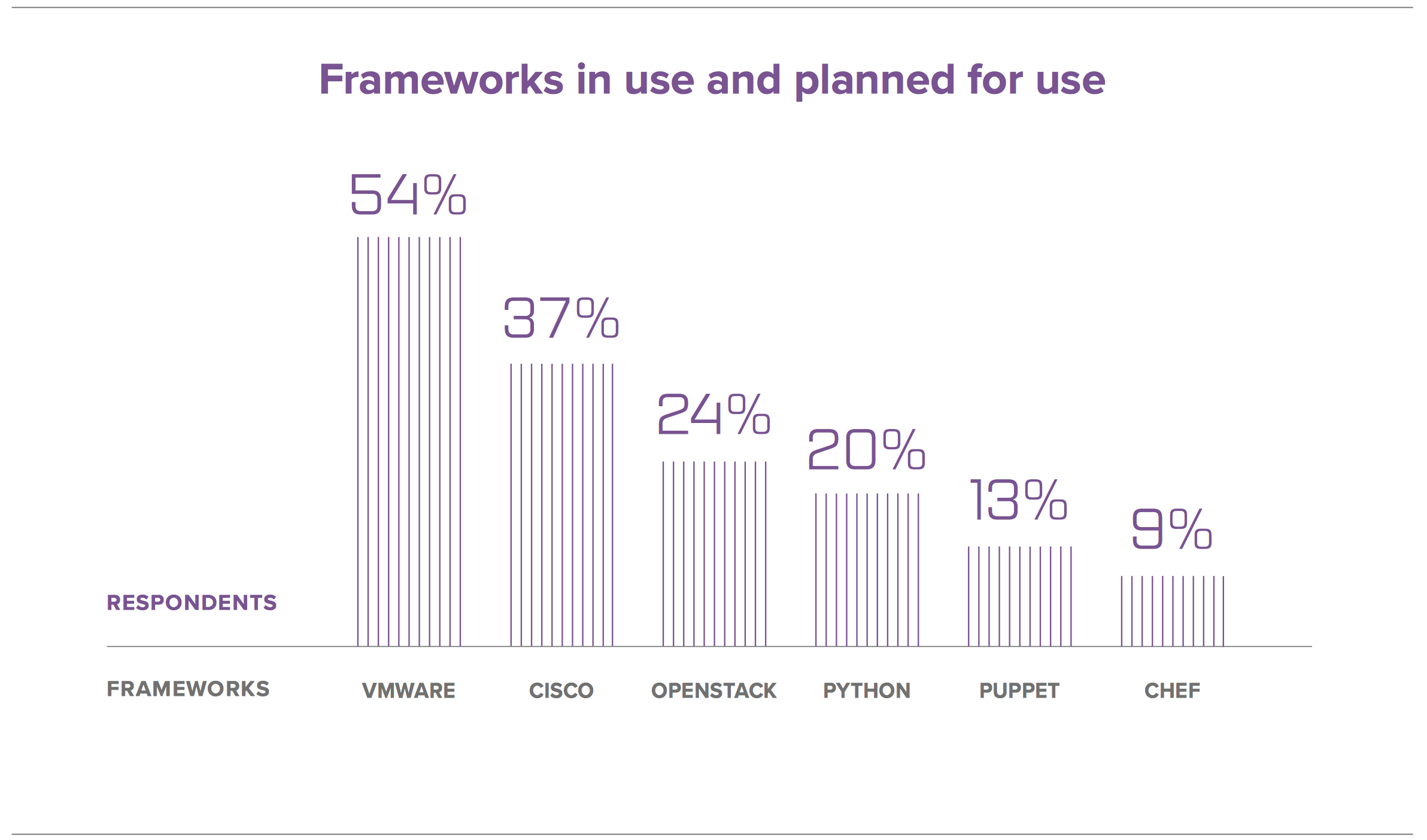
    While editing errors are distracting, the biggest issue I had with the report was the inclusion of Python as a “framework” (along with VMware, OpenStack, Puppet, Chef …). The assumption is made in the accompanying text that this indicates the level of homegrown automation, but since there are many ways to implement homegrown automation, this is at best a low point indicator of that. Overall, it feels out of place in the list:

    DevOpsTools
    DevOps tools as surveyed by F5 Networks.

    But honestly, there is enough other information about trends and number of these “frameworks” in use per org packed into this section that I’m willing to view inclusion of a language as a simple oversight that can be explained away because lots of organizations are using python for automation (I have, at more than one organization).

    The report also talks about the average application having double digits of application services deployed for it. This seems high to me, but it is data from a survey of F5’s customers, and if you’ve already paid for this bundle of services, perhaps you are more likely to make use of as many as possible. What this points to, for me, is an automation of the overall application environment. Considering the commentary F5 received in response to skills questions, it makes sense that automating solutions that can easily be automated would be an easy choice for their respondents.

    Note that in the graphic above, the company did not restrict users to “What frameworks are you using for network configuration?” It might be a reasonable assumption to think it did, as F5 is primarily a networking company (don’t tell the execs I said that—they seem to be repositioning as an application services company these days), but I asked, and the company put no limits on responses. That shows uptake of Puppet among its customers to be far smaller than I would have expected, personally, considering the core of its customer base should be Puppet’s sweet spot—traditional enterprises in a variety of industries.

    The weighting of respondents across roles might have some play in how these are ranked, though. There is a preponderance of networking and management types in the response list, with fewer security, dev, architecture and DevOps types. This could skew results, even if the organization list is relatively balanced across industries.

    Overall, take a look. It’s solid information, with some interpretation available and more commentary on verticals and use cases. It’s definitely a document worth having on hand when explaining the value of what you’re doing, or attempting to expand what you’re doing.

    — Don Macvittie

  • VMs, Containers, Cloud, Cluster: Scheduling Differences

    VMs, Containers, Cloud, Cluster: Scheduling Differences

    Scheduling is a large part of making the data center go, and more to the point of making the virtualized (be it VMs, cloud, containers, or clustering) portion of the data center work.

    While there are a lot of variables to virtualization performance, scheduling impacts performance all of the time. And yet we only really talk a lot about it in clustering (where a robust scheduler on par with an OS scheduler is required).

    There’s a reason for that, and it is worth exploring.

    (Side note: I was talking about this blog with Lori while I was writing it, and she reminded me of when we took our Masters’ courses, the Operating Systems class used Homer Simpsons greedily wanting donuts as our scheduling project. So whenever we think scheduling, we mentally hear one of the many Homer processes being denied a donut and going “D’oh!”)

    For virtual machines, scheduling is largely forgone in favor of other resource utilization. Virtualization only cares about CPUs and memory requirements when the virtual machine is created. You tell it then, and the only time you worry about it again is if you demand more CPU cores than the physical hardware can provide—and in some cases, CPU virtualization will allow you to keep spinning up VMs even after that. Only the real scheduling mechanisms actually can be at odds with each other in a heavy load situation. The host OS scheduler, for example, could swap out your VM’s active thread at the same time the guest OS has raised the level of importance for an app to “insanely high, do it now.” Although this only begins to show if basic rules about servers and loads are ignored, it does happen.

    You get the same issues with private clouds. Why? Because even though everyone in the marketing world pretends it isn’t true, private cloud and VMware ESXi essentially are the same underlying toolset. And usage patterns in the enterprise show not only does everyone know that, but also the differences are less substantial than any of the organizations involved want to admit. Not that they are the same code, but in practice, they do the same things.

    The one place where these two (and public cloud for that matter) really make use of scheduling is when automatically responding to spikes in usage that threaten to bury a system. However, solutions to usage spikes are not part and parcel of these systems; they are crafted by DevOps (or Dev, or Ops) folks who work at places where dropped connections are lost money and, thus, a quick response of growing the pool of available servers and then later shrinking it is important. But because they are using their own metrics to determine the need, more of these systems are implemented in application provisioning tools than in cloud or virtualization software. We could argue about where this functionality actually belongs, but not really where it is implemented today.

    I kind of bled into public cloud there, so will address it. When people talk about it being more “agile” or “adaptive,” they mean “with this quasi-scheduling code we wrote to spin up instances at need.” It doesn’t matter if the “code” is a python script or an Ansible playbook—they did the scheduling, not the system.

    That leaves clustering software (such as Mesos). Because clustering software treats many machines as one big thing, it requires a scheduler to manage the resources. In the case of Mesos, the central scheduler really isn’t that smart, and I think that is a genius implementation. It knows what resources (CPU, memory) each machine has available, it knows what resources have been assigned from that machine, and for each of the “frameworks” (think of them as job executors; though that’s a bit simplistic, it’s perfect for this discussion) what it needs to get its work done. Then it does a best match, offers resources to frameworks and waits for more resources to come available from finished executions.

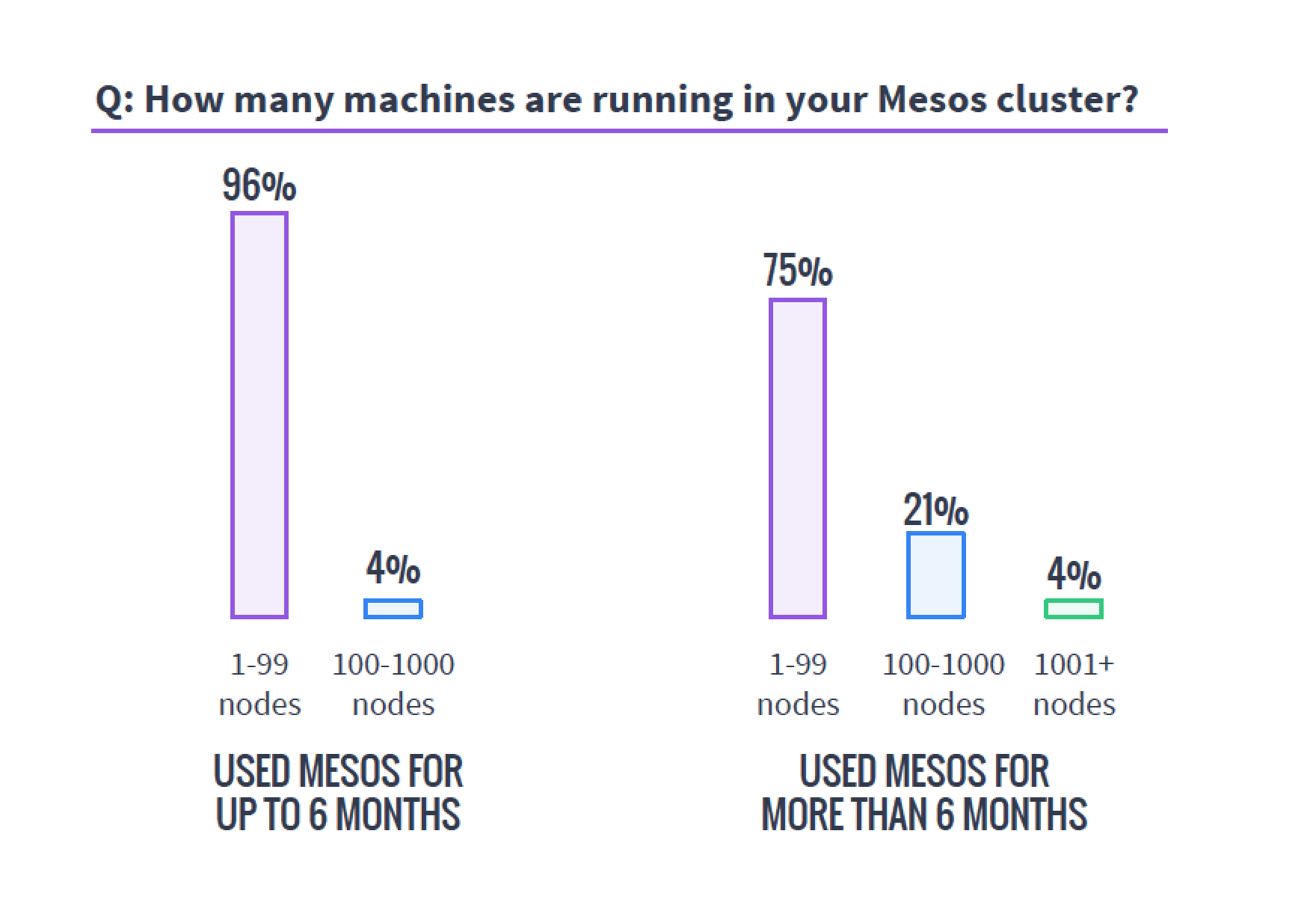
    So in the world of VMs, if you have 50 unique applications that need resources, you create 50 VMs to service them. In either cloud environment, you do the same. It is a joke we like to make that because of microservices, containers are treated like VMs, except if you have 50 unique applications, you create 500 containers, but the reality is that they are exactly like VMs in many use cases, and make 50 containers when containerizing existing apps. Taking a look at MesoSphere’s 2016 survey of clustering users, you can see that a fair number of clustering users are using containers with Mesos and DC/OS, while many of them are not doing it exclusively with microservices.

    Source: MesoSphere user survey, August 2016

    In the clustering world, you have what presents as one big monster machine that is going to run these applications as resources come available, so if your 50 applications require fewer resources than the cluster offers, they simply execute in parallel; if you don’t have enough hardware to run them, unlike with VMs, you can just queue them up and, assuming the cluster isn’t over-burdened, eventually they all will run.

    This gets more interesting when containers are added to clustering (a common environment), because then you do have discrete containers, but the scheduler still manages how many resources are available/in use, and the container architecture allows the app to carry its requirements with it across the cluster.

    Why do we care? Because you know what your workloads are and which scheduling methodology is more important to your organization. If there are 50 applications that all have steady resource needs and run all of the time, then virtualization might be right for you, but if the organization’s workloads are shifting constantly and resources need to be cycled at a high rate, clustering might be right for you. Either way, knowing what’s out there is never a hindrance.

    — Don Macvittie

  • The One Simple Reason to Consider Clustering

    The One Simple Reason to Consider Clustering

    As you may know, I’m pretty interested in the newest round of clustered computing these days. I’m digging in pretty deep to see how well-suited it is to the enterprise, and how it is best used/architected/implemented.

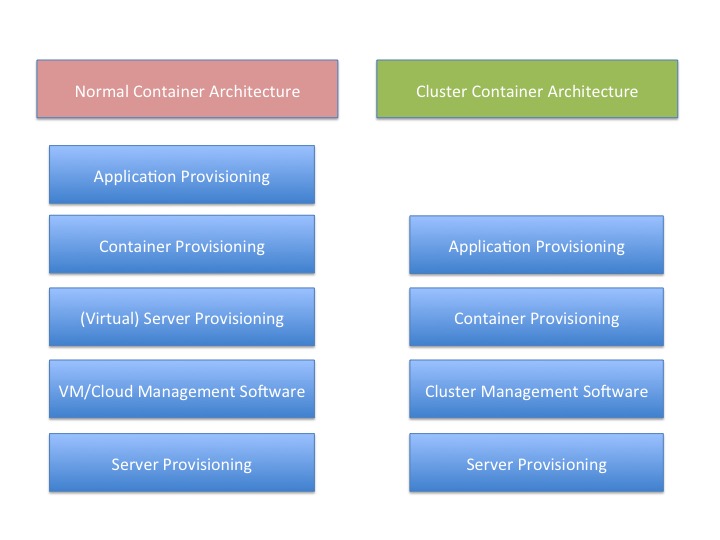
    There is a reason for that, and I think this graphic probably gives it away:

    You’ll note that “container provisioning” is in there. It doesn’t need to be. If your environment is running without containers at this time, then simply remove that block from both sides of the diagram and remove container from the titles.

    The fact is that there is one less step in any provisioning environment short of one app, one server.

    And remember that this abstraction doesn’t touch on storage provisioning, AAA or OS upgrades at two different levels (or in some scenarios three).

    And that’s a big deal. Not just because you have one less layer for deployment, you also have one less layer for maintenance, one less layer for security, one less layer for logging … It’s a big deal. As I’ve mentioned before, we have increased the complexity of the operations environment to the point that some form of DevOps is nearly required to keep a modern or cutting-edge data center running smoothly. The newest round of clustering solutions removes one layer from the architecture stack, reducing that complexity a little bit. Of course, it is just a slowing in the growth of complexity, but it’s better than a “Damn the torpedoes, full speed ahead!” approach to complexity.

    The thing is that clustering software has been around for a very long time—I was briefed back when VMware was just making a name for itself about a clustering solution that was aimed at gaming sites. I never wrote about it because VMware stole the thunder, and the company couldn’t reference any customers except gambling websites—not exactly an easy comparison to make with enterprise environments. This briefing was my first, but clustering existed long before that, even.

    But this round is different than most recent clustering solutions. It focuses on resources and scheduling, not on making a special-purpose large-sized computer. This round of clustering software makes a large computer that looks to apps like Linux. That’s a far more useful abstraction, if it works without a ton of overhead.

    And the overhead is what I’ll be digging into over the next few weeks.

    But yes, I think it’s a great idea. Give me a big old expandable Linux box, make it look exactly like Linux to my apps and let’s see what it means for app growth.

    — Don Macvittie

  • Should Continuous Deployment Be Renamed?

    Should Continuous Deployment Be Renamed?

    I’m a technologist turned into a word person. For those of you who know me, I started as a developer, learned ops and security as it was needed, and eventually my love of talking about technology lead me to writing, tech marketing and evangelism. I still develop, though; I can’t stop that—it’s kind of a part of me.

    But as a technologist at heart, words are a way to convey concepts, and any that don’t contribute to the conversation in a meaningful way aren’t necessary.

    So it is pretty weird for me to be saying, “What if we renamed CD?” But I think there is a real point here that we could address. If you look across the industry, you will find quotes (and in IT departments, the reality) that for most of us, CD is not about continuous deployment. It is about continuous delivery and on-demand deployment. Unfortunately, “on-demand deployment” makes a pretty terrible acronym in the English-speaking world, so perhaps we should use “on-demand update.” Deployment is looking at it from the application’s perspective, but as DevOps, we get to look at it from both perspectives and we are updating the server(s) to run our application(s). So on-demand update (ODU) would work, but I’d be open to alternatives.

    In this case, the wording change is useful. There are a few organizations with very special needs that do actual continuous deployment. No one else does. The ability to say, “OK, we’ve got enough together and tested to warrant the disruption this will cause. Update the app,” is what most organizations use CD for. And I think that’s right. While purists will roll their eyes and talk about the advantages of each bug fix, no matter how small, rolling out in a timely manner, most orgs aren’t going to do 15 updates a day. And orgs that like stability don’t want to. Testing doesn’t resolve every issue; otherwise, we wouldn’t need things like Bugzilla for anything in production, risking introduction of new ones 15 times a day. That’s just not on the list of priorities for most organizations, particularly if their CI system is on longer run-times.

    So I like CI/CD/ODU. Then you are separating continuous delivery and on-demand deployment, which I would argue is a huge piece of the problem. I’ll quote Georg von Sperling of CA Technologies during the Q&A section of a webinar:

    Continuous delivery does not equate continuous deployment to production. If I may be so bold, I would state continuous delivery is a practice to allow deployment to production at any time with a high degree of quality and a low amount of risk with zero downtime and zero touch. A business leader recently said to me that whereas, in the past, ‘Deployment to production was an IT decision, it is now a business decision at a push of a button.’ But, CD certainly played a part in this paradigm shift, as the entire delivery process, including testing, is visible and predictable.

    Which makes sense, once explained, but it’s truly a source of confusion in the field, so separating the two makes sense. The point is to communicate clearly, and requiring a further clarification of what exactly CD is says we’re not communicating clearly at all. Indeed, delivery and deployment definitions that are meaningful to IT are close enough in context as to automatically cause the confusion when a single “CD” is presented.

    So even though I don’t get terribly wrapped up in wording, I think this is a worthwhile change to consider. Words convey meaning; let’s ensure the meaning they convey is clear.

    For those of you knee-deep in CI/CD, yes I am aware of Fowler’s definitions, but this clears up the fact that he has to explain how continuous delivery is different from continuous deployment in the definition for continuous delivery.

    In short, we’re being confusing. Stop it. Let’s talk about tools/technologies/methodologies to get there, not keep clarifying confusing terminology.

    — Don Macvittie

  • Lessons Learned: We’re Still Killing Ourselves with Innovation

    Lessons Learned: We’re Still Killing Ourselves with Innovation

    Since the widespread acceptance of virtual machines (VMs), we’ve been on a racetrack with changing technology, with little opportunity to stop and digest lessons learned. That’s not to say organizations haven’t done a good job of learning from experience and mistakes both; rather, the lessons learned are too frequently obsoleted by The Next Big Thing.

    While I have an abiding interest in several areas of DevOps, we’ll focus on one I’ve spent a lot of time around recently: provisioning.

    All Roads Lead to Rome

    Road signs for Rome
    Image Credit: Melanie Bateman via Flicker

    At this point in time, you can provision to VMs, “the cloud” (note that from an automated provisioning perspective this is anything but homogeneous, but the fiction helps here for a moment), containers, clusters and clustered container managers. While all end up giving you a working machine that has IP access, how each goes about it is different.

    That is a problem for automation, unless a company goes all-in on one of the above. Containers were going to save us from custom configurations based upon target—and largely have—but in DevOps they still leave us with an underlying deployment infrastructure that must handle where that container will land. The infrastructure doesn’t define itself, unless we teach it to, and that is still very much tied to the target. Anyone who has used both AWS and Azure knows that even two cloud environments can look very different to get up and running with automation.

    Server deployment tools are steadily growing their capabilities and are adopting the ability to spin up cloud instances alongside their ability to handle hardware/VMs. That’s a good thing, but it’s still relatively new.

    The thing is, we in DevOps are trying to do the exact same thing in every case: get a server configured far enough that our application provisioning tool (Puppet, Chef, Salt, whatever) can pick it up and get the server populated with our applications. One goal, many paths, and it is a rare organization these days that is taking only one of those paths.

    Plan Ahead, Forge Ahead

    The rate of change is not showing signs of slowing down—the re-emergence of clustering software in the light of containers is proof of that. I’m stoked about the idea of clustering, simply because it can take a layer out of an increasingly complex environment, but it changes the way we deploy yet again, offering new software, configurations and APIs.

    The defense mechanism I recommend is to look at what is available, consider how it does or will fit into your architecture and plan for it. DevOps is the area of IT most affected by these changes, so that’s where the planning should take place. But like all topics DevOps, this requires a lot of communication with Dev and stakeholders to make certain the platforms being considered are the ones that will best serve the needs of the company. But supporting all of the possible deployment mechanisms in a DevOps environment means investment in scripting and apps that do the same job for different targets. While that may be doable today if you are blessed with tons of DevOps man-hours, I cannot say often enough that it is building technical debt. Each of those different deployment mechanisms will need to be maintained moving forward, and while the idea of DevOps is always relatively simple, it has been my experience that the reality means some pretty complex code/script feats are necessary to make it work successfully and reliably.

    So build a list of platforms you aim to support, start working toward that list, then revisit in six months or so to make sure nothing has changed. Considering that the needs of most organizations change continually in light of technical advances, and the markets are changing from those same technical advances, six months is a good timeline for revisiting. Any longer than that and you may find yourself with a list of things to support that isn’t accurate and misguides DevOps automation efforts; any sooner than that and you will find you are shifting priorities too frequently to adequately support large installations.

    It’s About the Business

    In the end, for the vast majority of IT, the goal is simply to support the business in an efficient and secure manner. Find out what your organization needs and then go out and make it work. Our industry is lucky enough to have a metric ton of smart people, so making it work is not the issue; pinning down the goals is.

    And keep rocking it. For every error, there are a bazillion successes we don’t jump up and down celebrating, so do the same with those errors. Learn the lessons and move along. Pretty soon you’ll have fully automated deployment on the newer platforms most-suited to the organization, serving up the apps the organization needs.

    — Don Macvittie

  • Mesos: Security Awareness and Considerations

    Mesos: Security Awareness and Considerations

    binaryAs regular readers know, I’ve been digging into Mesos quite a bit these days and, for the most part, enjoying the entire ecosystem that has grown up around it. There are some very cool possibilities when organizing servers into one massive platform for application (or micro-service) delivery. While there is a bit of a learning curve, I wouldn’t say it is as bad as the application provisioning tools out there, and there is the ability to scale and manage apps while maintaining but a single reference architecture.

    But every technology has its issues that we need to be honest and open about if they are to be successful in the enterprise. Mesos is no exception.

    Most open-source projects start out with, “If we just did X, Y and Z, we could do this cool thing!” and only afterward consider the security needs of the target audience. This is kind of the nature of the beast, and Mesos is no exception. The Mesos team is currently on the path to enterprise-grade security from little (or optional) security, but for right now, here are things to consider to help make your Mesos installation secure.

    According to Ben Hindman, Mesosphere co-founder and co-creator of Apache Mesos: “For folks that were running without authentication, we didn’t want to break their clusters when they upgraded. Authentication will be on by default after sufficient time for frameworks to get upgraded. We enable a mixed mode where some frameworks can authenticate and others don’t exactly to support this upgrade path.”

    The thing is, the default upon installation of Mesos at this time is to have no—I repeat no—authentication for frameworks, and no limitation on what those frameworks can see. If you use command line switches, you can modify this default behavior, but the default is still to be wide open where frameworks are involved. The point of this blog is to urge you to use those command line switches if at all possible in your environment.

    It is industry standard to do the exact opposite of what Mesos does—to offer an option to turn off security—but to have it turned on by default. And while it makes initial pilot deployments more difficult, that is precisely what Mesos needs (and, judging from Ben’s comment above, plans) to do.

    The following items, taken together, create the core problem:

    1. By default, Mesos allows frameworks to register without authentication (see link labeled “command line switches” ,above). Normally, some form of authentication is required. Increasingly, OAuth access control is being utilized. See Stormpath or DigitalOcean for examples of API Authentication design.
    2. Mesos uses “roles” to determine which frameworks have access to what resources. By default, a framework can register for any role.
    3. Persistent disks (such as your database or your contracts directory) can be resources assigned in Mesos. Access is controlled by role only (last bullet point before version history), to make them available to multiple apps on multiple frameworks. This also makes access available to any framework that assumes the same role as those with access.
    4. Mesos can distribute agents to each node in the cluster as needed via the mesos fetcher. So distribution of agents, which would be a limiting factor to this weakness, is actually easy—a framework can request that its agents be downloaded to any server in the cluster, on demand.
    5. There is a public framework development guide.

    So with a default Mesos installation, and any machine that can hit the REST API for frameworks, I can register a framework of my own construction. The Mesos system has automated approval of registration, so there is no human decision-making involved; registration (called scheduler subscription) implies approval if authorization is not enabled, and the response includes registration information. Considering that the frequency of adding frameworks should be minimal, this is a good place to have a human involved in the process. Note that older framework development using libmesos.so could also abuse this default, but that route is harder, and thus less likely to be utilized. My new framework can supply roles that exist in other frameworks, and I can then gain access to these static resources simply by waiting for Mesos to hand me the correct resources. These resources could include any persistent disk assigned to that role, with read/write access (because the current incarnation of Mesos only supports read/write). This came to my attention while working on Mesos with Marathon, but is possible simply with Mesos.

    Again, this is a known issue and the Mesos team is slowly moving toward resolution. But for now, users need to lock down their own implementation if their environment will allow it.

    The workaround is easy enough, there are command line options to turn on authentication for frameworks, and to limit which frameworks can use what roles. But you have to turn both on—they are off by default—and looking through the logs on my Mesos cluster, it does not appear that framework registration is logged with default logging settings. Note that role management has overhead, but when applied to frameworks is not a large security burden unless operations is constantly adding/removing frameworks from the system (which is highly unlikely). Also remember that the reason the system is currently designed to work both ways is that some frameworks do not yet support authentication, so testing with this feature turned on is a must before rolling it out in production.

    Do I rate the risk from this issue to be huge? Honestly, it depends upon your implementation. If the Mesos cluster in question is putting sensitive information on a persistent disk, the risk is potentially high. If the cluster in question is not, there is still risk from the architecture design and lack of authentication, but the data available—and how it is protected outside of Mesos—determines how hazardous an attack would be. The ability to modify the configurations of running applications is a further concern; HTTP redirections alone could be troublesome.

    In short, the existence of this transition period is going to make me more aware of the security implications of everything else in Mesos, simply because it shows a failure to follow common practices and might indicate that other places in the project suffer similar security design decisions, though the move toward fixing authentication will make me less hypercritical.

    Note that I wanted to get this info out there, thus have not yet taken the time to explore exploiting this issue on my cluster. Implementation almost always provides different information/issues than researching offers, as it is a different stage of the process. I will update when I have time to make a pair of frameworks, one “normal” and one “attacker,” to test with. In security, it is always best to test out issues first, but these are well-enough documented, I opted for notifying the community before embarking on a potentially lengthy proof.

    It is not the point of this post to imply that Mesos should be avoided. The point is to advise you that the “Command Line Switches” link (above) should be followed, read and the guidelines for turning on authentication should, at a minimum, be implemented. I would recommend limiting roles also, but at a minimum, turn on authentication for frameworks and test if it works in your environment.

    I’d like to thank Ben Tomhave, Security Architect at New Context, for helping me out on some of these points. If there is any error in my analysis, it is mine alone, but the blog is far better for his assistance.

    — Don Macvittie

  • Understanding Mesos and Its Place in DevOps

    Understanding Mesos and Its Place in DevOps

    Finish carpentersWhen building a house, work is done in teams. This work is managed by a foreman, supervisor, or general contractor, but let’s restrict ourselves to the teams doing finish work, and a foreman. Foreman is old fashioned, but general contractor gets long to type over and over. Assume a large enough house to warrant a couple of teams putting in cabinets and trim, hanging doors, etc. A team of two tells the foreman “We’ve finished with the master bedroom”, and he looks at his list and says “Good, go install the trim in the master bathroom.” And the two head off to do just that. About half way through, one of the installers has an unfortunate incident with a nail gun, and nails his hand to the floor. Both inform the foreman that they have to leave – one to go to the hospital, the other to drive.

    When the other finishing team comes free, the foreman says “The master bathroom trim isn’t done, go take care of that for me.” And keeps his checklist up to date.

    Eventually, the entire house has the finish work completed, simply by the foreman sending teams off to do different parts of the job until all parts are complete.

    That’s Mesos, essentially.

    The foreman is, in a nutshell, Mesos in this example.

    Mesos is a scheduler that knows what jobs have to be done, and what resources are available to do them. The details of getting the job done are not Mesos’ concern, but if the job is not completed, Mesos will send other resources so that it can get done.

    There is a lot more involved, of course, but the analogy holds pretty darned well.

    Mesos turns a collection of machines into a cluster, simply by placing agents on each machine that know how to (a) report what resources are available for Mesos to dole out, and (b) execute applications for a given environment (called framework in Mesos-speak for a variety of good reasons). So once Mesos is distributed across your servers, it can effectively treat those servers as one master server, and itself as the scheduling algorithm.

    It’s never simple. Because IT isn’t simple.

    I have an adage for IT though: No good idea is complete until the real world imposes complexity on the simple.

    In order to make Mesos fault tolerant, there can be multiple masters, and zookeeper can be used to make certain that if the current master fails, there is a replacement ready to pick up and keep things moving (processing).

    In order to keep Mesos focused on scheduling, it does not have complex resource scheduling built in. Instead, it relies upon frameworks asking for resources, and then offering them what fits the requirements. So let’s say Hadoop asks for five CPUs. Mesos may say “Here are three”, then a few minutes later say “Two more!” and Hadoop could tell the executors on those servers to start up tasks. Frameworks can also tell Mesos what they don’t want (filtering), and reject offers of compute resources Mesos makes (in which case those resources are offered to any other frameworks out there).

    Of course, those frameworks that know both how to schedule jobs and how to send them to agents are key. Marathon can handle most long running tasks, Hadoop has a framework of its own. So the “subcontractors” are ready to get the job done, for the most part.

    So what is the benefit? Mesos doesn’t much care where you install it. Put it on hardware, put it on VMs, put it in a VPC. Using Marathon, you can deploy your apps in containers, meaning you really don’t have to care what the underlying infrastructure is.

    What’s the downside? Well, there are a whole lot of tools to learn to make a production environment stable and maintainable, and there are other alternatives out there that we’ll be looking at in the coming weeks. Honestly, most of the “other alternatives” are expansions based upon Mesos (and often Marathon), so this was a good place to start in a series exposing what you need to know to consider if Mesos fits your environment. If you want to start running apps and seeing hardware/VMs as a pool of available resources, Mesos is a good place to start, though the packages we’ll talk about in the coming weeks are more interesting, mostly because they take Mesos’ simple scheduler concept and expand upon it to offer a more complete solution.

    If you would like to learn more about Mesos, The Apache Foundation, DigitalOcean, and Mesosphere all have tutorials. I have used the Mesosphere one, and it was pretty good, though on OSX it failed, it worked like a charm on Windows 10.


    — Don Macvittie

  • Mesos Usage Survey: Big Clusters, Big Workloads

    Mesos Usage Survey: Big Clusters, Big Workloads

    Mesosphere, purveyors of DC/OS, recently released a survey of Mesos users focused on Mesos deployment information.

    There were some interesting results, and a few things I wish they’d dug a little deeper on. If you’ve ever given a survey, then you know that the results inevitably spawn more questions. No doubt Mesosphere has the same new questions I do.

    The first important tidbit I would like to highlight is a cautionary tale. I’ve been around clusters—big data, cloud and, more recently, Mesos-style clustering—for years, and there is one truth this survey shows that is far more global than just Mesos. Clusters always end up bigger than you’d planned. The survey shows that of those using Mesos for more than six months, 25 percent have more than 100 servers backing the cluster.

    mesosservercountsWhen planning a cluster, always assume it will be bigger than you plan and grow faster than you think. Organizations that need this type of technology need it to perform and find themselves using it more than they’d planned, so the clusters always grow. I’ve seen orgs do a 20-server cluster that within six months numbered well over a hundred servers and headed to 200. I’ve heard of faster/larger unexpected growth rates, but not seen it or talked to those responsible. Plan for bigger than you think you need—worst case, you’ll have overplanned, which is easier to handle than being caught with too small a cluster.

    This is one of the areas I think it would be interesting to have a follow-on question delving into how big survey respondents had planned their clusters to be versus how big they were at this point in their deployments.

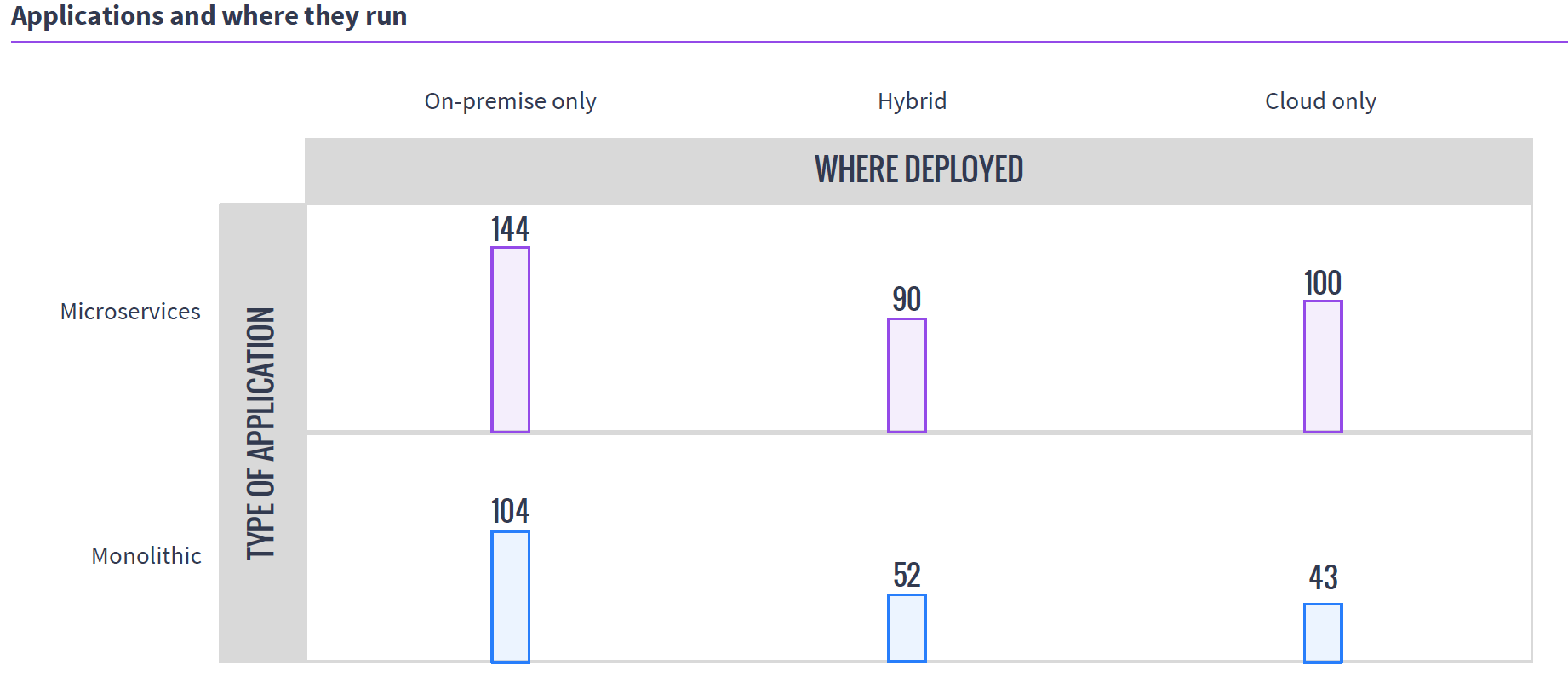
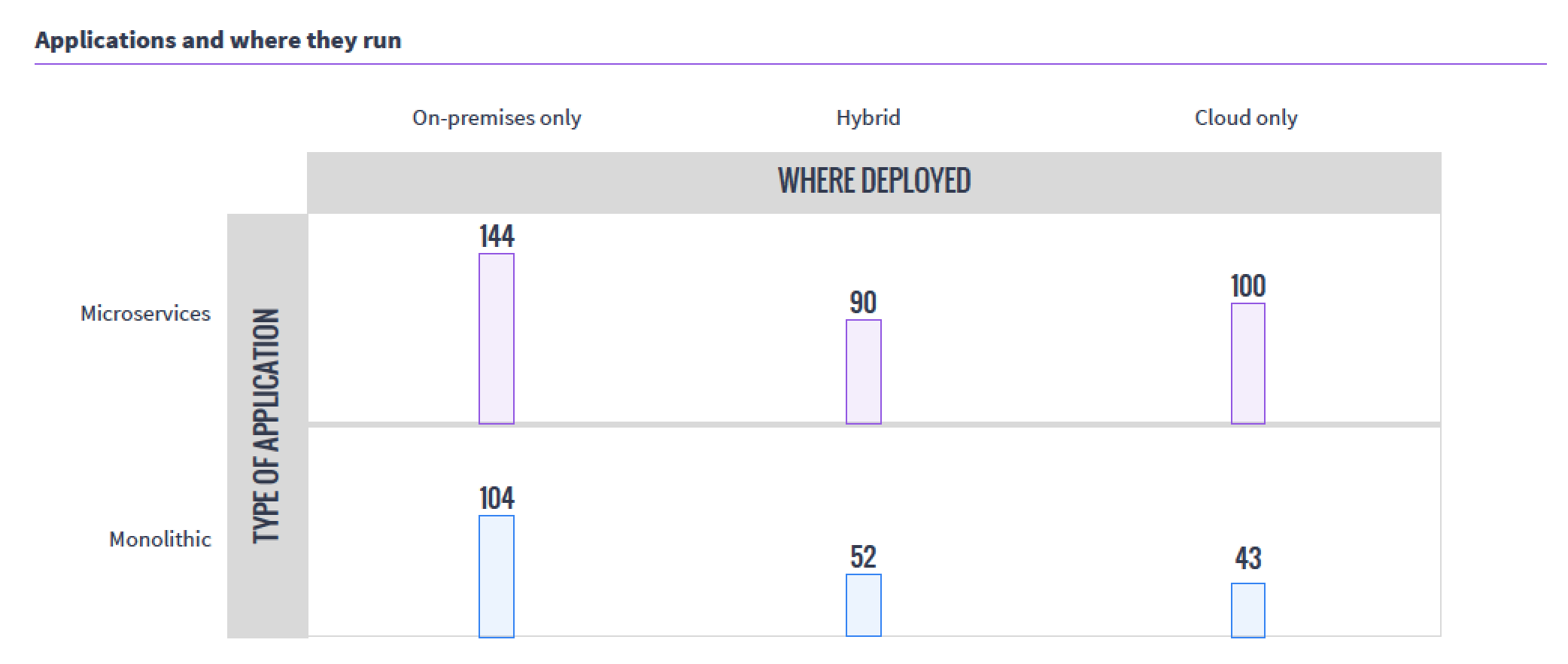
    The next interesting takeaway from the survey was the usage patterns. While internal/external/hybrid cloud is not a surprising distribution, the fact that so many organizations have moved monolithic workloads to Mesos was a bit of a surprise. The sample size of the survey was relatively small, but still, that’s a lot of “We have Mesos, let’s start running it there” going on.

    mesoswhereappsrun

    I think I’ll work with Mesosphere to talk to one of the organizations running monolithic apps on Mesos and see if we can’t get an interesting interview.

    For the health of open-source projects, I like to see what is happening with those involved—is the audience growing? Are the number of developers growing? Supplemental survey data says yes.

    mesoscontributors

    I double-checked this information, since it should be available publicly, and although the move from GitHub to Apache Git made it more difficult to track down, this Apache post from July does verify the graph above, and offers even more interesting data.

    The thing that still intrigues me about Mesos is that instead of allowing users to pool servers to create virtuals, it pools servers to make a massive parallel system. But running containers on it (as this data indicates most are for resource isolation) carves it up into virtuals, of sorts. Very esoteric.

    I won’t bore you by going over what I think of each and every question. Follow the survey link at the top of the article and you can get the survey response summaries to support your work.

    — Don Macvittie

  • Mesos and Its Impact on the Data Center

    Mesos and Its Impact on the Data Center

    One of the things that many of us have been observing is that in the midst of a sea of other changes, data center architectures also are changing. By a lot.

    RAID array sales are down, even though unstructured data is still going up; networking is getting an application programming interface (API) makeover in some places and pure software-defined networking (SDN) in others; and the topic of this post—the concept of “server” in the data center—is becoming somewhat fluid.

    Until recently, “server” meant either physical hardware or a virtual machine (VM) on VMware. There were other definitions, but no one cared about them. Then came OpenStack, and while the same as VMware in terms of meeting enterprise needs, it brought with it more work and more options than VMware, and started people thinking more about servers and what that word means. Now we have Apache Mesos, and its various incarnations are gaining traction in the data center. This doesn’t even touch on specialized clusters such as those Hadoop requires.

    If you’re busting your tail every day keeping the systems humming and serving the needs of the organization, the differences might be elusive. I’ll take this blog to talk about the differences, and moving forward will focus more on Mesos and its variants because it is an area of DevOps that I think it underserved in the publishing arena.

    While VMWare and OpenStack let you pool servers and then carve them up into virtual servers, Mesos decided to eliminate that “carve up” portion and treat the pool of servers as one big system that can service applications. That is a simplification, but when it comes down to it, think of Mesos as Linux with the resources of many physical systems instead of just one.

    Because making a pool of servers into a single logical server means the server can do a lot more than a normal system, there are a lot of add-ons, bells and whistles. So for process isolation, containers are used to offer a bit of protection from rogues, for example. And since the Linux scheduler was not intended to handle cross-system processes, scheduling is handled by a system that, while not more complex, does require you to know a bit more about, so it seems more complex than just running it and letting the system take care of the rest. When you consider the volume of jobs a cluster of systems can handle compared to a single system, and the work of distributing jobs/apps/programs/whatever-you-call-them across the supporting hardware, it just makes sense that a scheduling and job submission management subsystem is required.

    Because the Mesos scheduler (and more) has an API, there are some definitely interesting DevOps possibilities here: Run all the processes you need and have the ability to hook the scheduler and reporting into your DevOps tool sets? Definitely interesting possibilities that we’ll explore at some point in the future.

    Why would you go with a clustered operating system instead of a cloud platform? That really is a valid question, and one the market is still working out. Early adopters like the fact that an entire layer of abstraction is removed as unnecessary. In VMware or cloud, you have physical hardware -> pool of resources -> virtual Servers -> application.

    Both physical and virtual servers are running copies of an operating system (OS). That’s a lot of overhead.

    With Mesos, it looks much the same, except that instead of VMs, the app is running on the pool of resources (or more correctly, the app is running in a lightweight container on the pool of resources). So there is less to maintain, less CPU/disk/memory overhead, and less install/configuration time.

    Of course, any highly complex system has issues of its own. I am still learning what the real issues that crop up and enterprises have to deal with, so I will promise to report back after I have a handle based upon reality, but they are there—I just need to get a solid enough understanding that I’m not misleading anyone.

    From a DevOps perspective, the ability to assume the configuration of the server the cluster presents itself as, no matter the app being submitted to run, and the management of an entire data center’s worth of applications on a common platform are strengths I intend to dig into.

    If you’ve evaluated or used Mesos (or DC/OS or Mantl or SuperGiant or any of the other tools based on it), don’t hesitate to reach out to me. My experiences are one thing; others might have different issues/concerns/loves.

    We do indeed live in interesting times, with changes in IT coming at a pretty astounding rate. Fun times. I’m actually pretty excited to learn how well Mesos serves the need and enables DevOps. It’s not a simple topic to discuss, there are a lot of moving parts, but we’ll get it covered, and help you figure out if it’s the best solution for your organization.

    — Don Macvittie