Tag: SaaS

  • Why SaaSOps Pros Need to Manage the New Perimeter

    Why SaaSOps Pros Need to Manage the New Perimeter

    It’s a SaaS-driven world inside today’s workplace. Business users have taken control over their organization’s data within SaaS applications in search of a much more collaborative and responsive IT experience. This has caused a fundamental shift in the security paradigm. The user has become the new perimeter. IT and security must now monitor user activity and actions closely, while maintaining the high standard of productivity employees have become accustomed to as a result of SaaS.

    Security didn’t always fall on IT teams. During the days of defensible networks and firewalls, it was left up to security to protect the perimeter. But now, the dynamic nature of cloud and SaaS has created a new set of responsibilities for IT that didn’t exist before. Today, both IT and security teams require granular insight into user activities and interactions within SaaS applications—e.g., everything from sharing files, forwarding emails, granting elevated privileges, exporting reports, etc.—in order to automate visibility and affect action to protect the new perimeter.

    The task of proactively detecting and mitigating risky behaviors, such as confidential file downloads, could be significantly more effective if IT and security pros were able to receive real-time alerts—or have the ability to shut down access in a manner non-disruptive to employees. This is true for any user action taken within a SaaS application that could compromise data. An alert in those situations would trigger workflow approval or automatic remediation that could ward off dangerous security breaches.

    Luckily, this escalating security concern has given rise to a new movement in enterprise IT: SaaSOps. This paradigm introduces a new set of disciplines, processes, technologies and people required to successfully manage and secure SaaS applications. It’s an entirely new framework consisting of three parts: people and process, SaaS management and SaaS security—the latter being the most relevant to the topic at hand. 

    Here are the trends that led to the rise of this new perimeter.

    Shift in Control from Organization to User

    Access to cloud-based SaaS applications has created an entirely new business environment and opened up a completely new approach to performing daily operations. Business lines now leverage unprecedented opportunities to drive innovation, collaboration and overall employee experience; and can launch new products and services at speeds previously unimaginable. 

    Today’s workers expect seamless access to multiple PaaS, IaaS and SaaS services. The downside is that allowing access has significantly decreased IT’s ability to control user activities and interactions within these services and applications. The result is a dramatic weakening of their physical control over confidential company data. A failure to adjust to the shift in control from the organization to the user can lead to nightmarish consequences.

    New Status Quo Now in Effect for a Mobilized Workforce

    Today’s professionals work from anywhere, at any time, using multiple devices. This is having a profound effect on how businesses operate, with many now providing access to SaaS apps as part of their daily operations. SaaS allows organizations to compete, collaborate and remain engaged. But with devices and data living off-premises, protecting networks from security breaches must shift with the times.

    That means IT and SaaSOps teams must proactively account for the multiple unmanaged devices and entry points—from smartphones to mobile devices to tablets and wearables, and more—being used outside the LAN and from any number of locations. The proliferation of SaaS in the enterprise means work can now start on one device and continue on another, rendering the traditional perimeter obsolete. The new perimeter is in full effect and there’s no turning back.

    Insider Threats Driving a New Paradigm

    Insider threats must now be considered a major part of the new paradigm, according to recent reports and research, which show that 90% of organizations report feeling vulnerable. As company leaders take greater responsibility for cybersecurity, internal attacks must be kept top of mind. The business impact of an insider threat and/or attack can no longer be underestimated.

    The Dangers of Blind Trust

    Securing user access is a positive first step, but there’s so much more that can be done. As hackers continue to evolve and discover new ways to navigate around authentication efforts, trusting users without hesitation is a reckless mistake—especially given the proliferation of SaaS usage. Even users with no evil intent can act dangerously due to the openness and collaboration possible inside SaaS apps. 

    There’s also the harsh reality that some users are willingly conducting egregious activities. Being able to closely monitor their behaviors and interactions allows you to see in real-time if your data is exposed or if any suspicious activity is occurring. More importantly, it allows you to move quickly to shut it down.

    New Perimeter Created by Users

    The new perimeter in today’s modern security landscape is the user, as they are closest to the data assets today’s SaaSOps teams are trying to protect. Proactively monitoring all user interaction activities will help to stop any security threat from the get-go and prevent confidential business data, trade secrets, intellectual property and employee and customer data from being compromised.

    Data is a living and constantly shifting entity. With that always in mind, SaaSOps teams must focus on the users within their organization who have access to the most sensitive data. Always understand what they’re doing and stand ready to react quickly—whether files are being shared publicly or forwarding corporate email to a personal Gmail address with malicious intent.

    One key point to remember: Exerting control is critical to SaaS security, but not at the expense of employee and business productivity. That’s why it’s imperative to establish a healthy balance between user experience and control by instituting non-disruptive policies via the right set of SaaS management applications.

    — Jim Brennan

  • Zoho Offers Free SaaS Apps to Combat Coronavirus Spread

    Zoho Offers Free SaaS Apps to Combat Coronavirus Spread

    Zoho today announced it is making available for free a bundle of software-as-a-service (SaaS) applications dubbed Remotely through July 1.

    Raju Vegesna, chief evangelist for Zoho, said Remotely is a humanitarian gesture to help mitigate the impact of a global coronavirus epidemic. Remotely comprises a set of productivity and collaboration applications that users can access in as little as five minutes.

    Included in Remotely are productivity, collaboration and project management applications as well as tools that automate the migration of data into the Zoho cloud platform.

    Vergesna said Remotely also addresses cybersecurity concerns by enabling IT teams to apply security controls to the data that employees are allowed to access. Of course, IT organizations in many cases would still need to make sure the network connections being employed to access SaaS applications are secure.

    Now that many local governments are recommending that organizations allow employees to work from home to help limit the spread of the coronavirus outbreak, many IT administrators are scrambling to provide remote access to applications at scale. It’s one thing to provide access to a small number of employees who might travel intermittently, but it’s quite another to support an entire remote workforce for some unknown period of time.

    Vergesna, however, said that at this point the challenges associated with making that transition have a lot more to do with overcoming cultural issues than they do the technology. Much of the transition to Zoho SaaS applications has been automated, he said.

    It remains to be seen to what degree the coronavirus outbreak might accelerate the transition to cloud applications. Many IT administrators are still managing local instances of Windows servers to deliver applications because the time and effort to migrate to SaaS applications have been substantial. Making those on-premises applications available remotely at scale is not only challenging from a technical perspective, but it’s also expensive.

    Of course, Zoho is far from being the only provider of SaaS productivity and collaboration applications. However, it remains to be seen whether other providers will follow Zoho’s lead. The hope each of these vendors has is that once the coronavirus crisis passes many of the organizations that take advantage of their software to enable employees to work from home will start paying to use that software.

    In the meantime, the economic impact of the coronavirus is likely to be staggering. Conferences are being canceled and face-to-face business meetings are being shifted online. It’s hard to say how many of those meetings are likely to stay there for good. At the very least, many more end users are about out to discover just how rich SaaS application environments have become. In many cases, IT teams will stitch together workflows across a range of SaaS applications using application programming interfaces (APIs). The challenge they will face is acquiring the programming skills required to construct those workflows.

    — Mike Vizard

  • Castles in the Cloud: How to Take Your Business Kingdom Off-Prem with Confidence

    Castles in the Cloud: How to Take Your Business Kingdom Off-Prem with Confidence

    Cloud transformation requires migrating all or part of an organization’s virtual assets off-premises, typically to a public cloud.  This enables greater efficiency and cost savings, among other benefits, but it brings heightened risk as well. At the same time, many organizations moving to the cloud don’t fully understand the implications in terms of security. Consequently, successful cloud migration requires a shift in mindset.

    A Medieval Metaphor for Cloud Infrastructure

    Think of your organization as a kingdom surrounded and protected by a castle. Traditionally, this castle would be outfitted with defensive layers designed to protect the residents, the royal family and the possessions within. Protection of the castle is straightforward. A moat surrounds the castle with drop bridges in and out at strategic points (firewalls).

    In addition, guards are stationed at each entry point, conducting a thorough inspection of the people, carts and the content that they carry both in and out of the castle (IDS/IPS). The guards also check credentials at the gates and within the castle to ensure patrons are cleared for access and use of rooms and resources (IAM). The perimeter and interior walls are continuously checked for weaknesses that could introduce potential blind spots that are unguarded (vulnerability management).

    The castle has a variety of rooms, each with its own function, content and worth. Each door has a lock (AV). Within each room and the correlative hallways exist guards who check credentials, monitor the people who enter and the contents they carry, etc. (behavioral detection and endpoints). In addition, multiple other measures are in place that bolster prevention, detection and response capabilities (DLP, deception, etc.). Information from all of these sources is noted in a central location by a scribe. Guards analyze the information, looking for additional indicators of potential threats to the kingdom (SIEM) and respond accordingly.

    Comprehensively, protection of the kingdom requires an overall model and policies that accounts for new threats and tactics from rival kingdoms and thieves. Architecture of security measures are continuously updated and adaptable. In the event of an incident, the guards have designed and exercised a plan to respond. 

    Understanding the Three Different Models of Cloud 

    Clearly, this is a basic metaphor for the on-prem approach. Moving to the cloud introduces a new level of complexity to protection spread across three different models: Infrastructure as a service (IaaS), Platform as a service (PaaS) or Software as a service (SaaS).

    In the context of our castle analogy, let’s assume the castle has reached productive capacity. Neighboring rivals are creating competitive pressures, offering residents (who pay taxes) the possibility of a better life if they relocate. To keep residents happy, productivity requires expansion beyond castle walls. As production expands, neighboring kingdoms offer different models to achieve productivity. However, each model presents different levels of shared responsibility in protection (referred to as the Shared Responsibility Model).

    • IaaS: In this model, the on-premises kingdom (kingdom A) decides to expand all operations to a neighboring castle (kingdom B). The castle itself and the moats are all controlled and provided by kingdom B. However, the infrastructure, moats, hallways, rooms, access lists, monitoring of activity and protection and usage of its contents are the responsibility of kingdom A.
    • SaaS: Kingdom A decides to have blacksmithing conducted in a neighboring castle (kingdom B). The castle itself, the moats, infrastructure, hallways and blacksmithing room are all protected by kingdom B for a charge. Kingdom B’s responsibility is to control access to the room, but maintaining who’s on the access list to the room and the protection of its contents and usage are the responsibility of kingdom A.
    • PaaS: Kingdom A decides to house and build military operations in a neighboring castle (kingdom B). Kingdom B is responsible for the basic controls, but the configuration and monitoring remain the responsibility of Kingdom A.

    With this transformation, Kingdom A faces a more complex security landscape. Innovation and efficiency are critical to meeting the growing and changing demands of their kingdom, but not without additional risks. New operating models bring new risks and potential vulnerabilities to their system(s). Methodologies and processes used to secure their own kingdom do not necessarily work or apply to protecting their new partner kingdoms. Additionally, people–and experience–that understand these new complexities are harder to come by while the thieves and rival kingdoms discover vulnerabilities and weaknesses and begin to exploit and steal valuables that put the entire kingdom and its residents at risk.

    Protecting Your Castle in the Cloud Takes a Deep Understanding

    Moving to the cloud is almost inevitable at this point, and it carries so much potential to accelerate business outcomes. It takes a different mindset to secure it than what we are used to as an industry–the landscape has been changed from a security perspective. By fully studying and understanding the differences, organizations can continue rapid and secure adoption of the cloud, while reaping the benefits that it promises to bring.

    — Sean Blenkhorn

  • Observability-Driven Development: From Software Development to DevOps and Beyond

    Observability-Driven Development: From Software Development to DevOps and Beyond

    In today’s world of cloud platforms and applications, typically delivered as SaaS (Software as a Service), it is critical for organizations to ensure efficient collaboration between software development and operations teams. The software development team codes the software application or platform, while the DevOps team streamlines and automates the entire production lifecycle, from development and testing to deployment.

    Today, applications are updated anywhere from weekly to daily, requiring fast turnaround. In the old days, every change request would go to the different stages–software design, development, testing and release. This can’t be sustained in an agile environment where updates must be as close to instantaneous as possible. 

    How can organizations achieve this, and where does observability fit into it all?

    What Is Observability and ODD?

    Observability-driven development (ODD) adds another layer to software development by encouraging the development team to think about the application availability and uptime throughout their development process and similar to unit-testing development, wrap their code with more verbose logging, metrics and KPIs. This gives the IT operations team more data on the application and improves overall observability, allowing an organization to detect predictable and unpredictable permutations of failures that may occur in the future. ODD observes the behavior of a system throughout the entire development cycle in order to learn what behavior is normal and abnormal, and to detect potential weaknesses.

    Observability provides everything with a real-time status of a product–this includes software developers, DevOps and any other department that requires it. Each role has different needs. Software developers need to know why a certain feature has to be added or developed in order to understand its business value and prioritize it over other features or updates. If a certain feature is likely to require many future updates, this also needs to be taken into consideration in the development phase so that the code can be adjusted easily without negatively affecting DevOps teams when they test and deploy the feature.

    These are just examples of things that must be taken into consideration during the development process. Organizations must be able to create transparency and effective communication between the different departments and roles.

    Inefficient Collaboration in the SaaS Market 

    DevOps need to ensure zero downtime, fast updates, constant monitoring and more. This can be done by maintaining an operational mindset during the development process. Traditionally, developers write the code, QA do the testing and operations take care of deployment, but there needs to be more collaboration between these three stages with each doing their part with an understanding of everyone else’s roles and needs pertaining to the product. When this isn’t done, numerous problems arise. Operational inefficiencies can ultimately lead to a delay in delivery time and even affect system availability. When there are multiple teams involved, especially in different locations and even time zones, there can be ineffective communication and hand-offs, particularly between software development and operations teams.

    Meanwhile, ad hoc changes must be implemented, negatively affecting product stability and release cycles. Miscommunication and inefficient operations lead to confusion over who is responsible for what task, feature and target. These are all issues that can result in significant downtime, losses, wasted resources and frustration within the organization. Effectively streamlining the software development cycle using full transparency and seamless collaboration between development and operations solves these problems.

    ODD Can Improve Your SaaS Product

    A strong proactive observability platform can predict and address issues before they occur, thus increasing effectiveness and speed when it comes to updating and tracking changes, as well as releasing new features. It simplifies complexities and management, and allows to automate operations so that organizations can maximize efficiency.

    Benefits of ODD include:

    • Common goals.
    • Shared metrics.
    • Execute on goals and recognize results.
    • Performance guidelines.
    • Application governance strategy.
    • Alignment between IT and business perspectives.

    Employing ODD when developing cloud applications is critical. This is due to the highly distributed nature of cloud architectures, increasing the chances of a failure exponentially compared to traditional systems. As a result, developers should be educated to think and implement observability to create highly available and resilient applications and systems.

    How to Integrate ODD in Your R&D Practices

    Today, development teams and practices are under constant pressure to meet scrum deadlines and release features on time. They are measured on their code effectiveness and meeting deadlines, while ODD adds another layer of measurement of serviceability and observability metrics to their considerations. 

    Implementing such an approach requires organizations to provide their development teams with the right toolset and knowledge on how their code affects the SRE and IT operations teams. From a technical standpoint, development teams should be familiar with all levels of monitoring for application infrastructure (for example Kafka, RabbitMQ, Kubernetes), application performance metrics (user experience, transactions per second, etc.) visualizations and their respective remediation processes. 

    ODD culture changes the way organizations think about their development process, and essentially injects an operational mindset to their daily practices and processes which should increase the availability and performance of their cloud application while streamlining collaboration and work processes, and improving teams’ satisfaction and productivity.

    — Avi Shalisman

  • DevOps Chats: Simplifying Digital Adoption, With WalkMe

    DevOps Chats: Simplifying Digital Adoption, With WalkMe

    WalkMe recently announced a funding round of $90 million, bringing its total raised to over $300 million. But according to President and Co-founder of WalkMe Raphael Sweary, the real measure of WalkMe’s success is its annual recurring revenue being more than $100 million (which it is) and whether the company is helping its customers.

    WalkMe’s customers are comprised of businesses undergoing digital transformations and looking to accelerate their digital platform adoption.

    In this DevOps Chat, Raphael and I discuss WalkMe’s plans for its latest funding, including plans for its SaaS-based digital platform. As usual, the streaming audio is immediately below, followed by the transcript of our conversation.

    Transcript

    Alan Shimel: Hey, everyone, it’s Alan Shimel for devopsy.kinsta.cloud and you’re listening to another DevOps Chat. You know what, we’re recording this—oh, December 23rd, here, getting near the end of the year. This is probably the last DevOps Chat of the year. So, what a great way to end our year of fantastic DevOps Chat with Rafael Sweary, president and co-founder of WalkMe. Rafael, welcome to DevOps Chats.

    Rafael Sweary: Thank you, Alan. I’m super excited being here. It’s one of the last days of selling in Q4, and you know how it is when you’re a B2B business. It’s a big quarter for us, so I’m actually feeling privileged that I can spend some time with you.

    Shimel: I appreciate you taking it, I know how crazy it is. You know, Rafael, just on the subject, that’s something I’ve noticed the last two, three years. Years and years ago, kinda the consensus was that especially here in the U.S., after Thanksgiving, things kind of shut down, people got in that holiday mode and business slowed up. But I don’t know whether it’s because we live in a more global economy now or just, things are that different. The last couple years, the last couple weeks of the year have been absolutely frenetic with people doing things and deals coming in and sales being done, right up to the last second, it seems.

    Sweary: Yeah. So, I’ve never felt the Thanksgiving effect. For us, it’s always, the last quarter of the year was strong. I think it’s because of budgets that companies have and they want to use it. And sometimes people have something on their desk that they want to come to closure with by the end of the year. So, next year, they can start building and start implementing the new software that they bought. So, I’ve never felt it, but I’ve definitely heard people talking about this phenomenon.

    Shimel: Yeah.

    Sweary: So, it might be, as you say, the globalization and everybody’s connected all the time. And so, we’re kind of hooked. We’re kind of—

    Shimel: Yeah. I agree, I agree. But Rafael, the big news is—well, the big news for WalkMe is, you guys have recently announced, what was it, a $90 million round?

    Sweary: Yeah, it’s a $90 million round. It brings the total that we raised to $307 million.

    Shimel: Wow.

    Sweary: We went into this funding, this funding we didn’t really thought about raising money, and we started entertaining with the idea—because we were very, very well-funded before and we’re selling a lot, so we are, we didn’t really, we’re not a startup that is in a dire need of cash. We weren’t in such a situation. We were very lucky there. And we were planning—we’re planning, we had, our hope is to go cash flow positive and start thinking about going public, et cetera.

    Now, what is happening is that, on one hand, we saw a huge opportunity to grow much faster than what we planned, because things were going really, really well with our larger accounts. And, on the other hand, there is a lot of uncertainty crippling into the market. So, you see some instability in the financial markets. Overall, it’s not—it’s not sustainable, but you keep seeing people are, you start seeing those articles about being, writing about the evaluations being too high, et cetera.

    And the second thing, you’re going into an election year. Now, uncertainty is not good for business, and those two things brought us into the option of possibly raising capital. We didn’t plan to raise so much money, but when you are dealing in such evaluations and when you’re raising money from later stage funds, they have a minimum that, below that minimum, they’re not interested in the deal, even if the deal is great. Just because they can’t, from a portfolio management, they gotta deploy a lot of money to every company. The minimum for Vitruvian, which is the fund we selected to work with, was 70 million, and then, you know, we have preempt rights, which was exercised by our existing investors, which made the round into 90 million.

    Shimel: Right. That’s crazy. So, you know, Rafael, as we were talking off mic, you know, we live in a bit of a crazy time—I don’t know if it’s crazy or if it’s just the new normal—but we live in a time where large numbers like this are not as unusual as it was when I was doing startups, you know, even 10, 20 years ago. And so, first of all, congratulations, alright, because I don’t care what anyone says. It’s hard raising money and it’s hard raising that kind of money, so obviously, you’re doing good stuff there.

    But I think the question for our audience is—okay, so now, we have another well financed startup here, raised 307 million, unicorn valuations. But what does it mean to them? How is this gonna change and affect their life, right? When we look at WalkMe, right, the digital adoption technology to help bridge the digital skills divide—

    Sweary: Yeah.

    Shimel: How are you helping people with that?

    Sweary: So, I want to first start with the unicorn. It’s a nickname I don’t like, I gotta say.

    Shimel: Fair enough.

    Sweary: And it’s overly inflated. So, when I get up in the morning, I’m not worried whether we’re a unicorn or not, right? [Laughter] What I’m concerned about is our stakeholders. Our stakeholders is our, first of all, our employees and our customers are in the number one place. And I wanna make sure that we’re providing a business for them and we’re working in such an environment where we make everything better for everyone, okay? So, this is my concern. My concern is not whether we’re a unicorn or not.

    By the way, speaking about that, I think that TechCrunch, I think it was TechCrunch, suggested to stop looking at whether you’re a unicorn or not, but over you over 100 million in ARR or not?

    Shimel: Right.

    Sweary: I’m glad to say that we are—

    Shimel: Good for you.

    Sweary: Well over 100 million in ARR. So, it’s not—now, let’s talk about, a little bit about digital adoption. So, for us as users, there is a lot of technology available, and we can use technology everywhere. The problem is that the technology is changing very, very fast, and for us as humans, we don’t change that fast. The common saying is that when practice makes perfect—but actually, practice makes a habit, and changing a habit is something that is very hard to do. You’re accustomed to do something in one way and to change how you adapt to these changes is something that takes very long.

    So, I don’t know if you ever moved from a Windows to a Mac machine or from—

    Shimel: Oh, I have. [Laughter]

    Sweary: You’ve been?

    Shimel: Oh, yeah.

    Sweary: So, you know that the first few days were painful, right?

    Shimel: Mm-hmm.

    Sweary: They were painful. They weren’t fun.

    Shimel: I know.

    Sweary: Right? It takes some time until you—so, Mac, I don’t know what the move you’ve done, but Mac might be much better than what you had before or Windows much better than what you had before. But when you make the change, those first few days, weeks are very tiring, you gotta focus very hard.

    Now, but this is a change you wanted to do. Nobody forced you to do this change, you wanted to do it. Now, when you go into an enterprise environment, what is happening is that you’re forced to make—you are forced by the company to make many, many changes to the way you work. Because the company implements a new software, because the company is, has a new process on an existing software, et cetera, et cetera.

    And what happens is that you find yourself overwhelmed with all those changes. You go to do your performance appraisal and the process changed or the application changed, and you find yourself learning it again and again and again.

    Now, this is where WalkMe comes in. WalkMe reverses the relationship between the user and technology. If today when a user uses technology, he has to focus and he has to think and understand what he needs to do in the software—we do the opposite. The software tries to understand the user and help him achieve what he came to do.

    Now, usually what he came to do is to do something specific. So, this is how we help on the user level. But the way we—so, when you are in a company and you’re an employee of a company, today you have many software packages and it’s very hard to track them and we help you to do that. But also important is what we do for the company itself.

    So, the general idea when you implement new software is to improve your business. Usually, companies don’t buy products for spite. Like, I might buy a jacket because I feel like it. But no company buys anything because they feel like it. They buy in order to do something.

    Now, usually the things that they’re looking to do is to sell more or to spend less or to reduce risk. Like, any expense that a business will do will fall into one, at least one of those buckets. Now, what companies buy most is technology. It’s the biggest expense after human resources. So, companies invest massive amounts of money in technology, but a lot of the times, they’re not gaining the benefits.

    So, let me dive a bit deeper, there. When a company buys or implements a CRM, what is their goal? Is their goal to replace the Excel file or the notebook that the salesperson was using? No. That’s not their goal.

    Shimel: [Laughter]

    Sweary: Their goal is to cell better, right?

    Shimel: Yeah.

    Sweary: Their idea is that if the salesperson will use the CRM correctly, they will be able to use AI to recommend which pipeline to focus on, on one hand. On the other hand, they would have better predictability so they can report to the market, and also the HR team will be able to look at it and understand if they need more employees or less, and the purchasing department will understand what supplies they need. So, the hope is that, with putting digital, the company will operate better.

    Now, what happens? What happens is that the salesperson, when he comes to the CRM, it’s not helping him. He’s struggling. And what happens is that he’s forced to use the CRM. So, what he does is documenting in the CRM. He actually continues to work on his Excel file, and he works on his notebook, okay? So, you’re not gaining all those benefits because it’s not predictable, it’s done retroactively, okay? It happened—once the action happened, okay, it’s a lagging indicator.

    And a lot of companies, a lot of time I talked to them and they say, “I have a great usage for my CRM.” And I said, “Look, if you wanna know if you have adoption for your CRM, go to a salesperson and ask him what he’s gonna close this quarter. If he opens the CRM, you have adoption. If he’s going into his notebook or his Excel file, he’s documenting, and you’re not gaining all the benefits.” And then it’s very easy to see that a lot of, for example, the pipe moves from stage two to stage eight, right? Because you’re not really keeping current.

    This is, of course, one example. The same thing is true about any type of professional applications that companies use, and even more on everything that is a digital workforce application. If it’s interesting, I can give you some more examples of what we see at our customers.

    Shimel: Agreed, agreed. You know, I’m sitting here listening to you talk, Rafael, and you know, you can’t help but put your own, how it fits in your—we went through this right here at MediaOps, right? We have a CRM tool, and I’m trying to break the people of using whiteboards and spreadsheets, you know? [Laughter].

    Sweary: Mm-hmm.

    Shimel: It’s just as you describe, right? All the reasons, all the motivations. But it’s also a process.

    Sweary: Yeah. How do you handle this process?

    Shimel: So, I’ve gotten older. I think I’ve become a better parent and a better supervisor. I used to try to force people and say, “You can’t use the spreadsheet, wipe the whiteboard, I want it all in the”—in our case, it’s HubSpot—“I want it all in HubSpot.”

    Sweary: Yeah.

    Shimel: And what I found is, you know, they would pay lip service to me and they would just move the wipe board out of the way or they’d have a spreadsheet that they didn’t show me, and then it would be like double work, Rafael. So, they would do it in a spreadsheet and then, to make me happy, they would kinda transfer that stuff into the CRM [Cross talk].

    Sweary: Right.

    Shimel: But a funny thing happened—as they transferred more and more into the CRM, the CRM became more and more valuable, right? So, you wanted, having things in there that you couldn’t put in there, just as you’re talking about.

    Sweary: Yeah.

    Shimel: You couldn’t put these things in a spreadsheet any more, right? Because there was more intelligence, if you will, built in there. And so, eventually, we started using it more. But—

    Sweary: Yeah. Now, think about this, about, with an enterprise that is global and has multi-branches and has a diverse workforce with different digital IQ. And no parents is there to tell them, “Put it into the Excel sheets and then—uh, put it into the CRM,” and then you start understanding the problem. Now, I assume that your CRM was stabilized.

    What is happening a lot of the times, it’s not stabilized, it keeps on changing because companies have new processes and then the process changes. So, for example, you keep learning from your business and you’re like, “Well, if it’s 30% discount, you need this approval process versus 15.” And now you add another complexity, and the salesperson is not able to work, right?

    So—and I think there is a solution. There is a solution. I think that what is stopping us from using technology to its fullest is the gap that happens between what the technology can do, what we can do as users, and how much, how long does it take until it gets better, right? So, anyone who’s ever used the GPS would never wanna go back to a map, right?

    Shimel: Right.

    Sweary: As soon as you experience it, it’s much better than anything you did in the past, do you agree?

    Shimel: I agree.

    Sweary: So, you don’t need to work—yeah.

    Shimel: I agree, I agree.

    Sweary: You don’t need to work—exactly. You don’t need to work on adoption. But when you’re talking about an enterprise application, there is a very big gap between the perceived value to the organization, and until you see the value and until it trickles down to the employees.

    So, let me take you through another example. So, a lot of companies are implementing HRMs, and they idea behind the HRMs is that the employee can self-task, right? You want vacation, you can take vacation. Now, in the past, let’s assume, let’s go back 20 years ago. An employee wanted vacation, he would fill out a form, it would go to his manager. His manager will scribble something, put it in his outbox, it will go into the HR department and then into the finance department and then back to the manager and then back to the employee.

    Now, all those people worked on something that didn’t add any value to the company. It’s just an employee taking vacation. So, the company has this great idea—we’ll put a ____ and when an employee wants to take vacation, he would see whether he has a balance or not. Once he asks for the vacation, if there is an issue and other people in his positions are already on vacation, he’s gonna get an alert, and if he doesn’t have the balance, he will get an alert, et cetera, et cetera. And you say, “Let’s automate this process.”

    Now, it comes down to the employee. The employee wants vacation. He doesn’t care about the process and how much time is spent, he wants vacation. He comes into this software, he doesn’t remember the log-in, because the last time he took vacation was a few months ago. And he goes in and he’s not sure how to ask for vacation and he gets stuck a few times and what does he do? He sends an e-mail to his boss. What does his boss do? Sends an e-mail to HR, that sends an e-mail to finance, that sends—and then you’re not gaining the benefits, right? Because you don’t see the value.

    Now, for the company, it’s super important that people use this application, because it makes sure that all the vacation days are deducted on time, and it really closes the loop, and less people are working on it. But you’re not gaining the benefits. Make sense?

    Shimel: Yeah, makes perfect sense to me.

    Sweary: Mm-hmm.

    Shimel: Perfect sense. Rafael, I wanna take a moment, because we’re running low on time—you know, we spoke about how much money and all of that and it’s all great. I wanted to give people a sense, though, of how many organizations you’re helping with WalkMe, right? And the amount, and how many applications you guys have done integrations.

    Sweary: Okay. So, customers, we have close to 2,000 customer logos, which means that when I say a logo, if—let’s say a company of ours, let’s say just as an example, Coca-Cola. So, we have, let’s say, Coca-Cola Greece and Coca-Cola U.S., it would be one logo, although there are two separate companies and that might be completely unrelated. So, we look at the logo level, and we have close to 2,000, including 30 percent of the Fortune 500.

    Regarding applications, WalkMe is platform agnostic. We really don’t care what application you use WalkMe on. We have some enhancements that are specific for the big and popular applications such as Salesforce, Dynamics, Workday, SuccessFactors, and those enhancements—again, they’re not about integration, it’s about, we already have a lot of data about what’s working in those systems and what is not, because we did hundreds of deployments over them. So, there is a lot of things you learn between customers.

    When we come to a new Workday implementation today, because we did a few hundred of them, we already know what the employees are gonna struggle with. We already know what the managers are gonna struggle with, and we built it into our system so it’s easier for our customers to create content, specific content. Make sense?

    Shimel: Mm-hmm. Got it—got it, got it, got it. Excellent. Rafael, I feel like you and I could talk about this stuff all day and lessons for people out there to learn to hopefully make their businesses better, but we’re out of time. I try to keep these, as I mentioned to you, to 15, 20 minutes. We might have gone over.

    Sweary: Sure.

    Shimel: But first of all—hey, congratulations on all of the success with WalkMe. And more than just the raising money—2,000 organizations using your product and really making a difference in trying to bridge the digital skills gap. It’s a great, great thing you’re doing, and keep it up. Secondly—love to have you back on again soon, maybe in the new year, and we’ll keep—

    Sweary: Sure. I would love to join and talk to you a little bit about what we do specifically for companies, how we help, and try to give some tips to some organizations that we see and what we learn from there, because we’re always humbled by what we learn from our customers. And it’s some of the best businesses in the world, and it’s really fascinating to see, when technology works, the competitive advantages that you’re able to gain.

    Shimel: Yeah. Agreed. You know what? You’ve got an open invitation, my friend, so when you’re ready, you’ll reach out to me and we’ll continue this.

    Sweary: Awesome. I hope Marissa hears that as well. So, Alan, thank you so much.

    Shimel: Thank you.

    Sweary: And I look forward to talking to you again.

    Shimel: Okay. Rafael Sweary, president and co-founder of WalkMe. This is Alan Shimel for devopsy.kinsta.cloud, and you’ve just listened to another DevOps Chat. Have a happy new year, a happy season’s greetings, merry Christmas, holidays, Hanukkah—whatever you’re celebrating, enjoy, folks.

    — Alan Shimel

  • Opsani Applies AI to Rein in Cloud Costs

    Opsani Applies AI to Rein in Cloud Costs

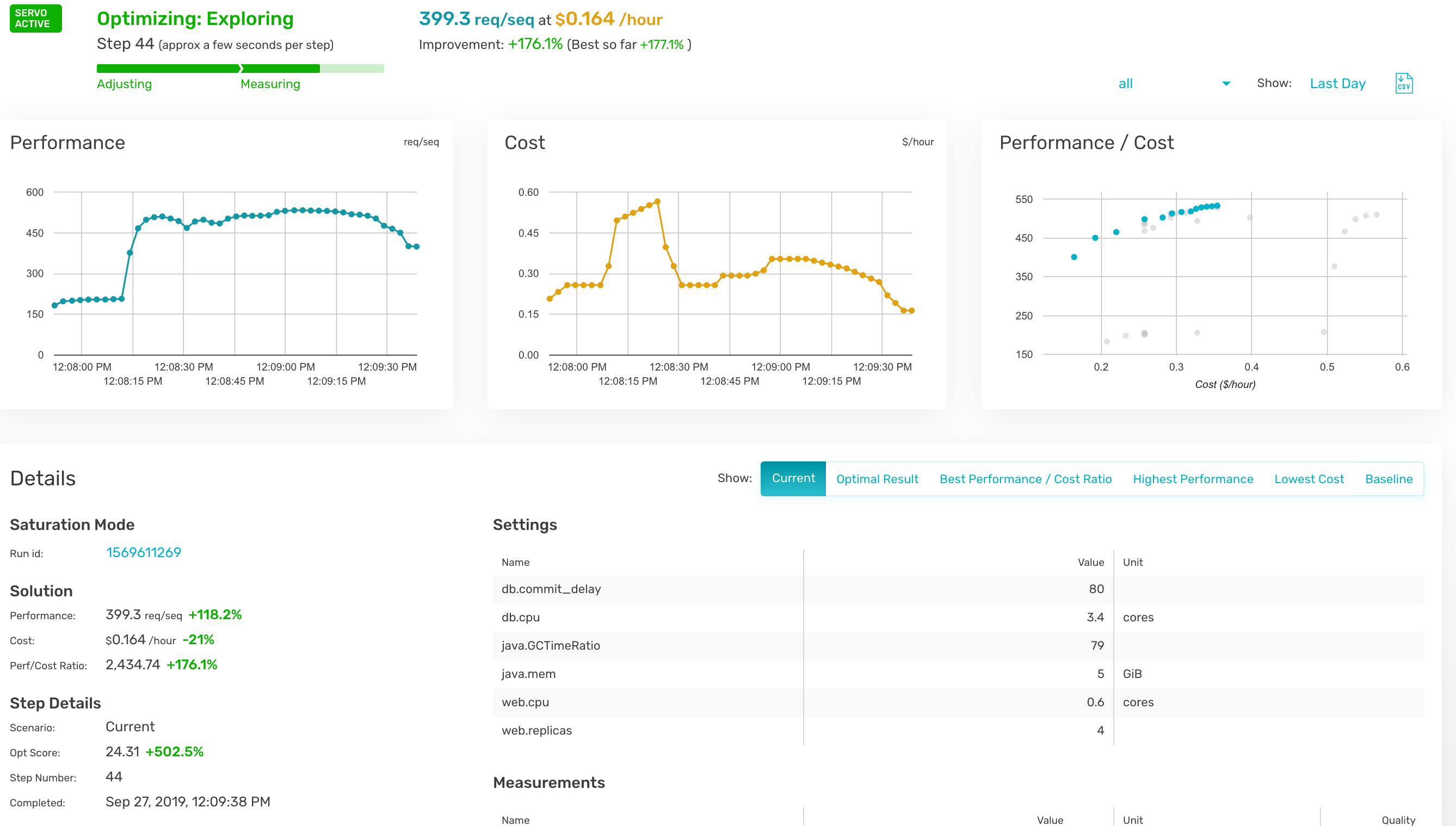
    Opsani has added support for cloud computing environments to its namesake software-as-a-service (SaaS) platform that leverages machine learning algorithms and other forms of artificial intelligence (AI) to optimize the IT environment.

    Company CEO Ross Schibler said Opsani AI not only proactively tunes resources such as CPU and memory, but it also can optimize middleware configuration variables such as Java virtual machine (JVM) type and pool sizes; kernel parameters such as page sizes and jumbo packet sizes; and application parameters such as thread pools, cache timeouts and write delays.

    Given the size and dynamic nature of most cloud computing environments, Schibler said it’s not possible for IT administrators to manually optimize cloud computing environments to match the specific needs of each class of application workload being deployed. The Opsani platform makes it possible to leverage AI to optimize settings for the lowest cost or best performance every second, he said.

    Opsani claims existing customers are seeing more than 200% increases in performance per dollar while saving up to 80% on their cloud spend.

    In addition, Opsani has made available plugins for a variety of DevOps tools including GitHub, Terraform, Jenkins, Spinnaker, Wavefront, DataDog, SignalFX, Prometheus, Splunk and New Relic, on all the major cloud computing platforms.

    Schibler said Opsani can be applied to existing monolithic applications as well as emerging microservices-based applications based on containers running on Kubernetes clusters. The goal is to make it possible for IT teams to rein in cloud costs at a time when most cloud resources are being employed inefficiently, he said.

    Individual developers are deploying applications on virtual machines in the cloud with little to no appreciation for total cost, noted Schibler. Before most IT organizations realize it, the cost of running applications on a public cloud has far exceeded budget allocations. IT organizations not only need tools to rein in those costs, but Schibler noted Opsani also makes it possible to model those costs before an application is deployed or upgraded.

    The adoption of public clouds and DevOps often go hand in hand. The challenge organizations are encountering more often is that as the number of applications running in a public cloud computing environment increases, they often wind up overprovisioning resources. Over time, the need to optimize the consumption of cloud resources becomes a more pressing financial concern. However, most IT organizations don’t have the resources or expertise needed to manually tune each instance of cloud workload. At the same time, the typical IT organization doesn’t have the ability to build its own AI engine. Opsani is making the case for a SaaS platform that provides that capability without requiring an IT organization to build its own AI models from scratch.

    Naturally, many IT professionals are dubious of AI because there may not be enough transparency into the AI models being employed. However, because Opsani is a SaaS platform, the risk of experimenting with AI to optimize cloud workloads is relatively slight. Of course, there’s no absolute requirement to employ AI at all. However, as financial pressure on IT organizations continues to mount, there doesn’t seem to be much of an alternative either.

    — Mike Vizard

  • DevOps at Longtail UX

    DevOps at Longtail UX

    Longtail UX is an Australian SaaS startup that boosts traffic to e-commerce sites by automating the selection of relevant long-tail search terms and the creation of custom landing pages for each of those terms.

    The company has fully embraced the Infrastructure-as-Code approach, according to Troy Jendra, senior systems architect at Longtail UX.

    By using Terraform and Ansible for automation, “we can release whenever we want,” said Jendra. In practice, that can be at intervals between two minutes and as long as necessary at the other extreme.

    Jendra said he had not used Ansible before joining Longtail UX. He used Puppet in a previous role, but found it “painful.”

    “Ansible was a breath of fresh air,” confessed Jendra. It makes it easier to write configurations, and uses fewer CPU cycles because it does not need to run continuously. He explained that Terraform’s role is to spin up sufficient infrastructure so Ansible can run.

    A recent project added support for CJK (Chinese, Japanese, Korean) characters to Longtail UX as part of a push into the Asia market, and that made it necessary to clone part of the infrastructure. Thanks to Ansible and Terraform, that task was easy to perform and completed in just half an hour. Thus, Longtail UX brought the new capability to market more quickly than would otherwise have been possible.

    Ansible and Terraform together form “a cornerstone of our disaster recovery plans,” said Jendra. Fully automating recovery to improve on the current worst-case time of a few hours would take more time and effort than justified.

    Apart from that, “it’s important to automate as much as we can,” said Andreas Dzumla, Longtail UX co-founder and CEO.

    Avoiding Vendor Dependence

    Even though Longtail UX runs on AWS, a deliberate decision was taken to avoid the vendor-dependency that would come from using AWS-specific services, such as AWS CloudFormation, in place of Terraform.

    For the same reason, the company keeps things as simple as possible and sticks to AWS basics, such as EC2. It has recently started using Spot Instances to reduce the cost of running certain batch processes.

    Jendra keeps a watching brief on AWS Lambda, and while the company does not currently have a use case he does see a time when it will jump from EC2 to Lambda.

    “We’re pretty locked into AWS,” he admitted. However, the company uses AWS-specific services only where the benefits clearly outweigh the lack of portability. He likened the situation to 1990s attitudes toward using Microsoft-specific technologies.

    Growth

    The adoption of Kubernetes is not on the cards due to the relatively small size of Longtail UX’s DevOps team.

    “We’ve doubled the size of our development team in the last six months,” said Jendra. It now comprises seven developers, a project manager and himself.

    Dzumla expects it will double again in the next 12 months.

    Jendra predicts that improvements to Longtail UX’s development stack will make it easier to on-board new hires.

    “We currently utilize a Vagrant/VirtualBox dev stack (hooked into the aforementioned Ansible configuration), but find that very rough around the edges, and I only see it get worse as more attention is focused on Docker,” said Jendra.

    DevOps is a philosophy, not a role, he emphasized. “Either everyone is doing DevOps or it doesn’t work.”

    Fortunately, that understanding goes to the top of the company.

    “Everyone needs to pitch in,” said Dzumla. “We do a lot of things that haven’t been done before, so we need senior people who don’t merely expect to do what they’re told.”

    — Stephen Withers

  • Why Salesforce?

    Why Salesforce?

    Over the past 20 years, Salesforce has become the fastest growing enterprise software platform, and a market leader in sales, service, marketing, integration and custom application development among other areas. Although there are many reasons why a company might adopt or consider using Salesforce, the overriding value proposition is that it provides tons of capabilities out of the box, releases new capabilities at an ambitious pace and allows for virtually endless customization and innovation.

    Unlike with traditional platforms, there’s no need to manage infrastructure for computing, data, network or security, and no need to invest in generic system administration that adds no value for the organization. Add to this the accessible and supportive community and learning culture based around Salesforce’s Trailhead, which enables rapid onboarding and skill development, and it’s easy to see the attraction of this platform.

    Salesforce’s mantra throughout the 2000’s was “Clicks not Code,” and their logo was the “No Software” image which became embodied as SaaSy, Salesforce’s first mascot. You could be a declarative developer using clicks alone and build a data model, business process automation and user interface using drag-and-drop interfaces. This opened the door to an entire new job specialization: Salesforce admins and app builders—citizen developers who were empowered to directly customize the platform to meet their company’s needs.

    As Salesforce grew, they recognized the need to enable custom coding on their platform and launched Apex Triggers, followed by Apex Classes and Visualforce in 2008. Admins continued to configure rich business capabilities, while low-code developers and professional developers were empowered to create customizations beyond the scope of what could be built declaratively. Initially, the code developed on Salesforce was rudimentary: a few hundred lines here and there to accommodate unusual calculations and data processing. But gradually, companies began to accumulate tens of thousands of lines of custom code, especially as legacy applications were migrated from other systems. Needless to say, the “No Software” motto no longer strictly applies.

    In the decade since the launch of Apex, 150,000 companies have adopted Salesforce and moved a staggering number of legacy systems onto Salesforce—which now processes billions of transactions per day. Many of these transactions are part of the core CRM and customer service applications, but a huge number relate to custom applications, making Salesforce one of the largest Platform as a Service (PaaS) providers.

    How is DevOps Different for Salesforce?

    As mentioned before, Salesforce provides both SaaS (Software as a Service) and a PaaS (Platform as a Service). By contrast, much of the focus elsewhere in the DevOps world is in moving from on-premise infrastructure to using IaaS (Infrastructure as a Service). This diagram shows an illustration of the differences between these four modes, and how they represent progressive simplifications of what companies themselves have to manage.

    Figure 1: On-premise systems require you to manage all of the resources yourself. IaaS, PaaS and SaaS delegate progressively.

    Managing the Salesforce development lifecycle requires a unique skill set and approach compared to most other platforms. You can say the DevOps movement was jointly realized by both developers (working in traditional languages such as Java) and system admins or operators (working on traditional infrastructure such as servers and databases). There are thus a vast range of well-established tools and techniques in the DevOps world for developing and deploying code, and for managing and updating infrastructure. Unfortunately, almost none of them can directly be used for Salesforce.

    To illustrate this, let’s look at how teams would manage infrastructure using AWS, or deploy an application onto Heroku (a PaaS product also owned by Salesforce). Every aspect of AWS infrastructure can be represented using JSON configuration. JSON can be used to define which AWS services are used, which data centers they are running in and how they’re configured. The AWS CLI (command-line interface) can be used in a continuous integration tool such as GitLab CI to automatically deploy updates to AWS infrastructure every time the JSON configuration changes.

    Similarly, Heroku provides a platform to deploy custom application code (in Java, PHP, Ruby, etc.) and to specify which services (such as Postgres databases) are needed to support that application. The Heroku CLI can be used to automatically update the application whenever the codebase changes. Heroku also provides a tool called Pipelines that allows you to visualize and manage the entire development lifecycle without requiring a third party CI tool.

    AWS’s infrastructure as code approach is a delight for sysadmins, since it allows them to track changes and automate updates. Similarly, Heroku removes the vast majority of the setup and dependencies that developers would need to deploy their applications. Heroku provides a true PaaS that is ready to receive custom-coded applications built in a traditional way: from the ground up.

    Although we can say Salesforce’s Lightning Platform is a PaaS, it actually works extremely different from true PaaS systems such as Heroku. The Lightning Platform allows you to write custom server-side or client-side code, but that code can only run on Salesforce. Although it allows you to define custom database tables and fields, that schema cannot be loaded into any database other than Salesforce’s. These customizations are effectively just changes to the configuration of one Salesforce instance. It’s therefore more accurate to say every customization you can make to Salesforce is basically a Salesforce configuration change.

    Salesforce is actually just a big application that happens to allow for infinite customization. But this means the tools used for managing other IaaS and PaaS products cannot be used to customize Salesforce. Fortunately however, the release of Salesforce DX means the techniques and principles used with other technologies can now be ported over to Salesforce. That is the focus of the book Mastering Salesforce DevOps that I’ve recently released.

    DevOps in the Salesforce World

    Moving from on-premises CRM software to Salesforce removes the need for servers and manual software upgrades. Consolidating customer support and online community management onto the CRM platform removes the need to integrate sales, support and community applications. Migrating legacy applications onto the Salesforce platform allows those applications to share data and processes with the rest of the business.

    Because moving to the cloud dramatically simplifies many of the challenges in delivering IT functionality, many Salesforce customers have been able to innovate quickly without having DevOps practices in place. But even without the hassle of managing servers and building software from scratch, the inevitable growth of complexity eventually causes companies to struggle with issues such as organizations getting out of sync and delays in deploying functionality.

    Salesforce solves so many IT headaches, it’s almost easy to overlook the fact that it’s created some new ones.

    Salesforce has unleashed the ability for companies to focus on their core competencies, instead of struggling to provide basic IT services. Salesforce admins and developers are empowered to spend their time directly creating business value. But with multiple Salesforce admins and developers working at companies year after year, more and more Salesforce customers are finding themselves drowning in all of that business value.

    If you have tens of thousands of components, each providing business value, but no systematic way of tracking, managing or deploying them, you now have a new form of business pain and chaos. Far too much of a good thing.

    What is Salesforce DX?

    Salesforce DX (Development eXperience) is an initiative begun by Salesforce in 2016 and launched publicly at Dreamforce 2017. The goal of the initiative is to re-envision the development experience on Salesforce with a focus on how to empower their development community with the tools and processes needed to develop safely and effectively.

    Salesforce DX is a very broad initiative, including several main teams at Salesforce focused on environment management, custom coding, developer tooling, APIs and more. Although the Salesforce DX teams tackle very diverse needs, their main focus (at least initially) is to improve the developer tooling and development lifecycle.

    The tools and capabilities included in Salesforce DX are made available for free to all Salesforce customers. In that sense, Salesforce DX is an important complement to Trailhead, Salesforce’s free, self-paced, gamified, interactive learning platform. Trailhead is also a major investment for the corporation. Together these are intended to support the growth of skilled Salesforce professionals and to make it easier for those workers to build and innovate on the platform. These multi-year strategic initiatives help ensure that talent shortages and worker inefficiency will not be the limiting factor on the company’s aggressive 30% annual growth.

    Summary

    Salesforce is an extremely powerful and versatile platform. But it’s unique in many ways and it hasn’t been easy for professional developers to adapt their tools and techniques to working on this platform.

    Salesforce DX is a major strategic initiative to ensure that industry best practices such as DevOps and modular architecture are possible on the platform. But making something possible doesn’t mean the process is straightforward. It’s still early days for most teams working to enable DevOps for Salesforce. Fortunately, there is an enormous amount of research and experience that can be borrowed from the broader IT industry. Combining a flexible, powerful platform like Salesforce with the speed and reliability of DevOps processes can open up entirely new levels of efficiency and effectiveness for teams.

    — Andrew Davis

  • CircleCI Achieves SOC 2 Compliance for DevOps Platform

    CircleCI Achieves SOC 2 Compliance for DevOps Platform

    CircleCI has achieved a SOC 2 compliance rating for the DevOps platform it makes available via a software-as-a-service (SaaS) model.

    Tad Whitaker, security manager at CircleCI, said CircleCI is the first provider of a SaaS platform for DevOps that has invested the hundreds of thousands of dollars required to achieve SOC 2 compliance.

    SOC 2 compliance requires organizations to pass an annual audit based on the Trust Services principles and criteria defined by the American Institute of Certified Public Accountants (AICPA). That criteria evaluate IT environments on everything from the cybersecurity controls they have in place to the integrity of the data management processes employed. A SOC 2-level certification means DevOps teams can have confidence in the fact that their data is being kept completely confidential, said Whitaker.

    With interest in best DevSecOps processes on the rise, Whitaker noted more organizations are starting to ask questions about how data is managed and secured on the cloud services they rely on to build and deploy applications. Cybersecurity professionals who are now participating in those processes are starting to ask challenging questions. To address those concerns, Whitaker said CircleCI created a team within the company to first attain SOC 2 compliance and, now, maintain it.

    That may lead to additional processes and controls being put in place, but DevOps teams can be confident that everything possible is being done to secure their data from prying eyes, including employees of CircleCI.

    A lot of the data being employed to build new applications is among the most sensitive an organization is likely to possess. As organizations embrace DevOps practices to drive digital business transformation initiatives, there’s a much greater need to ensure the DevOps environment is secure end to end. However, most of the DevOps platforms delivered as a service today are not able to validate the level of security they claim to have put in place, said Whitaker.

    It’s unclear how many organizations are going to insist of SOC 2-level certifications before agreeing to develop applications on a specific DevOps platform. However, SOC 2-level certifications are routinely required for cloud service providers so it’s only a matter of time before the same audit requirements are applied to other cloud services. The challenge will come when DevOps teams have to adjust their existing DevOps processes to accommodate the security processes that SOC 2-compliant cloud service providers are required to make.

    In the meantime, the days when DevOps teams could employ cloud services to bypass cybersecurity policies are coming to an end. Cybersecurity teams are finally catching up in terms of figuring out how to enforce cybersecurity policies beyond an on-premises IT environment. Not every DevOps team may appreciate the impact those policies may have on productivity. However, if the alternative is to have sensitive data that DevOps teams are now being held accountable for exposed on the web because of careless processes than the time to come to terms with cybersecurity has finally come.

    — Mike Vizard

  • Virtual Instruments Changes Name to Virtana to Drive AIOps

    Virtual Instruments Changes Name to Virtana to Drive AIOps

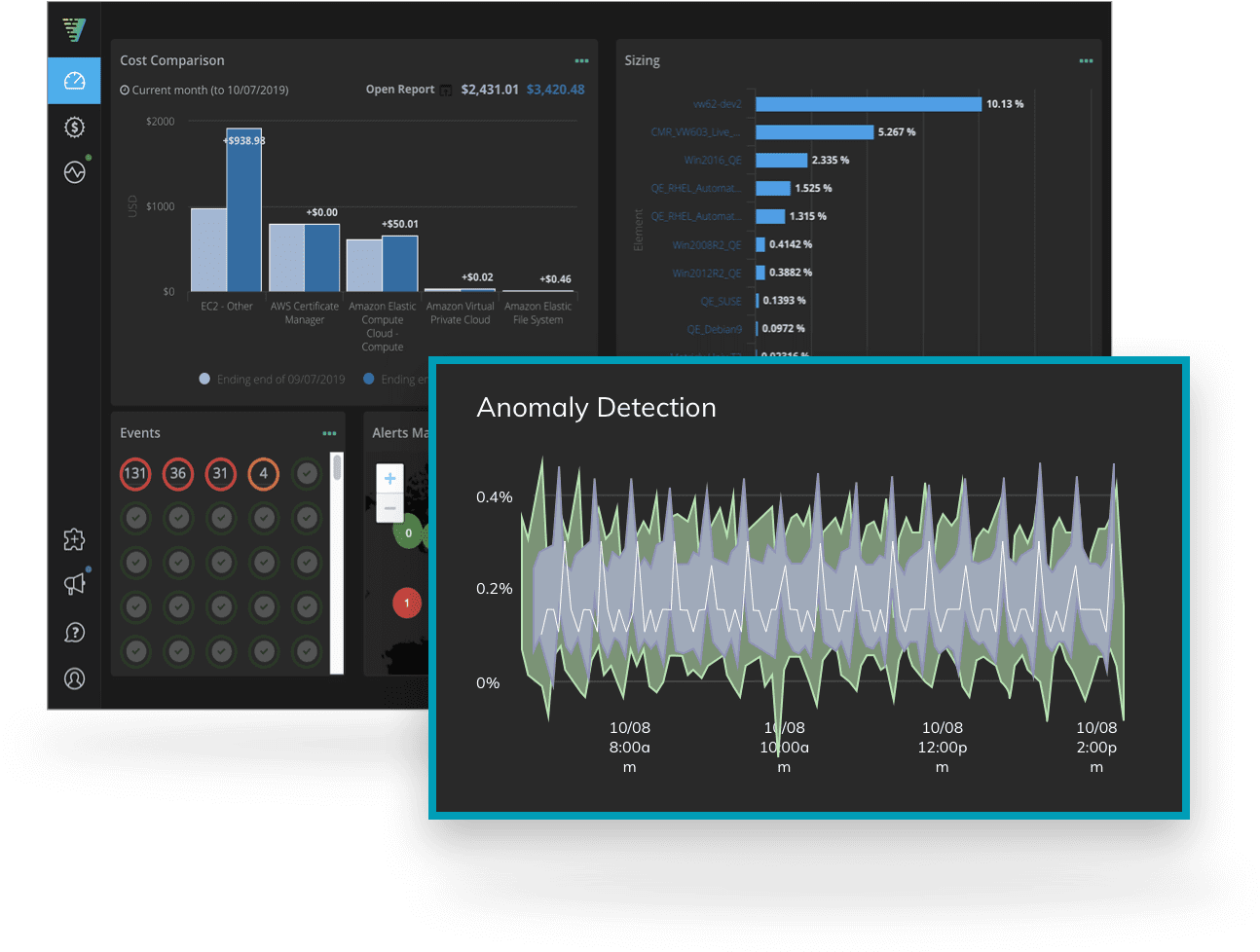
    With the formal launch of a software-as-a-service (SaaS) to monitor cloud platforms and optimize cloud, Virtual Instruments today renamed itself Virtana.

    The company’s CloudWisdom platform is based on technology Virtana gained via the acquisition of Metricly earlier this year. In addition to being integrated with existing on-premises offerings from Virtana, CloudWisdom has been expanded to include a self-service option. Downloadable trial versions are also available.

    Virtana CEO Philippe Vincent said the name change reflects a transformation from being simply a provider of storage I/O performance testing tools to becoming a provider of an IT operations management platform infused with artificial intelligence (AIOps). As part of that effort, the CloudWisdom offering represents the first time Virtana has extended the reach of its offerings beyond on-premises IT environments, he said.

    CloudWisdom will differentiate itself, Vincent said, because it combines cloud monitoring with built-in tools for optimizing cloud costs. Rival offerings require IT organizations to acquire two separate services, he noted. The CloudWisdom platform monitoring capabilities span databases, messaging platforms and containers, as well as cloud infrastructure services from Amazon Web Services (AWS) and Microsoft.

    In general, Vincent said IT organizations are moving away from a reactive approach to managing IT to a more proactive approach that will require increased reliance on automation. As IT environments become more complex, too many IT organizations are trying to compensate by overprovisioning IT infrastructure resources to make sure application performance doesn’t deteriorate or applications crash. That approach not only drives IT costs higher, he said, but it also makes those costs unpredictable.

    To address that issue, Virtana is combining CloudWisdom with an AIOps platform designed to be equally applicable in legacy IT service management (ITSM) and emerging DevOps environments. Organizations that have adopted DevOps will be at the forefront of the transition to AIOps because of the inherent fluidity and velocity of those environments, Vincent noted. Machine learning algorithms coupled with real-time monitoring, big data analytics, workflow engines and automation frameworks will enable IT teams to streamline ITSM and DevOps processes to become more efficient. The opportunity for Virtana is to disrupt a highly fractured monitoring category by leveraging AIOps to unify monitoring at an unprecedented level of scale and scope, he added.

    Virtana is not the only IT management platform provider that has identified the same opportunity; much larger incumbent providers of these platforms and a raft of startups are moving in the same AIOps direction. Vincent said Virtana will differentiate itself by pursuing a more application-centric approach to delivering on the promise of AIOps.

    It’s too early to say to what degree IT operations can be automated using AI. There’s general agreement that AI will play a significant role in automating IT, and the more standardized the IT environment is, the easier it is to accomplish. The challenge is, most IT environments today are still anything but standardized.

    — Mike Vizard