Tag: developers

  • The Time Is Now for an IT Operations Revolution

    The Time Is Now for an IT Operations Revolution

    There’s a level of frustration starting to build inside IT operations teams that’s about to boil over. Lucas Carlson, vice president of strategy for Automic, a unit of CA Technologies that provides an IT automation platform, says developers are bullying IT operations teams by programmatically invoking application programming interfaces (APIs) exposed by public cloud service providers. As the number of application workloads running in those clouds increases, IT operations professionals are losing control.

    To ensure their continued relevance, IT operations teams need to leverage automation to inject levels of agility into local data center environments, he says. That would make it much less likely developers would feel the need to programmatically invoke IT infrastructure resources.

    Carlson says achieving that level of agility will require IT operations teams to rely more on machine- and deep-learning algorithms to automate low-level tasks. Instead of thinking in terms of managing silos of compute, storage and networking resources, Carlson contends IT operations professionals need to reinvent themselves.

    The artificial intelligence (AI) models based on advanced algorithms must be trained continuously. IT operation professionals could become the trainers of those AI models. In fact, Carlson says IT operations teams are approaching a critical moment in history: They can either wait for AI models to eventually replace them or they can leverage them to take back control of IT infrastructure.

    However, developers tend to make decisions based on what they prefer versus what’s best for the organization. Before too long, multiple duplicate operations management frameworks are in place. Rather than incur all those management headaches and associated technical debt, Carlson says organizations need a single framework that can more adroitly accommodate the multiple roles within the DevOps team. It’s already long past the time when IT teams should have modernized their operations, he says.

    The relationship between developers and IT operations teams has always been contentious. The more belligerent members of the developer community are even making a case for “NoOps.” In that context, all the IT dollars spent on operations are moved into developing applications because the management of IT infrastructure is completely automated. Given the amount of legacy infrastructure that isn’t likely changing anytime soon, achieving that level of automation inside the enterprise won’t happen for a while. But there’s no doubt that IT operations needs to get more agile. Because of that issue, investment in software-defined data center (SDDC) technologies is growing rapidly.

    Instead of resisting that trend, Carlson says teams need to demand that internal IT operations be brought into the 21st century. It’s true that SDDCs infused with AI models will automate most of the lower-level tasks associated with DevOps. But those members of that IT operations teams who become the masters of building and training those AI models will be among the most highly sought-after individuals in IT.

    — Mike Vizard

  • Signal Sciences Looks to DevSecOps to Improve App Security

    Signal Sciences Looks to DevSecOps to Improve App Security

    The time has come to put control over IT security into the hands of the developers who increasingly are being held accountable for it. To make that possible, Signal Sciences has launched a Web Protection Platform (WPP) capable of inspecting traffic in real time across multiple deployment models.

    Intended as a replacement for more traditional web applications firewalls (WAF), WPP redirects any suspicious traffic to a cloud analytics engine without adding any meaningful overhead in terms of overall latency, says Signal Sciences CEO Andrew Peterson.

    What makes WPP unique, he notes, is that it can be deployed in three different modes. When deployed on a local server, no changes to the application code are required. WPP also can be deployed as a reverse proxy in from of a web server. But from a DevSecOps perspective, the most flexible options is to deploy WPP in a runtime application self protection (RASP) mode that allows developers to embed WPP directly into their source code. In the later instance, Peterson says developers can assume security responsibility for their own applications, in keeping with process employed by organizations that have implemented advanced DevOps processes.

    Peterson says WPP not only provides protection against the top 10 most common web applications threats, but it also thwarts distributed denial of service (DDoS) attacks, account takeover and even attacks employing malware embedded in custom business logic.

    Regardless of the delivery model, Peterson says it’s become apparent that legacy WAF are not able to secure modern applications based on containers and microservices, Embedding WPP in application source code enables developers to embed a cybersecurity defense mechanism in each container-based microservice in a way that scales over time.

    As part of its commitment to DevSecOps, Signal Sciences has created 16 pre-built integrations with a range of third-party DevOps tools and security technologies, including Atlassian JIRA software, Datadog, PagerDuty, Slack and Splunk. In addition, DevOps teams can take advantage of an application programming interface (API) that Signal Sciences has developed to integrate WPP with other applications.

    Of course, the whole DevSecOps movement is only in its infancy. Most IT organizations are still struggling with the concept. It’s also not clear how much IT security professionals will be comfortable relinquishing control over application security to developers. However, Signal Sciences claims that 95 percent of its customers have implemented automated blocking, versus only 10 percent to 15 percent of IT organizations that have implemented a WAF.

    Signal Sciences is betting that in much the same way they now exercise more influence over IT operation, developers will play a much larger role in IT security. In fact, as developers are held more accountable for application security, Peterson says many of them will demand to be able to programmatically implement IT security controls. Naturally, there’s no such thing as perfect security. But is the case of application security, DevSecOps may turn out to be our only hope.

    — Mike Vizard

  • Avoid Crashes: 5 Best Practices for Load Testing

    Avoid Crashes: 5 Best Practices for Load Testing

    Demanding customer expectations and the rapid distribution of information across social media have made website and applications crashes an off-limits path for today’s companies and organizations.

    Crashes resulting from traffic spikes cause immediate and long-term loss of sales, as well as tarnishing the brand name. When servers or websites go down during highly anticipated events such as Black Friday, the Big Game or before a major concert, the repercussions can be permanent.

    Yet, avoiding the “website temporarily unavailable” screen is also easier than ever before. By performance testing your website continuously and proactively you can easily detect errors, bottlenecks and bugs, and then fix them to ensure your website handles any amount of traffic.

    Here are five best practices for load testing your website or app:

    Define Your Load Goals

    Before starting your tests, you need to figure out what it is that you need to test.

    This includes the number of concurrent users, traffic patterns and areas that users can visit on your site. For example, if your site has 10,000 users concurrent at its peak, but  3,000 arrive in the morning and that total slowly climbs up to 10,000 in the afternoon—and these visitors mostly just browse your homepage—you’ll need to run a different test than if you have 10,000 concurrent users on your website all day long, constantly browsing multiple pages.

    To determine your load goals, you need to engage directly with your business colleagues. For instance, get your product manager to set the system’s expected abilities, ask the marketing team to inform you about any special campaigns that might increase website traffic, and then look at server logs and tools such as Google Analytics to determine previous customer patterns.

    Choose Your Load Testing Tools

    There are multiple open-source load-testing tools that you can use to run your tests.

    JMeter is the most popular tool, but you can also use Gatling, Locust, Tsung, The Grinder or Selenium. See here to learn more about the differences between these toolsets.

    Does this seem complicated? Taurus is an open-source automation test framework that simplifies running these tools, by using a simple YAML script. If you need to run your tests from the cloud, utilizing rich analytics or requiring user collaboration, you might consider using BlazeMeter.

    Take Your System to the Limit

    To make sure you stand up to your load goals, you need a buffer; specifically, you need to make sure that your system can handle heavier loads.

    This ensures that the CPU stays low and you don’t experience memory leaks. However, we also recommend you take your system to the limit and see when and how it fails. This ensures that you know exactly what your system’s weaknesses are, giving you a better ability to fix any errors that might occur.

    This is especially important if you come across an unexpected traffic spike—say, if your competitor’s website crashes and all their customers come running to you. Wouldn’t you rather be prepared for that?

    Monitor Test Results

    Set aside resources for looking at test results.

    Examine KPIs including Response Time and Hits/s, as well as the correlations between them, to learn what your system’s abilities and bottlenecks are. This information will help you see what needs fixing.

    As you continue testing over time, you will be able to identify KPI trends, which will help you monitor system health. We also recommend you monitor backend KPIs like DB Queries, with APM tools.

    Test Again

    So, you’ve tested, you’ve analyzed, and you’ve fixed.

    Now you have one last thing to do: Run your tests again to make sure everything is working smoothly after the committed changes. That ensures nothing gets overlooked. It would be a shame if all your hard work went down the drain due to a minor oversight.

    Now, let’s get testing!

    To get more load testing tips, check out this free whitepaper, “How to Ensure Your Website or App Won’t Fail at Peak Times.” To learn more about BlazeMeter, request a demo.

    — Noga Cohen

  • VMware CEO Stakes Out DevOps Position

    VMware CEO Stakes Out DevOps Position

    At the Dell EMC World 2017 conference this week, VMware CEO Pat Gelsinger waded into an increasingly heated DevOps debate by suggesting that most developers are too “lazy” to be really interested in IT operations.

    At a time when factions within the DevOps community are making the case for developers to be responsible for DevOps on an end-to-end basis, Gelsinger contends that most developers want to get out of being involved with IT operations as quickly as possible so they can spend more time developing applications.

    The VMware approach to DevOps is closely aligned with Pivotal, a sister company operating under the Dell Technologies umbrella that curates an instance of the platform-as-a-service (PaaS) environment developed by the Cloud Foundry Foundation.

    Gelsinger notes that the two primary reasons developers have shifted workloads to public clouds is perceived costs and the fact that invoking infrastructure as a service (IaaS) via an application programming interface (API) is simpler. To combat both those issues, Dell EMC has been rolling out preintegrated converged and hyperconverged infrastructure that, for certain classes of workloads, is less expensive to own over multiple years. Those systems are optimized to run either VMware or Microsoft virtualization software within a software-defined data center that exposes IT infrastructure resources via APIs. In effect, Dell EMC is applying a cloud operating model on top of IT infrastructure deployed inside the data center to close what Gelsinger describes as an “easy gap” between public clouds and internal IT operations. As those systems are more widely deployed, Dell EMC and VMware jointly contend that IT organizations will be in a better position to inject more agility into their DevOps processes.

    Many IT operations professionals have a vested interest in the outcome of those efforts because developers have been doing an end run around internal IT operations teams by deploying applications directly on to a public cloud. The challenge VMware recognizes, says Gelsinger, is that the entire DevOps space currently is chaotic. Each IT organization not only has a different view concerning to what level of DevOps integration it wants to achieve, but none of them are at the same point in making that DevOps journey. In fact, there’s a raging debate over the merits of PaaS environments versus lighter-weight container-as-a-service (CaaS) environments.

    Dell EMC, in collaboration with VMware and Pivotal, has invested heavily in a Cloud Foundry platform that it makes available as a Pivotal Cloud Foundry (PCF) offering is increasingly automated, from an IT operations perspective. The latest version includes a rolling update capability that requires no human intervention. Pivotal claims one financial services customer has deployed 10,000 application containers on an instance of PCF that is managed by only four IT operations people. Couple that level of automation with the automation that VMware and Dell EMC are driving into the underlying IT infrastructure, and it shows that DevOps will be profoundly different than today. Less clear is who inside the IT organization will be exactly managing what.

    — Mike Vizard

  • Understanding the App Development Life Cycle

    Understanding the App Development Life Cycle

    More and more businesses nowadays are shifting to mobile. And that’s absolutely reasonable choice:

    • More than 50 percent of digital media consumption accounts for mobile apps;
    • Ninety percent of the time smartphone users spend on their mobiles goes to mobile apps;
    • A typical user has about 30 apps installed on his mobile and spends more than 35 hours a month using them;
    • Forty-two percent of the mobile purchases were completed from mobile apps;
    • Eighty-five percent of consumers prefer native mobile apps over a mobile website.

    When deciding on developing a mobile app, it’s important to picture the entire range of stages and procedures to go through.

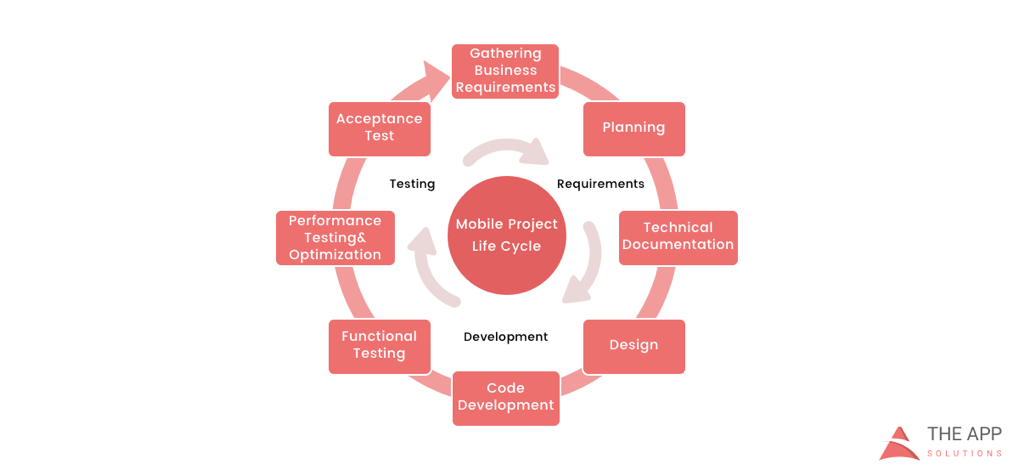
    According to the mobile app projects approach by The App Solutions, here is the life cycle of a typical development project, no matter the complexity:

    1. Planning stage (project manager, marketer, and business analyst are involved) – carrying out the business analysis and crafting mobile strategy.
    2. Technical documentation (covered by the technical writer) – describing all tech requirements and details.
    3. Prototyping (usually made by a UX/UI designer) – creating the sketch, wireframes, prototype and final app skins upon approval.
    4. Development (performed by the developers) – front-end and back-end segments of coding.
    5. Quality Assurance (usually performed continuously after each agile sprint is completed; followed by bug fixing) – testing tech requirements, device compatibility, interface, security aspects, etc.
    6. Publishing & Maintenance (covered by DevOps) – publishing to the app store, updates releases, infrastructure, and entire app maintenance.

    Planning stage

    When creating a mobile app, it is crucial to take time to go through the necessary research and planning steps.

    Business analysis:

    • Idea evaluation – a preliminary stage, when experts investigate the idea, correct it, give their advice and create a rough logics for it.
    • Competition analysis – study of activities of other players in the market.
    • SWOT-analysis – evaluation of strengths and weaknesses of the product, insights into opportunities and other aspects.
    • ROI calculation – assessment of the future app market performance help realize the real value and adjust budget accordingly.
    • Requirements scope – summing up requirements for the future product at all levels.

    Mobile strategy:

    • Market research – this study shows the overall situation on the market to help adjust the concept of the product to current demand.
    • Defining user personas – understanding who is your target audience is crucial in crafting advertising approach.
    • Technologies & tools assessment – study of specific tools required for the industry and select a set of technologies to meet the objectives of the project.
    • Complex promotion strategy – a step-by-step action plan for acquisition and retaining users.

    Technical documentation:

    Also known as a technical specification or a software documentation, this paper is a complex manual of your product, outlining requirements, business logic and leading your specialists through all stages of the project:

    • Makes your software universally understandable.
    • Provides flexibility for future changes.
    • Adds value to your app by providing a clear manual.
    • Helps to keep control of your own product.
    • Allows reusing existing parts of the developed application.

    Prototyping:

    Prototyping is a process of defining a concept in visual terms and evaluating how the app might develop to correct a misconception.

    • Creating a sketch – the draft version of your app on paper that sets up the main logic, number of screens and the way they interact with each other.
    • Creating wireframes – provides the visualization of the draft structure.
    • Creating a clickable prototype – helps to find out and analyze all possible use cases, discover logical breaks and technical inconsistencies in the original idea.
    • Designing app skins – collecting all wireframes and put them together to get the final design.

    Code Development:

    This segment usually consists of two main parts:

    • Front-end development – client-side development, creating a presentation layer of the software for a direct user interaction with it.
    • Back-end development – a server/database part of development, connecting a front-end part of the mobile app with the data access layer.

    Quality Assurance:

    In the agile development, it’s usually a continuous process following every sprint of development:

    • Compatibility testing – running the app on different devices and screen sizes.
    • Interface testing – checking the navigation, menu and buttons performance.
    • Device compatibility testing – checking how the app looks and performs on various screen sizes.
    • Low-level resources testing – examination of the app in conditions of low battery, slow internet connection, etc.
    • Security testing – provides quality assurance of users data safety.
    • Beta testing – giving users access to the app to get feedback.

    Publishing & Maintenance:

    • Publishing of the app and following updated versions to a chosen app store.
    • Infrastructure support – either you have admin panel to post on or cloud service attached, you’ll need to make sure it functions fully.
    • App store optimization – helping your app move onto the tops of search lists and this way gain more users.

    Making the Most of Your App Development Project

    Here are a few tips for getting the most out of your own app development project:

    • Mind what’s trendy + study the market and your target audience. It is a crucial preliminary stage that will impact literally every side of the project and every decision to make.
    • Specify as particularly as possible the product you expect to see at the end of the project. Defining the smallest features and functions of the software at the planning and prototyping points of the project will help find areas to save money on the actual development.
    • Negotiate your idea with various development teams (study the profile of the app development company and find evidence for their credibility, debate the best price). Make sure they hear you and understand what you mean—simply put, that you’re on the same page.

    About the Author / Charlie Shabe

    Charlie Shabe is a professional Digital Marketing Strategist. He has over 20 years Digital Marketing experience in helping global organizations use the Internet to drive their online visibility and generate leads. In addition to his PR and online marketing experience, Charlie is an expert in writing. Connect with him on Facebook and Twitter.

  • How Much QA is Enough in Software Development?

    How Much QA is Enough in Software Development?

    People working in quality assurance as testers, managers or engineers know what it’s like having to justify their existence; it’s been part of the job for many years. QA experts have had to fight the perception that what they do is a bottleneck, overkill and it slows everyone down.

    Finally, however, QA is getting the attention that it deserves. Companies are gradually investing more in QA skills and tools. This began with the onset of Agile and DevOps—methodologies which have now infiltrated mainstream software development practices everywhere. Since those practices focus on speed, efficiency and quality, engineering leaders have grown to understand that great products are not achievable without adequate QA checks and balances. Another risk is the unflinching nature of high user expectations: Thanks to social media, one user complaint can quickly escalate into others across the web, creating an uncomfortable perception problem for the software provider.

    Robust testing practices can prevent egregious flaws in the software that result in poor user experience and performance—or, worse, a breach. True, testing can sometimes get in the way of speed. Yet no matter how fast you release a product, if it doesn’t work well, no one’s going to buy it, much less use it.

    Nevertheless, we can continually improve the QA practice to fit into modern development teams’ workflow. Testers need to work with developers and master automated testing, while developers need to sometimes engage in testing; everyone should think about the appropriate level and amount of testing. You can have too much of a good thing.

    The Right QA Balance

    The below ideas can help your organization reduce conflict between QA aficionados and those who would rather code and release as fast as possible.

    1: Assess, analyze and report. Developers and testers alike are highly technical; they like numbers. Therefore, the more that the QA team can quantify the risk of an application, provide evidence as to the effectiveness of current QA practices and use metrics to show the need for more QA resources when warranted, the faster that everyone will get on board.

    There are plenty of tools that can deliver common quality metrics such as total number of defects, defect leakage, test coverage, test pass/fail rates, test completion rates, code coverage and application uptime. It’s important to share and discuss these metrics throughout the development team and with product and business managers. What constitutes high quality for the development team may not be the case with executives who are closer to the end user/customer.

    2: The gut check. After metrics, take into consideration the comfort level of your team and company concerning product flaws. In regulated spaces, or for applications that collect sensitive private data, the tolerance for bad code and security gaps is usually low. Gather feedback from different perspectives and roles in the organization for a balanced perspective on the QA practice and areas for improvement.

    3: Get people involved. Quality assurance is no longer a separate activity from development; especially when you are practicing Agile and DevOps, the responsibility for quality is shared. Therefore, developers, business analysts and operations managers all should be doing their work with an eye to quality, delivering feedback regularly to the QA team. Provide opportunities and incentives for any team member to attend events and training related to software quality.

    4: Streamline testing. Test automation tools are helping product teams be more comprehensive in testing, by automating low-risk test cases so that testers can focus their exploratory and manual methods on high-risk or new features. This is a positive development, although testers must take time to learn how to use the tools. Some other ways that can help teams be more efficient in testing include:

    • Conducting more testing early in the sprint. This avoids the 11th hour disaster of finding a major flaw right before the release deadline.
    • Per Agile methods, dividing development tasks into smaller chunks with team members from different disciplines to ensure testing is being done all the time and with visibility by all.
    • Using test driven development (TDD) or behavioral driven development (BDD), which requires that QA, developers and business stakeholders meet at the beginning of a project to agree upon requirements and test cases. Developers then write code against the test, until it passes. New tools are helping bridge the gap by writing requirements and user stories in plain English.
    • Outsourcing part of the testing load during a major project, which can help increase coverage and reduce stress on your team. However, understand that too much outsourcing will undermine any efforts to develop QA as an internal best practice and “mindset” for software teams.

    If your team is committed to QA as a best practice, not an afterthought, those at the top will need to invest properly in the right tools, training and people to get results. Misconceptions about QA still exist; contrary to the view of some DevOps experts, we can’t (and shouldn’t) automate every test. As well, even though developers are now testing the code they write, you still need experienced testers on your team. With the pace of innovation and the high stakes in the marketplace, organizations need more—not fewer—people engaged in testing.

    For testers who love their job, as many of them do, it’s an exciting time to be in the field. Companies increasingly are seeing the value of QA and testers continually are gaining more tools and tactics to excel at helping their organizations produce really great software.

    About the Author / Kyle McMeekin

    Kyle McMeekin is Senior Sales Engineer at QASymphony. Prior to QASymphony, he was a programmer analyst at Cognizant Technology Solutions. Connect with him on LinkedIn.

  • From Architect to Operator: The Rise of Developers

    From Architect to Operator: The Rise of Developers

     Over the past five years, DevOps has transformed from a model for agile software development practices to the aspirational standard for functions across the IT spectrum. Previously, developers and IT Ops teams were distinct and siloed—developers built the application and IT Ops managed production environments—but now many in the industry have shifted to create a net-new liaison between the two, allowing applications to exist simultaneously in the worlds of development and production.

    While everyone is focusing on the convergence and collaboration of the developer and the IT Ops person, however, the storyline is changing again. The focus is now shifting back to the developer (and his/her specific skill sets), as there’s an increased demand for a single team to manage the entire application life cycle. Now more than ever, the people who actually develop the systems are poised to take ownership of traditional IT operations functions, such as maintenance, performance and availability.

    As IT continues to evolve, three trends point to the expanding and evolving role of the developer.

    1. The decoupling of infrastructure from services. With the rise of public and private clouds, more of the technology stack is becoming abstracted away from infrastructure, and often offloaded to a provider. This has created challenges for how developers manage and deliver applications in this new environment. In the past, IT operations was responsible for ensuring things such as availability and performance, but now, developers can build those capabilities into the applications themselves.
    2. The elimination of infrastructure setup. IT Ops roles have traditionally been the gatekeepers, and new technologies didn’t make their way into the data center if it didn’t pass their standards. Getting into the data center was just the first step, though, as lengthy deployment of physical infrastructure and provisioning of virtualized instances for applications would require substantial expertise and time. Now, developers can spin up services instantaneously, and infrastructure setup has been reduced to a simple configuration file. It is the developer who understands which resources the application will need, and with infrastructure reduced to a couple lines of code, the speed at which it can be applied is impossible to ignore.
    3. Microservices create fault tolerance. How we’re building applications also greatly impact how they will run in the future. Historically, you would build a single monolithic service that would respond to every request from the users of that application. This approach meant that when a part of the service failed, everything would go down. However, when you abstract away the infrastructure, you gain the ability to decentralize the application or service into many loosely coupled microservices. This makes the application much more fault-tolerant and reduces the impact of an outage or shortage of resources. As such, developers can help ensure system continuity and performance by building resilience and monitoring capabilities into the software.

    End-to-End Visibility and the Need for IT Ops Persists

    While developers are certainly on the rise, the role of IT Ops remains uniquely necessary in today’s IT environment. IT Ops will always have the best end-to-end IT system perspective, encompassing the application environment as well as shared services and infrastructure (think backup, endpoint protection, single sign-on, DNS, etc).

    Developers build visibility from the inside out. But because it’s happening in the app itself, there’s no outside-in look, and thus pieces of the stack go unmonitored. As a result, you can’t understand the holistic end-user experience—which, when it comes to application health, is both the start of the conversation and the end of the argument. IT Ops brings incredible value, offering end-to-end visibility with better monitoring and a focus on ensuring every transaction—both internal and external—goes smoothly. While it has become common for developers to instrument their applications, they don’t have nearly as much expertise in end-to-end service management and measuring performance across each component. Additionally, IT Ops workers tend to possess a great level of operational rigor; they’re better versed in dealing with third-party vendors; and they understand the entire system (the weakest link, what works, what fails, etc.), including back-end functions, in a way that developers simply don’t.

    What Comes Next for Developers?

    We’re already seeing how developers are taking greater control over traditional IT operations functions, but what comes next? Looking forward a few years, I believe the next frontier to monitor is the role developers will play in SecOps. Security attacks are about finding the path of least resistance, and as SecOps matures into active threat-hunting and breach detection, attackers will evolve their methods. If SecOps can solve current attack vectors—phishing, especially—tricking software into following unexpected code paths will once again be a reasonable route to a breach.

    But there are ways to mitigate that during the development process, by building security into the code itself. As SecOps teams increasingly treat the environment as an ecosystem, they’ll see the application itself as a vulnerable piece of the attack surface; they may begin requiring secure development practices with a level of governance over development teams. As security increasingly becomes everyone’s job, everyone in IT must shift their mindset, and while development teams may be late to the party, SecOps will eventually extend a mandatory invitation.

    About the Author / Eric Thomas

    Eric Thomas serves as Director of Solutions Architecture for IT analytics company ExtraHop. Eric leads the Professional Services team, and draws on over 20 years of experience in IT operations. Before joining ExtraHop, Eric performed a variety of operational roles, most recently as Director of Advanced Engineering for Thomson Reuters, where he led a team of performance and availability specialists, supporting over 200 applications representing $2B in annual revenue. His prior experience includes Enterprise IT management, SaaS production operations and next-generation technology advocacy.
     

  • The Challenges of Digital Experience Monitoring

    The Challenges of Digital Experience Monitoring

    One of the great ironies of DevOps is that the better you are, the less likely it becomes that anyone will ever see your best work. If the code is supremely elegant, the app runs flawlessly, the servers do not lag and users and managers rarely say anything because that is exactly the experience they expect.

    People become aware of you only when something goes wrong—and at that point, they are rarely full of compliments. The experience means everything to them.

    Digital experience is the foundation of how online companies compete in the contemporary global market. That is why digital experience monitoring (DEM) has been recognized by Gartner as the most significant foundational process within application performance monitoring (APM). DEM is designed to improve not only your app but the entire experience that the user has in interacting with your brand online.

    If you’re unfamiliar with the DEM category, check out my primer here.

    DEM is the technological response to one of the oldest problems in business: not being able to be everywhere at once. On the digital side, the challenges of delivering the best possible performance across the widest scope fall into three spheres:

    • The problem of divergent user tech
    • The problem of network propagation
    • The problem of splintered responsibilities

    Let’s take a closer look at how DEM engages with each problem on its own turf.

    Divergent User Tech

    The mobile OS wars have settled on two champions for the time being: iOS and Android. As of February, those two account for 99.6 percent of mobile sales. Of course, from a DevOps perspective, nothing is that easy.

    Within iOS, around 79 percent of devices are on iOS 10, and another 16 percent are on iOS 9. The other 5 percent are scattered across various earlier versions. On the Android side, version 6 Marshmallow has the largest share at 31.3 percent of the market, and there are a plethora of other versions out there. Then you have to worry about the mind-boggling variety of hardware.

    For every combination of device and OS running your app, there are also users going to your mobile website on a handful of browsers. The numbers for February 2017 show 55.2 percent of the market is on Chrome, and 29.84 percent are looking at you through Safari. That leaves 14.96 percent of the market to be divided up among the default Android browser, Opera Mini, IE (at 1.02 percent, as hard as that is to believe) and many other contenders. It is significant to note here that the market leader did not even exist five years ago, so any apps you build now must be designed to work on browsers that haven’t been invented yet.

    The second subset of problems within the user tech consideration is geographic variation. How your app runs on 4G LTE in the city will be very different from 3G in rural areas. While Atlanta was judged to be the fastest city in the nation with downloads averaging 16.9 Mbps, users in the capital of Washington, D.C., can only work at 9.2 Mbps.

    The final subset covers issues related to the connection medium: Wi-Fi, cellular data, NFC, Bluetooth, ZigBee, WiMAX, HSPA, EV-DO, etc. It should be clear that there may be wide variations in digital experience based on the connectivity medium of various features within your app.

    Network Propagation

    It is not always the user’s fault. Old-school IT support tends to start with that assumption, but there are times when the problem originates within your own network or results from network latency generated by external errors.

    Everything that is happening on your servers, from DDoS attacks to viral videos to presentations in the conference room, could impact the performance of your app. As microservices becomes the dominant design model, it has become more common to see distributed applications get hung up in communications across the network. How will you track down which team is at fault or even assign fault when communications between microservices break down? The bigger question is, how will you correlate what happened on the front end with what happened on the back end?

    Splintered Responsibilities

    The second set of problems implies the third, which has to do with establishing a more unified view of your digital experience beyond just the IT world or whichever departments are involved. If your app involves contractors or third parties, the bigger view is larger than your company itself.

    It takes a paradigm shift to see your app as a unified tool. You have to assign a central command that takes a unified approach to keeping internal and external teams in agreement. This is the level where a team will determine the proper processes to launch at a moment’s notice and mitigate the damage from issues in real time.

    A central command outpost running DEM is needed to ensure a swift diagnosis of the performance anomalies. Then the DevOps team can resolve the issues and deploy fixes with minimal disruption to whatever the end user wants to do. Ideally, you want to do it with zero downtime or at least an SLA of nine 9’s (0.0864 milliseconds of downtime per day).

    About the Author / Kevin Goldberg

    Kevin Goldberg works in marketing at SolarWinds working on the Monitoring Cloud team. Prior to SolarWinds, he worked at AppDynamics and WalkMe. Follow his ramblings on Twitter at @Kevin_Goldberg.


  • DevOps is a Lifeline to Connected Mainframe ROI

    DevOps is a Lifeline to Connected Mainframe ROI

    A new IDC white paper sponsored by IBM and CA Technologies reveals the adoption of DevOps is a hallmark of those organizations that are actively modernizing and integrating legacy systems such as a mainframe to support digital transformation.

    Early adopters are blazing a path for faster innovation and greater ROI.

    DevOps Delivers Mainframe Modernization and Integration

    I’m encouraged to see DevOps recognized as an important element in realizing a “connected mainframe” vision. Respondents demonstrated a continued commitment to modernizing their mainframe environment.

    The IDC study confirmed that leveraging Java on the mainframe was one of the most popular approaches. In fact, I’m constantly surprised at how few managers realize that these days, Java and Git can be used by developers in such a way that allows them to completely separate themselves from the mainframe “green screen” environment when coding or maintaining applications.

    DevOps automation has also helped organizations overcome many of the cultural and operational challenges to a fully end-to-end enterprise by aligning application development tools and orchestration chains across multiple platforms and teams.

    Adopt a Business-First Approach

    Customers I’ve spoken with are experimenting with DevOps for mainframe tools and practices, with many piloting new approaches across the life cycle. They’re immediately becoming more agile, realizing shortened development cycles, improved collaboration between distributed and mainframe teams and faster MTTR that maximizes availability. In all, these early adopters have benefited from increased speed to market, improved business agility and better platform economics.

    The IDC study concurs, identifying more effective delivery of applications and services as a powerful cost-saver, with savings of $58,900 per application achieved through increased developer productivity and day-to-day support efficiencies. By helping mainframe organizations to realize improvements at every stage of the application life cycle—from build through test, deploy and operate—DevOps delivers compelling benefits; for example, from our recent study Accelerating Velocity and Customer Value with Agile and DevOps:

    • Advanced DevOps users reduce the time taken to develop, test and release new applications by 42 percent.
    • Advanced agile users reduce their time to decide and act on new opportunities by 40 percent.
    • Advanced agile users accelerate the time to develop, test and release new apps by 36 percent.1

    Excited? I encourage you to catch up on the full IDC White Paper here.

    — Aline Gerew

  • SRE vs. DevOps vs. Cloud Native: The Server Cage Match

    SRE vs. DevOps vs. Cloud Native: The Server Cage Match

    This post supports my DevOpsDays Austin Presentation on May 4

    I don’t believe in DevOps shaming. Our community seems compelled to correct use of DevOps as an adjective for tools, teams and teapots. The frustration is reasonable: DevOps clearly taps into head space for both devs and operators who see a brighter automated future together. For example, check out this excellent DevOps discourse by Cindy Sridharan.

    As an industry, we crave artificial conflict so it’s natural to try and distill site reliability engineering (SRE), DevOps and cloud native into warring factions when they are not. They all share a focus on Lean process.

    Very simply: SRE is a job function, DevOps is a process approach and Cloud Native is an architecture.

    These three concepts have tremendous alignment because they all have the same fundamental goal: increase product delivery through improved flow. It’s really that simple. We are looking to enhance productivity using system thinking concepts from Lean manufacturing.

    SREs improve productivity by eliminating manual operations, reducing errors and improving infrastructure quality. They do this starting from the production infrastructure and working backwards. Highly automated delivery, integrated logs, systemwide monitoring and blameless root cause analysis are key tools. Before we get wrapped up in tools, the distinguishing factor for SRE teams is that they take ownership of the production infrastructure.

    There is tremendous power in assigning ownership for delivery. That’s why I see industry benefit in defining an SRE job function. A DevOps strategy is a system approach and it becomes an anti-pattern to making an individual or team responsible to own “the DevOps.”

    In DevOps, we look for ways to streamline the entire product creation flow. That often drives toward tools and techniques that SREs require; however, our goals are not department-specific. We want to work with all stakeholders including developers, product managers, testers, SREs, executives and customers. This system focus for developers becomes CI/CD pipelines, platforms, work tracking tools and other workflow elements. These tools are not specifically DevOps tools, but confusion is natural since they are often pulled into organizations due to DevOps thinking.

    This SREs should expect to collaborate deeply with other functions under a DevOps process.

    Cloud-native architecture also falls under the DevOps mandate because it strives to decompose large application stacks into highly automated collections of services. There is no magic “DevOps platform” in cloud-native design; however, teams using the architectural approach get modularity, strong APIs, service orientation, simplified configuration and build automation practices that fit perfectly into DevOps thinking.

    For example, using containers does not mean a dev or SRE team is following DevOps process or using cloud-native architecture; however, it is an indicator that they are leaning toward smaller deliverables and improved dev-production fidelity.

    Yet, SRE, Cloud Native and DevOps do have a shared enemy: Complexity.

    We’re doing a great job creating best practices and abstractions that accelerate developers and creating innovative infrastructure options in both cloud and physical. That means we are seeing dual explosions in developer productivity and infrastructure complexity. Unfortunately, this wealth has not made it into operations automation, which has been delivering incremental improvements at best. Even worse, the added workload and complexity adds pressure to SRE functions.

    Ultimately, all three of these concepts are aspects of Lean business practices; however, acceleration from DevOps and cloud native is outpacing progress by SREs. This imbalance creates risk for everyone involved because Lean is about system performance. Delays and failures cannot be isolated to a single silo.

    The mistake of seeing Dev and Ops as silos means creating false contention between SRE, DevOps and cloud native.

    If you are hearing that in your organization, then take it as a warning about how your teams are integrating Lean systems thinking into your processes.


    — Rob Hirschfeld