Tag: developers

  • BMC Pushes Automation to the DevOps Left

    BMC Pushes Automation to the DevOps Left

    Much of the inherent conflict that exists between developers and IT operations teams often comes down to how IT automation processes are implemented. IT operations teams generally have their own preferred tools for automating operations while developers have another. To resolve that issue, BMC Software unveiled Control-M Workbench, a set of development tools that extends an application programming interface (API) to allow developers to embed instructions for automating infrastructure using BMC Control-M automation platform.

    Gur Steif, president for digital automation at BMC Software, says Control-M Workbench moves the responsibility for automating the IT infrastructure resources that their application consumes, including the ability to code, debug and test workflows. The IT operations team can then more easily deploy that application in a production environment, he says.

    In effect, BMC Software is enabling IT organizations to put the control of how jobs are executed in a production environment in the hands of developers by moving that function further to the left of the DevOps life cycle. Control-M Workbench represents the first time BMC is venturing beyond its traditional IT operations base to create a tool that will primarily be employed by developers.

    Steif says the goal is to enable IT operations teams to manage much higher volumes of application rollouts. In return for spending a few minutes on installing Control-M Workbench, IT organizations can deliver application 20 percent faster, while running jobs using 50 percent fewer full-time employees. In addition, Stief says production incidents can be reduced by up to 25 percent and batch processing failure rate can drop by as much as 80 percent.

    Control-M Workbench is clearly part of a trend to give developers more control over and responsibility for IT operations. A recent survey of 650 IT decision makers conducted by BMC finds 94 percent of IT decision makers expect automation to spread into all other areas of business by 2020.

    In addition, the survey notes that 73 percent of IT decision makers believe businesses that do not embrace IT automation to achieve the larger digital business strategy within the next five years will cease to exist in 10 years. The top three areas of investment priority in the next 24 months to achieve those goals are containerization, workload automation/scheduling and DevOps. Almost 9 in 10 (89 percent) respondents concur that IT automation needs to achieve their desired digital business objectives.

    However, there are considerable obstacles that need to be overcome, including lack of budget (67 percent), skills (44 percent) and time (51 perent). In fact, 42 percent of the respondents concede that when it comes to digital business initiatives there are conflicting objectives between business units and CIOs that can get in the way of crafting a comprehensive IT strategy.

    DevOps, of course, is more about people and processes than it is technology. Then again, DevOps isn’t going to be willed into existence without providing the tools needed to change the processes. Given the chicken-and-egg relationship between processes and tools, it becomes incumbent on the IT leadership to serve as the catalyst for bringing it all together.

    — Mike Vizard

  • Node.js Becoming More DevOps-Friendly

    Node.js Becoming More DevOps-Friendly

    Over the last several years use of Node.js has exploded across the enterprise, as developers moved to embrace a variant of Javascript that made it easier to build both client and server-side applications. However, every time it is upgraded, all the dependencies between it and application modules written in C or C++ breaks.

    To solve that problem, the Node.js Foundation is making available on an experimental basis a Node.js API (N-API), developed collaboratively by Google, IBM, Intel, Microsoft, nearFrom, NodeSource and other contributors. The API will be in Node.js 8, and promises to eliminate the need to update all those dependencies. Pending additional testing, it is expected to be given Long Term Support (LTS) status later this year.

    At the same time, The Linux Foundation is adding new features to experimental tracing and async tracking features. A diagnostics API will make it easier to monitor the operation of the Node.js event loop across the complete life cycle of a service request. Finally, an inspector core module, which allows developers to leverage the debug protocol used by the Google Chrome inspector to inspect currently running JavaScript code, is also being added.

    Each of these new capabilities are nice to have on their own. But collectively, they signal the beginning of a maturation process in the Node.js community. Increased use of Javascript in general—and Node.js especially—have arguably caused many enterprise IT organizations re-evaluate their DevOps processes. Developers using Node.js have been able to increase the number of applications they could develop considerably. Since then, the number of languages being employed within the enterprise has exploded.

    Mark Hinkle, executive director of the Node.js Foundation, says moving forward there will be more focus on reducing the friction surrounding upgrades of Node.js applications as part of an effort to further expand the ecosystem. Many organizations commonly end up supporting multiple versions running across a variety of applications. Hinkle says N-API is a step in helping to reduce the maintenance costs associated with supporting those applications. In an ideal world, the foundation would be gathering additional input from DevOps experts pursuant to achieving that goal. In most IT organizations, the care and feeding of Node.js applications is still left in the hands of IT operations teams after the apps are deployed in production.

    In the meantime, Hinkle says its performance continues to improve. Naturally, there’s a corresponding relationship between better performance and the number of use cases for which it will be considered. Of course, that doesn’t mean Java and other legacy programming languages won’t be used to develop new applications. But it does means that in terms of the number of programming languages employed across the enterprise, it’s now a polyglot universe.

    — Mike Vizard

  • Tailoring Enterprise Collaboration: Strategies for Success

    Tailoring Enterprise Collaboration: Strategies for Success

    In the age of SCRUM, Agile and DevOps, developers collaborate with their peers and colleagues more than ever before. Many developers already use a variety of collaboration tools on a daily basis, such as a team messaging application, an online discussion forum, or an open code repository.

    But while developers love to collaborate, it can be easy for them to forget that not everyone collaborates the same way. By focusing solely on collaboration products and solutions that work well for their development teams, developers are missing the opportunity to provide tailor-made collaboration capabilities to the applications they’re building, or to their entire company or organization. When it comes to developing collaboration capabilities for their organization, developers often fall short of business expectations, as their own personal needs differ from their constituents.

    Tailor-Made Collaboration

    Here are three recommendations on how to tailor a collaboration solution that will fit well for an entire organization:

    Beware of the “One Size Fits All” Approach

    Today’s array of collaboration tools is more sophisticated than many developers realize. In fact, incorrect assumptions about which platforms are “best of breed” result in rolling out collaboration technology that may have technical but not business, appeal. As many developers hold the keys to the platforms that are eventually put into practice within their organization, this leaves executives at the hands of those who often see collaboration platforms as group chat spaces and wikis for sharing code.

    However, other lines of business don’t only collaborate with chats or wikis. A business with thousands of employees located around the world cannot only use general correspondence streams to acquire the information they need to successfully do their jobs. It is unrealistic to expect that messaging platforms alone can support groups of people across departments who do not necessarily understand one another. For instance, IT and Marketing departments’ daily operations are far from the same—so then why would a “one size fits all” approach for workplace teamwork be successful?

    Developers must look beyond topline technologies and examine a full range of collaboration solutions that can also provide centralized repositories for information, customized landing pages and unified communication capabilities.

    Identify and Understand Communication Gaps in Business Processes

    As departments differ, mindsets across organizations vary as well. The developer creating the back end of the platform operates in a unique workflow and framework from those utilizing the platform. It is, therefore, critical to demonstrate a clear integration between different levels of the organization to create a unified understanding of how people work.

    Individuals who rely on each other to accomplish tasks need to interact in a variety of ways, including through a centrally located platform to converse on ideas and join forces on project development. To create useful online spaces, developers should attend meetings with other teams to truly understand their needs. By doing so, they will gain perspective on how their peers operate in the workplace, and develop a platform that is increasingly applicable and effective.

    Build a Plan for Scale and Growth

    By better understanding business needs, developers can predict the appropriate scaling requirements for their collaboration solution. Scaling a collaboration solution may involve setting up workspaces and areas for mass access to thousands or tens of thousands of people, but many of the leading tools cannot scale past several thousand users. For global businesses with multiple constituents and varying workflows, messaging-based approaches may not suffice on their own, as they are not scalable methods to distribute content to a high volume of people.

    Ultimately, enterprise collaboration work patterns are shifting toward more speed, and developers are at the heart of the transition. However, being overly reliant on the technical appeal of specific collaboration tools will not lead to the best outcomes for the business.  Developers need to design and build collaboration solutions that not only assist their colleagues to communicate, but also help drive collaboration that impacts business outcomes at scale. By understanding the nature of the way an organization needs to collaborate, developers can provide solutions that directly contribute to increased revenue, empowering them as strategic partners in organizational change.

    About the Author / Stephen Hamrick

    Stephen Hamrick is VP Product Management, Collaboration Software at SAP. Based in Palo Alto, California, Steve leads the product management, user experience, and documentation teams for enterprise social software products at SAP. He has spent the last 20 years of his career in the enterprise software technology industry, focused primarily on collaboration and social software. Connect with him on LinkedIn and Twitter.

  • Salesforce Moves Compliance to the DevOps Left

    Salesforce Moves Compliance to the DevOps Left

    Compliance is one of those tasks that trips up developers multiple times over. More times than anyone cares to admit developers finish an application only to discover there are any number of compliance controls that were overlooked. Sometimes, bringing that application into compliance is trivial. Other times, it can delay the rollout of the application by months.

    To help mitigate this issue, Salesforce this week added a Heroku Shield module to Heroku Enterprise, its container-based platform-as-a-service (PaaS) environment available to IT organizations needing access to a dedicated platform running on Amazon Web Services (AWS). Dylan Steele, vice president of marketing for the Salesforce platform, says Heroku Shield enables developers to comply with a broad range of mandates ranging from payment card standards to any number of healthcare regulations. The goal is to automate meeting regulation compliance by making it possible for developers to automatically add the appropriate controls to their applications.

    Heroku Shield requires mandatory encryption for data at rest in addition enforcing a stricter level of TLS encryption for applications deployed in a Shield Private Space. It also enforces trusted IP ranges and manages application-level authentication tokens.

    The move is part of the effort to shift left more of the responsibility for IT security, by making it easier for developers to address security and compliance issues early in the application development process. That’s when the cost of fixing those issues is substantially less than when that application is deployed in a production environment.

    In general, there’s not a lot of love lost between developers and auditors. Developers often feel that the controls needed to achieve compliance are not all that clear. Auditors feel that many developers are simply too lazy to implement the appropriate controls in the first place. In truth, however, there’s a lot of commonality between the control required to meet various compliance requirements. That creates a lot of opportunity for PaaS environments that abstract the underlying infrastructure away from developers to automate implementing a broad range of compliance and security controls. The biggest issue now may be simply making developers aware that’s possible.

    In the meantime, DevOps teams that regularly struggle with compliance issues at the back end of an application release cycle might want to reconsider their approach. Whether it involves a PaaS environment or not, there’s a strong case to be made for moving testing of compliance controls as far left as possible in the application development process. Not only does that approach minimize the number of compliance issues that may arise before and after an application is deployed, but the documentation generated during the development process should substantially reduce the amount of time auditors spend crawling over and around an IT environment. That’s critical, since most auditors charge by the hour, and every minute they spend on an audit also increases the probability of finding something else that needs to be fixed.

    — Mike Vizard

  • 5 Ways to Keep DBAs Happy, Alive and Efficient

    5 Ways to Keep DBAs Happy, Alive and Efficient

    As DevOps adoption continues to grow, organizations are competing to find the best and brightest application developers available. Meanwhile, database administrators (DBAs) are hard at work in the background to keep up with the burgeoning number of databases platforms developers deploy.

    DBAs have it rough. If developers are the James Bonds of the IT world, then DBAs are the Qs who quietly toil away to create the next big toy that Bond will destroy.

    The average DBA in a large enterprise can be tasked to manage 40 or more databases spread across various development stages. These disparate and sometimes rogue databases compete for the same compute and storage resources. Nearly all come with their own reporting and management tools. And when they break or fail, any number or combination of factors can be blamed.

    Database growth is especially difficult to control when companies such Amazon Web Services make it easy for any developer to create one. The AWS site, for example, provides just five easy steps to create a MongoDB database. Compare that to the time and work that goes into hiring, training and retaining more DBAs.

    Overloaded DBAs can overlook issues that lead to data loss or missed insights that affect revenue and productivity. If you can’t establish policies that control database growth, then think about ways to help your DBAs keep up and stay ahead of the game. Here are five possible tips:

    Focus and eliminate distractions

    DBAs can sometimes be lumped into general, overarching IT roles including help desk, backup and recovery or system upgrades. You probably wouldn’t want your developer to multitask, so why ask the DBA on the back end to do that? Give DBAs the opportunity to move beyond the firefighting role to focus more on proactively improving application performance. In the long run, this approach will eliminate fires before they occur.

    Give DBAs time to train on new databases

    By eliminating outside distractions, DBAs have more time to spread their knowledge across traditional databases including MySQL, Oracle or Microsoft SQL, and develop their expertise on more modern open-source databases such as Couchbase, Cassandra or PostgreSQL.

    Centralize monitoring tools

    The management tools that come with most databases provide a limited view of their broader environment. Centralized tools can provide visibility across the entire application stack. They show how databases interact with shared resources and unveil interdependent factors that lead to failures and performance issues. A centralized tool allows DBAs that “Monday morning coffee” view of all databases on one screen to determine which one needs the greatest or more immediate attention.

    Deputize your DBAs to enforce database policies

    Give your DBAs the power to evaluate and regulate new databases. This role is difficult to maintain if you confine DBAs to a traditional operations team. If databases can cross boundaries, so should your DBA. They should be empowered to seek out and evaluate databases that might be redundant, resource-intensive or unused. This means giving them the ability to say no to new databases unless they have a clear and compelling argument to be created. DBAs also deserve the authority to create a common set of goals, metrics and SLAs that must be met by all databases.

    Hire and treat your DBAs like rock stars

    It is becoming increasing more challenging to find and hire talented DBAs—especially the ones who can multitask across multiple database platforms. According to a survey in 2015, “The Vanishing Database Administrator,” more than 41 percent of database professionals surveyed said they intended to leave the data management field within the next 10 years. Possibly because of the impending shortage, the DBA profession is now seen as one of the hottest IT careers over the next several years. CNN Money ranks it as No. 9 in its 2017 Best Jobs in America. Employers should give particular consideration to these candidates and do everything they can to retain them.

    If you want your data to continue playing a central role in your business, give your DBAs as much recognition and credit as your developers. Behind every  developer, there’s a DBA keeping applications and data running at top speed. Remember Bond could never be successful with his Q.

    About the Author / Cameron Jones

    Cameron Jones is the Principal Product Manager at Blue Medora. Based in Grand Rapids, MI, he has been with Blue Medora for over 5 years working with partners and customers to ensure the highest value of Blue Medora products. This has involved initial investigation, feature planning and ensuring customer satisfaction. Connect with him on LinkedIn and Twitter.

  • DevOps Doesn’t Stop at the Database

    DevOps Doesn’t Stop at the Database

    DevOps has moved into the mainstream and practices such as continuous delivery now are being widely adopted. But what about the database? Applications often have a back-end database that needs to be developed and maintained at the same time.

    At first glance, there doesn’t seem to be an issue. The recent “State of Database DevOps Survey” from Redgate showed that 75 percent of companies have developers in their team who work across both applications and databases.

    Investigate a little deeper, however, and the cracks start to appear. The survey also showed that while version control is used by 81 percent of those in application development, it falls to 58 percent for the database. The same is true for continuous integration and automated deployments—39 percent and 33 percent for the application, 20 percent and 21 percent for the database.

    What’s going on? If developers are increasingly responsible for the database as well the application, why can’t the principles of DevOps be applied across both areas? That way, rather than the database being the problem at the end of the pipeline that can (and many times does) cause releases to fail, it becomes part of the pipeline.

    Especially when you consider that the biggest downside of traditional siloed database development is the downtime often experienced when introducing changes. That’s not to mention slowing down releases and preventing companies responding rapidly to changing business requirements.

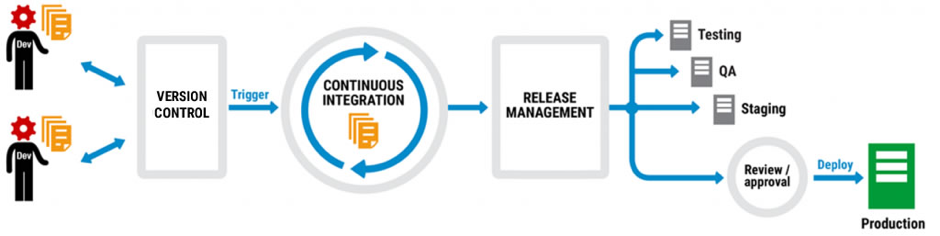
    A typical DevOps workflow looks something like this:

    Code is version-controlled so different developers can work on multiple branches at the same time. When it’s checked into the version control system (VCS), often at the end of each day, it triggers a continuous integration process that builds and validates the changes. Once the changes are complete, a release management tool then pushes them through the testing, QA and staging environments and there’s a final review before the changes are deployed to production.

    Not every company does all of this, but many do different parts of it and plan to extend DevOps practices into other areas. They might start with version control, for example, get the team accustomed to checking in changes, and then move on to continuous integration.

    It works too. The “2016 State of DevOps Report” from Puppet found that organizations practicing DevOps deploy 200 times more frequently, recover from failures 24 times faster, and have a 3 times lower change failure rate. DevOps has moved from a developer-led approach to one that businesses are actively encouraging.

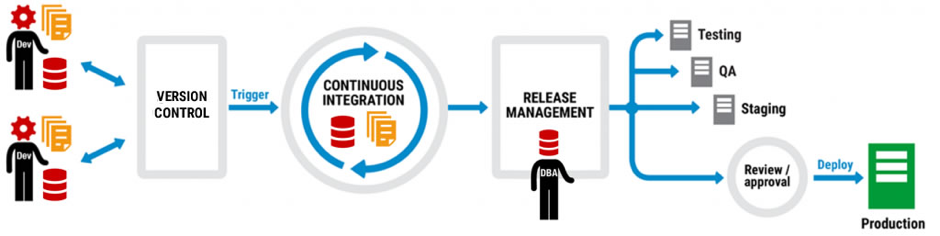
    Thing is, database development can be part of the same picture as application development. Let’s take another look at that DevOps workflow:

    The same workflow, but this time with database development included. Note that there are no extra boxes or arrows, there are no asterisks with caveats, and the only difference is that database development has been added to application development and a DBA has stepped in to the frame.

    But how can database development be added to the DevOps mix when it requires new tools, separate processes, a different mindset? The answer is to think about integration not separation, and extending the current infrastructure not replacing it.

    Application development teams, for example, will use a VCS like Team Foundation Server (TFS) or Git, a continuous integration system like TeamCity or Jenkins, and maybe a deployment automation tool like Octopus Deploy. They’ll also have a favored IDE for application development, probably Visual Studio, and if they do database development, they may well work in SQL Server Management Studio as well.

    Ask them to add to their workload with unfamiliar tools and development environments, or enforced policies and processes, and the shine of DevOps starts to lose its luster. What was freeing them to perform better is now tying them down to an unwelcome way of working.

    Ask them, on the other hand, to use the same tools and processes but extend their capability to database development and it’s a different story. If they already version application code using TFS, for example, there are database version control tools out there that plug into it so that database development becomes an additional part of the process, not an extra process.

    The same is true for continuous integration, release management and deployment. At every step of the DevOps workflow, database development can join application development so that it’s a natural partner rather than an unwelcome guest.

    But just how realistic is this approach? When development teams are already facing the challenge of introducing DevOps, is it a pipe dream to think the database will even be considered as part of the picture?

    According to Microsoft, no. When Visual Studio 2017 was launched in March, the Enterprise edition included Redgate Data Tools in the installer to make it easier for users to implement DevOps practices when building, deploying and maintaining their SQL Server databases.

    As Shawn Nandi, senior director for Cloud App Development and Data product marketing at Microsoft said at the time: “We think this is an important step forward to help companies extend DevOps practices to all parts of their applications.”

    So if you’re considering adopting DevOps, remember the database can be part of it, too.

    About the Author/Matt Hilbert

    Matt Hilbert is a technology writer at Redgate Software with 20 years’ experience working for lots of the world’s biggest tech companies – and many of the smallest. He has a particular fascination for emerging technologies and is on a continuing mission to decompile, untangle, and explain techspeak to a wider audience, and excite people about the endless possibilities technology offers.


  • IBM: DevOps, AI to Drive Digital Business Transformation

    IBM: DevOps, AI to Drive Digital Business Transformation

    Conventional wisdom holds that one of the biggest challenges organizations face today is a chronic shortage of application developers. But as artificial intelligence (AI) advances, the process of writing code will become more automated. But rather than there being not enough developers to write all the code necessary, the shortage will be in software engineers who can develop innovative systems.

    Bob Lord, chief digital officer for the Digital Business Group at IBM, says a glimpse of the future of application development is already being provided today. Instead of writing low-level code, most developers today simply combine modules to create new applications. Anytime new functionality is required, another module gets dropped into the application. The number of developers writing the low-level code needed to create those reusable modules is relatively few, says Lord.

    Over time, however, AI models will learn how to write that code. People will add value by providing the engineering expertise needed to combine modules to create an innovative application, Lord says. Naturally, most of the processes employed to deploy that software also will be automated. But IT operations teams will be needed to continuously train the AI systems being used to deploy that software. This is in much the same way that we need human pilots to fly a plane whenever something new or different occurs, despite the existence of autopilot technology.

    In general, Lord says, IT organizations would be well-advised to focus on three things:

    • They need to decide what architecture strategy is going to be employed to accelerate DevOps integration.
    • They need to develop a data strategy that drives digital business transformation.
    • They need to layer a cognitive computing strategy that employs advanced algorithms to maximize the business value of the data they’ve accumulated.

    While some organizations approach these issues in isolation, Lord says the reality is they’re all closely connected. Organizations are investing in DevOps not just to reduce costs—DevOps is about attaining a level of IT agility capable of driving digital business transformations. In fact, Lord believes the way IT organizations are measured will change: Rather than being rated on traditional IT metrics, they will be measured on how effective they were in attaining business goals—especially when to comes to velocity at which applications are rolled out and updated.

    In the meantime, Lord says, developers are starting to exercise more influence over the technologies organizations are employing to achieve those goals. Because of that issue, IBM is making an effort to get closer to the developer community. But as application development advances, many of those developers will be software engineers rather than people who write code, while IT operations teams will become teachers who train intelligent systems how to respond to the needs of deployed code.

    — Mike Vizard

  • The Emergence of UI and UX in DevOps Tools

    The Emergence of UI and UX in DevOps Tools

    Most of the popular DevOps tools on the market such as Puppet, Chef and Jenkins, are open-source and require a high level of proficiency. With the complexity comes the challenge of learning new frameworks and paradigms, a benefit to those who want to challenge themselves and learn new skills.

    But while these tools have become widely adopted, the widespread adoption of DevOps is creating a need for interfaces that cater to all users, from the most technical engineers to those who don’t want to learn, don’t see the value in learning or don’t need some of the top-end power that a complex scripting interface provides.

    It is for this reason that CloudBees developed Blue Ocean, a new interface for its continuous delivery tooling, and Red Hat released a user interface (UI) for Ansible.

    The Right Time for UI?

    Why have there not been UIs before now?

    I would say two reasons:

    1. Users did not demand nor care for one until now. A UI in many circles is seen to been more presciptive/restrictive of what can be achieved, and that only scripting/programming interfaces expose the real power to an engineer. Also, many of the most progressive engineers like scripting; they derive satisfaction from learning new skills, especially those that are the most highly desirable/in demand. And, I think many engineers like things because they are difficult to do; it’s a challenge, they have bragging rights and means they likely are getting paid more/are in demand.
    2. The open-source community is not as good at or geared toward building UIs.

    Why has a UI become important now?

    At MidVision, like many of the other commercial automation tool vendors, we have always believed that user experience and accessibility is critical, so we have provided command-line, scripted, API and GUI interfaces to our tooling. But this has not been the common approach.

    What makes this moment different is the wider adoption of DevOps automation tooling by groups that want at least graphical user interfaces (GUIs) and improvements to user experience such that you don’t need to be super-technical to be able to use them.

    The main groups we see are:

    • Business users within an organization. Continuous delivery/release automation tooling very much promotes collaboration, interaction and self-service, allowing release managers to see the status or pipelines, approve releases or initiate deployments. Managers may want to see dashboards and metric, produce reports or usage data. Other less technical staff, offshore teams, second level support, etc., may want to be able to provision, clone environments or deploy changes.
      There is a gap between the nerds in the basement speaking one language – and the business users who speak another which accessibility, UI and UX hopes to bridge.
    • Operations. There are certain parts of IT Operations that have welcomed the technical script-based tooling with open arms—it was a natural evolution for a UNIX system admin to become a DevOps/automation engineer. They can still script in shell (or are they meant to be doing it all in Python? ?). Again, some of the security tooling, storage, etc., are generally more comfortable down in the weeds. As you move up the stack however, toward the business application deployments, users are much more familiar and comfortable with UIs. Also, at this level dashboard, metrics, access control and reporting are much more important—and all of which are very hard to achieve without a proper UI.
    • Wider industry adoption. Adoption of the tools and techniques that are often advocated in the DevOps world started with the same poster child companies—Netflix, Twitter, Facebook, Google—and other newer companies that are cloud-native, have an open-source-first policy and are unencumbered by heritage technology stacks.

    We have then seen parts of enterprises adopt DevOps practices and tooling. Obviously, it is important to start small, establish value and then scale—running an initiative like you would a startup within an enterprise works well.

    Now that there is a compelling body of evidence to suggest that DevOps practices provide competitive advantage, cost savings, improved time to market, etc., other industries that are heavily dependent on technology have not had yet adopted these practices for varying reasons. Some parts of the finance and healthcare industries are two such areas. These industries have concerns around security and stability that may have slowed their adoption to date.

    Overall, however, this wider adoption means we need to cater not just for the new breed of DevOps engineers that are both system administrators and programmers and can script in Shell, Rudy and Python. We also need to cater to a wider group that either don’t have the skills to use these tools or don’t care for them.

    What change, then, are we likely to see?

    I believe DevOps tooling will evolve to provide new interfaces to cater to business users and self-service, and to make it easier to achieve the same thing without needing years of experience using a tool before being considered a competent user.

    I would compare many of the current tools today to a map and compass. Lovers of orienteering or mountaineering may suggest using a GPS or map on a mobile phone is cheating, cannot be relied upon or won’t provide the same same information as the contours on a 1 to 10,000 map. Or maybe you prefer vinyl to Spotify.

    Neither of these things are wrong; they are just not the only right. If you want to nerd out with your map and compass, vinyl LPs and Python scripts, I say fill your boots. All of which, BTW, I have some passion for! However, if you also want to get in your car, enter a zip code and know that it will get you there (accepting there is maybe a route that is slightly quicker if only you had done your research more thoroughly), this makes perfect sense to me.

    User experience is at the heart of the most of the other products we choose to consume, and I think many new and existing users will be pleased with UX becoming more important as tools like ours and others put this at the forefront of their design.

    About the Author / Dave Sayers

    Dave Sayers is a co-founder and technical services director of MidVision, a provider of Release Automation and Continuous Delivery Software. He works closely with customers and partners on DevOps and Automation initiaitves throughout Europe and North America and is responsible for devising and managing the partner and channel strategy. Connect with him on LinkedIn.

  • In Product Development, Transparency is the New Agility

    In Product Development, Transparency is the New Agility

    The rise of DevOps has shown that agility and speed are key drivers for turning a business into a high-growth company. But as product managers, that’s not all we can take away from the DevOps culture. Those same methodologies that enable DevOps to function, such as having cross-functional teams and embracing a culture that embraces transparency, can also help product teams adopt experimentation.

    The product cycle should be an ongoing opportunity to try new ideas, gather data, make changes and celebrate failure. Teams with an experimentation mindset are better-suited to accept these goals, knowing that they lead to learning and succeeding quickly. Yet, experimentation and developing innovative products will succeed only when there’s a foundation of transparency—and not just about financial data and company successes, though that certainly helps. Everyone on the team needs the freedom, insight and tooling to make big bets, as well as the accountability to see them through.

    This is where DevOps comes in. Leaders at the C-suite and VP level need to apply DevOps systems to product development to stay agile. Here are three ways to do so:

    Make Development a Collaborative Process

    DevOps brings IT and engineers together to meet customer and business needs. Product development teams should adopt a similar cross-functional team culture to remove silos. When product managers, sales managers, success managers and developers have regular and open conversations about industry trends, customer requests and big successes, they’ll have more insights in the customer experience and product road map that can help each team be more effective. For example, sales managers interact with customers daily and bring a broad perspective about customer problems, while product managers can gauge whether the ideas align with the business goals and developers can assess whether ideas are feasible to implement.

    At Optimizely, I encourage my team to brainstorm several big bet ideas on a quarterly basis and discuss whether these ideas are new offerings we need to build or buy or whether we can build on into our current offerings. This collaborative process gives the product, sales and developer teams insight into what other teams are thinking about and encourages all of the teams to put their heads together to experiment with new ideas. Recurring brainstorm sessions that incorporate recent trends will ensure the team stays agile.

    We also have a collaborative product feedback process that allows go-to-market teams to suggest features to the product team at any time and have a conversation around the business benefits of feature delivery. This is accomplished with pods of product areas comprised of product, design, engineering, product marketing, success and sales. The members of the pod meet weekly at standups and biweekly at product reviews to ensure alignment between what is being built and what the go-to-market teams are hearing from customers and prospects.

    Shop Around Your Proof of Concept and Be Ready to Course-Correct

    Product development isn’t a one-and-done process. It requires building minimum viable product, collecting feedback and revising. At Optimizely, we try new ideas and first get feedback from our internal teams and around five trusted customers to start. We implement their feedback and updates before rolling the feature or product out with a slightly larger subset of beta customers, around 20 or 30. With even more feedback, we continue to improve and build on the product, rolling it out to larger and larger customer groups under beta before making it generally available.

    As feedback is collected, it’s important to bring our cross-functional teams together to analyze the comments and bring their different perspectives, whether it be customer-centric or developer-focused. We have to be willing to accept the feedback we get and make changes based on it. A recent example is when we rolled out Optimizely X Experimentation, which was built with reusability in mind to overcome some of the issues of Optimizely Classic. While this was a worthwhile goal and customers wanted reusability, we ended up overcorrecting and having to build new workflows after the fact. These ended up looking more like Classic and were more user-friendly but less reusable across experiments.

    Hire Product Managers who Prioritize Trust and Transparency

    People underestimate the importance of getting along with your colleagues and building trust with them. That doesn’t mean you can’t disagree or have different approaches. It simply means you’ve established trust and open communication—and you’re open to hearing and considering these differing opinions. These two elements are key for staying agile and quickly adapting to industry trends. You often heard the phrase “strong opinion, weakly held” at Optimizely, which encourages lively debate.

    At Optimizely, we evaluate trust and transparency by having engineers and marketers interview prospective product managers to make sure the candidate can build trust with different teams and see pain points and priorities from various perspectives. During the interview process, it’s equally important that people acknowledge their mistakes and are able to learn from them. If a candidate can’t think of a mistake or explain what they learned from one, they likely aren’t taking enough risks or reflecting on their failures. Opening up about failures creates trust that leads to better teamwork and ultimately better business decisions.

    Ultimately, we can all take a page from the DevOps playbook to make trust and transparency a priority on our teams. Those who do will see new business ideas flourish and team members work in a more cohesive way.

    About the Author / William Gradin

    William Gradin is the VP of product management at Optimizely and is responsible for building the Experimentation Platform to help businesses boldly test their assumptions and respond more quickly to ever-changing market dynamics and customer expectations. Prior to joining Optimizely in 2015, Will worked in Product Management at Salesforce, where he owned the Platform teams for the Salesforce Communities product. Connect with him on LinkedIn.

  • Feature Branching vs. Feature Flags: What’s the Right Tool for the Job?

    Feature Branching vs. Feature Flags: What’s the Right Tool for the Job?

    A dev team’s branch management strategy can have a significant impact on the rate at which it can release high-quality software. In this article we’ll explore the pros and cons of several different approaches for enabling multiple concurrent streams of dev work in the same codebase. We’ll see that two major factors—the cost of merge conflicts and the ability to release streams of work independently—are often in tension, but that Feature Flags provide a way to resolve that tension.

    Merge Conflicts

    New products start off as a small codebase, usually only being worked on by a handful of developers. This situation doesn’t call for much formal process. However, even when a team consists of just two devs, it’s still preferable to avoid working on the same files at the same time to avoid merge conflicts.

    Unfortunately, even when we’re trying to avoid stepping on each other’s toes, it’s still pretty common for work streams that seem unrelated to end up touching the same files. Sometimes it’s these unexpected merge conflicts that can cause the most pain—any iOS developer who’s been around the block a few times probably has acquired some scar tissue from an epic three-way XIB merge in their past. In this article we’ll explore some different ways to deal with the challenge of merge conflicts when multiple developers are working on the same codebase.

    Some people might argue that merge conflicts aren’t that big a deal these days and mostly are solved if you just use modern tools such as Git. This is unfortunately not true. Git certainly makes creating branches trivial, but it does not always make merging parallel changes within those branches trivial. It has some powerful features to automatically merge changes when possible. These automatic merge heuristics can feel almost magical at times, but they are not actually magical. If you make parallel changes that affect a large XML file—for example, a XIB or an IDE project file—Git likely will not be able to merge those without human assistance.

    Most importantly, Git cannot automatically resolve semantic conflicts. For example, imagine that in one branch Alice renames a method and in another branch Bob adds a new usage of that method. When those two branches are merged, Git will do nothing to help resolve the fact that Bob’s branch is calling a method using the old name. Bob’s code is calling a method that no longer exists. In fact, Git will not give Alice or Bob any clue that there is a conflict, since these semantic conflicts aren’t detectable by our current set of tools.

    We’ll only find semantic conflicts when we try to compile our merged codebase, and even then only a subset of them. If the codebase is in a dynamically typed language such as javascript, we might not find out until our users start reporting app crashes in production.

    Beyond the productivity hit of having to manually resolve these inevitable merge conflicts, the spectre of introducing a conflict can have a more pernicious, long-term effect on a codebase. A developer who sees an opportunity to incrementally improve the quality of the codebase is slightly disincentivized to do so if they sense that it could lead to a merge conflict.

    The calculus for whether the effort of making a small improvement is worth the investment gets shifted as the cost of that change becomes higher. This introduces a subtle drag working against the internal quality of a codebase over time. What’s more, the type of small but broad refactorings that can gradually improve a codebase—or stop it gradually degrading—are exactly the type of changes that often lead to a merge conflict. In my opinion, this is the true hidden cost of branch-based development—it disincentivizes the sort of “boy scout rule” improvements that can prevent areas of a codebase from gradually degrading into no-go zones.

    So, having established that merge conflicts are a Bad Thing, let’s look at how we might avoid them.

    Working Directly on Master

    A small team starting out on a new app might initially try to mitigate the risk of a big unexpected merge conflict by having all devs push frequently to a shared master branch—one of the central tenets of continuous integration. When everyone is frequently synchronizing their changes in a shared master branch, an unexpected merge conflict is revealed earlier and is easier to deal with.
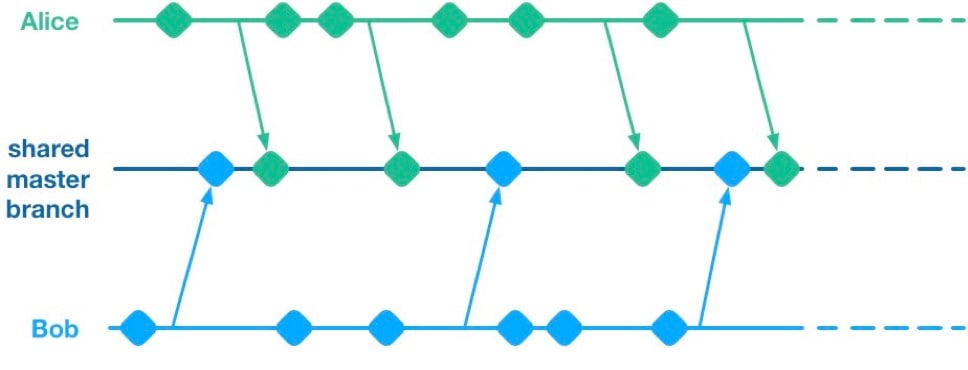
    Unfortunately, having multiple streams of work landing on a shared master branch comes with a big drawback: If any of the streams of work are not ready for release, then nothing on the shared branch can be released. Let’s see why using a hypothetical example.

    Alice and Bob are a two-dev team working on a mobile app. They have two streams of work in progress. Bob is working on a big overhaul of how user preferences work, while Alice is finishing off a critical new feature for the app which the big bosses have decreed must be pushed to the app store by the end of the week. This team is trying to avoid big merge conflicts by frequently pushing their code changes to a shared master branch as they go.

    On Thursday, Alice is wrapping up her changes and doing some testing. While giving the app a general run-through she notices that the user preferences section is crashing. She asks Bob if he knows why. Bob explains that he’s in the middle of overhauling that area of the code. It’s taken a little longer than he expected and it might be buggy for a while. Alice gives Bob a look. She explains to him that her feature has to get to the app store this week. Bob gulps. Over the course of two long days Bob and Alice are able to roll back Bob’s changes, some of which had gotten tangled up with changes that Alice had been making as part of her new feature. They manage to ship to the app store by Saturday, and a crisis is averted.

    We see here that because Alice and Bob were both committing to a shared branch, their independent streams of work became entangled. Alice could not release her changes without Bob’s and vice versa. This is the huge drawback of working on a shared branch—although we will discover later on that there are ways to mitigate this.

    Feature Branches

    To avoid this issue of coupled work streams, dev teams very often will move away from pushing in-progress code onto a shared branch. Some teams will opt to continue working on master on their local machines but only push to the team’s shared repo once the work is complete. Other teams will opt to use Feature Branches, maintaining separate streams of work on isolated branches and only merging them into master once they’re complete.

    As an aside, it’s interesting to note that when using a distributed source control system like Git, these two approaches are essentially equivalent; the only difference is whether the unmerged in-progress changes are visible in a remote feature branch or hidden on a dev’s local master. As such, I’ll talk about both variants as Feature Branching.
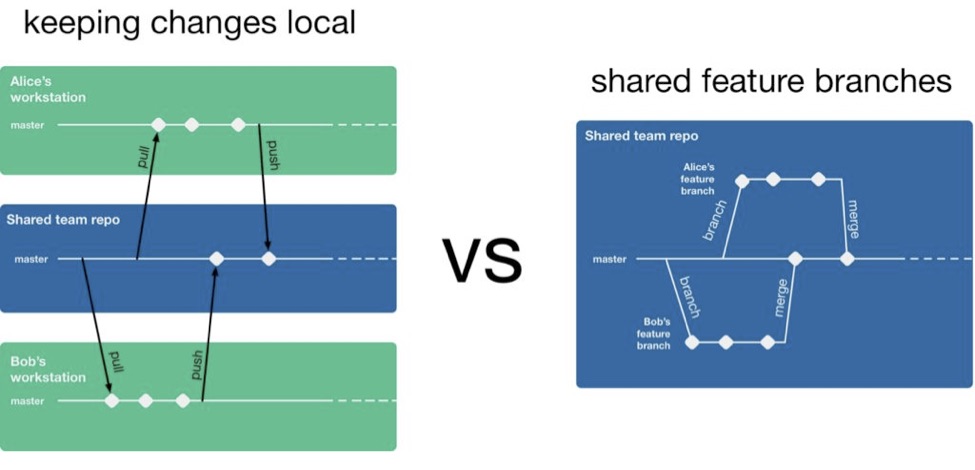
    So, if a team is using feature branching, then all their problems are solved, right? Unfortunately not. We’ve now re-introduced the risk of painful merges. Work that is being done on a feature branch is not integrated with other changes until it is merged to a shared master branch. Whenever two streams of work both touch the same files, either inadvertently or intentionally, there is a latent merge conflict which continues to grow in size until one of those stream’s branch lands on master. Some teams will try to mitigate this issue by frequently merging changes from master back into in-flight feature branches.
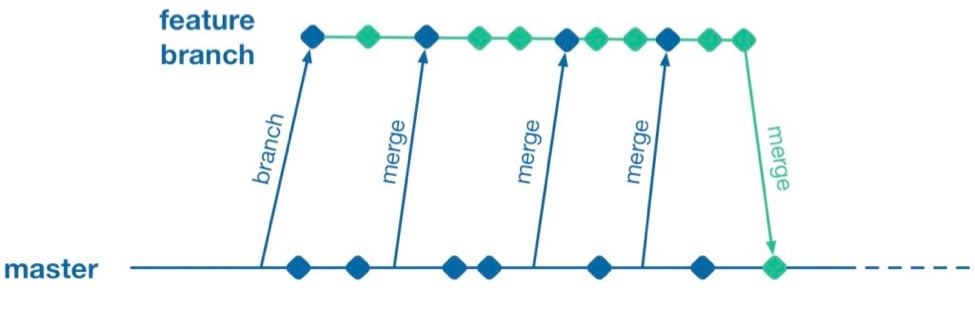
    However, this does not help when parallel changes are occurring on isolated branches. Alice’s branch will only see Bob’s changes when his feature branch lands on master. The latent merge conflict between these parallel changes is now waiting for Alice the next time she merges from master.
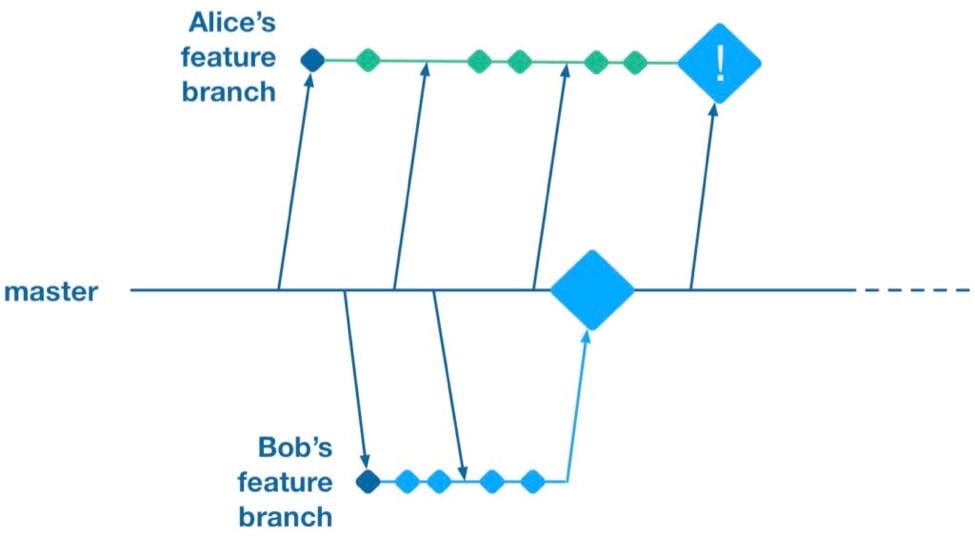
    (Thanks to Martin Fowler’s feature branch writeup for inspiring the above illustration)

    Some teams attempt to solve this problem by “cross-merging”—pulling work on one feature branch across into another feature branch to break down the size of latent merge conflicts between those branches.
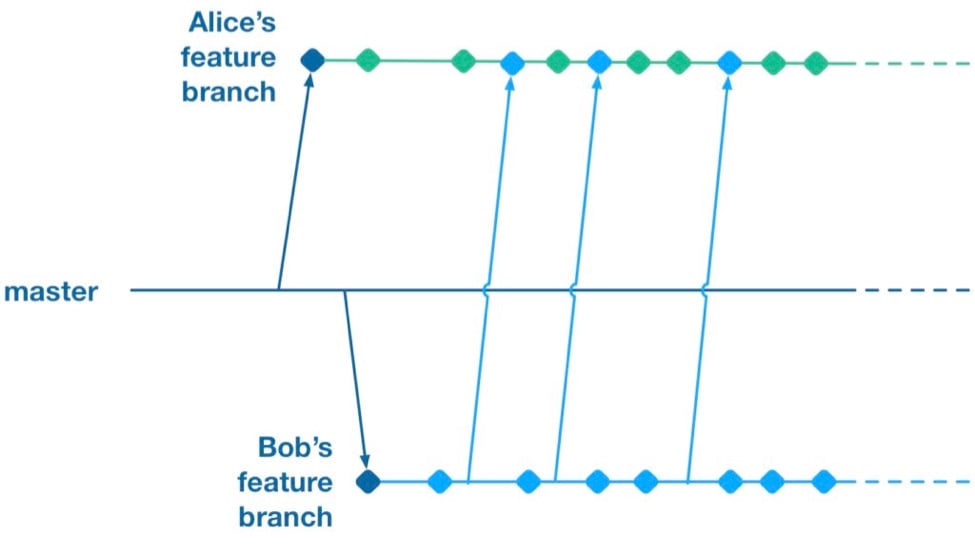
    However, as soon as you merge two feature branches together you’ve essentially created a shared branch of in-progress work, and are back to the same problem as teams who are pushing in-progress changes to a shared master: Code changes from both work streams are now intermingled. Your features are now coupled together and cannot be released independently.

    To summarize, feature branches allow teams to decouple streams of work such that they can be released independently. However, they introduce a risk of large merge conflicts when parallel feature branches contain large sets of changes. Remerging from master into feature branches only helps once parallel work has already landed, and cross-merging between branches couples features together in the same way as working on a shared master.

    Feature Flags

    What alternative does a team have if they want to avoid the merge conflict risks Feature Branches introduce? They could go back to frequently integrating changes on trunk, but we established that this has the major drawback that formerly independent streams of work are now coupled together and cannot be released independently. This is where a technique called feature flags (aka feature toggle, bits or flippers) can help.

    A feature flag is a way to isolate work-in-progress code by placing it behind a “flag” or “toggle.” The work-in-progress code will only be exercised if the flag is flipped on. Otherwise, it will sit within the codebase as “latent code.” Here’s a sketch of how a basic feature flag might be used:

    if( featureFlags.isOn(“my-new-feature”) ){
    showNewFeatureInUI();
    }

    Unless the my-new-feature flag has been configured as “on,” the new feature will not be exposed within the app’s UI. This means the app can be released even if the code implementing new feature is totally bug-ridden, as long as that feature’s flag is flipped off.

    By using feature flags, in-progress changes can be pushed into a shared branch without blocking release from that branch. If Bob is halfway through his feature and Alice wants to push a release of her feature, the team can do that by creating a release where Alice’s completed feature is flipped on while Bob’s half-finished feature is flipped off. We get the benefit of continuous integration of developer work streams (reduced risk from merge conflicts) while still keeping release of those work streams decoupled.

    This technique is not particularly new. It is part of a family of techniques sometimes referred to as trunk-based development (you can tell the technique is not new because the name uses trunk rather than the mastermoniker, which is more common today due to git’s predominance). Flickr, Etsy, Github and Facebook are some better-known proponents of the technique. Facebook’s use of feature flags is one of the key enablers for its famous ability to deploy facebook.com from a shared branch twice daily.

    Drawbacks of Feature Flags

    As with the other approaches discussed so far, feature flags have their share of drawbacks. They introduce a fair amount of noise into a codebase as we now need to explicitly implement some sort of branching logic for any incomplete feature. This noise can lead to some messy code over time unless care is taken to retire old feature flags once they are no longer necessary. Testers can take a while to get comfortable with feature-flagged apps—the idea of shipping unfinished, untested code to the app store takes a while to get used to. If the flags can be controlled remotely at run time, then teams need to understand that the new configuration of flags must be tested before being applied to apps deployed to end users.

    Finally, certain types of changes are particularly hard to protect via feature flags—broad but shallow changes that touch a lot of files can be a challenge. Happily, feature flagging is not an all-or-nothing approach; feature branches can still be used for a change that would be particularly fiddly to implement behind a flag.

    Succeeding with Feature Flags

    When a team starts to adopt feature flagging they will usually run afoul of some of the challenges discussed above, and eventually figure out ways to mitigate them. Here are some of those techniques for working successfully in a feature-flagged codebase.

    Expire Your Flags

    A lot of teams get a bit flag-happy when they first start using the approach. They tend to introduce a lot of flags, but not take the time to retire the flags once they not longer need to control whether a feature is on or off. Make sure to take the time to retire old flags—they introduce design drag in your codebase and confusion when managing flags. Some teams take quite aggressive approaches ensure old flags are expired, such as setting “timebombs” when they create a flag, or having it throw an exception if it’s still in use after a certain period of time. Other techniques include adding a flag removal task to the team’s backlog at the time the flag is created as a reminder.

    Flags Aren’t a Silver Bullet

    It doesn’t always make sense to use a feature flag for a new stream of work. Flags lend themselves best to a new feature or alternative feature where access to the feature can be controlled from a single point in the code—often by showing or hiding a button or changing what happens when you tap some part of the UI. Other types of work, such as internal refactoring, is hard to protect behind a flag. For that type of work, consider using a feature branch, ideally breaking the work down into smaller chunks that can be implemented incrementally in a series of branches rather than one long-lived branch. This will reduce the risk of a large merge conflict growing over time.

    Summary

    Feature flagging and feature branches are both ways to decouple parallel code changes and allow teams to release changes with less coordination overhead. Feature branches are easy to get started with, but can lead to painful merge conflicts. This risk of merge conflicts tends to disincentivize making incremental improvements to a codebase, and can lead to areas of the codebase becoming “no go” zones. Feature flags allow teams to practice true continuous integration and totally decouple code changes from feature release, at the cost of some complexity in implementing each flag.

    Feature flags are not a silver bullet and aren’t always the right choice, but it’s easy for a team to experiment with the approach. You can get started simply with a single hard-coded if/else statement, see how it goes and take it from there.

    About the Author / Pete Hodgson

    Pete Hodgson is a consultant to Rollout.io, a software engineer and an architect. His clients range from early-stage San Francisco startups to Fortune 50 enterprises, focused on enabling continuous delivery of software at a sustainable pace via practices like test automation, feature flags, trunk-based development and DevOps. Pete is a frequent podcast panelist, regular conference speaker in the US and Europe, and a contributing author.