Tag: developers

  • NodeSource Gets to the Source of the Node.js Issue

    NodeSource Gets to the Source of the Node.js Issue

    There’s no shortage of variants of Node.js in the world, but NodeSource is making a DevOps-related case for why IT organizations should standardize on its runtime implementation.

    NodeSource released version 2.3 of N|Solid, which adds support for event loop delay notifications that pinpoint precisely where an issue that needs to be addressed has occurred with an application, based on the Node.js variant of JavaScript.

    Pravin Halady, product manager for NodeSource, says N|Solid uniquely provides a runtime implementation of Node.js that provides that capability. Coupled with tools to monitor applications based on N|Solid, additional visualization tools and configurable webhooks-based integration to create alerts that can be shared via collaboration platforms such as Slack, N|Solid is the only Node.js runtime specifically optimized for enterprise IT environments, Halady says.

    He notes one of the thornier issues organizations that embrace Node.js face is that any long-term synchronous activity blocking the event loop can prevent other incoming requests from reaching the server. Before too long, the application hangs or simply crashes. By providing insights into when an event loop delay is occurring in real time, Halady says IT organizations don’t have to waste time trying to reproduce the problem. The result is a much faster time to resolution of Node.js application issues.

    DevOps teams can find themselves dealing with those types of issues at a much higher level of frequency once developers employ Node.js. As adoption of the most widely employed variant of JavaScript increases, IT organizations are managing more applications than ever. In fact, a recent survey published by the Node.js Foundation finds that three out four respondents plan to increase their usage of Node.js over the next 12 months. The primary reasons cited for that additional usage are increased developer productivity (68 percent); improved developer satisfaction (65 percent); reduced development costs (58 percent); and increased application performance (50 percent). Nearly half the respondents (47 percent) working in enterprise IT organizations say they been using Node.js for more than three years. Over half the developers (58 percent), in contrast, report having more than 10 years of experience working with Node.js.

    IT organizations generally have very little visibility into what’s occurring inside Node.js applications, which makes it difficult to apply DevOps processes. In fact, most DevOps processes in place today are wrapped around applications written in more mature languages such as Java. Developers employing JavaScript tend to not be as well-versed in the role programmers ideally play within the context of an integrated set of DevOps processes.

    In the absence of those processes, having the tools needed to debug an application in real time becomes more important to an IT operations teams that needs to inform a developer about the root cause of a specific issue. Otherwise, the developer ends up running one test after another in the hopes of replicating the problem. Unfortunately, the probability of accomplishing that goal inside most organizations is often relatively low. Because of that issue alone, an event loop delay notification made in real time is likely to pay for itself in a matter of hours.

    — Mike Vizard

  • The Role of QA in the DevOps World

    The Role of QA in the DevOps World

    The need for faster time to market and superior quality is getting intense in the software development process. Software trends for 2017 suggest that DevOps will grow as a trend and become more widely accepted across enterprises. Organizations are reaping the benefits of DevOps approach and are incorporating the rules within every aspect of software testing. A case in point: DevSecOps—security testing integrated with DevOps—is an emerging concept and is being considered by enterprises to execute application security testing.

    The underlying objectives of adopting DevOps are to make the testing and development process more collaborative, ensure software quality and to help launch the product faster to the market. This makes quality assurance (QA) a key component in the DevOps methodology. New-age applications need real-time changes and updates to meet the growing demands of the consumer. This requires continuous testing, continuous development and continuous delivery/deployment. DevOps enables teams to constantly upgrade and deliver.

    In 2016 a number of enterprises adopted DevOps. According to industry experts, 2017 will see more defining moments for DevOps. The idea of accepting DevOps is to consider a cultural shift and not just a technical shift. As digital transformation expert Jeff Sussna says about DevOps, “The key to following the continuous delivery path is to continually question your own assumptions about what’s possible.” Currently, DevOps is on the route of being questioned and defined at every level. It will result in bringing more value to the methodology.

    Every enterprise and its style of working differs. The way they would adopt DevOps will differ, too. But digital transformation and the need to be available for customers all the time with new updates is transforming the way enterprises adopt new practices and methodologies. Every enterprise has to evolve in a sustainable manner, so quality is at the core of every practice, including DevOps.

    Why is QA Integral to DevOps?

    In the DevOps scenario, QA integrates into the testing and development process and takes the collaborative approach. Quality is ensured throughout the testing and delivery cycle and both the testing and development teams are responsible for it. In the traditional pattern, quality creeps in toward the end, but with DevOps it comes in at every level.

    In terms of code development, the QA team pushes the new development code into production and DevOps facilitates to ensure a seamless deployment of infrastructure and tools. Thus, it helps in releasing a code on a consistent basis and the responsibility to ensure quality is not just limited to killing the bug; it is built in the overall application release.

    In the current scenario, hourly releases are required to meet the demands of the consumers and deal with competition. Web/mobile applications such as an ecommerce or financial services application need to be updated frequently. It is a key business requirement. DevOps helps to make this possible, but with QA involved, the quality of the release is ensured. Moreover, with DevOps, the reality check can happen in real time rather than taking the code offline and testing it.

    On the whole, the popularity of DevOps over the years has intertwined quality into every engineer’s responsibility, which is a positive sign. This helps in addressing the needs of the market and ensure that customers do not suffer. QA further enables and directs teams to check the application for performance and quality before it is delivered.

    The role of QA in the current software development process is changing, where the customer comes into focus and the needs of the customer are brought into perspective while delivering the application. Releasing new and functional builds at any point through the application’s life cycle can become a disaster if quality is not ensured constantly. Automation of tests plays a critical role to guarantee quality and bring speed.

    Building a QA strategy with the necessary best practices is essential for organizations that are embracing the DevOps movement. This will help in delivering effective software development and operations to achieve user experience. DevOps practices are adopted to improve the regularity of the releases and reduce the defects. It is a methodology that boosts rapid, short, iterative development and deployment of applications.

    So, the idea of incorporating QA is to ensure continuous improvement in the delivery process. DevOps helps digital enterprises to meet the needs of the competition and enable overall business growth. As a result, enterprises are able to streamline and pace up the delivery of applications with changes and innovation.

    Best Practices for Incorporating QA in DevOps

    The key aspect to consider while merging QA with DevOps is that the QA and testing teams must team up with the technical teams. In this way QA becomes an enabler for ensuring quality in the software development cycle. In addition, it is important to define tangible aspects of the quality that are expected from the project/application. This helps in achieving results within stipulated time frames.

    Putting down the quality metrics is absolutely critical in DevOps, which helps teams to identify bugs early in the development cycle. Defining the metrics also enables teams to integrate them within the organizational culture at various levels. In this way, quality is ensured at every level and development teams also get enabled.

    The idea of DevOps is to make the developer think in line with testers and constantly check the code for potential errors. On the other hand, a tester who holds the responsibility to test the application/software with various testing tools and methodologies also needs to fix the code. In this way, enterprises with an inadequate QA or testing strategy cannot ensure continuous testing and continuous delivery.

    In Conclusion

    The application scenario is changing and it is getting very complex. DevOps can speed up the development, but what can you expect without a robust QA strategy? QA is absolutely integral to the DevOps process. Continuous development and delivery is impossible without a comprehensive QA/testing strategy.

    This blog has been drafted in collaboration with Cigniti Technologies, an independent software testing company. Click here to read more blogs on DevOps.

    About the Author / Komal Lopez

    Komal Lopez works with Cigniti Technologies and is instrumental in helping enterprises take better decisions related to Quality Assurance products, tools and services by leveraging research and content. She specializes in writing about technology trends, testing trends and has been in the Marketing and Communications industry for over a decade. Connect with her at komal.lopez@cigniti.com

  • Avoiding Application Integration Fails

    Avoiding Application Integration Fails

    Trying to integrate applications on your own can eat your project alive. A seemingly simple project may look harmless when you start, but in the end do-it-yourself software delivery tool integrations can devour your entire software process.

    The problem may be that building simple integrations appears easy. How hard can an integration be? But let’s look at what typically happens with integrations down the road using the example of one developer’s story.

    A developer needs to send defects from Zendesk to JIRA, so he builds a one-way integration based on a workflow action (just a trigger). Soon enough, he realizes he is now managing two tools, and keeping them updated has become a big issue—a very manual process and a huge time-sink. So he designs something to support two-way updates. But that’s just the beginning; each tool changes every few months and an integration that seemed so simple on the surface becomes very complicated.

    Then our developer tries to modify a simple JIRA workflow. Again, it seems straightforward, but it’s not, because the tools involved are constantly changing. There are complexities with workflows, and organizations undertake endpoint system upgrades. As a result, one change to the tool breaks everything he’s done. On top of this, it’s difficult now for him to know the hierarchy or how one item relates to another.

    He starts to consider some of the challenges he’s facing. He needs to consider how the description is written in each tool. They are all different, so how does he make sure he conveys the information correctly every time? And each “simple” integration seems to create more pain points, creating auditability and traceability problems. Meanwhile, he has to manage other tools that are continually added to the mix.

    He’s taken a look at both API and custom-tool approaches. He’s found that API integrations are brittle or they become too popular and then have to be maintained for an entire organization. But the alternative—custom tools—typically fall apart quickly.

    And what happens when our developer decides to leave the company? There’s no one left who knows how to maintain the integrations he created. Meanwhile, new tool replacements mean someone has to build new integrations—and the puzzle becomes even more complicated.

    This short scenario illustrates the unexpected challenges developers face in creating and maintaining integrations. The cost of building and maintaining tool integrations in an always-evolving landscape is deceptively high. And when an integration fails and the organization suffers critical downtime, costs (and tempers) skyrocket.

    Many of the common pitfalls are readily evident, such as rich text problems, but the following three areas may be the most challenging to developers addressing integration issues and can’t be easily avoided:

    • Endpoint system upgrades and schema changes
    • Workflow rules and differences
    • Relationships

    Endpoint system upgrades and schema changes: Much of the time, a different team from the one that developed an integration will perform the upgrade. Perhaps a new field was added. Regardless, simple changes to APIs can blow up an integration. API responses may change formats or the expected values for a field may change. When the team upgrades the system the URL may change, so avoiding duplicates is tough. So, too, is ensuring that the change is seamless. Changing some of the underlying features could result in unexpected behavior (and it will be hard to detect where the problem actually is). It may be that JIRA made API changes that caused custom select fields and comments to fail when using the “old way”; however, other features may continue to work as expected, making this failure silent.

    Workflow rules and differences: Workflows are the complexities between systems. It is hard enough to reconcile teams, let alone the tools they use. Tools may require you to enter required fields, and this can constantly change. And workflows may not match up at all. How can you handle these differences without bouncing field values and allowing complex mappings to reconcile these? What happens when a system has a special action to change a status and fields are required at the same time, but the other system is open and doesn’t reflect this?

    Because of these issues, it is critical to get the teams being integrated (e.g. testing and development) to discuss workflows and where the two teams align. These teams need to understand where workflows overlap so they can undertake proper integrations.

    Relationships: These are not always apparent. As you grow and want traceability, you need to have synchronized relationships. How does this requirement trace to a test? How will you manage those relationships? The tools don’t match the way they manage relationships. Some allow one value, others multiple. Some allow relationships across projects and types, others are more restrictive. In addition to the rules of the system, how do you know what items to link once you have synchronized the artifacts? What happens if only one side of the link is synchronized or the items are not synchronized in the order that you expected?

    Getting this all right requires intelligent systems that can look at one system and translate properly to another

    Avoiding Integration Pitfalls

    The first obvious step in avoiding pitfalls is to identify what they will be and when they’ll pop up. To do this, focus not just on the current problem, but also on the future. Consider the bigger picture, understanding that systems constantly change and teams work differently so there will be additional layers of complexity in any integration project down the road.

    As such, my best advice is for development organizations to focus on the software their organizations are counting on them to deliver, not creating and managing tools to build that software. Put internal resources to work in IT areas where you can create competitive advantage for your company. And consider using third parties to address issues such as integrations.

    About the Author / Shawn Minto

    Shawn Minto is the senior director of Technical Services and Support at Tasktop and one of the original team members working with CEO and co-founder, Mik Kersten, on Mylyn prior to Tasktop’s founding.  Shawn began his career at Tasktop as a software engineer, working on all aspects of the product and directly with our customers to support their needs. Currently he works with customers to understand their tool environments and offers suggestions on how to best leverage Tasktop through deployments and support. In his free time, he enjoys being outside, cooking, and renovation projects. Connect with him on LinkedIn and Twitter.

  • Study: Half of Enterprises Have Achieved DevSecOps

    Study: Half of Enterprises Have Achieved DevSecOps

    The inclusion of IT security into DevOps processes, also known as DevSecOps, appears to be occurring at an accelerated rate. A new survey of 300 enterprise IT organizations published this week by DigCert, a provider of identity management and encryption software, finds that almost half (49 percent) of the respondents says they have completed DevSecOps, while another 49 percent say they are already working on it.

    In terms of overall impact, however, only 22 percent say they are doing well in terms of achieving and maintaining higher levels of security.

    In addition, those that have achieved DevSecOps say it took them anywhere from 12 to 14 months to make the transition. Those that have not completed the transition are estimating it will take them seven to 11 months. Based on the experience of the organizations that have completed the transition, there would appear to be a natural tendency to underestimate how much the cultural difference between developers and IT security teams can negatively impact integration objectives.

    Jason Sabin, chief security officer (CSO) for DigiCert, says that while many organizations may have brought IT security professionals into the process, an increase in the overall security of applications being built requires more time and patience, says Sabin.

    DigiCert recommends IT organizations identify an IT security champion within a DevOps process and automate the implementation of IT security controls as much as possible. Those moves can help lower developer cultural resistance to having to spend time on what often are considered mundane programming issues.

    It’s worth noting that most IT security professionals don’t have much in the way of programming skills. They can secure an application using any number of platforms that have a management console. But understanding how to employ APIs to help plug security holes before an application gets deployed is beyond the capabilities of most IT security professionals. IT security professionals can make developers aware of issues, but in general there’s not much they can do to fix the application itself.

    Also, IT security professionals typically don’t understand the amount of coding that might be required to fix an issue, and they are not always able to access the true risk associated with a specific vulnerability. All vulnerabilities tend to be treated as equal threats regardless of number of instances a vulnerability has been exploited.

    The good news is a full 88 percent of respondents saying it is somewhat to extremely important to integrate security into DevOps. Failure to do so will lead to issues such as increased costs (78 percent), slower application delivery (73 percent) and increased security risks (71 percent). Awareness of these issues should eventually lead to the development and deployment of more secure applications.

    The issue, of course, is that not every development team is equally along the DevSecOps maturity code. Because of that issue, it unfortunately may be years before the preponderance of applications running in a production environment are able to defend themselves from even the most rudimentary cybersecurity attacks.

    — Mike Vizard

  • Overcoming the People, Culture Barriers to DevOps Adoption

    Overcoming the People, Culture Barriers to DevOps Adoption

    The fact you’re reading this article on devopsy.kinsta.cloud suggests you’re already a DevOps fan. Or maybe you’re visiting this site because you’re considering moving to DevOps in your organization, or you’ve been told you must move to DevOps and are figuring out how on earth to do it.

    Whatever your view on DevOps, let’s get my position clear from the outset: I am a big believer in the power of DevOps to deliver continual innovation to an organization. I advocate DevOps in every project I do because I believe those organizations that innovate and change the fastest become the leaders in their sector, and since almost every business innovation relies on a technology innovation first (“every company is becoming a technology company,” after all), DevOps is the best way for an organization to adapt to, and benefit from, new technologies and gain a lead in the market.

    However, as anyone who has managed the transition from waterfall to DevOps will know—or, in fact, anyone who has overseen any change management project will know—the transition is rarely a smooth one. So, what is behind this reluctance to innovate and work in new ways?

    First, the Technical Arguments

    At some point, most organizations have been burned due to a lack of quality control in technology, whether a security breach, bugs or implementations/changes that went horribly wrong. We all know stories like these. They can have an immediate and catastrophic effect on the organization’s ability to do business. Therefore, there has been a tendency to inhibit change in favor of “stability” and known entities, and to adopt a “Better the devil you know,” strategy.

    DevOps has rocked this view of the world, and teams are reticent to move away from tried and tested approaches and processes because they are held responsible for operational stability. In addition, those people in a quality-control role believe their very purpose and job is under threat. There is also a view that DevOps is system- or application-centric, and can introduce risk to an interconnected IT estate.

    While these are all valid concerns, it is worth bearing in mind they are all technical arguments against DevOps, and they have all been countered before. Implemented correctly, DevOps does not jeopardize stability or undermine quality (in fact, many would argue it does the exact opposite), and it does not undermine a person’s role in development or operations, but rather liberates them from their silos.

    Culture is the Real Reason

    From my experience, innovation of any kind cannot be held back by technicalities alone. While the technical arguments are certainly valid, in most instances, the reluctance to adopt DevOps comes from something much more basic: the organizational culture borne from natural human behavior. Most people are simply risk-averse and resistant to change, so the resistance to DevOps is just a manifestation of human nature.

    The only way for DevOps to succeed is to change the organizational culture to be more open to change and to adopt an “innovation mindset.” The change must also encompass the whole organization. If you only bring half of the business with you, the innovators will become frustrated and find ways to circumvent processes and policy, resulting in additional operational risk and shadow IT.

    The influence that senior managers can have in facilitating—or undermining—the move to an innovation mindset must also be factored in. It is common for senior management to inadvertently foster a hero culture, where those individuals who get things back on track after a catastrophic event are rewarded, yet the well-structured and “stable” DevOps deployments are not given the same weight or focus. Again, it is human nature to be drawn to the dramatic event than the non-event. But you must ask yourself: As exciting as firefighting is, is it a sustainable way to run a business?

    Instilling a new mindset into a business is the same as any other transformation project. It requires you to tackle the four elements of process, organization, technology and information to bring about meaningful and sustainable change. To bring DevOps into your organization you must:

    • Align operational teams with development teams, embedding where possible for early involvement of Ops.
    • Ensure that operational/non-functional requirements have the same weight and priority as functional requirements—no user story is complete without a stable and secure operational environment.
    • Automate where possible to reduce human error and increase the speed of delivery.
    • Improve knowledge management to reduce “hero culture” or bottlenecks where knowledge is concentrated across a few people or one team. Never make exceptions for “heroes”; you need their support more than anyone else because they hold the biggest sway over the rest of the team.
    • Have accurate and comprehensive configuration information. Having a good understanding of the IT estate (including interconnectivity) can help move an organization from a one-size-fits-all governance model to a tailored risk assessment approach through better understanding of the impact of changes.

    DevOps often fails when people can revert to their default behavior. Only by actively identifying and supporting a project in a DevOps manner (considering process, organization, technology and information as previously explained) will you be able to change to a new “business-as-usual” innovation mindset and behavior. But this needs strong sponsorship, guidance and patience.

    DevOps must become the culture of the organization, driven from the top as well as the engineering teams, and people need to understand the implications for their role and responsibilities. CEOs and leaders need to actively support and drive the change, while providing the necessary working environments (tools and training) for those people who will be held accountable for operational stability. It is no good investing in technology and training for engineering to innovate if your ITSM functions are not brought along with the change, for example. But if you bring everyone with you, and address all concerns along the way, you will soon be reaping the rewards of the DevOps approach.

    About the Author / Romy Hughes

    Romy Hughes is director at Brightman. Romy is a business change specialist with expertise in service integration and management (SIAM) for managed services, business transformation and IT service management (ITSM and ITIL). Connect with her on LinkedIn.

  • Microsoft Woos Development Partners

    Microsoft Woos Development Partners

    If Microsoft has its way, many more DevOps processes will revolve around the cadence at which the company upgrades its applications. At its Inspire 2017 conference, the tech behemoth announced an ISV Cloud Embed initiative designed to entice more developers to add value by extending application functionality it has already developed and deployed in the cloud.

    Rather than reinvent the same functionality over again, Microsoft will provide developers with access to its application at price points that are as much as 50 percent less than what an end user might pay, notes Alysa Taylor, general manager for Microsoft Business Applications and Industry. In addition, the company is promising to help software developer partners reach 100 million commercial active users of Office 365 and Dynamic 365 customers through the Microsoft AppSource online store.

    The specific software modules the company is providing developers access to under this program include:

    • Dynamics 365 Embedded: a suite of business applications the company is hoping third-party developers will customize and extend across a variety of vertical industries.
    • Microsoft Flow Embedded: Makes it possible to customize workflows to automate business processes within their application.
    • PowerApps Embedded: Provides access to extensions that make it easier to deliver an application via a browser or as a mobile application.
    • Power BI Embedded: Allows users to easily embed fully interactive reports and dashboards.

    This latest initiative is a logical extension of the work the company has been doing to entice developers to employ Microsoft Office as the front end for accessing a wide variety of back-end services.

    The challenge IT organizations that go down this path will face is aligning the pace of DevOps with the rate at which the company is updating its applications.

    Microsoft is not the only IT vendor that presents this DevOps challenge. The more a software developer invokes APIs, the more complicated managing the DevOps process can become. The whole concept of continuous integration/continuous deployment (CI/CD) can get sorely tested when control over when the back-end services being invoked via an API are updated.

    In effect, software developers are being asked to make a buy-versus-build decision. To entice developers to make a buy, the company not only provides a common API framework, but also developers will be able to take advantage of any investments it makes in artificial intelligence across the entire Microsoft application portfolio.

    Taylor says Microsoft is committed to working with partners to eliminate any competitive friction. The company is in the process of implementing a massive reorganization under which the company’s core technology groups are being aligned around four technology groups: Modern Workplace, Business Applications, Applications and Infrastructure, and Data and AI. The rest of the company is then being organized around a go-to-market strategy that is focused on education, financial services, government, healthcare, manufacturing and retail industry segments. Microsoft is looking for partners that can apply their own intellectual property to extend its core applications into each of those segments, says Taylor.

    It remains to be seen just how well partnering with Microsoft can work on a practical DevOps level. But the one thing that is clear is that there will be no shortage of software developers who are about to find out.

    — Mike Vizard

  • How AI Impacts DevOps Pipelines

    How AI Impacts DevOps Pipelines

    The rise of machine- and deep-learning algorithms is about to create some interesting data-gravity challenges for IT operations teams. Over most of the last decade IT operations teams have been caught up in a public- versus private-cloud computing debate that has mostly been species. The truth is that most organizations wind up employing both. But as IT organizations are just now getting used to that multi-cloud reality, the rise of machine- and deep-learning algorithms to create a new generation of advanced artificial intelligence (AI) applications are about to add some significant nuances to managing the DevOps pipeline.

    New applications tend to be built and deployed where they can access the most relevant data. Most of the data employed by the average enterprise resides on-premises today. But it’s clear that the data being created in various types of cloud services is growing at a faster rate, thereby altering data gravity forces across the enterprise.

    To get the most value out of that, developers are now building a new generation of advanced applications that employ machine- and deep-learning algorithms. In most cases those algorithms are being deployed wherever data happens to reside. For example, Salesforce just announced at its Salesforce TRAILHEADX 2017 conference that it is making available additional APIs to the Salesforce Einstein Platform Services for building custom applications that can now be infused with sentiment analysis, the ability to detect objects and understand customer intent.

    Michael Machado, director of product management for Salesforce Einstein, says that the success of any AI initiative will come down to both the amount and quality of the data being accessed. As a CRM application consisting of a mix of structured and unstructured data concerning customers, Salesforce represents an attractive platform for building AI applications. In fact, to facilitate the building of applications, Salesforce also is making it simpler for developers to collaborate across multiple alliances in addition to providing access to DevOps tools from Atlassian and Github.

    But CRM applications are only one element of the typical application portfolio. The more data that any set of algorithms can be applied against, the faster the application learns and the more accurate it becomes. As developers build the next generation of applications, they are going to want to be able to access as much data as possible. For many IT organizations, that will mean the applications will be hybrid almost by definition—attempting to centralize all their data will prove to be impractical as well as prohibitively expensive. Constructing application pipelines spanning multiple data sources, however, requires a very mature set of DevOps processes.

    Arguably, the rise of these next-generation applications might finally force the DevOps issue inside most organizations. Most have been able to manage application development on various cloud platforms in isolation. Going forward, that may no longer be practical, as developers seek to incorporate more data sources within their application environment. The challenge IT operations teams will need to wrestle with is providing timely access to that data in way that doesn’t ultimately compromise their performance.

    — Mike Vizard

  • 13 Best Practices of Successful Software Testing Projects

    13 Best Practices of Successful Software Testing Projects

    Thorough testing is vital for quality assurance, and best practices in software testing can yield high-end software at the end. The current post is giving fine clues regarding the prevailing best practices in software testing projects. 

    Recent cyberattacks have proved that security has paramount importance for any software life cycle. The best QA and testing practices can help software development companies to cut the worst incidents considerably.

    Here are 13 best practices to ensure successful software testing projects.

    Rely Only on a Controlled Security Environment for Testing

    Today, many software development companies and freelancers prefer cloud-based testing to capitalize on the cloud’s benefits. Unfortunately, the cloud has tons of vulnerabilities, particularly when the public cloud is in use.

    Software development agencies instead should invest on testing infrastructure and create a secure testing environment locally to avoid the internet and cloud-based vulnerabilities.

    For mobile app testing, regional testing labs and libraries are the best alternatives, where manual and automated testing take place securely and safely.

    Carry Tests Throughout the Software Development Cycle

    Testing only on the QA stage of the software designing process is an inadequate approach. Testing must carry with each major output/feature of the software. Plan the testing schedule right from the beginning stage of the development process.

    Early testing can catch bugs early and cut the defects early. It improves the quality of software and cuts the labor in the final stage of QA, and reduces the cost of quality maintenance. Moreover, it builds the confidence among the team of developers to include some innovations in the product.

    Break Tests in Small Fractions

    When you carry tests frequently and throughout the cycle, take smaller tests to save time and resources. Many tests are longer than we think, so carry such tests in smaller fractions such as UI testing, function testing, security testing, UX testing and so on.

    Write Tests for Maximum Coverage

    Write all types of tests to cover the maximum, if 100 percent is not possible. When you write test cases for valid conditions as well as unexpected conditions/behavior of apps under the test, you can cover maximum.

    Moreover, write test cases in the requirements step for analysis and designing step, too. This way, your requirements also become testable.

    Carry Regression Tests

    You must recognize and segregate your test cases for regression testing. A quick and effective manual regression testing is beneficial for the quality assurance of the. During regression testing, use a bug graph (number of bugs against time for different modules) to predict the most possible buggy part of the app.

    Programmers Should Not Write Tests

    Technically, tests must be written before coding. Programmers should not write tests or test cases for their own code to reduce  the chances of biased tests or a lack of creativity in the test. Tests should carry tests with own perspectives.

    Note and Report All Tests

    When you carry manual testing or automated testing, keep records of all tests. Note all test progress and observations in a file, and incorporate these observations into the final test reports. Thus, you can release absolutely unambiguous test reports and required details.

    Some of the things that should be noted include the bug’s symptoms, the effects it exerts on the entire system, and all possible solutions to make testing meaningful.

    Clean the Test Code Prior to Final Release of Software Product

    When an application under the test requires changes in core code to carry a test successfully, it must be cleaned once the testing process is completed. Therefore, record-keeping of testing code is a highly beneficial practice. In addition, save time and resources by cleaning the testing code from the core code at the time of the deployment of the final application.

    Isolate the Application from Developers

    During the development stage, designers and developers make constant changes mostly in a collaborative manner, particularly when the MVC paradigm has followed. Testing the application within the development environment is not advisable. For unbiased and complete testing, you must isolate the application from the design and programming environment for a declared period of testing.

    Customize Testing

    Write custom testing solutions for each project according to needs and their possible use cases. A module in an app running on a smartphone has different use cases than the tablet environment, so write the test accordingly.

    Accumulated Skilled Testers

    Highly skilled testers in the team is a welcome move for the success. Your testing team must have functional and automated testers with the latest testing skills in their respective areas.

    Similarly, for performance testing, you should have mixed talents with skills on LoadRunner and JMeter testing. Moreover, you should look for additional skills in your testing team such as UFT, HP ALM, Selenium and other open-source tools for advanced testing.

    Build a Target Operating Model for Testing

    Define testing processes, methods, tools, RACI matrix and communications for your testing project. Acknowledge all developers and team members of the QA department regarding these, their project goals and the responsibilities allocated to them.

    The process is termed as the target operating model for testing, and it helps in the successful entry of any new team member to work toward the common objectives.

    Have a Mix of In-house and Offshore Teams

    Collecting a testing team with required skills and investing in testing infrastructure is not always possible with all software development companies, particularly in developed countries where wages are higher.

    Therefore, you have to rely on outsourcing testing/QA team and their infrastructure. However, not all kinds of testing are possible with offshore teams, and you have to mix the tests and talents with offshore and onshore for successful testing.

    For instance, the behavior of the consumers/users of some products are different between the west and the east, and you need to carry such test cases in the west with the help of local or in-house team through applications that were built by the offshore team.

    Conclusion

    We have explored the best practices to enhance the testing projects for better quality and security of your software in the modern age. Experienced and expert software testing developers are mandatory to hit your testing goals.

    About the Author / Tarang Vyas

    Tarang Vyas is a head of the development team at software development company Perception System. He has been in the industry for 15 years. Connect with him on LinkedIn.


  • Continuous Delivery vs. Continuous Deployment

    Continuous Delivery vs. Continuous Deployment

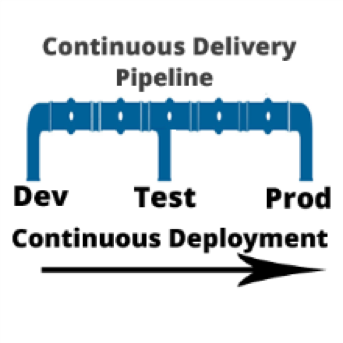
    I am often asked, “if we are using a continuous integration (CI) server and adopting a continuous delivery pipeline, where does continuous deployment fit in?” Good question. In a nutshell, continuous delivery engines such as CloudBees or Blue Ocean are designed to trigger the execution of CI workflows across the dev, test and prod environments. Continuous deployment is called as part of the CI workflow to do the actual release of code out to endpoints. Continuous deployment can be managed by application release automation tools or supported by one-off scripts. Regardless of how sophisticated the deployment step of your CI workflow is, it is still continuous deployment.

    To understand both continuous delivery and continuous deployment, one must go back to their roots, continuous integration. CI is a key component of Agile practice.  Agile developers understand the importance of adopting a methodology that can manage smaller incremental software changes to release software, and therefore business value, to end users quicker and cheaper.  The activities of deploying to testing and production historically have been in the hands of testing and data center teams, separate from Development. But in the Agile practice, these activities cannot be separated from development. The concept of separate development, testing and production teams is a waterfall concept, not an Agile concept. In Agile, everyone is on the same team. This means that testing and production teams must become part of the Agile process.
    Mastering Agile’s last Mile

    Ultimately, the goal of continuous delivery is to accelerate release cycles and get new code out to production fast. However, for most companies this is not happening. Developers and testers may have embraced continuous delivery, but when it comes to production, the code is moved to a staging area where it languishes until production is ready to perform the update. The last mile of Agile is not achieved. And we are back to where we started: waterfall.

    There are many reasons for the production roadblock. Lets’ review the top four.

    • Agents: Both open-source and commercial CI servers are agent-based. An agent based system works fine for developers and can be tolerated by testing. However, production teams are not that excited about installing yet another agent on to the production end points. For this reason, production team use their own method of deploying code. Therefore, the deployment scripts used for releasing code to dev and test are not used by production. The way they see it: Production does not want a deployment process that requires them to re-configure their data center environments with agent from a development tool.
    • Scripts: Production teams want input and visibility. One-off scripts obfuscate the deployment process. For this reason, production teams will write their own scripts. Scripts simply do not have the intelligence needed to meet the audit, rollback and transparency requirements needed by production teams. Production teams perform many steps manually. This takes time and cannot be done in an agile cadence. The result: Great code languishes in staging areas. Production stays several releases behind what continuous test has approved.
    • Cost, cost, cost: Most of what developers create in a continuous delivery workflow comes from open-source or consumption-based licensing models (think Jenkins and Jira). Tools that can achieve continuous deployment such as application release automation solutions are far to expensive for one development team to acquire and incorporate into the CI workflow. These types of tools are sold at the CIO level and cost upwards of $250,000. Production teams are often hesitant to purchases these tools, as the high cost equals high risk. And ‘one ring to rule them all’ does not work. This type of operational tool acquisition is waterfall-based and does not fit into the leaner Agile DevOps tooling. The result: One-off scripts continue to be used and dev and test. Production does not adopt agile.
    • Sustainability: During waterfall, a production release was performed as infrequent as two times per year, or at most once per quarter (considered aggressive). In other words, production is staffed to support a production release on an infrequent basis. With agile, the demand for production releases increases 10-fold. Instead of doing at most four releases a year, they may be required to do four releases a month. Production cannot keep up the agile pace. They are staffed for waterfall.

    Automating Continuous Deployment: Key to Maturing Continuous Delivery

    Continuous delivery cannot be successful without continuous deployment. If you want to roll code out to end users faster, the deployment process itself must be modernized. Using the same one-off scripts that were used in the waterfall approach will not achieve your CD goals.

    Continuous deployment automation is performed by a new set of agile DevOps tools called application release automation, or ARA. ARA solutions are designed to support a model-driven software deployment that allows development, test and production teams to use the same process without the need for one-off deploy scripts. ARA adds all of the features and functions needed to support continuous delivery and data center deployment requirements. ARA is designed to fully perform the heavy lifting of software releases including application packaging, release versioning, database updates, server configuration management, calendaring, roll-forward, rollback, security access and auditing.

    ARA solutions are called by a templated CI workflow that is defined by the development team. The workflow is moved up the pipeline and adapts to the changes at the various pipeline stages (System Test, Integration Test, Pre-Production, Production, etc.)  Because the process is driven by the ARA tool and not a script, the changes are automatically addressed across the pipeline reducing the workload for all teams and supporting frequent changes that can be easily traced and audited down to the server inventory level, including the production environment.

    Developers, Get Your Hands on Deployment Automation Tool       

    To achieve a repeatable CD pipeline that supports production, developers must embrace the automation of continuous deployment at development. The dysfunction however is the outrageously high cost of ARA tools. Developers don’t buy expensive operational solutions. More ARA solutions must be offered on a consumption-based model or offered as open source with the ‘out of the box’ integrations into CI/CD. When considering the purchase of an ARA solution, look for agentless models that can be implemented one project team at a time. Embracing this level of corporate process change must be done project by project. The operational big bang approach does not work well in an agile practice. Not everyone can use the same solution. However,  if done correctly, there are big benefits.

    ARA is a process that strengthens the foundation of the continuous delivery pipeline and is core to the agile DevOps initiative.   It facilitates agile practices by allowing the testing teams and data center teams the tools needed to become more agile and accept the frequency of changes being pushed across the pipeline by Development. Ultimately, the goal is repeatability across the pipeline, pulling together Dev and Ops.

    About the Author / Tracy Ragan

    Tracy Ragan is CEO and Co-Founder of DeployHub. Tracy has extensive experience in the development and implementation of business applications. It was during her consulting experiences that she recognized the lack of build and release management procedures for the distributed platform that had long been considered standard on the mainframe and UNIX.  Tracy has worked with hundreds of development teams in implementing a team-centric standardized build to release process. Connect with her on LinkedIn.

  • In DevOps, Figure Out Why Before Considering How

    In DevOps, Figure Out Why Before Considering How

    It has been fairly well-established that DevOps is primarily a function of the underlying culture—about breaking down barriers and shifting roles so that teams and individuals are empowered to come up with innovative ideas and execute them without the burden of traditional corporate bureaucracy. It is also understood that there are a variety of tools and platforms that enable and automate processes. However, before an organization can even get to the “How”—the culture and tools of DevOps—it should be able to answer the question, “Why?”

    I reached out to organizations that have embraced DevOps and leaders in the field to see what they had to say about the “why.” What benefits can businesses expect, and what goals can adopting DevOps help them achieve—or achieve faster, or achieve cheaper?

    “Delay in delivering innovation comes with an increasingly high price tag, perhaps the loss of an entire market to competitors,” says Forrester Analyst Charles Betz. “DevOps accelerates and improves the quality of software delivery, but that is not an end in itself. The increased speed provided by DevOps is essential to achieving the fast product feedback needed for digitally transforming enterprises to stay relevant and competitive.”

    As Betz points out, companies should implement DevOps for the competitive advantage. Dave Lindquist, IBM Fellow and VP of Private Cloud for IBM, puts it another way: “DevOps is at the heart of the digital transformation. It’s how the next wave of disruptions are being developed and delivered.”

    DevOps bridges the gap between development and operations teams. Inspired by agile development and continuous integration, and incorporating their principles, it addresses the challenges of today’s condensed timeline for application development.

    In that way, the line between the “Why” and the “How” blurs into a bit of a gray area. Companies should adopt DevOps with specific goals in mind—a vision for what they expect it to do for them—because simply eliminating barriers or implementing tools and platforms without a strategy in place for what that is expected to accomplishment is likely to be a waste of time, money and effort. On the other hand, it is very difficult to execute or achieve those goals without also successfully navigating the “How.”

    “Enterprises are navigating major technology shifts and demand is therefore higher than ever for simple and consistent automation and management across hybrid infrastructure and application portfolios,” says Marc Holmes, VP of Product and Revenue Marketing at Chef. “Organizations should adopt DevOps practices for both the culture and tooling to create a consistent and collaborative workflow so enterprises can build, manage and deploy software quickly and safely in any environment.”

    “DevOps can have a direct effect on your bottom line. According to a recent study from Enterprise Management Associates (EMA), ‘Companies that excel at DevOps interactions are 11 times more likely to see double-digit annual revenue growth. It doesn’t stop at revenue growth either. According to EMA, 49 percent of organizations also agree that accelerated delivery frequency leads to higher customer satisfaction, and 35 percent find that it enables them to be more agile and competitive,’” notes Chris Lippi, VP of product at NGINX.

    With its focus on automation, DevOps also helps to ensure predictability, efficiency, accuracy and the standardization of operational, development and testing processes. This, in turn, saves time and money by shortening the release cycle, reducing errors and lessening the need for time-consuming fixes. It also frees up resources to focus on more creative endeavors and on tackling larger problems as they arise.

    Lippi sums it up this way: “Once implemented, DevOps tends to prove its business value in terms of time and cost savings. Making the business value of DevOps clear—to the newly unified team and beyond—helps DevOps culture take root.”

    There are lots of tools and practices out there to choose from, and plenty of guidance and advice on how to implement a DevOps culture. Before you go down that path, though, step back and figure out what you hope to accomplish by adopting the culture, tools and practices.

    — Tony Bradley