Tag: continuous integration

  • WhiteSource Extends DevSecOps Reach

    WhiteSource Extends DevSecOps Reach

    WhiteSource has extended its platform that enables developers to more easily address application security issues to provide integrations with GitLab Core and integrated development environments (IDEs) based on the open source Eclipse project.

    David Habusha, vice president of product for WhiteSource, said these latest extensions extend the reach of the company’s platform for addressing DevSecOps beyond existing support for GitHub and BitBucket continuous integration/continuous deployment (CI/CD) platforms and the proprietary IntelliJ IDEA development platform. All of these integrations are being made available via WhiteSource for Developers, a commercial instance of the WhiteSource platform that includes a WhiteSource Remediate tool to address vulnerabilities and integrations with repositories, IDEs, CI/CD platforms and multiple browsers.

    As the responsibility for cybersecurity continues to shift left, Habusha said WhiteSource is making it possible for developers to identify, track and remediate cybersecurity issues from within, for example, an Eclipse-based IDE. That approach eliminates the need developers to exit the tool in which they spend most of their time to address cybersecurity issues.

    In general, Habusha said organizations that have adopted DevOps are now in the best position to leverage best continuous integration practices to make the transition to a new DevSecOps era. It’s still early days in terms of making that transition, but he said it is clear higher levels of collaboration between DevOps teams and cybersecurity professionals are now occurring.

    In fact, a recent survey published by WhiteSource finds 71% of respondents agree that operational responsibility for application security now lies with software development teams. That same survey finds over a third of respondents (36%) are starting to integrate security testing tools at earlier points in the software development life cycle (SDLC).

    Regardless of where organizations may be on the DevOps maturity curve, it’s never too early to address cybersecurity issues. The challenge is providing the means for DevOps teams and cybersecurity professionals to collaborate. There are not enough cybersecurity professionals available to participate in every stage of the application development process. Developers need to be able to act on issues identified by cybersecurity teams within the context of a larger, ongoing quality assurance process that revolves around their CI/CD platform. In effect, Habusha said, responsibility for cybersecurity needs to shift both left and right across the entire DevSecOps team.

    Nor is there any single right approach to DevSecOps; rather, Habusha said each organization will need to define the right set of processes for addressing application vulnerabilities earlier in the development cycle that best fits their culture.

    It may take some time to heal the rift that has existed between developers and cybersecurity teams for decades now. Even though everyone agrees developers need to take on more responsibility for cybersecurity, the individuals within organizations that have cybersecurity expertise don’t always trust developers, who are under constant deadline pressure to do the right thing. However, given the fact that cybersecurity professionals can’t address every vulnerability on their own, many of them are now coming to terms with the fact they need to find a way to work much closer with application developers regardless of their level of trust.

    — Mike Vizard

  • How to Implement an Effective CI/CD Pipeline

    How to Implement an Effective CI/CD Pipeline

    DevOps bridges the gap between development, operations and IT services teams efficiently. To foster a DevOps culture, implementing the right DevOps tools with the right DevOps process is essential. Continuous integration/continuous delivery/continuous deployment (CI/CD/CD) help developers and testers ship the software faster and safer in a structured environment.

    Unlike the traditional software life cycle, the CI/CD implementation process gives a weekly or daily update instead of monthly or quarterly. The fun part is customers won’t even realize the update is in their applications, as they happen on the fly.

    A Brief Insight About CI/CD/CD Terminology

    • Continuous Integration: CI is a process in which developers integrate new codes into a shared repository several times a day. This is a better approach than the traditional one, where the developer will build new codes in isolation and then integrate into the main repository at the end of the project lifecycle. The primary goal is to detect any integration bugs at the initial stage so it can be rectified quickly. It triggers a new build whenever a new code merges with the existing main repository. Test runs are performed against these new builds to check for any breakage.
    • Continuous Delivery: At the end of the CI, CD comes in. CD ensures to automate the software delivery process and commits to deliver the integrated code into the production stage without any bugs or delay. CD in the DevOps implementation process, helps developers merge the new code with the main branch consistently so they can build an instant software-ready product. It is responsible for checking the quality of the code and performs tests to check whether it can release the functional build to the production environment.
    • Continuous Deployment: The most critical part of the automation occurs at this stage of the delivery pipeline. Whenever there is an important change in the code, the corresponding build and deployment occur simultaneously. It is achieved through continuous deployment process where it allows to perform live deployment changes for every code modification that passes through the CI stage. During this stage, there is no manual intervention right from the initial code until the code is in the production stage.

    Benefits for Implementing CI/CD

    The ultimate aim for any software application is to reach its potential customers faster than ever before. This is exactly what the CI/CD pipeline offers to any business model that leverages a software process which reduces the risks in each build and helps the end product to reach the customer quicker.

    • Achieve Faster Feedback Through CI Tools: For every committed code, the corresponding tests are run simultaneously to avoid any link breakage at later stages. Faster feedback helps to check the quality and impact of the code.
    • Greater Visibility: With CI/CD pipeline setup, the whole process of new builds, test results and any issues with new builds can be analyzed. This transparency allows the developers to know which changes in the build led to the brokerage and to avoid them in the future.
    • Early Bug detects: Conducting various types of automated testing allows to identify any bug issues at an early stage without any last minute surprises. These automated tests along with few manual test runs, help to fix any issues that may arise.

    The Different Stages of CI/CD Pipeline Implementation

    To get the full benefits of the modern DevOps environment, embarking on a scalable CI/CD DevOps implementation is important. It lays a strong foundation for building an agile DevOps for your business.

    Tools for the CI/CD Process

    Tools are the magic wand that help automate a successful CI/CD pipeline and ensure a faster software delivery.

    • Open-Source Tools or Proprietary: Depending upon the budget and the client’s requirement, business can opt for open-source tools such as Jenkins for automating the CI/CD process.
    • Cloud or Self-Hosting Services: To self-host your CI/CD application, tools such as Jenkins and Cruise Control help to setup, configure and monitor the application effectively. Otherwise, you can get SaaS providers to host on cloud services.
    • Build Status: Choose a tool which embraces the transparency and visibility of the entire process through appropriate notifications, through email or other type of communication.

    Possible Challenges of CI

    • You might need a discipline strategy to address an issue by the CI/CD pipeline, otherwise the whole fast feedback is in vain. 
    • Slower builds eventually take place as newer builds keep adding to the product.
    • Failure to train the resources to adapt to new tools and patterns.

    Wrapping Up

    In this era of faster software shipping and building quick releases on the fly, adopting a more robust project cycle that accelerates the delivery pipeline is crucial. Implementing DevOps services is the optimal way to get the effective collaboration between cross-functional teams through the CI/CD process.

    — Jay Elango

  • To Build a Healthy DevOps Culture, Look to Your Ecosystem

    To Build a Healthy DevOps Culture, Look to Your Ecosystem

    How do you do DevOps?  Here’s a hint: Don’t fixate on finding the right tools or implementing the right processes. Instead, think about the broader ecosystem in which you operate, the culture that prevails in that ecosystem and which parts of the culture you can borrow to help enable your DevOps transformation.

    This is true no matter which type of ecosystem you work in–even one that depends in part on mainframes. In other words, to quote from Rouan Wilsenach, writing on Martin Fowler’s blog, “Even with the best tools, DevOps is just another buzzword if you don’t have the right culture.”

    Keep reading for tips on what this means in practice, and how to build a successful DevOps culture by engaging your ecosystem.

    Tools and Processes in DevOps

    To be sure, tools and processes are a key part of DevOps. We’ve yet to see an organization that achieves continuous delivery successfully without the help of a continuous integration server or a continuous feedback process.

    But the reality is tools and processes are not what ultimately separates DevOps success from DevOps failure. Tools and processes help you to implement DevOps; but on their own, they don’t deliver the cultural priorities that allow DevOps organizations to thrive.

    This is an important point to digest. The market is teeming with tools pitched as critical enablers of DevOps, and there is no shortage of articles about why processes such as shift-left testing or de-siloing your team are important for DevOps.

    It would be a mistake, however, to assume that doing DevOps is as simple as implementing one of these tools and processes. If it were, we wouldn’t be spending so much time talking about DevOps in the first place, because it would be a trivial thing for anyone to achieve.

    DevOps Culture

    What matters above all in DevOps is culture. By culture, we mean the values and viewpoints that shape how your team approaches software delivery.

    If your team members don’t believe in constant collaboration and transparency as cultural values, no amount of continuous integration servers or real-time communication tools are going to enable you to achieve the type of team-wide collaboration necessary to support continuous delivery. Similarly, if your developers, software testers or admins don’t recognize the importance of doing continuous delivery in the first place, having the tools and processes in place to perform continuous delivery is not enough to ensure it actually happens.

    This is why instilling key cultural values is critical for DevOps. This isn’t an exhaustive, universally applicable list of essential DevOps cultural values, but most folks would include the following items in this category:

    • Collective accountability. Everyone on your team should assume responsibility for ensuring that software is delivered on time and meets expectations. Software delivery is everyone’s responsibility in DevOps.
    • A blameless environment in which the team as a whole, rather than individuals, owns the system.
    • In a DevOps culture, all team members should have constant visibility into what other members of the team are doing.
    • DevOps places a priority on minimizing manual effort. It promotes automation over allowing some team members to perform tasks manually in order to protect their turf or increase their individual value.
    • Collaboration and shared roles. In DevOps, no single engineer should exclusively own a particular task. Some people might bear primary responsibility for certain tasks, but at the end of the day, everyone should be permitted, qualified and willing to assist with any task.
    • Support from management for all of the above. Executives need to embrace the concept of collective ownership for IT processes, while also giving IT teams the flexibility to scale and change tools and processes as needed.

    Your Ecosystem and Your Culture

    How do you actually construct a DevOps culture founded on principles like those described above? Part of the answer lies in evaluating your current internal company culture, of course, and taking steps to change it.

    But another important part of the answer lies in your business’s ecosystem. After all, culture is not something that develops only on the basis of internal factors. Culture is influenced to a tremendous extent by what is going on around you.

    So, in order to build a healthy DevOps culture, think about what other companies you engage with are doing. In many cases, you can jump-start your DevOps cultural transformation by borrowing ideas from partners who have already been there.

    To be clear, I’m not suggesting you look only for partners who have won accolades as DevOps-first organizations, or startups that have had the benefit of coming of age when DevOps was already a big deal. Think also about established companies that have deep experience working with an array of different technologies, integrating those technologies and bringing them up-to-speed with modern software delivery practices.

    Those are the organizations that have sophisticated, organic cultures. They’re also the ones that know what it takes to update existing cultures to support DevOps. And they may be able to help you identify the specific tools and processes that will enable DevOps for your business.

    Building a Healthy DevOps Ecosystem

    As an example of what the process of constructing an effective DevOps culture might look like in practice, consider how you might approach this challenge if your ecosystem (like many today) includes a mix of modern, cloud-based infrastructure on the one hand, and mainframes on the other.

    This might seem like a difficult circle to square. Conventional wisdom tells us that mainframes may be difficult to integrate with modern DevOps processes.

    But that is not the case. IBM offers a range of solutions to help integrate mainframes into the rest of your ecosystem. For example, Z Open Development makes it possible to standardize your SCM and build processes for mainframes using modern, Git-based tooling. Likewise, Z Open Unit Test makes it possible to bring modern unit testing to mainframe applications. And you can even test and build mainframe apps on commodity x86 servers using Z Development and Test Environment.

    Of course, integrating mainframe infrastructure into the rest of your ecosystem using tooling like this also requires a culture and attitude adjustment. Developers and ITOps admins must move past the cliché that mainframes have no role to play in modern DevOps shops, or that they are too difficult to integrate into modern ecosystems. That’s not at all true and building a successful DevOps culture that embraces the mainframe means discarding this inaccurate viewpoint.

    Conclusion

    In short, succeeding at DevOps means adopting the right cultural principles to turn a DevOps toolset into an actual DevOps workflow. The good news is you don’t have to invent those principles from scratch. Look for an experienced ecosystem partner or partners who can help you in your DevOps cultural journey.

    — Chris Tozzi

  • Automated Multiplatform Deployment for DevOps

    Automated Multiplatform Deployment for DevOps

    In a simpler world, every CI/CD pipeline would need to support only one deployment platform.

    In the real world, multiplatform deployment (which means deploying an application to run on multiple OS platforms) is a must-have for many organizations. We live in an age of diverse operating systems and deploying for only one platform is often not an option.

    With that challenge in mind, let’s take a look at best practices for achieving multiplatform deployment in DevOps.

    Dealing with Multiplatform

    Maybe you’re designing a container-based multiplatform app from scratch. Perhaps you’re thinking of converting a traditional, monolithic, client-server application to microservices with continuous delivery. Or, it may just be time to expand your existing DevOps delivery pipeline to include multiple platforms. The truth is that sooner or later, most DevOps teams will need to understand and deal with multiplatform deployment and how it impacts continuous delivery and continuous integration.

    What are the basic problems DevOps teams face in orchestrating automated deployment for multiple platforms? Let’s look at the key issues involved in multiplatform deployment, and the most effective ways to deal with those issues within the context of an automated DevOps continuous delivery chain.

    But first, we’ll consider one of the most basic distinctions in multiplatform architecture.

    Multiplatform, Single-Tier

    In the single-tier model, the same stand-alone application is deployed to multiple platforms. This is, of course, the standard model for releasing traditional desktop applications. The update process for many of those applications, however, has shifted toward frequent, automatic push updates to the point where it now constitutes a form of continuous delivery. This is typically the case for web browsers, for desktop office suites and for more specialized applications. It is also the rule for stand-alone mobile apps.

    Multiplatform, Multi-Tier

    In multi-tier and multiplatform deployments, different platforms have different roles, and the elements of the program deployed to a platform depend on its role. Typically, this involves some sort of client-server architecture, with the client part of the application installed on mobile and/or desktop devices, and the server functionality deployed in a cloud or hybrid cloud environment, or an on-premises server. At the enterprise level, on-premises hardware is likely to consist of one or more mainframes.

    We’ll focus mostly on multi-tier applications; much of what’s covered here should, however, also be relevant to single-tier multiplatform deployments.

    Designing for Multiplatform Deployments: Overall Architecture

    Fundamental decisions about application architecture will inevitably have a major impact on your deployment strategy. Key members of your DevOps team should ideally be active participants in decisions regarding overall architecture; at the very least, your team needs to be kept up to date on the design process.

    This is particularly true when the application has a hybrid backend, with key tasks split between cloud services and on-premises hardware, since the allocation of tasks is likely to shift as the design team develops a better understanding of both the resources required for those tasks and the load-handling ability of each platform.

    Example: Cloud Transactions, Mainframe Database

    Suppose, for example, that you have a very large and complex database that includes both customer and transaction records. It must be maintained on a mainframe because it includes legacy elements, or for security reasons, because of company policy, or (as is often the case) for all three reasons. Your application is likely to involve a high volume of transactions and other customer traffic, most of which will be stored in the database. In order to shift traffic away from the mainframe, customer interactions will be processed in the cloud, with transaction data initially stored in a cloud database, then transferred to the mainframe database.

    • Will the cloud database represent an actual field-for-field subset of the mainframe database, or will data need to be cleaned up and parsed before it’s transferred to the mainframe?
    • Will you be porting database code from the mainframe to the cloud, or creating a cloud-native database (i.e., COBOL vs. SQL)?
    • Will all user access be through the cloud interface, or will the app switch between the cloud and direct access to the mainframe, depending on the load?

    Questions like these are likely to have a major effect, not just on microservice and code-level design, but also on deployment strategies, since they will determine such things as how closely database microservices must be coupled on the two platforms.

    Designing for Multiplatform Deployments: Platform-Specific Issues

    In order to design a multiplatform application at the end-user and backend microservice levels, and deploy it using automated tools, it is crucial to have a clear and detailed understanding of the resources available on each platform, and of the dependencies they require.

    For the frontend, this may mean maintaining separate versions of your app for Android, iOS, Windows, OSX and Linux. For the cloud-based parts of your back end, you may be able to work in a relatively standardized container environment. Even here, however, you will need to be familiar with the resources and requirements of the specific cloud provider.

    On mainframes, you will need to have a good working knowledge of the mainframe environment, including the operating system and the available resources. This is a necessity for native mainframe operating systems such as z/OS, and it is still largely true if you intend to use a virtualized OS such as Linux on Z, since it is likely to have significant interaction with the underlying system resources.

    Designing for Multiplatform Deployments: Automating the Pipeline

    Keeping track of platform-related issues and managing their impact on your continuous delivery pipeline may seem like a formidable task, but it doesn’t have to be that difficult.

    The key is to develop an adequate understanding of the platforms involved, to incorporate that understanding into your automated tools and all of the target platforms into your automated delivery chain. This means (for example) automated testing across platforms, dependency checking for each platform, coordinated deployment and integrated monitoring.

    A variety of tools, both open source and proprietary, are available for all of these purposes and they can often be integrated into an automated continuous delivery system.

    Integrated Tools for Multiplatform Deployment

    There are, however, considerable advantages to using a highly integrated suite for fully orchestrated deployment. For example, if you are working with IBM Z, UrbanCode provides you with an integrated suite of DevOps tools that is fully integrated into the z/OS ecosystem. It is an agent-based system that includes tools for design of automation processes, multiplatform deployment, dependency checking, inventory and integrated monitoring; and it is specifically designed to manage multi-tier deployments.

    The advantage of working with a highly integrated deployment suite such as UrbanCode is that you do not need to spend time learning what to automate, learning how to automate it or putting together the basic automation infrastructure. You can concentrate on managing the specific automation components and settings your continuous delivery system needs. When you are dealing with a large, complex and business-critical platform such as a mainframe, an automated deployment suite that is highly integrated with that platform, can be an extraordinarily valuable (and time-saving) resource.

    Automated multiplatform deployment for DevOps may be challenging, but it’s eminently possible. The tools are there, and you can make it work.

    — Michael Churchman
  • Pulumi Deepens Cloud Ties to DevOps

    Pulumi Deepens Cloud Ties to DevOps

    Pulumi has made available a framework for automating the management of multiple cloud computing platforms using familiar programming languages such as JavaScript, TypeScript, Python and Go.

    Company CEO Joe Duffy said Pulumi 1.0 provides a framework that enables developers to automate the deployment of applications on public clouds in a way that eliminates having to learn another programming tool or manually employ YAML files that are often at the root of misconfiguration issues. Pulumi also provides access to a software development kit (SDK) through which scripts or code developed for Terraform, CloudFormation, Azure Resource Manager, Kubernetes or Helm can be imported into the Pulumi framework.

    Pulumi also has extended the reach of its automation framework to provide integration with a variety of continuous integration/continuous deployment (CI/CD) platforms including Azure DevOps, AWS Code Services, CircleCI, Codefresh, GitHub, GitLab, Google Cloud Build, Jenkins and Travis. Pulumi also can be embedded with integrated development environments (IDEs) to provide statement completion, interactive documentation and rich error-checking.

    Duffy noted Pulumi also now can be extended to further adoption of best DevSecOps practices. A Pulumi Key Management Service is integrated with the key management tools from Amazon Web Services, Microsoft Azure, Google and HashiCorp. Pulumi also provides role-based access controls and integration with identity management tools spanning GitHub, GitLab, Atlassian, Active Directory, Okta and Google G Suite, among others.

    Pulumi comes in three flavors: A free Community Edition enables individuals to manage their cloud environments, a commercial Team Edition adds support for organizations and an Enterprise Edition provides additional identity options, policies and controls, as well as self-hosting capabilities.

    Duffy said frameworks for automating application deployments on multiple clouds are necessary because enterprise IT organizations now routinely embrace multiple clouds. Rather than requiring IT operations teams to master programming environments, Pulumi makes it possible to shift deployment responsibilities on to the developer, he said, noting that approach should significantly increase the rate of speed at which applications can be deployed using cloud platforms such as AWS, Azure, Google Cloud Platform, Digital Ocean or others.

    While a lot of progress has been made in terms of continuous integration, organizations are finding continuous delivery to be a challenge. Pulumi is betting that by directly involving more developers in the deployment process, organizations will find it easier to extend their DevOps processes in a way that doesn’t require anyone to learn new programming tools.

    In the meantime, the rate at which new applications are being built is only going to accelerate. As development teams embrace a wide range of cloud-native technologies, it’s only a matter of time before the application deployment backlog increases significantly. IT leaders are going to be under a lot of pressure to solve that issue in a way that results in more applications not only being deployed on a timely basis but also deployed reliably. Having more applications running in a production environment that winds up having issues later isn’t necessarily progress. In fact, it’s likely most IT leaders would find themselves in even hotter water for exacerbating cloud security issues that already plague most organizations.

    — Mike Vizard

  • Shift-Left Testing, Continuous Integration and the Mainframe

    Shift-Left Testing, Continuous Integration and the Mainframe

    “Mainframe” is one of the oldest terms in tech. “Shift-left” is much newer.

    You may not think, then, that mainframes and shift-left testing have much in common. But you’d be wrong. Shifting testing to the left can deliver tremendous benefits, even in the context of mainframe applications.

    Let us explain.

    What Is Shift-Left Testing?

    Shift-left testing refers to the practice of performing more tests earlier in the software development lifecycle.

    Traditionally, most testing occurred just before software was deployed into production environments. Testing code at this stage is useful for ensuring it will behave as expected in production, but it comes with drawbacks.

    The biggest drawback of traditional testing is problems are difficult to fix if they are not discovered until just before software is ready to be deployed. At that point, addressing a problem within the code requires determining where specifically the problem exists within the code, removing that code from the application and replacing it with updated code—all without breaking other parts of the application that depend on the original code.

    Shift-left testing helps to address this problem by encouraging software delivery teams to perform tests earlier—typically, starting right after individual units of code are written. Being able to test earlier and more often is especially important in software delivery pipelines based on continuous integration/continuous delivery (CI/CD), where the goal is to roll out application changes on a nearly continuous basis.

    Since bugs that aren’t detected until just before release can take a long time to fix, a lack of shift-left testing puts organizations at risk of not being able to achieve the main goal of CI/CD due to constant delays caused by software quality problems. In addition, shift-left testing reduces the amount of overall end-to-end testing you have to perform.

    You Still Test on the Right

    It’s important to note tests performed earlier in the pipeline don’t replace the testing done just before deployment. They complement them and reduce the chance of having problems go undetected until right before deployment. In this sense, the term shift-left can be a bit misleading; it’s not really about shifting all testing to the left of the delivery cycle, as much as it is starting tests earlier, while continuing to test on the right of the pipeline as well.

    Shift-Left Testing and Continuous Integration on the Mainframe

    Shifting testing to the left makes it easier to fix code problems within virtually any type of application delivery pipeline based on CI/CD. But it can deliver especially critical benefits for software delivery teams striving to bring mainframe applications up to speed with CI/CD.

    There are a few primary reasons why. One is mainframe applications are usually written using older programming languages that were not designed to help developers avoid mistakes. This isn’t to say mainframe languages are especially prone to errors; they’re not. But compared to a language such as Python, which is designed to enforce good coding habits, a language like COBOL doesn’t exactly require programmers to be highly disciplined when they’re typing out their code. Thus, it’s especially important to be able to catch bugs earlier within code written in a mainframe language.

    Another factor is mainframe applications are often part of legacy codebases. When you’re dealing with code and dependencies that are decades old in some cases, you’re at a greater risk of ending up with software quality problems, despite your best efforts. Here again, detecting those problems earlier rather than later means they can be fixed without interrupting the entire CI/CD process.

    Finally—and most important—is the fact that in some cases, there is a large disconnect in terms of skill set and familiarity with mainframe code between software quality engineers and mainframe programmers.

    Your typical QA engineer today didn’t grow up with z/OS and may have limited experience troubleshooting software problems. Given the QA team is typically responsible for running pre-deployment tests, this can pose a problem in the event that QA detects issues with a mainframe application that it has no idea how to troubleshoot, let alone fix. By shifting testing to the left, it’s easier to give developers faster feedback so that they can fix bugs more quickly.

    How to Shift Mainframe Application Testing to the Left

    If you thought mainframes had nothing to gain from the shift-left testing movement, you might also think there aren’t many tools out there to help you do shift-left testing for mainframes.

    Fortunately, that’s not true at all. For unit testing, IBM offers Z Unit, a unit-testing tool for z/OS programs. Z Unit is included in Z Open Unit Test and IBM Developer for z Systems. Using these tools, Z developers can automatically generate unit tests for batch and CICS programs as part of their daily work. These tests can be stored in any standard SCM and can be executed independent of their environment.

    You can even test mainframe apps on non-mainframe hardware using Z Development and Test Environment. The platform creates virtual Z environments on x86 systems so developers can write, build and test their mainframe applications on any standard commodity server or development box.

    Conclusion

    Whether your mainframe applications are decades old or have been written from scratch in just the past few years, there’s nothing stopping you from taking advantage of shift-left testing to help validate them. Doing so will make it easier to achieve CI/CD effectively for your mainframe application, which keeps your software delivery team and your end-users alike happier by reducing bugs and delays.

    Check out the Z Open Unit Test demo.

    — Chris Tozzi

  • Weighing the Cost of Improper DevSecOps

    Weighing the Cost of Improper DevSecOps

    Simply put, data breaches are terrible news for companies. And, the costs associated with such attacks continue to escalate. A recent IBM-sponsored report found an average price of 3.92 million per breach.

    Not adapting security automation and vulnerability scanning into development pipelines could have a drastic effect not only on cost but workload efficiency and team morale. With these sorts of headaches, it’s vital to consider the repercussions for not adopting secure (and lean) armaments and auditing procedures.

    Can organizations adopt DevSecOps beyond the buzzword it has become? In this article, we’ll uncover some startling evidence on the state of Kubernetes vulnerabilities and discuss what companies can do to rectify.

    Trends in Kubernetes and Istio Vulnerabilities

    It’s astounding how much in DevOps is left exploitable. Secrets are routinely unknowingly left in the open due to human error. These are the most common gateways for attackers. Plugging these gaps is the first, albeit obvious, step.

    There’s proof of an epidemic, too. A recent study conducted by Alcide ran a live production analysis of over 500 cloud-native environments across the globe. According to their findings, “89% of deployment scans show companies are not using Kubernetes’ secrets resources, with secrets wired in the open.”

    This means the majority of Kubernetes environments share susceptible to data breaches in some form. Among the 5,000 scans run, the Alcide report found secrets are commonly left open in a few areas, including:

    • Workloads that had to connect to cloud resources that exist outside the cluster
    • AWS access keys to connect to those resources
    • Tokens for workloads that require API access to external databases
    • Credentials for S3 buckets

    Gaps in Best Practices for Kubernetes and Istio

    Kubernetes brings many nuances to the table. It’s a sophisticated system, with a wide range of use cases and cloud-native experiences. These require extensive auditing and compliance checks to safeguard deployment.

    According to Gadi Naor, CTO and co-founder of Alcide, Kubernetes requires a good level of expertise. However, “there is a knowledge gap that DevOps doesn’t have,“ said Naor.

    Much of this gap lies in Kubernetes secrets handling and network policies. On top of Kubernetes, service meshes are a next evolutionary leap. Istio, an architecture layer for creating network policies is ten-fold more complex, according to Naor.

    On network policy creation, “75% of the scanned deployments use workloads, which mount high vulnerability host file systems; while none of the surveyed environments show segmentation implementation using Kubernetes’ network policies,” stated the Alcide study.

    These are compelling platforms, but best practices must meet the growing number of potential attack vectors.

    Why You Should Approach CI and CD Security Separately

    Many pundits now link continuous integration (CI) and continuous deployment (CD) together as if they’re synonymous. However, they are separate concepts. Securing them, in the same manner, could decrease overall efficiency.

    Scanning all resources created in the CI phase against security auditing could waste time and resources. For example, if you’re standing images for CVEs and only deploy 20% of those images, that is a lot of wasted exercises.

    Rather than scanning all environments in the CI phase, Naor believes you should focus on scanning 100% of images for CD. Therefore, security tooling is leaner, and anything deployed will be assuredly safe.

    Takeaways on the Cost of Poor DevSecOps

    Infrastructure components such as Kubernetes and Istio are powerful allies to the DevOps minded teams. These environments do come with their nuanced security concerns, which must be addressed. Otherwise, the data breach price tag is high.

    To intercept system frailties before the black hats do, you must consider the following:

    • Scan for the Obvious: Utilize automation to discover secrets, keys, tokens, left in public repositories.
    • Scan in a Lean Way: Maintain a lean security environment that retains your engineer’s attention.
    • CI vs CD: Recognize the security nuances between integration versus deployment.
    • Add Auditing Tooling Strategically: Adopt compliance and auditing tooling that doesn’t create friction with existing developer workflows.

    As Naor said, “Don’t ignore the obvious stuff.”

    — Bill Doerrfeld

  • Measuring Success in DevOps: Top Four DevOps KPIs

    Measuring Success in DevOps: Top Four DevOps KPIs

    There is no news in DevOps concept. Many companies have integrated DevOps to improve and accelerate software development and help drive their digital transformation, and that number continues to grow exponentially. There are now entire tool ecosystems, methodologies and transformation models—as well as endless resources—available to guide companies along the DevOps journey.

    But DevOps success can be difficult to measure. DevOps isn’t a formal framework; it’s more of a culture and a set of practices, and there is limited guidance available to ensure you’re doing it properly or accurately measuring your successes and failures. DevOps also looks different in every organization—no two DevOps shops will be the same.

    However, despite the nebulous definition of what a DevOps organization looks like, there are some core key performance indicators (KPIs) that should be common to all DevOps environments: asset management, monitoring, continuous integration/continuous deployment and continuous security.

    Asset Management

    In this context, asset management means measuring what is automated and how effectively it is controlled. It doesn’t matter if you are using tools such as Puppet, Chef, Ansible or Terraform; what matters is how effectively you use them. These tools allow you to automatically provision bare-metal or cloud assets, as well as join a load balancer and receive traffic. However, you can achieve similar results from Kubernetes or chaining lambda functions. Automation is really about controlling assets to achieve your business goals.

    Whether you’re using on-premises virtualization or cloud workloads, taking the time to streamline your processing cycles down to the minimum hardware required can significantly reduce monthly costs. The higher the percent of your servers, containers, services, etc. are automated, the less time you’ll spend fixing and maintaining your infrastructure. Some of your applications may be uniquely configured to your particular organization, and therefore cannot be automated. However, if applications cannot be automated, it might be time to retire them and build next-generation applications.

    Monitoring

    Should you be monitoring all of your resources? Yes. Should you also filter out the noise? Absolutely. Monitoring agents should be deployed to all of your servers, and if your PaaS tools and other providers have integrations, you should be using them and parsing out unneeded data. The only thing worse than not monitoring anything is monitoring everything without proper filtering.

    Good monitoring should always be coupled with utilizing the information acquired. Capturing logs, parsing them and using tools such as ELK, Datadog or Sumo Logic, for example, give you a large kit that can not only capture and glean useful information from a tremendous amount of data, but can also make decisions and perform predictive analyses. You might learn your stack is operating inefficiently, or not scaling fast enough during peak utilization periods.

    Disparate systems should be aggregated into a common tool, lest you spend valuable time combining information across systems or pulling information from data warehouses to get your insight. Let the tools do that work for you. You should also be using tools such as Logstash to pull and understand application, database and other logs in your stack for meaningful data. If not, you’re limiting your insight into the service’s health.

    Continuous Integration/Continuous Deployment

    Continuous integration and continuous deployment (CI/CD) is the difference between releasing software once a quarter (or year) and performing dozens of releases to production within a day.

    But it’s one of the most difficult indicators to measure, since every environment is different. It is important to understand how many code commits don’t make it past your integration environment. These blockages could be the result of poor programming practices, poor code quality or poor testing. However, if features stay in dev or integration for too long, there is surely an underlying issue. In most cases, it centers around automated testing.

    So, how do you measure good testing? This is one of the most difficult questions enterprises face, especially when automated testing is added after monolithic applications are already written. Essentially, good testing is about creating good business logic and integrating testing that meets most use cases, while covering each function and class. Immediate feedback on failed or successful tests expedites the automation process. The less automated testing is built, the more QA has to test by hand. Failing to integrate good business and integration testing slows down the entire CD part of the pipeline significantly. Also remember shooting for 100% test coverage is unrealistic—over 80% should be sufficient.

    It’s also important to remember applications that are not in a pipeline and must be manually tested will never keep up with the pace of cloud-born innovation. If you are dealing with a giant, monolithic legacy app, it’s time to design its replacement (starting with testing). Pipelines should also have notifications built into them, with chaining logic to react to failures. Tools such as Jenkins, CircleCI, TravisCI and most code repository solutions, such as GitLab, offer rich feature sets to aid in pipeline creation and management.

    Continuous Security

    The easiest way to ensure security compliance is to shift left and resolve security issues in the development stage. Too often, security is applied at production, which means it’s not part of the environment’s end-to-end process. Securing applications and networks at the development level will give you more confidence that applications will interoperate properly at the production level.

    After shifting left, make sure you continuously deploy and monitor your clusters, nodes and pods in a secure manner. Ideally, you have a tool that provides a real-time summary of your cluster’s compliance and security status by looking at workload security and governance checks, cluster worker node CIS Kubernetes Benchmark checks, cluster Ingress controller security best practices and istio security checks.

    DevOps Success Never Ends

    Success in measuring your core DevOps KPIs is not about getting to full automation immediately—it’s about understanding your biggest issues, continuously securing them and improving them over time. DevOps has no end; success requires continuously measuring your progress and improving your environment with the most effective and up-to-date tools. Take control, implement thorough and meaningful monitoring, deliver with confidence and do it securely.

    — Gadi Naor

  • CollabNet VersionOne Advances End-to-End DevOps Strategy

    CollabNet VersionOne Advances End-to-End DevOps Strategy

    At its Agile 2019 conference, CollabNet VersionOne announced it plans to extend the capabilities of its software delivery and management platforms later this month as part of an effort to provide organizations with more visibility into how changing software development project schedules impact the business.

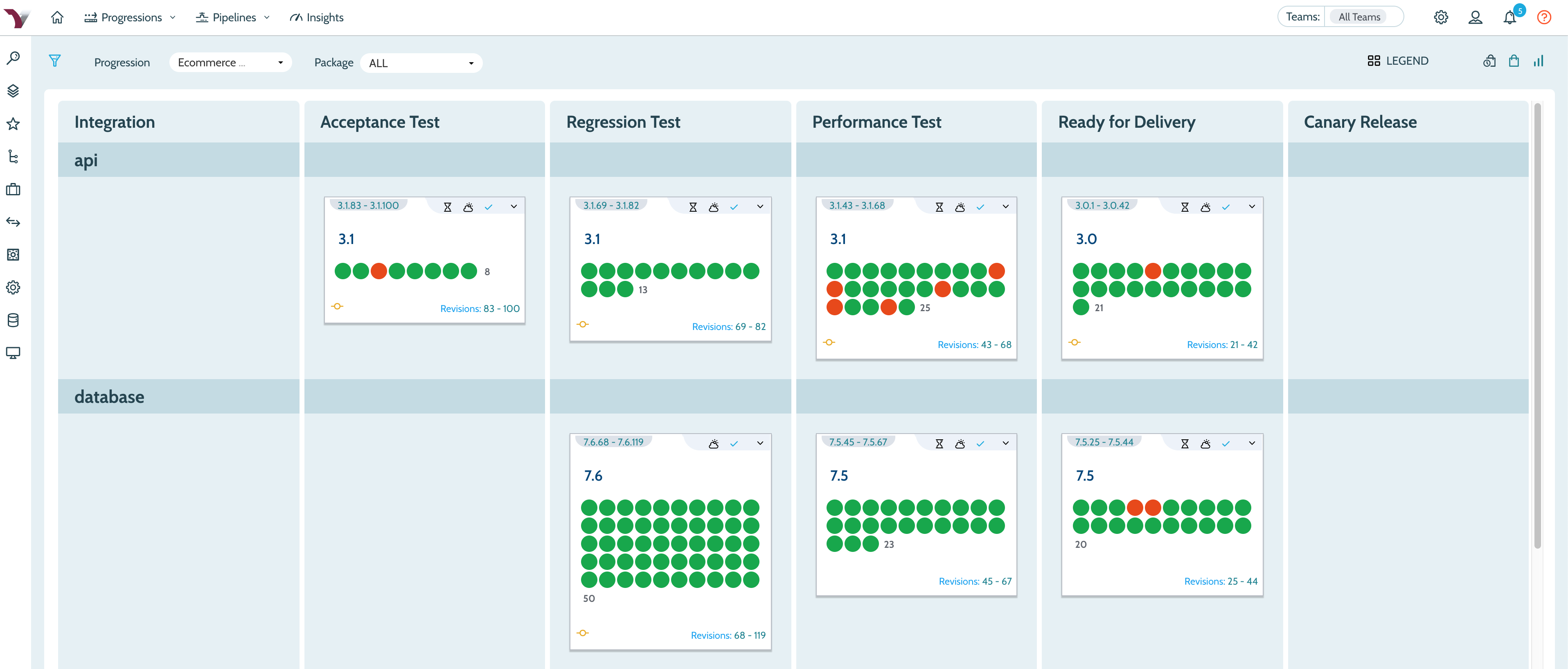
    Company CEO Flint Brenton said updates to the VersionOne value stream enterprise management platform will include a revamped user interface that provides more visibility into events occurring within the Continuum continuous integration (CI) platform.

    Brenton also said those updates will further advance adoption of agile frameworks such as the Scaled Agile Framework (SAFe), a prescriptive approach to combining best agile development and DevOps practices.

    While organizations may opt to employ VersionOne in combination with other CI/CD platforms, Brenton said CollabNet VersionOne provides a more comprehensive understanding of the impact changes to software development schedules will have on the business.

    As part of that effort, CollabNet VersionOne also announced VS Exchange, a marketplace for custom and preconfigured Continuum and VersionOne extensions and workflows, and enhancement to the Continuum TestDrive component within the company’s implementation of Continuum that streamline provisioning.

    With more organizations than ever starting to appreciate how dependent they are on software, Brenton said business leaders are now looking to exercise more control over software development projects. It’s no longer enough to generate more code, he noted; rather, DevOps teams are now being asked to generate more reliable code that has the greatest impact on the business faster. CollabNet VersionOne enables organizations to achieve that goal by providing a management platform in the form of VersionOne that is layered on top of Continuum.

    CollabNet VersionOne is now taking part in a race to infuse more business analytics into a software development lifecycle (SDLC) platform. While SDLC platforms have typically been employed to gather technical metrics, organizations now want to correlate that data against business metrics.

    Less clear right now is whether having access to business metrics will influence the selection of one CI/CD platform over another. Over time, the expectation is that various forms of business intelligence capabilities will be a standard capability of the platform, especially as IT leaders continue to assume larger business responsibilities in the age of digital business processes.

    It may be a while yet before business and IT roles start to converge. In the meantime, CollabNet VersionOne is clearly betting there will be a lot more collaboration between these two camps going forward. In many ways, the DevOps best practices that organizations have adopted to become more agile are about to be extended to the business processes enabled by software. Savvy business leaders will realize their ability to meet financial goals for any given quarter is tied to the timely manner in which new digital customer experiences are enabled. In fact, there may come a day when IT organizations are able to deliver software updates faster than most businesses will be able to consume it.

    — Mike Vizard

  • CircleCI Extends CI/CD Reach to Windows Platforms

    CircleCI Extends CI/CD Reach to Windows Platforms

    CircleCI today announced it will make available its continuous integration and continuous deployment (CI/CD) platform available on a variety of Windows platforms.

    Matt Wyman, vice president of product for CircleCI, said the decision to support Windows stems from recent Microsoft DevOps initiatives, most notably its move to acquire GitHub. As Microsoft invests more time and energy promoting best DevOps practices, demand for CI/CD platforms running on-premises or in the Microsoft Azure public cloud will escalate sharply, said Wyman.

    The Windows environment on CircleCI also includes support for Docker Engine – Enterprise for Windows workflows and all Windows jobs run isolated on a virtual machine. Each new job uses an environment that gets created just in time and gets destroyed once the job finishes running. That approach is intended to ensure both build reproducibility and the security of the code, data and secrets stored in a CI environment. All CircleCI features such as caches, Workspaces, approval jobs and Contexts are now being made available for Windows jobs.

    Wyman said CircleCI now expects organizations to extend the same software development lifecycle processes for building and deploying both Windows and Linux-based applications. The ability to leverage the same pipelines within the context of a common CI/CD platform spanning both environments will help narrow the time and effort required today to build Windows applications, he added.

    Currently, it’s unclear whether a common set of processes for building and deploying applications in Windows and Linux environments might foster greater collaboration within IT organizations. Linux and Windows teams don’t tend to interact much. However, as more organizations look to apply repeatable processes that enable them to build more reliable software faster, the need to standardize DevOps processes has become apparent. Of course, Circle CI isn’t the only provider of a CI/CD platform looking to take advantage of that emerging hybrid cloud computing opportunity.

    It’s also worth noting that providers of platforms such as Microsoft and Red Hat are also promoting their own approaches to software development lifecycle management. Organizations need to decide how much they want to rely on the tools and processes made available by platform vendors instead of a CI/CD platform that integrates DevOps processes across multiple platforms. To fight that battle, CircleCI last month revealed it has raised another $53 million in funding. At that time, the company noted that the total monthly job count on its platform stood at 30 million, up from 7 million in January 2018.

    Regardless of the path chosen forward, organizations increasingly need to build and deploy software on multiple platforms. The challenges associated with managing those processes are nothing less than considerable. The issue IT leaders will need to determine first is how much they want to drive unification of software development from the top down versus simply providing a common set of tools and platforms that their teams will (hopefully) gravitate toward.

    — Mike Vizard