Tag: collaboration

  • ChatOps: Has the Fat Lady Already Sung?

    ChatOps: Has the Fat Lady Already Sung?

    One of the sometimes unsung stars of the DevOps scene is ChatOps. I have heard lots of folks use the term, but what does it really mean to you? ChatOps is a phenomenon that started, perhaps not surprisingly, inside of GitHub. It was only natural that developers leveraging the repository to share and build better code would eventually start collaborating in ways that other messaging options just couldn’t provide.

    Whether ChatOps in GitHub is something that gave rise to the growing enterprise collaboration and chat  product/services market is open for debate. There is no doubt, however, that the 30 (give or take) cloud-based messaging and chat platforms out there today are looking to make their mark in the world of developers, engineers, admins, DevOps and IT professionals. Some of the larger players in the space have already launched features designed specifically to appeal to this set of users, with Atlassian HipChat and Slack among the leaders. But they are not alone. I thought it would be worth the effort to take a look at some of the players and up and comers in the space.

    HipChat has been a strong proponent of ChatOps for a time now. The company has consistently been tagged as a leader and boasts product integrations with many different tools and services. For example, a Puppet integration brings the power of ChatOps to joint HipChat/Puppet DevOps customers. Slack has made strides as well. Integrations with incident management and response providers including VictorOps and PagerDuty are only a few examples of how Slack has given teams the ability to collaborate on and fix problems with just a few clicks.

    Despite the millions of users already using Slack, HipChat, Microsoft Teams, Facebook Workplace and other apps in the market, there is still no definitive proof of whether any of the competitors have won the hearts and minds of the IT professional. In fact, we are seeing many of general IT publications writing about several of these tools because many of their users are in that category. The original ChatOps tool that was brought to life in GitHub, for all we know, may still be king among the IT audience.

    Will the Jury Reach a Verdict?

    There are two things that are certain in the market: The jury hasn’t yet decided if there is a ChatOps winner among the numerous options, and developers and other IT professionals may want to consider other options before reaching a decision. Unfortunately, for as much as the true IT practitioners despise marketing, there simply has been no way to avoid the  buzz that the aforementioned providers have created. Chances are, if you are searching for a solution, one of the biggies is going to pop up in the top of your browser and potentially block you from finding all options available.

    The Choice Gets Tougher

    The foundational similarity between top platforms is that they use cloud-based applications to connect teams in efficient, collaborative and transparent ways. Mobile workflows and the growth of BYOD has increased the popularity of enterprise messaging and chat platforms as they create ways for employees to quickly reach one another on their own terms. Yet even so, enterprise messaging vendors are learning that  to be effective, they must also provide users with agility, security and the ability to execute on change.

    Options to Consider

    The past couple ​of year​s​ have highlighted just how competitive this space is, and how quickly it is moving. If you work in an environment that leverages ChatOps or are considering ChatOps options, the list below presents a few of the lesser-known or up-and-coming platforms out there with the potential to become your ChatOps solution. That is not to say that the big guys such as HipChat or Slack are not worthy. On the contrary; they are great solutions. But some of these others might be worth looking into:

    Newcomer Flock entered the U.S. market in September 2016. With an eye on the developer community, the startup worked quickly to open its API to developers and has started adding integrations with partners such as PagerDuty, Bitbucket and Appsignal. Flock’s biggest differentiator is that it allows developers to build bots, widgets and apps on its framework using Java and Node.js SDKs, which easily feed into Flock’s Appstore for distribution. Flock allows developers  to spin up applications in just days. For developer teams stretched on time and budget, they’ll find the application has GitHub integration, engages quickly after being turned on and offers low costs for its paid version.

    Ryver, founded in 2015, provides all-in-one team collaboration, from chats, posts and files to the option to invite as many team members and guests as needed. Additionally, Ryver has a broad range of functionality that offers the ability to share long-form posts or threaded discussion, and integrates with the likes of Google Docs, Dropbox, Asana, Jira, Twitter and Facebook, among others. Ryver recently rolled out its “Global search” bar, which allows a keyword search to locate multiple matches across conversations and solves email’s common problem of archiving data.

    Third, there’s ChatWork, known as a group app for global teams. ChatWork is available in five languages and says it supports 124,000 customers in 205 countries. Last month, ChatWork announced new features to connect multiple chat platforms through the ChatWork desktop app as well as a new screenshot feature. The multichat and chat service integration features allow users to be logged into multiple ChatWork accounts without having to change browsers or log in and out repeatedly. This comes in handy when using multiple ChatWork accounts, such as personal and business accounts at the same time. It also allows teams that use Gmail, Outlook or Skype to use these services together from a single area within the desktop app.

    eXo Platform began as an open-source project in 2002 focused on implementing the industry’s first Java portlet container. The project grew into a company in 2003, to start working with its first customer, the U.S. Department of Defense. Today, eXo is an all-in-one open-source digital collaboration platform that provides knowledge, document and content management, social engagement and project collaboration tools integrated into your business’s applications. It is full-featured and extensible, and has a great design. eXo helps companies connect their employees, customers and developers through social, collaborative and content-driven intranets, websites and dashboards.

    Assembla is a set of cloud-based task and code management tools for software developers. Created in 2005, Assembla hosts more than 100,000 commercial and open-source projects and is used by more than 800,000 users in 100+ countries. With Assembla, software engineering teams can manage tasks, teams and code in one place with SVN, Perforce, Git repos, cardwall view of tickets for drag and drop planning, wikis and more. Integrations include Slack, Github and Zapier.

    Finally, there’s Salesforce company Quip. Quip was founded in 2012 by Facebook and Google alumni and combines documents, spreadsheets and chat into one experience. With Quip, enterprises can manage projects, finalize budget plans, share meeting notes and stay connected. Quip is used by thousands of the world’s most well-known and innovative companies, including Facebook, NewRelic, Quora, and Pinterest.

    As you can see, there are lots of choices out there if you have not already settled on Slack or HipChat, or if you want to see if something else is better for your situation. If you haven’t heard the singing, there is still time to check them out.

    — Alan Shimel

  • DevOps: Here’s How to Slack Securely

    DevOps: Here’s How to Slack Securely

    With 1.7 million daily active users, it’s clear Slack has come to dominate the team chat world, especially in the tech industry. This, however, means that a fair amount of security is required to ensure that strategic assets remain safe.

    From a security perspective, Slack has done a solid job of keeping its assets on lock, going so far as to score Geoff Belknap from Palantir in 2016 as its chief security officer. The company is also transparent about its approach to security and has dedicated a whole section of its website to it, including interviews with Belknap and others that delve into Slack’s precautions and philosophy around security.

    The company has also certified many of its products to meet strict compliance regulations including FINRA, HIPAA and SOC 2 and 3, which makes it a no-brainer for small teams and enterprises alike.

    So, it’s perfectly possible for companies of all shapes and sizes to lean on Slack for team chat and ops without worrying too much about security. However, no one’s perfect, and Slack’s ubiquity and popularity mean it will always be a target for cybercriminals looking to steal information—that’s basically the nature of being a cloud-based application.

    While, there’s no need to run scared, you do need to be smart about how you use this valuable tool. Here are a few tips for running Slack securely at your organization.

    Use Slack for SecOps

    Slack can be easily used for distributed security alerting, which means every member of your organization can play a role in keeping the business secure.

    Your security operations likely include members of the DevOps team as well as dedicated security folks, and Slack can help all team members integrate security into their workflows seamlessly. DevOps folks may not frequently log in to Threat Stack platform directly. However, any relevant alerts or notifications can be sent to them immediately via Slack, where they can be reviewed and the determination can be made whether further action is needed—all without having to step outside the daily workflow. This means security tasks don’t pose an extra headache, but are just a natural part of the way the company’s operations run.

    Require Two-Factor Authentication

    Slack’s built-in security precautions won’t do you much good unless you actually put them into practice. One great example is two-factor authentication (2FA). It’s up to team owners and admins to require this of their users (otherwise, it will be optional, and most users won’t bother). It is highly advisable you take advantage of this feature, which makes it much more difficult for hackers to tap into your organization’s Slack channels.

    Set Up User Provisioning and Deprovisioning

    Security-minded organizations need to be conscious of and work around insider threats. This also includes employees who have left the company, whether on their own terms or due to an incident.

    To ensure that you do not have any “lurkers” who might be able to take advantage of company information shared on Slack after they have left the company, it’s a good idea to plan ahead for user provisioning and deprovisioning.

    In fact, this should be built into your process for onboarding and offboarding employees, just like it would be for email or any other company asset. If possible, automate the process, so that the moment someone leaves the company, they no longer have access to Slack. To get started, here’s Slack’s guide to provisioning and deprovisioning users.

    Don’t Share Secrets

    Slack is a great place to have secure conversations, which unfortunately can lull some users into a false sense of complete security. “Secure” doesn’t mean you should treat it like it’s watertight; in other words, Slack should never be used to share secrets such as passwords, sensitive customer data or valuable corporate IP—basically, anything that could be considered highly confidential. A good rule of thumb is this: If a piece of information could be dangerous in a hacker’s hands, it doesn’t belong on Slack. Instead, it’s a good idea to use encrypted communication channels, like PGP-enabled email.

    Educate Users

    None of the tips above will do your organization any good if no one knows about them. So make sure that you regularly educate your users about steps they need to take to stay secure while using Slack (such as never sharing passwords there). You should hold user security training whenever new employees come on board, and also make sure to do a refresher now and again with the entire company.

    Additionally, if you change up security protocols around tools like Slack, make sure employees are given a heads up and reminded when new measures go into effect so they know what to expect. Remember: The best offense is a good defense.

    Don’t Slack on Security

    Slack is a great platform with all kinds of benefits for teams. As long as you take the right security precautions, there’s no reason why it can’t be used to its full potential on your team, whether you’re a small shop or a multinational enterprise. As with any other tool, the shared responsibility model is key. Take responsibility for your half of the security equation, and you should be well on your way to a secure Slack implementation.

    — Pete Cheslock

  • Is Site Reliability Engineering the True ‘Ops’ in DevOps?

    Is Site Reliability Engineering the True ‘Ops’ in DevOps?

    I recently had the privilege of attending the SRECon conference in San Francisco. It’s in its third year and 650 attendees gathered to learn and share their experiences, insights and site reliability engineering (SRE) practices.

    Most SRECon attendees either identified as SREs or were there to learn more about this new role and approach. While there was strong representation from the “unicorn” community (Google, Shopify, Twitter, Netflix and Linkedin), enterprises such as Capital One and Comcast were among the many exhibitors actively seeking to recruit SRE talent. The conference spirit was infused with enthusiasm, a willingness to share, innovative thinking and grassroots advice. It reminded me very much of my first DevOps Days in 2012. There is no doubt that interest in SRE is rapidly growing and worthy of attention by enterprise IT.

    The practice of site reliability engineering was born out of the book by the same name from Google. Interestingly, the SRE movement emerged separately from the DevOps movement—although there is little doubt that they are part of the same IT spectrum with similar customer value-driven goals. DevOps focuses on engineering continuous delivery to the point of  deployment; SRE focuses on engineering continuous operations at the point of customer consumption. Both domains rely on sharing, culture, metrics and automation. Both require human and automated resources to ensure a seamless value stream and exceptional customer experience.

    The role of the SRE is rapidly gaining momentum. Part systems administrator, part second tier support and part developer, SREs are encouraged to be inquisitive, to acquire new skills, to ask questions, to solve problems and to embrace automation. I asked several of the exhibitors what types of skills they were looking for in new SREs. The answers almost unilaterally included the ability to code as well as an unwavering thirst for knowledge and improvement—to find answers, solve problems and ensure the highest levels of reliability and availability.

    I also can see a clear bridge between SRE with IT service management (ITSM). Many of the presenters spoke about the handling and management of late-night incidents, escalations, root cause analysis, service level objectives, availability metrics and other topics addressed in ITSM frameworks such as ITIL. The tools and process definitions may be different, the opportunity to instill agility into many of the ITSM processes to meet changing demands is certainly apparent.

    What are the risks? To my mind the biggest risk is if SRE, DevOps, ITSM, Agile SDLC and other frameworks do not align and remain siloed outposts. SRE and DevOps are two sides of the same coin. Let’s hope that the SRE momentum catches up to DevOps and that enterprises begin to integrate both sets of practices as the norm.

    — Jayne Groll

  • CD 101 Podcast: The What, How and Future of Continuous Delivery

    CD 101 Podcast: The What, How and Future of Continuous Delivery

    Now that we’ve arrived at Episode 4 of our CD 101 Podcast, let’s address some basic concepts—like the what and how of it all and the future.

    Wait … perhaps we could—or should—have touched on these key topics earlier. Or not. At least not the future part? Anyway …

    While this (mostly) backwards-looking orientation may seem a bit odd, I’d argue that we’re actually navigating the conversation on precisely the correct path. Let’s rewind for a moment to look at where we’ve come from.

    Episode 1: We highlighted many of the fundamentals of this thing called CD, yet we did so from more of a conceptual and best-practices standpoint. While the ideas and processes involved do resonate in the real world, the topics we cover in this episode are bit closer to the water-cooler conversations we’re hearing about CD as it grows in practical adoption.

    In Episode 2: We covered the whole how do you “realize agility” piece of the conversation. This is important and a precursor to some of these other basic questions. The entire process of digital transformation begins with getting agile and you can’t truly adopt continuous delivery without doing so; therefore, this was another good place to feed today’s discussion.

    In Episode 3: We looked at the prospect of re-inventing the “Modern Software Factory” with agile development and continuous delivery. OK, so, perhaps we were getting a bit ahead of the basics here, but I’d maintain that this is an important piece to consider upfront that builds on these other building blocks. As with the topics covered in Episode 2, it is critical to understand the big picture challenges and benefits before you begin to get your hands dirty.

    And now for some nitty gritty.

    In Episode 4, we hear from Shamim Ahmed, CTO of Continuous Delivery Solutions at CA Technologies, as he answers the nine burning questions he most often hears in speaking to enterprise practitioners as they look to employ DevOps and Continuous Delivery practices in the real world.

    So, while these previous conversations were material, this is a crucial set of topics to consider as you invoke your own strategy, including:

    1. What is the difference between DevOps and continuous delivery?
    2. What are the key impediments/obstacles to achieving speed/quality in CD?
    3. How do we overcome these obstacles?
    4. How do we get started on the CD journey?
    5. What are the key top-level metrics you want to track in a CD program?
    6. What org changes do we need to make to implement CD?
    7. What the key capabilities we need to implement?
    8. How do we integrate all the different tools we have in our environment?
    9. How will the future of continuous delivery evolve?

    OK, that last part is a bit more postulation on our part—though we like to think on the practical side, based on the answers to all these other important real-world adoption dynamics.

    Tune in and hopefully learn a good deal about where your approach stacks up, and needs to evolve.

    As always, you can find said Episode 4 of the Continuous Delivery 101 Podcast by:

    • Listening to it on your computer on YouTube
    • Downloading it from iTunes store
    • Downloading it via the Podcast App by searching for “Continuous Delivery 101 podcast”

    Enjoy!

    — Scott Edwards

  • DevOps: The Innovation Power Couple

    DevOps: The Innovation Power Couple

    If “Dev” and “Ops” are the power couple of tech, “DevOps” is the holy matrimony that takes innovation from trainwreck to fast and repeatable. At most businesses, however, Dev and Ops still sleep in separate rooms and agree only on their mutual contempt.

    Dev (Development) and Ops (IT Operations) usually are divorced or ready to serve the papers because their incentives clash. In Ops’ opinion, Dev is an idiot—always out late drinking with friends, he comes up with wild ideas and wants to implement them immediately. Dev can’t make anything work on real servers and can’t write scalable, stable code.

    To Dev, Ops is a total code-blocker—she makes Dev go through “change management boards” and slows down progress. She lets the competition get to market first. So every day, Dev and Ops have an angry shouting match that ends in tears.

    I wish I were exaggerating. My coworker Brandon Cipes once walked into an interview for a product development position. The interviewer broke down crying because the relationship between Dev and Ops had gotten that nasty. They refused to meet with each other, let alone be in the same room.

    When Dev and Ops have a dysfunctional relationship, they struggle to communicate, collaborate and get results. Their organization will fail at innovation because it lacks the cultural, technological and procedural base to do otherwise.

    The missing base is DevOps. It’s a unified strategy for Development and IT Operations, and implementing it can have the following effects:

    1. Communication Becomes Unavoidable

    Normally, Dev and Ops play “telephone” because they’re physically separated and have too many points of communication. Emails, IMs, grudgingly accepted meetings and passing conversations ensure Dev and Ops never get the full message.

    DevOps fixes communication by assigning Dev and Ops personnel to the same teams. They sit in one room and work in a single squad (a.k.a. a pod or team) of no more than eight to 10 people. If they turn their heads, they see each other’s beautiful faces. Until promotions or career change do them apart, they can’t avoid talking and working toward common goals.

    In essence, DevOps puts “cross-functional” teams together and thereby eliminates hand-offs. Fewer points of contact, less telephone, better communications.

    1. Collaboration Gets Automated

    For many Dev and Ops teams, “collaboration” is another word for bureaucracy. It’s TPS report-ish stuff characterized by change review board meetings and laborious documents that tell Ops how to deploy new code. Dev and Ops might accidentally (or intentionally) withhold information from each other.

    In DevOps, collaboration is automated. Instead of change review board meetings, you use version-controlled software. The hand-offs from Dev to QA and QA to Ops are done by machine. A script deploys the code for Ops so there’s no risk of misfiring.

    “Collaboration” is no longer an ordeal or choice. Documenting and sharing the squad’s collective knowledge is wired into the process.

    1. Fast and Stable Releases

    Normally, a software deployment is like a sloth trying to cross US 101: slow, awkward and soon to be roadkill. That’s all thanks to bad communication and bad collaboration.

    With DevOps, you catch problems before they go live. Test automation prevents any need for manual checks. One person corrects the problem in a matter of minutes whereas before, a team of five might spend eight hours tracking down and fixing one bug. Ops feels confident that tested code won’t cause havoc.

    Thus, the upshot of DevOps is speed and stability. Before, Dev and Ops delivered maybe a few times a year and faced regular breakdowns. DevOps can deliver multiple times daily without a hitch.

    Say ‘I Do’

    DevOps is a cultural, procedural and technological transformation. As in a marriage, both partners are responsible for good outcomes. Linked as they are on one squad, Dev learns to care about stability and Ops begins to value innovation.

    If “agile” is about making businesses nimble and quick, DevOps is about applying agile principles to technological development and operations. Ultimately, it’s about beating your competition to the next big thing.

    Dev, easy on the drinking escapades. Ops, live a little. Tie the DevOps knot and make some innovation babies.

    About the Author / Zubin Irani

    Zubin Irani is co-founder and CEO of cPrime, a full-service consultancy that focuses on agile transformations and project delivery solutions for hundreds of software teams, including more than 50 of the Fortune 100. Connect with him on LinkedIn.

  • Metrics Only Matter When They Matter

    Metrics Only Matter When They Matter

    Many studies have shown the significant value that DevOps can bring to a software organization. However, organizations on their own DevOps journey need more than general industry studies or case studies. Any practitioner needs to be able to show the value—specific to their organization—that the changes to people, process and tooling made in the name of DevOps are having meaningful results.

    Measuring the success of a DevOps practice or project is critical to securing and maintaining support for similar projects in the future.

    In a previous blog, I talked about some of the pitfalls that come from focusing on the wrong DevOps metrics and outlined a few general guidelines around what makes a good metric. Here I’ll expand on that theme and discuss more specifically what types of metrics can help you show progress within your organization.

    To review, in the previous blog we looked at the characteristics of a good metric. Specifically, good metrics should be obtainable, reviewable, incorruptible and actionable. With those as general guidelines, it’s helpful to consider the three core components of successful DevOps implementation to help us determine where to look at measurements.

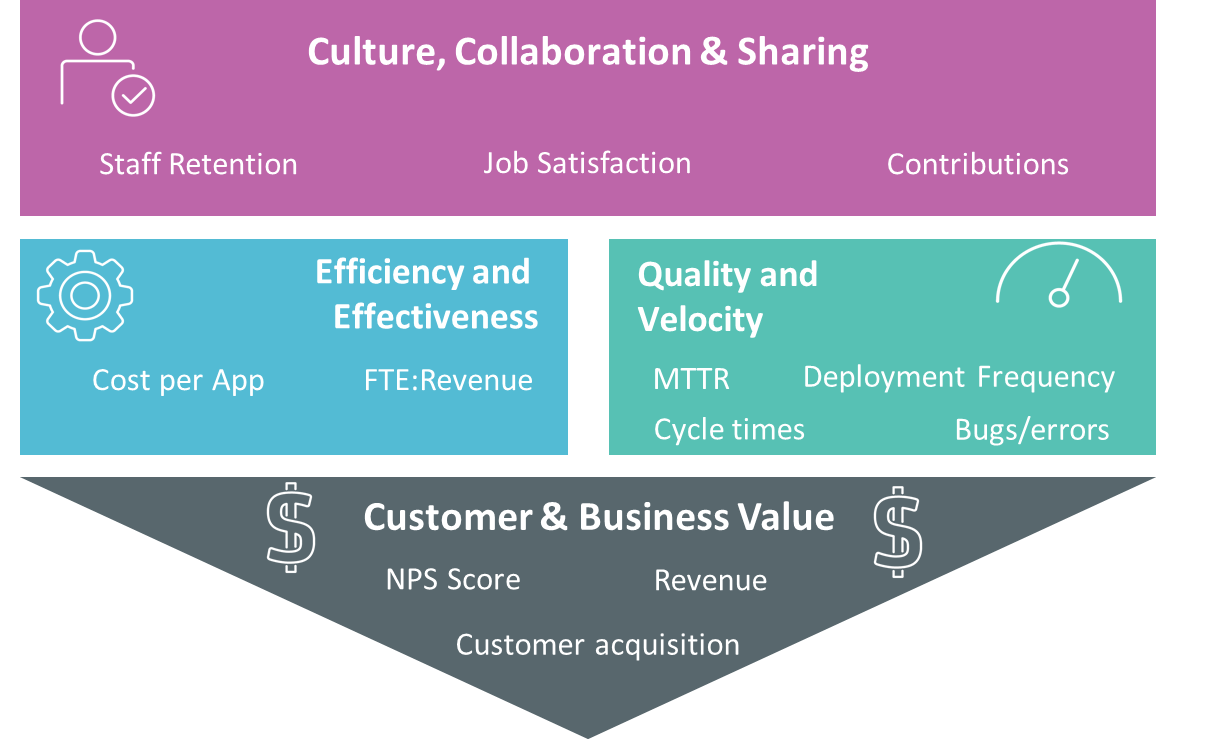
    DevOps is built around people, process and technology. But it doesn’t make sense to measure the components of DevOps; instead, we need to think about the goal, or outcome that each of these achieves. For example:

    • People changes are focused on improving culture, collaboration and sharing
    • Process changes are largely implemented with the goal of driving efficiency & effectiveness
    • Technology changes contribute to efficiency and effectiveness, but primarily drive quality and velocity

    Together, all three of these should lead to significant customer and business value.

    Notice how certain words above are in bold? That’s not an accident. These four key areas are the foundation of a successful DevOps practice—and therefore an excellent place to focus your measurement efforts. The figure below illustrates how these four areas fit together, and provides a few examples of the types of things that can be measure in each area.

    Of course, it’s important to consider your own organization when considering what metrics to focus on, as well as the guidelines mentioned previously. For example, in some organizations people-related metrics could be difficult to obtain on a regular basis. That’s not to say they’re not important—it’s been shown that DevOps can have a meaningful impact on employee satisfaction—but these metrics may not be the primary focus for some groups.

    DevOps has a wide range of benefits and I’ve seen organizations often have their own primary motivation, whether it is costs, velocity, competition or something else. It’s best to focus on metrics that are aligned to your organization’s primary objectives.

    Metrics matter only if what you’re measuring matters to your organization.

    If you are interested in learning more about DevOps metrics, the book “DevOps for Digital Leaders” explores this topic in more detail.

    In my next blog, I’ll delve into what to do with the metrics, once you’ve gathered and analyzed them. Because even the best metrics are only as good as what you—and your organization—can learn from them.

    — Aruna Ravichandran

  • Release Automation: Delivering the Big Quality Payoff

    Release Automation: Delivering the Big Quality Payoff

    Have you ever gone down the path of testing the latest release of an application only to find out that you had the wrong version?

    Maybe you accidentally grabbed the wrong build or you didn’t have the correct configuration file for the environment you were testing against—or your database wasn’t updated correctly, or the script you were using was still pointing to a prior version of the software.

    Whatever the case, we can agree that keeping track of all the various artifacts, database schema changes, configuration parameters and other components needed to accurately test and deploy an application is both time-consuming and prone to errors.

    Today, many companies are looking to DevOps, continuous delivery and agile development methodologies to shorten their application delivery cycles and reduce the number of errors and the costs associated with application deployment processes. Nearly all enterprise companies are software companies, and their mere existence depends on delivering differentiating products and services via software to their customers.

    It’s imperative to be able to react to customer demands and competitive pressures quickly, if not immediately, to stay ahead of the competition. Gone are the days of yearly release cycles.

    Today we see companies deploying new capabilities into production environments on a monthly, weekly or even daily basis. At some companies, hundreds, if not thousands, of deployments are occurring across dev, test and production environments daily. The old methodologies we once used simply can’t support this type of volume and cadence.

    Employing Release Automation

    So, how are these companies transitioning to this new way of thinking? In a word—automation; specifically, by automating early and often.

    Everything about your release process is a candidate for automation. This includes environment provisioning and configuration automation, build automation, test automation and release and deployment automation.

    A customer of ours recently implemented CA Release Automation, and within eight weeks had automated 90 percent of its deployments. Deployments that once took more than five hours and a team of people now take a matter of minutes.

    “This not only saves us a huge amount of time, but it also mitigates the risk of human error being introduced by manual processes,” said Tim Dallmann, platform engineer at Jewelers Mutual.

    Another customer, a major airline, implemented CA Release Automation and immediately reduced their production outages from an average of 237 over a three-month period, down to 15, seven, six and five over the following four months.

    And Molina Medicaid Solutions reduced their cost of human error by 90 percent, all the while responding quicker to emergency deployment requests and improving deployment quality.

    Automation is critical, but I believe these results prove that implementing a framework to manage and deploy release processes in addition to automation works even better.

    Increased Flexibility and Visibility

    Continuous delivery helps break down barriers often seen between development and operations teams. It provides, even forces, a more collaborative approach and automation is a key enabler of this.

    “One of the best things about automation is that it gives us the flexibility to skill-up end users—deployments in our test environments are no longer solely the responsibility of the operations or IT teams,” explained Dallmann.

    With an application release automation (ARA) solution, artifact, build, configuration and release processes are no longer tracked with spreadsheets or embedded in complicated scripts.

    Increased visibility into these processes ultimately enables all stakeholders to take a more active role in the release process, and access to real-time information can significantly reduce the amount of time and resources needed to resolve and recover from problems when they do occur.

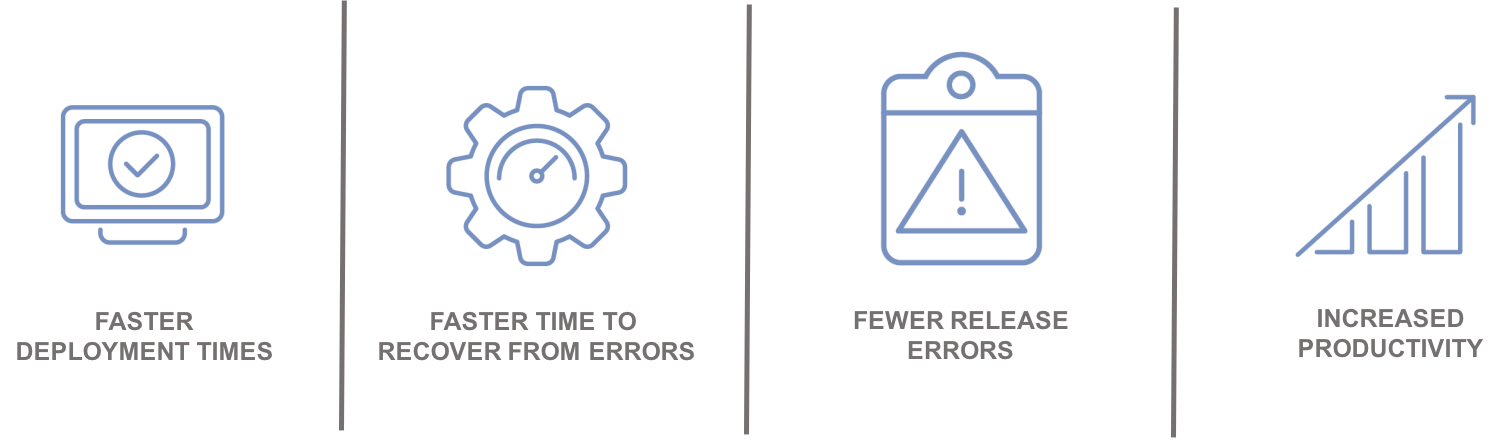
    Automation leads to:

    Integrating with the Ecosystem

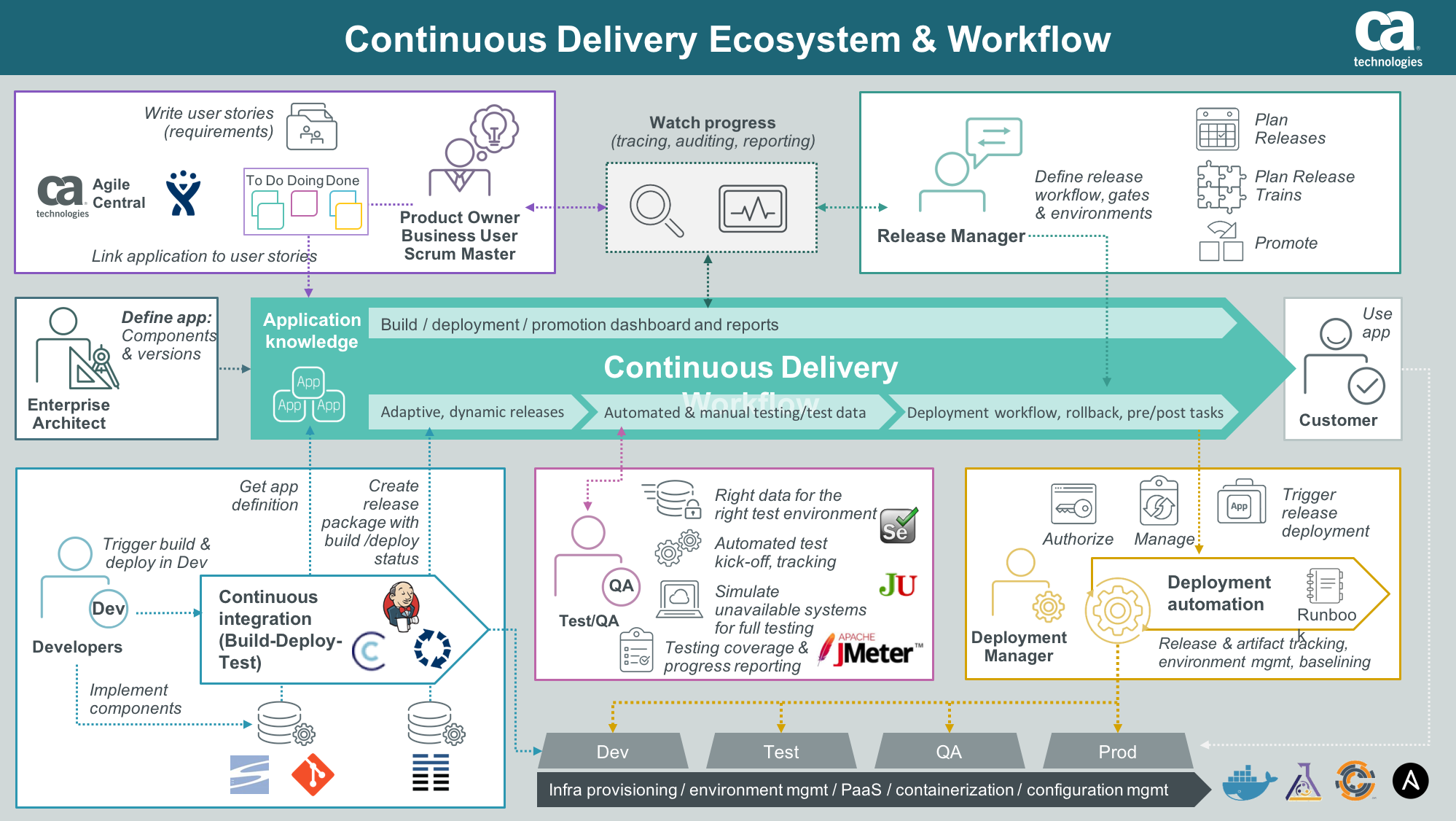
    An enterprise ARA solution can help you create a single control point to streamline all your application delivery processes for better predictability and reduced risk. A critical component of this is the ability to integrate and orchestrate tools and technologies required along the continuous delivery pipeline, including source control, automated testing tools, provisioning and configuration management solutions and change management and performance management solutions.

    Integration with an application lifecycle management solution can provide even further alignment, governance and traceability between development projects and what is ultimately being tested and promoted to production.

    “By integrating the two solutions, we will have a complete audit trail of deployments to help us understand how, where and by whom stories have changed,” said Phil Nickolai, director of application services at Jewelers Mutual.

    “What we really needed was a solution to streamline our whole way of working,” he said. “We had numerous people working on projects, competing for resources and causing complexity. Now we’re back in control and getting smarter every day.”

    The Time Is Now

    Let’s get rid of the problem that exists between the keyboard and information kept in spreadsheets, scripts or emails. Not only will you stop wasting time testing the wrong version of an application, but you can also ensure you have the right test data, the appropriate test cases and the correct configuration parameters for your environment.

    Stress-inducing release weekends and nights become a thing of the past. Developers can spend more time on developing innovative capabilities that generate revenue and keep customers coming back for more.

    — Tim Mueting

  • CD 101 Podcast Episode 2: The Agile Enterprise

    CD 101 Podcast Episode 2: The Agile Enterprise

    And we’re back with another episode of the “Continuous Delivery 101 Podcast.”

    In Episode 1, we covered the three waves of IT disruption—and how these disruptions, combined with the move toward digital transformation, are drastically changing every industry.

    This, of course, underlined how accelerating speed-to-market is clearly more important than ever before.

    In this second episode, we talk about Agile methodologies with expert Dan Rice, who addresses how these practices can enable business strategies to be implemented at greater speed.

    Listen closely and you’ll learn more about what Agile actually means across various teams, roles, product owners and scrum masters, along with related points on DevOps and CD tooling.

    All of these topics are great food for thought as you think about how you can move to build software faster and with increased quality. Yet, if enterprises only focus on these issues, they aren’t tackling or talking about the real problem in their organization that Agile can solve.

    It’s time to take the conversation beyond the team level and talk about how work flows to every involved team, enterprise-wide—specifically, about how initiatives can expand across multiple teams, how to manage shared resources and how to pull in other dependent teams.

    For Agile to work, it has to expand universally and be ingrained further at program level, to understand precisely how work is coordinated and flows across every domain.

    You can listen to Episode 2 of the “Continuous Delivery 101 Podcast” via:

    • YouTube
    • iTunes store
    • Or by searching for it in the iTunes Podcast App under “Continuous Delivery 101 Podcast”

    Thanks for tuning in to the “Continuous Delivery 101 Podcast.” We hope you’ll continue the conversation by posting your comments below or in the comments section on YouTube or iTunes.

    Meanwhile, keep tuning in: We’ll be back soon with another episode!

    — Scott Edwards

  • Communicating and Collaboration in a Digital Age

    Communicating and Collaboration in a Digital Age

    The way we communicate with the world has changed drastically in the last 20 years. Gone are the days of pen and paper, lengthy phone calls and, to a certain extent, even emails. Gone are the days of needing to have your entire team under one roof to accomplish anything. Gone are the days of communicating from one limited perspective.

    In our digital day and age, we can move mountains with keyboards, perform miracles via Skype and enjoy a thousand different perspectives of any project. There is one key behind all of this progress: code. Without it, we would not be where we are and couldn’t accomplish any of the amazing interdependent things we do. In fact, STEM (science, technology, engineering and mathematics) is one of the fastest-growing areas of our economy, according to TechRocket. Between 2014 and 2024, the number of STEM jobs will grow 17 percent, as compared to 12 percent for non-STEM jobs.

    Unfortunately, not everyone speaks this language, which can lead to a breakdown of communication in the office when the goal is to work as a diverse but cohesive team. It’s infinitely more difficult to collaborate with someone when you can’t translate each other’s visions. That’s why it’s important to have a basic understanding of this vital skill if you want to build successful teams.

    Bridge Communication Gaps

    I’m not saying everyone on your team needs to have the expertise of a developer, but it is helpful if everyone can learn how to code from a very basic level. This basic understanding helps everyone understand the time and effort involved from their tech peers, the boundaries of what can and cannot be accomplished, and the importance of clear, precise details in communicating their ideas.

    It also makes troubleshooting and revising much easier to pinpoint and less time-consuming to correct. You can skip the IT-to-English translation that so often degrades communication on major projects because neither party feels they’ve been heard and understood.

    Encourage Collaboration Throughout the Process

    A recent poll by Gallup showed that 70 percent of U.S. employees are not engaged at work. Luckily, there are plenty of opportunities for companies to bolster engagement through effective communication channels that keep everyone in the loop and invested in the ultimate outcome.

    Oftentimes, ideas flow from conception to initiation to implementation without ever having crossed the desk of the programmers charged with writing the code to bring these ideas to life. That’s the same as asking a carpenter to build a car. Although the carpenter may have a great design, understand the market and even be able to build some pieces of the car, at the end of the day the carpenter’s skills aren’t enough to do it alone and the carpenter’s vision will need to be communicated to someone with a different skill set.

    When everyone on the team understands how code works and the resources needed to turn these fantastic brainstorms into reality, the entire process becomes more streamlined and can be executed more efficiently.

    Be in the Know

    At the end of the day, everyone on the team benefits from understanding how the machine is programmed to work. Whether you’re launching a new website or the latest iteration of your app, somewhere along the line you will need to write code to convey your message in this digital world—and you will want that message to come across loud and clear.

    The good news is that it’s easy to harness the skill of coding these days. Employees can participate in a coding bootcamp, online courses or even mentorships with other employees who’ve already mastered the skill. The improved communication among teams and departments will help improve efficiency and help you realize visions.

    About the Author / Michael Peggs

    Michael Peggs is the founder of Marccx Media, a digital marketing agency specializing in Search Engine Optimization (SEO) and Search Engine Marketing (SEM). Before Marcxx, Peggs worked at Google in business development, forming digital media and advertising partnerships in the United States and Asia. He is also a contributor to The Huffington Post, FastCompany and Business Insider and a podcaster, hosting the iTunes Top 10 New & Noteworthy Podcast You University. Connect with him on Twitter.

  • 4 Top Tips for Developing a New Feature

    4 Top Tips for Developing a New Feature

    As a backend developer at CA BlazeMeter, I recently had the chance to work on a big feature for our web app. The feature required a massive change on our backend code, a big change on our frontend and multiple migrations. You know what I’m talking about—it was one of those projects that developers fear.

    But, I gained a lot of valuable experience from the project. Not only did we deliver a kick-ass feature, I also learned the importance of teamwork and patience when developing something new. Armed with those two values, and the right tools and technologies, you can deliver a new feature quickly and efficiently.

    Here are a few more things that I learned that should prove helpful whether you’re developing a major feature or one that only requires a minor code change.

    Tip 1: Plan to understand the development requirements

    The process of development starts way before you start coding, with planning. After the product manager decides what needs to be developed, R&D needs to understand the cost: how many days (or weeks) of development the feature will take, how many people will be needed and which APIs are required.

    To do that, the product manager needs to conduct at least three “grooming” sessions with backend, frontend and QA leaders. The grooming sessions start with the product manager presenting the product flow and requirements.

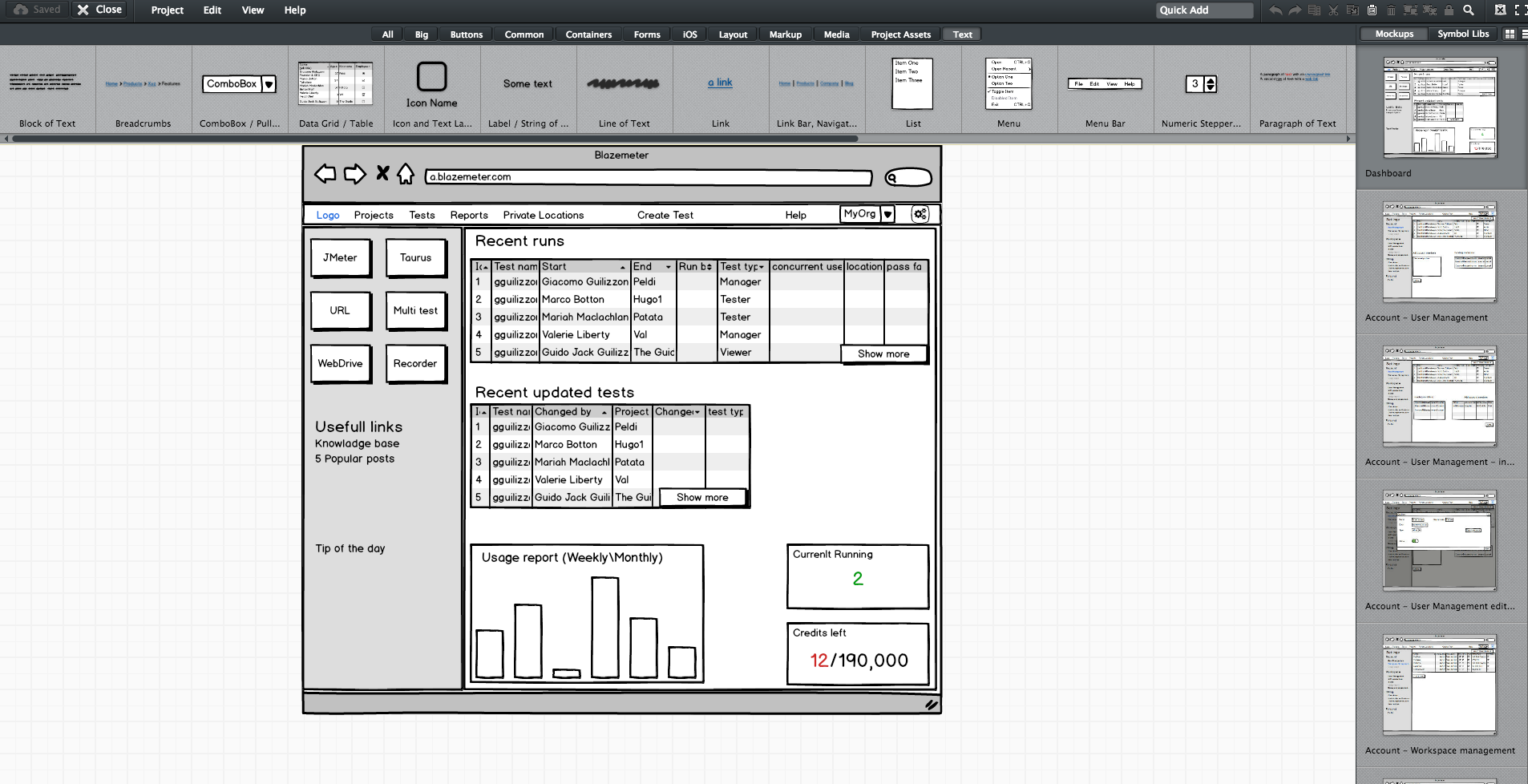
    Since no one wants to read a lot of text (except perhaps the awesome readers of this article), the product manager should prepare mockups. They don’t have to be designed or colorful, but they do need to show the team what the feature looks like in his or her vision. During our grooming sessions, we used Balsamiq, which lets you create screen sketches for how the product is supposed to look, feel and work.

    Editing screen sketches using Balsamiq

    After the initial presentation, the sessions should include a lot of open discussion—asking questions, checking for answers and examining compliance, etc. —until everyone is satisfied and understands what the feature requires from them and from others.

    This is the time and place for frontend, backend and QA to give their opinion about the schedule and to alert and flag any potential problems in development or extreme use cases. It’s the role of the product team to answer questions and change the flow and requirements until there are no R&D rejections.

    Afterward, the frontend and backend leaders need to create a feature development plan, sitting down to determine what data they need to transform the product vision into a real thing. Or in other words, which APIs are required for each flow or button, how long each step is supposed to take, including buffers, and the order of development. APIs are the agreed “contract” between the development teams. After determining the contract terms, each team can proceed individually.

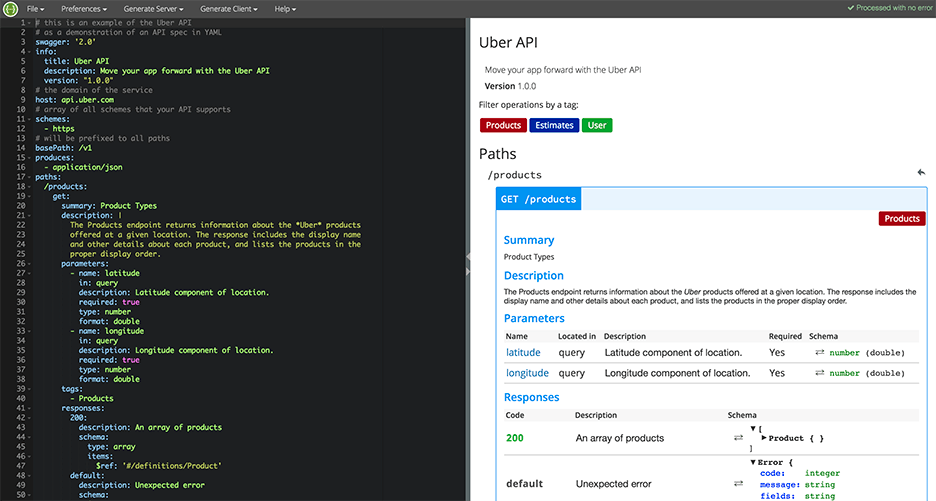
    I recommend you write your APIs in Swagger, which turns YAML files into detailed HTML pages with all the APIs.

    Swagger Editor

    This plan needs to be transparent to everyone working on the project. In fact, it’s even better if each project participant can add and describe scenarios. Tools such as TestLink and Atlassian do just that. Then, when the code is ready, developers can go over the list and see everything is covered.

    We will need to stick to this schedule later on, especially when new demands unrelated to the feature come in, such as fixing bugs. Sticking to this plan is the best way to distinguish the wheat from the chaff of the development process.

    Start writing automation ASAP

    After planning, we want everyone to start working, and not only the backend. To do that, the backend can prepare mocks, either through outsourcing services such as JSON servers, which show inputs and outputs, or by writing dummy code.

    I mentioned earlier that we used Swagger to write APIs. We also used it to generate a server in NodeJS/Python, like this:

    Generating a JSON Server through Swagger

    From this moment on, frontend can begin writing and building screens and QA can start writing API automated testing, by using tools suh as JMeter. At this point, frontend and QA have the response codes and response bodies; they know which features to put where; and which APIs they need and how to use them.

    QA also know which data they’re missing, such as field names and field data. Sure, the backend code isn’t ready yet and all of the automated exams will return “red” instead of “green,” but the main issue is making sure everyone is as prepared as possible.

    This includes load and performance testing. You can use open-source tools such as JMeter, which is enhanced by CA BlazeMeter. By uploading our test script into, configuring the number of virtual users and ramp-up time, determining geo-locations to test from and analyzing KPIs to determine trends and the health of our system, we can ensure our product is delivered to our customers without crashing.

    This is also true about sending code to QA: Developers should test their code themselves and ensure that when they commit their code, it works 99.9 percent of the time.

    By starting automation as soon as possible, you can minimize future bottlenecks in the development process.

    Ensure the team communicates and works together

    Like I said before, teamwork is the most basic requirement when creating a new feature. This is because new questions arise during development and because requirements change. Therefore, everyone in the team needs to be in sync all the time, from the product manager and the designer to the developers and QA.

    Open communication lines are crucial because everyone is working on the same product at the same time, but each developer or QA should be working on a different part of the product and on different functionalities. Communication ensures each person’s work is compatible with the rest of the team’s work. This saves time, prevents frustration and redundancy and ensures maximum professionalism.

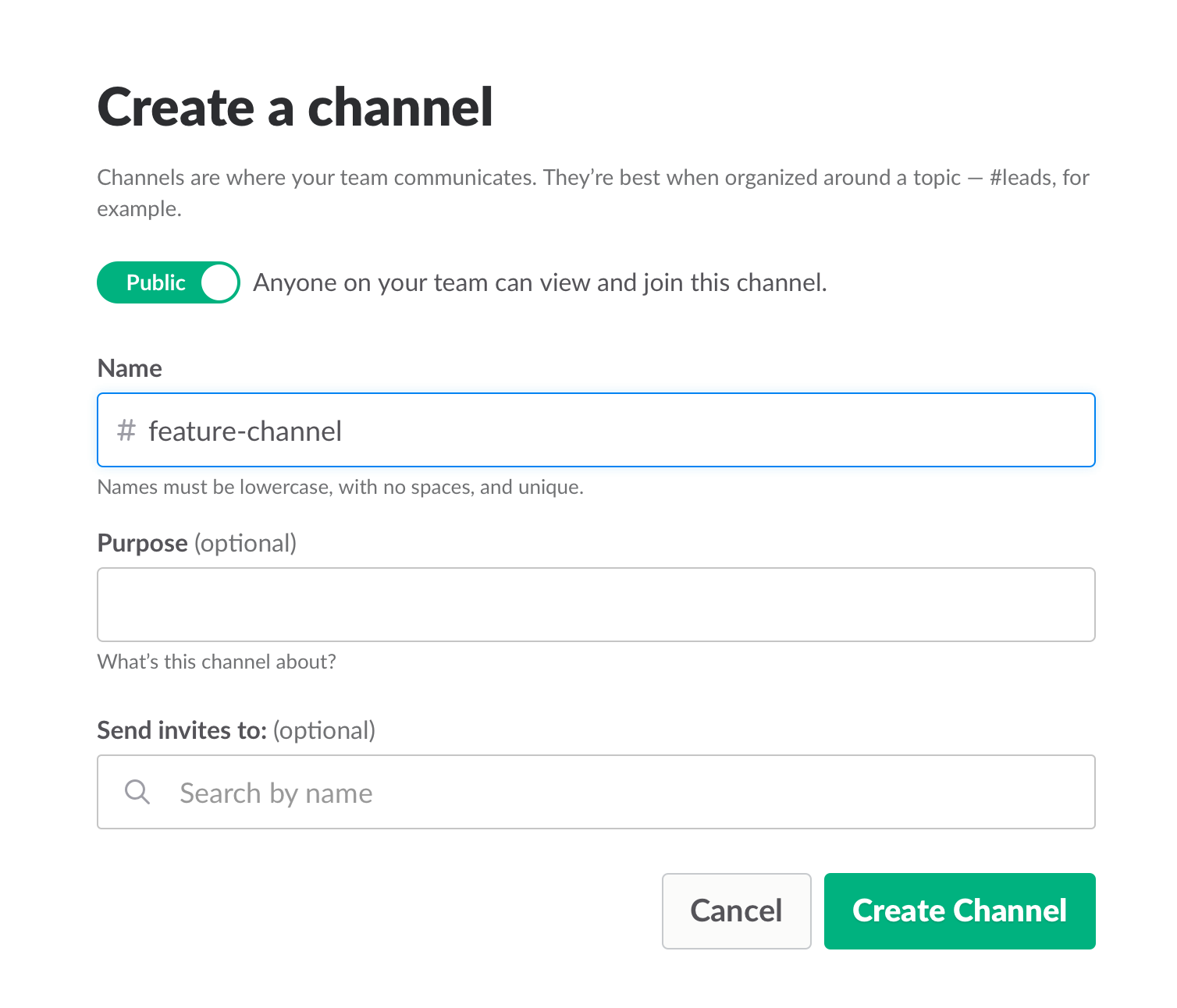
    To make sure everyone knew what was happening, we used Slack and opened a dedicated channel for the creation of this feature. We also had daily (short!) standups where we discussed what we have and what is missing.

    Opening a Slack channel

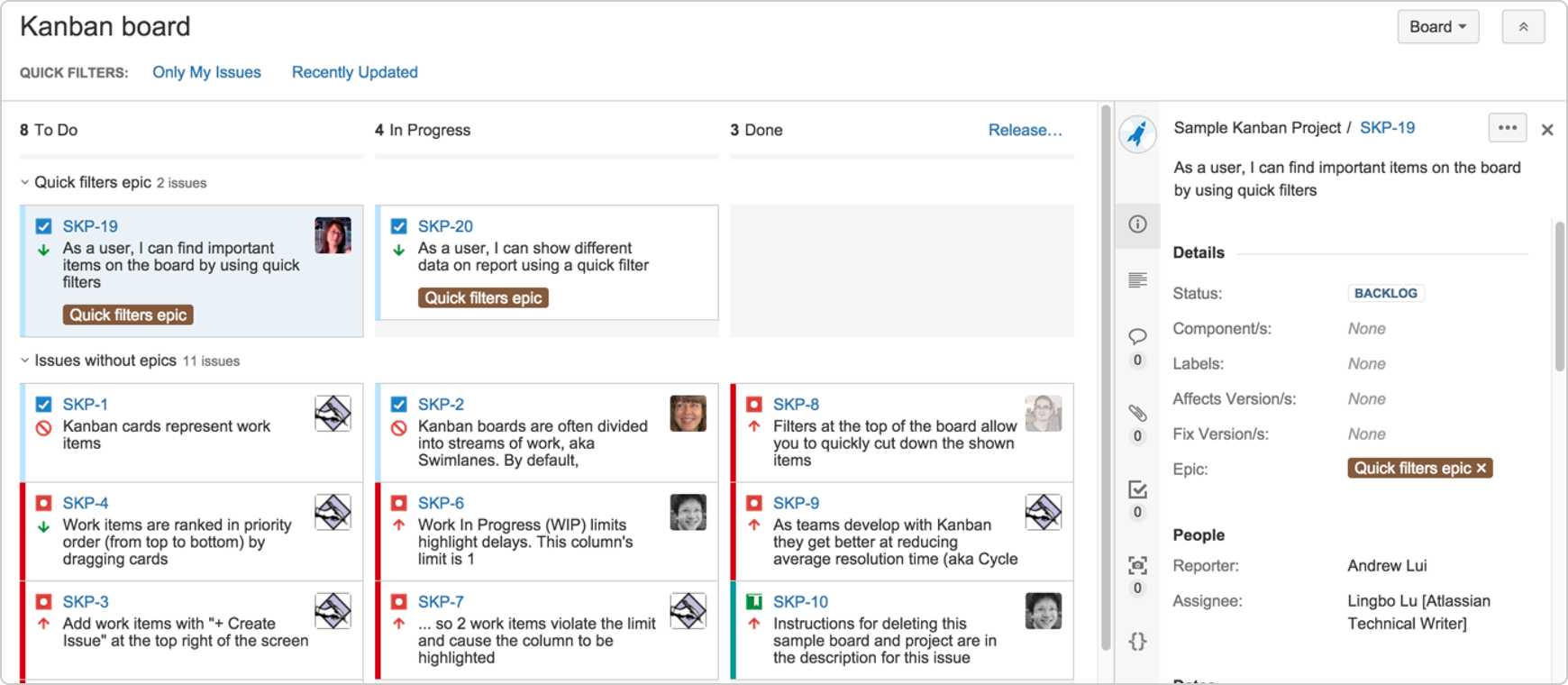
    Communication also includes team and assignment management. JIRA, our primary issue tracking tool, offers Kanban-style, Scrum and fully customizable boards, which show the progress of each development task, including the developer assigned to it, and his or her exact status or phase.

    This helps you understand what other people are working on, and just as importantly, where people are stuck. If you can, get everyone to work in an open space and put a large screen in the middle of it. This lets you stay in sync at all times.

    We used JIRA to open and manage bugs as well. This was helpful when multiple QAs found the same bug. It’s important to carefully choose which tickets are opened and put them under one epic, so everyone stays focused.


    JIRA Dashboard

    Another important aspect of communication is ensuring everyone uses the same terminology, as sometimes people might use the same term to describe different things or different terms to describe the same things. To prevent mixups that could waste your time, make sure everyone is on the same page. For example, do you say “system admin” or “<name (ex. BlazeMeter)> admin”?

    Work on the same development environments

    It’s important that everyone works on identical development environments and even on the same version of the tools and libraries. Otherwise, it could cause an (in)compatibility mess, including a lot of unnecessary back and forth and even might cause bugs to pop up. This environment needs to be as similar as possible to production, but only on a smaller scale.

    Conclusion

    Now look at the feature that came out of all that work here. I’m so grateful that I had the opportunity to work on it with an awesome team.

    I hope these best practices help you the next time you develop a new feature. Don’t forget to keep going agile after development and delivery by running tests in a continuous environment such as Jenkins for every commit.

    CA BlazeMeter works with Jenkins, ensuring you can load test in the cloud and analyze your data while shifting left. You can also use different APM tools, such as New Relic, AppDynamics and CA APM to alert you about errors before QA, which saves time.

    — Dor Atias