Tag: collaboration

  • How an Integrated Tool System Helps Implement DevOps

    How an Integrated Tool System Helps Implement DevOps

     DevOps is the marriage of application development teams with system operations teams, their philosophies and actions.

    In an agile environment, development, testing and operations all must work together to meet frequent iterations, releases and delivery goals. This calls for a collaborative development environment that supports data orchestration with other lifecycle tools.

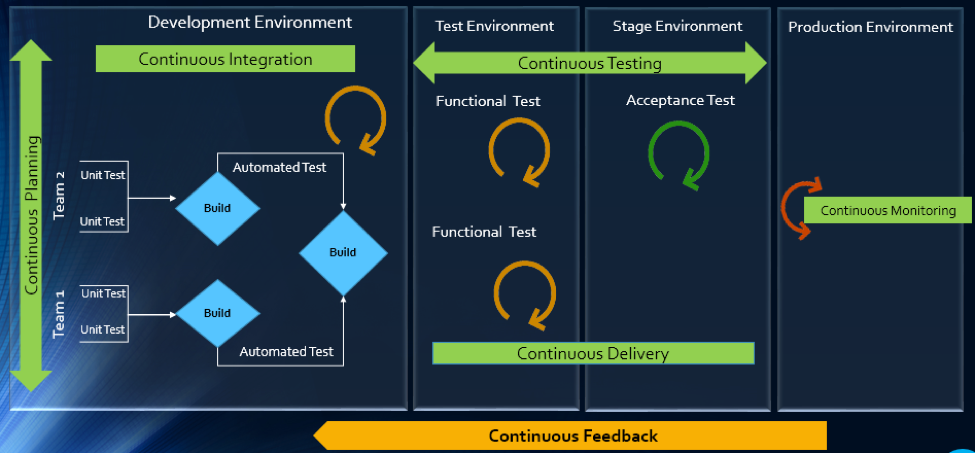
    The article will explain how multitool integration support can help organizations perform the DevOps life cycle, which includes continuous planning, continuous integration, continuous testing, continuous monitoring, continuous delivery and continuous feedback mechanism.
    The Drivers of DevOps

    Today, with the increasing competition and the need for an early market release, the software development industry is undergoing a paradigm shift. Agility has become an inevitable process across all organizations. In addition, shorter ROI cycle spans, frequent releases, increased CRs and different IT systems and tool technologies have made the situation critical.

    The industry demands higher transparency, maximum visibility, minimum turn-around time, lesser human intervention and efficient processes at every stage, from development to delivery.

    However, organizations that use specialized tools to manage builds, deployments and delivery processes continue to face difficulties when it comes to data orchestration and process automation across the tool chain.

    In an agile environment, developers and testers need to ensure not only that code changes work and integrate well, but also  that frequent iterations do not make the product unstable. Hence, seamless cross-tool collaboration is very important here.

    The process chain consisting of Code –> Build –> Provision –> Test –> Defect Fix –> Deploy –> Release needs to run continuously and smoothly without compromising delivery deadlines or the product quality.

    Automation is the Catch Line

    With the rising demand for continuous delivery and sprint-based development, manually setting up a test, build and deployment environment is burdensome and time-consuming.

    Software teams need to automate the entire cycle of build, provisioning and deployment of test environments, including the tools, scripts and test data to ensure rapid delivery. They also need to collaborate around the application architecture and monitor event-action-based mechanism for seamless data flow across the tool chains.

    Reports show the most important DevOps components are IT automation, agile development and collaborative teaming of personnel. Therefore, without centralized orchestration of tools, achieving DevOps is not a realistic situation. Since organizations spend around 73 percent of their DevOps budget in tool acquisition, it is important they know how to get the tools working together to overcome DevOps obstacles.

    In the process of connecting their existing and new toolsets, most organizations search for an integration methodology that is scalable, reliable and easy to maintain. Point-to-point integration between tools help, but to a limited extent. Even a single change in integration rules involves complex coding and high maintenance across development, test and deployment cycles.

    How ESB-based Integration Can Help

    An enterprise service bus (ESB)-architected integration hub connects both the existing and the new tools to support a seamless data flow between them across the DevOps life cycle.

    Once integrated, the data from both the development and the operations tools become readily available for use to every stakeholder. The benefit of using ESB-based integration is that you can add or remove any tool based on your connectivity requirements.

    In a typical scenario, DevOps teams use a series of cross-functional tools starting from project planning to delivery and operations. Neither of these tools comes with built-in integration features, which results in inconsistent flow of information among tool users.

    Project managers use application lifecycle management (ALM) or Agile planning tools to detail the scope of work and tracking progress reports. Upon unit testing, developers use a different tool to check in a code from their integrated development environment (IDE) to the source code management (SCM) repository. They also perform a code quality analysis before committing to the SCM.

    In such a scenario, continuous integration (CI) can be achieved only when developers bring these planning, unit testing, code analysis and SCM tools under one roof. That is, connecting the tools through a common integration hub. It also helps developers to manage everything from within the IDE.

    After successful check-ins, build engineers trigger the SCM tools for automated build and testing. Upon a successful build, testers engage in continuous testing using manual and test automation tools, followed by provisioning for continuous deployment. They also perform load testing, API testing and security testing using separate tools. An integration support helps to keep the real-time data flowing between the build and the testing tools uninterrupted and seamless.

    A DevOps system also includes application performance monitoring (APM) tool for continuous monitoring of memory consumption, CPU usage, database health and release tracking. Operations team use help desk/ IT service management (ITSM) tools for continuous feedback generation and customer support. And delivery managers use continuous delivery tools for defining and tracking release pipeline through graphical interface.

    When all these tools are connected to a central integration hub, product release and help desk operations become faster and efficient. The integration between development and ITSM tools facilitates continuous feedback generation, which helps to improve the product quality.

    Through an integrated tool ecosystem, project managers can create a DevOps workflow based on business logic and automate the data movement across tool systems. Business analysts, developers, testers and delivery managers can also get real-time update on development progress and keep track of actionable items. Supervisors can route cross-tool data to a central repository and generate meaningful reports and analytics before taking business decisions.
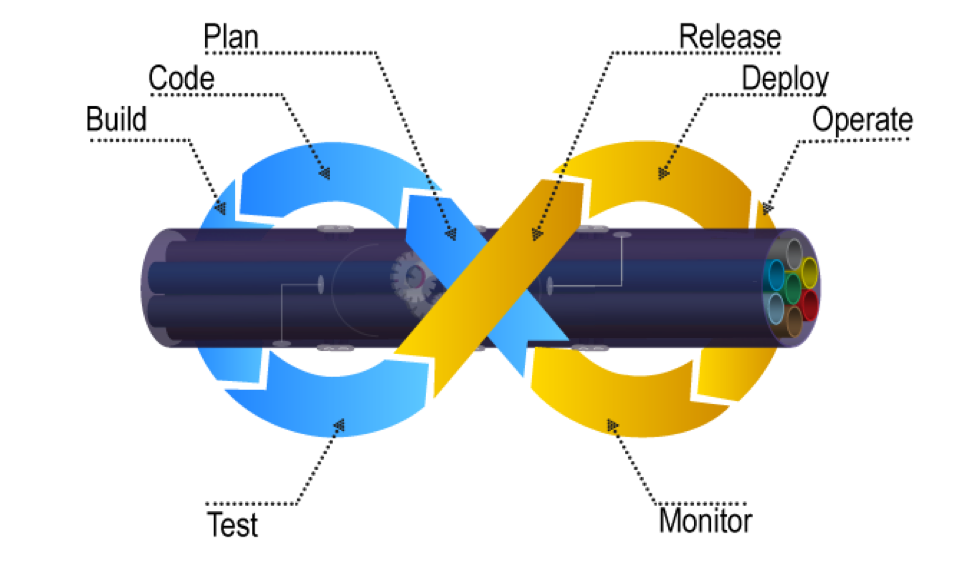
    Fig: ESB Integration Bus Facilitating Adoption of DevOps

    An ESB-based integration tool helps organizations to implement and leverage the best DevOps practices by establishing connections across all participating tools. An integrated tool ecosystem helps achieve the following:

    • Real-time collaboration between development, delivery and operations tools
    • Continuous planning from requirements capturing and review to design and code analysis
    • Cross-tool traceability for defining relationships between various data objects
    • Test strategy implementation for continuous testing
    • Continuous integration through automatic triggering of build on successful completion of code check-in
    • Continuous testing through workflow based automatic triggering of both manual and automated test cases
    • Scheduled test automation script execution enabling continuous delivery
    • Continuous monitoring of release quality through reports and dashboards
    • Automated defect identification and resolution for faster help desk response
    • End-to-end traceability providing better release predictability and change impact analysis
    • Meaningful reports, metrics and KPIs for quick decision-making
    • Continuous delivery through tracking release pipeline

    How Inter-tool Connectivity Brings Continuity

    To understand the stages of engineering practice, let us consider a sample DevOps scenario in an IT service organization.

    The organization uses an ITSM tool to manage support tickets submitted by customers. On submission of a ticket, it is automatically passed on to an ALM tool as user stories or defects for internal development.

    On allotting to a sprint, developers and testers view the user stories or defects from IDE, SCM and test tool. Once the coding is complete and codes get checked in at an SCM tool, an automatic build gets triggered using a build tool. Upon successful completion of the build, tool provisioning is done through a virtual machine.

    The successful build can be automatically deployed using a deployment tool and automated tests can be executed through a test automation tool. The test results are then captured and linked with test cases and the source requirements for traceability.

    The defects that are raised in the defect tracking tool for failed test cases can be automatically routed to developers for fixing.
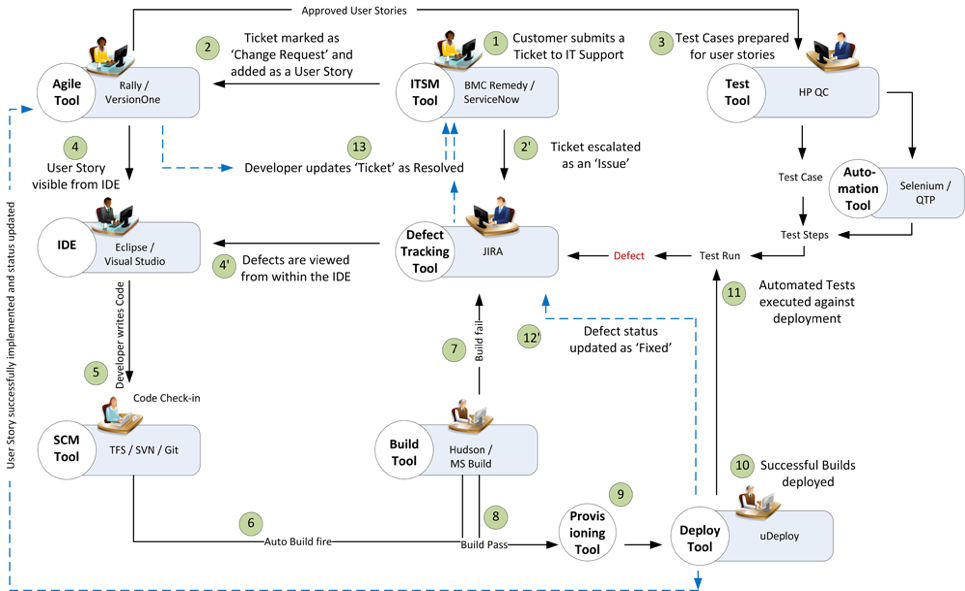
    Fig: DevOps scenario achieved in a collaborative tool environment

    Once connected to an integrated tool system, users get a complete visibility of the tool records and their relationships from within their own tools. Developers, testers and help desk managers can get complete traceability view between development artifacts and change requests or defects.

    When all the tools participating in DevOps sync with each other, developers can easily view the support tickets reported by the operations team right from their own IDE.

    The help desk team also gets a real-time update whenever a change request gets implemented or a defect is resolved by the development team. It eliminates the latency in communication between the Dev and Ops teams to a great extent.

    In addition, customers get frequent updates from the help desk team, which makes them happy and confident about the product performance.

    Conclusion

    Implementation of DevOps is not a “Do once and forever” type of task. Just deploying the right set of tools to the right users will not serve the purpose. Proper connectivity between and across the DevOps tools chain is necessary if you want to create a collaborative work environment around the Dev and Ops teams.

    An integrated tool system saves considerable amount of time and effort, which would otherwise be wasted on manual execution, monitoring and reporting of data during DevOps implementation.

    About the Author / Sanat Singha

    Sanat Singha is a senior technical and web marketing writer. He takes special interest in ALM process, technologies and tools integration as an industry. Sanat does content marketing, professional blogging, social media promotion and website analytics.


  • AIOps: Managing the Second Law of IT Ops

    AIOps: Managing the Second Law of IT Ops

    Or, why IT systems keep breaking

    The tension between the two halves of DevOps is long-standing, going back long before the term was even invented. What underlies the split between Development and Operations is a fundamental difference, like an actual physical law. Let’s explore that analogy together.

    IT Ops is fundamentally a constant fight against entropy, meaning disorder. Sysadmins expend significant energy trying to keep everything up and running, in a process which can sometimes feel like trying to shore up a sandcastle while the tide is coming in. Systems are constantly breaking down; users need changes made that introduce risk; and, as if that wasn’t enough, the whole shebang is constantly under attack from malicious outsiders. It’s no wonder that sysadmins have a reputation for being a bit grumpy!

    Homer: In this house, we obey the laws of thermodynamics!
    It’s not just a good idea, it’s the law.

    In contrast, Dev actually increases the level of entropy. Every new release, be it as small as a one-line fix or finding that errant semicolon, is a change that has to be made, reducing the order that Ops fights so hard to maintain. Dev is entropogenic, embracing change as a positive force.

    The interaction between Dev and Ops is analogous to the second law of thermodynamics: Entropy can only increase over time, unless energy is introduced to the system from outside. In other words, unmanaged change will eventually cause something to break, unless people put in continuous effort to prevent those breaks.

    Thermodynamics: Lots of Heat, not Much Light

    These conflicting goals, taken to extremes, can get unhealthy, with Ops actively fighting change or Dev going around Ops to increase their velocity of change. Left unchecked, this tension can turn into a vicious cycle, as frustration with the “Department of No” drives developers into unmanaged “shadow IT.”

    The good news is that the analogy with hard laws of physics is not perfect. The process of increasing entropy is not irreversible, and does not require constant inputs of energy to prevent. New agile approaches to IT Ops are emerging that are light and flexible, taking their structure from that tension. In the physical world, this is called “tensegrity,” and was originally formulated by Buckminster Fuller, one of those annoying polymaths who seem to make breakthroughs in every field they touch.

    Tensegrity structure
    Tensegrity structure

    IT Ops needs its own equivalent to tensegrity, a flexible, holistic structure that is able to embrace change while maintaining its shape. Structures that try to resist change through rigidity are brittle and ultimately fragile.

    Today, this flexible strength is enabled by AIOps, a term coined by Gartner to describe a new way of operating IT, based on augmenting human skills with automated analysis enabled by modern algorithmic and machine-learning approaches.

    Complexity Breeds Complexity

    Modern IT is too complex for any single person or even team to keep track of, instead requiring multiple specializations. In turn, each of these functions requires its own specific support tools that enable that particular role. Beyond a certain point, it becomes very difficult to combine these partial views to gain a holistic understanding of what is actually happening in the environment.

    Because of the scale of modern IT environments and the sheer rate of change that businesses require, old-style rules-based “Managers of Managers” can no longer keep up, requiring more effort to build and maintain their worth. Especially as infrastructure becomes more and more self-modifying in response to changing conditions and demand, IT Operations needs to accelerate just to keep up.

    AIOps brings developing issues to the attention of sysadmins before they become visible to customers and end users, and gives them the tools to collaborate effectively between different teams and specialist roles to avoid outages or restore service quickly and efficiently. In this world, automation is used to augment the capabilities of the human operators to make them more effective, letting people concentrate on adding value, not just fighting fires.

    This is how Ops can get out of the business of fighting Dev, and instead become a supportive partner. AIOps can catch issues that are affecting services and flag them to the right people early on, including the DevOps engineers that are responsible for production support.

    For developers, one of the fears around DevOps is that in “picking up the pager,” they are opening themselves up to a constant stream of irrelevant alerts. Old Ops hands nod wryly at this, or maybe try to share their personal approach to filtering the noise. Instead, AIOps ensures that only valid, actionable alerts get as far as being shown to a human being and taking up their valuable time.

    Eyes on the Prize

    It’s not all roses. As the AIOps market begins to mature, there is a certain amount of “algorithm-washing” going on, with more and more vendors trying to claim that either their legacy tool was AIOps all along, or that their one-trick pony is actually a whole three-ring circus. What gets lost in the excitement is what all of those algorithms are actually supposed to achieve.

    Me too!
    Me too!

    In considering a shift toward AIOps, the goal should not be simply to build a better mouse trap, meaning a smarter filter for monitoring events. The success of the project can be measured not so much in the mathematical results of the algorithms, but in the smoother exchange between the human users. This easier collaboration is especially important across team boundaries, whether these be different specialist units within the Ops function or developers and software engineers who need to work with Ops to understand the performance of their code in production.

    The benefit of transforming operations this way—moving from sequential, waterfall Ops to abile, collaborative Ops—is to turn DevOps-enabled teams into a sort of perpetual-motion machine, able to continue operating without requiring constant massive inputs of energy from outside the system. Modern applications and the complex infrastructures that support them cannot be managed with the sorts of rigid, cobbled-together, industrial approaches that were appropriate in the mainframe days. AIOps is the agile, flexible approach that can not only accomodate that complexity, but thrive on it.

    — Dominic Wellington

  • Quality Culture, DevOps Forge Better Connections Between IT, Lines of Business

    Quality Culture, DevOps Forge Better Connections Between IT, Lines of Business

    The automation of software development does not obviate the need for a collaboration between IT and the lines of business, or the development of a culture of quality on the part of the development team. Achieving that quality culture requires more than a change in mindset as developers seek to align quality with the speed and automation goals of DevOps.

    There are five items required for a quality-driven DevOps environment:

    1. Understanding the proper role of “minimum viable product”
    2. Collaboration between IT and lines of business
    3. Having metrics in place
    4. Across-the-board buy-in

    “Quality culture is characterized by employees who are motivated to consistently strive for the highest level of quality,” said Al Riles, principal consultant at Tunnell Consulting, a firm providing solutions to the complex problems faced by life sciences and biopharma companies. “That’s one key component of it, as well as the ongoing process of continuous improvement.”

    Minimum Viable Product and Continuous Quality

    Aligning quality with the speed and automation goals of DevOps is critical to success, and part of this is gaining a deeper understanding of the role of “minimum viable product” and understanding when that approach contributes to the development process.

    “The concept of ‘minimum viable product’ does not, as its name would suggest, contribute to a substandard product,” said C.R. Venkatesh, CEO of Dot Com Infoway, a CMMI Level 3 IT company. “Quite the contrary, the concept is the basis of continuous and iterative improvement, and encourages the use of user feedback, which often results in insights that might be missed by the in-house team.”

    The concept of quality culture and MVP are not mutually exclusive in a DevOps environment, so long as continuous improvement is part of the equation.

    Collaboration Between IT and Lines of Business

    The collaboration that is a key part of DevOps is also a key part of quality culture. “You have a culture in place where everyone embraces that fabric that includes the right type of behaviors and the right values, including communication, reward and recognition, as well as clarity on roles and responsibilities,” said Riles. “That working fabric gets well-defined, because everyone is functioning around the same key elements that constitute that strong corporate culture.”

    “Collaboration has always been important in a DevOps environment,” said Venkatesh. “But we need to define precisely where that collaboration exists. In an internal environment, that collaboration is between IT and lines of business. Increasingly though, IT and development is an outsourced function, and in such cases, that collaboration must be preserved. What this means is that it exists not just within the confines of the outsourcing provider, but also between the provider and the client. The developer must seek out alliances not only with the client’s sourcing manager, but also with other internal stakeholders in the project.”

    If You Don’t Measure, it Doesn’t Exist

    Quality initiatives require an active role in changing the mindset of all stakeholders, but mindset alone won’t get the job done. Metrics must be in place and tied to those quality initiatives. “Even in the smallest of development projects, defined quality metrics must be set ahead of time, with clearly defined outcomes,” said Venkatesh. “By asking what we hope to accomplish with a development project, clearly defining the goals and adhering to a set of predefined quality standards, developers—whether in-house or third-party—are able to accurately predict what the outcome will be.”

    Riles’ process involves a quality management maturity grid, which identifies multiple dashboards. “It allows the organization to become familiar with what a quality organization consists of, and then you can use this maturity grid to measure where the organization is once you embrace this initiative. Then, you can implement the initiative, and come back and re-evaluate yourself to see the progress you’ve made,” said Riles.

    Everybody Has a Seat at the Table

    Incentivizing all stakeholders, throughout every level of the company, is paramount and, according to Riles, “It has to do with communicating what the vision is, and having a clear quality message that’s coming from leadership. Then, there has to be a shared quality mindset among all staff.” Riles notes that the quality mindset is shared by everyone in terms of understanding the organization’s objectives, policies and procedures and their roles in hoping to achieve them.

    This is reinforced by leadership at all levels, who are actively engaged in supporting the development of a quality culture, and they engage and motivate others to do the same. For it to be sustainable, we realize that success is based on the sum of all parts of the organization. They must be continuously monitored and fine-tuned as the organization grows, and this includes communication, reward and recognition, and engagement.

    About the Author / Dan Blacharski

    Dan Blacharski is a thought leader, advisor, industry observer and PR counsel to several Internet startups, and author of the book “Born in the Cloud Marketing: Transformative Strategies for the Next Generation of Cloud-Based Businesses.” He has been widely published on diverse subjects relating to cloud computing and technology, and he is editor of BoozeHub.com. He lives in South Bend, Indiana with his wife Charoenkwan and their Boston Terrier, Ling Ba.
  • From Waterfall Incident Management to Collaborative IT Operations

    From Waterfall Incident Management to Collaborative IT Operations

    What can Ops learn from Dev in the transition from sequential, reactive IT support to real-time DevOps?

    One of the signature ideas of DevOps is right there in the name: the blurring of the boundary between the historically separate worlds of Development and Operations.

    On the face of it, this seems like a great idea. Developers have always grumbled about how Operations is preventing them from deploying as rapidly or as frequently as they would like. Meanwhile, Operations people have harbored a dark suspicion that developers might code with more attention if they were the ones getting paged at 3 a.m.

    Another of the great things about DevOps is that it is pretty easy to adopt in one area or project without needing to get the entire company onboard before you can get started. This means that you can quickly produce some interesting results in terms of accelerated development times and release frequencies, faster resolution of problems and more time spent innovating instead of firefighting.

    Armed with these results, DevOps evangelists spread through the organization, telling their story and recruiting other departments and teams to join them in the bright future.

    This is Where the Problems Start

    Complex enterprise IT environments are, well, complex. Different teams have adopted different tools and methodologies to do their jobs, and are justly resistant to throwing out something that works for them. Specialists in different areas require their own specialist tools to be able to do their jobs. Because of this, when an incident occurs, all of that agility and collaboration that DevOps brings goes out of the window in favor of something that looks much more like a classic “waterfall” approach:

    • When an event is received, it is routed to one particular team
    • The event is placed in a queue
    • Eventually, someone from the relevant team takes a look at the event and makes a determination of whether it falls in their area or not
    • If it’s in their area, they begin working to resolve the issue within their team
    • If it’s not (believed to be) in their area, they reassign it, either back to the front-line team, or to whichever team they believe to be responsible (often, this is the network team)
    • Repeat until either someone takes ownership and fixes the issue, or it becomes a Major Incident and everyone gets paged at 3 a.m.

    Just to complicate matters, there may be multiple instances of this process going on at any one time, as two or more different teams grapple with what eventually turn out to be different aspects of the same problem.

    Why Does This Happen?

    In health care, there is only so much that can be done by way of prevention. There is always the need to react to patient’s issues, starting from their symptoms. In the same way, the starting point for Operations is monitoring—gathering the symptoms of the IT infrastructure to be able to return it to health as quickly as possible.

    To understand problems with the Ops part of DevOps, we needed to start at the beginning, with those symptoms. We wanted to do this the scientific way, so we polled attendees of Velocity and Monitorama to understand their top monitoring challenges.

    The interesting fact was that across both populations, the main challenge listed by attendees was “alert noise/fatigue/volume.” Simply put, Operators were drowning in alerts to the point that they had completely lost the ability to understand what was actually important, let alone an overall picture of how those alerts related to the service that IT was supposed to deliver.

    This is another parallel between IT and health care, where alert fatigue has long been a concern, and with potentially far more serious consequences than in IT.

    A big part of the cause of the alert fatigue on the IT side is the proliferation of specialist monitoring tools. In the poll, 66.67 percent of people we surveyed have five to 10 monitoring tools in place, and yet 61.90 percent of them are still struggling with that problem of alert noise/fatigue/volume.

    To be clear, those different tools are each very important. Trying to monitor the network with an APM tool is probably not going to go well for you. They only become a problem when it becomes too difficult to build up an overall picture of what is going on, and sharing that between different people to solve problems faster.

    So What Can Be Done?

    Dedicated Operations organizations have long worked to assemble tools and techniques that can give them a complete view of the environment that they are supporting, and of the services that run in it. The accelerated pace of release that comes with DevOps is causing the old models to break down, but fortunately, it also carries in itself the seeds of a new approach to the problem.

    As development moved from the sequential waterfall model to a more rapid, collaborative, and agile approach, operations teams can learn from that transition to come up with a more agile approach to IT Ops.

    What would this look like? The first thing to do is to get rid of the blame-storming and buck-passing: “It’s the network!” “No, it’s the database!” I don’t know about you, but personally, I’ve been in enough of those meetings to last me for the rest of my life, thank you very much.

    Let’s All Go Fishing in the Data Lake

    Instead, a common perspective is needed, so that everyone can quickly agree on what is going on and what needs to be done.

    This does not mean throwing out all of those specialist monitoring tools! They are there for a reason. Rather, gather all of those symptoms in one place where the whole team can collaborate to make sense of them more easily. These days, it should be easy to get information in and out of the various components of your toolchain (and if it’s not, that’s a glaring warning sign that maybe it’s time to migrate off that particular tool).

    This will, of course, produce a huge pile of data, so it’s not sufficient to stop here with the creation of a “data lake.” Things disappear into lakes and are never seen again—in which case, why did you bother gathering them in the first place?

    What you need is a way to make sense of what is going on in the lake, and show that to the right human operators. In the same way that developers resent sitting around waiting for the Change Advisory Board to meet, operations people get frustrated and bored just staring at a screen waiting for something to happen. If instead you can use automatic techniques to assemble all the related symptoms of a single issue together in one place, that will give you a good starting point to resolve that underlying issue quickly.

    Brainstorming, not Blamestorming

    This is where the collaboration comes in. Again, people are doing this already, but they are doing it in a disconnected way. The tools have evolved, from email and IRC, to Slack and Google Hangouts, or even (heaven help us all) WhatsApp. What has not evolved is the usage model; it’s still ad-hoc and reactive, and requires lots of copying and pasting.

    Operations people can learn from what their developer colleagues have built or adopted. Kanban boards are a great technique for tracking open issues and who is working on them. ChatOps is a fantastic way to integrate human-to-human communication with human-to-machine communication. Integrated collaboration tools capture knowledge that otherwise is stuck in people’s heads or inboxes, unavailable to their colleagues.

    I’m an Ops guy at heart, but I can recognize a good idea when I see it. Our Dev colleagues have come up with quite a few that we could stand to adopt in Ops. Let’s learn from what they already know to work, instead of trying to reinvent the wheel.

    — Dominic Wellington

  • Tailoring Enterprise Collaboration: Strategies for Success

    Tailoring Enterprise Collaboration: Strategies for Success

    In the age of SCRUM, Agile and DevOps, developers collaborate with their peers and colleagues more than ever before. Many developers already use a variety of collaboration tools on a daily basis, such as a team messaging application, an online discussion forum, or an open code repository.

    But while developers love to collaborate, it can be easy for them to forget that not everyone collaborates the same way. By focusing solely on collaboration products and solutions that work well for their development teams, developers are missing the opportunity to provide tailor-made collaboration capabilities to the applications they’re building, or to their entire company or organization. When it comes to developing collaboration capabilities for their organization, developers often fall short of business expectations, as their own personal needs differ from their constituents.

    Tailor-Made Collaboration

    Here are three recommendations on how to tailor a collaboration solution that will fit well for an entire organization:

    Beware of the “One Size Fits All” Approach

    Today’s array of collaboration tools is more sophisticated than many developers realize. In fact, incorrect assumptions about which platforms are “best of breed” result in rolling out collaboration technology that may have technical but not business, appeal. As many developers hold the keys to the platforms that are eventually put into practice within their organization, this leaves executives at the hands of those who often see collaboration platforms as group chat spaces and wikis for sharing code.

    However, other lines of business don’t only collaborate with chats or wikis. A business with thousands of employees located around the world cannot only use general correspondence streams to acquire the information they need to successfully do their jobs. It is unrealistic to expect that messaging platforms alone can support groups of people across departments who do not necessarily understand one another. For instance, IT and Marketing departments’ daily operations are far from the same—so then why would a “one size fits all” approach for workplace teamwork be successful?

    Developers must look beyond topline technologies and examine a full range of collaboration solutions that can also provide centralized repositories for information, customized landing pages and unified communication capabilities.

    Identify and Understand Communication Gaps in Business Processes

    As departments differ, mindsets across organizations vary as well. The developer creating the back end of the platform operates in a unique workflow and framework from those utilizing the platform. It is, therefore, critical to demonstrate a clear integration between different levels of the organization to create a unified understanding of how people work.

    Individuals who rely on each other to accomplish tasks need to interact in a variety of ways, including through a centrally located platform to converse on ideas and join forces on project development. To create useful online spaces, developers should attend meetings with other teams to truly understand their needs. By doing so, they will gain perspective on how their peers operate in the workplace, and develop a platform that is increasingly applicable and effective.

    Build a Plan for Scale and Growth

    By better understanding business needs, developers can predict the appropriate scaling requirements for their collaboration solution. Scaling a collaboration solution may involve setting up workspaces and areas for mass access to thousands or tens of thousands of people, but many of the leading tools cannot scale past several thousand users. For global businesses with multiple constituents and varying workflows, messaging-based approaches may not suffice on their own, as they are not scalable methods to distribute content to a high volume of people.

    Ultimately, enterprise collaboration work patterns are shifting toward more speed, and developers are at the heart of the transition. However, being overly reliant on the technical appeal of specific collaboration tools will not lead to the best outcomes for the business.  Developers need to design and build collaboration solutions that not only assist their colleagues to communicate, but also help drive collaboration that impacts business outcomes at scale. By understanding the nature of the way an organization needs to collaborate, developers can provide solutions that directly contribute to increased revenue, empowering them as strategic partners in organizational change.

    About the Author / Stephen Hamrick

    Stephen Hamrick is VP Product Management, Collaboration Software at SAP. Based in Palo Alto, California, Steve leads the product management, user experience, and documentation teams for enterprise social software products at SAP. He has spent the last 20 years of his career in the enterprise software technology industry, focused primarily on collaboration and social software. Connect with him on LinkedIn and Twitter.

  • In Product Development, Transparency is the New Agility

    In Product Development, Transparency is the New Agility

    The rise of DevOps has shown that agility and speed are key drivers for turning a business into a high-growth company. But as product managers, that’s not all we can take away from the DevOps culture. Those same methodologies that enable DevOps to function, such as having cross-functional teams and embracing a culture that embraces transparency, can also help product teams adopt experimentation.

    The product cycle should be an ongoing opportunity to try new ideas, gather data, make changes and celebrate failure. Teams with an experimentation mindset are better-suited to accept these goals, knowing that they lead to learning and succeeding quickly. Yet, experimentation and developing innovative products will succeed only when there’s a foundation of transparency—and not just about financial data and company successes, though that certainly helps. Everyone on the team needs the freedom, insight and tooling to make big bets, as well as the accountability to see them through.

    This is where DevOps comes in. Leaders at the C-suite and VP level need to apply DevOps systems to product development to stay agile. Here are three ways to do so:

    Make Development a Collaborative Process

    DevOps brings IT and engineers together to meet customer and business needs. Product development teams should adopt a similar cross-functional team culture to remove silos. When product managers, sales managers, success managers and developers have regular and open conversations about industry trends, customer requests and big successes, they’ll have more insights in the customer experience and product road map that can help each team be more effective. For example, sales managers interact with customers daily and bring a broad perspective about customer problems, while product managers can gauge whether the ideas align with the business goals and developers can assess whether ideas are feasible to implement.

    At Optimizely, I encourage my team to brainstorm several big bet ideas on a quarterly basis and discuss whether these ideas are new offerings we need to build or buy or whether we can build on into our current offerings. This collaborative process gives the product, sales and developer teams insight into what other teams are thinking about and encourages all of the teams to put their heads together to experiment with new ideas. Recurring brainstorm sessions that incorporate recent trends will ensure the team stays agile.

    We also have a collaborative product feedback process that allows go-to-market teams to suggest features to the product team at any time and have a conversation around the business benefits of feature delivery. This is accomplished with pods of product areas comprised of product, design, engineering, product marketing, success and sales. The members of the pod meet weekly at standups and biweekly at product reviews to ensure alignment between what is being built and what the go-to-market teams are hearing from customers and prospects.

    Shop Around Your Proof of Concept and Be Ready to Course-Correct

    Product development isn’t a one-and-done process. It requires building minimum viable product, collecting feedback and revising. At Optimizely, we try new ideas and first get feedback from our internal teams and around five trusted customers to start. We implement their feedback and updates before rolling the feature or product out with a slightly larger subset of beta customers, around 20 or 30. With even more feedback, we continue to improve and build on the product, rolling it out to larger and larger customer groups under beta before making it generally available.

    As feedback is collected, it’s important to bring our cross-functional teams together to analyze the comments and bring their different perspectives, whether it be customer-centric or developer-focused. We have to be willing to accept the feedback we get and make changes based on it. A recent example is when we rolled out Optimizely X Experimentation, which was built with reusability in mind to overcome some of the issues of Optimizely Classic. While this was a worthwhile goal and customers wanted reusability, we ended up overcorrecting and having to build new workflows after the fact. These ended up looking more like Classic and were more user-friendly but less reusable across experiments.

    Hire Product Managers who Prioritize Trust and Transparency

    People underestimate the importance of getting along with your colleagues and building trust with them. That doesn’t mean you can’t disagree or have different approaches. It simply means you’ve established trust and open communication—and you’re open to hearing and considering these differing opinions. These two elements are key for staying agile and quickly adapting to industry trends. You often heard the phrase “strong opinion, weakly held” at Optimizely, which encourages lively debate.

    At Optimizely, we evaluate trust and transparency by having engineers and marketers interview prospective product managers to make sure the candidate can build trust with different teams and see pain points and priorities from various perspectives. During the interview process, it’s equally important that people acknowledge their mistakes and are able to learn from them. If a candidate can’t think of a mistake or explain what they learned from one, they likely aren’t taking enough risks or reflecting on their failures. Opening up about failures creates trust that leads to better teamwork and ultimately better business decisions.

    Ultimately, we can all take a page from the DevOps playbook to make trust and transparency a priority on our teams. Those who do will see new business ideas flourish and team members work in a more cohesive way.

    About the Author / William Gradin

    William Gradin is the VP of product management at Optimizely and is responsible for building the Experimentation Platform to help businesses boldly test their assumptions and respond more quickly to ever-changing market dynamics and customer expectations. Prior to joining Optimizely in 2015, Will worked in Product Management at Salesforce, where he owned the Platform teams for the Salesforce Communities product. Connect with him on LinkedIn.

  • How IT is More Like an ATV Than a Sedan

    How IT is More Like an ATV Than a Sedan

    There is an analogy for IT being like a car and it often goes something like this:

    IT should run like a well-oiled machine. I don’t get in my car and think about how it works, I just work some controls and it does what I need it to and it goes where I need it to go. No assembly required!”

    When people think IT, it seems they’re hoping for their IT department to work like a Tesla luxury sedan that drives for you. They like to think of IT in this “it should just work” kind of mentality. The internal dialogue of some may be, “I have this goal, IT is this tool to get it done, and I have paid for it! It should just work by itself! Heaven knows, I have spent enough on it!” They want something that’s comfortable, doesn’t require much interaction and gets them where they need to be.

    The problem with the sedan metaphor is that sedans are not really what companies need.

    Sedans are built for paved roads, made to go to places that others often go. The average sedan can’t really explore much else other than what is well-paved and well-traveled by others. They’re a comfortable ride for drivers who want all the amenities of the home wherever they are. Anything too far off of the beaten path and the car is being torn to pieces by the rough terrain. Sedans perform consistently and reliably in consistent and reliable environments.

    This is not to say that IT should not be reliable. By all means, IT has to be reliable. If IT isn’t operating reliably, much like a broken car it should either be fixed or replaced. Why would anyone pay for something that can’t perform the tasks you need it to do?

    However, organizations know they have to take calculated risks, and the larger the risk, the larger the payout. This means going into unfamiliar territory and going down paths that are not mapped out. Even a Tesla is going to struggle over terrain that isn’t already mapped out.

    On top of that, we know customers and technologies are constantly changing. There is very little consistency from the world outside of the enterprise. Every day brings new fluctuations and challenges that companies need to anticipate and adjust to.

    So why do we expect IT to behave in a consistent way when the environment around us is constantly shifting? We can’t act as though our business can succeed riding around in a comfortable sedan! We need something that can be flexible and can still move us forward.

    Think ATV, Not Sedan

    The ATV fits this kind of unpredictability perfectly. ATVs can adjust to a variety of terrain. They don’t need paved roads nor beaten paths. They can go almost anywhere and can get there quickly. These machines are rugged; they can adjust to a variety of terrain and, most importantly, they can go anywhere—if the driver knows what they’re doing.

    But ATVs are not comfortable. An ATV takes knowledge to drive and it takes engagement. One can’t sit back disengaged and hope to have a smooth ride on an ATV that is going full speed. The places these machines are made to go are not for the complacent or for those seeking comfort.

    The business-IT relationship should look more like an autocross driver and his ATV than a suit in a Lexus. In this analogy, both machine and driver are adjusting in unison to the environment around them. The driver (the business) guiding the ATV (IT)  where to go and pushing through hills, mud and dirt to make sure both arrive safely and quickly despite the dangerous and uncertain environment around them. At the end, the driver and his machine will have pioneered places many feared to tread and will be rewarded appropriately.

    To extend the analogy, this is not a problem only between business and IT; this is the same attitude Dev often takes with Ops. Dev says, “Here’s a build, your environments should be good enough,” and Ops is expected to just make it work. Isn’t this the same disconnect as the IT and the business?

    It is so important to collaborate in a large enterprise. It takes investment of not just money but also time. If we have an agile team with no product owner, we essentially have a car with no driver. If we have Devs who don’t talk Ops, don’t we have a car body with no engine?

    In today’s world of Agile and DevOps, the companies that build that bridges between Devs, Ops and the business are the ones who take the calculated risks and succeed. These companies win bigger market shares and know confidently what their customers need. They can experiment fast with different business ideas, use the latest and the greatest technology and not comprise on security. These same companies can leverage their IT function to accurately monitor spending while minimizing waste.

    When businesses interact with IT, they shouldn’t just toss something at them like an external vendor and expect quality. Collaboration and engagement is the key. When all the necessary members in an organization are talking, communicating and engaged with one another, then we begin to see the true power of IT.

    The power of IT is the ability to go over terrain that would destroy other organizations. It is the ability to set any vision and know that your people will have the tools to tackle whatever comes their way. It is the ability to adapt, change and continuously improve while watching organizational goals become reality.

    About the Author / Caleb Wolfe

    Caleb is an IT professional with a passion for DevOps and transforming the way IT organizations work. As a member of Delta Air Lines, Caleb has a variety of experience from working as a baggage handler, business analyst, software developer and as a technical analyst in IT transformation. Caleb uses his multidiscipline experience to identify and remove constraints, create effective throughput and work to break down barriers both internally and externally. Caleb is a perpetual student of process improvement and IT technology and uses his knowledge for the betterment of Delta’s employees and customers worldwide.

  • 5 Team Skills That Make DevOps a Success

    5 Team Skills That Make DevOps a Success

    When starting their DevOps journey, your team will discover it needs to develop some new skills. Most likely the team is good at typing code and solving issues, but what about the soft skills?

    Many teams have to learn how to deal with issues themselves—as self-supporting teams, there is no longer a manager who will help them out and tell them what to do.

    During the Phoenix Project DevOps business simulation, the majority of teams discover collaboration and communication are skills they lack. I am often surprised how few people can really facilitate standups, retrospectives, Andon-sessions and other communication methods.

    Here are the five team skills that participants recognize as core skills they learn (or could learn) during the simulation.

    The Standup

    The standup is a very powerful way to share knowledge about certain issues. The team will stand together for a short time and discuss an issue that blocks the flow, needs clarification or needs to be high priority. So, who should initiate this standup and who should lead it? I’ve noticed a lot of participants find it very difficult to manage this standup initally, but after a few times the team discovers the key elements of a successful standup:

    • Chose a facilitator. Someone who is leading this session. It doesn’t matter who (it doesn’t have to be a manager).
    • Share the focus: What are we going to talk about?
    • Keep it short (time is ticking).
    • Make sure we all understand the outcome.
    • The importance of listening and engagement.

    Facilitating a Retrospective Session

    DevOps is also about continuous learning and experimenting. One of the important steps in this process is retrospective. This activity explores the past round of work and reviews what went OK and what needs to be improved. Again, during the simulations I discovered that not many participants know how to execute this activity. After being shown the right example, the team often can perform this activity themselves. This is what teams learned during the simulation:

    • Someone from the team must facilitate this process.
    • Make sure the improvement is supported and understood by the whole team.
    • Test the improvement before to applying it.
    • Record the discoveries—this becomes part of the visual management system and part of the team backlog of improvement needs.
    • This team skill is one of the skills that more than one team member should be able to execute.

    Managing the KanBan

    During a project, teams sometimes will have standup moments to discuss the work visualized on their KanBan. Work will move from backlog to doing and done, and new priorities will change the order of work. During the simulation participants will take the lead in this process, but some don’t find this easy. After the sessions they discover:

    • Use standups to discuss the changes on the KanBan, make sure the team is fully involved when moving notes around.
    • Challenge participants to share their thoughts. Saying “yes” doesn’t always mean “yes.”
    • Errors are made, but that doesn’t mean somebody has failed and should be punished. Keep the session safe and open.
    • The KanBan is a form of visual management system (VMS). The VMS is not the goal—it is an instrument and must help the team to visualize flow, limit work in progress, drive productivity through an awareness of what people are working on and continuously improve the process.
    • Make sure at the end of the session, all participants know what’s agreed.

    Managing an ‘Andon’ Session

    ‘Andon’ is a very powerful instrument to explore a situation that stopped the flow. As soon as the flow stops, someone “pulls the rope” and the team “swarms around” to investigate the error and try to continue the flow as quickly as possible. This session should be led by a team member; it doesn’t matter who. During this session, the team discovers the following learning:

    • Make sure the session is short and focused on fixing this blockage and restarting the flow.
    • Make sure we are not blaming each other; it should be about exploring what stopped the flow, fixing it and agreeing how to prevent it from happening again.
    • Make sure the whole teams swarms around and participates.
    • Create a safe environment.

    Collaboration

    Doing the work is not always easy. Sometimes we don’t know what to do. Sometimes we need help, and sometimes we are not happy with the actions of a team member. This is what collaboration is all about.

    One of the first aspects of collaboration is helping each other. But, this is not always effective. Sometimes it’s even disruptive or we just take some work from somebody else if we think he is too busy. Here’s what participants learned about collaboration during the simulation:

    • We have to avoid “compensational behavior.” This is about taking other people’s work with the intention to help the other. Sometimes this person doesn’t know you took the work and he or she does it again, creating unnecessary double work.
    • Collaboration is about shared goals and shared processes. We should all know what we are doing and how.
    • It’s also about clear roles and responsibilities. If you know what your colleague is doing, you know what you have to do. And the other way around.
    • You must have an open team culture in which it is also safe to say you don’t know and to ask for help.
    • Collaboration is fun, and it gives energy if we as a team achieves something.

    Conclusion

    I have visited many global DevOps conferences in the previous years and have listened to numerous speakers declaring, “It’s all about people.” And they were right. Unfortunately, the audience often did not get many useful answers.

    A high-performing collaborative team needs team players who know how to deal with the collaboration and communication issues themselves without needing management intervention.

    Teams will have to go through the stages made famous by Bruce Wayne Tuckman (Forming, Storming, Norming, Performing and Adjourning) to become an effective, collaborative team.

    Continuous learning is a key success factor and a critical competency for any DevOps team. Why not start this learning journey in a safe and challenging environment?

    A simulation such as the Phoenix Project is a very powerful instrument to teach teams how to collaborate and become high-performing. The environment is safe and feels like the real work environment. Participating in this simulation with an actual team allows you to capture and agree on actions to takeaway. Outcomes can easily be transferred to day-to-day work.

    I wish you a lot of soft skills.

    About the Author / Jan Schilt

    Jan Schilt is owner of GamingWorks. His background is Human Resource Development (MSc). Within GamingWorks he is responsible for Business Simulation design, Facilitation and Train the Trainer. He is also an expert in developing learning activities related to organizational change. He builds all the simulations and has delivered more than 300 workshops worldwide.



  • ShiftLeft & DevOps: A Narrative Within a Narrative?

    ShiftLeft & DevOps: A Narrative Within a Narrative?

    I procrastinated watching the season finale of “Westworld” just because I ended up reading a day later how Dolores ended the episode! I don’t know who to blame: my inquisitiveness or that guy who couldn’t hold himself. It kind of feels stale when you know the ending.

    Finally, I finished weeding through the multiple narratives across the episodes, and the flashback narrative merged seamlessly with the current one. That got me thinking about using that as an analogy and maybe understand whether the concept of ShiftLeft is really actually a “narrative within a narrative” of #DevOps.

    Ok, so what is ShiftLeft?

    I came across the term at my fav go-to source, @devopsy.kinsta.cloud, where Alan wrote on how much to Shift Left and its diminishing returns, and another very old article on the continuous testing approach, which primarily seeks to test early and often, to catch defects, yeah, early!

    Then it was thrown at me in the context of identifying repeatable activities, often manual with consistent results, performed by the Support & Operations team, and moving that work left from Level-3 all the way to L-0. Empowering the help desk, I would say!

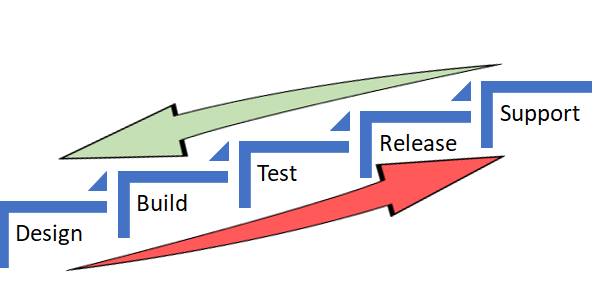
    In both the scenarios, the underlying objective was to catch defects and or reduce life support activities early in the cycle (below) which costs more and more as we move up the food chain, which in turn makes a release and subsequent maintenance cheaper.


    As Alan also referred in the same article to the IBM Study, it’s almost 100 times more expensive to fix an eventual production defect which cost about six times more if caught at Implementation stage or about 15 times more if found during testing. Thus, “Early identification and prevention can improve reliable software delivery” would be the mantra.

    Now, to the crux of this article, Is ShiftLeft not what we aim to achieve via DevOps?

    DevOps basically creates a collaborative, non-siloed cultural change to bring both Development and Operations together early in the game.

    Throw in a bunch of tools to facilitate CI/CD, pull in the security guys early, expand automated testing coverage, include change and release—who are the catalysts, as I call these functions in my earlier article here—squeeze in a few monitoring tools and dashboards and voila! You have a complete and mostly successful DevOps team to dish out the most appetizing feast of quality software repeatedly.

    A table for two (Dev & Ops) has become a party of six! Yaaay!!

    So, from DevOps standpoint, ain’t we doing the same as ShiftLefting (If I may coin the word) with the resulting cost effectiveness, more efficiently?

    We do when we as a team make shorter and frequent sprints; gain insight, not just on how to code better or leaner but also by learning from the masters in Operations who run that software on the infrastructure they monitor and support daily. Or perform the VA scan early, or push a scenario as unit test instead of regression, and/or raise flags on potential capacity challenges.

    So again, isn’t DevOps team already doing that ShiftLefting as part of its charter?

    There is a limit to moving things left, but then, if your organization is still doing wireframes under a waterfall or is in the process of setting up a DevOps team, then this approach could be a stop-gap arrangement, an eventual merging of a narrative within a new narrative.

    But then my argument would be, Why stop-gap and why not a full frontal? Why not embrace the DevOps model, which comes preinstalled with all the ShiftLeft possibilities?

    Even if we are aware how an episode ends, procrastinating raises the risk of being left behind in the race to deliver quality, cost-effective product quickly.

    Technology is redefining businesses: Transportation is an app and soon probably will be driverless; banks are rebranding as tech companies in FinServ business; a fridge can reorder milk; trash cans can be Wi-Fi-enabled! Ah, the internet of things. Is Alexa listening?

    My other relevant posts are here and here.

    Thank you for the time.

    — Abdul Salaam Khurram

  • Avoid Crashes: 5 Best Practices for Load Testing

    Avoid Crashes: 5 Best Practices for Load Testing

    Demanding customer expectations and the rapid distribution of information across social media have made website and applications crashes an off-limits path for today’s companies and organizations.

    Crashes resulting from traffic spikes cause immediate and long-term loss of sales, as well as tarnishing the brand name. When servers or websites go down during highly anticipated events such as Black Friday, the Big Game or before a major concert, the repercussions can be permanent.

    Yet, avoiding the “website temporarily unavailable” screen is also easier than ever before. By performance testing your website continuously and proactively you can easily detect errors, bottlenecks and bugs, and then fix them to ensure your website handles any amount of traffic.

    Here are five best practices for load testing your website or app:

    Define Your Load Goals

    Before starting your tests, you need to figure out what it is that you need to test.

    This includes the number of concurrent users, traffic patterns and areas that users can visit on your site. For example, if your site has 10,000 users concurrent at its peak, but  3,000 arrive in the morning and that total slowly climbs up to 10,000 in the afternoon—and these visitors mostly just browse your homepage—you’ll need to run a different test than if you have 10,000 concurrent users on your website all day long, constantly browsing multiple pages.

    To determine your load goals, you need to engage directly with your business colleagues. For instance, get your product manager to set the system’s expected abilities, ask the marketing team to inform you about any special campaigns that might increase website traffic, and then look at server logs and tools such as Google Analytics to determine previous customer patterns.

    Choose Your Load Testing Tools

    There are multiple open-source load-testing tools that you can use to run your tests.

    JMeter is the most popular tool, but you can also use Gatling, Locust, Tsung, The Grinder or Selenium. See here to learn more about the differences between these toolsets.

    Does this seem complicated? Taurus is an open-source automation test framework that simplifies running these tools, by using a simple YAML script. If you need to run your tests from the cloud, utilizing rich analytics or requiring user collaboration, you might consider using BlazeMeter.

    Take Your System to the Limit

    To make sure you stand up to your load goals, you need a buffer; specifically, you need to make sure that your system can handle heavier loads.

    This ensures that the CPU stays low and you don’t experience memory leaks. However, we also recommend you take your system to the limit and see when and how it fails. This ensures that you know exactly what your system’s weaknesses are, giving you a better ability to fix any errors that might occur.

    This is especially important if you come across an unexpected traffic spike—say, if your competitor’s website crashes and all their customers come running to you. Wouldn’t you rather be prepared for that?

    Monitor Test Results

    Set aside resources for looking at test results.

    Examine KPIs including Response Time and Hits/s, as well as the correlations between them, to learn what your system’s abilities and bottlenecks are. This information will help you see what needs fixing.

    As you continue testing over time, you will be able to identify KPI trends, which will help you monitor system health. We also recommend you monitor backend KPIs like DB Queries, with APM tools.

    Test Again

    So, you’ve tested, you’ve analyzed, and you’ve fixed.

    Now you have one last thing to do: Run your tests again to make sure everything is working smoothly after the committed changes. That ensures nothing gets overlooked. It would be a shame if all your hard work went down the drain due to a minor oversight.

    Now, let’s get testing!

    To get more load testing tips, check out this free whitepaper, “How to Ensure Your Website or App Won’t Fail at Peak Times.” To learn more about BlazeMeter, request a demo.

    — Noga Cohen