Tag: cloud services

  • AWS Advances DevOps Agenda at Summit Event

    AWS Advances DevOps Agenda at Summit Event

    Amazon Web Services (AWS) has added services to its cloud platform designed to automate the creation of virtual private clouds (VPCs) and made available additional tools to build applications and integrate external data.

    Speaking at the AWS Summit event, CTO Werner Vogels said these latest services are part of an ongoing effort to automate DevOps processes to the point at which developers will need to write only the code for business logic that runs on top of the AWS public cloud.

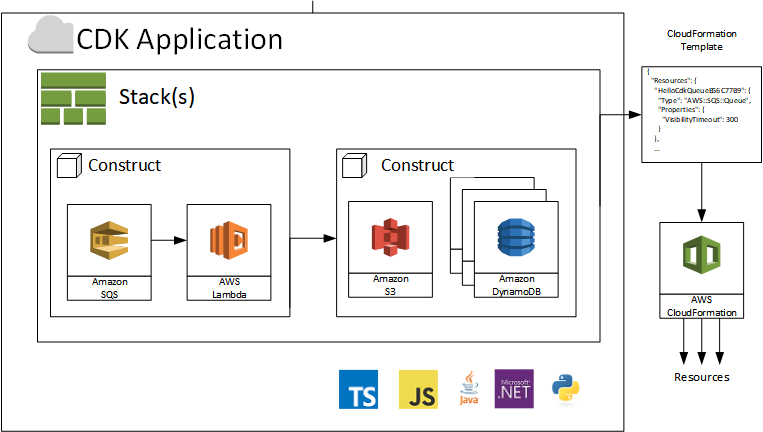
    One of the latest tools the company is making available in pursuit of that goal is AWS Cloud Development Kit (CDK), a software development framework for defining cloud infrastructure in code as constructs and provisioning it through AWS CloudFormation. AWS CDK currently supports TypeScript, JavaScript and Python with support for C#/.NET and Java available in preview. That capability will eliminate the need to write low-level code using a different tool just to spin up a VPC on AWS, Vogels said.

    AWS CDK also allows organizations to design and compose their own custom components for managing infrastructure alongside their application code.

    The cloud services provider also announced AWS EventBridge, a programmable event bus for integrating data on AWS with data residing in software-as-a-service (SaaS) applications on any platform based on a serverless computing framework, and the general availability of AWS Toolkit for Visual Studio Code, a plug-in for the Microsoft integrated development environment (IDE) that makes it easier to build, debug and deploy code on AWS.

    Finally, the company announced that Amazon CloudWatch Container Insights is now available in preview. This offering provides access to automated dashboards summarizing the performance and health of their Amazon Elastic Container Service (ECS) and Fargate clusters by tasks. Those offerings come on the heels of AWS Fluent Bit, a tool for container logging being made generally available earlier this week.

    Vogels stressed that the way applications are built is now fundamentally different in the age of the cloud. Developers are making greater use of containers and serverless computing frameworks. The challenge with containers is that in the absence of a cloud service provider to manage the environment, the complexity of the underlying middleware and infrastructure conspires to reduce the amount of time developers spend on writing actual application code, he said.

    To address that issue, AWS is investing more in container and Kubernetes services as well as in on-demand serverless computing services such as AWS EventBridge that don’t require organizations to pay for idle processes, Vogels explained.

    In general, Vogels said AWS continues to advocate for the elimination of separate IT operations and cybersecurity teams in favor of a more unified approach leveraging automated services provided by AWS that ensure, for example, the entire continuous integration/continuous deployment (CI/CD) platform is secure. However, while the number of organizations embracing best DevOps and DevSecOps processes continues to increase steadily, it’s much less clear how many of them will standardize those processes on a single cloud platform at a time when reliance on multiple clouds also continues to increase steadily.

    — Mike Vizard

  • Making Your Cloud Work For You

    Making Your Cloud Work For You

    Does your cloud work for you, or do you work for your cloud? Given the enormous dependency and costs associated with cloud computing, that is a question more and more DevOps teams are asking these days. After more than a decade of pressure from higher-ups to move workloads to the public cloud, DevOps teams are now facing the reality that there is such a thing as too much cloud.

    Don’t take that the wrong way. I’m not here to tell you the cloud is inherently bad or we should return to the days when all our critical workloads ran on bare-metal servers housed in a closet in the back of the office. Public cloud services offer a number of critical benefits and DevOps teams should take advantage of them.

    However, to use the cloud responsibly, it’s crucial to control for two risks. The first is cloud computing costs, which easily can get out of hand if not managed properly. The second is a rigid dependency on public cloud services that undercuts agility and makes it more difficult to deploy applications at scale—which is exactly the opposite of what the cloud is supposed to do.

    In this article, we’ll take a look at what causes each of these risks and how DevOps teams can respond to ensure their cloud strategy actually delivers value.

    Risk 1: Cloud Computing Cost

    You’ve probably heard a lot of talk about how the cloud saves money. If you use the cloud effectively, that is true. However, because of the complexity of cloud computing cost structures and the difficulty of comparing cloud computing costs to on-premises costs, it’s easy to end up with a cloud hangover after paying a much higher cloud computing bill than you bargained for.

    There are several distinct challenges at play in predicting and understanding the true costs of your cloud. Let’s take a look at each one.

    Never-Ending Cloud Computing Costs

    When you move workloads to the cloud, your costs vary month by month and are spread out over time. At first, moving to the cloud feels like a great money-saver because it frees you from having to make large, upfront purchases of on-premises hardware. However, just as leasing a car ultimately costs more in the long run for most people than owning, paying monthly for cloud services hosted on someone else’s infrastructure adds up. If you ignore this fact, you can end up failing to appreciate the true cost of your cloud computing bill over the long term.

    Unpredictable Cloud Costs

    Another fundamental challenge of cloud computing cost compared to on-premises is that, in the cloud, costs structures are opaque and unpredictable. Public cloud vendors change the prices of services without notice. The same service might cost more in one cloud region than another, while some services have multiple fees attached. For example, if you store data in the public cloud, you pay not just a per-gigabyte cost to store it but also fees whenever you move the data. This adds up to tremendous difficulty in predicting your true cloud computing bill.

    On-premises costs are not entirely straightforward to predict either, of course. There are some fluctuating expenses, such as the cost of electricity. However, the lion’s share of on-premises computing costs is the hardware itself, which is a very simple and tangible expense. It’s also a one-time expenditure that you can amortize over the life of your servers. Once you have purchased a server, you don’t have to worry that its effective cost will change month to month, as you would with a virtual server in the public cloud.

    Overlooked Workloads

    In the cloud, it’s trivially easy to spin up a new workload. It’s also easy to leave a workload running after you no longer need it—and public cloud vendors don’t go out of their way to notify you when you have resources that are activated but sitting idle. You can’t blame them; that would be like a restaurant telling you you’re ordering too much food or a builder telling you your house is bigger than you need.

    If you don’t carefully manage your cloud workloads, they add up to extraneous and unnecessary costs.

    To be sure, you can have unnecessary workloads running in an on-premises environment, too. But the difference is there is no substantial cost increase on-premises that accompanies each extraneous workload. You’ve already paid for the servers and you don’t get a bill for every service you have running on your own infrastructure.

    Risk 2: Lack of Cloud Agility

    Beyond unnecessary costs or inefficient cost structures, relying too heavily on the public cloud also undercuts the agility of DevOps teams.

    When you run a service or workload in the public cloud, moving it to different infrastructure can be challenging. Not only is it usually difficult to migrate from one cloud to another, but also doing so entails adapting to a new cost structure and possibly paying more for the same set of services.

    There is an irony here: Conventional wisdom suggests that one of the main reasons to migrate to the cloud is that the cloud is inherently more scalable and agile than on-premises infrastructure. That may be true in some cases, but when you factor in the cost and the difficulty of migration from one cloud to another, the cloud quickly starts to look less agile and scalable.

    On-premises infrastructure doesn’t always scale painlessly either, of course. I don’t dispute that. But the cloud doesn’t always live up to the hype when it comes to scalability and agility. On-premises and cloud-based infrastructures both have limitations in this regard.

    Cutting the Cord: Making the Cloud Work For You

    Now that we’ve identified the inherent (and underappreciated) cost and agility challenges of cloud computing, let’s consider solutions.

    Optimize Cloud Computing Costs

    Cost optimization is something you should always do on any infrastructure, and the cloud is no exception.

    There are many guides out there on cloud cost optimization. Some vendors also offer tools designed to monitor your cloud workloads and identify underused resources or help you right-size cloud service instances. These are all good ways to help reduce your cloud-computing bill.

    Be Cloud-Agnostic

    Another useful strategy is to architect your cloud workloads in a way that makes them as cloud-agnostic as possible. Instead of deeply integrating with a particular cloud vendor’s services, rely on third-party tooling whenever you can.

    For example, if you run containerized apps in the cloud, run your containers in standard virtual server instances and use a third-party registry instead of using the container registry and managed container service of one cloud vendor. This will require a bit more work on your end, but it will give you the freedom to move your workload to another cloud easily. It also enables cost-efficient scalability, because you are not beholden to the cost structures tied to the vendor’s managed container service. Rather, you are using only virtual server instances (and perhaps some storage to go along with them), which have much more flexible pricing on public clouds.

    Don’t Be Afraid of On-Prem

    My final recommendation, and my most important one, is to embrace on-premises infrastructure.

    Again, I say this not because I want to move backwards and return to a world where everything runs on-premises. I’m not anti-cloud.

    However, from a cost and agility perspective, the public cloud is not the best fit for every type of workload. Workloads that have very convoluted cost structures in the public cloud—or that would be difficult to run in a public cloud without sacrificing a great deal of mobility and scalability—are often a better fit for on-premises environments.

    You may be thinking that embracing on-premises means sacrificing all of the advantages of the cloud or having to forgo cloud-native workloads. Fortunately, that’s not the case. There are software vendors that offer the services of a public cloud, but on your own enterprise infrastructure using the public cloud APIs.

    Thus, you can obtain the cost and agility benefits of on-premises infrastructure (not to mention the security advantages) while still running cloud-native applications. In fact, you don’t even need to overhaul your CI/CD pipeline; you can simply deliver your cloud-native apps onto on-premises infrastructure that runs services designed to be compatible with those of the public cloud, even though they are hosted on your own servers.

    Conclusion

    Don’t move workloads to the cloud just because it seems like the thing to do or because someone told you it’s necessarily better. Some workloads work better in the cloud while others are best hosted on-premises. An all-in cloud strategy is not typically the most cost-efficient or agile architecture you can adopt.

    — Ariel Maislos

  • Pulumi Advances DevOps on AWS

    Pulumi Advances DevOps on AWS

    Pulumi announced the availability of Pulumi Crosswalk for Amazon Web Services (AWS), an open source framework for deploying applications on Amazon Web Services (AWS).

    Company CEO Joe Duffy said Pulumi Crosswalk for AWS provides a software-as-a-service (SaaS) application through which DevOps teams can automate the deployment of applications on AWS infrastructure using software development kits (SDKs) from Pulumi. The SDKs are based on programming tools such as JavaScript, Python, TypeScript and Go, which most developers already know how to use. That approach eliminates the need for DevOps teams to learn how to employ YAML files or to acquire tools such as CloudFormation or Terraform to deploy applications on AWS, he said.

    Pulumi Crosswalk for AWS also embeds the best DevOps processes recommended by AWS directly within its SaaS tools, including patterns for containers and serverless computing frameworks, Duffy noted.

    Pulumi Crosswalk for AWS is available on GitHub. It is designed to be integrated with existing Team and Enterprise Editions of Crosswalk that come with support and training provided by Pulumi.

    In addition to AWS, Pulumi Crosswalk supports other cloud platforms, including Microsoft Azure and Google Cloud Platform (GCP). The company also plans to provide support for private clouds and leverage Kubernetes clusters to automate deployments across hybrid cloud computing environments.

    Duffy noted that despite all the enthusiasm for DevOps, many IT operations teams have been left behind. While much time and effort has been put into unifying backend cloud services, the operational experience in the cloud still revolves around low-level application programming interfaces (APIs) or specialized tools that are challenging for IT operations teams to employ. That situation often creates a backlog of applications for IT operations to deploy. Crosswalk enables IT operations teams to leverage the skills developers have to deploy applications they approve on AWS, he said.

    As cloud computing evolves in the age of DevOps, the relationship between developers and the IT operations team is becoming more nuanced. IT operations teams still need to put guardrails in place, but they can’t afford to be perceived as a bottleneck slowing down the rate at which applications can be deployed in the cloud. The challenge IT operations teams must overcome is finding a way to enable developers to self-service their application deployment requirements as much as possible within a set of policy guidelines defined by the internal IT team. That approach will enable developers and IT operations teams to get out of each other’s way.

    It may be a while before IT operations and developers find the right DevOps balance that best suits their organizations. Individual teams within enterprises tend to define their own best practices based on the expertise available within the team. Ideally, those best practices are then shared and implemented as appropriate across the rest of the enterprise.

    In the meantime, it will be interesting to see how aggressively cloud service providers embrace tools such as those from Pulumi. Cloud service providers have a vested interest in getting as many workloads deployed in their clouds as quickly as possible. They tend to be a little less enthusiastic about anything that makes it easier to move those workloads anytime a DevOps team sees fit.

    — Mike Vizard

  • Chef Extends Automation Reach and Scope

    Chef Extends Automation Reach and Scope

    At its ChefConf 2019 conference today, Chef extended its core platform in ways that collectively serve to automate further the management of applications and the IT infrastructure they are deployed on.

    Extensions to the Chef Enterprise Automation (EAS) Stack include the addition of Application Operations Dashboards, Migration Accelerators for moving applications to the cloud and tighter integration between the Chef Infra and Chef InSpec modules within the Chef Habitat management framework.

    Brian Goldfarb, chief marketing officer for Chef, said these latest additions to Chef Enterprise Automation Stack are part of an ongoing Chef initiative to make it easier to seamlessly unify the management of infrastructure and applications in keeping with best DevOps practices, which Chef refers to as the “Coded Enterprise.”

    Chef DashboardAs part of that effort, Chef Application Operations Dashboards provide visibility into both applications and infrastructure to simplify troubleshooting and compliance, said Goldfarb. For example, IT teams will be able to see how individual security and compliance controls are performing across a heterogeneous computing environment that now includes Microsoft Azure and Google Cloud Platform (GCP) alongside Amazon Web Services (AWS), he said.


    At the same time, Chef is trying to make it easier to lift and shift applications to the cloud. EAS Migration Accelerators automate an application migration process that today requires most organizations to spend considerable time and effort to accomplish manually, said Goldfarb.

    An EAS Migration Accelerator for Windows, for example, will scan existing .NET applications running on IIS to discover configuration and dependency details and then package that information as code. That approach significantly reduces the time required to build application packages in Chef Habitat.

    Within Chef Habitat, the integration between Chef Infra, for automating infrastructure configuration, and Chef InSpec, a tool for automation compliance, is now more unified via pre-configured compliance profiles and cookbooks that make it easier to customize and modify which security and compliance controls are tested and enforced.

    Finally, Chef has also added support for high availability to the EAS platform to make sure the environment is always accessible.

    Goldfarb said the goal is to continue to make automation more accessible to IT generalists versus requiring them to hire and train dedicated specialists. One of the primary reasons that DevOps practices have been adopted so unevenly within IT organizations is the bar to master them has been set too high. By making it easier to automate the management of both infrastructure and applications, Chef is moving to lower that bar and make it easier to manage IT by unifying the management of applications and infrastructure, said Goldfarb.

    It’s too early to say to what degree IT automation will advance the adoption of DevOps. What is apparent is that IT environments are becoming too complex for mere mortal IT administrators to manage manually. IT organizations are also expected to be able to respond faster to any issues that arise, which requires IT teams to have a unified view of applications and the infrastructure o which they are deployed. In fact, as IT organizations continue down that IT automation path, many of them one day may discover they have embraced DevOps without even realizing it.

    — Mike Vizard

  • Dell Technologies Drives Automation Deeper into Platforms

    Dell Technologies Drives Automation Deeper into Platforms

    Dell Technologies this week launched a series of initiatives intended to provide IT organizations with multiple deployment options for Dell EMC appliances and servers, including forthcoming managed service offering through which Dell will manage private cloud platforms based on VMware software on behalf of customers.

    Announced at the Dell Technologies World 2019 conference, Dell EMC also unveiled a new appliance series and revealed an alliance with Microsoft under which its VMware arm will make available cloud software on the Microsoft Azure cloud, in addition to existing support for Amazon Web Services (AWS), IBM Cloud and servers deployed on-premises.

    Jon Siegal, vice president for product marketing for converged platforms and solutions at Dell EMC, said Dell EMC plans to make it easier for IT organizations to consume IT infrastructure in an on-premises IT environment as a service or continue to use their capital budgets to acquire servers and appliances.

    To advance that latter approach, Dell EMC is launching VxFlex, a set of appliances that include an operating system that enable compute, storage and networking separately. In contrast, the existing VxRail series of appliances are optimized for VMware and assume compute, storage and networking will be scaled in tandem, said Siegal. Dell EMC is also now unifying a set of hyperconverged appliances and converged infrastructure servers under a common VxFlex brand, and Siegal said in the future those offerings will be extended to add support for Kubernetes alongside platforms from vendors other than VMware.

    At the same time, Dell EMC is previewing a VxRail Analytical Consulting Engine (ACE) that will be embedded in VxRail HCI system software that Dell EMC provides in its appliances optimized for VMware. That analytics engine employs machine learning algorithms to maximize application performance, while also providing self-optimization recommendations and capacity forecasts.

    The Dell Technologies Data Center-as-a-Service offering, meanwhile, is scheduled to be generally available in the second half. It marks the first time Dell has launched a managed service under its own brand. VMware, however, has been providing managed services for the past year. The Dell Technologies Data Center-as-a-Service offering extends that concept to include Dell EMC VxRail appliances.

    Automation is clearly at the heart of the evolving Dell Technologies strategy. The challenge organizations that have embraced DevOps will face is aligning their processes with the automation frameworks Dell Technologies is embedding in both VMware and the underlying infrastructure on which VMware gets deployed. To address that issue, Dell Technologies over time will bundle frameworks such as the open source distribution of the Pivotal platform-as-a-service (PaaS) environment from Pivotal Software, an arm of Dell Technologies, on its platforms, Siegal said.

    These moves signal Dell Technologies is trying to fulfill a promise to make it as easy to manage IT infrastructure deployed in an on-premises IT environment as it is to manage on a public cloud. There’s obviously still a gap. But as Dell Technologies starts to make IT infrastructure available as a service, it may one day become challenging for DevOps teams to tell where any one cloud happens to be running at any given moment.

    — Mike Vizard

  • Keeping NoOps From Going Rogue

    Keeping NoOps From Going Rogue

    “We’re NoOps—everything is in the cloud and we have no infrastructure to manage.” Before running that victory lap and shifting everyone to the dev side, consider several NoOps risks carefully. I’m really thinking about teams using all-SaaS stacks, especially in martech, edtech and other areas. However, the rise in microservices and serverless means more teams are leaning toward NoOps. At least a few people on your team should always watch for rogue issues on the ops side of the equation.

    Locked-in Vendors

    Risk: Cloud-based tools in the same category rarely have the same functionality. Once one is selected, you’re committed to its specific features. Moving away from a tool may mean dropping a popular application feature or changing workflow with coding to recreate functionality.

    Mitigation: Evaluate unique features and customized data fields carefully before use. Solving data format differences is relatively easy for common fields. Look for tools with well-documented APIs and integrations or connector support for analytics. If there are no integrations out there, that’s a red flag.

    Ghosting

    Risk: Lock-in becomes a big problem if the vendor ghosts. SaaS startups often meet one of two fates: they are acquired or they crash and burn. A tool critical to your workflow may disappear overnight. In the acquisition scenario, you may have some time and support in migrating from your tool to its successor.

    Mitigation: Always have a Plan B for every cloud-based tool in your stack. Competitors are introducing new tools frequently. A trade study done two years ago may be completely obsolete on today’s fast-moving landscape. Proactive migration to newer solutions may reduce vendor risk and improve features.

    Limited Observability

    Risk: Overheard in a conference recently—Those who develop the code are more motivated to build in useful observability for those in operations if those folks are the same team. In NoOps, that’s not in play. If a cloud-based tool in your stack is down frequently or providing strange results, it may be very difficult to tell what is happening. Observability is often replaced by faith that the SaaS vendor has done its job and you aren’t experiencing a corner case it hasn’t tested.

    Mitigation: Observability and monitoring aren’t the same, but when you don’t have observability inside SaaS tools, monitoring helps. Application performance management (APM) tools are emerging with new ways to build instrumentation around microservices. Create test cases with synthetic data to check your functionality—you’ll need these to provide evidence for the vendor in any bug report.

    Unoptimized Workloads

    Risk: You’re also often at the mercy of the SaaS vendor when it comes to speed of results. It’s a common tripping point to pilot a SaaS workflow with a few users and test cases, and then find out it doesn’t scale when everyone is brought in.

    Mitigation: This is one the biggest NoOps risks where ops expertise pays off. Where is the problem, exactly? Application problems may be candidates for workload acceleration—such as running on a GPU (or FPGA) enabled cloud instance. Reporting problems may be better-suited for an analytics tool, which can be run offline with extracted data.

    Tangled Analytics

    Risk: Every SaaS tool reports different metrics in different ways. Worse, users in a multi-cloud environment face learning and visiting multiple applications to look at data. Different applications report similar facts using different terms. As the tool stack and data sets grow, it takes longer and longer to analyze data.

    Mitigation: Dashboards pay off early with one destination for data across the stack. Earlier, I mentioned the need for integrations or connectors—this should be a requirement for tool selection, both in the stack and the analytics tool. Deciding on which KPIs to track in the dashboard also focuses conversation and minimizes digging.

    Closing NoOps Risks

    There’s also the big topic of multi-cloud security and compliance, probably worth a series of posts by themselves. An Ops team working proactively in tool selection can comprehend many security risks before committing to tools and exposure. More value unfolds over time, as the security posture evolves with discovery of new threats.

    The tech pendulum is always swinging. For many organizations, NoOps swings the pendulum a bit too far from DevOps and leaves risks open. A better philosophy is MinOps, where a small team is deployed, watching for and even anticipating problems.

    I’d be interested to hear if you’ve tried NoOps and been successful over time, or if you reverted to a MinOps approach.

    — Don Dingee

  • VMware Advances Hybrid Cloud Ambitions

    VMware Advances Hybrid Cloud Ambitions

    VMware today advanced its hybrid cloud strategy by making a series of updates to existing offerings, including the CloudHealth by VMware software-as-a-service (SaaS) application for managing and optimizing cloud applications, which VMware acquired last summer.

    In addition, VMware Cloud on AWS is now available in data centers operated by Amazon Web Services in Canada, Paris and Singapore, the company noted. VMware also announced that the latest version of VMware Cloud Foundation—which provides and automatically updates all the VMware compute, storage and networking software required to build a cloud—has been optimized to deploy VMware Horizon virtual desktop infrastructure (VDI) software, and will available on Dell EMC VxRail hyperconverged infrastructure in April.

    New capabilities being added to CloudHealth by VMware include enhanced multi-cloud reporting, multidimensional reporting and workspaces reporting.

    The CloudHealth platform also is now integrated with the Wavefront by VMware cloud analytics and monitoring platform, enabling users of CloudHealth to employ Wavefront metrics to rightsize and optimize applications running on multiple cloud applications as part of their DevOps practices.

    A future update to the CloudHealth platform will add enhanced amortization as well as support for convertible Reserved Instance (RI) exchanger automation, container cluster visibility and cross-family rightsizing for Amazon EC2, according to the company.

    Finally, VMware announced it is making available version 9.7 of VMware vCloud Director to cloud service providers. This offering provides a single pane of glass through which multiple VMware environments can be managed regardless of whether they are deployed on-premises or in the cloud. The latest version of VMware vCloud Director adds support for version 3.0 of VMware Cloud Availability, which unifies onboarding, migration and disaster recovery services between multi-tenant clouds. VMware vCloud Director is only available to cloud service providers, but Ajay Patel, senior vice president and general manager for the cloud provider software business unit for VMware, said VMware and its cloud service provider partners plan to make available a software-defined data center (SDDC)-as-a-service offering through which they will manage deployments of VMware from the edge to the cloud on behalf of IT organizations.

    VMware also revealed there are now more than 60 partners building or delivering managed service offerings for VMware Cloud on AWS, and more than 280 partners have achieved the VMware Cloud on AWS Solution Competency. VMware also now has 35 VMware Cloud Provider Program partners that have achieved Cloud Verified status, which is required to be eligible to deliver the forthcoming SDDC-as-a-service offering. Patel also revealed the number of organizations running instances of VMware on public clouds now exceeds 1,000, in the wake of the launch of VMware Cloud on AWS last year.

    Patel said the shift to hybrid clouds is more about transforming IT operational models than it is about deploying workloads at new physical locations. The challenge many IT organizations will need to come to terms with going forward is deciding what portions of that IT operational model they want to run themselves versus opting to rely on VMware and its partners.

    — Mike Vizard

  • Kemp Adds Predictive Analytics to ADC to Advance DevOps

    Kemp Adds Predictive Analytics to ADC to Advance DevOps

    Kemp this week enhanced the automation and predictive analytics capabilities it makes available within its application developer controller (ADC) as part of an effort to ease deployment of applications across multi-cloud computing environments.

    Company CEO Ray Downes said the goal is to make it easier for DevOps teams to avoid overprovisioning IT infrastructure, at a time when applications are more distributed than ever.

    The Kemp ADC offerings are comprised of a mix of physical and virtual appliances that have now been deployed more than 60,000 times. The volume of data generated by those deployments now makes it possible for Kemp to apply predictive analytics via a 360 Central monitoring tool that, for example, can now make suggestions concerning where to deploy a workload based on current utilization rates, Downes said.

    Kemp also now can provide comparative analytics, he noted. For example, the company revealed that its analytics show 61 percent of application experience issues are related to events caused by capacity issues such as failing or degrading application servers. Kemp also revealed that 48 percent of organizations see as many as nine application incidents per week.

    Now that Kemp has begun to apply predictive analytics to its ADC platforms, Downes said the next logical step will be to apply machine learning algorithms to help further automate application deployments.

    While ADCs provide critical load balancing capabilities, they are often overlooked as a source of actionable intelligence for DevOps teams. That data is more critical than ever because as IT organizations modernize their application portfolios by embracing more complex microservices, many of them are discovering every application will soon require its own load balancing capability. Previously, the primary role of an ADC had been to enable as many applications as possible to share the same IT infrastructure efficiently. Now the goal is becoming to orchestrate and optimize the allocation of IT infrastructure resources across a range of loosely coupled microservices. The Kemp ADC is designed to enable DevOps teams to define a desired state of all the load balancers in the distributed IT environment, including F5 Big-IP, AWS Elastic Load Balancer, Nginx, and HAproxy load balancers. That capability then makes it easier to roll out distributed application services.

    Over time, Downes said Kemp will extend that capability to open source load balancers such as Envoy, which are starting to be deployed on top of Kubernetes clusters. Both Kubernetes and Envoy are being developed under the auspices of the Cloud Native Computing Foundation (CNCF). As critical as load balancing will be within a Kubernetes cluster, however, Downes noted distributed applications will span cloud-native and legacy IT infrastructure environments as well as multiple Kubernetes clusters.

    It may take a while for DevOps teams to fully sort out what form of ADC platform and load balancing capability to employ when and where. But as IT becomes more distributed, there’s rising interest in making sure IT infrastructure utilization rates for those applications remain as high as possible regardless of how they have been developed.

    — Mike Vizard

  • Business Continuity in the Azure Cloud: Understanding the Options

    Business Continuity in the Azure Cloud: Understanding the Options

    There are numerous ways to assure business continuity for applications running within the Azure cloud via various high availability and disaster recovery provisions. But, selecting the best and most cost-effective provisions for each and every application can be extraordinarily difficult owing to the myriad choices available. At best, making poor choices during development can waste money. At worst, a wrong choice can cause failover provisions to fail when needed during operation.

    All business continuity provisions involve hardware and software redundancy, data replication and some means of failover and failback. Purpose-built failover clustering software has long been among the most popular choices based on its proven dependability and cost-effectiveness. The clusters are relatively easy to deploy in an enterprise data center using shared storage. But with no shared storage available in the public cloud, configuring failover clusters in Azure becomes considerably more challenging.

    This article examines the options available for high availability (HA) and disaster recovery (DR) provisions within and for the Azure cloud. Special emphasis is given to SQL Server as a particularly popular application for Azure.

    Options Available Within the Azure Cloud

    The Azure cloud offers redundancy at three layers: within data centers, within regions and across multiple regions. Within data centers, Availability Sets are used to distribute redundant servers across different fault domains located in different racks, which protects against failures at the server and rack levels. This affords some protection for some failures, but provides no protection during a sitewide failure, such as the one that occurred in September 2018 in Azure’s South Central US Region. The 99.95 percent Service Level Agreement (SLA) only guarantees that in an Availability Set with two or more servers, at least one will have external connectivity, but it does nothing to assure availability at the application level.

    To protect against sitewide failures, Azure is now offering Availability Zones (AZs). Regions with AZs have at least three data centers interconnected via a high-bandwidth, low-latency network that supports synchronous replication. Azure offers a 99.99 percent SLA for AZs, but again, only guarantees at least one server will have external connectivity—nothing less and nothing more.

    For redundancy during major disasters, Azure offers Region Pairs, in which each region is paired with another in the same geography (e.g. United States or Europe). The regions are separated by at least 300 miles to protect against widespread disasters that might impact an entire region, including across multiple AZs. By pairing regions, Microsoft is able to apply updates one at a time to prevent the “update gone bad” scenario and will prioritize the recovery of at least one region in each pair during an Azurewide outage. But again, Azure only guarantees “dial tone” for the servers, leaving it to the customers to ensure availability at the application level.

    Options Available in OS and SQL Server Software

    Windows Server Failover Clustering (WSFC) is a standard operating system feature that is utilized by many applications to provide HA protection in enterprise data centers. However, WSFC requires some form of shared storage, which historically has not been available in any public cloud, including Azure’s.

    Microsoft addressed this problem in the Datacenter Edition of Windows Server 2016 by adding Storage Spaces Direct (S2D), a software-defined, virtual storage area network. But because the cluster must reside entirely within a single data center, S2D is incompatible with Availability Zones. Applications that require multisite HA/DR protection will, therefore, need to use third-party failover clustering software, log shipping or some other additional provision(s).

    With no equivalent to WSFC or S2D for Linux, HA/DR protection requires either the use of open source software, such as Pacemaker, or a third-party failover clustering solution. Because supporting open source software requires a substantial and ongoing commitment, only the largest organizations have the wherewithal to even consider this do-it-yourself option.

    SQL Server, whether for Windows or Linux, offers two of its own HA/DR features: Failover Cluster Instances and Always On Availability Groups. FCIs afford two major advantages: inclusion in the Standard Edition; and protection for the entire SQL Server instance, including system databases. A notable disadvantage is the need for cluster-aware shared storage, including the virtual variety with S2D, which is only supported for SQL Server 2016 and later.

    Always On Availability Groups is SQL Server’s more robust HA/DR offering, capable of delivering recovery times of 5-10 seconds and recovery points of seconds or less. Its disadvantages include the lack of protection for the entire SQL instance and the need to license the more expensive Enterprise Edition, which can be cost-prohibitive for many applications.

    A significant disadvantage with all application-specific options is the need for DevOps staff to use different HA and/or DR solutions for different applications. Having multiple HA/DR solutions inevitably increases complexity and costs, making this another reason why application-agnostic third-party solutions are so popular.

    The Third-party Failover Clustering Software Option

    Being agnostic with respect to both applications and platforms enables purpose-built failover clustering software to provide a complete HA/DR solution for virtually all Windows and Linux applications. Application-agnosticism eliminates the need to have different HA/DR solutions for different applications. Platform-agnosticism makes it possible to leverage, while not being dependent upon, various capabilities and services within the Azure cloud, making this option suitable for use in private, public and hybrid cloud environments.

    Failover clustering solutions include, at a minimum, real-time data replication, continuous monitoring for detecting failures at the application level and configurable policies for failover/failback. All are designed to satisfy mission-critical recovery time and recovery point objectives, and most also offer a variety of value-added capabilities to simplify implementation and management.

    Clustering with Confidence

    Whether used individually or in various combinations, all of these options can have a role to play in making HA and DR protections more effective and more affordable for all applications—from those that can tolerate some downtime, to those that demand five 9s of uptime. But be sure that the options chosen afford protection at the application level for all likely failure scenarios.

    — Dave Bermingham

  • Spot Instances on Black Friday: A Case Study

    Spot Instances on Black Friday: A Case Study

    Businesses made the right choice using spot instances for Black Friday

    Black Friday is the unofficial kickoff to the holiday shopping season, when retailers announce exciting deals to attract as many customers as they can into their stores. With online shopping surging in recent years, e-commerce and AdTech businesses are also participating in Black Friday to increase their online presence and revenues. Today, millions of customers have the choice of shopping online or in brick-and-mortar stores. While these stores have their challenges managing massive amounts of shoppers, e-commerce and AdTech businesses are dealing with their own set of challenges when it comes to handling shopper traffic.

    Source: Business Insider

    During peak shopping days such as Black Friday, businesses use significantly more capacity to process online shopper requests while constantly trying to provide them optimal performance. In theory, as more companies utilize resources from a cloud provider, they may experience a capacity shortage when trying to scale. When a busy online shopping day finally approaches, this theory can become a reality as online retailers scale to meet their shoppers’ demands and cloud providers struggle to accommodate capacity. However, what many cloud users may not know is that about 50 percent of the major cloud vendors’ infrastructure is mostly idle.

    To be clear, this is not because AWS, Microsoft or Google are struggling to sell their capacity; it’s because they have to be ready for rapid increases in usage—just like the one businesses experience during Black Friday.

    The fear of insufficient capacity also has made users apprehensive to use cloud providers’ excess capacity such as spot instances to run their workloads, since many customers are using more cloud resources and are eating all of the cloud inventory. Businesses simply do not want to take a chance trying to compete for excess capacity and opt for something more predictable, such as on-demand instances. The fact that cloud providers are capable of handling the most aggressive computing demands has created a situation in which businesses that chose to make intelligent use of excess capacity during Black Friday saw great returns on their investments.

    Events such as Black Friday, national elections and the Super Bowl are pretty extreme stress tests for any consumer-facing business. We thought it would interesting to go through the data and see how the AWS spot market behaved during Black Friday, and see what we can learn from it. In this blog post, I will go over the spot market statistics and lessons learned from 2018’s Black Friday.

    Spot Markets and Statistics

    Spot markets are defined as the supply and demand for a specific instance type at a specific spot price in an availability zone. Spotinst Elastigroup ranks spot markets for availability and costs from current and historical data in a process called Spot Market Scoring. Spot Market Scoring enables us to predict an instance interruption in a market approximately 15 minutes before it happens (sometimes even more than an hour). This advance notification on upcoming interruptions is what triggers the spot instance replacement and ensures the continuous availability of compute workloads. Let’s see how the spot markets behaved before and after Black Friday.

    Now that you have a better understanding of the spot market, let’s delve into the statistics from Black Friday. In the image below, we can see the number of spot interruptions for each Friday three months prior to Black Friday in the us-west-1 and us-east-1 region. The us-east-1 region had significantly more spot interruptions during this period.

    The graph below shows the number of spot interruptions that occurred a week before and after Black Friday in us-east-1 and us-west-1 across all instance types. We can see that us-west-1 was more reliable for spot instances than us-east-1. Also, us-east-1 continued to experience more outages the week after Black Friday.

    We then took a look at popular instance types and sizes used before, on and after Black Friday to see how many interruptions there were. In the image below, we can see that c4.4xlarge had the highest number of interruptions and incrementally improved after.

    The section below shows metrics for Back Friday in comparison across different availability zones in us-east-1 and us-west-2:

    1. Total Spot Interruptions this Black Friday in the US: 462
    2. Breaking down the Interruptions by Availability Zones, some had more Spot interruptions than others
    Availability Zone us-east-1 us-west-2
    AZ 1 29 1
    AZ 2 3 7
    AZ 3 24 3
    1. Average Spot Uptime: 2675 Minutes (1.8 days)

    What Spot Interruptions and Autoscaling Events Look like

    Let’s examine what a spot market interruption looks like and how Elastigroup handles the situation. In the data below, you can see an actual event log from one of our customers.We can see that early on Black Friday, the day started with Elastigroup automatically replacing terminated or soon-to-be-terminated instances. A little later, as shoppers began scavenging the internet for deals, we see that the instances were automatically scaled up to meet demand. Elastigroup scaled down the instances the following day because demand was not as high as on Black Friday. With this type of autoscaling automation in Elastigroup, administrators can spend more time worrying about application development and other tasks.

    Takeaways

    1. DevOps Automation is Key – Elastigroup uses predictive algorithms to identify and drain instances that are about to be terminated. Prior to termination, Elastigroup will launch a new instance and replace it seamlessly. Elastigroup will also make sure to distribute your instances across different types to optimize costs and longevity.
    2. Spot Instance Availability – Having a stable uptime is crucial for peak days such as Black Friday. With millions of shoppers visiting e-commerce sites, an outage can result in revenue loss. On Black Friday, the small number of spot instances that experienced interruptions had an average uptime of 1.8 days. With that uptime, organizations can rely on spot instances managed by Elastigroup to reduce costs while not sacrificing service availability during peak times.
    3. Spot Market – Spots allow businesses to make better decisions without sacrificing costs and availability. Elastigroup reliably leverages the spot market to optimize your underlying infrastructure for cost, without compromising availability. Per the statistics above, we can see that some availability zones had more spot terminations than others. AZ 1 in us-east-1 had the highest number of spot interruptions.

    — Amiram Shachar