Tag: CI/CD

  • Securing Immutable Servers in a Serverless World

    Securing Immutable Servers in a Serverless World

    Snowflakes are beautiful, unique creations. But, let’s keep them in nature. They don’t belong in our server infrastructure. Snowflake servers, where every configuration is just a little different, can introduce unnecessary security vulnerabilities and complications. While common in IT infrastructure, in the DevOps realm they are gradually becoming ancient history.

    At All Day DevOps 2016, Erlend Oftedal (@webtonull), with Blank and head of the OWASP Norway chapter, discussed the benefits of immutable infrastructure practices within serverless architectures. Erlend walked us through the positive effects on security as well as offered insight on potential problems.

    Erlend outlined the progress from physical servers to immutable servers, discussing the benefits of each step and the concerns that lead to the next phase, ending with immutable servers—that is, they can’t be changed. Once set up, they are set. Automated processes coupled with immutability principles can eliminate snowflake servers.

    blog pic 1.png

    Immutability isn’t a new concept. Some classic examples include live Linux CDs, internet cafes, schools, libraries and hotel business centers. To set up immutable servers, Erlend outlines these steps:

    1. Find a suitable base image
    2. Build a specific image for the application
      1. Dependencies
      2. Application
      3. Secrets
    3. Deploy image to the server(s)
    4. Repeat steps 2-3 for new versions

    blog pic 2.png

    Of course, this immediately raises questions:

    • What about data?  He notes that because data inherently changes, data has to be stored externally.
    • How do you deploy changes?  Well, you don’t change the server. You take one out and put a new one in. What if that one fails? Roll back to the previous one.
    • How do you manage secrets?  You can build secrets in, leverage cloud key management, or use third-party services.
    • How do we apply security patches?  If truly immutable, you deploy a new server with the patch. However, you can have a semi-immutable server that allows for automatically installing patches but still doesn’t allow for logins or manual changes.
    • Speaking of security, what are the security advantages? For starters, if an attacker is in your server, it will be thrown out when you change servers, although it may come back if the vulnerability isn’t patched. It also allows for very specialized images by removing all unnecessary packages. With these specialized images, you can more easily audit and monitor the system for unexpected file changes, logins and connections.

    blog pic 3.png

    Erlend discussed containers because they are a step closer to a serverless world. Containers isolate processes and all run on the same OS. Of course, you can make them immutable, but regardless of whether they are, there are some key security best practices you’ll want to consider:

    • Don’t run as root inside container
    • Implement user namespaces so the root account within the container is separated from the root account outside the container
    • Utilize the least privileges necessary for capabilities and resources
    • Keep them up-to-date
    • Automate scanning using tools such as Sonatype Nexus, Twistlock, Clair, or Aqua
    • Separate untrusted and trusted containers

    Erlend also dove into serverless architecture. While there is debate over what exactly qualifies as serverless, there are five principles that Erlend highlighted:

    • Use a compute service to execute code on demand
    • Write single-purpose, stateless functions
    • Design push-based, event-driven pipelines
    • Create thicker, more powerful front ends
    • Embrace third-party services

    Migrating to immutable, serverless infrastructure is a topic to be discussed well beyond this blog post and even Erlend’s session. Whatever you do in the future, though, take his parting words to heart: “The cloud can solve many of your problems, but in the end you cannot transfer your responsibility for security.”

    Erlend’s session was packed with information. If this piqued your interest, you should watch his complete session from All Day DevOps 2016 (just 30 minutes). The other 56 presentations from the conference are also available online, free-of-charge here.

    Also, this year’s All Day DevOps is Oct. 24. It’s online and free, so be sure to check out www.alldaydevopsy.kinsta.cloud to learn more and register.
    — Derek E. Weeks

  • CircleCI Injects Workflow Flexibility into CI/CD Platform

    CircleCI Injects Workflow Flexibility into CI/CD Platform

    Nobody likes to be told how to get a specific task or job done. In fact, it’s arguably that very sentiment that holds backs adoption of DevOps processes inside many IT organizations. Aiming to provide IT organizations with a more flexible approach to DevOps, CircleCI has updated its continuous integration and continuous deployment (CI/CD) software to give IT organizations more granular control over workflows within a DevOps environment.

    CircleCI CEO Jim Rose says the issue with most CI/CD frameworks is that they are too monolithic. Rather than allowing IT organizations to apply different types of workflows against various types of scenarios, Rose says most CI/CD platforms are too prescriptive in how they define workflows.

    To provide some additional flexibility, version 2.0 of the company’s namesake CI/CD platform provides IT organizations with the ability to employ different types of workflows whenever appropriate, including:

    Sequential job execution: Provided in the first release of CirceCI, this class of workflow is optimal for approaching jobs in a lockstep build-deploy-test model.

    Parallel job execution: Allows IT organizations to run multiple jobs simultaneously in a way the resolves dependencies before deployment.

    Fan-in/fan-out in a repo: Ideal for a more complex build orchestrations involving different test suites against commits to get faster feedback.

    Branch-level filtering for job execution: Allows deployment of code off specific branches.

    Job execution from failed and job execution from start: Allows IT operations teams to choose where and how build reruns are implemented to save repeating unnecessary jobs. IT allows IT operations teams to start jobs from the last failed job, instead of rerunning every job or stage.

    Rose says the rise of microservices has begun to stress CI/CD platforms that were not designed to scale to support environments where Docker containers in any given microservice often are replaced. Any change to an element of microservice is likely to have a significant impact upstream and downstream. Rather than having to continually rerun every job, Rose says CircleCI now enables IT organizations that have embraced microservices to respond more adroitly to changes in the overall environment.

    In an ideal world, DevOps processes lead to faster rollout of new applications and updates. In reality, however, there are more dependencies than ever. Rose contends that CI/CD platforms need to evolve to the point where they can allow IT operations teams to cope with accelerated rates of change instead of becoming a bottleneck. The irony of that, of course, is that CI/CD platforms were adopted to eliminate bottlenecks. But as microservices architectures continue to evolve, in many cases the CI/CD platform has become a new bottleneck.

    It’s too early to say what impact microservices will have on DevOps. There’s no doubt that adoption of microservices will finally force the DevOps issue inside many organizations. But at the same many organizations that have already gone down the CI/CD path may soon find that some of their initial assumptions about what the word “continuous” meant were considerably misguided.

    — Mike Vizard

  • Continuous Everyone: Engaging People Across the Deployment Pipeline

    Continuous Everyone: Engaging People Across the Deployment Pipeline

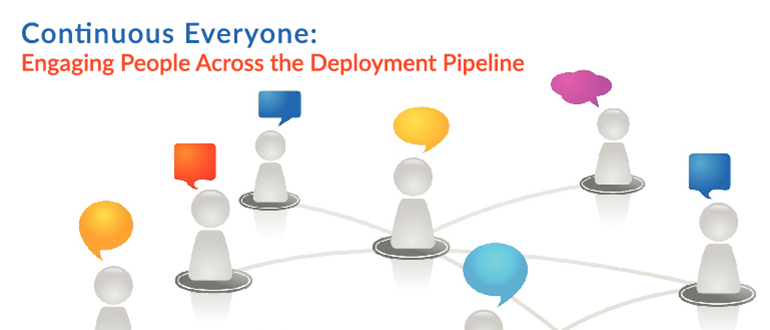
    We have continuous integration and we have continuous deployment, but what’s continuous across all of what we do is people. Even when tasks are automated, someone wrote the automation. So, Jayne Groll evangelizes about “continuous everyone.”

    Jayne is the CEO of the DevOps Institute and the author of “Agile Service Management Guide.” She talked about continuous everyone at the 2016 All Day DevOps conference. She describes it as “about people, culture and collaboration mapped into your value streams.”

    Picture1.png

    We all hear about the importance of people, culture and collaboration, but how well are they integrated into our organizations and processes? Is it in everything we do? Is it inherently continuous?

    It all starts with culture. The Business Dictionary defines culture as, “The values and behaviors that contribute to the unique social and psychological environment of an organization.” As Jayne points out, culture influences how people think, feel, interact and behave at work.

    Picture2.png

    We all have a vision of a euphoric culture. For most, that doesn’t reflect the reality of the current culture, which is generally Games of Thrones. Everyone wants to sit on the Iron Throne: ITIL/ITSM, DevOps, Security, Lean, Agile, Automation, and CI/CD. Traditionally, each of these functions has operated in isolation, convinced they are the most important cog in the machine. Now, DevOps has forced us to talk for the first time in 40 years.

    Picture3.png

    Once we acknowledge a problem, there are only 11 more steps. So, next, improving culture begins with addressing the root cause of cultural fails:

    • Language barriers (industry language)
    • Tribal knowledge
    • Poor communication
    • Thick silos
    • Disparate processes
    • Incompatible automation
    • Inadequate collaboration

    These cultural fails—both the cause and a symptom of thick organizational silos—must be broken down because they cage people’s creativity, and creativity is something you can’t automate.

    Now, people typically participate in the Continuous People Pipeline like this: Develop → Commit → Build → Test → Deploy and APIs built in between. Jayne advocates that we need to focus on Application People Interfaces between engineers and testers and ops teams. We need to let computers do the boring, repetitive tasks and let people solve problems and focus on high-value activities.

    Since not everything can be automated, continuous engagement is critical. While some advocated for “NoOps” (everything is automated), we should focus on “NewOps” to capture the talent and expertise in operations we need to leverage for tasks only people can do, such as:

    • Provide input and feedback
    • Design pipelines
    • Configure automation and APIs
    • Review test and other output
    • Design metrics
    • Facilitate feedback loops
    • Interface with the customer
    • Solve problems
    • Exchange ideas
    • Be innovative

    The bottom line is that this could be the beginning of a beautiful friendship. We need to reinvigorate the lost art of the dialogue. Actually talk to each other.

    Picture4.png

    This begins with trust. Every aspect of the Continuous People Pipeline is filled with expertise, integrity and people whot want to learn. There is a trust. You have to trust each other’s strengths and take the opportunity to engage on a continuous basis.

    It is only together that we can continuously improve.

    You can watch Jayne’s entire talk online here. If you missed any of the other 30-minute long presentations from All Day DevOps, they are easy to find and available free-of-charge here.

    Finally, be sure to register you and the rest of your team for the 2017 All Day DevOps conference here.  This year’s event will offer 96 practitioner-led sessions (no vendor pitches allowed).  It’s all free and online Oct. 24.

    — Derek E. Weeks

  • Survey: DevOps Divide Grows a Little Wider

    Survey: DevOps Divide Grows a Little Wider

    The gap between the number of organizations that have invested in DevOps is starting to narrow, and IT organizations that made the transition to DevOps earlier are starting to see accelerated returns on that investment, according to the latest survey by Puppet.

    The annual “State of DevOps Report” finds that out of 3,200 IT professionals surveyed, only 11 percent were part of organizations that could be considered high DevOps performers. High performers are deemed to have higher deployment frequencies, lower lead times for changes, better mean time to recovery (MTTR) and better change failure rates. The higher performers in this year’s survey are deploying applications 46 times faster than the same designated group of higher performers were last year.

    The survey also finds that higher-performing organizations have automated 72 percent of all configuration management processes. Those same high performers spend much less time (28 percent) employing manual configuration processes. Lower performers are spending almost half of their time (46 percent) on manual configuration.

    Just over a quarter (27 percent) of the respondents self-identified themselves as being part of a DevOps team, according to the survey. In contrast, only 16 percent said the same last year. Puppet CTO Nigel Kersten says those results suggest that understanding of the power of DevOps is increasing. It’s also apparent the early implementers of DevOps processes are enjoying a level of IT agility that is much greater than the average IT organization.

    In general, Kersten says that while much DevOps progress has been made, most IT organizations have automated only various pockets of silos. Developers, for example, may have automated some processes on their own, while IT operations specialists may have developed a custom script to automate the configuration of a handful of servers. Kersten notes IT leaders should be cognizant of the technical debt their organizations are incurring every time different elements of the IT organization employ different tools to automate the same basic processes time and again.

    Very few have automated their operations within the context of a continuous integration/continuous deployment (CI/CD) pipeline, says Kersten. That becomes more challenging to accomplish as new computing models based on containers, for example, are added to the enterprise mix. On a more positive note, Kersten says more processes are being well-defined, as they are bounded by an application programming interface (APIs). Those APIs then become the core technology over which IT automation frameworks are then laid.

    The issue many IT organizations have yet to confront is the degree to which they want to stumble toward DevOps versus implementing a concerted plan of action. Much of the DevOps progress to date has been driven from the bottom up inside many organizations. The time is now approaching for IT leaders to imbue DevOps as a part of the IT culture that permeates the entire organization.

    To one degree or another it’s a safe bet every organization will implement some form of DevOps going forward. The challenge  will be figuring out how to transform all those isolated instances into something more akin to an actual IT strategy.

    — Mike Vizard

  • Stop Talking About the Number of Times You’ll Deploy

    Stop Talking About the Number of Times You’ll Deploy

    40s Chrysler
    Chrysler Windsor – By Lars-Göran Lindgren Sweden – Own work, CC BY-SA 3.0 https://commons.wikimedia.org/w/index.php?curid=1385155

    It’s the late 1940s and the automobile industry is just taking off. You run one of the product marketing teams at Chrysler. Wanting to make the best of an exploding market, your marketing team says, “You’ll drive 1,200 times as much with the new Chrysler Windsor!”

    Of course, that advertising never makes it to the public, because it says nothing. So you’ll drive more, so what? It tells the customer nothing about the benefits of driving more. And some customers may make a connection between driving more and “because you want to,” but likely most won’t without context. So into the trash bin the entire ad campaign goes.

    Yet, that is what happens in CI/CD every day. Every time you read a blog, pick up a book, listen to a speaker, it’s all about how many bazillion times more you’ll deploy with CI/CD in place. And I ask the same question: So you’ll deploy more. So what?

    Most of those making these statements never get around to talking about how that can help with stability and user acceptance, a few get around to it roughly halfway through whatever they’re presenting, when the whole “You’ll deploy 70 billion times more!” statement is long gone. Very few drive the connected point home and make these statements show value.

    Particularly if your target audience is people without a strong knowledge of the topic, talk about the benefits, not the act. I can create a script that builds my source tree just as many times as I like a day, but that adds value for no one, absent any other change.

    While I’m going on about terminology, the whole “Delivery is not Deployment” topic needs to be made explicit in each and every talk/article/book. Marketing people have actually gotten better on this topic, but influencers have not. It’s time to step up the game, clarify, speak in meaningful terms.

    In Short, Pique Their Interest

    In the end, if you’re talking to people about CI/CD, you are doing so because you like to educate. So seek clarity. Many an enterprise IT person interested in what CI/CD tools and DevOps in general can offer their organization will be turned off by “You’ll deploy all the freaking time!” with no statement of benefit to them. And they’ll hear deploy and assume “to production.” Don’t do that. Education happens in clear and understandable terms; use them. Help those interested parties understand benefits; don’t confuse and disconcert them.

    Oh, sorry, I’ve accidentally found someone’s soapbox. I’ll return it now.

    — Don Macvittie

  • Think of the Future When Building Delivery

    Think of the Future When Building Delivery

    We’re in a strange state of the pendulum swing right now, where speed of delivery is king and all else seems to take a back seat. Many orgs even place quality behind speed in the claim that “we’ll get it right later,” but I’m talking about the more universal rush to deploy and the infrastructures we’re building to do it.

    In short, look around your organization. Do you have apps more than 10 years old? Are you working on the same type of app? Then spin your mind ahead and consider what it will be like for someone in that time.

    Future-Proofing Delivery

    You cannot stop the advance of technology, but you can make the environment adaptable. There are some easy tricks to provide for the future when it comes to your DevOps toolset.

    COBOL Still Needed. Source: Hackerrank.com

    Virtually Perfect

    First, build your continuous integration/continuous deployment/application release automation (CI/CD/ARA) architecture on virtual machines (VMs) or cloud instances. If your standard is containers, then use them—but on top of a VM. The reason is simple: Given the vagaries of business environment and IT priorities, a fully installed VM gives you a buffer—you have everything needed to run the environment in a contained package. Containers alone won’t be good enough, as the underlying OS impacts container operations. As an extreme example, the switch to Red Hat Enterprise Linux (RHEL) 7.0 was massive and broke things. A DevOps environment based solely on containers would break with it, while a VM running RHEL  5 or 6X would keep clipping along, as long as your virtualization environment ran.

    Get Versions In-House

    While the executables for any CI/CD/ARA toolset and development languages will be in-house, there is far more to a modern development environment than just those parts. The libraries/modules your code relies on must be available. Increasingly, we pull them on build, but that becomes a problem when suddenly they are significantly changed or downright missing. There is a market of hosted, verified module vendors out there these days that guarantee availability of a given version of each module they support, and that is an option; however, a better one is to pull them once and put them into your own enterprise repository. Is it another thing to maintain? Yes. But it might save your project from having to emergency patch—and frankly, that kind of insurance is worth it.

    Choose Wisely

    Like any relatively new market, there are a lot of CI/CD/ARA toolsets out there. Do evaluations; don’t just grab the one that a team member likes or is familiar with. Look at the longevity and stability of the project/vendor as much as the tool, because we’re talking about hedging for the future. In the early days (and even occasionally today), open source aficionados would say “We have the source, we’ll do fine,” which is technically true, but most organizations aren’t in the business of maintaining their dev/deploy tools and don’t want to be, so a little research goes a long way.

    Plan as Though You Chose Poorly

    Know what you’ll do if, in spite of evaluations, the project/product you chose goes away. While it’s not CI/CD, I was on a team that selected Mambo right before the big team split that created Joomla and doomed Mambo. Our choice was intelligently made based upon available information, but things still came around to burn us. And it could happen to your choice, too, whether you choose open source or commercial. So have an idea of what you would do in that scenario and document it. If we adopt enough IT tools, it’s guaranteed that some of them will fail over time, so this is not a totally wasted exercise. And should you ever need it, knowing what the plan is before things are falling apart helps keep level heads.

    Quality Over Speed

    Remember that time to delivery is super hugely important, and for decades was not given the credence it deserves. But as I mentioned above, recognize that right now the pendulum has swung so far the other way that many shops have a “just get it out, we’ll make it better later” mentality. Don’t join in where your DevOps environment is concerned. The architecture you are constructing should be for the long run—unless you enjoy rebuilding it regularly and the delays to production code such rebuilding threatens, then ignore this point.

    Security, Security, Security

    DevOps and security has had a rough relationship, but let’s talk about your DevOps environment instead of security’s impact on rapid delivery. Once you’ve thrown all of your build into one easy-to-use tool, the risk from a successful outsider or a risky insider is commensurately larger. Use tools that support role-based access control (RBAC) and make sure application programming interfaces (APIs) are properly locked down. Give security the time it needs to build a list of recommendations for DevOps toolsets that will protect them in almost any eventuality. Because the combined ability to mess with the build process and the deployment process through one automated toolset is powerful and dangerous, make sure you’re monitoring and it’s secure.

    Consider a Modicum of Standardization

    In my entire career, “We are an X shop” has never seemed to work. I’ve been at places that tried to use a single database vendor or a single development language, and inevitably, other forces override these directives. But there is a benefit to keeping the number of languages or database variants down, and that benefit is most felt in the CI/CD space. Keeping track of which DB goes with this project, or keeping that DB up to date—or determining the new release will introduce incompatibilities—all falls on the DevOps environments. Keeping the amount of accumulated future change down is in the organization’s best interests.

    Make Cool Stuff

    Every time I think I’ve maxed out on awe, something new comes along. We are on the cusp of fully automated build/test/deploy with ARA tools calling both CI/CD tools and application provisioning tools. Keep pushing the edge, give vendors your feedback or projects your mods, and making it better. Because there’s a fundamental change here that we want to see through to the end. And I love playing with the toys.

    — Don Macvittie

  • The Postman Delivers More

    The Postman Delivers More

    Most of us use Postman during API development. The company claims 3 million users, and as one of them, that number doesn’t raise my eyebrows any. But if you are like me, you’ve figured out collections, how to back up your data and perhaps looked at tests, but not done much more. As a tool for API development, Postman is powerful and useful, but that means many of us don’t look very far beyond how quick and easy it is to set up an out-of-browser test environment to evaluate request/response.

    We use collections to separate projects, but really only as a way to group calls together and keep a single copy of each call close to hand while the history list scrolls through multiple copies.

    But for DevOps, there’s more. And they’ve just added to it again.

    Packing in the Features

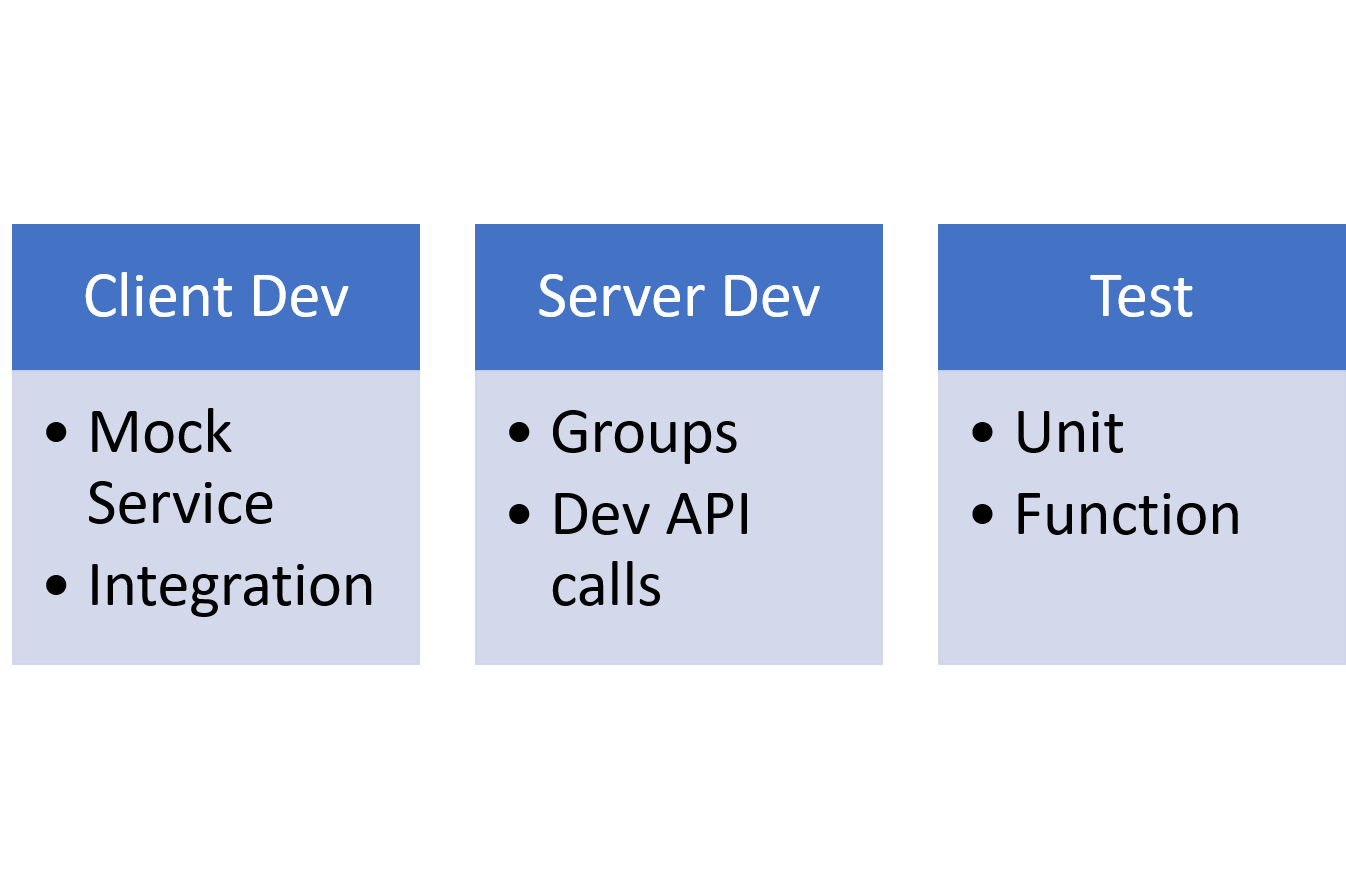
    Groups can be used for grouping calls with tests, for example, and a command line tool can perform automated testing. If, like us, you use Postman to test as the API is developed, and use groups to keep those calls pulled together in one place, then testing from the source that already contains your entire API makes sense.

    And as of this week, Postman also includes the server side. Postman Mock service allows you to mock up the API calls and specify a valid return value. That means client-side developers can use Postman Mock for testing their app/page, while server-side developers are using the original Post

    man to develop the APIs that Mock emulates and testing is running tests from the real-world APIs that already are in Postman for development purposes.


    Dev, DevOps, Testing and Ops: Something for Everyone

    So a quick diagram shows that the entire development process has a bit of Postman in it if that’s your tool of choice:

    While all assist with agile development, for DevOps, the pieces that are the most beneficial are Test combined with Groups and the new Mock service. As long as the Mock service is configured for a group of calls, test can call them and the logged output can reflect that the test succeeded but ran through the mock service. Once the service is completed and the group is directed to point at the server, testing will run tests against the real API. Using Newman, the command line tool, these tests then can be integrated with your build toolset.

    The Mock service can take imports from SOAPui, if you are converting from SOAP calls or use SOAPui for REST and are moving to Postman. I’m told the Postman toolset also supports SOAP calls, but truth in writing, I’ve never even looked to see how that would be done. I’ve used both tools, but never on the same project.

    There’s a Cost, but There’s Also Value

    This next bit sounds a bit salesy, and I try not to do that. But for the price, there aren’t a lot of value-add tools out there that deliver this kind of value. Lori and I are talking about going Pro, as we both use Postman in projects. And considering we’re regular users, I figured if we didn’t know about most of these features, many of you wouldn’t, either.

    Mock is part of Postman’s Pro package, along with sharable team collections, and API documentation tools. That means it will cost you a little bit of money, but if you’re on a team and have been cobbling together a way to share collections, team collections and associated collaboration tools are worth the price—particularly since built-in auditing will show all of the changes made to Postman collection items. That means fixing a change-based error on the Postman side is easier.

    As of this writing, the cost for Postman Pro was $8 per user per month. My guess is sharing groups (or worse, each team member re-creating/maintaining them) costs more than that per month in many cases. Consider that documentation can be generated and shared to a private URL and the fact that Mock service enables parallel development, and $8 sure seems like a steal. Finally, Pro offers API monitoring, so performance and uptime can be tracked to better adjust to the realities of production. There’s more (such as integrations with some great Dev/Ops/DevOps tools), but I’ll stop.

    Summary

    Design, Development (both client and server, in parallel), Test, Monitoring … as long as you can get it deployed, Postman can help with the rest. Postman Pro has a reasonable price for the functionality it offers, and the introduction of the mock service makes agile development, tight timelines and consistent “start to deployment” testing easier. I’d venture to say it is worth taking a look at. And if you’re developing APIs without it, pop out and get the free version, you’ll quickly find why so many of us use it.

    You can find out more about the various editions of postman on Postman’s Product page.

    — Don Macvittie

  • One Team, 5,000 Jobs: Life in the DevOps Jungle

    One Team, 5,000 Jobs: Life in the DevOps Jungle

    Damien has 5,000 jobs. While you might gasp at that workload, Damien is not stressing out. All 5,000 jobs are automated within his team’s Jenkins pipelines. How does he do it? Damien follows four key principles to keep his cool in the job jungle: self-service, security, simplicity and extensibility. But you might be surprised that one of his most important survival techniques is treating his pipeline as “not code.”

    At the recent All Day DevOps Conference, Damien Coraboeuf (@DamienCoraboeuf, nemerosa.com) discussed how his organization got out of the job jungle. Even with 5,000 jobs in Jenkins, Damien has a tiny team of six running it while supporting a large band of developers around the world.

    During his session, Damien laid out how a pipeline, the backbone of a Jenkins job, is constructed. Spoiler alert: It is pretty simple; hence, the magic of Jenkins. However, it gets complicated quickly, so Damien shared four principles his team strives toward:

    • Self-service. They don’t want the Jenkins team to be a bottleneck, and they don’t want to have to deploy an army just to run Jenkins.
    • Security. With teams of developers—many of whom they have never met—security and control is critical.
    • Simplicity. Developers can focus on developing rather than Jenkins.
    • Extensibility. As they grow and capabilities are dreamed up or implemented, their system needs to be able to adapt.

    Core to their implementation and their goals of self-service, simplicity and extensibility is the Job DSL Plugin. While Jenkins has a robust user experience, as jobs are added, it can get cumbersome and clumsy. The Job DSL Plugin brings order, automation and consistency to the jobs. Damien walks through the basics of the plugin and its benefits, noting that it treats the pipeline as code.

    Treating the pipeline as code allows the team to reuse code through versioned libraries and easily manage thousands of jobs. Requiring developers to manage more work as code does offer benefits, but giving that many people access to the code also produces security risks. So, Damien’s team actually treats the pipeline as “not code” by describing the pipeline using properties files. It also allows them to use the pipeline as metadata, so queries and reports are almost enjoyable.


    Damien’s team also utilizes the Seed plugin, which they maintain, to “help automate the generation and management of pipelines,” tighten security by keeping projects locked to teams and increase automation through hooks.

    The Seed plugin shares some functionality with the popular Pipeline plugin, which is maintained by a large community. However, the Pipeline plugin does not allow for treating the pipeline as “not code.” Damien’s vision is that one day Seed will be an extension of Pipeline.


    Damien’s team has done a tremendous job of running Jenkins across the enterprise. In fact, he just wrote me with an update that since November, his company has scaled to 7,000 jobs while still following the same principles.  If you want to learn more about how his team does it, be sure to watch his full All Day DevOps conference session (only 30 minutes). The other 56 presentations from the All Day DevOps Conference are available online, free of charge, here.

    — Derek E. Weeks

  • 35+ Tools Every DevOps Expert Must Know

    35+ Tools Every DevOps Expert Must Know

    List of DevOps tools and resources:

    Here is the set of tools and resources that help every DevOps enthusiast must know.

    Learn coding:

    Code academy: Learn to code interactively, for free.

    Code school: Interactive programming courses and guided projects.

    Treehouse: Learn Web Design, Coding & Much More.

    Lynda: Technology and Creative Skills taught by industry experts.

    Tuts+: Thousands of free tutorials and online courses to help you learn software development from mobile devices to web applications and everything in between.

    Source control:

    GitHub: GitHub is a web-based Git repository hosting service. It offers all of the distributed version control and source code management (SCM) functionality of Git as well as adding its own features.

    Bitbucket: Bitbucket is a web-based hosting service for projects that use either the Mercurial (since launch) or Git (since October 2011) revision control systems. Bitbucket offers both commercial plans and free accounts.

    Versions: Versions offers the best way to work with Subversion on the Mac. Thanks to its clear-cut approach, you’ll hit the ground running.

    Tower: Version control with Git, made easy. In a beautiful, efficient and powerful app.

    SourceTree: Harness the power of Git and Hg in a beautifully simple application.

    Continuous integration and deployment:

    Circle CI: The modern continuous integration and delivery platform that software teams love to use.

    Travis CI: Easily sync your GitHub projects with Travis CI and you’ll be testing your code in minutes!

    Shippable: A declarative CI/CD and release automation platform that streamlines software delivery.

    GO CD: Open-source continuous delivery server to model and visualize complex workflows with ease.

    Xebia Labs: Continuous delivery at enterprise scale.

    Electric Cloud: Powering continuous delivery and release automation.

    CloudBees: CloudBees is the hub of enterprise Jenkins and DevOps, providing companies with smarter solutions for automating software development and delivery.

    Development platforms:

    Heroku: Deploy and run apps on today’s most innovative platform as a service.

    Cloud 66: Simplify DevOps—build, deploy and maintain any application on any server, on Rackspace

    Docker Cloud: Build, ship, and run any app, anywhere.

    Appfog: A platform for creating, scaling and managing cloud-native apps.

    Engine Yard: Reliability and support you can count on. Built and proven on over 1 billion AWS hours.

    Bug tracking and monitoring:

    Bugzilla: Bugzilla is server software designed to help you manage software development.

    Bugify: Bugify is being used in many different industries. If there’s anything you need to keep track of, keep track of it with Bugify.

    Usersnap: Collect feedback and track bugs. Your central place to organize your web projects.

    BugHerd: Bug tracking so simple—it’s like sticky notes on a website. Capture client feedback, resolve issues and manage projects visually.

    New Relic: New Relic is the first, best place to examine and understand your digital business.

    Browser add-ons:

    Measureit: Draw out a ruler to get the pixel width and height of any elements on a webpage.

    Ghostery: Protect your privacy. See who’s tracking your web browsing with Ghostery.

    View source chart: Inspect the DOM at lightning speed.

    Colorzilla: Advanced eyedropper, color picker, gradient generator and other colorful goodies.

    Empty cache button: Cache clearing made easy. One click.

    CSS and HTML5 frameworks:

    Foundation: The most advanced responsive front-end framework in the world.

    Bootstrap: Sleek, intuitive and powerful front-end framework for faster and easier web development.

    Framework 7: Full-featured HTML framework for building iOS and Android apps.

    Some cool tools:

    Metricfire: Metricfire operate Hosted Graphite, a powerful way for teams to measure technology.

    Snippets: Snippets is a powerful application for Mac and Windows that stores the most valuable pieces of code you can reuse in different projects many times.

    Lingohub: Master your translation workflow and connect with world leading translators.

    Flowdock: Chat and inbox for teams. One place to talk and stay up to date.

    These tools can definitely help you do DevOps and software development efficiently.

    — TeamShippable

  • Confessions from Fannie Mae, Liberty Mutual and Capital One

    Confessions from Fannie Mae, Liberty Mutual and Capital One

    Learn from real-world stories from presenters at the All Day DevOps conference …

    True Story

    Over the past few years, Fannie Mae transformed the way in which it delivered software. Deploys increased from 1,200 per month to 15,000 per month.  At the same time, productivity increased by 28 percent while costs were reduced by 30 percent.

    But, how did Fannie Mae do it?

    During the All Day DevOps conference, more than 13,500 practitioners from around the world came together to learn from their peers in the industry. Barry Snyder, senior manager of DevOps at Fannie Mae, was one of 57 practitioners who shared his real-world journey through his enterprise transformation.

    Choke Point or Checkpoint?

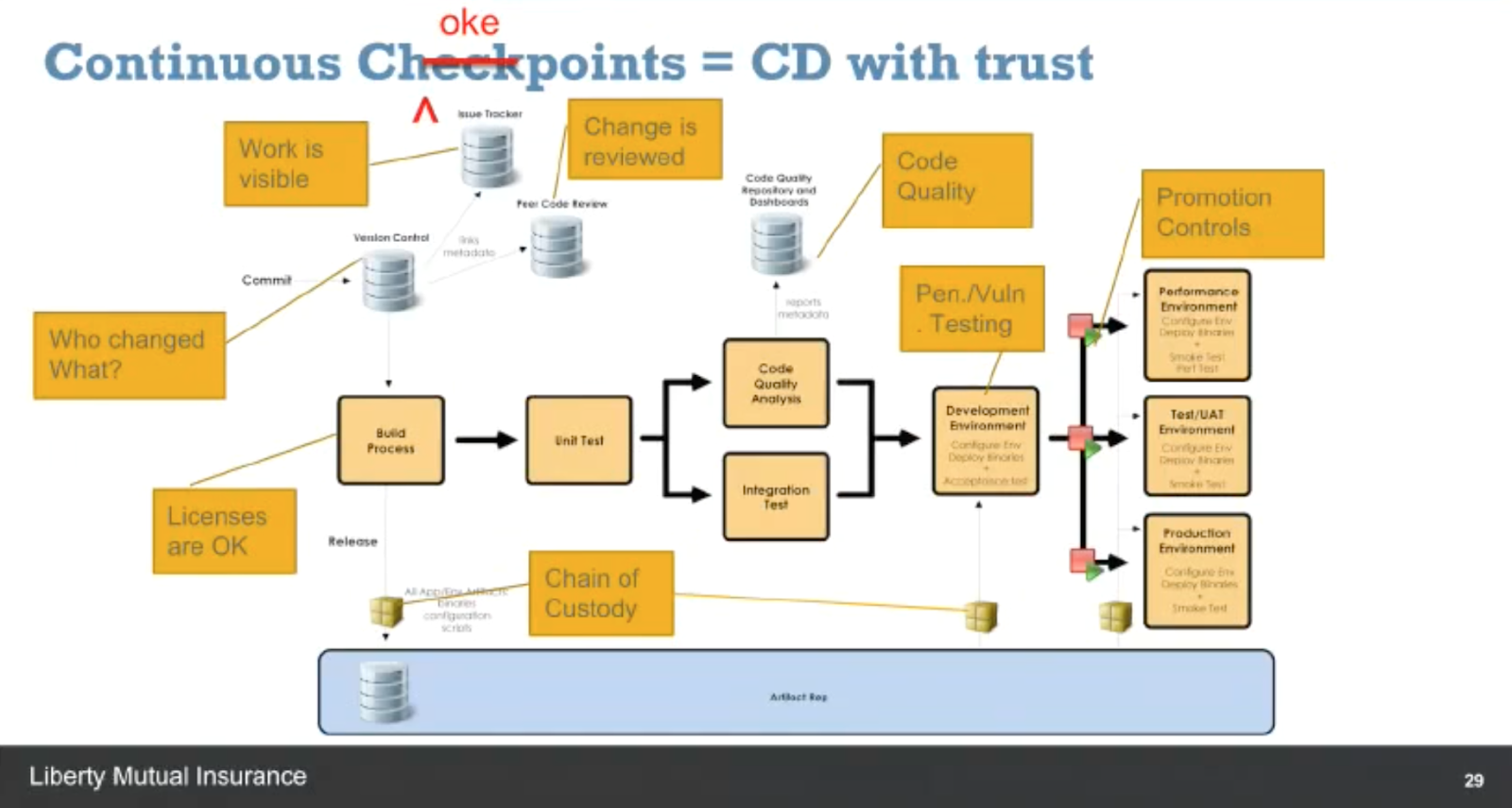
    Eddie Webb, director of Software Delivery Platforms at Liberty Mutual, also shared his organization’s journey into DevOps.  Eddie described how Liberty Mutual evolved its organization, tool chain and processes to go from 20 percent of builds being deployed to 60 percent over the past 18 months. He described how the company documented its value delivery chain and identified all of its choke points in the continuous delivery process that would need to be automated to achieve its new velocity and quality targets.

    Screen Shot 2016-12-05 at 11.35.04 AM.png

    Run the Gauntlet

    The All Day DevOps conference recorded more than 57 practitioner-led sessions (30 minutes each) including those from Barry and Eddie. Every session is now posted online and is free to watch. The conference itself had three tracks: CI/CD, Automated Security and Modern Infrastructure, including:

    • Application Secret Management with KMS – Andrey Utis of Capital One
    • Getting out of the Job Jungle with Jenkins – Damien Coraboeuf of Clear2Pay
    • Serverful Computing – Taking One for the Team – Paul Czarkowski of Blue Box Group

    One of the best ways to learn about DevOps is to hear from the experiences of others who have run the gauntlet. Take 30 minutes this morning, at lunch or at home this evening to watch your first online session with All Day DevOps On-Demand.

    — Derek E. Weeks