Tag: CI/CD

  • From Thought to Leadership

    From Thought to Leadership

    Thought leadership is a term that those of us in the industry hear a lot. A thought leader is a person who has ideas/thoughts that push the edge and brings great ideas to the rest of us. Most vendors want to be seen as thought leaders—and some do, through the agency of rocking individual employees.

    We all benefit from true thought leaders. They dream up new ways to do things (such as DevOps and agile), or find new uses for things (such as adapting agile practices to operations) that, in the long run, we can all benefit from. Good thought leaders (in any space) either look outward and see how what we’re doing today can be used to greater benefit tomorrow, or look inward and make us think about ideas and where we are in accepting them.

    This Isn’t About Talking Heads and Vendors

    The thing is, if you are establishing or attempting to expand DevOps operations in your organization, you are a thought leader. And that’s what I’d like to discuss.

    Those of you who say, “No, not a thought leader; I’m showing how long-established DevOps practices can improve the organization,” are wrong. The key to thought leadership is that you are there, and your audience isn’t. If those long-established DevOps practices were acknowledged in the organization then there wouldn’t be a need for DevOps leaders to establish or expand. Everyone would agree and it would just happen. After sufficient meetings, of course. (The definition of “sufficient” varies by organization and falls somewhere between zero and infinity.)

    In short, a thought leader must simply see what others do not (yet) see. If the audience is internal and resistant, then a DevOps leader is indeed a thought leader for that audience.

    So, What is Required?

    It is true that a big chunk of DevOps is communications. I’m an “automate first, streamline communications after” kind of DevOps person, but acknowledge that the opposite route is also valid. But increased communications are going to be required for long-term DevOps success. Part of that communications is with other managers both in and outside of IT. There is no better time to start than the present, by acting like a thought leader.

    Target the next application/portfolio you think would greatly benefit from DevOps. Sit and refine where you think improvements and/or savings would occur, get the buy-in of line-of-business leaders responsible for the application or portfolio, and go on a PR blitz.

    Thoughts are Great …

    But leadership is better. Be the leader, advocate for what you believe to be right. There are those who will tell you DevOps is inevitable, and it’s not a big deal once there is at least one project in the building doing DevOps. I could not disagree more. Change—any change—doesn’t happen without a champion. If you are in charge of DevOps, yes, take the DevOps Institute Leadership Certification (Disclosure: I have written paid promotional material for this certification. But it’s good material, so I’m mentioning it here anyway), but also look outward. Bring the organization to the table; be visible; be driving.

    But don’t be annoying. Know when to back off, or maybe target a different application first. And know how the existing system reporting and deploying will be mirrored in a full-on DevOps environment, so you can answer important questions such as, “How will we get through test and deploy if we re-target the application?”

    Do I think DevOps is inevitable? No. But I do think it will have a lasting impact on the way we develop and deliver software, even if a particular shop doesn’t claim to be a DevOps shop, deployment automation, test automation, enhanced defect and runtime monitoring, increased communications. These are coming because they’re good ideas. It’s best to have a plan, be a thought leader and get it rolled out so the organization can reap the benefits.

    — Don Macvittie

  • Jump-Start Your Kubernetes Journey with JenkinsX

    Jump-Start Your Kubernetes Journey with JenkinsX

    Containers are very quickly being adopted as the stable way of deploying services. More and more organizations are adopting immutable architecture and containers provide an excellent way to achieve that.

    But along with the stability comes the complexity of deployment, along with managing workload, scaling and updating. That’s in addition to having to create a reliable and repeatable process to continuously build and ship these containers to a production ready state. Kubernetes is one option: It provides features to reliably manage production workloads for your services.

    So now developers have to learn Kubernetes, as well as how to prepare their application for Kubernetes and create the pipeline for continuous integration and continuous deployment (CI/CD). Developers also must determine what is the best approach to get this done and where to start.

    JenkinsX: CI/CD for Kubernetes

    JenkinsX is an open source CI/CD solution for the modern cloud platform for developing and managing applications on Kubernetes. It’s the automation that helps an application move to Kubernetes, deploying various services on Kubernetes to manage an application’s CI/CD journey.

    Developers simply focus on their product and its features and JenkinsX will manage the Kubernetes deployment. It’s opinionated yet flexible, and provides extensive customization. Users can create a Kubernetes cluster using JenkinsX on AWS, Azure, Google or even locally on minikube or minishift. Developers who already have their own Kubernetes cluster and its RBAC (Role Based Access Control) enabled can simply install JenkinsX on top of it.

    JenkinsX provides various templates, and, since it’s open source, more templates are added daily. Developers can do a quickstart with a templated version of spring boot application, a golang project, node, open-liberty, python-http and more. It will create a git repo for a template application and then connect to developer’s github account to push this template to a repo. Also, it sets up the required webhooks to talk to Jenkins, which is installed on Kubernetes as part of the JenkinsX setup.

    JenkinsX also creates namespace environments in Kubernetes. By default, it will create a staging and production environment that can be modified.

    Once changes are made to a templated quickstart application and a pull request is created, the process kicks in and pushes the payload using webhooks to jenkins. The pipeline jobs then kick in to start the build process.

    After the application builds in its own container, the next stage begins to create a docker image and push it to the internal docker registry. Helm charts are generated for the application and stored in the internal hosted chart museum. It is then deployed to a preview environment and developers can view or run tests against the application even before the pull requests are merged.

    As the pull request is reviewed and merged to the master branch, a job kicks in to deploy that application on to the environments. JenkinX implements GitOps, so any and every change is triggered from the github repository. It creates a pull request to the environment repository and adds a change to deploy this application in this environment., validates the pull request and automatically merges it, kick-starting the final deployment stage.

    An environment is mapped to a specific namespace, the application container is then deployed in that namespace, a service is created and all the required mappings are configured. Also, a URL is spit out for developers to hit their application.

    Developers then push their changes, grab a coffee (this step is optional) and few minutes later they get the URL to access the application in that environment.

    That’s the standard workflow. As you might have noticed, JenkinsX is very different from the traditional Jenkins approach. Jenkins provides complete flexibility, whereas JenkinsX provides an opinionated approach. Given everything is in the template repo it creates, you can always modify them to your requirements.

    A Jenkinsfile is created for the pipeline jobs that can be edited to add another stage. Helm charts are created and can be updated if required. Users can disable the default environment it creates the first time and have their own set of persistent or disposable environments.

    This is a great approach toward automating of various different tools we use today to build and deploy our applications on Kubernetes. There are a few features I would love to see added, such as different deployment strategies, support for internal docker registries and maintenance features to clean up obsolete images. That said, JenkinsX removes much of the learning curve and jump-starts your Kubernetes and container journey.

    — Saurav Sen

  • 451 Research Report Highlights Value of DevSecOps for the CI/CD Pipeline

    451 Research Report Highlights Value of DevSecOps for the CI/CD Pipeline

    One of the compelling benefits of DevOps for many organizations is speed. Between breaking down silos, streamlining processes and automating routine tasks, the process of developing and deploying software can be significantly faster. A new report from 451 Research and Synopsys, however, points out the value of incorporating DevSecOps in the equation, especially with continuous integration/continuous delivery (CI/CD), and the pitfalls of prioritizing speed without also considering security.

    For the “DevSecOps Realities and Opportunities” report, 451 Research surveyed 350 enterprise IT decision-makers across the United States and Europe, focusing on organizations that have implemented CI/CD. The goal was to learn more about how organizations are implementing CI/CD and the role security plays in that equation.

    For most organizations, embracing DevOps and adopting CI/CD is about speed, not security, the survey found. Shocker! As per usual, security is typically an afterthought—something that might be nice to do if time and resources permit.

    Survey respondents indicated speed as a leading driver for and expectation from CI/CD. “The most organizations (36 percent) sought a 4x factor of improvement in time to deploy from their CI/CD workflows. A significant number (15 percent) sought a 5x factor of improvement. Another 7 percent sought more than a 5x factor of improvement, and 5 percent were seeking a 10x or greater factor,” according to the report.

    The irony is that organizations seem to prioritize speed over quality and/or security at their own peril. Maximizing for speed in the CI/CD pipeline without consideration for security typically leads to more bugs in the code, more downtime and increased time and effort to maintain and remediate applications.

    451 Research points out that as DevOps implementations mature, the focus will shift to what’s truly important. “We believe that as organizations evolve these processes, the focus will naturally move from ‘how fast can development teams iterate’ to ‘how reliably can we deploy high-quality, appropriately secure code each and every time,’” the researchers wrote. “That critical change in focus—that more mature view of risk management—will realign everyone’s expectations on what ‘4x’ really means.”

    Of those organizations that participated in the survey, only about half actually include some sort of application security testing as a function of the CI/CD workflow. Identifying open source software components with known vulnerabilities—also known as software composition analysis (SCA)—is ranked as the most crucial security component for CI/CD by survey respondents, yet nearly 40 percent of the participants admitted that they don’t do any SCA or insist they simply aren’t using any open source code. That seems highly unlikely, though, given that a recent report from Black Duck Software, “Open Source Security and Risk Analysis,” found that 95 percent of applications contain open source elements.

    “While some DevOps teams are starting to incorporate application security into their CI/CD workflows, driven by factors such as improved software quality, compliance and risk avoidance, there is ample room for improvement,” said Jay Lyman, principal analyst at 451 Research. “In many cases, security testing is not being integrated often or early enough in the process for organizations to fully benefit from reduced risk and rework headaches.”

    With security, it always seems a bit like the Bill Murray movie, “Groundhog’s Day”: No matter how many years security professionals have pushed, and fought, and screamed from the mountaintops that security needs to be woven into the foundation of software and integrated into the development life cycle rather than being tacked on with duct tape and chewing gum after the fact, organizations continue to insist on doing the things the harder—and more expensive—way. Hopefully, reports such as this will open the eyes of some organizations and they will break the cycle and start prioritizing security, recognizing that it is actually the best way to develop reliable code as quickly as possible.

    — Tony Bradley

  • What Andreessen’s ‘Software’ Essay Means to Development Today

    What Andreessen’s ‘Software’ Essay Means to Development Today

    It’s been nearly seven years since Marc Andreessen’s essay, “Why Software is Eating the World,” brought to light software’s role in determining the next wave of winners and losers.

    Today, his essay is still relevant. The past decade saw the consumerization of IT in business. It also witnessed the shift in software consumption from desktops to the web and to mobile apps today, reflecting a mobile revolution. Software continues to eat the world, having moved to a “mobile only” development model.

    This revolution is defined by disruptive companies including Airbnb, Uber and others that run with more leanness and agility compared to their 20th century counterparts. These companies have few physical assets, relying instead on software.

    Since Andreessen’s essay, the software development life cycle has expanded and evolved—from waterfall to agile processes, from testing against just a handful to thousands of mobile devices and from serving a regional to a global one user base, to name a few examples. Demands for speed and quality control have been key drivers, and as a result, the life cycle moves faster than ever. A record number of developers are writing a record number of programs. This expands each and every day as businesses small and large, in markets old and new join, the mad dash to create more software, better, faster and cheaper.

    Creating Software, Fixing Mistakes

    Indeed, the software development curve is evolving at breakneck pace. But while the cost of creation decreases, the cost to correct a mistake increases. How can developers and their organizations stay ahead of the curve? Here are three principles we’ve observed from studying more than 25,000 customers in the last seven years:

    Implement Modern Development Techniques Such As CI/CD

    Continuous integration (CI) and continuous delivery (CD) are two modern development practices designed to help teams release quality code faster and continuously. CI/CD has gained popularity over the past few years, and for good reason. When implemented effectively, CI/CD shortens delivery times, improves overall quality and enables teams to adapt quickly.

    Key to a successful CI/CD practice and ensuring quality software development is the practice of testing throughout the development process. The cost of fixing already deployed broken software is high, and it’s crucial to ensure your software works properly on all platforms and devices to minimize customer abandonment. This is especially true when you consider that the cost of regaining a customer is four times higher than winning them in the first place. Getting software right the first time through a culture of continuous testing is critical to success.

    What does ideal testing look like? It is automated, runs fast and includes good coverage. As the already broad ecosystem of operating systems, devices and platforms expands, this last point is critical. What good is your app if it doesn’t run (and, by extension, monetize) properly when it gains popularity in some part of the world with users on a different platform from the one you tested on? Developers need to ensure their software works on as many different combinations of browsers, devices and operating systems as possible, to help their business reach the maximum number of users.

    Introduce ‘Self-Driving Software’ Practices, Technology into Your Development Cycle

    When everyone is running so fast, it’s critical to ensure the software you’re writing actually works, won’t break your infrastructure and will actually be used by consumers. The “garbage in, garbage out” model is not an option, especially given the expense of creating software today. While the barriers to create software have lowered over time, the bar has risen in terms of creating something really remarkable.

    The good news is that we are at the cusp of attaining the holy grail of software development. I have interviewed multiple engineering and quality leaders at many of our customers who are pushing the limits on ultra-efficient DevOps. Through a streamlined process (which, frankly, is nothing short of beautiful), they are able to create a single, seamless flow between development to testing to operations to deployment and monitoring—without compromising on speed or quality. The key is to prioritize speed over cost and quality and agility over all else. If an organization isn’t following this principle, they risk being left behind. In the “Stack Overflow developer survey 2017,” more than 65 percent of developers indicated that they follow some kind of agile development methodology at work.

    The end result is deploying software almost immediately as soon as it’s written, for release as quickly as possible. Companies strive to achieve this scenario, and the highest performing organizations have already reached this development dream in some manner or another. Attaining CI/CD and automating all the tasks involved in creating a test system in real time is one of the arenas in which the next big software battle will be fought. The quest for the holy grail of software development is on.

    Support (and Attract) Your Engineering Talent by Providing Flexibility

    In  the mad dash to develop amazing software, engineering has become among the hardest roles for companies to recruit for.

    Organizations need to be nimble enough to attract top engineering talent. Part of being attractive to potential hires is understanding that software can no longer be monolithic. More than ever, the talent pool expects choice in the languages, platforms and tools they can use to develop and work most efficiently. In the Stack Overflow developer survey, participants valued the languages, frameworks and other technologies they’d be working with as a critical (4/5) decision factor while assessing potential jobs. This doesn’t mean providing a “free for all” for developers to use everything and anything they want—rather, it’s all about adopting flexibility. The companies that are most attractive to the best engineers follow this principle.

    Conclusion

    Today, we’ve moved from software eating the world to the world eating software. Developers simply have no control or knowledge over where their website or app is going to be downloaded or accessed from. Unless it’s an internal app behind a firewall, any software developed today by definition is consumed by the global community.

    Even if you test for all scenarios and devices, the future will always bring new devices, browser versions and operating systems. Your customers may use these instead of what you initially tested for. One option is to test for emerging devices in an in-house lab; however, that means committing to resources, time and qualified engineers to maintain it. In most cases, this approach is simply unsustainable.

    Companies must focus on ensuring their software works both with what’s out there today and with whatever browsers, devices and platforms will be out tomorrow. This is a major challenge, requiring considerable investment. Companies need to decide whether they are in the business of testing software themselves, or leverage solutions that are.

    Well before Andreessen’s seminal article, Geoffrey Moore wrote “Dealing with Darwin.” Here he he expounded upon the concept of core vs. context. Organizations will be well-served in deciding (quickly) whether building an in-house testing infrastructure is core or context to their business. The alternative is falling behind—or worse, being eaten up by the competition.

    — Ritesh Arora

  • CI/CD and its Effects on Release Managers

    CI/CD and its Effects on Release Managers

    The role of release management in the development of any software package has drastically changed with the introduction of continuous integration and continuous delivery (CI/CD).

    CI/CD has made the development process more agile, and it has made the role of release management significantly more challenging. To understand and grasp the changes brought into the role of release management, it is imperative to understand release cycles before and after the incorporation of CI/CD.

    Release Cycles before CI/CD

    In the past, most of the software houses had unidirectional release cycle that comprised of five components:

    1. Research
    2. Plan
    3. Development
    4. Test
    5. Release

    These are the usual steps of any release cycle. In general the development and testing phases of the cycle are lengthy as compared to the other phases. However, there is no proper feedback mechanism in the old release cycles.

    Then Comes CI/CD

    The overall framework of release cycle has changed with the introduction of CI/CD practices. Both of these protocols are related to the development phase of the cycle and are practiced to make the process more rapid, responsive and adaptive.

    Continuous Integration

    Continuous integration is the practice by which developers are required to integrate the developed codes into a common software repository. That repository receives multiple entries every day, each of which is verified and checked through an automated build. This routine helps teams with quick and early detection and location of any issue with the coding.

    Several benefits of continuous integration are:

    • Teams spend less time in debugging the coding problems.
    • System integration becomes convenient.
    • Developers don’t have to wait to check the viability of their coding.

    Continuous Delivery

    The practices of continuous integration are extended to continuous delivery, the process through which release managers ensure that every bit of alteration in the system or package are releasable at any point in the cycle. Continuous delivery helps large software organizations streamline their releases with more adaptability per feedback, changed strategy and market trends. In making release cycles more agile and smooth, modern release management plays a decisive role.

    Continuous Deployment

    Continuous deployment follows the continuous delivery methodology, in that every change and patch that goes through agile testing automatically gets deployed to the production. Continuous deployment reduces the lead time which results in quicker ROIs and feedbacks. Organizations not burdened by unnecessary regulations can make the most of continuous deployment.

    Release Managers’ Role in the Era of CI/CD

    As with the incorporation of CI/CD in the development and release of any software package, release cycles have become continual. This has brought about a significant shift in release managers’ responsibilities, including those discussed here.

    Shift from Linear Phase to Operations

    In the past, release managers usually would supervise the linear phases (planning, development and testing) that culminate into a final release. Now, with the advent of CI/CD, release managers are responsible for taking care of the operational side of things. For instance, a modern release manager has to ensure a smooth flow of continuous integration of codes to the production team.

    More Fronts to Deal With

    Modern release managers are no longer limited to development and quality assurance. They have to deal on several fronts. Because of continuous delivery, speed is now associated with releases. Hence, release managers are required to deal with sales and support, management/marketing, and customer feedback to ensure the required changes in the next release.

    Modern Release Manager as a QA Manager

    Before the new paradigm of CI/CD, release managers solely relied upon the reports from the quality assurance (QA) manager to determine and access the release quality. With more automation involved in software development, the tasks of QA managers have shifted to release managers. With the help of layered test automation suites, a release manager now has to assure the quality of release from development to production.

    Release Management Ensures Swift Decision-Making

    In the past, a whole board of decision makers would decide whether to release the software product, or not. But with fast and never-ending cycle of releases, this collective decision-making was lagging in the process of a release. Therefore, release managers are now required to come up with decisive final report, which enables even a single stakeholder to call the shots.

    Complete Understanding of CI/CD Pipelines and Other Related Technical Aspects

    Release managers today must have comprehensive knowledge of CI/CD protocols and DevOps auto deployment tools. They must understand how the CI/CD pipeline, which is central to the quick release cycle, works, and be able to identify defects early. In addition, release managers must understand:

    • Feature Toggles: A unique prevailing tool that enables developers to amend system behavior without altering the code, to help expedite the release cycle.
    • Branch Handling: Used for parallel development of different patches of software.

    CI/CD is still in its nascent phase and therefore faces the issues of lack of management and infrastructure. Due to these shortcomings, Some naysayers also question its viability. It becomes, then, a shared responsibility between all departments—including release management—to address the concerns and meet the challenges in a better way.

    In this backdrop, below are some important points integral to the release management role.

    • Quality of release must not suffer for the sake of agility.
    • An appropriate change notification system must be implemented so every stakeholder can know which patch is about to release and when.
    • With release becoming more of a continuous progress rather than an event, it is important for release management to make sure that the power of decision-making resides with small, independent release teams to have smooth deployment process.

    Apart from the explicit responsibilities of release management discussed above, they must have the requisite interpersonal skill set to implement and steer the changes in the work culture, as well as structure the hierarchy of the team. Furthermore, they should have a thorough grasp of the tools and processes that are necessary in the CI/CD integrated working environment.

    There is no doubt that the job of release manager has become more demanding with the introduction of CI/CD. But on the bright side, release management has become the linchpin of any software release that is developed in the environment of CI/CD.

    — Subramonian

  • Building a Services and IoT Platform with DevOps, Part 3

    Building a Services and IoT Platform with DevOps, Part 3

    Business needs and IoT demands are taking new dimensions in connecting millions of devices, people, process, tools and systems. With endless possibilities of creating new IoT solutions, DevOps teams are the key players who handle the challenges in successfully rolling out a IoT solution while handling the business, development, operations and infrastructure demands in the background. This article focuses on some of the DevOps best practices to adopt during IoT development, enabling faster time to market.

    DevOps practices to adopt during IoT development

    1. Adopt Security by design – Teams need to be educated and made aware of security threats. Use threat models mitigation techniques such as using authentication; storing secrets separately and protecting those secrets; using tamper-resistant protocols, digital signatures, timestamps, audit trails, encryption, authorization policies, filtering; and running services with least privileges during security design and development.
    2. Shift left security analysis and security testing – Integrate security analysis tools, customize security compliance rules and run security testing as part of continuous integration pipeline, generate security threat reports on vulnerabilities and act on these threat reports to fix issues early in the development phase and minimize the security risks.
    3. Follow security standards during development such as security development life cycle (SDL), which has guidelines and measures for building the software for devices and application components of IoT platform.
    4. Perform code reviews for device software, application software, PaaS rules and configurations, as quality assurance can become a huge risk given the complexity of the infrastructure, millions of devices connecting and dynamic environment configurations. Code review tools need to be integrated to the CI pipeline with pull request code review.
    5. Use the right branching policies in a version control repository, including precommit/preflight builds, pull requests for merging the code changes and access control for maintaining branches and using the right branching strategies, as there will be multiple fragmented development and deployment pipelines for devices and application developments to reduce the overhead. Use distributed repository/central repository with traceability and auditability based on the requirements.
    6. Automate deployments and create deployment pipelines for device development, application development, infra-automation scripts development with build and deployment pipelines targeting for different target endpoints.
    7. Customize the builds and release pipelines to pull the packages from multiple build and deployment pipelines to integrate and deploy as units of deployment.
    8. Plan for frequent release cadences—say, monthly—for application rollouts. Release cadences for firmware update rollouts can be planned for three to six months, as device updates cannot be pushed so often.
    9. Continuously monitor deployments – Use a release management tool for orchestrating the releases and release coordination activities, with gated checks and approvals with a view of what is getting deployed to each environment, as well as traceability and audit.
    10. Enable feedback loops and automated alerts if firmware deployments or application updates fail.
    11. DevOps teams can define key tenets, criteria to be met and standards to be followed for the devices; infrastructure to be provisioned; device protocols usage and standards in connecting to existing/new devices and services. This can reduce the complexity in development and deploying to multiple varied devices by following the same protocols for connectivity and communication.
    12. Train the team of developers, QA and hardware developers on how to do continuous integration for IoT development, follow agile and lean practices and ensure security criteria for all layers of the application and in process.
    13. Adopt user-centric test automation and end-to-end testing approaches and build robust test cases in perspective of testing a complete flow, with devices/services that may not be in your scope but will be part of your overall IoT platform ecosystem.
    14. Create/utilize container based test environments and device simulators coupled with service virtualization for functional testing.
    15. Automated infrastructure provisioning – Use the right configuration management tools to automate the infrastructure along with dependencies to create environments through code instead of provisioning basic VMs.
    16. Use container and cluster management tools such as Docker Swarm or Kubernetes for service discovery, auto-scaling, self-healing and scheduling.
    17. Use RBAC, service accounts and security access controls in the infrastructure templates/scripts that are created instead of individual user credentials to limit the risk of unauthorized users provisioning the environments using scripts. Build security in devices, cloud security, application security and infrastructure automation templates. Use secrets, key vaults, encryption methods and certificates to secure the credentials and access control.
    18. Configure individual build and deployment pipeline jobs for application development and infra-automation development, as there will be a huge development effort involved in automating the infrastructure.
    19. Create infrastructure verification tests with scripting tools such as Python or use testing frameworks such as Pester or any other open-source tools and integrate the infrastructure tests with the CI/CD pipeline. Ensure to run these tests every time the infrastructure is provisioned.
    20. Version-control the infrastructure templates, scripts, user profiles, environment configurations and device configurations apart from source code.
    21. Set up a centralized dashboard of monitoring tools to monitor the clusters, nodes, firewall rules, VMs, applications, devices and services. Feedback should flow back to developers/QA/DevOps teams.
    22. Configure applications to provide logging about exceptions, memory leakages and response times and push the logs to the monitoring tools or the dashboards in monitoring tools.
    23. Use the telemetry from the applications and devices to derive the analytics graphs/trends and set up KPIs/metrics to measure application performance/availability, as well from derive business metrics to set SLAs for DevOps and operations, to improve productivity.
    24. Ensure DevOps teams have close coordination with dev/QA teams of both software and hardware teams, as managing IoT platforms need more skill and expertise in hardware and software in the IoT domain.
    25. Manage legacy and cloud infrastructure with multicloud management platforms, and monitor and optimize the infrastructure usage.
    26. Create a DevOps governance plan/guide, with clearly defined access control policies, access rights for devices, control limits on infrastructure provisioning in different clouds, limits on PaaS/IaaS services to be used, etc., and standardize the process to be followed in DevOps/development/testing/operations, tools, etc.

    Following DevOps practices for application development has become quite streamlined in recent years. However, in IoT, where traditional methodologies and practices are followed in industrial enterprises, adapting to agile methodologies and following DevOps practices coupled with right DevOps-skilled team, tools and expertise can streamline and simplify IoT developments.

    About the Author / Lavanya Subbarayalu

    Lavanya Subbarayalu is Senior Architect working with Technology Office in HCL Technologies. She has expertise in IOT, Azure, DevOps consulting & Microsoft technologies. She is associated with DevOps COE, working on design and Development of DevOps solutions and consulting tools. Connect with her on LinkedIn.

  • 3 Practical Steps to Employing DevOps

    3 Practical Steps to Employing DevOps

    Everyone seems to be talking about DevOps but, if you are new to it, it might all seem a little overwhelming. One of the hardest things about DevOps is knowing where to begin. This is because to “do DevOps” its seems you have to suddenly start using a lot of new processes and tools at once.

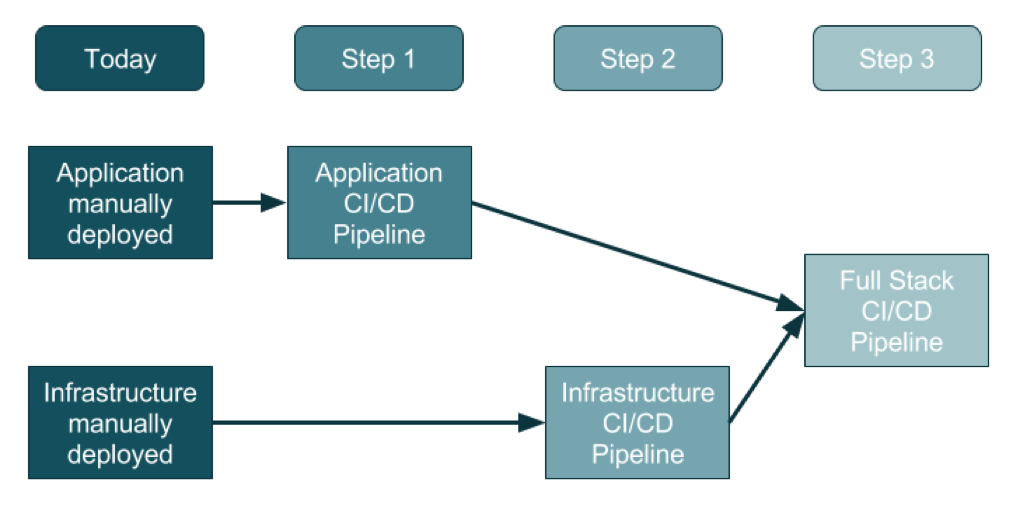
    For an organization that doesn’t use DevOps today, the adoption of this three-step method will promise a generally clean approach.

    Source: https://ukcloud.pro/

    Step 1: Creating the Application Pipeline

    Regardless of the type of application, the pipeline looks—at a distance—very similar. The goal is to weave application releases into a new coordinated process that looks something like this:

    1. The developer makes changes locally to their laptop/PC/Mac, and upon completion (including testing, etc.) issues a Pull Request.
    2. Code review kicks in, the developer changes are reviewed and accepted and a new release can be created.
    3. Someone, or the system, runs a procedure to create a release artifact, which could be a Java JAR file, a Docker file or any other kind of unit of deployment.
    4. Someone, or the system, copies the artifact to the web or application servers and restarts the instances.
    5. Database migrations/updates may be additionally applied, although the database is often left outside of the application release process.

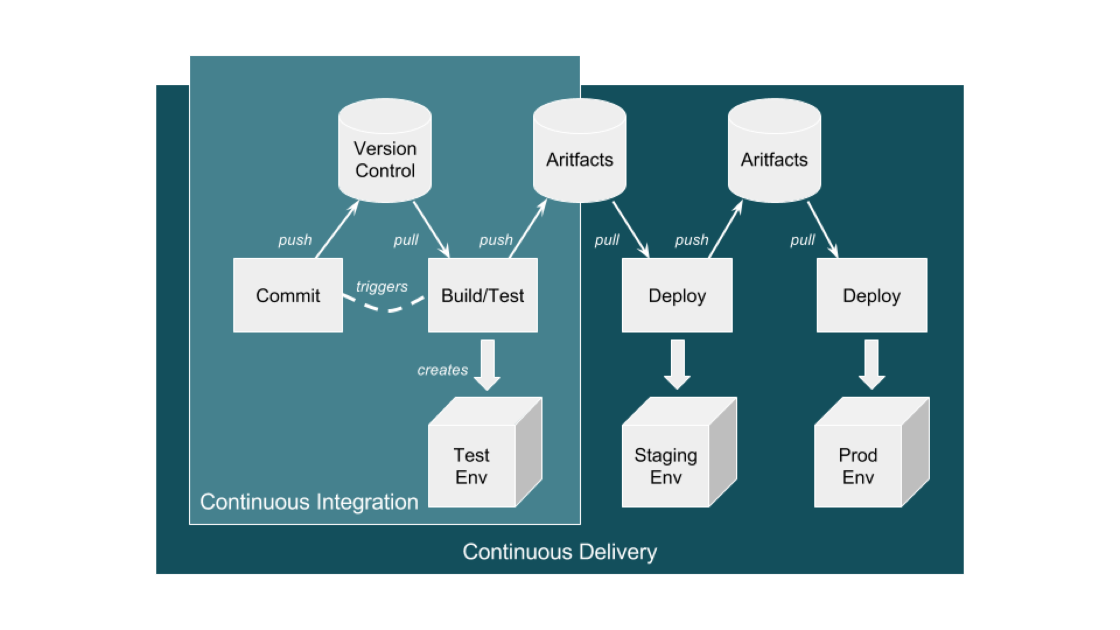
    This process evolves into an automated application-only continuous integration and continuous deployment (CI/CD) pipeline by using a toolset to automate the process as shown in the diagram below:

    Source: https://ukcloud.pro/

    A Typical CI/CD Pipeline


    However, be aware that this isn’t ideal (yet), because at this point the application alone is being released (injected) into existing environments.

    Why is this potentially an issue? If the developer has altered the local environment as well as the application but these local environment changes are not part of the release, then they’re not in version control. And, if they are not applied at the same time as the application, then the application will break and the common argument occurs: “Well, it works on my machine!” The solution is for application and infrastructure releases to be synced—and hence steps 2 and 3.

    Step 2: Creating the Infrastructure Pipeline

    Ideally, the infrastructure team has learned from the developer team’s DevOps and CI/CD pipeline journey and can expand and adapt it for the infrastructure (which increasingly is a public cloud).

    There are some differences with the infrastructure pipeline, specifically around units of deployment that are now the infrastructure layers in environments, the things that surround an application such as the DNS, load balancers, the virtual machines and/or containers, databases and a plethora of other complex and interconnected components.

    The big difference here is that the infrastructure is no longer described in a Visio diagram: it is brought to life in code, in a configuration file, in version control—this is infrastructure as code (IAC).

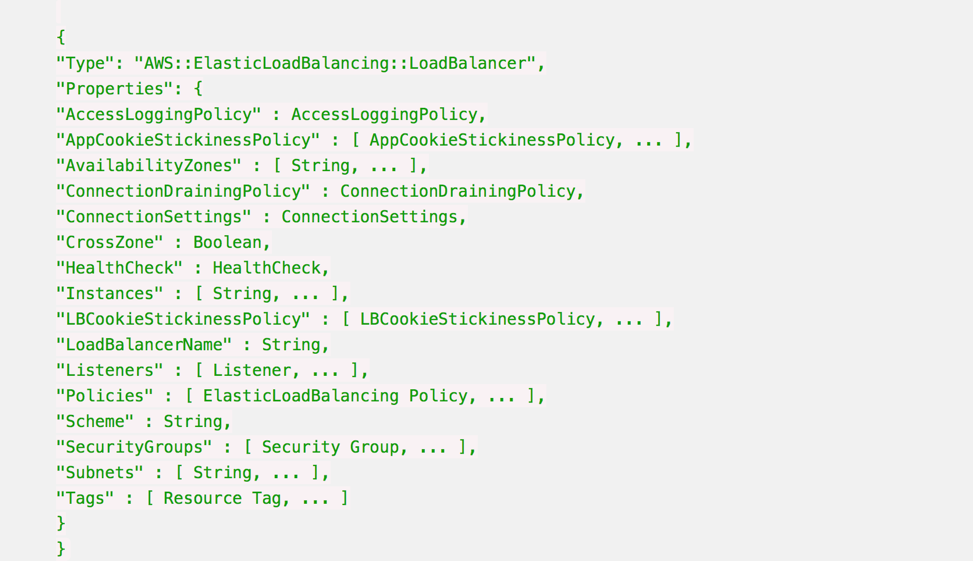
    Before this, a load balancer was described in Visio diagrams, Word documents and Excel spreadsheets of IPs and configurations. This is now swapped to describe everything about the load balancer in a configuration file.

    Here’s an example AWS CloudFormation Configuration for a Load Balancer:

    Whenever this file is changed in Version Control, such as changing the subnets a load balancer can point to, then the automation engine can update an existing infrastructure environment to reflect that one change, and any dependencies that change.

    It also means that you can apply this template to multiple environments just by changing the environment name from staging to production, for example, and be very confident that all environments are consistent, from the developer laptop to production.

    It is also possible to make the templates dynamic to change their behavior according to the environment, so in production the environment will scale out across three datacenters, but on a developer’s laptop it will use a local VirtualBox single-system.

    Step 3: Creating the Full-Stack Pipeline

    The goal of a full-stack pipeline is to ensure that the application and infrastructure changes over time are in sync, both in version control and the release deployments across each pipeline stage. And a developer should never say, “It worked on my laptop!” when a release fails in production.

    The popular CI/CD tools can now automate the full stack because everything is programmable. This means everything can be captured in version control, and the same configuration can use dynamic input parameters to build an environment on a developer’s laptop, or a QA system in the cloud or updates to production.

    Imagine a developer makes an application change that also requires a change to the database, the web instance scaling configuration and the DNS. All of these changes are captured in one version control branch and the developer builds a system on their laptop from this branch, and tests it.

    This is what platform-as-a-service systems can do. By adding an environment configuration file inside the same code base as your application, you can ensure that you have bound your application to the infrastructure. 

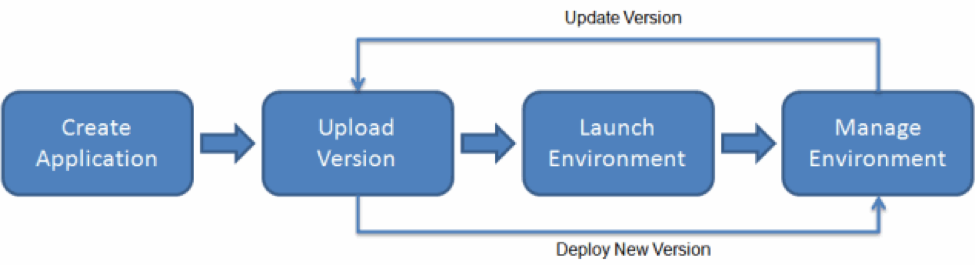
    AWS Elastic Beanstalk Example

    This is the target end goal, though it takes a lot of practice, and learning, to get there. It can be very satisfying to watch a build and a deployment, seeing the automation use tags and dynamic configurations to build, or update, the target environment with application and infrastructure changes.

    About the Author / Sarah Lahav

    Sarah Lahav is CEO of SysAid Technologies. As the company’s first employee, Sarah Lahav has remained the vital link between SysAid Technologies and its customers since 2003. She is the current CEO and former VP of Customer Relations at SysAid – two positions that have fueled her passion in customer service. Connect with her on LinkedIn and Twitter.


  • Building a Services and IoT Platform with DevOps, Part 1

    Building a Services and IoT Platform with DevOps, Part 1

    With the growth of the internet of things (IoT), expected to connect more than 50 billion devices (things) in next three years, building intelligent systems in a more connected world is presenting many challenges. Especially in building software for IoT, beyond hardware and network connectivity challenges there are numerous challenges in development, test, release, managing the infrastructure, monitoring the infrastructure and devices (things) and security.

    This article focuses on key components in IoT platform, how to select right set of DevOps tools for building those components, and creating a DevOps pipeline for the IoT platform.

    Building Your Own Services and IoT Platform with DevOps

    The main components in IoT solution comprises of device registration and identity, data ingestion, command and control, rules and actions for hot data analytics and cold data analytics, data storage, alerts and reporting.

    Device Registration and Identity: The devices/edge need to connect to each other and to a cloud gateway to send/receive the data, for which the devices have to be uniquely identified and registered at the gateway so that only authenticated and authorized devices/users can communicate to the cloud. Every IoT platform vendors has its own way of device registration and identity methods for storing device metadata such as AWS Things Shadow and AWS Gateway Rules Engine, Device twin and Azure IOT hub in Azure, GE Predix, etc.

    Data Ingestion: The devices communicate to the cloud/field gateway, which further ingests the data (device info and telemetry info, such as temperature data from sensors) into the cloud. You can use multiple options of PAAS services from Azure/AWS/GE predix, etc. for this component.

    Command and Control: These components cause the device to take an action and send messages to a device from the cloud, which can be built with PaaS services such as AWS Kinesis, Lambda functions, Azure functions, Azure Logic Apps, etc. or open-source technologies.

    Rules and Actions: These components act on specific device-to-cloud data, using the rules defined for processing hot data (where the data needs to be queried and analyzed within specified time interval) and cold data (where the data can be stored for delayed querying and further analysis). These components can also be built with existing PaaS services or using open-source tools such as Apache Storm, Map Reduce, Hive, Data Lake, etc. for data streaming and analytics.

    Data Storage: You need to store multiple types of data ranging from device metadata, telemetry data from specified set of devices, hot data and cold raw data, which needs to be stored and scaled up based on demand.

    Alerts/Notifications: The analyzed data needs to be visualized to derive more useful business metrics and outcomes, which can be integrated to external systems or other business applications to take preventive and predictive actions. Customized dashboards and data monitoring tools needs to be integrated to the solution to enable monitoring, alerts and notifications.

    With increased complexity in IoT development, the large number of devices to be monitored and large volumes of data to be analyzed and to manage complex infrastructure, DevOps becomes essential to the IoT development life cycle.

    Selecting the Right DevOps Tools for an IoT Platform

    Selecting the right DevOps tools for an IoT platform can help overcome challenges in creating/pushing applications and firmware updates to large scale of devices, as well as monitoring and infrastructure provisioning on-demand.

    With PaaS services used for IoT development, there is less code development but more configurations and rules-based development for developing key IoT components.

    Also, the teams developing device software and application development may be distributed, but the releases need to be streamlined with complete traceability and auditability. You need to manage a scalable infrastructure to support an IoT platform.

    Given below are some of the DevOps Tools used in most of IoT developments to help DevOps teams develop, build and release an IoT platform seamlessly.

    • Version Control: Git, for distributed teams and maintaining repositories for device development, application development and infrastructure automation development. Other tools are Clear case, SVN or TFVC.
    • Continuous Integration: Jenkins, VSTS (Visual Studio Team Services) and Bamboo to create jobs to do build, unit test and code quality analysis for the application, device software and infrastructure scripts, with the support of large collection of tools plugins and usage of different build tools such as gradle, maven, msbuild, etc., as well as supporting multiple technology stacks.
    • Infrastructure Provisioning and Automation: Ansible, ARM (Azure Resource Manager) and AWS cloud formation templates to automate the infrastructure in multiple cloud vendors and use tools such as Terraform or Spinnaker to automate the provisioning of infrastructure across hybrid clouds and maintain a common infrastructure blueprint, which enables the porting/migration of infrastructure workloads across clouds.
    • Infrastructure Testing: When PaaS services are used for developing certain components in an IoT platform, testing those PaaS components is a bit different—PaaS services have less code but more configurations and endpoints from dev/test team perspectives. Testing these components will involve endpoint testing, whether rules are created properly, how data flows between the different components and robust infrastructure verification. These infrastructure testing scripts can be written using Python/groovy or Vagrant to simulate the environment and test, or by using testing frameworks such as Pester for PowerShell scripts. You can extend your test solutions to leverage the REST APIs/CLI commands, exposed by different PaaS services, and these test scripts can test the PaaS services too, with simulated test data and generate the test result reports.
    • Continuous Deployment: VSTS Release manager, Jenkins, Capistrano, CA Nolio, etc. can be used to create the deployment workflows for deploying device firmware updates, application updates separately with control to release on multiple environments, gated checks and streamlined deployment process, with feedback enabled.
    • Test Automation: Selenium, Jmeter, security testing tools such as Veracode, EMMA, CA Lisa, Inspec, Robot framework and performance test tools are used for test automation. Testing in IiT is complex, as it needs an end-to-end testing of multiple devices interconnected. Most of the other device development may not be in your control, except your own device development, so to test an end-to-end functionality you need to have robust test cases and simulated test devices and test environments. This is where containers can help in test automation—a simulated device as a Docker container can run in one test environment and testers can use service virtualization tools such as IBM Rational Test Virtualization Server, CA Service Virtualization, Parasoft Virtualize or HP Service Virtualization to test their end-to end functionality when other dependent components/devices are being developed or not available.
    • Security and Code Quality Analysis and Security Testing is key in IoT development. As more and more devices are interconnected, the risk of data breach/data privacy is high; hence, a shift left of security testing during the development phase as part of the CI pipeline is inevitable. Tools such as Veracode, EMMA and Inspec can be used to run security analysis and identify security vulnerabilities and compliance issues. Unit testing tools such as junit, xunit, nunit or mstest can be used based on the technology stack. Code quality analysis tools such as SonarQube, coverity, cobertura and Fxcop are widely used for code quality analysis in IoT application components development.
    • Containerization and Container Orchestration: You can deploy your application as Docker containers, which have less footprint in the physical/hosted infrastructure and runs only with required application framework, libraries and dependencies. These containers/cluster of containers are managed with container orchestration tools such as Kubernetes, Docker Swarm, AWS Container Services, Azure Container Services, etc. As mentioned above, simulated test devices can run in docker containers, which enables shipping/moving the containers across any cloud and making the test environments ready within minutes.
    • Monitoring: Monitoring in IoT involves monitoring the devices; infrastructure VMs/clusters; telemetry data; the build, test and releases; and billing, among others. Metrics such as cluster usage, CPU usage, network availability, response time, number of devices connected and devices updated/not updated can be configured and viewed in monitoring tools including AWS Cloudwatch, Azure Application Insights & LogAnalytics, Stream Analytics, New Relic, Prometheus (open source), Nagios, Coscale, SysDig, Dynatrace and GE Predix Monitoring. The tools can be selected depending on the target platform on different clouds or on-premises, technology stack and other factors.
    • Cloud and Cloud Management: Cloud providers including AWS, GE Predix, Azure and GCP provide out-of-the-box features and support for IoT platforms with starter kits, IoT device SDKs, protocols, gateways customization and more. Cloud management tools such as Right Scale cloud management platform, OneOps, etc., can be used for managing the infrastructure workloads; bringing in central governance, access control and security; monitoring billing and optimization; managing security and standards; and streamlining and orchestration of IoT platform development.

    Depending on the technology stack, the DevOps requirements and business needs, the right tool needs to be selected to streamline IoT platform development with feedback flowing between the different stream of teams involved in IoT development, and to bring in standardization in security, governance and tools, metrics to measure and to better manage IoT platform.

    Release, Rollout Firmware/Application Updates

    Rollout of firmware updates for an IoT platform is more challenging compared to application releases; with device updates, we have to deal with network latency, issues with connectivity of devices, security issues, different sets of devices, different deployment channels, deployments done over the air and different sets of protocols used by different manufacturers.

    There is additional complexity involved when there are new additions to devices or when supporting legacy devices, and this needs incorporating integrated end-to-end testing as part of deployment pipeline, to test the devices and applications from a user-centric approach.

    In IoT development, there are multiple development and deployment pipelines for firmware updates, server-side code, mobile apps and multiple devices delivering to multiple endpoints. Hence, the release cadence of IoT components varies, as application code updates can be released monthly, whereas firmware updates to devices can happen every three to six months—hence, a well-defined process must be followed for regularly integrating the code.

    Continuous testing involves infrastructure testing, performance testing, end user testing and functional testing, all of which must be integrated with the release pipeline, where deployments can happen to simulated test environments, provisioned as environments as code (environment with all runtime dependencies needed to run the application like Docker containers), rather than simply infrastructure as code.

    DevOps teams need to keep track of releases and monitor all these deployments, ensure environments are stable, trace back the releases with the device firmware updates and track the defects. The DevOps teams should pull the release packages of different components from multiple pipelines and prepare main and customized builds to integrate and deploy the components together.

    The following are the main steps in CI/CD pipeline for IoT platform development.

    1. Code checked into version control: Check in the code for application development, device/firmware development, PaaS services configurations, infra automation scripts and templates to the version control, pointing to the defined repositories.
    2. Continuous Integration: Build jobs created in a CI server such as Jenkins/VSTS/Bamboo executes build compilation, unit testing, code quality analysis, automated reviews, environment configuration preparation, running security testing analysis, creating deployment packages or baked-in container images, for deployment.
    3. Triggers Deployment: The build agents generate the packages for firmware updates application updates and notifies release agent to trigger deployment.
    4. The deployment workflow can call a service/worker job, which in turn can connect to the cloud gateway services, to notify firmware updates.
    5. The cloud gateway picks up the firmware updates and notifies devices for devices updates. The devices will the pull the updates and installs the updates and further send telemetry data.
    6. Multiple testing environments in cloud can be integrated to the release pipeline to simulate the firmware updates.
    7. In case of application rollouts, there will be canary releases to gradually roll out to different environments in different regions after functional testing/regression testing.
    8. Testing: Security testing, firmware updates targeting to specific devices, performance of the device during the updates, device identity and memory usage, etc., needs to be addressed during deployments in IoT. Once the application is deployed to the test environment, functional/regression testing occurs and generates the test reports.
    9. Monitoring metrics such as memory usage, performance of the device, network traffic, latency, devices connected, reliability, etc., needs to be monitored, as these are of prime importance to decide on how to implement remote updates and monitoring without affecting the performance of the devices and these metrics has to be notified to the Dev/QA/DevOps teams as part of release pipeline execution.
    10. On-demand environment provisioning scripts/templates must be integrated with deployment pipeline to provision the test environments, add more devices as per the scaling metrics.

    Establishing a CI CD pipeline well ahead at the start of development and following mature DevOps practices such as security testing, infrastructure testing, containerization, monitoring, cloud and DevOps governance and feedback-driven development are the keys to help address the challenges in building your own services and IoT solutions.

    About the Author / Lavanya Subbarayalu

    Lavanya Subbarayalu is Senior Architect working with Technology Office in HCL Technologies. She has expertise in IOT, Azure, DevOps consulting & Microsoft technologies. She is associated with DevOps COE, working on design and Development of DevOps solutions and consulting tools. Connect with her on LinkedIn.

  • DevOps: Time for Developers to Dig In

    DevOps: Time for Developers to Dig In

     Speaking to developers and project managers at the Gartner Catalyst Show, Jenkins World and Atlassian Summit revealed some insights about how most IT specialist perceive DevOps. Yes, I had a busy end of summer schedule attending events and talking to a wide range of developers and project managers about DevOps.

    two dogs digging together in one hole in the ground

    What I learned is that most people have not yet figured out what is meant by DevOps. What most people told me is that they are doing DevOps explaining they have a CI/CD pipeline. When questioned further about how they perceived DevOps, they believed DevOps was about creating a CI workflow that developers and sometime-testing teams could execute to automate builds, deploys and testing. One of the most ironic of these conversations was project managers making the claim that their CI server performed builds and deploys.

    Well folks, DevOps is not about a CI/CD pipeline. And contrary to popular beliefs, your CI server does not perform builds and deploys any more than it performs automated testing. Your CI/CD pipeline orchestrates build and deploy processes in the same way that it executes an external tool for test automation. The ugly truth is that your CI/CD pipeline is executing one-off build and deploy scripts, the same scripts used in your waterfall practice, but just triggered by your CI/CD process. These scripts cannot easily adapt across the continuous delivery pipeline. Testing and production environments are configured differently. The build and deploy scripts must be tweaked, maintained and debugged in the same way they were during waterfall practices. Once ready, they are then called by your CI/CD workflows. DevOps is different.

    DevOps demands that your developers and operation teams share and collaborate from the earliest phases of a project. In essence, this requires that more of the operational duties be shifted left and directly onto the shoulders of developers. This is precisely were the responsibility and control should be. Operation teams need knowledge and transparency so they can communicate infrastructure requirements early and often to the developers. Eventually what we will see is a decline in the number of operational resources. A “release engineer” who managed production deployments said, “If we define our DevOps process correctly, my job will not exist in the future. Instead, automation will replace the manual Ops scripts, allowing Dev teams to do 70 percent of my work.” And that, my friend, is real DevOps.

    Developers, Dig In

    So it is time for developers to really dig in to DevOps. What I mean is developers must begin walking away from automating most of the processes by a one-off script and begin incorporating tools that perform DevOps tasks from continuous deployment, security scanning and performance monitoring. And different platforms need different tools. Project teams will need the power to select the tools that work for them. The days of “legacy” purchases of a single tool for the enterprise is long gone. High-dollar operational tools are high-risk and incur technical debt when developers choose to use a different solution. DevOps means giving development teams more control and purchasing authority for automation tools that can be managed at a project level, not an enterprise level. These tools must support a process where the developers work on the declarations followed by testing and production consuming the process with a good amount of transparency. Scripts cannot achieve this, even when triggered by CI.

    Our future is becoming more and more complex. Most companies I spoke to still managed over 70 percent of monolithic applications. The writing on the wall is in the 30 percent. With microservices and containers, operational tasks are going to become more complex, not less. The sooner developers can become the core owners of operational tasks, the easier it will be to adopt a microservices architecture. Managing microservices will not be the job for the operations team. It will need to be done by the developers who have the intimate knowledge of their application.

    To mature from CI/CD to DevOps is going to require a close look at the engine under your CI/CD hood. When developers and project managers begin to really dig in and see how the engine is running, it will be clear that achieving DevOps is a bit down the road. And there is urgency in this process. Leaner and better ways of writing and releasing code is upon us. Most of us are just not ready to toss out some of the old habits from waterfall practices to get there.

    Some departing thoughts:

    • Acknowledge that CI/CD is a good place to be, it is just not DevOps.
    • Look carefully at your underlying processes that are called by CI/CD. How well do they support your production environment?
    • Can your CI/CD workflow at Dev support a production deploy? If not take the time to understand why.
    • Are your developers working late to get a code update to production?
    • Do you have a clear continuous feedback loop that shows where a code update is running, and on what exact endpoints?
    • Do your developers know what infrastructure updates are going on in production today?
    • How do your developers communicate infrastructure updates to production teams? Can they do it alone?

    The time is now for self-examination and a clear honest appraisal of just how automated your core operational tasks are. If they are built upon one-off scripts, you should assume you have some work ahead to really begin moving to a DevOps practice that can be declared by developers, consumed by all runtime environments and is transparent to all.

    And remember, microservices are chasing you.

    About the Author / Tracy Ragan

    Tracy Ragan is COO and Co-Founder, DeployHub. She has extensive experience in the development and implementation of business applications. It was during her consulting experiences that Ms. Ragan recognized the lack of build and release management procedures for the distributed platform that had long been considered standard on the mainframe and UNIX.  In the four years leading to the creation of OpenMake Software she worked with development teams in implementing a team-centric standardized build to release process. Connect with her on LinkedIn.

  • 5 C’s That Changed the Future – Webinar Series  CI, CD, Containers, Cloud & Culture

    5 C’s That Changed the Future – Webinar Series
    CI, CD, Containers, Cloud & Culture

    Join us for case studies of innovation and success with continuous integration (CI), continuous delivery (CD), containers, cloud (infrastructure & migration), and culture (the DevOps kind).

    If you’re on the same mission – to create sustainable systems that empower your business to deliver innovation faster and predictably – then you’ll gain incredible insights from this series. We’ll share the journeys of some very cool companies, joined by a few of the experts who are making it happen.

    Why 5 C’s?

    The consistent theme in these successes is DevOps – culture, process and technology. And when we looked at the results that had the most notable impact on the business, they related to implementations of some or all of the 5 C’s. Results such as:

    • 10x faster new product delivery.
    • Internal & client confidence in iterative development, driven by innovation in quality & feedback.
    • Modernized traditional apps by adding self-healing, auto-scaling, and rolling deployment capabilities.
    • Blameless culture, enabled by feedback and consistency across dev, test & prod environments.
    • Security integrated across the stack and not simply a checkbox.

    The series:

    • Tuesday, Oct. 3 – CI/CD, Containers & Culture
    • Tuesday, Dec. 5 – Cloud Infrastructure & Culture
    • Tuesday, May. 15 – Cloud Migration & Containers

    View On-Demand Webinar (Oct. 3):
    Faster Innovation with Confidence – How CI/CD & Containers Help Arrayent Go Faster

    View On-Demand Webinar (Dec. 5):
    Scaling Cloud Infrastructure for Millions of Devices

    View On-Demand Webinar (May 15)
    Cloud Migration: Solving for Growth with Containers & DevOps on AWS