Tag: CI/CD

  • 7 (More) Security Considerations for CI/CD

    7 (More) Security Considerations for CI/CD

    CI/CD orchestration has become increasingly popular in DevOps practices. It facilitates faster deployment of software and product delivery. Through the use of automation when building, testing and deploying applications, CI/CD bridges the gap between development, operation activities and teams. 

    However, there are many security considerations to keep in mind with frequent deployment. From quality automation to code history analysis, security must be baked into your CI/CD pipeline to ensure your product and processes remain safe from hackers.

    To gain insights on the top security considerations for CI/CD, I asked the speakers and sponsors for the upcoming SKILup Day as well as several DevOps Institute Ambassadors for their thoughts. In this two-part series, I will be sharing their insights. Did you miss part one? You can read it here. Here’s what they had to say in part two of this series:

    Speaker, Ravi Lachhman, Evangelist, Harness

    “CI/CD platforms are core to an organization’s engineering efficiency and typically have elevated privileges to sensitive environments such as production. Since CI/CD platforms typically will be deploying, this makes sense. Delving into the SolarWinds hack with binary artifact signing, etc., can separate security concerns into two parts. One concern would be the security around the actual CI/CD platform and one around the DevSecOps goals inside a CI/CD pipeline. With so many items shifting left, having proper role-based access control (RBAC) is crucial. With the separation of duties for regulated environments and the need for engineers to be efficient, controls that ensure only certain entities can deploy and certain entities can view pipelines is important. Around the DevSecOps movement, container/OSS scanning is still top of mind for many firms.”

    Sponsor, Basis Technologies, Eran Kriegshauser, Basis Technologies’ SAP DevOps Architect

    “The question you should be asking is ‘How do I maintain quality with the frequent deployment tempo demanded by business today?’ We need automation of quality and guaranteed rigor. For example, take promoting security configuration changes in systems, applications and products (SAP). Today, this is done by SAP transports where the change is created in an SAP development system, then imported into QA and, ultimately, into production. How do you ensure that a developer can’t give themselves extra security access through a role modification? Automated analysis and approval workflows must support segregation of duties requirements. Users can’t approve changes they create–the appropriate CI/CD process will not allow it.

    Another area is automatic peer review notification on changes to sensitive enterprise resource planning (ERP) objects. Once identified, the promotion of those object changes are halted until approved by a team lead or change and release manager.”

    Savinder Puri, DevOps Evangelist, Zensar Technologies

    “Infuse as many aspects of security as possible into your CI pipeline. CD is already too late for security—you’ve already deployed the application into an environment.

    Start from the basic static code analysis, security scanners, etc., and then keep maturing. Whatever tools you integrate into CI Server, ensure the corresponding integrated development environment (IDE) plugins are made available to developers. That way, devs can do the first-level validation within their IDE itself, and do it as they code, even before compiling. That’s the practical implementation of the often overused term ‘shift left.’”

    Vishnu Vasudevan, Head of Product Engineering and Development, Opsera

    “Now with cloud migration, emerging technologies and open source technology, companies will have to make sure they have the right tooling to measure and take action based on the security challenges born out of different development activities. 

    The focus will need to be on managing the risk that is tied to the business criticality. Each industry, domain, technology, etc., all have their own independent security goals, and you cannot have one security goal across the enterprise for different technologies and different domains. It is important to evaluate the technology being used and weigh the security requirements accordingly.”

    Stephen Walters, Sales Engineer, Everbridge

    “Inclusion! This is why the term DevSecOps came to be—because, erroneously, security was not included as part of a DevOps transformation, and the same is true for transformation of an SDLC to incorporate security.

    Security has still been treated as a non-functional requirement; an afterthought. If there is one thing we should learn, there is no such thing as a non-functional requirement. Security needs must be considered on an equal footing with all other requirements and built into the design, test, deployment and delivery of any feature.”

    Mark Peters, Technical Lead, Novetta

    “CI/CD pipelines should implement security at every step.  Tests can be automated in tooling to conduct tests of various functions at multiple levels for code accuracy, unit tests through fuzzing and integration or vulnerability testing. Most vulnerability testing in a pipeline is actually patch management, ensuring all commercial and proprietary holes are filled for release software. The first step should be using coding checks to make sure there are not any common problems with the code. While this may seem easy, if you are not managing that basic step, you cannot move ahead to the more complicated areas.”

    Pawel Piwosz, Lead Systems Engineer, EPAM Systems

    “At a high level, I would say that security is still outside the main scope of CI/CD. We should consider a few areas and different angles, here. Security should be not only implemented by CI/CD; CI/CD should be implemented in a secure way. Everything-as-code is a solution here: policy-as-code, security-as-code, drift-as-code, and if we talk about infrastructure, remediation-as-code.”

    If you’d like to learn more about the latest in CI/CD and similar topics, check out the upcoming SKILup Day schedule. Or, learn more about the benefits of becoming a DevOps Institute Member. 

  • Copado Acquires Qentinel to Gain AI Testing Tools

    Copado Acquires Qentinel to Gain AI Testing Tools

    Copado has acquired Qentinel as part of an effort to incorporate AI-infused application testing within a DevOps platform and build applications using low-code tools across multiple software-as-a-service (SaaS) platforms.

    The Copado continuous integration/continuous delivery (CI/CD) platform was originally created to accelerate the development of low-code applications on top of the Salesforce platform. Now, however, Copado is expanding the scope of its DevOps reach to include other SaaS platforms.

    Andrew Leigh, chief marketing officer for Copado, said as organizations increase the number of SaaS platforms they employ in the wake of the COVID-19 pandemic, it quickly became apparent there would soon be a need to build applications that enable organizations to unify business processes spanning multiple SaaS applications.

    As part of that effort, Copado’s acquisition of Qentinel aims to advance that goal by making it simpler for both developers and end users to participate in the application testing process, Leigh said.

    Qentinel is accessed mainly via the cloud to automate the creation of application tests. Rechristened Copado Robotic Testing, the core of the Qentinel platform is based on the open source Robot Framework that understands scripts, executes them and generates logs and reports. A set of built-in libraries comes packaged with Robot Framework and addresses a wide range of testing scenarios. Qentinel customers include Brunswick, Elisa and Konecranes.

    Copado AI testing

    Gartner is forecasting that, by 2024, 75% of large enterprises will be using AI-enabled test automation tools to advance continuous testing across different stages of the DevOps life cycle. Much of the interest in AI-infused application testing tools is being driven by necessity as the pace of low-code application development exceeds the pace at which manual testing processes can work. As application testing becomes a bottleneck, organizations will naturally look toward automation platforms that employ machine learning algorithms capable of testing applications at scale.

    It’s not clear to what degree those platforms might eliminate the need for humans to test applications. The expectation is humans will be able to test application functionality at a deeper level versus, for example, merely checking to see if compliance mandates have been met. Many smaller organizations building low-code applications don’t have any meaningful application testing capabilities at all. Testing platforms infused with AI will prove to be especially crucial for citizen developers that require guidance to build a secure application that can actually scale, noted Leigh. The more SaaS application environments those applications span, the more critical testing becomes, added Leigh.

    One way or another AI is coming to application testing. After all, machine learning algorithms don’t ever need to take a day off or suddenly leave to take a better offer elsewhere. In fact, soon, most organizations soon won’t even consider a test automation platform that doesn’t have AI capabilities as they attempt to reduce the level of manual, monotonous and repetitive testing tasks. It may take a while for everyone to gain confidence in the algorithms, but it’s now more a question of the degree to which AI will be employed rather than if.

  • 8 Security Considerations for CI/CD

    8 Security Considerations for CI/CD

    In the software development enterprise, CI/CD refers to the combined practices of continuous integration and either continuous delivery or continuous deployment. CI/CD enables organizations to bridge the gap between development, operation activities and teams by the use of automation when building, testing and deploying applications. 

    How do you maintain quality and security with frequent deployments? While CI/CD can improve the efficiency of an organization, there are many security considerations to take into account.

    To gain insights on the top security considerations for CI/CD, I asked the speakers and sponsors for the upcoming SKILup Day as well as several DevOps Institute Ambassadors for their thoughts. Here’s what they had to say in part one of this two-part series:

    Speaker, Grant Fritchey, Product Advocate, Redgate Software

    “There are a lot of security considerations when it comes to CI/CD. As a person focused on data and data management, I’m going to say that the top security consideration is ensuring that you have compliant data for your non-production environments. Just the sheer number of people who will have access to the information means that you have a huge number of possible vectors for a breach if you’re exposing protected information.”

    Speaker, Anders Wallgren, VP of Technology Strategy, CloudBees

    “Secure your software delivery pipelines themselves, not just the software that you deliver with those pipelines. Everyone should have only the level of access they require in order to perform their role.

    Maintain a Software Bill of Materials (SBOM) so you know what you have in production. When a new vulnerability is disclosed, you will have a much easier time deciding whether and how to mitigate it if you don’t have to chase down what you have in production. Your orchestration software should do the lion’s share of the work here.”

    Tracy Ragan, CEO and co-founder, DeployHub

    “CI/CD tools are driven mainly by one-off scripts. There is absolutely nothing secure about one-off scripts. From build through deploy, we need to start thinking of implementing automation and policy-driven tools and dump the one-off scripts.”

    Tiffany Jachja, Technical Evangelist, Harness

    “Supply chain management is a major security consideration for CI/CD. If an entity gains access to a CI/CD resource or component that they shouldn’t, this can lead to vulnerabilities, downtime or even malicious code. For example, in the SolarWinds hack of 2020, attackers legitimized their software malware by injecting it into the SolarWinds build process. This build pipeline produced trusted software artifacts and obtained digital certifications before being released to over 18,000 customers worldwide. After the hack, SolarWinds took action, further restricting access to its build environment and reviewing its build process, but not before it was too late. It’s not only about automating developer and operations workflows but also how we treat and handle CI/CD pipelines.”

    Jamal Walsh, Technical Product Owner, The Very Group

    “You must make sure you implement security tooling within your pipeline; it’s not enough to just use CI/CD to build and deploy applications. Steps in your pipeline should include security testing tools like SAST, DAST, dependency checks, etc.”

    Martin Chan, System Analyst, Global Executive Consultants Ltd. 

    “The most important thing is to define the access control list and rules to control the access in the CI/CD pipeline so that the audit log can easily trace issues. Also, the system should require authentication and define password policies for all users.”

    Bryan Finster, Software Engineer, DoD Platform One

    “Security must be automated as part of the pipeline. Just like any other quality gate, the pipeline must be the single source of truth for security. Any manual process after code is committed increases the effort to deliver. Increased effort increases the size of each change. Larger changes are harder to check for quality and fail more spectacularly. Manual security is just security theater and is easily bypassed or forgotten. That effort is better spent improving the ability of the pipeline to use security as-a-service.”

    Dheeraj Nayal, Global Community Ambassador, DevOps Institute

    “Follow the three security best practices for CI/CD. We usually divide security practices into three parts that you can address with different kinds of solutions. These are:

    1. Secure pipeline configuration
    2. Code and Git history analysis
    3. Security policy enforcement

    All three aspects are equally important.”

    If you’d like to learn more about the latest in CI/CD and similar topics, check out the upcoming SKILup Day schedule. Or, learn more about the benefits of becoming a DevOps Institute Member. 
     

  • Bringing Continuous Testing Into the Software Delivery Pipeline

    Bringing Continuous Testing Into the Software Delivery Pipeline

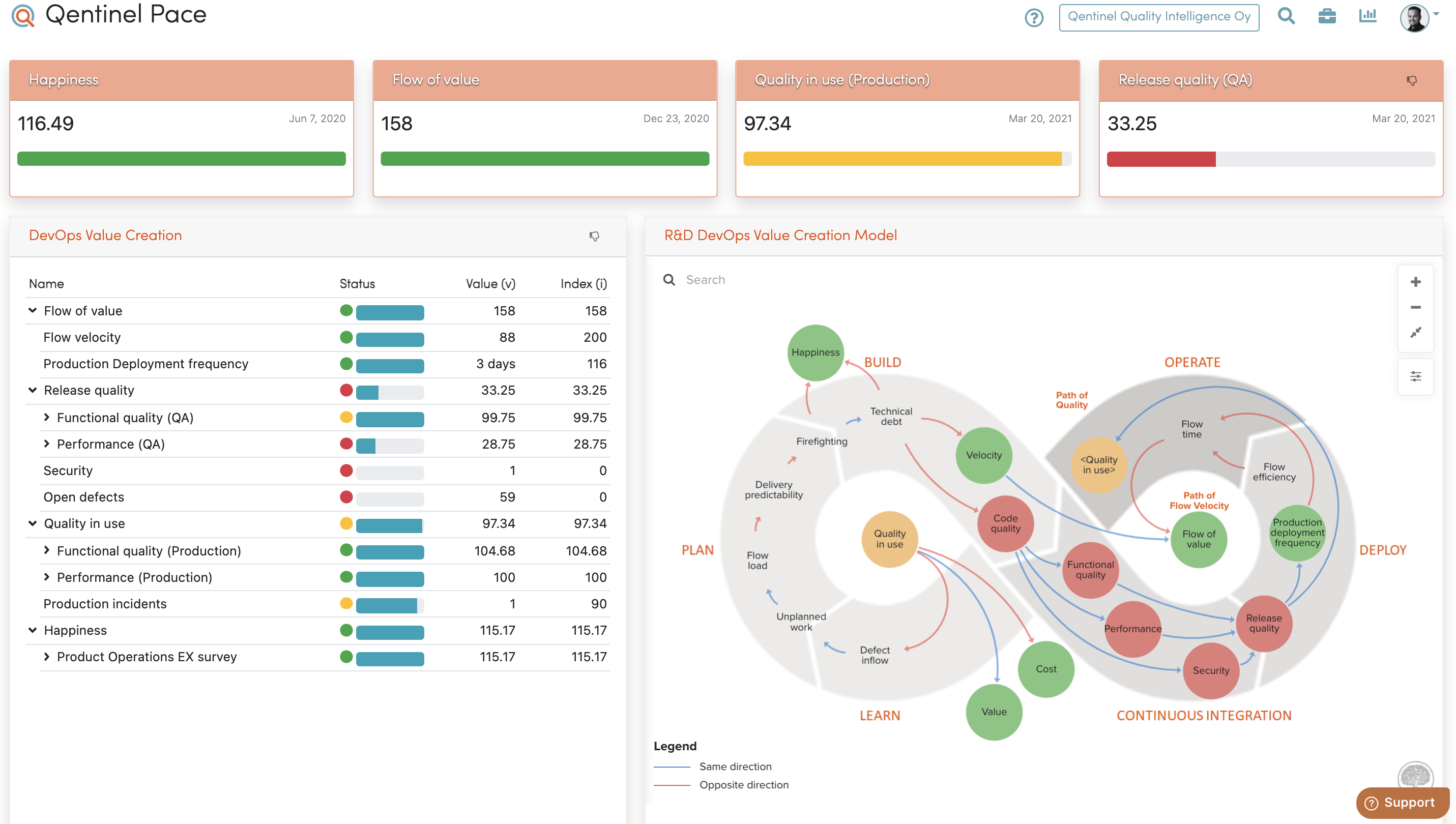
    For any highly competitive industry that relies on a smooth and stable user experience, it is vital that their development teams accelerate release cycles, lower operating costs and ultimately reduce risks. Continuous testing is one way companies can achieve these objectives.

    As a subset of software testing, continuous testing (CT) is valuable because it uncovers and addresses different problems at various stages of the development journey that other methods don’t. Most other testing methodologies require a large staff; CT doesn’t. CT leverages in-sprint automation, including end-to-end tests across the front and back end of the technology to cut costs and facilitate rapid delivery without adding more pressure on internal teams. Moreover, as part of a larger software delivery pipeline, CT is positioned closer to the beginning to execute tests early, often and comprehensively to realize cohesive release goals.

    CT introduces quality assurance with constant iterations of testing and actionable feedback at each stage of development to evaluate business risk coverage and ensure the best user experience and customer satisfaction. As the name implies, CT helps developers and product managers detect and fix critical bugs not only in the early stages of development, but continuously throughout the software development life cycle (SDLC), ensuring that errors in the code do not get unintentionally released into the wild.

    As software companies accelerate their release frequency, continuous testing sets a precedent for digital tools development and the quality assurance process.

    Benefits of Continuous Testing

    Continuous testing plays an integral role in the CI/CD pipeline, is part of the overall set of DevOps best practices and the information it provides is invaluable to development teams. The benefits of CT are also far-reaching, with positive impacts on the entire organization, including:

    Better Company-Wide Feedback

    Continuous testing facilitates feedback to all involved teams and stakeholders. For example, when a bug gets detected in code, ideally, the only team notified should be the team responsible for the part of the code with the bug. Without CT to automatically detect bugs and notify those responsible for fixing errors, triaging bugs could be a full team effort or, worse, a dedicated team’s main function. This approach is very inefficient and wastes the time of the engineers whose code is bug-free. The feedback provided from CT cuts down on these unproductive scenarios and allows stakeholders to make immediate and informed decisions.

    Higher Quality Code and User Experience

    A company that effectively uses CT should expect higher quality code and a more stable user experience. Stability measures application health and user experience; it is negatively affected by session-ending events like crashes. With CT, businesses will give their development teams better awareness of product quality and performance while also significantly improving overall business metrics by fixing broken apps faster.

    CT Breaks Down Siloed Teams

    Not only will CT enhance quality assurance, it similarly works to improve the development of digital tools through the breakdown of siloed teams. When teams become siloed, they inadvertently keep processes and knowledge to themselves, resist cross-functional collaboration and work in isolation toward their own goals. Predictably, separate groups fail to share insights or ideas, leading to stagnation and decreasing innovation. However, by leveraging CT, siloed teams can become more collaborative in development, testing and operations, increasing overall business efficiency.

    CT Enables Objective Evaluation

    Finally, CT enables an organization to pause and objectively assess if it is aligning efforts with its specific business goals. As mentioned before, CT uses automation to provide timely feedback on business risks, reducing the chances of a digital application or tool failing at launch. Likewise, dev teams and managers can more easily meet their business goals and optimize the value of a release. Additionally, objective assessments are helpful for critical decisions – as CT gives actionable data for decision-makers to support their choices.

    Today, consumers have come to expect error-free experiences within their software applications, with the most stable of these applications driving conversion, engagement and retention. Applying a continuous testing model to a software development pipeline will ultimately result in applications being delivered faster and at higher levels of quality than ever before, with an enhanced end-user experience. As companies combine agile development with continuous testing, they will optimize each aspect of the development life cycle and their larger business goals.

  • The State of Continuous Delivery in 2021

    The State of Continuous Delivery in 2021

    One of the hallmarks of DevOps is to improve the delivery of software. Therefore, mature DevOps systems employ continuous delivery (CD), the process of releasing bite-sized software changes on a regular basis. Amid high demand for digital innovation, streamlining this release pipeline is becoming more and more crucial for enabling overall software fluidity.

    So, what is the state of CD among today’s development teams? The Continuous Delivery Foundation (CDF) recently released its 2021 State of Continuous Delivery Report, a study that helps establish baseline continuous delivery metrics. Below, we’ll review some key takeaways from the report and discover mean rates for things like deployment frequencies, recovery times and average lead time for code changes.

    Benefits of Continuous Delivery (CD)

    Before we look at the broad metrics surrounding CD adoption, let’s consider: what are the benefits of CD? A big net benefit of CD, the report noted, is that it helps realize feedback earlier in the software development cycle. A lean, CD-driven development approach could help quickly discover features that won’t succeed, which avoids wasting precious development resources.

    CD also increases overall delivery speed for small software chunks. In an era where microservices architecture is all the rage, this process is a necessity for continually initiating many disparate updates. For example, Netflix utilizes Spinnaker to deliver hundreds of microservices and thousands of daily deployments.

    With these results, organizations can reap increased responsiveness and agility. CD can enable fast feedback to changes, which can help businesses adapt to unforeseen conditions, such as zero-day exploits. An investment in CD can also bring net positives to developer team dynamics, according to the report.

    Continuous Delivery Statistics

    Software performance can be indicative of overall organizational performance. So, how should an organization measure its software delivery success? Well, the book Accelerate outlines four crucial metrics to watch: lead time for changes, deployment frequency, time to restore service and change failure rate. The CDF report establishes current industry averages for three of them.

    In terms of deployment frequency, the study found that the highest percentage of developers (31.3%) release once per week to once per month. A large percentage of developers, 27.3%, release every month to six months. Only 10.8% of developers are elite performers, releasing multiple times per day. This indicates that rapid release cycles are still maturing across organizations.

    The average lead time for changes is more variable than you might think. It takes 28.3% of developers one week to one month to go from committed code to running code successfully in production. For 27.3% of developers, this lead time is increased, from one month to six months. Only 5.74% of developers say it takes less than an hour, indicating that a truly on-demand delivery mechanism remains out of reach at most organizations.

    On the other hand, developers are much quicker to act when it comes to restoring services. The survey showed 34.4% of respondents said it takes them one hour to one day to respond to an unplanned outage. A significant number, 15%, respond to incidents in less than one hour. Still, about 50% of outliers are responding somewhere between one day and more than six months.

    Decreasing the mean time to recovery (MTTR) is imperative to respond to broken applications, quickly address security vulnerabilities, and meet evolving customer expectations. As a result, MTTR has become a de facto metric for Site Reliability Engineers (SREs) to watch closely.

    Factors That Affect Software Delivery

    Other factors may influence software delivery agility, such as industry type and programming language preferences. Out of the many industries attempting to refine their delivery models, the report highlighted retail as an industry that ranks high in both speed and stability metrics. Other sectors, such as financial services, government and energy ranked high on stability yet received only average scores for speed. Industries like telecommunications received poorer overall scores.

    Programming language choices may also dictate overall software delivery performance. The study found that shell scripting languages, Go, JavaScript, PHP and Scala were among the top five programming languages, based on the combined software delivery performance data for organizations using each language.

    DevOps Aims to Improve CD

    Continuous delivery is vital to responding quickly to changes and enabling iterative, progressive delivery of new features.

    Another facet of modern CD that can’t be understated is the widespread prevalence and reliance on open source tools. CDF open source packages like Jenkins, Jenkins X, Spinnaker and Ortelius remain vital to enabling CD processes for numerous developer teams.

    The 2021 State of Continuous Delivery Report provides a baseline of standard continuous delivery practices across companies and sectors. The findings are based on SlashData’s Developer Nation survey, which reached 19,000+ respondents from 155 countries from late 2020 to early 2021. One area where reporting is lacking is change failure rates, which we hope future studies will benchmark. For more insights, you can download the report here.

  • How Low-Code Makes DevOps Stronger

    How Low-Code Makes DevOps Stronger

    While its roots can be traced back to rapid-application development (RAD), low-code application development started to gain serious momentum about three years ago. Initially, some in the DevOps community dismissed the trend, even as myriad approaches—from no-code to low-code for professional developers—started to enter the market.

    At the time, enterprises of all sizes had embraced agile software development processes, moving to cloud infrastructure for some critical workloads and using test automation tools widely. DevOps emerged as an essential discipline, and it was assumed that its dominance would overshadow low-code.

    Fast forward to 2021, Gartner predicts that the low-code development market will increase by 22.6%, to a total of $13.8 billion in one year, so it’s clear that the obituary for low-code was premature. The growth of the low-code market hasn’t restricted growth of DevOps, either. Thousands of medium to large enterprises either are already adopting or planning to adopt low-code for professional development, and DevOps’s growth continues. Low-code platforms for professional development haven’t replaced the DevOps model; instead it places an emphasis on a robust software development life cycle working with the business and IT to increase the velocity of transformational digital experiences.

    The Need for Speed

    During the early days of the COVID-19 pandemic, many organizations were compelled to accelerate their digital innovation to adapt their business activities to the new normal, or find new ways to compete against more nimble competitors to stay afloat. To enable delivery of their services to suddenly distributed customers and employees, they began to switch to low-code development platforms to deliver solutions faster.

    Low-code software is easy customizable, can fit any organizational needs, doesn’t require in-depth coding skills and speeds up development. Low-code platforms feature a host of pre-made tools to develop an app in a matter of hours instead of weeks or months.

    Some low-code development platforms feature integrated DevOps services and automated testing capabilities. Cutting edge platforms use AI to generate test cases to be executed on the cloud as part of the continuous integration/continuous delivery (CI/CD) pipeline). While these platforms It don’t replace developers, they can help to automate their work so they can focus their time on new features and big ideas, rather than on coding repetitive but essential tests, or on figuring out the back end complexities.

    A Confidence Booster

    With a low-code platform, DevOps teams get automated tools for testing, deployment, security, data management — all of the back end development necessities — plus front end and design capabilities. This is a very different set of skills and expertise, but using low-code platforms to simplify development processes allows almost any developer to work on any app through its full life cycle.

    Even if an aspiring coder from the organization’s marketing team builds an internal app, DevOps team won’t have to worry about build validation or version control, because low-code enables a continuous process.

    One small DevOps team can efficiently and confidently manage building and deploying an app from any developer. It can also deploy these apps across multiple devices — with very little upskilling of different programming languages required. Low-code platforms include pre-wired components, templates and sample apps for smart speakers, wearables, AR, PWA, native mobile and other real-world use cases.

    Strategic Focus

    Once low-code frees the organization’s DevOps teams from repetitive tasks and eases workload burdens, teams can concentrate on more complex problems, like upgrading and maintaining existing enterprise-class apps — enterprise resource planning comes to mind — or work on other high-value digital and operational strategic initiatives.

    Long Live DevOps and Low-Code!

    Low-code for professional developers is best suited for developing consumer-grade mobile and multi-experience apps. Whether an organization is trying to digitize an old process or create new ways to engage with consumers, business partners, customers or employees, low-code development helps organizations be more responsive and agile — just like a good DevOps culture. With the ever-rising demand of a digital economy and the subsequent shortage of development talent, by adopting the velocity of low-code development approaches, we can enhance the power of the developer (and the DevOps) models to meet the next business challenge.

  • Continuous Testing Practices – Part 2

    Continuous Testing Practices – Part 2

    In my prior blog, Continuous Testing – The Quest for Quality at Speed, I described five tenets and some of the practices for continuous testing to help explain what continuous testing is. In my consulting work, I find it necessary to use 15 categories of practices to assess an organizations’ continuous testing capabilities. Given the large number of practices, I am publishing the complete list in three parts.

    This article is part two, which covers the following categories of continuous testing practices:

    • Test automation
    • Test tools
    • Test infrastructure management
    • Test scripts
    • Test results

    You can read part one here.

    Test Automation

    • Test automation requirements are defined.
    • New automated tests are created for each new feature in compliance with the test strategies for the product or service.
    • Automated test cases are reviewed and tested to ensure they satisfy the purpose of the test.
    • Automated test cases are compliant with test case standards for the product or service.
    • Automated test cases are designed to run independent of each other.

    Test Tools

    • All testing tools in a pipeline are integrated into a common framework which enables orchestration of test resources and automation of test tasks.
    • A test framework supports automation of everything needed for testing including test cases, test tools, applications, test infrastructures, and test data.
    • A test framework can be invoked, controlled and released through an application programming interface (API) so that it can be integrated into a DevOps continuous delivery toolchain.
    • Features provided by test frameworks include capabilities to orchestrate the test infrastructure, select tests, control the execution of tests, monitor tests in progress and report test results, logs and verdict data.
    • A selection criterion is defined for test tools. The criterion includes requirements for coverage, automation features, support, compatibility with the automation framework, compatibility with test progress reporting systems.
    • Test tool software versions are maintained in a source version management system.
    • A common test automation framework is defined for the entire organization to ensure all test tools can integrate and be orchestrated with common test automation practices.
    • Test automation tools are available for testing all features of an application that can be automated.
    • Manual testing tools are available for testing features that must be tested manually. These tools can report results to a common test management reporting system.
    • Test authoring tools support input error checking and features which help encourage scripts development according to best practices. Examples of such features include the ability to create and use a repository of known good test utilities for control and analysis of the system under test.
    • DevOps-ready test tools are employed that easily integrate into a test framework and toolchain and elastically scale on demand vertically or horizontally, to match the varying capacity and workload demands of tests of software changes going through the continuous delivery pipeline.
    • DevOps-ready tools can be orchestrated, scaled, invoked, controlled and monitored from an API.

    Test Infrastructure Management

    • Standards for describing resources and topologies for test configurations are documented.
    • Techniques used to accelerate the time for executing tests are used such as vertical and horizontal scaling of test campaigns.
    • Test resources and topology files are maintained in a software version management system.
    • Orchestration and automation tests are conducted to verify the software that supports orchestration and automation layers satisfy their assessment criterion
    • The test infrastructure used for each stage in the pipeline is a replica of production configuration variations, as much as is practical.
    • Infrastructures for testing are elastic, with the ability to stand up and release (i.e. orchestrate) infrastructure configurations as needed for use with specific tests. Typical techniques that are employed to orchestrate test environments include dynamic infrastructure configuration tools, infrastructure-as-code (IaC) strategies, cloud services, testing-as-a-service (TaaS) providers and use of tools to stand up and release applications and test resources packaged in immutable containers.
    • Database migration, replication and restore tools also need to be tested to ensure they can function quickly enough to keep up with the speed of the DevOps continuous deployment pipeline cadence.
    • Health checks on the test environment are used to reduce the chance of false negative test verdicts that could be caused by test environment failures.

    Test Scripts

    • Test scripts are maintained in a software version management system.
    • Guidelines for test scripts and test suites practices are documented.
    • Test utilities, tests and test suites follow guidelines for documentation, test results reporting, reuse and maintenance practices.
    • Test script peer reviews are conducted to encourage collaboration and to ensure test script best practices are used.
    • Each test script has a unique identification.
    • The test type of the script is identified (for example, sanity test, build test, smoke test, security, acceptance test, conformance test, functional test, unit test, patch test, bug fix test, integration test, regression test, performance test, system test, other).
    • Evidence, including an execution log, demonstrates that each verdict of tests work.
    • Tests determine at least one verdict, which may be ‘Pass,’ ‘Fail’ or ‘Inconclusive.’
    • Verdict and assertions priorities are recorded or reported.
    • Tests are data-driven. Data inputs control execution of the test.
    • Each test script is is tagged with a codified risk level.
    • Failure verdicts reported by the script include a tag for risk priority.

    Test Results

    • Techniques are used to ensure test results analysis keeps up with accelerated tests. For example, test design techniques, analysis tools built into test frameworks, test results dashboards and/or test results analyzers that run in parallel with the tests.
    • Quality assurance goals include specific thresholds for test coverage prior to release such as run-to-plan (RTP) and pass-to-plan (PTP) minimum thresholds. RTP is a measure of how many tests of the total planned tests have completed. PTP is a measure of how many of the completed tests pass. For example, 95% RTP and 90% PTP.
    • Quality goals include a measurement and threshold for reliability. For example, S-curves for pass rates can indicate reliability when the pass rate stabilizes for a period. Example: 95% pass rate for three consecutive test cycles.
    • Time to recover a failed service is routinely tested and used to calculate mean-time-to-recover (MTTR).
    • Monitoring and management tests are conducted to verify monitoring and management capabilities of the pipeline satisfy their assessment criterion.
    • Technical and business metrics are designed to monitor the success of DevOps testing for technical continuous improvement and to justify business cases needed to implement those improvements.
    • Input and output metrics and acceptance criterion exist for each stage in the value stream.

    What This Means

    Continuous testing (CT) practices are critical to success with DevOps. Many organizations underestimate both the importance and the practices needed to engineer continuous testing. This article is the second in a three-part series that provides a comprehensive list of practices that can be used to understand and assess an organization’s continuous testing capabilities. To learn more about my blueprint for continuous testing, refer to my book Engineering DevOps.

  • Continuous Testing Practices (Part 1)

    Continuous Testing Practices (Part 1)

    In my prior blog, Continuous Testing – The Quest for Quality at Speed, I described five tenets and some of the practices for continuous testing (CT) to help those understand what continuous testing is. In my consulting work, I find it necessary to use 15 categories of practices to assess an organizations’ continuous testing capabilities. Given the large number of practices, I am publishing the complete list in three parts.

    This article is part one, which covers the following categories of continuous testing practices:

    • Continuous testing tenets
    • Leadership
    • Culture
    • Test strategy and plans
    • Test management

    Continuous Testing Tenets

    • The continuous testing principle “shift left” is practiced, in which tests are conducted as early in the pipeline as possible.
    • The continuous testing principle “fail early” is practiced, in which tests are arranged so that the most likely problems are found in the early stages of the pipeline.
    • The continuous testing principle “fail often” is practiced, in which tests are run frequently and with many different conditions such as different variations of operating systems, production topologies, browsers and production versions of services.
    • The continuous testing principle “test fast” is practiced, in which tests are run in quick cycles to get to a verdict as quickly as possible.
    • The continuous testing principle “be relevant” is practiced in which tests are focused on the most important tests and results for each purpose and stakeholder.

    Leadership

    • Leaders establish a definition and vision for software quality.
    • Leaders establish a definition for test coverage.
    • Leaders clarify how everyone’s roles fit with the CT strategy.
    • Leaders establish incentives for CT performance.
    • Leaders proactively sponsor quality assurance testing as a strategic element of their budgets and operations rather than viewing testing as a cost to avoid. This includes budgeting time and money for DevOps test training, test resources, test frameworks, test tools, test management and establishing policies for assessments.
    • Operational and capital expense budgets are planned together with all stakeholders to ensure all stakeholders agree there is enough opex and capex budget for the organization to accomplish quality goals for the budget period being planned.
    • Cost accounting practices ensure the capex and opex expenditures are tracked and made visible to stakeholders.
    • Schedules for CT improvement projects are identified and tracked.
    • Skills development programs provide individuals and teams opportunities to learn CT practices.
    • The performance of continuous quality assurance programs are monitored and made visible to stakeholders.
    • Leaders participate in creating and maintaining guidelines for codifying and tagging business risk priorities.

    Culture

    • Quality is everyone’s concern. Responsibility for attaining high quality software products is shared by everyone on a cross-functional team.
    • Cross-functional team members collaborate for testing. This reduces confrontation and friction between people who find failures and those who fix the code.
    • Dev teams embrace the creation of good tests and analysis of test results.
    • Ops team members contribute to test planning, test creation, test execution and test results analysis.
    • Policies for test creation and test coverage are agreed upon by the cross-functional team including Dev, QA, security and Ops team members.
    • A test architect is a role within the organization. The role has expertise in CT practices and helps cross-functional teams understand and apply them.

    Test Strategy and Plans

    • Test strategies and plans are created for each product or service and reviewed by cross-functional teams including development, QA, Ops and security teams.
    • Test strategies and plans identify the type of tests, and the extent of testing activities, for each stage in the value stream.
    • Test requirements and tasks are included in agile planning procedures for each theme, epic and user story.
    • Test strategies and plans define a test coverage standard, test case standards, and input/output criterion for each pipeline gate.
    • Test plans identify the test cases and all the supporting requirements to implement and execute the test cases as required satisfying the test strategy and test management goals.
    • Test strategies and plans identify the approach for system and acceptance testing.
    • Test strategies and plans identify any tests that are to be conducted in production.
    • Test strategies and plans identify any tests that are to be conducted for security testing.
    • Test strategies and plans identify a target for test automation and manual testing for each type of testing. For example, 100% of all tests in the integration stage and 85% of test in the pre-production stage is a typical goal.
    • The test strategy requires that changes to a database or changes to an application that uses a database have tests defined for the database and the application use of the database.

    Test Management

    • All aspects of test management, such as test planning, test guidelines, test code version management and version management of test results are handled by tools that are well-integrated into the continuous delivery pipeline and any test framework being used for test automation.
    • Schedules for all test tasks are identified and tracked.
    • New features have a scheduled task to ensure test goals are met for each new feature.
    • Each test case has associated attributes that can be used to find tests according to the attributes. For example, an attribute could be type of test and the feature purpose of the test.
    • Test environments and resources needed to satisfy requirements to run each test are identified and available programmatically for scheduling purposes.

    What This Means

    Continuous testing practices are critical to success with DevOps. Many organizations underestimate both the importance and the practices needed to engineer continuous testing. This article is the first in a three-part series that provides a comprehensive list of practices that can be used to understand and assess an organization’s continuous testing capabilities. To learn more about my blueprint for continuous testing, refer to my book Engineering DevOps.

  • GitLab Updates Approach to Integrating DevOps Workflows

    GitLab Updates Approach to Integrating DevOps Workflows

    GitLab today took the wraps off a major update to its continuous integration/continuous delivery (CI/CD) platform that embeds analytics tools in workflows to identify the root cause of inefficiencies, among other additional capabilities.

    David DeSanto, senior director for product management at GitLab, said that capability is part of an ongoing effort to include value stream analytics within the core GitLab 14 platform as an alternative to acquiring and deploying a separate platform. There are also additional charts and dashboards that enable DevOps teams to uncover bottlenecks over time.

    In addition, GitLab announced it is extending the security capabilities of the platform by adding integrations with open source Semgrep and Trivy vulnerability scanning tools as part of an effort to enable organizations to embrace DevSecOps best practices within workflows. GitLab has also added support for the fuzz testing tool it gained via the acquisitions of Fuzzit and Peach Tech to enable DevOps teams to test application security more thoroughly along with making available additional dashboards to track security metrics.

    As part of an effort to enable organizations to better secure their software supply chains, GitLab has also added support for immutable pipeline definitions that can’t be altered without specific levels of permissions being granted. That capability also enables DevOps teams to more easily achieve compliance with any number of regulatory frameworks, noted DeSanto.

    The company is also adding a pipeline editor that provides access to a visual tool for creating, managing and visualizing pipelines. That tool is designed to both make DevOps more accessible to novices and provide experienced DevOps teams with an alternative tool for managing pipelines in a way that doesn’t require them to write additional code.

    Finally, as part of its comprehensive approach to DevOps, GitLab is also making available agent software for Kubernetes clusters to eliminate the need for organizations to acquire a separate DevOps platform to build and deploy cloud-native applications based on microservices constructed using containers. The company now provides IT organizations with the option of crafting a GitOps workflow for Kubernetes using either an agentless or agent-based approach.

    Gitlab is betting that, as DevOps continues to evolve and mature, more organizations will prefer to replace the various tools they need to integrate themselves with a platform that lowers the total cost of DevOps. Gartner is forecasting that, by 2023, 40% of organizations will have switched from multiple point solutions to a DevOps value stream delivery platform to streamline application delivery, versus less than 10% using such a platform in 2020. Today, only 10% of organizations are employing such a platform, according to Gartner.

    There should also be many more organizations employing DevOps workflows to build applications. Organizations of all sizes now realize how dependent they are on software to drive a wide range of digital business transformation initiatives. The rate at which that software can now be securely developed and updated, in many cases, goes to the heart of their ability to compete. The issue is finding a way to achieve that goal without constructing a platform that ultimately takes time and resources away from building secure software.

  • PagerDuty Allies with JFrog to Modernize IT Incident Management

    PagerDuty Allies with JFrog to Modernize IT Incident Management

    PagerDuty has integrated its IT incident management platform with the continuous integration/continuous delivery (CI/CD) platform from JFrog as part of an effort to streamline troubleshooting of application environments.

    Steve Gross, senior director of strategic business development at PagerDuty, said the overall goal is to make it easier for IT operations teams and developers to collaboratively discover the root cause of issues by, for example, being able to identify builds within a JFrog pipeline that might be having a negative impact on a production environment.

    At the same time, IT teams employing PagerDuty can now also receive notification from JFrog Xray, a tool that discovers both vulnerabilities in open source software and license compliance issues.

    Organizations of all sizes are attempting to minimize the impact of an IT incident by providing deeper insights into how applications were constructed. The goal is to reduce the amount of time IT teams currently spend looking for the root cause of a problem.

    PagerDuty JFrog

    Ideally, IT teams would discover those issue before they impact end users. The challenge they face is it can take weeks to discover the root cause of an issue that takes a developer a few hours, at most, to fix. Armed with insights from the CI/CD platform, Gross said it becomes easier for IT operations teams to proactively pinpoint the source of an issue in a way that provides the developer with enough insight to act.

    That is critical because, more often than not, it’s the last build of application that was deployed in a production environment that is usually the source of an issue, especially when that IT environment was operating normally before that build was promoted into a production environment.

    The data collected by PagerDuty from various DevOps platforms is fed into the PagerDuty tools via a Change Events application programming interface (API). Over time PagerDuty will also be able to apply machine learning algorithms and other forms of artificial intelligence (AI) to identify issues long before they reach a meaningful level of disruption, noted Gross.

    In general, there’s a movement to modernize IT incident management in a way that aligns with DevOps best practices as part of an effort to identify issues before an application is actually deployed. The hope is that those efforts will reduce the number of “war room” meetings that need to be convened to determine the root cause of a performance or security issue after an application has been deployed.

    It may be a while before IT incident management processes are modernized to that level. However, as IT environments become more complex—in part because of the number of microservices-based applications with multiple dependencies that are now being deployed—it’s apparent existing approaches to IT incident management don’t allow IT teams to respond fast enough to an issue. In fact, that’s more challenging than ever now that many of the members of an IT team are working from home more often.

    The pressure to modernize IT incident management increases in almost direct proportion to IT teams’ stress levels. The challenge now is to modernize those processes before the members of an IT team are too burned out to appreciate the effort.