Tag: CI/CD

  • How to Build a Team That Embraces Metrics

    How to Build a Team That Embraces Metrics

    When we talk about metrics in software delivery, a lot of developers think of execution metrics — things like throughput, delivery and number of deploys. But in reality, those metrics don’t motivate anyone — at least not without connecting them to a bigger picture.

    I’ve worked in software for 23 years. I’m a three-time founder and four-time CTO, responsible for leading a 200+ member distributed engineering organization. I’m passionate about metrics because they can tell me a lot about where things are working and where they are not. On the other hand, there’s a risk that operating metrics become the focus, taking attention away from measures of business value.

    Getting your developers to embrace metrics isn’t about hand-selecting specific metrics to track. It’s about disseminating the bigger picture and sharing measures of business impact that allow your team to see progress against those larger, shared goals.

    When developers understand how their day-to-day work directly impacts the company’s goals and vision, they’re able to understand their impact, too, and will want to do better. When they want to do better, they want execution metrics to get them there.

    Clarify Your Goals

    If you want your developers to not only track their metrics but be excited to use them, there are a few things you need to do first:

    • Get clarity on the goals you’re trying to accomplish as a team and as an organization
    • Figure out how you’re executing against those goals
    • Find out what’s getting in the way

    Developers shouldn’t be obsessing over execution metrics. Rather, you need them to understand what the company is trying to achieve. What is the outcome you’re aiming to deliver to customers and for the business overall?

    If your developers have clarity on the company’s mission and vision, they understand how their work directly impacts the customer and the success of the organization, which is highly motivating.

    Individual contributors will start asking for access to more information so they can diagnose their own problems and improve their work.

    Are we spending too much time on technical investment? Does it feel like we have too many incidents, issues and escalations from customers? Are we far off on our estimates? By answering these questions, your team can determine which metrics to track.

    Don’t Make These Mistakes

    Using one metric to rule them all. A lot of engineering organizations try to rally entire departments around the same execution metrics. Velocity, or throughput, for example, is a great tool to expose other issues, but consistent velocity is not a guarantee of delivering business value. In fact, targeting consistent velocity is likely to result in tradeoffs you didn’t anticipate, like taking shortcuts to get things out the door.

    Treating the metric as the goal. Meeting a metric shouldn’t be the goal; rather, metrics should be viewed as a way to ensure your team is meeting their goals. Organizing around business value is what really helps your team understand the purpose of their work. If you’re just rallying around how many times you can deploy per day, then sure, you can be an amazing software-deploying machine — but you might be deploying changes all day that have nothing to do with the actual goals of the business.

    Being a blocker. Developers need autonomy and flexibility to do their jobs well. Give teams a high-level objective and let them determine which metrics they need to push, instead of giving everybody the same metrics and telling them to get better.

    If engineers don’t have the autonomy to make their own decisions, then they’re going to feel like they’re just part of the machine. As engineers, and as humans, problem solving is what motivates us, along with the knowledge that our skills are contributing to a larger, shared goal.

    A Team That Embraces Metrics: Putting it Into Practice

    There are three channels that are essential to communicating business-value metrics to teams. At the company level, executives will introduce their high-level goals at all-hands meetings — where the company is trying to go this year, how you differentiate in the market — the things that really matter to a business.

    One level down, during organizational or department meetings, is where to communicate how teams should think about the goals from a product and engineering perspective, while still thinking about them within that overall business context.

    It’s also important that this is understood down through the management chain. An engineering manager should be able to explain to their team the overall business goals with local-level reinforcement and how it all ties together.

    When you have that knowledge as a team, you know what you’re capable of executing because you understand what you’re trying to achieve for the company and the customer. That’s when developers start asking for more metrics because they want to understand how to get there faster.

    If You’re Not Hitting Your Goals, You Should be Asking for the Data

    The only real failure is not learning from failure. It should be okay to not hit your numbers. Set a bold target and push yourself, then learn something from your misses. Figure out what you didn’t understand, what got in your way and why.

    Estimation is hard. Trying to plan work is hard. But if you know how much you were able to deliver last quarter, you can focus on getting something similar done this quarter instead of assuming this will be the one quarter where there are no interruptions, your initiatives will all be perfectly defined and nobody will get sick.

    If you’re not hitting your business goals and you’re not looking at your historical data, then you’re missing your opportunity to improve.

    Your Team Embraces Metrics. Now, How Do You Get Them Excited?

    The first time I started using continuous deployment (CD), I was truly amazed at how quickly it allowed my team to put new functionality into the hands of our customers. We could instantly find out if they liked it, and if they didn’t, we would build another version tomorrow.

    As an engineer, CD is a great way to feel more connected to your customers because you get to put something you built in front of them the same day you complete it. You also become interested in a different form of metrics: usage and adoption.

    The connection between your work and the ultimate value to the user is much clearer when the feedback cycle is shorter. CD allows you to get that feedback from customers directly and really see the impact you have on them. That gets people excited.

    There’s no Shortcut

    You can try to drive an entire organization by execution metrics, but it simply won’t be fulfilling for anyone. If your team is aligned around what they’re trying to achieve, they will recognize the value of execution metrics and they will come looking for them.

    There’s no shortcut.

    If you start with the reason and you end with the numbers, you know you’re on the right track. You’ll know you’re getting there because you’ll see the numbers moving, your team will be excited by that, and they’ll be motivated to do even better.

  • Three Ways Machine Learning Can Change Incident Management

    Three Ways Machine Learning Can Change Incident Management

    Incident management for important applications has many connotations, many of them negative. Most are well-deserved. Stress, panic, hurry, urgent, drop-everything, all-hands-on-deck, emergency, to name a few. Typically, there is a critical problem, ranging from complete failure to loss of certain functionality or performance. The problem or outage potentially means loss of revenue, loss of customers, negative social media commentary or bad reviews and more. Time is of the essence, dictating that the primary objective is fixing the incident as quickly as possible. Often, this means that symptoms or partial causes are mainly addressed rather than the underlying root cause.

    Without fully addressing the underlying issue, companies virtually guarantee that the same problem – or a similar one – will reoccur. Not identifying root cause often prevents a durable fix. In addition, companies lose the opportunity to proactively improve application code or infrastructure based on real-world experiences and issues. Postmortems may only result in reviews of monitoring and observability solutions and the inevitable updates to alert rules. Most DevOps professionals not only understand but have lived through these frustrations on an ongoing basis. Management, then, often wonders why their systems are so unstable.

    Changing the model for incident management has been limited by a combination of the overriding urgency combined with short-staffed, overworked teams. Although AI and machine learning has been positioned as the panacea for nearly every kind of technical ill, this is a clear case where “machines” could fundamentally enhance human efforts to improve a situation. The best troubleshooters exhibit a combination of instinct, experience and patience to carefully sift through reams of data, spotting unusual events and their correlation with bad outcomes. This turns out to be a perfect application for machine learning.

    By ingesting all logs and metrics to find meaningful problems or anomalies, systematized machine learning can quickly and comprehensively sift through all data to gain a thorough understanding of the real problem. Using this approach significantly speeds up the root cause analysis. Such an applied solution introduces three game-changers for incident management.

    Three Game-Changers for Incident Management

    First, incident remediation times can be reduced dramatically and with less of an all-hands-on deck, drop-everything frenzy. Rather than SREs and engineers spending hours digging through dashboards, traces and millions of log lines, an automated approach can accomplish it more quickly, more thoroughly and with less impact on human professionals, allowing them to focus on other responsibilities. This instantly relieves stress and panic and alleviates pressure because incidents can be remedied better and faster, restoring the application to its expected service level. The value is, of course, two-fold: faster time to resolution and greater efficiency or productivity of the teams who would otherwise be involved. Ending or mitigating the frustration professionals have to deal with is an additional bonus.

    Second, besides faster MTTR, an automated, machine-learning-driven approach is more comprehensive and gets to the root problem. This means that future incidents may be avoided altogether. This also means a potential end to the alert rule “hamster wheel.” The knee-jerk tendency to continually adjust alert rules and settings to enable better “early warning systems” is far less necessary. Instead of trying to gain an early indication of a similar failure in the future, the cause of such failures can be found and addressed proactively. Eliminating such problems in the first place is far better than trying to evolve alerts to catch unresolved causes. Alerts are still important, but machine learning can shift the basis for them to more root-level issues, and they can be constructed automatically by the system.

    Third, automated, machine-learning-based incident management can help proactively catch silent bugs that may not yet directly be part of an incident. It can also inform developers earlier in the cycle. Not terribly long ago, new releases were tested extensively before deploying to production, allowing for the creation of specific test plans, conducting stress tests and potentially catching bugs that might have potentially terrible consequences in the future. Now with faster, non-stop development cycles, testing mainly occurs during production. Machine learning can surface new or unusual errors, event patterns and patterns in metrics. The approach can proactively surface subtle bugs early, before they impact users or cause widespread failure.

    Changing the DevOps Life Cycle

    Each of these three results significantly changes not only the incident management life cycle, but also DevOps as a whole. Poring over logs and metrics is a perfect application for machine learning and offers the opportunity to fundamentally change incident management, transforming it from a scourge and necessary burden to a competency. An automated system of machine learning applied to incident management advances DevOps rather than encumbers it.

  • CircleCI Acquires Vamp to Apply AI to CD

    CircleCI Acquires Vamp to Apply AI to CD

    CircleCI today announced it has acquired Vamp, a provider of an orchestration platform for automating application releases. CircleCI at the same time revealed it has garnered an additional $100 million in financing to attain a $1.7 billion valuation.

    Jim Rose, CircleCI CEO, said Vamp will play a significant role in advancing the capabilities of the CircleCI continuous integration/continuous delivery (CI/CD) platform at a time when the rate at which applications are being deployed continues to steadily increase. In fact, CircleCI claims its platform is now being employed to process 2.5 million jobs processed per day.

    The Vamp platform makes it easier to construct and orchestrate a multi-stage release cycle involving, for example, canary releases of an application. It then employs machine learning algorithms to validate the impact, performance and quality of releases based on the service level objectives defined by an IT team. If anything is determined to be amiss, the platform will then automatically roll back a release.

    CircleCI

    While many organizations have successfully implemented CI best practices, the ability to continuously deploy application releases has proven to be a more elusive goal. Each platform on which an application is deployed has unique attributes. The addition of machine learning algorithms that can provide continuous validation of deployments should help drive a sea change in the way applications are being developed and deployed to improve the overall state of CD, noted Rose.

    Those machine learning algorithms, along with other forms of artificial intelligence (AI) won’t replace the need for DevOps teams as much augment them at a time when IT environments, thanks in part to the rise of microservices, are becoming more complex. In fact, with the arrival of containers, Kubernetes and serverless computing frameworks, it’s becoming next to impossible to manage an IT environment without the use of AI.

    Rose added that, as the line between pre-production and production environments continues to blur, it’s critical for IT teams to more closely align CI and CD workflows. Rather than isolating CD from CI within the context of a GitOps workflow, the goal should be to integrate those processes more closely. It is becoming more apparent that the elements of what constitutes an application are more empirical thanks to, for example, configuration files that are now stored in a Git repository along with application code. That tighter integration ultimately makes it easier to test and validate applications before they are deployed. Metadata that can be analyzed to optimize application development and deployment can also be more easily captured as part of a continuous feedback loop.

    That approach is more critical than ever, because the days of the “Big Bang” deployment of an application update are over. In its place are now a steady stream of updates that deliver new capabilities, which need to be continuously vetted, noted Rose.

    Each successive era of DevOps is, naturally, going to be more automated than the previous one. The challenge is recognizing when those new eras arrive before rivals gain an advantage in speed and agility that becomes too big to overcome.

  • The Evolution of SRE and Developer Roles

    The Evolution of SRE and Developer Roles

    As an industry, we’ve seen cultures and roles shift throughout IT teams — specifically, the role of ITOps site reliability engineers (SREs), various developer roles and the culture of DevOps. Most of these roles operated – or still operate – in silos, and didn’t understand (or care to understand) how each other’s role worked. More importantly, they didn’t know how to work together. But these roles are starting to overlap, driven by the increase in demand for customer experience and, subsequently, in intelligent observability, or observability with AIOps. Before we dive into the ‘how’ behind the overlap, let’s look at how each of these roles performs today.

    Developer

    While the specifics of what a developer does varies by project, the overarching responsibilities haven’t changed much since the introduction of the role. Simply put, developers write code to create and improve product functionality.

    IT Operations and SRE

    Traditionally, an IT operations professional focused on operating the code a developer put into production; aka keeping the lights on. However, we’re now seeing evolution of the role of highly skilled operations pro to that of an SRE who oversees automation and features surrounding the product, like CI/CD pipelines, infrastructure-as-code and the ability to monitor and observe the services and components within.

    QA

    Traditionally, QA would test the code the developer wrote and move it down the deployment pipeline. But we’re moving away from traditional QA. Now, the role sets up an automated framework for the developer so they can automate tests — similar to how the SRE sets up the CI/CD pipeline and observability framework to build, test, deploy, verify and monitor their code.

    DevOps

    DevOps has, in some cases, evolved from a practice and culture into a role. The DevOps engineer prepares the automation and the CI/CD pipeline for the developer to push out their code to test and, ultimately, production. But let me be clear – I believe the idea behind the practice of DevOps is that the practitioner does everything — they own testing frameworks, CI/CD pipeline and infrastructure. They own end-to-end product development and operation, so when anything does go wrong, they know exactly what to do, where to go and how to fix it.

    In the end, if a SRE can develop everything around the product code and knows how to fix the product — isn’t an SRE actually a developer? What if we have a really skilled developer who sets up the automation and observability framework to get their code from their keyboard to the user as quickly as possible — without breaking anything, of course — while also building and improving all the infrastructure and components surrounding the product? Isn’t the developer an SRE, or at least performing site reliability engineering?

    The short answer, in my opinion, is yes. And there’s one guiding force behind this amalgamation, this crossover; ultimately, this evolution: intelligent observability.

    The role of observability with AIOps

    Traditionally, and with the use of many tools, DevOps practitioners and SREs have had to — manually — battle floods of data coming in from all their endpoints, services and products. This can feel like a never-ending struggle. It can lead to a lot of toil and time spent on maintenance, when what developers really want is focused time to do what they love – write code, create and innovate. Not to mention, the result has a negative impact on the customer experience.

    But now, new tools are surfacing to support the everyday needs of SREs and DevOps practitioners. For example, intelligent observability, or AIOps, applied to observability data like events, metrics, traces, changes and logs, gives teams clearer insight into not only where complex data is coming from, but why an issue is happening and what action they need to take to resolve it. They can spend less time operating and more time innovating.

    As these roles continue to evolve, it’s important SREs and DevOps practitioners remain agile and willing to adjust to keep up with the latest technologies supporting their day-to-day workflow. AI can be the key to keeping the incident count down and the customer experience up.

    Looking Ahead

    If you’re currently in one of these roles, consider how you are practicing. Whether you’re a developer, a QA engineer, a DevOps practitioner, or an SRE, have you evolved your role to fit your company and customers’ needs right now? As these roles overlap with the application of intelligent observability throughout your development life cycle, it’s possible to deliver better products and fix reliability issues faster. It’s up to you to decide if you want to embrace the evolution of your role and intelligent automation or stay put and risk falling behind.

  • The Basics of DevSecOps Adoption

    The Basics of DevSecOps Adoption

    Embracing DevOps is essential, but keeping the software delivery and deployment pipeline safe has become more critical than ever. While attackers are keen on getting into your Docker containers or Kubernetes clusters, securing your images, pods and clusters can deter attackers. Securing your artifacts, deployment workloads and production environments remains critical today. While we have many tools to get these jobs done, it is vital to understand DevSecOps and its related factors.

    DevSecOps has become a mass movement today. But what makes it so important?

    What is DevSecOps?

    DevSecOps addresses software development security via the mindset that everyone is responsible for security at every stage in the development process.

    DevSecOps is a culture and an evolution where security is given the utmost priority in the software development life cycle (SDLC). Security is everyone’s responsibility, and inspection is done at each stage of the development cycle. Basically, implementing a process for inspecting, scanning and reviewing code by developers at predetermined checkpoints to immediately tackle any identified bugs or vulnerabilities. One of the most challenging parts of the transition from DevOps to DevSecOps lies in building more open and communicative teams.

    Why DevSecOps?

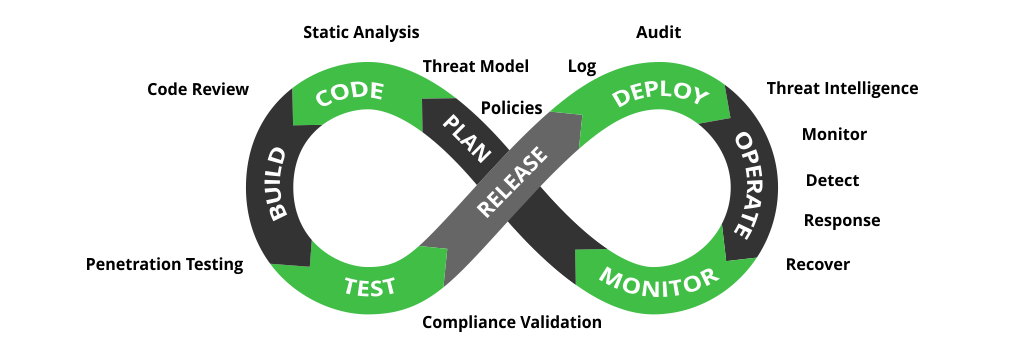
    Using DevSecOps, security becomes an integral part of the planning, coding, building, testing, deployment and production stages. DevSecOps makes continuous testing the default for developers and security professionals to deliver more secure features to the market more quickly.

    In many organizations, most development, operations or DevOps teams see security or security teams as a roadblock to getting things done faster; delaying features. In traditional DevOps implementations, the security aspect was missing, DevSecOps was introduced to stress the priority of security in DevOps.

    The Importance of DevSecOps

    Let’s take Uber’s security breach in 2017 as an example. Personal details and information of 57 million customers and over 600,000 drivers was exposed. Uber paid a $100,000 ransom to hackers in an attempt to get them to delete the breached data. This breach happened because engineers failed to secure and update the credentials they were using on GitHub.

    Similarly, in 2018, Tesla’s Cloud was hijacked and used to mine cryptocurrency by abusing a vulnerability in the company’s Kubernetes cluster. A significant amount of FedEx data was also exposed in the same way, affecting 119,000 individuals.

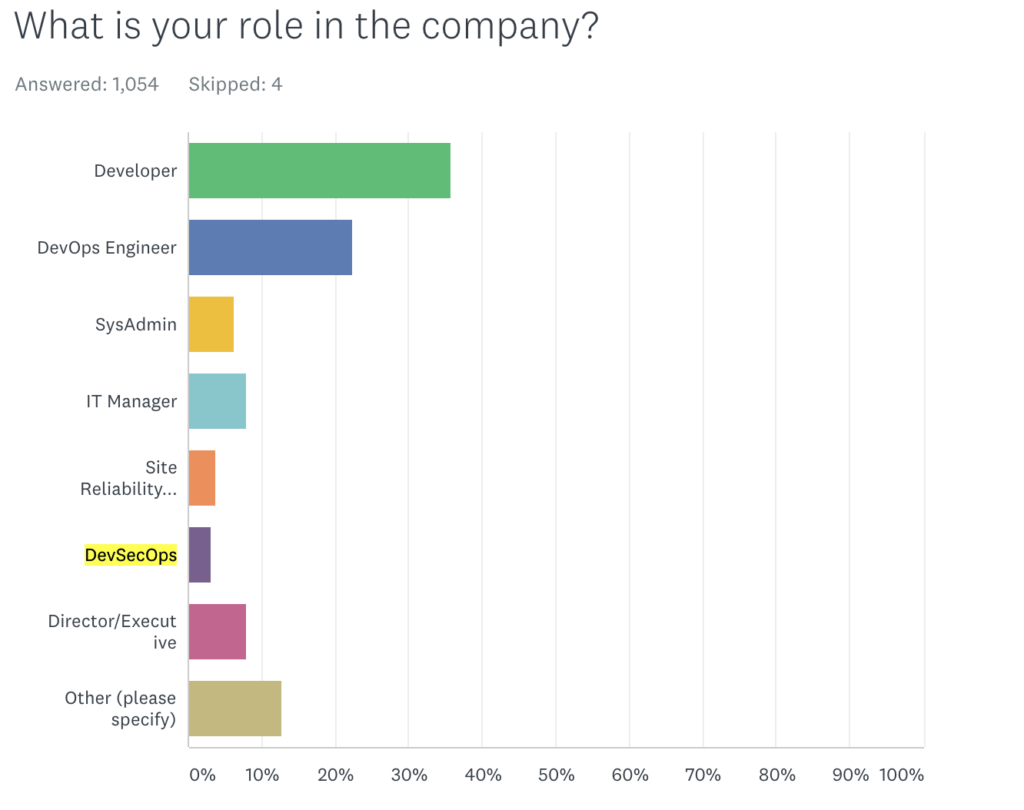
    Logz.io’s annual DevOps Pulse 2020 survey revealed that, out of 1,000 respondents, only 3% indicated their development methodology as DevSecOps, hinting at the slow pace of DevSecOps adoption in the industry.


    Image source: Logz.io

    DevSecOps Best Practices

    Adopt a Shift Left Approach

    Shifting security left helps organizations secure each stage of the development life cycle. This refers to starting testing earlier in the SDLC. The goal here is to enhance quality, cut down long test cycles and reduce the likelihood of unpleasant security surprises at the end of the development cycle or in production.

    Include a Threat Modeling Mechanism

    It is essential to implement a threat modeling mechanism in DevOps workflows since it helps developers and security professionals to view software from an attacker’s perspective. It makes developers more careful while writing code and encourages them to more closely follow code writing and review best practices. Threat assessment or threat modeling will also help identify potential vulnerabilities in system design and architecture, and acts as a crucial part of successful security integration in the SDLC.

    Mandate Developer Training

    Training developers on the importance of security is a critical best practice. Making sure each developer who writes, tests and deploys code understands that security is part of their job description is a priority. Training developers on security best practices, how to embed security, check for vulnerabilities and use appropriate security tools will improve overall security knowledge and increase its application within the organization. 

    Use Available Security Vulnerability Tools

    A vulnerability is considered a flaw in the code, application dependencies, external libraries, licenses used or operating system (OS) packages. There are a number of static and dynamic application security tools that can help the development team to find and address bugs and vulnerabilities as early as possible in the development pipeline. Many are automated to reduce the time it takes for developers to find these flaws.

    Sponsor Bug Bounties

    Bug bounty programs and rewards motivate external and internal security experts to experiment with the platform, analyze, think outside the box and report any major bugs and security flaws found. 

    Security-as-Code

    Security-as-code is the next evolution in DevOps, where security is fully embedded in the development processes. This practice implements security and secure coding practices in the earliest stage of development. With security-as-code, developers will be able to identify vulnerable code ahead of time and add security checkpoints/measures to tackle such irregularities. 

    DevSecOps Tools

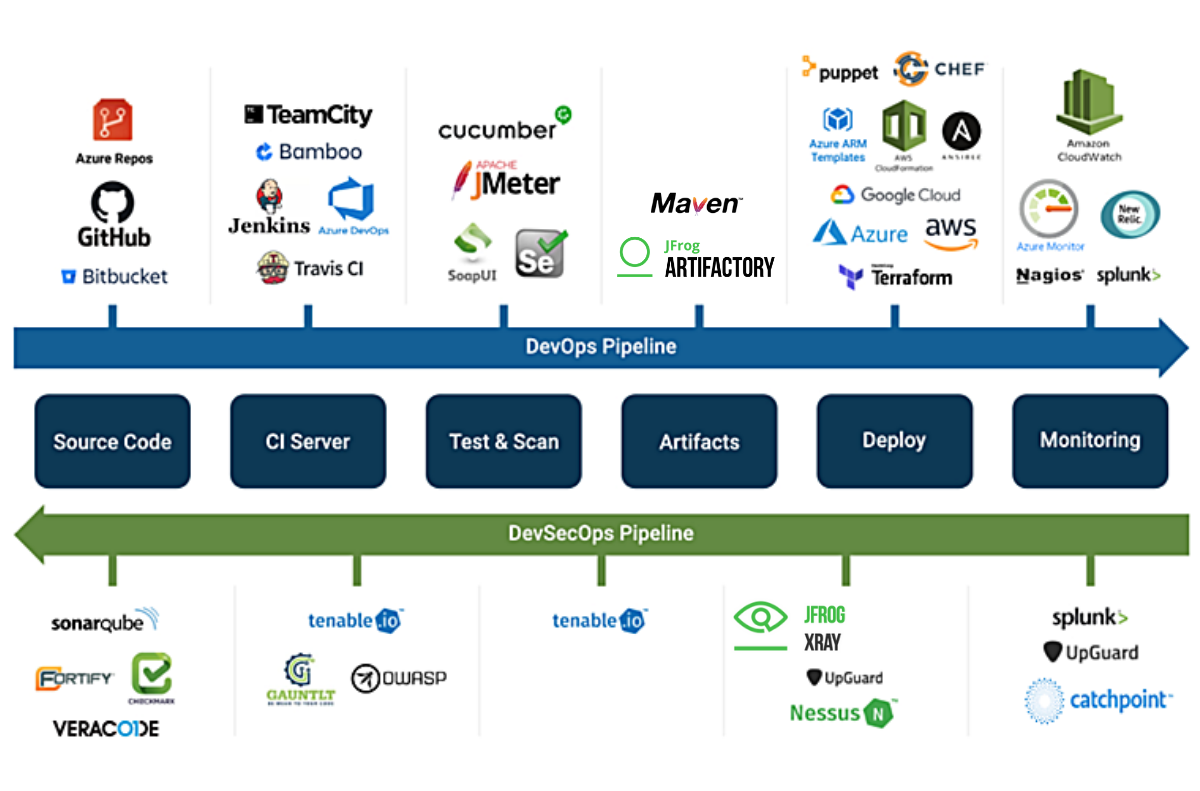
    When we talk about DevSecOps, the software development cycle involves multiple checkpoints to identify bugs and any other vulnerabilities and resolve them so that the application works as designed. The aim is to deploy software with quality and confidence, and this is achieved by using various tools at different stages.


    Image credits: CatchPoint

    Organizations can choose to use the type of security tools that best work for their needs from their preferred vendor. While the security tools themselves are critical for detecting vulnerabilities in the application through the DevSecOps pipeline, monitoring is also considered an integral part of this process. It not only lets developers analyze and evaluate security vulnerabilities from the end user’s viewpoint, but it can help identify breaches and anomalies after an application is in production.

    DevSecOps Pipeline

    While DevOps focuses on speed and agility, DevSecOps adds a layer of security throughout the software development life cycle. A DevSecOps pipeline adds security activities to every stage of the development process, not simply tacking it on to the end as an afterthought. This is achieved by integrating security checkpoints, controls, policies, tools and techniques from the beginning of the DevOps pipeline until the end. These additions facilitate automated security controls at each stage of the software delivery pipeline.

    Image credits: JFrog

    In his swampUP conference keynote The Divine and Felonious Nature of Cyber Security, John Willis shared some valuable DevSecOps best practices, including:

    • Treat security issues as you would software issues.
    • Adopt a “security-as-code” approach to enable the automation of security.
    • Build security controls and vulnerability detection into CI/CD pipelines.
    • Automate security testing as part of the build process.
    • Proactively monitor the security of production deployments.

    Embedding security earlier in your software development life cycle will yield bug-free features and satisfied customers. Have security checkpoints at each stage and make sure developers understand that security is everyone’s responsibility, including theirs. Manage your software and build artifacts, scanning and securing them at every stage of the pipeline using appropriate tools and techniques. Happy DevSecOpsing!

  • Debugging is Broken – Here’s How To Fix It

    Debugging is Broken – Here’s How To Fix It

    Let’s face it, debugging is broken.

    Whether you wholeheartedly agree or vehemently disagree with that statement, I think we can all agree that debugging, at the very least, has room for improvement. In fact, the way software developers debug their code hasn’t changed much. Of course, there are now a wide array of observability and monitoring tools available to make a developer’s life easier, but when we look at the process developers typically follow when debugging code, it’s stayed relatively unchanged over the years.

    Having the right tools available definitely improved the overall debugging experience, but they’re not the only factor. Internal organizational processes are equally as important, and should be adapted to make developers’ lives as smooth and stress-free as possible while still maintaining the proper levels of organizational security and compliance. Inefficient or highly restrictive processes, while great for the compliance team, can adversely affect the velocity of getting to the bottom of issues quickly. The right solution is typically a combination of adapting those processes to fit the company culture, along with a combination of tools that allow for compliance with industry standards and best practices.

    How Developers Debug Code

    When you talk to developers today about how they debug their applications, the process is typically not all that different than it was many years ago. The standard approach to debugging is still through the use of logging frameworks. Of course, teams are taking advantage of things like application performance management (APM) tools and other tools in the monitoring and observability space, but when you look at the primary method of debugging issues that require developers to dive into the code, logging is typically the main approach.

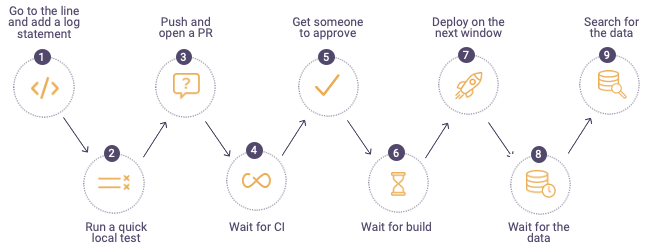
    The process typically looks something like this:


    debugging process

    When a defect is found, developers will first go to the log files on the production or pre-production servers in the environment where they are debugging. If they can’t find information in the logs to help them get to the root cause of the issue, they go back to their code and add additional log lines, finally sending their code through the process shown above. For highly advanced organizations, the process can take minutes or hours, but more often than not, this process drags on for days – or even weeks. It becomes especially time-consuming when the defect developers are trying to find and remediate is in production. In these cases, the cost to the business can be staggering; there’s got to be a better and more efficient approach to debugging.

    Where Tools Can Help

    While new and shiny tools don’t always solve all debugging problems, they can often ease some of the pain developers face and, in the process, make their lives a little bit easier. Debugging, observability and monitoring tools can get developers the data they need to solve problems faster than the more traditional method of digging through logs and using trial and error.

    The place many organizations start when considering diagnostic tools is with APM. These types of tools focus specifically on monitoring and management of the application availability, and can help to collect metrics and other relevant application information that can aid in pinpointing infrastructure issues. Most often, these tools are not actually used by developers themselves, but rather operations or production support teams to ensure availability and performance thresholds of applications.

    Another critical category of telemetry are tracing tools, which can help developers better understand how requests flow through multiple tiers of applications and even help identify error rates and latency. There are many vendors selling this category of tools, but there are also open source options which allow developers to integrate tracing into their applications via a vendor-neutral approach.

    After diagnosing an issue with an APM solution, there is often a handoff to development to remediate the issue. When developers need to debug, they often use their local IDEs or, even better, a remote debugging solution. Remote debuggers are used directly by developers to simplify debugging of applications in remote environments. These tools helps developers get to the bottom of customer issues faster by giving them direct access to the underlying application data in a safe and secure way while the application is running without stopping it or having to redeploy it. A major benefit of remote debuggers is that they can give developers the data they need from production environments without compromising security or requiring developers to have direct access to sensitive environments. While remote debuggers and other debugging tools are not a silver bullet, they can be a critical component that empowers developers to better address critical issues.

    Fixing Organizational Problems

    If solving customer issues is taking longer than expected or is potentially hurting your brand, it’s critical to sit down with your development team and use a data-driven approach to identify where the problems lie. Do a deep dive into your issue tracking or ITSM system to identify trends or recurring issues within particular application components. Development teams can often become so overwhelmed tackling issues and building out new features that valuable information in these internal systems can go untapped. Customer issues and defects should be reviewed periodically to assess things like business impact, cost to fix and alignment with the product roadmap. There is valuable information that can help focus the team’s effort on time-saving activities as well as improving the product, making for happier customers.

    Another area to look at is your software delivery process. Are there bottlenecks in your delivery pipeline that could be made easier or more efficient but have been overlooked? The speed and efficiency of your software delivery pipeline has a direct impact on developers’ ability to debug effectively and can contribute to a broken or slow debugging process. Developers should have the ability to push code into new environments as quickly as possible to remove slowdowns from too much context switching. This means automating as much of the delivery pipeline as possible, removing unnecessary manual deployment approvals and shifting left as many activities as possible.

    When it comes to empowering developers and fixing broken debugging processes, organizations should focus on fixing organizational bottlenecks as well as equipping developers with tools that can save them time and improve their daily workflows. Focusing on these areas can increase development team velocity and eliminate costly day-to-day slowdowns which add up over time and negatively impact productivity. With a few key changes, debugging can be a much more manageable and predictable process.

  • How Shifting Testing Left Can Boost DevOps Velocity

    How Shifting Testing Left Can Boost DevOps Velocity

    DevOps is all about balance: How can speed and quality be balanced to best meet the demands of customers who want exceptional digital experiences as fast as possible? DevOps looks to meet these expectations head-on by helping to deliver a faster cadence of new builds to customers while keeping quality high.

    What’s more, quality should continuously improve, build-over-build, so that fewer fixes are needed with each iteration. While inserting more testing earlier in the development life cycle may at first seem like a hindrance to the speed DevOps promises, it will soon empower teams to release higher-quality software, faster, as shift-left testing becomes a routine part of the team’s processes.

    Many organizations wait until the very end of their software development life cycle (SDLC) before executing testing. With this structure, testing can and does find unexpected bugs late in the SDLC, where issues are the most difficult and expensive to resolve. With this approach, testing becomes a bottleneck, impacting that ever-important goal of efficient and Agile software development and deployment. An unexpected outcome: it also negatively affects team morale, as developers who spent plenty of time and effort to build and ship code quickly now have to delay their deployment process in order to correct issues.

    There is a more efficient approach that organizations can put into place, however.

    Shifting Testing Left

    Testing can be implemented during and throughout the critical stages of design and development of software, instead of after.

    This is true regardless of how a team approaches development methodologies: Agile, waterfall, continuous or a combination of these methods. When testing is shifted left, it becomes the responsibility of the entire organization, not just dedicated QA testers. That means SDETs, developers and others should all be active in testing along with QA. When these groups are involved in testing early on in the SDLC, there are plenty of benefits, including:

    • A list of user workflows and test validation conditions can be created to streamline testing during development processes.
    • Testers can catch potential issues much earlier in the process so they can be fixed during earlier stages, instead of after code is done being developed.
    • Developers and testers can work with code they are familiar with to edit existing code and fix issues themselves.

    Building a Continuous Feedback Loop

    Another major advantage of shifting testing left in the SDLC is that it creates a continuous feedback loop. Software can be updated and improved continuously as it is being built, instead of when it is “complete” and ready to ship. This model of a feedback loop saves time and ultimately ensures no show-stopping issues make their way into the hands of customers.

    Test Automation in the SDLC

    One more key element to shifting testing left is test automation. Unfortunately, automation is often not leveraged completely or to its fullest potential. A recent report found that 74% of QA testers see test automation taking place outside the regular test cycle. Moreover, only 45% of organizations use test automation, and only 50% use it for continuous integration/continuous delivery (CI/CD).

    For test automation to succeed, it must involve developers creating the automation code and testers, then editing, maintaining and executing that code. When test development, including automated testing, is moved into the SDLC properly, it leads to automated and integrated unit testing, which helps achieve that goal of increased efficiency for DevOps teams.

    Automation is obviously crucial to the success of DevOps, but manual processes must also be considered. Some types of testing – like exploratory, payments, usability and accessibility – cannot be automated (at least not fully), but they should also be accounted for as part of a shift-left strategy.

    The origin of DevOps methodology and the focus of developers involves the goal of building and deploying code as quickly as possible. But testing software to make sure it works as intended is an important step that should be included throughout the SDLC. When testing only happens at the end of the process, it can be an inhibitor to the overall goal of increased development velocity. But when testing is shifted left and involved earlier on in the SDLC, it can do the opposite – by creating a continuous feedback loop and implementing automation to drive improved DevOps velocity.

    Ultimately, shifting testing left in the SDLC leads to features getting to users and customers faster, an overall improvement of software quality and a reduction of QA testing time and bug fixes.

  • Applause Delivers Testing Integration Tool

    Applause Delivers Testing Integration Tool

    Applause today made a bi-directional integration capability that simplifies requesting application code tests of, dubbed Applause In-Sprint Testing, generally available.

    Kristin Simonini, vice president of product for Applause, said application owners will be able to, for example, use a Jira project management application to create a ticket that requests a specific piece of code be tested either by a member of dedicated testing team or by a developer that has assumed greater responsibility for application testing within the context of a DevOps workflow.
    Alternatively, that request could be sent to a tester that is a member of uTest, an online community of professional testers that Applause oversees.

    The company also published the results of a global survey of 1,800 quality assurance (QA), product, engineering and DevOps professionals that found 44% of development teams that have shifted application testing left are spending a full workday every week on application testing. More than half the respondents (52%) noted that amount of time spent on testing is impacting developer productivity.

    On the plus side, a full 88% of respondents that release code multiple times per month said their organizations now test features as they are developed versus waiting until the end of application development process, the survey also found.

    The major benefits of shifting testing left cited by respondents are reducing the number of bugs released into production environments (57%), reducing the cost of late-stage bug fixes (48%), and reducing the need for hot-fixes (39%).

    The top two barriers to shifting responsibility for testing left toward developers is they are too busy coding (45%) and that development and quality assurance (QA) efforts remain siloed (37%). Nearly half of developers (44%) said they have issues with context switching as they shift between coding and testing tasks.

    Simonini said Applause In-Sprint Testing will make it easier for application owners to decide when they want to make use of a professional tester versus having a developer run a test. The Applause Product Excellence Platform then enables IT organizations to leverage a software-as-a-service (SaaS) platform to record a series of test case scenarios that can be automatically converted into an automation script without anyone having to write code.

    The overall goal is to simplify testing at a time when the number of applications being built has accelerated in part because of the increased focus on digital business transformation that occurred in the wake of the economic downturn brought on by the COVID-19 pandemic. As organizations realize how dependent they have become on those applications to differentiate themselves, the focus on quality assurance naturally intensifies, noted Simonini.

    There’s no doubt more organizations are testing with greater frequency. The efforts of developers that previously tended to address large numbers of bugs as part of a series of application updates after deployment in production are now being frowned upon. Organizations realize their applications only get one chance to make a first impression with end customers. As a result, the level of attention to detail being applied to application testing has, for better or worse, never been greater.

  • Seeing the Bigger Picture With BizDevSecOps

    Seeing the Bigger Picture With BizDevSecOps

    Not long ago, if you can believe it, software was shipped on physical floppy disks and CDs. These physical relics contained dense paper instruction books that humans read diligently for hours on end (I guess they had more time to spare back then?). Complexity was a given for computer-based tasks.

    Fast forward past the consumerization of IT to 2021, and you’ll find extremely high standards for technology. End users now expect intuitive apps with instant end value and 100% uptime. If they don’t receive gratification within minutes, they’re likely to trash it.

    In the race to meet digital innovation demands, software companies are increasingly tapping new strategies to deliver iteratively. Thus, disciplines like DevOps, DevSecOps, low-code and SRE have flourished. But are we adequately considering the end value of that work? Some feel business leadership needs a larger seat at the table and more input: enter the newest iteration of these disciplines, BizDevSecOps.

    I recently met with Gregg Ostrowski, CTO at AppDynamics, to discuss how to introduce BizDevSecOps in an organization. For Ostrowski, it boils down to having full-stack observability to connect application performance, security threats and revenue generation. Only by democratizing access to important metrics and identifying runtime weaknesses can business outcomes truly drive production.

    Full-Stack Observability

    Within our new pandemic-first reality, all organizations are amplifying their use of digital services to interact with customers. However, software teams are struggling to keep pace in this new environment — 89% of technologists report feeling under tremendous pressure at work, the Agents of Transformation 2021 report found. This strain has only increased as IT complexity soars amid the pandemic — 83% felt their job became more complex over the past year.

    IT staff is under mounting pressure to perform, and they may not have the correct elements in place to support elegant and profitable applications, said Ostrowski. When it comes to monitoring, in particular, alert fatigue could especially hamper innovation attempts and make it difficult to know what to prioritize.

    Instead, Ostrowski advocates for letting tangible business outcomes, such as conversion rates and performance, drive development. To correlate the impact on revenue more directly, he encourages “giving business leaders a seat at table during the entire CI/CD pipeline.” One aspect to roping in business, security, development and operations is unified observability across the entire stack.

    The Pendulum Swings

    But wouldn’t it be challenging to give business leaders a seat within a technical software delivery process? Well, this wouldn’t be the first time business has directed technological change.

    Ostrowski recalls the mid–2000s and the dawn of the mobile market. During this period, IT became consumerized for laypeople, with glossy apps and impressively intuitive experiences. He recalls a general loss of faith in IT staff, as workers often had “better tech at home than they did in the office.” This drove business leaders to invest heavily in modernizing their companies.

    In the following years, cloud solutions quickly re-empowered IT with new computing models, emboldening them to compete using the same tools as tech companies. However, simple deployments using a single server quickly morphed into arranging multiple workloads on various cloud service providers (CSPs). Virtualization, serverless and microservices architectures also brought novel complexities into the stack.

    “The IT staff is being asked to do jobs they’ve never done before,” Ostrowski said. He explained that SREs, for example, must understand networking, infrastructure and security — a vast portfolio for a single person and role. Supporting many disparate paradigms is simply beyond the scope and scale of what a single person can do, meaning new automation must be constructed — because “if you’re too busy debugging, you can’t innovate,” says Ostrowski.

    Amid mounting complexity and the burden of rising cloud costs, it appears business leaders again have a role in directing and prioritizing technological efforts.

    Getting Busy With BizDevSecOps

    According to Ostrowski, connecting IT and business with BizDevSecOps all hinges on collaboration. “If you don’t get to a point where you can collaborate with all these pillars, you’ll degrade your business,” said Ostrowski.

    BizDevSecOps also could help connect the dots to comprehend anomalies. For example, suppose a commerce application is experiencing a 15% conversion rate, but it drops to 7% after an upgrade. In this scenario, collaboration is crucial to identify usability bottlenecks in production and adjust accordingly.

    Tracking business outcomes can align development around improving the user experience. If broken features are hurting conversion rates, all stakeholders need to know to adjust accordingly. “User experience is the golden gem,” said Ostrowski.

    Other benefits of a BizDevSecOps approach may include:

    • Correlating activity and revenue: Ensuring spikes of activity are associated with revenue generation and not attacks or faulty instances.
    • Workload optimization: Monitoring business outcomes can help adjust the scope and size of machines as needed.
    • Before and after: Comparing financial results before and after migrations, new versions or new feature additions.
    • Postmortems: Pinpoint and correlate data when conducting postmortems.
    • Progressive delivery: A more rapid release frequency helps a business retain agility and pivot when needed.

    Visibility Enables BizDevSecOps

    DevSecOps is now a common philosophy — it promotes development with security baked into the application. Now, BizDevSecOps could be the next iteration; a collaborative approach that considers additional perspectives. BizDevSecOps is a vital method to “continue to build trust and collaboration so everyone has a seat at the table,” said Ostrowski.

    Ninety-six percent of technologists agreed that monitoring the entire IT stack to connect technical performance to business outcomes will be important in 2021, the Agents of Transformation Report found. To enable this, business, security and development must inevitably de-silo. According to Ostrowski, adopting BizDevSecOps depends on a window into performance management and business intelligence, because “when changes happen and no one knows about it, it’s a serious problem,” he added.

  • Survey Sees Application Testing Shifting Further Left

    Survey Sees Application Testing Shifting Further Left

    PractiTest, a test management platform provider, published a report today that suggests professional application testers have become more adept at working within DevOps workflows.

    The annual survey of more than 1,000 application testing professionals finds that 80% of all application testing within organizations is being done by test engineers, test leads, testers and automation testers. A full 92% of survey respondents also noted they are working within the context of an agile methodology, while 42% cited DevOps specifically. Half of respondents said they work within the framework of a continuous integration/continuous delivery (CI/CD) platform.

    Significantly, more than half of respondents (59%) said testing is shifting left within their organization, but only a third (33%) said programmers participate in the testing process.

    PractiTest CEO Yaniv Iny said that level of DevOps inclusion suggests that, rather than shifting testing completely left on to the shoulders of application developers, a more nuanced approach to application testing is taking hold as professional testers learn to work within the sprints that make up a DevOps workflow. A full 90% of respondents said testing has become more automated within their quality assurance (QA) processes.

    By now, most application testers have come to terms with automation and, increasingly, AI, said Iny. The assumption now is that large swaths of the testing process will be automated, Iny added. A full 97% of respondents said that functional testing automation was either important or very important for them to succeed, while 96% said test automation patterns, principles and practices are also critical.

    Usage of behavior-driven development (BDD) as a testing model has also increased, with 27% of organizations now employing it to go beyond simply testing functions.

    However, the survey also found that, instead of automation decreasing the size of testing teams, those teams are getting larger. The number of organizations with 16 or more testers increased by 10% to 34% compared to a year ago. That suggests organizations are launching either more complex application development projects or launching multiple projects at the same time as they embrace digital business transformation initiatives, Iny said.

    The survey found nearly 70% of respondents have at least five years of experience. Nearly three-quarters (71%) of respondents reported that their income was not affected by the economic downturn brought on by the COVID-19 pandemic. However, nearly half of respondents (54%) reported that they were concerned about job stability, an increase of more than 30% from a year ago.

    The pandemic did change the way testers acquire new skills. The number of testers reporting that they attended online conferences, meetups and seminars increased to just under half (49.5%), up from 40.5% in 2019. Participation in online communities and forums grew to 44%, while only a third of respondents receiving any kind of formal training.

    Testing professionals with five to 10 years of experience earned an average salary of $89,000 in North America, which compares to $76,000 in Australia/New Zealand, the survey also found.

    Application testing as a distinct discipline doesn’t appear to be fading away anytime soon. Rather, organizations appear to be investing even more in testing to deliver higher-quality applications.