Tag: CI/CD

  • Dagger: Standardizing CI/CD is the Holy Grail of DevOps

    Dagger: Standardizing CI/CD is the Holy Grail of DevOps

    Continuous integration and continuous delivery (CI/CD) has become a hallmark of quick software release life cycles. Nowadays, many teams support CI/CD pipelines for their software, offering a repeatable pathway to build, test and deploy code. A CI/CD pipeline is necessary to support an iterative, rapid deployment approach—yet, maintaining one is not an easy task.

    Enter Dagger. Dagger is a utility that aims to streamline how developers create and manage their CI/CD pipelines. Dagger, led by founders of Docker, recently unveiled their public beta launch along with a Series A $20 million funding raise led by Redpoint Ventures. While many open source CI/CD projects already exist on the market, Dagger is unique in offering easier configurations, pre-built components and more reusable actions.

    Akin to traditional supply chain management, software supply chain management is an increasingly complex endeavor involving many third-party dependencies. Development teams truly require a set of standard building blocks to piece it all together. For this reason, Solomon Hykes, co-founder and chief executive of Dagger, told SiliconANGLE that “solving this problem is the holy grail of DevOps.”

    Below, we’ll look at the common stressors inherent in creating and managing modern software delivery chains. We’ll also take a peek into the Dagger beta to see what it’s attempting to accomplish.

    Issues Facing CI/CD

    Software development supply chains are growing larger and larger to support a complex network of software architectures. But DevOps engineers, who must automate this chain, are drowning in tool sprawl—and stitching these components together to make custom pipelines can become a big bottleneck.

    Especially as an organization expands its distributed microservices architecture into the cloud, it can be tricky to scale a repeatable CI/CD pipeline across various department and disparate tech stacks. This often results in many bespoke CI/CD pipelines. Even within the same team, nuances between codebases can complicate each CI/CD process and require engineers to rewrite scripts.

    Simultaneously, organizations are under intense pressure to deliver to meet new digital innovation demands. But, until DevOps can make the release process more efficient, software development automation risks introducing more toil than it takes away.

    Diving Into Dagger

    So, how is Dagger alleviating these concerns? Well, Dagger creators described it as a “portable devkit for CI/CD pipelines.” Using Dagger, DevOps engineers can use a standard set of building blocks to assemble their CI/CD pipelines and then run them on their chosen cloud. It’s like a better developer experience for CI/CD pipeline creation.

    So, how does Dagger work under the hood? Dagger is powered by Buildkit, the Dockerfile-agnostic builder toolkit. Developers then use Cue to specify how their code is run in a container and to link up actions. Cue is an open source configuration language developed at Google.

    According to the docs, it takes about five minutes to install Dagger and the necessary dependencies. Dagger also provides boilerplate code to integrate with pre-existing CI environments. In essence, Dagger doesn’t need to replace your CI tool—it adds “a portable development layer on top of it.”

    Then, there are the actions themselves. Dagger supports a growing library of actions that it calls Universe. At the time of writing, the Universe of actions is limited and is being staged in the main Dagger repository. These actions are reusable Cue packages. For example, this package details how to run and deploy the Nginx web server in Cue:

    package nginx
    
    import (
        "universe.dagger.io/docker"
    )
    

    And then,

    #Build: {
        output: docker.#Image & _pull.image
    
        _pull: docker.#Pull
        *{
            flavor: "alpine"
            _pull: source: "index.docker.io/nginx:stable-alpine"
        } | {
            flavor: "debian"
            _pull: source: "index.docker.io/nginx:stable"
        }
    }
    

    Benefits

    CI/CD can certainly benefit from standard building blocks and more fluid wiring between tools. There are several potential benefits from Dagger’s proposition:

    • Unification: Unifying developer and CI environments could avoid headaches.
    • Localization: Dagger enables testing a closed-loop pipeline locally. This helps for debugging.
    • Reusability: Building blocks help avoid rewriting automation scripts repeatedly.
    • Multi-cloud: Easier ability to migrate a pipeline from one cloud to the other, thus avoiding vendor lock-in.
    • Compatability: Dagger can run in any environment compatible with Docker, meaning it’s probably workable with your current toolset.

    Final Thoughts: Lego Blocks For CI/CD

    Docker revolutionized the software industry by easing the process of managing containerized applications. And now, Docker founders Solomon Hykes, Sam Alba, Andrea Luzzardi and others at Dagger are tackling another meaningful problem within today’s complex software ecosystem. Given the success of their previous endeavors, it’s not too difficult to imagine a network of reusable CI configurations emerging with an excitement similar to Docker Hub.

    Of course, Dagger is still in its early stages and there’s much development ahead. It will undoubtedly be an interesting project to follow in the years to come. Dagger is being built as an open source project on GitHub. The company has also opened a Discord channel to engage with the community.

  • The Missing Link in Continuous DevOps Cycles

    The Missing Link in Continuous DevOps Cycles

    Delivering software quickly, reliably and safely is at the heart of technology transformation and organizational performance regardless of industry. As part of overall technology transformation, many companies are recognizing the benefits of applying DevOps methodologies to areas outside of software development, such as general product development, IT expansion and scaling and new business processes. However, some organizations—and even software development teams—may be missing a crucial step in the product development life cycle. 

    The Missing DevOps Link

    DevOps methodologies are nothing new. In fact, part of the reason organizations are adopting DevOps practices for initiatives outside of software development is because of its tested and proven success when it comes to developing and deploying new processes and features. The exact steps involved in DevOps processes can be debated by reasonable people, but there are three generally agreed-upon factors involved: Continuous integration (CI), continuous deployment (CD) and continuous release (CR). 

    Continuous Integration

    CI refers to a strategy of constantly updating products with new features and code on a regular basis. The cadence of the updates varies from weekly to monthly, but the strategy remains the same: Detect problems early before they can snowball and impact further development down the line. 

    Continuous Delivery

    CD is related to continuous integration but is focused on the delivery stage. CD is executed when new features and development updates are deployed to production. The most critical factor of CD is consistent management of the product’s end environment. To maintain the consistent functionality of a product in the end-user environment, it must be regularly deployed and tested to ensure performance doesn’t suffer as a result of product updates and new features.

    Continuous Release

    CR is the final step before the product development life cycle starts over again. CR refers to the practice of continually releasing new product updates, features and capabilities to end users. The tricky part of CR is that you must execute CI and CD flawlessly to ensure the end user doesn’t experience any bugs or issues caused by an update. 

    But what’s missing? The answer lies in continuous exploration (CE). 

    Why CE is Critical to Product Development Success

    CI, CD and CR are often-discussed product development strategies, but they don’t tell organizations where to start with the DevOps life cycle. To begin developing new products or features, organizations must first identify what exactly they’re building and for whom. As I often say to my product team, you need to get the kitchen ready before you can cook a great meal, but you need to know what meal you’re making before you start cooking the wrong thing.

    CE refers to the continuous exploration of a company’s markets, target audiences and customers to understand their requirements and preferences. This may sound like the job of a marketing department, not product developers, but the two should work together in a coordinated fashion that helps to achieve both teams’ goals. For example, product development teams don’t know what new product features their customers love, which ones they hate or which ones they really need. On the other hand, marketing teams don’t know how to market products if they don’t understand the ins and outs of the new features and how they can be of service to customers. 

    Even departments within an organization that don’t develop products can benefit from CE. For example, if an organization is pursuing a cloud migration of on-premises software, they will likely hire an expert consultant or vendor to help them execute their cloud vision rather than developing their own cloud environment.

    However, simply moving all of the on-premises systems and data to the cloud at once could be a catastrophe. What if you migrate systems and processes to the cloud and they suddenly stop working? Unless you’ve performed the migration at a gradual pace by following CI, CD, CR and CE strategies, you don’t know what, specifically, is causing the system error in the cloud.

    In the same vein, by performing CE internally, organizations can determine which processes and on-premises systems would benefit most from cloud capabilities and execute the migration accordingly. This not only prioritizes technology transformation initiatives based on the needs of the business but may also let the business know which on-premises systems may no longer be needed in a cloud environment.

    Many organizations interested in improving customer experience (CX) and internal processes by leveraging DevOps strategies would benefit greatly from leveraging CE. Products and businesses processes should be designed to meet the needs of customers and drive bottom-line revenue. So, it stands to reason that the first step in meeting the needs of customers is understanding those needs. This cannot be done without CE as the foundational building block of product development life cycles. 

  • GitLab Updates CI/CD Platform to Improve Dev Productivity

    GitLab Updates CI/CD Platform to Improve Dev Productivity

    GitLab has made available a 14.9 update to its namesake continuous integration/continuous delivery (CI/CD) platform that adds epic-linking, integrated security training, rule mode for scanning result policies and a revamped design, among other capabilities. The updated environment makes it easier to discover the state of the application development projects, GitLab said.

    Cindy Blake, director of product marketing at GitLab, said these updates are part of an ongoing effort to embed technologies within the CI/CD platform that will make applications both more secure and compliant with various mandates before they are deployed in a production environment.

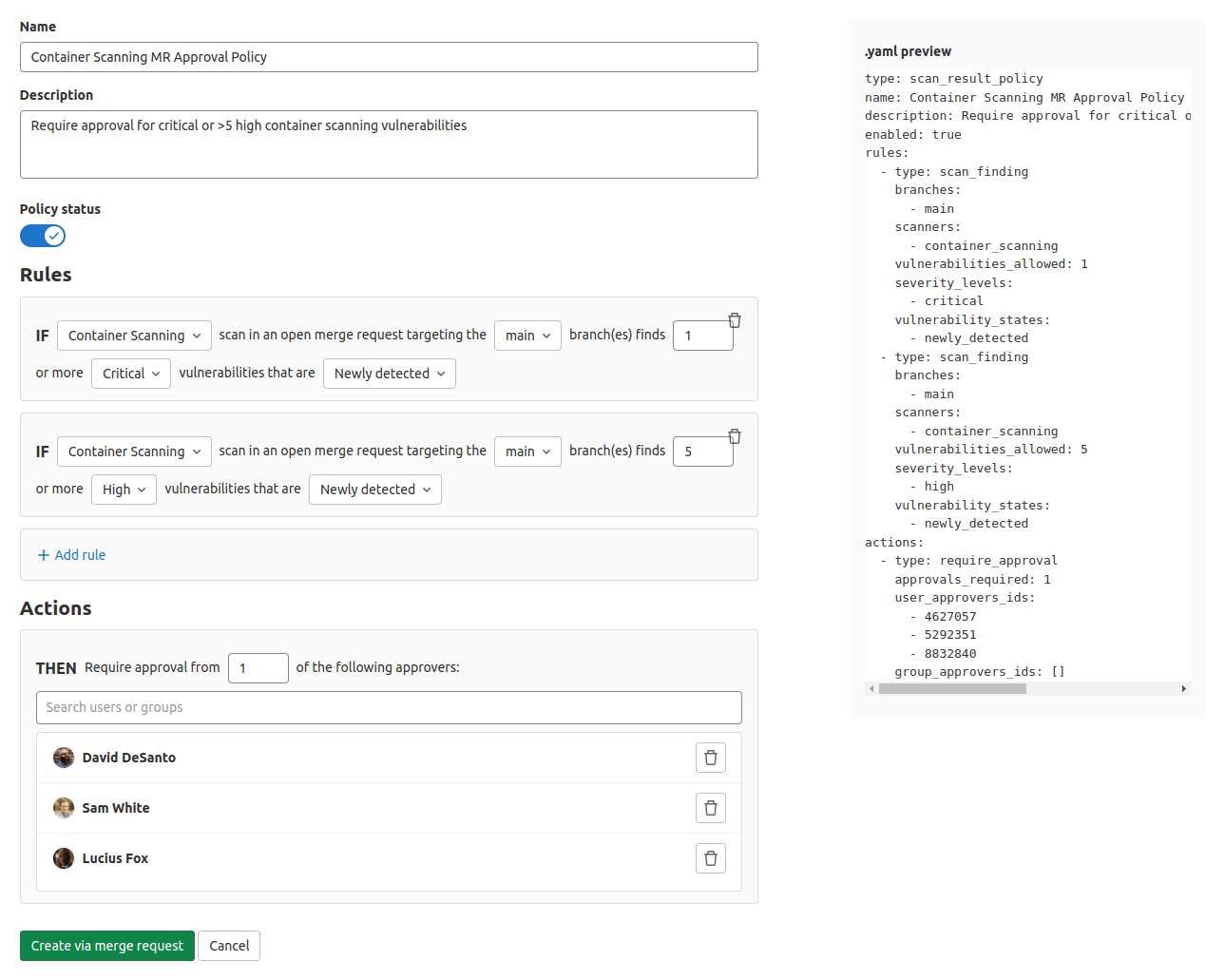
    For example, DevOps teams can now take advantage of a user interface through which they can use a rule mode to design and edit policies without the need to access YAML files directly.

    GitLab has also partnered with Kontra and Secure Code Warrior to provide content that will drive security training functionality. This content can be accessed via the GitLab platform whenever a vulnerability is discovered.

    The overall goal is to make it simpler for organizations to shift left because expecting every developer to become a security expert is not especially realistic, noted Blake. The ability to automate many of the security tasks that developers face is a way of showing empathy for the daunting challenges they face.

    In general, as application development becomes more complex, GitLab is moving toward making its CI/CD platform more accessible to a wider range of organizations, including those that might only be starting to embrace DevOps best practices. The epic-linking capability, for example, makes it easier to identify “related”, “blocking,” or “blocked” relationships to better track and manage epic dependencies across GitLab groups.

    The two biggest challenges organizations face today are securing their software supply chains and improving the overall productivity of the developers. In most cases, those two goals are tightly coupled; every minute a developer spends on security is one less minute they spend writing code. In fact, many organizations are finding that, in addition to salary and benefits, many developers are using the level of friction they will encounter when building and deploying applications as a guide to decide which organizations they want to work for. As a result, many organizations are now looking to modernize their application development and deployment environments with an eye toward attracting the best developer talent.

    At the same time, of course, organizations are looking to improve the productivity of the developers they do have. In the age of digital business transformation, there are many more application development initiatives being launched. The challenge organizations face is that hiring and retaining developers remains a major challenge.

    It’s not clear how eager organizations are to replace their existing CI/CD platforms. However, the pressure to improve the overall developer experience is mounting at a time when organizations are increasingly dependent on software. Arguably, going forward, the ability of any organization to compete will be dependent on the productivity of application development teams. Platforms and tools that get in the way of enabling organizations to build and deploy more secure software faster will be discarded.

  • 3 Must-Haves When Implementing DevSecOps

    3 Must-Haves When Implementing DevSecOps

    The term DevSecOps is already more than a dozen years old. DevOps—the practice of combining software development with IT operations to deploy applications faster—was first coined in 2008 and refined in a historic conference presentation in 2009. DevSecOps—the concept of baking in security at every stage of Agile development, rather than tackling it at the end—followed soon after. 

    Despite a huge amount of industry conversation and activity around DevSecOps, it has been hard to tell just how much traction the movement has been gaining.

    In a 2020 survey of 1,500 IT professionals around the world by the Synopsys Cybersecurity Research Center, 63% reported that they are incorporating at least some DevSecOps activities into their development pipelines. “At least some” indicates, however, that a portion of the adopters have yet to fully embrace DevSecOps. And what about the other 37% who haven’t incorporated it at all?

    Nevertheless, two factors suggest that DevSecOps is starting to pass a tipping point on the way to mainstream adoption.

    One, the prodigious number of cyberattacks that have been hitting companies and government agencies demand aggressive and proactive approaches to address security, which is exactly what DevSecOps does.

    Two, the pandemic has been a powerful accelerant for digital initiatives. For example, global spending on public cloud services was predicted to grow slightly more than 23% in 2021, to $332.3 billion from $270 billion in 2020, according to a forecast from Gartner. In addition to the greater reliance on technology driven by COVID-19, increasing use of emerging technologies such as containerization and edge computing are fueling higher cloud spending. All of this points to the need for organizations to take security risk into account throughout the modern software development life cycle.

    The logic behind DevSecOps is undeniable. Viewing security as a shared, collaborative responsibility among development, operations and security functions starting at the earlier possible stage—the methodology known as shifting left—rather than in silos enables the deployment of secure software at the speed and responsiveness that today’s business conditions require.

    Companies that have successfully meshed the three functions under the broader DevOps paradigm enjoy radically reduced friction in software development and production. These organizations can deploy software faster and more safely with fewer design flaws, misconfigurations and other missteps that can lead to security issues.

    Companies not as far along in their DevSecOps journeys tend to have espoused some of its practices but not consistently. Clunky, linear waterfall approaches persist here and there. Vulnerability management remains a reactive box-checking effort later in the life cycle, forcing developers to backtrack and fix the code rather than a proactive, preventative process seamlessly integrated from design to production.

    The more advanced organizations typically focus on three key ingredients to assure success.

    1. Education. DevSecOps is a cultural shift as much as a technological one. It requires a new mindset that empowers developers to take ownership for creating secure code at the beginning of the software development life cycle. Thus, IT leaders can’t simply snap their fingers and expect DevSecOps to take hold without educating team members on why it is so critical and how it drives rather than disrupts great work.

    “Organizational learning and change are key to allowing DevOps to flourish,” senior Gartner analyst George Spafford wrote. “In other words, people-related factors tend to be the greatest challenges, not technology.”

    This means that before introducing DevSecOps into an organization, it is important to connect the endeavor with the value it will bring and explain why it will allow the business to deliver more value to customers and improve its competitiveness.

    2. Process. The right DevSecOps policies and processes can spell the difference between a nimble software development machine and one still bogged down by inefficiency.

    For instance, many organizations that rely heavily on scanning tools to detect vulnerabilities assign nonsensical policies to their use. Let’s say that vulnerabilities of a particular score or type need to be eliminated before code is deployed to production. But what if the flaw resides in an unimportant section of the code and is unexploitable?

    The best DevSecOps initiatives include policies and processes that seek to understand the entire context of a project, from design to production and handle everything in a way that reflects the context of true risk to security and compliance requirements rather than merely running all code through the same pipeline.

    3. Tooling. Fact: Without the right automated tools that provide deep visibility into code, a DevSecOps implementation doesn’t stand a chance.

    To carry out the qualities of collaboration and agility that DevSecOps promises, organizations should gravitate toward tools that give developers all the relevant information they need to make more informed decisions.

    These tools must truly simplify the addition of security into DevOps methodologies by automating various manual processes that traditionally have slowed everything down—threat models, security and compliance reviews, pentests and risk assessments and the like. The tools can’t just aggregate data from silos — which fails to provide enough contextual information and generates too many false positives —they need to provide holistic relief to overburdened teams in securing applications at the feature request, commit, pull request and CI/CD stage.

    By keeping these three elements in mind, organizations can fulfill DevSecOps’ potential as a true game-changer. As DevSecOps continues to cross the chasm to more universal adoption, organizations can look to earlier adopters for guidance on how to do DevSecOps right.

  • A Closer Look at Azure DevOps

    A Closer Look at Azure DevOps

    Microsoft’s Azure DevOps Server is emerging as one of the most popular cloud application development environments. Like most continuous integration/continuous delivery (CI/CD) platforms, it provides features such as version control, reporting, project management, automated builds, and testing. It covers all aspects of the application life cycle and enables DevOps. Here’s a closer look at this cloud computing environment.

    Azure DevOps provides a number of different developer services that allow DevOps teams to plan work, collaborate on code development and build and deploy applications. It is highly collaborative and brings together developers, project managers and individual contributors to develop software. It allows organizations to create and improve products much faster than with traditional software development approaches.

    Services or Server?

    Teams can work in the cloud using Azure DevOps Services or on-premises using Azure DevOps Server.

    The cloud offering, Azure DevOps Services, is a scalable, reliable and globally available hosted service. It’s backed by a 99.9% SLA, is monitored by Microsoft’s 24/7 operations team and is available in local data centers around the world.

    The on-premises offering, Azure DevOps Server, is built on a SQL Server back end. The on-premises version is preferable when organizations need their data to stay within their network or when they want access to SQL Server reporting services that integrate with Azure DevOps Server data and tools.

    Although both offerings provide the same essential services, Azure DevOps Services offers some added benefits:

    • Simplified server management.
    • Immediate access to the new features and updates.
    • Improved connectivity with remote sites.
    • A transition from capital expenditures (servers, etc.) to operational expenditures (subscriptions).

    There are also some other key differences depending on your organization’s or your team’s needs. These can also be helpful if you’re migrating from on-premises to the cloud:

    Differences in Specific Feature Areas

    Although Azure DevOps Services is a hosted version of Azure DevOps Server, there are some feature differences. Some Server features aren’t supported in Services; for example, Azure DevOps Services doesn’t integrate with SQL Server Analysis Services to support reporting. Process customization and reporting also differ in their support.

    Integrated Features

    Azure DevOps provides integrated features that can be accessed through a web browser or an IDE client. One or more of the following standalone services can be used based on your organization’s business needs:

    • Azure Repos: Azure repos provides Git repositories or Team Foundation Version Control (TFVC) for source control.
    • Azure Pipelines: This service provides build and release services to support continuous integration and continuous delivery of applications.
    • Azure Boards: This suite of Agile tools supports planning and tracking work, code defects and issues using Kanban and Scrum methods.
    • Azure Test Plans: Azure Test Plans provides several tools to test applications, including manual/exploratory testing and continuous testing.
    • Azure Artifacts: These allow teams to share packages such as Maven, npm, NuGet and more from both public and private sources and integrate package sharing into pipelines.

    Use of the following collaboration tools is also supported:

    • Customizable team dashboards with configurable widgets to share information, progress and trends.
    • Built-in wikis for sharing information.
    • Configurable notifications.

    Azure DevOps supports adding extensions and integrating with other popular services, such as Campfire, Slack, Trello, UserVoice and more. In addition, DevOps teams can also develop their own custom extensions.

    Azure DevOps Services supports integration with GitHub and GitHub Enterprise Server code repositories. Azure DevOps Server supports integration with GitHub Enterprise Server repositories.

    Getting Started

    When you sign up for Azure DevOps, you must first register an organization, project and version control type. DevOps teams can create multiple projects and differentiate them with separate names and access permissions. Projects can be set to public or private. Teams can also use Azure Boards for collaboration and project management, and can also configure use of Agile practices. After setting up your team, you can use the platform to begin deploying your applications to Azure.

    In addition to a collaborative environment, Azure DevOps provides access to an Azure Pipeline service that supports multiple languages and platforms. The Azure DevOps pipeline is a set of services that are grouped into individual projects. 

    Additionally, Azure Test Plans feature facilitates automated testing. It is also possible to set up deployment pipelines with different components for multiple applications. 

    Azure Pipeline can track work status, manage backlogs and create custom reports. With the help of the Azure DevOps pipeline, developers can create, manage and deploy their projects in a single environment. With this solution, DevOps teams will have a single point of contact and can communicate with each other.

  • CircleCI Report: Pipeline Optimization Best Practices

    CircleCI Report: Pipeline Optimization Best Practices

    CircleCI today published a report that found most successful software engineering teams have average workflow durations of five to 10 minutes, with any failed run being fixed or reverted in under an hour.

    The report was based on two years of data gathered from more than a quarter-billion workflows and collected from nearly 50,000 organizations using its continuous integration/continuous delivery (CI/CD) platform. The CircleCI 2022 State of Software Delivery Report also found those teams have success rates that are above 90% for the default branch of their application and deploy at least more than once per day.

    Mike Stahnke, vice president of platform for CircleCI, said the report also makes it clear there is no correlation between team size and the level of DevOps success achieved.

    Organizations that focus on optimizing pipelines are also better able to integrate testing within their DevOps workflows, he noted.

    In general, Stahnke said more DevOps teams are relying on cloud-based CI/CD platforms versus opting to deploy and maintain infrastructure themselves. That shift also lowers the barrier to entry for organizations looking to embrace DevOps best practices to accelerate application development, he added.

    Less clear is the degree to which organizations have embraced both CD and CI. While many developers routinely employ CI to accelerate application development, CD has proven to be a more elusive goal. Each platform a DevOps team supports tends to have unique attributes that require them to rely on manual processes to deploy applications. However, as DevOps processes continue to mature, Stahnke said the CI and CD integration will become more seamless. In fact, as the number of applications that organizations build simultaneously increases, the pressure to automate CD will also rise.

    However, it remains to be seen to what percentage of organizations will opt for a tightly integrated CI/CD platform versus separate CI platforms for developers and CD platforms for IT operations teams that are more loosely coupled.

    In the meantime, organizations of all sizes are clearly more focused than ever on developer productivity. In the wake of the downturn brought on by the COVID-19 pandemic, there was a rush to launch a range of digital business transformation initiatives. The issue that many organizations are now encountering is they need to find ways to enable a finite number of developers to simultaneously build and deploy multiple applications with multiple interdependencies. Many organizations are trying to address that challenge by sharing best practices across DevOps teams that have varying levels of maturity. Few organizations have a set of standardized DevOps practices that are consistently employed across every application development team within an enterprise.

    It will be up to each organization to decide whether to compare their level of DevOps expertise to other organizations. Each application development team faces a unique set of challenges. The most important goal is simply to continuously improve at a time when demand for custom applications has never been greater.

  • CircleCI Acquires Ponicode to Gain AI Testing Tool

    CircleCI Acquires Ponicode to Gain AI Testing Tool

    CircleCI today revealed it has acquired Ponicode to gain control over a unit testing platform infused with artificial intelligence (AI) that makes it simpler to review application code prior to uploading it into a build. Financial terms of the deal were not disclosed.

    Jean-Philippe (JP) Leblanc, senior vice president of engineering at CircleCI, said the goal is to integrate Ponicode’s testing technology within CircleCI’s continuous integration/continuous delivery (CI/CD) platform. That approach will make it possible to apply algorithms to individual developers’ code as well as to code aggregated from multiple developers within a build as it is continuously updated across a DevOps workflow, he added.

    Ponicode was initially launched in June 2020 as a JavaScript unit testing extension for Microsoft VS Code. Since then, the company has started to support TypeScript, Java and Python, including complex functions such as variable mocking and infer suggestions of complex structures for nested objects.

    The issue that DevOps teams frequently encounter is that even when individual developers test their code prior to uploading into a build, integrating different developers’ code can still result in an application failure. The Ponicode AI testing tools will give both developers and IT operations teams more confidence in the quality of the code being employed to drive applications, noted Leblanc.

    Although not many developers want to admit it, Leblanc noted there is still a lot of sloppy code finding its way into applications.

    In addition, Leblanc said the Ponicode acquisition will help the code review process become more efficient. Instead of requiring another developer or dedicated tester to review code, he said most issues will be surfaced by the AI testing tool that provides the equivalent of a built-in peer review. As a result, AI testing tools will improve the overall quality of the code being used to drive applications, added Leblanc. Developers will also be able to spend more time on the business logic that drives their application than on code reviews.

    The goal, however, is not to eliminate the need for dedicated testing teams as much as it is to augment them and the developers they work with, said Leblanc.

    It’s not clear to what degree responsibility for testing code is shifting left toward developers. However, many developers would prefer to have issues surfaced via an AI tool so they could address issues on their own rather than having them discovered by someone else. In fact, there are already more than 20,000 users of the Ponicode AI tool that plugs directly into developers’ integrated development environment (IDE), said Leblanc.

    In general, there’s never been a greater focus on developer productivity. Organizations are attempting to simultaneously build and deploy more applications than ever—thanks mainly to digital business transformation initiatives launched in the wake of the COVID-19 pandemic. The challenge they face is recruiting and retaining developers. As a result, organizations are looking for ways to increase developer efficiency by eliminating as many manual processes as possible.

  • Tabnine, GitLab Build Custom Apps Faster With AI

    Tabnine, GitLab Build Custom Apps Faster With AI

    Tabnine today revealed it has integrated its code completion tool with the GitLab continuous integration/continuous delivery (CI/CD) platform. Tabnine’s platform employs artificial intelligence (AI) to accelerate application development.

    Brandon Jung, vice president of ecosystems and business development at Tabnine, said the goal is to make it easier for developers to automatically write code based on custom models created using AI. Those models would reside in the CI/CD platform provided by GitLab. Developers can now create custom models of their private source code, he noted.

    The Tabnine AI assistant can then be trained on a customer’s private code, style and security best practices that have been defined by an internal DevOps team, added Jung. That assistant, accessible from within a developer’s integrated development environment (IDE), is conversant in 35 programming languages.

    The code completion tool doesn’t eliminate the need for developers to write code; instead, it completes code once developers start writing it based on the model stored in the CI/CD platform.

    Nima Badiey, vice president of global alliances for GitLab, said the overall goal is to increase developer productivity at a time when organizations are launching more application development initiatives than ever. Many of those applications are being constructed using multiple programming languages that each individual developer may not have equally mastered.

    In addition, an AI model will, over time, improve the quality of the code being created, noted Badiey. That should make it easier to review code that is more accurate because it was created with the aid of a machine, he added.

    In general, GitLab has been moving to incorporate AI within DevOps workflows. The company last year acquired UnReview, a provider of a tool that uses machine learning algorithms to identify which code reviewers to assign to a project based on both the quality of their previous efforts and their current workloads.

    It’s not clear to what degree AI will be pervasively embedded within DevOps workflows. However, it’s now just a matter of time before algorithms are more widely employed. Organizations that employ DevOps today devote significant resources to maintaining platforms that could be simpler to manage if more tasks and processes were automated. In theory, more resources could be then devoted to building applications versus maintaining DevOps platforms.

    One way or another, more organizations are moving to increase developer productivity. Developers are both hard to find and retain, so organizations have a vested interest in finding ways to increase the rate at which an existing pool of developers can build applications capable of driving a wider range of digital business transformation initiatives. Of course, an increase in the rate at which applications are developed also has significant implications for the rate at which they might need to be deployed.

    Not everyone in IT is, of course, entirely comfortable with AI. Nevertheless, most DevOps organizations are highly committed to automating as many processes as possible. The only thing that will be different going forward is determining to what degree those processes will be automated by humans versus a machine.

  • What to Expect When Transitioning to DevSecOps

    What to Expect When Transitioning to DevSecOps

    How do you ensure your DevOps pipeline is secure? Does DevSecOps protect you against serious breaches or is it just a way to allay the concerns of stakeholders about security in DevOps?

    A data breach can cost an average of $3.92 million USD, as per IBM’s study Cost of a Data Breach. In this report, health care was found to be the most expensive industry, with breach fines averaging $6.45 million USD.

    While DevOps delivers on the promise to increase the rate of delivery, the traditional CI/CD framework does not emphasize security. For the sake of speed, misconfigurations and known vulnerabilities may be allowed to pass through the development pipeline to production. 

    Security and testing are generally a low-priority activity, which means these vulnerabilities are fixed retroactively. This takes more time, effort and money. With rampant, unverified integration of open source tools, you open up the software to attackersthat could compromise the security of your apps, systems and users’ data.

    DevSecOps is an upgrade to DevOps, allowing you to deliver security and compliance testing continuously. These checks get integrated within the CI/CD pipeline to enable the delivery of more secure code faster.

    From DevOps to DecSecOps: What to Expect

    The automated nature of DevOps delivers several benefits that enable teams to realize the true power of DevOps as silos break and delivery rates skyrocket.

    As DevOps practices span the entire delivery pipeline, it provides the necessary mechanism to deliver audit, compliance and security requirements along with speed and efficiency. 

    There are many benefits of upgrading from DevOps to a dedicated DevSecOps practice, and they are important to understand before you embark on that journey.

    1. No Restrictive Access Control Policies for Developers

    Access to infrastructure assets must be strictly controlled and monitored to enforce requisite security measures. This means approval gates, secure configuration parameters and other security measures.

    With DevSecOps built into the pipeline, these access controls can be automatically applied. This enables on demand access to infrastructure resources for the team and reduces their dependence on factors outside the team. 

    For example, many organizations have started deploying internal DevOps teams that enable automated access to a shared pool of deployment processes, tools, repositories, workflows, etc. 

    This team is usually separate from the IT team but enforces security mechanisms with the same rigor. It ensures that access to all the infrastructure instances required by development, QA or production is automatically tracked, monitored and controlled as per the guidelines. Additionally, inconsistent processes or misconfigurations are also controlled.

    Often called the shadow IT team, the idea of this team is not to circumvent the IT department but to create an additional team that matches the agility of the DevOps team. 

    2. Seamless Security and Compliance Testing

    Traditionally, security and compliance testing happened all at once at the end of the release cycle close to the release date. This typically meant that a large spreadsheet of issues is sent to the development team to be fixed immediately, since maintaining a consistent release velocity is the key to DevOps success. 

    This requires the development team have at least one dedicated resource to work on those issues. When metrics are tracked, to no one’s surprise, this method resulted in negative impacts on the velocity of the next release cycle.

    DevSecOps applies all the security and compliance checks in batches. So, testing for security and compliance is shifted left and spread out across the pipeline.

    This makes the security feedback loops shorter and more frequent, thus aligning security and compliance testing with the DevOps philosophy. As more secure code is committed every time, the possibility of security and compliance errors reported by the QA team is minimized.

    A second, more personalized approach is using the integrated development environment (IDE) itself to take security and compliance checks to the developers. With regular and automated security and compliance baked right into the development process, this process is sped up considerably and the development team becomes self-reliant.

    3. Overcoming the Risks Associated With Open Source Software

    The 2019 State of The Software Supply Chain report from Sonatype showed that, on average, 85% of the codebase among modern applications uses open source components. While open source components enable innovation, they also come with considerable security risks. As more of these open source tools are added to the software supply chain, it increases the risks on the cybersecurity front.

    The same report showed evidence to back up the need for greater open source software security checks and processes. Companies that managed their open source components released 55% less vulnerable components than those who had no verifiable open source management process.

    While many of these open source components released frequent patches, it is also important for the DevSecOps team to step in and regulate the open source components. Some of the ways DevSecOps teams can do this are:

    • Create a formal component management plan which makes sure that when employees leave, the practice doesn’t go away with them. Having a documented plan lets you look at the bigger picture of your pipeline and find vulnerable components that may be skipped without a formalized process. Incremental improvements to this plan are also possible if it’s well-documented.
    • Use scanning tools like Gemnasium and Snyk that help regularly check for vulnerabilities.
    • If vulnerabilities are detected or reported in a component, look at either updating or replacing the component.
    • Enable quick approval for new open source software. Alternatively, prepare developers to test new components using security and compliance checklists.

    4. Overall Cost Reduction and Acceleration of the Delivery Rate

    An integrated security and compliance framework in DevOps prevents breaches and guarantees faster recovery when breaches do happen. As developers don’t have to set aside a large chunk of time to work on security and compliance violations, this shortens release cycles and ensures more secure code at the same time. 

    The fewer breaches you identify and fix, the more money you save on overcoming security disasters. 

    5. Automated Compliance Reporting

    DevSecOps automates your security and compliance tests and it also logs and documents all the tests. DevOps automation platforms collect large amounts of information for the build, test, integration and deployment phases. This data can be used to create an end-to-end audit trail without any manual intervention or extra time spent scouring through various tools to prepare compliance reports. 

    A fantastic advantage of DevSecOps is the complete traceability from day one and automated compliance reporting. DevSecOps also focuses on the automation of testing, allowing you to deliver a secure development framework on a continuous basis.  

    DevSecOps is the Future of DevOps

    The rapid release velocity DevOps enables is not without its disadvantages. In particular, the unchecked use of open source tools in the pipeline can expose your applications and systems to many known vulnerabilities, increasing the probability of a breach. Combined with a general lack of focus on security, this is a recipe for an expensive security incident. 

    To counter this, DevSecOps radically transforms the pipeline by shifting security and compliance testing left. Developers check the code before every commit. With fast feedback loops, they fix any reported vulnerabilities along with other errors in the app. 

    With DevSecOps, compliance and security checks are not done all at once; instead, developers chip away at vulnerabilities and security flaws with every release.