Tag: CI/CD

  • Armory Extends Scope of Spinnaker CD Distribution

    Armory Extends Scope of Spinnaker CD Distribution

    Armory today updated both the self-hosted and managed editions of its distribution of the open source Spinnaker continuous delivery (CD) platform. The updates support concurrent pipelines and provide tighter integration with open source Terraform infrastructure-as-code (IaC) to better enforce policies.

    Previously, the two platforms were known as Armory Enterprise and Armory Enterprise Managed. They are now being rechristened; Armory Continuous Deployment Self-Hosted becomes Armory Continuous Deployment Managed in part to provide more differentiation from a CD cloud service the company rolled out last month that is not based on Spinnaker.

    Adam Frank, vice president of product for Armory, said other capabilities added to the platform include additional testing tools for contributions to the Spinnaker platform as well as enhanced plug-ins and remediation capabilities for Common Vulnerabilities and Exposures (CVEs) that might impact the Spinnaker platform.

    Despite launching a declarative CD-as-a-service platform that is not based on Spinnaker, Armory remains committed to supporting organizations that prefer to continue to rely on the open source platform, said Frank.

    The number of organizations that routinely make use of a dedicated CD platform is still relatively small. While organizations have been employing continuous integration (CI) within a CI/CD platform, making use of the CD element of those platforms has proven challenging. Each platform used to run applications has been unique, so automating delivery has been problematic. CI platforms, in some cases, have been extended using custom scripts to automate application delivery, but those efforts don’t typically scale across an extended enterprise. Many organizations that attempted to extend the open source Jenkins CI/CD platform, for example, are now looking to more loosely couple CI and CD processes to make DevOps workflows less brittle, noted Frank.

    Armory is making a case for a distinct CD platform at a time when more organizations are starting to build microservices-based applications on Kubernetes clusters that expose a standard set of application programming interfaces (APIs) regardless of what infrastructure they are deployed on. In many cases, those organizations now need to manage multiple pipelines in parallel as application environments become more complex rather than relying on a single pipeline, noted Frank.

    There’s no doubt that as the pace of application development continues to accelerate, the need to automate CD will become a more pressing issue. DevOps teams are releasing a larger number of smaller updates to applications and there’s also a need to be able to easily roll back those updates in case an unexpected issue is encountered, said Frank.

    It’s not clear yet how many organizations will be adopting dedicated CD platforms, but as application development continues to evolve many DevOps teams will, at the very least, be revisiting their existing processes. At the same time, there are also many organizations that are just beginning their DevOps journey. Most of those organizations are not committed to one CI/CD approach versus another.

    Regardless of approach, however, the expectation in the era of digital business transformation is organizations will be able to deliver software updates in a timely manner. The only way to achieve that goal, however, will be to have some type of CD capability that reliably operates at the scale required by organizations that need to operate like a true software company.

  • Why App Dependency Mapping Is Critical for Cloud Migration

    Why App Dependency Mapping Is Critical for Cloud Migration

    Software dependencies are a crucial part of efficient, component-based programming. At the same time, they can be a hurdle for fast-paced agile development teams, because they can make it more difficult to deploy, update and migrate software applications. Many applications have dozens or hundreds of dependencies, each with its own transitive dependencies, making the problem worse.

    Dependencies are components that provide required functionality that a main component depends on. They can be incorporated into code using package managers like npm or Maven, Git-based code repositories like GitHub and container image registries like Docker Hub. 

    Application dependency mapping involves discovering and identifying dependencies and interactions between application components, their dependencies and underlying infrastructure. Creating a map of application dependencies is an essential part of gaining visibility over complex application structures and understanding the impact of deploying them in different environments.

    Why Application Dependencies Are Critical for Cloud Migration

    Application dependency mapping ensures you have identified all the components you must migrate to the cloud. You may not need to migrate all components to the cloud, but you do need to ensure all dependencies are identified and migrated together. Otherwise, your application may suffer performance issues because important dependencies remain on-premises.

    For example, if you move an application server to the cloud but keep the application’s database on-premises, your application will experience severe performance degradation and may also cause related applications to fail. Once a dependency is disrupted, all related applications suffer. Therefore, when migrating applications to the cloud, you must include all associated dependencies. 

    How Application Dependency Mapping Tools Can Help

    Application dependency mapping can help you avoid poor application performance and service outages. It is a critical component of the migration process, but is also difficult without automated tools. Application dependency mapping tools check an application and help with the following:

    • Modeling all inter-server relationships 
    • Identifying inbound and outbound connection latency
    • Determining the necessary TCP ports
    • Detecting running processes 
    • Application performance monitoring over time

    Cloud vendors offer specific application dependency mapping tools developed for their environments. For example, Amazon Web Services (AWS), Google Cloud and Microsoft Azure offer proprietary tools to help manage this process. However, these tools are tied to each provider, which means you should use the vendor tool that matches your chosen target cloud environment.

    Alternatively, you can use open source tools that provide similar services but are vendor agnostic. Use these tools if you want an assessment that is not specific to a single cloud vendor environment.

    Mapping Application Dependencies to Prepare for Cloud Migration

    An application consists of a hierarchy of dependent APIs and tools. The hierarchy starts with the application’s interfaces and then goes down through platform tools. Dependency management helps identify combinations of related versions and ensures that the development team recognizes new application dependencies when changes occur.

    Versioning application components

    The first step in this process involves versioning application components. If you intend to deploy a specific software component independently, you need to assign a version number for every revision and then track the dependency chain for this version. 

    This technique ensures you know the specific platform tool versions associated with each application version. If you need to roll back, you know what additional components you need to roll back to ensure version compatibility.

    Changing platform components

    This technique requires changing some platform components, such as middleware, which also requires synchronizing each application’s platform version. You should start from the top of the application dependency chain.

    Each application is designed to use specific operating system and middleware features, expecting “version Y or later” of the tools. As a result, you must validate each tool with a specified version against the tool’s dependencies and continue validating each of these dependencies until you reach the bottom of the dependency chain.

    However, some application dependencies are not as obvious and explicit as others. You may encounter problems if you expect to run a guest operating system in a virtual machine (VM) on a hypervisor platform in a different source. 

    You may also encounter issues if a cloud stack release, like OpenStack, requires a certain scripting language version. You can mitigate this issue by testing every dependency chain against the standard middleware and operating system combination, ensuring that all dependencies are recognized.

    Rebuild the dependency tree

    Once you are ready to move to the cloud, you need to supplement the dependency tree for applications and include all the references to the cloud provider’s APIs and features. Make sure to determine how the provider notifies of changes to tools and APIs and prepare to validate new dependencies these changes can create.

    For a multi-cloud or hybrid deployment, you must compare cloud dependency trees across all the components and applications planned to migrate beyond a cloud platform boundary. Note that having a different dependency tree for each provider can result in problems when scaling or failing over between providers’ platforms. You can avoid this by synchronizing components in advance.

    You should also rebuild your dependency trees whenever you change software platform components. A basic update could undo all the mapping and work you have done, and you can easily overlook a change to a small middleware component. You can mitigate this by setting up a life cycle management process to ensure dependency problems do not arise when incompatible elements are introduced. 

    Conclusion

    In this article, I explained the basics of application dependency mapping, and showed how application dependency tools can make cloud migrations safer and easier:

    • Versioning application components—Understanding what version your application expects for all dependent components.
    • Changing platform components—Determining the impact of switching out certain platform components. 
    • Rebuild the dependency tree—Use the map of your existing dependency tree to rebuild a matching dependency tree in the cloud environment.

    I hope this will help you evaluate the use of dependency mapping and make your next migration a success.

  • Who Controls Your Build Process?

    Who Controls Your Build Process?

    We have come a long way in a short time in IT, and are currently in a ‘digestive’ state, where we take a bit of a break and prepare for the next wave of changes. Okay, not really a break, just a change in what we’re looking at.

    In the old days, CPU, memory speed, network throughput and disk access times would be in constant flux; one would be the server performance bottleneck and, when that was resolved, another would be the bottleneck. We’re in that kind of relationship right now. The majority of organizations are now using DevOps and our focus is currently on DevSecOps along with multi-cloud. Along the way, by unwritten consent, vendors have started calling Kubernetes “cloud.” This is totally amusing to me as a pundit, because Kubernetes is really a “cloud killer.”

    All public clouds are based upon the premise that they will have massive lock-in. And Kubernetes breaks that premise—unless an organization uses a cloud vendor’s customized version of Kubernetes; then they have other issues. No, I’m not blind, I am well aware that there are other reasons that cloud lock-in occurs, but there is a difference between “We chose this bit of custom functionality, well aware it locked us into our chosen vendor,” and “The act of using this vendor locks us in.” Multi-cloud and repatriation are things that would not be popular enough to talk about if not for tools like Kubernetes.

    So the next bit, IMO, is that once cloud portability is an established fact at most organizations, we’ll circle back to another iteration of build management. Many organizations are still on CI/CD iteration 1.0 and using Jenkins to manage their build process. While companies like GitLab and Atlassian have taken a bite out of the Jenkins-as-build-management phenomenon, they are also solid lock-ins through value add, and both of these vendors (plus most others in wave 2.0 of DevOps-centric build management) are heavily invested in the cloud. While the ability to build in the cloud is a very good thing, the requirement that a tool which is central to your toolchain be run from the cloud is not.

    That means we’ll be circling back to visit this issue again. And probably sooner rather than later. There is no denying that budgets are going to decrease for the bulk of us in the coming months, and I have no idea when they’ll rebound. That means that recurring expenses—like mandatory monthly subscription fees—will take a hit in B2B the same as they are in B2C. Don’t shy away from those assessments. Actually look objectively at your monthly payment plans and determine the ROI of each subscription your organization uses. Years ago, organizations centralized and reduced the number of development tool subscriptions they managed; this is just a continuation of that process in modern times. Spend your organization’s money where it will reap the most rewards instead of “where we always have.”

    You also want to make sure that you trust the company in charge of your builds, and that you believe they are stable. Over the years, we’ve seen several examples of companies that appeared stable when they were not; actually making the assessment is important.

    You’re building and maintaining the systems that keep the organization online and productive. Don’t hesitate to cut the fat. And don’t hesitate to maintain control. If the tool and its lock-in are forcing the org to work in ways that don’t fit the culture, look at alternatives.

    In short: Keep your options open. We know that money will be tighter in the near future, so let’s be sure we’re set up for that and retaining control of our build process. And keep rocking it.

  • What You’re Getting Wrong About DevOps (and How To Make it Right)

    What You’re Getting Wrong About DevOps (and How To Make it Right)

    DevOps is now the top software deployment strategy by a mile — 77% of organizations say they use the approach to roll out new software. This is good news because a DevOps approach is an important marker of business maturity, and its benefits (more on that later) are so tangible that most organizations don’t need to be convinced that DevOps is the future. 

    The bad news is most organizations are getting DevOps wrong, which is probably why only 10% report that their organization is “very successful” at achieving rapid software development and deployment. My company started its DevOps journey in 2019 as we began to build out the next generation of our ERP software. We were committed to the strategy but made mistakes along the way. 

    Our experience taught me the typical approach to DevOps (the one we took at first and the one many organizations follow now) is an improvement, but that a mindset shift can truly unlock the DevOps strategy’s potential and enable companies to maximize benefits. Here’s a closer look at where companies can go wrong—and what they stand to gain when they get it right. 

    What Happens When Organizations Get DevOps Wrong

    At its core, the DevOps concept is simple: Operational considerations should be considered at the development stage. As SaaS solutions gained popularity, the idea that issues like downtime should be everyone’s problem gained currency. Many organizations interpreted this to mean there should be a DevOps team that acts as a bridge between the development and operations teams.

    It actually makes more sense to merge the teams entirely. If a DevOps team sits in the center, the silos on the development and operations sides still exist. There can be even more communication breakdowns if there are three teams instead of two, and user needs can still be overlooked. A merged operation addresses this by creating a “you build it, you run it” mindset, which eliminates the disconnect. 

    We’ve found that a merged DevOps group handles operational issues as part of the engineering process from the earliest stages. This approach simplifies the process of identifying and addressing operational issues so that the software is more resilient and does a better job of meeting user expectations. 

    What Happens When Companies Get DevOps Right

    Simply put, making this mindset shift to get DevOps right lets your organization build better products, expedite updates, create greater alignment between teams and execute tasks more efficiently. This improves the experience for everyone, including the organization, its customers and end users. 

    One of the key benefits is better uptime. If you incorporate operational elements from the beginning, you reduce the risk of failure. When the groups are separated, operations teams often find it difficult to pinpoint issues, and the larger the system, the longer it can take to locate the problem, which can result in unhappy customers and unacceptably long outages. 

    By merging engineering and operations, you eliminate the tendency of some engineers to regard operations as someone else’s problem. A DevOps strategy that merges the teams makes operations everyone’s problem. And when everyone is subject to late-night calls for help if a problem occurs, it brings home the need to be proactive about preventing issues in the first place. The result is greater stability and reliability—and happier customers. 

    Maximizing DevOps Benefits

    Our experience taught us that merging engineering and operations was the best way to maximize DevOps benefits. It was a mindset shift that didn’t occur immediately; once it did, we realized how powerful it could be. One key component of the shift is to enhance team effectiveness by hiring engineers who are operations experts and honing existing staff skills as necessary. 

    Another important element is to get software engineers on board with the new approach and make it clear that the change is a priority. It’s easier to coast along as if the present approach is working perfectly, but that prevents your DevOps strategy from reaching its full potential. If you prioritize change and acknowledge the challenges involved, you can overcome them and reap the full benefits. 

    The consensus is clear: DevOps is the logical next step toward business maturity. But how you implement your DevOps strategy determines the magnitude of the improvement. Merging your engineering and operations teams is a challenge, but the reward is better products, quicker updates, tighter team alignment and an improved experience across the board. Getting DevOps right is worth it. 

  • CircleCI Integrates CI/CD Platform With GitLab

    CircleCI Integrates CI/CD Platform With GitLab

    CircleCI today announced it has integrated its continuous integration/continuous delivery (CI/CD) platform with a rival software-as-a-service (SaaS) offering from GitLab.

    DevOps teams can now, for example, trigger pipelines in CircleCI from GitLab forked merge requests in addition to merging requests and making commits for specific branches. Other capabilities include the ability to access testing capabilities on the CircleCI platform and integrate permissions to ensure security.

    CircleCI CEO Jim Rose said the company routinely integrates its CI/CD platform with other offerings because organizations typically have multiple teams using different version control platforms at different times. The goal is to give those teams access to capabilities and best practices regardless of which specific platform they are using.

    In general, Rose said organizations are trying to strike a balance between the standardization of DevOps platforms and the need to enable development teams to innovate by adding new tools. Standardization tends to create more opportunities to automate more tasks in ways that reduce costs. However, developers will eventually rebel against any effort to limit the choice of tools they use to improve productivity, noted Rose. Too many senior IT leaders are quick to assume that a plethora of tools is an indication of a problem rather than the result of ongoing experimentation, he added.

    In the wake of the global economic downturn, many organizations are also revisiting their existing DevOps workflows to try to increase overall efficiency by automating more tasks. Those organizations realize they can’t afford to continue throwing labor at manual DevOps tasks, Rose added.

    The challenge, of course, is that building and deploying modern software is becoming more complex. Organizations are embracing microservices to make applications more resilient as they realize how dependent they are on software. The issue is that as the number of microservices continues to expand, it becomes apparent that legacy manual processes will not scale, said Rose. As a result, the impetus to automate DevOps processes becomes that much greater, he added. Less clear is to what degree organizations that have already embraced DevOps platforms might be willing to swap out their current CI/CD platform to achieve that goal.

    In the meantime, more organizations are embracing DevOps to manage software development projects that drive a wide range of digital business transformation initiatives. The applications driving those processes typically need to be continuously updated as business requirements change. That becomes much easier to achieve when using processes optimized around continuous development and deployment.

    Regardless of which underlying CI/CD platform organizations choose, they should assume that, eventually, some level of integration between those platforms will be necessary. After all, in the event of an acquisition, for example, it’s not likely both companies will have standardized on the same DevOps platform. Given the amount of time required to migrate from one DevOps platform to another the amount of time required for interoperability is inevitably going to be measured in months if not years.

  • VW CEO Fired for Dev Fails | Fiber Shortage Hits | Google Fires Blake Lemoine

    VW CEO Fired for Dev Fails | Fiber Shortage Hits | Google Fires Blake Lemoine

    Welcome to The Long View—where we peruse the news of the week and strip it to the essentials. Let’s work out what really matters.

    This week: Herbert Diess is out at VW because software is hard (yo), fiber optic cable is hard to find, and the guy who said LaMDA was sentient is dumped by Google. (more…)

  • A Full Pipeline: CI/CD for Network Automation and Orchestration

    A Full Pipeline: CI/CD for Network Automation and Orchestration

    The intersection of CI/CD and network automation has grown substantially over the past few years. Network teams have seemingly reached the point in their automation and orchestration journey where it has become critical to implement a strategy to manage the testing, version control and deployment of both network changes and automation assets. 

    While CI/CD has grown in popularity, there are—at least on the surface—many differences in the types of pipeline implementations to which network teams want to apply the technology: Different tooling, different scenarios and different problems being solved. Despite the seeming disparities, there are some key themes that are consistent throughout most pipeline implementations. For instance:

    Network teams either want to develop pipelines to better manage specific changes to the network or they want to use pipelines to better manage the testing and deployment of automation and orchestration assets like workflows or scripts. Where initially those teams may have turned to network infrastructure-as-code (IaC), a significant (and growing) number are investing in automation asset pipelines. 

    The trust and resources being dedicated to these pipelines is just one of a growing number of indicators that automation and orchestration solutions are maturing and moving beyond initial implementations to large-scale, business-as-usual technologies.

    How Pipelines and Network Automation Complement Each Other

    A close examination of recent pipeline developments provided more clarity about the respective strengths of CI/CD tooling and network automation tools for network change management and life cycle—GitLab, GitHub, Jenkins and CircleCI to name just a few. Most network teams would prefer to stick with a “right tool for the right job” philosophy, wherein the best tool for any given task can easily be integrated into an overall solution. 

    In this context, the “right tool” philosophy looks at pipelines and at network automation/orchestration tools to identify what they do best. Then, a strategy is developed that maximizes the benefit of both technologies. Using this approach, teams can avoid the pitfalls of trying to solve everything with one or the other, leading to a suboptimal process.

    Some good current rules of thumb are based on two simple points:

    • Pipelines focus on creating consistency and repeatability by managing activities related to code versioning, testing coordination, code merging, code validation and approval. The primary benefit of pipelines is the ability to automate the change process.
    • Network automation focuses on generating the network payload and applying that payload to the network elements. This may also include automation of engineering and business logic steps that typically must be performed in a specific order. The best uses of network automation within the change process require attention to business logic, order of operations and network engineering rules.

    By integrating both technologies into a common pipeline, network teams can get the best of both toolsets. 

    The example below illustrates an integrated model where network automation tools provide the engineering logic for the generation, testing and deployment of configuration changes, while the CI/CD tools (represented by the orange arrows) carry the activities through a repeated, automated process, ensuring that the changes go through a consistent path with proper version management, approvals and testing. Multiple teams have successfully implemented this model and they are beginning to iterate their solution to incorporate their unique experiences and improvements.

    The widespread expectation from the industry is that, in addition to the integration of CI/CD and automation into a common pipeline, we will begin to see other indicators of maturation of orchestration and automation. Some of these are areas that are already taking shape, such as the shift in skillsets and competencies outside of traditional CLI-centric engineering toward DevOps and CI/CD skills, or the growing importance of quantifying the business impact of automation and orchestration. 

  • Survey Shows Increased Reliance on DORA Metrics

    Survey Shows Increased Reliance on DORA Metrics

    A new survey found just under a quarter (23%) of respondents are now tracking all four of the DevOps metrics defined by the DevOps Research and Assessment Team (DORA), with another 17% now tracking three.

    The State of Developer Experience survey polled 129 IT professionals that play a role in software development and was conducted by LeanIX, a provider of a platform for managing the building of enterprise applications.

    Dominick Rose, vice president of product management and strategy for LeanIX, said the ability to track DORA metrics such as deployment frequency (77%), failure rate (73%), lead time for changes (63%) and mean-time-to-recovery (MTTR) (55%) are leading indicators of DevOps maturity.

    DORA metrics, which are defined and maintained by a unit of Google, are being used most frequently to drive agile planning (69%) and optimize continuous integration/continuous delivery (CI/CD) platforms (58%), the survey found.

    Overall, the survey revealed just under half of the respondents (47%) said their organization had a high level of DevOps maturity, defined as having adopted three or more DevOps working methods. Those working methods are: Being flexible to changes in customer needs; having implemented a CI/CD platform; all engineers build, ship and own their own code; teams are organized around topologies and each team is free to choose its own technology stack.

    Of course, each individual organization will determine for itself what level of DevOps depth is required. For example, not every organization would see the need for teams to be organized around topologies or be free to choose its own technology stack. In fact, Rose said the survey made it clear that larger enterprise IT organizations tended to have a lower overall level of DevOps maturity. One reason for that is many larger organizations are still employing legacy processes to build and deploy software, noted Rose.

    Most developers are also further along in terms of embracing continuous integration (CI) than IT operations teams are in adopting continuous delivery (CD), added Rose. However, as the number of applications being developed using low-code and no-code tools continues to increase, it’s only a matter of time before application delivery needs to become more automated, he said. Achieving that goal will become easier as more artificial intelligence (AI) is incorporated into IT operations, Rose added.

    Nevertheless, the survey made it clear there is still a long way to go in terms of bridging the divide between DevOps teams and the rest of the business, with only 20% of respondents indicating that they use a value stream management (VSM) platform to track engineering efficiency to tie development activities to actual business results.

    A total of 71% of respondents, however, tracked open support tickets as a measure of customer value, followed by 66% that tracked monthly users and 45% that tracked feature adoption.

    It remains to be seen how DevOps will be further promulgated throughout organizations but as more organizations realize how dependent they are on software, it then becomes a question of how fully they embrace DevOps best practices as the pace at which applications are being built and deployed continues to accelerate.

  • GitLab To Embed Observability in CI/CD Platform

    GitLab To Embed Observability in CI/CD Platform

    The latest version of the GitLab continuous integration/continuous delivery (CI/CD) platform added a range of monitoring and visualization capabilities as part of an effort to embed a full set of observability capabilities in the core platform within the coming year.

    As part of that effort, the latest version of GitLab, 15.1, has now added support for all the metrics defined by the DevOps Research and Assessment (DORA) team that is also part of Google.

    In total, the 15.1 version of the GitLab platform has more than 30 updates. These include additional security capabilities in the form of support for the security assertion markup language (SAML) Group Sync and the Supply chain Levels for Software Artifacts (SLSA) framework defined by Google.

    Finally, GitLab added links to all configuration files and templates included in the CI/CD platform to the pipeline editor to make it easier to manage large and complex pipelines.

    Cindy Blake, director of product marketing for GitLab, said the monitoring, observability and security capabilities added to the platform are part of an ongoing effort to eliminate the ‘digital duct tape’ that many DevOps teams currently rely on to extend a CI/CD platform. In fact, as many DevOps teams look to better secure their software supply chains, many are now taking advantage of the moment to replace do-it-yourself (DIY) approaches with an integrated CI/CD platform based on a common codebase, noted Blake.

    As part of that effort, Blake said GitLab is building its own dynamic application security testing (DAST) tools that are more tightly integrated with its CI/CD platform.

    In general, there is now an expectation that the tools required to secure software supply chains should be made available within a CI/CD platform, but organizations are still working through the processes that will need to be implemented to achieve that goal, added Blake.

    It’s not clear to what degree organizations are looking to replace legacy CI/CD platforms as they modernize application development and deployment. In many cases, however, the technical debt associated with maintaining custom integrations across their DevOps environment has become considerable. Many organizations are revisiting their DevOps workflows as part of an effort to increase overall developer productivity. The challenge, of course, is that migrating from one CI/CD platform to another requires considerable time and effort.

    In the meantime, the number of organizations embracing DevOps best practices continues to grow. GitLab is betting that as the total size of the CI/CD market continues to expand, most of those organizations will prefer an integrated platform rather than writing and maintaining custom integrations themselves.

    Regardless of approach, the ability to monitor and observe workflows is an essential element of any DevOps workflow. There is, of course, no shortage of observability platforms available. It’s not clear whether IT organizations will adopt one of those offerings versus taking advantage of observability and monitoring embedded within a CI/CD platform. One way or another, however, it’s getting easier to discover the root cause of any IT issue.

  • How to Securely Manage Secrets Within Jenkins

    How to Securely Manage Secrets Within Jenkins

    The continuous integration and continuous delivery (CI/CD) pipeline is a fundamental component of the software delivery process for DevOps teams. The pipeline leverages automation and continuous monitoring to enable seamless delivery of software. With continuous automation, it’s important to ensure security for every step of the CI/CD pipeline. Sensitive information like access credentials is often necessary at various stages of the pipeline. Securing this information is vital to maintaining a strong security posture. This post discusses how to secure secrets within Jenkins CI/CD pipelines.

    Using Secrets in CI/CD Pipelines

    As previously mentioned, CI/CD pipelines often need access to sensitive information like passwords and API keys. Hardcoding them in plaintext represents a critical security risk and violates auditing guidelines in most compliance frameworks. A mechanism to make use of these credentials without exposing them unnecessarily is important for automating software delivery.

    The collection of tools and techniques used to store, manage, and access these credentials securely is known as secrets management. Secrets are broadly used in IT, DevOps, and cloud environments.

    Secrets include:
    ● App-generated passwords
    ● System-to-system passwords
    ● API keys
    ● Private encryption keys
    ● One-time passwords
    ● Certificates
    ● Privileged account credentials

    CI/CD pipelines integrate multiple configuration management platforms, requiring secrets to enable service-to-service communication. These platforms also need secrets to authenticate entities requesting access to SSH servers, databases, HTTP services and other resources.

    The Purpose of Secrets in CI/CD

    Secrets are used to manage access permissions for entities within the CI/CD pipeline. Some use cases include source control management, infrastructure connection, collaboration providers and verification. Let’s discuss each of these use cases in more detail.

    1. Source Control Management
    Version control systems, such as Git, foster collaboration between multi-personnel teams. These systems help maintain cohesive application development by managing and storing code contributions from multiple developers. Since source code can comprise some of an organization’s most valuable assets, it is important to properly authenticate and manage access permissions for Git repositories.

    Secrets management systems are important in securing credentials used to connect contributors’ machines to the repositories. The secrets themselves are not stored within version control, as malicious users can access them and orchestrate security attacks. Instead, they are stored in special, sensitive files that are designed to be excluded from the repository’s storage and logs.

    2. Infrastructure Connection
    CI/CD pipelines are often composed of different services residing on multiple hosts distributed across a disparate infrastructure. These hosts constantly communicate with each other, as well as with services through API calls, to achieve the required application functionality. Secrets such as API keys and system-to-system passwords enable a secure connection between the infrastructure running these services, allowing for multi-tenant and multi-cloud CI/CD pipelines.

    3. Collaboration Providers
    CI/CD pipelines encompass collaborative activity across multiple development, operations and quality assurance environments. These teams rely on multiple tools and frameworks to collaborate and share information. Using secrets for collaboration helps teams ensure secure communications and provides a layer of trust between both parties.

    4. Verification
    Identity verification is a crucial element of CI/CD and application security. Secrets are used to ensure security and privacy for CI/CD pipelines by connecting applications to identity and access management (IAM) solutions. These solutions provide an external database of user roles and permissions, letting users log in to the applications without exposing their credentials within the CI/CD pipeline.

    Examples of Secrets Usage in CI/CD

    To set the stage for improving secrets management, it’s helpful to understand some simple use cases. In this section, we’ll provide some basic examples of CI/CD configuration that requires access to sensitive credentials or other data for functionality.

    1. AWS Credentials
    As one of the leading cloud SaaS platforms, AWS is a common choice for most cloud-based infrastructures. Interacting with the AWS API to provision and query resources typically requires the use of a secret key/access key credential pair. Protecting these credentials is critical to maintaining the security of an AWS account.

    2. Infrastructure-as-Code (IaC)
    Modern application architecture often depends on infrastructure as code (IaC) to deploy the underlying systems that the workloads run on. Codifying this configuration makes it much easier to maintain a repeatable, scalable and secure infrastructure. In the course of provisioning this infrastructure, engineers will often need to deploy sensitive information to the nodes, such as SSH keys and API credentials. Automating infrastructure provisioning via IaC and CI/CD is a common pattern and managing secrets is an important component of that workflow.

    3. Environment Variables
    Environment variables, a common convention for configuring processes on a computer, see consistent usage in most CI/CD pipelines. The ability to dynamically set values and retain them for consumption by other processes and scripts is a powerful abstraction when dealing with CI/CD workflows. In many cases, sensitive values will need to be passed via environment variables, again highlighting the need for effective secrets management.

    Securing Secrets Within Jenkins

    Jenkins requires access to a large number of credentials to interface with all the platforms and applications that make up a complete CI/CD pipeline. Jenkins ships with a default credentials plugin that offers a built-in secrets store. It also comes with the credential binding plugin which enables the binding of credentials to environment variables.

    Storing secrets in the Jenkins controller enables applications in the pipeline to reference secrets multiple times, even when they’ve only been created once. While the Jenkins credentials plugin offers a simple way to store and manage secrets, any Jenkins administrator and pipeline author can access them. Therefore, DevOps teams should ensure proper configuration of access rights to keep the CI/CD pipeline secure.

    This section discusses some of the available options for securing secrets in Jenkins.

    Types of Secrets Jenkins Accepts

    Credentials supported by the Jenkins secrets plugins include: Secret text, username/password pairs, secrets file, SSH username and certificates. For a limited number of secrets, these can be stored individually, whereas a large number is typically best managed with a credentials file.

    Managing Secrets in Jenkins

    If you’re ready to inject secrets safely into your Jenkins pipelines, follow these best practices.

    1. One-Time Passwords (OTPs)
    One-time passwords help prevent user account takeovers by ensuring that a username-password combination can not be used more than once. While the account retains the username throughout, the user is sent an OTP every time they log in. This keeps Jenkins administrators’ and users’ accounts safe, preventing secrets from being exposed to unwanted individuals.

    2. Avoid Hard-Coding Secrets
    Remove any secrets that have been hardcoded into CI/CD configuration and Jenkinsfiles. This keeps sensitive credential information away from the pipeline, making it inaccessible to malicious actors.

    3. Reduce Attack Surface by Storing Secrets in Multiple Jenkins Files
    Storing secrets in multiple files helps enforce the principle of least exposure for credentials. This makes credentials available to the minimum number of applications and users possible.

    4. Use Authorization Controls to Manage Secrets Permissions
    Developer teams should configure security checks to ensure the application requesting resource access has the properties of a valid application. These applications should be able to access various resources based on permissions assigned in RBAC policies.

    5. Follow the Principle of Least Privilege
    Only grant permissions to applications that absolutely need access to secrets within the pipeline. Teams should consistently audit permissions to maintain the principle of least privilege throughout the pipeline’s lifecycle.

    Managing and Storing Secrets

    This section walks through three basic examples of actually using Jenkins with secrets and the Akeyless secrets management platform.

    ● The first example will highlight a completely insecure example: Using plaintext environment variables to store sensitive credentials.
    ● The second example will focus on using native Jenkins features and plugins for secrets management.
    ● The third example will show some of the benefits of using a third-party tool for secrets management.

    Plaintext example
    To get started, we’ll create a basic “freestyle” project in Jenkins, and connect it to a GitHub repository:


    Figure 1: Project creation

    Regardless of how we choose to manage our secrets in code, it makes sense to use the Jenkins built-in mechanism for credentials to access the GitHub repository:

    Figure 2: Configuring GitHub credentials

    Our actual code will be a very basic Python application that makes an API call. The API requires a simple API key in the form of a text string for authentication:

    #!/usr/bin/env python
    import os
    import requests
    api_key = os.environ[‘API_KEY’]
    response = requests.get(“https://thedogapi.com/v1/breeds?api_key={}”.format(api_key))
    print(response)

    Jenkins provides the ability to configure environment variables; however, without additional plugins, they can only be set globally to the Jenkins environment or instance:
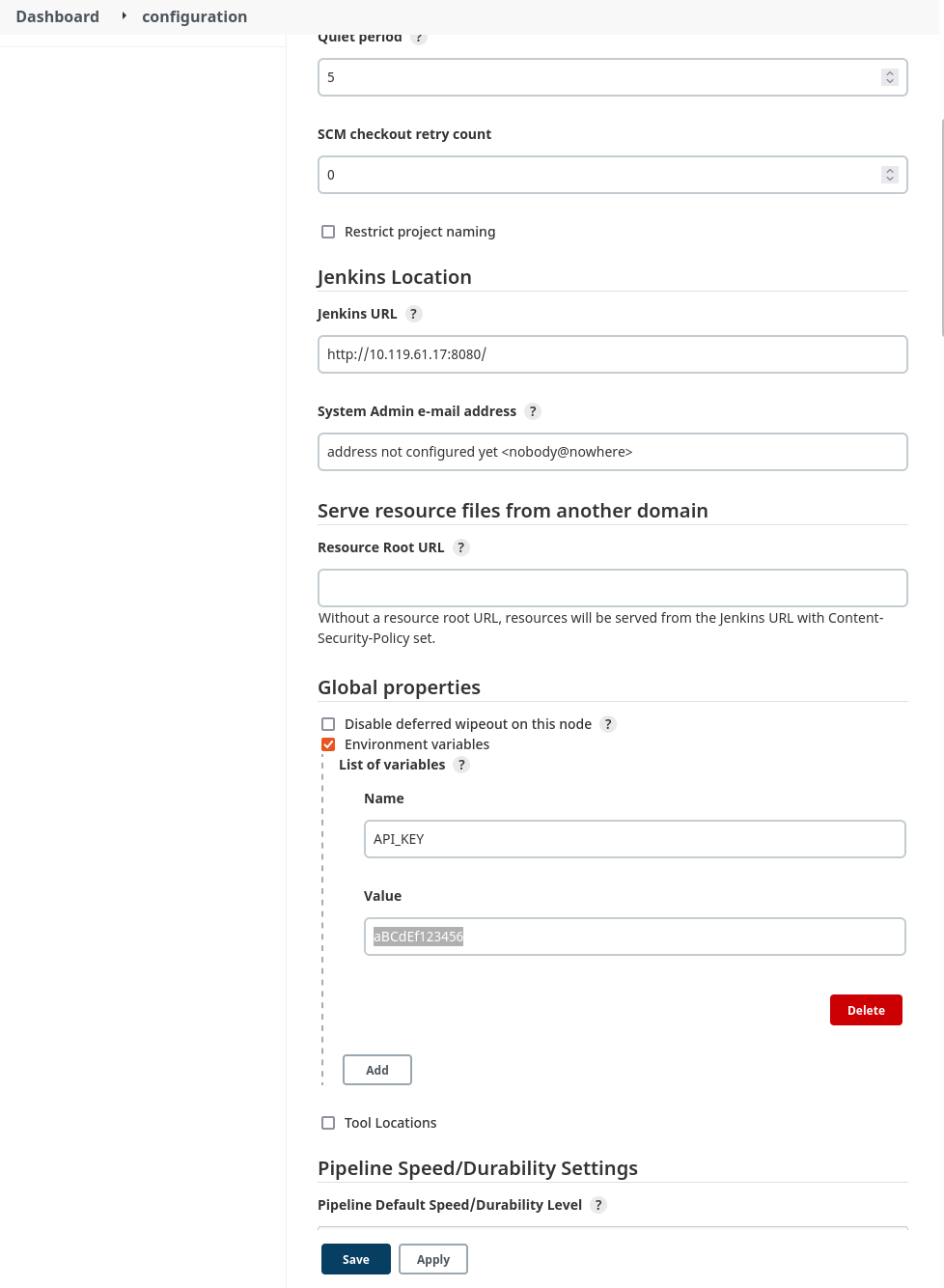
    Figure 3: Configuring a global environment variable

    The code will read the API key from the environment variable that was just configured. Here’s the configuration for the build steps:
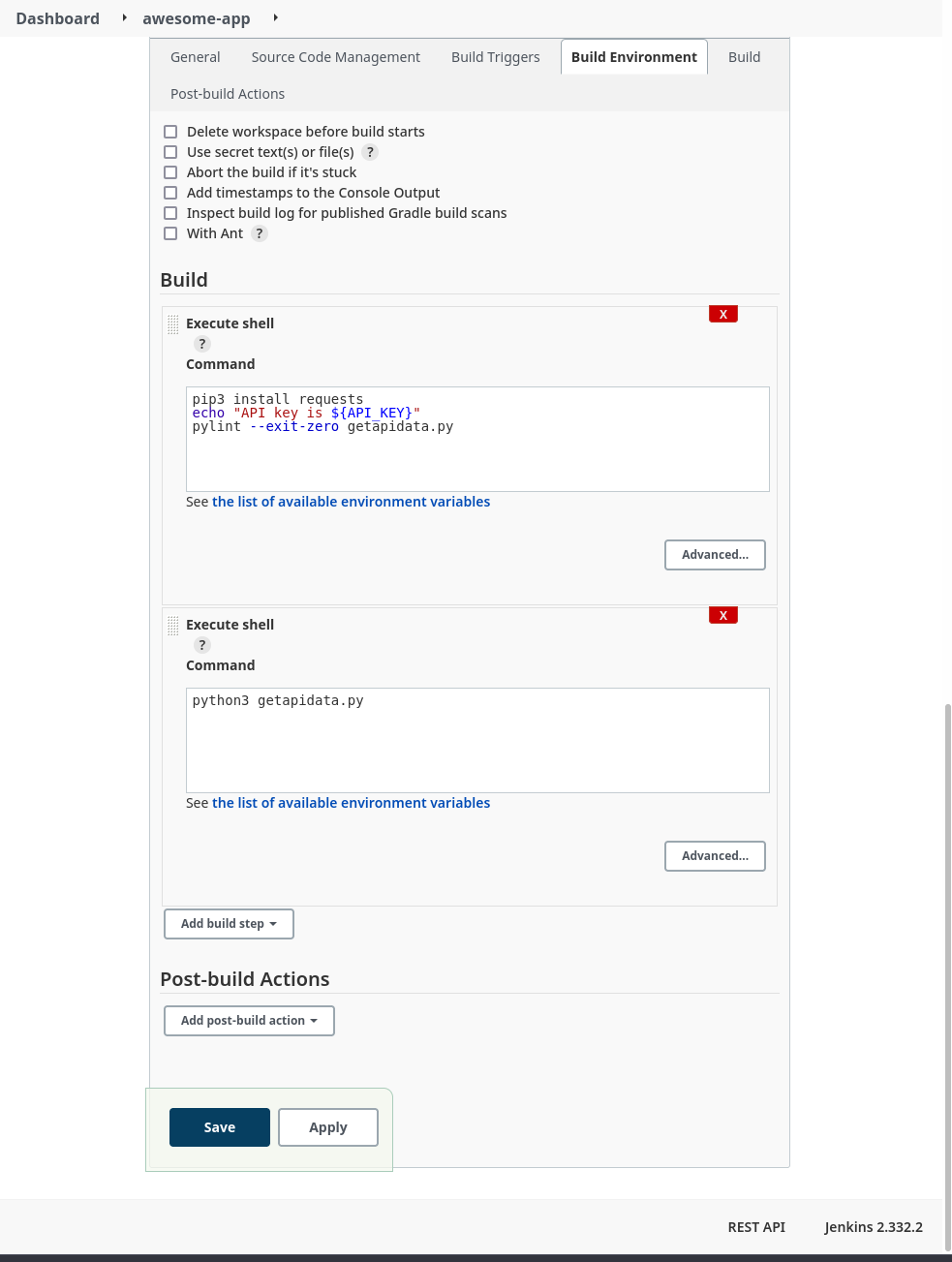
     

    Figure 4: Build configuration

    The build steps run some simple linting and then actually execute the code. Here’s a look at part of the log from a successful build:


    Figure 5: Build log with exposed secret

    The API key has obviously been exposed in a plaintext log with a simple directive in one of the build steps. A minor misconfiguration could potentially cause a breach or compromise.

    Jenkins Secret Text Example

    Now we can try to improve the security of our build environment by using the built-in credentials handler:


    Figure 6: Configure build environment to use secrets

    In this example, we’ll use a simple “Secret text” credential binding to store the API key:


    Figure 7: Adding a secret credential

    Next, we configure our build job to use the new credential variable:


    Figure 8: Updated build configuration

    Now, after running another build job, we check the build logs again:
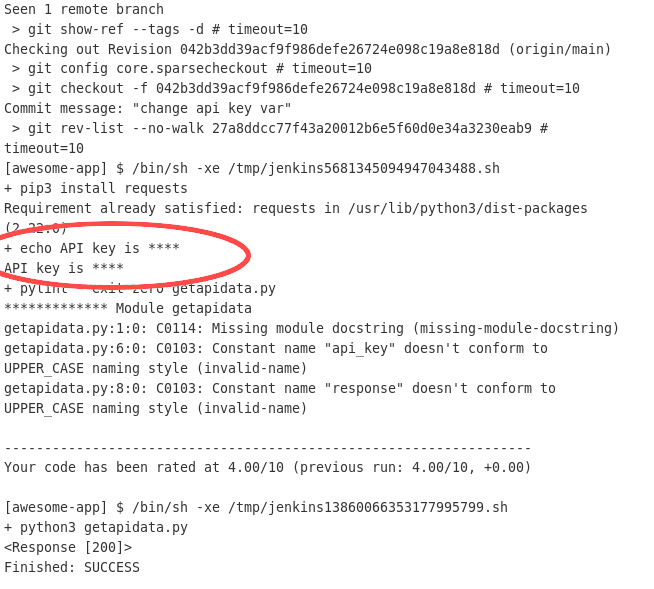
     

    Figure 9: Build job with obfuscated secret

    Even though we configured the build step to print the variable contents to the log, the Jenkins credential handler knows that the value is sensitive and obfuscates the actual value in any log or output.

    Although this measurably improved the security of the build, there are some caveats. While this works well enough for a small Jenkins deployment with a limited number of users, managing access and correct permissions scoping for multiple users and teams across a large, distributed Jenkins architecture quickly becomes complicated and difficult to manage effectively. In addition, the secret value stored in the credential variable is still accessible to every Jenkins instance in the cluster, as well as any user with the appropriate permissions.

    If any node is compromised, secrets across multiple deployments and contexts could be at risk. Users still have to manually secure and configure Jenkins infrastructure that now doubles as secrets storage. What if there were a way to use sensitive credentials without ever having to store them in Jenkins itself?

    Secrets Management Tool Example

    Let’s try using Akeyless to manage our secrets. Since we’re integrating with a Jenkins deployment, we can follow the documentation for working with Jenkins. Akeyless integrates with the publicly available Hashicorp Vault plugin, so it’s simple to get Jenkins set up.

    Next, we’ll create a free account with Akeyless, and configure a secret:

    Figure 10: Creating a secret in Akeyless

    Figure 11: Creating a secret (cont).

    The next step is to create an Access Role that has permission to access the secret that was just created:

    Figure 12: Create a role

    Now we need to give our Access Role the correct permissions to view the secret:

    Figure 13: Giving the role permissions

    The last thing we’ll need to create on the Akeyless side is an authentication method. This is how we can give external entities, like our Jenkins deployment, the ability to make API calls to Akeyless and retrieve secrets:

    Figure 14: Create an auth method

    Once the authentication method has been created, be sure to save the Access ID and key by downloading the CSV file; the values will not be displayed again otherwise. Finally, we need to associate our newly created role with this access method:

    Figure 15: Associating the auth method with the access role

    The next step is to configure the Jenkins build environment according to the Akeyless documentation referenced in a previous step:

    Figure 16: Jenkins build configuration with Akeyless

    Now we’ll run another build, this time configured to utilize the Akeyless vault we’ve configured:

    Figure 17: Build log with Akeyless configuration

    In the logs, there is now a step present where Jenkins retrieves the secret from the Akeyless Vault. The credential value is also still obfuscated in the build log. We’ve now got a working, third-party secrets management platform integrated with our Jenkins instance.

    It may seem like extra steps just to achieve the same outcome, but an external tool focused entirely on secrets management is a powerful abstraction. Jenkins is a CI/CD tool first and foremost, with secrets management provided as an add-on. In that context, it will never be able to provide the first-class features, management capabilities, and security guarantees that a dedicated secrets management platform can:

    ● Managed infrastructure with SLA guarantees
    ● Zero-knowledge encryption
    ● Intuitive, accessible secrets management and organization
    ● Integration with industry-standard DevOps tools and platforms

    A tool like Akeyless also does away with having to manage complex, self-hosted infrastructure. We were able to have a working secrets endpoint in just a few clicks.

    Conclusion

    Since security is a top consideration for CI/CD pipelines, it is important to follow best practices when using secrets in Jenkins. Jenkins pipelines rely on secrets for identity verification, collaboration, and infrastructure management. CI/CD secrets management presents a challenge for most teams because of how complex it is to implement access control at a granular level.
    With a secrets management tool, Jenkins users get a centralized and secure resource to manage the many credentials that are required to operate CI/CD pipelines. They benefit from using a simplified, standardized approach to access all secrets they need, without worrying about security. Simply put, a secrets manager accelerates DevOps workflows.

    Meanwhile, security teams benefit by gaining full visibility into where secrets are, and how they are used. With automated processes and centralized access policies, a secrets management platform helps security teams stay compliant with security regulations as well.