Tag: CI/CD

  • The Rise of NetDevOps and CI/CD Pipeline Solutions

    The Rise of NetDevOps and CI/CD Pipeline Solutions

    Over time, as organizations, networks and technologies have changed, the way enterprises think about managing networks has shifted as well. Enterprises are continuing to evolve their networking strategies, specifically with regard to how they expand their efforts to adopt infrastructure-as-code (IaC) practices. Looking ahead, the industry will continue to see the proliferation of solutions that help teams adopt a modern network operating model that delivers an agile, data-driven change management process. In most organizations, the software development team members and the networking team members have operated independently, with separate tools and processes. Developers would leverage pipelines to test and deploy code and then open a ticket for network changes such as VPNs or firewall changes. The network team would implement the changes, and end users could then use the application. The handoff between dev and network could be immediate or, more likely, it could take a few days–delaying the ability of the end users to access the new functionality. NetDevOps is focused on addressing this situation, which has become one of the market’s more critical infrastructure questions: How do you build an organization that can function smoothly across different skill sets, different technologies and different processes? Those same enterprises will be looking to leverage continuous integration/continuous delivery (CI/CD) practices from their software development best practices to help them overcome some of the challenges involved with implementing automation and orchestration into their networks.

    CI/CD Accelerates the Automation Process

    Let’s start with CI/CD. Adoption of network automation and orchestration will accelerate as network operators change the way they think about network updates and configuration management. According to Cisco’s recent white paper on how “Automation is driving network engineer skills transformation,” the reasons we’re seeing an increase in automation adoption is due to organizations relying on continuous connectivity, a greater need for the network to become more dynamic and the increased rate of changes both in the service supply side (applications) as well as in the service demand side (application consumers).

    However, some enterprises trying to build their own automation infrastructure struggle with resourcing, skill sets and maintenance effort struggles. To solve this, many of them are looking to incorporate the traditional DevOps practice of building and updating code with traditional continuous integration/continuous delivery (CI/CD) pipelines into their network automation and orchestration initiatives.

    Establishing a CI/CD pipeline is a workflow best practice for DevOps teams to follow. Today, organizations rely on CI/CD pipelines to help minimize bottlenecks in the software development and delivery process, while continuous integration optimizes building, integrating and testing code within a development environment.

    By integrating both CI/CD with network automation, teams will gain greater velocity and improve delivery. And by integrating network automation with an application CI/CD pipeline, they can reduce the time to perform network changes and enable secure access between the application and an in-house sales database.

    Why NetDevOps?

    NetDevOps brings the culture, technical methods, strategies and best practices of DevOps to networking.

    When DevOps principles are applied to network operations, organizations minimize operator interactions and optimize programmable network processes to configure, deploy and manage the environment, increasing efficiency and ensuring network availability, quality and reliability.

    NetDevOps takes those principles and applies them in a networking environment, offering tools to empower teams to collaborate and build an organization that can function across different skill sets and different processes — enabling everyone to participate in network orchestration.

    And it’s a movement that’s taking hold. According to Cisco’s Hybrid Cloud Trends report, 55% of those surveyed have created a cross-functional team with technical and business representation and 50% have a centralized CloudOps and NetOps function to help ensure their organization’s hybrid cloud strategy meets business objectives.

    Network Management Tools Will Continue to Evolve

    In today’s networking environment, where the expectation is to have an “always on” approach, teams are expected to build and release new applications at a faster pace than ever before. And every team has its own processes and methods for doing that which can create delays in the time it takes to execute the application. Incorporating network automation into the pipeline can empower teams to make application changes and deploy them to the network in seconds instead of the multiple days/weeks required for manual network changes. By integrating CI/CD pipelines and NetDevOps principles with network automation and orchestration, organizations can reduce the network change bottleneck even more.

    As we face the new year, we expect the way in which teams consume network automation and orchestration services as part of their software pipelines to become more sophisticated, with NetDevOps and CI/CD practices becoming a standard. And as more services become available, the adoption of IAC becomes easier. By abstracting and tweaking to abstract the traditional CI/CD pipeline, organizations of all sizes can accelerate the use of network automation and orchestration.


  • Awareness of Software Supply Chain Security Issues Improves

    Awareness of Software Supply Chain Security Issues Improves

    A global survey of 167 software professionals suggested that, while there is a lot more awareness of application security issues, the adoption of DevSecOps best practices is still not pervasive.

    The survey, conducted by Chainguard, the Eclipse Foundation, the Rust Foundation and the Open Source Security Foundation (OpenSSF), found that just over half (51%) of respondents are either concerned or are extremely concerned about software supply chain security.

    In addition, only a third of respondents (33%) reported they are familiar with the Supply-chain Levels for Software Artifacts (SLSA) framework for building more secure applications. Well over a third (36%), however, said they had never heard of it.

    Only a quarter of respondents (25%) reported that their team always signed built artifacts, the survey found.

    The survey identified the most challenging issues developers are encountering and found they are reproducing builds (64%) followed by creating hermetic builds that are isolated from other software libraries (62%).

    Mikaël Barbero, head of cybersecurity for the Eclipse Foundation, said while awareness of software supply chain issues is higher, it’s apparent that other priorities are still getting in the way of adoption of DevSecOps best practices. For example, software bills of materials (SBOMs) may generate a lot of headlines, but their adoption remains mixed, he added.

    John Speed Meyers, a security data scientist for Chainguard, noted that incentives still need to change; too many managers that hire developers still emphasize performance and delivery times over application security. Many developers, as a result, still tend to view cybersecurity as an obstacle to be overcome or worked around rather than a core capability that they will be graded on, he added.

    In theory, as responsibility for application security shifts left toward developers, overall cybersecurity will improve. Most developers, however, have little to no cybersecurity training, so the odds they will be able to resolve these issues are low. Instead, many organizations are either trying to embed cybersecurity professionals within DevOps workflows or, at the very least, deputize at least one developer to advocate for cybersecurity within those teams.

    Regardless of commitment level, it’s apparent that organizations need to address everything from locking down developer environments to thwart phishing attacks to ensuring application builds are not inadvertently infected with malware. The challenge organizations face is both technical and cultural, so the amount of effort required should not be underestimated.

    In the meantime, organizations should expect to see cybercriminals increase their attempts to compromise software supply chains. Infecting malware into software components that will be used by multiple downstream applications is, from their perspective, one of the most efficient means of wreaking havoc. Right now, organizations make it too easy for cybercriminals to compromise application environments.

    Organizations should also recognize that tolerance for insecure applications is also declining, as evidenced by the National Cybersecurity Strategy put forward by the Biden administration. It’s not so much a question of whether organizations that create software will be held liable for application security issues as much as it is to what degree.

  • Balance Software Quality, Dev Speed and Cost With CI/CD

    Balance Software Quality, Dev Speed and Cost With CI/CD

    In many cases, success in the business world relies on software, be it a compelling mobile app, desktop application suite, interactive website or even an embedded system for the IoT. Because of this need, companies with mature software development processes enjoy a significant competitive advantage over those without. Part of fostering this maturity involves crafting quality software with high velocity but low costs.

    Modern software development methodologies, like Agile and its variants, play a key role in crafting applications in an effective fashion. As more companies adopted an Agile approach, the movement also fostered DevOps, a management structure combining software engineering and network administration teams while leveraging automation to build apps more quickly. In many cases, the ultimate goal for these adopters involved achieving the programming Holy Grail of continuous integration and continuous delivery (CI/CD).

    So, let’s take a closer look at continuous integration and delivery and how it helps companies successfully balance quality, speed, and cost in their software development projects. In a competitive global economy, adopting this approach remains a crucial differentiator, whether or not a business also fully adopts DevOps. In either case, understanding the benefits of CI/CD helps your software company achieve its business dreams.

    A Closer Look at DevOps

    As noted earlier, DevOps somewhat grew out of the Agile movement, but it isn’t a software development methodology in and of itself. Instead, it involves a company merging its software development team and its network administration staff largely responsible for helping the process of building applications. It increasingly leverages modern technologies like containers and virtualization for development, QA and production servers and automation for builds and testing processes.

    This organizational structure and mixture of tools combine to help companies build high-quality software with high velocity and at a lower cost. A mature community grew around DevOps, including tools, best practices, process experts and more. While DevOps originally served as the sole domain of large enterprises, now businesses of all sizes involved in software development benefit from adopting this approach.

    Defining Continuous Integration and Continuous Delivery (CI/CD)

    Continuous integration effectively automates the critical software development processes of builds and testing. It especially makes sense for shops using multiple programmers, as it works with the team’s source code version control system to ensure all programming changes are merged and remain in sync whenever a developer checks in their code.

    Any check-in typically kicks off a process where unit tests and a build are automatically run to ensure those changes don’t “break the build.” In pre-DevOps days, this tended to be a highly manual effort, leading to inefficiencies in any software development project. In short, the team only discovered any integration issues after a manual test. Automation now plays a crucial role in making this aspect of application building significantly more efficient. CI remains a critical best practice in any DevOps shop.

    Continuous delivery shares many similarities with continuous integration, especially its use of automation and the latest software development tools. However, instead of performing builds for internal developers and the QA team, CD focuses more on delivering a software product for release to a user community, customer or the public at large. Again, this is another part of the software development process that led to inefficiencies in the days before DevOps and automation.

    In terms of software development for mobile apps, CD ends up being the last part of the development process before the app gets delivered to the App Store or Google Play. It also comes into play with any fixes or feature improvements after the app is on the market. A key aspect of engendering goodwill among your customers directly relates to the speed of app improvements. Adopting a CI/CD approach plays an important role in making app changes with high velocity.

    CI/CD is the Heart of Successful Modern Software Development

    Simply stated, if your company wants to be a successful software developer, adopting both continuous integration and continuous delivery remains crucial. Following an older, manual approach causes too many bottlenecks and inefficiencies to thrive in a highly competitive industry. No matter how great your startup’s idea or app design is, failure to deliver it with high velocity ultimately results in failure. Once again, this same concept applies to fixes and feature enhancements after the app’s launch.

    At the same time, you don’t need to fully embrace the DevOps organizational structure by creating a separate team made up of software engineers and network administrators. At many startups with a small headcount, your developers might handle many of those network tasks, including managing virtual servers and containers. Hiring a network admin or two might be an unneeded luxury.

    In the end, if you want to build your startup’s app in the most efficient manner, adopting the CI/CD approach makes perfect sense. It provides speed that allows your team to effectively balance quality, speed and cost, resulting in a great app without overspending. It’s the right approach for any successful software project.

  • Tips For Securing CI/CD Pipelines

    Tips For Securing CI/CD Pipelines

    Most development teams want to increase the pace of their software delivery. As such, continuous integration and delivery (CI/CD) has grown in importance, helping push code from build to production as seamlessly as possible. CI/CD pipelines often loop in many elements and may comprise a diverse stack of tools, automations and various languages. But because of this, the attack surface can be large. And as gaps in the CI/CD toolchain emerge, so do security concerns.

    In recent years, we’ve seen several high-profile cases where CI/CD environments were compromised. For example, take the Circle CI breach, in which a bad actor accessed Circle CI production systems. Others include the compromise of the SolarWinds build system and the Codecov breach. CI/CD security issues are alarming because so much control and automation are given to a pipeline. Unauthorized CI/CD access could be leveraged to publish malicious code or steal sensitive information.

    I recently met with Daniel Krivelevich, co-founder and CTO of Cider Security (acquired by Palo Alto Networks), to better understand the risks facing modern CI/CD. Krivelevich is a seasoned CI/CD security expert and co-author of the Top 10 CI/CD Security Risks framework, which OWASP adopted in late 2022. According to Krivelevich, there is a general lack of knowledge and visibility into these risks. “The CI/CD ecosystem as a whole is full of holes and opportunities for attackers,” he said.

    Below, we’ll review some of the risks that CI/CD pipelines face and offer general ways to mitigate some of these concerns. Hopefully, with greater security awareness around CI/CD threats, both tooling providers and users can begin to diffuse the potential of attacks against their systems.

    The Top Concerns Facing CI/CD Security

    The OWASP Top 10 CI/CD Security Risks framework covers the most impactful risks within modern engineering systems and gaps in CI/CD. It was informed by analyzing many attacks in recent years and was compiled with insights from numerous experts. Krivelevich hopes the framework will spark discussions around the mindset defenders should have when they’re looking to protect the modern engineering ecosystem. The top 10 risks are as follows:

    • CICD-SEC-1: Insufficient Flow Control Mechanisms
    • CICD-SEC-2: Inadequate Identity and Access Management
    • CICD-SEC-3: Dependency Chain Abuse
    • CICD-SEC-4: Poisoned Pipeline Execution (PPE)
    • CICD-SEC-5: Insufficient Pipeline-Based Access Controls (PBAC)
    • CICD-SEC-6: Insufficient Credential Hygiene
    • CICD-SEC-7: Insecure System Configuration
    • CICD-SEC-8: Ungoverned Usage of Third-Party Services
    • CICD-SEC-9: Improper Artifact Integrity Validation
    • CICD-SEC-10: Insufficient Logging and Visibility

    Before an organization can dissect these individual risks, however, they must overcome an even bigger problem—a critical lack of understanding regarding the CI/CD ecosystem and the many elements under the hood. Since CI/CD is not traditionally viewed as a security risk, this can result in insecure default configurations, insecure processes and systems not adopting a secure-by-design approach.

    “There’s a big gap between the level of understanding and opportunities attackers have and the knowledge defenders have over what attackers can do,” said Krivelevich. “Organizations traditionally have not been proactive enough in understanding this, unlike other elements that are more traditionally recognized as part of the attack surface. The main gap is a mindset shift.”

    Tips to Secure CI/CD

    So, knowing the above risks, what are some best practices to secure CI/CD pipelines? Krivelevich shared some tips to keep in mind.

    Bring CI/CD under the security umbrella. First, realize that CI/CD should be scrutinized. This will require an awakening in the community and more proactive effort than before. Krivelevich encouraged development teams to place it on their roadmaps and think about it.

    Map the attack surface. Before implementing security measures, you need to know what you’re protecting. Therefore, it’s a good idea to map your CI/CD environment and produce an inventory of assets. Cataloging the total surface area of dependencies and integrations is necessary to understand risks and helps mitigate CICD-SEC-10: Insufficient Logging and Visibility.

    Keep this updated regularly. Since the cadence of change is fast, teams will want constant visibility into their ecosystem and what’s under the hood. This may even lead to shadow IT, as per CICD-SEC-8: Ungoverned Usage of Third-Party Services. Therefore, Krivelevich recommended keeping a regularly updated inventory. This means continually mapping control systems, container registry artifacts, plugins and all other assets used as part of CI/CD.

    Protect the software supply chain. Many building blocks make up the modern software delivery process. But, some dependencies may be abused or contain malicious code, as per risk CICD-SEC-3: Dependency Chain Abuse. Dependencies within the CI/CD process may be prone to a host of open source vulnerabilities.

    Safeguard CI/CD credentials. CI/CD tools “possess secrets to most sensitive crown jewels in an organization,” Krivelevich explained. Therefore, access tokens and secrets related to CI/CD tools should be protected to avoid costly credential leaks. A zero-trust approach to CI/CD could help avoid CICD-SEC-2: Inadequate Identity and Access Management.

    By creating a virtual heat map of areas to address, organizations will be more informed and better equipped to assess risk. And according to Krivelevich, by implementing these best practices, defenders have a lot of power to raise security expectations in the CI/CD space. “When defenders and users become more diligent about security, the requirements from vendors will increase.”

    CI/CD is the Beating Heart, Don’t Let it Break

    “The engineering ecosystem and pipelines themselves are the beating heart of engineering,” said Krivelevich. And as this system becomes a larger part of what makes a business tick, it will be more heavily relied upon for mission-critical tasks and retaining agility.

    Yet, many building blocks comprise the contemporary software delivery process, and CI/CD pipelines can be a risky area due to the number of systems they touch. Further complicating things is the fact that the delivery ecosystem wasn’t traditionally viewed in security terms. This combination of many opportunities and limited security oversight makes CI/CD lucrative for attackers.

    Rectifying the top 10 risks is a relatively easy gap to address, said Krivelevich—what’s not so easy is the mindset shift required to take CI/CD security seriously. Organizations that invested deeply into microservices and rapid engineering processes will most likely be more susceptible to attacks, he added, since they typically use a diverse array of tools and a complex, integrated delivery process.

  • How GitHub Actions Simplifies Your CI/CD Workflow

    How GitHub Actions Simplifies Your CI/CD Workflow

    In today’s fast-paced world, being able to deploy applications quickly is essential for success. However, setting up a CI/CD pipeline can be a tedious and time-consuming task. Fortunately, GitHub Actions can help simplify and automate your workflow, making it easier than ever to get your applications up and running in no time. In this blog post, we’ll take a look at how to set up a React application with GitHub Actions and explore the benefits of using this tool for your CI/CD needs.

    Continuous Integration and Continuous Deployment

    Continuous integration (CI) and continuous deployment (CD) are essential components of any product development workflow. CI is the process of automatically building and testing code changes, while CD is the process of automatically deploying code changes to a production environment. Both CI and CD help to ensure that code changes are deployed quickly and efficiently, with minimal errors.

    Setting up a CI/CD pipeline can be a tedious and time-consuming task, particularly if you are not familiar with the required tools and technologies. However, using GitHub Actions can help to simplify and automate your CI/CD workflow, making it easier and faster to deploy your code changes.

    GitHub Actions is a powerful tool that can be used to automate many different tasks, including building, testing and deploying code changes. In addition, GitHub Actions can be used to trigger other actions in response to specific events, such as when a code change is pushed to a remote repository. This makes it an ideal tool for automating your CI/CD workflow.

    There are many advantages to using GitHub Actions for CI/CD. First, it is easy to set up and use, even if you are not familiar with the underlying technology. Second, it integrates seamlessly with GitHub, making it easy to track and manage code changes. Finally, it is highly customizable, allowing you to tailor the automation process to meet your specific needs.

    Setting up a React Application

    React is a popular JavaScript library for building user interfaces. Setting up a React application is not complicated, but there are a few important steps you need to follow.

    1. Choose your development environment. You can use create-react-app to set up a development environment with all the necessary dependencies and scripts.
    2. Install React and ReactDOM. React is the library that handles rendering of UI components while ReactDOM takes care of interaction with the DOM.
    3. Create a component file. In this file, you will write your UI code using JSX syntax.
    4. Include the component file in your HTML page. Now you can see your component rendered on the page!

    Development Mode and Production Mode

    In software development, there are two primary modes that code can be run in: development mode and production mode. Development mode is typically used by developers when they are actively working on code. In this mode, code is usually not optimized and may include debugging features that help developers identify and fix errors. Production mode, on the other hand, is used when code is ready to be deployed to end-users. In production mode, code is typically optimized for performance and security.

    One of the benefits of using GitHub Actions is that it makes it easy to manage both development and production workflows from a single platform. With GitHub Actions, you can create separate workflows for development and production, or you can create a single workflow that automatically detects whether code is being pushed to a development or production branch. This flexibility can simplify your CI/CD pipeline and help you avoid errors that can occur when manually managing multiple workflow files.

    To learn more about how to use GitHub Actions to simplify your CI/CD pipeline, check out the following resources:
    – [GitHub Actions documentation](https://help.github.com/en/articles/about-github-actions)
    – [Tutorial: Use GitHub Actions to deploy a static website](https://help.github.com/en/articles/configuring-a-workflow#creating-a-workflow-file)
    – [CI/CD with GitHub Actions blog post](https://blog.github.com/2019-08-08-introducing-github-actions/)

    Setting up GitHub Actions

    Setting up GitHub Actions is simple and only requires a few steps.

    First, you’ll need to create a new file in your project’s root directory called “.github/workflows/ci.yml”. You can name this file whatever you like, but for the purposes of this article we’ll call it “ci.yml”.
    In this file, you’ll need to specify the language your project is written in and the name of the action you want to run. For example, if your project is written in JavaScript and you want to run the “lint” action, your file would look like this:

    name: CI
    on: [push]
    jobs:
    build:
    runs-on: ubuntu-latest
    steps:
    – uses: actions/checkout@v2
    – name: Use Node.js ${{ matrix.node-version }}
    uses: actions/setup-node@v1
    with:
    node-version: ${{ matrix.node-version }}

    Breakdown of the Actions File

    In the “ci.yml” file, there are three main sections: “name”, “on”, and “jobs”. The “name” section is where you specify the name of your CI workflow. The “on” section is where you specify the events that will trigger your workflow to run. In this example, the workflow will run every time code is pushed to any branch. The “jobs” section is where you define the actual jobs that make up your workflow. In this example, there is only one job called “build”.

    The “build” job has two steps. The first step checks out the code from GitHub. The second step runs a Node.js linter on the code to check for syntax errors. If any errors are found, they will be displayed in the GitHub UI.

    You can also add additional jobs to your workflow, such as testing or deployment jobs. For example, you could add a job that automatically deploys your code to a staging environment whenever code is pushed to the development branch. This would allow you to test new features in a safe environment before deploying them to production.

    Adding additional jobs can help simplify your CI/CD pipeline by automating more of the process. This can free up time for other tasks, such as writing documentation or working on other features.

    Running the Action

    Assuming you have already set up a workflow file (ci.yml) and added a job to it, running the workflow is simple. All you need to do is push some code to your GitHub repository and the workflow will automatically run.

    You can also manually run a workflow by going to the Actions tab of your GitHub repository and clicking the “Run Workflow” button. This can be useful for debugging purposes or if you want to run a particular job without pushing code.

    If you want to see the output of a workflow, you can go to the Jobs tab and click on the job that you want to see. This will show you the log output of the job as it ran.

  • Appdome Integrates Mobile Security Platform With CircleCI CI/CD

    Appdome Integrates Mobile Security Platform With CircleCI CI/CD

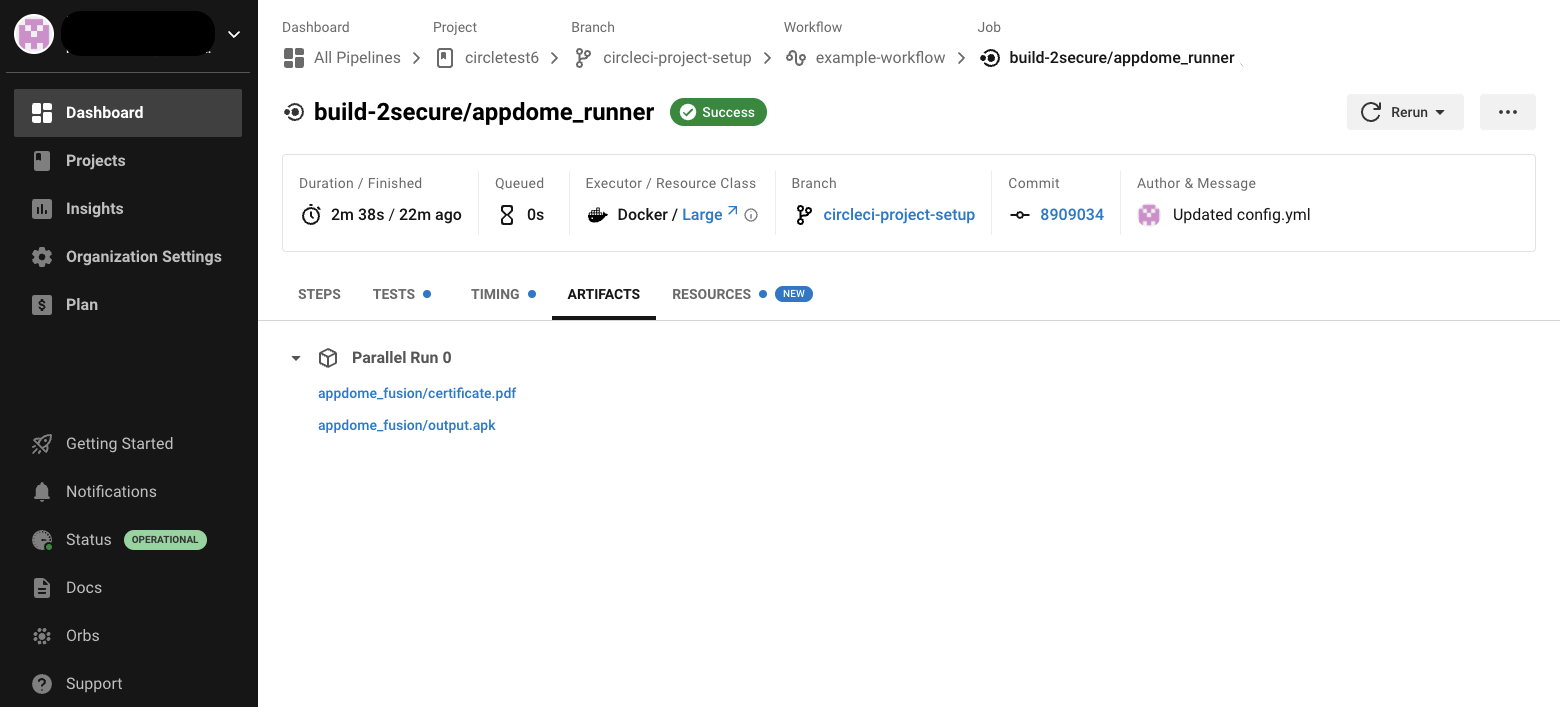
    Appdome this week made available an integration for the continuous integration/continuous delivery (CI/CD) platform from CircleCI that promises to make it simpler to secure mobile applications before they are deployed.

    As a provider of a platform for securing mobile applications running on iOS and Android platforms, Appdome provides a runtime application self-protection (RASP) platform that, among other capabilities, provides code obfuscation, mobile data encryption, jailbreak detection, root detection, man-in-the-middle attack prevention, on-device anti-malware, anti-fraud, anti-cheat and anti-bot capabilities.

    The platform is now integrated with the Circle CI/CD platform via the Orb framework created by CircleCI to simplify integrations with third-party tools.

    Karen Hsu, senior vice president of mobile DevOps and security solutions for Appdome, said the Appdome Build_2Secure Orb for CircleCI is an example of a series of integrations the company plans to make involving DevOps tools and platform that will make it easier to apply DevSecOps best practices to the deployment of mobile applications. That’s critical because it’s not uncommon for teams using different DevOps platforms and tools to be involved in the development of the same application, she noted.

    A recent Appdome survey suggested consumers are about to force the DevSecOps issue for providers of mobile applications regardless of how mature their processes are. A full 94% of respondents said they would promote a brand if the mobile apps protected them versus 68% that said they’d abandon brands that offered no protection.

    Securing mobile applications is especially challenging because once an application is compromised, it’s relatively trivial for cybercriminals to also inject malicious code into other applications running on a mobile device. There are no automated remediation capabilities, so the best defense is to isolate applications in a way that prevents malware from executing in the first place, noted Hsu. At a time when it’s already clear cybercriminals will be using artificial intelligence (AI) platforms to launch attacks, organizations will not have the time required to remediate vulnerabilities before malware is activated, she added.

    That Appdome approach provides the added benefit of reducing tensions between developers and cybersecurity teams that otherwise would be requesting immediate fixes to mobile applications that have been compromised, noted Hsu. As more mobile applications are built and deployed, the overall goal should be to enable both teams to work collaboratively together without unnecessarily disrupting each other’s workflow, added Hsu.

    It’s not clear what percentage of the applications being built and deployed today are destined to run on mobile devices, but securing those applications clearly presents some unique challenges. Many of those applications are deployed on consumer-grade devices attached to wireless networks that are not especially secure. Cybercriminals are increasingly targeting these devices not only to access sensitive data but also because they often provide a gateway through which the rest of an IT environment can be compromised.

    The simple truth of the matter is, sadly, DevOps teams need to assume that most mobile applications are going to be running in the cybersecurity equivalent of a hostile environment where the odds are considerably stacked against them.

  • 6 Ways To Empower Developers and Increase Productivity

    6 Ways To Empower Developers and Increase Productivity

    A big goal of DevOps is to increase productivity. Yet many organizations still struggle with the efficiency of their software release processes. In fact, 54% of engineers stated they have too many manual steps within their deployment process, according to an Armory survey. And with the pervasiveness of multi-cloud, developers now face an escalating number of deployment environments, each carrying their own nuances.

    Development teams want to move as quickly as possible without barriers. Yet, there are often hurdles to seamless deployments. For example, the code might be 100% ready to deploy, yet someone still must validate it before it reaches production. Manual bottlenecks like this in the CI/CD process can make developers feel like their code isn’t worthy of deploying and may even amplify feelings of burnout.

    I recently met with Anna Daugherty, senior product marketing manager at Armory, to see what technology leaders can do to remove barriers within their software release cycles and increase productivity. According to Daugherty, many of these strategies boil down to having empathy for developers and their needs. “Developers aren’t machines; they’re people, and people deserve to have a quality of life when they’re doing their jobs.” Below, we’ll highlight tips and tricks to keep in mind to improve release fluidity.

    1. Identify Where Your Manual Checks Are

    The first step to speeding up CI/CD is identifying where manual steps exist within the development workflow. The DevOps life cycle, often visually depicted as an infinity loop, includes many states, such as design, build, test, deploy, assess and monitor. But if each step has one or more manual steps, you accrue a lot of manual debt, said Daugherty.

    Therefore, engineering leads should seek to remove manual checks whenever possible. Of course, this may not be realistic within certain situations, such as financial institutions that require manual approvals at the last mile. However, everything should be smoothed out and automated up to that point, said Daughtery.

    2. Shift From Continuous Delivery to Deployment

    Depending on who you ask, the ‘CD’ in ‘CI/CD’ may stand for continuous delivery or continuous deployment. As part of reducing friction in the software release process, Daughtery encourages teams to begin to embrace the latter whenever possible. If deployment remains inhibited by unnecessary manual steps, it can decrease scalability and interoperability.

    3. Increase Confidence With Testing

    Of course, if we introduce more automation into the CI/CD pipeline, we must ensure the software is rigorously tested for errors and vulnerabilities. Daugherty encourages development to embrace automated, continuous testing approaches at every juncture, whether pre-production, inter-production, or throughout the application lifecycle. There are also advanced deployment strategies to consider, such as canary testing, which rolls out new changes only to a small subset of users or blue-green deployment can deploy to different places at different times.

    These deployment strategies can help build confidence while reducing the risk of disrupting a majority of your user base with untested production updates. “The more you can integrate testing into your process, the more confident your process will become,” said Daughtery.

    4. Chose The Right Toolsets

    So, how do we implement more automation into the DevOps cycle? And what sort of tools should we look for? According to Daugherty, when scouting for DevOps tools, technology leaders should prioritize open solutions that aren’t closed-off environments. Instead, they should offer flexibility and the ability to integrate with the tools you already use every day. “You can have all the tools in the world, but if they don’t fit together, that can drag down the process.”

    5. Consider Open Source Software (OSS)

    On that note, consider open source software (OSS) where possible. OSS like Argo or Spinnaker has the potential to empower developers and bridge gaps in the CI/CD process. Other projects from the Cloud-Native Cloud Native Computing Foundation (CNCF) and Continuous Delivery Foundation (CDF) are mature with proven stable adoptions.

    And although there is some weariness around OSS, particularly around unknown vulnerabilities and project maintenance concerns, “you can still be successful, secure, and scalable with open source,” said Daugherty. Open source also delivers community benefits and helps engineers feel like they are part of a bigger picture. “[OSS] is the opposite of burnout. It brings people together. It’s a community builder.”

    6. Become Developer-First

    Transitioning into a developer-first organization is another way to increase developer satisfaction and efficiency. But to become a developer-first organization, developers will need more say in the processes—this will involve balancing top-down requirements with total developer control. For example, leaders should suggest tools to enhance productivity but accept feedback on an ongoing basis to see what works best.

    To support these efforts, the concept of developer experience (DX) has entered the lexicon in recent years. Building with developer empathy can result in more usable, frictionless software that increases productivity. DX is crucial within the burgeoning area of platform engineering, as the goal is to create reusable, internal self-service platforms for developers to leverage.

    Interestingly, Netflix extolls what it calls full-cycle development, in which a developer oversees the building and operational aspects of a single component throughout its entire life cycle. “It’s an interesting way of addressing burnout because you feel more connected to what you create,” said Daugherty.

    Final Thoughts: DevOps Isn’t Dead

    Above, we’ve highlighted some potential strategies to increase developer productivity. By replacing manual bottlenecks with more automation, you can increase deployment fluidity. Considering how tools are acquired and iterating upon feedback from engineers can also help improve consistency while retaining quality talent.

    Looking to the future, Daughtery hopes that similar roles such as DevOps, site reliability engineering and platform engineering can come together and join forces. Because, at the end of the day, they share many goals. And contrary to some grabby headlines, DevOps is far from becoming obsolete. DevOps is not dead. It’s very much alive and increasingly important.

  • Are We Delivering?

    Are We Delivering?

    I had an interesting conversation today where I was told, “We do great with CI but terrible at the CD part.” My immediate reaction was to point at all the great CD activity going on in vendor space right now. But as I stopped to ponder, I realized that we’re doing all of that great CD activity to play catch-up.

    DevSecOps has us covered in spades—the toolsets allow for scanning and protection all through the process, from the first line of code to application retirement. I would argue that after being left out in the cold, DevSecOps has done a better job than DevOps at the right side of the equation.

    In DevOps, the various “cloud-native” deployment models (I use scare quotes because they’re not really cloud-native. If you dig into them, nearly every one of them includes Kubernetes in their definition of cloud) are starting to do the job admirably, but in shops starting to automate the entirety of the process, the CI part has been automated and code delivery accelerated for a good long while.

    In short, adoption seems to prove, once again, that the benefits of rapid development are more important than the benefits of offering a stable, repeatable deployment environment. This makes one wonder what, exactly, we should be doing to convince IT and business leaders in orgs smaller than web monsters that security and repeatability both demand the implementation of capable continuous delivery.

    I think we failed the audience when we allowed pundits to blather on and on about deploying thousands of times a second when most applications in most orgs need to deliver at a significantly slower pace. And not only that, but want to deliver at that slower pace, given the “Don’t fix what isn’t broken” rule. Even if the environment is stable, rolling out for a single minor bug fix is possible but it’s not the best use of time—both computer and human.

    But we are catching up. We have things like GitOps and Kubernetes automation catching up with the rate of development; security is already there and test automation is ready to find issues before deployment. It is simply implementation that is behind and, as time goes on, more orgs will get the implementation part nailed.

    And through that process, you’ll be there, rocking it. Step up and make sure it is done right. The entire process is there; you could sleep better at night knowing that it is all in place and you are not likely to get a midnight call. Your org loves stability, you love good nights of sleep … Go out and get it.

  • Best of 2022: CI/CD is the New Lock-In

    Best of 2022: CI/CD is the New Lock-In

    As we close out 2022, we at devopsy.kinsta.cloud wanted to highlight the most popular articles of the year. Following is the latest in our series of the Best of 2022.

    Welcome to 2022! Let’s start this year’s blogging off with a bang, and point out that we are in the process of creating the biggest lock-in that we have ever had. And I do mean ever. Maybe the hardware lock-in of the old days where vendor A was incompatible with vendor B was worse, but at least that one we acknowledged when we signed the contract. This one is growing on us as I type.

    Our DevOps environments in 2022 cannot run without what I like to call the “toolchain controller”: GitLab, Github CI/CD, Atlassian, CircleCI, Jenkins—whatever you are using. Like you need some form of faucet or flow control to make running water work, you need the CI/CD environment to make DevOps work.

    You. Can’t. Live. Without. It. And just like any other vendor solution, CI/CD vendors are not going to be in a rush to help you move to a competitor. It won’t be easy or cheap to switch, largely because we are moving everything that might have been on a computer that once had developed code running on it into the toolchain.

    Sooner or later, we’ll back off the kitchen sink definition of “What is DevOps?”, but I predict even then we will have to answer “…A lot of what we do,” because DevOps is, by definition, end-to-end. It is about the process and all the steps from design to production.

    No matter how long or complex the process through which an organization’s CI/CD tool runs, a plan must be in place to replace it. A workable plan, not a check box plan. When Atlassian decided they preferred cloud-based customers, their customer base was shocked. Atlassian was wise enough to leave an option for customers who really had to have an on-site solution, but it is not difficult to imagine them phasing that option out, or to imagine another vendor dropping on-site support altogether. Some of the more competitive offerings in the space—GitLab springs to mind—are online-only already, making that option more appealing to other vendors as it’s now proven viable.

    So, have a plan. This is more important, IMO, than cloud vendor lock-in. Cloud vendors are a small community, and each understands the others, so if push came to shove you could find help moving between the big three cloud vendors. There are dozens of DevOps master controller-type solutions in regular use, and some of them are not at all CI/CD solutions (application release orchestration tools and software infrastructure management tools are two areas doing CI/CD duty at some orgs, for example), so there is not going to be much help moving between them unless you manage to find a very specialized skill set that matches your desired move.

    So, have a plan. Yes, I am indeed repeating myself. Know what you’re going to have to do before you have to do it. Include what to do if the master DevOps controller goes down. Because it will, sooner or later.

    And keep rocking it. Protect your masterworks by protecting what builds them. And keep rolling out the tools your users need. It’s a new year—learn a new skill and use that to turn out even more cool stuff. I haven’t picked a new skill yet, but I’m taking that last bit of advice myself. And again, in the new year, thank you, for all those who don’t know to say it.

  • New Relic Extends Observability Reach to More DevOps Platforms

    New Relic Extends Observability Reach to More DevOps Platforms

    New Relic today expanded its ecosystem by adding integrations between its observability platform and a wide variety of DevOps and cybersecurity tools. The New Relic observability platform now integrates with offerings from Atlassian, Amazon Web Services (AWS), CircleCI, Confluent, GitHub, JFrog, Lacework and Snyk and the open source Jenkins continuous integration/continuous delivery (CI/CD) platform.

    Peter Pezaris, senior vice president for strategy and experience at New Relic, said the goal is to make it simple to share analytics based on telemetry data collected from IT operations environments with the tools organizations rely on to build and deploy applications.

    In total, there are now more than 500 integrations with the New Relic observability platform, he noted.

    Only 27% of respondents to a recent New Relic survey reported that they have achieved full-stack observability and only 5% claimed they have a mature observability practice in place. A third (33%) of respondents also said they still primarily detect outages manually or based on complaints from end users. More than half (52%) of respondents said they experienced high-business-impact outages once per week or more and 29% said they take more than an hour to resolve those outages.

    On the plus side, nearly three-quarters (72%) of respondents expected to maintain or increase their observability budgets next year, with more than half (52%) expecting observability budgets to increase over the next year.

    Observability, in one form or another, has always been a tenet of any DevOps practice. For the most part, the best that could be achieved until recently was continuous monitoring of a set of pre-defined metrics. With the arrival of observability platforms, it’s becoming much simpler to not only monitor metrics but also launch queries that surface issues long before an IT service can be disrupted.

    An observability platform achieves that goal by making it possible to query logs, metrics and distributed traces in a way that surfaces patterns that have not been pre-defined. In effect, an observability platform makes it simpler to debug application environments where the number of dependencies that exist between services are becoming too complex to track or decipher manually.

    Of course, those applications will need to be instrumented using agent software capable of generating the data observability platforms require. Fortunately, open source projects such as OpenTelemetry are helping to drive down the total cost of instrumentation by making agent software more accessible to a wider range of application developers.

    It’s not clear how quickly IT teams will be embracing observability platforms, but there is now a clear opportunity to narrow the divide between IT operations teams and application developers, noted Pezaris. As each DevOps platform makes it easier to collect data via application programming interfaces (APIs), richer telemetry data can be collected, he added.

    In the meantime, as application environments continue to become more complex in the cloud-native era, most DevOps teams will need additional tools. Existing legacy monitoring tools don’t make it easy to discover, for example, which microservice might be adversely impacting the overall performance of an application because calls are being rerouted. The frustrating thing, as always, is that it can take days or weeks to pinpoint an issue that might take only a few minutes to fix.