Tag: application development

  • Datadog Acquires App Dev Testing Platform Madumbo

    Datadog Acquires App Dev Testing Platform Madumbo

    Datadog announced it is extending its reach beyond IT monitoring to include application testing by acquiring Madumbo.

    Madumdo CEO Gabriel-James Safar said it’s become increasingly apparent that application testing needs to be more informed by the metrics gathered by IT monitoring tools. The combined Datadog/Madumbo will bring intelligence to automated testing processes using both application and infrastructure data gathered via the Datadog platform.

    The Madumbo platform already makes extensive use of machine learning algorithms and predictive analytics to inject artificial intelligence (AI) into the application testing process. The more data those algorithms can access, the more precise the AI models become over time.

    That approach made it possible for Madumbo to build a bot that checks for errors using code running on a real browser, which Safar said means DevOps teams can capture the same defects as they are experienced by end users. That’s critical because much time is wasted by IT organizations that are unable to prioritize tasks to either identify the root cause of a problem or, arguably more importantly, prevent issues in the first place, said Safar. Because of that issue most organizations lack the time required to develop best-in-class DevOps processes.

    Datadog provides a complimentary set of IT monitoring tools that are consumed as a software-as-a-service (SaaS) application. That data will then become a trusted source for Madumbo, which in turn will increase confidence in the AI recommendations being made by Madumbo, said Safar.

    How many of those customers will wind up replacing whatever application testing tools they currently employ with Madumbo remains to be seen. But if Datadog can provide a more efficient approach to testing, testing tools may wind up driving organizations to replace their monitoring tools. Most organizations spend an inordinate amount of time trying to correlate data across tens of monitoring tools that often generate either conflicting alerts or alerts about issues the IT organization has already been informed of by another tool. Most IT organizations eventually will see the rise of AI platforms that will drive consolidation across the entire DevOps tools category.

    In the meantime, the more issues that get addressed during the application development process, the fewer number of problems that will raise their ugly head in production environments. In fact, it’s arguable the whole point of investing in best-in-class DevOps processes is not just to roll out applications faster, but also make sure those applications are of a markedly higher quality than previous generations of applications. That’s not going to happen, however, unless DevOps teams can derive actionable intelligence from the millions of alerts that get generated up and down the IT stack.

    — Mike Vizard

  • Death of the Release: The Move to Continuous Delivery and Experimentation

    Death of the Release: The Move to Continuous Delivery and Experimentation

    As we move from continuous delivery to continuous experimentation, we also must develop new practices

    As software development processes have evolved, we have mostly said goodbye to the idea of defined product versions. Many modern product delivery teams are taking this a step further—even the concept of a “product release” is starting to fade. Instead, products are becoming a fluid, rapidly evolving set of features, assembled uniquely for any given user.

    Twenty-five years ago, the new release of a software product was a notable event. The marketing department would even insist on a catchy version name for the release. Internet Explorer 6, Office 2000, Windows XP, OSX Mountain Lion. This is still the case for a few types of software—operating systems being the most notable—but for most of the software products we use daily the concept of a version has faded away. What version of Google Maps are you using these days? How about Facebook? Twitter? As far as the end user is concerned, there is no version, just “current.”

    A few different forces have moved software products away from release versions. The rise of agile software methodologies and associated practices such as continuous delivery has allowed software teams to tighten up software delivery cycles dramatically. Products that once were released every few months are now updated every few days.

    In parallel, the growing capabilities of the web as a platform has moved many products off of the desktop and into the browser. This has greatly reduced the friction involved in releasing a new version of a product. Pushing a code change to servers you manage is a lot easier than persuading your users to download and install an update.

    Finally, there has been an architectural shift away from large monolithic systems toward service-oriented architectures and, in recent years, microservices. These modern architectures consist of many small, independently deployable units. This again reduces the friction around deploying a code change by reducing the scope of the deployment to one specific service.

    These forces combined have led to software release cycles shortening dramatically, from multiple months or years between each release to a rate of weekly, then daily, then hourly software delivery for some teams. Delivery of a new software release has moved from a marketing event with fanfare to something that is happening almost continuously, even for large products. As far back as 2011, engineers at Amazon were releasing changes to production every 11.6 seconds.

    As teams move from a monolith to microservices there is no longer one deployable unit, but rather an ecosystem of independently deployable services. It no longer makes sense to ask which version of a release is running in an environment. Instead, we must ask which version is running for each individual service.

    And then there’s feature flagging. One can think of a feature-flagged service as existing in a sort of quantum superposition of potential code paths, resolving to a specific set separately for each request. This means that a service’s behavior in an environment can change radically without any code deployment and without any observable change to the release version.

    Now, as we move from continuous delivery to continuous experimentation, we are reaching the point where it is no longer useful to attempt to describe the current running software in terms of a “release,” or even a set of releases. The situation has become a lot more fluid.

    Coping in a Post-Release World

    Modern approaches like microservices and continuous experimentation are a boon to product delivery teams. They allow us to move faster with more safety, thanks to the tight feedback loops they enable. But this new world also brings challenges.

    It can be a lot more difficult to diagnose a bug when you are not sure what code was involved. The load on testers becomes greater as they need to consider the interaction between multiple releases of different services—each with different feature flags which can behave differently from request to request.

    From a user’s perspective, a product’s rapid pace of change can be a little overwhelming. New features arriving frequently is nice, but having the UI change every time you log in can be disorienting. Even worse is when a feature is available one day and then gone the next. Users can also be wary of the idea that they are not getting the same experience as other people, particularly if there is any whiff of unfair business practices.

    Ironically, while this accelerated feature delivery is partly enabled by continuous experimentation practices, that same speed of change can itself interfere with feature experiments. It can be difficult to statistically correlate an uptick in a KPI with a feature experiment when there are other changes happening over the course of the experiment.

    Enhancing the observability of your software—the quality of logging and other instrumentation—is one key way to mitigate some of these challenges. Another is keeping the number of active feature flags reasonably low, which can help on a variety of fronts. It reduces the testing burden of multiple interacting flags, as well as the risk of experiments interfering with one another. Fewer active flags also mean fewer things changing at once for your users.

    Managing all feature flags in a shared system can help in understanding the number of active flags and avoiding interfering experiments. Centralized flag management also means you can batch up a set of feature changes into a single release, which helps avoid overwhelming your users with many small changes. A centralized system makes it easier for testers to see which flags they should expect to be in play within different systems, and how those flags might interact.

    We’re entering an era that will involve a massive explosion in the rate at which we release new experiences to our users. Embracing this next stage in the evolution of product delivery can enable teams to move faster and with greater safety. But entering this brave new world requires us to develop new practices if we are to avoid the pitfalls of a post-release world.

    — Pete Hodgson

  • DevSecOps Implementation Process and Road Map – Security at Every Step

    DevSecOps Implementation Process and Road Map – Security at Every Step

    DevSecOps is changing our perspective toward security and is equipping us to deal with its challenges in an intelligible manner. The systematic approach of DevSecOps helps us add value to our business processes while ensuring security.

    Here’s a summary of the key inputs and a recipe for a successful software development project. Implementing DevSecOps with the primary goal of enhancing security requires a step-by-step procedure.

    It requires the unification of culturally disparate teams of Security, Operations, Development and Test for the sole purpose of building a product marked by quality and backed by security.

    The DevSecOps process will require effective planning, design and release, which will be put together with a collaborative toolchain of technologies to bring about a common goal.

    Furthermore, as organizations continue to rely on automated delivery, avenues are created for testing opportunities beyond traditional bugs. In-house experts will be able to identify potential loopholes, design errors and even code weak spots.

    Being able to identify weak spots and flaws well in advance helps organizations maintain a competitive front in the market and trustworthiness before its target audience.

    DevSecOps Implementation Process and Road Map

    DevSecOps Implementation Process and Roadmap

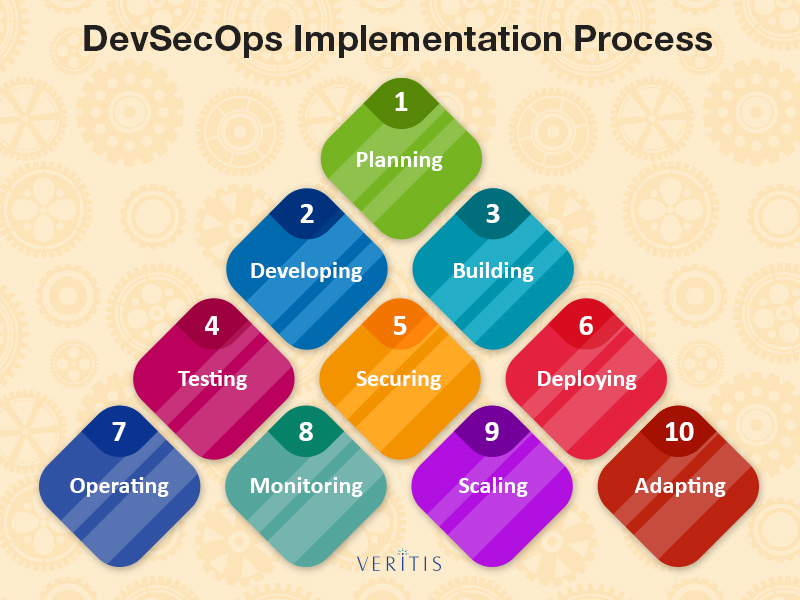
    1) Planning: Planning is the first approach to any task at hand and the core focus of DevSecOps—security—begins from here. In the planning stage, DevSecOps professionals must go beyond creating feature-based descriptions. The focus should also be on security and performance, acceptance test criteria, application interface and functionality and threat-defense models.

    Tech terminology: Acceptance Test Criteria is used by DevSecOps professionals to understand user preferences and behavior to a software application behavior.

    2) Developing: Developers should approach DevSecOps with a “how to do it” approach, rather than a “what to do” approach. It is important for developers to bring together available resources for guidance, have reliable practices and a code review system in place for themselves and for others in the team to follow.

    3) Building: Automated build tools can uplift the whole DevSecOps implementation process tremendously. These tools ensure test-driven development, standards for release artifact generation and utilize tools to ensure the design aspect is in alignment with the team’s coding and security standards through statistic code analysis.

    They can also be used to identify vulnerable libraries being used in your application and replace them with new ones.

    4) Testing: Automated testing in DevSecOps should utilize strong testing practices including front-end, back-end, API, database and passive security testing.

    Tech Terminology: Passive Security Testing is a developmental stage testing where security testing is not conducted directly on the target.

    5) Securing: Traditional testing methods always remain in place in DevSecOps exercise. However, somewhere down the line, there is a tendency to identify issues toward the end of the development process.

    Through advanced practices such as security scanning, we tend to become more aware of the issues and can determine if the threat is a serious one or not.

    6) Deploying: Automated provisioning and deployment can fast-track the development process while making it a more consistent one. Infrastructure-as-code tools can perform the aforementioned audit properties and configurations and ensure secure configurations across the IT infrastructure.

    7) Operating: Regular monitoring and upgrades are the Operations team’s important tasks. DevSecOps teams ensure to deploy infrastructure-as-a-code tools to update and secure the entire organization’s infrastructure in a quick and efficient manner with no scope for human error. Operations personnel have to be especially watchful of zero-day vulnerabilities.

    Tech Terminology: Zero-Day vulnerabilities are a software breach that remains unknown to software productions personnel and can eat away at a computer program and other components such as a network.

    8) Monitoring: Constantly keeping a watch for irregularities in security can save an organization from a breach. Hence, it is essential to implement a strong continuous monitoring program with real-time to keep a track of system performance and identify any exploits in their early stages.

    9) Scaling: Gone are the days when organizations spent precious hours and money on the maintenance of large data centers. With the introduction of virtualization solutions and the cloud, organizations can scale their IT infrastructure or replace it in the event of a threat, which would be impossible to do with a traditional data center.

    10) Adapting: Continuous improvement is key to any organization’s growth. An organization will only be able to achieve the desired growth of it evolves in its practices including DevSecOps practices—security, functionality and performance. Therefore, an organization should adapt to continuous improvement and external changing trends.

    The DevSecOps is in itself a process of innovation that substantially adds value to an organization.

    Point to Remember: Security is everyone’s responsibility.

    — Veritis

  • SolarWinds Survey Surfaces DevOps Disconnects

    SolarWinds Survey Surfaces DevOps Disconnects

    A survey of 336 developers, web product managers and DevOps practitioners published by SolarWinds, a provider of IT management tools, finds they spend most of their time troubleshooting applications—so much so that there is little time for strategic projects such as transitioning to DevOps practices.

    Joe Kim, executive vice president and global chief technology officer for SolarWinds, said that while senior IT leaders continue to preach about the critical role DevOps will play in changing their IT culture, IT staff still spends too much time dealing with tactical problems to implement any of the goals defined within a longer-term strategic plan. More than half of respondents (53 percent) said troubleshooting application issues is the top task completed on a given day.

    Because most of their time is spent on troubleshooting applications and not on managing and/or deploying applications, Kim said, many employees suffer from low morale. Then, before many IT leaders realize it, their best people are being lured away by the promise of working for an organization that enables them to focus more on the parts of IT process they enjoy, he said.

    In fact, Kim noted, in this situation IT leaders that embrace DevOps are in danger of losing credibility. If IT leaders tout the benefits of DevOps, and yet the internal IT staff is spending most of their time on application troubleshooting, chances are good many of the rank-and-file IT professionals will conclude their leaders are out of touch with their everyday reality. IT leaders would be well-advised to engage more with their IT staffs to make sure their strategies are more informed by that IT reality, he advised.

    The survey also finds respondents are spending less than 25 percent of their time proactively optimizing performance of their IT environments. Being able to spend more time on this aspect of IT is critical, because if more time is spent on proactively discovering issues, less time must be spent on troubleshooting, said Kim.

    IT teams should also be trying to push the boundaries of IT automation to reduce as much of the manual drudgery associated with IT as possible, added Kim.

    To get a better appreciation for real state of the IT environment, Kim advised IT leaders gather and share metrics with their teams. Not only does that provide IT teams with some sense of accomplishment as specific goals are achieved, the metrics make it easier to get IT teams to rally behind transitioning to DevOps best practices, he said. That’s crucial because any transition to DevOps is likely to fail because of cultural rather than technical challenges.

    It’s unlikely the need to troubleshoot applications ever will go away entirely. The developers that create those applications, after all, are only human. But it is possible to make working in IT a lot more fun and rewarding than what most IT professionals currently experience today.

    — Mike Vizard

  • Split Launches Free Managed Feature-Flag Service

    Split Launches Free Managed Feature-Flag Service

    As part of an effort to attract more DevOps teams, Split is making available a free managed feature-flag service for up to five users within an organization.

    Based on the same commercial managed service Split provides today, company president Trevor Stuart said the free service provides those five users with unlimited feature-flagging and unlimited usage in the hopes that the number of DevOps teams employing feature-flagging will rise to the point where the organization will opt to pay to consume the paid managed service. The free managed service also includes user segmentation capabilities to provide control over how many end users might be exposed to any new feature.

    The paid managed service provides access to additional capabilities such as integrations, access and permissions, team collaboration and full-stack experimentation.

    Stuart noted many DevOps teams are today attempting to incorporate feature-flagging into their processes by implementing one of more than 40 different open source projects. However, many of them quickly discover that building and maintaining a feature-flag platform is a difficult undertaking. Many developers decide that building a feature-flagging platform is a challenge they want to take on because it provides a critical set of DevOps capabilities. But when those developers leave the organization, the DevOps team is suddenly left with a platform no one else in the organization knows how to support, he said.

    Feature flags, also known as feature toggles, provide a means for DevOps teams to test and add new capabilities to their applications without having to take the entire application offline. Feature-flagging also enables phased application rollouts that make it easier for DevOps teams to assess new functionality as it is added. Any problematic update can be turned off with a single click. The downside is they generally result in more branches of applications that need to be managed carefully within the context of a DevOps process. Because of that complexity, vendors such as Split have been making the case for employing platforms that enable DevOps teams to more easily incorporate feature-flagging within a DevOps process.

    Stuart said the ultimate goal is to provide a more controlled approach to experimentation. Instead of randomly testing new features on end users, feature-flagging makes it possible to more easily test features on specific end users, said Stuart.

    It may be a while longer before feature-flagging is adopted more pervasively. But as DevOps teams become increasingly more sophisticated, there’s little doubt feature-flagging won’t become more commonly employed. The simple truth is that uncontrolled application experiments on end users usually are not appreciated. Savvy DevOps teams are finding ways to test application functions in real-world scenarios with minimal disruption to the majority of end users.

    The only real issue now is determining how best to go about implementing feature-flagging at a time when most DevOps teams already are struggling to keep pace with their existing application development and deployment projects.

    — Mike Vizard

  • AIOps: How to Solve Performance Issues in Complex Data Pipelines

    AIOps: How to Solve Performance Issues in Complex Data Pipelines

    AIOps takes center stage to topple barriers as modern data application growth accelerates

    There seems to be a chasm between DevOps and big data teams in the enterprise, and the bridge over that chasm is long and treacherous.

    In fact, data analysts who are charged with managing and making sense of the growing volumes of data in most organizations traditionally have been excluded from the strategy-making and operations functions of DevOps personnel. Yet, data analysts are critical to the success of software development and at every stage of the software delivery pipeline.

    DevOps Under Siege as Modern Data Applications Proliferate

    Let’s take a deeper look. We know that DevOps personnel are on the front lines in ensuring that all systems, both new and existing, perform as expected in a production environment. But, even today, DevOps teams struggle in dealing with technical challenges when faced with complex data pipelines and the underlying big data stack that supports them, including:

    • Root cause analysis — determining if an application issue is due to application code, config errors or resource contention.
    • Correcting inefficiency in code.
    • Improperly configured auto-scale clusters.
    • Lack of actionable insight into how clusters were tuned at both a cluster and job level.
    • Difficult access to support engineers and promotion of DevOps collaboration.

    And these are just the tip of the iceberg.

    The pressure is on. On average, companies with data-driven environments garner up to 50 percent higher market value than their competitors, according to IDC, and big data is a contributing factor. Thus, big data implementations have become a top priority for businesses of all sizes, and on multiple fronts: revenue acceleration, creation of new products and contributing to better, quicker decision-making. But the unfortunate truth is that, as big data projects move from pilot to production, they invariably encounter serious performance problems that frustrate both data analysts and IT operations.

    What’s more, DevOps and big data personnel face a mutual problem: lack of centralized, top-down visibility into their end to end data pipelines and applications. And, as a result, they face challenges in pinpointing the source of problems—namely, that problems can become visible anywhere in the stack, but their root cause could be elsewhere in in the stack. And, these problems result from root causes as diverse as bad code, inefficient data partitioning, mismatched system configuration settings, best-guess resource allocation and infrastructure issues. Furthermore, a big data stack running multiple applications faces resource contention and prioritization issues that can reduce both individual application performance and overall system performance.  And streaming applications create their own challenges;: for example, if a streaming application starts to lag in processing data in real-time, diagnosing the root cause takes considerable time and effort.

    The industry is faced with a reality where the problems are outrunning the solutions. In the case at hand, organizations have relied on brute force and expensive custom solutions for making analytics-based recommendations more user-friendly to improve individual application and full-stack performance.

    AIOps Takes Aim

    AIOps, or artificial intelligence for IT operations, is gaining steam in the enterprise, with many new use cases appearing as data volumes grow and systems become more complicated. Gartner expects AI to pervade every aspect of managing IT, including application performance management (APM), IT infrastructure monitoring, cloud platform monitoring, performance management, capacity management, the delivery tool chain (CI/CD) and IT service management.

    In fact, AIOps is on a tear: Just three years ago, it was only a concept. Today, Gartner predicts that by 2019, 25 percent of global enterprises will have implemented an AIOps platform to support two or more major IT operations.

    But even as it continues to evolve, AIOps today can deliver automated recommendations to solve expensive, challenging and time-consuming problems with big data deployments and across entire complex stacks. Without AIOps, there would be simply too many variables to correlate manually.

    AIOps makes APM for modern data application possible. It does so by helping to eliminate painstaking, trial-and-error configuration, troubleshooting and remediation workflows that have long plagued big data operations teams. And, for the first time ever, dataOps and DevOps teams can troubleshoot, support SLAs, remediate issues and manage large-scale deployments in an agile and dependable manner.

    It’s a new environment for the modern data center. As part of an APM solution, AIOps is hard at work helping automate and guarantee the performance of big data applications and addressing the primary challenges that DevOps faces with the unrestrained growth of big data.

    It could still be a bumpy ride—organizations of all kinds face unprecedented increases in data volumes. But now, working together, DevOps and AIOps are better-equipped to contend with the challenges.

    — Bala Venkatrao

  • Best of 2018: 5 Best Node.js Frameworks to Know

    Best of 2018: 5 Best Node.js Frameworks to Know

    As we close out 2018, we at devopsy.kinsta.cloud wanted to highlight the five most popular articles of the year. Following is the third in our weeklong series of the Best of 2018.


    When it comes to development platforms, the choices are wide and varied. It can be a difficult task choosing the right framework for your app, even for developers. For non-developers, the task can seem insurmountable. That’s why it’s important for app dev companies to educate their clients on the best development platform to fit the needs of their app. For most, it’s a matter of explaining the benefits and drawbacks of the many options.

    The Node.js environment, for example, has a number of different frameworks, each suited for a particular purpose. While developers need to know the technical details of each framework, clients really only need to know the factors that will impact their app.

    A Quick Node.js Explainer

    In the professional circles, much is spoken about Node.js and best Node.js frameworks as of the way to facilitate web apps development.

    What the client should know about Node.js: this is a special runtime environment used by the developers to create web apps. Its front-end (client-side) and the back-end (server-side) both can be coded using the same language: JavaScript.  Previously, those were two different areas to be dealt with different programming languages and by different developers, correspondingly.

    What to Know About Node.js

    Node.js is especially good for developing real-time apps intended for simultaneous connection of multiple users. However, it is not recommended for apps intended for complex computations.

    Some of the big names you know—Netflix, Trello, PayPal, LinkedIn, Walmart, Uber, Groupon, eBay, NASA—all use Node.js for their apps.

    Node.js offers myriad benefits to companies, including:

    • JavaScript belongs to one of the most popular programming languages—according to GitHub statistics, as of Q3 2017 JavaScript is the top programming language, with 22.5 percent of pull requests. That means will be no difficulty in finding an experienced developer;
    • Node.js’ popularity implies numerous ready-made solutions and contributions that can be used by developers for their apps;
    • Node.js gives the developers much freedom and space for creating a specific app;
    • Since the front-end and back-end are coded in the same language, only one programmer is needed;
    • Because of these factors mentioned above, development and deployment time is shortened and the app can reach the market in a short time;
    • Less search time, fewer developers and faster development mean lower costs.

    Who is behind Node.js?

    Node.js appeared in 2009 and now enjoys the support of the active and fast developing community. As of today, there are 8 million instances of Node.js, with more than 1,500 contributors and 39,672 stars on GitHub. Mark R. Hinkle, executive director of the Node.js Foundation, said his organization plans to Grow, Engage and Educate. So, the future app will have good prospects in terms of maintainability and eventual extension.

    Node.js Frameworks Worth Considering

    Express.js (35,310 Stars on GitHub)

    The classic of Node.js. appeared in 2010 and served as a basis for a long list of popular Node.js frameworks. It is considered to be minimalistic and simple. Express is not opinionated and offers the developers much freedom, as they can use various modules to build the app. Due to its flexible nature, it is best-suited for large-scale apps that are planned to be customized and extended and need long-term support.

    What should the client know about Express.js? Fast, simple, flexible

    Sails.js (18,088 Stars on GitHub)

    This framework used Express as a basis but is a complete product that can be applied as it is with the available functionality. It is suitable for fast launches. Sails is especially good for developing and setting the real-time apps requiring quick answers and is compatible with any front end.

    What should the client know about Sails.js? Complete, quick to develop, good for real-time apps

    Meteor (38,755 Stars on GitHub)

    This is a full-package popular Node.js framework that allows building real-time scalable web apps. It handles apps for any device (web, iOS, Android). With Meteor, developers can accomplish more job with less code. It suits as a perfect tool to start a project for all major platforms.

    What should the client know about Meteor.js? Full-stack, time-saving, universal

    Loopback (8,000 Stars on GitHub)

    This is a highly extensible modular framework. Loopback is specifically intended for quick and easy creating of API. It allows running the apps on-premises or in the cloud. Loopback works well for writing user’s authentication and authorization.

    What should the client know about Loopback.js? Easy and quick to develop as offers much out of box, suits for complex integrations.

    Hapi (8,701 Stars on GitHub)

    The framework appeared in 2011 and also is based on Express. It has since grown into the separate framework with a different approach: to provide as much as possible use cases out of the box. It is intended for large teams and large projects and will be too complicated for a simple app.

    What should the client know about Hapi.js? Configuration over code, reliable, time-saving due to focus on writing reusable app logic, large projects

    Bonus Framework: Koa.js (18,495 Stars on GitHub)

    This is a new-generation framework. Koa is created as lighter and more flexible version of Express. It suits both for large and small projects and provides for further customization and extension.

    What should the client know about Koa.js? Fast development, reliable app foundation, flexible

    Conclusion

    The list above should serve you in helping your clients decide which framework is best-suited for their project. Be sure to explain each framework in the simplest terms to ensure your customers understand the benefits and drawbacks of each. They will appreciate it.

    What frameworks would you add to the list? Please add them to the comments below!

    — Olga Nasonova

  • DevOps Chat: App Modernization and Service Virtualization with IBM’s Matt Tarnawsky

    DevOps Chat: App Modernization and Service Virtualization with IBM’s Matt Tarnawsky

    While everyone wants to focus on building a new app, the fact is there are many, many apps already out there. They need to be maintained, updated and modernized. How do you upgrade these legacy apps to new infrastructure, frameworks, languages and more? App modernization is a thing.

    In this DevOps Chat we speak with Matt Tarnawsky of IBM about app modernization and service virtualization, testing and more.

    As usual, the streaming audio is immediately below, followed by the transcript of our conversation.

    Transcript

    Alan Shimel: Hey everyone. Alan Shimel, devopsy.kinsta.cloud, and you’re listening to another DevOps Chat. In this episode of DevOps Chat we’re going to spend time talking about app modernization, testing, service virtualization. We will see what else kind of gets dragged in within our time frame.

    Our guest, you know, who’s going to serve as the expert today, Matt Tarnawsky. Matt, hopefully I didn’t mess that up too bad. Matt is with IBM. And Matt, welcome to DevOps Chat.

    Matt Tarnawsky: Thank you, Alan. Good to be here.

    Shimel: Absolutely. Pleasure to have you here. So Matt, first of all, I did not mangle your name too badly, I hope.

    Tarnawsky: No, you got it pretty good.

    Shimel: Fantastic. So Matt, following our tradition here on DevOps Chat, we like our guests to introduce themselves. So why don’t you tell us a little bit about your current role at IBM and also a little bit about your own personal journey that led you to be here today.

    Tarnawsky: Sure thing. So I am the product manager for IBM’s Rational Test Workbench and Rational Test Virtualization Server, specializing in API testing and service specialization. In terms of how I got here, I have had an interesting journey, starting off with working with a lot of the circuit boards and SPGAs, working with those and then testing those as well.

    I ended up migrating across to working with a small company called Green Hat Software building, AGI testing and service specialization tools. We were acquired by IBM several years ago and I’ve been enjoying the journey ever since.

    Shimel: Good for you. That’s a great story met. And you know, it’s fairly – it’s more usual than unusual in the IT space when you see someone – when we look at the arc of our careers, five years from now who knows what we will be working on. It may not even exist or we even know about it today. So it’s kind of right par for the course.

    So Matt, as I mentioned earlier, I wanted to talk a little bit about app modernization. In my mind, anyway, it’s a loaded – that phrase is a loaded phrase. We hear it bandied out about a lot but when you talk to people – to some people they are talking about, “Well, I am modernizing my existing app. So I’m taking my legacy applications and modernizing them for new infrastructures, new delivery methods, new imports, what have you.” So really about modernizing your existing legacy applications.

    To other people, though, it’s more about modernizing the way you develop, deploy, and manage applications. So modern – application modernization. Of course, no matter how we are talking about it, testing plays a vital role in this. So why don’t we first do a little level set. You know, Matt, what you – when you hear app modernization, what does it mean to you?

    Tarnawsky: So to me, it encompasses a lot of things you mentioned _____ _____ _____ _____ people talk about is, how to do I _____ _____ my app to new markets, new interfaces. That can be things like mobile. It can be things like presenting apps _____ _____ _____. And that often does require _____ _____ _____ _____ their interfaces to actually bring them into the _____ away from our systems that they may have had in the past.

    But often, it also means they want to look at the faster methods of delivery, new development styles. These things often go hand in hand. You often can’t get those faster methods of development with rapid feedback and everything else without looking at, how do we change our entire development life cycle; trying to be stuck in a waterfall method doesn’t really get you that same acceleration that you can get when you start looking at, how do we automate everything and moved to DevOps.

    Shimel: Got it. Got it. Now you broke up there a little bit back on – and I’m hoping people listening will be able to catch all of that. But let’s – so we may fill in. But let’s talk a little bit about the role of testing and that framework of app modernization. Obviously, testing is important, but how so and in what context?

    Tarnawsky: So I actually see – you know, if we are taking older, monolithic applications and looking to migrate them towards micro-services, it’s a great opportunity for testing. You are putting things into small units that can be tested on their own. You get things like – let’s say you’re migrating to a _____  based _____ based service, you get the opportunity to describe it with _____ Swiger or _____ or open API. And you’ve got a contract there that you can then test against.This means that things now have the parameters, the what needs to be tested, how to test it, and it can be imported into many different test tools to help them start testing, but it’s smaller bits of functionality. So it’s a great opportunity to break things up and really look at how those can be worked with at a smaller level.

    At the same time though, it also introduces new opportunities for more complex interactions that we didn’t previously anticipate. So let’s just say you’ve taken that big monolith. You want to expose micro-services to the rest of the world or indeed to other teams in your organization well, suddenly the integration that you had relied on in the past might not be the same ones that you are looking at using in the future. You need to start looking at how we test not just those smaller levels of the micro-services, but also looking at how we test each of those integrations over time.

    One of my customers has a great analogy that they like to use in terms of the testing. They said when you’re testing a car, you don’t just test the car. You test little pieces of it. So you might start off by testing the spark plug. Then you might say we will integrate some pieces and see how those work together. We test the engine out. Then at some point in the future, we will put the engine in the car and we will test that as – you know taking it for a test drive, taking it for a spin, and make sure the entire end-to-end system works as well.

    Shimel: Excellent. Excellent. Actually, that’s a great analogy. Great analogy. So Matt, another phrase we hear, and we’ve all been hearing it, a lot of us, in IT for a long time now, is service virtualization. I think people have a better handle on what we mean when we talk about service virtualization. But again, let’s lay a foundation. When you talk about service virtualization, especially in terms of app modernization and testing, what does that mean to you?

    Tarnawsky: So service virtualization is where we take some sort of interface that we might have had that could be something silent rest. It could be something like Mqueue. It could be a legacy mainframe interface like Kicks. We provide some sort of mock that is going to handle the interactions with the interface. That can be coupled on the rest of the application. It starts to be providing us – I’m sorry.

    It starts providing us with the ability to look around and – I’m sorry about that. Got myself a little bit jumbled there.

    Shimel: No problem.

    Tarnawsky: Basically, it gives us the ability to remove restrictions from ourselves. So if we had legacy items in our environment that we might not have in the cloud yet, well actually, we can do is we can say, well, look, that mainframe connection, that SAP connection, whatever it might be that’s in our current on-prem environment, we can virtualize that, we can house something that sits in the cloud. And in fact, our developers can have an entire environment in the cloud that is no longer linked to those legacy systems.

    Shimel: Fair enough. So how does this all play out then, Matt? Right? So now we’ve got our little parts here and we’ve defined what we mean by this. In your world, where are you seeing sort of rubber meets the road, if you will, in terms of organizations deploying, employing, doing this kind of stuff? Make sense?

    Tarnawsky: So we see all sorts of things. We do see people looking at that – we want to do a migration. So we are going to record various pieces of environment and have them available to replay. Just very, very basic style of creating virtual services, but it can be effective. And indeed, they can do the same sort of thing for their API testing as well and just say, “Have we migrated this correctly? Does it still have the same functionality we had last week when we had it on-prem as we got on the cloud now?”

    That’s a very effective way to look at things. But equally, we see all sorts of interesting stories come up from customers, whether that’s looking to virtualize the way a third party – so we’ve seen customers look at things like Apple Pay or Experian or whatever, where they have to pay every time, they had that third-party service. Or indeed, that might just don’t have control over it and they want to simulate what happens if that third-party service responds or throws an error code or whatever.

    We see customers who do some really – one of my favorite stories comes from a customer who was looking at testing out their credit card issuing systems. Now, you can imagine that as you’re looking at issuing a credit card, at some point you’re going to print a credit card. Now, just imagine test automation for that sort of thing. Do you really want credit cards popping out of the machine? No you want to be able to test things effectively, but not have these physical dependencies.

    So what they did what they looked at the traffic that was going through that credit card machine, the issuing machine. They said, here we got a point where we can virtualize some things in our environment and remove this dependency that we currently have. We don’t want to print real credit cards. It’s a waste of time, waste of resources, and in fact, it slows that test automation down. So if we can virtualize that out, we can get faster feedback back to the development team. So that’s exactly what they did.

    Shimel: So Matt, we recently did a webinar over on devopsy.kinsta.cloud you are probably aware of it, modernizing testing as apps re-architect. Is this the kind of stuff we are talking about?

    Tarnawsky: Very much so. You want to make sure that your testing stays in pace with that re-architecting of the apps. A lot of that does come down to developers delivering fast from the cloud. And tests more and more need to be automated. That doesn’t remove the value of exploratory manual testing or anything like that. But we do see that need for testing to become more and more automated in the future as well, as this change happens.

    Shimel: Absolutely. You know, another thing, and I get this a lot, Matt, when I’m traveling around the world. Is this a sort of – not to use the – abuse the term, but first world problems, right? Is this where… In terms of the market, is it sophisticated, large enterprises who already have legacy infrastructures, a history of service virtualization and so forth? Or is this something that’s really kind of more grassroots that’s happening across the board, across the globe, as organizations are starting to move to app modernization and dealing with the realities of having to test around this stuff?

    Tarnawsky: So we see all sorts. Actually, the example I gave you earlier, the bank that was looking at the credit cards, was a fairly new bank here in the UK.

    Shimel: It was? Okay.

    Tarnawsky: They were – that they are very much based on looking at how they can do things in the cloud, trying to keep things as modern as they can. They are looking for all the latest techniques, all the newest tools that can help speed up their development and their time-to-market. So yes, we do have a number of customers using this stuff for legacy enterprise systems. They are looking to virtualize the way a mainframe, for example.

    But equally, we see other customers come to us and say, “I want to accelerate my development and my testing as fast as we can. What can you do to help us?”

    Shimel: Good.  Interesting. You know, Matt, I mentioned when we started that the time goes pretty quick. We are coming up on the end of our time frame here. But for people who maybe want to get more information on this, where can they – where can we dig? I mean, I should mention that the webinar I referenced earlier is available on devopsy.kinsta.cloud and YouTube, a recording of it along with the slides. So people who are interested there should absolutely head on over and get that. We will try to include the URL in our show notes for today’s podcast.

    But where else should they go, Matt? How do people get smart on this?

    Tarnawsky: So I would invite them to come on to IBM.com, searching for Rational Test Workbench or Rational Test Virtualization Server, depending on whether they are interested in test automation or service virtualization, as a starting point. And we’ve got loads of white papers. We’ve got customer stories. We’ve got all sorts of things you can look at for more information just to see how other people have been doing things.

    Shimel: Fantastic. Matt Tarnawsky, thanks for being our guest on DevOps Chat today. Pleasure to have you on. Hopefully we will have you on again soon.

    Tarnawsky: And thank you very much for having me.

    Shimel: All right Matt. Hey, this is Alan Shimel for devopsy.kinsta.cloud. You just listen to another DevOps Chat. Have a great day, everyone.

    — Alan Shimel

  • How DevOps Can Nurture the IoT Brownfield For Results

    How DevOps Can Nurture the IoT Brownfield For Results

    Your latest IoT project sailed through proof-of-concept but started running into problems during rollout. Fortunately, your DevOps superhumans got things running. Now, perhaps a year or more later, you’re seeing more and more issues crop up as the project grows. If this scenario sounds vaguely familiar, or you’re worried you may be headed there, you’re not alone. Welcome to the IoT brownfield.

    “Nah, can’t be. We selected and evaluated all-new hardware and software during the PoC. This has been a greenfield project from the start.” Be careful of this trap. Many IoT projects indeed start off as greenfield efforts, free of the constraints of integrating legacy hardware and software. Your team developed requirements with collaboration between IT and line-of-business folks. You introduced these new tools, and got results on a small scale. According to Cisco’s 2017 IoT survey of 1,845 IT and line-of-business decision makers, 60 percent of IoT projects stall at PoC, so you’re ahead of the game.

    Or so it would seem. Now comes the escalating commitment. Management assumes that if it worked on a small scale, it should just work when rolled out across the enterprise. Data and insight will just come pouring in, and everyone will have visibility to what’s happening everywhere in real-time. They write a big check for the rollout, and away you go.

    First Signs of Trouble

    At the first rollout project review, folks start splitting hairs over the definition of “complete success.” You rolled out X locations, Y of them are working, X-Y of them are in various states of triage. How can that be? You took the “same” configuration and scaled it. As the team investigates the non-working population, you’re finding little things that aren’t the same, calling for tweaks here and there.

    Tossing out the trivial, over scale and time there is no such thing as an IoT greenfield project. Every IoT project with an extended life cycle becomes a brownfield, with a mix of new and old hardware and software. Rigorously controlling a configuration, à la defense or medical applications, is prohibitively expensive and unnecessary for most IoT applications. Your vendors won’t sell you the exact same hardware or software two years from now, five years from now, 10 years from now. Unless, that is, you pay them for things such as lifetime buys of electronic components or freezing open source code releases.

    Ideally, we should send DevOps teams into IoT projects. With a big tool stack acquiring data, the line-of-business types figure out more things to do as the picture develops. The whole point is gaining insight and adjusting for optimized results. Cycles of learning and security enhancements are part of the game.

    Coping with an IoT Brownfield

    Here’s the paradox: the longer your IoT application survives, the more complex this situation gets. How can you improve your chance of success by applying IoT brownfield thinking? Technical requirements vary, but some core philosophical tenets can help.

    Roll with the changes. Your team is already skilled at quickly rolling application software releases. Get more aggressive with ongoing changes at the firmware and network level. Incorporate over-the-air (OTA) technology for updating code on any wireless devices. Deploy multi-protocol gateways that can deal with revised protocol stacks (or entirely new ones) as IoT specifications continue evolving. Update security vulnerabilities relentlessly.

    Abstract everything. You’ll read tons about IoT interoperability, and what people typically mean is wire-level interoperability of protocols. Those multi-protocol gateways have one job—getting real-time data onto an IP network and into the cloud. What keeps me up at night is data-level interoperability. Use edge or fog computing for pre-processing streams so the cloud isn’t stuck sorting out various formats of the same class of data. Abstract your data using JSON or other lightweight techniques so that if a next-generation sensor outputs data in a slightly different format, pre-processing can be revised close to the source. Consider a publish-subscribe protocol for easier routing between nodes.

    Optimize the cloud. Scale can bite hard in the cloud tier. Heterogenous, distributed architectures usually win. Deploy a hybrid cloud solution where there is real-time data. Let the public cloud do what it’s good at: presentation, business intelligence and archiving. In a private cloud instance for heavier analytics lifting, use a framework such as Apache Spark to minimize data movement, with faster nodes sprinkled in for critical algorithms. Try dedicating a small processing core to each data stream for predictable deadlines, or using FPGAs in workflow optimized nodes for boosting compute performance.

    After All, It’s Just Business

    Ultimately, the evaluation of complete success of an IoT application will be up to the line-of-business decision-makers who wrote that big rollout check. A DevOps model is ideal for nurturing the IoT brownfield over scale and time, featuring ongoing strong collaboration between technologists and line-of-business types. Early in the project, reach out for some external IoT expertise until you have a few cycles of learning under your belt.

    As that Cisco 2017 IoT survey alluded to, 61 percent of practitioners believe we’re barely scratching the surface of IoT transformation for businesses. Avoiding the greenfield trap and incorporating these IoT brownfield coping strategies sets you up for the best possible chance of success in the long run.

    — Don Dingee

  • Low-Code Application Development: A Catalyst to Digital Transformation

    Low-Code Application Development: A Catalyst to Digital Transformation

    Low-code and no-code software development platforms have emerged as a focal point for CIOs, and it’s easy to see why. With an increasing emphasis on market disruption and continuous innovation across industries, tools such as these fit the bill in simplifying application development. Capabilities such as drag-and-drop integrations, out-of-the-box user interface (UI) templates and easy process flows allow anyone—including those with no coding background—to build and change applications. As a result, organizations can quickly deliver new applications and functionalities to keep up with, or disrupt, their markets. Traditional software development cannot match the enhanced collaboration, speed and productivity gains that come with low-code development.

    Laggards need to pay attention: Low-code is establishing itself as a key enabler for digital transformation and differentiator for organizations. Below are five reasons why every organization should embrace low-code adoption.

    Enterprises will struggle to find developers to keep up with global app development demands: Enterprise IT departments cannot keep up with market demand for application development. In fact, Gartner predicts that market demand for app development will grow at least five times faster than IT’s capacity to deliver through 2021. Low-code application development platforms help bridge an organization’s skilled developer shortage gap. Instead of relying only on short-staffed professional programmers, these platforms enable non-programmers to participate in and contribute to application development. Non-programmer citizen or business developers, such as business analysts, process specialists and departmental specialists, can use their experience with visual drag-and-drop tools to work collaboratively with IT to design and modify business applications.

    Low-code increases productivity: Organizational leaders today preach agile processes and methodology to build apps iteratively with constant feedback and collaboration. Bringing the business or citizen developers into application development enables organizations to deliver on the promise of agile. Low-code platforms make it much easier for business users to enter their requirements directly into the application development environment than the old way of creating huge requirements documents. This ensures business requirements are not lost in translation by IT. And just as importantly, the company’s skilled developers have more time to focus on higher-value work, rather than constantly chasing down business users for business requirements.

    Low-code development allows disparate teams to build apps collaboratively: How do IT, operations, business, marketing and sales collaborate to build apps that improve customer engagement and drive operational efficiencies? Instead of code, they need a common language that everyone understands, in the form of visual models. Adopting a low-code platform can empower every part of the organization to contribute to application development. CIOs and IT leaders can tap into the knowledge of their front-line workers to create apps that provide next-level customer experiences. And on the back end, organizations can leverage their internal subject matter experts from various departments to create better internal apps that drive operational excellence.

    Low-code empowers continuous innovation and scaling: Low-code platforms help organizations start small, evolve and then scale to drive digital transformation. Organizations can quickly build out minimum viable products (MVPs), deploy these apps on the fly, learn and optimize and scale these innovations to foster continuous innovation. Without writing complex code, businesses can easily extend their apps to more channels—mobile chatbots, self-service portals, etc. And cloud-based low-code platforms allow organizations to move between cloud platforms or use a hybrid cloud, enabling even more flexibility.

    Competitors are already using a low-code approach: Organizations are looking for ways to innovate, break down silos and reduce costs—and low-code helps them do all of those. A recent Pega-commissioned survey from Frost & Sullivan found that it’s not just hype; 81 percent of respondents already use a visual or low-code approach.

    The question isn’t whether to embrace low-code; it’s what to look for when implementing the technology. Some low-code platforms enable organizations to create only simple lightweight applications that fail to scale and offer limited reusability. Other low-code platforms provide disconnected app authoring environments that perpetuate a siloed approach to development for business and IT. With these types of platforms, organizations end up spending too much time stitching together pieces of apps created in these disparate environments.

    On the other end of the spectrum, next-generation, role-based authoring environments provide the right tools to anyone who touches enterprise applications. These include visual and intuitive authoring experiences for citizen developers, professional developers, system administrators and data scientists—where users can seamlessly toggle between different studios to quickly access what they need, where and when they need it, all in one unified platform. Users can quickly build and deliver MVP—or better yet, minimum lovable product (MLP)— while evolving and scaling the app to deliver enterprise-grade performance.

    The time has come to abandon slow and expensive code-heavy app development. True organizational collaboration and digital transformation depend on it.

    — Sid Misra