Tag: application development

  • DevOps Chat: The State of Software Security with Veracode’s Chris Eng

    DevOps Chat: The State of Software Security with Veracode’s Chris Eng

    Every year CA Veracode publishes its “State of Software Security” report, chock full of research about how well software is being secured during development and beyond. It’s eye-opening stuff and definitely worth a read for anyone even remotely interested in helping make software more secure.

    In this DevOps Chat, Chris Eng, VP of research at Veracode, recently discussed with me this year’s report findings and some takeaways that are worthy of noting.

    As usual, the streaming audio is immediately below, followed by the transcript of our conversation.

    Transcript

    Alan Shimel: Hey, everyone, it’s Alan Shimel, devopsy.kinsta.cloud, and you’re listening to another DevOps Chat. Joining us on this episode of DevOps Chat is Chris Eng of Veracode. Now I’m proud to say, actually, that I know Chris, actually, before there even was a Veracode. But – so it goes back a while. Chris, I don’t remember your exact title, but don’t you head up research at Veracode?

    Chris Eng: That’s right, yeah. VP of research at Veracode.

    Shimel: Yep. Welcome and good to have you back on, Chris.

    Eng: Good to be here.

    Shimel: Yep. So, Chris, you know, I’m gonna assume, if people wanna know who you are, it’s Chris Eng – E-N-G. You could look him up. He’s a bonafide cybersecurity warrior, with a long track record of accolades and just being a great guy in the community. On top of that, though, I’m gonna assume people know that Veracode, for the last couple years, has been putting out a report called “The State of Software Security.” In fact, this is volume nine, so which assumes there was eight before then, right, Chris?

    Eng: That is correct. [Chuckles] We do this every year and it gets bigger and better every year.

    Shimel: Yep. So volume nine, you know, it’s CA Technologies Veracode now, of course. Some changes. And, Chris, it’s kind of your baby, right? You shepherd this report every year, no?

    Eng: I’ve been involved in it since the first year we did it. I mean, certainly, going back to the early years, there were a lot fewer of us sharing the burden and doing all of the writing ourselves. And now, thankfully, we can spread that out among more people and get more eyes on it. And that’s actually one of the things that we did this year that was kinda different, is, in addition to ourselves, we worked with some data scientists, over at Cyentia Institute, to actually help us dig into some of the things we really wanted to probe, around remediation work and looking at different organization behaviors. And I’ll get into that in a little bit.

    Shimel: Absolutely. Chris, before we dive into maybe the specifics of this year, let’s just take a minute and talk about, look, nine years running, my god, how the world has changed in nine years. Right? I was talking to the CIO of Box, Paul Chapman, earlier today, and we were just talking about how the world’s changed, let’s say, in the last 20 years but even in the last 9 years. I mean, what we can – you know, security’s still security, and, unfortunately, we still have incidents; we still have vulnerable software; we still have buggy and have trouble closing up vulnerabilities. But the game has changed, though, too, has it, Chris? When you look back, what do you think that some of the biggest changes are?

    Eng: Yeah, it’s definitely undergone a huge evolution. When we started Veracode in 2006, application testing primarily was companies doing penetration tests, maybe once a year, against their most critical applications. And, if anything changed between those, you know, in that one year, you kinda only had a point-in-time assessment. You had a lot of applications, a lot of pieces of software, that were just never being tested at all. And, since then, companies have realized that, number one, they need to test more frequently. That’s the only way that they’re able to release software that is going to be secure and also be able to drive the speed that they want to release new features and new products. Right?

    The other, I think, realization is that you can’t just focus on the most critical applications to the business because attackers don’t really care how they get in, right? If they find a weaker way to – an easier way to get in, through some weaker application that’s not maybe core to the business but is still connected to the same infrastructure, well, they’re gonna go after that. So there’s been a realization that it’s important to understand everything that you have and to actually build software testing and security testing into all stages of the life cycle, right? Fix early and it’ll be a lot cheaper than fixing later on.

    And, you know, we were looking at some of our stats the other day – this isn’t in the report, but to do the first million application scan for our customers took 10 years; the second million scans took one year.

    Shimel: Wow.

    Eng: Right? So that huge rate of increase is just showing that, across the board, across all industries, company sizes, organizations are realizing that they have to scale their software security programs to cover all the bases. And they have to do it continuously, in order to not rack up security debt. So I think that would be the biggest thing that’s changed in how we approach the problem.

    Shimel: I agree. I agree. But, Chris, really, our time’s limited. Let’s jump into this year’s report. I’ve had a quick look through it, the executive summary and some of the other stuff. Boil it down for our listeners. What do you think are the three biggest kinda metrics or facts that jump out here, that they should be aware of?

    Eng: Yeah. Let me give you just a quick –

    Shimel: Sure.

    Eng: – review on – so, like I said, we do this every year. And we take about 12 months of data, so this is across all of the assessments that we do for all of our customers, and it’s anonymized down, of course, and then we look at trends and try and see what’s going on out there, in terms of application security. This data set is about 700,000 application assessments during a 12-month period, and the one big thing that we’ve been able to do this time that we weren’t able to do in the past is actually look at how long flaws are sticking around once they’re discovered. Right? How long is it taking organizations to fix these flaws?

    And so, when we detect something, we’re able to kinda track it across multiple assessments, so let’s say we scan an application today, we find a bunch of flaws, we fix some of them and not others, and then we scan it again in a week. We’re able to identify that certain of those flaws, the ones that we detect the second time, are the same as they were the first time. And so that allows us to actually track the life cycle of each individual flaw until it’s fixed, right? And so we’re able to look at “What does that flaw persistence look like?” Kind of a survivability analysis.

    And, if you look overall, just across all the flaws that we look at, the numbers are not great. It takes 21 days on average to close 25 percent of the findings, 121 days to get to the halfway point, and 472 days to get to the 75 percent point. So that’s a long time, right? That’s over a year, so it’s not a very rosy picture overall. And so we broke this down and, you know, once the report is out, people can kind of look at “What does that look like in terms of different severities, different industries? What kind of patterns do we see there?” But I think the most interesting one, and the one that’ll be most interesting to you, is around the effect of DevOps or DevSecOps on fix velocity.

    Now we don’t have an easy way of saying, for any given application, “Is this a DevOps shop or not?” Right? We can’t – we don’t have that information, so we have to figure out whether or not we think they are, and the proxy that we’ve been using for that is scan frequency, right? If you’re doing CI/CD, you’ve got your scanning baked into your build process or you’ve got it, some way, baked into your automation. And so, if you’re doing a nightly build, for example, you’re doing a test every night. And so we looked at scan frequency to identify that – you know, we think that probably these applications that are being scanned 300-plus times a year, those are probably DevOps shops, right? And the ones that are scanning one to three times a year, probably not.

    And so we’ve got this broken down into buckets. If you have this in front of you, you wanna jump over to page 39 – it’s Figure 43 – and this is what I really want to – this is sort of a – our hypothesis was like, “Yeah, I bet DevOps shops fix faster because they’re scanning more frequently and they don’t wanna rack up as much security debt.” And, in fact, it does show that. Right? We see this one line on the report that says, “Applications that are scanned 300 or more times a year are fixing – they’re getting to the halfway point of fixing in five days and they’re closing 75 percent of flaws within seven days.” Right? So that’s a huge amount better than those averages that I just described to you.

    And we have this broken down by bucket, right? So you have the 300-plus scans per year, you have 51 to 299, all the way down to one to three scans per year, where it takes close to four years for them to get to the 75 percent close mark. So I think that’s actually – this is what we hoped to see. This is what we expected to see. But it’s nice to see the data prove out that, in fact, yes, when you scan often, when you scan early and you stay on top of the findings, this is actually a very doable thing, right? To fix flaws in a reasonable time frame.

    Shimel: Absolutely. Two things there, Chris. No. 1, I would think hand in hand with the DevOps is automation.

    Eng: Yeah.

    Shimel: Right? I’m wondering if part of it is that, in DevOps-enabled cultures and organizations, organizational cultures, whatever – companies doing DevOps – are they automating the scan process and that’s why we’re seeing them doing 300-plus scans? Right? And then they’re deploying more and, if their MO, if their standard process is “Nothing gets deployed without first being scanned,” right, that’s where you start racking up 300-plus scans. Right? I mean, when you –

    Eng: Oh, yeah. Yeah, we’re –

    Shimel: – build that into your pipeline, right, you build that into your CD process, those scans get done.

    Eng: Yeah, we’re assuming that these – you know, we’ve gotten – I think, at the maximum point, there’s one app that was scanned over 1,000 times and, certainly, that’s – I mean, I really hope that’s not a human uploading something or pressing –

    [Crosstalk]

    Shimel: Right, _____ – hitting the “Scan” button –

    Eng: – a button every time, right?

    Shimel: – every time. You would hope not, right?

    Eng: Right. Right. I’m assuming that even the ones that are scanned 50 times a year, right, which I assume to be every week, I assume that those are also –

    [Crosstalk]

    Shimel: Are still better than once _____ –

    Eng: – _____ _____ through a build pipeline. Right? And, any time you can – I mean, and that’s been a big focus for us, just in general, is “How do we remove any human effort required to do the testing? How do you make it easier and more transparent and just remove any barriers to doing that?” And so –

    Shimel: No, heck, how do you – you gotta build it into your CI/CD pipeline. I mean, it has to be part of that. The same way you breathe air, right? If you stop breathing, you die; you don’t deploy software that’s not been tested and scanned. And –

    Eng: Right. Right.

    Shimel: You know, it sounds so simple, us talking about it, Chris, but here’s the fact, right? And not everyone listening to this in our audience has been in security as long as you have or even I have. And a lot of people see the reports, Chris, and they say, “Oh, my God, this is year nine,” and I forgot how many years Verizon is doing their report, and, every year, it’s hard to show progress in some things, right? We do show “Hey, if you scan more, you’re gonna have less vulnerabilities go out the door that aren’t fixed and that were at least – they don’t stay – you know, they get fixed faster.”

    Eng: Yeah.

    Shimel: But the fact is we’re still seeing – you look at the executive summary here, Chris, and it’s not a rosy picture, as you – I think those were your own words. And we still read about breaches every day and 30 million records here and 20 million here. You know, the non-security person says, “What are we gonna do? When does this fundamentally change?”

    Eng: Yeah, I mean, things don’t get solved overnight, right? I mean, if companies have only realized a few years ago that they need to kinda get a handle on all the things that they have and start understanding what their risk posture is, and they’ve got 10, 20, 25 years’ worth of software, thousands of applications, it doesn’t happen overnight; it’s baby steps. Certainly, starting any new greenfield projects with a proper SDLC that’s identifying and fixing issues early is gonna prevent them from building up even more security debt.

    But, yeah, a lot of these – the way I explain some of these things – for example, pass rates on OWASP Top 10 not getting a lot better or the prevalence of certain flaw categories, like cross-site scripting and SQL injection, staying relatively constant – is that some of the more mature apps that have been scanned for a while now, those are actually decreasing. If we sliced those separately, we would see the rate going down. But, when we look at it in aggregate, out of those 700,000 applications that are part of this data set, a lot of those are things that are just being scanned for the very first time ever. And so they’re gonna have a higher prevalence of some of these issues, that the more mature applications will have gotten rid of already. Right? And so they kind of balance each other out.

    And we see this every time. In fact, we should probably start to report on some of those things separately – it’s kind of a difficult thing to do – but I think what’s happening is some of the newer applications are bringing those numbers up and that’s why we see the lines staying relatively flat. There’s a long way to go, but we do see – you know, and things like the DevOps remediation case I just described. I mean, we see little points of optimism, where you can see a clear correlation between a certain behavior and a certain outcome. And so we like to focus on those things, and, yeah, it’s gonna take a while for most companies to really start to chip away at the legacy applications and getting those locked down.

    Shimel: Absolutely. Absolutely. Chris, we’re just about out of time. I should – we should put this out there: for people who are interested in really kinda digging in on the report, where can they get it from? Go to Veracode.com?

    Eng: It’ll be on Veracode.com, starting on October 24th, and, yeah, they can download it there. There’s a huge amount in here. We break it down into different flaw categories. We look at different industries against each other. There’s even a little geographic breakdown and then, of course, like I mentioned, a huge amount of data around flaw persistence and how long it takes organizations to fix flaws, which, I mean, ultimately, is what’s important, right? Doesn’t matter how often you scan if you don’t fix stuff. Right? You don’t reduce your risk unless you fix stuff. So there’s a lot of great data on that, that we’ve never been able to report out before, so we’re really happy to get those out there.

    Shimel: Absolutely. Well, Chris, you know what? I know I got a little hard on you about the – and it’s not your fault that the security industry – and it’s not the security industry ’cause, God knows, we wanna fix the issues and the problems that cause these breaches and things; it’s really just the state of software and where security lies as a priority in a lot of these organizations and managing their risk and so forth.

    But, by the same token, Chris, you know what? First of all, thank you, thank you, thank you, for being involved enough to do this report every year, and, whether the metrics paint a rosy picture or a sad picture, nevertheless, it’s a picture that needs to be told, right? We need this kind of insight; we need the metrics to understand where we are and where we need to be. And so great job, once again, in putting this together. You know, I think it’s as important for non-security people to read these reports as it is for security people. Right? To really –

    Eng: Yeah, we hope –

    Shimel: To –

    Eng: Yeah, we definitely hope people will get something out of it and, hopefully, kind of use that to think about how they are building their own programs, right – how they’re remediating, what do their numbers look like – and, hopefully, kind of informs how different organizations think about scaling up their programs. That’s what we’re hoping, anyway.

    Shimel: Good. All right. Chris, let’s call it a wrap on this; it’s a Friday afternoon here. And, again, thanks for your insight on the report. Thanks for managing this report year in, year out and being involved with it and helping. And we’ll see you soon. We’re coming into conference season; I’m sure you’ll be busy presenting and getting more –

    Eng: I’m sure, yeah. I’m sure we’ll be bumping into each other pretty soon.

    Shimel: Absolutely. Chris Eng, VP of research at CA Technologies Veracode, our guest on this episode of DevOps Chat. This is Alan Shimel, everyone. Have a great day.

    — Alan Shimel

  • Chef Extends Scope of Compliance Automation

    Chef Extends Scope of Compliance Automation

    Chef has extended the reach of its InSpec compliance automation framework by adding a plug-in architecture that makes it easier for developers to programmatically generate compliance controls that can be applied to automation frameworks. The Terraform configuration management framework developed by HashiCorp is the first framework supported via the plug-in architecture. InSpec previously was integrated with the open source Ansible automation framework.

    Julian Dunn, director of product marketing for Chef, said the plug-in architecture supports multiple communications protocols to extend it to multiple frameworks beyond the Chef IT automation framework.

    InSpec 3.0 also makes it easier to describe new resources that can be tested in addition to a stable application programming interface (API) that enables DevOps teams to modify how tests are conducted. Improvements to a packaging mechanism for profiles will also make it easier for developers to more easily iterate on InSpec profiles with dependencies.

    Finally, InSpec 3.0 adds a key value-based description interface to enable more fine-grained reporting as well as de-duplication of controls that satisfy one or more compliance regimes. This allows organizations to create their own custom metadata categories.


    In general, Dunn notes that application development and deployment, thanks to the rise of DevOps, is moving at a pace that exceeds the ability of those tasked with compliance to keep pace. As a result, responsibility for compliance needs to shift left along with other aspects of cybersecurity, said Dunn.

    Dunn conceded it is still early days in terms of making that shift. But as more organizations discover that the rate at which applications can be deployed is being held up by compliance audits, the more incentive there is to enable developers to programmatically insert the appropriate controls into their applications. Once those controls are in place, InSpec then generates human-readable code that serves to reduce the amount of time required to pass an audit before and after an application is deployed in a production environment, said Dunn.

    Of course, passing a compliance audit doesn’t mean the application is secure. But it does at the very least provide a baseline for what’s required to make an application nominally secure. In fact, the path of least resistance to any shift toward embracing DevSecOps might be automating the processes for putting compliance controls in place.

    While there are hundreds of regulations requiring various levels of compliance, it turns out most of them require the same types of controls to be in place. Once organizations begin to programmatically embed those controls within their applications, the speed at which those applications are certified to comply with multiple regulations should increase. There will be less reason for developers to skip a compliance control to meet an application development deadline when that control can be integrated automatically.

    None of this means that people with risk management backgrounds will be participating in DevOps processes anytime soon. But it does means that the output from DevOps teams won’t be stacked up waiting to pass a compliance review because all the applications in front of it are missing one key control or another.

    — Mike Vizard

  • The Benefits of Test-driven Development

    The Benefits of Test-driven Development

    It sounds like an oxymoron: Create test cases before coding. In the process of writing and using test cases before writing functionality, a developer can produce higher-quality software. That is the concept behind test-driven development (TDD), and it works.

    TDD Snapshot

    TDD has been around since at least 1999, and it is part of the emerging test-first approach to development associated with extreme programming. In 2003, American software developer Kent Beck “rediscovered” TDD and applied it as a way to create simple designs and inspire developer confidence. Fast forward to today’s agile development world, TDD is a software development process using a very short feedback loop in which developers do the following:

    1. Create a test that will fail immediately.
    2. Write the necessary code to pass the test as quickly as possible.
    3. Refactor the code written in step two, using the created test as a reference.

    TDD Benefits

    So why might a long-in-the-tooth software development approach have tangible benefits in an agile development world? Because put in its simplest terms, TDD is a way to develop highly usable software.

    Following the TDD process, a developer must focus on the test cases before actually coding anything. That meansa developer is thinking more about the use of the software and the design of user interfaces to achieve that. As a result, the developer is more interested in the interface than in the implementation—and that leads to more usable software.

    There are several other tangible benefits for taking a TDD approach, including:

    • Creating a metric for the code quality that can be easy and quick.
    • Allowing for a quick visualization to determine if the code base has any functional issues.
    • Living documentation of functionality with new code written.
    • Allowing for safe refactors of code, whether based on attempts to improve code quality or a changed requirement.

    That final point is worth dwelling on for a moment. The TDD approach requires that the evolving code base is cleaned up frequently so that new tests and code are easy to introduce. That usually means that code moves from its current place to where it more logically belongs in the software. That has the effect of reducing any extraneous duplication of code and enforces a strong discipline around objects, classes, modules, etc. In this way, the overall maintainability of the software increases incrementally.

    The improvement in readability and maintainability will pay huge dividends during the expected life cycle of the software. Following a TDD methodology requires developers to focus on writing smaller units of testable code. By following the TDD methodology, this leads to more modularized, flexible and extensible software.

    Where Can TDD Fit?

    A TDD approach is appropriate for both new greenfield software and legacy systems. For a development team that has to deal with existing legacy software, the key is to start small and begin with working on bug fixes. A good practice is that for each bug reported, create a test that addresses the broken bug and then fix the functionality. After several iterations of this, the development team has created a repeatable working test to address bug fixes. When applying this methodology to new software applications, make a point of understanding the testing tools used for the technology stack.

    For example, when working in an Angular application that generally uses the Jasmine testing framework for unit testing, and when using the Angular CLI for creation, unit tests are created alongside modules of code. Using a TDD methodology, the approach would be to:

    1. Determine a portion of the functionality to be created with this component.
    2. Create a unit test that will fail immediately targeting this portion of functionality.
    3. Run the test runner to confirm the failing test (it may be useful here to leave the test runner on to run after each source file save, which speeds the process).
    4. Write code in the Angular component that will make the written test pass.
    5. Make any refactoring changes for the Angular component after confirming passing, using the test as a guideline to ensure code refactoring does not break functionality.

    Measuring Testability with Code Coverage

    Another essential consideration when improving testability in code is to use a code coverage tool. Code coverage is a metric to show the percentage of code that has a unit test written for it. Angular applications use Istanbul to calculate code coverage through the application. Running a single run of code coverage in an existing project gives the following output:

    The output provided by Istanbul gives a metric on the overall test coverage and the areas of code that need improvement in testing. Code coverage can be useful in a few ways:

    • Provides an idea of the overall testability, allowing for a threshold to ensure the total software testability does not drop past a certain point.
    • Identifies areas in the code base with poor testing, making them opportunities for refactoring.

    However, as effective as code coverage can sound, it’s important to understand that it’s just a metric. Writing good unit tests is a matter of following what the code will do, and metrics such as these should not drive significant decisions.

    Considerations When Using TDD

    It’s important to note that TDD does not solve all problems. There are many different types of testing required to create a fully comprehensive testing strategy, including acceptance testing. In TDD, the focus is on a single unit of code at a time. A sophisticated software application may have many thousands of units of code and their corresponding tests. That’s why it’s critical to make sure that testing quality stays high when following the TDD methodology. Tests cannot become something bypassed in the pursuit of more functionality or expediency. Avoiding testing generates the risk of test creation becoming a hindrance for developers.

    For example, ignoring failing tests makes it difficult to determine the actual state of the application. It’s also important to have buy-in for a TDD approach form all the teams involved in the effort. Buy-in is particularly true on the business side. Time must be spent up front discussing the nature and benefits of a TDD approach, and the belief that using TDD will improve the resulting software. Otherwise, business management sees writing tests as an activity that doesn’t contribute to the bottom line.

    Conclusion

    TDD emphasizes the importance of an effective and sustainable testing approach. TDD also contributes directly to the overall quality of software. It’s a truism for small or large system development that often goes missing in the day-to-day hustle to get new functionality into production. Quality software gets built when there’s an acknowledgment that quality test code should receive the same amount of attention and resources as quality production code, as they are equally essential in development.

    — Dave Farinelli

  • OutSystems Infuses DevOps Processes into Low-Code Platform

    OutSystems Infuses DevOps Processes into Low-Code Platform

    OutSystems has turned its low-code platform into a framework for generating microservices that can run on-premises or in a variety of public clouds.

    Mike Hughes, senior director of product marketing at OutSystems, said applications generated using OutSystems 11 now can be deployed on both platform-as-a-service (PaaS) environments and container-as-a-service (CaaS) environments, including Amazon Web Services public clouds and the Pivotal PaaS based on open source Cloud Foundry software and CaaS platforms such AWS ECS, Azure Container Service, or as a set of Docker containers running on-premises.

    In addition, OutSystems 11 includes a set of monitoring tools capable of identifying issues emanating from within the applications and external dependencies, as well as a set of impact analysis tools that identify issues before an application is deployed. Those tools are critical elements of a concerted effort to apply DevOps practices and principles to the development of applications created using low-code tools, said Hughes.

    OutSystems 11 also now includes an entitlement model for controlling who can create and manage services and who can consume them, using a full entitlement model that extends to all applications and services.

    Finally, OutSystems has added support for automated risk assessments, granular access controls and activity monitoring of supplemental manual processes along with a revamped user interface.

    IT organizations of all sizes are trying to cope with a growing application development backlog by embracing low-code tools that can be employed either by professional developers to accelerate development or so-called citizen developers to create applications on their own. Legacy approaches to application development have created a gridlock issue that organizations are not going to be able to break without embracing a more modern approach to application development that combines the best of low-code application development platforms and DevOps practices, said Hughes.

    Hughes noted that more organizations than ever are trying to accelerate application development at a time when digital process transformation has become a much high priority. The rate at which new applications can be built, tested and deployed has a direct impact on an organization’s ability to compete, he said. The challenge organizations face is that much of the subject matter expertise required to build these applications resides in business units that have limited application development expertise. The central IT organization, conversely, typically has a limited number of developers available to work on applications at any one time. Rather than simply providing citizen developers with low-code tools, OutSystems is making a case for an approach to rapid application development that provides guidelines for citizen developers in a way that doesn’t create the equivalent of a black box that professional developers can’t later drill down into to determine how an application is behaving.

    It may take a while for low-code application development and DevOps processes to meld within enterprise IT organizations. But the more DevOps tools that come included with the application development frameworks being provided, the greater the chances DevOps processes eventually will pervade the enterprise.

    — Mike Vizard

  • SAP Extends Effort to Modernize App Development

    SAP Extends Effort to Modernize App Development

    SAP this week expanded the scope of the SAP Cloud Platform to include support for the ABAP programming language and made available a beta version of a Kubernetes-as-a-service offering, in effort to update its app development portfolio.

    Announced at the SAP TechEd 2018 conference, these two offerings serve as bookends for an evolving SAP strategy that seeks to include organizations that have heavily invested in ABAP over the last 20 years as well as organizations that are shifting toward employing containers to build applications based on a microservices architecture.

    Dan Lahl, vice president of product marketing for SAP, said ABAP has been widely employed by more than thousands of SAP customers to build applications using the same language that SAP employed to build its on-premises IT environment. Those applications now can be built or enhanced using an SAP Cloud platform based on a distribution of the open source Cloud Foundry platform-as-as-service (PaaS) environment.

    At the same time, Lahl said SAP is working toward hosting its distribution of Cloud Foundry on Kubernetes in addition to making available a Kubernetes-based platform alongside Cloud Foundry. SAP is also leveraging container-based technologies such as Knative and Kubeless to provide access to a serverless computing framework based on Kubernetes. That capability is also in beta.

    The SAP Cloud Platform Backend Service for generating application programming interfaces (APIs) is now available in beta, while the SAP Cloud Platform Enterprise Messaging Service—based on technology developed by Solace—is now generally available.

    Finally, SAP is making available Cloud Application Programming Model for SAP Cloud Platform, a set of framework, tools, languages and libraries based on best practices defined by SAP. Lahl noted that many of those best practices are based on DevOps methodologies that SAP is helping customers embrace as part of an effort to accelerate application development projects.

    Lahl said SAP is, for the moment, focused on modernizing the application development processes of its core developer community. ABAP support, for example, makes it possible to use a venerable programming language that most SAP customers know on a managed instance of the Cloud Foundry PaaS. But the goal is to make SAP Cloud a platform that organizations will use to build applications using multiple programming languages regardless of how many SAP applications they might have running. According to SAP, today there are more than 10,000 customers using SAP Cloud Platform.

    It’s not clear to what degree Kubernetes might supplant Cloud Foundry as a major platform for building applications in the enterprise. Lahl contended that by putting Cloud Foundry on top of Kubernetes, SAP now provides one of the richest application development tools on a platform that is rapidly becoming a de facto standard for orchestrating containers.

    It may take a while before SAP becomes a dominant provider of a platform for building custom applications. But the one thing that is clear is that SAP these days is focused on a lot more than delivering a set of packaged applications that eliminate the need to build a custom application in the first place.

    — Mike Vizard

  • The Art of Software Performance Testing

    The Art of Software Performance Testing

    When users turn away from applications or have critical feedback, it’s often because the application is slow, hangs/freezes or, worse, it isn’t available when needed. In this era of limited—or, zero—patience for app instability, delivery teams should ensure that their performance testing capability is sound. First though, let’s start with definitions. Despite popular opinion, performance testing is not the same as load testing. Load testing checks how systems function under a heavy number of concurrent users performing transactions over a certain period of time, while performance testing is much broader in that it checks how the system behaves and performs. Performance testing examines responsiveness, stability, scalability, reliability, speed and resource usage of your software and infrastructure.

    Performance testing doesn’t always get the attention it deserves. Testers have a tendency to focus on features and component functionality, even when verifying performance on application architectures designed leveraging APIs. As software development methodologies and application infrastructure evolve, so should performance testing. We observe that in Agile teams, performance testing typically executes at least one sprint behind other testing methods. Performance testers don’t start testing until the application’s features are deemed stable. They operate separately from the delivery team. Yet, performance testers should run tests as soon as new code is available, which in turn helps developers receive real-time feedback on issues that they then can fix immediately.

    To ensure a successful strategy in validating the performance of an application, here’s a look at three fundamental performance test categories:

    • Endurance: This involves running a transaction or scenario continuously for a period of time to detect memory leaks or anything else that causes a system to slow down.
    • Breakpoint: The goal here is to increase the load on a system until it reaches a threshold, after which it crashes. These tests are critical to understand at what point the system or underlying components will buckle.
    • Scalability: By increasing the number of concurrent users, instances or database size, you can measure how applications will handle growth.

    Performance Testing: Recommended Tools and Skills

    Performance testing is difficult without automated tools that can simulate scenarios and user activity so that you can test comprehensively. Many good tools are free or available as open source. Some of the popular ones include JMeter, Grinder and Locust.io.

    To be successful, performance testers need a DevOps mindset. Technical skills are a must, since understanding software code behaviors and interpretation of hardware and software utilization is necessary. An understanding of how to interpret the technical concerns observed from the business perspective is also a great skill to build. Tests should always answer a “what if” scenario and occur within the sprint. Hence, the ability to apply a continuous testing approach as part of the holistic testing strategy is a great skill to learn! Finally, learn how to provide real-time feedback to developers, as a form of hypothesis about changing code to support better performance tracking.

    Guidelines to Make Your Performance Testing a Success 

    These steps will  help structure your performance testing to achieve results for the business success of the delivered application:

    1. Map your tools and environment. You’ve got to understand the environment infrastructure that will host the application under test. The ability to quickly configure, build and tear down the environment to test is a crucial time-saver.
    2. Set acceptance criteria. Getting concise goals of application performance among all stakeholders will chart your path and allow you to gauge success. An example metric is page load times for your mobile application.
    3. Define KPIs. The acceptance criteria will dictate the KPI goals for performance tests. These may include percentile response times, throughputs, garbage collection performance, heap utilization and resource utilization.
    4. Set up test runs, execute and monitor. After completing the preparatory steps above, you can define test scenarios and create the test cases. Don’t forget to incorporate monitoring. This entails creating alerts in the testing environment to ensure that monitoring services are working as expected.
    5. Analyze, repair and assess. After each performance test cycle has completed you’ll want to assess the results against your acceptance criteria and fix any problems immediately. Over time, acceptance criteria will change and so should your test scenarios and anticipated outcomes.

    As with all testing activities, early involvement and collaboration with developers, analysts and business stakeholders will save time and headaches later. The more you know about the technology stack and upcoming application changes, anticipated maturity of the application and evolving business goals, the better prepared you can be for any testing need as it arises.

    In the evolving shift to a modern software development environment, performance testing has become central to building confidence in software. It’s time we give it our full attention.

    — Mush Honda

  • The Value of APM in Application Building and Management

    The Value of APM in Application Building and Management

    There are literally billions of smartphone users on the planet. Many of these users interact with apps on a daily basis. With all of the competition in the app market, developers have to stay on the cutting edge of technology to keep their programs both functional and popular.

    It is imperative that you adequately monitor your app after it has launched. Getting an idea of how well your app is performing can alert you to issues that may need to be addressed. Reading articles such as, “What is application performance management? 10 APM features” is an excellent way to wrap your mind around this concept.

    The following are just some of the things you need to know about app performance management and what it can do for your programs.

    Launch and Resume Times

    When trying to get a handle on how well your app is performing, be sure to focus on both the start and resume time users are experiencing. In most cases, startup will take much longer than resume time if the app is continuously running in the background.

    Both launch times affect the user experience in a significant way. If startup and resume times are getting increasingly slower, chances are your app needs a bit of retooling to keep up with your user’s needs.

    UI Response Times

    In the past, app developers would use network request times to gauge how fast users could submit and complete actions on their program. However, users only care about how fast their action completes, now how fast the network actually responds.

    When measuring UI response times, do so according to the device or OS the user is working with. This will allow you to:

    • Focus more on individual platforms and the problems they may have.
    • Respond to performance issues on a case-by-case basis.
    • Develop solutions for these problems in an easy and comprehensive way.

    When measuring UI responses times, be sure to rank the tasks by importance. By focusing on the issues that will affect user experience, you can keep your app running efficiently. Focusing first on tasks that don’t really matter will lead to the user experience suffering as a result.

    Monitoring App Crashes is Crucial

    Crashing apps are bad for both you and the user. Not only will they result in a lower user experience, app crashes also mean an increased amount and lost revenue for you. When your app crashes, you need to look at all angles to figure out why this happened and what can be done to fix it.

    Did this user’s actions cause the crash? What types of crashes are affecting UI? The answers to these questions will help you diagnose and prevent future issues. Having an adequate error logging system in place will allow you to get in-depth information when crashes occur. This information will help you fix issues in a hurry and avoid excessive app downtime.

    Helpful Tips and Tricks That Make Application Monitoring Easier

    Now that you know what types of things you need to be monitoring, you will have to figure out how to make application performance monitoring (APM) work for your company. Ideally, you want to provide users with apps that are both easy to use and reliable. If you are developing apps for your employees, you need to ensure they are able to boost productivity.

    By adequately monitoring your applications, you can find and address issues that exist with ease. Closely monitoring your apps will also give you a better understanding of how users are interfacing with them.

    Here are some of the things you should keep in mind when trying to put an app monitoring plan in place:

    Decide Which Apps Need to be Monitored First

    The first decision you have to make during this process is which apps you want to monitor. If you are monitoring the apps you provide to your employees, pick the most popular ones get metrics from. Are you unsure about what apps your employees use the most? If so, you need to get them to weigh in on this important decision.

    Often times, employees will be able to provide you with an outside perspective. With this perspective, you can clearly define the parameters of your application performance management plan. Neglecting to get this type of guidance may lead to you monitoring apps that are rarely used, which is a waste of time and money.

    What Critical Transactions Will You Monitor?

    To figure out what type of app transactions  you will monitor, you have to put yourself in the mindset of the end user. By doing this, you should be able to create a map of user functions. Once you have this map in place, you should be able to easily see what types of transactions you need to monitor.

    If you are monitoring an app you have given to employees, you need to map out workflows. Is the app in question making them more productive? If employees or users are having to go through too much hassle to access common functions, you have to work on streamlining your app. While this will take a bit of trial and error, it is definitely worth the effort.

    Polling Frequencies and Alerting Policies

    Adequately monitoring key transactions within your app allows you to identify performance problems earlier. When things such as threshold violations occur, you need to determine who should be alerted. Not only will you need to set alerting policies, you also need to figure out how many times a certain violation needs to happen before you send out an alert.

    Setting the violation count too low can lead to false alarms, setting it too high can put the functionality of your app in jeopardy. By taking control of your app’s monitoring, you can avoid user issues and crashes.

    Custom Reports are a Good Thing

    The performance reports you provide shareholders, employees or investors should be tailored to their needs. In most cases, investors and shareholders will only be concerned with how much productivity and capital an app is generating. This is why you will need to avoid giving them app performance reports with in-depth error reports on them.

    Generating detailed reports for employees with the various error messages an app is generating is crucial. Providing your team with this information can make it much easier for them to address ongoing app issues. Failing to get help with the monitoring and maintaining of your app can lead to a number of problems in the future.

    Create a Centralized IT Response to Deal with App Performance Issues

    While closely monitoring how your app is performing is important, you will need a system in place for dealing with the problems this monitoring can discover. Oftentimes, large businesses will have multiple apps in use at any given time. This is why having the right team and response plan in place is so important.

    Even the slightest misstep can lead to an app becoming unreliable and unusable. The information you get through monitoring the performance of an app can help you nip problems in the bud before they cause any real damage. The last thing you want to do is ignore signs of app trouble due to the serious issues it can cause.

    Keeping Everyone in the Loop is Vital

    Some business owners think that app performance monitoring is a solo sport. Usually, this attitude will cause a variety of missteps that will make an app less useful and more problematic. To use the data from APM properly, a business owner will need to involve their entire team. With all hands on deck, a business owner can delegate certain parts of the app monitoring process to various team members.

    Not only will this take a lot of stress off of a business owner, it will make this process more successful. In most cases, business owners who attempt to handle the app monitoring process alone will become overwhelmed and will make crucial mistakes as a result.

    Use App Performance Data to Optimize a Program

    One of the biggest misconceptions about app performance monitoring is that it can only be used to find functionality issues. The reality is that this data can help you see how to make your app more useful to employees or consumers. Failing to constantly improve and optimize the apps you have can lead to them becoming obsolete. In the world of technology, you either roll with the changes or the changes roll over you.

    Embrace the Power of Technology

    Creating a competitive edge should be one of the main concerns you have a business owner. Utilizing the power of technology is a great way to make your company unique. By providing both employees and consumers with useful apps, you can stay on an upward trajectory.

    The time and effort you put into adequately monitoring app performance will definitely pay off. If you are unsure about how to start the app monitoring process, reach out to an IT professional for help.

    — Wendy Dessler

  • OverOps Brings Machine Learning to DevOps

    OverOps Brings Machine Learning to DevOps

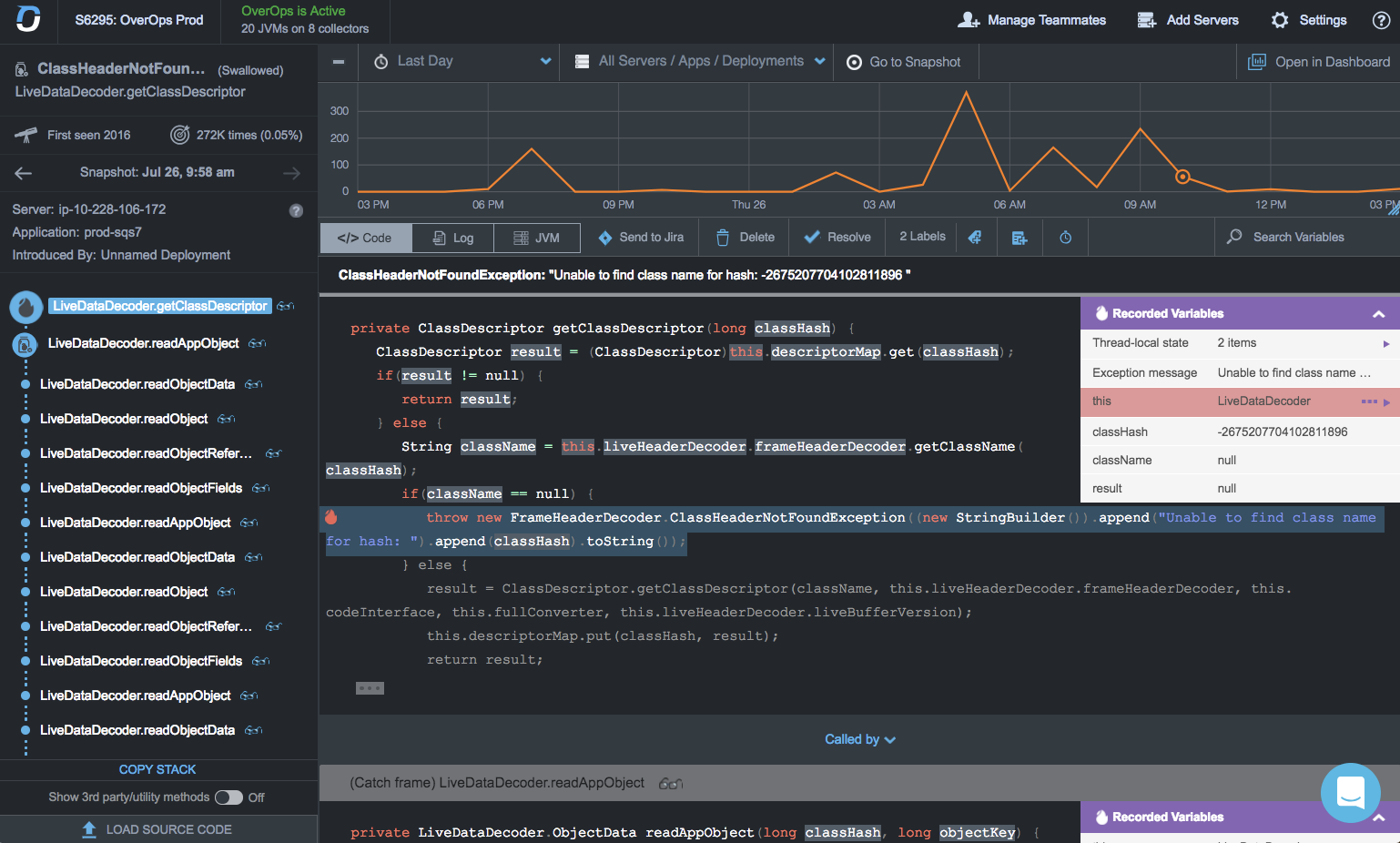
    OverOps has launched a namesake platform employing machine learning algorithms to capture data from an IT environment that identify potential issues before a DevOps team decides to promote an application into production.

    Company CTO Tal Weiss said the OverOps Platform is unique in that, rather than relying on log data, it combines static and dynamic analysis of code as it executes to detect issue. That data then can be accessed either via dashboards or shared with other tools via an open application programming interface (API). The dashboards included with the OverOps Platform are based on open source project Grafana software.

    That approach makes it possible to advance usage of artificial intelligence (AI) within IT operations without necessarily requiring that every tool in a DevOps pipeline be upgraded to include support for machine learning algorithms, Weiss said.

    OverOps also includes in the platform access to an AWS Lambda-based framework or separate on-premises serverless computing framework to enable DevOps teams to also create their own custom functions and workflows.

    Weiss said OverOps is designed to capture machine data about every error and exception at the moment they occur, including details such as the value of all variables across the execution stack, the frequency and failure rate of each error, the classification of new and reintroduced errors and the associated release numbers for each event. Log data is, by comparison, relatively shallow in that it is challenging to determine precise root cause analysis when trying to troubleshoot an issue, he said, noting the OverOps Platform offers visibility into the uncaught and swallowed exceptions that would otherwise be unavailable in log files.

    DevOps teams spend an inordinate amount of time analyzing log files in the hopes of discovering an anomaly. But as IT environments continue to scale out, the practicality of analyzing millions, possibly even billions, of log files becomes impractical. OverOps is making the case for employing machine learning algorithms to analyze events before the log file is even created, which eliminates the need to find some way to store log files before they can be analyzed.

    There’s naturally a lot of trepidation when it comes to anything to do with machine learning algorithms and other form of AI to manage IT. But as the complexity of IT environments continues to increase, it’s clear DevOps teams will need to rely more on AI to mange IT at levels of scale that were once considered unimaginable. For example, while microservices based on containers may accelerate the rate at which applications can be developed and updated, they also can introduce a phenomenal amount of operational complexity. Most DevOps professionals would rather automate as much as possible the manual labor associated with operations, especially if that leads to more certainty about the quality of the software being promoted into a production environment.

    Of course, while making use of machine learning algorithms to analyze code represents a step forward in terms of automation, it’s still a very long way from eliminating the need for DevOps teams altogether.

    — Mike Vizard

  • DevOps: Making the Development Cycle More Secure

    DevOps: Making the Development Cycle More Secure

    The promise of secure DevOps can be realized through security technologies such as dynamic authorization

    Fundamentally, DevOps is all about speed and agility. Customers expect companies to deliver and update applications at an accelerated pace and businesses must adopt modern technologies to meet customer expectations. With DevOps, organizations can implement a continuous development and deployment cycle to reap a multitude of benefits.

    Not only can organizations operate and evolve applications at high speeds with DevOps, but they also can do it more cost-effectively by automating all steps involved with software construction to avoid manually deploying code or configuration changes for each application.

    While speed and security are not necessarily enemies, if the security or access control technologies deployed are not in tune with a continuous deployment flow, the full promise of DevOps will not be realized. Waiting until the end of a development cycle to review security opens organizations up to security issues that could have been more easily resolved had security controls been implemented in the first place. Late discovery of security concerns also slows down the process—which is, of course, counter to some of DevOps’ primary objectives. To obtain the full potential of DevOps, organizations must ensure that security controls, such as externalized authorization, are an integral part of the security process from the very beginning.

    The Importance of Security Controls

    Security controls can proactively and consistently address different security aspects across the enterprise. A continuous integration/continuous deployment (CI/CD) cycle is a critical piece of the DevOps process; it implies that the application environment is potentially changing at any moment and possibly on a frequent basis. With constant changes to the production environment, it is critical to ensure that security controls are a part of this process—hence, the term “DevSecOps.”

    If security processes are not part of the overall process, then you risk the chance that security controls have not been vetted properly or consistently enforced with every new release or new application/API/microservices. However, the security controls must also conform to a DevOps approach, meaning they must fit into a model that is streamlined via automation to be deployed and managed in a manner much like modern-day applications.

    Conforming to a DevOps approach can have different perspectives. What we are focusing on here is to suggest that security and identity services should be deployed and managed in the same manner as your application code. Cloud-native capabilities, clearly defined interfaces, REST and JSON enabled interfaces and containerization are some of the characteristics that make security and identity services look and feel like the business applications and services.

    Integrating the Right Security Controls

    To realize the full benefits of DevOps, organizations must deploy security or identity management technologies that are in sync with a continuous deployment/integration cycle. If identity and access management (IAM) systems cannot be deployed and managed in the same manner as your APIs and microservices, then it makes the DevOps process more cumbersome and less streamlined.

    One technology to consider is externalized dynamic authorization delivered with attribute-based access control (ABAC). With dynamic authorization, users are authorized access to resources based on attributes. Authorization is then determined dynamically at runtime by evaluating centrally managed rules and policies.

    With dynamic authorization, you can automate policy changes the same way you can automate code changes. In addition, the ABAC service itself can be managed like a microservice, giving it the same flexibility, deployment and automation characteristics as your application microservices. Ultimately, the life cycle of redeploying the application and security components can be fully automated. Similarly, any changes to policies can also be part of the automation process. Furthermore, you can automate the activation of additional authorization servers for peak load conditions and remove them when less capacity is required.

    With an automated approach you can relieve pressure on developers, because they no longer will have to write security rules into their code. In addition, access rules are enforced consistently across applications, APIs, microservices and data resources, reducing the risk of overexposure to information and security breaches. This also means that your developers can spend their time on business functionality, not worrying about access security.

    Security technologies such as dynamic authorization are a critical part of the DevOps process. With dynamic authorization embedded directly into the development cycle, organizations can automatically address a wide variety of security aspects across the enterprise and ensure a continuous and secure development cycle.

    — Gerry Gebel

  • Eggplant Extends Scope of AI Applied to Application Testing

    Eggplant Extends Scope of AI Applied to Application Testing

    Reliance on machine learning algorithms and other forms of artificial intelligence (AI) to not just run application tests at scale  but actually construct them may be about to increase.

    The latest release of a Digital Automation Intelligence (DAI) Suite from Eggplant enhances the AI capabilities baked into the testing tool to include the capture and analysis of runtime performance data in a way that enables a testing process to “learn” where potential bottlenecks are hidden. Eggplant CTO Antony Edwards said DAI Suite will then suggest a series of tests designed to make it easier for developers to identify the root cause of the problem.

    The goal is to reduce reliance on humans to construct formulaic tests, which Edwards said often limits the rate at which applications can be deployed and updated.

    Eggplant’s DAI Suite

    Other new capabilities being added to DAI Suite include enhancements to Eggplant Functional, which now takes advantage of AI to discover the elements of a graphical user interface (GUI) to automatically populate the automation logic in an Eggplant AI application model. Eggplant Performance, a load and performance testing product, has been integrated with JMeter, an open source performance testing framework, to enable developers and testers to reuse JMeter assets as well as creating load test scripts. Additionally, new real-time key performance indicators (KPIs) can be employed to shorten the feedback loop between testing and analysis.

    Both Eggplant Manager and Eggplant Automation Cloud are now 10 times faster and provide higher levels of testing scalability, according to the company.

    Edwards noted that, in general, application testing is too formulaic. The end goal should be on identifying the best way to delight an end user rather than merely trying to check a compliance box. That requires being able to test more application use cases at scale without slowing down the overall application development life cycle. In fact, he said the biggest hindrance to DevOps today is a reliance on manual testing processes that are driving a $32 billion testing services sector.

    It’s now only a matter of time before AI is applied more broadly to application testing. As the number of applications being developed increases, the more challenging testing becomes. The longer it takes to conduct those tests the more tempted developers are to short-shrift the testing process altogether, believing whatever issues that might arise can be addressed quickly using agile development methodologies. However, not only are there more dependencies than ever between applications, but also end users are less forgiving. Many of them will not, for example, ever give a mobile application that initially disappoints them a second look. Compounding that pressure is increased reliance on digital business processes, where the quality of the underlying application experience directly correlates to the perception of the value of the corporate brand.

    Developers may not always have the highest regard for application testing. But as IT continues to evolve, chances are high there soon will be many more developers perfectly happy to take advantage of all the AI help they can get.

    — Mike Vizard