Category: Blogs

  • Orchestration Emerges as Crucial DevSecOps Enabler in 2021

    Orchestration Emerges as Crucial DevSecOps Enabler in 2021

    As DevSecOps best practices continue to evolve and mature in 2021, security orchestration is emerging as a cornerstone of a solid defense-in-depth approach to application security.

    DevSecOps assumes organizations will shift responsibility for application security further left toward developers. If this assumption is correct, then developers clearly need access to a range of code analysis tools to achieve that goal. The challenge they face is incorporating tools from multiple vendors within a DevSecOps workflow. At different points in the development process, it may make sense to employ a static application security tool (SAST) versus a dynamic application security tool (DAST) that stress-tests the application just before it is deployed.

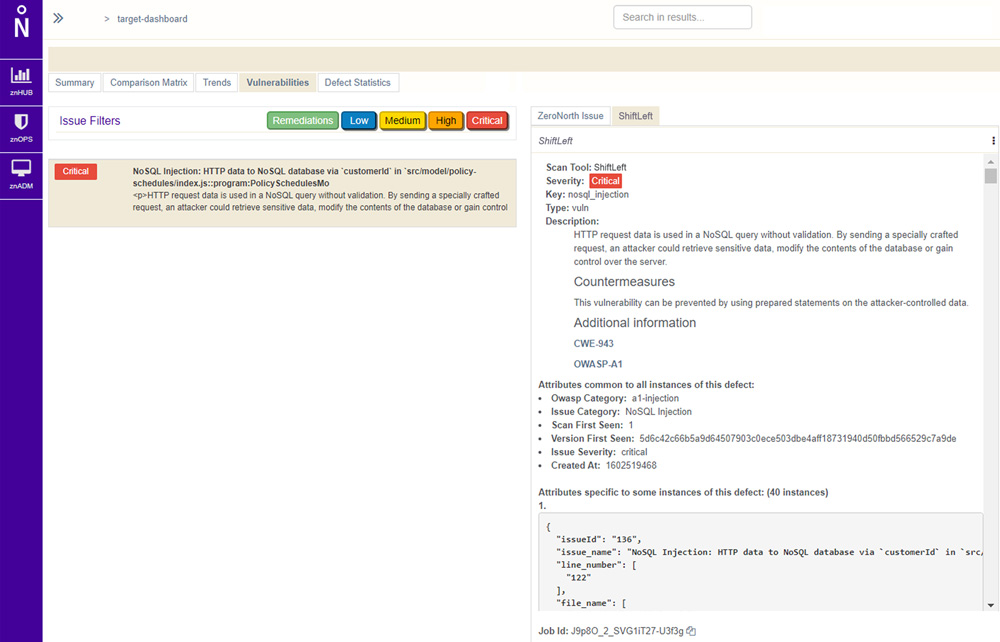
    Not surprisingly, providers of these tools are starting to align with security orchestration engine providers. ZeroNorth, for example, recently added ShiftLeft, a provider of a SAST tool, to the list of security tools that can be orchestrated via its software-as-a-service (SaaS) platform.

    Joanne Godfrey, director of product marketing for ZeroNorth, said organizations that have embraced DevSecOps are standardizing on two to three security tools. This mitigates the risk of becoming overly dependent on a single tool to discover vulnerabilities, Godfrey said. No single security tool can uncover every possible vulnerability in a timely manner, so DevOps teams must work to integrate multiple security tools into their workflows.

    Developers need tools capable of identifying vulnerabilities as they write code. They should also construct tests to proactively flag vulnerabilities before those are incorporated into a larger build. New vulnerabilities, however, are discovered all the time and it’s not uncommon for a container build deemed safe yesterday to suddenly need an update as quickly as possible. DevOps teams also need to secure the runtimes and hosts on which application builds are deployed, which typically requires more collaboration with the security teams usually responsible for managing platform security and DevSecOps.

    Despite this need to collaborate closely, the cultural divide between DevOps and cybersecurity teams is often wide. While there’s a lot of interest in DevSecOps best practices, developers don’t always prioritize application security when there are delivery deadlines to be met. This often results in security issues being addressed late in the application development process or, worse, addressed after the fact as part of an update delivered after an application has been deployed in a production environment.

    As application development accelerates, it’s imperative that the current divide between DevOps and security teams is bridged. Short-handed cybersecurity teams simply can’t keep pace with the rate at which applications are being built, deployed and updated. The need to shift more application security responsibility left toward developers increases daily.

    The challenge now is, rather than simply delivering an empty DevSecOps sermon, IT leaders need to practice what they preach and provide developers with the tools and processes required to secure their applications.

  • Every Millisecond Counts When Code-Testing Mobile Apps

    Every Millisecond Counts When Code-Testing Mobile Apps

    Whether a company is creating mobile applications for e-commerce, customer service or internally to boost employee productivity, the rapid development and effective deployment of mobile apps has become a business imperative.

    The global mobile application market was estimated at $106 billion in 2018 and is expected to hit $407 billion by 2026; an annual growth rate of 18.4%, according to Valuates Reports. Growth is being driven primarily by e-commerce, gaming and IoT, according to the report. “The advantage of having a mobile application, even for a small business, is that it improves brand recognition and offers a whole new level of e-commerce user experience, helps create customer loyalty, gathers feedback and helps [the business] stand out from the crowd,” the report says.

    Mobile App Developers Face UI Pressure

    Unfortunately, mobile application users are a tough crowd with zero tolerance for bugs or user interface (UI) issues. In fact, one-fourth of end users abandon mobile apps after their initial experience, according to the report. In this highly competitive environment, the ability to effectively test mobile apps prior to launch is critical, but many organizations face challenges when it comes to creating a suitable test environment.

    “Test environments and test data are the most cited challenges for core enterprise applications, as well as more fluid applications developed in short cycles, often deployed on smartphones, tablets or a web browser,” according to a recent Capgemini World Quality Report.

    The percentage of organizations struggling to keep pace with mobile app testing requirements is increasing, according to the report. Respondents cited a slew of issues, including not having the right processes, methods or tools to test mobile applications; not having in-house mobile testing experts; not having an in-house testing environment and/or not having enough physical devices on which to test.

    These challenges are pushing many organizations to cloud-based application testing platforms, which offer a way for developers to avoid common testing bottlenecks that slow mobile app deployment. The COVID-19 pandemic created another driver for adoption of cloud-based testing platforms, since mobile application testers lacked access to physical testing spaces where they could access and share an inventory of mobile devices.

    Accelerating Demand for Mobile Apps

    The shift to agile software development and continuous deployment methodologies is another factor ratcheting up pressure on developers to create new apps in weeks, or even days, without sacrificing quality.

    Unlike traditional apps, mobile applications need to be tested on dozens, sometimes hundreds of devices to ensure they run anywhere. The proliferation and ubiquity of mobile devices means developers need to test on more than 350 devices just to cover 90% of the mobile device market. In a present-day enterprise BYOD scenario, for example, each employee might use three to five different devices – a number that’s only expected to increase as wearables and IoT gain mainstream adoption. Development teams must prove the app is hardware agnostic and functions as expected; otherwise, imagine the fallout if the company launched a BYOD app that didn’t run properly on the CEO’s smartphone, for instance.

    This is where the value of cloud-based application testing platforms becomes clear. Cloud-based app testing platforms enable developers to manually test applications on an unlimited number of mobile devices, and to perform crucial measurements and tests of functionality like screen rendering. Mobile applications must seamlessly render in the tester’s browser without lag or latency to avoid poor user experience.

    Beyond that, there are time considerations to think about. A large enterprise organization could have hundreds of testers working around the clock to validate an application, and a slowdown of even a few milliseconds per screen rendering could cost  thousands of dollars a day in lost productivity. That’s why every millisecond matters.

    Selecting a Mobile App Testing Vendor

    Selecting a vendor that can deliver a cloud-based testing platform without lag or delay is critical, but there are other factors to consider, as well.

    Some solutions use emulators or simulators to test application performance, but nothing can replace the real thing. Look for a vendor with the ability to perform tests on real, physical devices. Since most organizations operate in a hybrid world, look for a vendor that gives customers the flexibility to combine both cloud-based and on-premises testing.

    Automation is also a major factor to consider in vendor selection. According to one survey of more than 350 mobile developers and software testers, 55% said automation would improve software quality, but the majority of respondents, 76%, are automating fewer than half of all software tests.

    Look for a vendor with the capability to take an initial manual test and automatically create scripts for all of the devices under test, without requiring developers to write new code. Test automation scripts can be created and executed exponentially faster than manual efforts, which enables businesses to get to market faster with better quality mobile apps.

  • Unlocking Your DevOps Automation Mindset

    Unlocking Your DevOps Automation Mindset

    In the new digital normal, where remote working has upended conventional software development cycles, the role of DevOps is central. Many enterprises have an accelerated digital agenda, but are often underinvested in rebooting DevOps for several reasons, including a lack of experience and insight into how it can help businesses recover from the new challenges created by the pandemic. This can be a strategic mistake, as real acceleration is driven at the developer level. Here are three ways DevOps automation can help enterprises overcome challenges in product life cycles and excel during this time of flux.

    DevOps Can Accelerate Product Life Cycles to Meet Demand

    In 2015, Adidas released a new line of Yeezy sneakers, which became an instant hit. The company quickly sold more than 2,600 shoes every five seconds. But Adidas’ IT infrastructure could not keep up with demand and crashed, and software developers were unable to find a quick fix.

    Impacted by customer and employee dissatisfaction, Adidas needed a solution to recover from the chaos and prevent future challenges. That’s when the company embraced cloud-native architecture, Kubernetes and DevOps. Today, Adidas’s IT infrastructure has accelerated its software product delivery cycle from once every six weeks to five times a day, while building a more resilient system.

    It is not that Adidas wasn’t aware of DevOps in 2015. The company hadn’t yet invested in educating its teams about the DevOps automation mindset, nor had it made DevOps automation a priority. Adidas needed a shift in culture, one that it brought about by rebooting its DevOps practice. This DevOps success story underscores how an accelerating go-to-market demand needs to be supported by underlying structural and systemic change.

    Today, as the pandemic continues to disrupt software development workflows, I urge enterprises to use this opportunity to reboot DevOps and gain speed, agility and resilience. DevOps can change the mechanics of dependencies between development and operations to reduce friction. By leveraging extreme programming and design thinking in conjunction with DevOps, enterprises can accelerate every segment of the software development life cycle independently, while maintaining resilience and adequate levels of governance. It provides the opportunity to invest in security-as-code (aka DevSecOps) so it is sustainable and scales easily. This also enables enterprises to reimagine software architecture and governance by implementing advanced digital architectures.

    For enterprises on the path to such transformation, there are four key DevOps Research and Assessments (DORA) metrics indicative of their DevOps practice’s success. These are: lead time for changes, deployment frequency, time to restore service and change failure rate. The first two of these could be seen as an “offensive strategy” and the latter two as a “defensive strategy” to measure speed. This means to accelerate delivery, organizations must introduce a faster lead time for changes to production, increase the frequency of new software deployment, shorten the time it takes to restore services to production and reduce the change failure rate to production. As you can see, Adidas needed improvements in all four of these areas to successfully reinvent its performance.

    DevOps Automation Can Reduce Complexities in the Software Development Process

    It took more than four years for BMW, the premium automobile manufacturer, to move from a waterfall software development methodology to a 100% agile, DevOps methodology. Today, 20,000 employees in the company use an agile software development toolchain, allowing them to streamline and synchronize their end-to-end software development. BMW has reduced its time-to-market by 25%, minimize incidents by 30% and gain a 360-degree view of IT.

    Today, enterprises are shifting from waterfall to agile weekly and daily releases. My belief is that every enterprise needs to adopt a 100% agile methodology, just like BMW did. Testing and continuous improvement/continuous development (CI/CD) is key for deploying code in small chunks and reducing merge issues and refactor efforts. Ultimately, this increases developer velocity and decreases lead time.

    The shift from a partial to a 100% agile model requires more than simply senior leadership’s resolve. It needs a dedicated pool of certified DevOps automation consultants, coaches and subject matter experts with experience in SAFE, LESS, Scrum and Kanban frameworks. Best-in-class enterprises and OSS toolchains that cater to DevSecOps, service meshes and omnichannel apps are essential. Simultaneously, agile-based delivery coaching, audits and continuous support to existing and new delivery teams are a must.

    While DORA metrics can serve as a good measure of an enterprise’s DevOps performance, businesses will need tools to assess DevOps maturity, improve developer productivity and provide specific recommendations for improvement. Data will play an important role in decision making and aid every developer’s performance, more than at any time in the past.

    Automation Makes Room for New Product Development

    Many software development teams struggle to keep up with the onslaught of new technologies entering the market. Take, for instance, artificial intelligence (AI); the number of applications built using AI is rapidly increasing. However, it continues to be new to many development teams. A similar story unfolds with Internet of Things (IoT), which creates complex systems with information pouring in from thousands of sensors and appliances every second with multiple software and hardware configurations. Testing these devices, configurations and performance cannot be done manually. This is where a DevOps automation mindset can help. It can ensure quality assurance processes have considerable test coverage across these different technologies and configurations by introducing automation.

    Newer technologies, such as Kubernetes, serverless apps, 5G, edge and cloud computing are increasingly used in product development, making DevOps even more important today. DevOps also plays a key role in transforming the developer experience. Today, developers need the foundation of agility, decision-making power and speed to deliver solutions on-demand. To facilitate this, enterprises must automate the management of development, testing, quality assurance and IT operations to successfully build continuous delivery processes. Further, given COVID-19 and the shift to working remotely, DevOps can help product teams collaborate remotely, leveraging well-established platforms available with any of the major cloud providers.

    As enterprises accelerate and adapt to work in this new normal, leveraging both the cloud and a remote workforce, a DevOps Automation mindset can speed up this transition. Enterprises must assess performance and enhance capability at the developer level to truly accelerate the journey to digital transformation.

  • AIOps: Enabling the Customer Experience Evolution

    AIOps: Enabling the Customer Experience Evolution

    How can IT organizations make sure they’re equipped to resolve operational issues quickly and drive better business outcomes? That’s where artificial intelligence for IT operations, or AIOps, comes in. With the increasingly vast amounts of data generated by infrastructure and business applications, and teams often working in disconnected silos, managing and improving operations through automation — including monitoring and service desk processes — is essential.

    AIOps, a term coined by Gartner Research in 2016, refers to the use of analytics and machine learning to aggregate and leverage historical data from a variety of IT operations tools. AIOps platforms can react to issues in real-time, providing intelligent insights that help teams continuously improve core IT functions and prevent future errors.

    Most IT operations, particularly since the coronavirus pandemic, have migrated to online processes (for example, performance monitoring) that gather ever-increasing amounts of data. At the same time, organizations are under mounting pressure to immediately address any infrastructure problems that arise. In a nutshell, the demands and requirements of today’s IT environments far exceed humans’ abilities to identify, act on information and react to issues at scale and speed. To ensure success, these processes require automation.

    AIOps platforms offer IT organizations this essential operational agility. By moving data out of silos, increasing scalability and speed, IT operations can become more agile – this is particularly beneficial to complex global service and logistics operations with massive data sets.

    In addition, AIOps platforms lower costs by reducing dependence on multiple on-premise solutions, as well as eliminating outsourcing costs. The technology allows organizations to scale infrastructure seamlessly, helping the entire service delivery ecosystem run more effectively and efficiently, and thus improving the customer experience. After all, disruptions in manufacturing production or distribution centers could be devastating, both for customer service and the bottom line. By intelligently automating operations, organizations can boost accuracy, predictability and ultimately, customer retention.

    How to Take Advantage of AIOps

    At the heart of an AIOps platform is big data. That means there is a significant amount of preparation necessary to put the pieces of the AIOps puzzle together so your organization can best take advantage of the platform. Here are the most important steps:

    Collect extensive and diverse data. Data serves as the foundation of implementing a successful AIOps effort, so it is essential to understand how data can be brought together and used effectively. IT organizations should collect data from various sources, including on-premise systems, cloud platforms and applications. Ultimately, the data should be stored in a centralized data lake. An AIOps platform does just that, enabling better decision-making and more meaningful analysis that is quick and thorough, thanks to the use of AI.

    Segregate data into meaningful categories. As data is ingested, it needs to be restructured based on the organization’s operational needs. This is important both for historical data as well as real-time ingested data. Depending on the AIOps use case, you should define categories that align with business rules. For example, for a pharmaceutical device manufacturing company, meaningful categories could include equipment health data, device efficiency data and environmental factors.

    Apply AIOps machine learning to initial big data test cases. Any transformation initiative benefits from starting small. The same is true for AIOps efforts: begin by capturing knowledge, applying machine learning capabilities to limited test cases and iterating at greater scale from there.

    Improve prediction accuracy with measurement and feedback. Once the AIOps platform knows the data pattern(s), it can intelligently predict what comes next, including extrapolation from real-time data. The organization can test and measure; supplying feedback to the model to improve predictions. The AIOps platform can then apply logic to the segregated data and design to define the next, best action. AIOps platforms use historical data, as well as learning from new data, to continuously improve and achieve more accurate decision-making. Ultimately, AIOps is about building a continuous feedback and improvement cycle.

    The Journey to AIOps platforms

    Gartner predicts that large enterprises’ use of AIOps, and other digital experience monitoring tools, to monitor applications and infrastructure will rise from 5% in 2018 to 30% in 2023. That trend is only escalating post-pandemic, as the IT landscape migrates even more to online services and operations. Analyzing data, and intelligently automating operations based on that data, will help organizations achieve greater success.

    Finally, it’s important to understand that it doesn’t take a lot of work to successfully enable AIOps. IT organizations already have the data and the means to extract it. A successful AIOps initiative simply requires the right AIOps platform, an experienced development partner and a defined use case based on a desired business benefit.

  • Reserved.ai Applies Machine Learning to Rein in Cloud Costs

    Reserved.ai Applies Machine Learning to Rein in Cloud Costs

    Reserved.ai has added a new artificial intelligence (AI) tool to more accurately predict cloud computing workloads and rein in cloud spending. The company says its Purchase Planner tool uses machine learning to optimize cloud computing workloads by automatically purchasing cloud reserve instances based on the forecasts it generates.

    Purchase Planner leverages the machine learning algorithms Reserved.ai created to monitor and forecast when organizations should optimally reserve instances on a public cloud. The forecasts are based on customers’ current application workload requirements, as well as what the AI platform estimates overall demand for reserved instances is likely to be in the months ahead.

    The Purchase Planner tool is currently available on Amazon Web Services (AWS), and there is also a public beta edition available for Microsoft Azure clouds with support for Google Cloud Platform (GCP) planned for this quarter.

    Reserved.ai CEO Aran Khanna said Purchase Planner enables Reserved.ai to automatically purchase reserved instances on the AWS cloud. If, for any reason, those reserved instances are not required, Khanna said Reserved.ai will buy them back from customers.

    Given thriving demand for reserved instances on public cloud, Khanna said reselling those instances minimizes any financial risk for the company.

    Historically, many IT organizations have over-provisioned their cloud resources to mitigate the cost of having to purchase cloud instances on demand. In the wake of the economic downturn brought on by the COVID-19 pandemic, Khanna said more IT teams are attempting to optimize their cloud costs by reducing the number of reserved cloud instances they anticipate they’ll need based on their current cloud infrastructure consumption. Achieving that goal requires a massive amount of guesswork that can be more accurately calculated by machine learning algorithms, Khanna said.

    Khanna said the Reserved.ai platform provides the added benefit of requiring only 15 minutes to install, with a minimal infrastructure footprint required.

    Capacity optimization as an IT discipline has been around for decades. In the age of the cloud, however, IT organizations lost visibility into capacity utilization and cloud computing costs as developers spun up virtual machines. Now, finance teams require IT teams to, at the very least, maximize the number of workloads run while more accurately predicting cloud costs. Any actual reduction in cloud spending is a secondary benefit. The challenge today is that most cloud optimization efforts rely on the manual efforts of IT teams, and often, they’re unable to keep pace with the rapid rate of change in the cloud.

    Understanding the true cost of cloud computing will be more critical in the months ahead, as more organizations look to compare the cost of running one type of workload on the cloud versus another. Gaining visibility into those costs today will only be feasible when IT teams can rely on AI platforms capable of analyzing those costs in near real time. Otherwise, by the time an IT team becomes aware of an opportunity to reduce costs, the opportunity has already been seized by another organization.

    Regardless of how IT teams rein in cloud costs in the months ahead, the goal should be to maximize the number of workloads that can run without increasing the budget. After all, most organizations today are focused on maximizing their existing cloud investments to the fullest extent possible.

  • AWS Looks to Meld MLOps and DevOps

    AWS Looks to Meld MLOps and DevOps

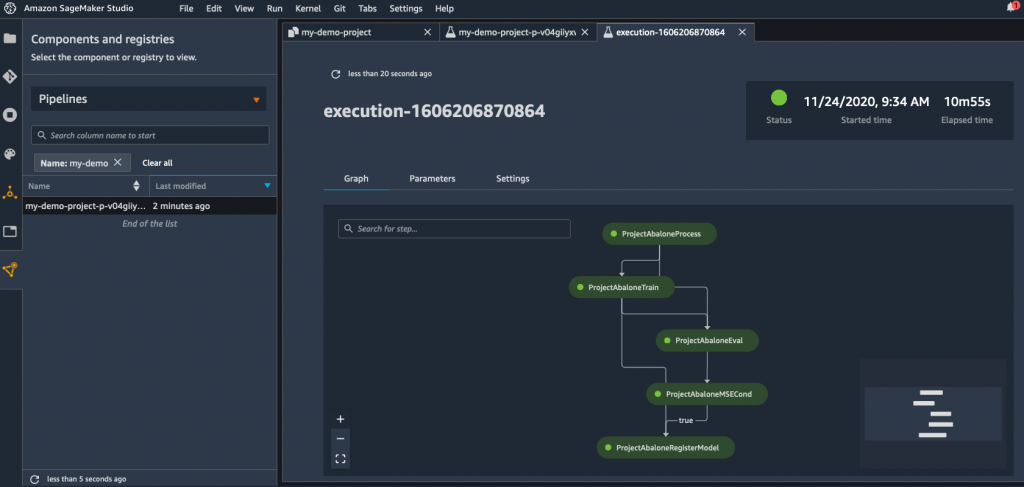
    The rate at which machine learning operations (MLOps) and DevOps best practices are converging is poised for rapid acceleration in 2021. At the recent online AWS re:Invent conference, Amazon Web Services (AWS) announced it is adding a bevy of capabilities to Amazon SageMaker, a managed MLOps service, that includes a continuous integration/continuous delivery (CI/CD) service for MLOps it is calling Amazon SageMaker Pipelines.

    Amazon SageMaker Pipelines enables developers to define a machine learning workflow that encompasses everything from loading data to training configuration; algorithm set up and debugging algorithms. Rather than having to acquire and deploy a standalone CI/CD platform for building artificial intelligence (AI) models, AWS is making the case for using a managed service that enables developers to manage workflows from within the Amazon SageMaker Studio tools it already provides for building AI models.

    Workflows can be shared and reused between teams to either re-create a model or can serve as a launch point from which to create another AI model.

    Amazon SageMaker Pipelines also logs each event in Amazon SageMaker Experiments, which enables IT teams to organize and track machine learning experiments and versions of AI models. In addition, a Deep Profiling for Amazon SageMaker Debugger now makes it possible for developers to more quickly train AI models by automatically monitoring system resource utilization and generating alerts whenever bottlenecks are detected.

    AWS has also added a Distributed Training capability to Amazon SageMaker that it claims makes it possible to train large, complex deep learning models up to two times faster than current AWS approaches by enabling data and AI parallelism across its cloud services.

    The cloud services provider has also added an Amazon SageMaker Edge Manager service that enables developers to optimize, secure, monitor and maintain machine learning models deployed on fleets of edge computing devices. The Amazon SageMaker JumpStart service enables developers to search for AI models, algorithms and sample notebooks.

    Finally, AWS has added additional data preparation tools that come pre-configured with support of AWS and third-party data sources, a repository for storing AI models, a preview of additional tools for automatically matching AI models to data sources such as the Amazon RedShift data lake, the ability to match an AI model to a graph database and a tool that detects bias within AI models.

    Bratin Saha, vice president and general manager for machine learning services at AWS, said as usage of AI models increases, the scope of these initiatives naturally lends itself more to cloud platforms. Many applications are starting to employ multiple classes of AI models in combination with each other; Saha noted this requires massive amounts of data and compute resources to train those models that are only readily available in the cloud.

    Overall, AWS claims it already has more than 100,000 customers building AI applications on its platform using various tools and processor classes. AWS said in 2021 it will add G4ad Graphics Processing Unit (GPU) instances based on processors from AMD and revealed its intention to build its own GPUs next year. The company also plans to add an Amazon EC2 instance based on up to eight of Intel’s Habana GAUDI accelerators to deliver up to 40% better price-performance than current GPU-based EC2 instances.

    At the same time, AWS has extended its alliance with NVIDIA to make software modules for building AI models available on the AWS Marketplace.

    In effect, Saha said AWS is inviting IT teams to either build AI models on AWS or bring their own AI models, encapsulated in containers, to its platform.

    AWS is clearly aiming to dominate AI, regardless of how such capabilities are infused into enterprise applications. In fact, in many cases, AWS will automatically construct the AI model for customers, or simply return the results generated by an AI model via an application programming interface (API). It will be up to each organization to determine when building their own AI model makes the most sense, and to what degree they want to rely on AWS to automate the deployment process.

    What’s certain is that many of the same DevOps principles—created long before AI models ever came along—will still be relevant as the applications that use those models are continuously updated for years to come.

  • Rapid Strategic SRE Assessments Accelerate IT Transformations

    Rapid Strategic SRE Assessments Accelerate IT Transformations

    A Strategic SRE Assessment is critical in helping organizations successfully transform traditional IT operations to SRE

    Site reliability engineering (SRE) is rapidly becoming more important to organizations that need to scale IT operations while maintaining or improving reliability and security, and to modernize operations to match the growth of DevOps in the organization. Without sufficiently thorough consideration given to best practices for people, processes and technologies, the transformation from traditional IT operations to SRE is unlikely to succeed. Despite challenges, the transformation to SRE is compelling because it provides an opportunity to reduce total operations costs and improve security and reliability while scaling services.

    To be successful, IT leaders need a comprehensive understanding of SRE best practices and need a well-engineered, yet affordable strategy and road map that effectively implements best practices and balances the many aspects needed to transform people, proces and technology. A Strategic SRE Assessment approach, based on best practices, is a key tool to help leaders understand, obtain the strategy and create a road map that will successfully transform traditional IT operations to SRE.

    There is no “standard” SRE assessment approach in the industry. This article enumerates a practical and proven Strategic SRE Assessment approach. The heart of the Strategic SRE Assessment approach is a survey of SRE best practices categorized under nine pillars: Culture, Work Sharing, Toil Reduction, SLAs/SLOs/SLIs, Measurements, Anti-Fragility, Deployments, Performance Management and Incidents Management. The survey is used to collect importance and capability scores for each of the SRE practices. As part of the assessment, a survey determines the current state and preferences of SRE practices for an organization for each of the nine SRE pillars.

    The following are examples of best practices for each pillar that are part of the Strategic SRE assessment survey:

    Culture – Leaders need to understand and sponsor a clear vision for SRE.

    • The culture embraces working practices to proactively shifts left the “Wisdom of Production.”
    • The culture encourages learning from failure and continuous improvement.
    • The SRE role is clearly defined and understood and SREs are considered a vital part of the organization.
    • Rules of engagement and principles for how SRE teams interact with their environment are codified—not only the production environment but also the product development teams, testing teams, users and so on. Those rules and work practices help to maintain SRE focus on engineering work as opposed to operations work.

    Work Sharing – Successful SRE requires that work be shared between SRE teams and development.

    • SRE teams are composed of software developers with strong operations knowledge or IT operations people with strong software development skills.
    • SRE workloads are managed to a budget with typically 50% or less spent on operations work.
    • SRE on-call work budgets are typically 25% or less. Developers share on-call work.
    • Technical debt is worked in small increments.

    Toil Reduction – SREs work to reduce non-value-added work through automation and standards.

    • Work standardization and automation—of both tools and processes—is employed to improve scalability, repeatability and other important goals.
    • Work standardization is used to reduce time spent on non-value-added work.
    • Automation is used to reduce time spent on non-value-added work.

    SLAs/SLOs/SLIs – Service level metrics, based on user perspectives, combined with error budget policies, are critical to managing flow and reliability.

    • SLOs are selected to measure availability, performance and other metrics in terms that matter to an end user.
    • An error budget (= 1-availability) internal service level objective (SLO) is established for each service. SLOs are set to be more stringent than external service level agreements (SLAs) promised to customers. The SLO budget considers what level users will accept, alternatives for users who are dissatisfied, and usage patterns of the product at different availability levels.
    • An error budget policy prescribes consequences if an error budget is spent. For example, the service freezes changes (except urgent security and bug fixes addressing any cause of the increased errors) until either the service has earned back room in the budget or the count period resets.

    Measurements – Smart monitoring implements observability to accelerate response times to incidents.

    • Monitoring solutions are designed to produce service level indicators (SLIs) from which SLOs can be calculated automatically.
    • SLIs do not require a human to interpret an alerting domain. Instead, software observability algorithms do the interpreting, and humans are notified only when they need to act.
    • Monitoring systems use telemetry and instrumentation to ensure the data being monitored is accurate, relevant and available in real-time.

    Anti-Fragility – Systems of people, processes and technologies are continuously tested and improved to assure they are resilient enough to serve applications as they scale.

    • Anti-fragility strategies are practiced to proactively assure the resilience of applications, infrastructures and pipeline services.
    • Fire drills are periodically conducted to proactively determine weaknesses in systems of people, processes and technologies that could potentially impact SLOs.
    • Chaos monkey or equivalent infrastructure testing strategies are used to proactively determine weaknesses in infrastructure systems that could potentially impact SLOs.
    • Security testing and DevSecOps practices reduce the risk of security vulnerabilities.

    Deployments – Deployment strategies reduce the risk of deployment failures.

    • Non-emergency deployments use progressive rollouts in which changes are applied to small fractions of traffic and capacity at one time. If unexpected behavior is detected, the changes are rolled back first and diagnosed afterward to minimize mean time to recovery.
    • Automation is used to implementing progressive rollouts, detect problems and implement rollback changes safely when problems arise, because outages are primarily caused by changes in a live system.
    • Deployment strategies such as blue-green, feature flag rollouts, A/B testing and canary rollouts are used to reduce the blast radius of failed deployments.

    Performance Monitoring – Proactive testing and monitoring ensure applications and infrastructures have the capacity necessary to flex and scale when needed.

    • The SRE team is responsible for provisioning and monitoring utilization because utilization is a function of how a given service works and how it is provisioned.
    • The SRE team is responsible for capacity planning and provisioning. Regular load testing of the system is used to correlate raw capacity (servers, disks and so on) to service capacity.
    • Provision to handle a simultaneous planned and unplanned outage without making the user experience unacceptable. This results in an “N + 2” configuration, in which peak traffic can be handled by N instances (possibly in degraded mode) while two instances are unavailable.

    Incident Management – Incidents are managed in an efficient, blameless manner with a goal to use incidents to improve responses.

    • Playbooks record the best practices for human response actions because playbooks produce roughly a 3x improvement in mean time to recovery.
    • Emergency response performance is measured using mean time to repair (MTTR) metrics instead of mean time to failure (MTTF) because the most relevant metric in evaluating the effectiveness of emergency response is how quickly the response team can bring the system back to health—that is, the MTTR.
    • Postmortems are blameless and focus on process and technology, not people.
    • Postmortems are conducted for significant incidents regardless of whether they resulted in a page; postmortems that did not trigger a page are even more valuable, as they likely point to clear monitoring gaps. Find all root causes of the event and assign actions to correct the problem or improve how it is addressed next time.

    SRE Assessment Surveys Are Not Enough

    The survey alone is an essential tool to collect information about the current state and preferences for each of the SRE practices. However, this is only part of the comprehensive Strategic SRE Assessment approach.

    The Strategic SRE Assessment approach starts with workshops to get alignment between leaders and teams regarding big-picture goals prior to conducting the survey. This is necessary so that everyone who answers the survey has a common perspective and can better respond with considered views of importance and capability scores for each of the practices. The results of the survey include an analysis that points out specific pillars and individual practices that have a high gap score in which the practices are scored as important but not yet practiced well. The high-priority gaps are then used to organize a value-stream map working session, that is designed to find the highest priority bottlenecks in people, processes and technology bottlenecks in the value steam, relative to the organization’s goals and gaps. With the goals, gaps, and data from the value stream map in hand, the next step is to formulate an implementation road map that directly addresses the goals, gaps and bottlenecks in the value stream.

    The final step is to obtain strategic alignment of the big-picture plan by reviewing the findings and road map with the leadership and implementation teams. This entire Strategic SRE Assessment approach, from goal alignment through surveys, value stream mapping, road map creation and strategic alignment, varies depending on several factors such as the size of the organization, number of applications and size of the deployment domains to be included in the assessment.

    A Rapid Strategic SRE Assessment for a sample set of model applications typically is conducted in 21 days. More complex Strategic SRE assessments involving many applications may take up to 90 days.

    In most cases the Rapid Strategic SRE Assessment is the best place to start. Most often, it is not a good idea and is too expensive to “boil the ocean” and make changes across all applications and deployment domains at once. By starting with a small number of model applications, it is easier to implement, measure and demonstrate success and use the results at each step to justify ongoing investments needed to complete the transformation across the organization. Another advantage of the Rapid Strategic SRE Assessment is that it is a quick and affordable approach to check-point progress as SRE is implemented progressively across applications and deployment domains.

    Key Takeaways for SRE Transformation Leaders

    SRE offers immense value for modernizing and scaling IT operations reliably and securely and to complement DevOps transformation. Adherence to SRE best practices is essential to reduce risk and assure security as the transformation is implemented.

    Each organization is different and has different requirements and priorities for its applications and deployment domains. The specific SRE practices that are the highest priority vary according to the priorities of applications and deployment domains. The Rapid Strategic SRE assessment approach, based on nine pillars of SRE best practices, is quick, effective and affordable.

    The Rapid Strategic SRE Assessment is a preferred approach to kick-start the SRE transformation. This approach is also a preferred and affordable tool to reassess the direction as SRE is implemented progressively across the organization.

    Summary

    There is no “standard” SRE assessment approach in the industry. The Rapid Strategic SRE Assessment approach described in this article has been tried and proven with large and smaller organizations. The author invites your comments regarding this approach and the SRE best practices.

  • Legacy Systems: Should They Stay or Should They Go?

    Legacy Systems: Should They Stay or Should They Go?

    Digital transformation requires new technologies. But does that mean legacy systems should be replaced?

    Survey after survey has shown that IT and business leaders have had to drastically rethink priorities, strategies and spending in the wake of the global pandemic. A survey our company conducted last October showed that technology spending hasn’t taken a terrible hit—in fact, 60% of IT leaders reported they had either significantly or moderately increased their IT budgets in the last six months. Other research from 2020 mirrors those findings.

    Yet, there are significant challenges. Three top ones reported in the OpsRamp survey include business and IT alignment, available technology solutions and economic uncertainty. Executives want to move forward, yet they need to be cautious with budgets and develop strategies that can flex with the unpredictability of 2021.

    And this is how we arrive at the topic of legacy systems. As part of the reprioritization effort, IT leaders are wise to take a hard look at their technology portfolio and determine which systems should go and which should stay—factoring in economics, business needs, customer demands and change management requirements. Progressive IT leaders know that if they don’t adopt the right technology at the right time, continued business success (and even survival) is at risk.

    Defining Legacy Systems

    We tend to associate a legacy system with a technology that’s been around a long time, yet it could also be a three-year-old system. Legacy systems can be a burden when the UI and the UX look dated, are slow or difficult to upgrade and integrate with other applications, and costly to maintain. Many legacy systems were built for on-premises environments and don’t migrate easily to the cloud. Finally, because some systems are built on languages and technologies that are 10 to 20 years old, IT organizations struggle to find people with the requisite skills to maintain them. These are all red flags.

    On the other hand, there are valid reasons why enterprises maintain legacy systems:

    • The technology technically isn’t broken and satisfies a core business process, industry requirement or customer need.
    • The system integrates with many other applications and core processes, making it difficult to replace.
    • Longstanding vendor relationships make it politically or culturally challenging to abandon.
    • Influential stakeholders love it, despite any negative impact on customers and revenues.

    How to Evaluate a Change

    Even if a system still currently meets your business need, it’s important to understand what your competition is doing and what your customers are asking for to ensure you’ve got a future-proof strategy. Consider Slack, Amazon, Google and Netflix: These innovators have redefined what experiences software can provide and thereby have changed expectations for all users regardless of the sector.

    In IT operations, if a customer is receiving fewer IT alerts due to filtering and correlation capabilities, that’s a good thing. But does the software proactively manage those alerts, filtering out the high-priority items to the right person and suggesting the best next steps for a quick resolution before users are affected?  From the executive and business view, you need to demonstrate efficiencies and cost savings from moving to a new solution as well as revenue-generating impacts.

    Mitigating Snafus With Legacy System Replacements

    When you decide it’s time to make the big move and replace a major system, consider the top factors that can ruin these projects or needlessly delay the time to value:

    • Gaps in knowledge and mindset. Look at what happened when every CIO got a mandate from the CEO to move operations to the cloud. Understanding how the cloud works and how to manage cloud-based assets was a struggle, so most early cloud migrations were simply lift-and-shift. That led to a common scenario in which not only did companies not achieve the savings they expected, but also the environment became even more expensive to support than their on-premises infrastructure.
    • New skills. In lockstep with the gap in strategic understanding of new technologies is the fact that it’s difficult to acquire or build the associated new skills fast enough to keep pace with changes in the market. This is why still today, more than 10 years after the advent of public cloud, there are significant talent gaps in the areas of cloud architecture, cloud optimization and cloud-native development.
    • Cultural changes. People don’t like change, especially if they’re not unhappy with the status quo. IT leaders are improving here, but there’s still ample work in helping convey the reason for change and the benefits to designing a frictionless path to adoption.

    The 3-step Plan to Modernization

    There’s nothing especially new about how to avoid a marred enterprise software implementation, except for the fact that tolerance levels are at an all-time low. Executives don’t want to see one-year rollouts and two-year time-to-value cycles anymore. Here’s how to simplify and speed up the benefits when moving to new platforms:

    1. Start with a small, powerful punch. You can gain momentum with a small project that doesn’t commit the organization to a gargantuan, tangled overhaul. Pick a project that’s not going to stress out your team and has a specific, predictable ROI. Truth is, people love innovation and want to be part of the “next new thing” as long as it doesn’t require too much pain all at once. Make sure to socialize the outcomes across the organization and explain how you did it.
    2. Make the leaders your champions. If your executive team doesn’t feel motivated to promote a new system internally, you might want to investigate whether it’s the right solution. Be sure to get that buy-in before you sign any vendor contract. Communication style matters. Who on the executive team can really create excitement around the future and effectively demonstrate the need for change? You want a salesperson personality for this job.
    3. Foster an evangelist committee. In the trenches, you also need a team of people who understand how to use the new solution and are eager to share their tips. I’ve seen leaders take on a full internal campaign prior to a new system being launched, from rebranding and relabeling an enterprise software package, developing an internal PR strategy around it and creating really effective tools such as short videos to help users get up to speed.

    Balancing Continual Innovation and Lower Complexity

    A legacy system overhaul is not for the faint of heart. You must carefully consider whether your organization is ready to take on transformational change or if an incremental change, such as customization or a new integration to your existing platform, is enough for now. But if incremental change is just going to help you survive another day, it can make the necessary change you really need much more painful later on.