Category: Blogs

  • Low-Code Opens API Integration Potential for Citizen Developers

    Low-Code Opens API Integration Potential for Citizen Developers

    APIs have an accessibility problem. Could a low-code API approach make them more inclusive and accessible for citizen developers?

    Most software today integrates with third-party SaaS. TomTom for geolocation. Stripe for payment. Twilio for SMS. Kairos for facial recognition. AWS for NLP … the list goes on. Whatever function you’re looking for, there’s probably an API for that.

    These specialized utilities help software teams avoid reinventing the wheel for things outside of their core competency. They’re standardized, too — most services are programmable following REST or GraphQL guidelines. Serving integrations over HTTP aids in decoupling the business logic from the client interface. Furthermore, OpenAPI Specification, now part of the Linux Foundation, has risen as a standard description format, making APIs more defined and interoperable.

    However, for all this progress, there’s still friction in the integration process, even for seasoned developers. Each API is a bit unique. It takes time to read through the documentation to authenticate and discover methods, parameters and accepted fields. It requires effort to test requests within Postman, decipher error messages and set up calls within your unique environment. On top of all this, downtime and breaking changes are legitimate concerns for over-the-wire dependencies.

    APIs require effort and maintenance, and just integrating third-party APIs alone won’t build you a fully functional application. Yet, organizations find themselves scrambling to find and hire engineers, and increasingly the onus is on non-tech folks to create new digital workflows. Naturally, companies are currently searching for even more low-code solutions.

    So, what’s the glue holding together API products? How can we better connect APIs to the software applications we’re already building and allow citizen developers to reap the benefits?

    My theory: If low-code platforms decrease the API integration hurdle, more problem-solvers can stitch together business utilities to create more advanced internal applications. Making third-party APIs more inclusive for citizen developers could boost the API economy at large and enable creative solutions to flourish throughout enterprises.

    The Need for Low-Code API Integration

    Perhaps the best way to demonstrate the need for low-code is to scare you with some code. Let’s say you want your application to initiate a direct deposit into a bank account.

    You don’t want to build a financial service from scratch, so you turn to Stripe API. You set up an account, grab a key, and dig in to the ‘Getting Started’ materials. You peruse their comprehensive documentation, and find out how to create a payout.

    The docs demonstrate a sample HTTP curl request for creating a payout. Other parameters to pass include destination, methodor source_type.

    curl https://api.stripe.com/v1/payouts \
     -u sk_test_4eC39HqLyjWDarjtT1zdp7dc: \
     -d amount=1100 \
     -d currency=usd

    If there are no errors with the request, the response will be a payout object, formatted in structured JSON. It details the balance, data created, currency type and other fields. It looks something like this:

    {
     "id": "po_1HmNKQ2eZvKYlo2CuRNBRWUW",
     "object": "payout",
     "amount": 1100,
     "arrival_date": 1605116514,
     "automatic": true,
     "balance_transaction": "txn_1032HU2eZvKYlo2CEPtcnUvl",
     "created": 1605116514,
     "currency": "usd",
     "description": "STRIPE PAYOUT",
     "destination": "ba_1HmNKQ2eZvKYlo2CzlT6m5gk",
     "failure_balance_transaction": null,
     "failure_code": null,
     "failure_message": null,
     "livemode": false,
     "metadata": {},
     "method": "standard",
     "original_payout": null,
     "reversed_by": null,
     "source_type": "card",
     "statement_descriptor": null,
     "status": "in_transit",
     "type": "bank_account"
    }

    Now, you can parse the response into data your application can ingest. You can also send other requests to update, return and cancel this payout object.

    For specialists familiar with HTTP calls and JSON, this is pretty straightforward. Stripe docs typically generate sample requests for many languages, like PHP, Ruby, Python and others to help within your own environment.

    But what if your users are more comfortable with UIs? Integrations are pretty opaque to the non-technical. Even for seasoned developers, APIs can quickly become too dense, and not all have a great developer experience.

    Hurdles In API Integration

    There are many issues preventing non-tech-savvy users and novice programmers from inserting API-driven business logic into their applications:

    • Onboarding time: Setting up an account, acquiring authentication, reading docs and testing calls to familiarize yourself all takes time.
    • Data Types: Data passed in headers must conform to explicit data types, or else requests may fail.
    • Parsing: Responses are often too verbose; developers must parse the JSON object responses to retrieve the data they need.
    • Programming language: Each language handles network communication differently, meaning requests look different in every language.
    • Breaking Change: Third-party services change often, so if you’re not actively maintaining an integration, you may face breaking change.
    • Differing formats: There are various API standards. REST, SOAP, GraphQL all are designed a bit differently. Plus, webhooks, event-driven and publish-subscribe patterns have nuanced communication models.
    • Security and legal: If APIs aren’t appropriately secured, hackers could easily steal user data or cause outages.

    As you can see, a simple programming task like “make a bank deposit” becomes extremely complex the more closely we look at the logistics of actual implementation.

    Furthermore, just because you’ve made an integration work, that doesn’t mean you have a fully-functional application, securely deployed in the cloud, with a friendly UI  that’s universally accessible. A single application may have numerous integrations, meaning the integration process must be duplicated for every external service you connect.

    API Categories

    Overcoming these challenges is a lot to ask of non-professional developers, who may not be comfortable consuming business applications from the command line. This issue is further compounded as integration extends beyond public APIs, too.

    In a recent interview with Divyesh Kharade, co-founder/CEO at DronaHQ, he identified three main API categories:

    • Ready-made SaaS APIs: Microsoft Teams, Slack, Sendgrid, Twilio, Google Sheets, etc. These are the connections to third-party operational business utilities and applications.
    • Connecting to databases: Many companies require secure connections with custom internal databases or legacy internal MySQL databases.
    • Internal custom software: These are private or partner APIs. They may be new API-first microservices or custom-built legacy internal apps. Such middleware may expose many APIs.

    If a low-code application wants to become a holistic software development add-on, it must anticipate all potential environments. This includes integration realities for various scenarios.

    Citizen Developer vs. “Non-Tech”

    So who, exactly, benefits from more accessible integrations? The term citizen developer is often used to refer to any non-professional software developer with minimal programming training. “When most people speak of citizen developers, they mean functional guys that can build tech,” says Kharade.

    As I’ve said previously, fostering a culture of citizen developers is becoming a bigger priority amid dwindling developer talent and a combination of other forces impacting software development requirements.

    Yet, citizen developer tends to means something a bit different to everyone involved in the low-code space. Kharade seems to prefer the term “non-tech.” Non-tech users may include designers who may not have a software background but the relevant UX/UI knowledge to assemble workflows. “Design is a big part of any application,” said Kharade.

    Masking the Complexity of APIs

    If low-code tools mask complexity and make APIs more accessible for these non-engineers, it could inspire many creative solutions. With low-code, “creativity is limitless, and integrations really help with that,” said Kharade. “Once they see that power, they aren’t going back again.”

    For example, if an internal application requires chat functionality, Slack could be a great addition. Low-code layers could hide complexity in the backend, to the point that it “doesn’t feel like a request in background,” noted Kharade.

    The solution works both ways. Utilizing low-code platforms to manage data and expose APIs could enhance visibility and extensibility. Kharade described an industrial manufacturing use case, in which shift workers manually entered machine operations data on paper. That was before COVID; once lockdowns were mandated, the company started digitizing this record-keeping process.

    Access to real-time data, and the ability to filter and organize historical data, is already beneficial.  “Six months down the line, they may consider how to make this data accessible using APIs,” said Kharade. “The journey has just started — it will only get smarter and better.”

    Trigger-Based Workarounds Were A Start

    Of course, tools like IFTTT and Zapier have already been making APIs accessible to laymen for years. These platforms use friendly, UI-based front ends over the foundation of complex integrations, allowing users to set up trigger-based automation. If this particular service does this, this other service should do that.

    These are cool tools for stitching together service-service communications. However, these workflows are a bit isolated from the larger application development picture. For example, an application for hiring employees may require more than connecting a form API’s input to a Google Sheets field. This could require a custom database, a way to upload documents and the ability to deploy an application to the cloud.

    Since low-code already has standard components for drag-and-drop, adding a common method to insert third-party API integrations feels like a natural feature enhancement for these platforms.

    Making Integration More Accessible

    ProgrammableWeb records 23,000 APIs as of this moment. Clearly, many innovative, programmable SaaS offerings are ripe for the picking. Some paid, some open, all with slightly different integrations.

    “It’s difficult for a non-tech user to register and interact with an API,” said Kharade. Figuring out authentication, OAuth, headers, payloads and responses requires expertise. Though a professional developer may be required to “register them once,” says Kharade, once third party integrations are set up, they “should be drag-and-drop and click-to-use.”

    Solving integration problems is just one of the many arenas where low-code platforms could shine. If platforms can successfully establish (and maintain) connectivity, consumers could more easily access the core logic they are searching for. Democratizing robust solutions for traditionally non-tech companies is especially important amid the COVID-19 crisis.

    To be clear, I don’t believe it’s the API provider’s job to cater to end-users. Instead, they should focus on creating excellent developer experiences. Naturally, the type of business application you are trying to construct and your access to software engineering talent will, to an extent, determine a project’s technical stack. The JAMstack style, for example, may be a better fit for your team’s makeup and project objectives.

    That said, there seems to be room in the market for additional low-code layers to open up integration. In the same way APIs avoid reinventing the wheel for specialized utilities, low-code layers could standardize the pains of integration itself.

  • Improving Mainframe Agility With DevOps

    Improving Mainframe Agility With DevOps

    Mainframe workloads were on the rise even before the coronavirus pandemic, and transaction-processing mainframes became vital as lockdowns went into effect and every aspect of business and personal life occurred online. Mainframes are reliable, secure, highly available and affordable, and it is essential for organizations to ensure their mainframe can achieve peak agility to enhance profitability and improve customer experience.

    There are four areas of focus for DevOps teams who want to improve mainframe agility: teamwork, cloud services, KPIs and automation. Let’s look more closely at each one.

    Encourage Teamwork Between DevOps and Mainframe Ops Teams to Improve Agility

    It’s vital that mainframe ops teams work seamlessly with DevOps teams to ensure adoption of best practices in both areas, where practical, and that those best practices are adhered to. No matter how skilled your DevOps team, they must always be open to learning from mainframe professionals, operational and cybersecurity experts.

    To truly empower everyone on your team to achieve maximum mainframe agility, mainframe code must translate within the larger, multi-platform DevOps toolchain. If DevOps and mainframe code are not in sync, mainframe code could slow down software development lifecycles. Important processes, such as diagnostics, test execution and source code need to be integrated to enable DevOps teams to achieve better productivity.

    Enterprise DevOps is shifting focus away from software development exclusively to encompass surrounding processes within organizations. Successful DevOps teams must be able to work with cybersecurity experts and mainframe ops teams throughout the coding life cycle to ensure that everyone is on the same page and applications are functioning optimally.

    Decide Whether to Move Entirely to the Mainframe or Integrate Cloud Services with On-Premises Mainframes

    Scaling your organization for growth by migrating entirely to the cloud is not necessarily the right choice for everyone. In some cases, moving away from the mainframe’s core systems can be costly and unnecessary.

    Cloud-based services don’t have to be eliminated entirely, either. The cloud can and should be used for business processes that could benefit from real-time data updates, easy team collaboration and seamless integration with other software and tools. Mainframes excel at functions that require reliable, secure transactions.

    Whatever decision your organization makes, it must be communicated and agreed to at all levels. A customer-centric approach is ideal here, where the needs of the business are considered, but a seamless customer experience is prioritized.

    Establish Measurable KPIs

    Achievable and measurable key performance indicators (KPIs) are essential to monitoring your progress as an organization. KPIs for mainframe functionality usually include an availability rate of 99.999%, which roughly translates to downtime of less than 5.6 seconds per year. KPIs also generally measure time windows for batch completions. Software delivery velocity, efficiency and quality should be evaluated, but make sure you’re not prioritizing one of these metrics at the expense of another.

    There are more nuanced goals that need to be prioritized, too. Continuous improvements in software delivery are harder to quantify, but no less important. By fostering a collaborative environment where communication is key and teamwork is valued, your organization can create a better product or deliver better services for developers and customers.

    Use Automation Whenever Possible for Mainframe Agility

    Automated testing and AI-enabled processes can solve problems in real-time and free your DevOps teams to focus on larger issues. Mainframe ops teams can save their organizations money by relying on automated processes, which can also reduce personnel costs.

    Despite the benefits of automation, mainframe code is often removed from automated processes commonly applied to DevOps toolchains. Javascript, for instance, is one of the most commonly used programming languages due to its platform independence. It’s an essential tool for DevOps developers to enable the smooth configuration and installation of applications.

    But as infrastructures grow more complicated and surface areas expand to accommodate more users, operations teams can feel overwhelmed. With the continuous pressure to create new and better software on accelerated timelines, DevOps teams can unwittingly introduce vulnerabilities in Javascript coding as they speed through the software development and delivery pipeline.

    Automated mainframe diagnostics and optimization tools are vital to improving both the customer and developer experience.  Comprehensive and accurate data presented to mainframe ops teams in real-time can detect vulnerabilities and to find and fix potential issues.

    Ultimately, the mainframe is here to stay, with 93% of software experts citing the strength, reliability and scalability of the platform. Mainframes form the backbone of most monetized applications and websites, so it’s no surprise that mainframe agility has become a top focus for many IT departments. No matter how sleek and flashy your application is, if customers have a bad experience at the transactional level of the process, it could mean lost sales.

  • Cloudflare Lays Out GitOps Ambitions for CDN Platform

    Cloudflare Lays Out GitOps Ambitions for CDN Platform

    Cloudflare’s acquisition of Linc is the latest move in the hosting provider’s move to better align its content delivery network (CDN) service with the tools and frameworks organizations rely on to build modern applications using GitOps processes, according to CEO Matthew Prince. Cloudflare also announced other updates and automation-related features, including a way to automatically deploy JavaScript applications using Linc’s technology.

    Prince said these latest moves are part of an ongoing effort to simplify integration of front-end applications with back-end services.

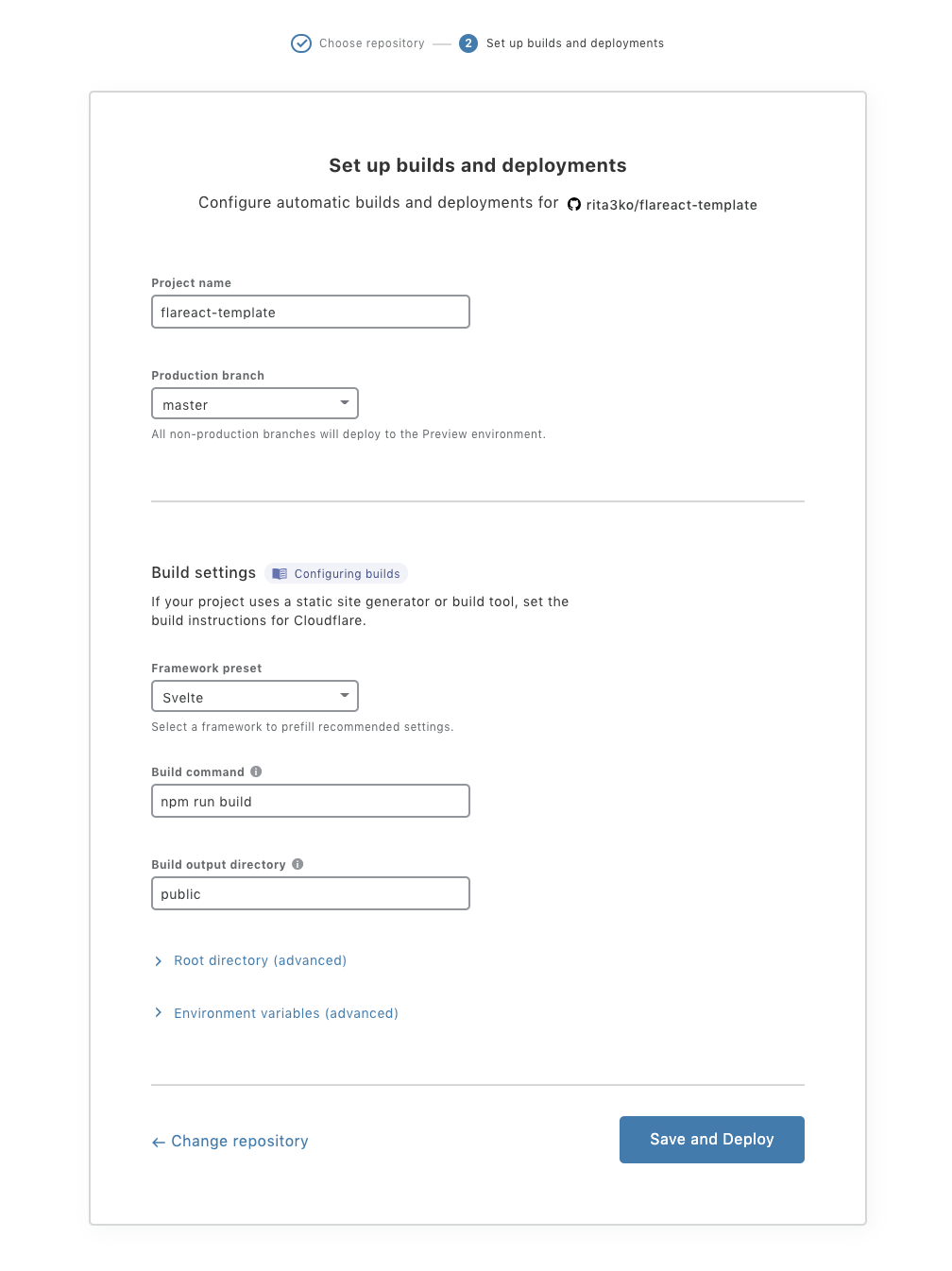
    Cloudflare Pages, for example, enables developers to select their preferred repository, identify what types of frameworks they are using, and then automatically deploy their applications on the Cloudflare CDN. The goal is to automate the continuous integration process in a way that enables developers to focus more of their time and effort on developing code, said Prince.

    Linc’s technology, meanwhile, will make back-end services more accessible to front-end applications using Front-end Application Bundles (FABs) that accelerate server-side rendering by combining front-end and back-end logic. The result is better performance across any type of application that relies on JavaScript, application programming interfaces (APIs) and markup languages, otherwise known as JAMstack, a framework for building complex applications.

    Prince said JAMstack adoption is accelerating because it allows developers to continuously modify the user experience (UX) without the need to modify back-end services. The CDN, meanwhile, has emerged as a platform for continuously deploying applications closer to the point where they are consumed by the end user, said Prince.

    That’s become especially critical at a time when digital business processes require data to be processed in near-time, and as closely as possible to the point where it is generated, said Prince. That’s not possible when application logic runs on a public cloud, Prince added.

    Cloudflare currently has points of presence in 200 cities worldwide, and is actively courting developers as part of an effort to usurp CDN rivals. Most recently, Cloudflare added a Durable Objects capability that makes it possible to run stateful applications across a distributed, serverless Cloudflare Workers service.

    Ultimately, Prince said the goal is to automate the majority of the DevOps process, as code moves from a Git repository to the network edge. A CDN will also provide the means to monitor and secure applications running at the network edge, Prince added.

    It’s not clear how much application logic will be pushed to the network edge via CDNs; however, it’s apparent CDNs are emerging as an important deployment platform that should be incorporated with DevOps processes. How providers achieve that goal is, in part, dictated by the framework used to build an application.

    Cloudflare’s moves are indicative of the larger trends of automating DevOps processes, a development that should make DevOps best practices more widely accessible to many more developers.

  • BMC Expands Scope of Mainframe Management Portfolio

    BMC Expands Scope of Mainframe Management Portfolio

    BMC this week updated its portfolio of mainframe tools as part of an effort to make mainframe platforms more accessible to IT operations teams and developers.

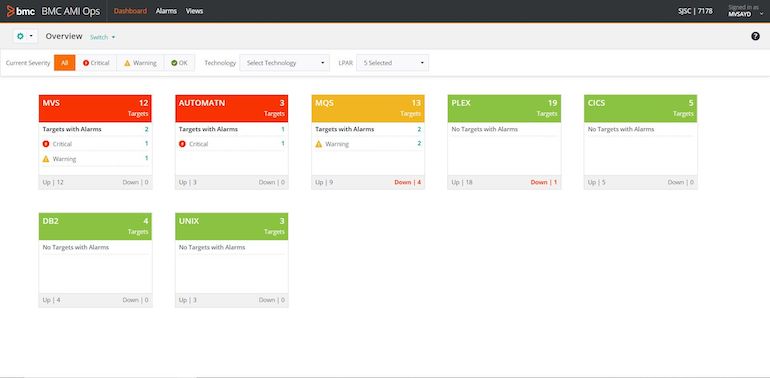
    At the core of these offerings is BMC Automated Mainframe Intelligence (AMI), which embeds machine learning algorithms in mainframe platforms to automate a wide range of processes. BMC AMI supplants the company’s existing MainView tools with a framework that promises to make artificial intelligence (AI) more accessible via a revamped user interface.

    BMC AI Ops

    John McKenny, senior vice president and general manager for ZSolutions at BMC, said an AI model based on the data collected by BMC AI can now be spun up in a matter of minutes, and can identify a potential issue days before it might otherwise occur.

    BMC AMI also exposes a REST application programming interface (API) through which more mainframe tasks will be automated.

    McKenny said as organizations accelerated digital business transformation initiatives in the last year, the need to modernize mainframe platforms became more acute. Mainframes are now the backend for multitier application environments that need to be managed in concert with other platforms, McKenny said.

    BMC is also adding Compuware zAdviser dashboards to the DevOps platform it gained with the acquisition of Compuware last year. BMC also updated Compuware Topaz for Total Test to streamline test creation for mainframe applications. There’s a growing need for better tools to test digital business processes created for the mainframe, noted McKenny.

    Other updates include Control-M job scheduler and Compuware ThruPut Manager integration, to ensure jobs run at or before their expected times on a mainframe, and an update to BMC AMI Data for IMS that simplifies database management in mainframe environments.

    Finally, BMC updated the BMC AMI Security offering with the Compuware Application Audit tool; this update allows for better capture of relevant user access and behavior data.

    McKenny said while mainframes remain one of the most secure platforms available, administrators must ensure security policies are properly implemented. IT organizations should avoid complacency and ensure zero-trust security in mainframe environments, McKenny said.

    McKenny added that, despite their long tenure and the rise of cloud computing, mainframes remain relevant. Many organizations determined that the fastest way to achieve their digital business transformation goals is by extending their mainframe platforms – platforms many of them already rely on to process and analyze transactions.

    What’s changing is the IT professionals that manage mainframes alongside other platforms, such as the cloud. Many of those IT professionals naturally expect integrated AI capabilities that enable the average IT administrator to manage a platform that was once the sole realm of dedicated IT specialists.

  • Windows Sandbox and Hypervisor-Based Isolation

    Windows Sandbox and Hypervisor-Based Isolation

    Completely securing the endpoint is hard. Securing it without sacrificing user productivity is even harder. Think of a modern laptop running a Windows 10 OS, for example. The OS consists of millions of potentially vulnerable lines of code. It has many legacy components written with old security standards in mind. The kernel is probably executing several third-party drivers that might also be vulnerable. Finally, there are dozens of daily-use applications. Some are provided, managed and patched by the enterprise, while others are installed on demand by users; the latter are not always from legitimate sources, making it harder to track and assess security. Timely detection and prevention of threats is a cat-and-mouse game, where a single win for the attackers is game over for the user.

    Consider, too, the rate at which organizations are moving to the cloud. For those using the endpoint purely as a browser, web isolation products can significantly enhance security by isolating browser access to risky websites and, sometimes, to risky email attachments, too. Using ChromeOS, an operating system built for the cloud with security in mind, can provide additional security benefits.

    But using only a browser is not yet practical for most organizations. Many legacy line-of-business applications are still being used daily. Workers install video conferencing applications to meet with business partners. Developers install and update software for their daily work. Almost every popular, modern cloud application (Slack, Teams, Office, etc.) comes with a full desktop client that offers superior features. For organizations looking to adopt these tools, web isolation solves only part of the problem.

    VDI or Desktop-as-a-Service (DaaS) solutions allow companies to shift corporate application workloads to the data center or the cloud. By limiting endpoint operations to that of a thin client, and only connecting them to this infrastructure, the list of potential attack vectors narrows and becomes very secure.

    But using VDI/DaaS for the entire organization becomes very expensive if massive numbers of users need remote access simultaneously. Further, the user experience and latency are far from ideal, and offline work is impossible. In terms of security, while the endpoint is now more secure, the threat still exists – it just moves to the data center or the cloud, where, in essence, a fat Windows desktop is running. With DaaS, security might be even more challenging when multiple users share the same virtual OS; a single threat can potentially compromise multiple user sessions at once.

    Hypervisor-Based Isolation

    The world trusts modern hypervisors to securely run servers, containers and other workloads in the cloud. Sometimes, multiple hypervisors run side-by-side on the same physical server, though they’re completely separated and isolated from each other. Unlike modern OS kernels, hypervisors are designed to perform a very specific task. Their code base is usually very small, well-reviewed and thoroughly tested, making it very hard to exploit. Empirically, it’s very rare to see a hypervisor-related vulnerability discovered or published.

    Is it possible to secure the endpoint with hypervisor-grade isolation? Imagine a “productivity environment” where workers can browse any website; open any email attachment or install and execute software, all without endangering the corporate environment or the organization’s crown jewels. Even better, malware or attackers who compromise this environment are trapped inside by strong, hypervisor-based isolation boundaries.

    Windows Sandbox

    Microsoft has been investing a lot in virtualization-based security (VBS) in recent years. Hypervisor-based isolation is a key element, whether it’s used to isolate LSA secrets with Credential Guard or to isolate critical Device Guard code. With the release of Windows 1903, Microsoft has introduced Windows Sandbox, describing it as a “lightweight desktop environment tailored for safely running applications in isolation.” Windows Sandbox enables users to spin up, almost immediately, a second, isolated instance of Windows with a click of a button.

    Windows Sandbox is based on the new “Krypton VM Containers” – Hyper-V-backed lightweight containers. The lightness is reflected in:

    • Reduced disk space: The container reuses the host’s binaries, reducing its disk footprint and making it easier to manage. This also means it remains as patched and secure as the host.
    • Optimized memory and CPU usage: The host’s kernel is aware of the container, and manages it as yet another application. That means improved CPU and memory allocation based on actual demand and usage.
    • Paravirtualized GPU: By enabling GPU acceleration inside the container, the CPU has less work to do.

    Unlike web isolation products, Windows Sandbox can isolate almost any application. With the Krypton optimizations, it’s fast and doesn’t place too many demands on hardware (any three-year-old laptop should suffice), making it dramatically more affordable than VDI. The virtualization layer is barely noticeable, making the performance superior to VDI/DaaS.

    The Missing Pieces

    Can Windows Sandbox enable organizations to provide an isolated “productivity environment” while further hardening and securing the host OS? In theory, it could, but in practice, unfortunately, it lacks certain capabilities necessary for enterprise environments:

    • Manageability: It’s hard to deploy and impossible to manage (policies, applications) Windows Sandbox with MDM systems such as Microsoft Intune.
    • Usability: Windows Sandbox is non-persistent. Applications installed by users or administrators are going to be wiped on reboot. User settings, cookies, and browsing history will not be saved.
    • OS integration: While users can install risky software inside the container rather than on the host, they are not forced to do so.
    • Security: While fully isolated in terms of code execution, Windows Sandbox doesn’t provide network isolation. Malware can access and attack other devices accessible by the host, even if behind a Network Access Control (NAC).
    • Software Compatibility: Some applications fail to run or to be installed inside Windows Sandbox.

    Hypervisor-based isolation has clear benefits over traditional security methods. By avoiding the cat-and-mouse game, and moving to “mitigation by isolation”, organizations can increase security and productivity, and reduce costs. Once some of the aforementioned gaps are filled, hypervisor-based isolation could become the future of endpoint security.

  • 7 Trends Influencing DevOps and DevSecOps Adoption

    7 Trends Influencing DevOps and DevSecOps Adoption

    Enterprise technology adoption trends can be broadly categorized under three pillars: infrastructure, architecture and technology. Let’s explore what these trends are and how they influence DevOps and DevSecOps adoption in tech corporations worldwide.

    Trends in Architecture

    In computing, architecture is the collection of protocols encompassing the utility, structure and execution of software applications. Architecture defines how an application works and determines the function of each component, such as data storage and computing capability, for example. Architecture trends directly influence how technology is developed, which also makes it influential on the field of DevOps.

    Trend #1: Monolithic to Microservice Architecture

    The shift from massive, inflexible systems that limit compatibility to lightweight, nimble software has increased DevOps and DevSecOps adoption. As architectures such as containers become mainstream, it is easier than ever for teams to code, debug and deploy software quickly, and work collaboratively. Microservice architecture offers the benefit of quickly being able to install, run and maintain systems, and is a catalyst to greater DevOps adoption, while containers spur DevSecOps adoption.

    Trend #2: Cloud-First Trend

    Mobile-first, cloud-first development has revolutionized data transportation, security and collaboration, and made development efficient, safe and transparent. This approach leads many organizations to adopt DevOps/DevSecOps.

    Trends in Infrastructure

    In IT, infrastructure refers to software, hardware, networking resources, systems and tools that allow companies to operate and manage their production processes.

    Infrastructure trends also heavily influence both the hardware and software tools companies use for tracking and manufacturing their products, and therefore directly impact their willingness to adopt DevOps and DevSecOps.

    Trend #3: Kubernetes Plus/Minus DevOps

    A significant infrastructure trend that affects DevOps is the increasing adoption of Kubernetes by global technology companies. Kubernetes is open-source software designed to orchestrate the management, deployment and scaling of containers, and  has seen widespread adoption in the tech industry. Kubernetes empowers organizations to be more productive, with an emphasis on security and collaboration. Containers in Kubernetes seamlessly allow multiple teams to develop a project simultaneously. Resource management and transparency are significantly enhanced, bugs can be fixed more quickly and work cycles can be shortened.

    Kubernetes and container management systems also reduce the need for human interaction and facilitate a fully automated, ‘NoOps’ scenario. Kubernetes uses a pipeline architecture approach that makes it easier for developers to use AI and ML tools to analyze, predict, and automate data and work processes.

    Furthermore, Kubernetes sets an infrastructure backed on logging, continuous detection, consistency, and self-healing, making it extremely easy and considerably faster for computers to make sense of the data, potentially eliminating human interaction. The infrastructure established by the trendy Kubernetes technology is both advancing and restraining DevOps adoption in companies worldwide, depending on how the companies implement Kubernetes into their work cycle.

    Trend #4: The Agile Infrastructure Trend

    Agile infrastructure for software development has become the standard for software development, and is perhaps the most influential trend impacting DevOps adoption. Agile, like DevOps, focuses on collaboration, organization, diversifying skill sets to achieve resilience, rapid iteration and self-improving work processes. Adapting to an Agile methodology means each team has members skilled in various disciplines that work in concert. Each product delivered is followed by a feedback cycle. Agile teams in an enterprise are transparent, collaborative and resilient to internal and external conditions.

    Trends in Technology

    Advancements in technology enable new ways of thinking and new best practices. As tech trends change, the work cycles, processes and mindsets also evolve.

    Trend #5: Release & Deployment Automation

    Manually moving software between testing and production environments is an inefficient, painful task that must be repeated every time updates are added, new versions are released or new features are built. But with the rise of release and deployment automation, software companies can entirely automate this process, saving time while boosting reliability. With the click of a button, test code can be automatically converted to production-ready work and deployed to version controls or hosting services. With this use of automation, DevOps adoption skyrockets.

    Trend #6: Site Reliability Engineers

    Site Reliability Engineers (SREs) are in huge demand as organizations strive to create highly scalable and secure software. SREs build robust, reliable software that leverages automation, create self-healing systems that focus on operations and align closely with business imperatives.

    Trend #7: Shift Toward AI/ML

    The evolution of artificial intelligence and machine learning is changing our entire perspective on the development and use of technology. With increasing automation, ML systems can process large amounts of data, make reliable predictions and provide extremely accurate analyses. AI can make use of this data and these predictions to determine what to do next, and create truly intelligent machines that can function with minimal human interaction.

    While this makes systems faster, more autonomous and reliable—which aligns with what DevOps promotes—it can eventually create a NoOps cycle that doesn’t require human intervention. In the short-term, this trend does influence DevOps adoption, but, in the long term, AI/ML could ultimately eliminate DevOps altogether.

  • Report: Software Quality Issues Costing U.S. Companies $2.08 Trillion

    Report: Software Quality Issues Costing U.S. Companies $2.08 Trillion

    A report published today by the Consortium for Information & Software Quality (CISQ) estimates poor software quality collectively cost companies in the U.S. an estimated $2.08 trillion in 2020.

    The report, co-sponsored by software quality and security tools provider Synopsys, attempts to calculate, at least theoretically, the cost of known software failures. The report identifies operational software failures, estimated to be $1.56 trillion, as the single largest cost. The next-largest cost contributor is unsuccessful development projects, which totals $260 billion, an estimated 46% increase since 2018, according to the report. The project failure rate remained steady, at about 19%, for over a decade, according to the report.

    Finally, legacy systems issues contributed $520 billion to costs in 2020, a significant decrease from the $635 billion these issues cost in 2018.

    That estimate does not include technical debt, which CISQ estimates at another $1.13 trillion. Technical debt costs have been growing at a rate of 14% per year since 2018, the report noted.

    Joe Jarzombek, director for government and critical infrastructure programs for Synopsys, said it’s apparent there’s not enough focus on quality assurance within software supply chains. However, as organizations begin to realize how dependent their digital business transformation initiatives are on quality software, business executives will be forced to shift focus.

    Unfortunately, most business executives today still don’t understand or appreciate how software is constructed. Most organizations don’t even have a bill of materials describing the components that make up an application, noted Jarzombek.

    That issue becomes especially problematic in the event of a security breach, because too many organizations can’t draw a correlation between vulnerabilities and the impact on specific components of an application, added Jarzombek. At the same time, however, cybercriminals are becoming more efficient at scanning applications to discover and exploit those vulnerabilities, said Jarzombek.

    Many organizations also don’t appreciate how adept cybercriminals have become at exploiting what are perceived as low-level vulnerabilities to distribute malware laterally across an application, said Jarzombek. There is a tendency to patch only the most critical vulnerabilities within an application, while the rest are left to future updates. When fixing low-level vulnerabilities is not prioritized, these vulnerabilities may remain over multiple release cycles.

    Ultimately, Jarzombek said, rather than treating security separately from the application development process, it should be addressed as part of a comprehensive approach to software quality assurance. The immediate challenge, however, is that not enough developers have access to the tools they need to address these ongoing cybersecurity issues.

    The impact of poor software quality on individual companies will vary widely, but poor software quality is itself a universal issue. Most software development teams are not deliberately ignoring these issues; instead, the processes currently employed to build software are not especially robust, mature or, for that matter, automated, leaving organizations vulnerable.

  • How Healthcare Companies Can Optimize Software for Improved Patient Outcomes

    How Healthcare Companies Can Optimize Software for Improved Patient Outcomes

    Healthcare companies are more reliant than ever on software to help them achieve good patient outcomes. Recent research reveals that the use of software as a service (SaaS) solutions is growing exponentially in health care, covering a wide range of areas including:

    • Patient diagnosis
    • Medical imaging
    • Therapy and patient self-care
    • Data collection and analysis
    • Hospital management

    Due to the increased use of digital products in patient care, healthcare providers recognize the need to speed innovation and fundamentally rethink how they build software. This has led many engineering teams to move toward continuous integration and continuous delivery (CI/CD) when building and deploying software.

    Considering the industry’s emphasis on improving patient experiences, it makes sense that healthcare providers are keener than ever to optimize their systems. In fact, around 90% of healthcare providers are implementing or already using customized software solutions and development.

    As teams look to improve these critical processes in software development, feature flagging is one way to speed up development and optimize software performance in the healthcare industry.

    CI/CD Challenges for Healthcare Companies

    The healthcare industry faces unique challenges when applying DevOps strategies such as CI/CD.

    Intense Regulation

    The main problem is that, for obvious reasons, health care faces stringent regulation and oversight. A high level of scrutiny is necessary in an industry in which one small mistake or misjudgment can cost patient lives; however, in terms of DevOps, waiting for regulatory evaluation and approval can slow down the entire software development process, which defeats the core purpose of CI/CD.

    Security

    Data security poses another challenge for healthcare providers, especially when dealing with cloud-based software solutions. Cloud-based systems will always have potential vulnerabilities, as they rely on infrastructure that connects a variety of devices and smart technology equipment. There will always be inherent weaknesses in remote systems, as opposed to on-premises, too. A recent survey revealed that 42% of respondents said their major security concern was unauthorized access to cloud systems through insecure APIs. Network configuration problems were a close second, with 40% of respondents citing those as a concern.

    In a healthcare setting, another issue is the high volume and high velocity of data. Even a small, specialist clinic that may only see 150 patients per day will still generate vast amounts of data over the course of a month or year. Most of the data is private and sensitive, which means that data privacy and cybersecurity are top priorities for healthcare companies.

    The Impact on DevOps

    At first glance, because of the high level of regulatory oversight and cybersecurity concerns, it might seem that health care is a less-than-ideal environment for agile DevOps processes. How can you adopt fast-paced CI/CD cadences and innovate rapidly when there are necessary, opposing forces?

    The answer is to leverage innovative software development solutions such as on-premises feature flagging.

    Feature Flagging and Its Impact on Software Innovation

    Feature flags are, essentially, toggles or switches that allow software development teams to turn features on or off. The main advantage of feature flagging is that it allows for faster software deployment. One or more features can be coded into the software during development and made ready to go, but it is turned off for the user and/or patient on initial deployment.

    The ability to embed features within software that can be toggled on or off is perfectly suited for the healthcare industry since that approach allows for the necessary regulatory approval(s) before full deployment.

    For example, look at the rapid rise of telemedicine during the COVID-19 pandemic. Doctors, hospitals and patients alike were forced, along with the rest of the world, into the “new normal” of virtual interaction to mitigate the spread of disease while still providing quality treatment.

    For most industries, adding video chat/conferencing capabilities to existing applications was relatively easy. But for health care, the approval process, privacy and security concerns slowed down the adoption of these features. In our experience, typical healthcare teams are, best-case scenario, running on monthly—or, most likely, quarterly—deployment cycles to align their deployment efforts with compliance and governance review boards. Product and engineering teams work to get their updates and improvements in line with this cadence, which can make innovation difficult.

    If teams wanted to deliver this capability quickly, they could adopt feature flagging to decouple the concepts of “deploy,” “approve” and “release.” To use the video chat example, here are the steps they’d be able to take:

    1) Build the videoconferencing capability into their app and deploy the feature to production with the capability switched on for internal users (IP targeting, specific email addresses, etc.) only.

    2) Now that the feature is in live production, they can perform actual field testing to ensure that the functionality is working well, while simultaneously moving through internal and external approval processes.

    3) Once the review is complete, move to the release stage by switching the feature(s) on and allowing (external) end users to access the capability.

    All this can be achieved without needing to redeploy the software, and the developers are still free to make iterative improvements to the application.

    Now that the regulatory hurdles are addressed, it’s important to acknowledge that security is still an issue for healthcare companies that employ a SaaS feature flagging platform.

    While most providers focus solely on SaaS, the ability to deploy feature flagging software on proprietary cloud infrastructure is important in the healthcare space. This model enables both extra security and HIPAA compliance, and also opens up important capabilities and performance results that SaaS-only providers have a hard time matching. Since this technology typically becomes deeply embedded in the fabric of an organization’s product and technology, feature flagging is well-suited to an on-premises implementation.

    The implementation of on-premises feature flagging is a great way for healthcare companies to increase deployment velocity from monthly to daily. It allows their software development teams to adopt CI/CD cadences and innovate more rapidly, without the risk of breaching regulations or making sensitive data easily available to hackers.

  • Orchestration Emerges as Crucial DevSecOps Enabler in 2021

    Orchestration Emerges as Crucial DevSecOps Enabler in 2021

    As DevSecOps best practices continue to evolve and mature in 2021, security orchestration is emerging as a cornerstone of a solid defense-in-depth approach to application security.

    DevSecOps assumes organizations will shift responsibility for application security further left toward developers. If this assumption is correct, then developers clearly need access to a range of code analysis tools to achieve that goal. The challenge they face is incorporating tools from multiple vendors within a DevSecOps workflow. At different points in the development process, it may make sense to employ a static application security tool (SAST) versus a dynamic application security tool (DAST) that stress-tests the application just before it is deployed.

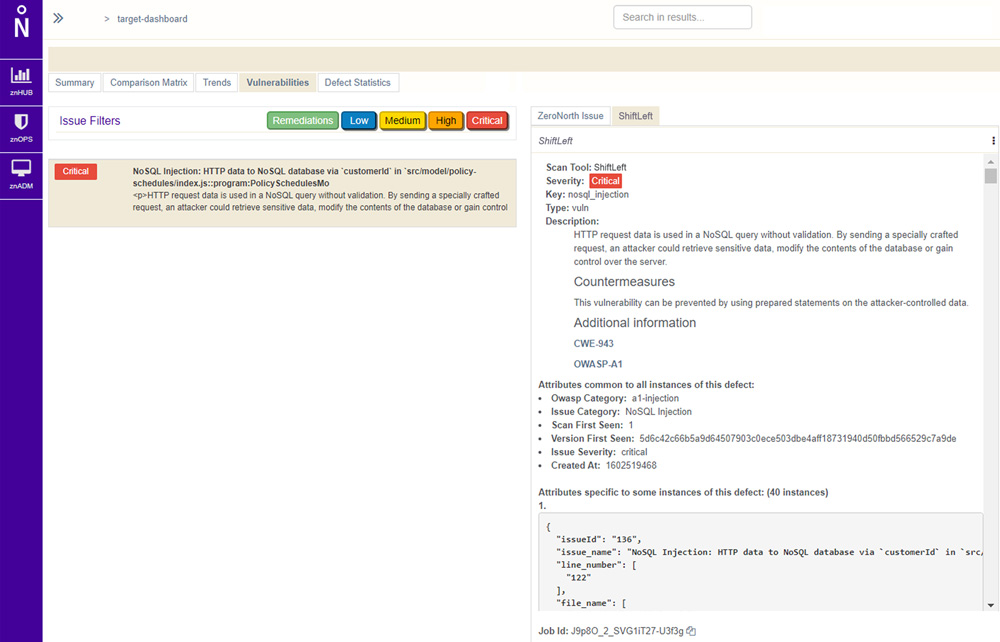
    Not surprisingly, providers of these tools are starting to align with security orchestration engine providers. ZeroNorth, for example, recently added ShiftLeft, a provider of a SAST tool, to the list of security tools that can be orchestrated via its software-as-a-service (SaaS) platform.

    Joanne Godfrey, director of product marketing for ZeroNorth, said organizations that have embraced DevSecOps are standardizing on two to three security tools. This mitigates the risk of becoming overly dependent on a single tool to discover vulnerabilities, Godfrey said. No single security tool can uncover every possible vulnerability in a timely manner, so DevOps teams must work to integrate multiple security tools into their workflows.

    Developers need tools capable of identifying vulnerabilities as they write code. They should also construct tests to proactively flag vulnerabilities before those are incorporated into a larger build. New vulnerabilities, however, are discovered all the time and it’s not uncommon for a container build deemed safe yesterday to suddenly need an update as quickly as possible. DevOps teams also need to secure the runtimes and hosts on which application builds are deployed, which typically requires more collaboration with the security teams usually responsible for managing platform security and DevSecOps.

    Despite this need to collaborate closely, the cultural divide between DevOps and cybersecurity teams is often wide. While there’s a lot of interest in DevSecOps best practices, developers don’t always prioritize application security when there are delivery deadlines to be met. This often results in security issues being addressed late in the application development process or, worse, addressed after the fact as part of an update delivered after an application has been deployed in a production environment.

    As application development accelerates, it’s imperative that the current divide between DevOps and security teams is bridged. Short-handed cybersecurity teams simply can’t keep pace with the rate at which applications are being built, deployed and updated. The need to shift more application security responsibility left toward developers increases daily.

    The challenge now is, rather than simply delivering an empty DevSecOps sermon, IT leaders need to practice what they preach and provide developers with the tools and processes required to secure their applications.