Category: Blogs

  • Up Your DevOps Game: It’s Time for NoOps

    Up Your DevOps Game: It’s Time for NoOps

    NoOps is here and it’s more than just a buzzword or an ideal. The next generation of platform-as-a-service (PaaS) platforms are evolving to minimize the developers’ operational burden and reduce dependency on DevOps for deployment. Dev teams that don’t want to deal with operations or don’t have in-house operations resources should consider deploying applications on a NoOps platform.

    To understand the concept of NoOps, we need to start with an understanding of how deployment management has evolved over the decades.

    From Hardware and Software and Back Again

    It’s been a long trend of back and forth between developers and “deployers.”

    It was once mandatory for software developers to be fluent in the hardware for which they were creating software. They wrote the code and then worked with the operations team to deploy it on in-house servers. Everything was tightly coupled. The first mainframes—IBMs and SiliconGraphics machines—ran on custom-built software, and the developers were responsible for the deployment and management. The developers had the machine first, and then had to create the code to make them run—assembly or low-level language or even hardware code; rope memory, in some cases.

    Then came the x86 revolution, when hardware became more standardized and was decoupled from the complexities of deployment. Developers started focusing on the software and organizations had separate teams that would manage the deployments.

    With the advent of virtualization and infrastructure as a service (IaaS), the deployment of software now depended on APIs for infrastructure provisioning, and we returned to an integrated development and deployment function—in other words, DevOps.

    The Problems DevOps Created

    The problem then became one of choice: As APIs multiplied, developers had to decide which APIs would be most relevant, efficient and useful to deploy their software—and on what infrastructure: bare metal, virtual machines such as EC2 and VMWare, Kubernetes, Swan, OpenShift, serverless, Lambda, Knative, etc.

    Not only did the teams have to decide on what IaaS to deploy the actual software, but they needed to also choose how and where the layers and logs would be monitored—and even where those logs would be stored. They need to consider things such as traceability and horizontal or vertical scaling issues, to name a few.

    This has resulted in the creation of bespoke permutations and combinations that work great … until vendors’ upgrades require them to keep up with tens or hundreds of configuration changes. Most teams are keeping it together, but it definitely can be done more efficiently.

    Now It’s time to Up the Game to NoOps

    It’s time for the next approach: Limit the number of choices to create standard best-in-class operations that deliver economies of scale and easily evolve with minimal hassle.

    NoOps simplifies cloud operations—everyone can do things the same way. NoOps aims to “completely automate the deployment, monitoring and management of applications and the infrastructure on which they run,” according to Forrester, which coined the term.

    NoOps is about standardizing the approach to deployments and reducing the number of variables, bringing simplicity. At its core, NoOps is focused on automating deployments and executions that are predictable and repeatable.

    NoOps & Standardization

    The development and increasing adoption of containers are critical to the entire NoOps philosophy. Containers provide the ability to independently deploy services and applications, automating and standardizing the process to deploy anything, anywhere. Using containers delivers the tremendous portability that hasn’t been seen since the development of generic hardware.

    With encapsulation within the container, whatever is running inside will behave the same no matter where it is deployed.

    The NoOps-containers movement will transform the entire DevOps industry.

    Let’s go back even further. In the 1800s, few homes had electricity. They hooked up whatever appliance they had to whatever generator they were running and kept their fingers crossed. Once governments took over the role of bringing electricity to every home with standardized voltages and outlets, the appliance industry took off.

    A true NoOps platform will provide a standard “socket” that works for everything. The developer will simply build the app, and it will “plug in” anywhere. With NoOps, developers don’t have to worry about how the application will work, deploy or scale, nor do they have to consider reliability or elasticity. The platform will deliver it automatically.

    The “Gift” of Containers

    Containers free developers from managing infrastructure and reduce the operational burden associated with building and deploying applications. They also minimize application conflicts among different environments and improve portability and team collaboration.

    Containers make application deployment easier than ever before. Continuous integration doesn’t change as part of this process. Adopting containers as part of NoOps simply automates continuous delivery—developers write the code, commit the changes and push it to the container’s remote repository. Based on the Docker file, an image will be built and the containers that run your application will be deployed. Since all deployments are rolling, no downtime occurs.

    Leveraging containers provides speed, agility and flexibility to any infrastructure, thus bringing cost savings and dynamism. Containers can flexibly host microservices, which can be scaled individually, as necessary. Using CPU, memory or even custom business rules, developers can set auto-scaling policies so applications are ready to serve an increased number of requests whenever needed. As the platform monitors application performance, it can use these insights to intelligently architect a right-sized infrastructure.

    Putting NoOps Into Play

    If you’re considering adopting NoOps, look for a PaaS provider with the expertise to make the right platform choices for you based on your application development language of choice. For example, if you are looking to host a Ruby application, ensure that the provider has the requisite Ruby expertise.

    A true NoOps platform will streamline deployment, automatically scale based on your business requirements and provide outstanding performance. The automation dramatically boosts productivity and reduces costs associated with deploying and managing applications.

    NoOps platforms monitor operations and automatically resolve issues using built-in observability mechanisms and intelligent alerts. Centralized logging, metrics and traceability make it easy to identify issues and initiate fixes without expensive downtime. Moreover, the platform should ensure strong security boundaries and adhere to applicable compliance regulations.

    When “going NoOps,” also make sure that the solution provides comprehensive documentation and 24×7 support for emergencies that would normally be handled by an in-house DevOps team.

    Wrapping It Up

    NoOps can eliminate much of the work associated with deploying and monitoring applications by simplifying and streamlining operations and reducing the need for extensive in-house DevOps support. While it’s not a one-size-fits-all solution, it delivers great value helping companies of all sizes from start-ups to enterprise teams save time and money and better redirect their resources toward high-value activities, creating the best code to deliver the highest quality products.

  • Shifting Left and Static Code Analysis with Perforce

    Shifting Left and Static Code Analysis with Perforce

    Perforce Product Manager Stuart Foster, and Evangelist Steve Howard, join Mitch Ashley to discuss the importance of creating security software from the beginning of the development process. We discuss shift left, SAST, source code scanning and other pursuits towards this goal.

    The video is immediately below, followed by the transcript of the conversation. Enjoy!

    Transcript

    Mitch Ashley: I’m pleased to be joined by Stuart Foster, who’s product manager with Perforce, and also Steve Howard, who is static code analysis evangelist, both with Perforce. Welcome, gentlemen.

    Stuart Foster: Hey, Mitch, how are you doing?

    Ashley: Very good. How about if we—let’s start off with just a little bit of an overview of Perforce, and then, Steve, why don’t you do that and also tell us a little bit about yourself, and then we’ll toss it over to you, Stuart, to give you introduction.

    Steve Howard: Right, yeah. Well, here at Perforce, really, our role as we see it is to help developers write better code more efficiently and more quickly. So, these days, we tend to talk about DevOps and the whole idea of developer operations and how they put that code together, how it’s constructed, how it’s managed, how we control the processes around it as well, of course. There’s more and more regulation, it seems, these days in software development and we’re making that whole process from start to finish, of writing code to delivering it, that whole cycle. It’s hopefully being made easier, more comfortable for our developers that use the products.

    So, that’s really where Perforce sits, and we think of that is really enterprise DevOps, and doing it at scale in large scale organizations.

    So, my role, really, is specific on the Static Code side or Static Code security testing side, SaaS tools, if you will, trying to make sure that that piece of writing the code, actually developers writing the code itself is done to the highest possible standard from both the security and the quality perspective and also, at the same time, getting maximum productivity from our development teams.

    Ashley: Wonderful. Stuart, introduce yourself?

    Foster: Yeah, absolutely. I’m Stuart Foster. I’m the Product Manager or Perforce’s Static Analysis products, both Klocwork and Helix QAC. So, I work with Steve, he’s kinda my partner in crime, amongst a number of other sales engineers and developers and everything, and we’re just out to produce a really solid static application security testing tool.

    Ashley: Excellent. Well, one of the great things about talking with you both is, since you have products in market, you talk to a lot of customers, especially in an evangelist role, too, Steve. It really helps us kinda get an idea of where the state of security is in applications, what people are doing today. The whole idea of shift left, I think, has evolved a great deal. I think when I first heard it was “move left in the workflow.” And then it became, “Well, move the when the security people get involved.” And you’ve really taken it much farther than that to really thinking about how we start writing secure code.

    Maybe one of you could kinda give us an idea of where you think we are as a community on getting to that point of when the code’s written, it’s written securely.

    Foster: Yeah, so, I mean, from my perspective, you know, you kind of look historically at people using the term shift left and, you know, from our perspective, that would’ve been, you know, doing some sort of code analysis on a server and then moving that left in terms of the software development life cycle into the developer’s IDEs.

    What you see nowadays is that, you know, historically, a lot of those responsibilities would’ve been siloed. You’d have a security team, a QA team, various other teams that, in many ways, because they’re siloed and in different stages of the process, you’d run into kind of bottlenecks. What you’re seeing a lot more with the concept of DevOps, DevSecOps, a lot of development teams themselves are becoming owners completely of the code that they write. And what I mean by owners is that, you know, they are writing unit tests, they’re writing more functional tests, they are ensuring that it’s part of their responsibility that the code is secure. 

    So, that’s a shift left, but then you have to think how developers work—they’re working in IDEs, they have their own CI/CD pipelines, they may be using cloud services, various containers that are all getting spun up and broken down. So, it’s not just, to me, shift left any more, it’s analysis anywhere. It’s basically having something that can work anywhere in a workflow, right? And in this sense, you know, the Security teams still exist, the Quality Assurance teams still exist, but what it really is, is a culture of security collaboration that are coming together, right?

    Steve, I think you may have a little bit of a perspective on this, too.

    Ashley: Yeah, I’m interested in your from the field perspective, too.

    Howard: [Laughter] Yeah, no, it’s—well, it’s exactly that. I think it’s a really good point that no, we’re not just talking about moving to the desktops, we are talking shifting left throughout the whole cycle. I think that is a key point. And it is really an opportunity using tools like ours in Static Analysis security testing, it’s about being able to enforce the requirements and the needs from that expert security team where there were bottlenecks previously, trying to put that into rules and regulations that we can then push down to the development tasks and processes that are to the left of that kinda final sign-off.

    So, yeah, that—in that form, very much, I’d say it’s shift left, and it’s about that optimized process now where we can be doing that checking all of the time. So, it’s making sure we’re continuously compliant to those security requirements or quality requirements, as the case may be, yeah.

    Ashley: You know, it’s interesting, we talk about the workflow and we think about the whole tool chain and pipeline, but if you really break it down into much more granular pieces, developers are working on a linear piece of development, right? They’re in multiple places jumping back and forth, solving bugs, adding features, developing new capability—whatever it might be. So, the ability to concentrate on any one aspect of an application, sometimes, is not even possible, right?

    So, you need an environment where you’re aided in how you write and create secure code as well as think about writing secure code. You agree with that?

    Howard: Yeah, absolutely. I think that’s the point. We’re trying to make sure that all of those pieces that they’re working on at different times and, you know, our colleagues in the Version Control System team know this very well, but obviously, there are tens or hundreds of branches running in parallel, as you’re sort of saying, and developers are jumping between, you know, fixing problems on the current release, maybe, and then carrying back on with their feature work for the next release as well. 

    And all this time to try and manage what security requirements each one of those had or quality requirements as well would be a really nightmare without sort of tooling and regulation around that, around the whole process, which is a significant part of developer operations as a whole, the idea of automating a lot of that and building it into the system. So, I think it’s just enforcing that with making sure we’re adding all of the extra pieces that we can also include in those processes.

    Foster: And also, if you think about those developers, too, they’re experts in their fields or experts on some of the functionality that they’re developing, but they’re not also necessarily experts as a security team might be, right? So, part of the trick, too, is to offer kinda help, knowledge, learning via the tool set so that, you know, the developers can keep the velocity up and develop to those standards more easily. 

    And I think Steve mentioned a little bit of a buzzword that kinda we like to think about is, it’s continuous compliance, right? It’s having this throughout the process and enforcing it and continuously monitoring, remediating, fixing, and reporting that become important for these processes to run really cleanly.

    Ashley: You know, it’s interesting, there was—kinda stepping back in time, and again, I think about the myth of developers don’t wanna, don’t care about writing secure code. Well, of course, they do. They don’t wanna write insecure, vulnerable code. But I think there’s a period where we thought training was—you know, let’s teach them about how to avoid writing code with vulnerabilities in it.

    But when you talk about a continuous governance environment, you’re kinda talking about a whole layer of things, right? It’s from the person doing the work to the environment that it’s being checked in and integrated and being tested into the workflow, and then really, the data, the information about that, that’s happening on a continuous, ongoing basis. And that’s really your data set for producing the compliance information, right? We don’t have to go ask you or check your code, it’s already been done, it’s done every step of the way all the time, and here’s the evidence of it, and here’s what we learned from it and here’s where we’re doing well and here’s maybe where we can improve. 

    That’s how I think of continuous compliance. Yes, it shows up in a report down the road, but it’s continuous, because we have all that data.

    Howard: Yeah, I think that’s a really important point from the efficiency as well. I mean, the Security team or the Development Management that want to know when this product or project will shift obviously need to know where they are relative to that compliance requirement. And if we can keep it compliant from day one, we don’t ever have that risk of building up technical debt at the end of the process that we then have to solve, and I think that’s a really important evolution that we’ve seen over the last few years, that we have that knowledge to hand immediately at our fingertips, as you say. So, that’s a really important piece.

    And the other point you made there about the developer education, I think, again—yes, you can teach developers and I know myself, in the past, I’ve learned the right way to do things, wrong way to do things, but there’s nothing quite as good as actually showing the examples of when things are potentially risky within the code you are writing, because you really understand, at that point, what you’re writing and how this could then be a problem, and it is the classic on the job experience that you really want for a perfect education, almost.

    Ashley: Let’s take—I’d love to hear your kinda definition or how you describe Static Code Analysis SaaS to people about, if you’re embracing that, what does that mean to a development team, to a software project team?

    Howard: I think from my perspective, it’s the idea of having an automated code reviewer, almost, looking at the work you’re doing in a fairly pleasant and passive way. [Laughter] Not being critical in any way, shape, or form as well. So, from a cultural point of view, I think the developers perhaps accept it more when it’s from a machine rather than a colleague that perhaps is picking holes in the code they’re writing, which is another good point about having a computer do that initial check.

    But yes, it’s like having that guard at the end of the process, and then we often joked historically about the value of the tools and saying, “Well, you know, if you had two developers that were both going for the job, you know, you’re advertising for a new development role, and one of those developers is, you know, the cost of the license is more, but they never make a mistake in the code, they check in clean, compliant code with every commit, whereas the other developer, they both have the same experience, they’re both writing good code, but the other one could make mistakes and could check in, potentially, security vulnerabilities. Which one would you pick as a manager?” That’s quite an interesting way of looking at it, but of course, you would always want to have that assurance that, essentially, it’s clean code from day one.

    Foster: Yeah, and also, you know, in terms of the perspective, Steve talked a little bit about the developer perspective or the hiring perspective. From the business perspective, you have to think about the costs of reputation, lives, revenue, anything of a product being in the field and discovering an issue. You know, the costs to fix a bug exponentially gets more expensive as you go further down the software life cycle, right? So, it’s cheapest to fix it then and there, right at the start. And, you know, in terms of kind of pain points that the software is trying to fix is, you know, providing that knowledge, providing that quick remediation as developers are working, ensuring the velocity stays up, ensuring that the continuous compliance enforcement throughout the process means that there’s not a heavy lifting of work later in the process, because you know, you weren’t reaching compliance requirements. 

    You know, the ease of using the software however a developer wants to work, it’s all about velocity, you know? And in terms of the business having that oversight and understand, you know, what are our risks, and how soon are we gonna be able to ship this product? Because, you know, we know with many products, the faster to market you get, you know, you have that first mover advantage, and that’s what’s needed in this fast-paced software market.

    Ashley: Well, that’s very tough to recovery from reputation damage and quality issues or perceived quality issues around your products, too.

    You know, one of the ways that I explain it to folks outside of being a developer or within the security world is, it’s kinda like taking your spell check of a document and adding in the grammar checking—so, this is the higher order, more complex, specific things around grammar. In this case, it’s around security and helping you as you’re developing or creating code, right, make sure that you do it the best way, you know? Avoid introducing security issues.

    I know that’s a gross oversimplification, so don’t worry, I’m not saying Perforce is like a grammar checker. [Laughter] But that is sort of a non-technical way of describing what we’re doing. I mean, we want it to be that natural, as part of the process.

    Howard: Yeah, absolutely. And I think that’s very true. I think, you know, we’ve seen the evolution of Static Analysis tools very much in the same way we’ve seen the evolution of things like the Microsoft Word, you know, spell checker to grammar checker and so on, and it’s kind of evolved to be more and more all of the time, you know, of the systems similarly.

    But on top of that, there’s also the opportunity, then, to, what we find quite interesting is to write your own checkers and rules that are specific to your application. So, we can find in some places where there have been security problems in a certain application for some special reason—not necessarily related to the constructs of the code, as most of the coding standards check, but something that’s specific to the project because of the way the project has designed all the code, and that project interacts with outside external interfaces. 

    And it has been interesting to work with customers in some cases. I worked with very large telecom customer on one occasion and he said, “Well, you know, we have this translation module between sort of the application and the platform, and nothing should ever, you know, go direct between the two unless they’re going through this one piece in the middle.” And it’s kind of the golden rule we’ve taught to all the developers from day one and nobody will ever break this rule.

    So, you know, obviously, I was slightly challenged by this and said, “Well, it’d be nice to check the rule. Let’s put that enforcement in just to see if we can, you know, use a custom rule to see if there are any cases and, of course, as you say, it should be clean.” And obviously, you know, a couple of hours later, once the analysis is run, it’s a very big system, we found a couple of cases—only a couple, but there were a couple of cases where exactly what they said should never, ever, ever happen for the security of the entire system, it happened. 

    And so, we were able to then remediate those problems and keep that rule in for future development, and of course, it will always be enforced. So, that was a really interesting case where there was also that, where you have something specific, it’s not just generic grammar issues, if you will, or spelling issues, but something very specific to that document.

    Ashley: Mm-hmm.

    Foster: Yeah, you can imagine some of these things coming out of requirements or an internal coding standard or things that a Development team might be following and be able to enforce these. Especially when you start looking at legacy code, giant monoliths, you know, that have been around for 5, 10, 15, 20 years, decades, you know, and you don’t have those original people who are developing, right?

    So, you know, it’s—we sometimes think of our tool also as, you know, kind of like a quality assurance on a product or a code base that, you know, it’s legacy and all the new people have no idea how to use it, but you need to expand on it, you need to develop it, because it’s valuable IP, and how do you manage developing new functionality and moving forward when, you know, it could be as brittle as a glass house, right?

    So, you know, that’s the other benefit you get out of being able to enforce and write your own standards, I’ll call them, and rules, yeah.

    Howard: Another classic case there, Mitch, is—and you’re well aware of this as well from the field is, this system was never intended to be connected to the Internet, you know? This was something that—

    Ashley: [Laughter] You’re guaranteed it will be, then.

    Howard: Yeah. [Laughter] It was an embedded system that was entirely supposed to run in an embedded environment with no connection to an outside world at all, and all of a sudden, you know, it or something around it that’s connecting to it is now connecting to the outside world and there’s open attack interfaces, and now we have to make sure that they’re not gonna compromise the original legacy code base.

    Ashley: Mm-hmm. Yeah, there’s just sort of the rule of unintended uses always occur, right? The thing we don’t want to happen is usually what happens. [Laughter] So, yeah, the demo becomes the production system is another great example.

    I’m really interested in your perspective on where you think we are. If I made an analogy to the network security world, the best time to be a network equipment or network security salesperson is the day of or the day after a compromise, and automatically, you’ve got budget and we need to solve this problem. I mean, I think we’re well past that in most cases, but where are we in the software world? Do you see this as a, it’s just a natural thing, “Okay, what’s our SaaS strategy, how are we gonna be doing security within the application, what tools should we use for that?” Or is it something where you have to mature to a certain point or have experienced some issues before you’re really gonna take it seriously? 

    Where are development—and I’m asking for a generalization I know, but what’s your sense of where people are today?

    Foster: I’d say, you know, in general, it seems as though most people don’t take these kinds of things seriously until it bites them. I think, you know, there’s some kind of safety feelings of some types of products that you can use where, you know, you find out about a security vulnerability or intrusion and you’re using a piece of software that basically just tells you that, you know, the barn doors have been opened and all your horses are gone, right? But that’s too late in the process. I think we all need to understand that, right?

    So, the point of dealing with it sooner and using tools like security application and security testing tools like Klocwork or QAC is that, you know, you’re trying to build the risk reduction, the known unknowns that you can at least deal with sooner, right? So that, you find out later, in the worst case, that the doors were open, but, you know, nothing happened, you still have your horses, because the stables didn’t open at the same time or whatever, right? Just to make a kind of analogy to it, there.

    Howard: Yeah, I think in the—obviously, we do a lot of work in the embedded space, and in that area, having seen it over the last 10, 15 years, I think, you know, there was a time where we were educating people a lot more about what it was, you know, what it was that we could do with Static Analysis to actually find some of these problems. Whereas I think—and there’s a lot more awareness now of the risks in the security field and, obviously, what Static Analysis can do to help. So, most people are starting to think about it if they’ve not already got it built in.

    So, I’d say it is becoming more of an expected insurance policy against those kind of things within the tool environments. And obviously, the other kind of driving force there is the regulation. So, we’re starting to see standards themselves creeping into the market like the new ISO 21434 standard for automotive, for example, where they’re actually going to require some level of looking at the security of the system and making sure that we’ve done some of those things correctly and, you know, probably that will include what we expect it to include, some level of Static Analysis and coding standards and so on and so forth.

    So, that stuff is really becoming almost regulated into the process just like functional safety regulation has been in that process from the beginning.

    Ashley: Definitely.

    Foster: Yeah, you’d imagine—

    Ashley: Sorry, go ahead.

    Foster: I was gonna say, just on that topic there about cyber security for automotive, you think about it, the cars are effectively rolling entertainment systems, right? So, there’s a lot of new kind of vectors for attack, right? An insecure Bluetooth module inside a car and its infotainment system that is also connected to the bus controller that’s driving all the data from every sensor on the car that’s controlling your fly by wire driving and your fly by wire steering and all those things, right? It’s very important—very important.

    Ashley: And usually, you have, I believe, you know, both cars and trucks that have starters can start by Bluetooth as one of the mechanisms. So, yeah, you have potentially the same attack vector, you need to be able to isolate that, and now you’re into the function of the engine versus the entertainment system, and there’s a lot of work going in, I know, to the automotive systems. They’re very complex. I mean, just as complex as many, you know, many business applications—maybe even more so because they’re integrated from so many different suppliers, and they are, of course, largely based on, built on embedded systems.

    It seems like embedded systems, though, are much more accepting of an update process, of keeping the software current and requiring some way of being able to update software in an embedded system or maybe making it an automatic process so it’s kind of touchless. Is that your experience as well?

    Howard: Yeah, I think so. I think that is coming into many systems now. I mean, there are certain manufacturers driving that kind of process—automotive, for example, is a prime case. And it is interesting, because if you go back 10 years, that just was never even considered. You know, once you kind of flashed that system, it was staying as it was until you climbed up the mobile phone master or whatever it was that the embedded system was doing and flashed it again with the latest version. So, yeah, it is, the over the air updates is creeping in, and that will lead us to a more continuous delivery type architecture with the delivery of the software as well, that we’ll be able to go to that.

    So, yeah, it’s gonna be an interesting time. And as part of that, I guess now the focus has moved slightly from the cost of fixing an issue out in the wild to just, we don’t want to have the issue because of the potential impacts on having that issue even for a day, you know? [Laughter] The idea that a car might be possible to take control of from an external source, for example.

    Foster: Yeah, and I think you’re seeing a lot more emphasis on the security around a lot of these embedded systems because a lot of them are so, you know, requirements driven, compliance driven. They have ISO requirements that are needed to be validated by external bodies to make sure that these things are safe to use, because you know, a lot of our infrastructure is built on the backs of these things, that they’re, in some ways, leading the charge of seriousness for these reasons, right?

    Ashley: Mm-hmm. And it seems, also, that industries like, I mean, we were talking about the automotive industry, are putting together their own standards, I think in part of fear out of, “We don’t want government standards to dictate to us, we’d rather us solve the problem, you know, industry solve it” in a way that they’re more accepting and flexible to them. But do you see more regulation coming at a kinda geographical country, government level? Is more of that happening? You talk about ISO standards, of course, being more industry.

    Foster: Yeah, I’d say so [Cross talk]—

    Ashley: You see it happening? Like, our privacy standards, now we’re talking about software security standards?

    Howard: [Laughter] Well, yes, there is that as well. Perhaps in the European level, for example, of something we see on this side, but yeah, mostly, it’s industry standards, from what I can tell that we’re experiencing and seeing come downstream at the moment.

    Ashley: Mm-hmm. [Cross talk]

    Foster: Yeah, I think it depends on the level of kind of sensitivity of the data. So, you do see requirements as they relate to finance and, like, PCI, DSS, and things like that. You see security in terms of—I’m running a blank, here, but they typically come from when the data is so sensitive, you know, the U.S. government has their STIGs, DISA STIG rules.

    Ashley: Mm-hmm.

    Foster: So, it tends to come down from the level of sensitivity. I wouldn’t be surprised if we do start seeing more requirements, perhaps, for public data, but right now, we have things like the HIPAA compliance and things like that, as they relate to very, very sensitive data.

    Ashley: Yeah, the defense industry is also a good one to start to drive standards, too, and I know they’re doing a lot in security.

    So, just to change, shift focus here, we have a few minutes left. We were talking earlier about where people are in their maturity level of adopting SaaS and writing more secure software using those kinds of tools. If you were someone leading a project, maybe an architect or a lead developer or somewhere in the management chain that said, “You know what, we’re almost there, I just need to do a little bit more convincing, or I need something else to help my organization get there to see why we need to do this, and I’d like to do it before we have a major incident”—what’s your best suggestion for kinda doing that? I don’t know if it’s internally selling or if it’s demonstrating the value of it or how do you see people successfully getting the organization to begin to support adopting it?

    Howard: Hmm. I think that’s a tough question, just because there’s so many industries and so many different kind of topics of particular interest, it always helps to have experience of a well-publicized kind of issue [Laughter] that’s gone out into the—

    Ashley: “We don’t wanna be like those people.”

    Howard: Exactly, yeah. That always helps drive things a little bit when you’ve got something tangible to say, “We don’t want to end up there.” I think, again, the regulation piece is where I see a lot of that being driven. You know, the industry bodies are actually saying, “As a whole, the industry doesn’t want to end up there. That’s not somewhere we can afford to be, and so let’s try and make sure we get this right from day one” and that trickles down into individual projects and so on. [Dogs barking]

    Ashley: Well, speaking of dogs [Laughter]—okay, hold on.

    Howard: Okay. Yeah, so, that’s really where we’re—

    Ashley: Okay, just start your answer again.

    Howard: Yeah, so, that’s really where we’re seeing it, predominantly, from the—you know, first of all, we don’t want a case where there is an incident, because, you know, if we can  use that as a tangible case and say, “We don’t wanna be like those guys, because that didn’t end well for them.” So, that’s, obviously, always a good driving force. But then it’s regulation from the perspective of the industry bodies themselves getting together and saying, “We really can’t afford for this kind of thing to happen, and we want to make sure that, you know, across the industry, we start to follow a best practice that’s gonna do our very best to prevent that,” I guess, is a good way of describing it.

    Ashley: It seems this is also an area where security team CISOs can be a real colleague asset for making the case to the rest of the organization, because if you’re _____ on the software team, you have one set of justifications or definitions for why you need that. Another is, there are corporate—you know, the CISO is trying to accomplish these goals, these things with the organization. And it’s always easier to fit your objectives within a larger objective and get that supported and get funding—that kinda thing. So, that’s another suggestion I would throw out there, too, that also helps folks—and plus, it brings security and software teams closer together.

    Howard: Yeah. [Cross talk] Sorry.

    Foster: Yeah. I think we do see—we do see, we do have, you know, security evangelists that are, as you just said, who are championing it, right? And when we talk to those people and we go over Static Analysis with them and this is the security focus, right? It comes down to, you know, being able to help understand their size of team, what kind of current development practices they have, and what that means and how you can deploy, roll out the tools and, you know, not slow down that velocity, because that’s always the goal. Don’t slow down the velocity, but add more value. 

    So, that’s what we try to help them with, help them understand. And also, you know, help—sometimes, you know, Steve is sitting with these people and we almost help them mature in their software development process to, you know, move from a couple guys who are just doing nightlies and they have no version control, they’re not using quality gates, they have no type of automated pipelines to setting them up so that they can scale their development groups, they can speed up their testing, their development processes, and that all comes out of engaging with vendors like us.

    Ashley: Great. Well, gentlemen, this was a lot of fun. I really enjoy talking security and creating secure applications and, you know, it’s something that I think everybody wants to improve at to different levels and degrees, and hopefully, before those bad things happen. It’s always better to do it before, but if you have to do it after, you do. Maybe sometimes that’s what it takes.

    So, it’s been great talking with you. Again, this is Stuart Foster, who is Project Manager with Perforce—thank you, Stuart—and Steve Howard, Static Code Analysis Evangelist with Perforce as well. Take care, gentlemen.

    Foster: Great, thank you.

    Howard: Thanks, Mitch.

  • XDR: The DevOps Transformation of Security Infrastructure

    XDR: The DevOps Transformation of Security Infrastructure

    eXtended detection and response (XDR) is a security technology that unites multiple security systems into one. Organizations are transitioning from traditional systems such as endpoint detection and response (EDR) and security and information event management (SIEM) to XDR, in a move that is analogous to the transition from agile to DevOps work processes.

    XDR can detect threats quickly by automatically collecting and combining information from across the IT environment—endpoints, servers, email and social media messages, cloud and application workloads—giving security analysts the context they need for fast investigation and response.

    In many cases, attacks occur in the borders between security silos. Each silo may be adequately protected by a security solution, but in between those silos, attacks remain evasive because security analysts have a limited view on the environment, determined by their security tooling. XDR connects silos with a unified threat identification and response strategy.

    Just like in the past development and operations teams were responsible for separate silos, with independent tooling and split responsibilities, security teams are split into silos, with limited communication between them. Security threats that cut across silos are difficult to mitigate. XDR enables new organizational structures in which security teams work together, with shared responsibility for mitigating threats, no matter where they occur in the IT environment.

    Benefits of XDR

    The purpose of XDR is to promote the visibility of threats and security incidents throughout an organization’s ecosystem. Its key benefits include:

    • Centralized monitoring and management – XDR solutions provide a single pane of glass for security incidents happening across the corporate network, endpoints and workloads. Consistent security rules can be implemented across diverse IT infrastructure, both in the cloud and on-premises.
    • Unified visibility – XDR integrates security visibility  across endpoints, cloud infrastructure, network traffic, etc. This allows security analysts to understand potential security incidents without having to learn and use other platforms.
    • Fast ramp up – XDR offers built-in integration with an organization’s IT infrastructure, and uses multiple threat discovery mechanisms from a variety of security technologies. Because analysts only need to learn one platform, time to value dramatically increases.
    • Increased productivity – XDR eliminates the need to manually switch between multiple dashboards or tools to collect security data. This allows analysts to more effectively detect and respond to security threats.
    • Low Total Cost of Ownership (TCO) – XDR provides a fully integrated network security platform. This can reduce the costs associated with purchasing, configuring and integrating multiple solutions.
    • Analyst empowerment – XDR provides a shared workflow for all tiers in the security organization. This reduces the need for training and allows Level 1 analysts to perform more in-depth analysis, reducing their need to escalate to higher analyst tiers.

    XDR is designed to give security teams full visibility into an organization’s endpoints and network infrastructure. Increased visibility has many security benefits:

    • Unified detection and remediation – XDR provides centralized and integrated incident response capabilities across all corporate environments. This allows security personnel to quickly identify threats, mitigate them and recover, all using the same platform, reducing the impact on the organization and overhead costs.
    • Better understanding of threats and attacks – Attack indicators are rare and far between, and each one on its own may not be enough for analysts to identify the threat. XDR collects these signals from multiple sources, across environments and over time, helping analysts identify threats that would otherwise remain invisible.
    • Threat hunting – With unified visibility and data analysis accessible to everyone in the security environment, all analysts can carry out proactive analysis to identify threats that have already compromised the corporate environment.

    How Does XDR Work?

    What is the real difference between an XDR system and the traditional toolchain of endpoint detection and response (EDR), security orchestration, network protection and data analysis tools?

    The answer is the language it uses. An effective XDR system should provide a unified, abstracted language to describe security signals, data and security controls. This language clearly specifies the potential security associations of each data point, by adding the concept of an “attack history.”

    The XDR security language removes certain non-essential information, but suppresses noise, revealing high-risk attacks. It does not require expert manipulation, so security analysts do not need to be interpreters anymore—they can spend their time actually mitigating attacks. It is easy to understand, rich with context and content, based on advanced technology, but generating straightforward outputs that make an analyst’s job easier.

    This unified security language is new, because the technology needed to enable it was not available until recently. Here are some of the advanced technologies that have recently matured and power the XDR information experience:

    • Threat intelligence feeds – Now delivered in real-time and with more data and context.
    • Next-generation machine learning – Multidimensional traffic algorithms that take into account signals from many independent data sources, unlike traditional systems such as user and event behavioral analytics (UEBA), which had a narrow set of inputs.
    • Natural language processing (NLP) – Algorithms that can be trained to draw conclusions from security rules, revealing information about threats, security alerts and how they interact with security controls.
    • Reasoning mechanisms – Algorithms that identify causal relationships, allowing the system to aggregate data points and automatically generate an attack story. This is a dynamic analysis, not based on predefined rules as with old-school security information and event management (SIEM) systems.

    Mistakes to Avoid With XDR Platforms

    While XDR is widely believed to be the future of EDR and network security, it is a new technology and there are several pitfalls you should try to avoid in your implementation:

    • High integration complexity – Check the cost and effort involved in integrating the XDR solution with your environment. Maintaining this integration is also costly. For example, if your organization already has a SIEM, integrating it with the XDR system is non-trivial.
    • Time to implement – The adoption time required for an XDR solution is crucial. Organizations are transitioning to remote work, and attackers are using remote workers, unsecured remote devices and networks, to gain access to sensitive data. A detection and response solution that takes weeks or months to successfully integrate into the stack is risky.
    • Limited automated analysis – Some XDR solutions do not leverage the full power of AI-driven analysis, limiting themselves to initial data processing and correlation, which may be better than existing systems, but still require manual work from analysts.
    • Operational complexity – The promise of XDR is to simplify workflows and improve productivity. If the XDR solution itself is too complex or requires analysts to learn new skills, adoption may be difficult and the total cost of the solution increases accordingly.

    An Enabler for DevSecOps

    XDR is not just a technology platform, it is a new organizational model that will help security teams work more closely together, focusing on threats rather than on specific tools or IT systems.

    This ties into a broader movement in security organizations to transition to DevSecOps models, in which developers, security and operations work together to shift security left and integrate security into all parts of the development life cycle.

    XDR technology will make it easier for security teams to act as a whole, and apply security tooling and practices consistently to a variety of environments, from a developer’s workstation to a full production environment. Thus, XDR may become a key enabler for the easier adoption of DevSecOps methodologies in highly secure environments.

  • AI Automation Won’t Replace Jobs – It Will Replace Processes

    AI Automation Won’t Replace Jobs – It Will Replace Processes

    As Software 2.0 takes shape, how are AI processes—and the jobs that go with them—changing?

    When it comes to new AI automation, the Software 2.0 movement can be seen as akin to the auto industry’s recent evolution. Beginning in the 1990s and rapidly progressing into the 2000s, the auto industry saw a huge rise in AI automation such as digital vehicle diagnostics.

    Throughout this, people worried that digital transformation might take jobs away, when instead it led to “greater profits, productivity, and competitiveness,” according to a 2008 study by the journal of Technological Forecasting and Social Change. In short, these innovations didn’t replace jobs, per se; they simply changed the processes of jobs from the manufacturer’s assembly line down to the mechanic’s garage.

    An auto diagnostic specialist used to perform tedious tasks such as counting flashes and converting them to error codes on printed-out tables. Computerized diagnostic tools made this process faster, more reliable and, you might imagine, far less tedious. According to diagnostic specialists Helmut Frank and Uwe Schmidts, digital transformation went from being “a necessary evil to being a key to new, interesting and innovative functions.”

    You might liken the above example to the innovations that AI automation and machine learning (ML) have offered to software developers, who until recently, were tasked with a much more hands-on approach to deploying and maintaining applications. In many ways, DevOps practices have heroically come in to break them free of this minutiae, automating many of the repetitive tasks involved in application management. By design, it’s increasing efficiency and security while decreasing tedium and the chance for human error.

    Speaking to tedium, Mike Loukides and Ben Lorica, in their article “The road to Software 2.0” noted, “Up until now, we’ve built systems by carefully and painstakingly telling systems exactly what to do, instruction by instruction. The process is slow, tedious, and error-prone; most of us have spent days staring at a program that should work, but doesn’t.”

    In short: Much like digital transformation brought efficiency to the life cycle of automobiles, AI automation is offering efficiency to every stage of the software development cycle.

    Don’t Change the Players, Change the Game

    Indeed, a new generation of AI automation and ML tools is now emerging, shaping what some call a Software 2.0 movement. But before you begin to fear that these tools will lead to a “they took our jobs!” revolt, consider that they may be celebrated instead as a means of not only augmenting the work of software developers but also helping offset the ongoing developer drought. According to a 2019 Stack Overflow survey, over a third of developers named “not enough people for the workload” as their primary challenge to productivity. Rather than replacing jobs, automation should be viewed as offering efficiency in an industry that desperately needs it.

    As an example, the process of writing code, though more streamlined today than it was 25 years ago, has remained a mostly manual process. This has presented an excellent opportunity for the automated processes we are beginning to see, which bring in AI to automate aspects of code development such as program synthesis, smart code completion and static code analysis.

    Assaf Araki spoke to this in the article, “Software 2.0 takes shape.” Araki described how automation is filling gaps in many other areas, such as regression testing, code analysis, AI for vulnerability detection and observability tools to monitor software health.

    From Monolith to Microservices

    Just like the recent, mysterious disappearing monolith in the Utah desert, the relevancy of monolithic development may be on its way out.

    In the past, software cycles were longer. Teams updated monolithic-style deployments only monthly or yearly. Nowadays, companies are under pressure to push much more rapidly, often turning to microservices and progressive release strategies. This new paradigm requires much automation to increase release efficiencies and enable a seamless CI/CD.

    As Araki pointed out, “Automation in software is best viewed through the lens of Continuous Integration (CI) and Continuous Deployment (CD).”

    How to Know When AI Automation is Worth Its Salt

    It’s smart to consider the investment of both money and time when deciding whether an AI solution is worth adopting. “AI systems need to add value that exceed any new costs and requirements (such as the need for labeled data, hiring new staff, etc.),” Araki said.

    You should also be asking if the solutions are wide-ranging enough to meet the needs of your developers and anyone else on the team who may be employing them. Key considerations for AI automation, Araki noted, are focusing on tasks and systems that are frequently used, adjusted or tuned.

    4 Examples of Versatile AI Automation and ML:

    1. Data management systems from simple systems that employ ML to more complex systems that enable self-driving data management.
    2. Dashboards that are automatically created, ideally with intuitive and visually appealing UX, that use AI automation and ML to bring up the right elements—more progress is expected in these areas in the coming years.
    3. Websites and mobile apps that use AI automation to become highly personalized interfaces, such as those that employ real-time data for online and reinforcement learning—these are also expected to progress in the coming years.
    4. UX and design tools that use simple automation to design and revise digital media, with ML being a promising way to kick the automation up a notch, such as deep learning for game developers.

    AI Automation and ML to Grant Opportunities

    In short, Software 2.0 doesn’t currently appear poised to threaten jobs or decrease developer need. Instead, it seems to be changing the processes engineers are using and creating efficiencies in their work, at a time when their expertise is in increasing demand. Demand for novel roles, like the Cloud Economist, demonstrates the emergence of new opportunities for humans with cloud knowledge who work alongside AI.

    The new evolution of AI and ML also could create a unique subset of developers with skills keeping par with these new innovations—much like digital transformation in the auto industry led to evolving specialties in computerized vehicle systems.

    Not to mention that just as low-code has paved the way for citizen developers and AutoML led to citizen data scientists to fill large gaps in demand, AI and ML solutions have the potential to further broaden and democratize software and code development.

  • Low-Code To Become Commonplace in 2021

    Low-Code To Become Commonplace in 2021

    A new study finds 85% of engineer leads predict low-code and no-code will soon become common

    New findings from an Internal-endorsed study suggest 2020’s software development challenges will undoubtedly carry into 2021. Many businesses are making immediate transitions to a digital-only economy, forcing a ton of new app development requirements. Yet, hiring top engineering talent is especially difficult, amid a developer drought and pandemic uncertainties.

    One in three organizations has implemented a hiring freeze. Respondents also cited rising development challenges and insecure internal software, putting a strain on normal operations. To help address these challenges going forward, a whopping 85.1% believe implementing low-code and no-code will become more and more omnipresent within their company.

    Below, we dive into the report’s major findings, which surveyed 500 IT and engineering workers at medium-to-large enterprises. Using this data, we’ll forecast hurdles software development teams may face in 2021, and gauge if low-code tooling adoption is the ultimate panacea or no more than a Band-Aid for a much larger ongoing problem.

    Development Challenges Will Increase

    In the thick of the pandemic, software is often the only touchpoint many traditional companies have with a user. Naturally, the number of digital experiences required to meet this new reality is skyrocketing. Experts and data show this trend has no signs of stopping.

    In fact, 60.1% of surveyed saw app development increasing due to work-from-home policies. Only 9.7% reported a decrease in app development. One could easily attribute rising app development with growing software requirements brought on by the current digital-first climate.

    In this new economy, finding bold ways to increase productivity is critical. Improving the efficiency of engineering teams was a priority for most respondents and a high priority for 40% of respondents. For small groups with lean margins, improving automation for software delivery could help compete with larger players.

    Talent Will Become More Competitive

    The biggest challenge employers face is finding talent—30.6% of respondents cited increased competition for talent as a top challenge in 2020 and 22.2% also recognized developer drought as a significant obstacle. If you had trouble finding skilled software engineers in 2020, good luck next year …

    Looking to 2021, 45% see competition for talent remains a top challenge. Trailing problems include developer drought, immigration issues and a poor reaction to new work-from-home policies.

    Hiring Practices Will Continue to Shift

    With COVID–19 in full force and a developer scarcity, you’d think hiring would come to a freeze. Yet, the results of this study were mixed—hiring practices are pretty varied across teams.

    According to the report, 34.5% of organizations surveyed had paused hiring new engineers. Conversely, 37.3% have hired more engineers, and 18.5% of organizations reported no change to hiring practices at all. About 10% had layoffs.

    Whereas some tech companies are thriving in the new normal, others may pause hiring due to uncertainness around COVID-19. These companies could be turning to low-code technologies as a replacement. “If you pause hiring, you still need to build, and low-code is a great option for that,” said Arisa Amano, CEO of Internal.

    Low-Code Will Become Commonplace

    To address the above issues, companies are turning to low-code solutions. These platforms help relieve the development burden for internal business tools and open up citizen developer use. And, it’s more than a fad—the report was able to squarely demonstrate an uptick in low-code use.

    Most companies (75.2%) have already implemented a combination of low-code and traditional engineering methods. It appears that low-code is complementing existing software engineering practices at a number of institutions.

    In addition, 28.8% of respondents predict low-code and no-code will become a high priority in the coming months, and for 21.6%, it will become an essential focus. Impressively, 85.1% of developers foresee low-code and no-code as becoming more commonly implemented within their company.

    Low-Code Will Open Doors for Non-Tech

    The citizen developer concept has been gathering marketing steam, but it might not be just hype. Now, data suggests low-code tools are actually opening doors for such non-developers. Seventy percent of companies said non-developers in their company already build tools for internal business use, and nearly 80% predict to see more of this trend in 2021.

    It should be noted that low-code and no-code do not seek to replace all engineering talent; instead, to free them up to engage in more complex tasks. “With low-code, you free up your engineers to work on harder problems, instead of having them work on basic things,” said Arisa Amano, CEO of Internal. She believes this could translate into more innovation companywide.

    Surprisingly, bringing non-traditional engineers into the development fold is not being met with ambivalence—69.2% of respondents foresee that citizen developers positively affect engineering teams, with the rest primarily exhibiting a neutral reaction.

    Improved Access Control Will Boost Internal Security

    The costs of internal security threats are high. Breaches could decrease customer trust, harm brand reputation and lead to escalating legal fees. With cyberattacks a prevalent concern, cybersecurity must come back in style.

    Not only are threats external, but internal too—46.8% of respondents were extremely concerned about employees having access to customer data. The cause for concern is duly noted, as the majority, 58.1%, have experienced internal data security breaches in the past.

    The reasons for internal breaches vary across the board. Respondents attributed the top cause simply to a rise in the number of employees and contractors with access to sensitive information—a surge in employees means a greater chance of human error or leaked credentials. It also means an increase in the number of devices with access to sensitive data—this is particularly tricky, as CISOs face a dilemma on how to govern privileged access for housebound laptops and mobile devices.

    Respondents also noted the increasing complexity of technology and the overabundance of new cloud applications. It’s hard to expect DevOps to secure modern infrastructure when they’re still trying to figure out how it works! As a knowledge gap could quickly introduce vulnerabilities, 62.7% of respondents are actively investing in increased employee security training.

    Other security problems, such as a lack of granular access control or lack of logging and audit trails, seem like they could be mitigated with the right configurations and DevSecOps approach. In fact, 55.4% of respondents are in the process of baking in fine-grained access controls. “Having that at the forefront of internal tools is key,” said Bob Remeika, co-founder, Internal.

    Shifting security left could correct an age-old trend of adding security after the fact, which only prolongs the problem. On the whole, companies require a combination of better access enforcement, multi-factor auth and increased monitoring to mitigate mounting threats.

    Low-Code Becomes Mainstream in 2021

    Software development teams face many challenges in the coming year. Demands for new software will increase and processes to increase efficiency will fall under the microscope. Rising engineer competitiveness and developer drought will also continue to shift hiring practices.

    Companies that weren’t 100% digital will be forced to embrace the new norm and develop internal software and automation. Yet, building internal tools isn’t straightforward and will be especially difficult for companies less technical than their software-as-a-service counterparts. All this, paired with ongoing security threats, means internal app development in 2021 has its challenges.

    Although conditions look dicey, the underlying issues are not unusual, Remeika said. They have just been amplified. “There’s always been a developer drought, companies have always been trying to find ways to do more with less, and competition for talent is never getting less fierce,” he said.

    Though we’ve seen a spike since COVID-19, the desire to offload work has been everpresent. Remeika believes sophisticated low-code platforms will empower technical non-engineers and assist with things people typically tend to disregard when building internal applications, such as security, deployment, testing and review capabilities.

    Nevertheless, development team output appears to be resilient throughout work-from-home policies. And as I recently covered, a low-code movement could also enable a democratization effect, helping SMEs who can’t afford the top talent to still compete at the same table as large tech companies. We expect low-code and no-code adoption to spill well into 2021, seemingly, as a panacea to these mounting concerns.

  • How to Avoid Cloud Overspend

    How to Avoid Cloud Overspend

    Cloud overspend can have a major impact on a company’s bottom line. Here’s what organizations need to know

    Cloud technology has reached the stage of mainstream adoption across multiple industries, be it finance, health care, manufacturing or retail. According to a Research and Markets report, the global cloud computing market is expected to grow further to $832.1 billion by 2025, at a compound annual growth rate of 17.5% during the forecast period. However, with the expected increase in cloud usage, cloud waste is bound to increase. According to a report by Gartner, cloud waste is forecasted to reach $21 billion by 2021.

    Companies that are not aware of the factors that lead to cloud overspend will end up wasting a lot of money without even realizing it. This article discusses some of the reasons for cloud overspend and potential ways to optimize cloud usage and expenditure.

    1. Understand cloud better: One of the most prevalent reasons organizations overshoot their anticipated cloud usage is a general lack of understanding of cloud technologies. They often fail to make well-informed choices at the beginning of their journey to the cloud. Without truly understanding their business needs and the trends in their industry, they will opt for a one-size-fits-all approach, which frequently does not work. Gartner estimates that 70% of the global cloud overspend can be attributed to companies that do not have a defined plan for cloud cost management. An activity as simple as organizing data before a cloud migration can help organizations optimize cloud usage.
    2. Define a policy around cloud usage and associated expenditure: Organizations that do not have a defined strategy to navigate their cloud journey frequently end up with misaligned priorities that can lead to overspend. This lack of strategy manifests with different people and/or departments managing disconnected cloud initiatives that frequently are not aligned with the overall business goals or bound by governing policies, the result of which is typically out of control cloud sprawl. To avoid overspend due to a lack of governance and oversight, organizations should at the very least define these three controls at the start of their cloud journey:
      • Financial controls at multiple levels of the organization.
      • A project lead who coordinates, controls and manages cloud resources across the organization.
      • Resource quota policies to help prevent unanticipated spikes in usage.
    1. Control overprovisioned resources: According to a report by RightScale, approximately 40% of cloud instances are larger than needed for their workloads. The widespread perception that cloud technology is economical and affordable makes companies worry less about controlling the expansion of cloud instances. This often leads to the creation of unnecessary or oversized instances, resulting in shockingly large bills.
    2. Decommission idle and orphan resources: Continuous and thorough assessments help to identify and eliminate assets that are no longer used or required. The right assessment helps identify unattached volumes and orphaned assets that can be deleted. Investing in cloud cost optimization tools can assist with these assessments and reviews. Without a regular review of cloud resources, companies will continue to pay for resources that are no longer needed.
    3. Track vendor contracts regularly: Keeping a close watch on your vendor contracts governing licensing and subscription services is a complicated but necessary step to reduce cloud overspend. This becomes more critical for companies dealing with multiple vendors for different cloud services. Vendor contracts should be re-negotiated and fine-tuned at regular intervals to reduce subscription costs. These savings could be substantial in the long run.

    One of the most important steps on your journey to the cloud is finding the right partner that can assist you at every stage. Choose a technology partner that can help with not just implementation but also the management of your cloud instance. A strategic partner will help you leverage the cloud to drive business growth as well as scale your cloud usage and spend to suit your ever-changing business needs.

  • Copado Adds Value Stream Management to Salesforce DevOps Platform

    Copado Adds Value Stream Management to Salesforce DevOps Platform

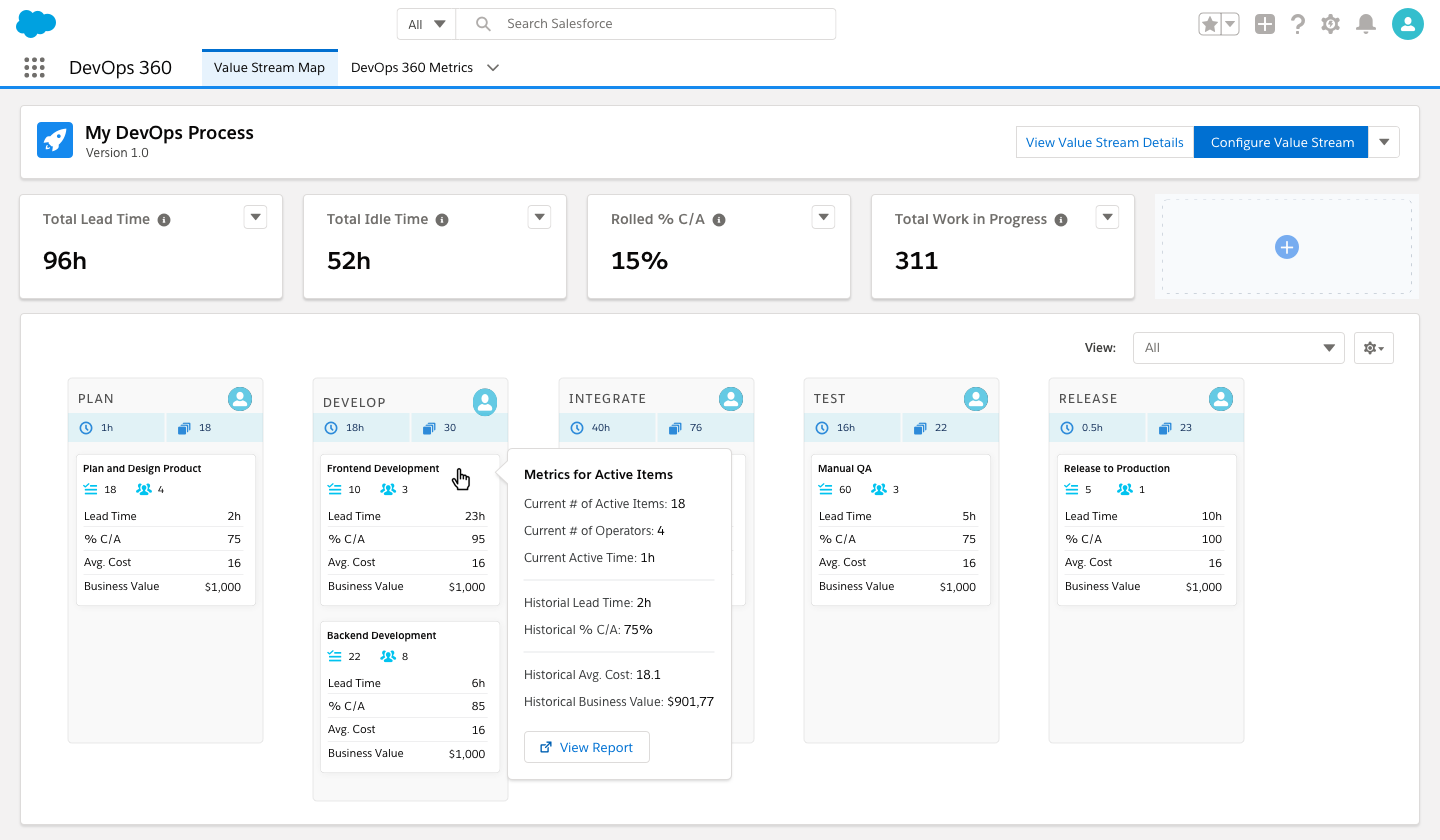
    Copado, a provider of a DevOps platform for building applications that extend software-as-a-service (SaaS) applications from Salesforce, this week announced it has added value stream management capabilities.

    Andrew Leigh, chief marketing officer for Copado, said providing a platform that accelerates the development and deployment of application code is no longer sufficient. The winter 2021 release of the Copado DevOps 360 platform now includes value stream management capabilities that enable organizations to better prioritize DevOps projects, he said.

    In response to the COVID-19 pandemic more organizations than ever are now relying more on SaaS applications that can be accessed easily by employees working from home. IT organizations are also now using platforms such as Salesforce to jumpstart digital business transformation initiatives. Rather than write develop entire applications from the ground up, many organizations are employing low-code tools from Salesforce and others to extend, for example, customer relationship management (CRM) platforms.

    Leigh said most of the activity revolves around professional developers who are increasingly applying best DevOps practices to build those applications. Copado has certified more than 25,000 developers on its platform, he said.

    Given the current state of the economy, Leigh said interest in DevOps platforms is rising among organizations building Salesforce applications because they want to ensure a return on investment (ROI). Organizations that are investing six figures to build these applications are especially interested in value stream management tools that help make sure these projects are delivered on time.

    The value stream management capabilities added by Copado include support for the Scaled Agile Framework (SAFe) for building complex applications more efficiently. It also provides the ability to synchronize stories from Jira and Agile Planning boards.

    The latest version of the Copado DevOps 360 platform also adds a suite of declarative pipeline builders that allow non-technical teams to define and manage value pipelines without a single line of code. That capability is intended to simplify version control and automation flows to enable developers and administrators who manage Salesforce instances to better align their efforts.

    Copado added deeper integrations to third-party testing tools that incorporate artificial intelligence (AI) and updated its static code analysis and compliance tools.

    Salesforce is clearly not the only SaaS application platform that organizations are looking to extend, but it is among the fastest-growing. For its most recent third quarter, the company posted revenues of $5.42 billion, an increase of 20% year over year. The company is now lifting its future guidance to slightly exceed pre-pandemic levels. Salesforce is projecting fiscal 2021 revenue at the end of its fourth quarter will total $21.11 billion. Revenue guidance for fiscal 2022 has been raised to $25.5 billion. Salesforce earlier this week also announced its intention to acquire Slack, a provider of a messaging platform that is used widely by DevOps teams.

    Leigh said a dedicated DevOps platform for Salesforce applications is necessary because Salesforce applications are constructed using a set of objects and tables unique to the platform versus traditional application code. Regardless of the reason for requiring a dedicated DevOps platform, interest in building and deploying custom applications on top of the Salesforce platform has increased sharply since the start of the pandemic.

  • Demystifying the Low-Code Category

    Demystifying the Low-Code Category

    The low-code category is estimated to grow substantially in the coming years. By 2024, Gartner projects 75% of large enterprises will have adopted four low-code or no-code tools for both IT application and citizen development needs. But what exactly is low-code, and what are the scenarios in which it is needed?

    Low-code, like so much other software jargon, is somewhat ambiguous. Under this umbrella term exists a well of various tool types—website generators, form builders, API connectors, database builders, workflow automators and more, each requiring varying levels of technical proficiency. Some are 100% codeless and UI-based with drag-and-drop templates. Others need programming acumen to set up to complement a developer’s pre-existing workflow. When we talk about low-code, we’re typically referring to platforms that help create internal business utilities.

    I recently connected with Divyesh Kharade, co-founder and CEO at DronaHQ, to demystify the low-code category. Below, we define citizen developers, break apart low-code versus no-code and dig into specific types of low-code scenarios. Given this knowledge, technology leaders can better identify what tools they need to increase rapid development for their business needs.

    Hard Code Is to No-Code as Manual Is to Driverless

    So what’s the difference between traditional coding, low-code and no-code? To demonstrate the nuances between emerging code paradigms, Kharade compares them to automobile types.

    Manual Coding

    Traditional coding is like a manual car with a gearbox

    With a manual car, you must know how to switch between gears. Not to mention, you must understand driving itself and how to navigate busy streets, all while following traffic laws. We can compare manual driving to traditional coding. Manual coding is for trained developers.

    For example, consider we need to develop an application to interact with a database. To create this from scratch, this could mean coding a PHP application, connecting it to a back-end database management system such as PostgreSQL and hard-coding commands for ingesting data and manipulating entries.

    Manual coding requires an adept understanding of programming languages and development frameworks and libraries and collaborative development processes such as git. Naturally, traditional coding is in the professional developers’ realm and often necessary for software teams developing proprietary software-as-a-service offerings. It affords ultimate customizability.

    Low-Code

    Low-code is like an automatic car

    With an automatic car, you must still know how to drive, but gear-switching is automated. Cruise control is a nice perk, too. Similarly, low-code seeks to make development easier. It even enables some non-tech folks to construct applications. Low-code is used by professional developers and citizen developers.

    If we consider our database example, a low-code solution would likely involve a one-time registration of a database. This would require a little technical expertise to initiate, Kharade said. However, after which, it would be smooth riding—a user interface would be utilized to develop applications that interact with the database.

    Low-code platforms often incorporate various drag-and-drop building blocks to help develop applications. These pre-generated components may include tables, textboxes, dropdowns, charts, maps, forms, user directories and other elements. Low-code solutions typically make code under-the-hood accessible and portable, too. Degrees here vary. Some, such as some-code, are more geared toward alleviating operational tasks for skilled engineers.

    Low-code solutions also may assist with the surrounding operations necessary to create a fully functional app, such as hosting, deployment and monitoring. Example providers in the low-code spectrum include Appian, Claris Filemaker, Mendix, Outsystems, Quick Base and Salesforce Lightning.

    No-Code

    No-code is like a driverless car

    In an automated car, AI handles all. Driving through traffic and re-routing is automated. You don’t need your hands on the wheel—but you do need a destination. Similarly, no-code is the most usable, non-tech option for application development. No-code is geared toward citizen developers and non-tech users.

    No-code takes low-code usability to a new level—100% UI-driven, with pre-built templates and the ability to string together utilities. No-code is popular in connectivity and triggers, taking the burden out of integration. Of course, the more you automate, the more granular control you sacrifice. Many no-code options simply require logins and permissions for business applications you already use. Examples include Zapier, IFTTT, Kissflow, Airtable and Retool.

    The trend toward low-code and no-code is industry-agnostic, too, having seen adoption by banking, manufacturing, consumer goods, eCommerce, and other areas, Kharade said.

    5 Common Low-Code Scenarios

    Now that we understand the variants, what are enterprises building using low-code? Kharade sees four common scenarios:

    1. Building internal forms: Collecting data in a form, such as for an inspection or audit. May require PDF generation. Non-tech folks with an understanding of their industry could create forms.
    2. Extending with publicly available forms: Making the form public for registration or lead generation. Requires little added functionality and a no-code user could likely implement.
    3. Working with databases: Junior engineers will readily understand database mechanics, but it’s not entirely non-tech, said Kharade. For example, skills may be required to synchronize databases with other cloud operations.
    4. Business process management (BPM): Digitizing the traditional corporate project approval processes. What was once paper-based or email-based is streamlined. It could involve picking up an order, pushing to a manager and a manager approves. Digitizing this process requires a deep understanding of the data structure.
    5. Purely open applications: Perhaps used for onboarding or internal job postings. Requires a fuller amount of user interaction design, workflows, file hosting and API connectivity. May require skilled developers.

    “Building your data structure at the start is extremely critical,” Kharade said. To him, more complex projects will still likely require skilled engineers at some point. But, as you can see above, there are many areas where low-code and no-code could streamline the creation of simple apps and tools.

    Low-Code, Demystified

    In other pieces, I’ve attributed the rise of low-code to an ongoing developer drought and the emergence of a digital-first economy during COVID. Throughout the pandemic, “there has been a frenzy to digitize any manual process,” noted Kharade. “People are scared even to use a pen someone has used.”

    Low-code has in part become a critical option to stand up replacement business applications rather effortlessly, providing citizen developers or non-tech users new digital capabilities. With its surge in popularity, the marketing language around this area is a bit befuddling, and many applications claim to be low-code or codeless.

    Of course, you could call any tool with a UI “no-code.” Technically, your iPhone apps are codeless from a user’s point of view. However, what sets these low-code development styles apart is their use in forging internal business applications and automating repetitive software development tasks. By utilizing low-code, traditionally non-tech companies could wrap operational capabilities around basic applications and scale them like tech companies.

    Another key to low-code, which I will expand on in a follow-up piece, is solving the integration hurdle with third-party APIs. “It’s difficult for a non-tech user to register an API,” Kharade said. One must understand authentication, OAuth, payloads, HTTP methods, responses and headers just to make a single call.

    API-driven services have needed better usability for quite some time. Low-code layers could make consuming a vast array of SaaS more inclusive—a fascinating prospect to problem-solvers of all skillsets.

  • Antipatterns That Hurt DevOps Implementations

    Antipatterns That Hurt DevOps Implementations

    Avoiding these DevOps antipatterns can help organizations reap the benefits of implementations faster

    It’s a given that all organizations at some point will suffer from poor development practices when trying to find the perfect balance between software development and IT operations. The good news, however, is that implementing DevOps can help you improve these processes and get them synchronized and working together in harmony.

    However, understanding and mapping out the core issues and the common DevOps “antipatterns” that are holding you back from successful DevOps implementation is essential. This article will focus on the most common DevOps antipatterns that organizations tend to fall into and how to avoid or overcome them.

    What Are DevOps Antipatterns?

    At first glance, DevOps may sound like a pretty straightforward concept. At its core, DevOps is about bringing together separate but functional areas and bridges the gap between software development (Dev) and IT operations (Ops) with the ultimate goal of delivering software faster and with better stability.

    That said, DevOps antipatterns can best be defined as ideas that are counterproductive to the DevOps culture. They include:

    • Blame culture: In this kind of culture, blaming and punishing people is the norm when mistakes are done. It can happen at an individual or organizational level.
    • Root cause analysis (RCA): RCA is a process that involves identifying the “root” cause of a problem or an event, as well as the appropriate actions to take to avoid a recurrence. It’s an iterative and continuous process that must be performed until data is exhausted or all organizational factors have been identified.
    • Human error: Human error is often cited as a root cause in RCA. This is also common in “blame culture” and someone has to be held accountable for mishaps and mistakes.
    • Silos: An organizational or departmental silo defines the mentality of teams that don’t share their knowledge with other teams within the same company.

    4 DevOps Antipatterns and How to Break Them

    Wrong Perception of Your DevOps Team

    The perception you have of your DevOps team matters. It’s essential to consider the team as part of the entire process. Neglecting to provide them with structure, resources, and a positive working environment can increase your chances of DevOps failing. Furthermore, making DevOps teams more productive requires proper implementation of processes and tools.

    How to Break It

    A successful DevOps implementation requires more than just bringing people together. Structuring the team correctly and adding processes is vital if they are to succeed. Providing the necessary resources, technology and information security they need will get the best results.

    Practices such as continuous integration (CI) and continuous delivery (CD) are both concerted processes that can be used to bring development teams together in alignment so software products are delivered quickly, operations are more simple to manage and no downtime is present during deployments that are detectable to the end user.

    Poor Choice of Technology

    Technology plays a significant role in IT; however, the rapid development of new technologies has made it challenging to separate essential and overhyped tech trends. For instance, DevOps itself is a powerful digital transformation tool as it plays a critical role in new software development and problem-solving. Nevertheless, many of the latest IT trends should not be worth your attention unless you and your team are willing to implement it correctly.

    How to Break It

    This antipattern can be broken by top-level and project managers who make the decisions regarding technology choices. Asking questions such as, “What does the organization need?” or, “How well will this technology work for us?” will help when choosing what tech is right for your organization. With thousands of tools and technologies available, you need such a mindset to make the right decisions.

    Unclear Responsibilities in Teams

    You may have come across this problem in many other non-IT projects. However, in both IT and DevOps teams, the consequences can be severe if solutions aren’t implemented quickly. If team members aren’t clear on their roles and responsibilities, this can lead to poor decision-making and unnecessary interference in other people’s positions.

    How to Break It

    First of all, you need to clearly define roles and responsibilities for everyone in the team. A clear definition of roles boosts productivity. For example, having a data scientist in your DevOps team can play a huge role in business success due to their very specific data analytics skills, techniques and tools. In fact, 89% of business managers agree that hiring a data professional will help to improve success at their respective organizations. There just needs to be active and consistent communication between team members for everyone to conduct their own roles and responsibilities efficiently.

    Every team member should follow the strategies and plans in place so timelines can be monitored and effective top management decisions can be made. When implementing complex DevOps architectures that require teams and software to work together, poor decision-making will be an issue if roles are left unassigned.

    Wrong or No Code Deployment

    To put it bluntly, there’s no DevOps without code deployment. With this being the ultimate result, DevOps makes no sense if it fails. This is quite a challenge for several organizations, as having Dev and Ops teams working in harmony can seem impossible.

    How to Break It

    As mentioned above, code deployment is often a challenging task for DevOps teams. However, organizations can break the resultant antipattern by integrating the units correctly to enable a collaborative environment, a great strategy for successful DevOps implementation.

    Such an environment will also make code deployment easier by reducing the need for a series of meetings and reviews, which ultimately delay teams from getting code to deployment.

    NoSQL’s Key Role in Database DevOps

    DevOps processes need to work in a synchronized manner to be successful. Issues with the database can cause it to slow down and affect the delivery of database changes. However, NoSQL’s unique approach is designed to simplify the process of DevOps implementation in the following ways:

    Faster scalability

    Many small companies fail to maintain peak performance with greater workloads. A more significant workload calls for better tools that can help maintain peak performance, subsequently making it easier for organizations to scale out.

    More efficient technical support

    Having technical support that doesn’t hold you back is key to DevOps success. The right NoSQL solution enables you to solve problems before they become full-fledged, expensive and time-consuming.

    Faster adaptability

    The changes that new codes bring for databases can be challenging. NoSQL makes it easier to deliver solutions to client requests, as it organizes them using dynamic indexing. Therefore, it verifies all queries before answering them with the appropriate index.

    Platform testing

    Testing is one of the critical steps you need to go through before actual implementation. Databases should be flexible enough to allow you to test queries without interfering with the real data. Testing helps to determine how new changes will impact the development process.

    Conclusion

    As you can see, there are many ways to implement DevOps systems in your business to deliver products faster, offer more technical support and automate essential tasks.

    All of the requirements we have covered are necessary if a business is to scale and grow. Businesses need to ensure the correct strategies are in place, roles in the company have been clearly defined and common antipatterns have been identified and eliminated.

  • Design Systems: Development Choices for Meeting User Expectations

    Design Systems: Development Choices for Meeting User Expectations

    Modern software development trends involve design systems and modernization, and if we drill down further, the trend within the trend is about creating better user experiences. This means improving usability, emerging technology and performance enhancements. This is easier said than done. What does it mean for developers?

    Employing Design Systems

    What a designer sketches, a developer tries to replicate, often with varying degrees of success. When we introduce multiple screen sizes and form factors, the experience can vary greatly if the collaboration between design and development is not in sync. To combat this, many modern software development practices are beginning to employ the use of design systems to provide an outstanding experience to the end user and streamline processes internally.

    Typically, a design system consists of UI components and visual style guidelines, both in the form of reusable code and reusable design artifacts. The system could include UI patterns, foundational elements and design principles or guidelines. Many go as far as defining what tools should be used for optimal UI and UX. For example, one of the most widely known design systems—and most used, due to its open source nature—is Google’s Material Design.

    With a design system in place, developers and designers are singing from the same sheet of music. This eliminates many delays and inconsistencies and provides prescriptive guidance for both the visual and functional experience of the app. It allows developers to deliver the beautifully styled, feature-rich responsive experiences the end user has come to expect.

    Choices for Modernization

    For .NET developers, this could mean exploring Blazor, Microsoft’s answer to JavaScript, which allows developers to build interactive web UIs using C#. It could mean diving into.NET 5, which is the next step in building a unified platform, allowing developers to use it to target Windows, Linux, macOS, iOS, Android, watchOS, WebAssembly and more. Or, it could mean getting a jump on .NET MAUI, the welcome evolution of Xamarin.Forms, combining the best of Mono and .NET Core and allowing developers to build truly native desktop and mobile apps for any operating system from a single codebase and project system from their preferred IDE.

    For the JavaScript developer, modernization could mean looking toward Vue 3, which is a faster, smaller and more maintainable framework. Or, it could mean exploring Angular 10 and its warnings for CommonJS imports. Or maybe it’s truly understanding and appreciating the downplayed release of React 17, which now allows multiple versions of React on one page, making it easier to use React with other frameworks. Modernization is all about staying relevant, learning and leveraging the latest the industry can offer.

    Popular Frameworks

    For front-end development, React, Angular and Blazor are some of the most popular frameworks at the moment. Blazor is so new enough that you aren’t going to find anyone with years of experience, but it is a framework that is incredibly adaptable and easy to learn if you are C# developer.

    React and Angular are more mature and with their latest releases provide even more compelling reasons to build your web apps with them. The soft skills—the ability to communicate and collaborate—are some of the most in-demand skills today.

    Regardless of your front-end preferences, the proliferation of frameworks and new versions means that developers have more choices than ever for creating rich, interactive, modern experiences for multiple platforms and devices.