Category: Blogs

  • Could No-Code Enable Everything Ops?

    Could No-Code Enable Everything Ops?

    It feels like DevOps principles are permeating every discipline, creating new buzzwords by the minute. DevSecOps. DatabaseOps. SalesOps. FinOps. MarketingOps. This “JargonOps” is clearly encouraged by marketing campaigns (and bloggers, wink, wink). Yet, the phrases do depict a real trend: all industries are getting an efficiency overhaul in the wake of increased automation.

    As I’ve covered before, low-code and no-code tools lower the barrier to entry to application development, enabling field experts to construct workflows as they see fit. For tech-savvy non-engineers, this could be a huge boon to transform copy-and-paste stopgaps into efficient workflow automations.

    I recently chatted with self-proclaimed “productivity geek” Sean Chou, CEO of Catalytic, to get his take on where this new era of automation is heading. From healthcare to logistics, advertising to supply chain management, every industry is likely to get an efficiency boost — and a lot of this digitization will be constructed using codeless environments.

    But first, how did we get here?

    From RPA to No-Code

    “The story of B2B software is largely about automation,” said Chou. If we consider classic examples of corporate applications, we see one common thread — B2B software has always sought to automate traditional office work.

    And so, it came to pass that computing and software devoured all these office tasks, from accounting to time-tracking, communications and many other areas. Though computer-based office work delivered huge efficiency boosts, these interfaces often introduced new hurdles; bad UI design, difficult navigation and a hundred open tabs, just to name a few.

    From there, robotic process automation (RPA) aimed to operationalize a growing number of tedious digital workflows across Excel spreadsheets, web apps and desktop apps. In Chou’s words, “RPA took the concepts of test automation software, and then pointed it toward production systems.”

    Though RPA’s process of recording screen interactions gathered much interest and attention (and funding), screen scraping is ultimately too fragile to be effective. It adds technical debt over legacy systems. It can be expensive to implement. Lastly, it’s not processes-centric and doesn’t implement reusable software-defined APIs.

    At that point, though, “Pandora’s box was open,” Chou said. Folks started to consider other ways to optimize, and reimagine how end users could automate workflows and stitch together interactions between disparate apps.

    Out of the ashes of RPA rose a new paradigm — low-code and no-code.

    No-Code Addresses Everything Ops

    With developer resources stretched thin and limited engineering talent available, it can be challenging to loop expert programmers into codifying traditionally non-IT processes.

    There’s not often enough developers to help with SalesOps, FinOps or any other Ops areas, explained Chou. “The only thing that can change the narrative is no-code technology that is effective.”

    Similar to how higher-level programming languages made low-level programming more accessible, Chou sees low-code and no-code unlocking accessibility for automation design by orders of magnitude.

    Four Examples of Everything Ops

    So, what are some examples of no-code use cases for automating operations? Chou outlined four specific categories that he believes will see much more citizen developer attention and action in the years to come:

    Customer Ops: “It’s really important to run customer operations as efficiently as possible,” Chou said. Especially in B2B interactions, people need to adopt various systems dictated by the customer. This can result in many ad-hoc implementations that beg for efficiency improvements.

    Financial Ops: Imagine the number of Excel spreadsheets that make up an account’s financial foundation. Consider the tedium of inputting data, generating reports or migrating calculations into other tools. There’s a ton to automate here. Providing no-code platforms to financial minds could have a “really transforming effect,” said Chou.

    People Ops: “The number of mini apps being developed for HR use cases is astounding,” Chou said. Think of all the digital tools HR must use: vacation requests, employee performance reviews, personnel databases – the list goes on. There’s a significant opportunity to clean up legacy applications within many HR departments to build a more coherent platform.

    SupplyChain Ops: Procurement and supply chain operations is another area where no-code could have an impact. Streamlining inter-company communications or engaging with potential customers are areas worthy of automation.

    No-Code? No Problem

    Across all these verticals, Chou notices three common patterns emerging.

    First, groups are using no-code to create standard operating procedures (SOP). SOPs could be used for onboarding or offboarding customers or ensuring compliance with a set of policies.

    Another everyday use is data pipelining — pulling information from many resources for analysis. A common use case is processing financial or customer data to generate a particular output. This is an area where embedded machine learning models could enrich the data.

    Lastly, a third common use case is creating workflow-powered surveys. These online forms could be used to measure employee engagement or to collect customer input. No-code workflows enable not only the collection of that data, but could allow for additional actions to be taken upon input.

    Implications and Governance

    Of course, giving non-developers the keys to the castle could have some downsides. Let’s face it — computer science is, well, a science. There’s a reason engineers are taught strict practices around version control, data governance and peer reviews. All of which must still be upheld when establishing a citizen development culture — especially at scale.

    When it comes to low-code and no-code, “governance is a huge thing,” said Chou. “Any company coming at this with no governance in mind can’t work beyond small teams.” Move beyond 10 or so citizen developers, and you’ll really need to establish some sort of shared framework or center of excellence.

    Making citizen development work in a large company requires IT visibility, data governance and a review process for new workflows, said Chou. IT will likely also want to verify that a new workflow doesn’t make permanent state changes. Otherwise, static apps that don’t touch core systems or affect persistent data stores are probably fine. “Having built-in governance is really key to making this successful,” Chou said.

    A Technology Leap

    No-code is giving more people the ability to produce unique workflows to increase their efficiency and do more with less. But with this movement comes worry. “With every technology leap, there’s always a wave of people concerned,” said Chou. Many naysayers are worried that automation will leave people out of work – “They’re coming for our office jobs!”

    Instead, Chou recommended we curb our expectations. Citizen developers are not going to build sophisticated iPhone apps any time soon. “If you think no-code is a panacea for all software, you’re coming at it all wrong,” he said. Instead, what they can actually can accomplish is far more practical.

    In reality, things are not as dire as some may make it seem. The new age of automation will likely open room for more jobs than it diminishes. “The net is always a plus,” said Chou.

  • Puppet Adds DevOps Consulting Practice

    Puppet Adds DevOps Consulting Practice

    Puppet has launched a DevOps consulting service that promises to help organizations implement best practices that will ultimately make their IT organizations more efficient.

    Nigel Kersten, field CTO, Puppet, said the Scaling DevOps Service is especially focused on improving workflows among organizations that have already started down the DevOps path.

    Most IT organizations that embrace DevOps eventually encounter bottlenecks that conspire to limit the rate at which they can build and deploy applications. Puppet will make available DevOps experts capable of assessing DevOps workflows as part of an effort to reduce operational friction, said Kersten.

    Those consultants can also identify integration opportunities that might further streamline workflows, in addition to providing an overall assessment of an organization’s DevOps maturity based on a model Puppet developed.

    Kersten said in many cases, enterprise IT organizations, especially, are trying to adapt DevOps principles that were originally created for small startup companies, with mixed success. Puppet consultants, using observations gleaned from their own engagements with customers that have embraced its tools for automating the management of IT, are often in a better position to identify ways to optimize DevOps workflows across larger IT organizations, Kersten said.

    It’s also easy for large enterprise IT organizations to misinterpret how one DevOps principle or another should actually be implemented, Kersten said.

    DevOps consulting, of course, has become a cottage industry within the IT services sector over the last decade. Now, almost every systems integrator has a DevOps practice. Most of those practices are focused on enabling organizations to embrace DevOps, versus helping organizations optimize workflows after they have already begun the transition, said Kersten.

    It’s not clear to what degree organizations that have not embraced Puppet’s automation framework will embrace consulting services based on a DevOps model created by observing Puppet’s customers. However, it’s apparent many IT organizations have inconsistently implemented DevOps practices across various departments. In many cases, bottlenecks that result in various departments within a larger IT organization are being addressed using a set of manual processes that have been created as a workaround to a specific problem.

    Of course, optimizing DevSecOps best processes is only going to become more challenging as emergent technologies such as containers, Kubernetes clusters and serverless computing frameworks are added to the IT mix. More challenging still, many organizations are now trying to shift responsibility for security further left as part of a DevSecOps workflow.

    Many IT teams are, naturally, resistant to paying for advice, while others routinely hire small armies of consultants in the hope that ideas and concepts that have worked well elsewhere can make their IT teams more efficient. Regardless of the approach pursued, IT leaders need to remember that DevOps is a continuous journey. Every time a new platform is added to an IT environment, a DevOps workflow will need to evolve. The real issue IT leaders need to come to terms with is how long it will take for their internal teams to adapt, whether it’s via the school of hard knocks or relying on external expertise that has handled most of the issues an internal IT team is likely to encounter.

  • Game On: Secure Coding Virtual Summit 2021

    Game On: Secure Coding Virtual Summit 2021

    Agile organizations are looking for ways to win at security without slowing down their release cycles. That’s where DevSecOps comes in. The days of a hands-off security approach for developers are over. Organizations implementing DevSecOps to integrate security into their DevOps framework are able to release secure software faster. Developers test code for potential security vulnerabilities earlier in the pipeline to fix security issues in real time to avoid costly delays.

    At Secure Coding Virtual Summit 2021, industry-leading AppSec and DevSecOps practitioners, analysts and visionaries will come together to share their best pro tips and power ups to level up your code security. The agenda for the virtual event, taking place March 24 from 10 a.m. to 6 p.m. ET, features a mix of topics including AppSec, threat modeling, API security, container security, case studies and more.

    The most brilliant security luminaries from OWASP, Okta, Microsoft, Secure Code Warrior, WhiteSource and many other well-known IT companies, will discuss:

    • How to level up your secure coding strategies
    • How to run an AppSec program with open source projects
    • The best practices for securing your APIs, the attack surface of an API and common authorization problems
    • The concept of threat modeling, its objectives and its role in the SDLC
    • How to transform developers into security people
    • How easy (or not) it is to get a container or Kubernetes cluster hacked on purpose
    • How to create an AppSec pipeline with containers in a short period of time (demo)

    This year’s Secure Coding features outstanding industry leaders, such as:

    • Vandana Verma Sehgal, global board of directors at OWASP
    • Simone Curzi, cybersecurity principal consultant at Microsoft
    • Keith Casey, API problem solver at Okta
    • Matias Madou, CTO and co-founder at Secure Code Warrior
    • Matthew Coles, senior principal product security engineer at Dell
    • Sarah Young, security architect at Microsoft
    • Chris Romeo, CEO and co-founder at Security Journey
    • Dr. Phillipe de Ryck, web security expert and founder at Pragmatic Web Security
    • Richard Greenberg, founder and CEO at Security Advisors LLC
    • Izar Tarandach, principal security engineer at Squarespace
    • Jeroen Willemsen, principal security architect at Xebia
    • Shiri Ivtsan, director of product at WhiteSource
    • Justin Hutchings, director of product management at GitHub
    • Matt Tesauro, senior partner at 10 Security
    • Matthew Butler, principle engineer at Laurel Lye

    Attendees will have access to useful resources and will be able to interact with sponsors to power up their secure coding strategies. There will be live Q&A chats with keynote speakers to get your burning questions answered. Attendees will also have the opportunity to hunt for Easter eggs to boost their player score for a chance to win a PlayStation 5.

    To see the full agenda and to register, please visit the Secure Coding website.

  • Too Many Organizations Get Public Cloud Wrong

    Too Many Organizations Get Public Cloud Wrong

    The cloud has been getting a lot of press in the past few years—and with good reason. The elasticity and flexibility of resources are transformational for businesses. However, there are also drawbacks. For most enterprises, it’s a significant undertaking to migrate on-premises applications into a public cloud environment.

    Modern applications today are rarely self-contained entities. Application dependencies occur when software components, applications and servers rely on one another to deliver a service. The typical enterprise manages hundreds, or even thousands, of interconnected components and services, forming a complex web of dependencies.

    If an application is migrated to the public cloud without understanding the dependent services, severe performance degradation can occur with applications that are still on-premises. For example, moving an e-commerce shopping application to the public cloud but leaving a key database on-premises will result in consumers experiencing a slower response.

    The Repatriation Problem

    IDC research shows that fewer than 20% of enterprise applications have been moved from onsite data centers to the public cloud, not because companies do not see value in the cloud, but because the process of getting those applications to the cloud is complicated.

    A survey of 350 cloud decision-makers in the United States and UK commissioned by Virtana and fielded by Arlington Research in November 2020 confirmed this. More than two-thirds (68%) of respondents have already migrated 25% or more of their applications to public clouds, supporting the IDC finding.

    Clearly, businesses recognize the value of the cloud. But another surprising result confirms that the migration process may be problematic. A whopping 72% of respondents said they have moved one or more applications from the public cloud back on-premises. Considering the time and effort cloud migrations require, this is a striking result. While there may be cases where repatriation is undertaken strategically to support evolving business needs, the reasons cited by respondents show most were rollbacks required because of unanticipated problems.

    There Is No Single Reason Why

    Almost half (41%) of respondents said they repatriated applications that should have stayed on-premises. The reality is that not all workloads are a good fit for the public cloud environment. You need a solid understanding of the various attributes of different workloads, such as data, back end, privacy and security requirements, to determine their inherent suitability for a public cloud environment.

    Technical provisioning issues challenged 36% of respondents. The sheer number of configuration options available—combined with the variety of computing dimensions that you have to take into account—means there are a lot of puzzle pieces that have to fit together, or you could run into problems.

    Almost one-third (29%) of respondents reported application performance degradation in the public cloud. The public cloud is a fundamentally different environment than an on-premises data center, and creating a hybrid environment further alters the nature of the infrastructure, so you cannot simply expect workloads to attain the same performance levels as you migrate them. And if performance slows to an unacceptable level, any benefits you gain by moving applications to the cloud are overshadowed.

    Around one-fifth (21%) admitted that they selected the wrong public cloud provider. Cloud providers are not all the same, and picking the wrong one, for any reason, can be an expensive and disruptive mistake.

    Finally, one-fifth (20%) of respondents repatriated applications because of unexpected costs in the public cloud. The public cloud’s pay-for-what-you-use model is appealing compared to the on-premises capex model, where you pay for capacity regardless of whether you use it. But there is a dark side; you have to pay for what you use in the cloud even when that usage is unexpected. Whether that is due to poor planning, an unanticipated surge or workload drifts over time, getting a nasty surprise in your end-of-month bill can put a big dent in your cloud budget.

    Eliminate Repatriation With Better Planning and Observability

    Any one of these reasons alone reflects a challenging setback to overcome. Unfortunately, many organizations run into more than one of these problems. In fact, one-third of respondents cited two or more of these reasons for repatriation, and 12% experienced three or more of these issues. This seems to indicate that organizations’ migration planning efforts are inadequate. It is not for lack of investment—78% of survey respondents said that even during the current challenging economic climate, they are continuing their migration to the public cloud at the same or an accelerated pace, signaling they believe public cloud deployments to be a strategic investment.

    The real problem is a lack of precision in observability—of workload characteristics in the data center pre-migration and of workload utilization and performance in the public cloud post-migration. The better you understand your applications, in minute detail, within the context of the environments they are moving from and to—a ‘know before you go’ approach—the less likely you will have to hit the “undo” button on your public cloud migration.

  • How to Respond to Rising Cloud Costs

    How to Respond to Rising Cloud Costs

    As organizations ascend to the cloud, their cloud expenses are floating to the same lofty heights. But are all cloud costs necessary? The answer is a resounding no — there’s a lot of waste.

    In 2020, organizations wasted $17.6 billion on idle cloud resources and cloud overspending, according to ParkMyCloud. Data egress, upgrades and subscriptions to SaaS tools also crowded the cloud invoice inbox. With digital innovation a pressing concern, cloud spend is forecasted to rise significantly in the coming years. Without the right fiscal discipline in place, companies face escalating fees.

    I recently met with Eugene Khvostov, VP of product management at Apptio, to discover how organizations can rein in cloud and SaaS spending. According to Khvostov, IT departments require increased visibility, optimization and responsibility if they are to curb the cloud checkbook. Below, we’ll see what he means and discover useful tips for reducing unnecessary expenditures. Following these general guidelines could help right-size your cloud offerings across AWS, GCP, Azure and other cloud-based tools.

    Where We Are With Cloud Costs

    The pandemic has ushered in significant growth in the cloud computing and SaaS space. We’re also seeing a multi-cloud fracturing effect, as cloud service providers like GCP and Azure reach parity with AWS offerings.

    Cloud tooling grants extraordinary flexibility, elasticity and scalability. Being able to spin up or wind down an instance on a whim has permanently altered how software architecture is built. Yet, with great cloud power, comes great responsibility. “How do I make sure I’m not wasting money in the cloud?” Khvostov asked.

    According to Khvostov, as more organizations move to hybrid and decentralized multi-cloud models, more and more questions arise: What is the total cost per service? Who is spending what? Is cloud spend actually driving growth, and, if so, how much? How are new tools being procured?

    Three Cloud Financial Management Strategies

    To address these concerns and plan for cloud spending increases, Khvostov recommended three general strategies. These three phases can be thought of as research, remediation and prevention.

    1. Access and Visibility

    “You’ve got to have access and visibility,” said Khvostov.

    First, companies require access to their spending data. In this case, large, general invoices are not granular enough. You need breakdowns by service, said Khvostov, to access more fine-grained spending habits.

    Second, you need to equate those spending habits to team usage. This requires improved visibility into your organizational structure and service usage tracking at a team-by-team level.

    2. Optimize

    Next comes optimization. Ensure cloud footprints are appropriately sized for each application, and ensure you don’t have any idle resources, Khvostov said.

    Where do you have the opportunity to optimize? Well, it could be as simple as shuttering an orphaned volume, such as an Amazon Elastic Block Store (EBS), which could persist even after an EC2 instance is terminated.

    “BS volumes tend to persist unless you select the Delete on Termination,” AWS explained. So, check your configurations. Amazon provides a way to detect this using OpsCenter.

    3. Responsibility

    Once things are optimized, you need to maintain standards. “You must ensure teams drive responsibility for spend management and optimization,” said Khvostov.

    But how do you instill an optimization mindset and empower engineers to take action? Khvostov said it’s all about demonstrating a measurable return on investment (ROI) and continuing discussions between stakeholders.

    A recent report from A Cloud Guru found that 90% of organizations plan to expand their cloud services over the next one to three years, but 44% lack a plan to upskill their workforce. Most groups have their work cut out for them if they are to assign accountability for cloud costs ownership.

    Specific Cloud Costs That Bite

    So, what are some other particular areas we should be watching? Well, arguably, the most common cost is hidden data transfer fees. Surprise ingress and egress fees can be costly — take the story of Chris Short, whose personal site was charged $2700 for an unexpected 30.6 TB data transfer.

    Watch out for other cloud costs around:

    • Services automatically launching or autoscaling.
    • Idle resources due to “orphan” instances or overprovisioning.
    • Price lock on granular commitments. You could be stuck in a savings plan on an Amazon EC2 R5 instance, which would be lost upon upgrade to R6. (Khvostov acknowledged that AWS has remedied this situation, to an extent).
    • Legacy, less-efficient code can rack up cloud costs, The Information reports.

    The Cloud Economist Role Is Trending

    To unearth these costs, some believe a brand new role is required. A cloud economist is a cloud financial manager that helps spot fees, directs further cloud optimizations and calculates overall ROI from cloud investments.

    The rise of cloud financial offers is an accelerating trend, Khvostov said, one that requires the right tools and practices within an organization to become a trusted ally. “It’s definitely a legitimate role in the sense that it’s critical to organizations,” said Khvostov. “It’s specialized enough that it requires technical and financial skills.”

    Hiring a cloud economist, or building a cloud financial center of excellence, could provide a lot of value. Yet, gauging the ROI of this role isn’t immediately obvious. Some optimizations could take time to visualize, Khvostov said. A certain change could instantly invoke 20% cost savings, but you may not register that impact for 30 days or more.

    “It’s not just about cloud infrastructure — it’s about your SaaS spend, as well,” Khvostov added. He believes companies desperately need a window into what infrastructure-as-a-service (IaaS) and automation, like Chef or Jenkins, cost, along with the time savings and dollar ROI their usage equates to — because, he said, “You can only right-size what you know.”

    Trimming Cloud Spend and Cloud Costs

    Some IT folks simply fail to understand the implications of their cloud resources. Surprisingly, a recent survey by SoftwareONE revealed that 30% don’t realize that everything in the cloud is metered. To rectify this knowledge gap, organizations could use better awareness into their cloud holdings.

    The cloud is the future, and we must prepare responsibly. Yet, having fiscal discipline in a world where every software function is commodified “as-a-service” is tricky — teams require financial visibility into their cloud holdings. To rein in costs, Khvostov recommended treating it as a continuous process: access and visualize spending data, optimize your existing cloud footprint and disseminate responsibility among teams.

    Once you have a better frame of reference, you can begin to right-size cloud, right-size SaaS and appropriately right-size the team. Eventually, with the right multi-cloud and SaaS financial management strategies, perhaps that cloud bill will start to feel a little lighter.

  • GitLab Releases Updates to CI/CD Platform

    GitLab Releases Updates to CI/CD Platform

    GitLab this week made available a 13.9 update that adds more than 60 new features and updated capabilities to its namesake open source continuous integration/continuous delivery (CI/CD) platform.

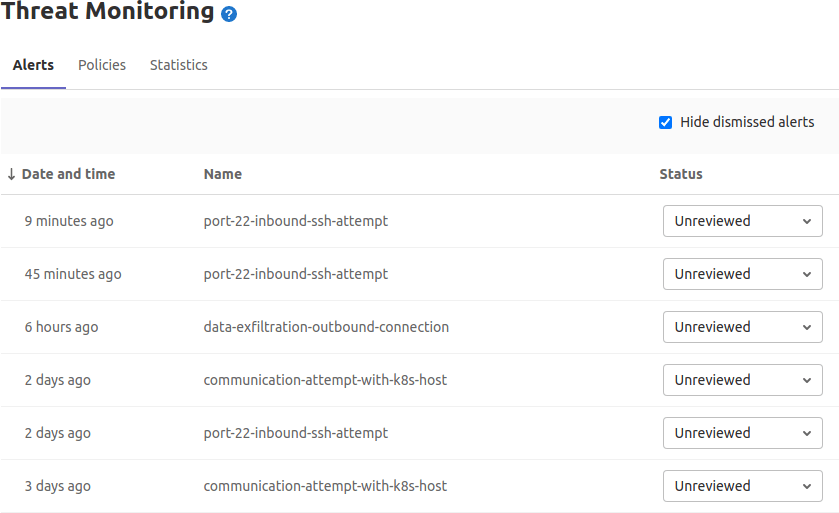
    Brian Glanz, a product marketing manager for GitLab, said chief among those capabilities is a Security Alert Dashboard that enables DevOps teams to triage high-priority alerts more easily. As more organizations embrace DevSecOps best processes, application development teams need to be able to prioritize which security issues are more pressing than others, Glanz said.

    Other new capabilities include the ability to reuse a pipeline of a CI/CD configuration, and a maintenance mode option that keeps instance available while administrative tasks are being performed.

    Additionally, it’s now possible to view group-level analysis of release metrics, in addition to the ability to view a version of a pipeline configuration with all of the include and extends configurations merged together.

    Glanz said GitLab continues to gain traction, because all the capabilities it provides are based on the same integrated code base. The effort a DevOps team needs to exert to take advantage of new capabilities is substantially less than rival platforms, Glanz said.

    At the same time, Glanz noted that the number of contributors to GitLab coming from outside the company also continues to increase. The latest version has 299 merged contributions from the wider GitLab community.

    It’s not clear how much of an appetite organizations have, these days, to replace an existing CI/CD platform. However, it’s not uncommon for organizations to have multiple CI/CD platforms employed by different DevOps teams. In the meantime, the number of teams within enterprise IT organizations that are embracing DevSecOps processes to advance digital business transformation initiatives continues to rise. As more organizations realize how dependent they are on custom software to differentiate themselves from rivals, more enterprise IT organizations will opt to standardize on a single CI/CD platform to both reduce costs and increase overall efficiency.

    A report published last year by GitLab noted organizations can improve application development and delivery by 87%, resulting in a savings of more than $23 million. Overall, the report claims organizations can see a 407% return on investment (ROI) on the GitLab platform.

    Naturally, competition among CI/CD platform providers remains fierce. With most developers working from home to help combat the spread of the COVID-19 pandemic, these platform providers have been touting their ability to support remote work. It’s not clear if developers will be returning to the office en masse now that COVID-19 vaccines are being distributed. However, it’s clear that even once the pandemic subsides, the way application code is created and maintained will be a lot more fluid. Many organizations are now more comfortable hiring developers wherever they can find them.

    Of course, many of those developers are going to be wary of joining organizations that have disjointed workflows, especially when it comes to shifting responsibility for application security further left toward developers. In fact, the ability of any organization to effectively recruit developers is now directly tied to the overall sophistication of their DevOps workflows.

  • New Monitoring Features in PostgreSQL 13

    New Monitoring Features in PostgreSQL 13

    Every monitoring solution is limited by the information the system allows to be collected. PostgreSQL DBMS provides many metrics reflecting its internal state, running queries and background processes, and each release brings the community more monitoring-related features. PostgreSQL 13, which was released in September of 2020, added key improvements, including query sampling, improved WAL usage statistics and new system views. Let’s look at the benefits of each of these new features.

    Query Sampling

    Those who regularly monitor database queries are familiar with the following parameters:

    log_statement controls what SQL statements are logged
    log_min_duration_statement enables logging of statements that ran for at least the specified amount of time.

    These parameters help users track down unoptimized queries in applications. However, it is important to recognize that excessive log traffic may impact performance, especially when analyzing workloads with a lot of short queries. To help address this, PostgreSQL 13 introduced two new GUC parameters to allow logging of sampling statements.

    log_statement_sample_rate controls the sample rate (0.0 – 1.0). That is, it allows users to control the percent of queries that are logged.
    log_min_duration_sample defines the minimum required statement duration of queries to sample

    Only statements with a duration exceeding log_min_duration_sample are considered for sampling. Because of this, to enable sampling, both GUCs need to be set correctly. Further, the existing log_min_duration_statement GUC has a higher priority than log_min_duration_sample, so statements with a duration exceeding log_min_duration_statement will always be logged, no matter how the sampling is configured. This means that only configurations with log_min_duration_sample < log_min_duration_statement actually sample the statements, instead of logging everything. Note that only superusers can change these settings.

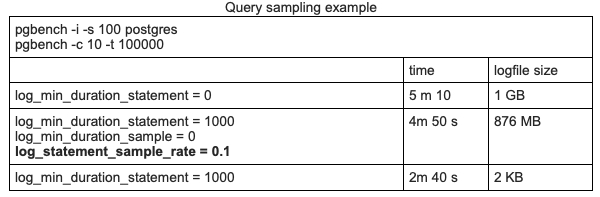
    Consider the following synthetic query sampling test using pgbench on a laptop.

    PostgreSQL 13

    • 1st Row: No sampling. All queries are logged
    • 2nd Row: Log all queries longer than 1 second, plus 10 percent of all other queries
    • 3rd Row: Log all queries longer than 1 second

    In this example, sampling improves timing slightly, but since the test was run on a personal laptop, this measurement does not signify much.

    However, the size difference is very interesting. Sampling helps make the logfile size approximately 10 times smaller. We can figure out that most of the queries in this test lasted less than 1 second. And if we log only long queries, the logfile remains almost empty (third row). The difference here is significant. Even if disk space consumption isn’t a concern, sampling can help speed up tools that analyze PostgreSQL logs.

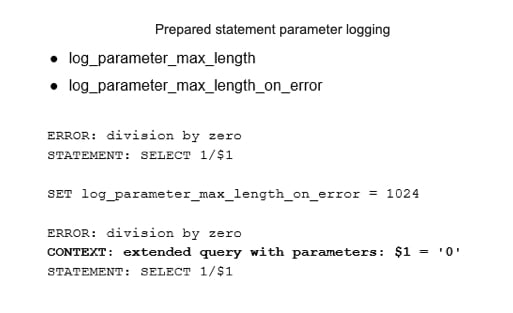
    PostgreSQL 13 also introduced settings to improve control over prepared statement parameter logging.

    If log_parameter_max_length is set, bind parameter values will be trimmed to this many bytes.
    log_parameter_max_length_on_error adds context for the failure of parameterized queries.

    Previously, prepared statement parameters were never logged during errors. Note, since these logging features can impact performance, they should be used with care.

    PostgreSQL 13

    Write-Ahead Log Usage Statistics

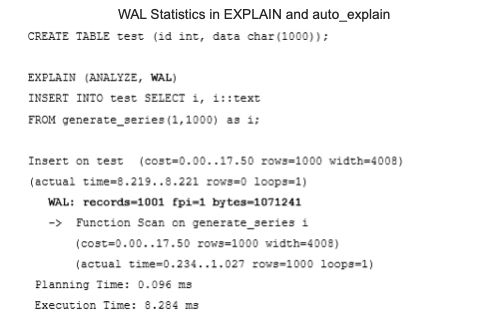
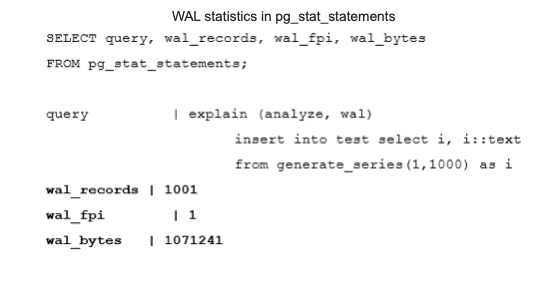
    A write-ahead log (WAL) is crucial to database system durability, and is also used for physical replication. This makes monitoring the WAL important. PostgreSQL 13 allows users to explore WAL usage per query using the EXPLAIN command. The following example shows that the insertion of a thousand rows generates 1001 records and takes about 1 Mb of space. Note that auto_explain also shows this statistic.

    PostgreSQL 13

    It is also possible to find WAL usage statistics in autovacuum log messages. However, this works only when autovacuum logging is enabled with the log_autovacuum_min_duration parameter.

    Probably the most useful place to see WAL statistics for a monitoring plugin is in pg_stat_statements. PostgreSQL 13 has new columns that show WAL usage statistics per query.

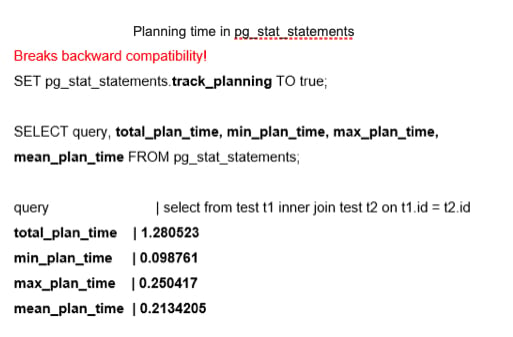
    Another addition to pg_stat_statements is a group of fields to track planning time. This feature is disabled by default because it can cause a noticeable decrease in performance. When enabled, it shows total, minimal, maximal and mean planning time. The pg_stat_statements.track_planning parameter enables this feature. It is important to note that this feature breaks backward compatibility. Previously, existing “time” fields — min_time, max_time, total_time and mean_time — had their suffixes changed from “time” to “exec_time.” As a result, all monitoring tools that rely on pg_stat_statements should be adjusted accordingly.

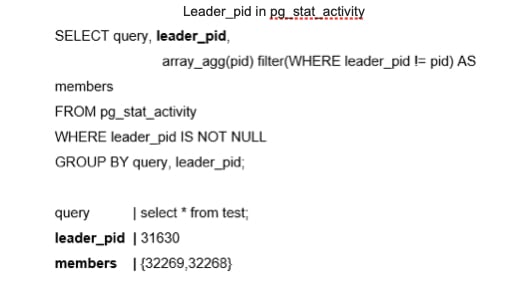
    The next feature provides more information about parallel queries. In the past, parallel queries did not reveal which back end was related to the parallel query or provide easy insight into all the processes involved in a query. It is now possible to show the parallel group leader information, at the SQL level, using the leader_pid in the pg_stat_activity system view.

    New System Views

    PostgreSQL 13 offers new system views that can be used for PostgreSQL monitoring. The first group improves progress reporting.

    pg_stat_progress_basebackup helps to estimate the progress of a base backup of a PostgreSQL cluster.
    pg_stat_progress_analyze shows information about backends running the ANALYZE operation, including autovacuum workers. It can help administrators understand how long it will take to collect statistics.

    Another group of new system views helps answer the following question: “How does Postgres spend its allocated memory?” These views will be mostly useful for DBMS admins and low-level support engineers who inspect bottlenecks and optimize memory usage.

    pg_shmem_allocation can be enabled for a deeper inspection of how shared memory is used for internal DBMS structures, including a lock table, process array, data about various background processes and so on.
    pg_stat_slru is related to the inspection of SLRU caches. SLRU is a special buffer cache where non-user data is stored, such as the state of each transaction, as well as information about subtransactions. Asynchronous notifications also use SLRU.

    Wait Events Changes

    PostgreSQL 13 introduced the renaming of various wait events to improve consistency. The brief reference to this in the release notes does not do justice to the importance of this change. Wait events were added in Postgres 9.6, and are usually needed to diagnose bottlenecks that occur because of interprocess locks. Previously, wait events were named in all possible styles. Now, the naming is more consistent, and the wait events are better documented and, hopefully, more understandable. However, admins need to update any monitoring scripts that use wait events, including the following:

    Hash/Batch/Allocating → HashBatchAllocate
    ControlFileLock → ControlFile
    clog → XactBuffer
    AsyncCtlLock → NotifySLRU

    Several new wait events were also introduced in PostgreSQL 13, including:

    VacuumDelay
    BackupWaitWalArchive, RecoveryPause
    RecoveryConflictSnapshot, RecoveryConflictTablespace

    Upper Limit for the track_activity_query_size Parameter

    One final small improvement in PostgreSQL 13 is worth noting: an updated upper limit for the track_activity_query_size parameter. This parameter specifies the amount of memory reserved to store the text of the command. The previous maximum was 100 KB, which could be too small when monitoring applications that generate large SQL queries.

    The new upper limit is 1 MB. However, keep in mind that the database allocates the amount of memory specified in track_activity_query_size in advance for all potential sessions. Thus, higher values can increase memory consumption.

    The Importance of These Features

    These significant updates in PostgreSQL 13 are vital for admins that run the database and want to tune the system, optimize applications, forecast system growth and do resource planning. However, the new features are also extremely important for DBMS developers who need to gather more information and collect real production statistics about various parts of PostgreSQL in order to find bottlenecks and opportunities to make improvements. As always, we look forward to even more great new features in future releases of PostgreSQL.

  • Top Misconceptions About Low-Code Development

    Top Misconceptions About Low-Code Development

    Accelerating the pace of development has become one of the biggest goals in DevOps. After all, having teams speed the creation and modification of applications is supposed to be one of the primary advantages of DevOps pipelines. Yet, far too many DevOps teams run into speed bumps that can derail the process. For some, turning to alternative methods to generate and modify code can slay the beast of project deceleration, and that is where low-code platforms come into play.

    However, the waters are muddied by misconceptions about what low-code is and what it isn’t. Here, three industry experts share their own observations about these common misconceptions.

    Low-Code is Only for Citizen Developers

    “People often confuse low-code with no-code platforms,” said Richard Rabins, CEO, Alpha Software Corporation. “No-code platforms, which are driven by visual modeling and user interface builders, are aimed at citizen developers with little or no coding experience to quickly build applications.” Rabins makes some good points; no-code environments are designed to put the power of application development into the hands of a citizen developer, meaning those no-code platforms are optimized for simple workflows and not for teams. On the other hand, low-code platforms can integrate with deployment platforms, which helps expedite delivery while also enforcing consistency.

    Low-Code Makes Collaboration and Reusability Difficult

    “Over time, many developers have come to believe that low-code platforms were built for a single programmer working on a waterfall project,” said Deepak Anupalli, co-founder and VP of Engineering at WaveMaker, Inc. “Today, low-code platforms, like WaveMaker, offer development environments that integrate with code management tools, as well as APIs, to support the sharing of code and fostering team collaboration.” Anupalli’s point is that the majority of low-code platforms incorporate workflows that support team activities. What’s more, those platforms support scale-up, reuse of code and the ability to work within pipelines.

    Low-Code Prevents Custom Development

    “From the beginning, low-code was all about building applications with little or no code needed, creating the perception that low-code platforms did not lend themselves well to customization,” said Rabins. “However, nothing could be further from the truth. Developers are able to expand the functionality of low-code projects as the need arises. They can insert custom code, call APIs, integrate with other platforms, and so on.” Rabins points out that low-code doesn’t mean no-code, simply that low-code can generate code that can be modified and adapted as needed, supporting pipelines that deliver fully customizable applications.

    Low-Code Platforms are Only a Trend

    Many seem to think that low-code platforms are just a trend that will ultimately fade away as other technologies come to light. However, according to Business Wire, the low-code market will grow 44.4% by 2022 to reach $27.23 billion. Anupalli added that WaveMaker has experienced year-over-year growth since the company was founded.

    Leaders in the market today include Visual LANSA, GeneXus, Appian, Mendix, OutSystems, WaveMaker and Alpha Software. 

    Low-Code Solutions are Proprietary

    One of the leading assumptions about low code platforms is that they all use some type of proprietary programming language. That may be true for a few platforms, but many embrace open source ideologies and use common languages, such as Java, PHP, and C#. Take, for example, the RISE Editor, which enables users to output code based on models in a number of different languages. RISE is not alone in the industry; several other platforms embrace either open source or can create easily accessible code. VisionX and WaveMaker create in Java, allowing generated code to be edited with other Java IDEs.

    Low-code development platforms (LCDPs) have come a long way since the term was first coined by Forrester Research back in 2014. And yet, these numerous misconceptions remain, which may have slowed the adoption of LCDP in enterprises using DevOps pipelines. Dispelling these assumptions goes a long way towards helping application developers realize the benefits that LCDP can offer.