Category: Blogs

  • How the Pandemic Renewed Respect for the Agile Mindset

    How the Pandemic Renewed Respect for the Agile Mindset

    Agile methodologies were introduced to us around 10 years ago. In that time, we have seen technology advance at breakneck speed and faced many new challenges in the way we work; arguably, never more so than in 2020.

    However, despite the abundance of change we have experienced, the core values of Agile have stood the test of time. Yes, Agile has been agile, adapting to fit our individual needs. But its values and principles are so strong that they ring true for each and every organization touched by this way of working.

    It’s impossible not to mention 2020, and how Agile shifted and adapted to help us through this turbulent time. What did we notice? Well, much like the renewed gratification you feel for your automotive breakdown service when your car gives up the ghost for the first time in years, we noticed that the COVID-19 pandemic changed Agile in a different way: by providing renewed respect for the agile mindset.

    What is the Agile Mindset?

    When we talk about the agile mindset, we’re referring to the core values that combine to establish a set of attitudes held by those embracing agility. There are four of these core values: Make people awesome, deliver value continuously, make safety a prerequisite and experiment and learn rapidly.

    All four values are of equal importance, but they each have a unique impact on the mindset. For example, making safety a prerequisite means providing employees with the confidence to experiment, innovate and not fear mistakes or failure – these are all natural on our path to achieving new things.

    Additionally, delivering value frequently benefits both our customers and employees. It takes away the pressure of bouncing from one milestone to the next and adds value to a consistent level of delivery. Our customers are happy and grateful, seeing constant developments and improvements to what we provide them.

    The final two values (make people awesome and experiment and learn rapidly) are those that were particularly important during the change and adversity of 2020. Let’s dive into them.

    Making People Awesome!

    Agile methodology is massively focused on people: both employees and customers. When we work in an agile way, we want to enrich our people and give them the freedom to express themselves and show off their skills. This, in turn, helps the entire organization to deliver excellent service to our customers.

    With such a focus on people, the mandate for remote work brought about by the COVID-19 pandemic introduced an obstacle to agile ways of working. Our only human interaction with colleagues and customers was through a screen, which, let’s be honest, just isn’t the same as interacting in person.

    Therefore, employee engagement has become more important than ever. Virtual interactions make it harder to truly see how somebody is feeling about work – whether they are happy or unhappy, motivated or unmotivated. It’s important to check in with everybody regularly; ask them directly how they’re doing and encourage honest answers. Keep the Agile team spirit alive by making an effort to break the screen barrier during meetings.

    There are benefits of remote working for Agile, too. For example, it offers a fantastic work-life balance. When employees are less pressured by commuting or less exhausted by the constant energy of the office, they are happier. And happy employees make happy customers!

    So, the value of Agile’s ‘Make people awesome’ tenet became even more important and respected in 2020. We realized that we must optimize our employees so that they can bring their best selves to work, even during uncertain times.

    Experiment and Learn Rapidly

    This been an incredibly important value, hasn’t it? For lots of us, remote working was a brand-new experience. Perhaps we’d spend the odd day working from the sofa to let the boiler engineer in, but five days a week from home – unprecedented!

    Learning and innovating at speed has been key to being able to work effectively from home. We’ve been truly embracing this aspect of the Agile mindset. But how? Essential to agility is the ability to critically review how we operate. Almost half of businesses say they do this every quarter (43%) and 21% say they do this every six months.

    Regularly reviewing and analyzing how we work helps us to identify areas of improvement, areas that we could experiment with innovation, and gaps in our knowledge. Without this, we’d be walking through our working life with a blindfold on, and likely not be able to pivot in the face of change and adversity.

    A great example of the renewed respect given to the ‘experiment and learn rapidly’ value is the COVID-19 vaccine. It normally takes years to develop, test and roll out a vaccine, but we’ve seen this happen in just months.

    You wouldn’t be mocked for not knowing that the vaccine was being developed way before the pandemic of 2020. In fact, scientists began preparing for ‘Disease X’ over four years ago. They analyzed the response to the Ebola outbreak of 2014 and recognized a need to develop a vaccine that could be used quickly, for an infection that did not yet exist.

    Fast-forward to COVID-19, and while scientists still had lots of work to do to prepare a specific vaccine (designing; initiating the correct immune response; testing and more testing and roll out), their agility, started years ago, meant they had a strong foundation on which to build.

    This value has definitely received more recognition in recent months. This is great, because it’s going to be vital for the continued response to our changing world. We must continue to analyze our response to new ways of working and adapt based on what we find. Are you already experimenting and learning to be ready for the new normal?

    An Essential Mindset for Remote Teams

    The core values of agility have had a huge part to play in our adaptation to the changes we saw in 2020. And many of us have embodied this agile mindset without even realizing – we’re calling this ‘unconscious agility.’

    If you’ve tried something new in the face of remote working, made a conscious effort to deliver value continuously rather than in big chunks, checked in more regularly with your colleagues or relayed the message that mistakes and failure are a natural part of innovation, you’ve been working in an agile way. Even if your organization doesn’t consciously work agile, you can still embody this mindset.

    And it’s going to be key for the new normal – we should already be looking ahead to that. We didn’t have time to prepare for what came in 2020 – it was somewhat of a surprise. But we do have time to prepare for what comes next, and the Agile mindset is key for tackling this successfully.

  • Cloud Migration Monitoring: A Practical Guide

    Cloud Migration Monitoring: A Practical Guide

    Almost every organization has transitioned some operational systems to the cloud. DevOps professionals are an essential part of migration projects, facilitating the migration itself, and making sure applications work as expected and provide satisfactory performance after the migration.

    To make your next cloud migration a success, you must get monitoring right. Applications must be monitored at every stage of the migration—when the application is still running on-premises, during migration and once the new workload is running in the cloud.

    In this article, we will explain key metrics to track during your migration, monitoring considerations at every stage of the migration cycle, and free tools offered by the major cloud providers that can help you monitor your migration.

    What to Monitor During a Cloud Migration

    There are many components involved in a cloud migration process. There are several approaches to cloud migration—each migration is unique, and might necessitate setting up different metrics. However, there are several aspects that can be considered mandatory when monitoring your cloud migration process:

    • Tracking application traffic. Tracking application traffic can help you validate that application configurations are properly defined and validate the availability of the entire application. You should ensure that all requests arrive to the new server, and keep an eye on the error rate. Additionally, watch for response times to ensure your application is not exceeding the planned thresholds.
    • Tracking your costs. Tracking costs can help you ensure that you are not incurring unexpected losses. The majority of organizations migrate to the cloud to reduce their costs. However, incorrect implementation of cloud resources may lead to losses. You can gain visibility into your costs by leveraging first-party cloud tools, like AWS Billing, which natively integrate into the pipeline, monitor costs, and show visualized data in customized dashboards. You can also use these tools to set up alerts.
    • Monitoring application security. Application security monitoring can help you identify security vulnerabilities and incidents during and after the migration process. You should monitor infrastructure configurations, such as internal traffic, host open ports and instance processes that are actively accessing different services. Additionally, keep watch for API hits per second, which might indicate a distributed denial of service (DDoS) attack.

    Monitoring Aspects of the Migration Life Cycle

    Cloud service providers typically identify three main phases of the migration process, which are referred to as the plan, migrate and run phases.

    Plan Phase

    The plan phase helps you assess the performance levels of your applications before migrating. The goal is to achieve an in-depth understanding of how workloads are functioning pre-migration, as well as the current state of user experience. This data can then be used to establish performance benchmarks and baselines.

    Performance baselines, like error rates, page load times and slow transactions, can help you set up configuration alerts that keep track of outages across the cloud migration process. You can then quickly diagnose the situation and apply fixes that ensure application health during and after the migration.

    Here are several questions that can help you during the plan phase:

    1. What is the application baseline?
    2. How will the migration process affect user experience?
    3. What are the potential technical challenges expected during the migration process?
    4. Can the corporate network support additional bandwidth needs?
    5. What are the steps needed to start the migration process?

    Migrate Phase

    The migrate phase involves all processes required to securely move components from one location to another. During this process, you should continuously monitor performance to ensure user experience remains within the pre-established baseline. However, migrating to the cloud means you no longer have control over all configurations.

    To ensure application performance and stability during the migration process, you need to identify potential roadblocks and issues, and continuously monitor and validate the process. You should test critical aspects like application response time and call counts, and troubleshoot issues quickly.

    Run Phase

    The run phase starts right after the migration process is complete. During the post-migration phase, you need to establish proactive monitoring processes. The goal is to ensure your application performs well in the cloud; using the expected resources and without incurring overhead.

    When monitoring your application, keep track of service level agreements (SLAs) to ensure the cloud vendor meets the requirements agreed upon. You should also monitor for changes and review individual variables that might cause issues.

    Additionally, you should make sure all connections between applications are maintained after the migration.

    Free Cloud Migration Monitoring Tools

    The three major cloud providers—Amazon, Microsoft Azure and Google Cloud—provide tools that help automate migration to their clouds, and also assist with the crucial aspects of monitoring. These tools are offered free, because it is in the best interest of the cloud providers to allow easy, frictionless migration.

    The following table summarizes migration monitoring capabilities available from each cloud provider.

    Cloud Provider Tool

    What it Helps Monitor

    AWS Migration Services

    Helps automate migration of applications that rely on databases.

    • Continually monitors source and target databases
    • Able to restart failed migrations
    • Oversees continuous data replication
    • Integrates with first-party AWS monitoring tools

    Azure Migration Tools

    Provides a migration hub that lets organizations manage large migration projects.

    • Tracks migration process and current status for server and database migrations
    • Allows external tools to integrate and track migrations
    • Reports on compliance aspects of migrations

    Migrate for Google Compute Engine

    Formerly known as Velostrata, this tool automates migration of on-premises systems, with automated roll back in case of errors.

    • Validation of workloads for migration compatibility
    • Ongoing oversight of streaming data transfers
    • Ability to roll back migration to on-premises systems in case of error

    Monitoring is critical for a successful cloud migration, and it’s important to use monitoring at every stage of a cloud migration:

    • During the plan phase, establish a baseline of application performance before it is migrated to the cloud.
    • During the migration phase, carefully monitor application behavior and troubleshoot issues.
    • During the run phase, validate that the application performs as expected and is meeting SLAs.

    I hope this will be useful as you plan and execute your next cloud migration project.

  • Despite the Pandemic, DevOps Salaries Rose in 2020

    Despite the Pandemic, DevOps Salaries Rose in 2020

    Puppet today published the results of an annual global DevOps survey that found, despite the downturn in the global economy brought on by the COVID-19 pandemic, most DevOps professionals saw their salaries rise in 2020.

    However, for the first time since Puppet started collecting this data, DevOps professionals working in the life sciences, health care and pharmaceutical sectors, on average, made more than those working in the financial services sector. Not surprisingly, the report also found that DevOps professionals working in the U.S. made more than their global counterparts.

    Nearly two-thirds of respondents in the life sciences, health care and pharmaceutical sectors earn more than $100,000. That compares to 53% in the financial services sector and 45% of those working for technology companies.

    The survey was based on responses from 2,243 DevOps professionals, and noted that organizations with highly evolved DevOps practices pay better than those that are less evolved. Among respondents working at highly evolved companies, 80% earn $75,000 per year or more. That compares to 57% that earn as much at less evolved companies. Much of that discrepancy is attributable to DevOps managers that make much more at highly evolved companies compared to their counterparts at less-evolved companies, the report noted. Two‑thirds of practitioners make less than $100,000 per year, the survey found. In general, respondents working at companies with revenue over $1 billion had the highest percentage of those earning $150,000 to $250,000 (22%).

    The largest percentage increases in salaries among DevOps professionals occurred in Japan and the United Kingdom (UK). Salaries, on average, did not rise in Singapore, Germany, New Zealand and Australia. In the U.S., the demographic that saw the most growth was among DevOps professionals earning between $150,000 to $250,000, most of whom are managers. More than half of all DevOps managers in the U.S. fall within this salary range, the report noted.

    The Puppet report also noted that DevOps professionals working in dedicated engineering and application development tend to make more than those that are part of a larger IT team. A third of respondents in engineering or development report salaries over $125,000 per year, compared to 22% percent in IT and 15% percent in information security.

    The Puppet report also showed a divergence between what men and women earn as salary ranges increase. For both men and women earning up to $75,000 a year, salaries are similar. Between $100,000 and $125,000, women actually earn more. However, at $125,000, men (28%) earn more than women (17%). The survey, however, does not mention the experience levels of any respondents.

    It’s also not clear whether the higher salaries among DevOps professionals found in the life sciences, health care and pharmaceutical sectors represent a fundamental shift, or is an aberration based on the amount of COVID-19 research being conducted.

    Alanna Brown, a senior director of marketing for Puppet, said the one thing that COVID-19 has changed forever is that competition for DevOps expertise is now global. Organizations are no longer limiting themselves to hiring individuals within 50 miles of their office. In fact, DevOps professionals that have shown they can successfully work remotely will, in the months and years ahead, be in greater demand than those that have only worked in an office setting, Brown predicted. Organizations of all sizes are trying to reduce their commercial real estate expenses, Brown added.

    In the meantime, the most important thing for IT professionals is to stay relevant. Site reliability engineers (SREs) with certified programming skills will make more than a traditional IT administrator. It’s up to each IT professional to make sure they have the skills that are highest in demand at a time when many IT functions are being ruthless automated by increasing numbers of DevOps professionals.

  • Introduction to Materialized Views

    Introduction to Materialized Views

    More often than not, the types of queries that use materialized views are both faster, and use fewer resources than those that are still processing queries directly to base tables. But the key to understanding the potential that materialized views bring with them involves first understanding as much about them as possible.

    What is a Materialized View?

    In the world of computing, a materialized view is a database object made up of any results that were obtained from a query. Note that this could be a local copy of data that is also stored in a separate remote location, or it could have been derived from a join result. Sometimes, a materialized view could even be created after a user performed an aggregate function, thus allowing it to act as a summary of that database information.

    Oracle Database first made materialized views available in version 8i of their software, and it has been a part of every release since. Just a few of the environments that support materialized views include, but are not limited to, others like SQL Server, BigQuery, PostgreSQL and Sybase SQL Anywhere.

    View vs. Materialized View

    What’s the difference between a regular view versus a materialized view? There are a number of important things you’ll need to keep in mind.

    Chief among them, the fact that a view itself is a precise type of virtual table created via the “Create View” command. As the name suggests, it collects all data obtained from any relevant query that you’ve executed. A view will always be compiled every time it is either used or accessed in any way. This is how a view is able to make sure that you’re always getting the most updated data, no matter what – it’s literally designed to do that.

    If you make any changes to the data contained inside that view, it will get pushed out to the table in which it originated. Along the same lines, any changes made to that base table are automatically pushed to the view so that the same information is in both places at once.

    Because of this extra step, a view will always be a bit slower than a materialized view when it comes to performance. The upside is that this really doesn’t require much in the way of storage space. But it does mean that you’ll be sacrificing a bit in terms of performance.

    With a materialized view, you’re talking about a physical copy of the information contained in that original table. This means that it isn’t updated every time you interact with it – you have to go out of your way to update it manually. Or, if you’d prefer, you can have it update using pre-defined triggers.

    Because of this, a materialized view is always going to respond much faster than its traditional counterpart. However, if you don’t make an effort to confirm that it has been updated, you also run the risk of retrieving stale data.

    Why Use a Materialized View?

    So at this point, you’re likely asking yourself, “Why use a materialized view in the first place? What can this do for me that a simple view cannot?” The key thing to understand has to do with the costs that you accrue whenever a database is queried.

    Even a simple query still needs to be parsed, validated, planned, optimized and executed. In an operational sense, this equates to CPU time. This means memory usage. This even directly impacts your opportunity costs as time goes on. All of this adds up – especially as the application you’re working with continues to evolve and become more resource-intensive.

    Savvy developers are always looking for a way to cut costs, and materialized views are a big part of how they’re able to do it. Remember that the results obtained are always kept in memory – meaning that they are only updated when absolutely needed. This is the opposite of what happens when you query tables or use logical views; those results are updated constantly. Therefore, using materialized views is a great way to significantly reduce your costs without impacting performance in a way that will also affect your end users.

    Materialized Views Best Practices

    For best results, you should always make sure that your materialized view reflects query patterns against the original table you’re working with. Don’t just create a materialized view for every iteration of a query. Instead, create one to help focus on a broader set of queries.

    Likewise, if the base table you’re working with is partitioned, your materialized view may grow to a size larger than you’re comfortable with. Therefore, it should be partitioned, as well, to preserve the performance benefits it is supposed to bring with it.

  • How Open Source Software Powers Digital Innovation

    How Open Source Software Powers Digital Innovation

    Open source has permanently altered how we work and conduct business. Linux, and thousands of other open source projects and open standards, now dominate the software landscape, supporting emerging technologies like artificial intelligence and edge computing. Without open source, the DevOps tooling ecosystem would lack Docker, Kubernetes, service mesh, popular databases, and many CI/CD tools used by DevOps teams daily.

    Now, more than ever, companies are searching for ways to meet escalating user demands. The pandemic has amplified this urgency, accelerating existing digital transformation initiatives. Arguably, open source is the engine that now powers the digital innovation required to compete. Leveraging open source could also help check rising cloud costs. With proprietary solutions falling out of favor, many enterprise leaders are adopting open source alternatives for infrastructure modernization and application development.

    Red Hat recently released its third annual State of Enterprise Open Source report. The report surveyed 1,250 IT leaders worldwide on their open source adoption and usage patterns. The findings validate what most of us already know — open source is now fundamental to most technology stacks. Without it, most development projects would fall flat in an instant.

    Open Source Use Cases

    Open source is at the heart of modern software development. According to the report, 90% of enterprise IT leaders are using open source. So, where is open source being applied? Well, 64% of enterprises use open source software for IT infrastructure modernization. The report surmised that this could be due to Linux and open source infrastructure replacing proprietary systems.

    The report also found 54% of enterprises use open source for application development. This is no surprise, as engineers routinely adopt open source libraries and packages to construct B2B and user-facing experiences. In a digital-only environment, applications are the lifeblood for many businesses, and open source is critical scaffolding.

    The third top use case for enterprise open source is digital transformation, at 53%. This figure has increased by 11 percentage points in the last two years alone. Open source will likely continue to replace non-digital or manual processes with software-based, automated processes.

    In the enterprise, open source is used in networking, adopted by 54% of enterprises, databases, at 53% and security, at 52%. Other areas mentioned in the report include big data analytics and cloud management tools.

    In recent years, multi-cloud has become a notable trend. The idea is that organizations will seek out multiple cloud vendors to support different use cases. The Red Hat report confirmed that hypothesis, finding that 69% of respondents prefer to use multiple vendors for their cloud. As hybrid, multi-cloud setups profligate, cloud expertise and smart multi-cloud economic practices continue to gain importance.

    Containers and K8s

    Open source components are the foundation for containers and container management utilities. As reliance on containers grows, so will the dependence on open source technology. The report found just under half of enterprises now use containers in production. An additional 37% also use containers for development-only purposes.

    To orchestrate these containers, IT teams have coalesced around Kubernetes. Sixty-six percent of respondents view Kubernetes as very or extremely important. As Kubernetes becomes ubiquitous, growth in container usage is slated to continue — about one in three respondents reported their container usage will increase significantly in the next 12 months.

    “Kubernetes has become the de facto standard for Linux container development,” said Michael Hinterland, team lead, ICS cloud & automation and ICS system & middleware, Porsche Informatik.

    While Kubernetes is flourishing, there are certainly variances across industries. For example, 62% of financial services and telecommunications respondents adopted containers in production, while other sectors, such as health care and retail, saw a lower adoption of containers in production, at 47% and 50%, respectively. The highly-regulated financial services sector also scored high on Database DevOps, a separate report recently concluded.

    Open Source Benefits and Barriers

    There are numerous benefits to using enterprise open source software. For one, a commitment to open source brings transparency and collaboration improvements. Respondents also cited higher quality software, access to the latest innovations and improved security as being among the top benefits to adopting open source software.

    But open source has its drawbacks, too; 42% of tech leaders reported a lack of support as a top hurdle to enterprise open source adoption. This checks out – community-driven projects don’t typically offer traditional support systems. Without accessible frameworks for learning, creating a Center of Excellence at scale becomes difficult.

    Other top barriers to enterprise open source adoption include compatibility, code security and a lack of internal skills. Introducing open source within an enterprise means upskilling the workforce and encouraging secure-by-default settings to avoid costly misconfigurations. It could also mean working with trusted allies that further open source initiatives, the report recommended.

    Open Source Fuels Emerging Tech

    “Open source has solidified itself as an innovation engine for the software industry,” wrote Paul Cormier, president and CEO, Red Hat.

    Indeed, open source is at the heart of most cutting-edge emerging technologies. For example, 55% of respondents report using enterprise open source in edge computing and internet of things (IoT) settings. Simultaneously, 48% of respondents use open source for artificial intelligence and machine learning (AI/ML). Amid open source projects like OpenAI and GPT–3, AI is eating the software world, Forbes reported.

    Both categories are slated to increase by nearly 20 percentage points in the next two years, whereas the use of proprietary solutions for AI/ML will decrease. Open source will continue to affect buying decisions, as 83% of IT leaders are more likely to choose a vendor that has contributed to the open source community.

    Within a COVID-19-influenced world, “the problems are too big for one person, one company or one organization to solve,” said Cormier. “But it’s in moments like this where open source truly shows its power.”

  • The Promise of AI for DevOps in 2021

    The Promise of AI for DevOps in 2021

    DevOps is a natural target for AI-driven efficiencies, as it involves frequently repeated processes that generate mountains of data. It seems reasonable to expect that, like other domains that require decisions to be made based on large volumes of data, AI will play an important role in DevOps, too.

    Definitions of AI vary considerably, so you can’t be blamed if you’ve sat through a discussion of AI and DevOps and still don’t understand exactly how the two intersect. But the bottom line is that AI will prove most useful in situations where there’s lots of data generated by, or passing through, a repeatable process. Humans are pretty good at identifying heuristics to help them make reasonable decisions based on patterns in data. But machine learning (ML) techniques bring with them the promise of teasing out inherent characteristics that underpin the data, and that are often impossible for humans to observe.

    There are two main points in the DevOps process where large amounts of data are generated, and where machine learning would be most useful when applied: testing and release and monitoring.

    1. Testing and Releasing

      Deployment packages: AI can analyze trends in what is actually being deployed. My company, Gearset, is a DevOps solution for development on the Salesforce platform. In that context, AI could track the items of Salesforce metadata a team usually deploys, and optimize requests for retrieving that metadata from its org based on those items, speeding up comparisons and deployments, and, ultimately, release cadence.
      Deployment errors: At Gearset, increasing deployment success rates is a constant focus. To that end, we aggregate and analyze data from deployment errors to identify the most common deployment-blocking errors. We then build problem analyzers that suggest automatic fixes to users. With machine learning running on telemetry data, we could more rapidly identify other patterns of use that trigger common deployment errors, and suggest new problem analyzers we should build, boosting deployment success rates still higher.
      Static code analysis: Static code analysis generates data about the quality and security of new code, judged against a ruleset. Within Gearset, Salesforce developers can choose and customize the PMD rules they want in their ruleset, so they’re warned about the code quality issues they care about. But richer insights would be possible with AI, such as high-priority areas for improvement and refactoring based on trends in code quality and security.

    2. Monitoring

      Infrastructure monitoring. Huge amounts of data can be generated from DevOps monitoring. It’s easier to know what to focus on with AI-driven insights into performance log monitoring. Pattern recognition can also predict usage growth and help with capacity planning.
      Security. This has been a key area for innovation in recent years, with the development of products that use machine learning to enhance threat detection, intrusion detection and vulnerability database compilation.
      Unit testing. Gearset provides tools for monitoring code in Salesforce, such as automated unit testing, which reveals when code is no longer executing as intended. AI could identify patterns in the logs and suggest areas of the codebase that appear to require attention.
      Change monitoring. Changes in the codebase, whether expected or unexpected, are tracked by change monitoring and backup jobs. Gearset currently has smart alerts on backup jobs that users can manually set up to be warned of changes or deletions that are unusual, both in terms of the kinds of records being deleted and how many. But AI could automatically spot anomalous and unusual patterns of churn that should be investigated.

    In summary, AI promises to accelerate innovation in the areas where we currently use data-driven insights to improve the performance of DevOps tools and processes. The result will be even higher deployment success rates leading to increased agility, better code quality and performance, and enhanced security.

  • LogDNA Adds Usage Quota Tools to Help Control Costs

    LogDNA Adds Usage Quota Tools to Help Control Costs

    LogDNA announced today it will enable IT teams to apply usage quotas to help rein in log management costs.

    Tucker Callaway, CEO, LogDNA, said as applications become more complex – thanks, in part, to the rise of microservices – the amount of log data that a DevOps team can collect has significantly increased. IT teams can now assign DevOps teams both hard and soft quotas to limit the amount of log data collected during a specific time period, Callaway said.

    IT teams can set a daily or monthly hard limit on the volume of logs stored or, alternatively, they can also set soft daily or monthly quotas that can apply throttling logic to ensure mission-critical log data will continue flowing through LogDNA as usage volume approaches the limit threshold. It will then be up to each IT team to determine, based on the tasks at hand, whether to enable a DevOps team to exceed those thresholds, Callaway said.

    IT teams can also make use of soft limits to reallocate storage resources from one DevOps teams to another based on how much log data might be generated in a specific time period, Callaway noted.

    LogDNA will notify team members any time a quota is hit, or when an exclusion rule is triggered because a quota has been reached. Those alerts can also be integrated with email systems or the Slack messaging platform. Logs that are not retained are not counted toward the monthly bill, but are displayed and will trigger other relevant alerts.

    In the wake of the economic downturn brought on by the COVID-19 pandemic, IT organizations are, generally, more sensitive to costs. At the same time, many of them are encouraging developers to assume more responsibility for application life cycle management as they embrace DevOps best practices. The usage quotas are intended to enable IT teams to strike a better balance between what can be two competing agendas, Callaway said. IT leaders are not necessarily trying to discourage DevOps teams from collecting log data as much as they are trying to make sure costs are predictable, Callaway added.

    Log data, of course, is one of the core elements of any observability strategy. While observability has always been a core DevOps principle, the number of organizations that have been able to meaningfully achieve it has been limited. However, as organizations start to deploy microservices with multiple dependencies, the need to provide context when troubleshooting those applications has become more acute.

    It’s not clear to what degree more granular control over log data might sway an IT organization toward one platform versus another. However, when it comes time to justify a choice to senior IT and business leaders, it’s always a good idea to address, at some point, how one decision versus another might have a more positive impact on the bottom line.

  • GrammaTech Allies with GitLab to Advance DevSecOps

    GrammaTech Allies with GitLab to Advance DevSecOps

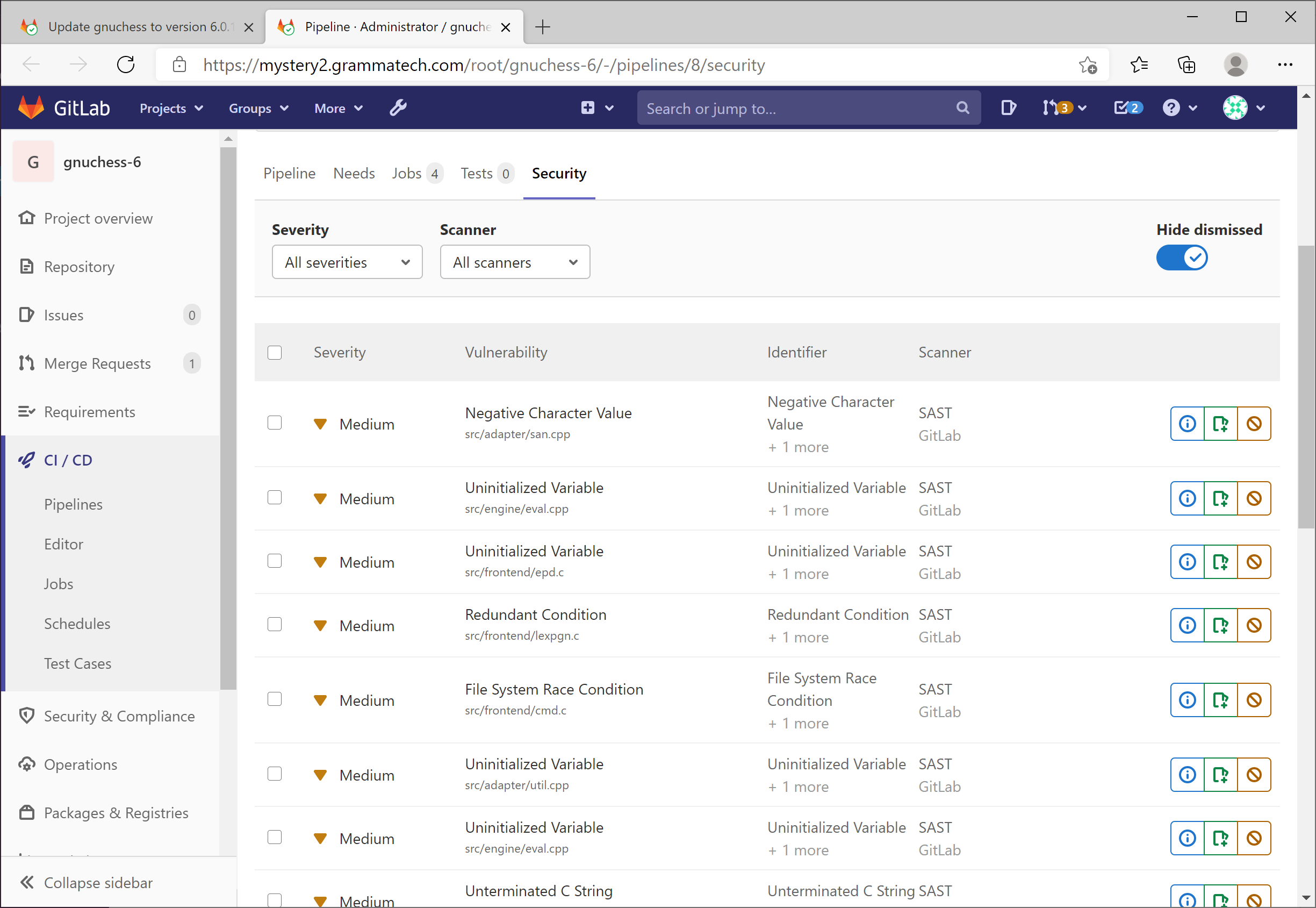
    GrammaTech announced today it has partnered with GitLab to integrate its GrammaTech CodeSonar static application security testing (SAST) tools with the GitLab Ultimate DevSecOps platform.

    Vince Arneja, chief product officer at GrammaTech, said integration with continuous integration/continuous delivery (CI/CD) platforms such as GitLab is critical because it enables security scans to run automatically any time code is merged. That capability reduces the amount of code that is scanned at any one time, Arneja said.

    GrammaTech is partnering with multiple CI/CD platforms and integrated development environment (IDE) providers to make it simpler to create multiple points for scanning code during the application development process, Arneja noted.

    GitLab, meanwhile, is providing its own tools for analyzing artifacts as they move through the software development life cycle. The GrammaTech tools, available via the highest tier level made available by GitLab, analyze code at a deeper level, said Arneja.

    Ultimately, the goal is to enable developers to discover security flaws as early as possible in the application development life cycle. The later those flaws are discovered, the more expensive they become to fix, Arneja said.

    Developers, naturally, tend to postpone security scans as they race to meet an application deadline. That practice creates issues; the more code there is to analyze, the longer such scans take. It’s generally more efficient to scan smaller amounts of code more frequently. Otherwise, developers can become overwhelmed by the number of security bug fixes that need to be addressed at the back end of the application development process. Automating security scans allows an organization to move toward embracing DevSecOps best practices in a way that doesn’t rely on a developer remembering to initiate a scan.

    Most developers are not deliberately ignoring security issues – it’s just that the existing, manual processes for discovering those flaws is inefficient.

    Automated scans also provide the added benefit of simplifying discovery of common security flaws long before a code review, creating more time to address significantly more complex issues.

    Application development teams are also under pressure to reduce the total number of bugs that need to be fixed after an application is deployed. As the number of applications being deployed steadily increases, developers can find themselves spending more time fixing bugs than writing new application code.

    Most organizations are not very far along in their journey toward embracing DevSecOps. However, as it becomes easier to integrate a variety of scanning tools within DevOps workflows, the number of organizations moving up the DevSecOps maturity curve should increase. In the wake of some recent, high-profile attacks on software supply chains, the sense of urgency surrounding the adoption of DevSecOps best processes has undoubtedly increased.

    In the longer term, there may soon come a day when security is viewed as just one of many quality assurance gates that code needs to pass through before it’s allowed to be promoted. In the meantime, an ounce of cybersecurity prevention at the front end of any application development is most certainly going to be worth more than several pounds of cybersecurity cure applied too late.