Category: Blogs

  • Low-Code and DevOps: Friends or Foes?

    Low-Code and DevOps: Friends or Foes?

    What does low-code mean, and who is it really for?

    Over the last few years, I’ve seen many articles associating “low-code” with “citizen developers” or with people who don’t have deep development skills. Users can arrange visual elements, or fill in forms with key information and publish the result as an application.

    But tools for citizen developers are only one part of the low-code story. There is also a growing number of tools for professional developers, and I want to talk about those, too.

    Both citizen developers and professional developers have a role to play in application development and automation projects, and low-code has something to offer both of them.

    Low-code is Not a Market, it’s an Approach

    Low-code does mean providing visual and graphical tools and simple frameworks that mask more complex coded operations, so the application designer does not have to directly touch the code that performs desired operations. These apps are naturally limited, as the resulting application can’t be highly customized if you can’t touch the code.

    With these kinds of visual tools, anyone can create a simple application within the limits of the tool. But when we pull back and look at what is needed to create larger, more complex applications – ones that need to communicate with other enterprise systems, or need extensive customization, or cross organizational boundaries, or need to pay attention to governance requirements, for example – the visual-only approach is frequently insufficient. In complex cases, developer expertise is often needed, and developers have to get “under the hood” to tinker with code.

    There is no “low-code market.” We are bringing tools to people who need them to develop specific projects. A comprehensive low-code approach to application development and automation means offering both visual programming and coding capability. For usability reasons, these tools are clearly separated and presented to the development team in a way that allows citizen developers to work on certain elements and developers to work on others, all on the same platform.

    We know that it’s possible to serve professional developers with low-code, too. A low-code approach also includes drag-and-drop tools that developers can use – for example, to develop APIs, or to integrate the application with other systems, or to customize front-end interfaces. Of course, when code is required, developers should be able to use their own tools and frameworks and not be limited by low-code tools. Platforms that offer a hybrid approach are likely to be most useful to mixed-skills development teams.

    The Hybrid Approach

    Strictly low-code tools can serve simple automation use cases. More broadly, automation platforms offer a hybrid of low-code and coding capabilities for more complex automation use cases.

    For critical enterprise applications, both business and developer inputs are usually needed. Having tools for both of them means not leaving anyone out.

    Low-code tools will continue to become more mainstream. Low-code is not a fad or a passing trend, but a quiet revolution that will see greater incorporation into more business tools.

    Here Come the Digital Natives!

    More vendors are offering low-code tools for digital process automation, business intelligence, robotic process automation, identity management and data integration, to name just a few.

    As automation platforms and other low-code tools mature, a greater number of people are getting used to working with them. Developers are less hesitant about incorporating non-developers into their teams, as everyone gains a better understanding of the benefits of these platforms.

    The younger generations entering the workplace today are digital natives. They are fearless about diving into technology and working hands-on. So, these low-code tools are ready for them, and they are ready to put them to work.

    Low-code is breaking down technical barriers to work in the automation space, making smooth collaboration between business and development easier.

    Low-Code Can Be a Double-Edged Sword

    Automation and development teams are also becoming more aware of vulnerabilities and compliance issues as citizen developers roll up their sleeves and join the technical team.

    Low-code tools are a double-edged sword. They facilitate teamwork, but issues with security and data governance may not be top-of-mind for non-developers. If you have a big team working on automation and/or application development and delivery, the need to build in governance becomes even more important.

    Using a shared platform will help manage and mitigate these issues with security and governance. This will become even easier as the platform tools evolve and mature, so DevOps teams can use them to help mitigate some of these issues.

    Does Low-Code Have a Place in DevOps?

    We are definitely seeing the impact of low-code on development environments and DevOps. Remember, low-code started with small applications, and while DevOps-style teamwork and workflows may not be needed there, as the use of low-code platforms becomes the norm for critical enterprise projects, DevOps will be a necessary part of the mix. This is where low-code is having a more obvious impact; Agile methodologies using low code platforms for iteration, for continuous improvement and for continuous delivery. These applications aren’t one-and-done. They need to be maintained, improved and delivered, again and again.

    Low code isn’t going away. On the contrary – it’s going everywhere.

  • 4 Ways to Overcome Agile Transformation Obstacles

    4 Ways to Overcome Agile Transformation Obstacles

    If an organization desires a successful Agile transformation, the first step is to shift its thinking from ‘doing Agile’ to ‘being agile.’ Unfortunately, a commonly shared belief that Agile is just a software development methodology keeps too many companies stuck in the ‘doing Agile’ mindset.

    This belief ties back to the principles of Agile thinking from frameworks like Scrum or Lean. Most of these methodologies were focused on teams of developers. Naturally, the vocabulary and tools derived from these methods are unique to software development. While development has evolved away from waterfall approaches, the rest of the organization tends to run into cultural challenges downstream because the vocabulary and ways of working are foreign.

    When an organization begins to lose progress downstream, it is too focused ‘doing Agile’ rather than ‘being agile.’ In order to shift the mindset toward ‘being agile,’ a new mindset must be adopted across the organization. These four insights offer ways to overcome obstacles along the way:

    Instill Agile Thinking Across the Organization

    The first step toward instilling agile thinking is to establish common vocabulary and define what it means to be agile. A common vocabulary and understanding of agility helps teams across the organization understand and see that agility is more than doing sprints.

    As an organizational strategy, agility equates to flexibility – the ability to adapt to changing business requirements. It also means being collaborative and making complex processes more lightweight. Instilling this type of agile thinking into everyone at the organization leads to success. DevOps, for example, successfully instills this type of thinking through value stream management.

    Essentially, this hurdle boils down to setting common goals and creating a common understanding of what ‘agile’ means across the organization.

    Achieve Autonomy Through Self-Organization

    Agile frameworks encourage self-organization. When teams self-organize they are given a task to do. However, no one tells them how they’re going to accomplish it. A self-organizing team gains a certain amount of autonomy, which leads to empowerment.

    With self-organization also comes risk. The organization must learn how to embrace risk, how to look at failure as an opportunity to improve and how to empower teams in a more self-regulating way. When teams self-regulate and self-organize, it’s a team win when they are successful. This develops a sense of communal pride.

    When breaches or too many failures do happen in a self-regulating system, the policies and consequences naturally occur. However, the key differentiator is that these environments are not driven by the policies. Rather, the objectives drive the behavior. When objectives are being met, empowerment stands.

    Agile software development, DevOps and site reliability engineering (SRE) are intended to be self-regulating systems, but all first require leadership to create psychologically safe environments, blameless postmortems and more. There is no room for a blame culture in a self-regulating system, and the organization must be agile enough to meet the demands of the system.

    Leverage Intelligent Lightweight Process

    Agility does not equate to a complete absence of process. It means there is enough process in place to ensure consistency, improve flow between people and teams and that automation replicates the process simply and effectively.

    IT organizations must understand that it is possible to move away from complex and authority-based processes and continue to leverage an element of process.

    Intelligent Process Means Intelligent Automation

    Although humans are the driving force behind agility, automation helps them go faster with more consistency. However, there is no such thing as ‘being agile’ with automation alone. Agile cannot be bought, and it’s important to get teams thinking that way. Automation should complement Agile, but not define it.

    When investing in automation, a cost/benefit analysis is critical. When considering automation, think in terms of two key metrics: time and quality. With two equally important metrics, the organization cannot become dependent on one aspect or another.

    For example, you can’t go faster with a manual process. You also can’t go faster with only automation, because the automation alone doesn’t replicate your intelligent lightweight process. And, you can’t go faster just by having a process, because the process can become very bureaucratic.

    Process is just a means of getting there, but it needs people and automation to make the processes come alive. People, process and automation all play an essential role in creating an intelligent process.

    Successful Agile transformation is more a way of thinking and behaving than simply following a framework. From a human perspective, an organization that experiences true agility, as we’ve defined it today, allows humans to exercise their competencies, grow skills, collaboratively celebrate success and learn from failures.

    If you’d like to learn more about Agile Transformation, especially in regards to Agile Testing, you can register for the next SKILup Day on April 22. Please register for SKILup Day: Agile Test Management for the Enterprise here.

  • How lulu Became a Lemon: A Digital Transformation Fail

    How lulu Became a Lemon: A Digital Transformation Fail

    Many people sometimes have a tough time figuring out what exactly digital transformation is and why it’s so important. I want to tell you a real-life story of how a once-respected brand, lululemon, has failed the digital transformation journey and, as a result, may fail in a new retail landscape.

    The story starts innocently enough with my desire to get my wife a lululemon gift card for her birthday. She has gotten her vaccines and is returning to the gym, so I figured it was a great time to get new workout clothes. I purchased a gift card on March 15 to be delivered via email a few weeks later on her birthday. It was a simple digital transaction that for any company that has its digital transformation act together would be a no-brainer. Well, this is where lulu turns off the tracks and turns into a digital lemon.

    On the day of my wife’s birthday, I had planned that she would wake up and see how thoughtful I was in getting her the gift card. She didn’t say anything about the card, though, so I finally asked if she received the gift card. She didn’t know what I was talking about. I had her check her spam folder, nothing. Nope, no gift card.

    Thus began a day that would see me reach out and communicate with the lulu team no fewer than six times. It seems that lulu uses a third party for digital gift cards. Each time I reached out to a lululemon “educator” (that is what they call them, and did I get an education), I was told a different story:

    1.  A simple apology and card being emailed, give it an hour.
    2. Sorry, it must be that email address, do you have another email address? Give it an hour.
    3. Hmm, seems our third-party gift card provider is having problems today.
    4. We located your card, it was sent to: tlaynguyen@gmail.com  could I check that email? (I would love to, but that isn’t an email address I have.)
    5. Well, we have no control over when the third party sends emails.
    6. Digital gift cards are non-refundable, even if you didn’t receive it. Sorry, can’t help you.
    7. You have blocked our emails from your computer.

    At this point I realized that lululemon, while maybe making great workout gear, is analog to the core. A simple digital transaction like this had them tied in knots, wasted hours of my time and so turned off my wife that she is looking elsewhere for her new workout gear.

    This past year has taught us that retailers that can’t hop on the digital transformation train are heading for the precipice. It seems as though lululemon may have already gone over the deep end. The company better hope the malls fill up quickly because in a digital world, lulu is truly a lemon.

  • The Single-Sentence Postmortem

    The Single-Sentence Postmortem

    Do you have four seconds?  In the time it takes you to read this sentence you could be done with your incident’s postmortem.

    “But my postmortem has 8 sections!  I have to construct a critical timeline, restate my followup tasks, show the major milestones, evaluate root cause…”

    Stop right there.

    First of all, your incident management system should be automatically capturing your timeline, follow-up tasks and major milestones as they happen — so you shouldn’t be worrying about reproducing that content at all.

    Second of all, the most critical thing a responder can bring to a postmortem, in the moments right after the incident concludes, is the one-sentence personal context of what actually happened. It’s the same sentence they’d say to a co-worker in the lunch room when asked what went wrong. But to achieve organizational resilience, the knowledge in that sentence has to be captured and distributed. I can’t emphasize this enough – a single sentence can unlock 80% of the value. Writing something, anything, is so much better than writing nothing, and yet, too often, we see companies skip this part of the incident management process.

    Modern incident management, as a practice, was born on factory floors.  Instead of firing the person who was considered accountable for a major incident, having that person write up their view of what happened was more impactful at preventing future incidents. That’s because only the responder has the complete context to shed light on the contextual, systemic failures that actually caused incidents, as compared to the outside view of management and other employees who will often see problems as human-centered or due to obvious oversights (using 20/20 hindsight).

    When asked if he would fire an employee who made a $600,000 mistake at IBM, Thomas J. Watson famously replied, “No! I just spent $600,000 training him – why would I want somebody to hire his experience?”

    The reality is that any amount of your unique perspective as a responder is invaluable when compared to nothing, and without it, the chances of your company learning from these mistakes is slim. That’s why we encourage a unique approach: we tell our customers to spend four seconds on their postmortem.

    Especially for those new to incident response and management practices, it’s important to develop a practice of doing postmortems right away, as soon as the incident closes. As quickly as possible, open up your postmortem, jump to the ‘What Happened?’ section, and write one useful sentence. That’s it.

    Once you do that, we know that one of two things will happen:

    1) You’ll have other things to do, so you’ll publish the postmortem, and that one critical piece of knowledge will be shared throughout the company. That is infinitely better than nothing. 

    2) Or, you’ll realize you have more to say and get it done, right then and there.

    Like putting your running shoes on even if you don’t want to go for a run — at the very least, you’re up and active; at most, you’ll get out there and rack up some miles.

    Working with companies across industries and seeing thousands of incidents filed; hearing the stories of hundreds of companies’ incident management implementations has taught us that the alternative to a quick postmortem often isn’t often a more in-depth one, it’s no postmortem at all.

    So if you’ve just finished an incident– and if you’re about to pick up your coffee and move on to the next task at hand – instead, spend four seconds writing one sentence. It could make all the difference.

  • Languages and DevOps: Network

    Languages and DevOps: Network

    It is fun to discuss the changes in network operations over the last couple decades. We’ve come full circle, and, honestly, ended up in a better place. Network specialists were super command-line wizards who kept us going, with few GUIs in sight. Everyone thought the next iteration would be GUIs, so network operations could be accessible to more than a few command-line specialists. “Everyone” was mostly right; we did head in that direction. It was optional, and many network operations friends pointed out that you could still do more, faster with the command line. Before GUIs had the opportunity to catch up with command lines, though, automation came along. And then DevOps. And finally,* configuration-as-code. Pretty quickly, the ability to do everything through an individual product’s GUI was determined to be a weakness. Network operations personnel were dealing with more vendors to handle the networkification (it is too a word! I just made it up) of common development activities, like some aspects of security. And now, APIs and command lines rule the juncture of DevOps and networking.

    *Finally – so far, at least

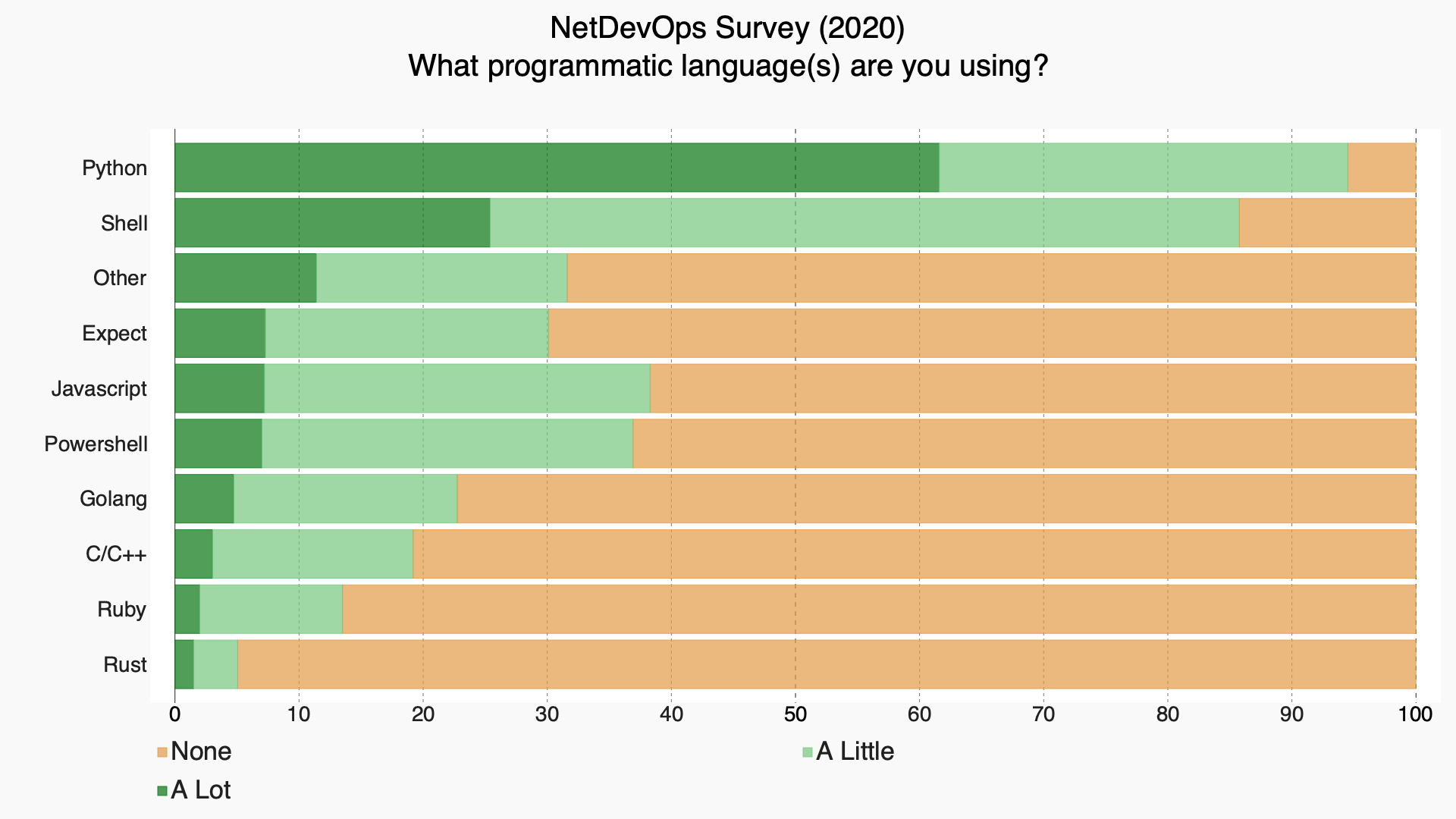
    And that shows in languages. Shell scripting and Python run this show, with little competition from any other language. We could get into a massive discussion about whether shell scripting is programming, but we won’t, because at least in networking, it most definitely is considered to be programming.

    One time, when we were tracking down a problem that involved all of IT, I was sitting with the serious network geeks and marveling at their ability to make everything they wanted happen from the command line in an instant, and their ability to parse command output. I’m no slouch when it comes to networking, but they easily put me to shame. I got to chatting with a few of them, and the consensus was that they loved computing but hated programming. Networking made sense to them. This explains why networking DevOps people are continuing to use Shell scripting and adopting Python at the same time.

    Python and Shell

    Shell is a given in networking. There are a lot of extant Shell scripts for doing all sorts of things, and the need to automate to keep up with Agile makes shell scripting a logical choice.

    Python enters the picture because it is “common ground.” It is intuitive enough for most networking people to do what they need to get done, and known or knowable to most developers. When it comes to usage, Python has overtaken Shell; (don’t take my word for it, check out the excellent work of the NetDevOps survey on GitHub, or just glance at the graphic below, created by them) in fact, Shell and Python command so much of the network development space that you are probably better off just making sure you’ve got those down, and focusing your free time on other issues like completely different networking commands, or even skills for data center versus cloud. The ROI would be better.

    But Wait, There’s More

    The key operational changes recently have been around GitOps and reporting back into the DevOps toolchain. People no longer want your appliance or application to have a pretty GUI, they want it to report in to the tools that provide automation and a larger-picture GUI. Many vendors are there already, but many are not yet. That creates a need for tools – products, open source projects, or internally developed – to do that integration while waiting for the vendors to catch up. These, again, are well-served by Python, though other languages that can handle APIs are viable, too.

    We’re headed for a world where systems detect anomalies and react to rectify them, but we’re not there yet – not on a strategic scale, at least. And we probably won’t be for some time, as automating massive network changes is a scary proposition and will take time to use these systems for detection, monitoring what they could have done, before organizations are willing to let them “just do it.”

    Carry On

    Meanwhile, NetDevOps is getting folded into DevOps proper, and in many organizations, using infrastructure-as-code or GitOps, is being deployed and managed like any other part of the life cycle. So we are moving along. For my network peeps, your job will continue to change, but it certainly won’t go away. You’re essential to smooth-running systems, and while the network may become even more virtual, it will still be networking. And under that virtual network will be … a physical network. So keep kicking it, and carving a path from users to apps, while protecting those apps and ensuring they have adequate resources. Oh, and if I spin up another instance at midnight, you’ll hop on and make sure it’s got traffic directed to it, right? RIGHT?!

  • DevOps Skills Increasing Among Salesforce Developers

    DevOps Skills Increasing Among Salesforce Developers

    A survey of 521 attendees at a recent online Future of Salesforce DevOps Summit event hosted by Gearset, a provider of a continuous integration/continuous delivery (CI/CD) platform for Salesforce developers, found just under half (47%) of respondents now release software at least multiple times a week, with another 29% releasing software weekly or biweekly.

    More than half of respondents (52%) also noted they now can deploy software in less than an hour.

    Gearset CEO Kevin Boyle said the survey suggested the level of DevOps maturity among developers building applications on top of the Salesforce software-as-a-service (SaaS) platform is increasing rapidly. In the wake of the COVID-19 pandemic, many organizations embraced SaaS platforms to accelerate their digital business transformation initiatives rather than building entire applications from scratch.

    However, the biggest benefit cited by survey respondents was not the ability to release applications faster, but rather the improvements to application quality (77%), followed by increased productivity (69%) and enhanced collaboration (46%). Other benefits cited included reduced complexity thanks to automation; increased agility; more reliable releases and time and cost savings.

    Overall, the survey identifies source code control, CI/CD, unit testing, change monitoring and backups of metadata and data as being the most widely implemented DevOps capabilities that have been adopted. Over the next 12 months, capabilities that will see the most increased adoption among survey respondents include CI/CD, static code analysis and sandbox seeding with data.

    Survey respondents said their top obstacles to adoption of DevOps are ramp-up time, followed by difficulties adopting source control and a perceived steep learning curve. For many organizations that have adopted Salesforce, the intimidation factor when it comes to adopting DevOps best practices is still fairly high, Boyle noted.

    Most recently, Gearset added a free training platform, dubbed DevOps Launchpad, that employs gamification techniques to make DevOps more accessible to developers. Topics covered include version control fundamentals, Git branching strategies and Salesforce backups.

    Gearset counts McKesson, Zillow, Traction on Demand, Intercom, Accenture, IBM and Johnson & Johnson among its customers. It’s not clear to what degree appreciation for DevOps has risen among smaller companies. However, as the number of custom applications deployed as extensions to the Salesforce platform increases, it is apparent that manual processes for building and deploying applications will not scale. The Salesforce platform itself is uniquely constructed using a set of objects and tables that generally lead organizations to adopt a DevOps platform built for that environment. However, it is possible to build and deploy applications using a DevOps platform designed for building and deploying applications that might need to span multiple platforms. Those applications would be integrated with the Salesforce platform at an application programming interface (API) level.

    Regardless of how custom applications are built and deployed, it’s clear Salesforce platforms are becoming more widely used in enterprise IT environments. Each DevOps team will need to determine how best to integrate those platforms within the context of their overall DevOps strategy.

  • Nylas Announces Components: JavaScript UI/UX Features That Boost User Productivity

    JavaScript UI/UX solutions allow developers to launch end-to-end productivity features fast

    SAN FRANCISCO – April 6, 2021 – Nylas, a pioneer and leading provider of Productivity Infrastructure solutions for modern software development teams, today announced the launch of Components. Components are JavaScript UI/UX solutions that allow developers to bring productivity features to market faster without needing to design front-end elements from scratch.

    DevOps Research and Assessments (DORA) analysis of the state of DevOps identified that making “smart investments in tooling, information search, and reducing technical debt through flexible, extensible, and viewable systems” as key to supporting productivity. Nylas’ core set of products enable developers to quickly and securely build features that connect to users’ email, calendar, and contacts data, while powering intelligent workflow automations with this data. With the addition of Components, developers can now build backend and front-end productivity features in a fraction of the time.

    Components will initially consist of four fully-functioning UX solutions with additional white-labeled and customizable solutions planned to further assist in modern UX productivity and functionality. The Nylas Components include:

    • Agenda Component: The Agenda Component leverages the Nylas Calendar API to display a summarized view of each selected day’s events. This component offers the ability to navigate any number of days in the past and future. Users can click on events to expand and show details and collapse all other events.

    • Composer: Composer uses the Nylas Email and Contact APIs so users can seamlessly compose and send emails. Compose also provides the ability to search for contacts, attach files, and send at a scheduled date/time using the Outbox endpoint.

    • Contact List Component: The Contact List Component leverages the Nylas Contacts APIs to enable users with the ability to search for and create contacts while providing critical information such as full name, email address, and last day emailed.

    • Scheduler: Powered by the Nylas Calendar API, Scheduler provides users with intelligent, highly customizable scheduling features including auto scheduling, editing, time zone and language support, as well as auto-routing meeting requests between multiple calendars based on first availability.

    Nylas Components allow product leaders to navigate provider-specific requirements to position their application as the customer’s core productivity hub with ready-made UI and powerful connectivity integrations, while bypassing the need to shift roadmap priorities or build expansive teams of developers with both the back-end and front-end technical knowledge to build and maintain productivity solutions.

    “Today’s technical leaders are tasked with delivering rich UX features that drive customer adoption, retention, and increase ROI, while simultaneously streamlining backend operations and development time,” said Gleb Polyakov, CEO of Nylas. “Components empower product leaders with ready-made UI and powerful connectivity integrations that alleviate bottlenecks, eliminate roadmap trade-offs, and create competitive advantages through modern UX capabilities that accelerate growth.”

    Nylas provides Productivity Infrastructure solutions for more than 600 customers across 22 countries, such as Upwork, Wix, Dialpad, and Comcast. This announcement follows Nylas’ launch of its On-Prem offering for enterprise customers and the introduction of Workflows: pre-built templates for automating tasks in software applications.

    For more information on Nylas Components, please visit www.nylas.com/products/components.

    About Nylas

    Nylas is a pioneer and leading provider of productivity infrastructure solutions for modern software. Over 50,000 developers worldwide use the Nylas platform to quickly and securely build productivity features into their applications. With Nylas, developers get unprecedented access to rich communications data from their end-users, pre-built workflows that automate everyday tasks, embeddable UI/UX components for fast front-end development, and comprehensive security features – all delivered via a suite of powerful APIs that make integration easy.


    Nylas was founded in 2013 and has raised over $55M to date from 8VC, Spark Capital, Slack, Citi Ventures, Round 13, ScaleUP, Data Collective, Fuel Capital, and SV Angel. Nylas customers span from large enterprises such as Ceridian, Hyundai, Fox News Corp, Hubspot, and Move.com to high-growth start-ups like Dialpad, Pipedrive, Lexicata, and Qualia. Learn more at www.nylas.com

  • Apollo GraphQL Makes Federated Server More Accessible

    Apollo GraphQL Makes Federated Server More Accessible

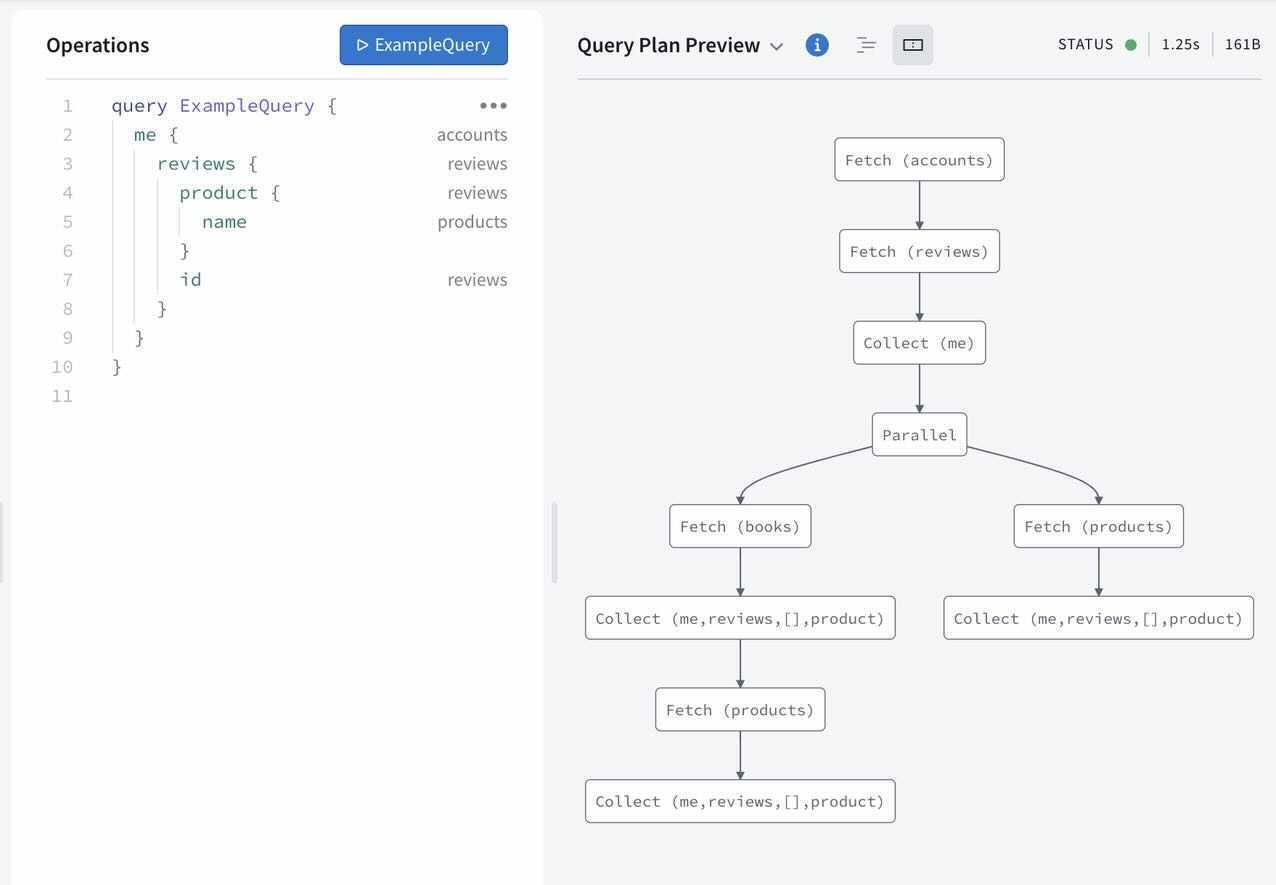
    In advance of its online GraphQL Summit this week, Apollo GraphQL announced today it has updated its Apollo Federation offering that enables a GraphQL Server to span multiple platforms, making it more accessible to a wider range of developers using different tools.

    Apollo Federation is now integrated with both Apollo Studio, a web-based tool for navigating GraphQL application programming interfaces (APIs), and Apollo Workbench, a plugin for Microsoft Visual Studio.

    At the same time, Apollo GraphQL is making available a command line interface (CLI), dubbed Rover, that makes it simpler to integrate Apollo Federation within a DevOps workflow.

    Matt DeBergalis, CTO, Apollo GraphQL, said GraphQL is continuing to gain traction as an alternative to more rigid REST APIs as more organizations begin to appreciate how dependent they have become on software. REST APIs may be simpler for developers to create, but APIs based on GraphQL are easier to update and manage, DeBergalis noted.

    Apollo GraphQL

    The challenge organizations encounter is that a GraphQL Server can become too large to easily navigate. Apollo Federation provides a mechanism that enables of subset of those APIs to be managed on multiple platforms that make up a federated instance of a GraphQL server, DeBergalis explained.

    DeBergalis also noted that IT vendors that have embraced GraphQL are also starting to add support for Apollo Federation. DataStax, a provider of a curated instance of the open source Cassandra database, has added Apollo Federation to the open source data gateway Stargate it provides to access data stored in a Cassandra database.

    At its core, QraphQL provides an open source data query and manipulation language for APIs along with a runtime for fulfilling queries. Originally developed by Facebook, the GraphQL Foundation is now an arm of the Linux Foundation. As more organizations embrace APIs to construct applications based on microservices, GraphQL adoption has steadily increased. It’s not likely GraphQL will completely replace REST APIs any time soon, however, given how pervasively deployed REST APIs already are.

    However, DeBergalis said that organizations that require a more agile approach to building and deploying software are voting with their feet for GraphQL APIs that are easier to update. As the rate of change in software environments continues to increase, the need for a more flexible approach to deploying and updating APIs becomes that much more apparent, added DeBergalis.

    GraphQL is also more efficient than REST APIs in terms how much data is shipped back and forth between a client and a server. At a time when the amount of data that is being consumed is steadily increasing, the need to give clients more control over how data is returned from a server has become more pressing. Apollo GraphQL claims more than two billion queries per day are now being launched against instances of its GraphQL Server.

    Regardless of what types of APIs are employed there are more of them with each passing day. As the number of digital business transformation initiatives increased in the wake of the COVID-19 pandemic, so too did the number of internal and external facing APIs. Developers may have their own individual preference for the type of API they want to use, but as developers are increasingly being tasked with both building and managing APIs after they are deployed, the appeal of GraphQL becomes harder to ignore.

  • Report: The State of DevOps Automation

    Report: The State of DevOps Automation

    In the race to accelerate digital transformation initiatives, organizations are encountering more incidents, more downtime, and longer resolution times. In fact, 90.4% of organizations saw an increase in incidents since the pandemic began, according to a recent Transposit report.

    In a completely digital economy, service downtime takes a higher toll. For ITOps teams, working remotely also requires new strategies to organize a team’s response to issues. Amid rising incidents, 94.1% of organizations have increased their focus on service reliability engineering (SRE) practices.

    Transposit just released their 2021 State of DevOps Automation report, which surveyed over 500 IT, DevOps, and SRE professionals across the U.S. The report sheds light on the state of remote work as it relates to incident response processes, reveals increased demand for SREs and highlights the automation they’re using to narrow the resolution time gap. Below, we’ll explore the report’s key takeaways and discover what sort of DevOps automation is trending.

    Remote Work Slows Incident Response

    Try as they might, videoconferencing and group chat solutions like Zoom and Slack just can’t compete with in-person collaboration. According to the survey, 93.6% of ITOps and software teams reported it takes longer to resolve incidents while working remotely.

    Since the pandemic began, 97% of teams have adopted remote work, and 90.4% have experienced increased service incidents. It doesn’t bode well that incidents are increasing as incident response time lags.

    The report findings frame remote work as a top hurdle to resolving issues — 46.1% reported that not being physically in the same room to collaborate on fixing issues was a top concern. But remote work is only one element; others cite changing processes and a lack of visibility into who’s responsible for maintaining code as another challenge.

    Incident Response Hangups

    To make up for these concerns, organizations are investing in incident response strategies. The report found that 56.4% of companies are adopting communication and collaboration tools, with automation tools at 52.3% and integration tools at 43.9%.

    Though the report showed greater investment in those tools, it also identified a persistent communication gap. When conducting postmortems, it can be challenging to correlate human action to incident responses. More than half (57.4%) of respondents felt it’s hard to piece together human actions and team communication during incidents. This context is essential to make sense of mean-time-to-response (MTTR) metrics.

    Interestingly, the report found 96.4% of respondents believe mining insights from human data, like Slack channels or group emails, could help improve incident responses. It appears that having a clearer way to harvest and query incident-related data throughout the entire response process is a universal concern.

    SRE Goes Mainstream

    As I previously reported, the SRE role continues to evolve and gain favor. The report similarly hypothesizes that, based on the survey results, the SRE title is going mainstream. Out of 295 respondents surveyed, 98% said they increased SRE practices in the last 12 months, and 62.4% said they would be expanding SRE efforts in 2021.

    In 2021, SREs will likely remain a hot commodity in hiring. However, these individuals will face mounting complexity in addressing real-time incidents for complex distributed systems. They will also likely be tasked with automating manual processes, as 51.7% of respondents reported that a lack of automation is the top cause of slow incident resolution.

    Automation Goals and Barriers

    40% of companies surveyed now have at least one dedicated full-time staff member working to create in-house tools or bots to automate incident responses. So, what sort of automation is common in the SRE field? The report shows SREs constructing custom scripts to automate things like:

    • Customer communication
    • Recording MTTR metrics
    • Automating infrastructure
    • Corporate communication
    • Auto-generating runbooks
    • Creating or updating tickets

    But, automating these processes is not all that easy. As a top barrier to automation, DevOps professionals collectively cite a lack of documentation. It seems by replacing tribal knowledge with up-to-date, shared documentation, teams could quickly unlock some gains. So, make documentation accessible, and provide copy-and-paste abilities for sample scripts.

    SRE and Automation to the Rescue

    The study demonstrates how the remote economy has increased both the number of incidents and the mean response times to address them. To fill this gap, organizations increasingly turn to site reliability engineering practices to automate incident responses. By leveling up DevOps with SRE, teams could reduce errors and improve overall availability as development teams progressively deliver new features.