Category: IT as Code

  • How to Mitigate Low-Code Security Risks

    How to Mitigate Low-Code Security Risks

    Gartner predicts that by the end of 2025, over 65% of development projects will use low-code builders. The field of low-code continues to expand. But what security implications does low-code introduce?

    Low-code refers to tools that enable application construction using visual programming models. Adopting drag-and-drop components instead of traditional code, no-code and low-code platforms enables non-technical folks to construct their own workflows without as much help from IT. Yet, handing power to citizen developers with less security training can be risky. Plus, low-code platforms may hold compromised propriety libraries or leverage APIs that may unknowingly expose sensitive data to the outside world. There’s also the possibility that low-code could increase shadow IT if not governed well.

    Low-code opens the door to more producers. But, does it open the backdoor, too? I recently met with Chris Wysopal, CTO and cofounder of Veracode, to discuss the growing security risk posed by low-code applications. According to Chris, hardening low-code environments involves a combination of compartmentalization, dynamic and runtime techniques, and adopting the “least privilege as possible” rule across the board. Below, we’ll expand on potential low-code risks and see what other methods Wysopal recommends organizations employ to secure the emerging low-code paradigm.

    Low-Code Security Concerns

    Verizon’s 2020 Data Breach Investigations Report (DBIR) found 43% of all breaches are connected to a vulnerability at the application layer. Thus, securing these applications, or in the case of low-code, the layer that generates them, is essential for business to function smoothly.

    When it comes to low-code, Wysopal notices a few key risk areas:

    Proprietary libraries with hidden vulnerabilities. By their nature, low-code platforms typically use a good deal of proprietary software, making securing them a bit opaque. These systems could involve a proprietary language, proprietary libraries and proprietary frameworks. If you trust a low-code platform, you place a lot of faith in the low-code vendor to have a strong security process in place.

    Some platforms do generate traditional code, which organizations can export to run on a Node.JS or Java server. Yet, this often involves a mix of code and proprietary libraries, says Wysopal. While you could run traditional static analysis on the generated code, you may miss some context.

    Lack of citizen developer security training. Citizen developers have little technical knowledge, let alone DevSecOps training. If runtime applications present vulnerabilities, expecting no-code users to mitigate them is unrealistic.

    API integrations. If low-code platforms expose an API or generate a web application via an API, the platform could be exposing sensitive data.

    Ways to Harden Low-Code Environments

    To respond to these areas, Wysopal offers some advice for securing low-code environments:

    • Perform static code analysis: Perform your own static analysis on any generated code and test for common errors. “Look at the code, and understand where it interacts with the outside,” Wysopal recommended.
    • Audit proprietary libraries: Whenever possible, Wysopal said he recommends pushing back on the vendor to question them on their application security standards and examine proprietary libraries for potential risks.
    • Verify partners: Similarly, take precautions when working with third-party partners around low-code tools. Partner tools should be carefully vetted and hold some sort of application security certification from the low-code platform.
    • Secure the API layer: Understand what APIs the application interacts with. These connections should be tested dynamically and automatically with an API scanner. Along your journey, consider these API security testing best practices.
    • Compartmentalize: Wysopal also recommends traditional isolation techniques. Consider more than just the application layer; Wysopal recommended isolating the app and running it in a virtual machine or a container.
    • Security training for citizen developers: Since citizen developers are typically not trained on appsec practices, hold security exercises to train them on fundamentals. A helpful demonstration could involve directly attacking an app to find flaws.
    • Apply the least-privilege-as-possible rule: When assigning user capabilities, whenever possible, use secure-by-default settings and allow access only to those that need it.

    By applying dynamic and runtime techniques, you may catch vulnerabilities, such as a cross-site scripting error. However, if you’re working with proprietary low-code systems, you may not be able to fix it immediately! You may have to send a request to the vendor and wait for the bug to be patched. Thankfully, most technology providers take more immediate action in response to bugs than to feature requests, Wysopal noted.

    Change the Attitude Toward Security

    On the low-code spectrum, there is the attitude that “people aren’t really doing mission-critical applications — they’re mainly doing prototyping, or back office automations,” Wysopal said. Or, since low-code applications often do not publicly expose an application, they are deemed low-risk and fall to the bottom of the security team’s inbox and list of to-dos. “We’re still in a world where people don’t secure all applications,” he said.

    However, these attitudes are a bit short-sighted, since “applications aren’t islands,” Wysopal said. Even if applications are intended for internal use only, phishing attempts could expose credentials and gain access to the network. Here, attackers could leverage sensitive resources or steal infrastructure for compute power.

    Thus, all low-code users should be aware of potential threats and change habits to address these risks accordingly. However, the onus is also on low-code vendors to sufficiently arm their systems. Having a vulnerability disclosure, bounty program and an easy means to accept bug reports from white hat security researchers will be necessary to continually patch issues.

    No-Code ≠ No-Bug

    Low-code continues to permeate more and more digital operations, opening up novel potential for citizen developers. While the low-code movement promises impressive returns, it also brings potential risk.

    To mitigate these concerns, we must level up our security understanding and evolve our approaches, Wysopal said. “Any application can have flaws and security bugs in them.” Just because you’re not writing a function in C and are relying on a visual programming model doesn’t mean you’re not introducing flaws.

    Disseminating the real risk of resources and dependencies, along with helpful consumer-facing documentation, will set the superior low-code platforms apart from the rest. Otherwise, putting faith in proprietary libraries will be a tough pill to swallow.

  • LeanIX Extends Application Management Reach

    LeanIX Extends Application Management Reach

    LeanIX today unveiled a catalog that enables DevOps teams to more easily track the relationships between microservices as they are built and deployed.

    At the same time, the company also revealed it has acquired Cleanshelf, a provider of a platform for managing software-as-a-service (SaaS) applications.

    LeanIX CEO André Christ said the Microservice Intelligence catalog will make it simpler for IT organizations to keep track of their ongoing software development efforts, while Cleanshelf provides the mechanism for centralizing management of SaaS applications that are now widely employed across the enterprise.

    The Microservice Intelligence catalog is the latest addition to the LeanIX Continuous Transformation Platform used to manage enterprise applications. It automatically captures and correlates metadata being generated across disconnected toolchains, pipelines and Kubernetes clusters to create a 360-degree view of microservices and their dependencies, said Christ.

    In addition to being integrated with the LeanIX Enterprise Application Suite, Microservice Intelligence comes with out-of-the-box connectors for Kubernetes, Jenkins, GitHub Actions and Red Hat OpenShift platforms.

    By monitoring deployment frequencies, mean-time-to-recovery (MTTR) and failure rates, Christ noted it will become easier to make software engineering decisions based on data and insights surfaced via the Microservice Intelligence catalog. DevOps teams can also annotate the microservices recorded by the catalog to provide additional information, Christ added.

    The Microservice Intelligence catalog provides the added benefit of making it easier to onboard new developers, said Christ. Each new member of a development team can, on their own, explore the overall application environment without requiring an IT team to dedicate someone to describe it each time a new member of a DevOps team is hired, Christ noted.

    At the same time, other stakeholders, such as cybersecurity teams, can explore the application environment to better understand dependencies as well as the potential impact of a newly discovered vulnerability, Christ added.

    In general, Christ said, as application life cycle management across the extended enterprise becomes more complex it’s clear new platforms will be required to manage legacy monolithic applications, emerging microservices-based applications and SaaS applications that, in the wake of the COVID-19 pandemic, are being used to enable employees to work from home. The Cleanshelf platform, in particular, will be rebranded as LeanIX SaaS Intelligence to address that latter issue. A SaaS discovery and cataloging capability will also be made available as a free component of the LeanIX Application Portfolio Management module in the second quarter.

    IT environments have never been more distributed, and it’s clear most organizations are under pressure to reduce the total cost of IT by centralizing management functions. It’s too costly to dedicate a management platform for each type of application deployed across an extended enterprise. LeanIX is making a case for a platform that enables IT organizations to finally centralize the management of application environments.

    It’s unclear at what rate that centralization may occur, given the level of inertia that exists within most IT organizations today. However, as application lifecycle management continues to evolve, the centralization of the management of application portfolios that continue to grow is all but inevitable.

  • Progress Unveils First Update to Chef Automation Portfolio

    Progress Unveils First Update to Chef Automation Portfolio

    Progress today announced it has enhanced its Chef Enterprise Automation Stack (EAS) and released a new version of Chef Infra Client that promises to make the programming language on which EAS relies more accessible.

    Sudhir Reddy, vice president of engineering for Progress, said the latest versions of both offerings are the first updates to the Chef portfolio since Progress acquired the company last fall.

    Chef EAS combines elements of the Chef portfolio in a way that makes it easier to develop and integrate DevOps workflows that span everything from provisioning infrastructure to deploying applications. The latest update to EAS adds the ability to automatically execute compliance audits as part of any Chef Infra Client run using Chef InSpec tools. At the same time, the latest update also simplifies the implementation of the patch management processes.

    DevOps teams can also view and manage Chef Infra Server details via the Chef Automate framework. Those views, when combined with Chef Infra Client Run Reports, provide insights into the various policies and Chef objects in use on a system.


    Finally, the Chef Workstation module includes the Chef Habitat command line interface (CLI) to further simplify workflows.

    Ultimately, Progress is moving toward creating a common user experience across all elements of the Chef EAS suite of tools, Reddy said. In effect, EAS is emerging as the control plane through which the entire Chef portfolio will be managed, Reddy added.

    Meanwhile, Infra Client 17 promises to make the Chef Language underpinning that suite more accessible. It provides a streamlined developer experience as well as pre-built integrations with various cloud services. In addition, Progress is adding support for various ARM processors used in cloud services, macOS Big Sur, the Apple M1 architecture, Windows 8 and PowerShell Core.

    Progress also enhanced its ability to securely capture metadata from the Amazon Web Services (AWS) public cloud as well as capturing data from Microsoft Azure clouds.

    An early pioneer of a framework for automating IT infrastructure-as-code management, Chef is still widely employed. However, rival open source frameworks have since emerged, which Chef eventually responded to by making its core platform also available as open source software as it changed its business model. Progress today also announced it will recognize external contributors to the platform with recognition awards. Progress reports that, in 2020, there were more than 6,000 contributions from over 350 contributors in the Chef community in support of Chef Infra, Chef InSpec and Chef Habitat.

    It’s still unclear how the battle for infrastructure-as-code framework management supremacy will ultimately play out. While many developers have clearly shown a preference for rival open source tools, Progress is positioning the Chef portfolio as a framework for IT organizations that need to automate processes at scale, including how application are deployed on infrastructure that is provisioned as code.

    Of course, many rival framework providers have similar ambitions. The challenge, of course, will eventually be convincing organizations that tend to employ a wide range of tools across different departments to finally standardize on one framework versus another.

  • Teleport Adds Database Support to Security Gateway

    Teleport Adds Database Support to Security Gateway

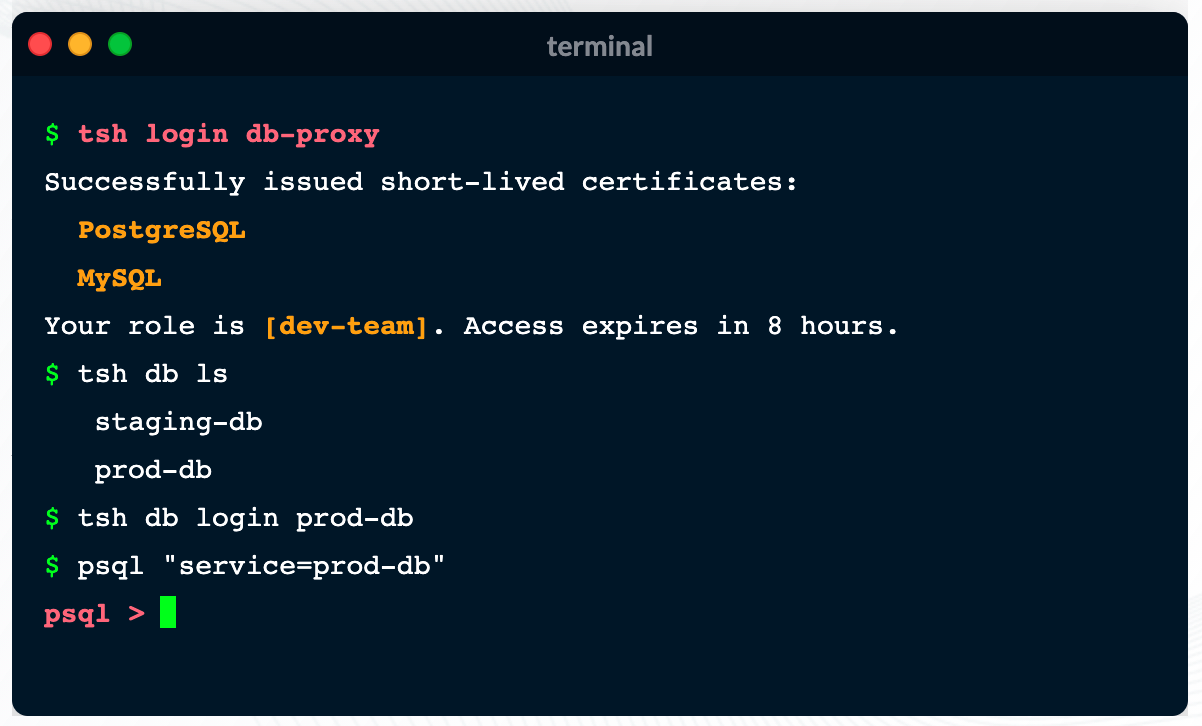
    Teleport announced today it has added support for databases to a security gateway, delivered as a cloud service, that is currently used to secure Linux servers and Kubernetes clusters.

    Ev Kontsevoy, CEO, said Teleport intends to extend the reach of the security gateway up the entire stack of IT infrastructure that developers routinely use to remotely access databases. Initially, Teleport 6.0 adds support for open source PostgreSQL and MySQL databases.

    Teleport has gained traction as an access management tool because it provides a single binary that can be easily deployed by developers to encrypt IT platforms and enforce session controls. It automatically discovers all the resources in an IT environment, along with the protocols needed to access them. Teleport also provides a unified audit log, in a JSON format, that enables IT teams to track what resources are being accessed, when and by whom.

    Other features include the ability to authenticate identities via built-in single sign-on (SSO) and multi-factor capabilities, discover and see all database instances, integrate with command line interfaces (CLIs) and a set of workflows for managing privilege escalation.

    Access control is becoming a bigger issue due to a number of factors. The overall IT environment is becoming more complex as the infrastructure stack required to run applications continues to grow; most IT teams continue to work from home to help combat the COVID-19 pandemic. Teleport provides a fine-grained approach to streamlining access management across servers, clusters and databases in a way that eliminates the need to rely on virtual private networks (VPNs). In effect, Teleport enables IT teams to move toward a more identity-centric approach to unifying the management of access, Kontsevoy said.

    That’s critical at a time when the rise of DevSecOps is pushing responsibility for security further left toward developers, Kontsevoy added. While the rate at which that transition occurs will vary widely, Kontsevoy said it’s clear developers are taking more control over access control as part of a broader effort to roll out secure applications, faster.

    It may be a while before DevOps teams are able to aggregate all the access control protocols they currently employ under a single proxy. However, Kontsevoy said, the massive amount of time and effort spent managing access control today will drive DevOps teams to look for ways to automate what is currently a very manual process.

    Less clear is what role cybersecurity teams might play in supervising access management. The days when a separate overlay was needed to manage access may be coming to a close.

    In the meantime, it’s clear VPNs were not designed to address access management, in an era where the bulk of IT teams – and the employees they support – are working from home. More employees may be soon be heading back to the office more frequently, but it’s likely that remote work will remain prevalent. That means legacy approaches to managing remote access that were never designed to scale will becoming increasingly obsolete.

  • Why Developers Should Care About Resilience

    Why Developers Should Care About Resilience

    Recently, a friend reminded me of a joke we used to have when we were both developers at a huge software corporation (we won’t mention names, but back when printers were a thing, you probably owned one of theirs). We didn’t develop printers. We developed performance testing and monitoring tools.

    We were the dev team, which was completely separate from the QA team and from the Ops team (yes, I’m that old – we didn’t even call it DevOps back then). Support was part of a completely different organization and “business” was something that happened in an altogether different galaxy. That is, until a customer had an issue.

    When an important customer had an issue, we definitely felt it at R&D. Managers called hourly to check on status, and we would have intense conversations with the support team who would then, in turn, have intense discussions with the customer. If we, the software engineers developing the product, ended up on the same call with both support and the customer, it was a sure sign that things were bad. You knew that millions of dollars were on the line, and, consequently, that pressure was high. But most of all: you knew that we would do anything we could to solve the problem, because we needed those millions of dollars to be paid, so that we could keep getting paid. And so, we kept the coffee flowing.

    This is where the joke part comes in. We used to have a system for managing support tickets, collecting information, tracking time and assigning it to the relevant software or support engineer, so everyone would know who was in charge. Today, you probably use Zendesk, ServiceNow or one of their alternatives. We used a home grown system, of course.

    Our joke was this: the purpose of the system was not to track and measure and propagate the handling of customer issues. The purpose of the system was to indicate someone else is now responsible for solving the problem. Or, if you would rather paraphrase one of my favorite Douglas Adams jokes, the issue is now under a Somebody Else’s Problem field.

    Because solving customer issues is difficult and frustrating, and being pressured by business could ruin a software engineer’s day. This is because when you’re a happy code monkey, and all you want to worry about is writing beautiful code and releasing cool features and drinking some coffee, solving a customer issue gets in your way.

    You end up spending too much time sifting through endless logs, crossing your fingers and trying to reproduce an issue that only happens at 2 a.m. on a Friday, usually when a blue zebra is passing by. Spending your time on a heated support call is less fun than, say, drinking coffee quietly with your friends.

    As R&D managers, we understand that our developers want nothing to do with solving customer issues. We want to make sure they are motivated and happy and efficient, and that they are free to challenge themselves by learning the latest buzz-worthy technologies and thinking up ways to introduce those into our product in a way that will make our customers happy.

    Additionally, as R&D managers, we are far more likely to understand the business impact of having too many support tickets or having support tickets that take too long to resolve. We know that the loss on such cases is twofold:

    1. The customer that faced an issue and is waiting for a solution may become frustrated, and the company may lose their business.
    2. Our engineers are busy solving that customer issue instead of delivering new value to the business.

    Therefore, as R&D managers, it is our responsibility to make sure that our engineers have the tools to handle these issues as efficiently as possible when they come up. It is our responsibility to make sure they are motivated, and that they understand the business impact of solving a customer issue as quickly as possible. And whenever possible, it is our job to make sure that they make our application as reliable and stable as possible to begin with.

    That ensures that we have test coverage, and the right knowledge, practices and tools to ensure that we have as few customer issues as possible to begin with.

    Happily, changes in dev culture usually means that “support” and “business” and even “customers” are not as far away as they used to be. When developing a SaaS platform, your developers often have an almost intimate, real-time ability to track what users are doing and how it impacts their experience. The culture of DevOps has done a lot for breaking the silos that used to separate the dev team from the support team, and to make sure that all members of the team engage and understand how the code they write and the issues they resolve help our customers.

    I hope you already found the way to motivate your team to solve such issues, and that they have enough time to drink coffee. If you and your team are still struggling, we suggest bringing in a live debugging tool that can help them solve customer issues even faster, by making sure they have all the data they need at their fingertips, and that they can instantly reproduce any issue in a live, remote environment. Live debugging tools give your engineers a developer-friendly experience, and also gives them the power to reduce issue resolution time, too. Now, all you need to worry about is that your engineers have enough coffee.

  • Without These 3 Things, You Don’t Have DevSecOps

    Without These 3 Things, You Don’t Have DevSecOps

    DevSecOps adds security to the DevOps software development and releasing paradigm. Everyone thinks this is a great idea, except actual Dev and Ops practitioners, for whom security can be a thankless, stressful time sink. Without the right approach and tools, an organization can run a DevSecOps process that actually contributes little to security. Security simply tags along after development and operations, ignored at every turn. The result is rapidly released, insecure code.

    Industry vendors will tell you they have a DevSecOps solution. You, in turn, may believe you have DevSecOps up and running. However, there can be a big difference between acquiring a DevSecOps solution and fielding a viable, effective DevSecOps program.

    What DevSecOps Isn’t

    1. Every task is manual, and done mostly by consultants.
    2. You send out myriad PDFs or spreadsheets and waste time in meetings.
    3. Your solution or program escalates a lot of security alerts, but never delivers a fix.

    DevSecOps, a Brief Overview

    DevOps, the merging of previously separate software development (Dev) and IT operations (Ops) workflows, has been a boon to businesses. When developers work directly with Ops, which releases and manages the code in production, the entire development-to-release cycle speeds up. This is great news, except when it comes to security.

    Rushing new code into continuous integration/continuous deployment (CI/CD) platforms invites risk exposure. DevOps can easily, but inadvertently, put vulnerable code straight into production on a daily basis. To mitigate this risk, the DevSecOps approach inserts a security function into the workflow.

    This is good, in theory. However, if this is all you have, you do not have a DevSecOps program; you have missed the bigger picture. Without automation, tool integration and results validation, simply injecting security processes into the DevOps workflow might actually make everything worse. Your code will be less secure. The security team will not move quickly enough for the DevOps team, which aims to rapidly release code, and will not always address the security issues raised.

    DevSecOps Requires True Automation

    DevSecOps has to include true automation in the security process. The practice of security pros copying code for security testing and then returning with a spreadsheet of remediation requests simply does not work. Good intentions aside, the Dev team does not want to deal with a long list of security problems, many of which are perceived to be low-risk or could generate false positives. Security is perceived as slowing everything down. There can even be organizational issues that keep the two groups in opposition to one another.

    Instead, code vulnerability assessments should be automated within the DevOps workflow. As code gets checked into Github and then compiled via the build pipeline CI tools, it needs to undergo automatic static, dynamic and interactive analysis. It should undergo a full stack assessment, too. The automated assessment must examine code for vulnerabilities at the mobile or web client layer, the API data transport application network layer and the back end cloud building block app services layer. Automated security testing can analyze microservices, serverless architectures, storage and databases. With this approach, the “sec” part of DevSecOps comprises a “build, set and forget” function. There will be security people involved, of course, but the majority of work is automated.

    This automated vulnerability assessment must then generate alerts and establish a priority hierarchy for their handling. Again, automation plays a pivotal role here, and needs to automatically, and in a meaningful way, triage the long list of findings based on issue severity, privacy concerns and app store blockers. If the assessment produces an overly long list of risks to fix, the DevOps teams commonly tune them out as noise that delays release schedules. However, if the automated process identifies the five or ten “must address” problems, developers are more likely to respond to a realistic, practical set of tasks that create an effective process and resolve issues at the roots.

    DevSecOps Must Integrate With Development and Security Tools

    Security processes are most effective if they integrate with the toolsets used by the DevOps team. These include development tools, cloud platforms and monitoring tools such as security incident and event management (SIEM) systems, as well as ticketing and remediation solutions. That way, security connects directly into the DevOps pipeline; it is neither a digression nor a bottleneck.

    For example, if issues get distributed via ticketing systems, they go directly into developer workflows. Developers might be accustomed to working on issues described in JIRA tickets, for example. If the alerts are suitably prioritized, the developers will likely not perceive the ticket as an imposition on their other work. As security issues appear in JIRA tickets, developers can work on them at a familiar, practical cadence. This improves security and DevOps team collaboration by providing details about issues, occurrences, recommendations and remediation. The results can help remediation of security vulnerabilities be more effective.

    DevSecOps Provides Validation of Results

    A viable DevSecOps program will also provide stakeholders with data about how the program is performing. Reporting and data visualization that documents the results of its vulnerability assessments, and the subsequent remediations, are critical to a successful program. While no application is always perfect on any given release, knowing the risks and having a measurable, clear course of action is critical to a solid DevSecOps program. Successful programs will feature reporting on metrics such as critical issues fixed before production, “business blockers” fixed before rejection, legal costs and regulatory fines avoided and security time and costs saved. Without such reporting and validation of results, there can be no actual DevSecOps. It will be DevOps with some ambiguous security activity surrounding it.

    Application security tools are essential to realizing these three tenets of true DevSecOps and an effective appsec program. The preferred tool should be, as these parameters suggest, highly automated and easy to integrate. It also has to have in-depth reporting capabilities. Armed with the right tools, a DevSecOps group can embrace an approach to the work that is fully automated and intuitively part of the DevSecOps workflow.

  • JumpCloud Brings Zero-Touch Provisioning to the Mac

    JumpCloud Brings Zero-Touch Provisioning to the Mac

    JumpCloud today announced it is adding a zero-touch enrollment for Macs capability to its cloud directory platform that will also be extended over time to applications.

    Greg Keller, JumpCloud CTO, said this new capability extends Apple Business Manager, formerly known as Apple Device Enrollment Program (DEP), all the way down to specific users by leveraging data that resides in the JumpCloud platform.

    Whenever a user logs into a new Mac, it can automatically be synchronized with the JumpCloud Directory, which then uses the identity of that end user to configure the device in addition to providing the appropriate access to all corporate resources via their JumpCloud credentials.

    Keller said the need for zero-touch approaches to IT administration has become more acute in the wake of the COVID-19 pandemic. With employees working from home more frequently even after the pandemic eventually subsides, Keller noted the days when IT teams could physically provision a Mac are on the wane.

    While Apple Macs still represent less than 10% of all the PCs shipped in a year, Keller noted small-to-medium (SMB) businesses are adopting Macs at a faster rate than large enterprises. As the endpoints become more diverse, Keller said the JumpCloud platform provides an alternative to Microsoft Active Directory for managing both Windows and Mac devices. Apple, of course, last year acquired Fleetsmith to gain access to provisioning tools. However, those tools are not yet integrated with any type of directory.

    Most recently, JumpCloud has added a tool that enables IT teams to remotely install software onto end user Windows devices, as well as integrations with Slack, Salesforce, Atlassian, GitHub and Amazon Web Services (AWS).

    Fresh from raising an additional $100 million in funding, JumpCloud is making a case for a zero-trust approach to managing endpoints using a directory that verifies the identity of each end user. JumpCloud, which makes a free edition of its platform available for individuals and small teams, is already being used by more than 100,000 organizations spanning more than a hundred countries. More than 3,700 of those organizations, including Cars.com, GoFundMe, Nimbus Therapeutics, Grab, Pulselive, SlimPay, Foursquare, Beyond Finance and Funding Societies, are paying customers.

    In the longer term, there may come a day when verbal commands are employed to provision endpoints for specific end users. In the meantime, the process of configuring and provisioning those endpoints is becoming more automated. IT teams are now able to remotely manage fleets of endpoint devices without having to physically touch them. In fact, there may be no need for IT managers to return to an office, as tasks become increasingly automated and able to be performed remotely.

    While there are a lot of options available to achieve that goal, Keller said the number of them that are tightly integrated with a directory to ensure the right system winds up in the right end user’s hands is few and far between. The challenge now is getting organizations to rethink their directory requirements at a time when IT teams are increasingly expected to deliver personalized, white-glove services regardless of where an end user is located.

  • VMware Enhances Management Portfolio

    VMware Enhances Management Portfolio

    VMware today rolled out a series of updates to its automation and monitoring portfolio as part of an ongoing effort to simplify management of highly distributed IT environments.

    Updates to the VMware vRealize Cloud automation portfolio include VMware vRealize Automation 8.4’s tighter integration with the open source Salt automation framework the company gained by acquiring SaltStack last year, in addition to a range of tools for provisioning and governing instances of VMware software running on Google Cloud, Microsoft Azure and VMware Cloud on Amazon Web Services (AWS).

    There is also a set of tools to enable organizations running NSX network virtualization software for vSphere to migrate to NSX-T, an instance of network virtualization software that can be deployed anywhere.

    VMware vRealize Operations, meanwhile, is being updated to support a total of 57 AWS services along with the ability to predict the cost of deploying VMware Cloud on AWS. The latter capability includes tracking potential savings generated by powering off idle or unused virtual machines as well as snapshots, orphaned disks and oversized virtual machines. There are also now ten additional dashboards for tracking various costs, including return on investment, total cost of ownership and potential cost savings. IT teams can also more easily track capacity utilization trends on AWS.

    VMware is adding support for the open source Telegraf Agent to enable IT teams to collect metrics from any platform, in addition to providing an update to VMware vRealize Log Insight 8.4 and vRealize Log Insight Cloud that enables these monitoring tools to store data collected from multiple cloud services more efficiently. IT teams will also be able to collect logs from both Microsoft Azure and AWS.

    Finally, VMware is expanding its network monitoring tools to provide greater visibility across multiple clouds.

    Fidelma Russo, senior vice president and general manager for cloud services at VMware, said the rate at which IT teams are consuming the software-as-a-service (SaaS) editions of VMware management and observability tools or full-blown managed services has increased sharply since the start of the COVID-19 pandemic, as IT teams managed on-premises and cloud instances of VMware software from home.

    It’s not clear what percentage of VMware’s installed base are now consuming the company’s automation and monitoring tools, but as the number of VMware instances deployed on public clouds increases alongside on-premises IT environments, so, too, do the management challenges. The choice IT teams generally have to make is deciding between automation and observability tools that are optimized for a specific platform versus adopting frameworks that work more broadly. With the acquisition of Salt and support for Telgraf, it is apparent VMware is moving to expand the reach of its management portfolio beyond its own software.

    In the meantime, IT teams are not only being asked to manage more complex IT environments, but the expectation that, through automation, they will be able to more effectively implement cost controls. This is happening at a time when many organizations have not been quite so sensitive to the total cost of IT. The challenge, of course, is those organizations are being asked to spend money on automation today in the hopes of spending less because of it tomorrow.

  • Tackling Audit Compliance as Code

    Tackling Audit Compliance as Code

    Do the words, “It’s audit time!” make your stomach sink? If so, you’re not alone. Assisting with evidence collection for compliance audits around PCI DSS, SOC-2, ISO 27001, NIST and HITRUST is a drain on DevOps teams’ time and resources at companies of all types and sizes – time and resources that could be better spent driving innovation.

    The good news is, vendors have taken notice, and are delivering new tools and platforms that use automation to eliminate repetitive manual tasks and dramatically speed the audit process. This is entirely in line with the DevOps philosophy of tackling various IT tasks and requirements “as code” to remove tedium and improve efficiency and orchestration. In fact, as this movement to improve the compliance process picks up steam, I believe it’s entirely likely the next evolution is the use of open APIs and online communities where engineers can build and share software to automate a wide variety of evidence collection for compliance.

    But before we can get there, let’s understand where we are today and assess new opportunities going forward.

    Audit Support: DevOps’ Favorite Task

    As keepers of cloud environments, DevOps teams typically spend hundreds or thousands of hours each year gathering evidence for compliance audits. This tedious, manual labor takes significant time away from their primary job responsibilities. Large enterprises often have multiple, overlapping audits each year, with little break from the grind of evidence collection. Companies that make heavy use of the public cloud face additional challenges; the increased complexity means that evidence collection is more difficult, and the fast pace of software development and change management in the cloud (compared to more traditional monolithic application updates) makes it difficult for compliance to keep up. This contributes to an overall lack of clarity and confidence in the compliance process at the leadership level.

    Audit Prep as Code

    When I ran a cloud engineering team at a previous job, we realized the vast majority of repetitive, manual labor involved in evidence collection could be automated to save time and free up resources for other business needs. This automation also improved the completeness and accuracy of the evidence gathered, ensured that important areas weren’t overlooked and allowed for more regular assessment to prevent “drifting” out of compliance in the fast-paced cloud world. While automation helps with multiple aspects of compliance audits (such as evidence-to-control mapping and cross-walking evidence across common control frameworks), it’s the automation of evidence collection that primarily impacts DevOps.

    In this scenario, automated collectors crawl your public cloud environments and connected SaaS systems to rapidly gather technical evidence such as specifics on user access, encryption of data at rest, key management, network segmentation, firewalls, vulnerability scan reports and more. The results are transformed into formatted reports ready for internal review, analysis and auditor review/approval. This, alone, can save thousands of hours annually for typical enterprises facing multiple audits. Even better, the data is considered more complete and accurate from a compliance perspective, because it includes time stamps and other metadata to ensure capture and processing integrity.

    As mentioned, this is well aligned with the broader “X as code” mantra that underlies many DevOps automation initiatives – and why not? What could possibly be a more repetitive, manual task than capturing, renaming, organizing and describing screenshots?

    The Scripting Curse

    When confronted with evidence collection, an engineer’s first thought is usually, “I can write a script for that!” Scripting is a form of automation, but it has some limits in this scenario. First, scripting and doing the necessary QA shouldn’t be your day job; there are better things to spend time on. Second, given the explosion of cloud infrastructure and SaaS apps, there can be a lot of scripts to create. In fact, it’s arguably a never-ending task. Finally, while you understand your scripts, who’s doing the next audit? If it’s not you, are you going to explain and train someone else on all the work you’ve done? Scripting elements of evidence collection is an improvement over doing it manually, but is still only one piece of the larger puzzle.

    Compliance is a Community, not an Island

    So what’s the best way to automate evidence collection? Multiple vendors are tackling the challenge, from cloud platform providers to established GRC vendors and cloud compliance startups – and new tools have already begun to hit the market over the last few months.

    But as discussed, a primary challenge is that there is a lot of complexity in most cloud environments, and tools that approach the puzzle from only one direction – say, a particular cloud platform – still leave a lot of potentially relevant systems untouched. In fact, when you take all of the variations possible with cloud infrastructure into account, this might, ultimately, be a challenge that is best tackled at the DevOps community level.

    Consider this: adherence to industry standards for data handling, privacy and protection is not a competitive issue. We are all better off if everyone shares a basic commitment to complying with these IT security and compliance standards. Viewed from that perspective, the more we can lower the barriers to achieving this compliance, the broader the adoption will be.

    What I hope to see is a DevOps community that coalesces around automating audit readiness. At the engineering level, this could entail sharing of custom collectors. For platform and SaaS vendors, it means ensuring open APIs that allow capture and extraction of relevant data. And the compliance tool vendors must design their collection engines, evidence libraries and usage policies such that customization and sharing is possible. Similarly, automation tools must not only pull data from standard systems, but support pushing data from custom systems or legacy infrastructure. In my view, this bottoms-up approach is the best way to stop wasting DevOps’ time on audit prep, while still allowing enough autonomy to do what works best for their specific environment.

    In this future, then, perhaps an upcoming compliance audit won’t produce a collective groan from the DevOps team – or at least, generate a quieter one.

  • IBM Deepens DevOps Insights on Mainframes

    IBM Deepens DevOps Insights on Mainframes

    IBM today extended its effort to enable IT organizations that have mainframes to embrace DevOps best practices by updating the analytics tools it provides.

    Tom McPherson, vice president for IBM Z Software, said a version 6.0 update to the suite of IBM application discovery and delivery intelligence (ADDI) for IBM Z tools surfaces more granular insights by leveraging a new version of Wazi Analyze that now analyzes code immediately after a change is made. That capability is critical, because most of the workloads running on a mainframe are highly tuned. Any issue that is likely to occur can usually be traced directly back to the latest software update made to the environment, McPherson said.


    Wazi Analyze also can now be deployed as a set of containers, which McPherson said means IT teams can opt to run the analytics application on a platform other than the mainframe.

    ADDI also has been updated to improve Assembler support by making it easier to analyze multi-level dynamic assembler macro calls. A set of application programming interfaces (APIs) for feeding that data back to a continuous integration/continuous delivery (CI/CD) pipeline has also been added.

    Finally, IBM revealed it signed a licensing agreement with ITP Software Systeme GmbH, Munich (ITP) to enhance application analytics capabilities. That capability will be added to a future release of DevOps for IBM Z Hybrid Cloud, which includes ADDI and IBM Wazi Developer, to enable organizations to determine how best to modernize legacy monolithic applications as they transition to a microservices-based, cloud-native computing environment.

    Naturally, not every monolithic application is going to be converted into a series of microservices. However, McPherson said, it’s clear there is a need for analytics tools that will enable IT teams to more easily determine which elements of an application are better suited to being reconfigured as microservices that could be deployed on, for example, a Red Hat OpenShift cluster.

    For the last several years, IBM has been encouraging IT organizations that have mainframes to embrace DevOps best practices as part of a larger effort to position mainframes as another type of distributed computing platform. The overall goal is to lower the total cost of mainframe ownership by reducing the need to rely on specialists to manage mainframe application environments. Each year, more of those specialists retire. IBM wants to make it more feasible for organizations to replace those specialists with IT generalists, like those that typically manage distributed computing environments. At the same time, management of distributed computing environments is becoming more automated, thanks to the rise of DevOps.

    Of course, mainframe processes have been highly automated for decades. IT teams managing mainframes may still rely primarily on waterfall-based processes to deploy applications, but the underling infrastructure is designed to scale up and down on demand as application workloads require. Convincing IT teams that, for decades, have employed the same processes to manage mainframes often requires a significant amount of cultural change.

    Regardless of motivation, however, the winds of DevOps change are now blowing through mainframe environments just as fiercely as they have through the rest of IT.