Category: IT as Code

  • 5 Best Machine Learning Use Cases

    5 Best Machine Learning Use Cases

    Many industries are struggling with the ongoing COVID-19 pandemic, and the IT industry itself and the broader trend of transition to remote work over the last year revealed many areas where traditional approaches to managing businesses created unnecessary waste. Data science and its counterpart, machine learning, revealed that expansion in the ways technology can facilitate new ways of working is nearly limitless.

    Machine learning uses powerful algorithms to discover insights based on real-world data. These insights can then be used to make predictions about future outcomes. As new data becomes available, machine learning-enabled programs can automatically adapt and produce updated predictions. As with any tool, machine learning is not a silver bullet. However, there are many situations in which the technology can outperform linear and statistical algorithms.

    Here are five of the most common use cases where machine learning can make a big difference:

    When engineers can’t code rules for certain problems. Many human-oriented tasks (such as recognizing whether an email is spam) aren’t solvable using simple (deterministic), rule-based solutions. Because so many factors may influence an answer, engineers would have to write and frequently update billions of lines of code. In addition, when rules depend multiple factors and when those rules overlap or need fine-tuning, it becomes difficult for humans to code precise rules. Fortunately, machine learning programs don’t require users to encode actual patterns. These programs only need proper algorithms to extract patterns automatically.

    When you need to scale a solution to millions of cases. In finance, for example, you might be able to manually categorize a few hundred payments as either fraudulent or not. However, this becomes tedious or impossible when dealing with millions of transactions. As user bases grow, it’s no longer feasible for organizations to process payments by hand – end-users today want answers about their money in milliseconds, not minutes or hours. Machine learning solutions are effective at handling these types of large-scale problems with little to no human intervention.

    When you can do it manually, but it’s not cost-efficient. There are situations in which in-house experts could process many requests quickly and accurately, but at a high cost. For instance, imagine you assess DMV forms for in-state and out-of-state car purchases to determine their validity before passing them on. In this situation, the business processes are well-defined, optimized and serialized. It may take only a few minutes to check each form thoroughly. But allocating so much manual labor to this work is likely not the best use of your budget. Machine learning, on the other hand, offers predictable, pay-as-you-go pricing for fully scaled operations.

    When you have a massive dataset without obvious patterns. Consider this – you’ve successfully prepared a well-curated dataset and know the underlying problem you’re trying to solve. However, you don’t see any explicit patterns in the data, preventing you from encoding those validations. Plus, there are many typos, missing fields, and other human-caused errors with no validation in place. You may even know the data is poor quality and can manually determine every affected row. But you can’t see any actual connections between valid and invalid records. Machine learning algorithms can solve this problem. They can find hidden connections between data points that aren’t clear to humans. Tools like interpreting tracers can even describe how machine learning models arrived at their conclusion(s).

    When you live in an ever-changing universe (adaptive). The world, and its problems, are always changing. A problem you solved yesterday can, today, easily mutate into something else entirely, rendering your previous solution inefficient or even useless. For example, if your organization processed medical appointment records to extract diagnoses, procedure information and billing codes, your rules might have to evolve constantly. However, you can’t make updates in real-time, 24/7. Meanwhile, incorrectly labeled items could lead to insurance rejections, huge fines and legal penalties. One major advantage of machine learning methods is that they can learn from data across the entire life cycle of your application – from the first line of code written to the moment when the model is finally shut down. Moreover, it’s important for production-grade systems to have feedback loops so that you can catch the moment when your model no longer solves problems correctly.

    It’s important to remember that machine learning is a tool – it’s not magic. Machine learning models are, essentially, advanced math-based algorithms, which identify patterns in data and learn from them. However, when properly applied to the right use cases, machine learning can reduce the amount of time spent on error-prone manual IT operations, adding significant business value and greatly reducing IT costs.

  • How to Know if You Need Multi-Cloud — and Succeed if You Do

    How to Know if You Need Multi-Cloud — and Succeed if You Do

    There are many good reasons for running in multiple clouds, as well as times when multi-cloud environments are unavoidable due to organizational history or legal reasons. However, operating in multiple clouds adds complexity, increases operational overhead and can become expensive. Organizations should only pursue it when they have clear business reasons for doing so.

    In this article, I’m going to cover some common situations when organizations can get value out of multi-cloud as well as strategies for success. Because multi-cloud is hard, the first question organizations should ask themselves is, “Do we really need multi-cloud?” So, the first order of business is to outline when technology leaders are better off avoiding multi-cloud altogether.

    When Multi-Cloud is a Bad Idea

    A single application and its data should never span multiple clouds, if it can be avoided. Here are some common reasons organizations adopt a multi-cloud approach when they would be better off avoiding it.

    Short-term bursting (in hybrid cases). “I’ll just tap into a public cloud if my private cloud suddenly needs extra capacity.”

    Disaster recovery. “Let’s run this application on AWS and Google in case one of them disappears overnight.”

    Staying cloud-agnostic. “By running on multiple clouds, we are no longer locked in.”

    In all the cases above, network latency and egress cost will hurt your application and your business. In the best-case scenario, you will spend a lot of time and effort prematurely optimizing for unlikely scenarios.

    Unless you’re perfectly prepared, please, don’t go there.

    When Multi-Cloud is a Necessary Evil

    There are also plenty of times when multi-cloud is a drag on the engineering organization and a drag on the business — but can’t be avoided. Here are totally legitimate reasons to have a multi-cloud setup that will still require more effort to maintain than operating in a single cloud.

    Mergers and acquisitions. Some organizations can end up operating in public clouds and private clouds as they acquire other companies. The effort required to migrate everything to one cloud provider often isn’t worth it, so everyone continues using the same cloud they used pre-acquisition.

    Legal. Depending on the type of data you gather and the jurisdictions you operate in, you may have to worry about where your cloud provider has regions available. There will be times when you need a data center in multiple jurisdictions; none of the cloud providers are in all of them. In those cases, you don’t have much choice, you need to be multi-cloud.

    If you need to use multiple cloud providers, either for legal reasons or because of mergers, it’s best to focus on making multi-cloud management as painless as possible — while still accepting that it will not be as smooth an experience as running all workloads in a single cloud.

    When Multi-Cloud is a Solid Strategic Move

    There are also some very good reasons to adopt a multi-cloud approach on purpose. For example:

    Facilitating engineering speed. Engineering speed is paramount. Companies who focus on using multi-cloud to become cloud-agnostic and avoid lock-in often sacrifice development velocity, but if the organization instead uses multi-cloud to allow everyone on the team to use the tools and environment they are most comfortable with, it can increase velocity.

    Best-of-breed tooling. The cloud providers’ offerings are not totally identical. Multi-cloud can let organizations use the best tools from each cloud provider; for example, machine learning technology from Google, compute from AWS and business intelligence from Azure.

    Better customer experience. Especially if latency is a big concern, a multi-cloud approach can help organizations get physically closer to users, providing a better customer experience.

    There is a common thread here: When evaluating whether or not you have a legitimate need for multi-cloud, the key question is whether you will be fulfilling a psychological need, a theoretical need (in other words, something that you do not actually need at this moment but might at some future date) or a concrete legal or technical need that you can easily describe. If there are no concrete legal, technical or business reasons for pursuing multi-cloud, don’t. There are costs to pursuing multi-cloud, so organizations that won’t actually reap benefits from it shouldn’t attempt it.

    How to Succeed

    Multi-cloud is hard. Here’s how to increase your chances of success so you can get the business benefits of better tooling or better customer experiences from your multi-cloud deployments.

    Use a cloud management platform. Getting a single pane of glass for all your deployments is critical to managing multiple clouds without pulling your hair out. This abstraction, however, comes at the cost of supporting very deep and cloud provider-specific use cases, for example, using obscure service X.

    Standardize workflows with Terraform and Ansible. You need to have processes that are as repeatable and predictable as possible. Even with standardized workflows, you still have to adjust for each environment, but the more standardization the better.

    Use Kubernetes. Kubernetes lets you abstract the infrastructure layer and move workloads around more easily, even across clouds. The caveat here is that you have to adopt microservices and deal with the increased complexity of managing Kubernetes and its underlying infrastructure.

    Each of the above approaches has its merits and flaws. They are not mutually exclusive, and you should not treat them like they are. Be prepared to mix and match depending on your needs.

    Weigh the Costs and Benefits

    Sometimes companies are not realistic about their technical capacity or what their needs are. They want the ability to do the latest thing they read about without thinking about whether or not that technology or approach will provide business benefits.

    Multi-cloud adds a huge amount of complexity to your deployment. If multi-cloud truly is essential, however, use tools and platforms that hide that complexity from users and can simplify the management process.

  • How to Eliminate Incident Inefficiencies

    How to Eliminate Incident Inefficiencies

    In today’s complex, dynamic IT environments, the proliferation of disparate IT Ops, NOC, DevOps and SRE teams and tools is a given – and usually considered a necessity. This leads to the inevitable truth that when an incident happens, often the biggest challenge is collaborating between these teams to understand what happened and resolve the issue. Inefficiencies suffered during this critical stage can have huge impacts on how much each incident costs the business.

    I recently sat down (virtually) with Sid Roy, VP of client services at Scicom, to get a deeper understanding of how IT leaders can more effectively size up these inefficiencies and eliminate them.

    The Costs of IT Incidents

    When asked what a minute of downtime costs, analysts and vendors may provide different answers – but they are more or less aligned around the same order of magnitude – several thousands of dollars per minute. And with an average of five major incidents a month and an average time of six hours for resolution, this easily amounts to millions of dollars a year.

    The three key drivers of these costs are:

    Staffing and team member costs: This includes full-time employees (FTEs), consultants, and overhead when other teams are pulled in to deal with the incident. For many organizations, this can include offshore incident response teams.

    The direct and indirect costs of an IT incident: This includes your infrastructure or capital expenditures like software licenses for monitoring, log and event management, notification, ticketing, collaboration, etc.

    The business impact of an IT incident: This is one of the most challenging and unpredictable variable costs to calculate or manage, and is often the highest of all three drivers. It includes revenue loss/delay or reduction due to a major incident, and the profit or loss due to brand or goodwill impact. It also includes inefficiencies suffered by other parts of the business when critical services they depend on are degraded or unavailable.

    Fragmented Teams Magnify the Challenge

    The incident volume, complexity and throughput obviously affect the number of people and amount of time needed to deal with them and often drive more indirect costs as needed resources pile up. To save on these millions of dollars of costs, you need to be able to collaborate and lower MTTR. As mentioned above, this becomes a challenge in agile IT environments. To help streamline operations, teams need to start asking and answering several key questions:

    • Do you have an up-to-date map of your critical services?
    • Are they prioritized by business criticality (revenue, number of customers, other supported services in the supply chain)?
    • What are the upstream and downstream dependencies of these applications?
    • Have you identified the major infrastructure and application elements in your environment?
    • Are you aligned with the owners of these systems?
    • Do you have real-time knowledge of changes being done to the infrastructure and applications?
    • Do you have monitoring gaps?
    • Which monitoring tools provide you with the best value?

    Answering these questions involves overcoming fragmentation across teams of people, processes and tools – essentially integrating ITSM and ITOM to enjoy the benefits of contextual full-stack visibility and streamlined processes within the organization.

    The Right Combination for Incident Response

    What is the right combination of people, processes and tools we just discussed? Here are the two main guidelines:

    • Set up a major incident management team – ideally, from your existing staff. This team includes three vital roles:
      • The incident manager/incident response commander. This is a designated role in charge of declaring a major incident and taking ownership of it. Their job is to, essentially, stop the bleeding of revenue and costs.
      • The NOC/monitoring team. This is your front line defense. When things go bump in the night or boom in the day, they’re the ones picking it up with their “eyes on the glass” – 24/7. And, they’re in charge of reporting and creating full situational awareness for the incident command through bidirectional communications.
      • The production support team. This team actually effects the required changes and executes the remediating action.
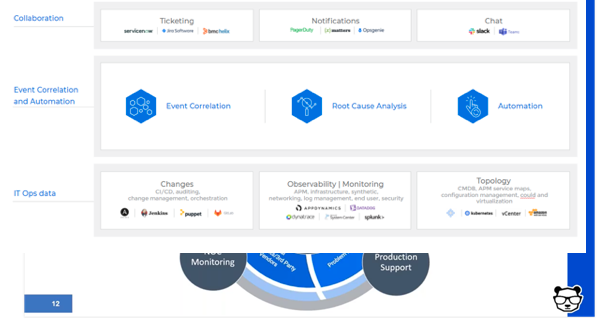
    • Deploy event correlation and automation tools to enable the incident management team. These tools are key, allowing your team to perform the required actions.
      • First, correlate the alerts created by your monitoring and observability tools into a drastically reduced number of high-level, insight-rich incidents by using machine learning and artificial intelligence (ML/AI). Add context to these incidents by ingesting and understanding topology sources, as well. This creates the necessary full-stack visibility and situational awareness.
      • Then, use ML and AI to determine the root cause of these incidents, including correlating them with data streams from your change tools: CI/CD, orchestration, change management and auditing to identify whether any changes in your environment caused these incidents.
      • Finally, automate as many processes as you can to free your IT Ops team from manual, time-consuming tasks. By integrating with collaboration tools, you can also enable the above-mentioned bidirectional communications.


  • Kong Integrates Service Mesh with OPA

    Kong Integrates Service Mesh with OPA

    Kong, Inc. today announced an update to Kong Mesh, built on top of open source Kuma service mesh, that adds support for Open Policy Agent (OPA) software that enables DevOps teams to manage compliance as code.

    Kuma and OPA are both being developed under the auspices of the Cloud Native Computing Foundation (CNCF). Kuma, unlike other service mesh offerings, provides connectivity across both microservices-based applications running on Kubernetes platform and monolithic applications deployed on virtual machines.

    In addition to adding support for OPA, the 1.2 release of Kong Mesh adds authentication mechanisms between the global and remote control planes operating across multiple zones. That functionality extends the Kuma Discovery Service (KDS) to support multiple authentication mechanisms.

    Finally, Kong has added support for the federal information processing standard (FIPS).

    Like the Istio service mesh, advanced by Google and IBM for Kubernetes environments, Kuma is based on open source Envoy proxy software. In contrast, however, Kuma is both lighter-weight and designed to span both cloud-native and legacy application environments.

    Marco Palladino, CTO at Kong, said OPA support will be a significant advance for both classes of workloads as organizations start to employ Kuma within the context of zero-trust computing environments. As DevSecOps processes are extended to include managing compliance as code, OPA will provide a programmable mechanism for ensuring that policies are not only properly implemented, but can also be easily audited, Palladino said.

    In general, an effort led by Kong, VMware and others to elevate the service mesh conversations to more broadly address application connectivity is underway. A service mesh, at its core, provides the means for integrating hundreds of application programming interfaces (APIs) at scale. It also provides a level of abstraction above the network layer that makes it easier to connect applications across a heterogeneous networking environment.

    Kong is making a case for a lighter-weight approach that spans multiple platforms and is highly extensible. As such, third-party vendors and IT teams can add extensions to Kuma as they see fit.

    Ultimately, Palladino said, the time has come to take cloud computing to the next level. If all organizations wind up doing is lifting and shifting monolithic applications to public clouds, an opportunity to advance the state of IT will have been lost.

    Of course, it’s still early days as far as adoption of service meshes are concerned. Most organizations today are relying on API gateways, proxy software or ingress controllers to manage APIs. It’s not clear to what degree a service mesh may remove the need for some of that existing application connectivity middleware.

    Regardless of which approach is ultimately favored, it’s apparent that, as microservices-based applications become more widely deployed, a different approach to application connectivity will be required. Monolithic applications, however, are not going away. In some cases, a monolithic application might be carved up into a smaller set of microservices, but it’s unlikely that every existing monolithic application will lend itself to that architecture any time soon.

  • Cloud Migration Monitoring: A Practical Guide

    Cloud Migration Monitoring: A Practical Guide

    Almost every organization has transitioned some operational systems to the cloud. DevOps professionals are an essential part of migration projects, facilitating the migration itself, and making sure applications work as expected and provide satisfactory performance after the migration.

    To make your next cloud migration a success, you must get monitoring right. Applications must be monitored at every stage of the migration—when the application is still running on-premises, during migration and once the new workload is running in the cloud.

    In this article, we will explain key metrics to track during your migration, monitoring considerations at every stage of the migration cycle, and free tools offered by the major cloud providers that can help you monitor your migration.

    What to Monitor During a Cloud Migration

    There are many components involved in a cloud migration process. There are several approaches to cloud migration—each migration is unique, and might necessitate setting up different metrics. However, there are several aspects that can be considered mandatory when monitoring your cloud migration process:

    • Tracking application traffic. Tracking application traffic can help you validate that application configurations are properly defined and validate the availability of the entire application. You should ensure that all requests arrive to the new server, and keep an eye on the error rate. Additionally, watch for response times to ensure your application is not exceeding the planned thresholds.
    • Tracking your costs. Tracking costs can help you ensure that you are not incurring unexpected losses. The majority of organizations migrate to the cloud to reduce their costs. However, incorrect implementation of cloud resources may lead to losses. You can gain visibility into your costs by leveraging first-party cloud tools, like AWS Billing, which natively integrate into the pipeline, monitor costs, and show visualized data in customized dashboards. You can also use these tools to set up alerts.
    • Monitoring application security. Application security monitoring can help you identify security vulnerabilities and incidents during and after the migration process. You should monitor infrastructure configurations, such as internal traffic, host open ports and instance processes that are actively accessing different services. Additionally, keep watch for API hits per second, which might indicate a distributed denial of service (DDoS) attack.

    Monitoring Aspects of the Migration Life Cycle

    Cloud service providers typically identify three main phases of the migration process, which are referred to as the plan, migrate and run phases.

    Plan Phase

    The plan phase helps you assess the performance levels of your applications before migrating. The goal is to achieve an in-depth understanding of how workloads are functioning pre-migration, as well as the current state of user experience. This data can then be used to establish performance benchmarks and baselines.

    Performance baselines, like error rates, page load times and slow transactions, can help you set up configuration alerts that keep track of outages across the cloud migration process. You can then quickly diagnose the situation and apply fixes that ensure application health during and after the migration.

    Here are several questions that can help you during the plan phase:

    1. What is the application baseline?
    2. How will the migration process affect user experience?
    3. What are the potential technical challenges expected during the migration process?
    4. Can the corporate network support additional bandwidth needs?
    5. What are the steps needed to start the migration process?

    Migrate Phase

    The migrate phase involves all processes required to securely move components from one location to another. During this process, you should continuously monitor performance to ensure user experience remains within the pre-established baseline. However, migrating to the cloud means you no longer have control over all configurations.

    To ensure application performance and stability during the migration process, you need to identify potential roadblocks and issues, and continuously monitor and validate the process. You should test critical aspects like application response time and call counts, and troubleshoot issues quickly.

    Run Phase

    The run phase starts right after the migration process is complete. During the post-migration phase, you need to establish proactive monitoring processes. The goal is to ensure your application performs well in the cloud; using the expected resources and without incurring overhead.

    When monitoring your application, keep track of service level agreements (SLAs) to ensure the cloud vendor meets the requirements agreed upon. You should also monitor for changes and review individual variables that might cause issues.

    Additionally, you should make sure all connections between applications are maintained after the migration.

    Free Cloud Migration Monitoring Tools

    The three major cloud providers—Amazon, Microsoft Azure and Google Cloud—provide tools that help automate migration to their clouds, and also assist with the crucial aspects of monitoring. These tools are offered free, because it is in the best interest of the cloud providers to allow easy, frictionless migration.

    The following table summarizes migration monitoring capabilities available from each cloud provider.

    Cloud Provider Tool

    What it Helps Monitor

    AWS Migration Services

    Helps automate migration of applications that rely on databases.

    • Continually monitors source and target databases
    • Able to restart failed migrations
    • Oversees continuous data replication
    • Integrates with first-party AWS monitoring tools

    Azure Migration Tools

    Provides a migration hub that lets organizations manage large migration projects.

    • Tracks migration process and current status for server and database migrations
    • Allows external tools to integrate and track migrations
    • Reports on compliance aspects of migrations

    Migrate for Google Compute Engine

    Formerly known as Velostrata, this tool automates migration of on-premises systems, with automated roll back in case of errors.

    • Validation of workloads for migration compatibility
    • Ongoing oversight of streaming data transfers
    • Ability to roll back migration to on-premises systems in case of error

    Monitoring is critical for a successful cloud migration, and it’s important to use monitoring at every stage of a cloud migration:

    • During the plan phase, establish a baseline of application performance before it is migrated to the cloud.
    • During the migration phase, carefully monitor application behavior and troubleshoot issues.
    • During the run phase, validate that the application performs as expected and is meeting SLAs.

    I hope this will be useful as you plan and execute your next cloud migration project.

  • Despite the Pandemic, DevOps Salaries Rose in 2020

    Despite the Pandemic, DevOps Salaries Rose in 2020

    Puppet today published the results of an annual global DevOps survey that found, despite the downturn in the global economy brought on by the COVID-19 pandemic, most DevOps professionals saw their salaries rise in 2020.

    However, for the first time since Puppet started collecting this data, DevOps professionals working in the life sciences, health care and pharmaceutical sectors, on average, made more than those working in the financial services sector. Not surprisingly, the report also found that DevOps professionals working in the U.S. made more than their global counterparts.

    Nearly two-thirds of respondents in the life sciences, health care and pharmaceutical sectors earn more than $100,000. That compares to 53% in the financial services sector and 45% of those working for technology companies.

    The survey was based on responses from 2,243 DevOps professionals, and noted that organizations with highly evolved DevOps practices pay better than those that are less evolved. Among respondents working at highly evolved companies, 80% earn $75,000 per year or more. That compares to 57% that earn as much at less evolved companies. Much of that discrepancy is attributable to DevOps managers that make much more at highly evolved companies compared to their counterparts at less-evolved companies, the report noted. Two‑thirds of practitioners make less than $100,000 per year, the survey found. In general, respondents working at companies with revenue over $1 billion had the highest percentage of those earning $150,000 to $250,000 (22%).

    The largest percentage increases in salaries among DevOps professionals occurred in Japan and the United Kingdom (UK). Salaries, on average, did not rise in Singapore, Germany, New Zealand and Australia. In the U.S., the demographic that saw the most growth was among DevOps professionals earning between $150,000 to $250,000, most of whom are managers. More than half of all DevOps managers in the U.S. fall within this salary range, the report noted.

    The Puppet report also noted that DevOps professionals working in dedicated engineering and application development tend to make more than those that are part of a larger IT team. A third of respondents in engineering or development report salaries over $125,000 per year, compared to 22% percent in IT and 15% percent in information security.

    The Puppet report also showed a divergence between what men and women earn as salary ranges increase. For both men and women earning up to $75,000 a year, salaries are similar. Between $100,000 and $125,000, women actually earn more. However, at $125,000, men (28%) earn more than women (17%). The survey, however, does not mention the experience levels of any respondents.

    It’s also not clear whether the higher salaries among DevOps professionals found in the life sciences, health care and pharmaceutical sectors represent a fundamental shift, or is an aberration based on the amount of COVID-19 research being conducted.

    Alanna Brown, a senior director of marketing for Puppet, said the one thing that COVID-19 has changed forever is that competition for DevOps expertise is now global. Organizations are no longer limiting themselves to hiring individuals within 50 miles of their office. In fact, DevOps professionals that have shown they can successfully work remotely will, in the months and years ahead, be in greater demand than those that have only worked in an office setting, Brown predicted. Organizations of all sizes are trying to reduce their commercial real estate expenses, Brown added.

    In the meantime, the most important thing for IT professionals is to stay relevant. Site reliability engineers (SREs) with certified programming skills will make more than a traditional IT administrator. It’s up to each IT professional to make sure they have the skills that are highest in demand at a time when many IT functions are being ruthless automated by increasing numbers of DevOps professionals.

  • LogDNA Adds Usage Quota Tools to Help Control Costs

    LogDNA Adds Usage Quota Tools to Help Control Costs

    LogDNA announced today it will enable IT teams to apply usage quotas to help rein in log management costs.

    Tucker Callaway, CEO, LogDNA, said as applications become more complex – thanks, in part, to the rise of microservices – the amount of log data that a DevOps team can collect has significantly increased. IT teams can now assign DevOps teams both hard and soft quotas to limit the amount of log data collected during a specific time period, Callaway said.

    IT teams can set a daily or monthly hard limit on the volume of logs stored or, alternatively, they can also set soft daily or monthly quotas that can apply throttling logic to ensure mission-critical log data will continue flowing through LogDNA as usage volume approaches the limit threshold. It will then be up to each IT team to determine, based on the tasks at hand, whether to enable a DevOps team to exceed those thresholds, Callaway said.

    IT teams can also make use of soft limits to reallocate storage resources from one DevOps teams to another based on how much log data might be generated in a specific time period, Callaway noted.

    LogDNA will notify team members any time a quota is hit, or when an exclusion rule is triggered because a quota has been reached. Those alerts can also be integrated with email systems or the Slack messaging platform. Logs that are not retained are not counted toward the monthly bill, but are displayed and will trigger other relevant alerts.

    In the wake of the economic downturn brought on by the COVID-19 pandemic, IT organizations are, generally, more sensitive to costs. At the same time, many of them are encouraging developers to assume more responsibility for application life cycle management as they embrace DevOps best practices. The usage quotas are intended to enable IT teams to strike a better balance between what can be two competing agendas, Callaway said. IT leaders are not necessarily trying to discourage DevOps teams from collecting log data as much as they are trying to make sure costs are predictable, Callaway added.

    Log data, of course, is one of the core elements of any observability strategy. While observability has always been a core DevOps principle, the number of organizations that have been able to meaningfully achieve it has been limited. However, as organizations start to deploy microservices with multiple dependencies, the need to provide context when troubleshooting those applications has become more acute.

    It’s not clear to what degree more granular control over log data might sway an IT organization toward one platform versus another. However, when it comes time to justify a choice to senior IT and business leaders, it’s always a good idea to address, at some point, how one decision versus another might have a more positive impact on the bottom line.

  • GrammaTech Allies with GitLab to Advance DevSecOps

    GrammaTech Allies with GitLab to Advance DevSecOps

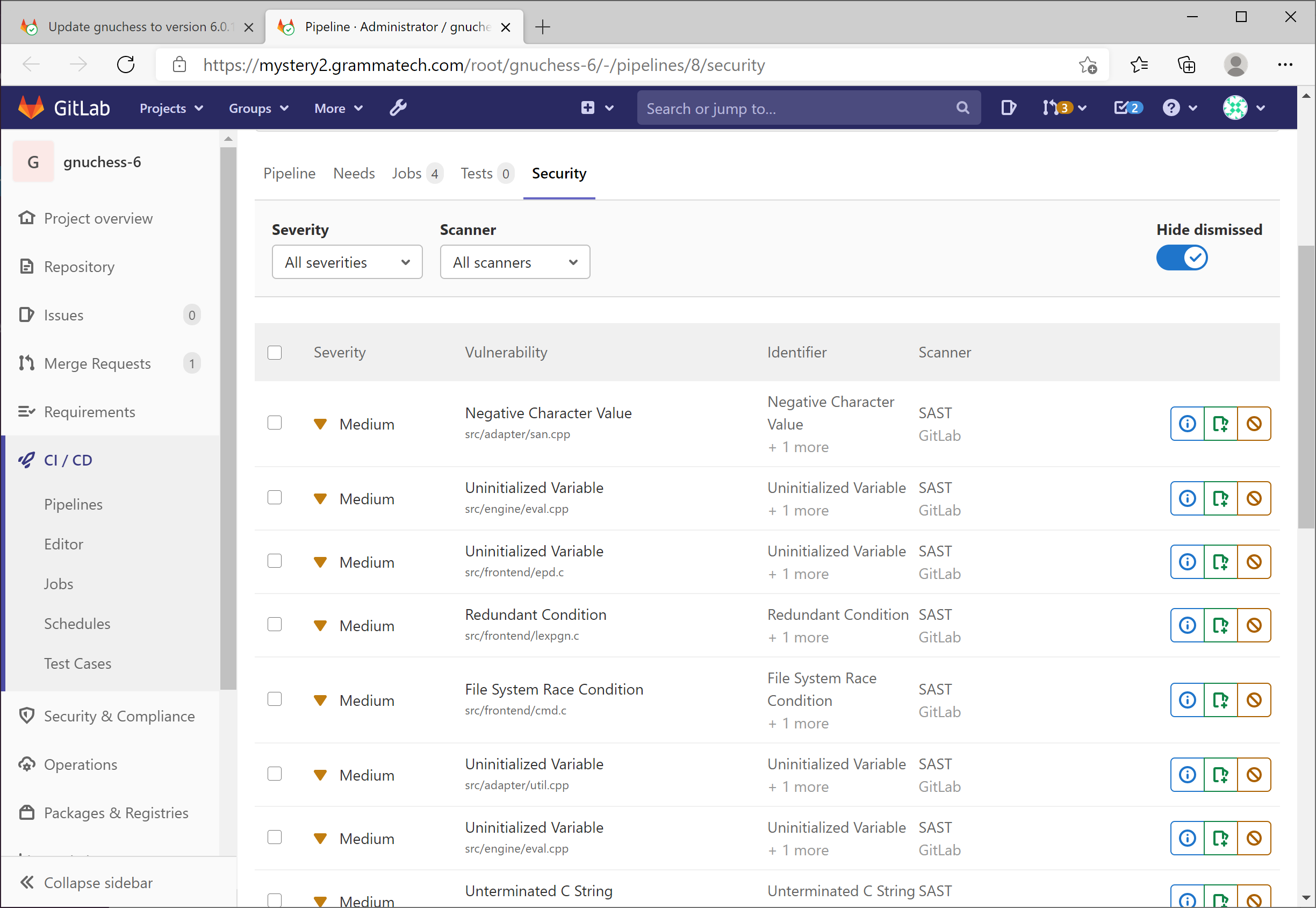
    GrammaTech announced today it has partnered with GitLab to integrate its GrammaTech CodeSonar static application security testing (SAST) tools with the GitLab Ultimate DevSecOps platform.

    Vince Arneja, chief product officer at GrammaTech, said integration with continuous integration/continuous delivery (CI/CD) platforms such as GitLab is critical because it enables security scans to run automatically any time code is merged. That capability reduces the amount of code that is scanned at any one time, Arneja said.

    GrammaTech is partnering with multiple CI/CD platforms and integrated development environment (IDE) providers to make it simpler to create multiple points for scanning code during the application development process, Arneja noted.

    GitLab, meanwhile, is providing its own tools for analyzing artifacts as they move through the software development life cycle. The GrammaTech tools, available via the highest tier level made available by GitLab, analyze code at a deeper level, said Arneja.

    Ultimately, the goal is to enable developers to discover security flaws as early as possible in the application development life cycle. The later those flaws are discovered, the more expensive they become to fix, Arneja said.

    Developers, naturally, tend to postpone security scans as they race to meet an application deadline. That practice creates issues; the more code there is to analyze, the longer such scans take. It’s generally more efficient to scan smaller amounts of code more frequently. Otherwise, developers can become overwhelmed by the number of security bug fixes that need to be addressed at the back end of the application development process. Automating security scans allows an organization to move toward embracing DevSecOps best practices in a way that doesn’t rely on a developer remembering to initiate a scan.

    Most developers are not deliberately ignoring security issues – it’s just that the existing, manual processes for discovering those flaws is inefficient.

    Automated scans also provide the added benefit of simplifying discovery of common security flaws long before a code review, creating more time to address significantly more complex issues.

    Application development teams are also under pressure to reduce the total number of bugs that need to be fixed after an application is deployed. As the number of applications being deployed steadily increases, developers can find themselves spending more time fixing bugs than writing new application code.

    Most organizations are not very far along in their journey toward embracing DevSecOps. However, as it becomes easier to integrate a variety of scanning tools within DevOps workflows, the number of organizations moving up the DevSecOps maturity curve should increase. In the wake of some recent, high-profile attacks on software supply chains, the sense of urgency surrounding the adoption of DevSecOps best processes has undoubtedly increased.

    In the longer term, there may soon come a day when security is viewed as just one of many quality assurance gates that code needs to pass through before it’s allowed to be promoted. In the meantime, an ounce of cybersecurity prevention at the front end of any application development is most certainly going to be worth more than several pounds of cybersecurity cure applied too late.

  • IaC Frameworks: Vendor-Specific or Multi-Cloud?

    IaC Frameworks: Vendor-Specific or Multi-Cloud?

    Over the past few years, I have been watching the shift to infrastructure as code (IaC) frameworks closely. With the shift from monolithic to microservices, and with the shift from mostly virtual machines (VMs) to cloud-native architecture, applications are much more complicated, making it much more important to automate infrastructure to respond with speed.

    In that sense, I refer to IaC as “The third cloud revolution.” Looking at the history of cloud transformation, the shift from physical servers to virtual machines (led by VMware about 20 years ago) would be the first cloud revolution. The move from virtualized data centers to the public cloud (led by AWS about 10 years ago) would be the second cloud revolution. With the shift to public clouds, people were suddenly able to click buttons to provision new resources, including “hardware.”

    In the last few years however, we see fewer clicks and more code. Engineers write and maintain that IaC, and something executes that code. Engineers influence the infrastructure much more than they used to – that is the third cloud revolution. We mainly see four IaC frameworks that drove this revolution – Terraform and Pulumi (both multi-cloud), CloudFormation and ARM (vendor specific).

    I recently talked with Joe Duffy, CEO, Pulumi, Mark Russinovich, CTO, Azure and Anton Babenko, AWS community hero and Hashicorp ambassador, the head of Terraform at Microsoft, the head of Terraform at IBM Cloud and one of the founders at Gruntwork. After our brainstorming session, it’s clear we all agree that IaC will have a huge effect on cloud operations. In this blog, I’ll share my point of view regarding multi-vendor IaC versus single-vendor IaC frameworks; discuss how they compare to the differences between iOS and Android and which direction I believe will win the day.

    The big cloud vendors seem to go “all-in” and create full ecosystem, iOS-style, and they have everything working nicely with the relevant services and tools. AWS just released AWS Proton, which works with CloudFormation. They say that Terraform is on their roadmap, but time will tell. Microsoft seems to offer more solutions that are ARM-based, like Bicep. When I talk with executives at those companies, they strongly believe in the great value of this vendor lock-in/closed approach. They truly believe that this will help their customers in the best way possible. Perhaps they are right.

    On the other hand, when I talk with the community, I hear different opinions. DevOps engineers at Azure customers do not debate whether to choose Terraform or ARM. DevOps engineers at AWS customers do not debate whether to choose Cloudformation or Terraform. While this was the case three years ago, it is not, anymore. Now, the real debate is whether to choose Terraform or Pulumi. Engineers prefer a language that is multi-vendor, open-source, no vendor lock-in and that is compatible with other open source solutions built on top, like Open Policy Agent and Terragrunt, to help Terraform users. This is the Android-style approach – open platform.

    Moreover, I hear new phrases from the community that make me think the future is going in this direction. Erik Osterman at Cloud Posse started using the acronym  TACOS – Terraform Automation and Collaboration Software (see the video here). It takes time, but, going forward, developers and the community will hold the key to the future of IaC, not executives and large vendors.

    You can, of course, challenge this by replying that, “iOS is a great OS.” This is obviously true, but I think there is one big difference here as to why the Android approach is winning the IaC market. The answer lies with the end user; the Apple ecosystem is a solution for the end user and consumer, and IaC is about larger-scale infrastructure decisions. Like the shift from monolith to microservices, developers prefer small and isolated parts, not one big system. With Terraform and Pulumi, developers get more freedom. Maybe the company will move from AWS to GCP or Azure or vice versa. Maybe IT will need an Auth0 provider, as well, and will want to manage it the same way. Maybe the use of Open Policy Agent to govern deployments becomes the status quo. Developers need freedom, whereas consumers just need a great product.

    But the question has still not been answered: Terraform or Pulumi? It is still too early to tell, and, frankly, there is more than enough room in the IaC space for both. Maybe more open-source and multi-vendor frameworks will emerge and one that’s yet unknown will rule the day. Terraform provides a great ecosystem of providers, support and maintainers. Pulumi has started to provide all of those, together with its imperative approach, which seems to be a bit more appealing to developers.

  • How to Build Actionable Logging Systems

    How to Build Actionable Logging Systems

    Logging is often considered an automatic process that doesn’t require much thought. We see logs, in general, from any system and take for granted that those logs have the information that’s needed. However, thinking through a logging strategy and architecture is extremely important for troubleshooting and performance efficiency. Regardless of how you log, the most important part of logging, after simply having logs in the first place, is having logs you can actually use. Actionable logs provide enough information, enough detail and enough history to ensure you can use the logs to get something done.

    Let’s examine an example system. This example system is an application, with a microservices architecture, running on a Kubernetes cluster that lives on top of an RHEL box. By default, you get logs from the operating system and Kubernetes. But to get logs for the different microservices, you have to program those logs into your application while building the codebase. So how do you set up useful, actionable logs successfully?

    Three Main Considerations

    Consider the following elements when you think about building actionable logs.

    Enough Information

    Your logs should provide enough information to answer ‘when,’ ‘who’ and ‘where’ for any event. As an example, let’s say you want access logs. If there was an access event for your system, the log line for that access event should tell you when that access occurred; this is known as the timestamp. The log line should also include information about who accessed the system. Often, this detail comes in the form of an IP address or other identifier, and the ‘who’ should include not just human interaction, but also actions by other systems. Always log every access! Finally, the log line should include the location from where the system was accessed, meaning which service or which part of the platform was accessed.

    Enough Details

    Your logs should provide enough details to tell you exactly what happened during any single event. Simply answering the who, when and where doesn’t actually tell you what happened, and a basic answer such as “This pod started,” doesn’t provide enough detail to differentiate a code change triggering a pod restart from a system crash triggering the orchestrator to restart pods.

    Enough History

    Finally, your logs should provide enough history to understand why something happened. Logs, overall, help you understand the context of the action that was taken. Writing log lines to a terminal somewhere without storing them is pointless. A single log line doesn’t provide you with enough context to understand the “why” for any action or event. How could you tell if an event was normal for a system without an easily accessible history?

    All three of these components are necessary to create a plan that will lead to actionable logs—logs you can actually use to understand what happened, why it happened, and how you can act to handle the situation. If you can answer who, what, where, when and why from your logs, you probably have actionable logs, and are well on your way to meeting or exceeding logging best practices.

    Next-Level Considerations

    Once you’ve thought through those higher-level considerations, you can think about the nitty-gritty of your logs themselves. When I think about the practicalities of logging, I think about these main considerations: log levels and data needs, format and structure and security and compliance

    Log Levels and Data Needs

    Using log levels properly ensures that you collect and store the data that you need, and only that data. Logging can get very noisy, very fast in modern environments. Log levels provide the ability to fine-tune your logs to store only what you need; this can help you find information quickly in an emergency, rather than digging through the haystack for the proverbial needle. In addition, someone is more likely to keep logging capabilities turned on when it gets noisy if they have the ability to reduce the noise and fine-tune the information, versus having only an on-off switch.

    Different programming languages use different combinations of log levels, but all of them have general categories of major, minor and debug logs. Major logs, as you might guess, should be on for all environments. Minor logs, generally, are turned on in environments for which you need to be able to understand the data flow without necessarily knowing the minute details. Finally, debug logs are generally turned on in dev or QA environments, and only when you need to know every detail – such as when you’re looking for issues that could turn into problems later on. You will need to ensure the necessary log levels are set in your code, as they aren’t necessarily automatic, but taking this extra step is worthwhile.

    Format and Structure

    You need to think about who or what is the primary audience of your logs. If you anticipate sifting through the logs yourself, you’ll likely not mind a text-based format. However, most modern logging uses machines to parse the logs and make the mounds of data more useful. In that case, you should use structured logging; JSON is the standard for structured logs due to the plethora of tools available for working with the standard.

    Security and Compliance

    Logging for security and compliance could be (and has been!) a full article, on its own. The short version, however, is that logging is a key pillar of a compliant system that is aware of, and actively monitoring, its security. If your stack doesn’t log everything to one or more append-only log files, stored in secure location(s) with a read-only archive stored in a separate location, then you’re at risk of an attacker coming in and modifying or deleting logs so you can’t track their actions across your system.

    Your logging processes shouldn’t store personally identifiable information (PII) in clear text or behind an easily broken cypher, either. It’s better to keep that PII in a secured and hashed database, with a unique identifier (UID) that correlates to the database, if you definitively need to keep that PII in your logs in some form, or strip it out if you don’t need it.

    Working Together

    All of these tips are fine and dandy, until you realize that you cannot get enough buy-in from others to ensure everyone follows the same best practices. It’s generally best to come to an agreement as to logging standards and practices across an organization. That will also help, as anyone working on a different system will start from the same baseline, and not have to understand another team’s standard, if they come in to help in an emergency. Ops teams working across many systems will appreciate the standards, as well. To get everyone to the table in the first place, start by appealing to each of their needs. Ask about people’s problems with logging and listen to responses. You likely will need to address assumptions folks make, misconceptions, complacency and resentment. The key is listening; you won’t get buy-in until everyone feels heard and validated.

    To get everyone on the same page, you should first identify, as an entire organization, the needs you have from your logs based on the components of actionable logs. Ensure everyone has a seat at the table and the ability to discuss and unearth all needs, so no one is tempted to go around the team’s decision. One team’s needs will not match another’s, so you need to ensure that all viewpoints are heard and accounted for. Then, organize related needs and set standards for those needs. Once you’ve agreed to your new standards, work together to update your systems. This will take time, just like it does with resolving any technical debt! Start with smaller systems, or less-critical systems, so you can monitor how the standards are surfacing in real life, and how well everyone’s needs are met. Adjust, if you need to, with everyone’s agreement. Needs and standards will change, just like your systems will, and they need to adapt to fulfill the needs of your teams. If you take the time to get everyone to the table and make sure everyone is on board, you’ll be better off.

    What You Need to Succeed

    Logging may seem like simple magic that ‘just works,’ but there’s a lot to think about before you can have a successful, useful system. You need actionable logs that have enough information, details and history to be useful. You need to think about the data you need for all of your various systems, how you’ll structure that data and how you’ll ensure you stay secure and compliant. Finally, you need to ensure your team is on board with standards so logging can be as useful as possible. If you do all of that, though, you’ll find logging becomes a great way to communicate across teams and organizations to ensure you deliver the best product possible.