Category: IT as Code

  • The Evolution of SRE and Developer Roles

    The Evolution of SRE and Developer Roles

    As an industry, we’ve seen cultures and roles shift throughout IT teams — specifically, the role of ITOps site reliability engineers (SREs), various developer roles and the culture of DevOps. Most of these roles operated – or still operate – in silos, and didn’t understand (or care to understand) how each other’s role worked. More importantly, they didn’t know how to work together. But these roles are starting to overlap, driven by the increase in demand for customer experience and, subsequently, in intelligent observability, or observability with AIOps. Before we dive into the ‘how’ behind the overlap, let’s look at how each of these roles performs today.

    Developer

    While the specifics of what a developer does varies by project, the overarching responsibilities haven’t changed much since the introduction of the role. Simply put, developers write code to create and improve product functionality.

    IT Operations and SRE

    Traditionally, an IT operations professional focused on operating the code a developer put into production; aka keeping the lights on. However, we’re now seeing evolution of the role of highly skilled operations pro to that of an SRE who oversees automation and features surrounding the product, like CI/CD pipelines, infrastructure-as-code and the ability to monitor and observe the services and components within.

    QA

    Traditionally, QA would test the code the developer wrote and move it down the deployment pipeline. But we’re moving away from traditional QA. Now, the role sets up an automated framework for the developer so they can automate tests — similar to how the SRE sets up the CI/CD pipeline and observability framework to build, test, deploy, verify and monitor their code.

    DevOps

    DevOps has, in some cases, evolved from a practice and culture into a role. The DevOps engineer prepares the automation and the CI/CD pipeline for the developer to push out their code to test and, ultimately, production. But let me be clear – I believe the idea behind the practice of DevOps is that the practitioner does everything — they own testing frameworks, CI/CD pipeline and infrastructure. They own end-to-end product development and operation, so when anything does go wrong, they know exactly what to do, where to go and how to fix it.

    In the end, if a SRE can develop everything around the product code and knows how to fix the product — isn’t an SRE actually a developer? What if we have a really skilled developer who sets up the automation and observability framework to get their code from their keyboard to the user as quickly as possible — without breaking anything, of course — while also building and improving all the infrastructure and components surrounding the product? Isn’t the developer an SRE, or at least performing site reliability engineering?

    The short answer, in my opinion, is yes. And there’s one guiding force behind this amalgamation, this crossover; ultimately, this evolution: intelligent observability.

    The role of observability with AIOps

    Traditionally, and with the use of many tools, DevOps practitioners and SREs have had to — manually — battle floods of data coming in from all their endpoints, services and products. This can feel like a never-ending struggle. It can lead to a lot of toil and time spent on maintenance, when what developers really want is focused time to do what they love – write code, create and innovate. Not to mention, the result has a negative impact on the customer experience.

    But now, new tools are surfacing to support the everyday needs of SREs and DevOps practitioners. For example, intelligent observability, or AIOps, applied to observability data like events, metrics, traces, changes and logs, gives teams clearer insight into not only where complex data is coming from, but why an issue is happening and what action they need to take to resolve it. They can spend less time operating and more time innovating.

    As these roles continue to evolve, it’s important SREs and DevOps practitioners remain agile and willing to adjust to keep up with the latest technologies supporting their day-to-day workflow. AI can be the key to keeping the incident count down and the customer experience up.

    Looking Ahead

    If you’re currently in one of these roles, consider how you are practicing. Whether you’re a developer, a QA engineer, a DevOps practitioner, or an SRE, have you evolved your role to fit your company and customers’ needs right now? As these roles overlap with the application of intelligent observability throughout your development life cycle, it’s possible to deliver better products and fix reliability issues faster. It’s up to you to decide if you want to embrace the evolution of your role and intelligent automation or stay put and risk falling behind.

  • ServiceNow Acquires Lightstep to Gain Observability Platform

    ServiceNow Acquires Lightstep to Gain Observability Platform

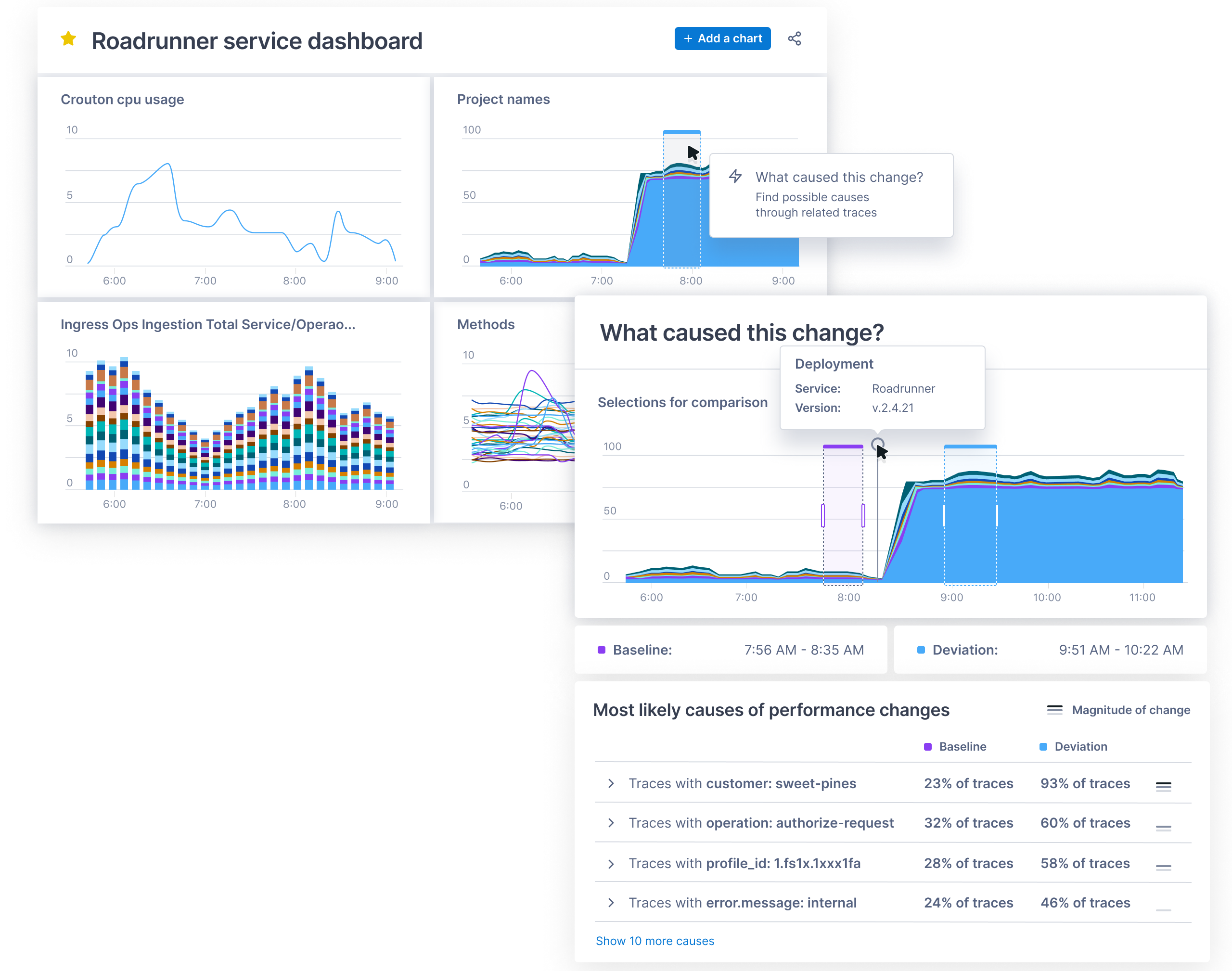
    ServiceNow today announced it has acquired Lightstep as part of an effort to add an observability platform to its IT operations portfolio. Terms of the deal, expected to close this quarter, were not disclosed.

    The Change Intelligence observability platform from Lightstep is based on a time-series database that is capable of processing a trillion events each day. It was built by the same team that created Monarch, the globally distributed in-memory time series database system that Google employs to monitor its applications and systems. Lightstep team members also co-created both the OpenTracing and OpenTelemetry open source projects for collecting traces, metrics and logs.

    Pablo Stern, senior vice president and general manager for IT workflow products at ServiceNow, said ServiceNow will employ Lightstep to enable IT organizations to observe both monolithic and microservices-based applications as IT operations and DevOps teams continue to collaborate more closely with one another. The goal is to provide a single pane of glass through which IT teams can observe their entire IT environment via the Now platform that ServiceNow makes available via a software-as-service (SaaS) delivery model.

    That approach will enable DevOps teams to programmatically manage IT environments alongside IT administrators employing graphical tools, noted Stern.

    Lightstep CEO Ben Sigelman added that, in time, the number of users of that observability will only increase as more application stakeholders start to track software development projects that are at the heart of various digital business transformation initiatives.

    ServiceNow

    Thanks mainly to the rise of microservices that are now being deployed across highly distributed computing environments, it’s become more difficult to discover the root cause of an IT issue. Microservices-based applications have lots of dependencies that, while serving to make the overall application more resilient, conspire to make it difficult to determine which specific microservices might be adversely impacting the performance of an application.

    The time-series database that lies underneath the Change Intelligence observability platform makes it feasible to go beyond logs and metrics to process distributed traces that provide more insight into application behavior. Ultimately, the goal is to enable organizations to innovate faster with a higher degree of confidence in the IT environment, said Sigelman.

    As far as the march to observability in the enterprise is concerned, it’s still early days. While observability may be a core tenet of any DevOps practice, most IT organizations rely on myriad tools that surface data the teams then attempt to correlate. Whenever there is a major issue, those IT teams typically convene in a “war room” to compare reports generated by the various IT monitoring tools employed. Observability platforms that collect and process distributed traces used to instrument an application using a consistent set of specifications, frameworks and libraries. The OpenTracing and OpenTelemetry tools are significant because they provide an open source approach to instrumenting applications that reduces the total cost of observability. In comparison, many legacy application performance management (APM) platforms employ proprietary agents to instrument applications.

    Naturally, each IT organizations will be moving down the path toward an observability platform that provides greater application context. At this point, however, it’s not clear to what degree observability platforms will need to be installed before making the transition to microservices versus being a capability that only gets appreciated once the trouble with microservices finally becomes apparent.

  • SAST, DAST, SCA: What’s Best For AppSec Testing?

    SAST, DAST, SCA: What’s Best For AppSec Testing?

    According to the most recent Verizon Data Breach Investigations Report, almost 90% of data breaches are driven by financial gain, up from 71% in last year’s report. Most noteworthy, however, is that cloud platforms are particularly at risk, with web application attacks increasing by 43%. As more information is stored within cloud infrastructures, and as more enterprises rely on web applications to maintain business continuity, security teams should consider how security controls can be integrated to DevOps without impacting productivity. However, the security market is often shrouded by acronyms and buzzwords. With the increase in automated security testing tools, such as SAST, DAST and SCA, it’s important to understand the difference between each of these practices, and when to use them in the development cycle.

    DevOps is the convergence of software development and IT operations that aims to continuously build, test and release software. Understandably, DevOps is becoming an integral part of any business as it facilitates delivering new products to end users faster and driving increased revenue. However, failure to secure these digital assets can open organizations to cyberattacks resulting in operational downtime, loss of customer trust and even hefty fines from a regulatory body. The sharp rise of application layer attacks proves that enterprises must proactively address security issues earlier in the software development stage.

    The evolution of DevSecOps takes the concept of DevOps one step further, putting security where it should be: at the heart of the development life cycle, using automation. DevSecOps has helped security professionals understand how they can successfully integrate automated security processes without slowing down development while allowing DevOps to focus on what matters most – building and creating software.

    There are a host of automated application security testing tools out there, each with unique benefits, that are commonly used in the agile software development cycle. This raises the question: what tools should we use, and when, to ensure a secure software development life cycle (SDLC)?

    The Difference Between SAST, SCA and DAST

    The most popular application security testing tools businesses implement in their development cycles are static application security testing (SAST), software composition analysis (SCA) and dynamic application security testing (DAST). Knowing the differences between them and when to use them is crucial to enhance your DevSecOps strategy and secure your web applications.

    Static Application Security Testing (SAST)

    As the pressure to deliver high quality and secure code increases, and DevOps embraces new agile methodologies and technologies, integrated static analysis within the continuous software development pipeline can help detect vulnerabilities early in the software development process from the inside out (white box testing). The benefit of a SAST solution is it doesn’t require a running system to perform code security checks and won’t slow you down like a manual code review or penetration test.

    One aspect that makes SAST unique is that it automatically checks for vulnerabilities within the application source code, byte code or binaries, line by line. This ensures security weaknesses – such as those listed in the OWASP top 10 and the 2019 CWE top 25 – in the proprietary code are detected from the start and during development. As a result, developers can identify the risks and fix any vulnerabilities before they make it into production. They are empowered to shift left and recognize early code defects in the development cycle, a security best practice, which also reduces the cost of fixing security issues.

    However, SAST does have some disadvantages in that it requires access to source code and the underlying framework, making it unsuitable for testing commercial off-the-shelf software (COTS) or working with outsourced development. It is also unable to identify runtime and environment-related issues, which makes it difficult to determine the actual and contextual risks of security flaws and suggest meaningful remediation.

    Dynamic Application Security Testing (DAST)

    Unlike SAST, dynamic application security testing (DAST) is done from the outside in (black box testing), and identifies vulnerabilities when the application is running. DAST tools crawl web pages, locate web services endpoints, inputs and outputs; it requires a working version of a web application for the testing to work. Without looking into the source code, dynamic analysis works to simulate penetration testing to uncover exploitable vulnerabilities and business logic issues from a hacker’s point of view, with reliable results.

    Yet, because this scanning occurs towards the end of the SDLC (running applications), the findings can be substantial and often put additional pressure on DevOps teams to fix these runtime vulnerabilities on short notice, creating friction between the security and development teams. Further drawbacks of DAST include the risk that vulnerabilities can be found too late in the SDLC, resulting in rushed or delayed remediation.

    Software Composition Analysis (SCA)

    Releasing new features on a deadline means that developers often don’t write all their own code. The use of prepackaged open source code is commonplace in modern DevOps practices, and so is the need for security governance. Some SAST solutions now include software composition analysis (SCA) functionality to locate weaknesses in proprietary code and vulnerabilities in open source code.

    SCA tools are designed to analyze the open source components by detecting software licenses, deprecated dependencies and known vulnerabilities and potential exploits in a codebase. SCA enables DevOps teams to manage their security exposure and license compliance while still allowing the use of prepackaged code to speed up development processes. In addition, composition analysis can be run and expanded to newer architectures, including containerized environments, to automate detection for publicly disclosed vulnerabilities within your containers and prevent those disguised in public registries, such as Docker Hub, from being brought into the project.

    With open source components now present in 96% of commercial applications, the ability to spot software supply chain vulnerabilities in development, in and out of the cloud, are vital to reduce web application risks – all of which can be a potential entry point for malicious actors, as we’ve learned from the Equifax and SolarWinds breaches.

    Choosing the Best Application Security Testing Tool

    There is no shortage of application security testing tools. The real conundrum arises when decision makers are presented with a host of various options and pressured to choose. However, these tools are not mutually exclusive. Instead, they form a holistic, almost linear, approach to the entire DevOps pipeline from plan to implementation. What does vary, however, is the application development model. Which tool(s) should you choose for your specific use case? Here are some general guidelines:

    Outsourced Development and Commercial off-the-shelf (COTS) Applications: When it comes to critical business applications for prepackaged code, black box testing is advised for enhanced security peace of mind. Without access to the source code, DAST scanning and/or penetration testing are ideal to test the running application for any critical software vulnerabilities before deployment and to monitor security compliance in the long run.

    Internal Development and Software Customization: For businesses with the resources and infrastructure to create applications in-house, it’s important to build security testing into the SDLC from the beginning. Doing so can help protect against application vulnerabilities including cross-site scripting. For true DevSecOps, arm your development teams with SAST/SCA tools to ensure code security in the ‘code and build’ stage, and apply black box testing (DAST) for security assurance before deployment. Once deployed, regular penetration testing and continuous vulnerability assessment of the underlying infrastructure are also recommended to keep security issues in check with each new release.

    As cyberattacks targeting web applications increase, it is essential for organizations to have complete application security across the SDLC, providing maximum security coverage for development and ensuring they can keep up with business operations.

  • Live Fireside Chat with Christopher Krebs: How to Combat Disinformation

    Live Fireside Chat with Christopher Krebs: How to Combat Disinformation

    We live in a digital world where most information is now found online. This makes it increasingly difficult to verify the veracity of information. Threat actors have been taking advantage of the digital landscape to spread disinformation, propaganda and conspiracy theories to manipulate the public and sow doubt, discord and chaos. How can we distinguish between fact and opinion, truth and supposition? How can we spot fake news and tackle disinformation?

    Former Director of the Department of Homeland’s Cybersecurity and Infrastructure Security Agency (CISA) and Co-Founder of Krebs Stamos Group, Christopher Krebs, will be speaking about disinformation at this year’s DevOps Connect: DevSecOps on May 19 at 12:00 p.m. EDT. During his keynote session, Krebs will explain what disinformation is, how to recognize fake news and the challenges disinformation poses to cybersecurity teams. He will reveal effective ways to combat disinformation, and how public and private partnerships can help. Krebs will also be answering questions from the audience during the live Q&A session.

    Krebs is a founding partner of the Krebs Stamos Group, and previously served as the first director of the federal CISA for two years. Before that, he served in various roles at the Department of Homeland Security (DHS), responsible for a range of cybersecurity, critical infrastructure and national resilience issues. He has also directed U.S. cybersecurity policy for Microsoft and advised industry and government clients on complex cybersecurity and business risk matters while serving in positions with Obsidian Analysis and Dutko Consulting.

    DevOps Connect: DevSecOps has been part of the RSA Conference for six years in a row. This year, the main focus of the event is on “Securing the Cloud Native World.” Krebs has joined a stellar lineup of DevOps, cybersecurity and IT thought leaders as the DevOps Connect 2021 featured keynote speaker. Attend his live session, “Disinformation: As Dangerous as Cyber and Physical Threats,” and check out all the other breakout sessions to learn more about cloud security, DevSecOps, cybersecurity threats—such as disinformation—and more.

    For more information and to register for free, visit the DevOps Connect 2021 website. Save your spot today and learn how to better secure, monitor and maintain the security of your systems.

  • ServiceNow Shifts to Single Unified Agent

    ServiceNow Shifts to Single Unified Agent

    ServiceNow today unveiled an Agent Client Collector (ACC) that makes it possible for IT teams to capture data from software, hardware and cloud infrastructure.

    Jeff Hausman, vice president and general manager for IT operations management at ServiceNow, said this unified agent will enable IT teams to reduce the number of agents they would otherwise have to deploy to collect the data required to monitor IT environments.

    IT teams will also be able to employ incident management tools that can view that data in a way that eliminates the need to install any remote desktop software, Hausman noted. At a time when many employees will be splitting their time between working from home and the office, that approach reduces the level of IT service management (ITSM) friction that many IT teams today regularly encounter, added Hausman.

    ACC surfaces both configuration and performance data in real-time to provide IT teams with greater visibility. That data can then be used to drive a variety of workflows and playbooks that trigger automated incident responses.

    ServiceNow will employ ACC both within its ITSM platforms and IT operations management (ITOM), hardware asset management (HAM), software asset management (SAM), and security operations (SecOps) tools.

    Hausman said ServiceNow will employ ACC alongside agentless tools for managing IT environments as part of an effort to strike a balance between the amount of software that needs to be deployed and the capabilities that agent software enables. Ultimately, ServiceNow will also open up ACC to third-party tools that offer complementary capabilities, he added.

    More than a few IT organizations are suffering today from a phenomenon known as agent fatigue. Each new tool added to the IT arsenal often requires agent software to be installed within a device, application, server or cloud service. The need to reduce the amount of agent software has given rise to agentless approaches to managing IT resources, but the tradeoff is that, in the absence of an agent, the types of data and capabilities that can be enabled tend to be more limited.

    The market research firm International Data Corp. (IDC) is predicting that 75% of Global 2000 IT organizations will adopt automated operations practices by 2023. A major driver of that increased reliance on automation has been, of course, the COVID-19 pandemic. Not only are organizations making greater use of cloud infrastructure, but application users are not often conveniently located behind a firewall in a corporate office. For the last year, IT teams have been tasked with supporting a largely remote workforce. As more of those employees are vaccinated in the weeks ahead, a lot more of them will be returning to the office. However, it’s unlikely most employees will be working in an office full-time even after the COVID-19 pandemic subsides.

    Regardless of how IT is managed, the overall IT environment will continue to become more complex. As such, it’s now more a question of when rather than if organizations will need to revisit how IT gets managed across what has become a highly distributed environment.

  • Fast Object Storage Key to Backup and DR Strategy

    Fast Object Storage Key to Backup and DR Strategy

    The massive shift to remote work necessitated by the COVID-19 pandemic kickstarted many companies’ digital transformation. While this transition had already begun for most organizations, the pandemic sped up the timeline. These events also had an impact on how storage and backup is done. Let’s look at why the right storage solution is key to your backup and disaster recovery strategy, especially when it comes to today’s work-from-home and hybrid scenarios.

    Hybrid Cloud and Storage

    While most companies have moved to the cloud in some form or another, many are relying on a hybrid approach. Enterprises may want to maintain their primary data storage on-premises for performance, security and compliance reasons. The public cloud, though, offers compelling services that can enhance this on-premises data.

    Using both the public cloud and on-premises storage allows for hybrid cloud use cases that are changing the way enterprise IT leaders think about data management and data protection. Enterprises are implementing hybrid cloud architectures to take advantage of cloud archive services, to maintain full copies of their on-premises data for disaster recovery, to protect against ransomware attacks, to take advantage of cloud service bursting and more.

    Businesses retain greater control over their private data by using hybrid cloud services. An organization can store sensitive data on a private cloud or local data center and, at the same time, make use of the robust computational resources of a managed public cloud. A hybrid cloud relies on a single plane of management, unlike a multi-cloud strategy that forces administrators to manage each cloud environment separately.

    Remote Work has Changed the Backup and Recovery Game

    Companies risk losing their most valuable assets – their data – if they lack strong backup and recovery infrastructure. Data loss affects businesses directly, when assets can no longer be leveraged, or indirectly, via loss of customer confidence and regulatory fines and penalties.

    The shift to remote work means that the way storage and backup is done has also changed. If the majority of a workforce is remote now, how do you back up laptops? How do you back up phones? Previously, employees would go to an office and their laptop and other devices would get backed up there – but now, that’s not the case. And with remote work in place for the long haul for many companies, backup methods have to change and adapt.

    Remote work opens up greater risks of information being stolen or lost. If an employee is at home, for instance, and they lose a file on their computer – and they’re used to having their computer backed up by the company – how do they restart that backup? If they have to go through IT, that seemingly simple act can take weeks.

    Self-Service Backup and Recovery

    Organizations need to have more flexibility – a way for individuals to perform backups in a self-service way without having to deal with centralized IT. In this way, people can protect their data themselves.

    With the right storage solution, authentication is built in; storage and backup are designed with security and data protection in mind. Unlike other storage solutions, object storage gives you your own keys and your own passwords, and you only see what you should. It’s very well protected. It’s also very siloed, so that employees can only do what the company wants them to be able to do, and they only have the minimum access they need. So, object storage can help organizations adopt a more fine-grained authentication and security posture; more so than with a typical file storage solution.

    In addition, having this kind of solution in place opens opportunities to provide your employees with the kind of self-service backup and recovery they need in a remote world where speed is of the essence and efficiency is front-and-center.

    Success in a Hybrid World

    The shift to the cloud is in full swing for many organizations, brought on by a variety of business factors and accelerated, in many instances, by the pandemic. It makes sense that the hybrid storage approach would become popular, as organizations naturally want to keep certain kinds of data close to the vest for security and/or compliance reasons. Performance is another consideration when it comes to where data should be stored.

    This gives organizations a lot to think and strategize about – including how to handle backup and recovery in a WFH world. Remote work increases security threats, so organizations need the option to empower employees to protect their own data. Object storage makes this possible with both speed and efficiency. There are many options available today for both cloud and storage configurations, so consider the above points when making decisions that will affect the security, compliance and performance needs of your organization.

  • Survey Shows Acceleration of Centralized IT Management

    Survey Shows Acceleration of Centralized IT Management

    An OpsRamp survey published this week suggests large enterprises are looking to finally unify IT management at at time when it is becoming increasingly complex.

    OpsRamp, a provider of an IT management platform based on machine learning algorithms, polled 132 IT operations directors working for organizations in the U.S. with more than 500 employees that spend more than $5 million a year on IT.

    According to the results, the survey found nearly 73% of respondents plan to roll out a digital operations management platform in 2021. That platform will, hopefully, enable IT teams to unify hybrid cloud computing environments made up of monolithic and microservices-based applications via a single console. Another 21%of respondents expressed interest in such a platform, if budgetary constraints allowed.

    More than half (51%) also noted they expect to employ automation and AIOps (51%) in the form of machine learning algorithms and process automation to reliably cut down on the number of alerts being generated, identify the root cause of issues and eliminate repetitive manual tasks.

    The two main goals identified in the survey are to enable greater agility and resolve issues faster (46%) and reduce costs by consolidating tools (41%).

    While the rise of cloud computing has made IT more agile, each cloud service that is added to the IT firmament tends to increase the total cost of IT. Each IT platform in use today requires a dedicated team to operate, which conspires to increase both the number of tools required and the overall size of the IT staff required to master them.

    In the wake of the economic downturn during the COVID-19 pandemic, the amount of pressure being applied to reduce those costs has increased significantly. Security and compliance concerns are also starting to push organizations toward centralizing the management of IT as much as possible. The OpsRamp survey notes that platform security (59%) is the most critical attribute of a next-generation IT platform, followed by hybrid infrastructure management capabilities (52%) and flexible pricing (37%).

    Deepak Jannu, senior director for product marketing at OpsRamp, said achieving those goals across what has become an extended enterprise requires a platform that has the ability to first capture telemetry data in real-time and then aggregate that data in way that enables artificial intelligence (AI) models to learn how the IT environment actually operates.

    Armed with that data, it then becomes possible to employ AI to both troubleshoot IT issues more easily and surface recommendations that address capacity utilization, noted Jannu.

    It may be a while before AI-enabled IT management platforms are commonplace in the enterprise. However, it’s also apparent a number of factors are driving IT leaders to reevaluate their existing platforms as IT environments become increasingly more complex.

    Regardless of what platform an organization eventually opts to standardize on, the rate at which IT management tasks are being automated is only going to increase as machine learning algorithms become more familiar with the IT environment in which they are deployed. That doesn’t necessarily mean those algorithms will remove the need for IT administrators and DevOps teams, however. It does mean that the tasks the individuals on IT teams are focused on will, hopefully, provide a lot more value to the business.

  • Solving Cloud-Native Challenges in the Rush to the Cloud

    Solving Cloud-Native Challenges in the Rush to the Cloud

    The shift to cloud-native environments away from traditional data center infrastructures continues unabated, but security and complexity challenges remain a struggle for DevOps teams.

    These were two of the main takeaways in a survey and analyst report published by the IT consultancy firm Flexera. 

    The survey, based on the responses of 750 IT professionals, revealed that 92% of the organizations represented in the survey have a multi-cloud strategy, 80% have a hybrid cloud strategy and only a minority (45%) have integrated data between cloud environments.

    The top challenges, according to the survey results, are:

    • security (81%)
    • managing cloud spending (79%)
    • governance, lack of resources/expertise and compliance (75%)
    • comprehending cost implications of software licenses (55%).

    The solution for these challenges largely involves — in addition to implementing the right DevOps culture and practices — adoption of the right tools and platforms, especially for security. However, first-generation cloud-cost management tools “simply are not cutting it” for modern architectures, said Asim Razzaq, CEO of Yotascale, which offers a cloud resource optimization platform.

    “Today’s modern architectures are dynamic, and ownership is transient and not always well-defined. The greatest strength of containers and Kubernetes is the ability to scale on-demand and share cloud resources among multiple applications,” said Razzaq. “Tracking cloud costs in modern architecture requires a strong ability to automate cost attribution — or tag management — for those dynamic resources, and the ability to understand usage at the application level, even for containers that are sharing resource instances.”

    First-generation cloud management tools are, in this way, unable to provide the information DevOps teams require to understand how to automate cost attribution for modern architectures, said Razzaq.

    “[DevOps teams] can’t break down costs into any level of meaningful detail for engineering and finance teams to digest and act upon,” said Razzaq. “Conversely, newer approaches that are focused on Kubernetes cost management lack the ability to understand and break down the costs of non-cloud-native workloads.”

    Indeed, tools are often frustrating to engineering teams because of their static custom reporting, broad and generalized recommendations and no effective workflow for effective collaboration between finance and engineering, Razzaq said.

    “The biggest source of frustration is the inability to drill down and manage costs in a way that matches the way that these teams do business. There may be 10 teams, each with five production applications running in the cloud, for a particular account,” Razzaq said. “Engineers need to see, at the application level, what their resource utilization, costs and cost anomalies are in order to make the best cost/performance decisions for their applications. Without that, they’re flying blind; having to defend their cloud usage without any supporting data.”

    As an example, a misconfigured Kubernetes cluster can “cause a massive spike in costs,” Razzaq explained. “Without detailed cost and utilization reporting at the team and application level, an engineer can spend weeks digging through spreadsheets and logs trying to track down the source of the anomaly. That’s weeks of their time that they aren’t [using to] be productive on new features.”

    cloud-native

    Razzaq said there are a number of solutions DevOps teams can adopt to address these issues, including automated cost attribution and tag management, actionable recommendations and comprehensive observability capabilities.

    Automated cost attribution and tag management “is the foundation of accurate and detailed cloud cost management,” said Razzaq. “Engineers need tools to help them set tag management policies, identify untagged instances and update tags quickly and easily in their cloud environment,” he said. “With this in place, cloud-native workloads can be automatically tagged as they are dynamically created, ensuring that cloud costs are always clearly attributed to the right teams and applications.”

    Actionable recommendations at the cloud-instance level with closed-loop feedback also are an important process “so that engineers can see exactly why the recommendation is being made, and what the cost impact will be of taking that action,” Razzaq said. “The ability to provide feedback on the recommendation and dismiss recommendations that don’t align with business needs ensures that new recommendations are relevant,” Razzaq added.

    Finally, tools that provide a unified view of both cloud-native and traditional workloads that have been shifted to the cloud help to ensure “that engineering and finance have a single source of truth for their cloud costs that enables them to make smarter decisions for their business,” Razzaq said. 


  • 4 Ways SASE Fuels DevOps Productivity

    4 Ways SASE Fuels DevOps Productivity

    Many enterprises are adopting secure access service edge (SASE) solutions as part of their digital transformation efforts. SASE, in a nutshell, merges together SD-WAN and security stacks to deliver secure networking and improved WAN performance, making it a logical choice for cloud-enabled businesses going through the throes of digital transformation. However, SASE offers other benefits, which may be of particular interest to DevOps teams.

    Let’s take a look at four ways SASE can enhance the productivity of DevOps teams.

    Reducing Collaboration Challenges

    SASE reduces the challenges associated with team collaboration. SASE, by design, integrates WAN optimization with cybersecurity. Today’s DevOps teams need to work together, despite being physically separated, and must have reliable, secure connectivity amongst the team. “DevOps are all about time-to-market, and DevOps teams are looking for ways to shorten their  CI/CD cycles. A critical part of that process is reducing their dependency on the networking and the security teams,” said Boaz Avigad, director of product marketing, CATO Networks. “Since SASE solutions already provide optimized performance and robust security, DevOps [teams] are free from waiting for infrastructure teams to provision the necessary resources. SASE provides DevOps the control and operational cadence they need without compromising performance or security.”

    SASE Improves Networking

    SASE improves overall network performance with integrated load balancing and failover capabilities. DevOps teams cannot afford to lose connectivity, especially when rolling out new iterations of software or resolving bugs. “For DevOps teams, fast and reliable application performance is critical,” said Avigad. “SASE architectures free DevOps [teams] from worrying about the infrastructure by connecting all the company’s edges, data centers, mobile users and cloud resources, with the same self-healing, secure and fully optimized global network. Should a line fail or a route become congested, SASE automatically switches to an alternate path.”

    Better Security Built In

    SASE helps to secure DevOps projects with native cybersecurity capabilities. When properly implemented, SASE integrates numerous security technologies directly into the network stack. “DevOps teams worry about information interception and protecting their applications from threats. All security services share a single, unified context, improving insight and closing the gaps in legacy security architectures; gaps attackers often exploit,” said Avigad. “SASE not only includes NGFW, IPS, SWG, AV and MDR services, it also converges them together into a single-pass architecture.”

    SASE Removes DevSecOps Burdens

    SASE secures internal applications, along with the interactions with those applications, which in turn helps to reduce the burdens on DevSecOps team members. Applications that run over SASE/SD-WANs are further secured by zero-trust network access (ZTNA) and software-defined perimeter (SDP), technologies that help to keep all interactions between an endpoint and an application secure. “Many proprietary applications are too sensitive to run over the public internet. SASE protects those applications by obfuscating traffic, protecting all entry points with a NGFW and restricting access with its zero-trust architecture,” said Avigad. “All internal application traffic is also continuously inspected for threats.”

    Adopting SASE for DevOps teams is beginning to make a lot of sense. The technology addresses many of the pain points that DevOps teams experience as businesses drive toward digital transformation. What’s more, the security benefits offered bring forth additional productivity, while also unifying the security stack. 

  • Agile Divide Between IT and Business Is Narrowing

    Agile Divide Between IT and Business Is Narrowing

    A global survey of 1,350 business and IT executives conducted by Jigsaw Research on behalf of NTT Ltd., a provider of IT services, suggests organizations are a lot more agile in the wake of the COVID-19 pandemic, but there’s still a significant gap in terms of prioritizing agility.

    A full 89% of business and IT leaders agree COVID-19 has caused significant changes to their operating processes, with 87% also agreeing it has accelerated their digital transformation strategy. A third of respondents (33%) also noted they pivoted their technology focus to take advantage of a market opportunity or scale their operations.

    However, well over a third of operational executives identified speed and agility as a core component of technology strategy, while only just over half of IT executives agreed (53%).

    Overall, the survey found there is a consensus IT remains a key enabler of business efficiency. A total of 91.4% respondents agreed that enabling business efficiency is a key driver for their technology strategy, with 92% of IT respondents saying their overall technology strategy is aligned either fully or partially with the organization’s business strategy needs.

    However, there’s a significant divide in terms of the importance of IT’s role in driving business efficiency. A technology strategy that drives business efficiency opportunities is seen as being most crucial by 70% of operations teams, yet only 48% of IT teams said the same.

    Sanjay Lakhani, a principal consultant for NTT and head of the IT service management (ITSM) practice for the Americas region said that while the alignment between business operations and IT is not as close as it could be, a lot of improvement has been made. Prior to the COVID-19 pandemic, the divide between IT and the rest of the business was generally wider, noted Lakhani.

    Now that more organizations are realizing how dependent they are on software, there’s a lot more focus on application development with business units, he added. There’s also more pressure on IT operations teams, which are being asked to keep pace with the rate at which digital business transformation initiatives have accelerated, added Lakhani.

    Unfortunately, the survey also highlighted an emerging technology gap. The survey found 92% of business and IT leaders agreed emerging technology is crucial for their technology strategy, but only two-fifths (41%) believed they have the technology to meet their organization’s immediate objectives. Those result suggest a significant transition is underway, both in terms of how software is constructed and the type of IT infrastructure required.

    In the meantime, it remains to be seen to what degree the COVID-19 pandemic has fundamentally altered the DNA of IT operations teams, but it’s apparent enterprise IT will never be the same. Most IT teams have embraced, to varying degrees, agile application development methodologies along with DevOps best practices. The challenge now is aligning the operational cadence IT teams follow with that of the rest of the business in the wake of the pandemic.