Category: DevSecOps

  • JFrog Adds Curation Capability for Open Source Software Components

    JFrog Adds Curation Capability for Open Source Software Components

    JFrog today announced it is adding a curation capability for open source software to its portfolio that will use metadata generated by binaries to identify malicious packages and software components that have licensing issues.

    Sharan Hiremath, senior product manager for JFrog, said JFrog Curation is an extension of the JFrog Artifactory binary repository that the company provides to enable organizations to manage their software supply chains.

    JFrog Curation also validates software packages against JFrog’s Security Research library of recorded Critical Vulnerabilities and Exposures (CVEs) and publicly available information to help establish a trusted repository of pre-approved, third-party software components.

    That approach automatically employs the JFrog Xray scanning tool to eliminate the need to individually scan each package before developers employ them, said Hiremath.

    Making sure open source software components are secure is often problematic because developers download them from public repositories that are frequently targeted by cybercriminals. There have now been more than 100,000 instances of malicious software packages discovered in repositories in the last year alone, noted Hiremath.

    In addition, cybercriminals have become adept at creating fake repositories that mimic legitimate repositories; that can result in developers downloading software components infected with malware.

    JFrog Curation takes the shift left concept of application security to the next level by automatically blocking the use of risky open source software packages, noted Hiremath. The JFrog platform will also surface advice on how to remediate any vulnerability discovered, in addition to creating an audit trail to enable organizations to comply with various regulatory mandates.

    While open source software components reduce the cost of application development, from a cybersecurity perspective, it’s the wild, wild West, noted Hiremath. Organizations are trying to bring more discipline to the way software is constructed by adopting DevSecOps best practices, but they need an approach that doesn’t introduce any additional friction into the application development process, he added.

    JFrog Curation addresses that issue by addressing cybersecurity and compliance issues before any open source component becomes part of the build, said Hiremath.

    As regulations to hold organizations more accountable for the security of the software they deploy are being proposed around the world, it’s only a matter of time before organizations must revisit the security of their software supply chains. Cybercriminals have already proven how adept they are at injecting malware into software components that could be used in thousands of downstream applications. In the eyes of regulators, organizations that don’t scan open source software for malware and vulnerabilities are engaging in reckless behavior that will warrant stiff penalties.

    The challenge is that, after giving developers free rein to develop software any way they see fit, organizations are now faced with a challenge that is as much cultural as it is technical. Automated processes will naturally play a key role in curbing aberrant behavior in application development, but there is, as always, no substitute for some good old-fashioned common sense.

  • Tabnine Unveils Beta of Generative AI Automated Testing Tool

    Tabnine Unveils Beta of Generative AI Automated Testing Tool

    Tabnine this week made available in beta a tool that enables developers to use natural language to interact with the artificial intelligence (AI) models embedded within its test automation platform.

    Brandon Jung, vice president of ecosystems for Tabnine, said Tabnine Chat extends generative AI capabilities the company developed to make it simpler for developers to invoke its test automation platform from within their integrated development environment (IDE).

    In addition to making it possible to search a codebase more efficiently, that capability can also be used to explain how a piece of code functions, said Jung.

    Developers can also generate new code via a natural language interface using Tabnine Chat in the same way other generative AI tools do, he added.

    In addition to developing its own LLMs, Tabnine previously announced it will be integrating LLMs provided by Google as part of a strategy to mix and match LLMs regardless of where they are hosted.

    Unlike general-purpose LLMs, the ones used by Tabnine were trained using a narrower base of testing code that the company curated using tests made freely available on the internet. No customer data was used to create any of those tests, so developers do not need to worry their code may inadvertently be accessed by anyone else, noted Jung.

    In general, as AI makes test creation simpler, tests will be run more frequently, said Jung. Over time, those AI capabilities and more frequent tests should significantly improve the overall quality of applications running in production environments, he added.

    It’s now only a matter of time before generative AI is applied across the entire software development life cycle (SDLC). Testing, however, may be one area where it will have the earliest impact.

    In the meantime, the debate over the impact generative AI will have on DevOps continues. Some proponents contend most of the software engineering process is about to become automated, while others suggest there will always be a need for a human to be in the loop of any process automated using AI models. Much of the current level of toil associated with DevOps today will be reduced, but the need for software engineers to manage the overall process will remain, they contend.

    The one thing that is certain is that the pace at which applications are built and deployed is about to be greatly accelerated. Prior to rise of generative AI, testing processes were barely keeping pace, so as more code is created with the help of AI, the need for similar advances in testing will become acute.

    There is as much irrational exuberance about AI as there is fear and loathing, but DevOps teams that committed early on to ruthless automation will naturally be at the forefront of adoption. The immediate challenge is assessing what functions will be automated and the impact those changes will have on the way DevOps teams are currently structured. Ultimately, the goal is to eliminate as many of the bottlenecks that conspire to slow application development and deployment while simultaneously improving the quality of the application experience.

  • Harnessing AI in Continuous Delivery and Deployment

    Harnessing AI in Continuous Delivery and Deployment

    In my recent article Revolutionizing the Nine Pillars of DevOps with AI-Engineered Tools, I explained that the continuous delivery pillar is an approach where code changes are automatically built, tested and prepared for release to production; this may be followed by continuous deployment where an approved release is automatically deployed to the production environment. The practices of the CD pillar aim to make releases and deployments less disruptive and more frequent, increasing speed and efficiency.

    In this article I explain how AI can help continuous delivery and deployment processes.

    Continuous Delivery Use Cases

    Orchestration of Test Environments: Teams need a reliable way to prepare and manage various test environments. This includes setting up and tearing down environments, managing versioning and configuration and handling data and resources. AI tools that can help include Harness, and IBM’s UrbanCode, which can automatically spin up and down environments for testing purposes and handle configuration as code.

    Execution of Various Tests: This includes system acceptance tests, regression tests, performance tests, user acceptance tests and security tests. The AI tool that could help here is Parasoft’s SOAtest. Its AI can generate test scenarios, ensure full coverage and automatically adapt to changes in the code base.

    Performance Monitoring of Release-Candidate-Artifact: Tools need to assess the performance of release candidates, identify bottlenecks and compare performance against previous versions. Dynatrace is an AI-powered tool that provides automatic and dynamic baselining of application performance, helping teams to recognize when performance is lagging.

    Automation of Policies for Artifact Acceptance: Rules and policies need to be defined and enforced regarding when an artifact is ready for release. Tools like Harness use machine learning to analyze past deployments and test results to predict the success of future deployments and automate the approval process.

    Continuous Deployment Use Cases

    Orchestration of Deployment Environments: Teams need to manage deployment environments, including setup, versioning, configuration and data management. Spinnaker is an open source tool that uses AI to manage multi-cloud deployment strategies.

    Execution of Deployment Strategies: This includes executing strategies such as Blue-Green, Canary and Feature Flag gradual rollouts. A tool like LaunchDarkly can utilize AI to manage feature flags, analyze usage data and roll out features gradually.

    Testing in Production: Testing the new release in the live production environment is crucial. A tool like Sentry can use AI to monitor application use in real-time and identify and alert teams to issues faster.

    Restoring Production to a Prior Version: When a problem is detected with a new release, teams may need to revert to a previous stable version quickly. StackStorm is an event-driven automation platform that uses AI to define workflows, allowing you to quickly roll back to a previous version in case of failure.

    Updating Documentation and Configuration Management Databases: It’s crucial to keep records up-to-date. A tool like Guru uses AI to automatically update and keep track of documentation, ensuring that it’s always accurate and up-to-date.

    Challenges When Transforming CD to use AI

    Here are some challenges organizations might face when transitioning their existing CI/CD pipelines to incorporate continuous delivery, continuous deployment and AI tools, along with possible solutions:

    Lack of understanding of AI capabilities and uses: One of the first challenges that organizations might face is the lack of understanding of what AI can and cannot do. Some team members may have unrealistic expectations or fear that AI will replace their jobs. Regular training and workshops can help teams understand how AI can enhance their roles rather than replace them. Clear communication about the goals and benefits of incorporating AI can also help allay fears.

    Data privacy and security concerns: Using AI tools often involves handling a large amount of data, some of which may be sensitive or private. There are also concerns about the security of AI tools themselves. Establish a robust data governance policy that includes procedures for handling sensitive data. Also, when selecting AI tools, prioritize those that are known for their robust security measures.

    Complexity in integrating AI tools with existing systems: Not all AI tools will seamlessly integrate with existing systems and infrastructure. This could lead to technical debt and instability in the pipeline. Prioritize AI tools that have wide integration capabilities. Engage the tool’s support team or hire consultants if needed to ensure the integration is smooth and stable.

    Resistance to change: The transition to a new way of working can be met with resistance, especially if team members are comfortable with the existing systems and processes. Change management strategies can help ease the transition. This can involve regular communication about the benefits of the change, training and providing support during the transition.

    Cost of AI tools and training: AI tools can be expensive, and there’s also the cost of training team members to use these tools. Start with a cost-benefit analysis to understand if the transition is worth the investment. Look for AI tools that offer a good balance between cost and features. Consider phased implementation to spread the costs over time.

    Dependence on vendor support: Given the complexity of AI, there may be a high dependence on the AI tool vendor for support. This could become a problem if the vendor is unresponsive or ceases to support the tool. Choose vendors who have a good track record of providing strong customer support. Also, consider tools that have a strong community around them, which can provide additional sources of help and support.

    Summary

    Navigating the landscape of continuous integration, continuous delivery and continuous deployment (CI/CD) pipelines can be complex, but it’s a vital process that’s being revolutionized by the introduction of AI tools. From orchestrating test and deployment environments, managing testing and deployment strategies, to automating delivery tasks and quality checks, AI is playing an increasingly critical role in streamlining and enhancing these processes.

    However, as with any significant change, transitioning to AI-enhanced CI/CD pipelines is not without its challenges. This includes understanding AI’s capabilities, data privacy and security concerns, technical integration difficulties, resistance to change, cost considerations and vendor support dependencies. By identifying and addressing these challenges head-on, organizations can effectively leverage AI’s capabilities, bringing increased efficiency, reliability and value to their software delivery pipelines.

    With proper planning, continuous learning and strategic use of AI tools, organizations can not only overcome these challenges but also thrive, gaining competitive advantages in their software delivery processes. The future of CI/CD is undeniably entwined with AI, and embracing this evolution is an exciting journey that holds the promise of transformative benefits.

  • HashiCorp Acquires BluBracket to Extend Secrets Management Reach

    HashiCorp Acquires BluBracket to Extend Secrets Management Reach

    HashiCorp this week revealed it has acquired BluBracket to add a set of scanning tools for discovering static secrets to its portfolio.

    James Bayer, senior vice president of research and development for the Secure product line at HashiCorp, said the existing Vault platform for managing secrets is designed to enable developers to manage them as they build applications. BluBracket has developed a secrets management tool that makes it possible to discover secrets in applications that have already been deployed in production environments, he said.

    The amount of secrets management-related technical debt many organizations have can be enormous, especially if they’ve been deploying applications for decades. IT teams need a tool that discovers secrets in applications that, in many cases, were deployed by application developers that are no longer with the company, Bayer added.

    The BluBracket tools make it possible to discover those unmanaged secrets even before efforts are put in place to improve application security, he noted.

    HashiCorp will initially integrate BluBracket’s functionality into HashiCorp Vault to expand HashiCorp’s zero-trust capabilities, and add detection and remediation workflows via additional capabilities expected later this year. That’s critical, because for decades, developers have been storing secrets in applications and forgetting to remove them before an application is deployed.

    In general, HashiCorp is moving to transform its Vault platform into an orchestration engine for managing secrets regardless of where those secrets might be stored, said Bayer. That approach will enable developers to build applications and store their secrets on, for example, the Amazon Web Services (AWS) cloud in a way that can be centrally managed via the Vault platform, he added.

    Most organizations today are at varying stages of embracing DevSecOps best practices to improve software supply chain security. It’s not clear how readily secrets management is being embraced as part of those modernization efforts, but as cybercriminals routinely scan for application secrets stored in clear text, the need to encrypt secrets becomes a higher priority.

    The core DevSecOps issue most organizations are wrestling with is how involved cybersecurity teams should be in application development. There’s clearly a concerted effort to push more responsibility for application security further left toward developers. The challenge is, even when those tools are provided, it’s not clear that developers can distinguish between the severity of one vulnerability versus another.

    Conversely, most cybersecurity teams don’t really understand how modern applications are developed. That doesn’t necessary mean cybersecurity professionals need to dive deep into application development workflows, but it does mean they should, at the very least, understand how applications are constructed to make sure the appropriate security guardrails have been put in place.

    Regardless of approach, it’s clear there is a need for some type of centralized security function to better ensure application security. Unfortunately, the cultural divide between application developers and cybersecurity teams remains fairly wide. The DevSecOps journey ahead will be long, as each organization determines how best to bridge that gap when the supply of available cybersecurity expertise remains constrained.

  • Bionic Extends Application Security Posture Management Platform

    Bionic Extends Application Security Posture Management Platform

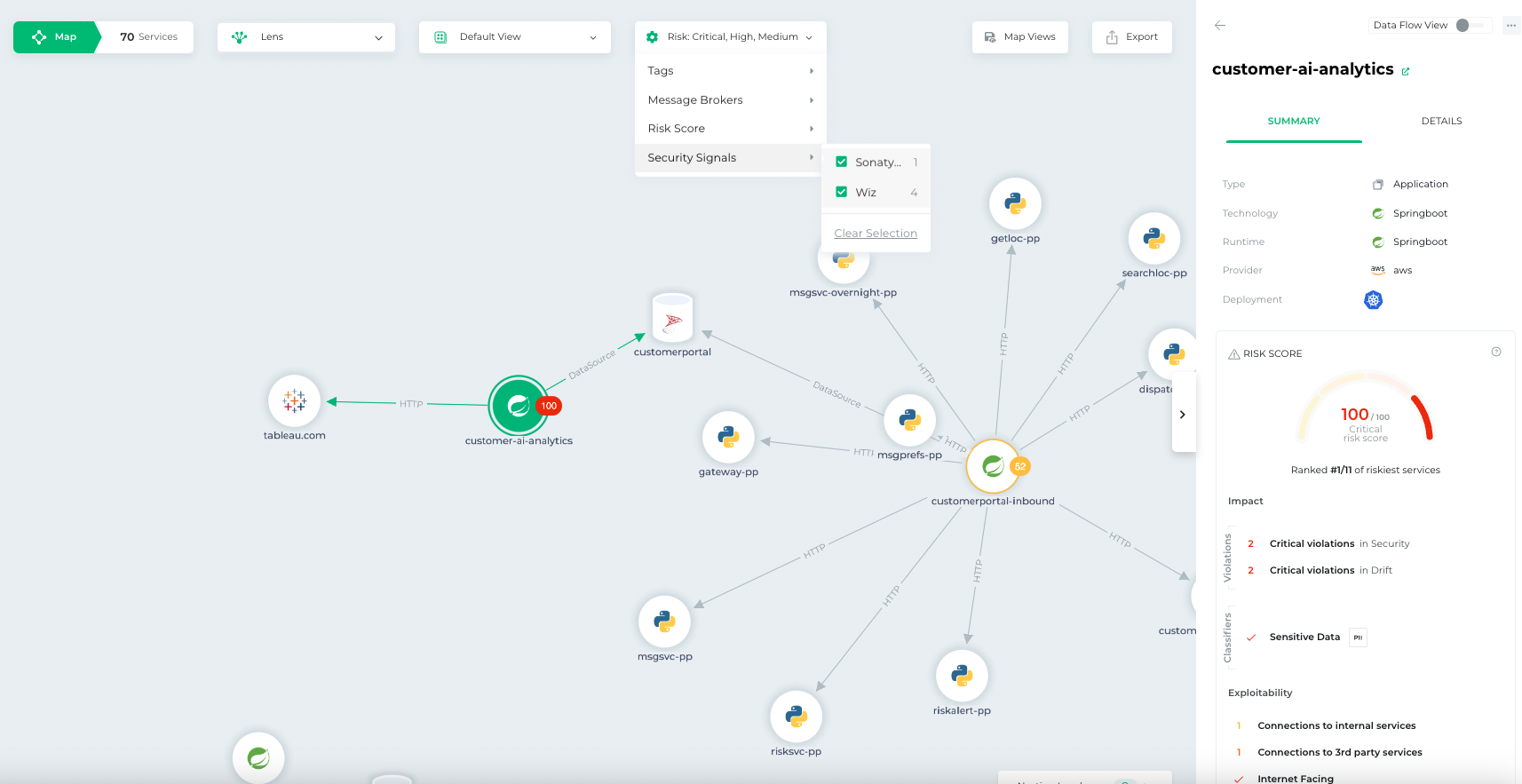
    Bionic this week added a pair of tools to its application security posture management (ASPM) platform that make it simpler to triage threats based on severity and attach a risk score.

    Josh Cho, senior director of global systems engineering at Bionic, said the Bionic Signals and Business Risk Scoring tools ingest data from third-party security tools to provide analytics capabilities. The first two vendors with which Bionic has integrated its ASPM platform are Wiz and Sonatype.

    The goal is to partner with additional vendors that provide unique cybersecurity capabilities that don’t compete with one another, said Cho.

    The agentless Bionic ASPM platform enables organizations to manage application risks by continuously collecting data from services and their dependencies, application programming interfaces (APIs) and DevOps data flows both in pre-production environments and after applications are deployed. Bionic then assesses any changes made to those environments based on a set of cybersecurity policies it provides. If an issue is discovered, the platform will create an alert informing the appropriate development team of best practices that eliminate the issue.

    While there is a lot of effort being made to shift more responsibility left toward application developers, there is often not enough cybersecurity context provided, said Cho. Bionic’s ASPM platform aggregates data from multiple tools to enable DevSecOps teams to better prioritize their remediation efforts, he added.

    It’s not clear how much organizations have embraced DevSecOps best practices, but one of the issues that needs to be addressed is the often-conflicting alerts generated by the various tools being used. Bionic is making a case for an ASPM platform that synthesizes data from multiple sources to streamline DevSecOps workflows.

    One way or another, more organizations will be embracing DevSecOps to better secure their software supply chains as more regulations are mandated. The challenge they face today is that most application developers—and the DevOps teams that support them—don’t have a lot of cybersecurity expertise. As a result, it becomes difficult to discern which vulnerabilities require immediate attention and which can be addressed in a regular update. In some instances, an alert generated by a cybersecurity team may not even been relevant—because the application in question is not internet-facing or the impacted module has not been loaded.

    In fact, it’s that very lack of context that often results in application developers disregarding the alerts generated by cybersecurity teams. Whenever there is a breach, however, cybersecurity teams always demand to know why their alert was ignored.

    No developer, of course, deliberately sets out to build and deploy vulnerable applications. In the race to meet delivery deadlines, there are always going to be tradeoffs. The issue then becomes keeping track of the cybersecurity technical debt that accumulates over time. An ASPM solution provides a means to keep track of that debt to enable DevSecOps teams to keep the risk in perspective.

  • How to Empower DevSecOps in a Complex Multi-Cloud Landscape

    How to Empower DevSecOps in a Complex Multi-Cloud Landscape

    Organizations are embracing cloud-based application delivery for speed of delivery and scale. However, the proliferation of multi-cloud systems to access and maximize the cloud’s capabilities is driving complexity in IT environments. Many organizations do not consider how multi-cloud adoption is expanding their attack surface—and the risk is growing: The 2023 CrowdStrike Global Threat Report found cloud exploitation cases grew by 95% year-over-year and cases involving threat actors targeting cloud environments were up 288% from a year prior.

    The expansion of cloud infrastructure and services has increased the pressure on organizations to protect assets within their multi-cloud environments. To alleviate this burden, more businesses are turning to DevSecOps, a practice that incorporates security at an earlier point in the development life cycle. This practice of shifting left helps improve the quality and reduces risk of applications, as well as makes the delivery of these applications more efficient since any potential issues are found earlier in the development process.

    DevSecOps is being adopted rapidly by organizations today to address the expanding array of threats and increasingly sophisticated attacks targeting multi-cloud environments. However, securing the cloud can be tricky due to its dynamic nature and multi-cloud makes shift left security even more complex. For DevSecOps to truly be effective, here are three things that organizations should consider doing.

    1. Strive for Complete Visibility in a Multi-Cloud Environment

    It is important that DevSecOps teams have a comprehensive understanding of their multi-cloud environment. Without it, they will not be able to identify a variety of security risks including vulnerabilities, privileged credentials, misconfigurations and other threats that may leave their organization’s cloud assets vulnerable.

    The best way to get full visibility across multi-cloud environments is through a cloud security posture management (CSPM) tool. With a CSPM tool, DevSecOps teams can identify misconfigurations and proactively detect threats. In addition, DevSecOps teams should also use a cloud infrastructure entitlement management tool (CIEM) to manage identities across all of their cloud infrastructure resources. The primary goal of a CIEM tool is to mitigate the risk that comes from the unintentional and unchecked granting of excessive permissions of user credentials.

    2. Visibility and Compliance Do Not Guarantee Security

    Organizations need to develop a comprehensive security strategy to mitigate issues within the development process. This may include implementing tools, automation and standards to enable developers to follow the desired security behavior. These approaches reduce developer friction, as well as diminish the likelihood that unsafe or default configurations will be used. Historically, DevOps teams have pushed back on integrating security since their concern is that it slows down the development lifecycle. However, DevSecOps is gaining traction in recent years because organizations are realizing integrating security sooner in the development lifecycle is more efficient than reactively patching problems as they arise.

    A tool that DevSecOps teams should look to leverage is cloud workload protection (CWP) because it offers breach protection for workloads, containers and Kubernetes, while enabling them to continue to build, run and secure applications with speed and confidence.

    3. Create Consistency With Security Tools

    Ideally, organizations should opt for a single platform that consolidates capabilities such as CSPM, CWP and CIEM. The reason for consolidation is to eliminate security gaps from having multiple security solutions. As a result, DevSecOps teams should turn to cloud-native application protection platform (CNAPP) tools to create more consistency within the multi-cloud environment.

    Securing multi-cloud environments can be complex. By empowering DevSecOps teams using these best practices, organizations will be able to move faster than today’s adversaries and have the agility to quickly adapt to present and future cybersecurity challenges in their multi-cloud environments.

  • How to Avoid Risk When Using Multiple Low-Code Platforms

    How to Avoid Risk When Using Multiple Low-Code Platforms

    Organizations are still increasing their use of low-code/no-code (LCNC). But this adoption isn’t always consolidated around one tool—frequently, multiple low-code/no-code platforms are used under the same roof. In fact, Gartner predicts that by 2024, 75% of large enterprises will be using at least four low-code development tools for both IT application development and citizen development initiatives.

    Utilizing multiple low-code/no-code platforms simultaneously introduces some security concerns. This is partially due to a lack of standard policies to govern different platforms in the same way. Low-code platforms are often incompatible with traditional IT security processes, like vulnerability scanning, manual code reviews and runtime security monitoring. Organizations going all-in on citizen development need safe ways to use low-code/no-code platforms. So, how can they safely enable this innovation without hindering productivity?

    I recently met with Michael Bargury, CTO and co-founder, Zenity, about securing LCNC systems. Bargury, who oversees the OWASP Low-Code Top Ten list, has significant insight into both the benefits and drawbacks of low-code/no-code platforms. Below, we’ll review the potential risks of using multiple low-code platforms and consider ways to mitigate these concerns.

    Why Companies Have Multiple Low-Code Platforms

    Interest in low-code has been rising, and low-code/no-code adoption continues to accelerate across enterprises. According to Bargury, large enterprises often don’t get a choice in the matter—low-code tools are arising organically, and it’s challenging to keep a lid on their proliferation.

    One way this occurs is that low-code becomes embedded into the SaaS platforms everyone already uses. Software platforms integral to business operations, like Salesforce, Microsoft Office and ServiceNow, have arguably mutated into low-code platforms, making them more like cloud providers than SaaS vendors, said Bargury.

    The other way low-code platforms emerge is through bottom-up transitions, says Bargury. This could be a specific knowledge worker working in a subset of the business to automate a domain-specific operation or integrate various tools. Then, there are the platforms, like OutSystems, Mendix or Mulesoft that specifically target professional developers.

    Organizations going all-in on citizen development may build a center of excellence and focus efforts on a single platform. And low-code platforms targeting developers will sometimes encourage more consolidation. Yet, “different platforms solve different use cases better,” explained Bargury. As a result, you will usually have a few converging in the same enterprises.

    Potential Security Concerns of Multiple Low-Code Platforms

    The emergence of low-code is similar to the bring your own device (BYOD) movement. IT and security leaders fought to avoid it at one point, but nowadays, everyone does it. So, what are the security implications if low-code becomes similarly ubiquitous? Well, no matter how it’s generated, low-code-bred programs are still applications susceptible to the same logical problems. And unfortunately, compared to your typical traditional code development life cycle, low-code development is fraught with discrepancies, says Bargury.

    Immature CI/CD Pipelines

    Some platforms do not offer the kind of mature CI/CD process one would expect from a software development platform. For example, there may be no way to create tests or separate your environments. Since there’s no coherent and consistent way to push code from development into production, you lack a way to apply secure development across platforms. “You don’t have a way to ensure every piece of software is up to your standards,” said Bargury.

    Opaque Underyling Codebases

    In traditional software development, you apply your own security reviews to ensure applications don’t contain risks. This includes shift-left scanning, security gates, manual reviews to catch mistakes early on and runtime scanning to catch unknown vulnerabilities in production. But there aren’t always parallels in low-code development. Low-code solutions typically have their own way of doing things with fewer standards, and they avoid exposing the underlying code and Git, said Bargury.

    Lack of Visibility

    As such, with low-code obfuscation, you lose a degree of visibility into how an application runs. Logs may be insufficient or wholly inaccessible. It’s also tricky—or at times impossible—to set up runtime monitoring, let alone scan various platforms. This means that low-code users can’t leverage powerful observability tools to identify errors and remediate security holes.

    Lack of Unified Policies

    Finally, establishing common authorization and permissions across multiple low-code development platforms is another hurdle. Since low-code vendors have their proprietary building blocks, you’re unable to leverage something like OPA or Kyverno to create and unify policies. Lacking shared policies across tools makes it challenging to verify that best practices have been implemented, says Bargury.

    How to Secure Multi-LCNC

    Low-code can grant much creative potential. But, knowing the above risks, what should IT be doing to reduce risks around low-code—especially when using multiple platforms? Well, Bargury shared several steps to help cybersecurity leaders start safely addressing the emergence of increasingly low-code capabilities.

    1. Take low-code development under the application security umbrella. First, low-code must be brought under the security umbrella, if it isn’t already. “It should be part of their mandate,” said Bargury. Shift the responsibility to professionals well-trained in resolving threats.
    2. Understand your surface area. As a basic security tenant, you can’t secure what you don’t know. Thus, Bargury recommends increasing your visibility into each low-code platform by collecting logs when possible and centralizing your analysis.
    3. Create automated guardrails. Next, it’s critical to identify your risks and set guardrails for your low-code users—especially when citizen development is involved. The OWASP framework provides a good overview of common risks and mitigation advice across robotic process automation (RPA), integration and low-code. In general, it’s important to design permissions with the rule of least privilege in mind. This can help reduce the chance of vulnerabilities like LCNC-SEC-03: Data Leakage and Unexpected Consequences and LCNC-SEC-01: Account Impersonation.
    4. Address gaps within the development life cycle (SDLC). Lastly, low-code platforms often provide the building blocks to secure applications, but it’s still up to you to ensure they are safely used. Cybersecurity teams should continually audit the low-code SDLC to ensure holes don’t persist.

    You’re Responsible for Securing Low-Code Development

    Low-code development platforms aren’t 100% safe from harm. It’s not out of the question for hackers to abuse low-code platforms and turn them against their owners. For example, Microsoft’s Detection and Response Team (DART) reported how a hacker group used entry to a low-code tool to remain hidden within an organization for six months, using credential stuffing to access an administrative account. By creating automations, they were able to use internal discovery tools and exfiltrate secrets and data that could have been used for privilege escalation.

    As you can see, there are legitimate concerns for low-code, especially at scale. However, security responsibility is not always that transparent. To date, there isn’t an equivalent of a shared cloud responsibility model in the realm of low-code development. As such, at the end of the day, you need to take the reins to own the applications that you build and ensure everything is secure.

  • The Security Pipeline

    The Security Pipeline

    Over the last few years, the ability to secure our applications has grown, and deep integration into the DevOps toolchain has, too. There are more tools doing more security checks protecting more of the infrastructure and source than there have ever been. The key is putting them to use intelligently.

    We now have the ability to secure the image an app is based upon, the images that are derived from that original—complete with supporting software. We can get feeds to tell us which bits of our included open source components are insecure and how to protect them; we can scan the source, the assembled application, the APIs and the network. We can put runtime protections in place in front of web apps and in front of APIs. We can even track the long-tail attacks like slow data extraction that are becoming more common as security tools master more obvious attacks.

    That is a great set of security capabilities. And automation puts every bit of it within reach. Your job is to pick the bits you need to increase the security posture of your environment and get them worked into your specific toolchain. This is not all that difficult, but nothing is free, so you will need at least some implementation time and some staff time to work through results. After all, no matter how automated, current solutions do end with a list of changes that need to be made to increase security. Some tools will put a runtime fix in place immediately, but honestly, that is a patch—it only stays in place until you can fix the underlying issue.

    Integrating all of the great security tooling with each other is another aspect that will require some time. Some vendors cover a massive amount of the security testing needed across markets and technologies. These companies show us that even if an organization would rather use best-of-breed, there is a lot of benefit in increasing integrations. For an easy example, consider this: If the software bill of materials (SBOM) generated during the build steps shows that a given framework is included in an application, then active testing via dynamic or interactive application security testing can include extra tests specific to that library.

    Integrations will take effort, but once they’re in place they will enhance application security. There is no perfectly secure application, but the tooling is available to make a given environment less of a target because it is too much work to attack. And that is what you should be shooting for.

    I’ve said before that making security part and parcel of your DevOps practices is mandatory at this point, but that was in reference to the great DevSecOps toolsets currently out there. I’m suggesting now that we include it all–from design to GitOps runtime drift management. Because we can, and the result is reduced risk to the organization.

    And keep rocking it. Honestly, you’re maintaining something worth protecting–that alone means you are successful, even if you aren’t aware of every issue that crops up. Issues are why you’re there, and the systems keep running because you are.

  • Unleashing the Power of AI-Engineered DevSecOps

    Unleashing the Power of AI-Engineered DevSecOps

    In my recent article Revolutionizing the Nine Pillars of DevOps with AI-Engineered Tools, I explained that AI-engineered tools can help implement the portion of continuous security practices known as DevSecOps.

    DevSecOps involves integrating security practices into the DevOps workflow. AI can be used in anomaly detection to identify potential security threats and to automate security policy enforcement. AI-engineered tools have the potential to significantly enhance security across all phases of the software value stream in DevSecOps.

    Planning: The planning stage involves dealing with complexities related to risk analysis and threat modeling. AI can help automate risk analysis and threat modeling based on data from past projects and known security issues. This can help identify potential security threats early in the planning phase and develop appropriate mitigation strategies.

    Design and Development (prior to integration): Developers often face difficulties in writing secure code, identifying potential security vulnerabilities, and adhering to best security practices while coding. AI-powered static application security testing (SAST) tools can automatically scan the source code for known vulnerabilities and coding errors, providing immediate feedback to developers. In addition, AI could be used to generate recommendations for secure coding practices and strategies for mitigating identified vulnerabilities.

    Continuous Integration (CI): Continuously integrating new code can introduce new security vulnerabilities and regression bugs that are hard to catch and fix in a timely manner. AI can be utilized in dynamic and interactive application security testing tools (DAST and IAST) during the integration stage. They can intelligently automate tests and identify complex security issues by analyzing data flows and the behavior of code in an integrated environment.

    Continuous Delivery (CD): Ensuring that the code is not only functional but also secure before it is delivered is a major challenge. AI-powered tools can help manage security configurations, monitor changes and alert to any deviations from security policies during the delivery stage. AI can also be used to automate security testing in pre-production environments to ensure that security standards are met before delivery.

    Continuous Deployment (to production): Monitoring, detecting and responding to security threats in real-time in production environments is a critical and challenging aspect. AI can enhance security information and event management (SIEM) tools by providing intelligent real-time analysis of security alerts generated by applications and network hardware. AI-based runtime application self-protection (RASP) tools can also detect and block attacks in real-time, providing robust protection for applications in production.

    Roadmap to AI-Engineered DevSecOps

    It’s crucial to implement AI-engineered DevSecOps solutions in a structured and well-planned manner. Here is a logical roadmap for implementing such a solution:

    1. Assessment and Planning: Begin by assessing your organization’s current DevSecOps maturity. Evaluate the existing tools and practices for their efficiency and effectiveness. Identify areas that lack automation or present security concerns. Align the AI-engineered DevSecOps initiative with your business objectives. This includes defining key performance indicators (KPIs) to measure the success of the initiative. Outline the required resources and budget for the implementation. This includes potential AI-engineered tools, the team’s skills upgrading needs and additional infrastructural changes.

    2. Selection of AI-Engineered Tools: Based on your assessment, select the AI-engineered tools that best fit your organization’s needs. This selection should cover the entire software development life cycle: Planning, design and development, continuous integration, continuous delivery and continuous deployment. The tools should ideally be scalable, easy to integrate with your existing systems and capable of providing real-time, actionable insights to your team.

    3. Training and Upskilling: Train your team on the selected AI-engineered DevSecOps tools. This may require technical training on how to use the tools effectively and how to interpret the insights generated by the AI. Upskill your team to enable them to work effectively within the new AI-engineered DevSecOps environment. This could involve training in AI and machine learning, security best practices and new DevSecOps methodologies.

    4. Gradual Implementation and Integration: Start with pilot projects to validate and tweak your approach. The lessons learned from these initial projects will be valuable for the broader roll-out. Gradually implement and integrate the selected AI-engineered tools into your existing DevSecOps pipeline. This should be a phased approach that allows your team to adapt to the new tools and practices.

    5. Review and Refinement: Regularly review the effectiveness of your AI-engineered DevSecOps implementation against the defined KPIs. Continuously refine your approach based on these reviews. This could involve adjusting your security policies, refining how you use your AI tools or providing further training to your team.

    6. Continuous Improvement: Keep yourself updated with the latest developments in AI and DevSecOps to ensure your approach remains effective and up-to-date. Continually improve and evolve your AI-engineered DevSecOps solution based on emerging technologies, shifting business objectives and feedback from your team.

    Avoiding Pitfalls While Implementing AI-Engineered DevSecOps

    Implementing an AI-engineered DevSecOps solution comes with several potential pitfalls that can derail the process if not appropriately managed. Here are a few of them, along with suggestions for how to avoid them:

    1. Inadequate Planning and Alignment with Business Goals: Ignoring the strategic alignment between implementing AI-engineered DevSecOps and overall business goals can lead to undesirable outcomes. Clearly define the business objectives and how AI-engineered DevSecOps supports them. Outline expected outcomes and key performance indicators (KPIs) that align with business goals to guide the initiative.

    2. Neglecting Training and Upskilling: AI tools can be complex, and without proper understanding and training, their deployment may not yield desired results. Invest in training your teams on AI-engineered DevSecOps tools and techniques. Ensure they understand the functionalities of these tools and how to effectively use them. Upskilling your team will be crucial for leveraging AI capabilities.

    3. Ignoring Change Management: Introducing AI into DevSecOps is a significant change that can disrupt workflows and resistance from the team members. Adopt a systematic approach to change management. Engage stakeholders from the beginning, communicate the benefits of the transformation clearly, and encourage feedback. Also, plan for a gradual rollout to help teams adapt.

    4. Overdependence on AI: Relying too heavily on AI can be a risk if the tools are seen as a complete replacement for human judgment. Recognize that AI is a tool designed to assist human decision-making, not replace it. It’s important to maintain human oversight of AI outputs, as AI models might not fully account for all contextual and situational factors.

    5. Neglecting Data Privacy and Ethical Considerations: Using AI requires handling a lot of data, which can lead to privacy breaches and ethical dilemmas if not handled correctly. Develop a clear policy for data management, ensuring compliance with all relevant data privacy laws and regulations. Make ethical considerations a priority when implementing AI, ensuring transparency and fairness in the AI systems.

    6. Lack of Continual Improvement and Adaptability: AI-engineered DevSecOps requires a culture of continuous learning and adaptation. Failure to embrace this can lead to stagnation and ineffectiveness over time. Establish a framework for continual improvement. Regularly evaluate the effectiveness of the AI tools and be ready to adapt your processes based on new technological advancements, feedback, and changes in business needs.

    Summary

    Implementing an AI-engineered DevSecOps solution necessitates a thorough and strategic approach. This begins with an in-depth assessment of your organization’s current DevSecOps maturity and an understanding of how AI can enhance each phase of the software value stream. Essential steps in the roadmap include tool selection, team training, gradual implementation, regular review and continuous refinement and learning. While AI can significantly bolster security and efficiency, it’s important to avoid pitfalls like inadequate planning, neglecting training, resisting change, overdependence on AI, neglecting data privacy and ethical issues and lack of continuous improvement. By focusing on these areas, aligning the DevSecOps initiative with business objectives, investing in team upskilling, managing change effectively, maintaining human oversight, adhering to data privacy regulations and fostering a culture of continuous learning, organizations can successfully implement and maximize the benefits of AI-engineered DevSecOps.

    Remember, this transformation won’t happen overnight. It is a continuous journey that requires regular review and improvement. With the right strategy, the benefits of implementing an AI-engineered DevSecOps solution can far outweigh the challenges.

  • 92% of Devs Use AI, Survey Says ¦ Intel One Mono Font

    92% of Devs Use AI, Survey Says ¦ Intel One Mono Font

    Welcome to The Long View—where we peruse the news of the week and strip it to the essentials. Let’s work out what really matters.

    This week: GitHub touts unbelievable AI stats, and Intel’s beautiful open source typeface. (more…)