Category: DevSecOps

  • Organizational Dysfunction: The original vulnerability

    Organizational Dysfunction: The original vulnerability

    During your teenage years, you may have figured out a way to get a ‘yes’ from your parents by playing off of the responsibility and knowledge gap between them…walking up to your mom and saying something like, “Hey Mom, Dad said he would drive me, can I go out tonight?” and then proceed to your dad and say something like, “Hey Dad, Mom said I can go out tonight and you need to drive me.” There is nothing cleverer than a determined teenager wanting to get his or her way. Such is the case of targeted attackers and the way they play one IT department’s responsibilities off another. This is the grey area where the organizational chart and separation of duty can introduce weaknesses exploited by the more advanced threats we face today.

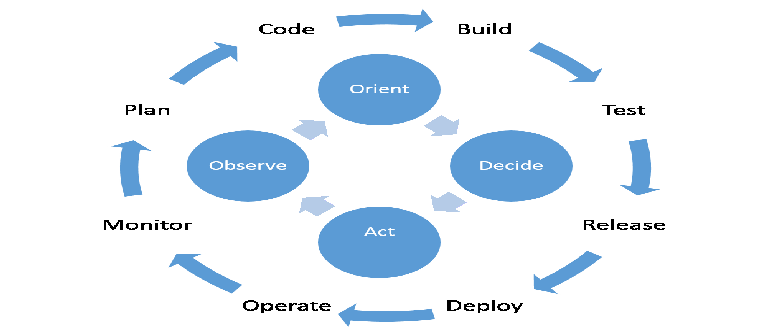
    You don’t have to look far into your organization to see this at work. The security team does its thing, networking engineers do their thing, and IT operations teams in general all have administrative realms that define functional boundaries as to what they can see and do. To borrow from Colonel John Boyd’s OODA loop, each team has its observation and orientation (OO) process for gaining operational visibility and making decisions, as well as specific decisions and actions (DA) they can execute within their administrative realm or set of capabilities to bring change to their organization. The weakness I’m highlighting in this post is when the decision and action appropriate for a set of observations, and the observations themselves, exist in two separate departments and can be exploited by the attacker.

    To exemplify the problem, let’s begin with the question: Is a distributed denial-of-service (DDoS) attack a security or a network engineering issue? The problem I see most often is that one department will have a precise view into network telemetry for early threat detection, but will not yet have the ability to mitigate or remediate the threat.

    Or how about the situation where credentials for one of your executives are harvested, and now the attacker need not trigger any security events at all in order to carry out an attack. In this situation, the attacker merely needs to log in and plan the next stage of the attack, roaming freely and without suspicion across your network because they are only generating networking traffic. The network team does not act because everything is still available, and the security team does not act because there is nothing being denied in access logs, no firewall violations, and nothing triggered on the IDS/IPS.

    Let me be clear in that I am not saying that everyone has to become an expert in everything; specialization is healthy, but only when it does not compromise communication! In the example of Mom and Dad being played by the teenager, if Mom and Dad had a better communication protocol, the teenager’s tactics would be thwarted. If you look at some of your operational procedures, and start to think like an attacker (or teenager again), I’m sure you will find at least half a dozen communication gaps that a clever attacker could exploit.

    This organizational dysfunction is going to require change that may appear to be radical because the systems that support it are so ingrained. Big analyst firms have defined their technology categories as law and they police them as if you were breaking the law if you dare to create something different – something more cross functional. Some best practices out there are, in my opinion, worst practices because they are so focused on the operational effectiveness of the department, and they leave out other departments or the active threat entirely. Lastly, even some prescriptive compliance requirements force organizations into strict separation of duties, but when implemented, create a broken OODA loop where the ‘OO’ does not connect with the ‘DA.’

    There is an opportunity for DevOps to completely recalibrate how we deliver a cross functional operational unit which is why I took the time to write this article for devopsy.kinsta.cloud.  Through the lens of Boyd’s OODA loop, you can already see the security ramifications because the tempo of DevOps allows the defense to loop at a faster rate than the adversary – the dominant strategy of the OODA Loop.

    I hope this post is a call to action for all you big thinkers. Get creative, get innovative, and do not be afraid to erase some lines and boundaries within your IT organization if it fosters a higher level of communication amongst your teams. Think of your organization like a great band playing live music. All of the performers play different instruments, yet they are listening to one another just as hard if not harder than they are producing sound. They improvise and adapt to one another; monitoring systems are put in place so they can have just enough of each sound in their own ear. This is what effective, cross-functional teams look like.  I’m just going to say it: DevOps is Rock and Roll!

    Oh, and hey, follow me on twitter: @tkeanini

  • What is Security Policy Orchestration and Why Should DevOps Teams Care?

    What is Security Policy Orchestration and Why Should DevOps Teams Care?

    After attending the DevOps day I wrote about in my last post, I wanted to take a minute to explain exactly what Security Policy Orchestration actually is so we can begin to understand how the two concepts overlap.

    Simply put, Security Policy Orchestration is intelligent network change automation. It goes beyond simple task automation by truly understanding the network through simulation and analytics. It also gives security people an extra level of governance and control, which is so critical to assure security and business continuity.

    Security Policy Orchestration reflects the growing relevance that managed security policies are having on IT systems.   In network security lingo, security policies are firewall policies, but can also apply to Access Control Lists (ACLs), router and load balancer configurations.  Managing security policies is an arduous task that requires automation, and Security Policy Orchestration has emerged in response to numerous factors happening in tandem – mainly, that:

    • Business agility is gaining importance as a key competitive factor. This is creating an increased demand for automation across IT and, specifically at the network layer.
    • IT organizations are pressured to match the speed, convenience and self-service provisioning the cloud environment offers for internal application deployment.
    • Enterprise networks are growing larger and more complex with numerous traffic routing and shaping technologies to service multiple data centers.
    • The widespread use of stateful and next-gen firewalls for external and internal network segmentation has significantly increased the size of the enterprise firewall estate, forcing security policies to morph into complex rule sets that map how business is conducted over the network.

    The collective impact of these developments on network and security operations tasks is having a profound impact on people, processes and technology, including DevOps groups, who like their Security Operations (SecOps) brethren, are under pressure to roll out services faster.

    Security Policy Orchestration helps to alleviate that pressure, enabling SecOps teams to keep up with the demands of the business while ensuring security and preventing an outage or a breach.  Being able to automatically generate, provision and synchronize Security Policy changes across a growing set of systems – with security, compliance and governance concerns accounted for – means that security will not become a bottleneck that slows down DevOps teams.

    While Security Policy Orchestration evolved out of network security operations, its benefits transcend security.  Even though it will remain a SecOps function, its impact on DevOps is only going to increase, especially as Network and Security Operations continue to converge.  However, the fundamental enabler of Security Policy Orchestration is automation.

    As a result, there is significant common ground between DevOps and SecOps when it comes to automating application connectivity. This may not have been an issue for you yet, but my introduction to DevOps came from my experiences helping Tufin customers automate application connectivity.  It’s a subject that is extremely germane to DevOps teams, and a topic that I plan to explore in depth in this blog because those of us leading the Orchestration charge within SecOps are kindred spirits with DevOps evangelists.  

    Contrary to popular belief, Security Policy Orchestration wasn’t created to restrict a company but to free it and help DevOps teams to accomplish its vision at the lowest IT risk level possible.  After all, there is no such thing as bulletproof security where the Internet is concerned.

    Instead, security folks focus on reducing risk, which puts us in a much better position to add value to the business.  Plus,  since so many of today’s biggest threats (i.e. APTs, for example) are network-based, introducing the tenets of Security Policy Orchestration  – which literally automates best security practices into change processes – is in the mutual best interest of both SecOps and DevOps teams. 

    In my next post, I plan to dig into more detail on the stakes Security, Dev and Ops all share to make IT work faster, better and safer, and propose a few ways in which SecOps and DevOps teams can collaborate to gain some quick wins.

  • DevOps and Security Are Compatible

    DevOps and Security Are Compatible

    When I speak with information security organizations faced with the prospect of moving to DevOps, one of the most common fears I hear is that this transition will degrade security of infrastructure and applications.  If you’re one of these folks, I understand this fear but you can rest assured:  when you do things correctly security will actually improve.

    One big reason security benefits in this model is due to improved alignment and tighter feedback loops.  You see, DevOps is about creating a unified, engaged team and doesn’t make it easy to fall into the “silo thinking” that traditionally leads to security as an afterthought.

    DevOps embraces automation and consistency, which benefits security by allowing you to add automated checks during coding to look for obvious security issues and flag things for human review (such as the linking of new libraries or the introduction of new third-party components that could add risk).  This means you will be able to identify “areas of concern” earlier in the development process where they will be much cheaper and more timely to address.  Twitter is a well-known advocate of this kind of automation, in which security checks are executed each time code is checked in and obvious security issues are presented to the developer immediately, giving them a chance to correct the problem right away and reducing the likelihood they will repeat the errors.  That is a much more effective process than the delayed feedback typically associated with manual code reviews.

    Security isn’t just better in the “Dev” portion of DevOps – you can also add automated configuration validation and scope checking into the environment build process to minimize the chance that a fat-fingered error or an out-of-policy change will introduce problems into production.

    This sort of automated approach also improves as you learn from retrospectives and post-incident reviews.  As you encounter preventable issues, you can often improve your automated checks to increase the odds of catching these issues before they impact production.

    Remember that security is an important stakeholder in the DevOps process, and the onus is on you to become a part of the conversation and find ways to add value to the goal of the organization.  Also, don’t forget to tap into the community of DevOps practitioners – others have walked this path before you and can help you in your journey.

    Finally, if there are specific security challenges related to DevOps that are vexing you (myths you would like to see busted) I’d love to hear from you.  Leave a comment below and become part of the conversation.

  • It’s the Outbound Stupid!

    It’s the Outbound Stupid!

    As nice as the word “Egress” may sound, I like “Outbound” better. Outbound is hardcore firewalling for the traffic that was initiated on the “trusted” side of the firewall, and is destined OUT to the unknown. However, over the last 20 years network administrators have put much more emphasis on what can come IN to their networks, rather than to worry about what comes OUT of them. There are many reasons for that, but the key one is that if nothing can come in, then we need not worry about what comes out. Right? Yea, right…
    Fast Forward 2014 we have firewalls everywhere. On our smartphones, laptops and home broadband wifi routers. In the cloud, any typical IaaS setup has a firewall for every group of instances, usually called Security Group and every instance has its own, internal firewall that is controlled by the instance OS. We are starting to see more and more people that use them as a core building block, in a  network security architecture, and as a fundamental element of it. But as most of you (us) actually spend time, energy and concern about inbound firewall rules, only 15% of you (us) even bother with the Outbound. That’s true, and its about time we change that.

    Plan. Plan for Success.

    A well planned inbound firewall policy can give the bad guys a true challenge, but what happens when they do get in and there’s no outbound policy in place? Its an all-you-can-eat buffet. With a well planned Outbound policy, theres a strong chance they will go away, or be easily discovered – and that’s a great ROI for your time!
    It all starts with a written (English, not Erlang or Java) security policy that outlines the way groups of servers interact with each other and with the outside world. First for the inbound/ingress which should be pretty easy to formulate. Then comes the outbound/egress tricky part – lets take a closer look at an application server.
    Usually application servers sits in one of the middle tier, trusting traffic coming from the web-tier and initiating requests to the database tier before sending the replies back to the web servers.
    Inbound: Allow traffic from Web Servers, usually only for HTTP or HTTPS depending on the Web<>APP settings.
    Outbound: Allow DB traffic to the Databases on the specific DB port, for example, TCP3306 for MySQL.

    Don’t forget the monitoring

    Any monitoring solution you may be using, affects your security policy. An agent-based monitoring solution installed on the machine will have to be allowed to connect out, where an external monitoring service, that probes your servers from the outside, will have to be allowed in to do its job.
    Agent Based Monitoring: Allow Outbound on specific protocol to a specific IP or a list of IPs
    External Monitoring: Allow Inbound for specific protocol and from a specific IP or list of IPs

    What else on the Outbound? The Killer (No) Rules

    Our app server runs Ubuntu so it may needs access to the ubuntu update services and also needs DNS to live happily. Now the common theme would be to allow access to update services for outbound on https (TCP443) and to allow outbound DNS (UDP53). Right? WRONG. Why not limit only to the specific repository services that our OS needs? The hardline DevOps will kill updates altogether, stating that any part of your application should not update itself. You can always bake/launch a fresh updated one instead of messing with a working instance.
    Result: No Outbound HTTPS TCP443
    Now for DNS. If you are a security concerned it is recommended to stop using DNS altogether and use /etc/hosts instead. A less drastic approach would be to allow DNS access only to a DNS server that you trust (E.g. Google’s 8.8.8.8), this is done to make sure that data leaked using DNS queries could only reach Google, and they already know everything.
    Result: No Outbound DNS  UDP53 or Allow DNS (UDP53) to 8.8.8.8 if you must.

    Your Feedback Loop: The Network Logs

    After setting this strict Outbound policy, we can finally identify the services that were left hanging, as we just severed their lifeline. It could be a non-critical agent that we should uninstall, or, god forbid, a rogue piece of code some bad guy wrote and now can’t connect to its C&C server – more on that next time.

    Happy Firewalling,
    Zohar

  • Security Policies For DevOps 101

    Security Policies For DevOps 101

    A while back I was talking with some friends about how to ensure security inside a devops environment.  The simple first thought was that no where does DevOps say to do away with security.  Instead, consider how your existing information security practices and policies need to adjust given the changes that DevOps brings to the working environment.  Veteran security professionals understand that many security practices begin with policies.  Furthermore, no policy is ever set in stone. Failing to update policies and procedures at least every year is already a recipe for disaster.

    I tell a lot of people to think back when the iPhone was first introduced.  The natural tendency of security professionals inside IT organizations was to either 1) simply ignore the device or 2) establish a flat out denial kind of policy.  Neither choice was even near the right answer.  I can say first hand that I was victim to this kind of tunnel decision making.  We updated our mobile device policies with a flat out “no iPhone for you…come back in 2 years” doctrine.  My feeble attempts to fend off iOS devices lasted maybe a year.  Meanwhile, lots of people at the office were seen with iPhones in hand who continuously said things like “but I’m not using it for work”.  Flat out denial on both mine and their parts.

    Bottom line, policies are meant to be changed for the changing environments.  DevOps is no different.

    The Minimum Requirements

    Just like in development how we talk about the minimum viable product, we can apply the same concepts to implementing security practices.  For starters, make sure your organization has a few policies drawn up, agreed upon and stamped with the approval of your executive staff.  The minimum set of policies any organization needs should include: network or Internet security, computer security, information and intellectual property security policies; secure software development policies and procedures.

     Be the Champion

    But the job doesn’t stop at policy creation.  Even having your executives agree to the policies doesn’t mean they will be followed or even understood by your DevOps teams.

    I speak to security heads often and tell them they need to get out of their seats and speak to all the employees in a company.  One of the first conversations to have is to begin championing the security policies.  Make sure people understand the policies and more importantly understand the reasons for the policies which have been selected.

    Do you remember going to high school and being told you have to follow a rule that you thought was totally asinine?  Non security folks will probably think the same about silly policies and might even act out purposely against them. A champion needs to teach and live those policies.  And when someone challenges the policies, then take the time to have a two-way conversation with them.  Make sure you understand their point of view first before you try and push your silly security ideals on them.

    Taylor Your Policies

    While the policy template available online, like those available from SANS, are a great starting place, don’t just slap those on the intranet as-is.  Read them and make adjustments for your company, for your culture and your development practices.  Even better, include policies that are specific to cloud and DevOps.

    One area of customization to start with is to create policies for specific cloud vendors.  For example, consider setting policies around how to the company should be using the Amazon’s IAM feature.  Make specific policies around how IAM users and groups should be configured and used.  Use the doctrine of least privilege and design a sane access control policy.  Consider a policy where only a few trusted users have full admin access and other users are in a power users group where they can launch instances, but cannot alter AWS console configuration or access.  You might want to give your accounting team limited access to the console as well to review billing and usage.  While you are at it, develop specific policies around the use, distribution and storage of cloud API keys.  Furthermore, consider enforcing two factor authentication.  These kinds of specific use case policies will go a long way for security teams in gaining confidence with the DevOps teams.

    DevOps might be the cool new hotness that is making waves in every kind of organization, but that doesn’t mean we can forget our information security requirements in a DevOps environment.  One of the starting points in ensuring DevOps organizations follow good security practices is to start with a minimum set of security policies.  Make sure you champion these policies and tailor them to your specific organization and use case.  With a little luck and determination even your DevOps teams can follow security best practices.

  • Bootstrapping Chef (or Whatever) for Autoscaled EC2 Instances

    Bootstrapping Chef (or Whatever) for Autoscaled EC2 Instances

    I realize it is traditional to start writing a new blog with some background and a deep introspection as to the author’s personal motivation for writing said blog, but I’ve never been one for tradition. Thus, for my first official DevOps post, I think I’ll jump write in with a technical tutorial on a problem had to solve last summer that I haven’t seen well documented anywhere else.

    You can read my bio for more, but here’s what you can expect on HackOps. I’m an industry analyst (in security; I’m the CEO of Securosis), but one with a bad habit of giving technical talks at DEFCON. In other words, a mix of research and analysis at both a technical and executive level.

    The Problem

    With that, let’s start with the technical:

    Last summer I was putting together a demonstration for the Black Hat conference when I ran into a little roadblock. I wanted to launch instances and have them automatically connect to a Chef server and pull down a default set of (security) policies. The problem is there really isn’t a great, built-in way to do this, nor could I find one documented anywhere. Normally, your options to install Chef in an EC2 instance are:

    * Load Chef and the configuration into a custom Amazon Machine Image. I wanted to use default AMIs instead of maintaining my own, so this wouldn’t work.
    * Launch instances using the Knife command-line tool (how you manage Chef, for those of you who don’t know) and the EC2 option. But I want to autoscale my images, which means I can’t launch them from Knife, since Amazon Web Services will launch them for me.
    * Bootstrap instances after they are up and running using the SSH bootstrap. But this is manual, or requires me to embed my SSH key in some automagic code, so this wasn’t an option.
    * Manually install and configure Chef. Not very DevOpsy, is it?

    Now I already had some decent experience configuring instances when they launch using cloud-init. cloud-init is a tool included in some operating systems, most notably Ubuntu and Amazon Linux, that allows you to inject a script when you launch an instance and have it run the commands once it launches, before you get to log into it. You simply paste your script into the User Data field.

    Overview

    Chef isn’t actually well-designed to handle this, since it seems to prefer a hands-on install, but I managed to hack together an effective process. At the high level, here’s how it works:

    1. Place your chef configuration (client.rb), validation certificate (validation.pem), and initial first run Chef file (first_run.json) into an Amazon S3 bucket.
    2. Use AWS IAM Roles to provide access to the S3 bucket. IAM Roles are worth a post all on their own, but the short version is you set the role for an object with Amazon and it is provided a set of rotating, temporary credentials to access other bits of Amazon.
    3. Write a cloud-init script to download Chef and s3cmd, which is a command line tool for accessing Amazon S3.
    4. In your script, set s3cmd to work with IAM Roles by installing a blank configuration file (figuring this part our was a major pain since it wasn’t documented at the time).
    5. In your script, use s3cmd to pull down your Chef configuration files, and then install Chef with the configuration files we pulled from S3, one of which will run it for the first time and set the initial role, which Chef will use to push down the first policy set.
    6. Launch an instance manually or as part of an autoscaling group. Set the IAM Role, and paste your cloud-init script into the *User Data* field.

    Now I am assuming a few things here. First, that you know how to use EC2 and set the correct security groups for everything to talk to each other. Second, that you know how to create an autoscaling group (or manually launch an instance and set the User Data field). Third, that you have a Chef server or Hosted Chef set up already.

    If you want more of a step-by-step you can read up on this in a paper I published — A Practical Example of Software Defined Security. It is ever so slightly out of date, but still works (just adjust it to get a current version of S3 tools and cut the *fix routing silliness* part of the script since that isn’t needed anymore and breaks things).

    The Details

    Here are the technical details for the files and commands:

    First, for your IAM Role policy. Replace “cloudsec” with the name of whatever bucket you create to hold your client.rb, validator.pem, and first_run.json (I’ll give you an example one in a moment):


    {
    "Version": "2012-10-17",
    "Statement": [
    {
    "Effect": "Allow",
    "Action": [
    "s3:Get*",
    "s3:List*"
    ],
    "Resource": "arn:aws:s3:::cloudsec",
    "Resource": "arn:aws:s3:::cloudsec/*"
    }
    ]
    }

    Next comes your cloud-init script. You can either past the entire script in, or use the command:

    #include
    http://url-to-script

    If you use a remote script, you probably want to store it someplace safe in S3 where no one can see it and see how you have things configured. Here is the cloud-init script itself, where the magic happens (our blog platform messes up the formatting a bit, but it is still readable):

    #cloud-config

    apt_update: true

    #apt_upgrade: true

    packages:
    - curl

    configchef:
    - &configchef |
    echo "deb http://apt.opscode.com/ precise-0.10 main" | sudo tee /etc/apt/sources.list.d/opscode.list
    apt-get update
    curl http://apt.opscode.com/packages@opscode.com.gpg.key | sudo apt-key add -
    echo "chef chef/chef_server_url string http://your-chef-server-URL:4000" | sudo debconf-set-selections && sudo apt-get install chef -y --force-yes
    wget http://sourceforge.net/projects/s3tools/files/s3cmd/1.5.0-beta1/s3cmd-1.5.0-beta1.tar.gz
    tar xvfz s3cmd-1.5.0-beta1.tar.gz
    cd s3cmd-1.5.0-beta1/
    cat >s3cfg <<EOM
    [default]
    access_key =
    secret_key =
    security_token =
    EOM
    ./s3cmd --config /s3cmd-1.5.0-beta1/s3cfg ls s3://cloudsec/
    ./s3cmd --config /s3cmd-1.5.0-beta1/s3cfg --force get s3://cloudsec/client.rb /etc/chef/client.rb
    ./s3cmd --config /s3cmd-1.5.0-beta1/s3cfg --force get s3://cloudsec/validation.pem /etc/chef/validation.pem
    ./s3cmd --config /s3cmd-1.5.0-beta1/s3cfg --force get s3://cloudsec/first_run.json /etc/chef/first_run.json
    chef-client -j /etc/chef/first_run.json

    runcmd:
    - [ sh, -c, *configchef]
    - touch /tmp/done

    You’ll notice that when we launch Chef, we use the command line option to load first_run.json, which establishes out initial Chef role. This is what allows us to push an initial policy to the instance, otherwise we have to do more manual stuff (ick). I kept it simple and merely established a starter role for the instance, which corresponds to a basic run list. first_run.json looks like this:

    {“run_list”:[“role[base]”]}

    Once you get all this set up, as I mentioned earlier you only need to launch an instance with the right IAM Role to access the S3 bucket, then paste in the cloud-init script to the *User Data* field. This can all be set as part of your autoscaling group rules so it runs automatically as new instances launch.

    The rest is magic. The instance takes a little longer to run, and it can take a bit for all the pieces to connect, but we are talking less than 30 minutes. Usually a *lot* less than 30 minutes.

    Now while I used this as a security demo, I know this technique is used in product for at least one major web property you have all heard of for non-security configuration management. Not that I can take credit for it, I found out months later they use a really similar technique they figured out on their own.

    The same basic techniques should also work with Puppet or the configuration management tool of your choice.

    To be honest, I was pretty surprised I couldn’t find this process documented anywhere when I started my project. It seems like one of those basic things nearly anyone working in public cloud with a configuration management tool would need, since building your own AMIs all the time is really inefficient.

    That’s one of the big reasons I’m excited to be writing here at devopsy.kinsta.cloud, since I think we, as a community, need a good meeting place to share this kind of information.

  • Why Baking Security Into the DevOps Framework is Vital to Its Success

    Why Baking Security Into the DevOps Framework is Vital to Its Success

    I attended my first official DevOps conference in Israel in September 2013.  But I was initially introduced to DevOps by my customers – firewall and network managers who, through their efforts to automate  security policy management, found themselves dealing with a new and like-minded set of IT stakeholders  –  DevOps teams.

    They said DevOps was also all about automation – automation that allowed IT to increase their business contributions by enabling new applications and other IT services to be rolled out faster with greater control and efficiency.  

    Conceptually, it was clear to me that the DevOps value proposition is just as relevant to Security as it is to Operations and Development groups, especially since Security teams apply automation with the same fervor as DevOps.  

    In fact, using automation to accelerate IT has caught hold in the network security world to fuel a new movement and class of solutions, called Security Policy Orchestration.  As the CTO of Tufin, a Security Policy Orchestration company, I could not help but recognize the synergies.  I was (and still am) intrigued by DevOps, so when I heard about the conference, I decided to go.

    And I am so glad I did.

    The alignment between DevOps and Security Policy Orchestration is obvious. They both champion the use of automation to accelerate the pace of business. We Security Policy Orchestration folks are just coming at it from a different area within the organization.  Kindred spirits, right?

    In theory, absolutely, but in reality…not so much.

    The conference as a whole was great.  It completely validated my theories regarding the synergies between Security Policy Orchestration and DevOp.  But what surprised me was that security was a topic that was not being discussed at all at the conference.   Maybe a hat-tip to application security, but network security was not even on the DevOps radar, at least not at this particular conference.

    It needs to be.  For DevOps, to really be able to move the needle, we have to work together.  If history has taught us anything, it’s that when new applications and services are not created or rolled out with security in mind, at some point we will have to go back and retrofit it back in.

    Envision the typical experience:   the development team builds a new application, brings IT Operations in to implement it.  Once that is done, IT Ops prides itself on all the corkscrewing it took to make the application work on the actual infrastructure.  Except for once the app is in production, it doesn’t work.  The troubleshooting begins.  Invariably, issues of network connectivity come up.  Solving them requires app, dev and security managers to break down the cultural and organizational barriers that exist within their organizations to work together to ensure the application is architected correctly into the network.  This starts and the process of change requests between AppDev and IT to get the app up and running. 

    If that process is not automated, it can take months longer than it needs to resolve everything.   Not to mention any company subject to PCI has to consider terms like secure zoning, a concept that is not second nature to DevOps folks.   If PCI is not an issue, there are plenty of other internal and regulatory mandates and security –related considerations that, if for no other reason than common sense, can exponentially reduce the chances of a company ending up in the headlines due to an APT.    

    These are just a couple of many scenarios that can be avoided if development, IT and security work together from the get go.

    The net/net is that Dev and ops have the same goal but they are siloed, which is slowing down the pace of business – inhibiting it.  Collaboration is not some warm and fuzzy team-building thing – it is a fundamental business requirement.

    And that’s why I am so excited to have the opportunity to do this blog.  I think I can add a unique perspective on how DevOps and Security can work together to reach our common goals.

    My next post will explain will dig into what Security Policy Orchestration actually is, so we can begin to tease out the similarities and determine how to build on that to true alignment and partnership. 

    Stay tuned as the drama unfolds! This should be fun….

  • DevOps – A wake up call to security vendors

    DevOps – A wake up call to security vendors

    DevOps is changing the way IT works.  Through a collaboration of development and IT teams, organizations can achieve tremendous scale at increased speed to deploy and maintain critical applications and infrastructure.  The key technologies of virtualization and configuration automation have made this possible.  Without these technologies, development may not slow down, but deployment would slow to a crawl and the benefits of DevOps would be minimal.

    It is interesting to note that in almost no definition of DevOps is the security process discussed as a key element.  In some cases you will hear mention of improved security through consistent configuration management enabled through automation, but security teams are not at the DevOps table.  Why is that?  I would suggest that for most people security is considered a barrier to IT.  Not surprisingly, DevOps, a practice focused on streamlining IT, security has been left out of the conversation so as to not prevent achieving the goal.

    But if you accept that security needs to remain a part of the story, then it must be just as manageable as the infrastructure or it will never have a seat at the DevOps table.  Take a look at Puppet or Chef; they automate the configuration of the systems necessary to run the applications.  Through automation scripts, systems are deployed, configured, updated, and managed.  Development boxes are configured consistently with production boxes limiting impacts related to deploying an application into production.  So why can’t security fit into this picture?

    One reason, is a lack of standardization.  Every security vendor wants to be unique.  They promote their solution as so incredibly unique from their competitors that there is no way to standardize.  So, creating scripts to manage security would require not only a unique script for each vendor, but a unique solution.  In comparison, the command to edit a route in Linux may be slightly different than in Windows, but the parameters are the same.  When you are managing security rules on a firewall as an example, you can’t even get agreement on that.  Zones are required for some firewalls, not used in others.  Applications define access in Palo Alto, but don’t exist in Cisco.  Even firewalls that share the idea of Applications use non-standard dictionaries of Applications.  So, creating a script becomes a non-standard solution.  Worse yet, the script that worked today won’t necessarily work tomorrow when the vendor changes their solution.

    To make it all unmanageable, is the fact that they are so proud of their uniqueness that they have obscured even how they do it.  If you take all the firewall vendors on the market, not one of them publishes an API on how to fully manage their firewall policies.  Palo Alto exposes some capabilities for object management in a cool SDN sort of way.  Check Point has a very powerful, but proprietary API that allows full management, but they do not recommend it be used in that way.  Cisco is straight up command line with some newly available API’s and should be commended for making it at least obvious how to do it, if not easy.

    The result: security is not a big part of the DevOps picture today.  And if the vendors don’t do something, they will be replaced by solutions willing to operate in this new DevOps world.  Open source firewalls or integrated firewalls in the virtual stack for example are ready to take their place.

    The solution for security vendors: publish API’s to fully manage their systems.  They must accept that their UI is no longer what differentiates them from their competitors, it is the security engine and enterprise manageability.  Make it possible for others to manage their solution through open API’s with their full support.  All the security vendors will not come together and agree on a single API, but each should at least publish a usable API for their own product.  Vendors like FireMon or open source contributors to solutions like Puppet and Chef will solve the rest.

    Security vendors better wake up or they will get left behind.