Category: DevSecOps

  • Delivering Delight At ChefConf 2014

    Delivering Delight At ChefConf 2014

    Chef CEO Barry Crist stirs the pot to open ChefConf 2014

    The theme from ChefConf 2014 is stirring delight and if you listened to Barry Crist during todays opening keynote, then you would know its more appropriately “F****ing Delight”.  Amidst high energy, loud music and a smattering of exciting expletives, Barry Crist called for attendees to stir delight in their enterprises using DevOps methodologies and, of course, Chef.

    Crist defined delight when the customer’s experience exceeds expectations.  Using Uber as an example when traveling in New York, he joked that the influx of Uber cars was so high that it took only 30 seconds for him to wait for a ride.  And what more he didn’t have to deal with payment when exiting the car at the airport.  In short, the service not only provided the expected functionality of something as simple as a car ride, but provided a delightful experience.  The new economy, we are part of he said, is the “delight economy”.  And the call to action for ChefConf attendees is to bring others along with them into this new and leading economy.

    Using Volvo as a case study, Crist also touched on the concept that many companies, not just web development organizations, can utilize DevOps practices.  When his wife’s Volvo navigation system needed a map update, he received a set of DVDs. The DVDs needed to be manually loaded into the on-board computer while leaving the car running for 5 hours.  Crist countered that Volvo is more like a software company than a car manufacturer, but they just didn’t know it yet.  For example, this would have been an excellent case for continuous delivery in that the Volvo probably didn’t need to ship him a handful of DVDs, but just the small changes and probably could have been delivered in a much more economical means.

    Crist concluded that using DevOps methods and delivering delight isn’t limited to any industry and certainly isn’t just for web dev shops. And so ChefConf 2014 begins.

  • Trust and Computers Make the News

    Trust and Computers Make the News

    The Heartbleed bug in OpenSSL was major news this week.  While you are waiting for sudo apt-get dist-upgrade to run on all your servers, let’s take a minute to reflect on how the SSL trust system works and about the kinds of system relationships that depend on it.

    Just to recap, SSL-based trust derives from a “blessed” certificate authority, and this certificate authority can create other certificates that can be “trusted” as long as their lineage can be traced back to the original authority. In this system the answer to “Should I trust you?” is binary; the answer is either “yes” or “no” based on the certificate chain.

    In the event the certificate authority is compromised, then all of the derivative trusted systems become suspect as well.  Real certificates become indistinguishable from fake certificates and it is no longer possible to know “who or what to trust”.  Absolute all-or-nothing trust is an inherent weakness in certificate based trust and the X.509 based trust system.

    This situation got me thinking about the differences between human trust systems and computing trust systems.  It’s interesting that people take very different approaches to trusting computers as we do with each other.  We rarely can answer the question “Do I trust you?” about another person with a simple “yes” or a “no” answer to cover all scenarios.  Most of the time the answer is “it depends” on what we are trusting another person to do, which is better captured by the concept of trustworthiness.  In human networks you establish trustworthiness based on knowledge that you have about the person, their honesty and their reputation, and information from other people who have had experiences and interactions which are similar to one you are trying to assess.

    SSL doesn’t let us assess the trustworthiness of computers.  It presents a “definitive” trust answer, in which we place too much confidence.  Based on the SSL attestations of websites, we readily hand over our credit cards to strange computers in a way that we wouldn’t do with people.

    There are alternatives to SSL for establishing trust in computing.  For example, Pretty Good Privacy (PGP) is a trust system that operates a bit closer to how humans think about trust in one another, although it requires additional overhead to manage trust systems that are established on a case by case basis.  Moreover, PGP doesn’t necessarily incorporate historical experience akin to the “reliability” parameter of trustworthiness.

    This week’s news highlights the need for accessible and manageable trust systems that provide estimates of trustworthiness somewhere in between the type of trust provided by SSL and case by case managed trust systems like PGP.

  • Continuous integration for better security

    Continuous integration for better security

    One of the big advantages to smaller deploys and continuous integration is that it can make it easier to provide more proactive security. In short, continuous integration (and the associated automated testing it enables) makes it easier to focus your security team on analyzing areas where the security risk is higher.

    If the notion of rapid development, rapid deployment, and continuous integration make your security team nervous you may be able to get them engaged by sharing proven ideas from companies who’ve made this approach work well in the real world.   For example, I was recently flipping through a presentation from Etsy on SlideShare, and discovered a clear explanation of how continuous integration enables better security.

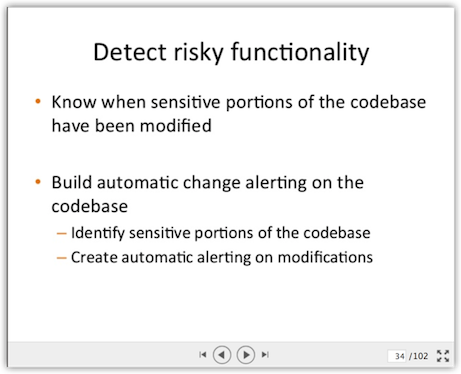
    Slide34At right, you see slide 34 from this (very long but clear) deck. this is the first in a series of slides that talks about how you can identify high-risk areas of code, then use those designations to drive  automated checks for changes to those areas of code.  The power comes in when you automatically alert the security team that someone has just check in code which changes one of the high-risk areas.

    This seems like a commonsense way to focus high attention on high risk.

    Another positive benefit of this approach is that it forces the conversation upfront about what constitutes a high-risk area code. This is an opportunity to get security, ops, and the business on the same page about where risk is likely to occur. When you incorporate this approach with periodic reviews of where things stand, it allows you to refine your approach to automated analysis based on your experience. In other words, during post-incident review if you discover one of those”Gee I wish I’d known that I had of time” sorts of situations, you can add a check into the automation library that looks for those conditions in the future. This sort of continuous improvement model benefits everyone.

    Oh, by the way – one of the scenarios this approach can check for is the introduction of new third-party libraries. In today’s climate of elevated concern over third-party risk (as well as fears of security flaws in open-source components) having that capability can be a very good thing.

    What about you? How are you integrating continuous security checks into your continuous integration?

  • Using AWS CloudWatch for Anomaly Detection

    Using AWS CloudWatch for Anomaly Detection

    Based on my unscientific poll of friends, one of the least used and most overlooked features of AWS is CloudWatch.  Not only can CloudWatch be used to monitor the availability of your AWS services, but it can also be used as anomaly an detection tool. Did I mention that these feature are free?

    Since the holy grail of DevOps is to bring  the security and the operations teams together to meet the same goals in an automated fashion; Cloud Watch is a perfect DevOps tool. In fact, once it’s implemented for your environment  you are one step closer to the exalted state of SecDevOps.

    If you aren’t familiar with AWS CloudWatch then head on over to https://aws.amazon.com/cloudwatch/. As a quick introduction, here’s how AWS website describes the service:

    “Amazon CloudWatch provides monitoring for AWS cloud resources and the applications customers run on AWS. Developers and system administrators can use it to collect and track metrics, gain insight, and react immediately to keep their applications and businesses running smoothly. Amazon CloudWatch monitors AWS resources such as Amazon EC2 and Amazon RDS DB instances, and can also monitor custom metrics generated by a customer’s applications and services. With Amazon CloudWatch, you gain system-wide visibility into resource utilization, application performance, and operational health.”

    Let’s assume that both security and Ops teams need to be aware when weird things are happening with their servers and applications.  Events outside the norm (aka weird things) can be either be related to security or operational events; either way they may merit investigation. Here’s a simple CloudWatch  monitoring process you can use  to give you a heads up on events that could indicate someone is trying to exfiltrate data from your systems.

    Opening Scene

    Think about what kind of information attackers are after.  They want your intellectual property and your customer data because it can be converted to cold, hard cash.  Next, consider the architecture of your systems and where that data is stored. Most likely your treasures are stored in databases or Git repositories.

    Guess what? Attackers know that so that’s exactly what they are looking for.  Take a few minutes and think like an attacker bent on exfiltrating your data.  Obviously, the first thing you should do is carefully monitor your egress traffic for suspicious activity.  In addition, look for anomalies in traffic flows – they can also help determine if suspicious events are happening.  Amazon CloudWatch can help you do  both of these things.(Note: This process assumes you haven’t already been breached.)

     1. Enable CloudWatch

    2. Establish a baseline

    Review the historical data on a daily, weekly and monthly basis.  Soon you will start to see a trend in your egress bandwidth usage.  Start with eyeballing the min, max and average usage over time.  Put these in your favorite tracking tool (text file, spreadsheet, abacus, whatever).

    3. Configure alerts

    When you feel comfortable with your baseline, configure your first alert to send an email if traffic usage goes over the baseline.  Consider how “chatty” you want this event to be.  For example, alerting over the average baseline will often generate more alerts than alerts over maximum usage.  This is a tricky balance and you’ll need to make trade offs between missing problems and the time spent responding to potential false positives.

    4. Respond

    However you choose to respond is up to you.  I suggest you start with automatically opening a ticket in your tracking system so that someone will be sure to review the alert and make notes on their findings.

    5. Tune as needed

    Make a plan to review the alerts and the data on a regular basis.  Architecture and other changes to the system are going to change the baseline and the alerts may need to be reconfigured.

    Building and automating security into DevOps is a requirement that everyone should be working toward. It’s a theme I’m going to be returning to in future posts because it’s really important.

    AWS Cloudwatch is a free tool that you can help you get started automating security right now, so what are you waiting for?

  • How to un-domesticate your network: DevOps!

    How to un-domesticate your network: DevOps!

    When I look at how compliance and regulations have affected network security over the years, I’m reminded of what dog breeder standards and regulations have done to dogs over the years. I’ll use this analogy to make the case that networks have become too domesticated to the point that they are not able to adapt and thrive when faced with their natural predators on the Internet. DevOps in my opinion is a way to undomesticate your network so that processes and technologies can deal with the threat in the most natural manner, striking the balance portrayed in complex ecosystems.

    cute2

    This entire thought process began when I was hanging out with my buddy Hugo. He is my one-year-old French Bulldog. We hang out a lot, and there are times when I think he telepathically helps me solve hard technical problems (but that is off topic). Anyway, if you know anything about French Bulldogs, you know they are mutants. They have been bred to the point where their breathing is compromised and they can overheat and die when it is too hot. They have common back and spinal diseases, and I can go on and on, but they essentially need humans at this point to keep them alive. I have to put a life vest on poor Hugo if we are near water because, while all dogs can swim, his head is so heavy that after a short while he will drown. Nonetheless, he is my sidekick in many ways, and we both lack vital characteristics of our ancestors who thrived in much more hostile environments.

    While I can go on and on talking about my buddy Hugo, the point I’m trying to make is that while standards like PCI help to raise the bar regarding online security measures, I have to stop and ask: security measures against whom? The level of innovation, change and adaptation that is taking place on the threat side of the equation is out pacing the rate at which security standards can be institutionalized and implemented. So your network may be cute and cuddly like my Hugo, and maybe even win a ribbon or two, but it would also not survive when faced with an advanced threat.

    When we trace the domesticated dog back tens of thousands of years, we arrive at the grey wolf. They traveled in packs, they faced threats on a daily basis, they thrived and adapted in a very hostile environment. DevOps takes us back to the time when the wolf finds its strength in the pack, and the pack finds it strength in the wolf when faced with conflict. Survival is very real and practical; there is no level of certification, checklists or deterministic process that must be followed. It is a delicate dance between attacker and defender, and like it or not, we are headed back in that direction.

    DevOps brings us the opportunity to constantly represent the changing threat in our everyday lives – such is the case with anything connected to the Internet. It is back to the wild, back to the days where a loss at the organism level meant evolution and resiliency at the species level. Our goals change from securing our networks to evolving our networks as this tempo of change raises the costs to the adversary. DevOps makes your network more expensive to attack!

  • Dev, Ops and Security Collaboration: Bring the body and the mind will follow

    Dev, Ops and Security Collaboration: Bring the body and the mind will follow

    Complexity has a way of muddying even the clearest of waters, and this has certainly been the case with IT Operations. While Dev, Ops and Security teams share a common purpose, the silos between them are so deeply entrenched, it’s easy to see how they have forgotten that they are working towards the same end.  Fortunately, the rise of DevOps has provided the opportunity to break down those silos and leverage automation to increase agility, efficiency AND security.  But accomplishing that requires an alignment that is only possible through a sustained, collaborative effort. So, I wanted to dig into more detail into the stakes Security, Dev and Ops all share, as I am certain the benefits of working together will become startlingly apparent.

    First, let’s take a look at where each group is coming from:

    • Developers want fast, automated application deployments. They only care about infrastructure as it relates to their ability to roll out applications.
    • Operations folks (network managers) live, eat and breathe infrastructure. When it comes to application deployment, they need clear technical requirements to reduce “redos.”
    • Security folks need to make sure policy & process are enforced with auditable security controls that also can ensure compliance.

    A big part of the problem is that until now, security has been introduced at the tail end of the development lifecycle, after risky practices have been introduced into application delivery architecture. Security comes in after the fact, implementing fixes and controls the best they can.  Obviously this slows things down, and creates a dynamic in which security is perceived as an obstacle, and security teams are pigeonholed as “the folks who are always saying no.”

    The good news is that automation can ensure that security is woven into Dev and Ops processes from the get go, and to great benefit.  But technology alone won’t change the underlying problem.  Breaking down silos requires cultural shifts that don’t happen overnight.  The first step to changing these dynamics is to better understand the relationship that exists between applications and infrastructure.   This does not mean security folks need to become domain experts in agile development, or that developers need to become network security experts. In fact, even a basic understanding of the collective impact of these trends should create the common ground needed to move towards a more collaborative model.

    As the DevOps movement reaches critical mass, the increased agility, greater efficiency and substantial security improvements it can deliver are being talked, written and Tweeted about in depth, and with increasing frequency.  And most importantly, these benefits are not just marketing buzzwords – they are tangible and multifaceted, as is illustrated in Steve Hall’s Jan 2014 blog post:

    “Business people completely understand ‘release my product faster’, ‘time to market’ and ‘make more money’ which are some of the outcomes that DevOps pontificates on. This is why DevOps as a movement has a higher probability of succeeding than other investment choices because there is a direct correlation between it and top/bottom line revenue. So if you’re an InfoSec leader, a good bet is to align yourself to the DevOps initiative (or spearhead it yourself for that matter) and help the business understand the value of security in a way that doesn’t measure things by # of incidents, time lapse from vulnerability to patch, or compliance score.”

    As for the shared stakes between Dev and Ops, check out John Allspaw and Paul Hammond’s Velocity 2009 talk on how cooperation between Dev and Ops enabled 10+ deploys per day at Flicker.  If that doesn’t demonstrate what “increased agility” looks like, I don’t know what does.

    These are just a sampling of the myriad ways Security, Dev and Ops can reap greater benefits by working together. But…. it takes time and effort to get the ball rolling.  Perhaps the best way to get started is to make sure Dev, Ops and Security start talking, literally.   Once a week.  Every week. No matter what! Get the bodies there, and I promise you, their minds will follow.

    Based on our customers’ experience, a few quick wins is all that is needed to get the ball rolling.  Once Dev, Ops and Security folks experience the upside for themselves, those silos will start to crumble.  In my next post, I’ll provide some examples where automation can enable Dev, Ops, and Security to gain those quick wins and build momentum for further cultural change.

  • Trust & the trusted image

    Trust & the trusted image

    Graphic No BGWhat is Your Trust Model?

    Information security conversations often start with the question “What is your threat model?” This blog asks: “What is your trust model?”.  Trust is a complex subject and an integral part of managing DevOps-oriented organizations and highly automated IT infrastructures. Who (developers, ops) or what (code, process) is trusted to accomplish specific tasks in the infrastructure can sometimes be difficult to characterize to management, auditors, or in operational/incident reviews. The goal is to describe relationships among people and systems at work in the DevOps world and discuss approaches to making systems more transparent (to coders and non-coders!).  

    The Trusted Image

    Organizations like Amazon, Canonical, and Red Hat provide virtual machine images of popular operating system distributions. It’s common to launch these images directly “as-is” and install software onto them after launch.

    However, there are advantages to specializing one (or several) of these images and using it instead of the base OS image. A base image which has been supplemented with configuration and installed packages that suit the needs of your application is referred to as a “Trusted Image”.  And there is definitely value to putting your trust in a purpose-built and well-characterized image.   

    Why Make a Trusted Image?

    The reasons are several:

    Reliability: The more downloads that a VM requires in order to provision and configure, the more likely that something will go wrong. Network errors, outages at package repositories, and random download errors can render your VM unusable or unstable.  Building base packages into a trusted image minimizes problems.

    Secure Configuration: If there are configuration options that you want to ensure on every VM, you can build these settings into your trusted image. For example, you can configure firewall (iptables) in a trusted image to protect every VM that you launch.

    Secure Communication: If you want to use SSL or TLS inside your application, you can establish trust in a root certificate via a trusted image.

    Built-in Service “Wiring”: Do you want to ensure that the syslog of every VM you launch is sent to your logging server? Or to ensure that a specific version of Python, Ruby, Java, Node.js, etc is pre-installed on every VM that you launch? How about client libraries? A configuration management agent?  Build these into your trusted image.

    Speed: No more waiting for package installations; build them into your trusted image, and launch the end product faster.

    VM Identity and Authorization: You can build trusted images that will create an identity for each VM, and help the VM to get permissions to operate accordingly in your infrastructure. Bootstrap credentials can be used to access resources that the VM needs to join the application, such as database credentials, system passwords, API tokens, and other sensitive information.

    The Counterpoint..

    The use of trusted images can have drawbacks, for example:

    Security Patching:  Security updates from vendors are frequent. Any new image that you build will have all the latest security patches built into it; but your images will quickly get out of date as patches are released by your OS vendor.  One approach is to configure VMs to patch themselves on a schedule, for example, nightly during a “quiet period”. [ Note: Patching is tough. Please share your experiences with this problem! ]

    Management: Once you have built a trusted image, you will need a way to manage them. Image tags and other metadata features provided by your cloud can be helpful here. Treat your images like any other product of your build system: version them strictly and keep track of the provenance (history). Lastly, be sure that the system you use to build trusted images is itself trustworthy!

    Weighing the pros and cons

    Overall, for many organizations the security, performance and reliability benefits of the trusted images outweigh the drawbacks.  Would love to hear more experiences from those of you who use trusted images and who’ve considered trusted images but taken another path.

  • Protect and Defend: Repositories

    Protect and Defend: Repositories

    When you’re creating work that gets deployed into production, there is typically a repository involved. It could be a code base, a deployment hub, a definitive software library, a library of VM or application templates, etc.

    Often, you may not think twice about what’s in these repositories or whether you can trust their content – after all, you and your teams built these repositories, right? That may be true, but what if your trust is misplaced?

    The recent Target breach illustrated (among other things) that you may be incorrect in assuming the “inbox” of your deployment process is trustworthy. In the Target example, there was a queue of patches ready for deployment but someone added additional, malicious code to that queue without being noticed. The automated deployment process grabbed both the authorized and malicious code and distributed it to every point of sale device in the network. Not a good outcome.

    Their workflow included a trustworthy process to test code that before it was checked into the deployment queue, but there was also a flaw in the process: there were no controls in place to detect when anyone went around the process and made arbitrary changes to the repository. In other words, even if you put trusted packages into the queue, the packages could be modified and additional code could be added without those alterations being noticed.

    What we can learn from this kind of situation is the value of the tried & true principle of “trust but verify:”  don’t assume you can trust your repositories without validating what’s in there.  With that notion in mind, think about your environment – are there repositories that people could alter without being noticed? If so, that could present a problem both for security and reliability in your organization.

    To correct this, we need to treat our repositories like bank accounts – account for everything that goes in or out, and monitor the contents of the repository continuously to look for any undocumented or unauthorized “transactions” (adds, removes, or changes).  We must also add validation checks to the deployment process to make sure everything is accounted for before the deploy occurs.  Yes, this will likely mean you need to do some extra work on your deployment workflow, add technology for instrumentation, etc. but it will more than pay for itself through better security, accountability, and availability.

    By the way – this same principle applies to the scripts and automation tools you rely on, as well.  If someone were to alter these tools without your knowledge, you may get results you don’t like.  You should also consider that your automated deployment repositories aren’t the only vector for untrusted code to enter production – continuous monitoring of the production environment is also a crucial activity.

    Protect and defend your repositories – it’s important.

  • Hacking Your Auditor

    Hacking Your Auditor

    No, not that kind of hacking, give me a little credit…

    Recently I was having a conversation with a consulting friend about DevOps, and he found himself in a bit of a tough situation. The organization he was working with was a pure cloud/DevOps shop, but one that was stepping into having the meet compliance obligations. Needless to say, things weren’t going well with the auditor.

    For those of you who haven’t had to deal with the miasma of audits, one of the strongest requirements, for nearly any regulation/contract/agreement, is strong change management. This is especially true after those Enron guys screwed everything up for the rest of us.

    Change management makes a ton of sense from both an operational and compliance standpoint. I, myself, have blown things up in production but not being smart about my change management. For compliance, it is absolutely essential. If you are dealing with anything with financial or privacy implications, you sure as heck want to get it into a stable, secure, compliant state and ensure that state is kept over time.

    There is a big misconception out there that DevOps-style organizations don’t have change management. That when you push multiple changes per developer per day into production, there is no accountability or control. Now, while you can certainly build things this way, that sure isn’t how I see successful teams doing it. Not even close.

    The problem isn’t that DevOps necessarily skips change management, it’s that it looks different. Much of change management becomes automated, and the fundamental nature of changes themselves is different. But think about how you describe DevOps to your traditional IT-focused friends. Now imagine trying to explain this to an auditor working off set standards that are still figuring out if cloud includes a co-hosted Mac Mini duct taped to a rack.

    Here are some tips on how to both adjust your process, and explain it to the auditors:

    • First, figure out which pieces of your application and operations are in-scope for the regulation. Odds are only financial and privacy related bits are, and you can then apply more-granular controls or logging to these if you need.
    • Make sure your continuous integration tool (if you have one) includes some security checks and logs all updates/changes. If you push right from your code repository to production, get a CI tool.
    • Keep records of all changes as they flow from dev to test to prod (or whatever you use). Again, this should be trivial to automate and dump the records to a secure log repository someplace.
    • Unless your cloud provider tracks all API calls (like CloudTrail does on AWS, although that only works for some services and regions) use an API or web UI proxy like Netflix’s Asgaard. This really is a good security practice anyway, and can actually speed up infrastructure and platform management processes anyway. Keep the logs from this to make the auditor happy.
    • If you SSH into instances, you need to log that activity and dump the logs to a central repository.
    • Make sure you keep revisions of both all code changes and infrastructure automation changes (e.g. your CloudFormation templates, Chef/Puppet scripts/etc.). This is often built-in, but make sure you configure it correctly.
    • Those suggestions now give you logs of all application changes, infrastructure changes, and direct access to instances. These are the things the auditor wants to know exist.
    • Filter them based on your in-scope compliance requirements. Such as payment systems components only.
    • Explain to your auditor that all changes go through an automated approval system that checks the code, tests it (detail the tests), tracks the change, and then moves it into production. That all server logins and infrastructure changes are logged, as is the complete history of the structure of your entire environment. And that you can provide all the documentation, filtered for the pieces within compliance scope.

    This might look like a lot, but odds are very high you are already doing most of this. You keep code revisions, run changes through test suites before they go into production, and track all infrastructure changes. You might not have your own Ops portal/proxy, but you really should for a lot of reasons that have nothing to do with compliance.

    The trick is explaining this to your auditor in their terms. They expect manual checks and records. You need to show them that you still have these checks and balances, but they are automated. You still might need to add some pieces, such as an alert if certain parts of your code are changed (e.g. the file with payment processing or account reconciliation), but these will hopefully be minimal.

    A good DevOps environment actually has a much better compliance infrastructure in place than traditional infrastructure. The automation and template-driven models give us much better control and insight as compared to manually fixing everything, even when we push more day to day changes. The trick is to document this, add a couple pieces if you need it, and then explain it all to someone with… less than refined technical skills.


  • Logging Wins for Devops and Security

    Logging Wins for Devops and Security

    Its always great when companies can invest in tools that serve multiple groups and purposes.  Ensuring proper setup and use of logs is one toolset that can serve both DevOps and Security.

    Why logs are important to DevOps

    DevOps use  logs primarily  to understand what’s going on inside an application server, database system or the operating system.  For the most part, logs are a resource that helps DevOps diagnose problems and ensure proper working order of systems.  Sometimes logs provide a tracking mechanism that helps DevOps understand what customers are doing in their application.  DevOps folks are intimately familiar with newer and popular logging aggregation services like Splunk, SumoLogic and Loggly.

    Security Loves Logs Too

    The good news is that security teams love logs too.  The use, review and management of logs is so important to the security function of an organization, its even part of the SANS top 20 critical security controls.  From a security standpoint, logs provide a ton of important data for everything from forensic analysis to audit records.

    Recommendations

    Since logs are so important to both DevOps and Security teams, it pays to implement your logging tools in a way that will serve the needs of both teams. Here a few quick tips that will help you set up logging tools in a way that will create a better world for both DevOps and Security.


    Centralized Logging & Log Off Site

    Setup all your systems to log to the same centralized location.  If you have all your logs in one place it’s much easier to setup log reviews and alerts.  Its also a good idea to log to multiple locations for security reasons.  Consider logging to a centralized location within your network and also to a remote location.  For example, have all systems log to a central server and also log to a remote service such as SumoLogic, Loggly or Splunk.  That way you have multiple copies of your logs available for forensic purposes.

    Time Sync

    Make sure all your systems are in tight time synchronization.  There is nothing worse than reading your centralized logs to find that a few systems are not properly time synchronized.  NTP is your friend for setting up time sync.  Be sure to use two or more reliable upstream time servers and configure all your servers to peer with each other.

    Applications and Operating System Logs

    Start with the most common base configuration  so that all systems use syslog to capture and distribute logs.  In the beginning, the logs in syslog will probably only be from the operating system and few processes that  are already configured to use syslog.  However, there are a ton of other processes running that should also be logging to your centralized system.  The DevOps group will want to ensure that all applications, even custom developed code, logs important information.  Make sure that your custom apps log enough useful information that problems can be diagnosed when they occur.

    Setup Alerts & Reports

    Nobody wants to be trolling through tons and tons of logs. To prevent this, one of tne of the first things you should do is to set up a basic set of alerts and reports.  Security teams will want to make sure that logs record and alert when users gain administrative access to a system or an application, but there are lots of other events that should need logs and alerts. Spend some time thinking about events that could mean something is not working correctly and needs attention.  Ask the development team to specifically log non-critical events that should be reviewed and incorporate these into a daily report.

    Be Verbose, But With Care

    Crank up the logging levels on all systems but don’t go too far. You want to be careful you aren’t logging too much.  For example, you probably don’t need to run all your systems in debug mode all the time.  You also need to make sure you aren’t logging sensitive information like user passwords or authentication tokens. With logs, there is such a thing as too much.

    If logs are set up correctly, they will provide nearly endless benefits to both the DevOps and Security teams. Now, go forth and log!