Category: DevOps Toolbox

  • InfluxData Video Series: Time Series Data with Chris Churilo

    Time series data can bring value to organizations in many ways, beyond simply metrics to help them understand how their infrastructure is performing. It also can help illuminate other issues that can have an impact on performance, such as customer usage.

    In this video—the first in a series of four—Chris Churilo, director of Product Marketing at InfluxData, recounts how time series data was used to solve the issue of battery depletion with one of its customers, a solar energy panel provider with end user customers in Africa.


    “It’s a great way of being able to look at metrics that are actually going to give them insight into how people are using it, and they could expand their service to their customers and ultimately making their customers a lot happier with their service,” she said.


    To learn more, watch the video and download the “More Than Just Metrics” infographic here.

    — Charlene O’Hanlon

  • VMware Wavefront Adds AI, Distributed Tracing

    VMware Wavefront Adds AI, Distributed Tracing

    VMware has updated its Wavefront monitoring service to include support for distributed tracing along with anomaly detection capabilities enabled by machine learning algorithms.

    Stela Udovicic, senior director for product marketing for Wavefront by VMware, said the addition of the distributed tracing support, now available as part of a public beta, means that a single monitoring service now can provide metrics, histograms and the tracing function required to provide a holistic view of the IT environment. Those capabilities eliminate the need to employ multiple services to achieve the same goal, she noted.

    In contrast, Wavefront makes it easier to search for traces containing a specific service or application programming interface (API) to determine which ones have errors or long response time. Additionally, DevOps teams can filter the trace search to show traces containing spans from a given cluster or shard.

    At the same time, VMware is adding an AI Genie capability that promises to make it easier to troubleshoot existing needs and identify future application and IT infrastructure requirements, said Udovicic. That data is collected in real time and presented in a way that allows even the most novice users to visualize using analytics tools built into the Wavefront services, added Udovicic.

    Wavefront is based on an agentless architecture that in part makes it possible for the service to process millions of metrics, histograms and traces per second. That capability is especially critical in IT environments that have embraced microservices based on containers that tend to expand across an enterprise IT environment, said Udovicic. Wavefront already supports Kubernetes clusters.

    In general, Udovicic noted that developers tend to embrace a variety of open source approaches to monitoring applications as they build their applications. But a SaaS application such as Wavefront makes it easier for enterprise IT organizations to apply monitoring across a broad range of applications. To facilitate that transition, Wavefront provides an OpenTracing/OpenCensus compliant solution that includes a drop-in replacement for the Zipkin and Jaeger distributed tracing software, which is at the core of many open source monitoring tools.

    VMware is clearly betting that increased reliance on AI will push organizations toward relying more on cloud services. Machine learning algorithms require access to massive amounts of data before they can construct AI models capable of accurately predicting events. The cost of collecting and storing all that data, plus the expertise required to train the AI models, are beyond the capabilities of most DevOps teams.

    Most enterprise IT organizations have applied monitoring tools to only their most critical applications, mainly because of cost concerns. But as applications based on microservices proliferate across the enterprise, it’s becoming apparent that all the dependencies that will exist between various application services will need to be continuously monitored. The only issue now is determining how best to achieve that goal as part of an integrated set of DevOps processes.

    — Mike Vizard

  • Red Hat Injects DevOps Flexibility into RHEL 8

    Red Hat Injects DevOps Flexibility into RHEL 8

    With the beta release of the next version of Red Hat Enterprise Linux (RHEL), Red Hat is setting the stage for making it easier for DevOps teams to consume emerging operating system services without having to upgrade their entire operating system.

    The beta release of RHEL 8 adds an Application Streams capability designed to make it possible to leverage userspace more flexibly, as modules running in userspace now can be updated more quickly than the core operating system.

    Matt Micene, the technical product marketing manager for RHEL 8, said it’s also now possible for multiple versions of the same package—for example, an interpreted language or a database—to be made available via an application stream. That means different DevOps teams will be able to more easily work with different versions of various classes of technologies without having to wait for the next upgrade of the operating system, he said.

    As part of that focus on flexibility, Red Hat is also moving to make it easier for organizations that have embraced microservices based on containers to build applications. Open source tools such as Buildah for container building, Podman for running containers and Skopeo for sharing and finding containers are now fully supported in the operating system. Red Hat is also extending support for container networking using IPVLAN, which enables containers nested in virtual machines (VMs) to access networking hosts. There’s also a new TCP/IP stack with Bottleneck Bandwidth and Round-trip propagation time (BBR) congestion control. As organizations increasingly adopt containers, many of them are starting to make operating systems decisions based on which platform has the most containerized optimized services built in.

    Other capabilities being added include support for OpenSSL 1.1.1 and TLS 1.3 along with Systemwide Cryptographic Policies; a Stratis file management system for dealing with lots of volumes; a Composer tool for building custom images that can deployed on hybrid clouds; support for the Yum 4 packager; and a new web console for managing the RHEL environment that presents administrators the same user interface experience regardless of their experience.

    Micene said Red Hat is trying to strike a balance between stability and IT agility. There are plenty of organizations that still prefer to upgrade their operating systems at very well-defined intervals. But there are also an increasing number of organizations that want to be able to take advantage of the latest IT innovations without having to wait for an operating system upgrade. Many of those organizations increasingly view IT as being core to their ability to compete, he said.

    Over time most organizations will develop a more schizophrenic approach to IT. There will be some application workloads where stability trumps all other requirements. At the other end of the scale, innovation will be the most prized attribute. To one degree or another, every workload is going to fall along a spectrum between those two extremes. The challenge is defining the right mix of DevOps processes to serve the needs of every and any workloads regardless of its attributes.

    — Mike Vizard

  • So Many DevOps Tools, So Little Time

    So Many DevOps Tools, So Little Time

    I’ve received thousands of emails, ads and sales pitches for tools for every stage of the app life cycle, from automating infrastructure buildout to release planning to building and testing, to delivering applications. If you’re building or rearchitecting an application, you have a surfeit of choice of DevOps tools.

    Ironically, when an organization invests in various DevOps tools, it can lead to disconnected teams that are siloed by tooling. Gartner calls this “disconnected islands of automation.” In addition to a culture problem, it can lead to major incidents and downtime.

    You can’t tool yourself into DevOps. But here’s how to make sure you’re not hurting your team with the wrong tools.

    Step 1: Process Before Tools

    Find out what problems you need to solve, then find tools to fit that need. It sounds simple, but many companies do the opposite: they’ve already picked the tool, and then use it to attack every problem.

    “If all you have is a hammer, everything looks like a nail.” If all you have is one or two main tools, every problem gets fixed by those tools. Our team has been guilty of this, too. When you get really good at one tool, such as Puppet or Chef, the answer to every question is inevitably Puppet or Chef.

    For our team, the fix has been to create process and architecture diagrams without tool names. Instead, we describe what needs to happen at each stage. If I know I’m building a long-running virtual machine, I know I need a configuration management component. Once we agree on the process, then we discuss tools.

    Engineers are practical people who are trained to be constrained by the tools we use. To break out of this mindset, write out your desired code pipeline without tool names, even if you “know” the DevOps tools you’re going to use.

    Step 2: Give Equal Priority to Infrastructure and Application Tools

    A software company recently told me an unhappy story: The company spent years perfecting its continuous delivery pipeline and everything worked together like clockwork. Developers could test and run code in minutes.

    The development team knew how to push code, but nothing was reachable in their region. Some of its delivery tooling was running in the same cloud region, so even though other regions were up, the tools the team wanted to use to perform failover weren’t available. When the team went to fail to DR, the configuration for its DR infrastructure had not been kept up to date with production, so instance sizes were not sufficient to run the application.

    The moral of the story here is that your infrastructure and application need the same level of automation and agility. Even if you have a very mature CI/CD pipeline with gating, approvals, linting, etc., if you don’t have that same discipline and tooling around your infrastructure stack, then you’re equally down. You should have the ability to move your application from one region to another (and if you’re really ambitious, from one cloud to another). Also, if you’re not incorporating application development into infrastructure development, over time your infrastructure will grow out of date.

    You should be asking questions such as:

    • What steps can we take to automate infrastructure provisioning?
    • How can we continually test failure?
    • What steps can we take to survive a platform failure?

    Step 3. Integrate Infrastructure and Application Tools

    The best way to survive a platform failure is to continually “practice” building out entirely new infrastructure and application stacks—as one continuous process, not as two different activities.

    Here’s one extreme example. The team at Logicworks recently worked with a large enterprise software company that was launching an internal product with a custom deployment pipeline. The pipeline included dozens of parallel automated and manual tests, each in a separate development environment. When a new deployment to the development environment occurs, a new set of 45+ dev instances must be created that has the new version of code; when the test is finished, the instances must be terminated. This means that instances in their environment rarely last for longer than 24 hours, and over the course of a single week, hundreds of instances are terminated and rebuilt.

    As you can imagine, this company has never experienced an infrastructure outage it couldn’t recover from, since it already recover from “failure” hundreds of times a week. This is the true meaning of immutable infrastructure: virtual instances are disposable and once you instantiate the infrastructure and code, you never change the instance. This way the infrastructure never strays from its initial, known-good state, operations are simplified and the system is so good at replacing itself that failure is a non-event.

    Ideally, infrastructure automation and application automation are not different stacks with different teams, but the same stack with the same level of destructive testing, so that an advance in your application needs to be tested against the current state of your infrastructure.

    Summary

    The constant release of new DevOps tools and features can be overwhelming. But the biggest challenges for your DevOps team probably have nothing to do with CI/CD tools. I have found that it’s easy to overemphasize tools and deprioritize crucial (albeit less glamorous) automation components such as infrastructure templates and testing.

    Your developers are constantly looking for new libraries and experimenting with new languages and tools for your applications. You need the same level of attention and testing in your full infrastructure and application stack. This will make you choose better application-level tools and prepare you for failure.

    — Jason McKay
  • Boxes vs. Services: The Infrastructure Equation

    Boxes vs. Services: The Infrastructure Equation

    Infrastructure is changing as more services replace the need for hardware-based architectures

    There has been a lot of change in the last few years, and that change shows no sign of slowing down. I’m one of those people who likes to know they could work offline if needed, yet in this day and age if you want me to install a fat client on my laptop, I go looking at your competition.

    Granted, for me the selection of these apps is small—I like having Office on my desktop to be able to use it to write or create presentations at will, regardless of whether I’m connected—but for most people, it is growing at a faster pace. The idea of buying a monolithic system that you have to install and maintain is becoming less and less appealing.

    That same syndrome is occurring in the data center, too, but with a twist. It is largely infrastructure that is feeling this pinch. Just prior to cloud/container mania, the idea was that each non-compute box in your infrastructure was a platform. It offered you a ton of functionality, all designed to simultaneously lock you in and help you get your job done. All in all, it wasn’t a bad trade-off, and we can see the same idea in the large public cloud vendors.

    The difference is, with an infrastructure box, you were making a serious investment upfront that offered you other functionality to sweeten the deal. Once that investment was made, it was natural and realistic to want to take advantage of the bundled platform functionality rather than search for yet another box to drop in your network.

    Containers and what survived of software-defined networking (SDN) have changed all of that. The ability to quickly spin up something in software that fits your needs perfectly and can be automated with your DevOps toolchain makes the idea of a platform box—with its high cost of entry and bells and whistles you will never use but might have to lock down—seem quaint.

    In the agile/DevOps world, boxes for low-level infrastructure are still necessary. Don’t get me wrong on that. If you are a large org, you are using one of a few vendors to do core switching and routing. But top-level (layer 4-7 and 8) networking is not something you would use those static boxes for.

    It used to be that all networking functionality was the same—it needed to be rock-solid and slow to change to guarantee that apps were functional. Over the last few years we have seen a move from “all networking is networking” to “this is low-level stuff that must be rock-solid, that is closer to application layer stuff that we can change rapidly, and thus need not be in the ‘rock solid’ category.” Load balancing is a great example of this (and yeah, I used to work for F5, which is the king of load-balancing): Load balancing was a network function that you went to a hardware vendor for if you were beyond a certain size. The resulting physical box might serve one or 100 apps and required specialized training or experience to manage.

    Today, load balancers are a systems function that you go to a software vendor for and work into your network with as many copies of the software load balancing as you needed. Or you turn on load balancing within your container management system and manage it there. Either way, it fits in with your agile/DevOps environment better, and is easier to get budget for your project.

    I expect to see this change intensifying. There is power in physical boxes for some things, but there is also power in portability and packaged deployment scripts. And a physical box is not portable to a public cloud, nor is it readily dropped into container management tools (though container management integration is getting better in most network security/performance appliances). Portability and ease of use will win over technical edge, in my opinion. Not because people are cheap and lazy, but because portability is key to agility and they are too busy.

    There are still things that just aren’t that portable, and I have yet to see convincing tools to make them that portable. Data is my go-to example because it is easy. If you have 2TB of data, your portability options are limited. For those with 2PB of data, there is no real option; the app is going where ever the data is, and that data is unlikely to move. Oh, if you were motivated, there are ways to move that much data, but then you’ve just shifted the problem to the new platform, because the data is still largely non-portable, and apps will have to go where the data is. Again.

    But for most functionality? Anything that can be made into highly portable software will be. And that software will run wherever it is most needed or most beneficial to the user.

    All in all, this is a good result. Multi-core, multi-network, multi-terabytes of memory PCs can rival many appliances for speed and functionality, and portability plus ease of integration makes software a winner. Just stay aware of where/when a physical box still makes sense, because the world doesn’t change as fast as high-tech marketing wants you to believe. A working appliance that does what is needed quickly should not be ripped out just because a software solution is available.

    But you knew that. Because you all rock. Keep kicking it, and use whatever solution serves the business best—which is a different equation for every business.

    — Don Macvittie

  • Virtual Instruments Extends Scope of AIOps Platform

    Virtual Instruments Extends Scope of AIOps Platform

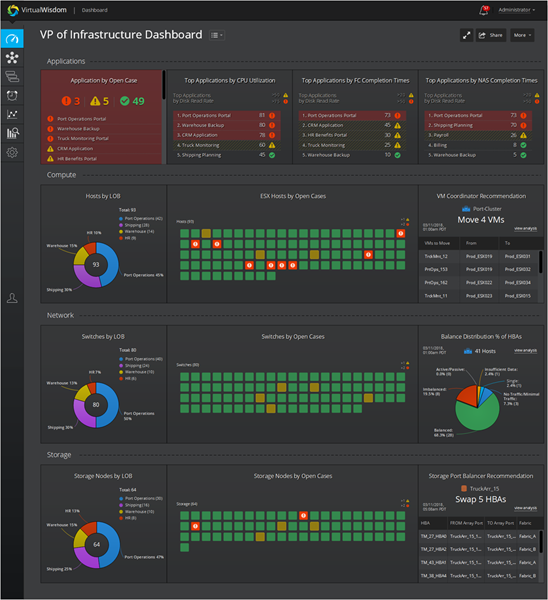
    Virtual Instruments has extended the reach of its AIOps platform to add application service assurance, predictive capacity management, workload infrastructure balancing and problem resolution and avoidance capabilities.

    Based on a combination of machine learning, statistical analysis, heuristics and expert systems technologies, VirtualWisdom is designed to enable DevOps teams to be able to apply analytics to resolve issues in near real time versus having to convene a “war room.”

    Len Rosenthal, chief marketing officer for Virtual Instruments, said the whole war room concept has become antiquated in the age of DevOps. Instead of wasting time having individual departments within an IT organization coming together to defend their innocents every time an issue arises, VirtualWisdom identifies the likely source of the problem instantly.

    The latest release of VirtualWisdom adds to that a predictive capability that identify workload balancing opportunities intended to prevent problems from arising in the first place, he added.

    As part of an ongoing effort to infuse AIOps into DevOps processes, the latest release of VirtualWisdom also adds integration with application performance management (APM) tools from Dynatrace, in addition to enhancements to existing support for APM tools from AppDynamics, a unit of Cisco.

    VirtualWisdom is also now able to collect Linux and Windows operating systems along with metric generated on Amazon Web Services (AWS) or Microsoft Azure. There also a now iSCSI wire data monitoring support in the NAS Performance Probe, which complements existing NFS and SMB monitoring capabilities.

    Rosenthal said the rate at which applications are being developed and deployed soon will force the AIops issue in most organizations. As those applications become more distributed across hybrid cloud computing environments, it’s become impossible for any single IT team to manually keep track of all the dependencies that could adversely impact all their applications, he noted.

    While increased reliance on artificial intelligence (AI) is all but inevitable at this point, it’s less clear to what degree IT organizations themselves will be reorganized as a result. Most organizations have embraced DevOps to bridge the divide between their IT operations and application development teams. But many of the silos within their IT operations teams soon may be automated out of existence as the need for dedicated compute, storage and networking specialists declines. In some instances, developers are already taking advantage of application programming interfaces (APIs) to assume control over IT infrastructure end to end. That scenario may become even more common as AI continues to automate more of the rote IT operations tasks.

    None of that means there won’t be a need for someone to architect the IT operational workflows required to support applications at scale. But it does mean many lower-level administrator tasks soon might be sharply reduced or eliminated altogether. The challenge IT organizations soon will face is retraining those administrators to handle tasks beyond what’s possible to automate using AI.

    In the meantime, organizations will continue to experiment with AI. Not every organization is comfortable enough with AI to turn over control to what many still view as a “black box” that doesn’t provide any visibility into those processes being automated. But as more of that visibility is provided, it’s now only a matter of time before AI platforms take move control of the IT environment.

    — Mike Vizard

  • CircleCI Automates Configurations Across CI/CD Platform

    CircleCI Automates Configurations Across CI/CD Platform

    CircleCI has unveiled what it describes as the first package manager designed specifically to address configuration tasks involving software delivery automation.

    Matt Wyman, vice president of product for CircleCI, said the Orbs package manager condenses commands, executors and jobs into single, reusable lines of code that automate tasks on the continuous integration/continuous delivery (CI/CD) platform the company provides as a cloud service. The initial set of Orbs being made available by CircleCI are focused on automating more than 25 different cloud deployment scenarios to enable organizations to employ DevOps processes at scale, he said, noting those Orbs can then be validated and shared via an Orbs registry that CircleCI is making available.

    CircleCI is also launching a technology alliance program through which Jfrog, Twistlock, Anchore, Aqua Security, Cypress, Postman, Coveralls, datree, Rollbar and Codacy have committed to building Orbs.

    Wyman said shareable Orbs that require only a few lines of code to develop makes it possible to share configurations across multiple CI/CD workflows. Those Orbs then can be integrated with any number of third-party tools.

    CircleCI is making a case for a CI/CD platform delivered as a managed cloud service that eliminates the need for DevOps teams to set up and manage on their own. Open source CI/CD platforms can be too complex for the average IT organization to set up. Alternatively, CircleCI makes available a version of its CI/CD platform that organizations can deploy behind their own firewall. The CircleCI approach is designed to enable DevOps teams to flexibly create workflows that can be executed sequentially or in parallel.

    There are 12 million builds a month being generated by more than 300,000 developers taking advantage of the CircleCI cloud service to build applications, Wyman said. One of the primary drivers of that success is a cloud service that allows organizations to apply more of their limited resources to developing applications versus managing CI/CD infrastructure, he noted.

    Most IT organizations have yet to standardize on a specific CI/CD platform. Competition between providers of CI/CD platforms has never been more fierce as more enterprise IT organizations embrace DevOps. As DevOps processes continue to mature, it’s also clear that DevOps processes will need to be extended across multiple clouds in addition to on-premises IT environments.

    In general, CI/CD platforms are initially set up by developers who have embraced DevOps processes to accelerate development and deployment of applications without sacrificing quality. The most widely used CI/CD platform is the open source instance of Jenkins. Developers often can adopt Jenkins on their own without requiring anyone to sign off on a purchase order. But as organizations move to scale up their DevOps processes, CircleCI is betting interest in a commercial service that can be easily accessed across an entire enterprise will increase as organizations move to standardize their CI/CD environments.

    In the meantime, pressure to increase the rate at which applications are built and deployed is only going to increase as organizations become more aggressive about digital business process transformation. The issue now isn’t so much whether they will have a CI/CD platform, but rather to what extent—and, in some cases, how many.

    — Mike Vizard

  • Back to DevOps School: What Tools are in Your Backpack?

    Back to DevOps School: What Tools are in Your Backpack?

    The 2018-19 school year is in full swing, and just like the kids are going to the bus stop with their new backpacks and shoes, it’s time to refresh your DevOps tool chain and look to the future. Remember, just like education, DevOps never ends. It’s a lifetime pursuit that constantly improves your life.

    The DevOps tool chain of the future must include:

    Trunk Releases

    Time to get your branch and merge skills down pat. Git is the best source code control to offer this to development teams. Companies should be actively moving to git to allow their development teams isolated feature development with pull merges and pushes to the trunk for releases.

    If you are not using git, it’s time to start justifying why you are not. Given the speed at which businesses are moving, it is time eliminate blockers for development to release features. Git is built for speed and large numbers of dispersed developers. Remember: it was built by Linus Torvalds to support Linux kernel development.

    Database Development Tools

    When planning for your DevOps tools, seriously consider database development tools as well. But, if you want comprehensive results when developing your database, you need tools with a DevOps flare.

    If we didn’t have the efficiency and speed that we got from Agile software development, we wouldn’t have created DevOps. So, bringing Agile to database development was a must for database DevOps to solve problems. One tool in particular that we use supports some incredible features for Agile development. A database is different than an application; because of this, a database will have state. So, having a database instance we can compare to with our team is critical. The tool we use has this functionality, which has allowed us to thrive. It also lets users work with existing source code control along with a live database to help database developers. Because of this, users can execute this functionality against database objects such as stored procedures and tables.

    Application Release Automation

    Application software can be difficult to manage. Often, they have too many components to manage easily, which is where automation can help. Application release automation helps your team move from learned and taught processes to basic scripts that are easily scalable and can help deploy applications rapidly. If you’re working with a team that cares about data and DevOps, Application release automation is a critical tool.

    Test Data Management

    No matter how rapidly you are able to deploy applications, you’ll need to test. The faster you deploy, the more tests you will need to run. But a massive problem with testing can be the lack of quality. Many applications pivot functionality depending on the data stored in a datbase. So, providing data that is or, at least, matches the production data is critical to guarantee high test quality. Without the right data, you could be running massive amounts of tests that are also providing bad/false results. And, with DevOps, you’re committed to improving your software and working to enable more testing for that software.

    Don’t Forget the Database

    A key finding of the “2018 State of DevOps Report” is that integrating database change management into your DevOps toolchain early in the process drives higher performance.

    This is obvious to anyone that has released software before. However, for large siloed enterprises, this is non-obvious. For too long, we have been told to leave the database to the DBAs. Well, it turns out that approach (though sensible in the ’90s, when we started it) is no longer working for us.

    Your application will not run without database schema and logic changes about 80 percent of the time. So, there is no reason to have a separate manual process. Here’s someone saying that exact same thing in 2017: https://www.youtube.com/watch?v=DDZIiGT3jzs

    Now What?

    Having all the right tools is a necessary first step, but it doesn’t stop there. To fully succeed with these tools, a few key strategies must be put in place as well:

    One Ring to Rule Them All

    DevOps has taught us to break down silos. Yet, we see silos now being created based on tool choices. Companies should standardize DevOps tools across the entire value chain. If some parts—say Dev and Test—are using Artifactory, for example, the operations team should also use it and not rely on the release teams to put the release on a shared network drive. Ops should use Artifactory, too.

    This will require some horse-trading. Some teams will dig their heels in on a tool because it provides value specifically to them. Well, so be it. As one of my favorite Venture Bros. character, Dr. Henry Kissinger, says, “Compromise, my friend, is the essence of diplomacy, and diplomacy is the cornerstone of love.”

    Cloud First

    When I hear “cloud” from IT leaders, I immediately think of Inigo Montoya from “The Princess Bride” when he said, “You keep using that word. I do not think it means what you think it means.”

    The National Institute of Standards and Technology has defined cloud computing to have five essential characteristics:

    1. On-demand self-service
    2. Broad network access
    3. Resource pooling
    4. Rapid elasticity or expansion
    5. Measured service

    Your DevOps tools should also have these characteristics. Specifically, if you are not allowing external teams to utilize your tools and require someone to make a request via ticket first, you are doing it wrong.

    Time to learn how to offer DevOps as on-demand self-service.

    — Robert Reeves

  • How GitOps Can (Sometimes) Save DevOps

    How GitOps Can (Sometimes) Save DevOps

    A lot has been written about GitOps since its release by Weaveworks more than a year ago as a “single source of truth for the whole system” for using Git for Kubernetes deployments on the cloud.

    Aptly described by Alexis Richardson, Weaveworks co-founder and CEO, as “90% best practices and 10% cool new stuff,” GitOps largely offers a framework for DevOps CI/CD deployments on Kubernetes. This was something very often seen as missing among the many Kubernetes management distributions on offer—hence, its popularity.

    The tool is obviously not of use for organizations that have not adopted Kubernetes, but in many ways has enabled organizations’ DevOps to more efficiently take advantage of Kubernetes by running Git in a more disciplined and focused way.

    “The idea behind GitOps is to maximize the time developers spend on productive coding versus worrying about working with the latest source code, merging their saved code back into the repository and continuously supporting problems that come up during the application build process,” Torsten Volk, an analyst for Enterprise Management Associations (EMA), said.

    GitOps offers DevOps a way to use its version control capabilities to archive changes to application deployments in a way that allows them to be recalled at a later time. This can come in handy when an architecture fails and it is necessary to access and reinstate a previous version of an application deployment or update prior to the incident. All changes are tagged and archived in a way that each developer knows when and how their changes to an application were changed.

    “Ideally, each developer would check in their code and receive a link to the running application with his or her latest changes applied, as well as with all the other changes that were checked into the repository,” Volk said.

    The Adoption Checklist

    Volk offered the following elements he said DevOps should have in place before adopting GitOps:

    — All infrastructure and application configurations, including databases, middleware and machine learning models, need to be defined as code, Volk said.

    “Everyone must accept the basic concept that code is only complete when all components for a successful build are checked into Git,” he said. “CLI-driven, ad hoc deployments are no longer acceptable.”

    — The DevOps group has to be able to detect changes to application code that previously might have been able to bypass Git. There must be thus be a process in place to bring these changes back under GitOps control, Volk said.

    “The IT Ops/DevOps teams need to make operational changes to the app exclusively via changes to the code checked into Git,” he said. “This means that tasks such as scaling, failover, creating maintenance windows, etc. as well as urgent troubleshooting tasks have to run through Git. The latter is especially tricky, as the enterprise will not accept longer mean time to detect (MTTD) and mean time to repair (MTTR) due to GitOps.”

    — Declarative management practices have to be used in Dev and Ops. “This has proven to be a critical roadblock,” Volk said. “Kubernetes developers, as part of Dev and Ops, still often prefer the control of imperative management over the promise of defining their desired end state and letting the software deal with how to get there.”

    For DevOps teams that have the prerequisites in place as described above to use Git to run Kubernetes deployments on the cloud, then GitOps deserves at least a look. However, for those organizations that adopt GitOps for the right reasons, it is not designed as a one-size-fits-all solution and organizations will need to modify it to fit their needs. Its implementation, for example, will almost certainly different compared to how Weaveworks described its functioning after using it for two years to run Kubernetes and Prometheus telemetry databases on a cloud platform.

    DevOps will, thus, need to be actively involved in GitOps deployment and maintenance to make sure it meets organizations’ individualized needs. When first describing GitOps, Weaveworks’ Richardson wrote: “Fair warning: this is what works for us, and dear reader, you may disagree.”

    — B. Cameron Gain

  • Unlocking the Power of AIOps

    Unlocking the Power of AIOps

    AIOps is becoming quite the hot topic lately. It seems as though everyone is realizing that Ops is difficult. As we have to deal with more big data at greater velocity with more automation and complexity, there is no way humans alone can tame the beast. AIOps seems to be the answer.

    I recently sat down with Dave Link, CEO and founder of ScienceLogic to discuss how to unlock the power of AIOps to empower IT ops. We video taped the conversation, along with some accompanying slides that help explain what the challenges are that ops faces and what are some of the ways to tackle this using AIOps.

    I should mention that Dave and I are old friends, having worked together 20-plus years ago at a dotcom era company called Interliant. Since 2003 or so I have watched Dave build ScienceLogic into the powerhouse it is today. I couldn’t be more happy and proud of him.

    ScienceLogic has been named by EMA as a top vendor in the AI/ML for IT Operations. Dave gives us a good background on ScienceLogic as well as a good background on the use cases and challenges that IT Ops faces that AIOps seems to be the answer for.

    Dave also talks about the differences between AI and machine learning or ML. This seems to be an area of confusion today as well.

    The video is about 30 minutes and excuse Dave and I reminiscing, but there is some really great information here.

    Video on AIOps


    — Alan Shimel