Category: DevOps Toolbox

  • Don’t Let Your DevOps Transformation Be a Parade of Tools

    Don’t Let Your DevOps Transformation Be a Parade of Tools

    Choosing the right DevOps tools should be a careful, thoughtful process.

    On May 12, 1848, a store owner named Sam Brannan held a “one-man parade” to announce the start of the San Francisco Gold Rush. “Gold! Gold from the American River!” Brannan shouted up and down the market street in San Francisco. He held his hat in one hand and waved a bottle of gold dust in the other. San Franciscans had received false news of gold before. But by all accounts, Brannan’s performance sent residents running in search of riches. 

    Brannan had a good reason for spreading the news rather than panning for gold himself. The canny entrepreneur owned a general store that served the workers, and in the week between learning about the discovery and yelling about it in San Francisco, he’d bought all the picks and shovels in the city. Brannan’s announcement helped spur a seminal event in California’s history. As Brannan raked in money selling mining supplies, his actions also, years later, led to the coining of a famous maxim. (source)

    During a Gold Rush, Sell Shovels

    In the current age of DevOps and Agile rush of enterprises, there is a lesson to be learned from the gold rush: Don’t let your DevOps transformation become a parade of tools. While automation is critical for the success of modern ways of technology delivery and operations, the wide range of tooling choices can often lead to wrong decisions—especially well-intentioned, top down purchase of tools, duplication in toolsets and, most importantly, ignoring the voice of the teams on the ground.

    With such variety of tools available in the market today, we all have opinions regarding the tools that we would like to use. Our preferences are based on either our history of using certain tools, because we have invested time and effort to learn a tool, or partnerships your service vendors might have with tooling vendors.

    This leads to two general attitudes toward tooling adoption, with each having their own advantages and disadvantages:

    Autonomy for teams: Let teams decide the tools they feel are suitable for their context.

    The advantage is that teams can experiment and pick a tool that suits their context better. The disadvantages can, potentially, include security risks due to lack of patching and maintenance, and limited cross-team collaboration and sharing of tooling skills and know-how.

    Standardized tool suite: A centralized way of dictating tooling choices.

    The advantage is that it allows for capacity planning, integration between tools, larger pool of community for collaboration and create platforms-based solutions.The disadvantage is that this method at times prevents teams from using tools that best suit their unique needs and creation of avoidable dependencies on centralized tooling teams in the organization.

    These contrasting views lead to debates at every level for the choice of tools and, in some cases, slowing down decision-making—or even leading to the purchase of tooling licenses without input from technical teams on the ground. The decision-making process must be improved, and the need for autonomy must be balanced with standardization and optimization. Also, the two approaches of “autonomy for teams” and “standardized tool suite” do not always have to be binary and will change depending on the context of the team needs and area.

    By considering desirability, viability and feasibility of the DevOps tools, we can help achieve the balance between autonomy and alignment.

    Here are some tips to help ask the right questions:

    Desirability

    • Do teams want this? or is this a solution chasing a problem?
    • Do you anticipate that teams will need this in the near future?
    • Does this help improve team productivity and effectiveness?

     Viability

    • Does this make commercial sense?
    • Have we considered maintenance costs and total cost of ownership?
    • Do we have existing license arrangements with the tooling vendors?
    • Do we have comparable tools already in use and that can do the job?
    • Do we need to purchase licenses throughout the enterprise?
    • Are there any open source alternatives?

    Feasibility

    • Can we implement this in the enterprise IT landscape?
    • Have we considered the ease of setup and configuration of the tool?
    • Does it scale across the enterprise? Does it have to scale across the enterprise?

    — Aditya Vadaganadam

  • Best of 2018: 11 Popular Open Source DevOps Tools Worth Knowing

    Best of 2018: 11 Popular Open Source DevOps Tools Worth Knowing

    As we close out 2018, we at devopsy.kinsta.cloud wanted to highlight the five most popular articles of the year. Following is the fourth in our weeklong series of the Best of 2018.


    Companies implementing the best practices of DevOps have demonstrated that they are more effective and flexible in implementing as well as designing IT tools and practices, resulting in higher revenue generation at a lower cost. For traditional organizations looking to embrace new inventions such as bitcoin wallet, the adoption of DevOps tools provides consistency, quality and efficiency.

    Open source DevOps tools are used as a way to streamline the process of development and deployment. The benefit of using open source software is that it is built with enhanced collaboration which can drive innovation and enhance flexibility in handling transforming markets and needs. Visibility into the code helps enhance overall quality and security, and also helps companies prevent vendor lock-in from proprietary vendors.

    Open Source DevOps Tools to Know

    If you are looking to accelerate an already existing program or just getting started with DevOps, below are 11 open source DevOps tools worth considering.

    Behat

    Behat is a php framework for auto testing the expectations laid by your business. It is a behavior-driven, open source development framework for php. This tool supports you in providing software that matters via test automation, deliberate discovery, and continuous communication.

    Watir

    Watir is a web application cross-platform open source testing tool. It is the most flexible and reliable tool of Ruby libraries for automating the web browsers. Just like a human being, this tool communicates with the browser so it validates text, fills out forms and clicks links.

    Supergiant

    Built on top of Kubernetes, Supergiant is an open source platform for container management. It is utilized for Kubernetes deployment on multiple clouds in a matter of minutes. The Supergiant API is used for streamlining production deployment. With the help of the packing algorithm of Supergiant, hardware costs can be lowered and the hardware you require with computed efficiency can only be utilized.

    Ansible

    Ansible automates various common tasks related to IT operations such as application deployment, configuration management and cloud provisioning. It is owned by Red Hat. It integrates with numerous other famous tools for DevOps, including Jenkins, JIRA, Git and many others. The free open source version of Ansible is available on GitHub. Red Hat offers three paid versions—premium, standard and self-support—with prices that differ depending on the required level of support and number of nodes in production.

    Nagios

    Infrastructure monitoring is an area that has numerous solutions, from Zabbix to Nagios to various other open source tools. In spite of the fact that there are much newer tools in the market today, Nagios is a well-established monitoring solution that is highly efficient due to the large contributor community creating plugins for it. Nagios has the capability to deliver results in different visual reports and representations.

    SaltStack

    SaltStack is the paid enterprise version of Salt. Salt is a highly flexible, powerful and intelligent open source software for event-driven orchestration, cloud control, configuration automation and remote execution. It helps DevOps companies by orchestrating the effective movement of code into production and keeping the complex infrastructures tuned for optimal application delivery and business service. Saltstack orchestrates the value chain of DevOps and helps to deploy as well as configure dynamic applications.

    Chef

    Chef makes it possible to manage both traditional and cloud environments with one single tool. While maintaining high availability, Chef promises to accelerate cloud adoption. The chef development kit provides you with the tools you need to develop as well as test your infrastructure automation code from your workstation locally prior to deploying changes into production. On the Chef site, many technical resources and a lot of documentation is available including various resources designed to help organizations transition to DevOps and scale their implementations of DevOps.

    Docker

    You can expect portability with Docker, which is transforming IT environments. The portability is made possible via its special containerization technology, quite often found in self-contained units. It packages everything than an application is required to run: libraries, system tools, runtime, etc. Due to this, the applications can function the same way irrespective of their deployment location. A part of Docker known as Docker Engine is a tool responsible for creation and running of Docker containers. Another part of Docker known as the Docker Hub is a service application based on cloud encompassing the concept of application-sharing and workflow automation.

    Git

    Git has become incredibly popular in the recent years for managing the source code. It has become famous, especially as a site, for hosting open source projects. Because of the ease with which it handles merging and branching, it stands out from other version control management. Many DevOps teams utilize it for managing the source code of their applications. It has great pull request and forking features. It also consists of plugins that can link with Jenkins to facilitate deployment and integration.

    Hudson

    Hudson is a tool for managing and monitoring continuous testing and integration. The key features of Hudson include support for various systems for management of source code, application servers, code analysis tools, testing frameworks, build tools, real-time notifications of test failures, change set support and easy process for installation and configuration. A huge library of plugins is present that further extend its capabilities.

    Puppet

    No matter where it runs, Puppet promises a standard way of operating and delivering software. Puppet automates deployment to boost auditability, reliability and agility. The products of Puppet provide continuous automation and delivery across the complete software delivery life cycle. The latest version of Puppet features Node Manager and Puppet Apps, which help handle large number of dynamic, variable systems.

    Conclusion

    The world of DevOps is full of unique and outstanding open source tools. The above mentioned popular DevOps tools can help effectively bridge the gap between development and production environments when compared previously. You can opt for the tool that suits your business needs and can instantly observe the difference in your business operations. And not only do these different DevOps tools function well individually, they also play well together.

    If you’re looking to build out your toolset, consider open source DevOps tools in addition to proprietary software.

    — savaramravindra

  • The Time for Time Series Data

    The Time for Time Series Data

    More than four years ago, we launched InfluxDB, an open source time series platform. In the years since, time series technology has become increasingly popular; according to DB-Engines, over the last 24 months time series has been the fastest growing database category. This popularity is fueled by the “sensorification” of the physical world (i.e., IoT) and the rapidly increasing instrumentation requirements of the next generation of software. InfluxDB has millions of downloads, an expanding list of enterprise customers and a growing community that is always finding new ways to deploy and build on our platform and we believe we are just scratching the surface.

    Amazon Web Services (AWS) recently entered the market with Timestream, a hosted time series database. We have been evangelizing the importance of high compression, super fast engines and a purpose-built stack for time series data and Amazon seems to have followed this model pretty closely. We are excited to have more competition in the market, as it affirms the broader market opportunity and further validates the need for robust, purpose-built solutions such as InfluxData. Amazon makes smart and strategic moves and we know that when it enters a new space, it’s not done so haphazardly—there is a lot of thought and research that goes into identifying the commercial potential, so its play in the time series database space is further evidence of what we already knew: that building a time series platform on existing multipurpose SQL or NoSQL databases is a nonstarter for a modern enterprise. AWS is a bedrock of the modern cloud-based internet and we are excited to see how Timestream evolves.

    Public details about Timestream’s technical capabilities are limited, but based on the AWS model, there are likely several significant differences between our offerings—enough to appeal to distinct developers and use cases. Among them:

    • Open source — We are first and foremost an open source company. We are committed to sharing ideas and information openly, collaborating on solutions and providing full transparency to drive innovation. InfluxData’s products are continuously improved by an energized group of developers that help to make them more reliable, secure and awesome. The power of the open source community to drive innovation is unsurpassed by any proprietary software solutions.

    • Hybrid cloud and on-premises support — Distributing assets on any or across multiple cloud-hosting environments is often the best choice for companies. Key among the advantages is avoiding vendor lock-in, which can limit the ability to customize systems and negotiate better rates, ultimately making it very difficult—and expensive—to change cloud providers to meet ever-evolving business and technical needs. Every business has specific functionalities and a hybrid cloud system offers the flexibility to choose services that best fit their needs, whether it’s to support GDPR regulatory requirements or teams that are spread across multiple providers. And from an operations perspective, a multi-cloud system increases efficiencies and provides another layer of security to ensure there is no downtime.

    Inevitably, as recognition of the power of time series data becomes more prominent, we’ll see even more competitors enter the space. And this is great from our perspective: Not only does competition fuel innovation, it grows the market as a whole. More importantly, it keeps us vigilant and focused on delivering value for the developers and those in the DevOps space who solve real-world problems with our platform.

    Our priorities remain the same and we will proceed on the track we’re laying for the future. We will continue to push the edge with this technology—leveraging the advantages of a purpose-built system, developing new languages, supporting new platforms and new workloads and pursuing exciting opportunities as they come. We are committed to having a project with velocity, investing in the platform to make it successful and in the community of creative and talented developers who are discovering new ways to deploy our time series platform every day.

    InfluxDB is available now and we encourage developers, both existing users and those who are just learning about the power of time series databases, to download and get up and running in minutes.

    — Evan Kaplan

  • Anaxi Delivers Project Management App for DevOps

    Anaxi Delivers Project Management App for DevOps

    Anaxi, a provider of project management software designed specifically for DevOps teams, has made its web application generally available. The web application complements an existing iPhone application, while an Android version of the company’s project management application is still under development.

    Company CEO says Marc Verstaen said that as DevOps has evolved around multiple repositories, IT organizations are finding it challenging to keep track of code from projects they are using within what applications. Anaxi is designed to not only make it simpler to navigate repositories, but also apply analytics to track individual developer productivity and team performance. Project managers now can, for example, analyze efforts in terms of code added and removed, refactoring and code churn on a weekly basis.

    Armed with that intelligence, IT operations teams will be better able to prioritize development plans based on the dependencies that exist between the various components that make up an application, said Verstaen. The number of those dependencies is only expected to increase as organizations increasingly shift away from building monolithic applications in favor of more complex microservices architectures that promise to make the overall business more agile.

    The fundamental project management issue with repositories such as GitHub is that there is no way to categorize all the project labels that get entered as text. That makes it difficult to monitor and track all the tasks associated with a specific label or even simply browse from one task to the next, Verstaen said. Via Anaxi, project managers can edit their issues and pull requests, which are then synchronized back to their GitHub and Jira projects.

    It’s not clear to what degree the lack of sophisticated project management tools has hindered adoption of DevOps in the enterprise. Legacy approaches to application development provide project managers with a rich portfolio of applications that may serve to bias them toward one style of application development over another. But given the pressure organizations are now under to become more agile, project managers need to evolve alongside the rest of IT organization.

    Before too long many organizations may also find themselves trying to manage projects spanning multiple repositories. It’s not uncommon for development teams to favor one repository over another. Standardizing on one repository would be preferred, but not every project manager has the political capital inside their organization required to force such a decision. Many projects also now span multiple companies, each with their own repositories, that project managers may find themselves forced to navigate.

    At the same time, business leaders are making it clear they want more visibility into the pace at which applications are being developed whenever those applications are expected to generate revenue or improve the overall customer experience. In fact, project managers who can ensure projects are delivered consistently on time and within scope are invariably considered among the most valued of employees.

    — Mike Vizard

  • Atlassian Brings Postmortem Analysis to DevOps

    Atlassian Brings Postmortem Analysis to DevOps

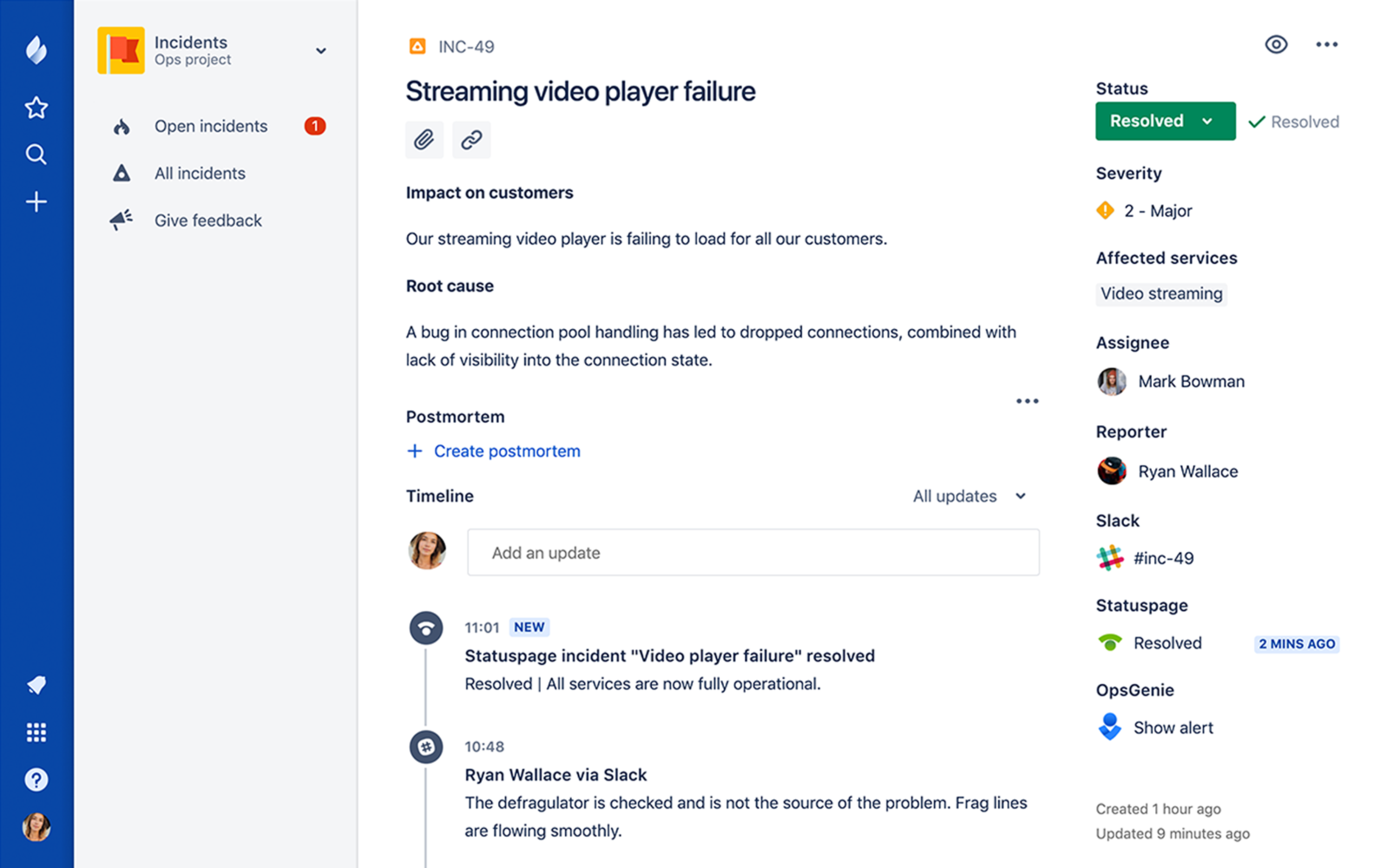
    Atlassian has added a postmortem capability to JiraOps, which gathers a list of all the key events from any IT incident in chronological order to make it easier to analyze what happened, identify root causes and raise issues directly within the JiraOps platform to ensure subsequent actions are taken.

    At the same time, Atlassian is extending the Automation Actions, a set of automated scripts and playbooks made available in Opsgenie to include support for Amazon Web Services (AWS) Systems Manager and Generic REST Endpoint. Those capabilities extend the ability of DevOps teams to launch automated tasks from within an Opsgenie console or mobile applications. Opsgenie is a notification application that Atlassian gained via an acquisition announced the same day the company launched JiraOps.

    Atlassian is also sharing incident management data it has collected throughout the year. Collectively, its customers have recorded more than 190,000 incidents and scheduled maintenance events. Updates to those events were made more than 564,000 times, which in turn fueled the delivery of more than 130 million email and text messages to end users.

    Unfortunately, the Atlassian report also finds only 3 percent of incident reports include any kind of postmortem analysis—an issue the company is trying to address via the latest update to JiraOps.

    Danny Olinsky, head of product marketing for incident management at Atlassian, said that as organizations make the shift from primarily deploying application on-premises to the cloud, many of them are starting to more fully embrace best DevOps practices. One of the central tenets of DevOps is ruthlessly automating as many processes as possible, including incident management. By integrating incident management and DevOps processes, the amount of downtime experienced by any application over the course of its life cycle can be reduced substantially, he said.

    The biggest challenge many IT organizations now face is melding DevOps practices and incident management process, which frequently evolve in isolation from one another. Those processes, however, are being unified as more organizations digitally transform business processes that need to always available. Any incident that might lead to application downtime now has potential revenue implications that go well beyond adversely impacting employee productivity. In fact, clear, precise communications involving any IT incident is now an expectation in the DevOps era, said Olinsky.

    The degree to which organizations will be automating incident management naturally will differ. But at a time when mean time to resolution is being more aggressively measured than ever, many IT professionals have an incentive to automate as many processes as possible. Murphy’s Law also dictates that incidents will manifest themselves at the most inconvenient time, so being able to automate a process from a mobile device can eliminate the need to make a trip to the office in the dead of night.

    It may be a while before IT organizations are able to fully automate every response to an IT incident. But as process that can be automated are identified, the lower the probability a truly catastrophic event capable of paralyzing the entire organization becomes.

    — Mike Vizard

  • InfluxData Video Series: Dealing with Large Amounts of Data

    InfluxData Video Series: Dealing with Large Amounts of Data

    The data deluge is becoming a daily issue, as companies collect ever more data from ever more devices and endpoints. But collecting data is one thing; deriving value from it is another.

    In this video, InfluxData VP of Products Tim Hall discusses some of the considerations in dealing with large amounts of data and how a time series database can help.

    “The vast majority of data systems that exist today are not really set up to ingest and analyze that data at speed,” he said, which can pose a real issue for organizations looking for actionable insights from their data in real-time. Time series databases enable ingestion and analysis instantly, with an ingest pipeline that allows users to gather and shape data to be useful upstream.


    To learn more, watch the video and download the “Benefits of a Purpose-Built Platform” infographic here. Also, check out the first video in the series here, the second video here and the third video here.

    — Charlene O’Hanlon

  • Using Continuous Backup to Keep Pace in an Increasingly DevOps World

    Using Continuous Backup to Keep Pace in an Increasingly DevOps World

    How continuous backup can help DevOps teams keep working with the right data

    The world of software engineering has changed; in fact it’s constantly changing. We’re moving on from the days of waterfall when big-budget releases with multiple features per version were the norm. Now, to compete, organizations have to implement agile development, with shorter release cycles and fewer improved or new features at a time. Modern software development has evolved to a practice of continuous development to the point that each new release feels like a simple patch rather than a dramatic overhaul.

    This has completely upended the testing process. Release cycles are a fraction of the time they used to be and the previous QA methods don’t stand a chance to keep pace. The latest model combines developers, operations, testing and security into close-knit teams. Development cycles are shortened and testing and deployment are automated from the source. All of this blending of teams and processes has been dubbed DevOps.

    This new paradigm for operations and development has been made possible by the flexibility ushered in by virtualization and the snapshots that can be made for a point-in-time failback. Yet, limitations remain that can keep technology from supporting the advanced needs of DevOps teams. More is still needed to keep environments up to date because once a snapshot is deleted, the data that it represented is gone.

    New tools have emerged including Docker, Kubernetes and Puppet to help on the operations side, but development teams can still be expensive if they aren’t used efficiently and effectively. Any amount of downtime or idle waiting for a database to be refreshed from production or for any sort of regression testing environments to be instantiated is burning money. DevOps processes can do this, but they aren’t effective if they don’t have a continuous stream of recovery points.

    The Quality of Code

    Development can only be as good as the copies of production data that a developer has to work with. The challenge is to get a current copy of production data in a reasonable amount of time. If it uses simulated test data designed to mimic production, results can be shoddy and defects can occur more frequently.

    A continuous backup solution with search and recovery across data, files or VMs from any point in time can make development and testing easy. Spinning up a clone of production environments is simple if you have multiple copies of data in different locations in a one-to-many configuration. Production data can then be replicated to DR facilities for protection, but also to development, test and QA environments to assure that developers and testers are working on the same, latest version of production data.

    Production replicas along with the simultaneous use of a proper API can allow the orchestration of test builds and deployments without manual intervention. This is essential because being able to perform tests on good, reliable data can significantly reduce the amount of code defects deployed into production.

    Confidence in Changes

    Because you can spin up real-time replicas of production workloads with ease, developers don’t have to guess what might happen when they push a new code update into production. Instead, the can reproduce an exact replica of production that has the latest data to an isolated area where it can’t affect production users. In this environment, they can observe the results without any risk.

    — Gijsbert Janssen van Doorn

  • The Benefits of a Purpose-Built Platform

    The Benefits of a Purpose-Built Platform

    When it comes to storing metrics and events, a time series database provides a number of benefits that general purposes databases don’t, including high velocity, range scans over large chunks of data, efficient data eviction and compression. But time series isn’t just about the database; it’s also about the ecosystem of tools built around it.

    In this video, InfluxData founder Paul Dix discusses how his company has created an ecosystem comprised of tools that developers can use to solve problems without having to do much coding or configuration to derive insight or value from the data. He also outlines the benefits of using a time series database over a relational database or a Postgres database, including lower cost and fewer tools targeted to real-time monitoring and alerting.

    In addition, Dix talks about Flux, the company’s latest scripting and query language, which was designed to be even more developer-friendly in every way. “It’s basically been years in the making, so it’s pretty exciting to finally get it out there,” he said.


    To learn more, watch the video and download the “Benefits of a Purpose-Built Platform” infographic here. Also, check out the first video in the series here and the second video here.

    — Charlene O’Hanlon

  • InfluxData Video Series: ‘Time to Awesome’ with Mark Herring

    InfluxData Video Series: ‘Time to Awesome’ with Mark Herring

    InfluxData firmly believes an awesome experience is fundamental in developing and curating its developer community. After all, the company’s platform is designed for developers, said CMO Mark Herring, and so delivering a great experience is in the company’s DNA. “We want them to have an awesome experience from the first download to the first interaction with the company to the first install, to first getting started, to first production database.”

    Part of that great experience includes an open source platform that takes only about five minutes to get up and running. “It comes down to one piece—the whole platform is there—and you can ingest the data, you can visualize you can query the data in literally about five minutes,” Herring said.

    In this video—the second in a series of four—Herring talks about the importance of “time to awesome” in every consideration InfluxData makes regarding its platform, its overwhelming acceptance by the developer community and how the company will continue to strive for an even better “time to awesome.”


    To learn more, watch the video and download the “Time to Awesome” infographic here. Also, check out the first video in the series here.

    — Charlene O’Hanlon

  • Bots: ‘Like a CLI on Steroids’

    Bots: ‘Like a CLI on Steroids’

    Overheard in a Palo Alto coffee shop:

    “… so, we tokenize the utterances, lemmatize the tokens, vectorize with StarSpace embedding, and run the featurized input through the neural net. The softmax activation layer tells us what the user intent was.”

    “Sorry, you what the what and then what?”

    “Or, you can say the user types commands, the bot interprets those and takes the appropriate action.”

    “Oh, now I get it; it’s like a CLI on steroids!” 

    Calling a chatbot “a CLI” is like referring to a mobile phone as “a portable wireless teletype”:  not even close to a complete representation, yet not entirely wrong. Like a smartphone, a well-trained bot will do as much or as little as the user requires of it.

    Historical Perspective

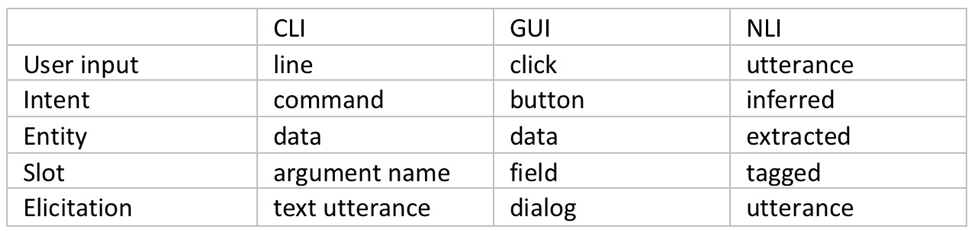
    The command-line interface (CLI) dominated human-computer interaction for a few decades, until the growing number of options software offered made GUI the new favorite way of talking to computers. Both of these interaction models are based on human to human communication: the operator communicates “an intent” complete with some input “entities,” each inserted in its “slot.”  This is exactly how bots operate, so how is a bot not just another UI?

    Fig. 1: User Interface Elements

    Bots as UI

    While a user interface is merely a human-readable catalog of machine’s capabilities and a set of input slots tightly coupled to a specific application, an NLI-enabled bot acts as our agent: it infers the intent (even multiple intents) from a natural language utterance, identifies any entities in that utterance, such as food: pizza, toppings: (olives, pepperoni) and fulfills that intent, be it by talking to Pizza Hut’s API or by calling the local pizza shop on the phone. Or even by making the pizza itself.

    NLI bots have already made quite an impact on the sales and support side, but how suitable are bot agents for more technical work? How would a chatbot perform in the DevOps world, replete with esoteric terms and complicated interfaces?

    Although there is a lot less training material available (after all, more people eat pizza than reconfigure Kubernetes clusters), there are also a lot fewer ways to express a technical intent, so in the end the technical bots are easier to train and make fewer mistakes than their sales brethren. But is a bot’s ability to classify an intent to deploy a new EC2 instance of specific flavor enough to make hardcore DevOps techies give up their favorite CLI?

    Beyond Interface: Advantages of Bot-assisted System Interaction

    Context memory: Whether a bot remembers your favorite pizza toppings, or you have to say “pepperoni and mushrooms” a couple of times a week is of little consequence. However, if your input looks like this:

    I’m sure you’d rather not have to type that ever again. The machine learning models of the leading bot platforms not only remember your slot values, they also remember the context in which those values were entered, so a well-trained bot is always able to suggest an appropriate value when looking to fill a slot.

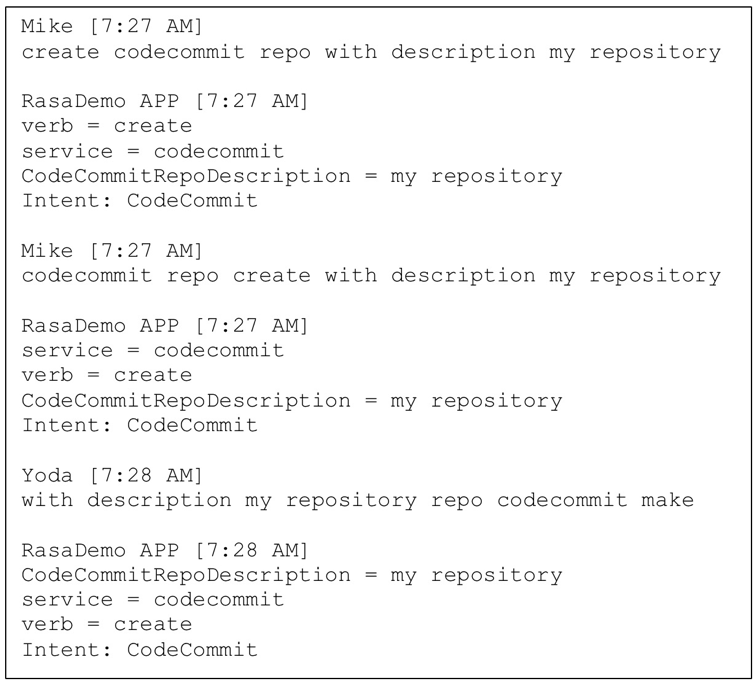
    Natural language understanding: Just like a human would not be fooled by variations in the word order or use of synonyms, neither would a well-designed bot. Not having to remember the exact syntax or even spelling translates into higher efficiency.

    Fig. 2: Intent classification and slot tagging

    Continuous training and improvement: The more time a bot spends with a team, the better it gets at its task of helping members of that team, not only due to filling its context memory with details about team members and tasks, but also because of reinforcement learning. In addition to the initial training corpus of data, most contemporary bot platforms feature interactive training mode, wherein a human user can provide a real-time feedback on the bot’s performance.

    Seamless automation: Since it’s an agent rather than a mere translation layer, the bot remembers successfully fulfilled intents and chaining those into a sequence, with or without slot elicitation, with or without branching and decision making is significantly simpler and easier than even the simplest of scripts.

    Collaboration platform integration: Teams typically meet in a collaboration platform such as Slack, WebEx or MS Teams, decide what needs to be done, then go and do it. With a bot on their team, they can get right to the “doing” part without leaving the collab platform; avoiding context-switching improves productivity.

    Built-in analytics: A bot’s main job is to classify intents, fill slots and invoke fulfillment. However, in its spare time it could listen in and take notes. At the end of an event (release, incident, outage, etc.) it could use its NLP savviness to provide a linguistic breakdown of the event: How many questions were asked? How many answers? How many statements? Or, even, What was the level of profanity use as compared to the average? This kind of summary provides benefits for parts of the company beyond bot’s original team.

    Conclusion

    Bots can and do increase productivity in a software development or operations environment. Automation is important, but when done through traditional means such as scripting, its high cost often causes it to be prioritized behind other tasks. The use of an NLI-enabled bot as an agent for interfacing with various back-end systems not only ensures the very best in user interface (“CLI on steroids”), but also minimizes the need to switch contexts and significantly lowers the cost of automation.

    More importantly, the emerging agent-facilitated process control prepares us for the next phase in the human-machine interaction: the post-app world.

    Bots will help us navigate the new world of commoditized services that will replace the familiar apps. They will track our experience and base future selections on our satisfaction with their past choices. What more can we ask for? Aren’t most of humanity’s dreams centered on intent (wish) fulfillment? What are the wish-fulfilling creatures from the fairy tales if not expressions of human desire for the perfect bot?

    — Mike Dimitroff