Category: DevOps Practice

  • AppSmith Adds Git Support to Low-Code App Dev Framework

    AppSmith Adds Git Support to Low-Code App Dev Framework

    AppSmith has added support for Git repositories to an open source framework for building custom applications using a low-code platform based on the JavaScript programming language.

    Rishabh Kaul, head of marketing for AppSmith, said the Git support will make it simpler for developers to manage version control as they iteratively build applications using a set of graphical widgets provided by AppSmith.

    AppSmith is used primarily by developers to build internal applications that automate a specific task or workflow. Support for Git makes it possible for multiple developers to more easily collaborate as they add work to a Git branch and make requests within the context of a continuous integration/continuous delivery (CI/CD) pipeline.

    That also makes it simpler to test applications and roll back to a previous version in the event something should go wrong, said Kaul.

    The Community Edition of AppSmith will make it possible to connect to unlimited public repositories and up to three private ones before requiring developers to upgrade.

    In recent years, use of low-code tools has increased dramatically as organizations embrace tools that enable them to build applications faster. Not every application requires developers to employ tools for working with procedural code. There are typically hundreds of use cases where an organization could build and deploy an application that would eliminate the need for an internal team to license yet another packaged application.

    In general, AppSmith and other open source tool and framework providers are betting that, as the economy continues to shrink, the adoption of these tools will increase as organizations continue to become more sensitive to costs. That approach will allow them to continue to provide applications tailored to automate specific tasks.

    The challenge, of course, is that as the number of applications being built and deployed steadily increases, the DevOps workflows that regularly update, secure and maintain those applications become much more challenging.

    It’s not clear what percentage of applications are now being built using some type of low-code tool. However, the overall size of organizations’ application portfolio is generally much higher than it was prior to the pandemic. Many of those applications are driving digital business processes intended to make the workforce more efficient at a time when many employees continue to work from home.

    Less clear, however, is how many new applications are being built by so-called citizen developers. One way or another, however, it’s becoming easier for end users that have some basic software understanding to build applications. Inevitably, those application development efforts will also need to be integrated within the context of a DevOps workflow.

    Regardless of how an individual DevOps team may view low-code tools, they have permanently altered the application development landscape. The issue is no longer whether low-code tools will be used by developers but rather to what extent. In the meantime, DevOps teams would be well advised to review just how extensible their existing pipelines need to become.

  • How Visibility Helps Devs Focus on Innovation

    How Visibility Helps Devs Focus on Innovation

    As software engineering leaders adjust to a future defined by remote and hybrid work models, they are shifting priorities in the organization of work to compensate for the lack of in-person collaboration. According to a recent study conducted by Jellyfish, the top priority for engineering leaders is ensuring that each member of their team is focused on the highest-priority work for as much time as possible. To achieve this goal, these leaders are using real-time visibility and data-driven decision-making to guide more effective management.

    Earlier this year, Jellyfish analyzed the work of more than 23,000 engineers and surveyed hundreds of leaders to better understand the current state of engineering management. The research revealed that engineering leaders are shifting resources away from reactive work—such as responding to customer-reported bugs—to the type of work that directly impacts top-line revenue. Additionally, engineering teams are emphasizing growth and innovation, developing the type of infrastructure that will enable their teams and their software to scale long-term.

    Prioritizing Visibility

    To shift from reactive to proactive work, engineering leaders must first have visibility into what their teams are doing. How can you allocate your time and resources more effectively if you don’t know how they’re being allocated today? Before work can be prioritized effectively, leaders must understand how much bandwidth their teams have to take on new projects. Additionally, they need data-backed insights in order to align the priorities of the engineering team with those of the company at large.

    Visibility is also key to avoiding work that wasn’t part of the plan. According to the study, teams spent 22% of their time on unplanned work in 2021, a 15% increase year-over-year. This trend indicates that engineering leaders may not realize when certain types of work are taking attention away from mission-critical initiatives. When asked to name their biggest challenge heading into 2022, 45% of leaders (by far the largest group) selected “making sure everyone is focused on the highest priority work.”

    To gain visibility into their operations, some engineering teams are doubling down on data aggregation and analysis. According to the report, while all organizations tend to devote similar amounts of time to “keeping the lights on” and customer support activities, those that invest in a more robust data organization are able to spend 29% more time on innovation and 48% less time on unplanned work.

    Building Through Data and Metrics

    The report also found that engineering leaders who’ve embraced data-driven decision-making are seeing more productive, healthy and focused teams. These organizations tend to release code more quickly and foster higher collaboration than their peers. Conversely, organizations that don’t prioritize data-driven decision-making are more likely to experience burnout, decreased productivity and less focus on innovative work.


    Here again, the difference between embracing data and ignoring data comes down to technology. Aggregating data and metrics manually can be tedious and challenging. However, emerging tools are able to automatically collect, measure and analyze data to offer insights on what teams are prioritizing. As a result, leaders can more easily align engineering work with business priorities, ensure more predictable development cycles, increase financial responsibility and continuously improve operations.

    For every engineering leader, nailing this approach to data will be essential for maintaining efficiency as teams expand. More than 79% of engineering leaders expect to grow the size of their teams in 2022, and respondents named employee onboarding ramp time, virtual onboarding and hiring among the most significant challenges they face.

    Despite the numerous challenges engineering teams have endured in the past two years, the industry has adapted and become more collaborative as remote and hybrid work models multiply. For leaders who seek to increase data-driven decision-making, new tools and approaches will result in more intentional engineering work and improved visibility and operations.

  • Saving on AWS Costs with Data Classification

    Saving on AWS Costs with Data Classification

    The cloud is becoming a large cost center for many organizations. Though often touted as a cost-saver—and while many cloud migrations are driven by the desire to conserve IT costs—the cloud does create operating expenses at the same time it cuts down on capital expenses. Moreover, unlike traditional IT investments, cloud costs can be unpredictable and quickly spiral out of control.

    However, while the cloud creates problems, it also gives you the tools to address them. For example, on AWS, a primary component of costs is object storage delivered via the venerable Simple Storage Service (S3). S3 is the basis for modern data lakes, huge-scale media libraries, website content, unstructured content repositories and more.

    Fortunately, S3 provides a storage tiering mechanism that can significantly reduce costs for content that is infrequently used. To make effective use of storage tiering, you’ll need to adopt the concepts of data classification—automatically discovering your infrequently accessed data and moving it dynamically to the most appropriate storage tier.

    What is Data Classification?

    The term ‘data classification refers to the practice of organizing unstructured and structured data into categories representing different data types.

    Data classification is an organizational practice that can help you achieve two key goals:

    • Learn what data types you have stored
    • Determine where each data type is located

    Here are several data classification use cases defined by Gartner:

    • Control intellectual property (IP)—Data classification helps you control access to data and define suitable locations.
    • Diminish the attack surface—You can use data classification to reduce the attack surface in locations storing sensitive data.
    • Identify data governed by regulations—Data classification enables you to categorize data into specific compliance categories, ensuring you meet requirements set by relevant regulations like GDPR, HIPAA and PCI DSS.
    • Provide access to content—Use data classification to configure access according to data type, usage and more.
    • Remove data redundancies—Use data classification to identify and remove redundant or stale data.
    • Optimize business activities—Data classification can help you set up metadata tagging to optimize your different business activities.
    • Learn your data patterns—Discover information on data usage and location.

    What is Amazon S3 Intelligent-Tiering?

    S3 Intelligent-Tiering is a cloud storage class that monitors access patterns to determine the optimal storage tier for each object. It automatically transfers less frequently accessed objects to access tiers with lower costs.

    Storage tiering is a key strategy for conserving cloud costs. Intelligent-Tiering is an automated storage tiering mechanism, which can save storage costs when data access patterns evolve without influencing performance or creating operational overheads.

    Key use cases for Amazon S3 Intelligent-Tiering are:

    • Data with changing access patterns—Unpredictable, changing or unknown access patterns, independent of the retention period or object size.
    • Infrequently modified data—You can use this storage class as the default for almost any workload that is not frequently modified, particularly data analytics, data lakes and user-generated content (UGC).

    Note that S3 Intelligent-Tiering comes at an extra cost-per-GB/month in addition to the regular S3 GB/month storage costs and the data transfer fees related to each storage tier.

    How S3 Intelligent-Tiering Works

    S3 Intelligent-Tiering monitors and predicts user behavior based on machine learning algorithms, allocating stored data to the appropriate access tier. These algorithms are trained on data traffic patterns across trillions of objects stored in S3. Intelligent-Tiering allows management on a granular object level, moving each object into a different storage tier when its access pattern changes.

    If an object remains unaccessed for 30 days, S3 Intelligent-Tiering automatically relocates it to an infrequent access tier. If you have not accessed certain objects for 90 days, AWS moves them to the archive instant access tier. To achieve even lower storage costs, you can decide to use the archiving tiers which can be accessed in minutes or hours.

    Here are S3 Intelligent-Tiering access tiers explained:

    • Frequent access tier (automatic)—This is the default access tier. Here, any object starts its life cycle once created or moved to S3 Intelligent-Tiering. An object stays in this tier as long as it is accessed continuously. The frequent access tier offers high throughput performance and low latency.
    • Infrequent access tier (automatic)—If an organization does not access an object for 30 (consecutive) days, AWS moves the object to an infrequent access tier. This tier offers high throughput performance and low latency.
    • Archive instant access tier (automatic)—If an organization does not access an object for 90 consecutive days, AWS moves the object to the archive instant access tier. The archive instant access tier offers high throughput performance and low latency.
    • Archive access tier (optional)—You may activate the archive access tier for asynchronously-accessed data. After you select to activate this tier, the archive access tier automatically archives any objects an organization has not accessed for 90 days. You can adjust the last access time before archiving, specifying up to 730 days.
    • Deep archive access tier (optional)—For data that you access even less frequently, you can enable the deep archive access tier. Once you activate this tier, Intelligent-Tiering moves any objects the organization has not accessed for at least 180 consecutive days to a deep archive. You can specify the last access time before archiving as up to 730 days.

    How to use Intelligent-Tiering to Cut Costs

    The S3 Intelligent-Tiering storage system uses automatic storage class optimization to minimize storage costs. The Amazon S3 API, AWS CLI and AWS Management Console allow you to set S3 Intelligent-Tiering to automatically archive asynchronously accessed data.

    How to Move Data to S3 Intelligent-Tiering

    You can move data to S3 Intelligent-Tiering using a PUT request to transfer the data directly. Alternatively, you can set up S3 life cycle policies that move objects from a standard S3 storage class to S3 Intelligent-Tiering.

    To upload data directly to S3 Intelligent-Tiering with a PUT operation, specify Intelligent-Tiering in the x-amz-storage-class header. For example, the following PUT request stores an image in an S3 bucket using Intelligent-Tiering:

    PUT /image-for-classification.jpg HTTP/1.1

    Host: myBucket.s3.<Region>.amazonaws.com (http://amazonaws.com/)

    Date: Fri, 7 Jan 2021 18:15:00 GMT

    Authorization: <your-authorization-string>

    Content-Type: image/png

    Content-Length: 15342

    Expect: 100-continue

    x-amz-storage-class: INTELLIGENT_TIERING

    How to Enable S3 Intelligent-Tiering Archive Tiers

    Archival tiers (i.e., Archive Access, Deep Archive Access) allow you to store data cheaply and access it within minutes or hours. You can use the management console CLI or S3 API to create a bucket, object tag-level configuration or prefix to activate an archive access tier (or both). You may activate either archive access tier (or both) by creating buckets, prefixes or object tag level configurations via the AWS Management Console, Amazon S3 API, or AWS CLI.

    To enable automatic archiving with S3 Intelligent-Tiering via S3 Console:

    1. Open the Amazon S3 console via the AWS Management Console.

    2. Select a bucket in the Buckets list and select Properties.

    3. Go to S3 Intelligent-Tiering Archive configurations and select Create configuration.

    4. Enter a descriptive name for your configuration in the Archive configuration settings.

    5. Select the configuration scope you want to use in the Choose a configuration scope section. You can also choose to restrict the configuration scope to specific objects in the bucket—use a shared prefix or object tag (or both):

    Limit the configuration scope by selecting Limit the scope of this configuration with one or multiple filters.

    Under Prefix, specify a single prefix to define the configuration scope.

    To use object tags to define the configuration scope, select Add tag and specify the value under Key.

    6. Select Enable under Status.

    7. Go to Archive settings and select the Archive Access tier you want to enable. You can select both.

    8. Select Create to set the configuration.

    AWS Intelligent-Tiering

    Image Source: AWS

    Conclusion

    In this article, I showed how data classification concepts, specifically applied through the Amazon S3 Intelligent-Tiering mechanism, can help you dramatically reduce storage costs on AWS. This is only one example of cloud savings driven by data classification and machine learning, and you can extend it to other parts of your cloud deployment:

    Leverage AI analysis services like Amazon Macie to identify sensitive data like personally identifiable information (PII) and move it to the most appropriate storage medium or storage tier.

    Use tools like Amazon Trusted Advisor to automatically identify unused or underutilized cloud resources—such as block storage volumes and snapshots. 

    Extend your analysis to include on-premise environments and other clouds—to determine which environment is the most appropriate for your data.

    I hope this will be useful as you improve your visibility and control over storage costs in the cloud.

  • Technical Debt: When It Works and When It Doesn’t

    Technical Debt: When It Works and When It Doesn’t

    Every software team has probably faced technical debt—the accumulation of little development deficiencies that will require rework down the line. Just like financial debt, they accrue interest as they build up, in the form of difficult software modifications or challenges in adding new features. Time is the usual culprit; your development team has one timeframe for creation but your leadership team wants to bring the software to market faster. And when it comes to choosing between building a clean and polished piece of software or hitting that delivery date, you usually need to bow to pressures from on high. It’s at that point that your collaboration might go off track, with little pieces of incomplete code jumping into the mix.

    Without careful monitoring, technical debt will eventually slow down your development and deployment processes, degrade your product quality and limit your ability to innovate in a changing market. But is technical debt unilaterally bad? Not always. Sometimes it’s in service to a greater strategy. Let’s look at the differences.

    When is Debt Part of a Good Strategy?

    Pankaj Gupta, senior director, product marketing at Citrix, said when technical debt impedes an organization’s ability to function, that’s a clear sign they need to wipe out the debt and start with a clean slate.

    “But there are a few scenarios under which it makes sense to let debt accumulate,” he said. “For example, if the cost of addressing a technical debt is significantly higher now than in the future; if the debt is not impacting your immediate and short-term business needs or if you have an emergency release like a major security vulnerability fix.”

    Daniel Viveiros, chief technology officer at CI&T, recommended that teams keep the big picture in mind when making the right tradeoffs. “For me, it’s about putting the business first and understanding that constantly activating value is imperative for success,” he said. “Well-managed technical debt can be an effective tool to shorten the lead time. Deferring refactorings, modernization efforts and other common debts in order to prioritize deployments is a constant tradeoff the engineering teams deal with on a daily basis.”

    What are the Signs of Too Much Technical Debt?

    Gupta provided some warning signs for technical debt overload.  “You know you’re accumulating too much technical debt when the cost and/or time to fix the technical debt is higher than starting fresh,” he said. “And the time taken for each release and deployment is consistently increasing.”

    A less obvious result: a DevOps exodus. The development team will be the first to feel the impact of too much technical debt, such as having a harder time completing tasks and working long hours to fix frequent breakages. “Employees are leaving the company out of frustration from working on legacy systems, spending most of their time fixing ad-hoc issues, routinely missing and being on-call all the time,” Gupta said. What debt reaches that level, resignations begin to mount.

    Viveiros pointed out that compiled debt will impact system resilience: “Bugs are originated more often and the change failure rate goes up. Speed is perceived as risky instead of something beneficial to the digital delivery process.”

    The ultimate sign of too much debt, he said, is poor business performance and lost revenue. “If downtime equals lost opportunities, the technical debt will become a financial debt,” Viveiros said. “Too much technical debt may impact the perceived quality of the product. As a result, the product and brand’s image will suffer.”

    What’s the Best Way to Manage Debt?

    Failure to deal with technical debt means kicking it down the road to another developer to tackle—and no one wants to be that person. So what’s the best way to take control and pay it off? To start, approach it as a collaborative effort and implement these four practices.

    1. Identify the types of debt. Not all technical debt is created equal. Distinguish between the debt you accept in the moment as something to fix later on and the inadvertent debt you discover—and categorize it into code debt, design debt, build debt and other forms to identify origin patterns.
    2. Analyze and automate. Analyze the origins of your debt and look for ways to tighten workflows or automate certain tests and processes. By reducing common errors and hidden bugs, you can stop them from snowballing into technical debt.
    3. Develop new policies and standards. These should clarify when debt makes sense and when it causes unacceptable damage. For instance, an immediate release of a security patch would be deemed acceptable while errors that will eventually cause considerable downtime would not.
    4. Communicate the cost to IT and business leaders. When another hyper-speed deadline comes your way, make sure your leadership understands the risks to product quality and developer retention. With the price tag made clear, they’re more likely to change delivery dates or provide funding for additional developers.

    Like most out-of-control spending, harmful technical debt begins with poor decisions and a certain level of denial. By approaching decisions with greater clarity and foresight on both the Dev and Ops sides of the house, teams can give themselves more breathing room and the space to produce exceptional software.

  • CDF Report Surfaces DevOps Workflow Gains

    CDF Report Surfaces DevOps Workflow Gains

    At its cdCon 2022 conference today, the Continuous Delivery Foundation shared a State of Continuous Delivery in 2022 report that found nearly half of developers (47%) use either continuous integration or continuous deployment platforms—but only about 20% report using both to automate all application build, testing and deployment.

    Overall, only a little less than a quarter (23%) of the 18,585 developers surveyed by SlashData on behalf of the CDF said they are not involved in any DevOps-related activities.

    Fatih Degirmenci, general manager for the CDF, said that the relatively low percentage suggested that DevOps workflows are now more widely employed than ever. Monitoring software and infrastructure performance and using continuous integration to automatically build and test code changes remain the most popular DevOps-related activities cited in the survey, at 36% each.

    The survey also found that, among large enterprises, the proportion of low performers when it comes to lead time for code changes has dropped from 34% to 24% in the last six months, while the proportion of top performers that need less than one day for code changes has also increased from 13% to 21%.

    Larger enterprises are also seeing an increase in developers that report they can restore a service in less than an hour (22%) versus those that still require one week (18%), according to the report.

    The survey also suggested there is a strong correlation between the adoption of modern backend technologies such as microservices, containers and Kubernetes and improved lead times for code changes and time to restore. Survey respondents using containers are twice as likely to have lead times of less than one day, while respondents that have adopted Kubernetes are one-third more likely to be top performers.

    However, the survey found no impact on deployment frequency. The percentage of top performers capable of deploying code multiple times per day is 11%, the report found. Developers who don’t use these technologies are, in fact, about twice as likely to deploy multiple times per day. Overall, only 53% of developers that work in backend development are using microservices.

    Degirmenci said it is clear there is still much work to be done in terms of simplifying DevOps workflows. The average number of technologies that DevOps practitioners use now stands at 4.6 in the first quarter of 2022. The CDF last month launched a CDEvents project to create a vendor-neutral specification for defining a format for sharing event data across multiple services, platforms and systems.

    In the meantime, the CDF survey also noted more than a quarter of respondents (26%) now rely on managed continuous integration/continuous delivery (CI/CD) services rather than building and maintaining a DevOps platform themselves.

    It’s too early to say how much complexity is driving organizations to rely on managed services, but as the pace at which applications are being developed continues to increase, more organizations are starting to focus on developer productivity. As a result, more than a few organizations are reviewing their existing approach to DevOps and whether it is actually a bottleneck rather than an accelerant for building and deploying applications faster.

  • Saying Goodbye to Legacy Systems

    Saying Goodbye to Legacy Systems

    Are you still using a rotary phone, tube television or Rolodex? Probably not. But if you were, you’d still be using newer technology than what many enterprises still rely on every day to drive mission-critical applications that we use every day when shopping, banking or hundreds of other normal tasks. 

    At least two-thirds of large enterprises are running mainframe-based apps that date back 10 to 20 years and more than 25% of businesses feature applications that are between 20 or 30 years old. Today, businesses are often running and maintaining legacy applications built on traditional databases while simultaneously building microservices-based apps to accelerate new services and innovations. The mantra “If it ain’t broke, don’t fix it” certainly applies here; and while there are many reasons organizations continue to rely on mainframes and legacy systems, there are also many organizations that want to begin modernization initiatives but don’t know where to start.

    However, the past few years saw a wave of new digital-first companies in all industries putting pressure on legacy systems-based businesses—from retail to finance to manufacturing to technology. The COVID-19 pandemic accelerated many organizations’ modernization plans and made clear that for those that wanted or needed to modernize to stay competitive, avoiding the problem just wasn’t an option. Companies found that if they weren’t proactive about modernizing, the cost of being reactive when they needed to update and evolve was exorbitant.  

    Accelerating IT modernization initiatives can be a major challenge: Safely modernizing those legacy apps and mainframe systems and the critical data in them can seem impossible, but it can be done. Companies like Kroger, for example, have already made that jump and there’s a lot to learn from them. Here are three things that can help any enterprise on their journey to say goodbye to mainframes and legacy systems:

    You Need a Frictionless Path for Legacy Apps

    Many modern solutions are only focused on greenfield applications and helping newer born-in-the-cloud companies and projects; however, the reality is most Fortune 1000 companies have a lot of existing applications they can’t afford to ignore or completely rebuild all at once. Supporting existing applications with standard interfaces like Postgres while delivering the scalability and resiliency to support modern applications is critical to providing a bridge from where companies have been to where they are trying to go. Distributed SQL databases provide a seamless path forward to modernize existing apps while supporting new and current initiatives. 

    Embrace Automation

    It’s time to stop relying on complex code or fragile systems with bolted-on third-party tools. Being able to rely on intelligence and automation in the data layer for distribution, resiliency and availability is critical to minimizing changes and impacts on current applications. Doing so will reduce risk, offload legacy app tasks and ensure systems have the intelligence to work properly. With a distributed SQL database, you can deliver a single logical database that appears to applications like a monolithic, single-server database but with the underlying intelligence to allow it to stretch across hybrid, private and public clouds. 

    Finding Flexibility and Becoming Future-Proof

    To avoid being tied to specific systems or architectures, it’s time to adopt a future-proof mindset. Businesses can achieve this through:

    • Multi-cloud/hybrid cloud: With a distributed SQL database, you can deliver a single logical database that looks like a monolithic, single-server database but with the intelligence to stretch across hybrid, private and public clouds—providing the flexibility to be deployed wherever the application is needed or is best served.
    • Any hardware: No two data centers look alike and there are a wide variety of hardware needs, from bare metal to VMs and containers. The right modern distributed database provides ultimate flexibility in where the data layer can be installed to match whatever hardware and configurations are already in use. 
    • Any deployment: Existing organizations have a wide variety of environments and deployment types, from single data centers to two or more private data centers to more and more hybrid environments that span on-premises and public clouds. A modern distributed database provides the freedom to support a wide range of deployment options, including synchronous replication, geo-partitioning and cross-cluster asynchronous replication.  
    • Open source freedom: While many databases provide some open source components, there are still a few 100% open source solutions committed to the Apache 2.0 license. Users can benefit from the full set of enterprise features and capabilities in these open source solutions as well as benefit from the security and transparency that comes with a 100%-open source solution. 

    It’s time to update the old adage, “If it ain’t broke, don’t fix it” to “If it ain’t fixed, it could be broke,” with regard to modernizing legacy systems. If you’re considering starting a modernization journey, save time, resources and money now to make upgrades that might later be costly, time-consuming and overwhelming for your internal teams. 

  • Solving the Speed Paradox With Open Source PaaS

    Solving the Speed Paradox With Open Source PaaS

    The number of DevOps tools keeps growing, as does the number of cloud resources and options to manage those resources. On EC2 alone, AWS offers nearly 400 instance types across storage, networking and operating systems. Complicating this further is that users can choose from machines located in 24 regions and 77 availability zones.

    This proliferation is driving a ‘speed paradox’ wherein the faster you grow the more fragmented and complex your ecosystem becomes which, in turn, slows everything down. Most DevOps teams struggle to keep up with the demand for more environments from developers.

    The Speed Paradox

    The Rise of the Internal Developer Platform (IDP)

    One intriguing solution to the speed paradox is the internal developer platform (IDP). As its name suggests, an IDP provides a single place where developers can find all the resources needed to run their environments. An IDP allows developers to speed development processes by offering improvements in:

    • Efficiency – Simplifying access to development and testing infrastructure through a self-service experience;
    • Consistency – Providing a consistent way to consume infrastructure resources across teams; and
    • Visibility – Providing a single place to see all the pipelines, workflows and states associated with each environment.

    Gartner sums it nicely: “Product teams often struggle due to disparate tools and disjointed workflows as they accelerate digital transformation. Software engineering leaders leading platform teams must establish internal, self-service developer portals to enable consistency and scale cloud, agile and DevOps initiatives.”

    Lessons From the ‘PaaS-t’

    The idea of a developer platform isn’t new. Previous-generation PaaS—Google App Engine, Heroku Cloud Foundry, for instance—provided a simple interface to write applications by abstracting cloud resources. But early PaaS failed, perhaps mostly due to the long tail of developer needs. Back in 2013, I observed: 

    “Every Access project will eventually fail because, while 80% of what the user wants is fast and easy to create and the next 10% is possible with difficulty, ultimately the last 10% is impossible because you can’t get far enough underneath the built-in abstractions and users always want 100% of what they want.”

    You can sum up the failures of early PaaS in three points:

    • Too opinionated: It is hard (impossible?) to control the way the platforms run their infrastructure resources. You’re dependent on the platform vendor for customization.
    • Limited to simple web applications and language choices: Modern SaaS applications are complex and include backend services that don’t fit that architecture.
    • Maturity: Early PaaS attempted to abstract cloud when it was a young, moving target.

    What’s Changed?

    With early PaaS, we traded simplicity for flexibility. Finding the right balance between the two is the heart of the challenge. Kubernetes and Docker, as well as IaC tools like Terraform, Cloud Formation and Azure ARM are a great substrate: They provide a consistent framework to manage applications across a wide range of infrastructure resources among clouds. Maturity and adoption of these tools reduces barriers to build a developer platform. This opens the opportunity to create a custom platform for each organization, allowing teams to control how their platform fits into their organization’s environments. It also offers balance between simplicity and flexibility, because each organization can choose where to draw the line—and even redraw that line without being dependent on an external vendor.

    The next-generation platform 

    Enter Backstage

    Backstage is an open source IDP project led by Spotify. Its three main parts are:

    • Service Definition—Based on the Kubernetes template format, it provides a service descriptor that fits into a range of services: monitoring, CI/CD and Git repositories
    • Backstage service catalog—Basically a web application with a database backend providing a single point of access to manage resources
    • Integrated tooling via plugins —A marketplace of integrated resources

    Here’s how an IDP based on Backstage can look:

    An example of an internal development platform based on backstage

    We can use Backstage to organize all development services and resources such as our squad KPI, the development pipeline, API and Git repositories, all in one place.

    Turning Backstage Into a Full-Blown PaaS

    One of the missing pieces in Backstage is infrastructure provisioning. Adding it turns Backstage into something closer to a full-blown PaaS. Cloudify provides a remote execution engine that integrates with a variety of infrastructure resources and allows users to organize them into a self-service development or production environment. The integration of Cloudify into Backstage includes synchronizing the development environments into the Backstage service catalog and allowing self-provisioning of those services through the Backstage portal or through GitOps.

    Integrating Cloudify as a remote execution engine to Backstage 

    You can watch a demo or get more information on the integration from the Cloudify Backstage Git repo.

    The End of ‘Growth At Any Cost’

    Last year, Sarah Wang and Marti Cassado analyzed the impact of cloud spending on hypergrowth companies. As tech companies trade away efficiency in pursuit of velocity, they face a non-sustainable growth model where cloud costs surpass 50% of total revenue. Wang and Cassado’s analysis illustrates how this condition directly impacts a company’s profitability—and valuation.

    In today’s market upheaval, it’s even easier to see how a “growth at any cost” policy is unsustainable. Today, DevOps teams have to find ways to support growth while controlling costs. This forces organizations to better control how development teams use cloud infrastructure. 

    IDPs can become a major tool in this effort. Unsurprisingly they’re becoming the next hot DevOps trend. Backstage provides a great framework and ecosystem to shorten the time a team needs to build its own internal platform and Cloudify provides the open, remote execution engine with a single place to organize infrastructure resources into a self-service environment. The integration turns Backstage into a full-blown PaaS.

    The current Cloudify-Backstage integration is only an MVP release. Next, we’ll deepen the integration, providing more monitoring within the Backstage portal. Here, you can find more information on our open source contribution to Backstage and offer feedback.

    An Open Source Solution to the Speed Paradox 

    The “speed paradox”—where the faster you grow the more fragmented and complex your ecosystem becomes, which in turn slows everything down—need not grind our DevOps agility goals into the ground. By using open source Cloudify integrated into the Backstage project, DevOps teams can avoid becoming the new bottleneck in software development agility goals. 


  • 5 Testing Strategies For Deploying Microservices

    5 Testing Strategies For Deploying Microservices

    With rigorous development and pre-production testing, your microservices will perform as they should. However, microservices need to be continuously tested against actual end-user activity to adapt the application to changing preferences and requests. This article will cover five deployment strategies that will help developers and DevOps teams when releasing new features or making changes to microservices-based applications.

    Always Test in Production

    A staging environment is a necessary but insufficient step toward building a robust microservices infrastructure. Although indicative, it is not a substitute for evolving user traffic and behavior. When real users interact with the software during production, the services may not perform as efficiently.

    Users are unpredictable. They may make requests you have not accounted for when drawing up communication paths. Or your microservices architecture may not sustain the actual production traffic. When testing with real end-users, you are sure of your software’s performance and can improve it or add new functionality. 

    The disadvantage of working with real users is that they will be impacted by any errors. However, with specific deployment strategies, you can identify the issues and minimize their impact on those users. 

    Depending on your goals, you can implement the following testing strategies in the deployment stage. They can be performed individually or in various combinations, as each approach varies in its contribution to deployment.

    Blue-Green Deployment

    A blue-green deployment uses two distinct yet identical production environments. For example, you deploy an inactive version of your application in the blue environment. At the same time, the latest version available to end users runs in the green environment. Next, you push code to add new functionality to the blue environment. 

    At this stage, you test the services in the blue environment to ensure that they are running smoothly. You can automate this process by using basic smoke tests. When the microservices pass these tests, you can instruct the load balancer to gradually redirect user traffic to this new environment.

    If the new functionality poses no problems, the router moves all traffic from the green to blue environment, but can immediately revert traffic in case of any errors. 

    Due to the identical nature of both environments and their reliance on each other, there is little to no downtime. The end user’s experience is largely unaffected and the developers can move quickly to fix any bugs.

    The old environment serves as a backup, making it possible to execute a rollback without any downtime. After releasing the latest version, you can decide to kill the old instances, but only after you are confident that the new environment will continue running without errors. You can also clone both blue and green environments to repeat the process with other feature deployments in the future.

    Canary Deployment

    Canary deployment is similar to blue-green testing in that it protects against release-related risks.

    The phrase “canary deployment” originates from an old mining practice of placing caged birds in mine shafts to detect the presence of harmful gases. If present, the gases would kill the canary before affecting the miners, thus providing an early warning to vacate the mine immediately.

    A canary deployment works on a similar principle. Instead of creating two separate environments, a canary deployment operates within the same microservice or infrastructure. The developers roll out a new service or application version with changes only to a fraction of the end-users.

    You can quickly detect errors or vulnerabilities while using the new service. The impact is temporary and minimal as the experiment is only run on a subset of users with most remaining unaffected. Once they are working and have passed verification, you can scale up the changes. 

    The biggest challenge for those running canary deployments is the requirement to run multiple versions of the same microservices so that they can be deployed to a few users at a time. Implementing multiple versions also means you need to keep track of which users are on which versions to run accurate business metrics and analytics. Such monitoring can get increasingly complex with multiple canary deployments within the same application.

    Feature Flags

    A feature flag or feature toggle is a change or feature written inside conditional code. Developers can turn the feature on or off depending on their testing requirements while the application is running and in use.

    The code is already deployed and there are two code paths: One with the code that implements the feature and one without it. The developer only needs to choose one of the two paths. When the switch is toggled on, the code chunk is executed as part of the flow. When switched off, that code is skipped and the feature is not implemented. The rest of the source code continues to run as usual, independent of the feature flag’s condition, with no disturbances in the end user’s experience.

    Once integrated, a feature flag allows you to turn on a feature for a select group of users. Unlike a canary deployment where the selection is random, feature toggles are usually employed in specific cases. For example, developers do not create two separate applications to implement free and paid subscription tiers. Instead, operating a feature flag allows you to make a particular feature accessible only to subscription users.

    Feature flags are especially attractive during testing as developers can use them to run small experiments throughout the application without relinquishing control. Being able to flip the switch remotely also makes rollbacks easier. The risk is negligible as the application is self-sufficient in that it can continue to run without the feature. 

    Feature flags generate complex user-to-service paths by way of permutations and combinations. For a specific user, it is difficult to determine the exact route they took when using the services. Feature flags complicate this by allowing each user to have a different experience, ultimately making the application hard to debug. These toggles are easy to get started with minimal risks, but their maintenance can quickly become complex. It is best to use them only when needed and with other deployment strategies.

    Traffic Shadowing

    With traffic shadowing or mirroring, the router duplicates incoming traffic to an already-released service and gives the copy to another service. The request and response mechanism between the user and the existing service remains intact. On the other hand, the second service with a copy of the traffic contains new features that require testing. Consequently, it does not interfere with the existing process. Instead, the copy is used to test its functionality.

    Its most significant benefit is that it allows the new version to receive the same traffic that is currently being received by the service it seeks to replace. There is no need to create test data or worry about replicating scale. This accuracy comes with little risk, as there is no tangible impact on the existing services. Developers can run all relevant tests on this production environment, such as testing for errors and performance metrics. The new version’s responses, which are not sent to users, can also be compared to those of the production service. Both versions operate independently of each other with different end goals. This can happen in real-time or a copy can be saved and replayed for future testing.

    Traffic shadowing can be used with other deployment techniques like blue-green or canary deployments. After successfully shadowing a production environment, the changes can be rolled out gradually using a canary deployment to gain maximum confidence before a full release.

    Shadowing can have unintended consequences, though, so you should exercise caution when deploying this strategy with services that have third-party dependencies. 

    A/B Testing

    Unlike blue-green and canary deployments, A/B testing is focused on user perception and experience of new features. It measures if and how end users are interacting with these features, whether they are easy to notice and use and gauges the application’s overall functionality. It provides developer teams with business-level insight to improve their application as the features are ultimately implemented using code.

    A/B testing divides users into groups that access different features. Group A, for example, sees a different user interface than group B, although members in both groups are making the same requests to access the application. Traffic is routed to separate builds or different configurations on a common build. This is done by considering aspects like the users’ operating systems and user agents. It must be run on a sample that is representative of your end users. The test also needs to display statistically significant results to be valid.

    This test can be combined with blue-green or canary deployments as they handle the actual feature deployments that this strategy tests. After comparing the versions shown to the groups, the one that has performed better can be pushed to release for all users. 

    Building your Deployment Strategy

    Each strategy outlined can be used independently or together in a combination that best suits your goals, workflow and microservices requirements. They allow you to identify and reduce the impact of any vulnerabilities that may only surface at the final stage of your software’s release. Implementing them can be a somewhat complex process, especially with larger architectures and dependencies. But by implementing any of these strategies, your team will release the best possible version of your application. 

  • LogicMonitor Expands Reach and Scope of Observability Platform

    LogicMonitor Expands Reach and Scope of Observability Platform

    At its LM Elevate user conference, LogicMonitor today formally launched LM Envision, an observability platform that incorporates artificial intelligence (AI) to both discover and then remediate issues.

    LogicMonitor CEO Christina Kosmowski said LM Envision is the only observability platform available via a software-as-a-service (SaaS) model that can be applied to both on-premises and cloud applications. In total, there are already more than 2,000 integrations for the platform as part of the open LM Envision ecosystem, she noted.

    Over the last year, additional capabilities have been developed and added to the observability platform. These include application performance monitoring (APM) tools to identify bottlenecks and optimize performance, expanded support for public clouds and Kubernetes environments, integration with the StackStorm automation platform, integration with Terraform infrastructure-as-code tools and more advanced tools for searching logs.

    The company has also extended its AI operations tools to provide more context when troubleshooting issues by aggregating logs and including topology tools and graphs.

    Finally, LogicMonitor has added a push metrics application programming interface (API) to make it simpler to ingest data, pre-integrated dashboards and support for open source OpenTelemetry agent software.

    Kosmowski said it’s only a matter of time before observability and AIOps converge to the point where IT teams will finally be able to spend less time managing platforms. One of the major challenges IT teams face is that each platform they use requires its own framework to monitor and manage it. As observability and management frameworks converge, the overall overhead associated with managing modern IT environments should steadily decline as machine learning algorithms make it easier to surface issues before they create a major disruption, she noted.

    The overall goal is to close the loop between the discovery of an IT issue and its remediation, Kosmowski added.

    Observability, of course, is one of the core tenets of any set of DevOps best practices. Achieving it, however, has always been a challenge. The goal now is to eventually replace the hodgepodge of monitoring tools that track a limited set of pre-defined metrics with an observability platform that not only aggregates metrics but enables DevOps teams to launch queries and surface IT issues. In some instances, the rationalization of monitoring tools will help justify the acquisition of an observability platform. The paradox is that, as IT environments become more complex, it may actually become easier to manage those environments as more applications become instrumented and the various silos that isolate IT teams from one another start to collapse.

    In the meantime, there is no shortage of observability platform options. The primary difference between each of them is the degree of integration they provide and their ability to employ AIOps to automatically resolve issues, said Kosmowski. Each minute DevOps teams don’t spend on managing IT platforms is a minute that can be applied to spurring innovation, she added.

    One way or another, DevOps teams will soon have more access to information about their IT environments than ever. Less clear is how much of the data being collected by observability platforms will actually constitute actionable intelligence. But as observability continues to evolve, it’s now more a question of the degree to which that goal will be achieved versus if or when.

  • Catchpoint Enables Experimentation by Automating Web App Testing

    Catchpoint Enables Experimentation by Automating Web App Testing

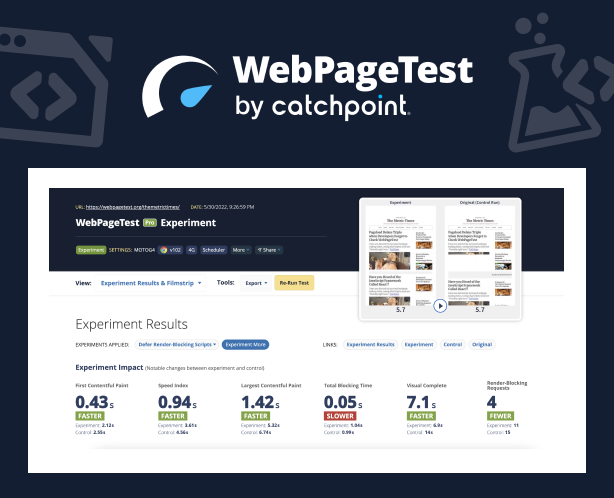
    Catchpoint this week expanded its open source WebPageTest performance testing suite of tools to enable IT teams to run instant tests that surface suggestions for improving overall web application and site performance.

    In addition, Catchpoint is now providing support for private tests, bulk tests and priority testing capabilities within the WebPageTest tool suite.

    Tim Kadlec, director of engineering for WebPageTest, said the goal is to make it easier for both developers and DevOps teams to experiment with how changes to applications and websites could improve performance using a capability that has now been added to the core suite.

    Identifying opportunities to improve performance typically requires tediously constructing manual tests over a period of weeks, noted Kadlec. Much of that effort is experimental in the sense that no one knows for sure if the tests being constructed will have a material impact on performance.

    The Opportunities and Experiments capability provides teams with a low-code tool for building tests based on a set of best practices that Catchpoint has defined. That approach makes it simpler to automatically generate and test tweaks that, for example, eliminate blocking scripts, optimize image rendering and minimize layout shifts. The result is optimization tests that show how their applications and websites could benefit from specific, actionable improvements without having to change any of the code that has already been deployed, said Kadlec.

    That’s a critical capability because it will encourage a level of experimentation that previously IT teams shied away from, simply because the amount of effort required to achieve an uncertain outcome was too high.

    It’s not precisely clear who is conducting these types of tests, as more responsibility for testing applications continues to shift left toward developers. The latest additions to WebPageTest make it easier for developers to conduct those tests without necessarily requiring help from a DevOps team, noted Kadlec.

    While there has always been a tremendous amount of focus on web application and site performance, the attention level has risen across organizations in the digital business transformation era. Many of the processes being implemented via web applications are extremely latency-sensitive. As more of those applications become routinely tested, the overall level of application performance should steadily improve.

    At the same time, the number of web applications and websites that most organizations are supporting also continues to expand. Most of those organizations are looking for ways to test applications without necessarily having to expand the size of the testing team or significantly increase the amount of time spent on testing.

    Regardless of the approach, it is apparent that testing is becoming more automated. The goal is not so much to eliminate the need for dedicated testing teams, but reduce the number of rote tasks that contribute to test avoidance in the interest of saving time. In theory, the more tests run—and the earlier they are run—the fewer issues that DevOps teams will need to deal with later.