Category: Doin’ DevOps

  • When IT Disaster Strikes, Part 2: Who You Gonna Call?

    When IT Disaster Strikes, Part 2: Who You Gonna Call?

    In Part One of this series, I provided a high-level overview of what an efficient incident response process entails from start to finish, including general framework for an incident response team. Now let’s delve a bit deeper into the role each person plays.

    In my experience, there are several core people who make up an effective incident response team. Regardless of the severity of an issue, it’s all about coming together, working through the problem and finding a solution quickly before the incident has a severe impact on your end users. Below is a breakdown of the most critical roles.

    Incident Response Structure

    The Incident Commander

    The Incident Commander (IC) runs the entire incident response process and acts as the single source of truth for what’s currently happening—as well as what’s going to happen—during a major incident. His or her primary responsibility is to drive the incident toward resolution.

    To start, the IC is responsible for helping teams prepare by establishing agreed-upon communication channels and training team members on best practices and procedures for communicating. When an incident occurs, the IC has to move quickly to jump-start the resolution process, getting everyone on the same communication channel and collecting pertinent information from each team member. After getting a sense of the situation and the plan of action to make the necessary repairs, the IC must delegate all repair actions and continue to stay abreast of updates to drive the team toward resolution and be a reliable authority on the system status for all stakeholders. Throughout the process, the IC is not responsible for taking repair actions; rather, the IC ensures they are assigned to the appropriate people.

    Following an incident, the IC assigns the post-mortem to an appropriate owner to help determine what went wrong and how it can be avoided in the future, as well as areas of improvement for the incident response team. This process includes creating a template immediately following the incident for team members to add their thoughts while still fresh, assigning the post-mortem after the event is over, and working with team leads to schedule preventive actions.

    So what makes a good IC? At a minimum, ICs should possess the following traits and skills: excellent verbal and written communication; high-level knowledge of how different services interact with each other (and their business impact); and the ability to assess the effectiveness of various tactics/strategies, make rapid decisions on courses of action and modify plans on the fly as necessary. The final, and possibly most important, characteristic ICs should have is gravitas. A good IC is not afraid to take command and get things done. He or she must be willing to kick people off a call to remove distractions—even if it’s an executive.

    The Deputy

    The Deputy is a direct support role for the IC. Deputies are expected to perform important tasks during an incident and should be trained as an IC as they may have to take over command at a moment’s notice. The deputy is expected to support the IC in a variety of ways, including bringing up issues the IC may not have noticed, such as keeping an eye on timers that have been started or circling back around on missed items. Deputies also act as a “hot standby” IC. Being an IC can be a cognitively draining role, and it’s good to “cycle out” during longer running incidents.

    Deputies’ responsibilities can vary, ranging from paging the right on-call engineers to managing the incident communication channels. They also can be in charge of contacting stakeholders to provide status updates from the IC. Deputies should be deeply familiar with incident response protocol, and possess organizational skills that keep things on track to allow the IC to focus on the incident.

    The Scribe

    Scribes are responsible for documenting the timeline of an incident as it progresses, making sure all important decisions and data are captured for later review. While the IC focuses on the problem at hand, it is critical for the scribe to capture an accurate timeline of events as they happen. This timeline will later be reviewed and analyzed during the post-mortem to determine how well the incident response team performed, and any additional impact that might not have been noticed at the time of the incident.

    In addition to recording any oral communication regarding the incident, the scribe must keep track of important data, events and actions as they happen via whatever channel of communication has been designated by the IC (Slack, email, etc.). Specific details the scribe should note include key actions as they are taken, status reports when one is provided by the IC and any key callouts during the call or at the ending review.

    Subject Matter Experts

    Subject Matter Experts (SMEs), sometimes called “resolvers,” are domain experts or designated owners of a component or service that is part of an organization’s software stack. When there is a problem with a service, an expert is needed to be able to quickly help the IC and deputy identify and fix issues.

    Typically the primary-on call at the time, the SME should be able to diagnose common problems with a given service, rapidly fix the issues found during an incident and concisely communicate the following in a report:

    Condition: What is the current state of the service? Is it healthy or not?

    Actions: What actions need to be taken if the service is not in a healthy state?

    Needs: What support does the resolver need to perform an action?

    The Customer Liaison

    Those of us in the technical weeds have a tendency to overlook the impact our work has on customers and our organization’s bottom line. The customer liaison is an important member of the team, as he or she is responsible for interacting with external stakeholders to keep them up to date on any IT incidents that may impact them. The customer liaison is typically a member of your customer support team and handles all outward communication, including one-on-one interactions, publicly facing updates on Twitter or StatusPage and the external message from the completed post-mortem. He or she also should relay any customer feedback to the IC throughout the incident response process.

    At a minimum, these are the roles that are vital to swift incident resolution. In future articles, I will break down details of the specific training involved for each of these roles, as well as specific examples of how I’ve seen them work together to resolve IT issues.

    About the Author / Eric Sigler

    Eric Sigler is the Head of DevOps at PagerDuty, helping protect its customers from the pains of downtime. Before his current role, Eric led infrastructure teams at Minted, Expensify, and the Missouri University of Science and Technology. Connect with him on Twitter.

  • Advancing DevOps with Diagrams

    Advancing DevOps with Diagrams

    The Application model can be incredibly useful to map out application features, planned changes and current flaws, and even for roadmapping. The model takes organizational time and effort, and can only be created and maintained when a universal language has been developed by a modeling team. The effort is well worth the cost, however, since it can lay the foundation for a better DevOps environment.

    The modeling team will represent various organizational backgrounds and must bridge gaps of understanding that are common between technical and non-technical personnel. The team also will include operations and development professionals so that collaborations produce not just deeper understandings, but also lay framework that meets, corporate, Dev and Ops needs from the beginning.

    Diagrams can be used by the modeling team to foster the understanding and creation of a universal language by adding more context to ideas and processes. Diagrams serve as a drill-down exercise and can be drawn on a whiteboard, sketched on a notepad or formalized with a UML tool.

    Diagrams become more technically correct as they are iterated on, and can be easily retained for future discussions. Further, the base of some diagrams often enable other types of diagrams that can be helpful to the development team (such as Class or ERD) and provide a level of technical documentation. They also provide a base of discussion for the modeling team to relay discussions back to their organizational units for feedback and improvement.

    Last, and perhaps most importantly, diagrams help to remove ambiguity that is inherent to narrative descriptions and discussions. Removing ambiguity is at the heart of the universal language and enables clear communication, a key tenant of DevOps.

    We can show this drill-down in diagramming by focusing on a small and simple operation: describing what happens when a new customer enters a banking system for a business loan.

    UseCase Diagram

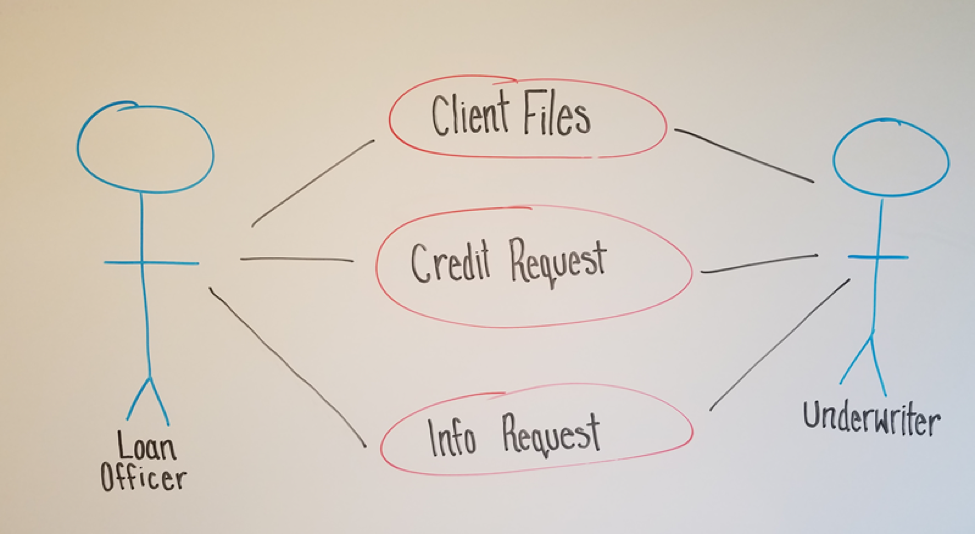
    A common place to start is a UseCase Diagram like the one below.

    The diagram shows a few key points of data:
    • There are two types of employees (actors) that are involved: a Loan Officer and an Underwriter
    • The Loan Officer and the Underwriter interact with three business elements: Client Files, Credit Requests, Requested Information

    This diagram might not seem very useful to those outside of the discussion, but it is the first step to creating more in-depth and useful diagrams.

    Activity Diagram

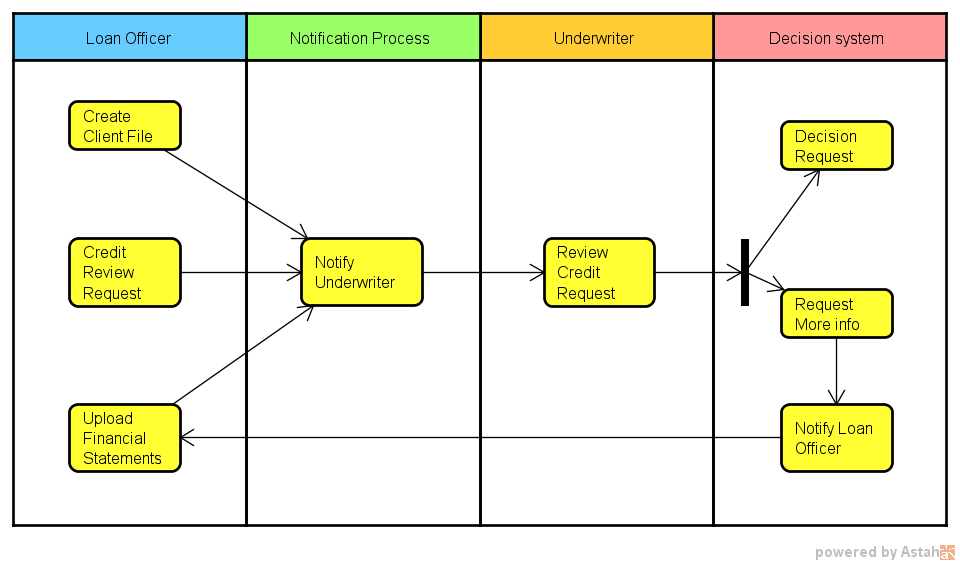
    A logical and easy step from a UseCase Diagram is an Activity Diagram. It takes many of the same concepts and expands them to a step-by-step order of procedures, which are established by discussion of current procedures as well as compliance and regulatory needs.

    By partitioning procedures into vertical “swim lanes” we now have an order to the processes as well as who or what is responsible for it.
    The first partition, labeled Loan Officer, shows three processes (Create a Client File, Create a Credit Request, and Upload Financial Statements) that they are responsible for before the system can do anything. All three pieces must be present before moving beyond this first position.

    Once those items are taken care of, the system then notifies the second Actor, the Underwriter, that there is a credit review for him or her to perform as well as where to locate the needed data.

    The Underwriter then decides whether the loan is approved. Whether this is a semi-automated process or done entirely by humans is beyond the scope of this diagram; all we need to know is that a decision happens next. What we can see is that the Underwriter has two options. He or she can:

    1. Decide on the loan (approve or deny—again, beyond the scope), at which case the system takes over from there.
    2. Request more information from the Loan Officer (perhaps the wrong files were uploaded or more data from the client is needed). The system would then notify the Loan Officer and the process starts over.

    Activity Diagrams are useful for documentation because they start to add structure to the overall business process. They also start to define which processes are:

    • Managed by humans
    • Managed by the application being developed
    • Represent a system that the application will interact with, and operations will need to secure

    Even if not 100 percent technically correct (as our sample isn’t entirely correct), they still represent information in a meaningful way that anyone with little or no guidance can understand.

    Data Flow Diagram

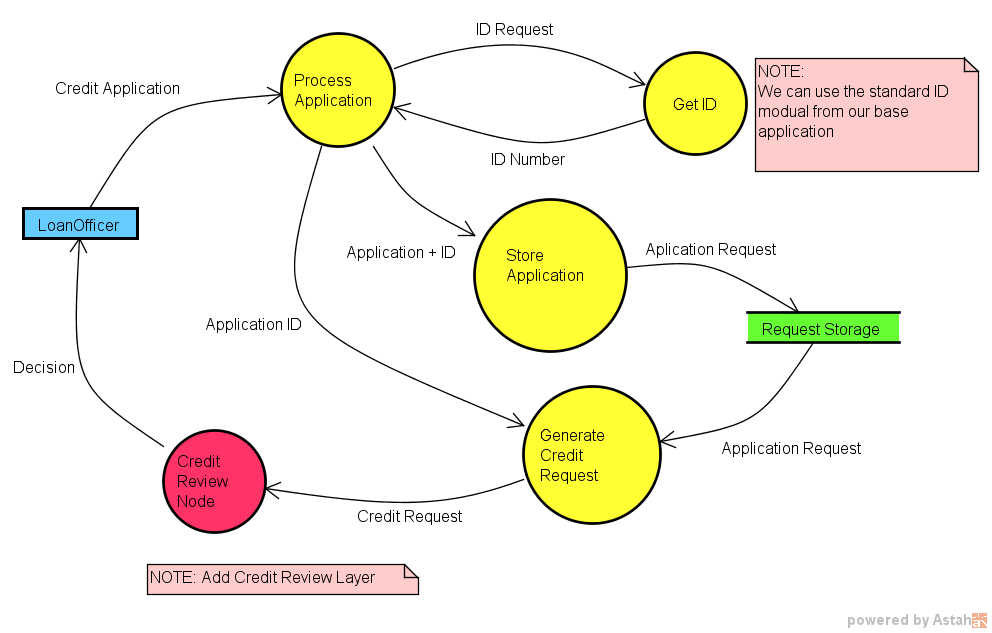
    With Data Flow Diagrams (DFD) the diagrams start to map out the system and procedures that happen and the flow of data. DFDs, which are more involved than the other diagrams so far, become keenly useful in showing how different processes interact. Even though DFDs become more detailed as more layers are added, they are still understandable and explainable to any member of the modeling team no matter the background.

    Operations teams often find them helpful since they map out when sensitive data may be accessed or stored. In our example, things such as corporate tax returns will be stored and accessed; there obviously would need to be some security measures implemented to ensure only those with clearance can see them.

    Discussions are key when creating Data Flow Diagrams because it would be very rare for an individual to have all of the knowledge needed to create one without questions and answers. Based on our current diagrams and a few questions such as:

    • Are Client IDs manually created, or is it part of a system?
    • Do requests go to specific people or are they delivered via queue?
    • Is the credit decision part of the original application or saved as a separate file?

    A DFD can be drawn up:

    The DFD may look complex at first, but when taken piece by piece it is quite simple and understandable with very little (if any) explanation. It also can be helpful to the Dev team because it isolates specific processes at a granular level.

    For example, the Dev team may see the process “Get ID,” know that it’s a system process (non-manual) and realize that they already have a module like that in an existing application that they can use for this application.

    Of course, this would be one of many DFDs created during an Application Model, which is another key advantage of using DFDs. Data Flow Diagrams can be layered, starting with a context diagram and working down granularly to the smallest process needed. This layering also naturally helps to break down the application to discreet parts, helping both in creating different parts of the Application Model as well as having natural starting and stopping points for conversations.

    With the idea that there can be many diagrams used during these discussions, it can be useful to use a modeling tool to easily create, edit, layer and store the diagrams for future use.

    Other Diagrams

    Of course, these are only a few diagrams, but they demonstrate how a process of diagramming can be useful to help a modeling team communicate. While a team could start with a Data Flow Diagram, it would be a much more difficult process. However, by walking through a UseCase and an Activity, it becomes easier since it breaks a system down into digestible parts.

    It also provides the modeling team easy-to-understand diagrams when they go back to their business units. They can explain the Application Model and get quality feedback, as well as suggestions to be added into the Model.

    These diagrams also can be helpful for teams as a starting point for documentation. The DFD is a good starting point for:

    • The Development team to create a detailed class and component diagrams that outlines the application architecture.
    • A deployment diagram for Operations to note which data to isolate behind a firewall with limited access.

    While no process of diagramming can create a universal language by itself, diagrams are supremely helpful to create team clarity. They also serve as a memory of Application Model discussion so that human error and memory can be reduced. Last, by helping to eliminate ambiguity among the modeling team, they help drive better communication that is part of the essence of DevOps.

    Note diagrams were created in Astah Professional and used with permission. To learn more about Astah and modeling please visit the company’s website.

    About the Author / Scott Reece

    ReeceScott Reece is a huge fan of the greater visibility and communication enabled by DevOps. As a Friend of Astah Scott has been successfully closing project communication gaps by using models and team building. With more than 10 years of project management experience, Scott currently serves as a Partner Director at Inedo.

  • The Tester: Saving Your Soul in a DevOps World

    The Tester: Saving Your Soul in a DevOps World

    Software testers have seen their careers go through some ups and downs in recent years. In the days of Waterfall, the tester’s job was clearly defined. Like other functions of software development and delivery, testers lived in a neat and tidy universe, testing features and design, finding bugs, sending back feedback to developers for correction and eventually, passing off code to the production people to work their magic. Testers had discrete roles with strong value propositions in the software organization.

    Then, Agile came along and new teams were created, lumping together developers, QA and Ops people for the sake of better collaboration and efficiencies. This began to create some confusion regarding who was responsible for what, when.

    DevOps brought order to the process, adding automation to every step, speeding cycles and reducing bottlenecks in a highly standardized, streamlined approach. In the continuous delivery pipeline, each step of the process creates its own contract for software quality—and that’s good.

    Development teams still value high quality, which customers demand. Yet in some DevOps circles, there’s been talk that testers aren’t needed much anymore. They bring bottlenecks to the process, forcing developers to work outside of the DevOps toolsets for code management and testing to respond to a defect ticket posted by the tester in an issue tracking tool.

    Eliminating that layer of process helps developers be as efficient as possible using continuous integration (CI) tools, proponents say. As well, some developers are more than comfortable handling testing, using test-driven development (TDD) methodologies.

    On the other hand, there’s faulty thinking here. Testers, whether deploying manual or automated testing methods, provide a valuable second set of technical eyes. Testers have a solid take on the user experience perspective, not just the fact that the code executes correctly.

    This human behavior and design insight is critical to the ultimate success of a software application. Finally, not all developers want to spend time testing nor have the skills to do so outside of unit testing.

    Moving forward into this new age of DevOps, testers play a vital role. The distribution of the tester into each phase of development (rather than at the end) is necessary to maintain both high standards of delivery and to keep communications fluid between different parties.

    Here’s how testers can contribute to DevOps teams:

    Testers need to be included in the continuous integration process

    Developers might be automating their unit test coverage, but they don’t replace all the test activities a tester can bring to the table. There are still other types of functional and non-functional test activities that must occur to validate the health of the product. Instead of transferring more testing responsibilities to the already overworked developer, testers can integrate their processes and systems with those of developers.

    Although there are version control tools (GitHub) and feature tracking systems (JIRA) to help developers, testers are often disconnected from these central tools. To connect with developer tools, testers can start creating and versioning their test cases within those development platforms. By doing so, testers can radiate feedback to the development team on issues to fix quickly through source code check-ins and in a way that won’t disrupt the normal flow of work.

    If testers can learn to use the DevOps tools developers love, much of the conflict goes away.

    Testers should increase their adoption of test automation, no matter their skill level

    Testers can learn newer test automation driven frameworks, especially those that help with transitioning manual test cases into automated scripts that can be reused, such as Cucumber or Gauge.

    For example, Gauge allows testers to write test specifications in Markdown, which provides a simple transition to automate your favorite programming language. These newer tools help testers transition to test automation despite not having experience writing tests this way—a common issue for testers working in DevOps.

    A growing number of test case management providers are starting to integrate their test design and execution around these automation frameworks to make the manual to automation transition smoother.

    Although developers might have automated unit test coverage, they struggle with developing functional and user acceptance automated tests. Testers can provide value by suggesting to the development team which are the best areas for test automation based on common issues and their unique knowledge of the application.

    They also can recommend areas for exploratory or manual test execution, depending on application complexity. This is especially helpful when teams starting down the path of DevOps do not have a regression test suite built that can be triggered through CI.

    Testers should focus on quality over finding defects

    Developers often complain that when testers find defects, it slows down their development processes. On a fast-moving Agile or DevOps team, filing bugs in a defect or issue tracking system is a total waste of time and creates unnecessary clutter.  Developers want instant feedback on code that’s broken and the related feature, rather than seeing another defect ticket they must open and close upon fixing.

    Therefore, testers should be giving feedback directly to the features that are being developed within a branch of code. They can do this through adopting tools that facilitate “ChatOps,” such as HipChat and Slack, which can integrate with version control systems. Testers can also provide direct feedback through a commenting system on the feature itself.

    With the advent of Agile and DevOps, which emphasize speed and frequent releases, testing is more important than ever in software development. By making some slight modifications to how they work and the tools they use, experienced testers can add considerable value to these teams by providing another layer of quality checks and a holistic view of an application’s performance and usability.

    About the Author / Ryan Yackel

    Ryan Yackel is Director of Product Marketing at QASymphony. He is responsible for all marketing activities around product releases, including development of strategic messaging. Ryan also helps to train the Sales teams on key value propositions for new products and features, and he provides customer feedback to the product team for roadmap initiatives. He can be found online at Twitter and LinkedIn.

  • DevOps is Dead! Long Live DevOps!

    DevOps is Dead! Long Live DevOps!

    Some are seekers on the quest for the one, true DevOps. They were misled. I’m here to say: Give it up. Whatever you find at the end of that journey isn’t it. That one true DevOps is dead. Dead and buried. The search is pointless or, kind of worse: The search misses the point altogether.

    DevOps began as a sort of a living philosophy: about inclusion rather than exclusion, raises up rather than chastises, increases resilience rather than assigns blame, makes smarter and more awesome rather than defines process and builds bunkers. At any rate, it was also deliberately never strictly defined.
    In 2010, it seemed largely about Application Release Automation (ARA), monitoring, configuration management and a lot of beginning discussion about culture and teams. By 2015, a lot of CI/CD, containers and APIs had been added. The dates are rough but my point is: That’s all still there but now DevOps discussions today also include service design and microservices. Oh, and the new shiny going by the term “serverless.” It is about all of IT as it is naturally adapting.

    And this emergent, inclusive content is possible because it’s always just people talking practices and sharing how to optimally do things. Infra as code, “cattle, not pets,” webscale, version and automate all the things, horses not just unicorns, etc. Lots of conversations, insights sharing, presenting.

    Good times.

    There are more DevOps Days naturally occurring globally this year in 2017 than ever before. Note I wrote “naturally”—DevOps was always an organic movement, a grouped (and, whoa, global) response to increased app release pressures and the desire to select for teamwork over turf wars.

    So we started with DevOpsDays and those blossomed all over. Then we got the Phoenix Project, the DevOps Enterprise Summit (now in US and EU formats!), and more great books including “Infrastructure as Code,” “System Reliability Engineering” and, finally, “The DevOps Handbook.” It’s all solid, informative stuff and I believe as a community we’re smarter, happier, and far more effective because of it.

    Even those naysayer analysts—you know who you are—have come around to accepting the DevOps goodness.

    DevOps lives when we continuously adapt to managing emergent properties spawning system-level feedback loops in our IT and across our businesses. To do better, faster, higher quality things to delight the customers.

    Any discussion of DevOps is truly about continual IT innovation adaptation because the rate of IT change is also changing. Fast and faster. All that means starting with the roots like CLAMS and moving forward with containers and embracing the journey to quickly delivering better customer experiences.

    So, the concept of DevOps is evolving, just as our understanding of what’s needed is evolving.

    — Christopher Little

  • When IT Disaster Strikes, Part 1: Resolving Incidents

    When IT Disaster Strikes, Part 1: Resolving Incidents

    As a developer or operations team member, there is nothing quite like the dread you feel when you hear the familiar ringtone of your on-call page at 3 a.m. Being on call means that you may be contacted at any time to investigate and fix issues that arise for the system, but that doesn’t mean you can’t get ready beforehand. There are steps your team can take to prepare for incidents and streamline the process of resolving them, leading to fewer 3 a.m. wake-up calls and better-running software and services.

    Below is an overview of a proven approach your organization can take before, during and after an IT incident to reduce headaches and increase hours of sleep.

    Before: Define the Who, What, When of Incidents

    The first step in any incident prevention and orchestration process is determining how your organization defines an incident. Generally, this is done by defining the varying degrees of severity, with lower-numbered severities more urgent. Operational issues can be classified at one of these severity levels. As a general rule of thumb, if you are unsure which level an incident is, treat it as more severe to ensure it is dealt with timely.

    In addition to aligning your team on defining an incident to communicate the sense of urgency involved, there are several main roles that should be designated ahead of potential IT issues. Certain roles have only one person per incident, while other roles can have multiple people assigned to it. It’s all about coming together as a team, working the problem and getting a solution quickly. Generally speaking, developer, IT Ops and DevOps teams must designate the following roles:

    • A point person or “Incident Commander”—someone who will drive the process forward, but not be involved in the actual remediation;
    • Someone to document a timeline of an incident as it progresses for future analysis and learning and to act as a backup for the point person;
    • One or more subject matter experts who are deeply familiar with the specified component or service and who will take the remediation steps; and
    • One person to manage customer support and communication during and after an incident.

    During: Keep Calm and Communicate

    If you are alerted of a major incident, don’t panic. The first step is to join a previously agreed-upon method of communication to be used during incidents to ensure that communication can run smoothly throughout the resolution process. The incident commander (IC) and the IC deputy should announce the issue in appropriate communication channels and lead the process, and it is best to defer to the subject matter experts assigned to the incident to ensure non-essential communication is kept to a minimum.

    The steps you take to prepare for an incident have a significant impact on how quickly you are able to move when disaster strikes. If incident prep has been done correctly, each member of the incident response team will have a very specific role and set of responsibilities carved out, ranging from someone to provide regular updates in the chat client to someone to modify your company’s status page to keep customers informed. By having these roles defined beforehand, you don’t have to spend valuable time during an incident figuring them out instead of fixing the problem. In a future article, I will break down each member of the incident response team’s specific role and the steps they should follow during an incident.

    After: Conduct a Post-Mortem Without Finger-Pointing

    For every major incident, you should follow up with a post-mortem—a blame-free, detailed description of exactly what went wrong to cause the incident, along with a list of steps to take to prevent a similar incident from occurring again in the future. The incident response process itself should also be included as part of the review.

    As the IT incidents we deal with daily become increasingly tied to larger organizational success and business objectives, streamlining the resolution process is a must. According to a report from IDC, the average hourly cost of an infrastructure failure is $100,000 per hour, and the average cost of a critical application failure per hour is $500,000 to $1 million. In future articles, I will break down the varying roles on an incident response team, specific steps to follow during an incident, a tried-and-true template for conducting a successful post-mortem and more, to ensure effective incident prevention and resolution.

    About the Author / Eric Sigler

    Eric Sigler is the Head of DevOps at PagerDuty, helping protect its customers from the pains of downtime. Before his current role, Eric led infrastructure teams at Minted, Expensify, and the Missouri University of Science and Technology. Connect with him on Twitter.

  • Using DevOps for Non-Code Artifacts

    Using DevOps for Non-Code Artifacts


    Figure: Linking various aspects for an article that can be connected through the “DevOps way of working”

    Innovation lies at the intersection of two or more otherwise-non-related areas. A very intriguing such instance I recently read was of Charles Babbage and Ada Lovelace setting up the foundation of the modern programmable computer by taking the punch card from the loom industry and applying it to their analytical machine (see: Wikipedia or refer to the book, “The Innovators“). There have been numerous cases where one industry has taken up the best practices of another industry and aligned it to work well in a new use case. We don’t have to go far to look at such examples; the IT industry has picked up a lot of manufacturing industry best practices such lean and Kanban.

    Today a lot is being talked about DevOps in the IT world as the new model of software development and support. The DevOps way is being adopted by various teams and everybody is exploring how they can adopt it in their environment. Can we break down the “DevOps way” and extend its principles to some other areas of work?

    DevOps in its simplest definition serves one purpose: Enabling businesses to reach their consumers faster with innovations and new offerings, enabled by tools and automation. By incorporating lean principles, automating various steps and bringing all the stakeholders closer (biz-dev-test-sec-ops), the life cycle is aligned to release continuously. The main objective is to have a releasable version always ready to be pulled, rather than wait for long periods before the next increment is available. That way, releasing it for the end users becomes a simple business call and a non-event.

    How can we extend the DevOps principles to the benefit of other business functions?

    What is the natural process that comes to the mind for completing an assignment? Does it look some variety of the below figure?

    Figure: Generally followed process model for completing an assignment from start to complete. There might be one or two iterations of the output, that means feedback provided once or twice. Low collaboration between stakeholders results in sub-optimal output or significant rework and wastage.

    Some shortcomings in the above process are:

    • There are no defined interim timelines or, even if defined, are not tracked among other competing priorities
    • Feedback is received only once or twice in the whole cycle
    • Approving sub-par quality output to close in time
    • Results in a high cost of change because feedback is received on near the complete version
    • Generated artifacts are not maintained properly, thus reinventing the wheel every time

    Accommodating slight changes in the above process can offer significant improvements overall. The first step is to make the “outcome” at the center of all the other things (instead of “output”). By keeping the end result (outcome) at the center and aligning all other things around it, we ensure that the objective is clear.

    Figure: Suggested process flow model keeping outcome at the center and completing the assignment iteratively and continuously. Output can be picked up when all the stakeholders are satisfied. This model gives an opportunity to start socializing a work-in-progress version and get continuous feedback.

    What I am saying here effectively is that we put the entire focus on the outcome and make the process “iterative” and “continuous.” “Iterative” essentially means that you don’t aim to complete the work in near entirety before going for a review. You break down the task into logical steps which will incrementally show the reviewer the direction or approach you are taking toward the task completion. And continuous refers to the lean flow, enabling the outcome to not get stuck at any stage, and continuously being aware of and removing bottlenecks.

    Make every important outcome a time-boxed event and work toward its closure in an agile manner. One of the best ways to complete something proactive is by creating self-imposed deadlines. Agile (or scrum, specifically) provides a systematic way of putting deadlines in the whole life cycle (McKinsey Article – “Making your marketing organization agile: a step-by-step guide“).

    My belief is that the same concepts can be extended to any important assignment for effecting the outcome.

    Figure: Agile Scrum process which suggests maintaining the requirements in a backlog that is always kept prioritized. Then work in an iterative manner, generating output incrementally toward an ever-improving state, incorporating feedback continuously.

    The key thing to observe here is that sprint duration and ceremony frequency can be adjusted to make them much more frequent than the recommended one to four weeks.

    Some people consider agile-scrum unnecessary. Well, the concept of Minimum Viable Product (MVP) and creating a “continuous” flow in the development of work item can be brought in irrespective of whether a team follows an agile-scrum approach or not. I have drawn that parallel and created a universal model for any kind of artifact (non-code – such as marketing flyer, legal contracts, product documentation, customer presentations, reports etc.).

    Figure: A model for following the DevOps best practices of continuous feedback, collaboration, automation and continuously improving outcome in any type of work environment or team.

    Here the requirements can come from any source internal or external to the organization. The “source content management” should become the single source of truth for any final artifact; it will also be the versioning system to maintain a record of historic artifacts. The orchestration platform could be an advanced CMS tools, a utility application developed in-house or a simple cloud storage tool such as OneDrive, Google Drive, Dropbox or even plain file systems.

    There will have to be a set of process and policies that support this model. I have appended an indicative list below.

    Collaboration sits at the core of the entire model. Unless people come together and share continuous feedback, the DevOps way of working cannot succeed. The lifecycle stages are explained in the next section, but the main idea is to prototype fast, get continuous feedback, fail fast and always maintain a releasable version ready. Feedback should become an integral part of the entire system. Feedback captured internally or from external audience should be captured and stored along with the artifact version for which the feedback was received. The next time the iteration starts, because the artifact is a periodically updating work item (marketing campaign or sales pitch material) or is being enhanced (website content or product documentation), the latest artifact version along with its feedback should be taken into consideration.

    The lifecycle stages for good-to-have artifacts are presented below. These stages could be slightly different than the one indicated in the above model to suite your requirements:

    • Dev (Development environment): Individual contributors local machine. People work on their picked stories (as in agile: a broken down unit of work). This could be an individual or a group of people.
    • Int (Integration environment): All the individual pieces are stitched together to form one coherent outcome. There should be an artifact ‘owner’ (as in agile: product owner) identified, who will do this work on his system. This has scope for automation. It will benefit if done collaboratively.
    • Test (Testing environment): Receive review and feedback by the approver (could be the “owner” or business leader who gave original requirements). This stage has a scope for automation. From this stage onward, the content resides centrally on the source content management system.
    • Pre-Prod (Pre-production environment): Approved and finalized version rests here until sent for final audience’s use.
    • Prod (Production environment): Only those artifacts that are for end users are maintained here (published news item, signed contracts, delivered customer pitch, etc.). Maintain the version-controlled artifact. This stage also becomes the single source of truth for all artifacts. Maintain historic data for record-keeping. Market feedback is captured and stored along with each version.
    • Release & Ops Mgmt (Operations): The purpose of this stage is to ensuring periodic cleanup activities in the source content management system. Ensure periodic enhancements on the content and maintenance of production copies.

    Artifact lifecycle policies, to start. You may identify and add more as per your requirements:

    • Identify owner for each artifact. She would become approving authority for the content.
    • Prototype & fail fast (MVP). Follow agile methodologies as much as possible and adjust sprint duration for different content types.
    • Make feedback your bible. This is necessary for continuous improvement. Record the feedback and act on it.
    • Collaboration should be at the heart of the entire process. All involved individuals should be part of the entire artifact life cycle.
    • No e-mail content should ever be accepted for review, approval or final use. E-mail can be sent with a link for source content management.

    The purpose of this article was to draw a parallel with non-code artifacts so that DevOps philosophy can be understood with a non-development angle. It’s my hope that it is evident that DevOps is not something that can be adopted overnight, and it’s not just about implementing tools. People have to be aligned and trained for the new ways of working. It entails a lot of cultural change to be initiated. And finally, the benefits are better visible as the scale grows; however, small steps must be taken at the beginning to identify a model that is fit for your specific landscape.

    This is the first iteration of this article and it will surely undergo improvements. Feedback and ideas are welcome in comments below.

    About the Author / Kunal Gupta

    Kunal Gupta is Product Owner in IG Group for their Payments team. Prior to this Kunal managed AgileBase, a DevOps platform developed in and by Wipro, a global IT major. Kunal played a key role in defining and streamlining the roadmap for AgileBase platform, its pricing and positioning to global customers. Kunal has diverse experience in Technology Product and Services Industry spanning across Product Management, Presales, Sales, Campaign Management and Demand Generation. He has a worked for major customers in financial, technology, and manufacturing industry across U.S. and European markets. Connect with him on LinkedIn.
  • The Elusive Definition of DevOps

    The Elusive Definition of DevOps

    How do you define DevOps? If you went out and asked IT professionals at other organizations, could you guarantee their answer would be the same?

    In most cases, the answer to this question is no. DevOps, despite its growing popularity, still lacks a widely agreed-upon definition. There are a few fundamental principles that appear consistently in most explanations of DevOps, such as efficiency, collaboration and improved communication. However, when it comes to the details and how exactly DevOps can be implemented in the software delivery process, differences abound.

    Recently, Clutch, a B2B research firm, conducted a survey of IT professionals to gauge knowledge of and opinions on DevOps. The data backs up the notion that a broad definition of DevOps remains elusive—but that fact shouldn’t hold organizations back when it comes to implementing DevOps.

    Clutch gave respondents four distinct definitions from separate organizations and asked them to pick the one they think best defines DevOps.

    Wikipedia’s definition, recorded in November 2016 and since altered, won the largest percentage at 35 percent. It read, “DevOps … is a culture, movement or practice that emphasizes the collaboration and communication of both software developers and other [IT] professionals while automating the process of software delivery and infrastructure changes.”

    The definitions by Rackspace, Hewlett Packard Enterprise and Amazon Web Services each garnered significant support as well, at 24 percent, 21 percent and 20 percent, respectively. Their definitions emphasized different points or excluded elements of Wikipedia’s definition and you can read them in Clutch’s report here.

    The organizations’ names were left out of the survey and the definitions’ presentation order was randomized to discourage bias.

    No definition won a majority and Wikipedia’s definition leads by only 11 percent. We believe that if there was a “correct” DevOps definition out of these four, then it would’ve gathered more support.

    Why Is a Definition So Tough?

    The abstract nature of DevOps’ definition may be rooted in the movement’s history.

    The idea of combining development and operations teams stems from principles in the Agile software movement, which emphasizes greater communication and collaboration within development teams. By breaking down silos on the operations side, DevOps further streamlined the delivery of product to user.

    If the beginning of the DevOps movement could be pinpointed to a specific moment, it would most likely be a talk Flickr employees John Allspaw and Paul Hammond gave at the 2009 O’Reilly Velocity Conference in San Jose, California, titled, “10 Deploys a Day: Dev and Ops Cooperation at Flickr.”

    Belgian IT consultant Patrick Debois, who had already been frustrated by the issues between development and operations teams, watched the talk online and, with encouragement by American software developer Andrew Shafer, created the first “devopsdays” conference in Ghent, Belgium. The movement (and the term “DevOps”) took off from there, gaining traction worldwide.

    DevOps’ grassroots growth and expansion likely contributes to the lack of a singular definition. The concept was not created by a single organization, nor solidified by a written manifesto, like the Agile movement. In fact, a manifesto may have hurt the DevOps movement, writes Christopher Little on devopsy.kinsta.cloud: “If you have a manifesto for something, then all conversation in the domain will, rather quickly, go back to the manifesto for resolution instead of everybody working together. That’s not handy in an ever-fluid, often on-fire, scale-up fast, resilience-oriented, rapidly changing and evolving IT situation.”

    So, DevOps’ history possibly explains its undefined quality, but that could be its strength.

    Who’s Right?

    In response to Clutch’s data, cloud experts gave differing opinions regarding Wikipedia’s definition.

    David Hickman, vice president of Global Delivery at Menlo Technologies, said, “I think that the word culture is misused. It’s more of a methodology trend than a culture, which pertains more to social elements of organizations and how people relate to each other from a professional and business perspective.”

    Brian Dearman, solutions architect at Mindsight, agreed with the culture aspect: “It being a cultural movement is true. Fifteen to 20 years ago, DevOps consisted of two separate things, with operations and development consistently complaining about each other. The culture is being changed, removing the animosity between each side.”

    Meanwhile, Nick Martin, principal applications development consultant at Cardinal Solutions and organizer for the CloudDevelop Conference, criticized Wikipedia’s emphasis on automation: “The definition may be a little over-prescriptive in talking about automating processes. DevOps can be done without such a strong focus on automation. It’s ultimately about collaboration and getting groups working together in order to solve the same problems.”

    Conclusion

    So, DevOps lacks well-defined and universal guidelines. Should that stop you from implementing it in your organization?

    Absolutely not. DevOps’ benefits are clear for most organizations that implement it. However, it’s imperative to clarify what DevOps should mean for your organization before you start implementation.

    The concept of DevOps is broad, but most everyone can agree that increased efficiency, collaboration and communication are positive changes. However, making a point to hammer out the details with your team before implementation is important. Ideas such as increased communication are futile if every employee has a different approach to achieving them.

    Choose DevOps, but choose it thoughtfully.

    About the Author / Riley Panko

    Riley Panko is a Content Developer and Marketer at Clutch, a Washington, D.C.-based research, ratings and reviews platform for B2B services. She conducts relevant research that aims to help consumers enhance their business and select the services and software best-suited to their needs. Connect with her on LinkedIn and Twitter.

  • The State of DevOps Adoption and Trends in 2017

    The State of DevOps Adoption and Trends in 2017

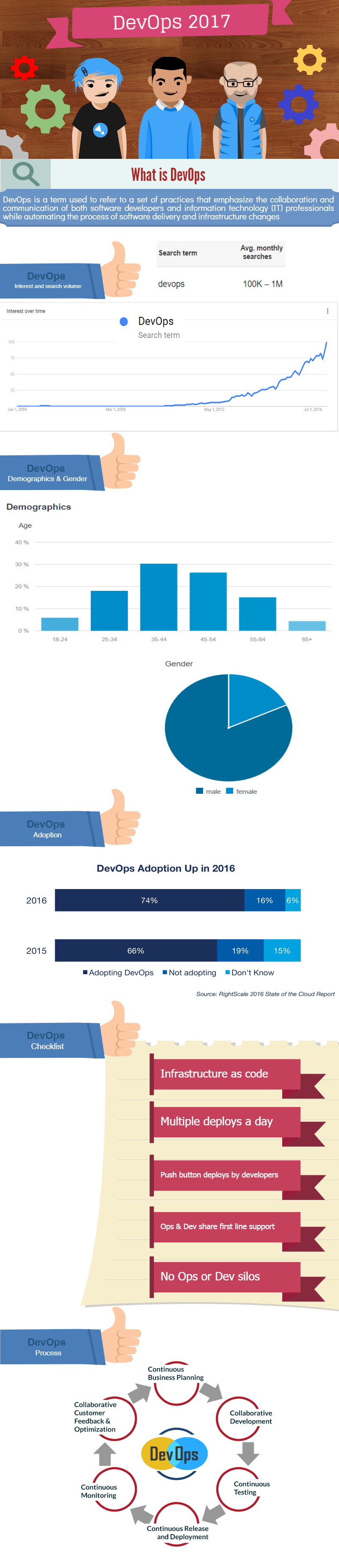
    DevOps has come a long way, and we see a tremendous increase in adoption in the recent years. To outrank your competition and be ahead in the growth curve, it has become an essential element for software-powered organizations. DevOps has taken a center stage in the software development field with no signs of leaving.

    Below is an infographic of DevOps and some of the trends we see happening this year in DevOps:

    DevOps trends in 2017

    Sources:

    http://www.rightscale.com/blog/cloud-industry-insights/new-devops-trends-2016-state-cloud-survey

    https://www.storybase.com

    slideshare.net

    https://en.wikipedia.org/wiki/DevOps

    Google.com

    7 DevOps Trends

    1. DevOps will be the mainstream and garner a lot of attention; hence, 2017 is going to be the “Year of DevOps.”
    2. Along with DevOps, the three C’s—Continuous Integration, Continuous Deployment, and Continuous Delivery—are going to gain a huge momentum.
    3. A number of new DevOps automation tools will be released that change the way we do software development.
    4. “Containerization” also will be in the limelight.
    5. Many software firms will move to a microservices architecture.
    6. Automation and continuous testing will become more popular—and more important.
    7. Must-have tools and platforms including Docker, AWS, GitHub and JIRA will become even more popular within developer zones.

    The Names to Know

    Below are the names of the top DevOps experts you need to follow:

    Name Twitter Profile Who is He/She Klout Score Website
    patrickdebois https://twitter.com/patrickdebois bridging the gap between creativity and technology with a #devops mindset; eternal researcher and pragmatic implementor; cto @townheroes; started @devopsdays 50 http://www.jedi.be/blog/
    Avi Cavale https://twitter.com/avinci ceo @beshippable, wildlife photographer, scotch lover 50 https://app.shippable.com/
    Kris Buytaert https://twitter.com/krisbuytaert Everything is a Freaky #Devops Needs Sushi Problem, Open Source, Infrastructure as Code, Consultant, Speaker, Author, Organiser of #devopsdays, #cfgmgmtcamp 53 https://about.me/krisbuytaert
    Gene Kim https://twitter.com/realgenekim DevOps enthusiast, The Phoenix Project co-author, Tripwire founder, Visible Ops co-author, IT Ops/Security Researcher, Theory of Constraints Jonah, rabid UX fan 64 http://www.realgenekim.me/
    Jez Humble https://twitter.com/jezhumble Co-author of Continuous Delivery, Lean Enterprise, DevOps Handbook; CTO devops-research.com, lecturer @BerkeleyISchool. PGP: https://keybase.io/jezhumble 63 https://continuousdelivery.com/
    Gareth Rushgrove https://twitter.com/garethr Software developer, occasional sysadmin, general web, programming and technology geek and curator of Devops Weekly. Engineer at @puppetize. @gdsteam alumnus 56 https://www.morethanseven.net/
    Denise Dubie https://twitter.com/ddubie Strategic Content Creator @CAInc, editor/writer/techie focused on App Economy, DevOps, Mobility, ITSec.& Mgmt., Cloud; former Network World/IDG tech journo. 50 https://www.ca.com/us/rewrite.html
    Sanjeev Sharma https://twitter.com/sd_architect #DevOps #Agile #Cloud #TechSales #CTO #Architect #Author – #DevOpsForDummies #Blogger #Inventor #Disruptor #IBM #DistinguishedEngineer. 52 https://sdarchitect.blog/
    Donnie Berkholz https://twitter.com/dberkholz Research director for development, DevOps & IT ops @451Research. PhD biophysicist. Open-source OG. Emerging tech, craft beer, and zeroth-world problems 59 https://451research.com/analyst-team/analyst/Donnie+Berkholz
    Nathen Harvey https://twitter.com/nathenharvey VP, Community Development at Chef 57 http://nathenharvey.com/
    Damon Edwards https://twitter.com/damonedwards DevOps, IT operations, and improving how businesses operate is my thing. Rundeck is where I work. 49 https://www.rundeck.com/

    We hope DevOps will be a rock star in 2017 and continue to rule the software industry.

    — TeamShippable

  • Swarms: Adapting Guilds To Scale Agility

    Swarms: Adapting Guilds To Scale Agility

    In my first article in this series, “Using Guilds to Combat Information Silos,” I reviewed the adoption of guilds at xMatters. As our company has grown, we’ve used guilds to keep critical information from languishing in silos—as often happens when an organization scales. Guilds have helped our engineers apply their creativity and critical problem-solving skills to other channels and contribute to areas outside their normal scope. It’s a win-win situation for everyone who participates—and especially for the company.

    Implementing guilds began as a grand experiment. We quickly learned a lot about what enhances or hinders a guild’s success, making adjustments and adding a necessary dash of protocol along the way. But, as is the case with any growing organization, new needs and pain points challenged us to adapt and tackle them. One attempt to solve a critical problem led to an entirely new team model: a body we call the Swarm.

    The Swarm arose as a result of key changes in our release protocol. We used to be very focused on getting new features out the door as fast as we could. As it turned out, many of our customers prefer a more predictable schedule. So we gave our customers  flexible options by maintaining continuous delivery of code to production, with flags to stage larger features or more visible changes. Now, customers who wanted more predictable updates could opt for a quarterly release model while others could continue to access features as they became available and were being iterated on.

    While the quarterly release model improved our rhythm for customers, it also created stricter deadlines. A project that just missed a quarterly release could get delayed by almost another full quarter before our customers could start using it. Throwing more engineers at a problem doesn’t necessarily solve it faster—but, being the engineers we are, we thought about ways to parallelize the problem.

    We knew that guilds were very good at collaborating around a shared problem, so we adopted temporary guilds, which “swarmed” around a shared problem, completed work at an accelerated pace and disbanded. Centered around a specific initiative with a definitive start and end, multiple teams from Dev to Ops collaborated to complete a defined project. For instance, we might form swarms to create new product features, and their lifetime would span a finite number of sprints across multiple teams until completion. Due to its nature of focusing on new product features, swarms differ fundamentally from Guilds in that they are typically not self-forming; each one is an entity intentionally designed for a specific purpose.

    We began our swarms experiment with a large architectural change to roll out a new format for our customer hostnames, which involved six Engineering and Ops teams. We realized immediately that this would be an incredibly challenging undertaking on our tight deadline. A slew of teams was working on different stacks in different programming languages, so there were many competing visions and different contextual understandings of the end goal. It became very apparent that the swarm could not be left to operate in a completely flat hierarchy, as a guild usually does. We needed a leader to help ensure there was no duplication of work, things weren’t falling through the cracks and necessary dependencies were completed in the scrum storywriting between teams.

    Having someone take care of all the logistical problems is one thing, but we realized that in-person communication between all the teams in the swarm is absolutely necessary. We tried staying in the loop with each other by defining a process of posting updates from each team in our swarm’s Slack channel, but this was not enough to keep the project on track. Mattius, one of our very talented operations leads, initiated regular in-person meetings across all the teams, which led to far greater clarity. It was absolutely crucial to have all of the teams together and face to face on a regular basis.

    In the end, swarming on this massive endeavor allowed us to get the project delivered a week before the deadline. It was a challenging and imperfect first run, but it absolutely paid off.

    I leave you with these three recommendations:

    1. Create each swarm with a clear purpose and deadline;
    2. Have a leader to enforce consistent communication; and
    3. Have regular face-to-face interactions.

    The lessons we learned were invaluable for refining (and continuing to refine) our approach to tackling projects for faster release, and we’re continually working to improve and enhance this model. Good luck with all your future swarms.

    About the Author / Nick Fletcher

    Nick Fletcher, Engineering Manager at xMatters, started designing and developing websites back in 1998, when the World Wide Web was the Next Big Thing. In the time since that first website, he’s mastered all the aspects involved in creating great products: design, development and strong leadership. Connect with him on LinkedIn.

  • DevOps: Making the Boring Things Stay Boring

    DevOps: Making the Boring Things Stay Boring

    “I, For One, Welcome Our New Robot Overlords,” is the title of Mykel Alvis’ (@mykelalvis) session at the 2016 All Day DevOps Conference. He wasn’t trying to curry favor with the new robot rulers, a lá Kent Brockman, but, instead, was evangelizing on the importance of precision in DevOps.

    Mykel is the DevOps Coach at Cotiviti Labs, the development arm of Cotiviti. Every day it handles healthcare data, which as you know happens to be some of the most regulated and protected data around. As Mykel said, “We don’t do cat pictures on the internet.” A mistake, breach, security flaw, etc., could mean the exposure of privacy and financial data for millions of people. But, it is a large organization, with exposure that needs to be managed. It has 200-plus repositories, three to four deployments per day, 15 developers and 0 operators (sort of). Without the right discipline and rigor, costly mistakes could happen.

    Hence, Mykel’s need for the robot overlords. As he noted during the conference session, robots have, “Lower utility, but greater predictability.” They do exactly what they are told, and they do it the same way, every time. By contrast, humans are superior to responding to unpredictable events. Mykel’s goal is to leverage the strengths of each. Cotiviti Labs has systems, policies, procedures and a culture in place that supports the automation of tasks as much as possible to ensure mistakes are kept to a minimum and the humans can focus on the unpredictable. The company is striving to make the boring things stay boring. Cotiviti calls it “The Labs Way” and here is how it does it:

    • Treat everything as code. Everything. Infrastructure, data, everything. As an example, it performs pull requests to get status updates for executive reports.
    • Test the code. 
    • Perform formal releases. Cotiviti builds its code in very specific ways, with extremely rigid gatekeeping processes.
    • Releases produce immutable artifacts. Once something has been released, it will never change it. It could, but it doesn’t.
    • Keep everything. Not in a huge, unorganized file system. In an organized repository.
    • Failing tests mean a failed build.
    • Design your systems to be automated. Cotiviti doesn’t do things that can’t be done automatically.
    • Deal with those systems only through automation. This is probably the most challenging thing it does since it is extremely hard to convince developers to write their code to do this.
    • Operations IS developing. Operations is not a bucket for development. Operations is a development task. You treat it like it is real code.
    • Because everything is code. Everything.
    • All defects are defects of code.


    To achieve this, Cotiviti:

    1. Standardizes
    2. Evaluates
    3. Tests
    4. Discards the useless
    5. Owns it

    None of this comes easy. It challenges norms. It pushes boundaries. It mandates discipline. (Pull quote – “Discipline is the bridge between goals and accomplishment.” – Jim Rohn) Your team has to understand you have a way to do things, there is a reason, and it will reduce risks and make sure everything works. It will keep the boring, boring.

    You can watch Mykel’s full presentation from the All Day DevOps conference here (30 minutes).  The other 56 presentations from the All Day DevOps Conference are available online, free-of-charge here.

    Want more to read? This is blog series is reviewing sessions from the All Day DevOps conference from November which hosted over 13,500 registered attendees. Last week I discussed, “DevOps for Small Organizations: Lessons from Ed”. Next week, look for “Getting out of the Job Jungle with Jenkins,” a discussion by Damien Coraboeuf.

    — Derek E. Weeks