Category: DevOps in the Cloud

  • Sysdig Extends Cloud Monitoring Alliance With IBM

    Sysdig Extends Cloud Monitoring Alliance With IBM

    Sysdig and IBM announced they have extended their alliance to make Sysdig monitoring tools more broadly available across IBM public cloud services.

    IBM first adopted the Sysdig platform to enable DevOps teams to monitor workloads running on a subset of the IBM Cloud in June 2018. Now the company will extend those managed instances of the Sysdig monitoring platform running on its own public cloud to include additional cloud services such as IBM Watson, Event Streams, Cloud Databases, Cloud Object Storage and Cloud Foundry.

    Janet Matsuda, chief marketing officer for Sysdig, said monitoring capabilities as especially critical as the number of microservices-based applications running on public clouds continues to increase. IBM also makes use of the open source Prometheus monitoring platform to monitor many of those applications. Sysdig last month announced compatibility with Prometheus as a data source.

    In the wake of the COVID-19 pandemic, it’s probable that more monolithic applications will also be moving into the cloud as part of organizations’ business continuity strategies. Applications that run in the cloud are easier to manage remotely. Regardless of whether applications are monolithic or based on microservices, it’s clear IT teams will be “flying blind” unless they have access to monitoring tools, Matsuda noted.

    Over time, many of the monolithic applications being moved into the cloud will be transformed into a more flexible set of microservices that are easier to update. As that transition occurs, the need to observe the myriad microservices running on a public cloud becomes an even bigger challenge for IT teams.

    Of course, some IT teams will prefer to employ their own monitoring tools versus relying on a managed service, especially if they are trying to centralize the management of IT across multiple public clouds and on-premises IT environments. However, for now, at least, the bulk of IT teams are still employing various public clouds in isolation from one another.

    Longer-term, the relationship between Prometheus and commercial monitoring platforms is still being defined. Many application developers are relying on Prometheus to observe applications during the development process. Many IT teams, however, are already making extensive use of commercial monitoring platforms to identify and correlate issues in production environments. Sysdig is betting most of those organizations will continue to rely on those tools because they are easier to set up and navigate. In addition, each instance of a Kubernetes cluster currently requires its own instance of Prometheus.

    On the plus side, the amount of time and effort being applied to instrumentation and observability as part of any set of best DevOps practices continues to increase sharply. Furthermore, the need to combine security and operational IT metrics and analytics to advance DevSecOps adoption is also going to push IT organizations toward more robust monitoring platforms. Arguably, the real challenge is no longer finding a way to instrument applications as much as it will be turning all the data being collected into actionable intelligence that can be relied on to automate the management of IT at an unprecedented scale.

    — Mike Vizard

  • Palo Alto Networks Advances DevSecOps in the Cloud

    Palo Alto Networks Advances DevSecOps in the Cloud

    Palo Alto Networks has updated its Prisma Cloud to make it easier to embrace best DevSecOps processes while deploying workloads in the cloud.

    New capabilities include the ability to define and apply cybersecurity policies to continuous integration (CI) and continuous delivery (CD) workflows and scanning tools for discovering misconfigurations in cloud infrastructure templates, which is the most common source of cloud security issues.

    Palo Alto Networks has also added the ability to scan virtual machines native to the Amazon Web Services (AWS) before they are deployed as well as an ability to apply policies to workloads running on the AWS Lambda serverless computing framework via a single click. That capability eliminates the need to manually install wrappers in application code running on the AWS Lambda framework.

    John Morello, vice president of Product Management, Container and Serverless Security at Palo Alto Networks, said in the wake of the COVID-19 pandemic, the rate at which workloads will move to the cloud will accelerate. Deploying applications allows organizations to retain a higher level of flexibility, which, given the current uncertainty over how long the COVID-19 pandemic may last or even return once this latest outbreak is contained, means organizations need to be able to manage workloads centrally from any location where their IT staffs are located.

    Of course, cybercriminals that have become especially adept at scanning for cloud misconfigurations realize this as well. As such, many of them will be focusing their future efforts on scanning for vulnerable workloads residing on public clouds, Morello noted.

    A recent analysis of public cloud configurations published by the Unit 42 research arm of Palo Alto Networks found more than 199,000 templates that had medium-to-high vulnerabilities. The most vulnerabilities were discovered in templates created using CloudFormation (42%), Terraform (22%) and YAML for Kubernetes (9%).

    As cloud computing environments become more complex the opportunity only increases for misconfigurations involving, for example, ports left open. IT organizations are increasingly trying to secure a wide range of application workloads running on a mix of public cloud services based on virtual machines, Kubernetes clusters and serverless computing frameworks. Public cloud computing environments assume that responsibility for cybersecurity is shared between the cloud service provider and the IT teams who employ those services. Unfortunately, developers often assume the cloud service provider is assuming more responsibility than they actually do. Most cloud service providers are really only promising to secure the infrastructure they manage. Responsibility for application security remains firmly in the hands of the IT teams deploying cloud applications.

    To rise to that challenge, many organizations have been embracing best DevSecOps processes that shift cybersecurity responsibility further left toward developers. However, to achieve that goal, developers need access to tools that are well-integrated with the CI/CD platforms that DevOps teams rely on to push code out to cloud platforms. Obviously, that shift represents a substantial cultural change that will take time to fully manifest within most organizations. However, no such change is ever likely to be attained without being armed with the tools needed to enhance application security within the context of their existing CI/CD workflows.

    — Mike Vizard

  • Copado Launches DevOps COVID-19 Initiative

    Copado Launches DevOps COVID-19 Initiative

    Copado, a provider of a DevOps platform building and deploying applications on top of Salesforce software-as-a-service (SaaS) applications, will make its platform available for free to anyone working on applications to help combat the COVID-19 pandemic.

    In addition, Copado has launched a virtual DevOps training center and opened its DevOps community to anyone in the Salesforce ecosystem by making DevOps certifications available for free for 90 days to anyone who can pass an online examination. Previously, Copado charged $250 per certification.

    Andrew Leigh, senior vice president for marketing and alliances for Copado, said the goal of the Copado Cares program is to train more than 10,000 individuals how to implement best DevOps practices on Salesforce platforms this year.

    In terms of providing free access to its platform for building applications, Leigh said Copado is following the lead of Salesforce, which has launched its own Salesforce Cares initiative that provides free access to select cloud applications.

    Leigh said that Salesforce applications will prove more relevant in the weeks and months ahead as fledgling digital business initiatives that organizations have launched rapidly become the foundation on which business continuity plans are now based. With more individuals working from home, many businesses need to deploy additional digital marketing and customer support applications rapidly, he noted.

    The only way to achieve that goal is to embrace low-code development tools such as the ones provided by Salesforce, Leigh added. Those tools are already integrated with a suite of core applications, which Leigh said means IT organizations don’t need to write entire applications from the ground up. Instead, they can use low-code tools in combination with best DevOps practices to accelerate the development and deployment of applications.

    In the case of health care, Leigh added that a foundation of battle-tested software-as-a-service (SaaS) applications is crucial because new COVID-19 applications being rolled out need to work reliably the instant they are deployed. Beyond the reliability of the core platform, it’s more critical than ever to employ best DevOps processes to ensure those applications have been thoroughly tested, he said.

    Of course, network access to cloud applications can be uneven when everyone is working remotely, However, in time many organizations will increase the amount of bandwidth being made available to critical customers and end users alike. In fact, the economic uncertainty created by the COVID-19 pandemic is likely to accelerate the rate at which organizations have been embracing cloud applications that are consumed on a per-user basis.

    In the meantime, it remains to be seen how long the adverse economic impact of the COVID-19 pandemic might be or to what degree relief measures being put in place by countries around the world might mitigate it. Regardless, it’s apparent that organizations that rely on digital processes are more resilient. In some cases, such as the online delivery of entertainment and education services, there has been dramatic growth. The degree to which that growth can be sustained, of course, depends heavily on how much money consumers are willing to allocate to these services when millions of people are unemployed. Whatever the outcome, however, it’s going to be a brave new world of application software.

    — Mike Vizard

  • Why SaaSOps Pros Need to Manage the New Perimeter

    Why SaaSOps Pros Need to Manage the New Perimeter

    It’s a SaaS-driven world inside today’s workplace. Business users have taken control over their organization’s data within SaaS applications in search of a much more collaborative and responsive IT experience. This has caused a fundamental shift in the security paradigm. The user has become the new perimeter. IT and security must now monitor user activity and actions closely, while maintaining the high standard of productivity employees have become accustomed to as a result of SaaS.

    Security didn’t always fall on IT teams. During the days of defensible networks and firewalls, it was left up to security to protect the perimeter. But now, the dynamic nature of cloud and SaaS has created a new set of responsibilities for IT that didn’t exist before. Today, both IT and security teams require granular insight into user activities and interactions within SaaS applications—e.g., everything from sharing files, forwarding emails, granting elevated privileges, exporting reports, etc.—in order to automate visibility and affect action to protect the new perimeter.

    The task of proactively detecting and mitigating risky behaviors, such as confidential file downloads, could be significantly more effective if IT and security pros were able to receive real-time alerts—or have the ability to shut down access in a manner non-disruptive to employees. This is true for any user action taken within a SaaS application that could compromise data. An alert in those situations would trigger workflow approval or automatic remediation that could ward off dangerous security breaches.

    Luckily, this escalating security concern has given rise to a new movement in enterprise IT: SaaSOps. This paradigm introduces a new set of disciplines, processes, technologies and people required to successfully manage and secure SaaS applications. It’s an entirely new framework consisting of three parts: people and process, SaaS management and SaaS security—the latter being the most relevant to the topic at hand. 

    Here are the trends that led to the rise of this new perimeter.

    Shift in Control from Organization to User

    Access to cloud-based SaaS applications has created an entirely new business environment and opened up a completely new approach to performing daily operations. Business lines now leverage unprecedented opportunities to drive innovation, collaboration and overall employee experience; and can launch new products and services at speeds previously unimaginable. 

    Today’s workers expect seamless access to multiple PaaS, IaaS and SaaS services. The downside is that allowing access has significantly decreased IT’s ability to control user activities and interactions within these services and applications. The result is a dramatic weakening of their physical control over confidential company data. A failure to adjust to the shift in control from the organization to the user can lead to nightmarish consequences.

    New Status Quo Now in Effect for a Mobilized Workforce

    Today’s professionals work from anywhere, at any time, using multiple devices. This is having a profound effect on how businesses operate, with many now providing access to SaaS apps as part of their daily operations. SaaS allows organizations to compete, collaborate and remain engaged. But with devices and data living off-premises, protecting networks from security breaches must shift with the times.

    That means IT and SaaSOps teams must proactively account for the multiple unmanaged devices and entry points—from smartphones to mobile devices to tablets and wearables, and more—being used outside the LAN and from any number of locations. The proliferation of SaaS in the enterprise means work can now start on one device and continue on another, rendering the traditional perimeter obsolete. The new perimeter is in full effect and there’s no turning back.

    Insider Threats Driving a New Paradigm

    Insider threats must now be considered a major part of the new paradigm, according to recent reports and research, which show that 90% of organizations report feeling vulnerable. As company leaders take greater responsibility for cybersecurity, internal attacks must be kept top of mind. The business impact of an insider threat and/or attack can no longer be underestimated.

    The Dangers of Blind Trust

    Securing user access is a positive first step, but there’s so much more that can be done. As hackers continue to evolve and discover new ways to navigate around authentication efforts, trusting users without hesitation is a reckless mistake—especially given the proliferation of SaaS usage. Even users with no evil intent can act dangerously due to the openness and collaboration possible inside SaaS apps. 

    There’s also the harsh reality that some users are willingly conducting egregious activities. Being able to closely monitor their behaviors and interactions allows you to see in real-time if your data is exposed or if any suspicious activity is occurring. More importantly, it allows you to move quickly to shut it down.

    New Perimeter Created by Users

    The new perimeter in today’s modern security landscape is the user, as they are closest to the data assets today’s SaaSOps teams are trying to protect. Proactively monitoring all user interaction activities will help to stop any security threat from the get-go and prevent confidential business data, trade secrets, intellectual property and employee and customer data from being compromised.

    Data is a living and constantly shifting entity. With that always in mind, SaaSOps teams must focus on the users within their organization who have access to the most sensitive data. Always understand what they’re doing and stand ready to react quickly—whether files are being shared publicly or forwarding corporate email to a personal Gmail address with malicious intent.

    One key point to remember: Exerting control is critical to SaaS security, but not at the expense of employee and business productivity. That’s why it’s imperative to establish a healthy balance between user experience and control by instituting non-disruptive policies via the right set of SaaS management applications.

    — Jim Brennan

  • How to Secure Online Coding Platforms

    How to Secure Online Coding Platforms

    Threat Modeling for Online Coding Platforms

    The evolution of DevOps teams and a greater reliance on cloud-based computing has completely changed the coding process. Now, with Integrated Development Environments (IDEs), coding can be done entirely online. This is convenient, but are online IDEs secure? To answer this, we will focus on two popular cloud-based IDEs: AWS Cloud9 and Visual Studio Online.

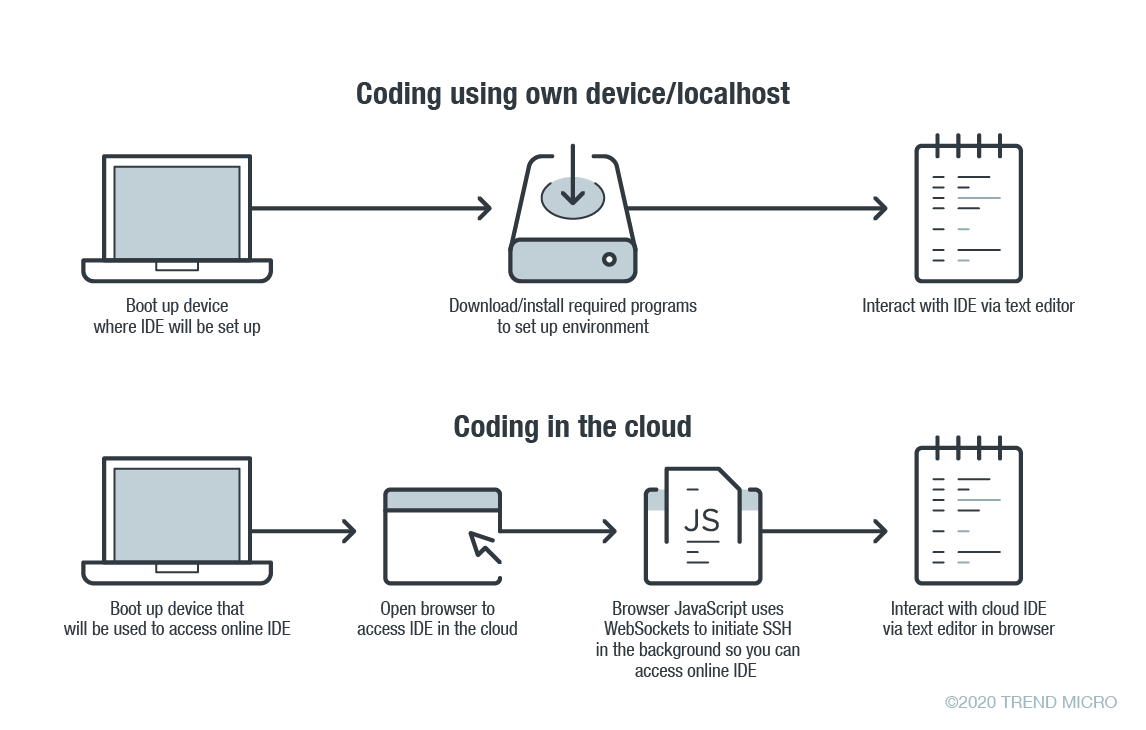
    In online coding, the IDE is rendered inside your browser, the browser JavaScript engine uses WebSockets to initiate an Secure Shell (SSH) connection to your linked device in the background—e.g. virtual private server (VPS)—providing you with the familiar terminal interface to execute commands. The environment—meaning the linked cloud VM/VPS or SSH-accessible device—includes tool configurations (like which tokens are included, or cloud configuration files), a copy of the source code, compilers and other tools that you want to use.

    Figure 1. Local versus cloud-based IDE. Source: Trend Micro.

    The main difference between local and cloud-based coding platforms is where the bulk of the environment resides. In cloud IDEs, the environment is a virtual machine instance inside your cloud provider. In terms of security, this means you are delegating trust to the cloud provider, but you are responsible for preventing any backdoors from opening or introducing misconfiguration issues to the VM. In the case of using your own device with AWS Cloud9, you are responsible for configuring the device securely.

    Linked Devices/VMs Are Not Always Secure

    What is running on the backend often dictates whether linked devices and VMs are secure. As previously described, an SSH-linked device is necessary to use these online coding platforms. In the case of Visual Studio Online (still in preview mode as of this writing), we can find a Visual Studio (VS) Code server running on the machine.

    The code server itself is a Node.js application to which your browser will connect. You can also download the whole ~/.vscode-remote folder and run the server inside your local environment.

    As the owner of the linked device, you have permission to promote yourself to root and install or configure whatever you think you will need. You also have, by default, both Docker and Git pre-installed.

    In the case of AWS-hosted Cloud9, the situation is a little more complicated. The backend necessary for platform communication is located inside the linked device while the frontend remains hosted on a different location. But, like in VS, you can also promote yourself to root.

    This brings us to our first security concern: How secure or private are linked devices/VMs?

    The linked device contains confidential information—access tokens, application configurations, source code, etc., which should be protected against unauthorized access.

    By default, the platform is secured by the provider. However, you should keep in mind that, together with your root access availability, you are also responsible for preventing misconfiguration issues, especially when using third-party plugins. AWS does not provide plugin support for plugins not developed by them.

    There are possible misconfigurations you might make that can lead to security issues. For example, if you set your IDE to be accessible from outside, either intentionally for ease of sharing, or unintentionally, that change can have major consequences.

    In addition, it is not common for access tokens to be stored in encrypted token vaults. A lot of them can be viewed via plaintext configuration files. Without additional security measures, your access tokens can end up exposed to outsiders.

    Once unauthorized access is acquired by cybercriminals, they can compromise your code for their own gain. An example would be the supply chain attack against a software company that modified software updates with malware.

    Browsers Can Introduce Malicious Extensions or Vulnerabilities

    The next security concern is the browser itself. As online coding platforms are accessed from web browsers, you should be very careful when accessing these sites from public, non-domain, shared or unprotected computers.

    Malicious browser extensions are a well-known phenomenon. While an untrusted computer possibly infected with malware presents an obvious risk, it is also possible for an attacker to steal code using a malicious web browser extension.

    Code Extensions and Plugins Can Also Contain Malware

    The main advantage of Visual Studio Online and, generally, the VS Code platform, is the number of extensions available. This in and of itself is yet another possible attack surface.

    Let’s imagine a malicious VS Code extension—a useful-looking extension with an embedded backdoor. The lack of permission checking (such as disk access, network access, process access, etc.) for extensions during installation or use, becomes a security problem. The extent of security checks during extension publishing is limited to having a valid publisher ID and a few image-related restrictions. This means you have to trust the extension developer entirely.

    No Software Application Is Error-Free

    The ever-present possibility of vulnerabilities in any kind of software must be considered as well. In the case of online coding platforms, they can be affected by web-class vulnerabilities since IDEs are web applications. For example, a vulnerability that allows an attacker to execute their own JavaScript code can have control of the IDE or remote linked devices.

    A recent vulnerability affecting the Visual Studio Live Share extension, which is also available for VS Code, shows that we can expect to see another vulnerability affecting online coding platforms in the near future.

    Securing Cloud IDEs Is a Must for DevOps

    Threat modeling allows us to understand the different factors at play that can affect the overall security of a computing environment. Cloud IDEs should be no different from other software, if not more critical to secure.

    Here are some recommendations for each of the security issues we raised:

    • For linked device security — Install trustworthy software. Keep that software updated. Don’t indiscriminately open ports to the internet.
    • For browsers — Work inside trusted and secured environments. Try to avoid using shared computers. Install browser extensions from trusted vendors only.
    • For VS Code extensions — Avoid installing extensions from unknown sources or authors.
    • For vulnerabilities in general — Make sure your environment is updated to the most recent version.

    — David Fiser

  • Humio Adds Unlimited Ingest Plan to Log Management Service

    Humio Adds Unlimited Ingest Plan to Log Management Service

    Fresh off raising an additional $20 million in funding, Humio, a provider of a platform for analyzing log data, has added an unlimited ingest plan to a cloud-based service to make it easier for organizations to retain massive amounts of log data.

    The unlimited ingest plan for the company’s cloud service extends a similar option Humio already makes available to customers that deploy its log management platform in an on-premises environment.

    Morten Gram, executive vice president for Humio, said one of the significant limitations of rival log management platforms is they charge customers based on the amount of data ingested. That approach only serves to dissuade organizations from ingesting data to limit their costs. The trouble is that organizations won’t be able to discover outlier issues in data they never see in the first place, he said, noting issue becomes even more problematic as organizations embrace best DevOps practices to deploy more applications both in the cloud and in on-premises IT environments. The Humio Bucket Storage can retain more than a petabyte of log data.

    Given the scale and scope of modern applications, Morten said organizations are now using log data to drive a wide variety of analytics tools to automate processes in real-time. Log data is also playing a critical role when it comes to applying artificial intelligence (AI) to IT management. The more log data made available, the more accurate the AI models being employed become, he noted.

    In addition, Gram said that because Humio doesn’t rely on an index engine to organize data for a search engine, IT teams can launch any type of query they like. In contrast, rival platforms are optimized for specific types of queries, he said, which also substantially reduces the amount of compute and storage required to analyze log data. That capability is why Humio can offer unlimited ingest of data and still remain profitable, as long as there are enough customers to enable Humio to operate at scale, he noted.

    Given the current need for many IT employees to work from home to help combat the COVID-19 pandemic, it’s clear more organizations will be relying on tools hosted in the cloud to manage IT environments. Many of those organizations will also be a lot more sensitive to costs given the impact the COVID-19 pandemic is having on the economy. Of course, it’s probable many organizations will postpone new application development projects until sometime after the COVID-19 pandemic subsides. However, as more organizations start to appreciate the extent to which people may adopt social distancing, many of them will soon be re-engineering business processes to adjust to a new reality. As such, it may now only be a matter of time before there are even more digital business transformation projects being launched than ever before.

    — Mike Vizard

  • How to Secure Your Kubernetes Cluster on GKE

    How to Secure Your Kubernetes Cluster on GKE

    Google Kubernetes Engine (GKE) is easy to get going with, but requires additional security controls. The documentation is hard to grasp as there are many features and changes that tie to specific Kubernetes versions that will require using beta feature enablement, as well as some out of date documentation that can catch people out.

    There is also an outstanding bug that we have raised on Kubernetes that is hit by GKE. This is an edge case situation if you end up running pods directly and not deployments, and only happens if you enable pod security policies (which we recommend doing for security reasons).

    If you are looking at production and have sensitive workloads, we advise that you implement everything inside of this article.

    Securing Your Kubernetes Infrastructure

    When you deploy a default GKE cluster with no additional options provided, you’ll get some sensible security defaults:

    1. Basic authentication is disabled.
    2. Encryption at rest for the Operating System (OS) image is enabled.
    3. Client certificate issuance is disabled.
    4. Secure Operating system (Using Container-Optimized Operating System; COS).
    5. VM Integrity monitoring to protect from malware/rootkits.
    6. Restricted Service Account.

    So, why did Google enable these things by default? Essentially it means:

    • You can only authenticate via Google Cloud Platform (GCP) Single Sign On (SSO) to the Kubernetes API. That means, no basic authentication or client certificate can be used.
    • The OS is locked down and container optimized with a limited and read-only root filesystem with integrity checks. Integrity monitoring of the OS is enabled, to protect against rootkits and malware.
    • The service account that the Kubernetes nodes are using is restricted and will only have privileges to access cloud services it needs, such as Stackdriver for logging and monitoring. 

    The things you need to make sure you enable:

    • Enable secure boot to validate the authenticity of the OS and kernel modules. (If you decided not to use the default OS, then it might cause issues).

    Using the virtual trusted platform module (VTPM) to sign kernel images and the OS, means that authenticity can be established. It also guarantees that nothing has been tampered with, and kernel modules have not been replaced with ones containing malware or rootkits inside.

    • Enable intranode visibility so you can see the data flowing between pods and nodes.

    Making sure all traffic is logged and tracked between pods and nodes will help you identify any potential risks that may arise later on. This isn’t necessarily something you need to do for development, but, something you should do for production.

    • Put the Kubernetes API on a private network.

    • Put the node pool on a private network.

    • Provide a list of authorized networks that should be allowed to talk to the API.

    Making your nodes and Kubernetes API private means it isn’t subject to network scans that are happening all the time by bots, hackers and script kiddies.

    Putting it behind an internal network that you can only access through a VPN is also good, however, this is a much more involved process with GKE and isn’t as simple as a feature flag like the others. You can read about what is involved here.

    Securing Your Application Containers

    Again, Google enables some default features to get you started. However, there are still gaps that you will need to fill. 

    What do you get?

    • Managed certificates
    • Role Based Access Controls (RBAC)

    What you will want to enable:

    • Pod Security Policies. This is Beta and requires you to inform Google that you’re wanting to run the cluster creation in beta mode:

    • Network Policies.

    This sounds great, but what does it actually mean? Basically, some of these roles are split into two, one is for application development teams to own and the other is for the cluster administrator.

    Application Developer

    • Set network policies at an application level so you only allow the right level of access, i.e., AppA can talk to AppB but AppC can’t talk to either of them.
    • Have encryption to your service endpoint for your desired domain, i.e., https://www.mydomain.com.

    Kubernetes can be a bit of a learning curve, there are technologies that make it simpler in terms of dependencies such as helm, that will allow you to deploy application dependencies with pre-defined deployments. But there is no real substitute from understanding the main components of Kubernetes;  Network Policies, Ingress, Certificate Management,  Deployment, Configmaps, Secrets and Service resources.

    The main security components are network policies, secrets and certificate management. Network policies will allow you to control the traffic to and from your applications. Secrets are base64 encoded, so there is no real security in terms of how they are stored; therefore making sure the cluster administrator has enabled secret encryption, (as mentioned further down), will add that additional layer.

    Certificate management will make sure the traffic to your service is encrypted, but if you’re communicating between services, then you should also add TLS between your applications. Having the cluster administrator install something like cert manager, will allow an easier way to encrypt between services. There are also services like Istio, but as that product does a lot more than just certificates, it can add more complexity than necessary.

    Cluster Administrator

    • Have the ability to control what users can do and in what namespaces (RBAC), i.e., maybe Bob the developer can do deployments, (create, update, delete), but can’t view secrets in namespace our-teams-app1-dev.
    • Implement a deny all network policy for both egress and ingress (outbound and inbound). This can be controversial, as it can catch teams out, so making sure you’re communicating this is key. It will, however, force teams to define network policies to get their application working.
    • Force an application deployment security stance with Pod Security Policies. This means preventing containers running in the cluster escalating privilege, mounting in devices (including binding to the host network) on the nodes or running more privileged kernel system calls.

    You want to make sure that development teams can’t deploy insecure applications or make attempts to escalate their privilege, mount in devices they shouldn’t or make unnecessary kernel system calls. Pod Security Policies offer a way to restrict how users, teams or service accounts can deploy applications into the cluster, enforcing a good security posture.

    RBACs and Pod Security Policies go hand in hand. Once you define a good Pod Security Policy, you then have to create a role that references it and then bind a user, group and/or service account to it, either cluster wide or at a namespace level.

    Note: GKE uses a webhook for RBAC that will bypass Kubernetes first. This means that if you are an administrator inside of Google Cloud Identity Access Management (IAM), it will always make you a cluster admin, so you could recover from accidental lock-outs. This is abstracted away inside the control plane and is managed by GKE itself.

    We recommend the below to be a good PSP.  This will make sure that users, service accounts or groups can only deploy containers that meet the criteria below.

    If you wanted to create a role to use the defined PSP above, then it would look like something below, this is a cluster role as opposed to a standard role. To then make this enforced on say all authenticated users, you would then create a role binding to apply to the “system:authenticated” group.

    Remember that as this is cluster wide, any applications that may need more privileged permissions will stop working, some of these will be things Google adds into kubernetes; such as kube-proxy, that runs in the kube-system namespace.

    You can read more information on RBAC and PSP’s on kubernetes.io.

    Securing Sensitive Data and Application Cloud Services

    We’ll break this down into two.

    1. Encrypting Your Secrets in Kubernetes

    The recommendation for encrypting secrets using Google Clouds KMS service, is to have segregated roles and responsibilities, and to define a new Google project outside of the Google project that will host Kubernetes and applications. This is to make sure the encryption keys and, more importantly, the key that is signing the other keys (envelope encryption) isn’t residing in the same project that could potentially get compromised.

    For encrypting secrets you need to:

    • Setup a new Google project to implement segregation of duties (if necessary).
    • Create the master key ring and key inside that project.
    • Only allow the GKE service account in the Kubernetes hosted project access to the key in the dedicated key project.
    • Only allow just the right permissions (encrypt and decrypt) of the service account.

    The documentation on how to do this can be found here. But the main things to remember are:

    • The key has to be in the same location (zone) as the cluster (this is to reduce latency or loss of a zone).
    • Access permissions have to be correct for the service account.
    • The binding is a KMS IAM policy binding.

    Once this is setup you can pass the path to the key, to the “gcloud container clusters create” command:

    Note: If any of the above is incorrect, you will get a 500 internal server error when you go to create a cluster. This could be the path is incorrect, the location is wrong or the permissions are not right.

    2. Consuming Cloud Service Inside of Kubernetes

    There are four different ways to allow application containers to consume cloud services. All of these have limitations in some way, i.e., being less user friendly and unautomated for developers (making developers wait for the relevant access to be provisioned), or have less visibility and more complexity in tying together auditability for Kubernetes and cloud administrators.

    1. Workload identity (this is still in Beta and is the more long-term direction Google are going in): Require a constant process of managing google IAM as well as Kubernetes Service Accounts to tie them together. This means managing Google IAM roles, policies and service accounts for specific application service lines as well as Kubernetes Service Accounts. It does, however, improve auditability.
    2. Google Cloud Service Account keys stores as secrets inside Kubernetes namespaces (where the application will be living): Similar to the above, but without the binding. This means provisioning a service account and placing it as a secret inside of the applications namespace for it to consume natively. This has the downside of not having full auditability within Google Cloud and Kubernetes.
    3. Use something like Vault to broker between Cloud and Applications: Using Vault provides an abstraction to cloud and will generate short lived access keys to applications. However, there is still a secret required to be able to speak to the Vault service, hence, the permissions are still the same but just abstracted down one. It also disjoints audibility between Google Cloud and Kubernetes.
    4. Using the default service account node role of GKE: Much simpler and more developer friendly, but more risky. It would mean allowing applications to use the default node service account and modifying the role to cater for all the service policies applications would need, increasing the scope and capability of the node service account to most Google Cloud services.

    Having Good Visibility; Current and Historic

    Note: As of today, there is no access transparency on when Google accesses your Kubernetes cluster (Google Access Transparency). This could be problematic for a lot of organizations who want assurances around the providers data access.

    When the cluster is provisioned, all audit logs and monitoring data is being pushed to Stackdriver. As the control plane is managed by Google, you don’t get to override or modify the audit format, log or extend it to your own webhook.

    It does mean that you can search your audit logs for things that are happening inside of Kubernetes in one place, for example; to query all events against a cluster inside of a specific Google project against your user ID, you can do the below:

    From this point on, you could take it further and add additional security rules such as setting custom metrics to alert when cluster admin changes are made or specific modifications are happening on roles (cluster-admin roles).

    Summary

    Security is something everyone wants but, as you can see, it can be quite an involved process to achieve. It also requires domain knowledge to get enough context to assess the risk and what it might mean to your applications and business.

    Security without automation can slow down productivity. Not enough security can put your business at risk. Enabling security features that require Beta feature enablement may also not be suitable for the business and only General Availability features are acceptable, which compromises on security.

    As a general rule, hardening your clusters and enforcing secure ways of working with Kubernetes, containers, cloud services and your applications will get you the best outcome in the end. There may be frustrating learning curves, but as the industry matures, these will slowly be remediated.

    To learn more about containerized infrastructure and cloud native technologies, consider coming to KubeCon + CloudNativeCon EU, in Amsterdam. The CNCF has made the decision to postpone the event (originally set for March 30 to April 2, 2020) to instead be held in July or August 2020.

    — Lewis Marshall

  • How to Compare and Contrast APIs to Improve DevOps Processes

    How to Compare and Contrast APIs to Improve DevOps Processes

    The cloud is driving digital transformation, from web applications to mobile applications, from partner integrations to API monetization. Even custom applications are moving into the cloud. If you draw a line through all these trends, APIs would be at the heart of it all.

    We know we need to eat our vegetables to keep our heart healthy, but sometimes it is easier to order takeout after a long day of work. Healthy API hygiene works the same way. In a perfect world, developers would register their API specifications and blueprints in an API catalog, and they would keep them up-to-date as the application changes. But this is a tedious manual process, and sometimes after a long day of work it is easier said than done.

    An API catalog is critical for improving the DevOps process through quality assurance and testing. Furthermore, the production environment for APIs can be subject to even harsher and more hostile access and usage patterns compared to the Dev and Test environments, which tend to be more self-contained. The good news is that by maintaining an API catalog, DevOps can gain more visibility into the contrast between these environments to identify gaps that should be closed. The end result is an improved DevOps process that drives the production of better products and services.

    There are a number of approaches to creating an API catalog, from manually logging APIs into Wikis, spreadsheets and vendor solutions, to more automated discovery tools. An API catalog should include meta information, such as the creator, the date it was last modified, which application it belongs to and so forth. At a deeper level, an API catalog should also include the parameters such as the data type, the bounds for the data type, the transport mechanism, the authentication and authorization mechanism, and a brief description about the data carried within the parameter.

    Compare and Contrast APIs from Dev to Test and Test to Production

    During the application testing phase, which is subject to quality assurance, regressions, performance and interaction cases, an API catalog should be updated and compared against its development state. The contrast between the development API catalog and those generated from the test environment can help identify:

    • An API listed in the Dev catalog, but not in the Test catalog, which would indicate that QA has not tested the API or its payload; therefore, the QA process could be improved.
    • An API listed in the Test catalog, but not the Dev catalog, which would indicate that the Dev catalog was incomplete; therefore, you cannot assume it is a “golden” image. This also suggests an area for improvement in the DevOps process because the developer has not maintained an up-to-date API catalog. Automated tools can help even more here since they generate an API catalog where there is none.

    There is a third scenario, where an API isn’t recorded in the Dev catalog, and it doesn’t show up in the Test catalog, but may later show up in the production traffic. This is considered an unpublished or “out of spec” API.

    Likewise, when moving from test to production environments, the API catalog should be updated to mirror real-world application access. The contrast between the Production API catalog and the Test API catalog can help identify:


    • An API listed in the Test catalog, but not the Production catalog, which could identify an API that is not being used. This would indicate that QA testing did not align with the real-world use of the application and suggest that development cycles could be prioritized elsewhere.


    • An API listed in the Production catalog, but not in the Test catalog, which would indicate the API catalog did not capture the most up-to-date specification. This is one example of a Shadow API, an API that was intended to be part of the application, but has not gone through the required processes related to testing and application security.


    Additionally, identifying an API in the Production catalog, but not in the Test catalog can be useful in identifying threat actors searching for vulnerabilities to exploit an unpublished API.

    Comparing and contrasting dev, test and production environments can help identify opportunities for improvement. However, manually creating and maintaining an API catalog is often neglected because of its tedious nature. DevOps needs automated tools to help discover APIs, generate blueprints and store them into the catalog. It is too much of a burden for developers to manually document APIs, but a continuously updated API catalog is the most important key to derive success using the compare and contrast methodology.

    — Ravi Balupari

  • EP 4: DevOps and the Mainframe

    EP 4: DevOps and the Mainframe

    In this fourth episode of our DevOps Unbound streaming broadcast on TechStrong TV and DevOps.com’s sister site Digital Anarchist, Mitchell Ashley of ASG and Alan Shimel are joined by Gerta Sheganaku of Tricentis, Rosalind Radcliffe of IBM and Sam Knutson of Compuware to discuss app modernization, mainframes and DevOps. Find out what’s the right way to modernize your applications and how to do app modernization in a Z environment.

    The video is immediately below, followed by the transcript of the conversation. Enjoy!

    Transcript

    Alan Shimel: Hey, everyone. This is Alan Shimel. Welcome to another episode of DevOps Unbound. This is episode four of DevOps Unbound, and then we’ve also done two DevOps Unbound roundtables. So this is actually the sixth DevOps Unbound event that we’re presenting. They’ve all been great, and I think this one is gonna be as good or better than any of ’em.

    Today’s topic is app modernization and mainframes, along with DevOps, of course. It’s DevOps Unbound. We’ve got a great panel lined up for you. Let me introduce you.

    First of all, we have Sam Knutson, and Sam is the product manager — is a product manager for mainframe and agile DevOps at Compuware, a BMC company. Sam, did I get that right?

    Sam Knutson: Pretty much, Alan.

    Shimel: Correct me. Get it right for the record.

    Knutson: So I lead product management at Compuware. We are a BMC company, and we are focused on enabling agile and DevOps on the IBM z/OS platform.

    Shimel: Fantastic. And the lesson I have learned here is I’ll let each of you introduce yourselves. My next guest is the one and only Rosalind Radcliffe. If you want to know about DevOps and mainframes, there’s no better person in the world to go to.

    Rosalind, welcome, and why don’t you give them a little bit of your title and background?

    Rosalind Radcliffe: Thank you. Glad to be here again. Rosalind Radcliffe, IBM distinguished engineer, responsible for DevOps for enterprise systems. I help clients with their transformation to DevOps for z/OS applications as well as application modernization and bringing z/OS into the rest of the world so you can do your cloud-native development for z/OS as well.

    Shimel: Excellent. Then we have – I’m gonna do my best here – Gerta Sheganaku of Tricentis. Gerta, how bad was that?

    Gerta Sheganaku: Thank you, Alan. That was perfect, really.

    Shimel: Okay. Gerta, your background and title?

    Sheganaku: I’m with Tricentis, as you said. I initially started at Tricentis in the customer experience space, where I was leading our customers through their digital transformation journeys, really helping them understand how they can enable testing as a catalyst to really get DevOps working.

    Then I have moved into the product organization, where I’m currently leading a team where we’re releasing our first AI-based test automation solution, which is really about tackling the problems that we see out there, especially when it comes to app modernization, and testing of old applications and new applications and really making testing easier.

    Shimel: Excellent. And then last but not least is my sidekick, well, partner in crime, Mitchell Ashley, CEO of Accelerated Strategies Group and also my co-host here on DevOps Unbound. Mitchell, good to see you.

    Mitchell Ashley: Good to join you.

    Shimel: All right, guys, today’s topic is app modernization, mainframe, and DevOps. It’s interesting. I’ve been kind of binging on Netflix that AMC show, oh, “Catch Fire”? I forget the name of it now. Anyone else watch this show? It’s an AMC on Netflix.

    Knutson: “Halt and Catch Fire”?

    Shimel: “Halt and Catch Fire.” You’ve watched it, Sam?

    Knutson: I’m familiar with the instruction. I’ve seen the previews for the show.

    Shimel: It’s a pretty good show once you get into it. So the company that started in Texas bets everything ’cause they’re tired of paying the timeshare people, and they buy an IBM, what is it, 3030, that’s based in Daly, San Francisco, or Daly, California, near San Francisco. They literally have to move the whole company to where the mainframe is versus moving the mainframe to where the company is. Well, it’s TV. But that was the late ’80s, right, and we don’t live in those worlds anymore.

    Mainframe applications are running on your phone, right, or at least the front ends of them are, on your tablets, on your computers. The mainframe doesn’t necessarily fill up – this was a whole basement that was one mainframe. It was pretty funny. The guy was sliding cards in and stuff like that. If you get a chance, watch the show. It’s an interesting, interesting look back.

    Certainly the modern mainframe has come into the world of DevOps. Rosalind, I think the work you have done with IBM has led the market with that. Quite frankly, Sam, the work Compuware has done has led the market in agile and DevOps on mainframes. How would you assess where we are currently in mainframes in the world of DevOps?

    Radcliffe: You mean where the mainframe is or where people are? I think those are two very different things.

    Shimel: You’re right. But what we’re not moving the whole company to the computer anymore, thank God. But let’s talk about where is the mainframe, and then we’ll talk about where the people are.

    Radcliffe: So you’ve got to remember, the mainframe itself, IBM Z, is the most modern machine out there. The IBM Z platform has evolved every few years for the last – ever since it was invented, and we keep evolving the machine.

    So the machine itself is the most modern system, and we’ve evolved the operating system. We’ve evolved things such that open source tools work there. We’ve done everything to remove the barriers from the system so that you can do exactly the same kinds of things, whether or not you’re doing z/OS development or another environment. And the Z hardware itself, we all know it runs – well, we all know on this call it runs Linux on Z.

    And so it’s a very large Linux server. It runs containers, and it runs OpenShift. So from a systems standpoint, it provides – there’s nothing keeping it out of the processes and practices. There’s nothing separating it from a systems standpoint. It’s the way people interact with the systems. It’s their existing applications that make it harder.

    Shimel: Sam?

    Knutson: I think Rosalind makes some great points. The current generation of IBM mainframes, the z15, is an engineering marvel, and the compilers and the operating system produce this amazingly efficient platform. It is the most efficient hyperconverged system in the world today.

    But I think the elephant in the room is the word that you used a minute ago when you said “modernization.” We alluded to this a little bit in the way that the practices that people and businesses have today. Well, modernization doesn’t mean moving off platform, because we already talked, and we could go on for an hour, about how great a hardware and software platform this is for running business computing. It is amazingly efficient, especially when you look at the large-scale, global business applications that the Fortune 1000 run, which is where the platform has its largest footprint.

    But the perception is that modernization is moving your application into a cloud-native application off the platform, hosted by another provider, or rewriting it in Java, and nothing could be further from the truth. The COBOL compiler alone is a perfectly paired piece of engineering with that platform, and it lets you wring every last ounce of efficiency out of it.

    But people need to get past that confusion and say, “What if I could work on the platform in the same way I’m working on every other platform?” It’s that normalization. We’ve kind of coined the phrase “mainstreaming,” “mainstreaming the mainframe” to make it different in syntax only, and Rosalind alluded to this. It’s being able to work on this platform in the same way that you work with any other platform. So when you think about DevOps, then you have a DevOps toolchain that looks like other toolchains, that you can connect all of the ecosystem partners that you’re probably already using in distributed development.

    People are definitely the problem, people and practices and culture. More than three-quarters, in fact 78%, of customers say it would be useful if they could update their mainframe applications more frequently than they do today. So there is an aspiration to change and to get better outcomes. You can see what they want. They want to be able to deliver value to customers more frequently, and that’s just one of the improvements that they want to make. But far too many people are not making progress on that.

    Shimel: Gerta, so you’re not a mainframe specialist, but certainly app modernization and testing of this. I’m wondering if you have any kind of information regarding people using Tricentis to test mainframe-based applications. How big a market is that?

    Sheganaku: That’s a very good question. One major thing that you always have to keep in mind, as we just said, especially when talking about app modernization, it is such a wide word, and it can mean so many things, too, to different people. It’s definitely something that’s challenging for our customers looking at their current system landscape. You see customers that are having everything in their landscapes from mainframe applications to also often very legacy mainframe applications that are trying to move onto more cloud-based environments. That is something that we see very often.

    Mainframes are still there, but the thing is that people really want to abstract away from the mainframe. Also thinking about where we are today, I think an important question we have to ask ourselves is why is everyone so into app modernization? Why is everyone into migration into the cloud currently?

    If you think about it, nowadays every company basically is becoming a software company, and not every company has the talent and the resources to maintain those mainframe applications because at the end of the day, honestly I struggle finding COBOL developers nowadays out there. I went to the Technical University of Vienna, and we definitely did not learn anything around COBOL there. It’s really hard to find the talent nowadays.

    When you look at it, basically every company, be it in retail, be it in banking, be it in the energy sector, you now want to have connected systems and so on. Really, everyone is going more towards being a software company. And with that, for people it’s becoming more and more increasingly important to have really good platform-as-a-service offerings, maybe going into serverless or software-as-a-service in the next step, but really having not really to deal with the underlying maybe mainframes and having a way of abstracting and using simpler technologies and only caring about the applications and the data that they’re running on those systems.

    Shimel: I’ll be honest with you, I don’t know if I agree with that. So here’s the premise of this, right? When we talk about app modernization, I’d love to live in a world where I could throw out an old app ’cause I want to have a new app. But we don’t live in that world, right, and no one lives in that world. That’s why we call it “app modernization.” We tend to modernize the apps we already have.

    And so when we look at – I think out of the Fortune 100, 98 are on mainframes. Or it’s some number like that, Sam or Rosalind, if you know. I don’t see 97-and-a-half of them throwing their mainframes out, right? As a matter of fact, they’re probably building more on mainframes. And so what’s happening is we’re seeing whether you want to call it hybrid cloud, VoLTE cloud, whatever you want to call it, we’re seeing where people can build maybe a front end for stuff in the cloud. But if that data is important, if security is important, if scalability is important, dollar for dollar, people who use mainframes know that that’s their best bang for the bank. Mitchell, I’ll let you chime in.

    Ashley: I have to jump in. So what’s interesting is we kind of do this to ourselves with the terminology that we use. “Mainframe” is a word for a cabinet used to house the computers the original IBM computers were stored in.

    If I said, “Hey, 71% of Fortune 500 companies rely on high-volume transaction-processing platforms. Ten out of the ten world’s top insurers, 23 out of the 25 world’s top airlines, 92% of the top 100 banks rely on high-volume transaction-processing platforms,” you would say, “Wow, that’s pretty cool.”

    “And it runs Linus, and it runs containers, and you can connect it to all kinds of applications from tablets and phones to wherever your application may be running, on cloud or on premises.”

    You’d say, “Wow, tell me about that. I’d like to learn about that.” That’s what mainframes are.

    So it’s interesting. It’s not going away. We do this to ourselves, and I say the analysts have done this to us, too, right? Today it’s all about this next shiny object, the squirrel moment. It is so vital to businesses today, and moving it into how we create software with DevOps and processes like that and tools to support it is essential for businesses’ both economic recovery, survival, and future. Digital strategies can’t happen without it for many, many, many companies.

    Okay, did I do a good job, Rosalind and Sam?

    Knutson: Mitch, those were great stats, and I think you did a great job quoting ’em. I’d boil that down to simply saying the worldwide economy and worldwide civilization runs on the mainframe. And I like the word “mainframe.” It has a little swagger. I don’t think it’s ever gonna go out of style.

    Ashley: Nostalgia.

    Knutson: And renaming the platform could make it cooler. It simply gets things done. We haven’t renamed cars yet. Well, maybe we’ll rename them to “highly efficient transport platforms,” but I think we’ll still be calling ’em “cars” when they have electric engines powered by portable fusion reactors. But customers see this as a long-term platform. BMC does an annual mainframe survey, and the 2020 edition is gonna launch soon. I can tell you that 90% of the customers see the mainframe as a platform for growth and long-term applications. Sixty-eight percent of ’em expect the size of that compute platform to grow, MIPS to grow. Sixty-seven percent of those organizations have the majority of their data on the mainframe. They trust it because, as you said, it’s highly available, scalable, secure.

    And to go back to Gerta’s key point about younger workers, that is absolutely essential. But what’s going on is that people are addressing that because – I think Rosalind and I both alluded to this – the syntax of COBOL isn’t Aramaic. It isn’t some incomprehensible script.

    If you put modern tooling around this, if you put modern process and a great, supportive culture that gives that great – you have a great developer experience, you have a great developer culture, then learning the syntax of COBOL is no more difficult than learning the syntax of Perl or Rust or Go. So we see that customers who see the platform long-term are making the appropriate investments. In the responses to that survey I mentioned this year, younger mainframe workforce definitely figures in, 43% less than five years on platform. Sixty-eight percent were under 49 years old, and 60% of that new generation see this as a growing platform.

    That really matches the experience that I’ve seen in Compuware’s journey is that we hired out of college and we have been hiring out of college, and those next-gen developers are more than a third of our workforce now in Detroit. Many of them did not know COBOL, and many of our applications are written in assembler. They certainly didn’t learn assembler in college. But what they did have was a strong bent for learning new technologies. Many of them came with computer science degrees. They had learned how to learn. They were what Gartner calls “polyglot programmers,” one, two, three, many in learning languages.

    So whether we needed to learn assembler or COBOL or C, it didn’t matter as long as we provided that supportive culture, the vehicles for learning, and we gave them meaningful work early on in their employment and made sure that they understood the vision, mission, and goals of the firm and how they were contributing to something that matters. I think our customers are having similar success in onboarding next-gen developers by doing some of these same things.

    Radcliffe: I think it’s interesting, the statement, “I can’t find COBOL developers,” because when I was hired in to work in this industry, nobody assumed you knew the language or the system you were going to work. That was the thing you learned. You learned how to develop, and then you came in and learned the company’s culture and the company’s tool choice.

    By using modern tools, modern practices, all of these things, the things they have learned in college on how to do, they’ve already got. And then the only thing they’re doing is learning COBOL.

    As I always joke, it’s just English. I know that works really well in the US and in parts of the world, and in other parts it’s, “Okay, it’s still a foreign language.” But it’s not a difficult language. It’s easy to understand. PL/I, it’s not difficult to understand. It’s just another language, and developers can learn other languages.

    I am kind of with the discussion about “mainframe” is not the word we should always use, and we really need to focus on how do we talk about our platform. I like the term “mainframe,” too. I still use it. But can we talk about our platform as this platform that provides this valuable, high-transaction server? It’s that big server as part of your pipeline. It’s not that old thing. It’s that big new thing that runs all this work, and now let’s focus on the applications that – Honestly, the best thing IBM ever did was a program you compiled in 19-whatever and still works today, and the worst thing IBM ever did was that program that you compiled in 19-whatever and still works today. It’s the best and the worst of the platform. You don’t have to change. It still just works.

    And if we can help companies understand if they start to change some of those, they can do the automated testing. They can do all those things. They can get more value out of their platform. They can help refactor and be able to move at the speed they need to.

    Shimel: Go ahead, Gerta.

    Sheganaku: These are all amazing points. I hope no one got me wrong at the time beginning with what I wanted to say. I really like what Rosalind just said, to talk about the underlying platform that is really enabling. But the point that I really wanted to make is that most companies are now becoming software companies. We don’t have that knowledge center of IBM, where there are so many smart people and you can learn from people and really develop that amazing platform that you offer other companies.

    But when I look at our customers, it’s usually self-built kind of mainframes that are sitting there that are not maintained that don’t apply current recent security standards. Those customers, what you see them do often is they all hear, “The cloud is the next thing. We all have to go to the cloud.”

    They all do this one big mistake that they just take whatever they have and they basically do the lift-and-shift approach, bring it to the cloud, and hope that everything’s gonna work. Of course that’s not gonna work at all. Also from a cost perspective that is insane, thinking about how much cloud resources actually cost you if you don’t do all the optimizations and so on. So what you see people do is kind of a step-by-step learning approach where they are taking things from not-so-secure systems, bringing them over to other systems, then starting to refactor the applications, and giving more and more also responsibility to the development teams.

    Once they do that, you see the development teams really getting that DevOps approach, really caring about the infrastructure, and so on. For the developers, of course it’s easier if they have container-based applications that they can simply deploy and so on. But of course underlying it’s very, very important that you have a secure and great platform that is enabling all of that.

    Shimel: I think that’s a great case for why you’d want to use a mainframe or whatever you call it, ’cause it’s probably more secure than the cloud is, I think, and it’s been proven. But here’s an interesting thing I’ll tell you here I see in DevOps.com, right? This is DevOps.com, mind you. And it was surprising to me. Our biggest article last year on DevOps.com, most views, most comments, “The Beauty Of the COBOL Programming Language” by Bob Reselman.

    I don’t know, it had half a million or something, maybe more, a crazy amount of views. Most of the comments were by COBOL programmers in India because there they recognize that there’s such a need for COBOL programmers that you have a lot of young people who are studying COBOL because they know it’s basically a guaranteed job for them, right? They come out and they start working right away.

    Here’s another interesting thing, and my friends in Tricentis will notice – will appreciate this. What do you think was another huge area of interest in DevOps.com? Running SAP in a DevOps world, right? We don’t think of SAP as DevOps-enabled or maybe not even agile.

    We did a roundtable a week or two ago on SAP in DevOps. I had to cut the questions off, and these were meaty questions: “How do I do this and that in this and that release?” It wasn’t just pie in the sky. They were very how-to, practical, “We’re running SAP, and we’re moving towards agile and DevOps and we’re doing these things.” So while everybody – we always rush to the shiny new trinket and the hot thing in our industry, I think the fact is certain things endure. As Rosalind said, it’s both their greatest and worst attribute. It is.

    But let’s talk a little bit about app modernization ’cause I think Gerta alluded to it. Mitchell, I’ll throw it out at you. No one wants to do shift and lift or lift and shift or whatever. It doesn’t work in 2005 when the cloud first started, and it doesn’t work now. But how do we do app modernization right in a Z environment? Sam, Compuware has made a – it was the reason for your being in a lot of these last couple years, right, something Chris O’Malley always harps on. How do you do modernization right in a mainframe world like this?

    Knutson: First, you do it on platform because – I can’t say that enough – when you see people try to avoid touching the mainframe apps that live on the mainframe, they do unnatural things from an architectural point of view, and they create these horrible kludges that are not robust, that are not scalable, that are not the most efficient implementation, and that aren’t easy to maintain. So you want to bring those practices on platform. You want to provide developers with helpful editors, with quality tools. You want to tap into the automation pipeline. So build a CD pipeline that goes right onto your pipeline so that you give developers a great developer experience, but you keep the business logic and the data on the platform.

    That goes to a number of things. When you talked about security, something that I learned a long time ago, the more copies of data you have, inherently the less secure it is, because typically when mainframe data is moved off the mainframe, the security controls that are on the platform are not replicated.

    So if you can take that core business logic, that digital DNA that a business has inscribed over 20, 30, 40, 50 years, continue to leverage that, and of course leverage systems off platform. Compuware really blazed this trail of using cloud and mainframe together with two-platform IT. We think these things are incredibly complementary. But what you don’t need to do is replicate that data all over the place. You don’t need to necessarily have a lot of on-prem systems. The term “hybrid cloud” was used, and that’s a nice, modern way to talk about that. We say “two-platform IT” because these things will pair very, very well.

    And the cloud, by the way, is an absolutely great place to host commodity applications. If you talk about your company’s e-mail system, I probably cannot run Microsoft Office better than Microsoft can with Office 365 in the cloud, and they can provide all the quality, the service, the latest updates. It’s a good solution. Can I do invoicing better than a cloud provider like NetSuite or Oracle? Probably not.

    But what I want to do is focus on those applications that give me unique business advantage, the things that I wouldn’t find in Amazon, Google, or Microsoft’s application catalog. Those applications give me a competitive advantage, and in updating them I increase that competitive advantage so I can provide new features, new capability. I want to take that on-platform application. I want to bring to it things like automated testing. Make it part of a CD pipeline. Give my developers a great set of tools and give them a great culture of development to help them help the firm be successful.

    That is the best approach to modernization I know of, and of course I work very hard to provide those things, including program understanding, so that developers can really get into code that they may not be familiar with, because when I talked about a younger mainframe workforce, that’s a good thing, but it also means that I don’t have people who have apprenticed with an application for ten years before being allowed to do important changes.

    You have people who are new to your firm, and they’re being tasked to do important work. So they need to be able to understand an application that may be older than they are quickly enough to inside a two-week agile sprint make a change, test it. Hopefully there’s already automated test present, but if there is not, they want to write some new automated tests and deliver that all as working, demonstrable code at the end of that sprint because that’s the way the world works today. So if you do that, you’re blazing down the road towards application modernization. It’s easy to talk about, but it boils down to just hard work.

    Ashley: Alan, I think to build on what we’ve said here, I look at it as three elements to the strategy here, and this is just also sharing my own personal experience with doing this. First is the people and the culture and getting our heads around new processes and new ways or additional ways of doing things. That’s what DevOps is about.

    Second is processes and tools, which Sam was just eloquently talking about. I think the third obstacle to app modernization is tackling the monolith because a lot of our applications were built differently, that we’re looking at how do we modernize. Well, why do you want to modernize? Sometimes it’s because we have to figure out a way to get in there and better maintain it ’cause it’s just too scary to tackle. The people that built it aren’t there anymore.

    Another reason, though, and I think the way to tackle that monolith part of it, is looking at our applications and saying what functionality and what business capabilities in the apps are most important to having the most flexibility or improving the speed at which we can improve that software to respond to and support the business?

    If we’re living in a world of changing how we’re delivering services into contactless, we’re living in a world where supply chains are going from inventory to on-demand, whatever it may be, examine those applications. Pick out where those elements are. And those are good candidates for going and saying, “Let’s carve out that piece and look at some new or alternative designs for how we can more easily maintain or more quickly develop capabilities in that part of the software.”

    It doesn’t mean you move it off the mainframe. It may stay there. It may be a combination of things. But that’s also part of app modernization is how we create software and the tools that we do it and sometimes how do we take on really big problems but divide ’em into much smaller pieces that we can do something about.

    Radcliffe: The application modernization of a Z application does unfortunately involve understanding it. And so having those tools for application understanding is the first key, but then actually understanding the business is the other key. And so it’s a combination of application modernization tools and understanding the business domains you’re trying to go after, really thinking about what are the focus areas and understanding what you need to run.

    Lots of discussion about microservices, and I always question, “Do you really want a microservice, or do you want a service? What level is the right componentization for this function?” And I always use a banking example because this one’s the easiest. “I need my credit card swipe to happen, and I only have a certain number of nanoseconds, whatever it is, to make that happen.”

    I’m not gonna make that a thousand microservices. I’m gonna make it a service. That service has to run fast. It has to be efficient. So it needs to be written as not a monolith, but a service itself. Where is that service? Is it bundled in the middle of something else that’s doing a whole bunch of other function? Can I strip it out? I need to look at the applications. And so using application understanding and the skills we still have today, because in many companies they actually still have a few people left that wrote those apps, not maybe for much longer, but they have ’em now. Let’s start to look.

    Use application understanding, the next generation, and learn from each other. I think the next generation, the newer developers, have a lot of skills in a lot of the new tools, and the people my age have the experience in the apps. So let’s bring these people together to help build this new culture, to help bring this together. Let’s take advantage of both sides and the tooling because even if they helped write the application, they still don’t know the whole thing anymore. It’s a monolith.

    Bring it together, and take advantage of these people. Use the people, both sides of the people, and bring all those skills together with the tooling to actually help you understand the business domains, the functions that you want to do, and split up that monolith. Maybe you’re splitting it up into a bunch of COBOL programs. It doesn’t matter. You’re providing the business value that you need to in a more maintainable, manageable way.

    Shimel: Fair. Guys, we’re running closer to the edge on time. I wanted to touch on the issue, though, ’cause it’s what Gerta does a lot of, and that’s around testing, right? As we’re modernizing these mainframe applications, we’re keeping them on the mainframe. Maybe we’re hybridizing them, if that’s a word, putting front end here and backend there or whatever. We’re modernizing the applications.

    Testing is an important part of it, as it is always. Anything special in particular that we’re doing around the testing of the modernization of mainframe applications that perhaps is different than – Gerta, go ahead.

    Sheganaku: When you think about testing, really just the whole topic of app modernization and also testing can be split into so many different bits and pieces. The one bit is really the architecture that we’re speaking about, where is everything hosted.

    Are we dealing with a monolith versus are we splitting everything up into service-oriented architectures or microservices or whatever we want to call those things, really making sure that we shift testing more to the left, that we make sure that the components are tested and such.

    Then the other side is really around the infrastructure, so really thinking about do you have those physical servers or do you have now more VMs, cloud-based environments? Do you have containers and so on where you’re hosting your _____ [break in audio] making sure that the intersections are tested properly?

    And then another point that’s also very important is really also the process side of things, so the delivery side. Are you having more of a waterfall environment or are you going more towards an agile DevOps environment? And all those things also go hand-in-hand.

    The typical approach would be especially you would have some more legacy type of applications that are running in the background that are really the backbone of your business, and then you would have more flexible applications built on top of that. For each of those you need different testing approaches.

    Something that we saw here, especially when we say “shift testing to the left,” was that while it was so far really possible to shift testing to the left when it comes to doing unit testing, doing API testing, and so on, it was always very hard when it came to end-to-end testing, especially across systems, when you have different systems, older systems, newer systems all working together, because there you really didn’t have that concept of just defining your tests up front and once everything is ready you just run your tests. It was really very difficult.

    Especially now I am focusing on the space of UI testing currently. In the UI space it was basically impossible to do that. That is also something where AI approaches can help in the future because if you look at the applications that we’re interacting with, no matter what technology is used in the background, no matter what type of programming language we’re using, if we’re having something in the cloud or on a server, it doesn’t really matter. How we interact with the applications as humans hasn’t really changed so much over time.

    When we looked at banking systems from 20 years ago and made an analysis, they look just the same like today. The applications that we work with on a day-to-day basis, although they move from one platform to the other, the technology keeps changing, bits and pieces keep changing, the way we interact with it really doesn’t change so much. So there it really helps to bring in AI-based approaches that help you take that human perspective when performing those tests to really be platform-independent.

    Shimel: Excellent. Sam, Mitchell, Rosalind, any thoughts on testing and app modernization with the mainframe?

    Ashley: I would just jump in and say it’s a great place to start, not to say you’re starting from scratch, but maybe you are, that whole CI/CD testing. As Gerta was saying, you can use cross-platform approaches, right? It doesn’t have to be one set of tools for this, one set of tools for that, et cetera.

    It can be, but there are some advantages to leveraging that knowledge base that Rosalind was talking about. You’ve been doing testing. Now how can you take that to the next level, whether it’s getting quality up or speeding up how quickly you can do releases, whatever the driver might be? As Gerta talked about, those are some fantastic approaches to take.

    Shimel: Rosalind?

    Radcliffe: Yeah, testing is one of the ways that we see people getting value fast, and it in some ways takes less cultural change. It’s easier maybe to get them to do automated testing, and automated testing is actually what makes you faster. You need that ability to test the system.

    Shifting left using virtual services, shifting left by virtualizing the whole system, allowing you to test your application in the build process, and doing unit test really does help in the mainframe space to get that feedback. It helps in every space, actually. But in the mainframe space, we seem to have forgotten this. I don’t know why. When I started, we did it. Okay, 20 years later people forgot. Getting to that unit testing, that automated unit testing, and making sure we’re doing that virtual testing, whatever it is to get that application transaction and really have that capability, and there’s lots of tools out there to do the testing.

    And the other part is it has to be cross-platform ’cause most Z applications are not Z-only. So open source tools like the Galasa framework that help you test across distributed and Z matter. Things like test data as a service matter. Use optimizations, looking at AI for data and understanding what data should you feed this.

    Multiple people have capabilities around that to look at the right data to test to make sure you get that fast feedback all the way at the beginning and get that developer that input so they aren’t waiting that six months of testing, that late-stage testing that is the reason why everybody says the mainframe is so slow because they spend too much time at the end testing. Let’s shift that all and bring it to the beginning, and then there are people delivering weekly into production because they have automated testing in place.

    Shimel: Absolutely. Sam, I’m gonna give you the last word, and then I’ve gotta wrap it up.

    Knutson: I think automated testing, and you have to underscore “automated,” is critically important. It’s one part of this. It’s not about the old, “Fast, cheap, good: Pick two.” People need to continuously improve quality, velocity, and efficiency on the platform, and automated testing is a key part of that. You will get measurable results, and you have to measure the results. So you have to put automated tests in place, you have to put quality aids in place, and then you have to measure that.

    If there’s one thing that we probably didn’t spend time today on that I think is a worthy thought for people to put front and center, it’s you’ve gotta measure from the very beginning what you’re doing, because any effort like this is going to entail some amount of spend in terms of resources. It is a worthy spend. It is the natural evolution of development for the platform.

    But you have to treat your developers like the high-performance athletes that they are. You have to give them continuous feedback. So use an analytics platform where you can understand what’s going on with your development process, what’s going on with your testing, so that you can see the results.

    When I looked in-house, what we were able to see is that as we evolved our development approach from waterfall to agile and we put these automated tests in place and we gave our developers a great developer experience, continually improving their tooling and our toolchain, we were able to get measurable results, like 25% more trapped defects that were caught before they ever escaped into customer hands.

    We were able to get twice as much code from individual developers and deliver at the speed of business. We didn’t get those results if we didn’t make the changes, including automated testing, including a great developer experience.

    None of it is optional. You don’t get a hall pass on any of this. Pick one and start, but you really have to think – this is a journey, and you’re gonna have to address all of these if you’re gonna get the outcomes that you want and be the most competitive that you want.

    I’ve seen customers getting amazing results that are measurable by outside firms where they’ve done studies and been able to see more than 467% ROI from implementing automated testing and building net-new applications on the mainframe. So this works. I’ve seen the proof points. I’ve seen the customer case studies. I would just urge people who have been sitting on the sidelines to get in because the competition absolutely is modernizing the way they build applications on the mainframe.

    Shimel: That was a strong finish, Sam. Thank you very much. Good stuff. Hey, Sam Knutson, VP of product at Compuware, a BMC company. Rosalind Radcliffe, Distinguished Engineer, IBM Enterprise Systems. Gerta Sheganaku from Tricentis on product for AI testing. And of course the one and only Mitch Ashley.

    This is Alan Shimel. Many thanks to Tricentis, by the way, for sponsoring DevOps Unbound today. This is Alan Shimel. We’ll be back in about another two weeks with another great DevOps Unbound. Stay tuned, but for now that’s it. Take care. Bye-bye.

  • 2nd Watch Allies With GitLab for Managed DevOps Service

    2nd Watch Allies With GitLab for Managed DevOps Service

    2nd Watch today launched a managed DevOps service based on the continuous integration/continuous deployment (CI/CD) platform from GitLab that it will operate on behalf of customers in addition to coaching them on how to adopt best DevOps practices.

    Stefana Muller, a senior product manager, said the 2nd Watch Managed DevOps service combines the managed and professional services capabilities of 2nd Watch into a single offering. That approach is required because when it comes to DevOps most organizations need as much help transitioning their culture as they will operating their CI/CD environment, she said.

    One of the major challenges organizations face when trying to embrace DevOps is they typically spend a lot of money upfront only to see those efforts flounder when changing the internal culture of the organization becomes too difficult, Muller said. As part of an effort to smooth that transition, 2nd Watch DevOps experts will assess an organization’s readiness to adopt DevOps tools and processes and then train internal teams on DevOps fundamentals such as managing infrastructure as code and Git principles. The assessment is based on a Culture, Automation, Lean Practices, Measurement and Sharing (CALMS) methodology.

    The 2nd Watch service is built around an on-premises edition of the GitLab CI/CD platform that it will host and upgrade on behalf of a customer on either an Amazon Web Services (AWS) or Microsoft public cloud platform. The DevOps service will focus on enabling organizations to build both monolithic and microservices-based applications faster because no organization today has fully transitioned to microservices. The company already provides a managed Kubernetes service for building and deploying applications based on a microservices architecture.

    2nd Watch chose to partner with GitLab because of the completeness of that CI/CD platform, which among other things includes integrated security modules that can be employed to advance DevSecOps practices as well, Muller said, noting that longer-term, 2nd Watch is planning to layer a more robust set of managed DevSecOps services on top of the GitLab platform.

    Managed DevOps offerings are starting to proliferate as the number of services providers that have attained certifications from multiple IT vendors has increased. It’s not clear to what degree organizations will prefer to rely on these services just yet. However, it’s is apparent many organizations are trying to shift as much of their limited resources to building application code versus managing IT infrastructure. It’s also possible that as the COVID-19 coronavirus pandemic becomes more widespread many organizations will need to rely on external service providers to manage their DevOps environments.

    Regardless of the motivation, organizations that are at the beginning of their DevOps journey clearly will need more help than those that are further along the DevOps maturity curve. The decision most organizations will need to make is to what degree will they rely on a managed DevOps service to accelerate their transition versus opting to rely permanently on an external IT service provider to manage one of their most critical IT environments.

    — Mike Vizard