Category: DevOps in the Cloud

  • Securing Internet-Facing Portals

    Securing Internet-Facing Portals

    Against the backdrop of the current pandemic, barely a day goes by without another portal or web application being launched to help citizens and customers interact with governments and corporations. Bringing these applications to market quickly, and ensuring they can’t compromise the security of the organization, requires DevOps to embrace news techniques and technologies. So, how best can DevOps ensure these applications don’t become a backdoor for the bad guys?

    Additional Defensive Techniques

    In the OWASP Top Ten list of vulnerabilities in Web Applications, ensuring uploaded documents and images are threat-free doesn’t factor. Yet, these can be the Achilles Heel of any internet-facing portal or application. 

    The primary vehicle for smuggling malware into an organization is via documents and images. These are routinely embedded with malware, some basic, some extremely sophisticated, targeting the user or employee who eventually uploads the document. Alternatively, the concealed malware can attack the portal itself, for example, via a malformed document.

    This malware is sufficiently new and well-concealed that it repeatedly evades detection-based cyber defences and even modern AI technologies. Ensuring that what arrives via the portal is threat-free means finding additional defensive techniques that increase the security without slowing down the application. 

    Best Practice

    The UK’s NCSC has published a set of essential guidelines for anyone charged with the security of an application that must accept documents and images from the internet. In the NCSC “Pattern: For Safely Importing Data,” the organization describes a set of best practice guidelines for accepting documents from untrusted sources and recommends an approach called document transformation to ensure imported documents are threat-free. 

    Transformation is a mechanism whereby untrusted documents and images have the essential business information extracted from them. The originals are then discarded–along with any embedded threats. The business information is then verified and brand-new documents are then created and formatted to match the originals.

    Securing internet-facing portals - Figure 1_transformation engine
    Figure 1: Transformation engine.

    Once documents have been through the transformation engine they are completely safe and can be used without any further security measures.

    “Baked-in” Security Controls

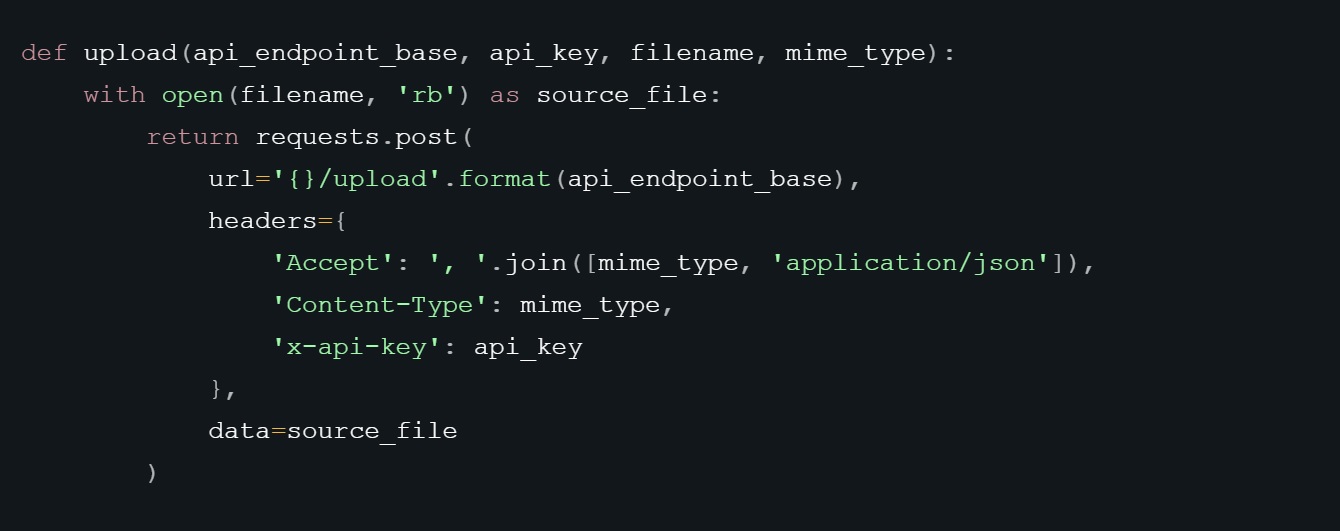
    For the AppSec manager, transformation is a great approach to promote across DevOps teams. It can be accessed via cloud APIs and it adds an additional layer of security–conformant with security best practices–that helps ensure web applications and portals don’t become a backdoor for malware infiltration. 

    Securing internet-facing portals - Fig 2 python
    Figure 2: Uploading a Document via an API.

    Developers need a choice of transformation APIs, depending on the nature of the particular application. For example, some applications will require a simple upload/download API to transform a file, while other applications will need APIs capable of handling more complex tasks, such as event-driven workflows or moving files between different storage buckets.

    Securing internet-facing portals - Fig 3 AWS flow
    Figure 3: AWS Flow Using S3 API.

    Head Start

    The demand for web applications to accept uploaded documents into portals is only going to increase, and with it the risk of potential for compromise from concealed malware. The good news is that any DevSecOps professional building a web application or portal that must accept documents and images from the internet, already has a head start when it comes to building securely if they are using a serverless architecture.

    From a security perspective, the alternative to serverless architectures, machine images in the cloud, have the associated risk that if, for example, malware succeeds in compromising the machine, it remains compromised thereafter. With a serverless, cloud native architecture, there is no residual machine and, therefore, little residual risk.

    Another key point in favor of building on a serverless cloud-native computing model is that it devolves the responsibility of patching to the service provider. It is widely understood that unpatched systems are one of the main causes of cybersecurity breaches. Serverless architectures enable the developer to shift operational responsibilities and routine security tasks, such as patching, maintenance and upgrades, to their service provider. 

    The current pandemic has turbo-charged the demand for internet-facing portals and with it the risk of malware infiltration via uploaded documents and images. For developers, that means finding new defensive techniques like transformation that can be quickly and easily baked into the code to ensure uploads are threat-free.

  • Red Hat Extends Scope of Ansible Tools

    Red Hat Extends Scope of Ansible Tools

    Red Hat today announced it has extended the analytics capabilities it makes available for instances of the Ansible IT automation platform and has made the Ansible Automation Services Catalog now generally available.

    In addition, Red Hat has increased the number of certified playbooks it makes available from both the company and third-party partners within the Ansible Content Collections. That repository now houses more than 1,200 certified Ansible Modules.

    Announced prior to the Red Hat Summit, which is taking place online this week, these offerings are part of a series of cloud services the company has developed to foster the adoption of Ansible to automate a wide range of processes.

    Tom Anderson, vice president for the Red Hat Ansible Automation Platform at Red Hat, said that as Ansible is employed to automate more IT processes, more IT teams want to better understand how the playbooks being created using Ansible are being used within their organizations. The latest updates to the Ansible Analytics module add the ability to filter analysis by Red Hat Ansible Tower cluster, by date and between organizations. IT teams can also discover job statistics by total runs, total time, average time, success rate, most failed tasks and the failure percentage of that task.

    At the same time, the Ansible Services Catalog makes it easier to access curated playbooks that have been vetted thoroughly, he said.

    Anderson noted Ansible continues to gain traction because it provides a declarative approach to automating IT processes that can span multiple platforms. Interest in automation has increased substantially in the last several years. The challenge that many organizations now face is that as various providers of platforms have made IT automation tools available, organizations now are managing multiple islands of automation, he said, adding Ansible provides a means to unify IT automation under a common open source framework.

    The pace at which organizations have been automating the management of IT is expected to increase substantially in the weeks and months ahead. In the wake of the economic downturn brought on by the COVID-19 pandemic, organizations that are reducing IT staff will look to automate processes to enable the remaining IT employees to manage more efficiently IT environments that continue to grow in size and complexity.

    That increased reliance on automation should also advance adoption of best DevOps practices, as more IT operations teams embrace managing IT infrastructure as code.

    Ansible, of course, is not the only platform capable of automating IT processes. However, because of its reliance on a declarative approach, Ansible is more accessible to IT operations staff who lack programming skills. In theory, DevOps teams are increasingly taking control over the management of IT infrastructure using programmatic tools. However, there are still many IT organizations that prefer to have access to IT infrastructure centrally managed by IT operations teams that typically make resources available to developers via a self-service portal. However, while there may be a debate over who will automate IT processes, the one thing everyone does agree on is the time to do so is now more than ever.

  • Data: The Fabric of Developers’ Lives

    Data: The Fabric of Developers’ Lives

    We’re living in the golden age of application development. Developers can tap into more resources and enjoy greater flexibility than ever before. Multi-cloud environments offer them the freedom to pick and choose from a wide range of services based on the strengths and offerings of different cloud providers. They have unparalleled opportunities to achieve their development goals.

    In this environment, developers must build applications to work across different hosted providers, each with their own unique administrators and requirements. The easiest way to deal with this is to forget about storage, at least in the traditional sense. Instead, developers and the organizations they work for should deploy an underlying data fabric that supports everything they’re trying to do, and every cloud provider they need to do it with. 

    What Is a Data Fabric?

    Put simply, a data fabric is an underlying, cloud-agnostic infrastructure that can enable developers to more easily port data between different clouds. An ideal data fabric is highly scalable—supporting an organization’s big data needs—and reliable. 

    For a visual representation, think of a big Thanksgiving when you invite a bunch of different people over and you need to pull two dining tables of different shapes and sizes together. You spread a tablecloth over the two tables to make them become one. That’s kind of what a data fabric achieves; it brings two different things together to create a single platform.

    Why Is this Important?

    Storage-as-a-Service—we hardly knew about it. Thanks in large part to containers, which offer exceptional scalability, simplicity and high availability, the speed of application development has increased dramatically. Developers need to be able to quickly provision their own data, in just the right amounts, to match that velocity. And, like containers, that data needs to be portable.

    Provisioning quickly means no more going through storage administrators to get the services they need, which can be a cumbersome and time-consuming process. Solutions like Kubernetes’ on-demand clusters enable developers to procure the data they need when they need it.

    The abstraction layer provided by a data fabric can empower developers even further. They can write their own APIs, provision data services as needed and move that data between clouds with ease. 

    This is particularly important when dealing with cloud providers that offer different services. Sometimes a developer may need a service that exists in one cloud but not another. It’s critical to have an underlying storage infrastructure that enables applications and their data to be transferred as needs require.

    What Does this Mean for the Role of Developers?

    Today, developers must be IT versatilists and wear many hats. They have to manage storage, understand their businesses’ goals—and, of course, they have to develop. That’s a lot to juggle, so it’s understandable why developers would want something that helps simplify things.

    Indeed, having a standardized data fabric can make all of this a bit easier. Developers don’t have to bother their storage administrators with requests; they can quite easily provision storage themselves.

    Everyone wins in this scenario. Developers save time, become more empowered and have the freedom to create applications and datasets and more easily apply them to different clouds. Storage administrators can focus less on provisioning and more on other value-added projects. Organizations as a whole can also benefit, since developers will be able to create applications more quickly, allowing companies to bring services to market at a faster pace.

    Speaking of the Bottom Line — What Is It?

    Deploying a standard infrastructure for data services is critical not just to developers but to enterprises themselves. It supports organizations’ initiatives for scalability, flexibility and agility—all of the reasons that companies are doing containerized application development in the first place. For developers working in multi-cloud or hybrid cloud environments, it makes perfect sense.

  • Multi-Cloud Cost Optimization For The Enterprise

    Multi-Cloud Cost Optimization For The Enterprise

    Multi-cloud is an increasingly popular approach for deploying enterprise computing assets. But, in the same vein, managing cloud costs has become a huge challenge. Whilst public cloud continues to grow in popularity, there are many factors that can increase a cloud bill that needs to be taken into consideration. A smart cloud cost management strategy certainly helps to avoid any unwanted billing surprises. Enterprises progressing through their cloud adoption need one in place to control their spend.

    The benefits of cloud infrastructure—scalability, control, security, etc.—are easily seen, but there are challenges, too. Perhaps the biggest challenge of cloud cost management is the difficulty that organizations have in tracking and forecasting usage— these uncertain budget costs can be a massive cloud management pain point. The ability to scale up and down on demand has allowed resource procurement to transition from sole ownership of the finance or procurement team to stakeholders across IT, DevOps and others. Procurement is now in the hands of a group of cost-conscious stakeholders who are responsible for understanding, managing and optimizing costs.

    How much will the public cloud cost? You should begin your cloud cost management strategy by looking at the public cloud providers’ billing models—just like any other IT service, the public cloud can introduce unexpected charges. How much storage, CPU and memory do your applications require currently? Which cloud instances would meet those requirements?

    Then, it’s a question of estimating how much those applications would cost in the cloud and comparing these figures to how much it currently costs you to run them on-premise. If you plan to use multiple public cloud providers, integration and other factors can lead to unexpected fees—try and plan application deployments to see where you might be liable for extra costs. 

    Initially, it seems that most vendors offer similar packages and prices—when you examine them in detail however, perhaps one vendor has a much lower price for certain types of workloads. Understand your business requirements before committing to a cloud vendor, and avoid vendor lock-in. Moving workloads from one cloud vendor to another can sometimes be difficult. If you don’t do your due diligence here, it can be subsequently too difficult to migrate applications or workloads after they are in production.

    Confronting Cloud Costs

    You must first identify waste by uncovering inefficient use of cloud resources. Cloud cost management is not a one-and-done process, but you can make a start saving money on your cloud infrastructure costs if you address key areas that account for the majority of wasted cloud spend and budget overruns.

    Visibility

    Ensure teams have the direct ability to see what they are spending. It’s easy to get carried away spinning up services, unless you know exactly what you are already spending. Identify what you have, and who owns it. Tag resources with user ownership, cost center information, product name and others to give you a better handle on where the spend originates. This information can be used to track usage through detailed billing reports.

    Budgeting

    Once you have a handle on what your spend is, set budgets per account. Doing this after establishing a baseline ensures that you are setting practical and realistic budgets that are based on the actual usage. Look to whitelist instance types (RDS & EC2) to only allow instances of specific types, classes or sizes.

    Manage Storage Lifecycle

    Ensure that you are rotating logs and snapshots regularly and backup and remove any storage volumes that are no longer in use. Ensure that you are using only one logging configuration and have added additional ones only when absolutely necessary. Also, ensure that sandbox or trial accounts are only utilized for exploration purposes and for the duration committed.

    Use Containers

    Another technological solution that can help to reduce operating expenses is the use of containers. Often used by IT teams taking DevOps approaches, containers package applications together with all their dependencies, making them easier to deploy, manage and/or migrate from one environment to another. Containers can also be more cost-effective on one hand but can cause more complexity, and therefore increase costs, if built in the wrong way.

    Review Regions

    Prevent staff from provisioning unapproved virtual instances from the marketplace that include software license costs, or from using specific OS or DB engines from vendors with whom you do not have enterprise agreements in place or are too costly to run at scale. Review in which regions you have services running. The cost of services per region can vary as much as 60%. You need to ensure you are balancing the need with running services in a given region with the cost of doing so. You can use instance scheduling to start and stop instances on a planned schedule. Shutting down environments on nights and weekends can help save you 70% of runtime costs. Look to determine which environments need 24/7 availability, and schedule the rest.

    Use a Cloud Cost Management Vendor

    Many organizations decide that tackling these cost optimization chores on their own takes too much time and skill. Instead, they leverage services from reputable cloud cost management vendors. Cloud cost management is one of the major pain points organizations confront when migrating to the cloud—cloud costs are difficult to estimate without some kind of assistance, due to the complexity of cloud infrastructure.

  • Self-Service Portal From env0 Reins in Public Cloud Costs

    A platform that provides IT teams with a self-service portal through which they can both control access to and the cost of cloud resource consumption is now available in beta for free from env0.

    Company CEO Ohad Maislish said that while many organizations have implemented self-service portals to control who can access resources on public clouds such as Amazon Web Services (AWS), Microsoft Azure and Google Cloud Platform (GCP), it’s apparent more workloads will be heading into the cloud in the wake of the COVID-19 pandemic to make organizations more resilient. As a result, there’s now a lot more sensitivity to cloud costs.

    Rather than relying on estimations or manual tagging, Maislish said env0 allows IT teams automatically tag infrastructure in a way that ties cloud resources to a predetermined budget using an engine designed for that purpose. All too often, organizations wind up spending a lot more on public cloud resources than planned simply because there is no way to track spending in real-time, he noted.

    In addition, it is common for organizations to find themselves being billed for “phantom workloads” that are created when developers forget to de-provision virtual machines, for example. The env0 platform provides automatic shutdown and time-to-live (TTL) options to eliminate that issue, said Maislish.

    Env0 is fresh off raising $3.3 million in funding. The env0 platform, expected to be generally available in the fall, also makes available policy controls for managing passwords, keys and tokens along with role-based access controls.

    Prior to the COVID-19 pandemic, there was a tendency for organizations to not pay a lot of attention to cloud costs. Achieving faster rates of building and deploying applications was considered a much higher priority. Most organizations will continue to put a premium on delivering applications faster. However, achieving that goal will be weighted more carefully against the total cost, especially as finance teams start issuing stricter cost mandates. In many organizations, the unfettered access to cloud resources that developers once enjoyed is likely to be more constrained.

    Of course, env0 is not the only platform promising to help organizations rein in cloud costs. However, it has combined access and financial controls in a way many organizations have been unable to achieve. In fact, the biggest challenge when it comes to containing cloud costs may very well turn out to be the will to enforce controls on developers who previously had a wide amount of latitude.

    It’s difficult to assess right now at what rate applications will be moving into the cloud. Many organizations may decide to lift and shift monolithic applications into the cloud as the first step toward making their IT environments more resilient. Others may accelerate the rate at which they are building and deploying new applications as once nascent digital business initiatives are transformed into business continuity strategies. Whatever the motivation, the days when many developers could spin up a virtual machine in a public cloud almost at will are most likely coming to an end.

  • How to Implement a Data Self-Service Program

    How to Implement a Data Self-Service Program

    Data self-service is a hot topic these days. By giving different people across an organization–marketers, technologists, business leaders, etc.–access to available data and analytics tools, you empower business users and decision makers to do their jobs effectively. But data self-service is still a work in progress at most organizations.

    According to a recent survey by IDG Research, more than half of the respondents’ lines of business rely on IT or data teams to build and set up BI and analytics dashboards, versus handling these tasks themselves. The point being, at most companies, employees do not have direct access to data or to the tools that help them analyze their data. For many businesses, data self-service is the next milestone in achieving rapid time-to-insight and real-time business agility.

    Whether giving increased data access to new users or helping traditional data users achieve more advanced analytics tasks, the goal is the same: more people with the ability to quickly get the information they need, without submitting a ticket or waiting in a backlog. However, moving to a more democratized data and analytics system takes strategy and planning.

    Here are six steps that can help you organize your data self-service initiatives.

    Move Data to the Cloud 

    Any data self-service initiative should start with seriously considering moving your data from an on-prem data warehouse to the cloud, or expanding your cloud presence if you’re already there. Many obstacles to achieving data self-service are related to infrastructure and the inability to use data quickly and in a cost-effective way. On-prem data architectures often come up short when trying to handle the sheer volume and complexity of data we see today, especially within a practical budget. 

    Build a Data and Analytics Strategy

    Before your organization moves forward with a data self-service initiative, there are several important questions you should ask to help develop a comprehensive plan that is more likely to succeed and benefit your end user:

    • Where is your organization now, and where is it going?
    • What does data self-service really mean to your organization?
    • What about security and data governance?
    • What are the blockers you might face?

    Choose Where You Will Put Your Data

    In order to facilitate data self-service, you need to break down silos between data sources and bring data into a centralized location. If that location is the cloud, there are a few choices of how that will look. In moving data to the cloud, you will need to focus on storage, data acquisition, preparation and transformation. 

    In determining where and how your data will reside in the cloud, there are many factors that come into play:

    • Will a cloud data warehouse or a data lake best suit your needs? Sometimes compliance or regulatory requirements will guide or dictate your choice.
    • How important is familiarity? For example, Amazon Redshift is based on PostgreSQL 8.0.2. A company operating an on-premises PostgreSQL data warehouse may be more comfortable moving to Amazon Redshift, since they share many aspects due to common ancestry.
    • What cloud platform/vendor services do you already use? Choosing a cloud platform related to your existing services may make it easier to trust, land and expand. Sometimes a vendor offers a clear differentiator, which in itself could be a winner. For example, if your company needs to share data with multiple third parties in a safe and secure manner, Snowflake’s data sharing feature may appeal to you.  

    When bringing data into the cloud, you have three main choices of cloud architectures to choose from: 

    • Platform as a service (PaaS) is a managed service that sits inside a cloud infrastructure that gives you scalability and also lets you retain some control. Examples include certain cloud data warehouses or an Amazon S3 bucket. 
    • Infrastructure as a service (IaaS) is a bare-bones cloud infrastructure from a cloud provider–for example, AWS, Google Cloud or Microsoft Azure. It allows you to set up your own data infrastructure in the cloud to suit your needs. It offers the most control, but it can also be a complex choice.
    • Software as a Service (SaaS) is an end-to-end managed service with little or no maintenance or overhead that lets you focus on business needs and not worry about maintaining a tech stack. But, you have the least amount of control over factors such as security and how data is stored.

    Choose Your BI and Analytics Tools

    After choosing the platform that will hold your data, consider your BI and analytics tools. As with the data platform, analytics infrastructures and tools are structured in different ways, depending on IaaS, PaaS and SaaS.

    Depending on the choices you make, you may be able to continue to use some or all of your existing ETL/reporting/analytics tools. But moving to the cloud allows you to explore newer technologies and products that align better with your data analytics needs and your future strategies.

    PaaS: Sometimes, on-prem services can be replaced with equivalent or similar PaaS cloud offerings. For example, if you move to a CDW such as Amazon Redshift, Snowflake or Google BigQuery, you may be able to load a CDW database driver into your reporting platform and continue to use your existing investments. Or, you could have an ELT process that loads your file directly into a table in your CDW.

    IaaS: Within an IaaS, you could move your existing analytics infrastructure into the cloud. End-users may see improved performance due to changes in topology as well as any infrastructure-related upgrades that were carried out as part of this move.

    SaaS: Some SaaS offerings come with their own visualization tools. Like PaaS, depending on your choice, you may be able to use existing tools or explore alternatives.

    Implement and Train

    Once you select your cloud data and analytics platforms, comes the equally important step of implementing your solution and getting your team up to speed.

    Before wide-scale implementation, you should embark on a POC to try the tools and determine whether they meet your requirements. Many companies with in-house technical teams tend to carry out the POC themselves. This involves researching the technologies, learning to use them and building a minimum viable product

    Many users in your organization will have limited or no experience with running their own analytics and creating their own data visualizations. Even if you think users have experience and will quickly get up to speed, training on new tools and processes benefits everyone.

    Build a Support Structure

    Every self-service initiative needs a well defined support structure and every user needs a clear path to get help if needed. These are the two types of support:

    • Support for products and tools. Most vendors have robust support offerings available for a subscription. Most noteworthy and popular open source products tend to have active user-forums or paid support. If you have a technical partner, they may also step in to fill any gaps.
    • Business process support. It’s nearly impossible to train an end-user for every eventuality or requirement they may encounter. For example, a user may need information that is not available in their daily dashboard. To create an ad-hoc report, they need to understand the underlying data model to be able to make effective use of it. 

    Establishing a self-service data analytics platform is a multi-step process, especially if you need to modernize your data architecture to do it. Remember to take the process step by step: use the right tools to get data into the cloud and ready for analytics; lean on the expertise of your IT and data teams and your partners; and choose ELT, analytics and visualization tools that are graphical and intuitive for end users. If you follow the steps and keep these things in mind, you will be on your way to making data accessible to every person in your organization who needs it.

  • JFrog Makes Free DevOps Resources Available for COVID-19 Projects

    JFrog Makes Free DevOps Resources Available for COVID-19 Projects

    JFrog is providing free access to cloud-based DevOps tools to teams or organizations that have launched projects to actively research and fight the COVID-19 pandemic.

    Ido Green, vice president of technology for JFrog, said this initiative will be made available via its FrogCare program mainly to nonprofit organizations. The goal is to make it easier for teams launching these projects to embrace DevOps practices to more easily sustain these applications for the long term, he said.

    Thus far, JFrog is supporting a mix of short- and long-term projects that address various aspects of the pandemic, he said, adding JFrog is not so much interested in the quantity of the projects it supports as much as the merits of the research project.

    Specifically, JFrog will provide access to cloud-based tools such as Artifactory, Xray and Pipelines with no time limits. Organizations participating in the program will get 5,000 build minutes and 250GB of storage space for free each month along with 500GB of free data transfer. Those teams will also receive free support. If they exceed quotas in a given month, JFrog promises to not shut off access to its services.

    Green said JFrog is in a better position to help these projects because many of them are already using various application development tools. The modular architecture of the JFrog platform makes it easier for those teams to extend those tools using a DevOps platform that is designed to meet each team where they are in terms of application development and deployment maturity, he said.

    JFrog expects most of these applications will be accessing massive amounts of big data in the cloud, Green noted. As such, most of these applications will be built using modern cloud-native stacks of software that make it easier to scale workloads up and down as needed. Of course, many of the organizations building these applications may not have the greatest appreciation yet for best DevOps practices. However, free access to platforms such as JFrog should also make it easier for DevOps practitioners to donate their time and expertise to help build and deploy these applications. In many cases, application development projects in vertical industry segments impacted by the pandemic have been suspended or terminated altogether. In the short term at least, there should be more DevOps practitioners with some extra time on their hands.

    Longer-term, it’s also clear that health care and life sciences will emerge as hotbeds of application development and deployment for years to come. DevOps specialists who want to move into that industry sector might benefit from volunteering to work on a research project. JFrog also envisions that over time it will serve as a conduit through which multiple teams working on these projects around the globe could share insights and best practices.

    It’s not clear to what degree the COVID-19 pandemic will transform IT in general and DevOps in particular. What is certain is that the amount of focus on preventing future pandemics both inside and out of IT is creating a unique opportunity to make a unique DevOps contribution.

  • Scalyr Alters Log Analytics Economics

    Scalyr Alters Log Analytics Economics

    Scalyr today announced that its log analytics cloud service is now capable of ingesting over 200TBs of data per customer per day in real-time.

    Company CEO Christine Heckart said the goal is to make as much log data available at a price point that will continue to be less than $5 per GB at scale.

    Heckart said Scalyr expects to be able to continue to expand the amount of data it makes available to customers because its namesake platform is built on top of a columnar data store rather than an index engine. The goal of a project dubbed Sonic Boom is to eventually make a petabyte of data available to customers of the cloud service, she said.

    One of the paradoxes of log analytics is that while IT organizations are encouraged to use this data to proactively identify issues before they become a major problem, the cost of storing that data often results in IT organizations limiting the amount of log data they analyze. As a result, they often miss outlier events that could have major implications for the IT environment.

    As a cloud service that is compatible with the S3 storage interface defined by Amazon Web Service (AWS), the columnar store engine employed by Scalyr makes it easier to pass the economics of cloud storage back to the end customer, she said. IT costs in the wake of the COVID-19 pandemic are, of course, going to be a much bigger issue going forward. Almost every aspect of IT, including log analytics, is likely to be subject to a cost review in the week and months ahead as organizations adjust to an economy that has changed for the worse overnight.

    Heckart said the issue many organizations will face when it comes to logs is that data is the lifeblood of any digital process. Organizations may not need to store that data, forever, but analyzing log data to identify anomalies indicative of, for example, a cybersecurity breach is now almost a daily routine. As such, how much log data to make available where at what cost becomes a subject of debate.

    Of course, it may be less costly to store log data locally. However, someone on the IT staff will need to manage those logs. Scalyr and other providers of SaaS-based platforms for log analytics contend it’s more cost-effective to rely on a cloud service to manage log data that also is more accessible via shared analytics tools.

    Regardless of the amount of IT resources made available, the one thing that is certain is neither the amount of data nor the rate at which it needs to be analyzed will be slowing down anytime soon. In fact, many organizations are likely to accelerate their transition to digital processes that are ultimately both more flexible and cost-efficient than existing processes. It will be up to DevOps leaders to figure out how best to keep pace with that rate of change with whatever resources are at hand.

    — Mike Vizard

  • APM and Application Stability: Where Two Monitoring Roads Merge and Diverge

    APM and Application Stability: Where Two Monitoring Roads Merge and Diverge

    In software development, application performance management (APM) is one of the grown-ups in the room. Not only has APM been around for a long time, but its solutions have evolved over several generations, making it one of the more mature product categories. 

    APM’s longevity makes perfect sense when you consider its fundamental purpose, which is to provide organizations with a way to understand the performance characteristics of their software. Value is delivered by alerting infrastructure teams when applications are performing slowly or poorly, and APM has the vast experience to do this job well. 

    If APM is one of the old-timers in software development, then application stability is the new kid in town. With the rise of mobile apps and iterative development releases, application stability has answered the widespread need to monitor applications in a new way, shifting the focus from servers and networks to the customer experience. 

    The emergence of application stability has caused some consternation for die-hard APM fans. However, these two solutions embody very distinct monitoring focuses, which leads me to believe there’s room for both tools, as well as different teams for both.

    APM: The Engine for Infrastructure and DevOps Teams

    Before the cloud, organizations supplied their own physical hardware and monitored components such as RAM, disk space, CPU and memory. If you ran out of any of these resources, you were screwed. 

    And that was the beauty of APM: It enabled the people running the applications to anticipate when they’d need more resources. 

    Of course, rather than monitor physical machines, today’s infrastructure, SRE and DevOps teams monitor cloud instances. Gone are the days of running out to Best Buy and lugging back new hardware. Instead, a simple request for a new instance is submitted to a cloud provider, and instant access is received. 

    Rather than make APM obsolete, as some feared, the cloud presents two good reasons for continued reliance on this tool.

    1. Apps Can Be Resource Hogs: A cloud instance is simply a slice of someone else’s computer, which means you still need to know when you’re close to running out of resources on this virtual machine. In fact, extra care is needed these days because you’re likely to run out of space more quickly.
    2. Money Still Doesn’t Grow on Trees: The ease of access to infinite cloud resources means that software companies may fall into the habit of throwing money at problems rather than figuring out how to streamline usage and costs through better efficiency. Companies can end up paying a ton of money to run apps if they continuously spin up more cloud instances without thorough consideration of the cost and need.

    And that’s where APM steps in. Its main purpose is to help infrastructure teams figure out capacity planning. With the cloud, questions shift to include:

    • How can I better manage my cloud instances and optimize usage? 
    • How can I make sure I don’t give ludicrous amounts of money to cloud providers? 
    • How can we tweak and optimize the cloud to reduce costs?

    These are the types of things that APM does extremely well. Anytime you need to figure out how to optimize your current resources or when to buy a new server or cloud instance, APM tells you. This information is invaluable to the people running the applications, namely the infrastructure or DevOps team.

    Application Stability: Where the Tires Meet the Road for Engineering Teams

    Now, let’s be honest, APM doesn’t have its strongest showing when the person who runs the app is also the person who builds the app. And that’s exactly the scenario presented by mobile development and iterative coding. 

    Rather than going through long development cycles, software now gets pushed to the web on a daily basis, and mobile apps tend to have weekly or biweekly release cycles. This release speed is not only encouraged but expected in agile software development.

    That means the chasm between building and running apps has shrunk, especially for mobile apps. More often than not, the people building the apps are the people releasing them. There is no gap. And, with mobile, companies no longer need to worry about expensive physical hardware but rather about the end user experience. The customer becomes the focus.

    Unfortunately, APM is perhaps a little too set in its ways to help you do that. But it’s not APM’s fault. These requirements are not what APM is inherently built to do. It’s great at detecting problems and alerting infrastructure teams so they can toss the issue over the fence to the development team. However, its core strength isn’t providing information on how to fix the problems because it wasn’t built with the developer audience in mind. 

    Trying to refactor APM to help with stability and error issues is like tuning your engine when you have flat tires. They are completely separate components of the car, built for different purposes. You can tune the engine all you want, but it isn’t going to move the car unless you focus on why there isn’t air in the tires.

    In today’s iterative world, development teams care a lot more about how apps are running. There’s a demand for fixing actionable items. Developers want to know exactly what’s broken, what to fix right now and what can wait. In short, developers want aggregation and automation of errors. They want to know, “Do we build or fix?” 

    This trade-off between building new features versus fixing bugs is one of the key factors behind the adoption of application stability management tools. Developers need answers to several questions:

    • Where are the errors in the code?
    • How can we get to those bugs and fix them as soon as possible?
    • How can we tie bug fixing into our planning for the week? 

    Whether running sprints or building in an agile manner, development work is planned in advance. Developers want to figure out how much new feature work will be included in a sprint versus how much bug fixing is required. And they need a tool that helps them automate the answer to that question.

    Benefits of Application Stability

    The beauty of application stability is that it brings together the errors captured by APM and enables developers to see at a glance which ones are worth fixing. As a result, five major benefits arise.

    1. Increased Efficiency: Companies eliminate the problem of infrastructure teams tossing issues over the fence to development teams. Valuable time is saved because application stability tools remove the game of telephone between the two teams and deliver bugs directly to the team that will fix them.
    2. Stronger CSAT: The time to fix bugs goes down dramatically when the person who wrote the code fixes the code. With diagnostic information in hand from the application stability tool, software engineers innately understand what the code does, what the bug means and how to fix it. Faster resolution of bugs that impact the end user experience means that customer satisfaction levels (CSAT) are less likely to drop.
    3. Error Prioritization: Application stability tools group bugs by root cause, making it easy for developers to get a sense of severity at a glance. It’s much easier to determine what to fix first when developers can see which errors are most costly, which affect the most customers, and which bug is impacting a key customer.
    4. Tool Synchronization: Taking it one step further, application stability tools are tied into project management suites. Bugs map directly to tickets created in Jira (or whatever tool is used), and tickets update automatically as priority changes.
    5. Stability Scores by Release: Application stability enables product and development teams to see stability scores by release. Since it’s common to have multiple app versions live at the same time, especially with mobile apps (where DevOps isn’t really involved), companies can’t rely on a single stability score. Teams need to see stability by release so that it’s clear exactly where the errors are and what impact they’re having on users.

    What Percentage of Your Development Team Has a Login to Your APM?

    I’m often asked whether I think application stability will replace APM, and my answer is simple: no, I don’t. APM remains an essential part of developing software, and organizations still need to understand when they’re about to run out of resources and when there’s poor performance. 

    Instead, I see these two solutions co-existing as adjacent categories but helping different teams. Application stability delivers prioritized errors to developers for fixing, while APM works well for enabling ops teams to raise red flags on high error rates and reduce cloud spend.

    Some of you may be thinking to yourself, “Well, my APM product does what you’re describing for application stability, so I’m sure my developers are fine using it.” To which I poise the following challenge: What percentage of your dev team has a login to your APM? What percentage logs in on a daily basis? And, if they do use it, do your developers like it?

    The answers to these questions may surprise you. After all, APM wasn’t really built for developers or for keeping end users happy. In contrast, application stability was born at the customer layer and is designed specifically to monitor the front end and ensure strong customer experiences with web and mobile apps. 

    Once you’ve had a chance to hear from your dev team, it wouldn’t surprise me if you discover that they’re pretty excited about the new kid in town.

    — James Smith

  • Google Names CloudBees App Dev Partner of the Year

    Google Names CloudBees App Dev Partner of the Year

    Google this week named CloudBees its 2019 Cloud Technology Partner of the Year for Application Development at a time when the rate at which application workloads are heading into the cloud is expected to accelerate.

    Beyond the Jenkins continuous integration/continuous delivery (CI/CD) platform on the Google Cloud Platform (GCP), CloudBees also makes available a software-as-a-service (SaaS) edition of Jenkins X, a CI/CD platform optimized for Kubernetes, along with a CloudBees Software Delivery Management (SDM) service for managing DevOps processes.

    François Dechery, chief strategy officer for CloudBees, said CloudBees chose to partner with Google at that level versus other cloud service providers because Google made it clear it would partner at both the technology and business development level. In addition, given Google’s long history with Kubernetes, it also made sense to leverage existing Kubernetes expertise, he noted.

    In the wake of the COVID-19 pandemic, more application development work will be moving onto cloud platforms that can be remotely accessed more easily by development teams, he added.

    In some cases, organizations will opt to self-manage those platforms or rely on a traditional managed service provided by a third-party IT services firm. However, Dechery said there also has been a significant increase in the number of organizations willing to consume a DevOps platform such as Jenkins X as a SaaS application, as long as the IT environment is proven secure. SaaS platforms are now a mainstream element of any enterprise IT environment, said Dechery.

    Many of those decisions will be predicated on what degree of abstraction any organization is comfortable with as IT platforms become both more complicated and diverse, added Dechery, noting one thing that attracts organizations to Jenkins X is that it abstracts away the complexity associated with deploying Kubernetes. The Kubernetes deployment process is automated by Jenkins X, which essentially provides a level of abstraction on top of another abstraction.

    Dechery conceded there is some level of inherent competition with cloud service providers that provide their own DevOps tools. However, most of those DevOps platforms are not up to the task of building and deploying applications at scale, he said. In addition, platforms such as Jenkins and Jenkins X make it feasible to manage application development projects at scale without having to worry about becoming locked into a single cloud service provider, he added.

    Competition across the CI/CD platform space remains fierce. CloudBees has long benefited from a large open source Jenkins community that often leads to organizations implementing an enterprise edition of Jenkins supported by CloudBees. However, as organizations embrace microservices-based applications based on containers, many of them are revisiting their platform options. That doesn’t necessarily mean they will rip and replace existing investments in Jenkins platforms; however, given the rate and scale at which modern applications are being built and delivered today, many organizations may be moving toward more prescriptive approaches to bring some order to the chaos.

    — Mike Vizard