Company CEO Jyoti Bansal said cloud costs are spiraling out of control within many IT organizations because DevOps teams lack visibility into the true cost of deploying an application on not just one cloud versus another but also specific tiers of services made available by cloud service providers.
Continuous Efficiency provides DevOps teams with granular cost breakdowns by cloud provider, cloud service, application, microservice and environment, as well as by Kubernetes cluster, namespace, workload, node and pod.
Bansal said that capability is crucial for organizations looking to identify underutilized resources that they today typically only become aware of when a monthly bill is presented by the cloud service provider. Even then, it’s too late for the DevOps teams to proactively optimize the cloud environment to minimize costs.
In fact, it’s currently too difficult to correlate the monthly bill presented by a cloud service provider with specific application services that might have been consuming that infrastructure, he noted, adding Continuous Efficiency is specifically designed for DevOps teams rather than the finance team.
In the wake of the economic downturn brought on by the COVID-19 pandemic, DevOps teams are under more pressure than ever to reduce cloud costs, said Bansal. Not only has the cloud become the single largest expense for DevOps teams, but also IT leaders are being required to better predict costs at a time when organizations are unsure how much revenue they are able to generate from one month to next. The days when DevOps teams could view the cloud as essentially a free resource are now over, he noted.
Beta customers who tested Continuous Efficiency have been able to realize as much as $500,000 in annualized savings on their cloud costs, Bansal added.
Harness is leveraging its continuous delivery service to auto-discover cloud costs without requiring IT teams to manually tag cloud resources. As a CD platform accessed as a service, Harness is able to aggregate all that data in real-time on behalf of its customers. The Harness platform supports Amazon Web Service (AWS), Microsoft Azure and Google Cloud Platform, including the Kubernetes based services provided by those services.
Much like the rest of the IT environment, Bansal said responsibility for managing cloud costs will increasingly shift left toward DevOps teams. As one of the primary consumers of those services, it’s typically DevOps teams who have the most variable consumption of cloud services. All too often, it turns out that costs are being incurred because developers have reserved instances of virtual machines on a public cloud for sake of convenience but are not actually using. When many organizations are deeply concerned about cash flow, tolerance for that behavior is quickly dropping to near zero.
Rightsizing of cloud computing environments has, of course, been inevitable. The thing that has changed is the current economic climate has transformed rightsizing from being merely the desired goal into an absolute requirement.
Companies today are under heavy pressure to deliver software faster and with more quality than their competitors. A set of good features and their reach to customers can increase only when the company releases software updates frequently. As a result, organizations are embracing DevOps and CI/CD approaches to improve their ability to plan, build, test and release applications and features to market quickly with quality and at scale. IDC predicts the worldwide DevOps software market will reach $8 billion by 2022, up from $3.9 billion in 2017.
The buzz around continuous integration, continuous deployment and continuous delivery is more than ever today, but in practice, the actual usage of CI/CD seems to be less. It can be because of the shortage of skill set required in DevOps or companies still practicing traditional software development methodologies. Enterprises are not understanding the amount of money they are leaving on the table by missing CI/CD and DevOps automation practices.
For many companies, DevOps is something they have to try because their competition is doing so or because it is a trend. This is a desperate attempt without understanding the consequences and basic understanding of DevOps principles.
For the most part, it is a disparate set of tools that customers have to connect together for their software delivery that creates chaos around. On the other hand, it is difficult to choose the right tools and understand what are the best practices. That’s why we are starting to see a trend of DevOps companies delivering a unified toolset so that customers have a complete solution out of the box —without having to worry about finding many different solutions from different vendors.
What Is CI/CD?
Whenever a developer commits and pushes changes to the repository, the CI system will rebuild the branch and run all related test cases to verify that new changes won’t break the existing application and functionalities.
Continuous delivery is an extension of continuous integration that helps you deploy your application with a click of a button. It means deploying changes every time they pass CI tests. With this, you can easily automate your build and testing phase and most of your release process as well.
With continuous deployment, developers will be able to release or deploy software automatically into the production environment. In this stage, no manual code check-ins happen into the app. Code is automatically tested through the CI process for issues, and if none are found, then the code is deployed.
Why CI/CD?
CI/CD serves as the best practice for testing and deployment of applications. For the purpose of quality assurance, making CI/CD the single channel to deploy code is the best practice. DevOps teams should ensure that everything is going through the CI/CD pipeline so that the code in testing and production are the same. This will also reduce human error and avoid deploying other versions not being tested by mistake.
One of the biggest reasons for companies to practice CI/CD today is faster software delivery, which leads to more frequent updates to customers. It makes them feel happy and a constant improvement with frequent releases will ensure enhanced customer satisfaction. This is a competitive advantage because it allows companies to deliver new features more often. It can help companies stay ahead of competitors.
Passing code through the CI/CD pipeline ensures that any changes made adhere to the established standards before moving to the next stage in the delivery pipeline. Any failure or discrepancy prevents the advancement of such changes to the next step until it is rectified. This simply means this approach of CI/CD ensures that bad code does not get into the production. CI/CD promotes the fail fast, learn fast and deliver fast approach. When you have automated CI/CD in place, the code is run through the CI/CD process constantly with each commit by developers which allows bugs to be caught quickly — it is easier to isolate the bug since each small change is tested separately.
What Is the CI/CD Pipeline?
A CI/CD pipeline is a deployment pipeline workflow that is integrated with automation. When conducted well, it will minimize manual handoffs and errors to enhance the feedback loops throughout the software delivery life cycle, allowing development teams to deliver smaller chunks of releases within a shorter time.
The CI/CD pipeline is now mainstream among software companies, and it has become the backbone of the modern DevOps environment. While DevOps lays principles and standards related to the culture aspect, CI/CD focuses on the automation, flow, process and tools. CI/CD scenario has changed with the introduction of containerization and microservices. Now, every cloud vendor has support and integration with tools such as Docker and Kubernetes that help the CI/CD pipeline to scale.
Stages of the Continuous Delivery Pipeline
Test Automation and CI: This is the important stage where the new features and prototypes are prepared, coding is done and then the code is integrated with the base. With the use of a CI server, the unit tests and packaging is done.
Build Automation: This is the stage where the artifacts are pushed by developers (i.e., Dependencies, Docker image) to the registry (i.e., Amazon ECR or Docker hub or any container registry).
Alpha Deployments: In this stage, developer checks-in changes. It is the place for developers to carefully see the changes they’ve made and how they interact with each other and affect other systems. Also, here developers can be able to see if they broke anything in the master branch.
Beta Deployments: This is the stage where testers carry out manual testing. Manual testing is still required to see the perfection of CI tools. This gives the DevOps team the guarantee that the condition of the application is good and will work definitely as desired when deployed.
Production Deployments: Here comes the final stage, where the app goes live.
What Is the Market Saying About CI/CD?
The search volume has gradually increased in the world for the keyword “CI CD Pipeline” on Google.
When Mabl, a test automation company surveyed 500 software testers, 53% of the people said their team uses continuous integration, while 38% embrace continuous delivery and only 29% have adopted continuous deployment.
A DevOps related survey from Codefresh showed that a third of companies had automated more than half of their workloads, but only 1% were all the way there. Almost no one has automated the entire CI/CD process. A plurality of engineering teams have automated less than 10% of the process.
The iOS Developer Community Survey is the largest survey of Apple platform developers ever undertaken, where 2,290 people filled in the questionnaire in which CI/CD questions were also a part of the survey.
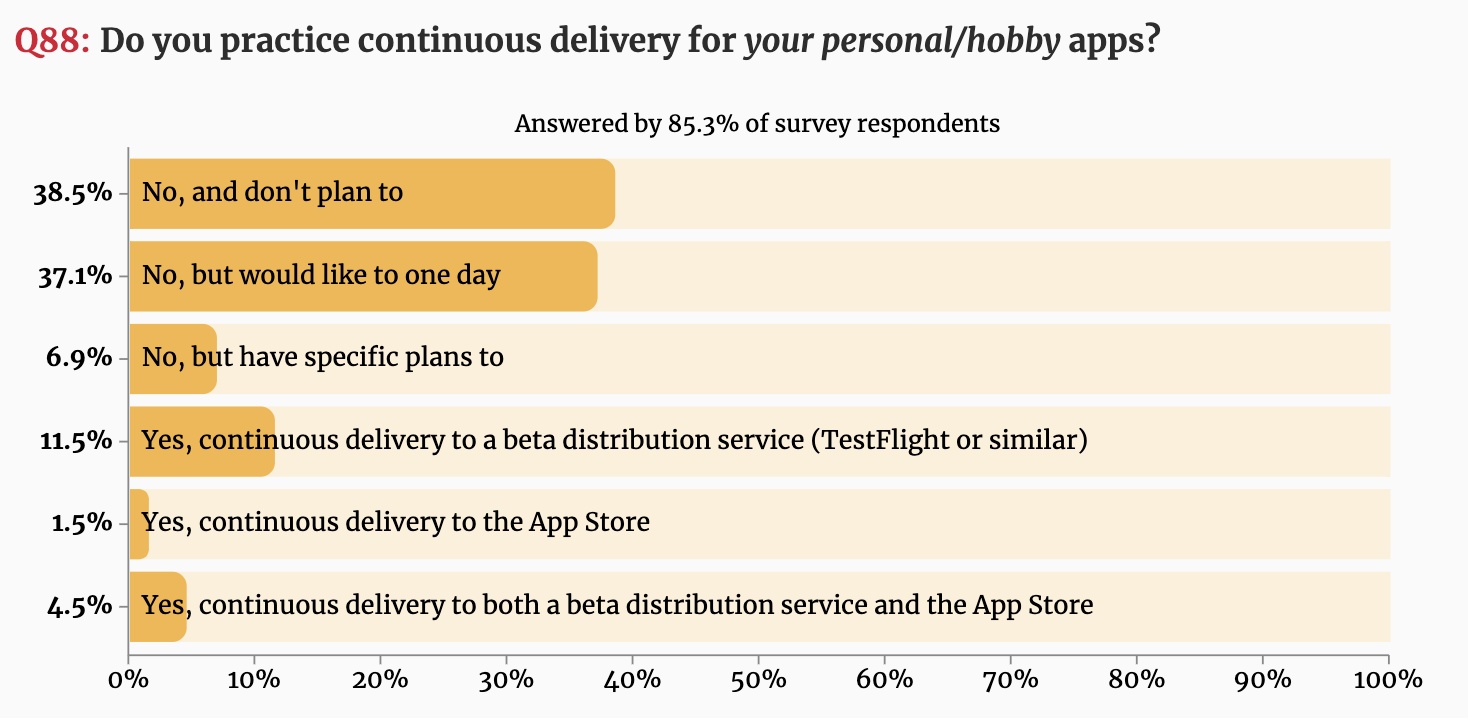
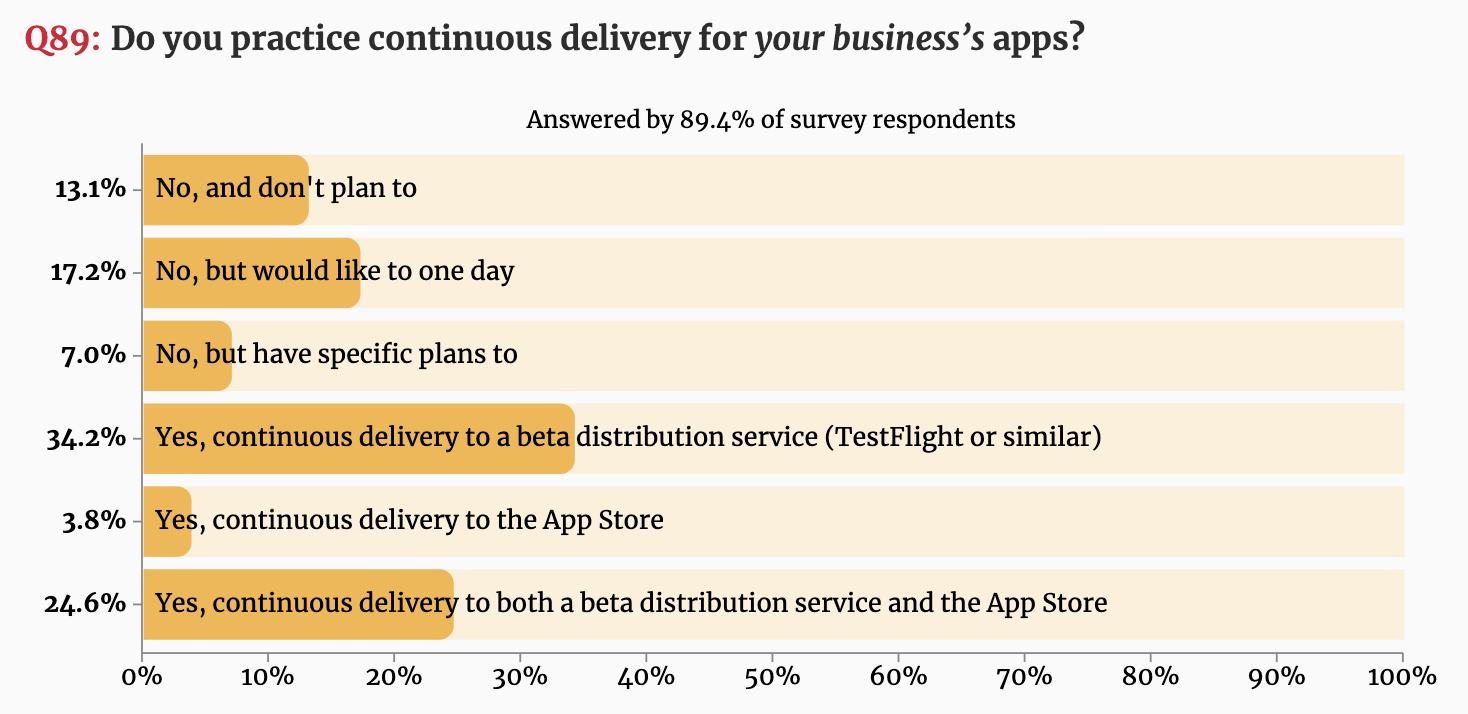
Below are the results that showed a majority of developers are practicing CI/CD when it comes to business apps.
Figure 1: Do you practice continuous delivery for your personal/hobby apps?Figure 2: Do you practice continuous delivery for your business’s apps?
The way forward: Companies will not be able to fully take advantage of containers and DevOps unless they embrace the use of a proper deployment pipeline. Companies will start offering pre-built pipelines to customers, something like JFrog pipelines. There is a need for a unified platform that has all the tools needed to support a CI/CD system — automation (Pipelines), binary repository management (Artifactory), security (Xray), release/deployment (Distribution), etc. JFrog provides a unified platform.
Codefresh conducted a survey and published the results of the survey of 130 developers at the KubeCon + CloudNativeCon Europe 2019 conference — and the results were a bit shocking. It showed that nearly a third (32%) don’t use any continuous integration or continuous delivery (CI/CD) platform at all. Sixty percent of the survey respondents said their organization has yet to take full advantage of automation to accelerate software development and deployment.
The Market Radar Report by GigaOm is a recent research on the enterprise CI/CD solutions where the author compares the leading CI/CD solutions in the industry and rates them depending on different valuation criteria. According to the results, JFrog, Codefresh and GitLab are outperformers as shown below.
The CI/CD solutions considered were AWS, CircleCI, CloudBees, CodeFresh, GitLab, IBM, JFrog, Micro Focus, Microsoft, Red Hat and Xebia Labs. You can download the free analyst comparison report here: GigaOm Radar For Enterprise CI/CD.
CI/CD is one of the DevOps best practices because it ensures proper alignment between developers and operations. While it enhances automation, developers can push code changes more reliably and frequently. At the same time, the operations team can see greater stability because environments have standard configurations, and rollback procedures are automated. To win the CI/CD game, both dev and ops teams need to develop consensus on the right tools and approaches that are beneficial for the business growth in the long run.
Cloud and DevOps Go Hand in Hand
You can’t do DevOps without the cloud. DevOps won’t have much value without it, and the cloud won’t do much without DevOps.
Cloud computing has many definitions, the fundamental explanation of the cloud can be defined as a system that enables and supports the provisioning of infrastructure. Thus, it allows it to be described as code or templates, facilitating the creation of repeatable processes. That is also the basic principle of DevOps, automating the processes/tasks in the software development life cycle to the fullest extent.
One of the biggest benefits of cloud for CI/CD is the dynamic nature of cloud infrastructure. This is perfect for the ephemeral and bursty nature of CI/CD workloads. Cloud resources can automatically scale up and down based on CI/CD workloads. This allows huge management and cost benefits for enterprises. Enterprise companies don’t need to have their own servers to maintain, they need to increase these servers as CI/CD workloads increase or waste server resources when they are idle.
Regardless of how your organization defines the cloud technologies and, despite which DevOps routes you travel to achieve digital transformation with the cloud integration, the aesthetics of cloud technologies and services can be easily amalgamated in the DevOps dictionary because they radically complement DevOps principles and processes.
For DevOps implementation, Agile principles serve as a driver, as there are shorter release cycles and automation to deliver fast and achieve the deadlines. To implement continuous practices, cloud computing is a great facilitator, since resources are available quickly for all the activities involved in development and application lifecycle management. Agile principles, along with cloud computing and DevOps practices, enable high developer productivity and faster growth in organizations.
With secured cloud gateways, users get the ability to access enterprise resources easily from anywhere and with any device, without compromising on the security of the network. Letting users access your network from their devices might sometimes seem scary, but the modern cloud platforms have much more to offer, they come with built-in security stacks to help provide administrators with the tools they need to manage and support security.
DevOps coupled with cloud tech has enormous benefits for businesses employing them:
Increased developer productivity and collaboration.
Faster time to market through quick and easy access to development environments.
Help to automate different repetitive tasks so that developers can focus on the tasks that matter.
Cloud complexity and system maintenance can be incredibly reduced by automation and infrastructure as code approaches.
Increase security with modern cloud platforms and principles that serve to eliminate the manual error.
Help to eliminate downtime through cloud-based continuous business operations. Developers can build stateless applications with automation, which will increase the availability and failover ability, along with increasing business reliability and improved customer satisfaction.
Scale to new heights — one of the main reasons businesses employ cloud and DevOps is to scale their infrastructure and applications as and when needed.
Cloud Deployment Models
When the cloud provider entirely hosts organization’s applications and data, it is a public cloud. With just having an internet connection, the employees of the company employing public cloud can access the applications.
A private cloud is when the resources of an organization such as storage, compute and networking resources exist in a provider’s data center. Companies prefer private cloud mainly because of security and for storing highly sensitive data when it comes to running applications.
One more modern approach is the hybrid cloud; it is a combination of private and public cloud services. According to the traffic and demand considerations, organizations can make the change. Some customers may have on-prem CI/CD systems. Some of these CI/CD systems can expand their workloads to the cloud in a hybrid setup. This can allow them to realize the benefits of cloud now and not have to do a complete migration.
Mainly, when there is high demand, workloads can be run in the public cloud, and then when things get back to normal, return to the private cloud. This approach reduces the overhead cost spent on cloud resources. Additionally, the key point is, sensitive information, data and critical applications can be kept in the private cloud. In contrast, less-sensitive data and applications can be stored and run in the public cloud.
Choosing DevOps Cloud Solutions
If cloud is like an instrument, then DevOps is the musician who plays it.
Cloud computing and DevOps play a vital role and are interlocking parts of the IT strategy. Together, cloud and DevOps help IT shift its emphasis from “How far and long can we go without an outage?” to “How often we can deliver new and stable functionality/feature?” or “How fast/quickly can we deploy a new service?”
Businesses today are looking for ways to digital transformation with the help of the cloud, DevOps and automation practices. Considering the competition in the cloud space, it is overwhelming to see so many vendors and get confused on what to choose.
Here, in the State of DevOps Cloud Solutions 2020, you can see a high-level overview of the cloud DevOps platform solutions available today, and what you should expect from vendors in your cloud DevOps journey.
Based on research conducted using its platform and other public sources of data, the report also finds 90% of organizations allow privileged users to make configuration changes directly to a cloud infrastructure after it is deployed.
Issues such as open security groups, overly permissive identity access management (IAM) and exposed cloud storage services make up 67% of the most common cloud security issues being uncovered, according to the report.
The Accurics report echoes similar findings published by Unit 42, the cybersecurity arm of Palo Alto Networks, which found more than 199,000 templates have medium-to-high vulnerabilities in use on public clouds.
Accurics CEO Sachin Aggarwal said that as more organizations embrace infrastructure as code using tools such as Terraform, policy guardrails aren’t being put in place. More troubling still, security assessments seem to be few and far between. That’s especially problematic because cybercriminals now routinely probe every layer of the application stack looking vulnerabilities, he noted. In effect, cybercriminals are assessing cloud applications and infrastructure more frequently than IT teams.
Aggarwal said beyond making sure the appropriate guardrails are in place in terms of overall security posture, organizations need to have confidence in the DevOps processes being adopted. That doesn’t mean cybersecurity teams should put rules in place that slow that application development process down. Rather, tools that surface cybersecurity issues and then provide a method to automate the remediation of any vulnerabilities discovered need to be put in in the hands of IT professionals, he said.
The challenge organizations face is the processes that are employed to secure on-premises IT environments largely don’t translate well to highly dynamic cloud computing environments that assume a shared responsibility approach to IT. Public clouds are obviously popular with DevOps teams that can programmatically invoke resources on demand. However, those teams generally don’t have much cybersecurity expertise. Too often, DevOps teams assume cybersecurity tasks are being handled by a cloud service provider. Of course, the cloud service provider is only securing the services they provide. Any configuration issue is not their responsibility.
The result is as more changes are made to the IT environment, the more likely that mistakes will be made. Catching all those issues without the aid of tools is an unreasonable expectation for any IT organization, much less a DevOps team that may be working beyond the purview of the rest of the IT organization.
No one sets out to create a cybersecurity issue. But in the rush to deploy or update an application it’s easy to overlook a cybersecurity issue. The goal should be to eliminate as many of those mistakes as possible before they are ever made. However, as long as humans are involved, there will be errors. So the next most important thing is to be able to correct those mistakes as quickly as possible without having to disrupt the entire IT environment.
Function as a Service (FaaS), the popular incarnation of serverless computing, along with containers, has played an important role in the migration from monolithic application architectures to those based on microservices. Its introduction has changed the way developers think about infrastructure and application development. While at the same time, it has also driven evolution in the consumption-based infrastructure models we saw introduced with the advent of elastic computing.
FaaS has simplified broad adoption of value-add platform services from the major cloud service providers (CSPs) such as database and authentication services. It has quickly grown to become a viable infrastructure option for developers and IT professionals alike, serving as another tool in the chest – perfect for short-lived or ephemeral tasks. In recent months, we’ve seen announcements from content delivery network (CDN) providers touting a new breed of FaaS offerings promising low latency, workflow customization and cost containment.
CSP FaaS vs. CDN FaaS
CSP FaaS resides in regional hyper scale data centers with the number of data centers in a region typically in the low single digits. These are the same data centers where the myriad of infrastructure and platform services are offered. Enterprises spin up their applications in virtual private clouds in a single region, sometimes they configure a backup region but even with today’s tools it is still complicated to manage data replication/consistency and ensure environments are kept in lockstep.
In contrast to CSP FaaS, CDN FaaS solutions are highly distributed with various PoP locations. These CDN FaaS architectures are typically integrated with the providers’ edge delivery locations. Depending on vendor architecture, there could be hundreds of edge locations. Whereas CSP FaaS benefits from being collocated with platform services, CDN FaaS benefits from being closest to CDN action, where end-user requests/responses are received and processed. This is where edge computing comes into play because it minimizes latency while allowing for custom content delivery workflows.
Empowering Innovation by Enabling Customization
Developers use functions to customize content delivery workflows to create more compelling user experiences. Up to this point, CDNs provided limited capability for developers to define custom workflows via their own code. Flexibility has been limited to predefined “rewrite rules” and custom behaviors are the product of professional services-led engagements, which is not exactly developer friendly. CDN FaaS changed this, handing power to developers to deploy code and create unique, differentiated user experiences.
The Make Or Break Element: Latency
It is important to minimize latency between application services that rely on FaaS to avoid program timeouts. CSP FaaS options typically offer a broad range of event-triggers and run-times/programming languages to support developer preferences and align with the other elements of the development environment.
CDN FaaS has request triggers that are integrated with end-user or origin server request/response flows. FaaS invocations are typically a result of an end-user requesting content or an origin server providing a response that needs to be customized on a per end-user basis to reflect their preferences. The scale and latency expectations are so demanding that the run-time options are often limited to those that provide the lowest memory footprints and highest performance. CDN FaaS can also take advantage of the caching technologies further improving latency to complete functions – especially when remote service or network calls are involved.
How Do the Costs Stack Up?
For CSP FaaS, the pricing model is two dimensional. It is based on the number of requests combined with the allocated memory and the elapsed time of function execution. Some of the CSPs are offering generous free tiers to entice customer adoption – and remember, Function as a Service drives adoption of many of the CSP’s higher value platform services.
When it comes to CDN FaaS, the pricing models are similar, some organizations are charging for requests only but they limit memory foot and the time a given function is allowed to run. However, there is typically a premium to run FaaS in those highly distributed edge locations. Which is no surprise because cost models are higher for distributed/global build outs than centralized models. Also, due to the nature and demands of web and video services, request volumes are likely to be an order of magnitude higher than CSP FaaS requests.
Not All Faas Services Are Created Equal
Function as a Service is an important part of our infrastructure as a service (IaaS) choice but it’s unlikely enterprises make a CSP solely on the FaaS offering. Typically, the decision is based on what value-add platform servers are available to build and support the application, and how seamless can those services be integrated with FaaS.
For CSP FaaS, it is all about the bigger picture, the infrastructure and platform choices. This is also true with CDN FaaS because it is unlikely a CDN purchasing decision will be made on that CDN’s FaaS capabilities in isolation. The selection criteria will include FaaS but the larger weighting factors will include the content delivery capabilities, such as global reach, capacity, origin offload, feature support and so on.
Overall, CSP FaaS are optimized for flexibility, multiple run-times, broad range of request triggers and tight coupling with CSPs’ higher-value platform services. Latency is important but the focus is within the CSP region or customer’s VPC and the use cases are often enterprise applications for B2B technology companies. Meanwhile CDN FaaS is all about performance, run-time efficiency and latency. It’s about running the functions in conjunction with the CDN – closest to where end-user requests originate and media responses are delivered. CDN FaaS requires enormous scale – on a global scale versus a single, centralized region.
CircleCI today in partnership with Plandek launched an analytics plugin dubbed Buildtrakr for its namesake continuous integration and continuous delivery (CI/CD) platform. Buildtrakr integrates with CircleCI and Git to synthesize commit and build performance data, with critical metrics being surfaced via a dashboard.
In addition, CircleCI has revamped its user interface and reconfigured a new fleet of Docker images, also known as CircleCI convenience images, to optimize them for a continuous integration environment.
CircleCI CEO Jim Rose said Docker images made available by CircleCI are faster, easier to download and provide a more efficient way to build custom images. CircleCI also released a new category of convenience images available for languages such as Python, Ruby, Rust, Go and several others, that come with improved documentation, more stability and more efficient infrastructure. Those convenience images are individual open source projects and can be used in IT environments other than the CI/CD platform from CircleCI.
Finally, the company also announced that its insights endpoints now offer start and end date parameters for workflows and jobs. These parameters restrict the range of executions returned based on their start times in addition to providing a new filter to use for testing analysis.
Rose said the new user interface is significant because it makes it possible to view the status of entire pipelines more easily while making it easier for more advanced DevOps teams to leverage workflows.
The redesigned interface also adds a filterable view with nested workflow and job information, making it easier to scan the status of recent builds. Pages were also overhauled to deliver more digestible job details, full-screen step outputs for easier debugging and a cleaner configuration-as-code view. There’s also been a 65% reduction in page load times, noted Rose.
In general, Rose said activity on the CircleCI platforms in cloud environments is on the rise in the wake of the COVID-19 pandemic. Organizations that are working remotely due to stay-at-home directives and can’t access a local data center have come to realize that having a build box located under someone’s desk is no longer a viable option.
Of course, it remains to be seen how much of that initial burst of activity will result in new applications being deployed. However, with more organizations starting to build and deploy digital business applications to engage customers, it may be only a question of when IT operations teams will be able to catch up to a building backlog of applications. In fact, many of those applications are now likely to be deployed on the same cloud where they were constructed.
Whatever the path forward, there most certainly will be a greater reliance on metrics. Naturally, the hope is that analytics will be used to coach DevOps teams to become more efficient versus simply riding roughshod over developers. After all, the goal isn’t to write more code faster but to deliver better code at the right time.
You’re running Kubernetes in a production environment, and you need to apply a patch — perhaps to a commercial application, an open source component or even a container image. How long should it take to implement that patch in production? Thirty days? One day? One hour?
Remember, cloud-native environments are supposed to respond to change in real-time. Such a response isn’t simply scaling up or down as needed. It’s also essential to respond to security threats, and performance issues, as close to real-time as possible.
Containers, and the microservices they support, are also ephemeral. They can live for five minutes or even less, and yet unpatched microservices are just as dangerous as more permanent code.
Patching must also fit within your application lifecycle. Teams with a mature DevOps process typically release code weekly, daily or even hourly. Their ability to apply the patch and roll to production quickly, significantly reduces their security risk. Are your operators up to the task?
Poor Security Management Becomes a Performance Problem
The connections between security and performance go well beyond cloud-native environments. Denial-of-service (DoS) attacks obviously target a site’s performance, as do cryptojacking and to a lesser extent, ransomware attacks.
In many cases, performance monitoring gives an organization its first indication that such an attack is underway. However, monitoring isn’t just for recognizing attacks in progress. It also plays an important role in the prevention of attacks as well — especially in cloud-native environments.
To understand this point, think about how organizations have traditionally handled patch management, especially to software infrastructure: A vendor (or open source project) releases a patch. The enterprise applies the patch in a test environment that resembles production somewhat. After running a range of integration tests over the course of days or even weeks, the ops team may be ready to deploy the patch into production.
Another likely scenario: The ops team may collect several patches to different pieces of software, hoping to test and deploy them all at once. In the meantime, more time goes by, giving attackers even more opportunity for mischief.
The reason that applying patches in an enterprise production environment takes so long is because IT leadership perceives that patch management is a high-risk activity. Patches may make a piece of software behave poorly or not at all — and the complex interdependencies among both applications and infrastructure components compound the risk of failure unpredictably.
Cloud-Native Computing Changes the Equation
Cloud-native computing extends cloud best practices such as scalability and resilience to the entire enterprise IT landscape, providing a new paradigm for computing across hybrid IT environments that leverage virtualization, containers and serverless computing as appropriate.
At the center of the cloud-native movement is the open source container orchestration platform, Kubernetes. Kubernetes requires and reinforces a cloud-native architectural approach that decomposes applications into containerized microservices.
Deploying, managing and operating microservice-based workloads at scale becomes the central challenge for Kubernetes, and for cloud-native infrastructure in general.
To manage patches, organizations must follow cloud-native principles. Monolithic, “test everything for weeks” approaches simply do not align with the dynamic, ephemeral nature of cloud-native software.
Just as application developers use canary testing for features they are rolling out, canary testing infrastructure updates largely supplants testing in the full-blown test environment.
Testing patches (or updates) become an ongoing, largely automated process of trying new configurations in limited production environments, analyzing the resulting performance and rolling back changes if necessary.
Operators can now test patches (or new releases) more quickly in production, in a way that ideally minimizes the impact on the applications that end-users interact with.
How, then, should operators manage such canary environments? By monitoring the performance of the software under test.
The Convergence of Security and Performance Monitoring
Unpatched software is the leading source of vulnerabilities in the enterprise IT landscape, and managing patches in dynamic environments requires performance monitoring.
Add patch management to other performance-related cyberthreats, such as denial of service, ransomware and cryptomining, and it’s clear that security and performance monitoring are two parts of a broad spectrum of IT operations management (ITOM) capabilities.
In cloud-native infrastructure, ITOM doesn’t stop at monitoring. Instead, operators require observability tools that monitor logs, traces and metrics across the entire infrastructure, in addition to providing tools that operators can use to mitigate and prevent problems with the infrastructure.
In other words, where monitoring is a passive, “watch the dashboard” activity, observability goes the extra mile, promoting an active, “understand and fix the problem” mentality.
It doesn’t really matter if those problems are performance or security-related — in many cases, there’s no distinction. Today’s operators must work with tools that bring the two together into a full-fledged security, compliance and monitoring solution.
The Intellyx Take
Some analysts argue that IT infrastructure has followed a natural progression from on-premises servers to virtualization to cloud computing to containers. However, there is a fatal flaw in this argument.
The first three environments in this sequence follow a clear pattern, as virtual machines work much the same as physical servers, be they on-premises or in the cloud. As a result, coding applications remained largely unchanged as enterprises worked their way along this progression to the cloud.
Containers, however, are fundamentally different — especially once you place them into Kubernetes and the cloud-native context overall. With cloud-native computing, it’s essential to rethink the nature of the application from the ground up. Cloud-native computing is, in fact, an entirely new paradigm for enterprise IT.
It’s no wonder, therefore, that core operational activities like security and performance monitoring have a new role in the cloud-native world. Indeed, security and performance are every bit as important as before, but today, we must deal with both at once in the context of a dynamic, ephemeral application landscape.
Only within this context does it become clear what cloud-native vendors like Sysdig are offering. The world of IT infrastructure is changing, and with it the world of enterprise application development and deployment. Security and performance are as important as ever. Don’t let them fall through the cracks.
In addition, Rubrik announced it has extended its AWS data protection support to include the Amazon Relational Database Service along with support for the OneDrive cloud service from Microsoft. Rubrik already provides support for Microsoft Office 365.
While most of the revenue Rubrik generates comes from data protection delivered as a service, president Dan Rogers said Rubrik is really a provider of a data management platform. With more applications heading into the cloud, it’s now only a matter of time before DevOps teams start to leverage the Rubrik application programming interface (API) to make the Polaris platform a vehicle for accessing large amounts of data, he said, noting Polaris is built from the ground up using GraphQL APIs and metadata that make it programmatically accessible.
Of course, Polaris today is accessed most often by IT operations teams via a graphical user interface (GUI). That approach allows Polaris to bridge legacy approaches to data management alongside emerging DevOps environments. It’s not clear to what degree DevOps teams are programmatically invoking platforms such as Polaris, but as applications are developed and deployed at faster rates DevOps teams have a vested interest in a platform that makes it easier to access the data those applications require.
Rogers also noted data protection platforms play a major role in application development and testing environments. Developers need to be able to recover the previous iteration of the application following a crash.
IT teams are also making extensive use of the backup capabilities provided by a data protection platform to migrate data from on-premises IT environments into the cloud.
Rubrik is not the only provider of a data management platform being delivered via a set of SaaS applications. The company has been making a case to initially replace on-premises data protection offerings with a cloud approach that in addition to data protection software makes data management tools available to address tasks such as data governance and compliance as well as metadata management.
It’s not clear to what degree data management and protection will be automated. However, in the wake of the COVID-19 pandemic, Rogers noted more organizations will be accelerating the rate at which IT management platforms of all types are accessed as a cloud service. With many IT operations teams now working from home for what may be an extended time period, organizations will be migrating to platforms that lend themselves more easily to being remotely accessed, he said. In fact, it’s already apparent that in some cases IT teams—like it or not—may never be returning to an office again.
People don’t want to buy a quarter-inch drill. They want a quarter-inch hole.
Companies aren’t interested in managing IT; they’re more interested in results. They want to deliver software quickly and focus on their core product or service. This is where the concept of cloud native computing comes in—and why securing it has become critical.
Traditionally, companies had many servers and resources. Today we’re moving toward a simpler reality. Developers are focusing on what’s needed to deploy business logic, regardless of what it’s deployed on. That’s why it’s particularly appealing to move to software without the server and the added complex management of IT overhead.
If a company can push its offerings without hardware, patch management, storage and so forth, and it can do it more affordably and faster, it’s a great win.
The Paradigm Change
2012 was the golden age of IT, where admins ruled the world and developers got in line. Moving from that era to 2016, we come to the age of the cloud, where developers were kings.
For many years, the IT department led—and perhaps stifled—innovation within organizations. Developers’ paths for innovation were limited to the area which they had control, i.e., the application layer. Anything beyond that was the IT department’s call. This included hosting, load balancing, database management and whether to adopt virtualization or advanced networking technologies.
With the emergence of NFV and cloud computing, that changed. There has been a continuous erosion of the abstraction layers that developers were faced with in the past. In 2020, developers are the masters of their own destiny, pushing their organization toward innovation. All of this is possible not only due to virtualization and cloud computing, but also to the relative simplicity of a developer setting up a full application stack on their own laptop.
In many organizations, the CTO focus has moved from an infrastructure orientation to an application focus. Developers are the new golden children of these organizations. They hold the keys to increasing company profits.
What Cloud Native Brings to the Table
There are many numbers being thrown around about the efficiency of cloud native. Whether it’s 300% reduction in deployment time or a mere 30%, the reality is that the time savings are huge. Many developers will never see a traditional data center again in their lives. In fact, new applications are developed as microservices or at the very least as containers, simply because they’re faster.
There’s no going back. This new approach enables developers to invest in scalable solutions without making companies preallocate unnecessarily large sums of money. Both applications and infrastructure can scale up or down quickly, using the right amount of resources to provide the best service.
Businesses that are seasonal or peak-oriented gain a lot from the movement to cloud native architecture. Users also stand to gain from the move, as they receive the best service possible, without downtime. Everyone comes out on top.
A Look at the Future
This movement to broader use of cloud native architectures is a trend that will continue to grow over time.
By 2025, VMs and bare metal will be as anachronistic as mainframe and token ring networks are today. In fact, most medium-to-large organizations already have some kind of a migration project from VMs to containers in progress. Many developers don’t need to spin up VMs anymore, since they can have a whole application stack running on their laptop using containers. When they are done, they simply lift and shift it to staging and production environments.
In addition, on-premises and cloud environments are becoming a single entity rather than two separate infrastructures. People used to think that the entire data center was going to move to managed clouds for economical reasons. Today, however, most deployments are becoming hybrid. Organizations are opting to keep some of their on-prem systems (mostly legacy applications that cannot be easily moved to the cloud). IT administrators are starting to think about the deployment in the cloud as an extension of the on-prem data center rather than a separate network that needs to be managed.
This trend will most likely continue, making it all the more important to understand the changing expectations around how to secure the hybrid network environment. The rate of change for cloud native environments is monumentally faster than on-prem, initiating code in milliseconds.
Most legacy solutions weren’t built to cope with ephemeral networks and compute entities that go up and down within seconds, one million times a day. So, what’s the best way to future-proof risk management in this ever-changing environment? There is no singular answer, but in general prevailing advice suggests you consider the long view, exploring the options best suited for your approach and then look at each through a one, three and five year lens.
Cloud Native Security
When thinking about the future of security, the basics stay the same and the threat modeling concepts stay the same. However, there are a number of security issues to consider, including policies, permissions and authorizations. As networks are converging, the security tools are as well. Looking forward, only solutions that can provide a genuine single pane of glass to control your digital estate will have a real impact on security.
When looking at solutions to help apply security to cloud native architectures, ask the following questions:
Can I improve visibility in my cloud service? Applications may be deployed over multiple cloud instances and on servers in different sites, and even different regions, making it more difficult to define clear security boundaries. The right tool can help you to understand the scope and layout of your cloud resources, particularly if it automatically discovers applications on your cloud deployment and maps the data flows between them, making it easy to understand applications that you have running in the cloud and how they interact with one another.
Can I achieve a single view of multiple environments? The tools used to apply security need to adapt to be able to control hybrid networks across on-prem and multicloud organizations. For example, if your architecture requires policies to be deployed to the edge, how is it managing convergence? Numerous network solutions are barely aware of layer 7 process level, let alone containers.
Can I set and maintain policies across these environments? Consider how solutions address network policies and understand potential challenges from both a technical and procedural point of view. Securing application traffic within cloud native architectures or between applications and external networks is a good start, but in the cloud, it’s necessary to implement micro-segmentation so you can define policies at the application level. By defining which applications are allowed to interact and the types of interactions that are permitted at a granular level, it’s possible to provide the level of security necessary for applications operating in the cloud. Look for tools that provide automatic policy recommendations that can be effectively applied on any cloud infrastructure, streamlining your organization’s security policy for deployments.
Can I future proof my cloud native security posture? When planning your future roadmap, think about what your network is going to look like. What type of workloads and network constructs are going to be used? Make sure the security vendors you select provide full coverage for your roadmap.
When implemented correctly, modern micro-segmentation techniques can offer a simple way to secure a cloud native environment, including solving the unique challenges of containers and providing the ability to create dynamic application policies down to process level. Look for tools that provide a single view and foundational visibility, automatically discovering all network flows and dependencies. This allows your business to take advantage of the best of serverless computing without increasing risk or complexity for security.
The OpenStack community today officially released Ussuri, an update to the cloud management framework that tightens integration between components including the ability to automatically provision bare-metal servers using the Ironic IT automation framework built for that purpose.
In addition, the community has added IPv6 support to the Kuryr project for integrating OpenStack with container networking and support for the CRI-O image specification for Kubernetes clusters within the Zun container runtime project. As a result, IT teams can now employ Zun-created pods on Kubernetes clusters that can run Kata containers being developed under the auspices of the OpenStack Foundation.
Jonathan Bryce, executive director of the OSF, said support for OpenStack remains strong with more than 1,000 developers from 188 different organizations making contributions to Ussuri. More than 24,000 code changes have been made to OpenStack in this release. According to 451 Research, the OpenStack ecosystem is on track to be valued at $7.7 billion by 2023.
Most OpenStack deployments have been on top of virtual machines. However, as interest in bare-metal servers to run platforms such as Kubernetes has increased, so too has interest in employing OpenStack to automate the provisioning on that infrastructure.
At the same time, the relationship between Kubernetes and OpenStack remains complex. Many organizations prefer to deploy Kubernetes on top of virtual machines to ensure isolation. Others view Kubernetes running on bare-metal servers as a way to eliminate the need for virtual machines altogether. It’s too early to say how that debate will play out but for now most instances of Kubernetes are deployed on virtual machines. The issue is whether to deploy Kubernetes on one of several open source virtual machines or employ commercial virtual machines from VMware that have been widely adopted in enterprise IT environments.
The OSF is also trying to drive the development of Kata containers, which will enable IT teams to employ a container runtime on top of a lightweight virtual machine to achieve isolation between workloads. Bryce said IT teams should expect to see a significant upgrade to the Kata project that will, among other things, make the runtime easier to deploy.
Investments in OpenStack over the last decade have been substantial, so it’s unlikely many organizations that have adopted it are going to abandon it anytime soon. However, in greenfield environments many organizations are considering rolling out next-generation cloud-native applications based solely on Kubernetes. The OpenStack community has already signaled its intent to foster as much interoperability as possible with Kubernetes, which is developed under the auspices of the Cloud Native Computing Foundation (CNCF).
In the grand scheme of OpenStack history, it’s not likely Ussuri will be remembered as a major update. However, it does serve as a reminder of how active the OpenStack community remains, especially as telecommunications providers continue to rely on the cloud framework to automate the provisioning of both 4G and 5G networking services.
In the meantime, enterprise IT teams that have embraced OpenStack as well should expect to be employing it to provision infrastructure to run both monolithic and microservices-based applications for years to come.
DevOps as a Service (DaaS) enables teams to centralize their tooling and workflow into one unified solution. This solution typically contains all necessary DevOps pipeline features, which replace legacy tooling. This article explains how DaaS works, including pros and cons, and an example showing how to migrate from Azure DevOps Server to Azure DevOps in the cloud.
What Is DaaS?
DaaS is a managed, cloud-based service that provides a unified DevOps toolchain. All or most of the tools necessary for a continuous integration/continuous delivery (CI/CD) pipeline are collected in a single platform. This platform is then provided to teams with the support of dedicated DevOps professionals.
The goal of DaaS is to enable organizations to focus on developing and delivering software without having to worry about managing or maintaining tools. It is designed to abstract away the intricacies of tool integration, deployment and maintenance. This enables teams to focus on higher-level tasks, and outsources significant manual effort.
DaaS can provide small to medium businesses with enterprise-level infrastructure and tooling without needing to hire more staff or build extensive expertise. Instead, these businesses can rely on the experience of DaaS providers to create, deploy and optimize a pipeline for them. These pipelines are created to be intuitive and to facilitate the smooth collaboration of all team members.
DaaS Pros and Cons
If you are looking to migrate your development processes to the cloud, there are several migration strategies you can use. One involves moving existing tools to cloud resources as microservices, which you must then integrate. The other may involve scraping existing tools and adopting a DaaS. Whichever the case, you need to understand the pros and cons of DaaS before you can make the right choice for your organization.
Pros of DaaS:
Managed services provide access to dedicated DevOps engineers for support, expertise and optimization.
Provider teams have experience across a range of organizations and industries, and can customize solutions for you based on that experience.
DaaS teams can provide mentorship and guidance which helps your team improve their own skills. This enables teams to learn from the mistakes of others and prevents repeating mistakes.
Cons of DaaS:
The importance of pipeline management and availability requires you to partner with a service provider that is reliable and can ensure zero to minimal interruptions.
Outsourcing infrastructure demands and providing access to source code and other sensitive data and systems. This can create a security risk that you are not in control of.
DevOps teams still need to understand the tools being implemented and the basics of how to manage and use those tools.
Managed services often cost more than self-implemented pipelines and the costs may not be offset by an in-house reduction in IT responsibilities.
DevOps Cloud Migration Example: Migrating from Azure DevOps Server to Azure DevOps in the Cloud
Azure DevOps Server, formerly called Team Foundation Server (TFS), is a server hosted on-premises that enables you to build DevOps pipelines. While based on similar services to those offered in the Azure cloud, it requires you to manage and maintain your infrastructure and provides limited support for your configurations.
By migrating to the cloud, you can outsource many of your infrastructure responsibilities, focusing instead on producing quality software. Azure DevOps Services are an example of partially managed DaaS that you can use.
Below is a brief guide for how to transfer your data and projects from DevOps Server. This guide is adapted from the full DaaS guide provided by Microsoft.
Preparation: Planning your migration requires taking an inventory of how you are currently using your tools, what data you need to migrate and how migration will impact your productivity. You also need to determine if you need additional licenses. For this step and those to follow, there is a tool you can use to assist you in the process.
Configure Your Prerequisites: Before you can migrate your pipeline data you need to set-up a few prerequisites. You should synchronize your local Active Directory (AD) with Azure AD for authentication. You also need to set up security and compliance measures to ensure that your infrastructure remains secure.
Update and Validate Your Server: Check to make sure that your server is up-to-date with the latest version of Azure DevOps Server. If you are still using TFS, this may mean a series of updates. Once you’re fully updated, you can use the migrator tool to validate the collection databases of each of your projects. If any errors are found, you need to fix those issues during this phase.
Ready Your Cloud Resources: After all errors are eliminated, you can begin preparing your cloud resources for import. This requires assigning, activating and mapping your DevOps Services subscriptions. You also need to generate a template for your import settings through the migrator tool. These settings should be saved in your Import Specification file. Finally, you need to create a container instance in the data center you want to use your DevOps Services in.
Migrate Your Pipelines: After all of your preparatory and planning stages are done, you are ready to migrate your workloads. During this phase, you should first run a test import to ensure that all configurations are correct and that the import process goes smoothly with no data corruption. This helps ensure that you don’t create unnecessary downtime.
Provided your test run goes smoothly, you can then proceed to import your data. Once uploaded, you need to assign your organization name, set up billing and redirect your on-premises build servers to the new cloud resources. After you are done, you can resume operations and begin operating your pipelines directly from the cloud.
Conclusion
DaaS is typically not just a centralized platform, but also a managed service that comes with certain levels of support and optimization. If you are short on DevOps talent and tooling, DaaS can fill this gap or even help you and your team learn DevOps skills.
However, since you are giving the DaaS of your choice control over your pipeline, you need to investigate and research. You will be giving your DaaS access to source code and security. Before signing a contract, make sure this service is trustworthy and meets your standards.