Category: DevOps in the Cloud

  • Observe Seeks to Put More IT Metrics in Context

    Observe Seeks to Put More IT Metrics in Context

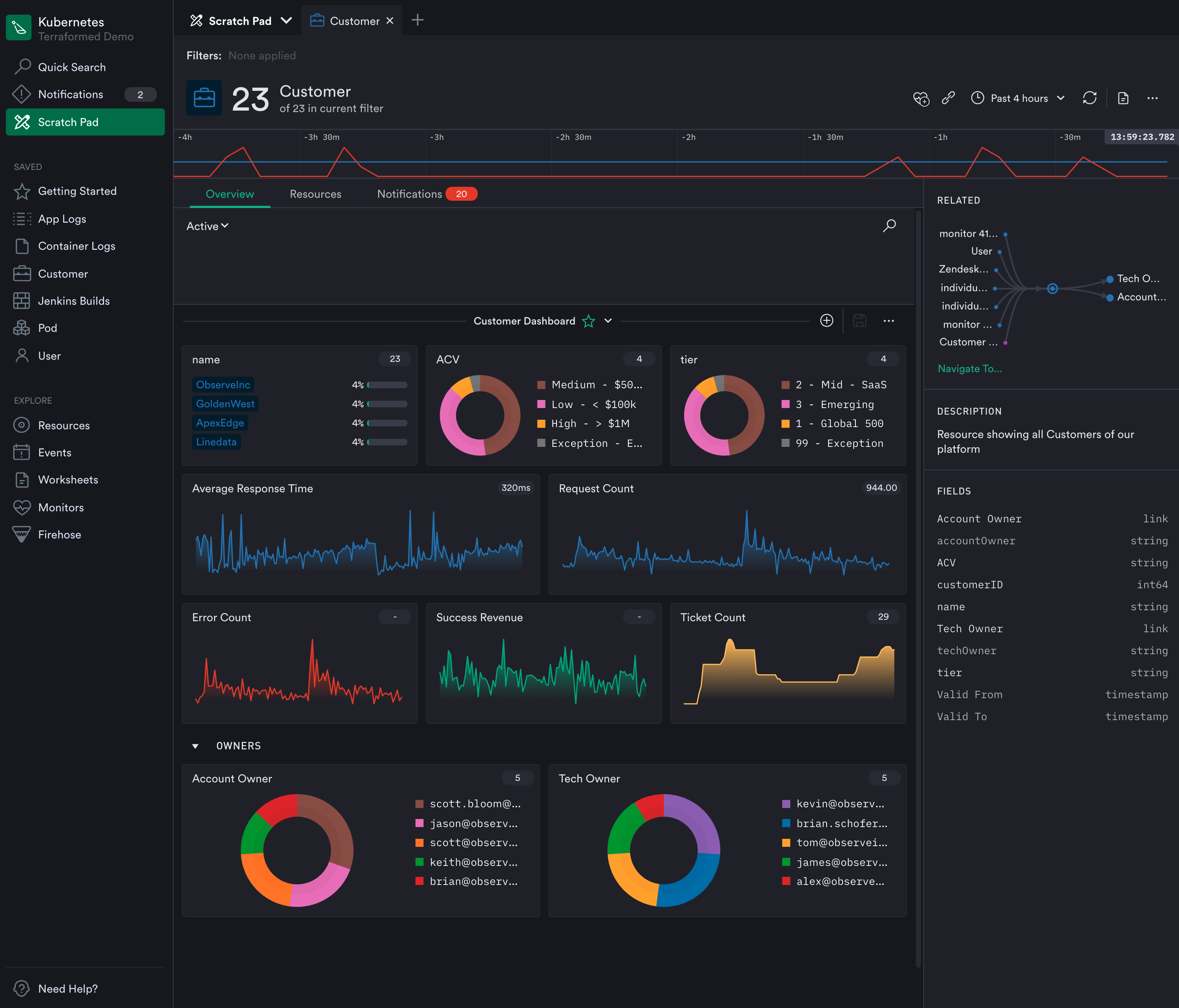
    Observe, Inc. announced today it has updated it observability platform to add support for metrics based on time series data. In addition, the company is revamping how the platform generates alerts as part of an effort to surface more actionable intelligence.

    Jeremy Burton, Observe CEO, said rival observability platforms require IT teams to sift through hundreds of metrics that are generated using elaborate tagging schemes that ultimately drive up the cost of storage. The Observe platform curates metrics by associating them with, for example, a customer, to provide more relevant context, Burton noted.

    That approach eliminates the need to present IT teams with overwhelming lists of metrics in addition to reducing storage costs by removing the need for a complex tagging scheme, added Burton.

    The latest update leverages that approach to metrics to only generate alerts based on curated metrics attached to customers, pods, shopping carts or containers. Rather than simply being alerted to a drop in response times, for example, the IT team can also easily see which customers or pods might be affected. That shift will reduce the volume of alerts that are already overflowing in email inboxes and across other communications platforms.

    Fresh from raising an additional $7 million, Observe today also revealed it has added 20 paying customers since launching the platform on top of the Snowflake cloud service residing on the Amazon Web Services (AWS) public cloud. Rather than reinventing the same core infrastructure, Observe is leveraging a data analytics engine that is already widely employed in IT environments.

    For now, Observe will continue to primarily focus on metrics as part of an effort to deliver insights in a form IT operations teams are prepared to consume today, said Burton. Over time, however, Observe will add support for distributed traces via tools such as OpenTelemetry and Jaeger as it adds additional application performance management (APM) capabilities, added Burton. Rather than telling IT operations teams they are managing IT in the wrong way, the goal is to meet IT operations teams where they are today, noted Burton.

    That strategy also enables the Observe platform to be employed to manage both monolithic and microservices-based applications running on Kubernetes clusters, noted Burton. The immediate goal is to provide IT teams with an alternative to legacy monitoring tools that provide more context at total lower cost by allowing IT organizations to rationalize tools that don’t tend to be especially well integrated, added Burton.

    In the longer term, Observe will also employ machine learning algorithms to collect data more efficiently. However, Burton said the company remains skeptical of visions of an IT future that depend on machine learning algorithms to continuously learn IT environments that are not only unique, but subject to frequent changes.

    Competition among observability platform providers is already fierce. Each IT team will need to decide what type of platform makes the most sense for them based on costs and their preference for specific capabilities one vendor might have that another doesn’t provide. One way or another, however, the way IT environments are managed will soon be changing for the better.

  • Grafana Labs Advances Open Source Visualization and Observability

    Grafana Labs Advances Open Source Visualization and Observability

    During the online GrafanaCONline conference today, Grafana Labs announced that version 8.0 of its open source visualization software widely employed by DevOps teams is now generally available. In addition, version 1.0 of Grafana Tempo, an open source back end platform for collecting distributed traces that are needed to drive observability across an application environment, is also generally available.

    At the same time, Grafana Labs revealed that Grafana Tempo is now available as a service on Grafana Cloud.

    Version 8.0 of Grafana adds support for additional types of visualizations such as streaming panels, state timeline, status history, bar chart and histograms in addition to a revamped unified alerting system that enables DevOps teams to view and edit alerts generated by Grafana and open source Prometheus monitoring platform via a common user interface. The notification system adopted to achieve that goal is based on a Prometheus alert manager that provides capabilities such as grouping, deduping and silencing of notifications alongside advanced message templates.

    The latest release of Grafana also improves startup and graph rendering performance, thanks to a major reduction in initial download size and graph rendering time.

    The enterprise edition of Grafana has also been updated to provide support for fine-grained access controls, improves caching of back end data sources and improved reporting capabilities such as live dashboard links that can be embedded in email.

    Overall, Grafana Labs claims there are now more than 750,000 active installations of Grafana that organizations are employing to create visualizations that correlate data collected from multiple back end sources.

    In addition to contributing to Grafana and Grafana Tempo, the company is running a cloud service that makes multiple instances of Prometheus running on different clusters accessible from a central console.

    Torkel Ödegaard, creator of the Grafana project and chief Grafana officer for Grafana Labs, said Grafana Tempo promises to further advance observability thanks mainly to its ability to employ object storage to capture complete distributed traces. Rather than only sampling traces, it’s now feasible to trace every request. Grafana Tempo is also compatible with any open source tracing protocol, such as Jaeger, Zipkin and OpenTelemetry, and can be integrated with metrics, logs and dashboards via a managed Grafana Cloud service.

    It’s not quite clear how quickly organizations are embracing distributed traces to improve application observability or, for that matter, to what degree traces might eliminate the need for certain types of metrics or log analytics. The one thing that is certain is DevOps teams require more context than ever to proactively manage complex IT environments. Distributed traces make it simpler to track interactions between application services. The challenge is they can require IT teams to store a lot more data.

    In time, of course, distributed tracing will become more commonly employed as developers more routinely instrument applications based on microservices that tend to have lots of dependencies that are difficult to discover in the absence of some type of distributed tracing capability. Of course, distributed tracing has been around, in some form or another, in application performance management (APM) platforms for some time. The difference now is that, as open source software, it’s becoming more affordable to implement.

  • HashiCorp Increases Terraform’s Enterprise Appeal

    HashiCorp Increases Terraform’s Enterprise Appeal

    During the online HashiConf Europe conference today, HashiCorp debuted the general availability of a 1.0 release of HashiCorp Terraform along with updates to HashiCorp Terraform Cloud service.

    Meghan Liese, senior director of product marketing for HashiCorp, said in both cases HashiCorp is moving to enable organizations to better secure and govern IT infrastructure-as-code provisioned using open source Terraform tools.

    Version 1.0 of HashiCorp Terraform provides access to a stable application programming interface (API) that will foster interoperability and simplify future upgrades.

    The Terraform Cloud service, which eliminates the need for IT teams to set up and manage a Terraform platform, adds workflows enhancements to the Terraform Cloud that include the ability to publish curated modules to a private registry, enhancements that make it easier to visualize elements of a workspace and a preview of an ability to check with third-party tools related to a Terraform run.

    Overall, the goal is to make it simpler for organizations to compose, collaborate and reuse infrastructure-as-code using modules and the public and private registry options, said Liese. The public registry already has more than 5,000 modules. Terraform Cloud now offers a native workflow to publish modules from the public registry directly into an organization’s private registry.

    Terraform, of course, has been widely employed since it first debuted in 2014. There have been 15 major updates prior to the release of Terraform 1.0, which is intended to provide a foundation that ensures backward compatibility between releases going forward.

    In some instances, Terraform can be too much of good thing. It has considerably accelerated the rate at which IT infrastructure can be provisioned within the context of a DevOps workflow. The challenge, though, is developers often lack the security expertise required to prevent infrastructure from being misconfigured at a time when cybercriminals have become more adept at scanning for those vulnerabilities. To enable IT teams to prevent those misconfigurations, HashiCorp makes available both an enterprise edition of Terraform as well as its Terraform Cloud service. Terraform Enterprise is used by more than 1,200 enterprises, while Terraform Cloud has more than 120,000 users that execute more than 30,000 runs per day.

    It’s not clear if security concerns might one day lead to a backlash against the concept of shifting more responsibility left toward developers to improve productivity. In some cases, developers are simply deploying more insecure applications faster. HashiCorp is making a case for Terraform platforms that allow centralized IT teams to exercise more control over how infrastructure is provisioned as code. The need for that approach is becoming more pronounced, as organizations not only employ Terraform to provision cloud infrastructure but also on-premises IT environments.

    Regardless of how infrastructure is provisioned by developers, security of infrastructure, both inside and outside of the cloud, remains a priority as more workloads than ever are deployed. In effect, the attack surface that needs to be defended has dramatically expanded. Of course, the best security issue of all is the one that never happened because infrastructure is being provisioned right the first time and every time thereafter.

  • 10 Actions IT Can Take to Curb Climate Impact

    10 Actions IT Can Take to Curb Climate Impact

    Digital technology is responsible for 3.7% of total CO emissions, according to estimates from The Shift Project. This could increase, as cryptocurrency mining is leaving a massive carbon footprint. With the world’s climate at stake, every percentage point matters.

    Thankfully, many tech companies have announced significant climate pledges to reduce emissions or offset their carbon footprint. For example, Microsoft states they will be carbon neutral by 2030. Amazon has committed to a deadline of 2040, and other companies such as Infosys have co-signed. Netflix’s climate commitment states they will reach net-zero greenhouse gas emissions by the end of 2022.

    Sustainability goals are vital long-term benchmarks, but on-the-ground technologists must make immediate optimizations to realize them. So, what exact steps can enterprise IT take to reduce their energy consumption and thereby reduce greenhouse gas emissions?

    I recently met with Anant Adya, Infosys, to explore the overall energy footprint of enterprise technology. Below, I’ll cover 10 ways IT can reduce its impact on the environment, including actions like auditing legacy infrastructure, optimizing cloud operations and moving toward renewable energy sources. Many of these energy optimizations bring the added benefits of cost savings and code consolidation.

    1. Reduce Resource-Heavy Legacy Infrastructure

    One potential cause of unnecessary energy consumption is legacy infrastructure. To reduce power consumption, Adya recommends going straight to a network compute storage setup. You may find energy consumption savings by porting resource-heavy legacy systems to the cloud. This will be especially effective if you’re running older end-of-life machines with less efficient processing.

    2. Reduce the Number of Clouds

    Next, look at the number of clouds your organization has adopted, Adya recommended. In recent years, companies have moved to multi-cloud setups for reasons like performance, cost or features. However, these movements could cause unnecessary duplication. For a large enterprise, refactoring your multi-cloud usage could mean reducing from five or six clouds to two or three, said Adya. With the right combination, you could very likely reach equivalent benefits with less reliance on multiple clouds.

    3. Reduce the Number of Core Data Centers

    Look at the number of sites in your core data centers and reduce the footprint, if possible. In his digital transformation work, Adya described working with a client to consolidate six large data centers into three essential locations — one for disaster recovery and two others to support American and European zones.

    4. Move Edge Locations to the Cloud

    Large organizations may be supporting a lot of edge infrastructure. Yet some locations, such as offices, don’t require that kind of infrastructure, Adya suggested. He recommended reducing local servers and embracing more cloud-based computing solutions, overall. He described one case in which an organization consolidated 600 edge sites to 350, thus reducing power consumption by 40%. Adya credited the cloud for delivering lower costs and greater scalability and resiliency.

    5. Embrace Cloud-Native Administrative Operations

    Cloud computing is arguably more energy efficient than traditional on-premises arrangements with its pay-per-use model and multi-tenant approach. To get the most out of the cloud, Adya recommended moving to the cloud, along with adopting cloud-native software. Most operational and administrative work can be processed in the cloud, he noted.

    6. Consolidate and Rationalize Resource Utilization

    Another way to stem energy consumption is to check for underused or forgotten assets. While the cloud can help optimize software, there is a good deal of unnecessary cloud spending on underused resources. In 2020, companies wasted $17.6 billion paying for idle resources and overprovisioned computing instances, reported ParkMyCloud. Adya thus recommended looking at the entire server and storage estate to calculate the server utilization and slimming down wherever possible.

    7. Increase Power Usage Effectiveness (PUE)

    Hardware is much more efficient these days — sometimes by as much as 10X more powerful with 10X less energy consumed. As storage technologies also are always improving, it could make sense to upgrade to new hardware to reduce overall power usage. It’s important to monitor power usage effectiveness (PUE) and check power ratings before and after migrations. Adapting your information life cycle management tiering practices for storage could also help optimize to reduce wasted power, Adya added.

    8. Meet Sustainability Goals on Campus

    Have you ever driven by an office park at night and seen thousands of empty rooms with all the lights on? This has got to change. Another way to reduce power is to limit a campus’s energy consumption, described Adya. Smart automation and remote monitoring could be used to manage power efficiency by turning off lights and heating and cooling to meeting rooms when empty, for example.

    9. Power the Business With Renewable Energy

    Run your campus with solar power. Adya described how Infosys is doing this by mounting 40MW solar panels at their corporate centers, in effect sourcing 43% of its energy from renewable sources. Another more passive way to invest in renewables is to choose a data center provider that commits, under contract, to using a high percentage of renewable energy.

    10. Purchase Carbon Offsets

    The previous goals are all active steps to reduce energy requirements. However, once an organization has attempted these optimizations, another option is carbon offsetting. This indirect method effectively cancels out a company’s emissions by funding green activities, such as tree planting.

    However, there is debate over the effectiveness of carbon offsetting, as trees take decades to become effective carbon consumers, and the practice doesn’t advocate for immediate change to harmful practices. “To be serious about tackling climate change, [organizations] need to stop carbon emissions from getting into the atmosphere in the first place,” wrote Alia al Ghussan for Greenpeace.

    IT’s Role In Curbing Climate Change

    Dire climate circumstances require quick action from all business units. In the process, organizations will likely consider many initiatives simultaneously to address their climate impact. However, as more companies become digital-first businesses, the onus falls on IT to support these changes.

    In addition to the above actions, there are undoubtedly other ways enterprise software architects can stimulate sustainability initiatives within their organization. This could include refactoring code into more lean iterations or eliminating unnecessary records storage. Tech leaders could also vocalize their support for global pledges, such as the Paris Climate Agreement, RE100 or Global Optimism.

    It would take a solar power plant covering 115,625 square miles, roughly the size of New Mexico, to power the world with solar energy! As you can see, it will take a lot of work to reverse our reliance on fossil fuels. But with scalable cloud computing and more intelligent infrastructure optimizations, IT can do its part to contribute to curbing climate change.

  • Serverless Computing Brings New Security Risks

    Serverless Computing Brings New Security Risks

    Attracted by lower costs and less operational overhead, serverless computing is an unmistakable undercurrent in the world of DevOps. Developers are drawn to the innovation because it requires no architecture to manage while offering continuous scaling for anything from a few requests per day to hundreds of thousands of requests per second.

    More than 50% of the developers using serverless functions today started using the computing model in the last three years. By some estimates, serverless computing is the fastest-growing segment in the cloud services market.

    While businesses are drawn by the opportunity to extend and integrate cloud applications at greater scale, there’s a dark underbelly to this DevOps phenomenon: security. In fact, organizations cite security concerns as the leading reason why they haven’t yet adopted serverless computing. For good reason!

    Serverless functions are introducing a new breed of threats – misconfigurations, code-level risks, injections and weaknesses – many of which are the underlying risk factors for a software supply chain attack. With adoption of this technology accelerating, organizations need security that delivers more than just visibility into these dynamic environments. They also need the ability to detect and block code-level vulnerabilities and misconfigurations that occur during development and through to production. Most importantly, this needs to happen seamlessly and with little to no impact on DevOps.

    Dynamic Environments Create Complex Security Risks

    The nature of applications has evolved, creating a new paradigm of security risk. In serverless environments, code sprawl makes it harder to identify vulnerabilities and patch them before they become business-level risks.

    In a monolithic application environment, an identified vulnerability could be efficiently patched by the developer through upgrading a single package, pushing a deployment and then testing and deploying the app.

    In a serverless computing model, patching and resolving vulnerabilities becomes a lot more complicated, given that there may be several hundred (or more) environments across different providers and regions. So, instead of having to patch a single application, developers will need to patch, deploy and test hundreds of individual functions that rely on that library.

    With 39% of developers saying they’re now fully responsible for security, it means they’ll carry the burden of having to patch an identified vulnerability – often taking them away from development work.

    With Serverless, You Need to Rethink Your Approach to Security

    Given the distributed nature of serverless functions – essentially, the reason for its flexibility and scalability – many existing security tools will provide little to no visibility, nor the control capabilities, for these computing environments. Many of the security attacks that will occur in serverless functions will be a result of misconfigurations and mistakes that happen outside the purview of the security team and due to legacy solutions which don’t translate to serverless architectures. Further, because abstracted workloads create blind spots, attackers will have more room to maneuver undetected.

    Serverless functions will even render some traditional DevSecOps tools less useful. Scanning tools must monitor hundreds of individual repositories instead of a single monolithic repository, while application performance monitoring (APM) tools lack security proficiency and cannot protect from the OWASP Serverless Top 10 risks.

    The challenge for security teams will be implementing solutions in a way that does not modify workloads or require changing business logic — both of which slow development. When applying security to serverless functions, it’ll be critical that the solution can do the following:

    • Go beyond monitoring and actually detect and block vulnerabilities without elaborate or manual steps involved. The scale of serverless functions will make it nearly impossible for security analysts to manage and keep up with every alert they receive. Instead, they need a tool that delivers actual security and can help them block malicious activity without stopping development altogether.
    • Enable a positive security model that provides protection against malicious changes, like zero-day exploits, within the function. This approach gives security teams more control by automatically detecting and blocking anything that isn’t explicitly allowed in a given function.
    • Provide forensic detail from log-level information so security analysts can fully understand the context of every attack with virtually no impact on latency. Further, with the risk of supply chain attacks soaring, security teams need the ability to identify and map third-party dependencies used during runtime.

    For many organizations, serverless architecture is a very different and unique computing environment – unlike anything they’ve experienced or had to protect before now. That reality means that organizations need a fresh approach to securing these environments and will need to look beyond the traditional tools they have in their tech stack today.

    Above all, developers and security teams will need to work together to ensure security is built-in from the start. Otherwise, serverless functions will quickly become a playground for cybercriminals.

  • How to Move Fast Without Breaking Security

    How to Move Fast Without Breaking Security

    “Move fast and break things,” is a familiar motto. The phrase, attributed to Facebook CEO Mark Zuckerberg, helps to explain the company’s stellar growth over the past decade, driven by its product innovations. However, while it’s a useful philosophy for software development, moving faster than you’d planned is a risky approach in other areas, as organizations globally realized during the COVID-19 pandemic. While 2020 saw digital transformation program timelines advance by up to seven years, enterprises’ quick moves to the cloud also meant that some things got damaged along the way – including security.

    Our recent survey conducted with the Cloud Security Alliance showed that more than half of organizations are now running over 41% of their workloads in public clouds, compared to just one quarter in 2019, and this will increase further by the end of 2021. Enterprises are moving fast to the cloud, but they are also finding that things are getting broken during this process.

    The research showed 11% of organizations reported a cloud security incident in the past year, with the three most common causes being cloud provider issues (26%), security misconfigurations (22%) and attacks such as denial of service exploits (20%). In terms of the business impact of these disruptive cloud outages, 24% said it took up to three hours to restore operations, and for 26% it took over half a day.

    As a result, it’s no surprise that organizations have significant concerns about enforcing and managing security in the cloud. Their leading concerns were maintaining overall network security, a lack of cloud expertise, problems when migrating workloads to the cloud and insufficient staff to manage their expanded cloud environments. So, what are the root causes of these cloud security concerns and challenges, and how should enterprises address them?

    Confusion Over Cloud Control

    When asked about which aspects of security worried them most when running applications in public clouds, respondents overwhelmingly cited getting clear visibility of topologies and policies for the entire hybrid network estate, followed by the ability to detect risks and misconfigurations.

    A key reason for these concerns is that organizations are using a range of different controls to manage cloud security as part of their application orchestration; 52% use cloud-native tools and 50% reported using orchestration and configuration management tools such as Ansible, Chef and Puppet. However, nearly a third (29%) said they use manual processes to manage cloud security.

    In addition, there’s competition for overall control over cloud security: 35% of respondents said their security operations team managed cloud security, followed by the cloud team (18%) and IT operations (16%). Other teams, such as network operations, DevOps and application owners, all figured in, too. Having different teams using multiple different controls for security limits overall visibility across the hybrid cloud environment, and also adds significant complexity and management overhead to security processes. Any time you need to make a change, you need to duplicate the work across each of these different controls and teams. This results in security holes and the types of misconfiguration-based incidents and outages we mentioned earlier.

    How to Move Fast and Not Break Things

    So how can organizations address these security and management issues, and get consistent control over their cloud and on-premises environments, so they can take full advantage of cloud agility and scalability without compromising on security? Here are the four key steps:

    Get holistic visibility across your networks: a lack of visibility across cloud estates was the main security challenge for survey respondents. Organizations need to get holistic visibility across all of their different cloud accounts, including the security controls that are being used both in the cloud and to manage traffic to and from the cloud environments. This enables IT and security teams to quickly identify any potential security issues or risks that could lead to outages.

    One management console to rule them all: When using a mix of the cloud providers’ security controls as well as other controls, both in the cloud and on-premises, it’s a huge challenge for organizations to manage policies consistently. If all these diverse security controls are managed from a single console using a single set of commands and syntax, security policies can be applied consistently. This avoids duplication of effort and the error-prone manual processes that lead to misconfigurations and outages. It also provides a full audit trail of every change.

    Automate security and compliance processes for speed: Automation is essential to managing cloud environments efficiently while orchestrating changes across a complex array of security controls. It brings speed and accuracy to managing security changes across cloud environments. It also accelerates audit preparation and helps ensure continuous compliance. Automation also helps organizations overcome skills gaps and staffing limitations, which were cited as a challenge by over three-quarters of our survey respondents.

    Accelerate incident response, anywhere: Our survey also showed organizations are concerned about overall network security in the cloud. Security management solutions that integrate with SIEM or SOAR tools can help to address these concerns by accelerating incident response. As soon as a threat is detected by the SIEM or SOAR product, the management solution can identify all the applications and servers that the threat could impact. The solution can then mitigate the threat’s risk by automatically isolating any affected servers or devices from the network – whether in the cloud or on-premises – preventing lateral movement.

    With a network security automation solution handling these steps, organizations can get holistic, single-console security management across all of their public cloud accounts, as well as their private cloud and on-premises deployments. This helps them to solve the cloud complexity challenge and ensures faster, safer and more compliant cloud management – making it possible for organizations to move fast in response to changing business needs without breaking things.

  • JFrog Adds Private Distribution Network for App Binaries

    JFrog Adds Private Distribution Network for App Binaries

    At its online swampUP conference today, JFrog launched a Private Distribution Network (PDN) that makes it simpler and faster to distribute application binaries across an extended enterprise.

    Yoav Landman, JFrog CTO, said the PDN provides the equivalent of a content delivery network (CDN) designed specifically for distributing application binaries using a peer-to-peer network managed by JFrog. Each binary distributed is an immutable signed release that provides visibility and traceability to validate the source destination as well as the integrity of the binary, added Landman. That approach essentially applies concepts from a blockchain network to the distribution of application binaries, noted Landman.

    The PDN is based on patent-pending network optimization technology that employs caching, distribution nodes and lightweight accelerators that enable IT teams to distribute binaries through inbound-only firewalls or to environments that have limited connectivity, said Landman.

    Finally, the PDN also comes with tools to analyze binaries for open source security vulnerabilities and compliance with license policies in addition to role-based access controls (RBAC).

    Landman said the goal is to provide a way to distribute binaries via a single click all the way to edge computing platforms in a way that is tightly integrated with the continuous integration/continuous delivery (CI/CD) pipelines and software development life cycle (SDLC) processes a DevOps team already employs.

    Currently available via a private beta, PDN is scheduled to become available in the third quarter 2021 with pricing based on a per-use model that requires no upfront costs.

    JFrog

    For years now, JFrog has been making a case for applying DevOps best practices to the deployment of binaries rather than just managing source code. As enterprise IT environments become more distributed, the need to manage the deployment of binaries at scale becomes more acute. IT teams are not going to be able to dispatch software engineers to manually install binaries on every edge computing platform employed. The goal is to provide IT teams with complete transparency into software distribution in a way that makes it simple to address compliance requirements, said Landman.

    Most organizations already find deploying software to be a major challenge. CI processes are generally well understood as part of any application development process. CD has proven to be a more elusive goal, because each target platform on which software is destined to run tends to be unique, which makes automating the delivery process challenging. That issue is only going to be more difficult to address as organizations attempt to install software across hundreds, or even thousands, of edge computing platforms that might be based on a wide range of types of platforms. A PDN alleviates many of these issues by providing IT teams with a network to centrally manage the process, noted Landman.

    At this point it’s now only a matter of time before most organizations confront this next major DevOps challenge. As organizations look to process and analyze data at the edge to drive any number of digital processes in near real-time, the amount of software deployed outside of a cloud or traditional data center is about to explode. The challenge now, of course, is finding the most efficient way to secure delivery of all that code.

  • Adapting Security with Menlo Security

    Adapting Security with Menlo Security

    Cloud data security is top of mind for CISOs. User data is moving across clouds, platforms and applications, and if we don’t shift to a data-centric approach, we won’t be able to protect that data.

    Jack Miller, head of professional services at Menlo Security and former CISO of over 16 years, addresses the balance of data, security and end-user convenience. Locating security close to users, close to data, and both are essential strategies for adapting security to the expanding presence of data.

    The video is immediately below, followed by the transcript of the conversation. Enjoy!

    Transcript

    Mitch Ashley: Well, I have the great pleasure of being joined by Jack Miller. Jack is Had of Professional Services, and also a former CISO at a different company, and he’s with Menlo Security. Jack, great to be joined by you today.

    Jack Miller: Thanks, Mitch, it’s great to be here. Yeah, before joining Menlo, I spent most of my career on the other side of the table as a practitioner. I was actually CISO at four different multi-billion dollar organizations over a span of 16 years. Been in the trenches for a long time, fought a lot of the battles—won some, lost a lot, and here I am today.

    Ashley: Such is the career in security, right?

    Miller: Yes, it is.

    Ashley: [Laughter] No doubt, no doubt. It’s a great pleasure to be talking with you. So, there’s a lot of things, of course, we could talk about, Menlo’s a great company, got some fantastic offerings. 

    What I’d like to really spend some time on is data. You know, we think about—I like to say there’s three reasons any application development team outside of IT is gonna come to IT. Security is one, and access to data and integration with systems.

    Miller: Mm-hmm.

    Ashley: So, let’s talk about data in the cloud, or what are some things we should consider maybe that we didn’t have to worry about in terms of securing data, but also not getting in the way with security for end user usability in the cloud.

    Miller: Yeah. I mean, look, I think the last point you touched on I wanna kinda drill into a little bit, because I think it’s so significant, right? That, you know, no matter how vested in security an organization is, right, how high they prioritize it at the very top, how much money they’re willing to spend, right? At the end of the day, it comes down to a battle between security and potential impact to your users and your business operations and business processes, right? 

    And when you think about it, I mean, companies and organizations don’t exist to be secure, right? They exist to make money, they exist to provide a needed service, right? So, at the end of the day, that’s what’s really most important. And so, you know, as the user data starts to move everywhere and it becomes in different places and now, we have the users moving everywhere. 

    So, we went from a really nice little model in the past where we had our users and our data in the same place most of the time, and now we’re in a model where our users are everywhere and our data is everywhere. And if we don’t shift our approach from a data center approach that we used to have to a data-centric approach, then there’s no way that we’re gonna be able to properly protect the data and do it in a way that’s not gonna be extremely, a difficult situation for the users to access the data, right? We need to make it fast and streamlined and accessible and once there’s a hiccup in their way, they complain and then we have to start turning our controls off, right?

    So, it’s a fine dance that we have to walk, and unfortunately, the legacy tools that we have and fitting into that data-centric approach just don’t really seem to work well in this new model.

    Ashley: That’s always the struggle with security is the convenience factor. Don’t get in the way of my job, but make sure that it’s secure. Don’t get me in trouble for having a breach or something happening.

    So, what are some approaches? Why do we have to think about this where we really can secure the data, wherever it is, and we’re creating more and more of it all the time, right? It’s a huge asset, but growing faster and faster. How do we do that where we can provide end users a level of convenience and security?

    Miller: Yeah, I mean, fortunately, today, we have the cloud, and for all the, as a security professional, for all the heartache that the cloud’s brought me over the years and all the challenges that it does introduce, it dos create this new opportunity now where I can, instead of having to have physical controls located somewhere, I can have virtual controls that are logically located all over the world, right? So, now, I can make sure those controls are close to the users or close to the data or close to both, whatever happens to make sense for any given business us case that we’re dealing with.

    Ashley: Yeah, that makes a lot of sense, too. And also, I don’t know if automation is the right word, but the manual processes we’ve had in the past of providing access control, whether it be for applications or end users, it’s not realistic with how far and wide we’ve spread data and where it’s all located.

    Miller: Yeah, and everything’s so dynamic that even if we could get our hands around it today, by tomorrow, we’re gonna be playing catch up again, right? You know, the cloud has made it really easy for things like shadow IT to flourish, right? So, now, business units can go out and they can add new apps.

    So, we spent years in the enterprise putting in robust two-factor authentication solutions to protect our data. Now, suddenly, even if we go out and we do an analysis and we find all of our SaaS apps today and we protect them, what happens tomorrow when another business unit just happens to go out and start using a new SaaS app and they don’t tell you about it?

    So, it is a struggle, right? But like I said, there’s a silver lining to it in that the same thing that’s making it difficult for us does give us an advantage to be a little bit more ubiquitous, I think, maybe would be a good word and where and how we can apply security.

    Ashley: Mm-hmm. How do you think—and I know, you know, Menlo Security, obviously, being a security product company, but if you thought more generally, more broadly, has the market kept up with the uses and the needs of securing data in the cloud in particular, or we still have a pretty big gap to meet?

    Miller: So, I think there’s kinda two parts to that, right? I think from a capabilities perspective, I think that we’re closing the gap, and I think significantly more capabilities exist today than existed a couple years ago to be able to do that, and we’re making, I think, huge strides and great progress there.

    From an adoption perspective of getting these new capabilities and technologies out there and adopted with companies, right, that’s where we have the gap today. It’s always hard to get people to embrace new technologies and accept new technologies. And we’ve been talking about digital transformation for years and years, and it’s been very, very slow, the transition. And a lot of what we were seeing pre-COVID was being done to really save costs associated with remote locations, right, and eliminate those expensive MPLS circuits, eliminate redundant hardware and that type of stuff.

    You know, now you throw COVID on top where you have, suddenly, all these remote users being remote that were never remote before. So, now, looking at using the cloud and direct access and things like that to kinda solve that same problem but coming at it from a different direction, right?

    So, I think what I find interesting right now is that you hear a lot of people talk that this is the new normal, that we’ve proved that remote work can work and everybody’s gonna keep working remotely. And I don’t think this, today, is the new normal. I think that many companies are gonna have their employees come back to the office, for a number of reasons. But I think it’s gonna be very different than it was in the past.

    I think now, those areas in the organization that weren’t allowed to work from home a couple days a week are gonna be allowed to, that weren’t allowed to be able to travel and be able to work are gonna be allowed to.

    So, I think, you know, we kinda went from this everybody was in the office to now everybody’s at home, and I think now we’re gonna go back to, it’s almost a—who knows where everybody is, because they can do their work from wherever they wanna be.

    Ashley: You’ve sort of disproven whatever maybe-ness, maybe partial truths that, you know, “You can’t do this work remotely.” Well, we had to, we did.

    Miller: Right.

    Ashley: You know, what’s interesting, I think a lot of folks are thinking of a hybrid model, even people that have employees come back to the office is, “Yes, but maybe one or two days of work, they can very easily work remotely.” So, maybe that’s a closer step in the new normal that we’re, at least for the next couple of years gonna be experiencing, and who knows what happens after that? [Laughter] 

    Miller: Yeah, exactly, exactly. No, I think that’s where we’ll land. I think it makes perfect sense. I think, from a productivity perspective, that’s probably the best path forward. And I think it’s a path we can secure, as long as we’re adapting our approach, right, and we’re focusing on where the data is and securing the data as opposed to, again, not being focused in the traditional of where the office is or where the data center is.

    Ashley: Now, I’m curious your thoughts about this. I’m sure others are thinking about it, I just haven’t heard it a lot in the kinda open press or writings. With so many people mobile—of course, if you would’ve had time to plan it, you might have done some things differently, but thinking forward, if we are gonna live in this hybrid world, there’s probably information, some data that you want to, telemetry information you wanna track about how people are using your applications, where they’re using them from. Maybe the same, of course, applies to customers, if they’re more mobile, also, and yet more data that we’re generating and creating to target this, you know, broad ecosystem of data that we’re trying to collect. 

    And now, so much of that data is going back into how do we create a better experience for employees, how do we create a better experience, better services for our customers? So, all of that data is just as important as the credit card transaction that goes through—well, maybe that’s a little more important, but it’s all important that we can share that. So, the challenge, to me, seems like it’s getting bigger, not smaller.

    Miller: Yeah, I think it’s getting bigger, and I think we’re seeing—it’s been a while in progress, right, but I think we’re seeing a shift to more of the ransomware type of attacks. I think that it’s easier for the bad guys to quickly monetize their code with a ransomware attack with less chance of getting caught. And plus, one might argue that, you know, we talk about herd immunity for COVID and things like that. From a data privacy perspective, maybe we’ve reached herd immunity because so many people’s data’s already gotten stolen, right?

    So, at some point, there’s so much personal information out there that the data itself starts to become devalued, right? But hey, just like the battle we fight as security professionals that I can’t impact my users, I can’t impact my business operations, right, the bad guys are teeing in onto that, saying, “Look, that’s the most critical thing. If we can get in there and threaten to be able to impact those, then that’s a very viable path for them that they keep following right now.”

    Ashley: Yeah, it’s the whole business continuity, right? That’s what the ransom is about.

    Miller: Exactly, exactly.

    Ashley: Using your data for some other purposes, which can happen, also, as well. I’m really curious, just in your personal story as a former CISO, both organizations large corporations—what are some of the things that you were bringing into the role in Menlo Security that you’re hoping to help? I’m sure you have that list of things, “If I could’ve had a product that did this” or some of those problems that you’d love to help Menlo and the broader community solve.

    Miller: Yeah, I mean—so, look, let me kinda break that into two parts, right? Because there was a process that I went through when I decided to switch teams, if you will, right, and go from being a CISO to working the vendor space. And a lot of people ask me that question all the time, “Why did you leave being a CISO?” Right? That’s the role everyone wants to get to today—‘til they get there for a while, and then they wanna leave. But, you know, there are a number of—

    Ashley: ____ future that you wish for. [Laughter] 

    Miller: Exactly. But, you know, one of the big drivers was that, you know, what becomes very clear to me over the years was that most security companies, the vendors, they don’t have a lot of people there that have worked on the customer side before as the practitioners. And so, they don’t really understand the real world in which a company lives and operates, right?

    And so, you know, they don’t understand this balance between security and impacting your users. And what that means for you as a CISO, with how far back it can set you—I mean, a story. I’d implemented a large scanning, vulnerability scanning system, a huge vulnerability scanning system. And somebody did a scan one night and his server that was running an old, vulnerable version of WebSphere, and it knocked the server offline. You know, we didn’t get medals because we found these vulnerability before the bad guys did; instead, we had to stop all scanning and we had to redevelop our process so that we could ensure that if we ever took a system down scanning that it wouldn’t impact production. I’m not gonna say that we shouldn’t have done that in the first place and that’s not the right way to do it, but again, it just kinda highlights this one step forward, two steps back, right?

    Another example where you see this gap is, ask any security practitioner, right, about IDS/IPS, and they’ll say IDS. Ask any security vendor out there, and they’re all IPS, IPS, IPS, right? But the practitioners know I’m not gonna turn on prevention mode, because the collateral damage to me and my program and what I’m trying to accomplish is too great, right?

    So, that was really kind of one of the big things I wanted to bring here. And I feel like heading up professional services is an opportunity for me to do that, because that’s when we’re really working with the customers and we’re trying to get them deployed. And by having that empathy and showing the customers we understand what’s really important to you and we’re not just trying to force a level of security down you, we’re trying to help you be secure but be successful at the same time, I think there’s value there. And that was one of the big reasons why I ended up coming here and what I’m trying to do with Menlo.

    You know, the other part of the answer would be from a technology perspective. I think from a technology perspective—and I don’t wanna make this sound like a company pitch here, right, but isolation can provide such a level of value that really, at the end of the day, nothing else can. And I think I’ve always been a big fan of isolation, going back to the very beginning when there were some companies that maybe tried to bite off too much and isolate too many things and that didn’t really work well, right? So, by narrowing down the surface and focusing on what really matters, which is web traffic, isolation can, for whatever connections you can isolate, you can virtually remove your risk, which is unheard of in the security field. 

    But, you know, it’s hard, it’s not easy. There’s a hurdle to get there during deployment, and if we’re not understanding those challenges for the customers, then, you know, as a vendor, we can start pushing them too hard and we can push them into trouble without intentionally wanting to do that.

    Ashley: Yeah, your experience, you and I have that shared experience, because I’ve been both on the practitioner and the CTO profit company side of it as well. It seems like one of the things that I would guess you would bring to this is, you know what it’s like to try to use products maybe similar, maybe the same as what you’re working with, with Menlo. And you’re immediately gonna have a very good feel for what’s gonna work well for the customer, what’s gonna work and what’s not, because you can very quickly assess where they are and what they’re going through, maybe some similar things, maybe different, but you’ve been in very similar shoes. 

    So, you can help bring something to the table to them that is much more compatible. You know the balance of security versus user experiences versus available versus available versus whatever, you know, reporting to the board—all that stuff, all those issues. And you can’t teach that to someone, so that’s a unique skill—unique value, I should say, that you bring. 

    Miller: Yeah, well, and, you know, given the options, right? So, interacting with someone like you and being able to—you know, again, a lot of companies want to kinda sugarcoat things. And, you know, as a CTO, right, I’m sure you would agree any day of the week, you’d rather have someone tell it to you straight so you can properly prepare than have someone kinda just make things sound like they’re easier than they are, right? And—

    Ashley: The worst problem is the one you don’t know about.

    Miller: Right. And so, you know, being straightforward with people and being—you know, oversharing the information and giving them options, right? I mean, at the end of the day, we’re the experts in our technology. So, it wouldn’t make sense for us to ask you, “Well, how do you want this done?” but for us to be able to come to you and say, “Look, you know, here’s a few different options and here’s the pros and cons, right? We don’t totally know all the intricacies of your unique situation, but you know, maybe it kinda fits in with one of these, and what do you think makes sense for you to proceed forward?”

    Ashley: Can you tell us a little bit about some of the professional services that you do offer through Menlo?

    Miller: Well, I mean, largely, it’s deployment services, right? So, we have a deployment service process we call our QuickStart Deployment service. You know, one of the main tenets is really, we gotta help customers be successful, and a lot of customers, they get a little bit too excited, they try to run before they can walk. 

    And so, by putting together, really, a defined process that slowly walks you through it allows you to get your users onboarded, start getting some level of value and security from it so that when you start moving into the harder areas, where you might start impacting some people, you’ve got some good ammunition of value to be able to offset the conversation. Whereas, you know, a lot of customers just wanna run right out the gate and turn everything on full bore. And some of them won’t even do that and start with doing it with their executives, right? So, a lot of—[Laughter] I know how crazy that sounds.

    Ashley: Good luck with that. [Laughter] 

    Miller: Right, so, a lot of what it’s doing is trying to save the customers from themselves, right? They get excited, they see what it can do for them, pull the back into reality, let them know—look, here’s the pitfalls, here’s one you’re not gonna be able to avoid, but here’s how we can minimize it, right, the time to resolution, and here’s others that maybe you can avoid if we take some proper steps up front.

    Ashley: Good. I’m sure it’ll be very valuable to Menlo’s customers. And folks can find out more about professional services on MenloSecurity.com, I assume, correct?

    Miller: Yep, definitely.

    Ashley: Great. Well, it’s been a pleasure talking with you, Jack. I wish you the best, and I’m sure it’ll be a lot of fun working with customers in your role there at Menlo, so thanks for joining me today.

    Miller: Well, thank you very much, Mitch, I enjoyed it a lot.

    Ashley: You bet.

  • Rethinking Your Tool Chain in the Cloud

    Rethinking Your Tool Chain in the Cloud

    Every IT shop has a “tool chain” – all of the software other than the OS and the application that fills in the gaps and keeps everything running. This includes solutions for monitoring the application, data protection, software development, release management, provisioning and de-provisioning resources and more. These tools build up over time, often evolving from homemade solutions to commercially available software as the company grows.

    The cloud presents another inflection point: a new way to manage systems and applications. When a company is considering moving applications to the cloud, IT and application development teams should take the opportunity to reevaluate their tool chain. Are their existing solutions still the right fit in this new cloud-based world, or are there better alternatives available? Here is a process for making that decision, and some important questions to consider when assessing whether a change is in an organization’s best interests.

    Step One: Take Inventory of the Current Tool Chain

    First, IT teams should perform a full inventory of their current stack to ensure they don’t overlook anything. This audit should include the following areas:

    • Provisioning tools (like Ansible or Terraform).
    • Identity and access management (IAM) solutions that allow IT to restrict access to servers, resources and software to only relevant users.
    • Development tools including IDEs, continuous integration/continuous delivery (CI/CD), source control and more.
    • Data protection, high availability, disaster recovery and backup software.
    • Monitoring and auditing software (like Datadog).

    Step Two: Assess How Well Each Tool is Meeting IT’s Needs

    Next, consider how well each product is meeting IT’s needs now, and how those needs will change as workloads move to the cloud. The first and most important question: is the tool and/or version you’re on still supported by the vendor? Changes like this migration to the cloud are rare, so the likelihood that one or more products are no longer supported is higher than one might think. Second, consider the licensing terms of the software and whether they allow for its use in the cloud. For instance, some tools are licensed to a specific physical server and some vendors require their hardware to be owned by the same entity which holds the license. Neither of these scenarios work well in the cloud. Third, will the application be managed in the same way after the migration? The cloud typically removes constraints; it offers nearly unlimited compute and storage, dynamic workloads, new APIs and multiple regions around the world. IT teams may want to take advantage of these capabilities by moving to a cloud-based tool (replacing an on-premises application log reporting solution, for example), or they may want to keep management as consistent as possible to minimize the amount of retraining required for employees.

    Don’t forget to consider non-technical arguments. Is the team happy and productive with the current solution, or do they feel forced to use it? Is it meeting the business needs of the organization? Will the change create more work in the short term? These reasons aren’t enough to keep a tool on their own, but they should be part of the discussion.

    Step Three: Create a Map of Alternatives

    Next, look at the potential alternatives to the tools that may need to be replaced. This can be a good opportunity to consolidate, so start by looking at what other teams in the organization are already using in the destination cloud. The most common decision IT must make here is whether to switch to a cloud-based tool (either one offered by their cloud vendor or a separate SaaS product). These typically offer pay-as-you-go licensing and are usually easier to scale up or down, move workloads around and to expand to other regions. Licensing for legacy vendors varies widely; some now offer consumption-based options to compete with the cloud, while some are sticking with perpetual licenses. These factors may make a cloud-based tool more or less attractive for specific companies based on their needs. Last, consider if making a change would allow the IT team to expand their skill set. For engineers that like learning new things, adding new products could actually increase satisfaction and retention because it gives them a chance to learn something new.

    Step Four: Talk to Existing Tool Vendors

    Even if a different option seems like the better choice, it always pays to check in with the current vendor and give them a chance to keep your business. It’s possible they may offer more flexible terms to keep you as a customer. The opposite is also possible; some vendors won’t budge on their licensing because they see the cloud as a threat. Even if a vendor conversation doesn’t change what they are willing to offer, it will usually reveal useful insight about how they approach their customers.

    Step Five: Create a Plan for Each Tool

    Based on the information gathered in the last four steps, it is time to decide what to do with each tool and make a plan for each transition. Where necessary, note products that will need to be replaced soon, ones where more research is required, and compile any other useful information learned during the process so that the larger IT team can access it. Also consider if teams will need training, if internal documentation or playbooks need to be updated, and how new tools will plug into existing authorization/authentication solutions. Each change will also need a migration plan of some kind that details how and when the organization will move from the old product to the new one, what scripts will need to be rewritten and what to do with historical data like log files from the old product.

    Cloud-based tools won’t be a fit for everyone, but their flexibility, potential cost savings and ease of scalability shouldn’t be underestimated. While no one is eager to add more work to a cloud migration project, taking the time to go through this process could uncover useful new options that better fit the new cloud model that the business is moving toward.

  • API Security by Design

    API Security by Design

    “APIs are nothing new,” said Secure Code Warrior co-founder and CTO Matias Madou, but they have recently become more widely used.

    And where they were once a local mechanism, they are increasingly used in a distributed manner, partly because of changes to application architectures. Another reason is that users are increasingly likely to access systems from outside the organization, whether they are customers, suppliers or employees working at home.

    Potentially anyone and anything can access an API, so developers and architects should therefore assume that APIs are exposed, and treat requests accordingly.

    This means addressing issues such as authentication and authorization, and generally ensuring that the only data exposed by the API is the data that’s supposed to be exposed.

    So assume every API call is malicious, suggested Madou.

    Start at the Beginning

    Achieving API security starts with the design and architecture, so jumping in and writing code immediately is a mistake. Unfortunately, starting with a completely blank slate is unusual, and some code will likely already exist. In that case, it is especially important that the design makes provisions for possible weaknesses.

    If you want secure APIs, then ensure that everyone working on the project – architects, developers, testers and so on – are “very security savvy,” said Madou.

    The need to improve skills is often triggered when the company or one of its competitors experiences a problem.

    So teams should work to identify any existing problems, realize they need to proactively avoid the underlying issues, and undergo appropriate training, he says.

    The trouble is, “security and developers are not often the best of friends,” Madou said. So, developers tend to think that security is the responsibility of their security colleagues. But there should be a common goal: making reliable and secure software.

    “Security needs to help developers,” he said. One way of achieving this is to appoint a ‘security champion’ to act as a bridge between the security and development teams. An embedded security person can help developers realize that security is an enabler, not a blocker.

    Help When Help’s Needed

    Embedding communication from the security team into developers’ workflows is another part of the process. Slack is one possible conduit. Security people need to be wherever developers discuss issues. Then, they can take advantage of opportunities to say things like, “it looks like you’re having problems with SQL injection. Here’s some training material that might help.”

    Developers live in their IDE, so that’s where integration should occur. But design such systems to help developers, not to control them. “Developers are people, not robots controlled by machines,” Madou warned.

    Another consideration is that it’s important to avoid unnecessarily interrupting developers. Such systems should therefore predict what a developer is about to do and deliver appropriate guidance.

    For example, if someone codes a database connection, the system could offer the statements that securely retrieve information. Then, the developer can copy and paste them instead of starting from scratch each time. Using new code every time carries the risk of introducing vulnerabilities.

    “It’s tricky to make these systems,” Madou admited, but he predicted they will become increasingly common in the coming years.