Category: DevOps in the Cloud

  • Fugue Aims to Simplify Securing Infrastructure-as-Code

    Fugue Aims to Simplify Securing Infrastructure-as-Code

    Fugue today unveiled a 1.0 release for Regula, an open source policy engine for infrastructure-as-code (IaC) security that comes with prebuilt libraries for implementing hundreds of policies that validate configurations on Amazon Web Services (AWS), Microsoft Azure and Google Cloud services.

    Regula is based on the Open Policy Agent (OPA) software being advanced under the auspices of the Cloud Native Computing Foundation (CNCF) and is compatible with both Terraform and AWS CloudFormation tools for configuring cloud infrastructure.

    Developers can also build custom rules on top of OPA using libraries that Fugue created for the Rego programing language that is part of the OPA specification. Regula supports output formats such as JUnit, Test Anything Protocol (TAP) and JSON to make it easier to integrate Regula with other tools and frameworks that make up a DevOps workflow. Input formats supported include Terraform HCL, Terraform plan JSON, AWS CloudFormation and Serverless Application Model templates.

    Regula also provides out-of-the-box support for the CIS Foundations Benchmarks in addition to other policies defined by Fugue, such as dangerously permissive identity access management (IAM) policies, Lambda function policies allowing global access, volumes with encryption disabled and untagged cloud resources.

    It is deployed as a pre-packaged binary that includes a command line interface (CLI) through which Regula can be incorporated within a DevOps workflow and can be installed using tools such as Homebrew or deployed as a Docker image.

    Fugue CEO Josh Stella said Regula provides DevOps teams with an extensive library of rules that check for common security and compliance violations as well as advanced multi-resource misconfigurations. That latter issue is especially challenging because developers typically don’t have much visibility into dependencies that can inadvertently provide cybercriminals with access to, for example, an S3 cloud storage bucket that otherwise appears to be configured properly. Regula will also identify any required resources that might be missing, as well, added Stella.

    Stella said Regula 1.0 provides a simpler approach to securing cloud infrastructure. Cloud infrastructure is frequently misconfigured simply because a developer made a mistake. Unfortunately, cybercriminals have become especially adept at scanning cloud platforms for these misconfigurations, noted Stella.

    It’s not clear to what degree a backlash might be building against IaC in the wake of recent high-profile breaches of software supply chains. Organizations have embraced IaC tools to make developers more productive. However, each security incident involving a misconfiguration of cloud infrastructure resources makes it all too apparent that developers lack the expertise required to securely provision IT environments. Rather than creating a series of cybersecurity reviews that would reduce developer productivity, Stella said Fugue is making a case for a compliance-as-code approach that developers can readily understand and implement.

    One way or another, cloud infrastructure has to become more secure. Business leaders are growing weary of security incidents that, from their perspective, are caused by careless mistakes. Their first instinct is to empower cybersecurity teams to resolve those issues once and for all. The only issue that needs to be resolved now is just how cumbersome those security reviews need to be if developers are provided with the tooling required to secure cloud platforms themselves.

  • Best Practices for Cloud Incident Response

    Best Practices for Cloud Incident Response

    Cloud computing is now mainstream, with almost all organizations running at least some resources in the public cloud—whether software-as-a-service (SaaS), platform-as-a-service (PaaS) or infrastructure-as-a-service (IaaS). Security teams have been scrambling to adapt to cloud environments, and with the growing adoption of DevSecOps, they are working together with DevOps teams to secure cloud systems from the ground up.

    As your organization discovers the best way to secure its cloud investments, you also need to develop an incident response strategy for the cloud. Even if your cloud security controls are perfect (and they aren’t), attacks will happen. Knowing what to do during an attack and preparing teams for incident response can be the difference between an incident quickly contained and resolved, and a multimillion dollar disaster.

    What Is Incident Response?

    Incident response enables organizations to make sure they are aware of security incidents and can respond in time to limit the damage to their systems. The objective is to block attacks and prevent similar attacks in the future.

    The SANS Institute’s six-step incident response process provides a structured framework for security incidents. These steps are:

    Prepare—establish security policies, carry out risk assessments, determine which assets are sensitive and establish an incident response team.
    Identify—monitor your systems to detect anomalous activity, identify real security incidents and investigate the severity and type of threats.
    Contain—conduct short-term containment procedures to stop the spread of the threat, followed by long-term containment, such as applying temporary fixes and rerunning a clean system.
    Eradicate—identify the root cause of the incident, remove malware and implement measures to prevent future attacks.
    Recover—restore your production systems and apply measures for preventing further attacks. Test and monitor recovered systems.
    Learn—perform retrospective analysis within two weeks of the incident with complete documentation evaluating containment efforts and determine how you can improve the incident response process.

    How to Prepare Your Cloud for Incident Response

    There are several ways you can prepare your incident response team and your cloud environment for more effective incident response:

    Establish response goals—determine incident response objectives in consultation with stakeholders, legal advisors and organizational leaders. Common goals include problem control and mitigation, restoration of affected resources, and storage of data for evidence and attribution.
    Use the cloud to respond—ensure your cloud resources include the tools and resources you need to respond to an incident. For example, ensure you have robust cloud-based logging and monitoring systems, and set up cloud-based backup and disaster recovery so you can rapidly restore affected systems.
    Determine your requirements—keep copies of logs, snapshots and other evidence in a centralized cloud account. Apply mechanisms to enforce retention policies. Use tags and metadata to maintain visibility and connect logs and cloud resources to organizational units, projects or corporate systems.
    Use a redeployment mechanism—if a security anomaly is caused by a misconfiguration, you should be able to remediate it easily by redeploying the resource with the appropriate configuration. Ensure the response mechanisms can be executed multiple times if necessary.
    Leverage automation—after identifying recurring problems and incidents, automate as much as possible and break them down programmatically to build response mechanisms for common situations. For example, use the mature auto scaling service on AWS or Microsoft Azure’s infrastructure-as-code (IaC) capabilities. This is much easier on the cloud than it was in an on-premises data center. Ensure you use human response only for unique, new or critical incidents.

    Effective Incident Response in the Cloud

    Use the following tips to improve your ability to respond to security incidents in a public cloud environment.

    Shift Your Focus

    Cloud environments require you to monitor different elements than you would in traditional on-premises environments. In the cloud, you should focus on applications, APIs and user roles. Consider how incident responders can operate successfully in a cloud environment, and what tasks they may need to perform. The incident response team must have proper access and visibility into your systems so they can detect, remediate and prevent attacks.

    Integrate Alerting and Incident Management Tools

    The security team must have direct access to supporting data to triage alerts and classify incidents. To this end, security alerting tools should be integrated with any incident management tools you use, like PagerDuty and Slack, for example. This enables security alerts to directly reach the existing tools and workflows used by your teams. Responders won’t have to alternate between tools to see what is happening.

    Build an audit trail to capture the response to each alert, which will provide visibility and accountability and help you refine your response processes. All actions taken in security tools must be visible in the relevant collaboration tool, so you can see who dismissed a specific alert and when, and what annotations they made.

    Work with Your Cloud Provider

    Cloud providers usually have an incident response team, but you cannot assume the vendor will handle everything during an event. Be aware of the shared responsibility model, where cloud providers are responsible for securing the infrastructure, while the customer is responsible for data and workloads.

    Make sure you understand the service agreement for your cloud provider and who is responsible for exactly which element of the response. Find out exactly what alerts you can expect from the vendor’s team and how it can support your own team. Having a clear relationship and establishing points of contact can save critical time during an incident.

    Protect Your Logs

    The major cloud vendors provide logging capabilities for their environments, including log files or operational metrics to provide insight into service operations. Logging services may be free or paid, ranging from basic access logs to complete audit and configuration logs. Most cloud logging service will allow you to store logs outside the cloud or on-premises—and it is critical to do so.

    Logs are a useful resource for incident response investigation, and you must ensure they remain inaccessible to attackers. An attacker might be able to compromise your cloud system or services, but they won’t be able to modify or delete your logs. Logs are a protected source of information that can help you identify the attack timeline, targeted systems and the attacker’s IP address. This provides a reliable starting point for investigations.

    Conduct Cyber Range Training

    Organizations often rely on exercises to train or test their security and incident response capabilities. Today, cloud environments provide an opportunity to simulate your production network in a protected environment, allowing your security team to practice their response to real attacks on your network within a safe setting.

    Tools such as AWS CloudFormation allow you to quickly design and deploy training networks that are identical to your actual network. You can keep costs down by limiting the duration of exercises. These exercises may be the best way to prepare your team to respond to attacks in the real world.

    These are the basics of security incident response, preparing a cloud environment for incident response and how teams can effectively react when the inevitable attack occurs. In short, it’s important to:

    Focus on what matters – In the cloud, this is APIs, applications, and identity and access management (IAM) systems.
    Integrate alerting and incident management tools – The cloud provides ample automation capabilities. Use them to respond automatically to common anomalies.
    Work with your cloud provider – You are not alone in the cloud, and teams need to understand exactly which part cloud providers will take in responding to an incident.
    Protect your logs – If logs are exposed to tampering, you will have no way to detect, investigate and respond to attacks. Protect them at all costs.
    Conduct cyber range training – You’ll never really know what it’s like to respond to an incident until one actually happens. Instead of waiting for a real attack, conduct a “cyber range training” or security drill and see how everyone works together in an attack scenario.

    Now, you’ll be better prepared as you move towards a cohesive cloud security strategy for developers, operations, and security teams.

  • Report: The State of Cloud-Native Application Security

    Report: The State of Cloud-Native Application Security

    The cloud brings tremendous capabilities in terms of increased deployment fluidity and automation. Along with cloud adoption has come the use of cloud-native tools built specifically for developing applications for this domain. However, cloud-native tools carry some nuanced security concerns, such as misconfigurations, known vulnerabilities and leaked secrets. As such, 83% of organizations recognize security as very important to their cloud-native strategy, according to a recent report from Snyk.

    Snyk’s State of Cloud Native Application Security report surveyed hundreds of IT professionals on their cloud-native security concerns. Below, we’ll pick out the top takeaways from the report, identify the most common trouble areas for cloud-native application security and see if there’s a correlation between deployment automation and higher degrees of application security.

    The Move to Cloud-Native

    Teams are moving to cloud-native tech, empowering DevOps with software-driven architecture and infrastructure-as-code (IaC). In this new cloud-native paradigm, 58% of production workloads are deployed as containers, 21% now are serverless and 50% use some form of IaC within the deployment process.

    Organizations are moving to cloud-native technology for a variety of reasons. For one, containerized software affords increased speed — 68% of organizations moved to containers for increased deployment velocity, the study found. This is followed by ease of management (at 67%) and reduced cost (43%). There is also the security imperative for adopting cloud-native tools; 36% of respondents cited security as a primary reason for moving production applications to containers.

    Top Cloud-Native Security Concerns

    While cloud-native technologies such as containers, Kubernetes, serverless and IaC enable more rapid development, they also bring unique security issues. The report found that misconfigurations and known unpatched vulnerabilities are by far the most common type of incidents among cloud-native environments. In fact, 45% of organizations have experienced an incident arising from a misconfiguration, followed by 38% due to known unpatched vulnerabilities.

    Other common cloud-native security incidents include secrets leaks, failed audits and malware. Interestingly, the study also found that data leaks by insiders are more common within organizations with higher degrees of cloud-native adoption. According to the report, 38% of organizations with high cloud adoption have suffered data leaks by an insider, whereas the figure is cut in half, at 17%, within organizations with low cloud adoption. Secrets like API keys must be managed carefully, especially as cloud-native tools force more dependencies. “The need for effective management of these kinds of artifacts is a key differentiator from the more centralized pre-cloud era,” the report noted.

    Automating Security Testing

    End-to-end deployment automation shows promise, yet is still at an early stage of maturity for most development teams. Though 95% of organizations use some kind of deployment automation, only about one in three organizations have an entirely automated deployment pipeline.

    Organizations with increased deployment automation tend to embrace a higher degree of security testing, as well. Highly automated pipelines are twice as likely to use security testing throughout their development lifecycle, found the report. Since incidents most commonly arise from misconfigurations and known vulnerabilities, automated scanning could help identify many cloud-native issues, comparing production code against databases of known exploits.

    So, when does this security testing occur? More often than not, it happens within the CI/CD pipeline. Over 60% of organizations perform security testing within the CI system. This is opposed to testing source code repositories or local IDEs and CLI tools early on in the development process. In terms of testing frequency, there is a wide range of executions. For those groups with high deployment automation, 70% test security daily or more frequently. Automated security testing seems to be functioning well, as 72% of fully automated teams find and fix critical vulnerabilities in under one week.

    The report also exposed an interesting disconnect with regard to security testing ownership. Only a small percentage of security engineers (less than 10%) feel developers are responsible for the security of the cloud-native environment and applications, whereas 36% of developers stated they are responsible for security. These figures may demonstrate the security onus shifting left toward the development side. Or it could underline changing attitudes as full-cycle development becomes more realistic. Regardless, teams will have to find clarity on roles to avoid some difficult conversations!

    Cloud-Native Security

    With the shift toward cloud-native strategies, security standards are rising to respond to new issues like misconfigurations. To address mounting application threats, increased automation could help shift security left—this and other reports clearly demonstrate a correlation between fully automated deployment pipelines and an increased security testing regimen.

    As a result of cloud-native adoption, 58% of organizations have increased their security concerns since adopting cloud-native tools. Part of this involves moving to a zero-trust approach across all infrastructure, whether internal or external facing. The report revealed that 58% of organizations are increasingly concerned with misconfiguration, 52% are increasingly concerned with insecure APIs and 43% are increasingly concerned about known unpatched vulnerabilities, while 41% are concerned about secrets leaks. Hopefully, these benchmarks will help you see how your organization stacks up in comparison to others.

    Snyk’s State of Cloud Native Application Security report questioned 600 experts in development, security and operations on cloud-native adoption and security practices. For more insights, view the study in its entirety here.

  • Automatic Right-Sizing is Magical Thinking

    Automatic Right-Sizing is Magical Thinking

    Some months ago, AWS evangelist Corey Quinn wrote a short blog post titled “Right Sizing Your Instances Is Nonsense.” As usual, Corey was spot-on in his takedown of cost-reduction-magic-AI industry hype. But his piece only scratches the surface. I would take the argument a step farther and say that anyone who tells you they can automatically and generally “right-size” compute instances simply doesn’t understand how software works.

    Does that strike you as overly aggressive? Stay with me. Even if you don’t wind up agreeing, there’s a lot to be learned about AIOps from a discussion of “automatic instance right-sizing.”

    What is Right-Sizing?

    Quoting directly from the website of one of the many services that claim to provide “right-sizing” for cloud instances:

    “The Recommendations Engine leverages the time series data of relevant utilization metrics for your resources, then creates a statistical model around average and peak utilization periods. The tool leverages historical utilization data to identify performance characteristics across instance types, families and zones to provide valid recommendations for your workload.”

    The idea behind this “right-sizing” is quite simple, really: track a bunch of cloud service metrics (and maybe a bunch of OS metrics, too, if they are available), use some statistical model—commonly called “AI” on VC decks—and magically deliver recommendations for a more cost-effective cloud instance type.

    There’s just one problem: creating a useful statistical model from generic metrics is practically impossible unless your software is purpose-built to support it, and that is never a software design goal. In fact, software is almost always built in a way that is completely contrary to this goal, and for very good reasons. To understand why, let’s go over the assumptions behind “right-sizing”:

    1. The software will be able to use all given resources
    2. Performance will improve (or degrade) predictably and uniformly with added resources
    3. Metrics accurately describe application load
    4. Scaling dimensions are independent
    5. There will be no side effects on connected systems

    It turns out, none of these assumptions behind right-sizing are generally true.

    A Crash Course in Software Scaling

    In theory, software is bottlenecked on resources, be they CPU, disk, RAM, network, what have you. In practice, however, it is extremely difficult to build software that can fully utilize resources.

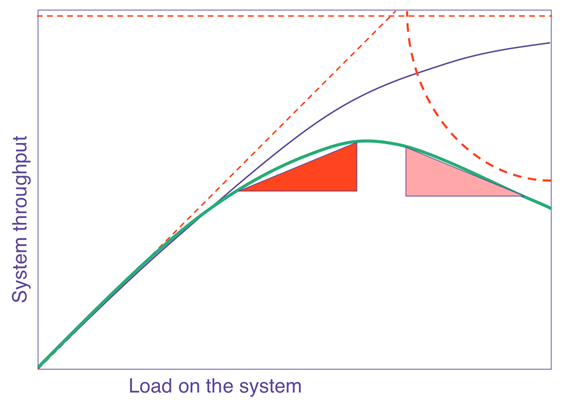
    The general curve that describes how software scales with resources or load is known as the Universal Scalability Law (USL). In a nutshell, it says that on any chart showing scale versus performance, you will see a region of linear scaling where adding resources (say, CPU cores) proportionally increases performance; however, you will then see where performance continues to increase on a nonlinear basis, with smaller and smaller gains with every additional resource until, at some point, the benefit is so marginal as to be completely negligible. This is known as Amdahl’s law, which states that the performance of every program is limited by the serial part.

    Beyond Amdahl lies the issue of retrograde scaling, the existence of which people often forget about until the consequences hit them smack in the face. In this issue, adding resources actually slows down the system. That’s right. From this point onward, larger servers will make your software slower.

    The reason this happens is that, to scale linearly, the workload and resources must be completely isolated and decoupled from each other, which isn’t realistically possible. There are always shared components, e.g. the kernel scheduler, the memory controller, the main PCI bus, perhaps the algorithm requires locking. In any case, the net result is queueing on the shared resource, which might also become a bottleneck when overloaded. Think of a supermarket checkout: you can admit more and more shoppers into the store, but they will still end up waiting at the checkout, eventually, no matter how many registers you open and staff. Performance is limited by the number of checkout counters, not by the number of shoppers or clerks. Worse yet, if the queue gets out of control (maybe people got tired of waiting and shopping carts are literally abandoned in front of remaining shoppers, blocking the path to checkout — think of this as the contention of retries and timeouts), the throughput of checkout will decrease as counters are starved for shoppers.

    right-sizing

    The USL shows us what happens to throughput as we scale, but what about latency?

    right-sizing

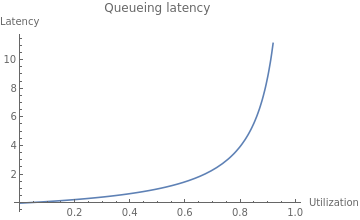
    As resource utilization approaches 100%, the wait time for the resource will approach infinity in a nonlinear fashion. This is why systems are designed to run at low utilization, so that quality of service does not degrade too much. You might see a server running at 50% utilization and think, “We can use a server with half the resources and save money!” but if you actually try to do that, you will degrade latency and quality of service to an unacceptable level, most likely causing an outage.

    The Dark Arts of Configuration

    Even if your software is able to take advantage of available resources in theory, it needs to be properly configured to use them. Buffer sizes, thread pool sizes, memory heap size, number of connections—most software has numerous options to tune it for resources and specific workload. You can’t just change the box size and expect it to work! Not to mention, it’s quite possible your current configuration is far from optimal. I’ve substantially reduced cluster sizes on several occasions by making a one-line configuration change.

    For example, a common web server configuration is the number of concurrent requests the server can handle (often expressed as number of threads), which relates to the number of CPU cores available, the amount of memory available to the specific workload and the average time it takes to handle a request. The problem you are solving isn’t “What instance size will have the best ROI?” but rather “What combination of instance size and configuration will have the best ROI?” That is a totally different question that requires specific knowledge of the application to answer.

    Let Them Eat Cache

    In the old days, when you tried to allocate memory beyond what was currently available, the operating system would simply refuse your request. Ah, the good old days were simple! Alas, in our quest to simplify programming and resource management, and to allow software to efficiently adapt to a changing environment, we made common use of resource tradeoffs. For example, a complicated computation can be calculated again and again using the CPU, or the results can be saved and reused, saving CPU time and trading it for the use of RAM or disk. This pattern is quite common; when you overallocate memory, the operating system may trade off CPU to free memory by compressing memory objects, or it may trade off disk space by paging out RAM to swap. Java, Node.js and Go each have a similar tradeoff where they spend CPU time on garbage collecting to free RAM. Modern software makes numerous tradeoffs between CPU, RAM, disk and network in multiple dimensions. The end result is that different resources are coupled in many unexpected and obscure ways.

    Lies, Damned Lies! (And Metrics)

    Speaking of that server running at 50% CPU utilization, it is quite possible that server is also maxed out on CPU at the same time. How can this be? It’s because the metrics you see are not raw data but aggregates—in many cases, averages—and aggregates hide certain behaviors that can be very important; for example, peaks and bursts, such as the ones you get from compaction, garbage collection and other periodic processes that routinely run in modern software. There are billions of events happening every second on a modern server, and only a few data points of metrics emitted every minute. All metrics are loss-y; it’s simple math, really. But machine learning (ML) models are only as good as the data they work on, so if the metrics weren’t specifically created to show the relevant behaviors—and they weren’t—the model would be completely blind to their existence.

    What is “Performance,” Exactly?

    Whenever we deal with resource allocation, we are interested in its impact on performance, which raises the obvious yet rather uncomfortable question: what’s your definition of “performance?” Is it throughput? Latency? Mean or the 99th percentile? Of which transaction? Or, perhaps you are mostly interested in the rate of purchases executed on the website? These are all different things, and often, optimizing one might degrade the others.

    This kind of discussion is the first step in any performance engineering session—but completely absent from the scope of “right-sizing” services, and the last thing you want is the generic cost function of the ML model costing you money.

    This wouldn’t be so bad if all performance goals could be achieved at once, but, sadly, some of them are in opposition: e.g., higher throughput causes higher latency due to queueing effects. When making changes to software systems, we have to know what performance metrics are important to us.

    The Curse of Local Optimization

    It is very tempting to look at a cluster of machines as an independent system. But if that system is doing something meaningful, it is part of some bigger system, and changing the configuration will likely have an effect on the larger system it is a part of. When we make changes to subsystems, it is with the intent of improving the system as a whole, to make the customer happy and make more money. But when a change to a subsystem is motivated by a desire to reduce the cost of the subsystem, the result is often an increase in the overall cost of the system! This is because the local cost of subsystems is relatively small compared to the cost of the entire system, not to mention the possible reduction in the income of the system. For example, you could save lots of money by using older, slower servers, but your customers won’t be very happy with a slow application and your profits will suffer—which will probably cost you much more than whatever you saved.

    To take this ad absurdum, you could save 100% of the subsystem cost by turning it off completely. Of course, the assumption is that changing server sizes will not have any side effects, which, as discussed, is highly unlikely. There will be side effects on connected systems as well, some of which will not appear immediately. Load is variant, and operational overprovisioning and buffers were often put in place for a reason. It’s quite likely the reason for low utilization is safety margins.

    The Problem With “Right-Sizing”

    The basic problem with “right-sizing” is the rather obvious, yet implicit, assumption that there is such a thing as “the right” size. Software engineering is all about tradeoffs, precisely because it’s very rare (if it happens at all) that one thing can be improved without making another thing worse. Tradeoffs mean business decisions to make, and you really don’t want a generic ML heuristic to make those for you. ML is very good at dealing with problems where a lot of data is available, the data is high quality, the data is predictive of behaviors (which isn’t the case for complex systems!) and most important, the problem is well defined. Most problems in AIOps are very far from this. Don’t take it from me, take it from the people who excel at both high-scale ops and ML.

    Even if it was feasible to make such ML models work, software is unable to automatically adapt to different machine sizes and fully utilize server resources. If it were, companies like ScyllaDB and Azul Systems wouldn’t need to exist. Creating software that is scalable and resource-efficient on modern hardware is a very difficult problem, and without those building blocks, ML models are constructing very shaky structures.

    It’s worth emphasizing that I’m not arguing against adapting the size and configuration of servers, only that doing so automatically and blindly for some local “cost-saving” goal isn’t the solution you might think. The goal of such changes should be to raise the overall quality and performance of the larger system guided by a theory of how that system works. ML is not a replacement for human thought and learning. There might certainly be an “optimal” instance type, or even a few, but “optimal” implies a target metric that certainly isn’t cost reduction. No system exists for the sole purpose of being inexpensive. All systems exist to serve business requirements first, and to be low-cost second.

  • Akamai Adds Service to Optimize API Traffic

    Akamai Adds Service to Optimize API Traffic

    Akamai today launched an API Acceleration service specifically designed to accelerate application programming interface (API) calls using special purpose hardware, reserved capacity and prioritized routing.

    At the same time, the company is also making available a globally distributed key-value store dubbed EdgeKV that enables stateful applications to be deployed on its EdgeWorker nodes.

    Finally, Akamai is also making available free tiers of services that provide access to a combined 60 million serverless EdgeWorker events per month with a limit of up to 30 million EdgeWorker events per tier. The two tiers are made up of a basic compute service for applications requiring lower CPU and memory consumption and a dynamic compute service for those applications demanding additional resources.

    Josh Johnson, an enterprise architect for Akamai, said Akamai is expanding its offering at a time when many organizations are starting to deploy microservices-based applications across an extended enterprise using serverless EdgeWorker nodes deployed at the network edge. EdgeKV provides access to a low latency data store that also enables those edge computing applications to process data closer to the point where it is being created and consumed.

    In general, Akamai reported that, in 2020, its platforms processed more than 300 trillion API requests, a 53% year-over-year increase. Much of the increased activity is being driven by distributed applications that are deployed directly on the Akamai CDN, rather than being deployed in a local data center to take advantage of a global network of data centers that allow IT organizations to take advantage of caching. In effect, the CDN becomes the target platform when an application developed using DevOps best practices is being deployed. The rise of edge computing has increased the number of use cases where DevOps teams are relying on CDNs to deploy applications.

    Naturally, competition among providers of CDNs has increased considerably as the number of applications deployed at the edge continues to increase. There may even come a day when there are more applications deployed at the network edge than there are in the cloud as more organization deploy applications that need to process and analyze data in near-real time as part of a larger digital business transformation initiative.

    Akamai, of course, as the provider of the largest global CDN, is betting it will be able to leverage the size of its CDN to convince developers to deploy applications on its platforms rather than smaller rivals.

    Regardless of the approach to edge computing, the applications being deployed will be more latency sensitive than ever. Each IT organization will need to decide to what degree they want to count on infrastructure to optimize API calls those applications make before they time out or need to be redirected to another microservice. One way or another, the laws of physics still apply. No edge computing application is an island. It depends on a complex web of infrastructure ranging from routers and switches to servers running back end services in the cloud. The challenge is finding a way to optimize all those interactions in a way that developers never have to be concerned about.

  • There’s No Innovation Without Automation

    There’s No Innovation Without Automation

    Companies of all sizes and across virtually every industry today have ready access to hyperscale compute, storage and myriad other technologies — without needing the significant budget or technical expertise of a hyperscale cloud provider like AWS.

    This is a boon for innovation. Cloud opened the door to cost optimizations, previously out-of-reach cloud-native tools, security improvements and other tangible business benefits. This also created something of a myth in the industry: people commonly think of cloud as “easy.” Yes, migrating existing applications to the cloud can create significant business value. But saying “cloud is easy” can be dangerously misleading.

    There are reasons for this perception. A developer with a credit card can create an account and spin up a new environment in a matter of minutes, for example. That’s a far cry from the days when that same IT professional might need to submit a ticket to an internal Ops team days (or weeks) in advance to provision a new Dev environment.

    Operating in the cloud at any kind of enterprise scale is not necessarily easy, however. In fact, cloud can be much more complicated than on-premises infrastructure. Consider the sheer number of new tools and services a platform like AWS rolls out in a given month—keeping up with the pace of change and innovation can itself seem like a full-time job.

    Complexity becomes an even bigger issue when teams migrate to cloud (or begin pursuing greenfield cloud-native projects) while simultaneously trying to move with greater speed and agility, often driven by a new or ongoing digital transformation project in the company. Think about a team that’s undergoing a shift toward DevOps while also migrating a major legacy system to a cloud—that’s a lot to tackle at once.

    Fortunately, cloud complexity is an eminently addressable challenge — so long as you embrace automation. Automation, including the use of embedded or native tools from the hyperscalers themselves, is absolutely critical to cloud success.

    Automation is what enables today’s IT teams to achieve the benefits of a cloud migration without saddling themselves with an untenable operational burden. Furthermore, automation is what makes a lot of popular mantras in business and IT today — such as “fail fast” and similar ideas — actually possible.

    Automation is the foundation of innovation. There is no such thing as meaningful innovation without automation. That’s because sticking with largely manual operations turns IT into a bottleneck. Technology hampers the overall business rather than drive its most pressing strategic priorities. Organizations that don’t adapt to this reality face big headwinds. Cloud on its own does not solve the problem; cloud paired with automation is what is needed.

    Consider the various operational requirements of any IT environment: provisioning, configuration, security, scaling, resource management and optimization, and change control/change management. Without effective automation, each of these alone can require an intensive amount of manual effort to manage in the cloud and quickly become more complicated than their counterpart in a plain-vanilla on-premises environment. If you can’t quickly scale up as your application needs change, whether due to a demand surge or other factors, then you’re not achieving the speed and agility that cloud promises, for example. Likewise, if you can’t scale down machines that are no longer needed, you’re almost certainly wasting money on idle resources. This is where a cloud platform’s autoscaling capabilities come into play.

    Similarly, consider your organization’s existing change control or change management processes. It’s a necessary function of many enterprises, especially those who must manage regulatory compliance. When applied manually in the cloud, it can quickly become a byzantine effort that severely limits agility. That’s a nonstarter for most modern businesses. This is another challenge that can be addressed with automation in the cloud.

    It’s also important to understand that automation drives quality as much as it drives agility. It enables you to deliver new products and services faster and more frequently while fostering top-notch user experiences. The autoscaling scenario above can reduce capacity-related outages that damage customer experience and the bottom line, for instance. In this way, automation and cloud together form the basis for true operational excellence and its hallmark characteristics of capacity, elasticity, performance, and security.

    This is not just the purview of customer-facing applications, either. Competitive businesses must bring the same philosophy to their whole IT portfolio. Innovation depends on internal systems becoming as nimble as a web front-end.

    Think about an ERP system like SAP; change on SAP for enterprises has traditionally moved at the speed of an elephant when today’s businesses operate at the speed of a gazelle. You must apply the processes, tools and culture of cloud and automation to back-end systems, too. You can automate operational tasks in the cloud, such as system refresh and other system-level operations. This paves the way to zero-downtime maintenance, patching the database at the OS level while getting rid of the hours of downtime that task would previously have required. Or think of the necessity of backup-and-restore: Via cloud-based automation, you can deliver point-and-click restores that greatly reduce time to recovery.

    Again, this is about quality just as much as agility. Applying automation appropriately to a cloud-based ERP system can reduce or eliminate human error, too, further boosting system performance and reliability.

    In short, cloud offers great opportunities for enterprises to access transformational innovation.  However, you can’t be innovative without being agile, and you can’t be agile without automation.

  • Designing Cost-Efficient Cloud Environments

    Designing Cost-Efficient Cloud Environments

    Today, the days of on-premises data centers are mostly behind us, and the cloud has largely taken over with the promise of scalability, flexibility and cost-efficiency. Despite these promises, the cloud often falls short of these ideals. Why?

    Because managing the cloud is hard—especially when it comes to managing its costs. There are no automatic savings the moment you sign up with AWS or any other cloud provider. Instead, realizing cloud savings requires lots of capacity planning, careful analysis, consistent monitoring, accurate forecasting and endless adjustments—it’s enough work to make anyone’s head spin.

    But the rewards make it worth the effort. If you manage your cloud correctly, it offers tremendous savings compared to on-premises environments. However, moving to the cloud without first putting a cost strategy in place can cost your organization millions as you scale in the long term.

    So, what guidelines should you follow to ensure you’re maximizing your potential cloud savings? Here are some common do’s and don’ts you can start implementing—or stop doing—now.

    Moving to the Cloud

    Migrating to the cloud is the first, and the most complex step. So before you get started, bear in mind the following:

    Do: Analyze Your Environment Prior to Migration

    Let’s face it—if you have a disorganized and over-provisioned on-premises environment, you’ll have a disorganized and over-provisioned cloud environment. Unless, of course, you clean it up prior to the big move.

    On the bright side, cleaning up your current, familiar environment is less daunting than doing the clean-up once you move to the new and unfamiliar cloud environment. Therefore, it’s critical to analyze your current environment prior to your cloud migration.

    Start by decommissioning all assets that are not currently being used. For example, you may have a virtual machine (VM) that was provisioned for a particular project and not turned off once that project was finished. As a result, you’d have an application running that is no longer needed. Identifying and removing these resources now will lower your future cloud costs while relieving engineers of future headaches.

    Do: Create a Blueprint for Your Cloud Architecture

    Next, you need to re-architect your application stack. Don’t worry, this task isn’t as scary as it sounds. You’ll need to create a list of the infrastructure you’re using now and find its corresponding infrastructure in the cloud. Say, for example, you’re using multiple dedicated servers for message queuing. If you’re moving to AWS, you’ll need to identify similar instance types in AWS prior to your cloud migration.

    Don’t: Follow the “Lift and Shift” Approach

    It may be tempting, but whatever you do, avoid the “lift and shift” approach. There are certainly ways to optimize your current environment, so simply moving exactly what you have into the cloud is a missed opportunity to reorganize, restructure and optimize performance and costs.

    For example, you may be running VMs that are not being used, backing up unused development servers, or storing data that can be allocated to a low-cost archival storage class. Make sure to readjust your architecture to fit the cloud, not the other way around.

    Governance

    The bottom line is, somebody needs to be responsible for managing cloud costs. Depending on your company size, it can be a team or an individual, but it must get done sooner rather than later.

    Do: Ensure Cloud Spend is Managed by a Specific Individual or Team

    Sticking to a cloud budget is easier said than done, but if you delegate this task to a team or specific individual, it will be their top priority to ensure your company stays on target. They will be responsible for handling cloud budgets, establishing who can and cannot provision resources and monitoring use.

    If you fail to establish governance, you run the risk of having many individuals provisioning resources without any liability or accountability, which results in significant overspend and lots of chaos.

    Don’t: Presume Governance Is Only for Large Organizations

    Think your company’s too small for governance? Think again.

    At least one individual should always be responsible for monitoring your cloud spend and ensuring it stays in line with the allocated budget. This person will work hand-in-hand with finance to create budgets, monitor use, create billing alerts and more.

    Cloud Security

    If you’re migrating to the cloud without thinking about security, you’re making a huge mistake. It is estimated that cybercrime will cost the world over $10.5 trillion by 2025. Even worse, according to Verizon’s recent study, cloud security breaches have surpassed their on-premises counterparts for the first time ever.

    So, needless to say, security should be prioritized when moving to the cloud. Here are some tips to get started.

    Do: Develop a Layered, Multi-Tiered Cloud Security Plan

    Your cloud security strategy should safeguard both your data and IT assets in the event of a cyberattack, while being compliant with the standards and regulations specific to your industry.

    Some cloud security strategies include:

    • Building your solution with a well-architected framework
    • Using solutions like threat detection, automated patching or security auditing
    • Connecting your on-premises network to the cloud using a transit gateway or similar technologies
    • Creating enough firewall rules for traditional systems and web applications

    Don’t: Rely Exclusively on Your Cloud Provider’s Security Controls

    While many cloud providers offer great security solutions, relying on them exclusively will not help you cover your bases. AWS regularly refers to the shared responsibility model, which states that AWS covers infrastructure, but the user must secure their own applications.

    Scheduling Your instances

    The longer you run your servers, the larger your bill will be. And, unfortunately for us, creating a new VM in the cloud has become so easy that many forget to turn them off when they are no longer in use. This results in cloud costs that are up to 66% higher than they need to be.

    So, if you’re looking to cut cloud costs, keep the following in mind when scheduling your instances:

    Do: Automatically Schedule Instances

    Let’s face it, it’s easy to forget about shutting down instances after hours. In fact, it’s so easy, it can happen to even the best of us. Automatically scheduling instances, on the other hand, avoids human error while simplifying the shutdown process.

    AWS’s Amazon Instance Scheduler or Azure’s Start/Stop feature makes it easy to shut down instances from non-production environments during “off hours” and spin them back up once they’re needed. In addition to these tools, you should consider implementing alerting so you can be notified if anything goes wrong in the scheduling process.

    Do: Take Advantage of AWS Auto-Scaling

    AWS auto scaling enables you to take full advantage of the cloud’s elasticity. The technology continuously monitors your application’s capacity needs and automatically adjusts resources to fit its current use. As a result, you don’t have to spin out a large VM for your workload. Instead, you can begin with a low-spec server and add it to an auto scaling group. When demand increases, more nodes will be added to your fleet to accommodate scale. Likewise, when the demand decreases, the extra nodes will be spun down.

    This helps optimize both performance and costs so you’re never paying for resources you’re not using and you always have the right number of instances to run your applications.

    Don’t: Allow Your VMs to Run Continuously

    This may seem obvious, but as we mentioned earlier, many forget to shut down VMs when they are not needed. For example, 9 AM to 5 PM on weekdays may be your peak hours. This means you probably won’t need certain VMs to run on Saturdays or at 3 AM—so why pay for them? Instead, shut down VMs during “off hours” to ensure your savings are maximized.

    Tagging Your Assets

    There’s no getting around it—tagging assets is an essential part of understanding your usage patterns and optimizing cloud costs. Asset tags are metadata labels which can be attributed to individual resources in your cloud fleet to track which application it belongs to. Usually, you can assign up to 50 tags per resource, and they can be organized and named according to your needs.

    When tagging assets, make sure to keep in mind the following:

    Do: Implement a Tagging Strategy Early in your Cloud Journey

    It’s never too early to start tagging assets. In fact, the longer you postpone it, the harder it will become. Once your spend and usage increases, which it inevitably will, you will need to have a tagging system in place in order to determine which team is responsible for each asset (so you can have them evaluate resources and costs), deactivate unneeded resources and more.

    Tags are extremely useful in many real-world scenarios. For example, if you’re not using a specific application, you can search for the tag “application” with a value of the application’s name. You will then see all resources related to that application, so you can easily delete them.

    Additionally, tags can be used to enforce budgets and prevent overspending. Simply set a budget threshold on your tag and set up alerts to notify you when you’re getting close to that threshold.

    Don’t: Embark on Cloud Migration Before Tagging Assets

    Tagging is simple if you do it in the beginning when your environment isn’t so complex. But it’s excruciatingly difficult once your environment is more mature. So, if you’re moving to the cloud, make sure to start tagging beforehand so you don’t have any regrets.

    Do: Use Reserved Instances and Savings Plans

    If you’re on AWS, using reserved instances (RIs) and savings plans can save you up to 72% over the cloud giant’s on-demand pricing. The catch is you have to commit to purchasing RIs one to three years in advance, which means you’ll need to predict your usage needs ahead of time. Despite this challenge, RIs offer tremendous savings for those that use them wisely.

    Don’t: Purchase Reserved Instances or Savings Plans Without Building a Strategy

    When using RIs, it’s crucial to develop a strategy to ensure your savings are maximized. Often, people make the mistake of purchasing many RIs, which are not used. This results in upfront savings, but no return. Make sure to come up with a plan for how you handle reserved capacity. Selling them on the AWS marketplace is a good place to start.

    We move to the cloud for the promise of more flexibility and lower costs. But to actualize that promise, we can’t expect the cloud or our cloud provider to do all of the work for us. Unfortunately, cloud savings are not automatic.

    That’s why creating a strategy that covers costs, security, and other critical aspects of cloud migration should be your No. 1 priority. Even if you’ve been using the cloud for years, you should continue to reassess your cloud cost strategy to ensure it is optimized fully. Start by pinpointing practices that result in cloud waste and creating a game plan to prevent it from happening.

    Keep in mind that new technologies are always emerging, so make sure you are aware of any industry changes which could impact your cloud cost strategy.

  • Majority of Orgs Lack Visibility Into Container Vulnerabilities

    Majority of Orgs Lack Visibility Into Container Vulnerabilities

    Today’s blend of third-party application dependencies and polyglot software development often makes assessing risk difficult. With many new cloud-native deployment models, it can be tricky to discover potential vulnerabilities. These threats take the form of insecure default settings in Kubernetes, over-permissive states, CVEs that threaten container integrity, and other vulnerable conditions.

    Plugging gaps throughout the cloud-native strata is now crucial to avoid exposing data and breaking privacy regulations. Yet, gaining visibility into these holdings is challenging, and traditional application security practices may not cut it within a cloud-native context.

    A new 2021 CISO Report released by Dynatrace, “Precise, automatic risk and impact assessment is key for DevSecOps,” demonstrates increased false positives and a general lack of real-time container runtime vulnerability scanning among enterprise IT departments worldwide. Of the 700 CISOs surveyed, most report that microservices, containers and Kubernetes have caused security blind spots across their organizations.

    Below, we’ll cover the major takeaways from the study to see why new cloud-native development models are leaving security gaps. We’ll consider how CISOs can increase security throughout the cloud-native IT stack while still reaping the rewards of container-based delivery models.

    Cloud-Native Security Blindspots

    Adopting new container-based technologies may introduce multiple nuanced security implications. Of the tech leaders surveyed, 89% report that microservices, containers and Kubernetes have created new vulnerabilities within their organizations.

    Engineers are shipping code to maintain release velocity and to meet the demand for digital innovation. In the process, 28% of CISOs say application teams sometimes bypass vulnerability scans to speed up software delivery. Due to these realities, it’s no surprise that 71% of CISOs admit they are not fully confident code is free of vulnerabilities before going live in production.

    As some teams bypass security pre-production, it follows that more aren’t applying holistic security scanning during production. As a result, nearly all organizations (97%) lack real-time visibility into runtime vulnerabilities, found the report.

    Adding to the number of cloud-native blindspots is information overload. The report calculated that, on average, an organization receives a staggering 2,169 new alerts of potential application security vulnerabilities each month. Out of this high volume of alerts, 77% of CISOs say they are mostly false positives and not actual exposures.

    Due to minimal testing and a high number of false positives, organizations are likely to leave many vulnerabilities unpatched. To make matters worse, developers, pressed for time, may lack the bandwidth to resolve known issues.

    Faster Delivery, Harder Detection

    Much of the setbacks in vulnerability detection may lie in a general shift toward new ways of working and faster delivery cycles. For example, 63% of CISOs reported that DevOps and agile methodologies are making it harder to detect and manage vulnerabilities.

    In addition, 74% of CISOs say traditional security controls such as vulnerability scanners no longer fit today’s cloud-native world, and 77% of CISOs agree that automation could help. This could involve replacing manual deployment, configuration and management with more automated approaches. Others agree that security-as-code is required to ensure high container security best practices.

    Another result of more frequent delivery is increased over-reporting. Of the total security vulnerability alerts received per month, CISOs report that only 42% of these alerts require action. More rapid release cycles could thus exacerbate already crowded vulnerability detection systems.

    Who Owns Vulnerability Management?

    Only 3% of organizations have real-time visibility into runtime vulnerabilities in containerized production environments, the study found. In reality, vulnerability scanning in production is only happening once a month or less within 68% of organizations.

    To compensate for this gap, most CISOs believe the onus is not on the security team but the application and DevOps teams to manage and respond to vulnerabilities—85% of CISOs believe these groups should hold responsibility for vulnerability management. These findings come to light as other stakeholders advocate for increased full-cycle developer control and encourage the DevOps mindset across roles.

    Handing more control to developers sounds good, yet, 64% of respondents say developers don’t always have time to resolve vulnerabilities before code goes into production. As a result, over one-quarter of application teams bypass vulnerability scanning entirely. Often, engineering teams may not frequently sync with security groups, and DevSecOps principles are not yet pervasive throughout all organizations.

    The report also highlighted the fact that existing security tools are often ineffective; 69% of CISOs say security tools slow down DevOps because they only focus on one state of the software delivery cycle.

    Cloud Use Requires Security Repositioning

    As cloud architectures rise in prominence, organizations are adopting cloud-native tools like microservices, containers and Kubernetes. There is also the chance of multi-tool conditions further complicating the vulnerability scanning process. With more systems to protect than ever before, teams may have to reposition their approach to vulnerability detection.

    “The increased use of cloud-native architectures has fundamentally broken traditional approaches to application security,” said Bernd Greifeneder, founder and chief technology officer at Dynatrace. “This research confirms what we’ve long anticipated: manual vulnerability scans and impact assessments are no longer able to keep up with the pace of change in today’s dynamic cloud environments and rapid innovation cycles.”

    The Global CISO report, “Precise, automatic risk and impact assessment is key for DevSecOps,” from Dynatrace, queried 700 chief information security officers (CISOs) on their monitoring practices concerning vulnerabilities. To review the report’s full findings, you can download it here.

  • CloudBolt Adds Cloud Cost Tool to Hybrid Management Platform

    CloudBolt Adds Cloud Cost Tool to Hybrid Management Platform

    CloudBolt Software this week added cost management capabilities for Amazon Web Services (AWS) and Microsoft Azure public clouds along with codeless integrations with additional platforms to its hybrid cloud management platform.

    Grant Ho, chief marketing officer for CloudBolt, said the Spring Release of the company’s platform, now generally available, enables IT operations teams to rely much less on custom code to integrate the various elements of a hybrid cloud computing environment. The Spring edition adds support for the VMware vRealize Automation 8 automation platform, the configuration management database provided by ServiceNow as a cloud service and the IP address management platform from SolarWinds.

    CloudBolt

    In the wake of the COVID-19 pandemic, CloudBolt is betting more organizations will look to centralize IT management as part of an effort to reduce the total cost of IT. The cost management capabilities added to the platform enable IT teams to position themselves as more of an independent arbiter of where certain classes of workloads should run, based on cost, at a time when organizations have never had as many options as they do today, noted Ho.

    A recent survey published by CloudBolt found 80% of respondents are prioritizing real-time insight into cost optimization and security remediation. A total of 71% want self-service to be easy for end users, while 62% want an approach to integration that doesn’t require deep domain knowledge or special expertise.

    A full 94% of respondents also noted hybrid cloud computing will be critical to digital transformation. A total of 92% also noted that empowering end users through self-service IT is a digital transformation accelerator, while 99% said successful automation depends on streamlining integrations.

    More than three quarters (78%) noted they lack the visibility necessary to optimize cloud deployments. More than half (56%) also admitted their self-service offerings fail to meet user needs and more than three-quarters (76%) still rely on some form of custom coding when it comes to integration.

    Most enterprise IT organizations are trying to strike a balance between cost and flexibility as IT environments become more distributed. Each time a new platform is added to an IT environment, the total cost of IT rises because additional consoles for managing those platforms need to be staffed. The challenge is finding a way to centralize the management of IT in a way that reduces the number of consoles that have to be mastered without requiring every business unit to standardize on a platform that locks an organization into a single provider.

    It’s unclear to what degree IT organizations will rely on traditional IT service management (ITSM) platforms manned by administrators versus DevOps platforms deployed by site reliability engineers (SREs) to achieve that goal. However, one way or another, the cost of distributed computing environments needs to be reduced, even as they are becoming more complex. The primary issue now is deciding how best to achieve that goal in an IT environment where every application owner tends to view themselves as master of their own IT domain.

  • Lightbend Launches Serverless Managed DevOps Service

    Lightbend Launches Serverless Managed DevOps Service

    Lightbend today unfurled a cloud service based on a serverless framework that provides developers with a managed DevOps platform to build applications that dynamically scale resources up and down as required.

    Brad Murdoch, executive vice president for strategy at Lightbend, said Akka Serverless provides access to its Java development platform environment that runs atop Kubernetes via a declarative application programming interface (API) based on the gRPC protocol. Support for additional open APIs, such as GraphQL, is planned, added Murdoch.

    At the same time, Lightbend revealed today that Jonas Bonér has assumed the role of CEO in place of Mark Brewer. Previously CTO and founder of the Akka Project, Bonér is a co-author of a reactive manifesto that defines the core principles required to build applications using a reactive programming model.

    Akka Serverless, available via an open beta program that provides access to limited amounts of storage, is scheduled to be generally available in the fourth quarter on the Google Cloud Platform (GCP), with support for additional cloud services planned.

    The service is made possible because Lightbend extended an existing open source Cloudstate serverless framework to create a platform-as-a-service (PaaS) environment to support large amounts of distributed stateful data that developers employ to build applications, noted Murdoch. That capability overcomes the performance limitations of existing function-as-a-service approaches, based on other serverless computing frameworks, that don’t support stateful application development, added Murdoch.

    In fact, one of the reasons that adoption of serverless frameworks has been limited thus far is the inability to be employed within the context of a stateful application that requires a lot of access to data, said Murdoch.

    Lightbend addressed that issue by enabling event sourced entities persist each change in state as an event that Akka Serverless writes to a journal. That journal can be used to replay events to reconstruct state at a particular time, debug or provide an audit. At runtime, a key distinguishes each entity instance from all others.

    Akka Serverless is the latest in a series of managed DevOps services that automatically scales as developers request new resources. There is no need for developers to configure and manage a database on which to build their application. Many organizations are migrating to these services because they would rather focus their time and effort on building applications versus managing a DevOps platform, said Murdoch.

    It’s not clear to what degree organizations will embrace managed DevOps services, which are starting to appear on various cloud platforms. However, the implication is that by choosing these types of services, organizations may not need to hire, for example, as many site reliability engineers (SREs). The challenge, however, going forward is that most of the managed DevOps platforms are currently tied to a specific cloud service at a time when most organizations are routinely using more than one cloud.

    Of course, developers will need to continue to manage continuous integration (CI) processes, but, in time, the continuous delivery side of the DevOps equation may be incorporated within a managed service. Regardless of the path forward, as DevOps processes continue to become more automated, the pace at which applications can be deployed is about to significantly accelerate.