Category: DevOps in the Cloud

  • Multi-Cloud Is Not About Lift and Shift

    Multi-Cloud Is Not About Lift and Shift

    Multi-cloud is often framed from the perspective of “lift and shift.” In other words, an organization takes a computing environment previously running on one cloud and transfers it over to a different service provider. Cloud migration may make sense for cost savings or performance benefits and such a shift may be necessary when migrating on-premises data centers to a public cloud.

    In theory, lift and shift sounds like it would empower cloud consumers with more choice in the marketplace. However, according to John Gentry, CTO of Virtana, lift and shift is quite rare in practice; it may not be the true driver behind multi-cloud strategies. Moving resources between clouds can result in costly egress fees. Plus, culturally-ingrained cloud preferences become challenging to shake. Unique configurations and add-on software-as-a-service (SaaS) make each cloud more nuanced, requiring new skills and procedures with every migration.

    Instead, Gentry advocates for a “fit-for-purpose cloud” strategy. This attitude is less about moving similar workloads between clouds but, instead, pairing particular types of workloads with the appropriate cloud types. According to Gentry, using multiple clouds simultaneously could still help organizations strategically align their digital resources and reduce dependency on a single cloud service provider (CSP). But, the real value of a hybrid multi-cloud setup lies in matching computing environments to different business layers.

    Fit-For-Purpose Cloud

    At first glance, the ability to move between clouds appears to be driving a new multi-cloud economy where cloud strategists can swiftly migrate resources and optimize intercloud utilization. However, when organizations attempt to shift, they usually experience many hidden costs, Gentry warned. These often pop up around data egress. Or, new data storage costs may take a surprising toll, Gentry added. “A lot of companies look at it from a computing perspective and they don’t account for the storage footprint.”

    DevOps in the cloud also introduces new responsibilities and processes that may differ between clouds, continued Gentry. From unique storage operations to managing the life cycle of a virtual machine, each cloud carries unique configuration methods. This makes it more difficult to abandon established procedures in favor of a different computing arrangement.

    Nevertheless, Gentry recognizes that we’re starting to see a maturing effect of the multi-cloud concept, especially among large enterprises. “Companies have a multi-cloud strategy—it’s less about moving between clouds than about picking a cloud that has specific advantages for a given workload,” he said. In a fit-for-purpose cloud approach, different workloads correspond to different layers of the business. For example, an organization may require a local data center or private cloud for high-security data. Certain applications may benefit from a distributed global public cloud, whereas other workloads could reap performance benefits and cost savings from a cloud-adjacent edge model. “These specific areas may not have anything to do with one another other than supporting the overall business,” explained Gentry.

    Matching Cloud Types to Business Units

    So how do we match the workload at hand to the ideal computing arrangement? Gentry identified three emerging cloud types:

    • Private cloud: A private core for particular functions that can’t be replatformed or rearchitected. Business areas such as financial records or patient care hold sensitive data that must be stored properly to meet regulations and SLAs.
    • Public cloud: End customer-facing, where sensitive data is not an issue. Public distributed cloud is ideal for delivering a highly available front end for customer-facing digital experiences.
    • Cloud adjacent/edge: When an environment is kept in a cloud adjacent facility with relatively local geographies. This may sit alongside the public cloud or connect to a front end in a cloud.

    For example, Gentry described how a large health care company uses a hybrid multi-cloud setup to support various business divisions. The organization is keeping traditional patient care workloads exclusively on-premises; due to regulatory reasons, it will never see the inside of a cloud. Yet, they are simultaneously building the next generation of applications in a public cloud, using Google Cloud to scale a clinical trial division. Simultaneously they began using Microsoft Azure for their back office. This scenario highlights one peculiar advantage of late-stage cloud adoption, noted Gentry: “They had the advantage of being able to take a more thoughtful approach.”

    Gentry described another case of an organization performing genomic sequencing. For data-heavy applications like this, where there is a high dependency on input and output, syncing with a public cloud could be extremely costly and introduce latency. For them, the most cost-effective method was to use a cloud-adjacent or edge model alongside a public cloud.

    How to Leverage Fit-For-Purpose Cloud

    One situation that may warrant cloud migration is a complete replatforming, noted Gentry. He described one early cloud adopter that rushed into AWS, only to find it wasn’t cost-effective for their needs. Architects then had to make tough decisions to determine what would be repatriated back to local data centers and what should remain in the cloud. “Their only motive going from cloud to cloud was, ‘We made a bad choice and we want to move.’”

    Clearly, to match cloud use with business requirements, you must choose the appropriate cloud. AWS is widely adopted for elastic computing and offers a wide product catalog. GCP is offering feature innovation and cost reduction to compete and is going after un- and under-penetrated regions. Azure, on the other hand, will offer licensing advantages if you are a Microsoft shop.

    Secondly, to unite IT around a hybrid multi-cloud strategy, you must remove the adversarial state between traditional ops and cloud ops. Classic ops is typically very safety-oriented, using a slow approach with endless tests in pre-production. Traditional ops may produce yearly updates. This is directly opposed to the new cloud ops approach, which emphasizes agility, speed and constant deployment. “They sit in different silos,” Gentry explained.

    To solve this dilemma, companies must share technical skillsets between the three main cloud types. “DevOps must become a continuum for all types,” Gentry said. In addition to cultural change, DevOps tools must evolve to monitor workloads across a hybrid multi-cloud estate. This will require integration to tie together tools and deeper observability.

  • Logz.io Allies with Microsoft on Open Source Observability

    Logz.io Allies with Microsoft on Open Source Observability

    Logz.io this week announced an alliance with Microsoft that enables DevOps teams to deploy its observability platform—based on open source platforms such as ElasticSearch, Logstash, Kibana (ELK), Prometheus and Jaeger—on the Azure public cloud.

    Jonah Kowall, Logz.io’s CTO, said the multi-year effort enables those teams to deploy the Logz.io platform via the Azure Console with the click of a button. The Azure platform has a data collection capability that aggregates operating system events in a way that makes it simpler for the Prometheus monitoring solution to consume, he added.

    DevOps teams, however, will still have to collect data from the applications they instrument on the Azure platform, he added.

    Logz.io integrates multiple open source monitoring tools based on metrics, logs and traces within a single observability platform that otherwise would require considerable time and effort from internal IT teams on their own.

    Interest in observability is rising as organizations attempt to provide internal IT teams with more context when troubleshooting issues. Whenever there is an IT issue, most teams convene a “war room” where they attempt to discover the root cause of an issue by comparing analytics generated by a wide range of monitoring tools. Observability platforms promise to enable a DevOps team to replace many of those tools in a way that provides more context by integrating log data, metrics and distributed traces within a single platform.

    In many instances, existing application performance management (APM) platforms are being transformed into observability platforms by adding tools to monitor IT infrastructure. Conversely, platforms for managing IT infrastructure are adding support for tools to monitor applications. Elsewhere, a range of startups have emerged to offer observability platforms they have developed from the ground up.

    Regardless of the platform employed, the rise of microservices-based applications within many organizations is forcing the observability issue. The dependencies that exist within microservices-based applications are too complex to manage without a platform that provides some level of increased observability. Of course, most existing monolithic applications are not being retired any time soon, so the need for an observability framework for both legacy and modern cloud-native applications has only become more pressing.

    The Logz.io platform can, of course, be deployed on other cloud platforms as well as within on-premises IT environments. As hybrid cloud computing continues to evolve, it is apparent that observability platforms will need to extend their reach from the cloud to the network edge. Over time, artificial intelligence (AI) capabilities will be added to make it easier to, for example, streamline the number of alerts that are generated across complex IT environments.

    In the meantime, the most important thing with regard to observability may be simply getting started. Most IT teams start to analyze logs before moving on to metrics and then traces using the open source Jaeger agent software. After all, the only thing more difficult to instrument than an application before it is deployed is, arguably, one that is already running in a production environment.

  • Learning from Loris Degioanni: Cloud-Native Days with Kubernetes Virtual Summit

    Learning from Loris Degioanni: Cloud-Native Days with Kubernetes Virtual Summit

    Keeping up with information can be challenging. With all these changes, you’re probably left wondering, “who can guide me through all this information?” Fortunately, Cloud-Native Days with Kubernetes is focused on giving attendees the tools they need to become proficient in cloud-native technologies. At the virtual summit, attendees can tune into our expert-led featured sessions and learn how to leverage cloud native technologies to move faster and more securely.

    Cloud-native technologies are quickly becoming an integral part of IT environments as organizations continuously accelerate their development efforts to meet business demands. Because of this, it’s incredibly valuable to learn from industry specialists changing the IT world as we know it. And who better to learn from than the industry thought leaders and doers in the cloud-native space? Through sessions touching on topics like security and observability, our featured tech titans will give you a better understanding of cloud native and its impact on the IT landscape.

    Today, the CI/CD pipeline is mainly built on open source tools – Kubernetes, Jenkins, GitLab, etc. Security has traditionally been closed, but it’s now clear the pace of innovation cannot be constrained by proprietary development models. Keynote speaker Loris Degioanni, CTO and founder of Sysdig, will discuss key practices needed for a secure cloud and container environment, including: what is required to increase security, visibility and simplicity in the cloud, lessons learned from major attacks like Kaseya and SolarWinds, ways to leverage Secure DevOps to not only ‘shift left,’ but also ‘roll right’ for detection and response, and how open source is the key ingredient to see all your signals in a constantly changing landscape.

    In his article, “Open Source is Taking Over Security,” published last year on The New Stack, Loris Degioanni elaborates on this idea that open source is essential to maintaining high security, stating, “I argue that, despite having lower penetration of open source, security is the industry that benefits the most from an open source approach. I also argue that open source will gradually take over and become the standard way to do security.” To understand this further, Loris breaks it up into a few key questions: Why is open source the best way to do security? and, Will open source become the standard way to do security?

    Let’s start with the most important question: Why is open source the best way to do security? Loris is adamant that open source is the key ingredient to security because of one thing – speed of innovation. Loris points out that the rise of widely adopted and open computing platforms like Kubernetes have had a big impact on how distributed, coordinated ecosystems can beat out a ‘behind closed doors’ single vendor 100% of the time. Loris writes, “On one hand, Kubernetes and cloud native have such a fast innovation pace that it’s hard for a vendor to keep up by itself. On the other hand, thanks to Kubernetes, for the first time we have a completely open platform to run our applications, where security can be natively integrated rather than being bolted on top.” 

    Open source also increases the speed of innovation because it empowers end users to work with vendors. Any user, regardless of size and level of sophistication, Loris says, can provide feedback in a tight loop and they can also contribute. So why is this relevant to security? As Loris explains, “The intrinsically fragmented nature of vulnerabilities and threats makes this bazaar-oriented approach to contributing very effective.”

    This brings us to Loris’s second question: will open source become the standard way to do security? Not only does Loris say yes, open source will become the standard way to do security, but in fact there is no escaping this. Using a metaphor of bad guys vs. good guys to describe cybersecurity battles, Loris says, “the army of the bad guys is big, smart, and aggressive. And the deck is stacked in their favor.” 

    So how do the good guys win in this scenario? Loris says the best chance at this is, “working together, as a team, leveraging each other’s strength, making sure that no energy is wasted.” Rather than having competing standards upheld by a variety of vendors, Loris is adamant that “a much better approach consists of leveraging a common set of standards that are deeply integrated in the platform, owned by the community, driven by consensus, on top of which all of the players can confidently innovate.”

    Much like Loris’s approach to open source, innovation and security are also valuable key practices at Cloud-Native Days with Kubernetes. Life moves fast. Innovation cannot afford to be slowed down, especially now. So begin your cloud-native information journey by tuning into our expert-led sessions, gathering your questions and learning from our talented speakers August 4 and 5 at 9 a.m. ET.

  • Are You Wasting Money in the Cloud?

    Are You Wasting Money in the Cloud?

    I’m not the first person to point out the issues with Andreessen Horowitz’s blog post outlining why Dropbox is repatriating from the public cloud to data centers and saving an enormous amount of money. But while others have brought up valid points about how Dropbox is not representative of most companies and that the value in public cloud is in speed, not cost savings, I wanted to address a different angle: How do you, as an IT leader, know if or when you should move your cloud workloads back to the data center? How do you evaluate the ROI on the cloud in general?

    I want to talk through some of the factors that companies should be aware of when they’re thinking about whether or not it would be appropriate to repatriate a workload—and perhaps give some IT leaders peace of mind that staying in the cloud is OK.

    How Mature is your App?

    The earlier you are in the application’s life cycle, the more critical access to cloud infrastructure is. Early in the application’s life cycle, you need to get things out the door and test them with real people. You don’t, at this point, actually know how users will interact with your application or how the application will perform under the stresses of actual use. You also don’t know how much it will cost to run.

    At the beginning, quick iteration is also very important. There will undoubtedly be things in the initial release that go wrong—you need a way to quickly adjust course and improve.

    As the application matures, everything slows down. Your information about the application accumulates, but quick iteration becomes increasingly less important. It’s not until the workload is fairly mature that you can begin to understand how much it costs to run in the cloud and can compare that with how much it would cost to run on-premises.

    At the early life cycle stages, using a public cloud provider is extremely valuable because it allows you to get the application into users’ hands quickly and to iterate fast. As the application matures and changes are made less frequently, moving it back to a data center could make sense—at least in some cases.

    Internal Skill Sets

    Running an application in the cloud involves a different skill set than managing a data center. If you don’t have the internal skills needed to staff your data center, that can add not just cost, but will also increase the risk that something goes wrong.

    If you’re considering moving from cloud to a data center, taking a critical look at your internal skill sets is essential. Without a skilled team to manage the data center, you’re better off staying in the cloud even if it’s expensive. And yes, you can hire the skill sets you need, but that requires both time and money.

    Criticality

    If you have a workload that you never want to go down—because it is mission-critical, because it’s revenue-producing—you should probably keep it in the cloud. The cloud is generally more reliable than individual data centers, and the repatriation itself could easily cause disruptions.

    In addition, the cost of running mission-critical applications is less important simply because they are so essential to the business. If the application is burning money but is also your only source of revenue—unless it’s burning more money than it earns, it probably makes sense to keep things as-is.

    Looking at the Exit

    Of course, depending on your application’s architecture, repatriating it from the cloud to a data center could be either impossible or prohibitively expensive. If the application relies on the cloud provider’s proprietary services—databases, for example, or Lambda functions—moving it off of the cloud is going to be extremely hard. Even if it turns out that moving from the cloud to the data center is possible, it could easily cost so much that it wipes out any potential savings from repatriation.

    This isn’t to say that you should never think about leaving the cloud—in fact, if you think moving cloud workloads back on-premises is something you’d like to do at some point, you should consider it during the architecture phase. The decisions you make at that point will determine how challenging it would be to move off the cloud in the future—or even to change clouds if you want to. Using Lambda is going to make moving off the cloud very difficult, for example, whereas using containers will make it comparatively easier.

    When we talk about the costs of public clouds versus data centers, we’re trying to compare things that are fundamentally different. First of all, public cloud costs are notoriously difficult to understand, whereas understanding the costs for on-premises is relatively easy. Sure, there is overhead—building, staff members, etc — but it’s not that different from calculating any other cost in a business and an accountant could make sense of it in 10 minutes with Excel. Good luck doing that with AWS.

    That’s the core problem with cloud costs—humans have a hard time trusting what they don’t understand. But cloud has never been about reducing costs. And regardless, the cheapest option is not always the best option.

  • Stop Hiding the Cloud From Your Developers

    Stop Hiding the Cloud From Your Developers

    If you say a person or organization “goes to great lengths” to achieve something, it means they try very hard and perhaps do extreme things to accomplish their goal. One example I’ve seen is that of more traditional companies “going to great lengths” to “hide” the cloud from their pool of potential technical consumers doing work like development. Instead of saying, “Here it is,” they block or restrict users from direct consumption. Under this model, developers don’t directly login to Azure or AWS, they go to the “internal corporate portal” and fill out a request form for the resources they want and submit it. Then, someone eventually processes the request and creates what is needed.

    In extreme cases, organizations create “cloud teams” and staff those groups with people who build cloud resources on behalf of downstream technical consumers, like developers. Potential consumers must submit a request with a detailed design document specifying everything they want. Then, the cloud team schedules the project and delivers it at a future point. The whole process mimics the historical waterfall approach to software development or systems implementation.

    Why do things this way? It always seems to come down to four distinct drivers:

    Costs: “If we give open access, we will end up with a huge bill!”
    Compliance: “Everything built must meet our security standards.”
    Complexity: “Most users will waste time trying to figure it out.”
    Control: “Our group has always coordinated access to resources.”

    In traditional companies, the reasons for this restricted access always seem to be some variation of those on the list. And when you rebut with something like “Do you think Facebook, Twilio, Netflix, etc. restrict their developers’ cloud access?” the answer is usually something like, “Well, those are elite tech companies; we’ve always done it the way we do it now …”

    In most cases, there is no singular argument you can make to change someone’s mind, or expand the range of possibilities. But you can offer facts. So, let’s take on their arguments one at a time and see if we can rebut them.

    Costs

    Argument: “If we open up the cloud to everyone, then all the developers will endlessly create virtual machines (VMs) and associated resources and services, and we will end up with a huge bill.”

    Rebuttal: There are certainly examples of this; do a search for some variation of “unexpected cloud costs,” and they’ll pop up, especially from a few years ago when cloud adoption was just taking off. But what about today? What can be done to control costs? Even though there are lots of tips and ideas on how to control cloud costs, I’ll offer one simple possibility that directly applies to developers and development groups that is not often mentioned in many articles: implement a cloud resource quota per developer or dev group.

    In AWS, for example, you can allocate via IAM; with Azure, you can use resource groups. The upshot is that there is a way to restrict the number and amount of resources that a single user can consume. So, whether you have 10 or 1,000 developers, you can use these built-in mechanisms to limit and then estimate what your consumption will be. If I have 100 developers and I put a limit on the number of VMs, the number of GB of RAM they can allocate and the amount of storage each developer can consume, then haven’t I just created a “cap” on consumption? The quota concept gives you a path to a “predictable” bill every month.

    Compliance

    Argument: “If we open up access to everyone, they’ll create VMs that don’t adhere to all our internal security standards.”

    Rebuttal: Aren’t developers just looking for a VM (or VMs) to do dev work? We aren’t talking about building production-hardened VMs to host applications. We are talking about giving developers the proper sandbox in which to do their work. So, from this perspective, requiring that developers only create VMs that adhere to strict compliance standards reserved for production servers doesn’t make sense.

    For example, maybe one of your compliance standards is that all production servers have a monitoring agent installed on them. Fine, that makes sense; what about dev/test? In dev/test, I might be spinning up a VM or a container that only exists for a short time, maybe even less than an hour while some tests are running. Does it make sense to require that a monitoring agent be installed on a VM that will only have a one-hour shelf life? Just throwing out the term “compliance” as a catch-all is not a real solid objection. Perhaps for dev/test, there are minimum standards you would want to follow regarding OS levels, patches, etc., but the VM(s) you use in dev/test do(es)n’t necessarily need to have all the additional security requirements reserved for production servers.

    The other part of this objection we hinted at earlier is that you have to transition to “cloud thinking.” Resources that exist for the next 10 minutes in the cloud could intentionally be gone shortly after that. In the cloud, you can quickly create and destroy VMs, or entire environments of VMs. That is what makes the cloud a game-changer versus traditional on-premises methods. You can’t apply the same on-premises considerations to the cloud one-to-one. You need to come up with a new thinking model that takes into account what it means to use the cloud versus how you did it before on-premises.

    Complexity

    Argument: “It’s too hard to figure out some of these cloud architectures, and developers will waste time trying to do so versus having a central team do all the work correctly the first time.”

    Rebuttal: Without the commitment to being a “learning organization,” there can be no DevOps, no transition/migration to the cloud, no digital transformation. Check out item number six on this list of 7 Ways to Make Developers Happy. (Spoiler alert: it’s ‘promote continuous learning.’)

    If “complexity of learning” is one reason why you restrict your teams’ access to the cloud, then you are missing the point of what it means to be a technical expert. Developers partially define themselves by the depth and the range of knowledge that they have accumulated, so continuous learning is a significant component of keeping developers “happy.” Not to mention that happy developers are more engaged and tend to stick around longer at companies that keep them that way; you’re risking losing the technical talent you do have, which has a host of detriments to your organization.

    Control

    Argument: “If developers are creating their own servers, what does our team do?”

    Rebuttal: This one is the toughest of all to rebut. Many organizations have one or more infrastructure teams who are responsible for creating servers and resources and giving access to downstream consumers. These groups control the resources. Now, along comes the cloud where everything can be self-service. And the natural reaction is, “If developers are creating on their own, what do we do?”

    For many traditional companies making the transition to the cloud, there will still be many opportunities for participation. Instead of “architect,” now we need “cloud architect.” Instead of “engineer,” now we need “cloud engineer.” Also, what other higher-value work could you be doing for the company if you weren’t spending all your time provisioning and maintaining on-premises servers? Do you think all of the existing on-premises applications are going to go away overnight? Will your company become “cloud-native” in the next six months? What about all of the AIX, IBMi, Solaris and other legacy components that are in the data center? There will always be plenty of work for everyone to do. And it’s always an opportunity to learn some new skills.

    The reality is that giving developers direct access to the cloud (with controls) frees up many other corporate resources to work on things that are, strategically, more important. If your company is not cloud-native right now, then guess what? It won’t be for a long time. Maybe in the short term, you’ll be hybrid-cloud and then in the long term, cloud-native. Along the way, there will be opportunities for everyone to rethink how things get done and maybe learn something new along the way.

    If you are hiding the cloud from your internal customers, ask yourself, “Why?” Are the original reasons still relevant, or are they holdovers from a time long past? Maybe it is time to re-examine your original rationale for why developers don’t have direct access to the cloud. If the goal of your organization is to “service the customer,” “do more,” “move faster,” etc., then removing internal barriers to accessing the cloud is one way to make progress.

  • Don’t Look at This! IT’S A SECRET!

    Don’t Look at This! IT’S A SECRET!

    To continue the discussion about secrets after perusing this excellent report by GitGuardian—last time I went a little nuts about the number of secrets exposed in IT folks’ personal repositories. And it is a lot. I mean a lot of secrets. But you know what is scarier than, “A lot of secrets are leaked in personal repositories of people rushing to get this week’s sprint in”? The fact that 30,000 secrets were leaked via corporate public repositories in 2020. That’s thirty thousand.

    This is not some poor DevOps person in a rush to meet deadlines and with no real security support for personal repositories who dropped some secrets into a public personal repository.

    This is a system set up by your organization that should have security awareness, should be getting scanned regularly and that should never be a source of information for hackers. Instead, it is a source of information, perhaps even critical information, that hackers can easily snag. Because there are secrets in this public repository.

    The first step to avoiding this problem is to acknowledge that IT can’t serve every need, and ask business units (BUs) to come forward with any apps they’ve developed behind your back so that (non-invasive) security can be applied to those apps.

    You’ll either get some apps, or people won’t trust you and you won’t get any. In the latter case, truthfully explain about secrets hiding in public repositories and ask them to validate their own. It’s the best you can do if people won’t share what they’ve done, and there are still people out there that think IT involvement is a huge impediment to their software. ::Shrug:: As long as you can get them to check their apps for vulnerabilities, it shouldn’t matter too much. But I’m more concerned about getting the secrets, so I won’t debate the centralized-versus-distributed-app philosophies in this blog beyond saying, For secrets, if you can get them to scan/clean them up, the question of who is managing the app and the process isn’t very important.

    I’m still shaking my head—30,000! That is more than 100 secrets checked into public, corporate repositories each day (on average, of course). Please, go through your org, make sure you are not contributing to this total. That is wild; even if you account for the fact that if an app has one secret out there, it probably has multiple; even assuming each vulnerable app had four, that’s still 7,500 apps exposing secrets in the most preventable way possible.

    So, if you’re not certain about your public repos, go get certain. The ROI on “a few minutes for a scan, or a couple hours for a person to search for them” versus “our AWS secret was compromised,” or, “our API key was discovered and abused,” is pretty high.

    And keep rocking it. The sheer volume of apps out there is part of the shared-secrets problem, as is the growth in use of secrets as automation and DevOps have taken over. But you’ve got the solution, just make sure they’re not hanging out there in a public repo. And then go back to doing what keeps the business alive.

  • Shhhh! It’s a Secret

    Shhhh! It’s a Secret

    In one of our regular back-and-forth breaks, Lori and I were talking shop a week or two ago, and she shared an excellent report by GitGuardian with me. Frankly, none of the information in the report was a huge surprise for me–Git is filled with information that companies probably don’t want out there, but that is nearly impossible to track proactively. That’s what GitGuardian tries to do for you, but honestly, I’ve not yet dug into them, so caveat emptor. Or, read someone else’s opinion to help you decide if they’re a good idea – I’m just going to talk about the report.

    The key takeaway is that you are asking your DevOps teams to move faster and faster. Putting a section of code they are working on into a public repository is an easy way to “take work home” or share it, especially during lockdowns. It is also a good way to hand over critical information to anyone searching for it—about your infrastructure, or even critical bits of data like SSL keys or credentials. And with the current level of cyberattacks against nearly every industry, I’d say there are people looking for that information, no matter what industry you are in.

    This is not really a DevOps-specific issue–credentials and such in code has been a problem for IT for as long as I’ve been working in the field. At some point, any automated system needs to perform AAA, and that means the data required is stored somewhere. A multitude of approaches have been attempted to resolve the problem technologically, but none have been a silver bullet. Yet. Eventually, someone will figure out a way to make it work; then a whole new attack vector will arrive, probably aimed at the tool that is settled on to protect this very data.

    This is a personnel/policy issue that is exacerbated by the speed of Agile and DevOps. Your best solution, at this time, is to write a clear policy that contains consequences for putting secret data into a public repository. We’re short on “consequences” right now, preferring to say, “Right, let’s make sure that can’t happen again,” but in the case of putting secrets out in public, it is a different level of ‘bad’ than a coding error getting checked in. Those secrets can actively be used against the organization, and if the not-to-be-shared data is clearly delineated, any violation can be viewed as intentional, be it because of convenience or malfeasance.

    According to the report, there are millions of bits of privileged information out there. Not all of them are from enterprise IT shops—but some are. And some might be from your organization. Set expectations, get feedback. Make it clear you do not want to stop progress on delivery of systems, but you also don’t want to implement a system with a built-in back door for attackers to use. It is easy enough to use alternative delivery methods for those few bits of data, and put the bulk of the source out where it is needed.

    And keep rocking it. Toward Data Science says there are 128 million public repositories out there (Q1, 2021). Think how many lines of code are in those repositories, and how many secrets potentially are, too. Just make certain yours are not included in the list. No sense keeping your next great solution from running because your critical data leaked.

  • Best Practices for AWS Tagging With Yor

    Best Practices for AWS Tagging With Yor

    On the surface, AWS resource tags are simple, informational key:value metadata that you can assign to most AWS resources. They also have many hidden benefits, as outlined in this AWS Tagging Best Practices guide for improving cloud operations. There are six use cases author Brian Yost calls out in particular:

    1. AWS console organization and resource groups
    2. Operations support
    3. Cost allocation
    4. Access control
    5. Automation
    6. Security risk management

    In summary, tags can simplify operational processes, improve security posture, speed up mean time to resolution (MTTR) and even save money if implemented consistently and persistently. But, unfortunately, in large organizations, that’s a tedious and often faulty process.

    To help teams overcome that challenge and make the most of cloud resource tags, Bridgecrew (recently acquired by Palo Alto Networks) recently launched a new open source tool, Yor. Yor is designed to automatically add consistent, helpful tags to infrastructure-as-code (IaC) templates starting with Terraform, CloudFormation and Serverless Framework. If run locally or added to a continuous integration (CI) pipeline, Yor will add tags like git organization and repository, unique trace ID and commit modifier details to IaC resources that carry through to cloud resources. For example, with Yor, you can tag your aws_instance code block in Terraform, and those tags will show up in your running EC2 instances.

    This post will explore how to leverage Yor to achieve the six tagging use cases outlined in the AWS Tagging Best Practices guide.

    AWS Console Organization and Resource Groups

    Using tags to organize and filter resources is the simplest and most common use case for tags. If you add tags to resources, such as EC2 instances or database resources, you can filter based on those tags. 

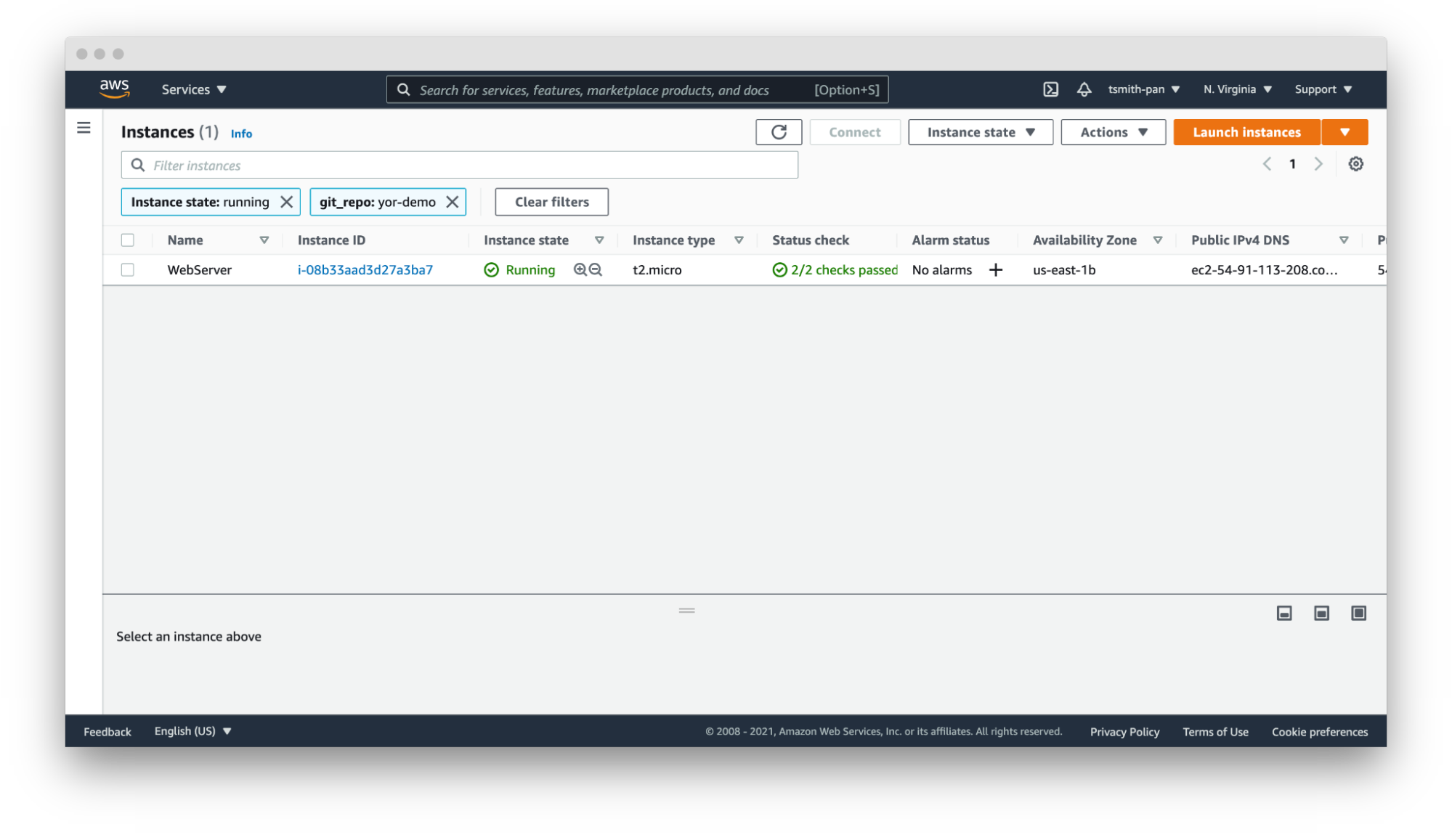
    If your AWS account has thousands or tens of thousands of resources in a region, filtering is necessary to manage those resources. For example, if you have hundreds of web servers, filter by the git_repo tag Yor added to quickly filter down to the web server(s) for your application.

    Yor

    In that same vein, you can set up resource groups to organize multiple resources across AWS services based on tags. For example, if you want to hunt down the VPC, EC2, internet gateway or database created by your Terraform repository, use Yor’s git_repo tag to group together multiple resources into a single resource group.


    Yor 

    Operations Support

    Yor excels at simplifying and speeding up operations support. In the words of Brian Yost, “For example, Level 1 support teams could use tags to direct workflow and perform business service mapping as part of the triage process when a monitoring system triggers an alarm.” Yor automatically tags resources with the git organization and modifiers of the cloud resource. This makes it easier to identify the right team and user to patch issues. 

    If you work in a GitOps organization, this is even more critical. Following GitOps best practices means all changes should be performed in the IaC template, not directly on the cloud resource. So if your security team identifies an open port 22 in runtime using policy-as-code or CSPM tools, such as Bridgecrew, Yor’s tags will make finding the owner of the IaC template easier and faster, lowering MTTR.

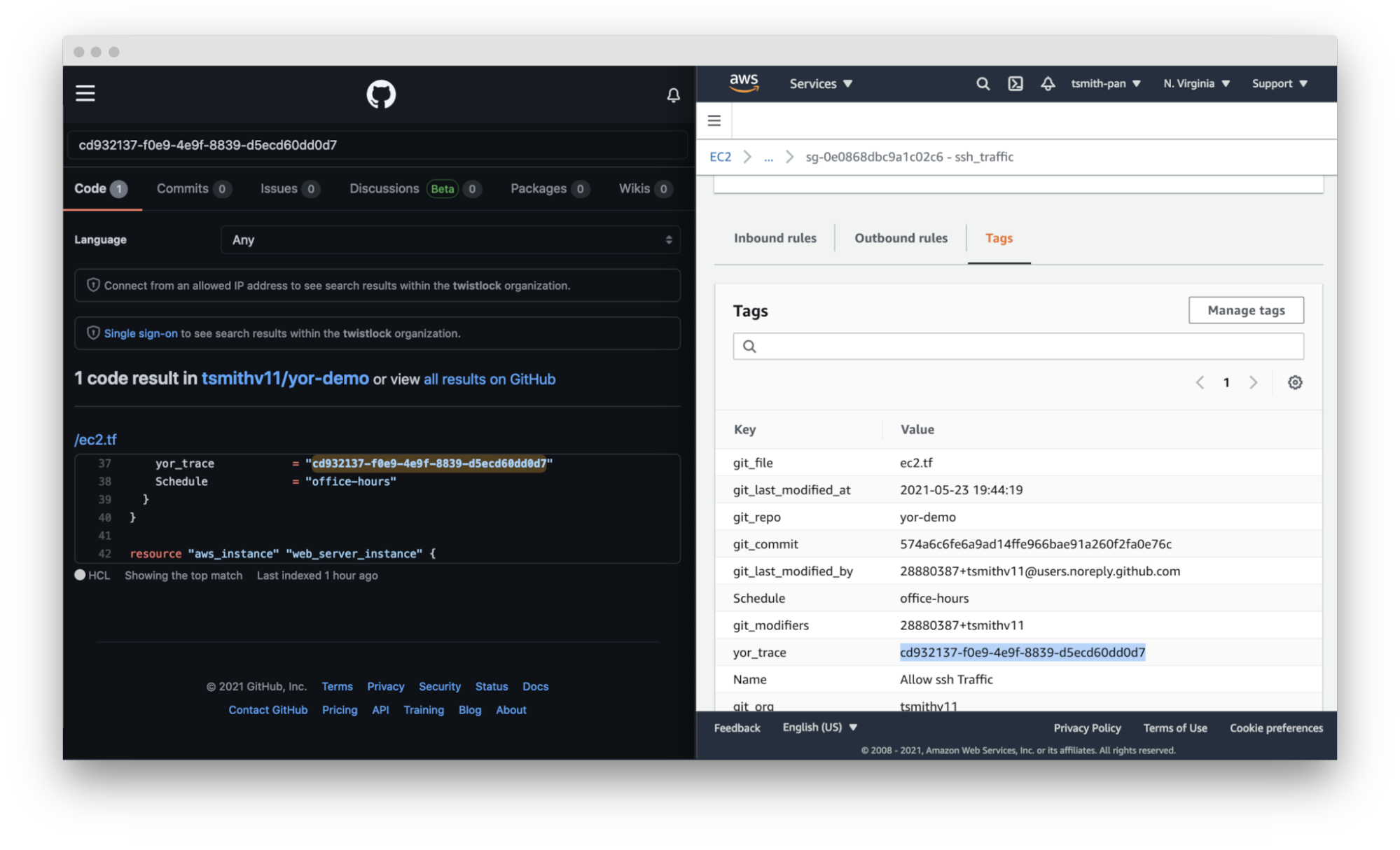
    Yor takes this a step further. By adding the repository, file and trace tags, Yor helps teams identify not only the code owner but also the exact file and resource block that created that resource misconfiguration.

    Yor

    Cost Allocation

    Large companies often have different profit and loss (P&L) statements for each of their business units. At the end of a reporting period, such as a fiscal quarter, finance teams allocate the expenditures made across the company to the various cost centers.

    For traditional IT teams, this usually involves very broad, general estimates. For example, if two organizations share a server rack, you could allocate costs based on virtual CPU time or disk space. Once that scales into dozens of organizations and ephemeral workloads, that allocation is much more difficult. Cloud costs can be just as difficult to allocate. If you have thousands of resources across types (virtual machines, serverless, managed Kubernetes workloads, managed databases, streams, CDNs, etc.) with differing life cycles and life spans, tying those resource costs back to a cost center is difficult.

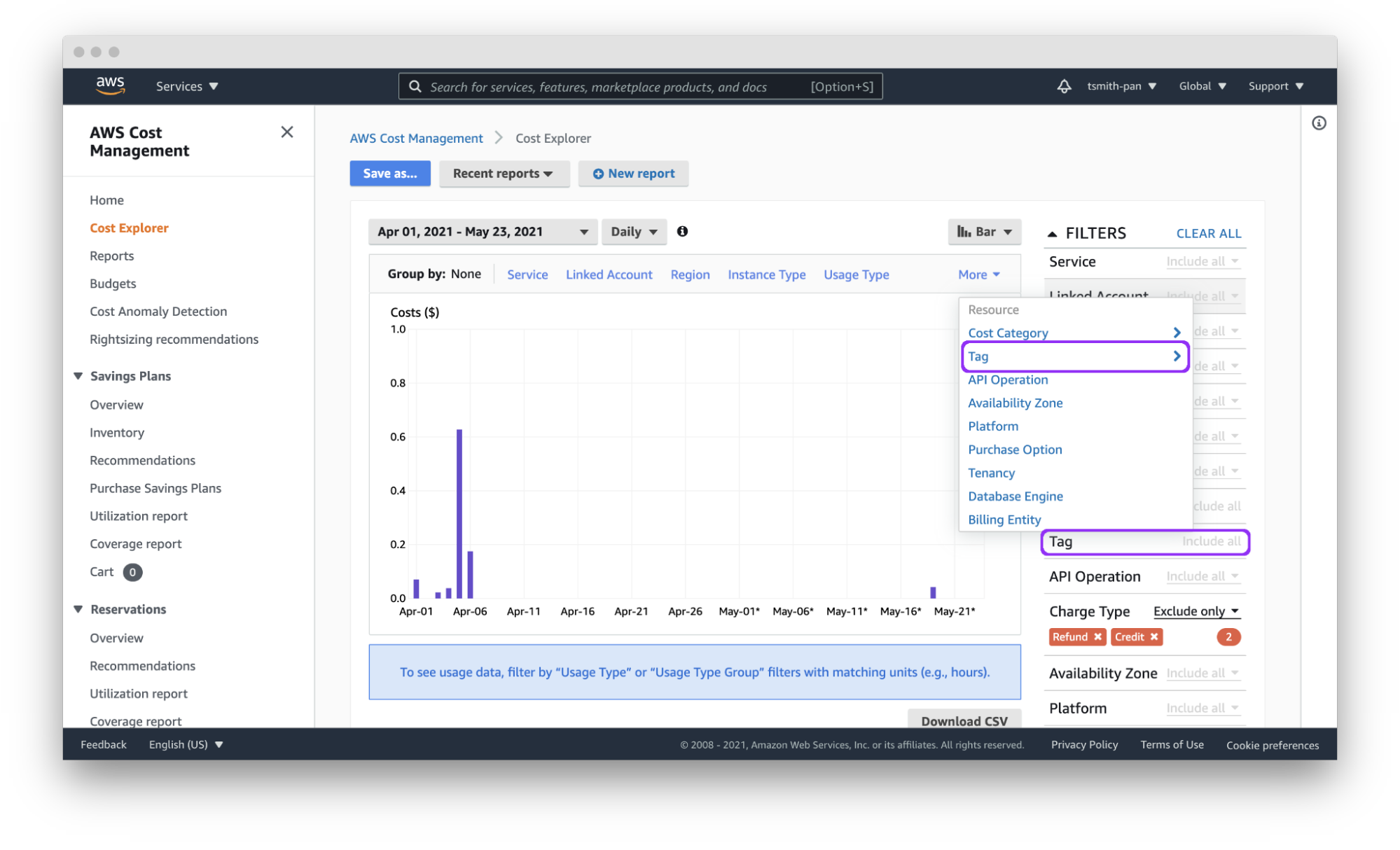
    Cloud tagging simplifies that process. Assuming each team has a git organization, Yor will automatically tag resources with the git_org or custom tags can group git_modifiers into cost center tags, and AWS Cost Explorer will let you filter by those tags to easily allocate costs. You can also export those costs by tag(s) to a CSV file for import into other tools for analysis.

    Yor applies those tags reliably and consistently so that finance teams don’t need to dig through different organization name versions, such as combining dev_team_one and devTeam1, or manually categorizing untagged resources.

    Yor

     Access Control

    AWS identity and access management (IAM) policies support the ability to limit control of resources using tags. This simplifies dividing up resources by teams using complex IAM rules.

    For example, if you want developers to access only the EC2 instances they provisioned, you can use the git_modifiers tag added by Yor. Yor will automatically tag resources with the git users who edited the IaC code. Then, Yor will add an AWS IAM policy to limit access based on that tag.  You’ll also want to add a policy to deny actions such as ec2:CreateTags and ec2:DeleteTags so users can’t just add themselves to other resources.

    This is where Checkov, an open source policy-as-code tool, can be leveraged for additional control. Yor can enrich the context for Checkov’s checks, enabling finer-grained policy control. For example, Yor will populate the user identification of whoever modified an IaC template, and Checkov can make sure that only approved team members modified the code. The following is an example of a custom check to determine that only security personnel modified CloudTrail settings.

    If the git_modifier tag added by Yor is anything other than “Nimrod,” “Rotem,” or “Naor,” Checkov will show a failed policy check for that custom check for that resource.

    Automation

    By leveraging tags in combination with other tools, such as Lambda functions and backup plans, you can apply automation to specific resources, such as targeting resources for archive, update or deletion.

    The AWS Tagging Best Practices guide uses as an example a situation where development resources are turned off during non-business hours. AWS recently released a tool called Instance Scheduler for just such a use case. It is a CloudFormation stack with a Lambda function and DynamoDB instance that automatically starts and stops EC2 and RDS instances based on a pre-defined schedule. 

    Instance Scheduler takes a tag with a key:value pair; for example, “Schedule” (or a custom key) as the key and the schedule as the value. The schedules can be either one of the preconfigured schedules in the DynamoDB table, like office-hours, or a custom one.

    Using simple custom tags in Yor, you can tag every resource in a repository with a schedule by using environment variables such as adding the following to the Yor GitHub Action YAML file:

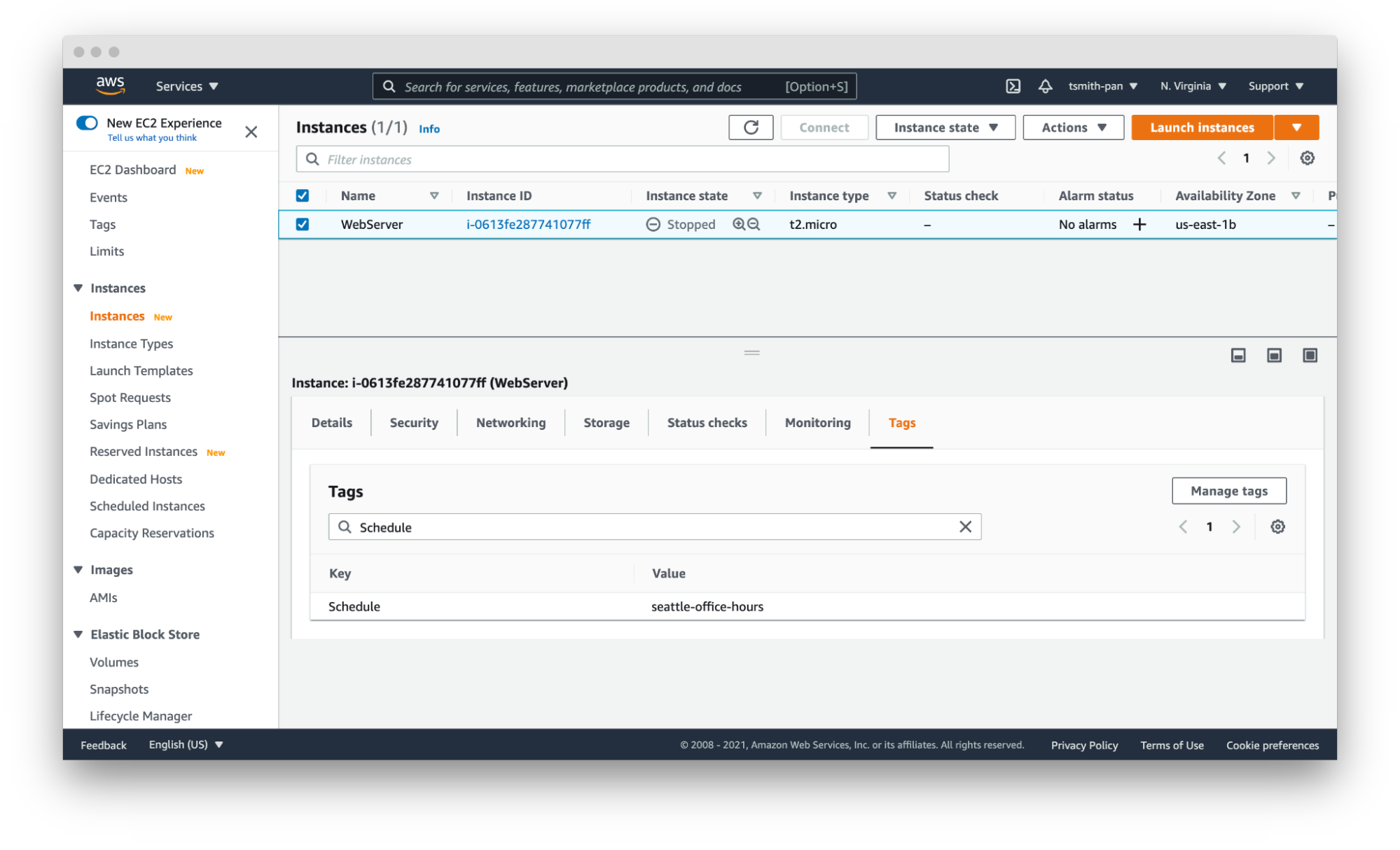
    This results in tags being added to every resource in that IaC directory. With the seattle-office-hours tag, Instance Scheduler will turn off EC2 instances at 5:00 pm Pacific Time and on again at 9:00 am Pacific Time Monday through Friday. This saves money by stopping instances automatically during downtime.

    Yor

    Another popular automation use case is for backups and archival plans. AWS can automatically apply different backup plans based on the tags applied to resources, such as storage and database resources. For example, if certain organizations, such as those that process financial data, need things archived forever, but others only need one year of backup, applying backup plans can move the short-term storage to cheaper options, such as Glacier, and eventually delete them on a schedule.

    Security Risk Management

    The final use case is risk management. The risk level of cloud resources differs based on whether they are in test or production environments and the sensitivity of the data those resources process and hold. This is another area where you can use simple tags like git_repo to filter down to repositories for applications that deal with sensitive data. You can also leverage complex custom tags. For example, EC2 instances attached to databases with “customer” in the name will get a data_level:sensitive tag.

    IT service management tools can apply higher priority to patching and updating resources with tags denoting sensitive data. This is another area where you can leverage Checkov’s graph-based checks in combination with Yor tags to assign higher severity levels to policy violations for resources with sensitive data tags or production environment tags. Assigning priority helps to focus developer attention and mitigate risk faster.

    These six tagging use cases are just a few examples of how you can leverage tags to be more efficient and improve your cloud security posture in AWS. The power of Yor’s tracing capabilities enables development and operations teams to work together without requiring complex triage to find the right person and IaC templates. With Yor’s extensibility and custom tagging capabilities, we can’t wait to see what other use cases the community comes up with!

  • Managing Cloud Governance Costs Collaboratively

    Managing Cloud Governance Costs Collaboratively

    For those responsible for managing infrastructure, the concept of governance is common, especially as it relates to cloud services. For cloud services, it’s defined as a framework that guides how end users use these services by defining and creating policies to control costs, minimize security risks, improve efficiency and accelerate deployment.

    The term is often associated with “rules” or “compliance” and can restrain innovation within an organization, as it typically is mixed with regulatory bodies and governance procedures that add cycles to required tasks. But what if we could flip the script and make governance more of a collaborative effort? What if we used an approach wherein teams across an organization share information and feedback for better business outcomes?

    This collaborative approach can be beneficial in ensuring everyone is on the same page, enabling businesses to get the most out of their cloud infrastructure while ensuring costs stay within budgets.

    Legacy Governance Overshadows Growth and Creativity

    Legacy governance is an extremely paranoid way of running your business. For example, blocking people or departments from making buying decisions is a perceived best practice to avoid overspending on cloud infrastructure. Unfortunately, this is actually the opposite of what organizations with cloud infrastructure should do.

    The advantage of the cloud is that it gives your organization the ability to develop and bring products to market faster—and at a lower price point—than traditional methods. Following legacy governance processes—adding more steps to the process for provisioning resources—results in slower launch times and overprovisioning of resources (since there is a lack of visibility and teams are not sure when they will get more), negating the cost benefits of on-demand cloud infrastructure over traditional data centers.

    Empowered Employees Produce the Best Results

    Think about it: An overbearing manager or boss makes you feel like you’re walking on eggshells when it comes to your work. Sometimes, this is the same effect legacy governance policies can have on employees.

    Removing access barriers and giving team members the freedom to easily request and use resources should be a cloud operator’s ultimate ambition. It’s also cost management that’s collaborative.

    The idea behind a collaborative approach to managing costs is that the individuals who work on the projects themselves–whether that is the engineering team, DevOps teams, etc.–are best suited to manage them and provide the proper infrastructure recommendations because they know what their needs are.

    To receive the full financial and organizational benefits from a collaborative approach, there are three simple steps to take:

    Have a Consistent Source of Truth

    Have a consistent and agreed-upon source of truth for decision-making and self-evaluation against key metrics. This means that everyone in the business—executives, finance, managers and individual contributors—are aligned and looking at the same numbers. When this happens, teams spend less time haggling about ownership and more time looking at how they can improve. When this doesn’t happen, the focus turns to storytelling about why the numbers are wrong, not solving the underlying inefficiency problem.

    Trust the Team

    Trust the members of your organization to leverage this information for the best possible business outcomes.

    Collaborate

    Encourage collaboration inside and between layers of the business to ensure the decisions are made with the complete picture in mind.

    Implicit tradeoffs are made every day at every business level for teams to align their work to organizational priorities. Encouraging collaboration between different layers, viewpoints and skillsets in the business helps to highlight these implicit decisions and make them explicit, intentional and agreed-upon

    Moving away from legacy governance to a more collaborative approach is within reach for any organization. The key is understanding what methods are required for the transition to be a seamless and positive experience that teams will embrace.

  • The Forces Massing Against the Data Center

    The Forces Massing Against the Data Center

    We’ve come a long way over the last few decades. A ton of stuff about IT has changed, even in the last five years. And it is true in IT that the only constant is change.

    We like to have control of our environment to provide the most stable platform for user satisfaction that we can and simplify troubleshooting when things do go wrong. But even such a simple desire has been stripped away in the flood of changes we face. To be certain, some areas of IT within most enterprises are very stable environments that only change after careful consideration, but much of the rest of IT–both within and outside of the enterprise–has become the wild west again.

    And there is a lot of good in this cycle. Trying new things solves old problems and drives innovation, there can be no doubt. The changes we’re making address things like, “There was never enough testing,” or “We don’t have the security staff,” which means our apps are better because of the wave of changes we’re currently riding. The cloud is a standard option for new development even in the most stodgy enterprises, and some enterprises are moving older apps to the cloud as time permits.

    That last bit is going to force some hard choices in the future. As many of you know, I spent several years writing exclusively about storage, so when I see something happening in the storage space, I get interested. A former coworker of mine recently wrote about Kubernetes storage options from an angle I hadn’t considered before, and it drove me to look deeper into what’s going on today.

    In case you missed it, storage–specifically, data gravity–has tethered a large number of applications to enterprise data centers. The app needs access to the data; if the data is in the data center, the app has to be there and have secure, ready access to the data somehow. Cloud and containers offered some options/workarounds to deal with this issue, but they’ve lagged far behind the rest of the agile infrastructure.

    That is changing. Higher-speed, distributed datasets are here and are being used. I have not followed the space closely, but my immediate thought is, “They have to be proven.” They’re going to have to show that they’re as stable and secure as the DBMS in the data center and that you can get your data out of them no matter what. In the end, data is a company resource–a very valuable company resource. In some cases, the data a company owns is worth more than the company’s products. So, total control and security of that data is imperative and must be proven on the ground.

    But it will be. Because there is a need. And that will be the final step in making data centers far less critical for the average enterprise. Some enterprises already don’t need a data center, but most still do, largely because of data control and the resulting data gravity. Apps can be shifted from cloud to cloud or cloud to on-premises, or from cloud to hosting via Kubernetes, almost as an afterthought. But data is far less agile. In the end, a couple terabytes (or petabytes, depending on dataset) of data aren’t just flung over to a new cloud. Distributed, though; copies could be done in parallel, at high speed, making them far more mobile.

    Vendors already recognize that subscription models are easier to sell, with far fewer user maintenance headaches. IT enjoys not having to go through huge checklists to make sure every bit of supporting software is up-to-date with the right version–in a hosted environment, it’s done for you. Enterprises already recognize that a fair number of applications can be cloud-native and are putting them out there. Slowly, over time, more and more applications–even data-heavy applications–will be viable in the cloud for your average organization. The bottleneck, as I see it, will be cloud storage costs. Cloud storage is both more cryptic than other cloud costs and more expensive. Ingress, egress, storage, instance … all these things add up, and the more instances required to achieve parallelism, the more they cost. Until that issue is resolved, don’t expect any mass migrations. But migrations will come, eventually. Kubernetes is preparing to do its part and make data easier to use and move; cloud vendors will just have to find a way to rationalize the bandwidth implications with the costs we, the users, are charged.

    But over time, it will be less profitable to produce hardware and software targeted at individual enterprises. We’ve already seen some moves to hosted models that should open your eyes to the direction your vendors are headed–Atlassian and pretty much the entire source code scanning industry, for example, come to mind.

    For most organizations that have been around awhile, the key to making the move will come from internal motivations. They’ll have to figure out how to manage containers with virtual storage internally, in their data center, before they’re comfortable throwing that architecture out onto the public cloud. It’s a good path, but for the short to mid-term, data gravity will slow or even halt the “To The Cloud!” charge for core applications.

    For most large and established organizations, the ROI just isn’t there to move tons of data around. The core systems that work will be kept and may be improved, and only when they need to be replaced will things like a full-on container architecture be considered. But, again, this is likely to be an internal architecture, to start, (and often, will be forever) simply because that’s where the important data is.

    For newer organizations, the opposite will be true for the short to mid-term. As the data lake grows in the cloud, the costs to keep it there grow in a non-linear fashion, eventually biting into profitability. This group will also want to understand how to run a fully agile container infrastructure internally, complete with virtual data access.

    Whichever group you belong to, consider adding on-site Kubernetes or local cloud skills to your talent repertoire. Those are the skills that overlap; the juncture where all of these paths seem to cross, and the agility that full-on container automation with storage offers will not negatively impact the organization.

    And keep rocking it. We’re enjoying your apps. Thank you for keeping them humming along!