Category: DevOps in the Cloud

  • Protecting Data in Public Cloud and Hybrid Cloud

    Protecting Data in Public Cloud and Hybrid Cloud

    Backup, business continuity (BC) and disaster recovery (DR) have all been a critical part of IT for more than 30 years—ever since we began relying on technology to run our businesses. Traditional solutions were designed for the world of on-premises infrastructure and structured applications and relational databases. But the world is changing. In the last blog, I talked about the era of digital transformation and the impetus it has on rethinking and reinventing the fundamental backup and recovery architecture for workloads moving to the cloud and applications being born in the cloud.

    The Motivations Leading to Reinvent Backup and Recovery

    Application and data platforms are undergoing the biggest transformation since the dawn of computing. There are several forces at work:

    • New applications. The third-generation applications are geo-distributed, scale across multiple systems, are always on and typically deployed in a cloud-first model.
    • Existing applications are moving to the cloud. They aren’t going away, but companies are moving some or all of them to the cloud. They still need backup and recovery.
    • RPO and RTO windows are shrinking: Enterprises want “always-on” and gone are the days when you could do nightly backups.
    • Smaller companies will go all-in on public cloud. SMBs don’t want to be in the business of IT. They’ve been driving the rapid growth of cloud applications and platforms.
    • Enterprises will build hybrid clouds. Enterprises will deploy applications and data across on-premises and public cloud environments. Scale, compliance and other factors mean they’ll need to keep some systems on-premises.
    • Everyone will use multiple clouds. No one will bet their business on one cloud or one provider. Even now, enterprises are splitting workloads across clouds or cloud and on-premises. Development and test may use one cloud, while the same application might be deployed in a private cloud or a different public cloud.

    Cloud’s Impact on Backup, Recovery and Continuity

    Cloud gives organizations much more agility, operational savings and a pay-as-you go model. Public cloud providers can also build much more resilient infrastructure. Amazon guarantees 99.95 percent availability for EC2 and 99.99 percent for S3; S3 is designed for 11 nines of data durability, with multiple availability zones. Because the cloud is so reliable—and cheap—it’s quickly becoming a backup target for on-premises data. But that shouldn’t trick us into believing backup and recovery are “built-in” when we run applications in the cloud. Even Amazon itself recommends backup services for all AWS-native applications and cloud databases.

    While service availability and data resiliency addresses infrastructure business continuity and disaster recovery, it doesn’t provide point-in-time recovery or application-level intelligence for backup and recovery. As good as the cloud platforms are, they don’t protect against logical errors. And research shows 8 out of 10 errors are logical errors—data corruption, user errors.

    But Won’t Existing Backup Products Work in the Cloud?

    As we noted above, traditional backup and recovery products don’t meet the needs of cloud applications—even for existing applications that have moved to the cloud, and not just because they were built in a different era. Cloud and distributed architectures present several other challenges:

    • Cloud breaks the media server based architecture of traditional solutions. Cloud applications and data don’t reside on a specific array or disk, so you can’t easily backup what you can’t see. Backups also don’t capture configuration data in the cloud, such as AWS Cloud Formation templates.
    • Cloud doesn’t speak the same language. Legacy solutions talk to tape, disk or virtual disks. Backup and recovery in the cloud means integrating with the right protocols, such as the S3 API or Google Cloud Storage.
    • Backup appliances can’t be moved to the cloud. Existing backup appliances that work extremely well on-premises can’t be picked up and moved to the cloud.
    • Traditional backup agents won’t scale. If you could get a backup agent running in the cloud, it wouldn’t scale well across dozens or possibly hundreds of nodes.
    • VM is not the right layer of abstraction: Look for technologies that provide a scalable application-centric view of data management and data protection, introspect application data and use global semantic de-duplication to achieve storage efficiencies, instead of relying on traditional de-duplication techniques. The benefit of this approach is fine-grained and highly space-efficient data protection that can span clouds over network links.
    • Cloud Gateway or Migration Services: Unidirectional only.

    The problem of backup and recovery of cloud applications is novel there are three critical things a cloud backup and recovery architecture should have:

    • Elastic compute only. The architecture should scale efficiently on elastic compute instances. There shouldn’t be any CapEx costs for servers or appliances.
    • No media servers. Backing up large scale out databases requires direct a parallel streaming architecture for data movement between the database and secondary storage. Legacy backup architectures rely on media servers that would quickly become choke points. Direct parallel streaming also allows the data to remain available in native formats.
    • Semantic deduplication. Scale-out application databases typically have a 3x replication factor. If you backup individual nodes or even manage to snapshot the whole database, two-thirds of the backup data is redundant. Over time, backups will be 75 percent to 80 percent inefficient without semantic deduplication that works across a distributed architecture.

    — Brian Yin

  • How Healthy is Your Office 365 Environment?

    How Healthy is Your Office 365 Environment?

    The IBM Domino environment was mostly replaced by Microsoft on-premises technology, then later replaced by the Microsoft Cloud Services. One thing that hasn’t been replaced is the need for administrators to have control and visibility of service delivery to end users.

    Whether you’re using IBM applications, Microsoft on-premises servers or Microsoft Office 365, as the messaging administrator you need to provide availability and performance metrics of the service delivered to your management. You also need to understand issues when they arise.

    In short, you are still responsible for the service that you deliver, even if the servers reside in Microsoft’s data center. So, how do you measure the health of your Office 365 service delivery and how do you anticipate issues before they impact your end users?

    Measuring Office 365 Health

    Microsoft works to maintain the 99.99 percent availability it promises from its data center as well as improve both the features it provides and the performance it delivers. The issues that arise generally impact only some features and usually only affect a subset of users with a specific configuration or in one location. It’s difficult to know exactly how these issues impact your global network, and it’s impossible to predict, but it helps to know that Microsoft offers a health dashboard. The dashboard provides an easy-to-understand view of the availability and performance of each Office 365 service out of the data center, and lets users configure alerts. The disadvantage is that the dashboard only shows service out of the data center, not any visibility into the service your users are experiencing. It also doesn’t provide information on how issues are impacting the availability and performance in your company. Nor does it take into account user complaints that can stem from many issues within the Office 365 environment.

    Microsoft provides two tools that can be useful for measuring the health of the Office 365 services delivered to your users. First, the Remote Connectivity Analyzer allows you to run a series of checks from the cloud to the cloud that will tests different part of the Office 365 services. This allows you to check if your tenant has problems with the basic functions of Office 365 by running Outlook connectivity tests, opening a mailbox, performing a mail routing or connecting to Skype to Business Online. The disadvantage is that it is performed from Microsoft Azure to Microsoft Office 365—from one cloud to another. It doesn’t provide you with any information that could help you troubleshoot what is happening at the user location.

    Microsoft’s other tool that can be useful when it comes to checking the connection is the Support and Recovery Assistant. This tool lets you perform tests to help you understand what’s happening when a location is experiencing poor Office 365 performance. However, these tests aren’t automatic or continuous, and they don’t alert you when an issue begins to arise. You still have to rely on user complaints for that.

    That leaves manual testing as the last option for administrators. Manual tests are available in PowerShell. When conducting tests, start by testing pings to Office 365, DNS resolution time, latency and end-user egress points to understand the impact of the network on your Office 365 service delivery.

    Even if these tools are not enough to measure, alert, report or troubleshoot the service to your end users, they still provide something to check the health of the Office 365 service. Microsoft understands that the service out of the data center is not what matters most; it is the user experience. That is why when people think about their Office 365 health, they should always consider the entire service route, from the Microsoft data center to the user sitting at his desk.

    When we measure health, we understand availability and performance of the service.The border between poor performance and unavailability is small, especially for end users. To understand the health of your services you need metrics, facts and alerts.

    What really matters is not poor performance but a degradation of the performance, because that is what users perceive. To measure performance degradation, you need to know the baseline, or what’s normal. This requires a tool that continuously measures the performance delivered to your end users and that can alert you when the performance is declining.

    Finally, because most Office 365 services are used in conjunction with internal infrastructure applications and appliances, they also can impact the service delivered. If you don’t monitor these applications at the same time and on the same dashboard, you won’t be able to troubleshoot the issue effectively. Some companies have hybrid Exchange, some still have Domino application servers, some are using gateways, some have proxy servers and so on.

    It all comes down to service delivered to your end users. Whether issues arise from the data center or your network, it’s important to monitor and understand what users are experiencing so you can maintain the highest level of service. Understanding the relationship between availability and performance from the user’s perspective helps you achieve better insights and oversight of your cloud or hybrid cloud health.

    About the Author / Jean-François Piot

    Jean-François Piot is vice president of Product Management at GSX, responsible for articulating the vision of the company’s product range and translating these into detailed specifications. His experience in IT processes and service management projects comes from previous business development positions at IBM and Beijaflore (IT Service Provider). He holds a master degree from the Grenoble Graduate School of Business.

  • How IT Ops Teams Prepare to Prevent Web Downtime

    How IT Ops Teams Prepare to Prevent Web Downtime

    IT operations teams can anticipate most periods of peak web traffic. The key to preventing outages and issues is to plan ahead. Here at BigPanda, we’ve prepared a checklist of the key factors IT ops teams need to consider to ensure their IT infrastructure is ready.

    Here’s is a recommended checklist for IT and ops teams:

    • Review monitoring metrics and work with your developers to test applications for stability. Some companies may need additional support to accommodate peak seasons and events.
    • Perform regular security tests and ensure necessary measures are taken to protect your systems. Exposure to hackers and the potential for unanticipated load are real threats.
    • Prepare for alert storms with an effective correlation platform. For IT ops teams, spikes in workload can cause what is known as alert storms. Reduce risk by utilizing an alert correlation platform that identifies patterns in unstructured alert data to separate signal from noise. This allows you to more effectively identify, triage and take action on issues before they have a chance to affect your customers.

    Companies also run a higher risk of downtime during peak traffic times. Seventy-five percent of outages are due to unplanned configuration changes to a system—when IT ops teams find something they think might cause a problem and try to fix it immediately, unintentionally creating a much bigger issue for the web or mobile site.

    To avoid unexpected downtime, we recommend companies take the following steps to ensure the availability and reliability of their services:

    1. Identify what is mission-critical.

    To avoid unexpected downtime, we recommend that IT ops teams tier their services and identify the systems that are mission-critical to the business. Top-tier applications should include those that are linked directly to the success or failure of the business, such as point-of-sale, ticketing or billing.

    2. Develop an ironclad failover plan for top-tier systems.

    Offering a high level of availability is not something that happens by chance. It must be planned carefully for every aspect of your systems architecture. Top-tier systems should be bolstered by an ironclad failover plan—one that plans carefully for load capacity to handle unexpected spikes.

    3. Invest in a best-of-breed monitoring stack.

    You can’t protect against what you don’t see coming. In the age of continuous integration and continuous delivery, the only way to ensure that you have an accurate pulse on the health of your IT systems is to implement the best monitoring tool for each layer of your stack (such as systems monitoring, application monitoring, web and user monitoring, logging and error tracking). The industry rapidly is replacing monolithic monitoring architectures with this “best-of-breed” approach to better service increasingly complex and dynamic IT systems.

    4. Implement alert correlation to distinguish signal from noise.

    More tools—monitoring more moving parts—lead to more noise. It’s a simple fact. To efficiently identify, triage and remedy potential issues before they have the chance to do real damage, IT teams require a way to properly separate the signal—the “real problem”—from the many sources of noise. By implementing an alert correlation solution, IT teams are able to see how alerts from their various monitoring tools are related, allowing them to quickly filter non-critical issues and focus on what matters most.

    — Assaf Resnick

  • Should You Go ‘Serverless’? The Pros and Cons

    Should You Go ‘Serverless’? The Pros and Cons

    The popularity of the “serverless” term started to grow when Amazon launched AWS Lambda in 2014. Ever since, we’ve seen the term exponentially grow in use and reference, with more vendors entering the market with their own solutions (Azure recently went GA with Functions, for example).

    What is it all about and how does this new trend affect the way people write and deploy applications? Is “serverless” a paradigm shift or just a natural evolution of infrastructure as a service (IaaS) and platform as a service (PaaS)? In this post, I will discuss what “serverless” is and is not—and how it shapes up in comparison to existing PaaS solutions.

    What is ‘Serverless’?

    “Serverless” denotes a special kind of software architecture in which application logic is executed in an environment without visible processes, operating systems, servers or virtual machines. It’s worth mentioning that such an environment is actually running on the top of an operating system and uses physical servers or virtual machines, but the responsibility for provisioning and managing the infrastructure belongs entirely to the service provider. Therefore, a software developer focuses on writing code.

    In other words, a developer thinks in terms of services or functions that communicate with each other and with the external world. After implementing these services, developers using a traditional approach would combine them into a number of distributed processes when installing, running, monitoring and updating such processes for specific operating systems that are running on specific servers or virtual machines. In the “serverless” approach, a third-party service provider is responsible for everything from the processes to the operating systems to the servers.

    When a third-party service provider is responsible for the underlying IT infrastructure, a developer no longer is in charge of purchasing a dedicated server or virtual machine. At the same time, the service provider is free to decide how to efficiently utilize its infrastructure to serve requests from all of its clients. As a result, the service provider is not usually required to run a permanent workload for a specific client; instead, the software handles requests from all of the customers at the same time, spending just a limited time on handling each request from a specific customer. Therefore, such providers usually charge their customers based on the total number of requests, the frequency of requests over a specified period or the total time spent to serve all of the requests from a customer.

    The same approach works well for different types of loads because third-party service providers usually have elastic, scalable services. When customers start using a third-party service, the expected number of requests can be low and customers pay significantly less compared to purchasing, configuring and managing their own infrastructure on-premises or in the cloud. For a larger number of requests—either expected or unexpected load peaks—customers do not need to add servers to horizontally scale their application. Instead, a service provider does care about increased load. For sure, handling a bigger number of requests will cost more, but in most cases it is still more efficient than using a dedicated IT infrastructure.

    BaaS and FaaS

    Two approaches that often are mentioned together with serverless are backend as a service (BaaS) and function as a service (FaaS).

    BaaS

    The growing number of third-party services that implement required functionality, provide server-side logic and manage their internal states has led to applications that do not have application-specific, server-side logic and use third-party services for everything. In this respect,  such applications are serverless.

    Some examples of third-party services include identity and authentication as a service (Auth0, AWS Cognito), logging as a service (Loggly, Logsense, Amazon Elasticsearch Service) and analytics as a service (Amazon Kinesis, Keen IO).

    FaaS

    When an application still requires specific server-side logic, a developer can use a modern alternative to traditional architectures: FaaS. With this approach, a developer focuses on implementing short-living stateless functions that are triggered by events and can communicate with each other and the external world. A FaaS provider does the rest—provisioning as many instances of such functions as necessary to handle all of the requests, terminate instances that are no longer required, monitor all of them and provide identity and logging services. FaaS ideally fits with microservices architecture because the FaaS provides everything that an organization needs for running microservices.

    Auth0 Webtask, AWS Lambda, Google Cloud Functions and Azure Functions are examples of FaaS implementation. IronFunctions is an ambitious initiative from Iron.io that is targeted to run AWS Lambda functionality on the most popular cloud providers as well as on-premises.

    What is Not ‘Serverless’?

    The main difference between serverless and PaaS is that traditional PaaS providers such as Heroku or OpenShift usually lack the automatic scaling feature. A user of traditional PaaS has to specify the amount of resources—such as dynos for Heroku or gears for OpenShift—for the application. It still is possible to manually scale the application up or down by changing the number of assigned resources, but mostly this is the responsibility of a developer or system administrator.

    The second difference is that traditional PaaSes are designed for long-running server applications. With such a design, the application always should be running to serve incoming requests. If you bring the application down, it obviously will not serve the requests. With FaaS, your function starts to serve a request and terminates when the request is processed. Ideally, your functions should not consume provider resources when there are no incoming requests (see also “cold start” issue below).

    Traditional PaaS implementations are not “serverless” under the strict definition of this term because they do not have automated scaling and require that server-side applications are always running so that requests can be served. Traditional container management platforms are not “serverless” for the same reasons.

    Another way to know if a provider allows the serverless approach is to identify the border between two areas of responsibility: the provider’s consumer and the provider itself. In “serverless,” the border is between application code and how is this code is actually deployed and running on physical servers. In container platforms, a platform’s consumer is still responsible for working with the operating-system level to define things such as the processes that will run in which containers and how many containers of each kind will run.

    Nonetheless, there is an inherent similarity between containers and serverless. For example, Kubernetes—an open-source container orchestration platform—allows for the automated scaling of containers using application-provided metrics such as the number of concurrent requests. AWS Lambda actually runs a container for each function.

    In other words, containers and container orchestration may provide an efficient way to implement FaaS while FaaS provides an additional abstraction level that hides specific processes, operating systems and containers from developers and allows them to focus on code.

    The Benefits and Drawbacks of “Serverless”

    As we already mentioned, “serverless” has the following main benefits:

    • Reduced time to market and quicker software release.
    • Lower operational and development costs.
    • A smaller cost to scale – there is no need for developers to implement code to scale and administrators do not need to upgrade existing servers or add additional ones.
    • Works with agile development and allows developers to focus on code and to deliver faster.
    • Fits with microservices, which can be implemented as functions.
    • Reduces the complexity of software.
    • Simplifies packaging and deployment and requires no system administration.

    At the same time, “serverless” has the following drawbacks:

    • Serverless is not efficient for long-running applications. In certain cases, using long tasks can be much more expensive than, for example, running a workload on a dedicated server or virtual machine.
    • Vendor lock-in. Your application is completely dependent on a third-party provider. You do not have a full control of your application. Most likely, you cannot change your platform or provider without making significant changes to your application. Also, you are dependent on platform availability, and the platform’s API and costs can change. Needles to say, the existing FaaS implementations are not compatible with each other.
    • Serverless (and microservice) architectures introduce additional overhead for function/microservice calls. There are no “local” operations; you cannot assume that two communicating functions are located on the same server.
    • To utilize its resources more efficiently, a service provider may run software for several different customers on the same physical server (this is also known as “multitenancy”). Even if customers’ workloads are isolated in virtual machines or containers, there can be different bugs in the early stages of FaaS offerings. This can be a major security issue for your application if you work with sensitive data. Such potential bugs in a platform or failures in one customer’s code (a “noisy neighbor”) can affect the performance or availability of your application.
    • In practice, it takes some time for a scalable serverless platform to handle a first request by your function. This problem is know as “cold start”—a platform needs to initialize internal resources (AWS Lambda, for example, needs to start a container). The platform may also release such resources (such as stopping the container) if there have been no requests to your function for a long time. One option to avoid the cold start is to make sure your function remains in an active state by sending periodic requests to your function.
    • Some FaaS implementations—such as AWS Lambda—do not provide out-of-the-box tools to test functions locally (assuming that a developer will use the same cloud for testing). This is not an ideal decision, especially considering that you will pay for each function invocation. As a result, several third-party solutions are trying to fill this gap, enabling you to test functions locally.
    • Different FaaS implementations provide different methods for logging in functions. For example, AWS Lambda allows writing logs to AWS CloudWatch using the standard frameworks for the specific language (Log4j for Java, console methods for Node.js, logging module for Python). It is completely up to the developer how to implement more advanced logging.

    Summary

    Serverless architecture is a new approach to writing and deploying application that allows developers to focus on code. Such an approach can reduce time to market, operational costs and system complexity. While serverless leverages third-party services such as AWS Lambda to eliminate the requirement to set up and configure physical servers or virtual machines, it also locks in the application and its architecture to the specific service provider. In the future, we can expect more movement toward the unification of FaaS APIs or frameworks such as IronFunctions that will help to avoid vendor lock-in and enable us to run serverless applications on different cloud providers or even on-premises.

    — Asaf Yigal
  • Evolving Data Requirements in Multi-Cloud Environments

    Evolving Data Requirements in Multi-Cloud Environments

    By design or by accident, multi-cloud is a reality that most enterprise IT teams have to cope with today. Multi-cloud (or, cross-cloud, as Dell EMC calls it) refers to an IT model where an organization uses services of one or more public cloud service providers, sometimes in addition to using its own data centers. In a multi-cloud model, different clouds may be used in different stages of the application life cycle such as test/dev and production, and for different types of applications such as traditional structured applications and next-gen cloud applications. Nonetheless, IT leaders face challenges in identifying data management tools they need to embrace the multi-cloud environment to improve application agility, reduce operational hassles and enhance application resilience. In this blog, I will discuss how enterprises are using a multi-cloud model and the requirements it places on next-generation data protection products.

    One common reason for multi-cloud is to support geo-replicated applications to enable global reach of e-commerce organizations. In such a scenario, a production database may reside on a private cloud behind an enterprise firewall and replicated to multiple regions in a public cloud to service reads (i.e. consumers are shopping on these e-commerce sites) from different regions at low latency. Such a configuration also protects against disasters at the data center level because the database and application are replicated to public cloud (with multiple availability zones).

    Another use case is to service the requirements of production environment versus test and development environments using different clouds. While security, control and performance optimization may mandate a production environment to stay within a private data center, agility, access to new capabilities such as Google BigQuery and developer preferences may drive application development teams to use a public cloud service providers.

    Finally, using a multi-cloud model could also be driven by the IT strategy of an enterprise to prevent overdependence (or, vendor lock-in) on any one public cloud service provider. To hedge the risks and get leverage, an enterprise may balance its application workloads across multiple cloud providers—for example, deploy Tier-1 applications on one cloud and Tier-2 applications on another. It is a real phenomenon we are seeing with enterprise customers! However, a multi-cloud model presents the following unique challenges to enterprises.

    • Data protection in multi-cloud environment: Legacy data protection (backup and recovery, archiving, replication) products were architected for on-premises environments and optimized to work with legacy applications. Using legacy backup and recovery tools for next-generation applications in a public cloud environment is equivalent to fitting a round peg in a square hole. For one, legacy products don’t leverage the elastic and scalable compute and storage that is available in public cloud. True infrastructure-independent (software-only and elastic compute-based) data protection products that may be deployed in heterogenous environments are required as enterprises look to migrate applications to the cloud.
    • DevOps agility: Moving data across clouds for disaster recovery or to refresh test & development environments with production data is another key requirement for enterprises. Doing so in a multi-cloud environment is not an easy task given the challenges in moving data over the WAN. There are also differences in configuration between test/dev and production environments. Further, the test/dev environments may not be as large as production environment so sub-sampling is required. Finally, personally identifiable data needs to be masked before it leaves the production firewall.
    • Ease of management and governance: Finally, federated management is required for applications and workloads running across multiple clouds. It is extremely inefficient to get familiar with different management tools and their intricacies.

    This is by no means a complete list. There are several other requirements, such as support for cloud storage with consistent performance, handling of identity access and management processes and so on. The point is that data protection needs to be re-thought in the context of multi-cloud environments.

    — Shalabh Goyal

  • 12 Tips for Managing Your Multi-Cloud Environment

    12 Tips for Managing Your Multi-Cloud Environment

    No single cloud vendor has the perfect solution for your unique business situation. The only way to maximize the benefits of cloud services to your business is by dealing with several cloud providers and monitoring all of them simultaneously. That’s the IT equivalent of singing an aria while standing on your head and scrambling eggs. (Not really, but it can seem that way.)

    Here are 12 things to keep in mind when planning your company’s multi-cloud strategy:

    • Map your entire network, and then identify where the cloud fits in it. Get a clear picture of the cloud’s role in your overall system-management strategy to avoid having to backfill gaps in the data needs of business managers and other customers. Different lines of business will be best served by different cloud providers.
    • Work with vendors that respond quickly and positively to the unexpected. There will always be unforeseen situations when you’re stitching together multiple cloud services. Your partners should report regularly on the state of their services, enhancements, and new features.
    • Automate low-level monitoring and maintenance tasks. Two primary reasons for adopting cloud services are cost savings and more efficient operations. One way to achieve both is by reducing the amount of human oversight required to keep your systems humming.

    The potential complexity of multi-cloud management is shown in this flowchart encompassing the many elements that need to be stitched together precisely. Many of these low-level operations must be automated to optimize your strategy. Source: Carl P. Lehrmann, 451 Research

    • Follow your users. Pay close attention to how the “consumers” of your apps and systems are actually putting the tools to use. They are the best indicators of which processes are the biggest productivity boosters. You can also learn about any new services the users discover that help them get their work done faster, more efficiently and/or less expensively. This lets you get a jump on the kinds of tools the users are most likely to need in the future.
    • Double down on cost controls. You can’t control what you can’t see. Dealing with multiple vendors complicates the process for requisitioning new services. To avoid unnecessary impediments to quick implementation of useful new services, devise a purchasing process that is as flexible as the services themselves. However, not long after the service honeymoon period, evaluate whether each new service is proving to be worth the cost and whether there are better and/or less-expensive alternatives.
    • Application life cycle continues to dictate cloud migration. Data centers may be shrinking, but they are definitely not disappearing. For reasons related to security, compliance, insurance, and any number of other factors, some systems are staying in house for the foreseeable future. You certainly want to avoid attempting to lift and shift an in-house app to a cloud service, particularly one that is only a couple years old and thus hasn’t yet paid for itself. Once an older system is ready for a reinvention, it’s easier to make a business case for going cloud-native.
    • Take advantage of the power of pre-emptable virtual machines. Because they persist for no longer than 24 hours, pre-emptable VMs are a good choice for batch processing and fault-tolerant deployments, according to ComputerWeekly’s Matthew Cooter in a November 2016 article. Pre-emptable VMs are as much as 80 percent less expensive than Google’s regular instances, and their fixed price help companies plan and manage their costs.
    • Adopt an integrated data center management system designed for virtual environments. This is the only way to ensure your server, storage, network, security, operations and applications teams are working as a single unit toward common goals, according to Jay Litkey, president and founder of cloud service provider Embotics, in a November 21, 2016, article in Virtual Strategy magazine. Any organization structured around traditional physical infrastructure boundaries is destined to struggle with the shift to hybrid and multi-cloud environments.
    • Identify the apps in your organization that are best suited to cloud-native implementation. Traditional apps are monolithic, run as VMs, use a scale-up architecture and are generally more difficult to develop, deploy and maintain. By contrast, cloud-native apps are more modular and service-oriented, comprised of collections of containers and services, based on a scale-out architecture, and easy to automate, move, and scale.

    Focus on the apps in your organization that will benefit most from a cloud-native approach, and wait on those that are better served by deployment on a traditional data-center platform. Source: TechTarget

    • Match your apps to the services that play to their strengths. Big-name services such as VMware and AWS have bifurcated to meet the diverse needs of their customers. For example, VMware’s vSphere-based Enterprise Hybrid Cloud is intended for traditional apps, and the company’s Native Hybrid Cloud is designed for modular, microservice-based systems. Similarly, AWS’s Elastic Compute Cloud, Elastic Block Store, EFS file system and VPC private networks mimic in-house data centers, while the company also supports higher-level services such as NoSQL databases, BI processing, Hadoop-like clusters, message queues, push notification services, media transcoders and search engines.
    • Automate policy across cloud environments. The only efficient approach to use of multiple cloud services is to have a single standard for policies that are applied automatically to each environment. The policies cover such areas as virtual servers, workloads, data storage, traffic flows, compliance/regulation, reporting and security. It’s also easier to apply updates and changes when you have a single configuration across different infrastructures because the changes propagate seamlessly from environment to environment.
    • Vendor lock-in becomes a thing of the past. When you rely solely on one public cloud service, it can be difficult to migrate virtual machines and other resources to another service. Among the factors to consider are comparable read/write loads, data transfer needs and network latency. By relying instead on your custom combination of cloud services, all of which share policies and configurations, you find yourself managing the change instead of the change managing you.

    — Brian Wheeler

  • 8 Ways to Focus on Cloud Software Security

    8 Ways to Focus on Cloud Software Security

    Cloud Software Security Examined

    Cloud software security is critically important. Take, for example, health care: Doctors and other healthcare professionals are one of the biggest users of cloud software, yet recent studies demonstrate that more than 15 percent are considered to be operating at a high risk of security breaches, and more than half are operating at a medium risk.

    Security breaches can be devastating to almost any large industry. Companies must take accurate measures to ensure the safety of cloud computing software, as hackers are all too eager to break into a computer system and do what they seem to do best.

    Fortunately, there are a number of ways to increase security of data and apps in the cloud. Increasing cloud software security is almost like an insurance policy that affords valuable protection.

    Taking Steps to Increase Cloud Security

    The first step in building an effective cloud security plan is to conduct a complete internal audit that includes all current cloud providers. All internal security personnel should participate in the auditing process.

    Once the auditing process is complete, companies should take the following measures:

    1. Security personnel must take steps to ensure all company data is correctly encrypted. Having a secure encryption process in place will increase cloud security significantly.
    1. IT and/or security department should create an authentication process, which will help ensure all cloud software, as well as highly confidential internal information and related files, are secure.
    1. All new internal applications should undergo in-house developmental testing. Well-organized developmental testing procedures will guarantee that new applications are secure at the time they are released. This procedure is highly effective and also should increase cloud software security, when done correctly.
    1. Security solutions must be created that accurately scan and store various binary codes. What’s more, security solutions must be created internally. Runtime makes it extremely difficult to detect any security breach or potential vulnerability. Failure to detect or recognize a potential security flaw can prove disastrous for any organization.
    1. Use a web application scanning program for better security and safety. Use a provider that secures and monitors all web applications on a continual basis, as well as multiple scanning on a single platform. Multiple scanning will produce increased accuracy as well as unified results.
    1. Use one platform for all multiple assessment tasks to heighten cloud security. Using one platform will enable security personnel to identify and address an open-source risk quickly.
    1. Utilize streamline compliance centralization tools, which permit access to direct access to applications for compliance. Applications for compliance should include access to PCI controls and CWE. Both PCI and CWE can be used to make sure corporate compliance requirements are being met.
    1. Develop a system of continual compliance., which will monitor the system for any existing vulnerability or security concern. In addition, this unique system will fully access and examine any and all applications before they are released or deployed. Finally, the system of continual compliance will automatically conduct regular searches to identify all web applications that are related to a specific company domain. Any temporary sites also will be searched and properly identified. A continual compliance system is highly effective when properly utilized.

    There are many ways in which cloud software security can be enhanced. It may be a wise decision to consult with a security and compliance specialist. Many large and small organizations are now utilizing the services that security and compliance companies can offer.

    The Importance of Cloud Security Enhancement for Businesses

    In this of age of advanced computer technology it is becoming easier for hackers to access highly sensitive information from just about any organization. It is sad to say, but there are people who have made careers out of computer hacking. Many computer hackers are never brought to justice. Therefore, it is critical that organizations take the necessary steps to protect all computer software as well as sensitive company information that should never be released to the public.

    Having efficient software testing tools is the first step when looking to increase or improve cloud software security. Efficient testing tools will help an organization to better identify any security problem or vulnerability that may be present. If vulnerability is identified, the next step is to fix the problem and prevent additional security breaches in the future.

    Keeping company software and critical files safe must be a No. 1 priority. If critical internal information is compromised, it can cause severe damage that may be irreparable.

    About the Author / Reed Gusmus

    gusmusReed Gusmus the director of Marketing at QASymphony. Gusmus is an award-winning, passionate and innovative B2B marketing leader who excels at prescribing winning strategies for new customer acquisition and revenue-driving solutions for SaaS companies looking to get more from their marketing investment. Connect with him on LinkedIn and Twitter.

  • Mesos Usage Survey: Big Clusters, Big Workloads

    Mesos Usage Survey: Big Clusters, Big Workloads

    Mesosphere, purveyors of DC/OS, recently released a survey of Mesos users focused on Mesos deployment information.

    There were some interesting results, and a few things I wish they’d dug a little deeper on. If you’ve ever given a survey, then you know that the results inevitably spawn more questions. No doubt Mesosphere has the same new questions I do.

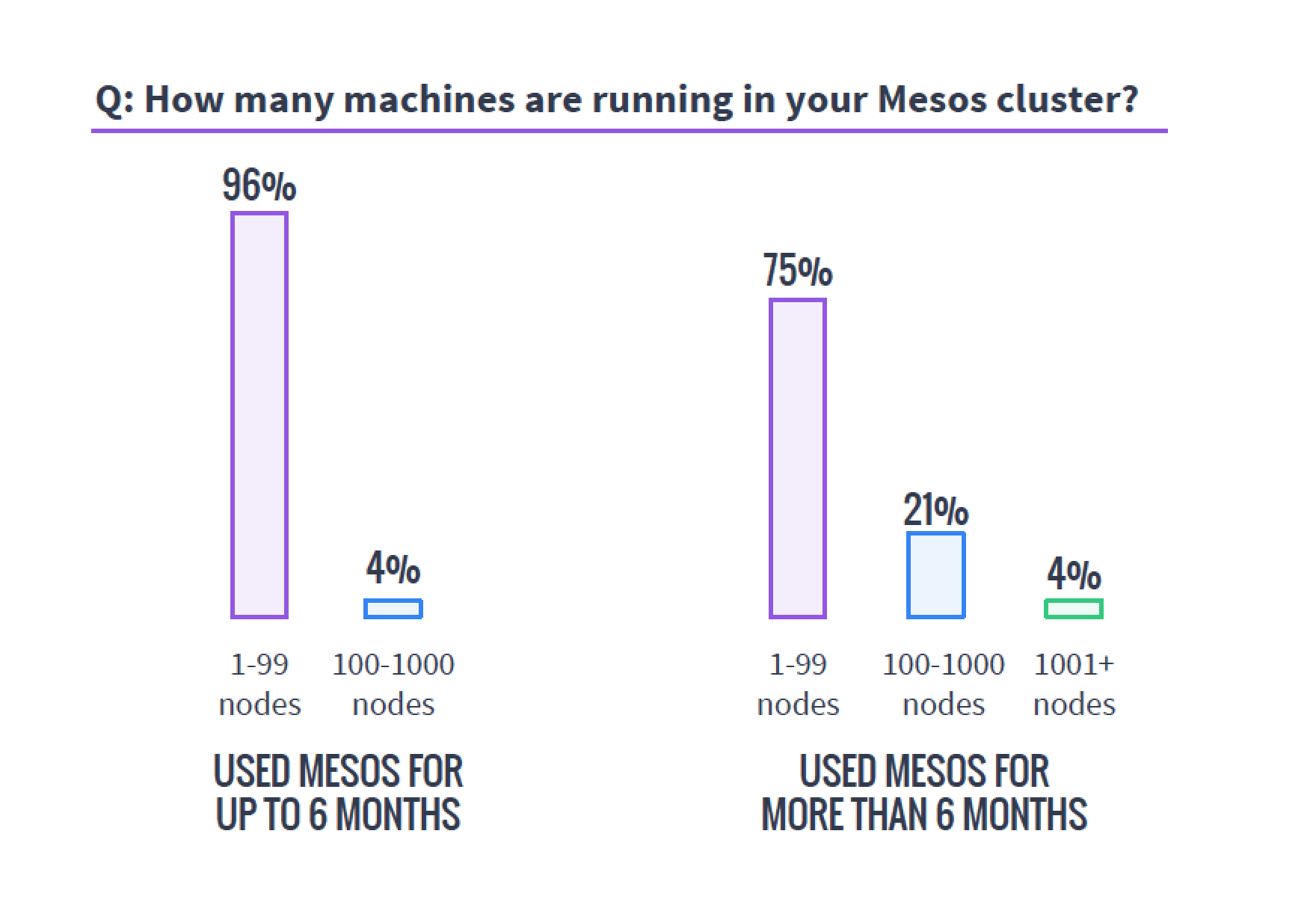
    The first important tidbit I would like to highlight is a cautionary tale. I’ve been around clusters—big data, cloud and, more recently, Mesos-style clustering—for years, and there is one truth this survey shows that is far more global than just Mesos. Clusters always end up bigger than you’d planned. The survey shows that of those using Mesos for more than six months, 25 percent have more than 100 servers backing the cluster.

    mesosservercountsWhen planning a cluster, always assume it will be bigger than you plan and grow faster than you think. Organizations that need this type of technology need it to perform and find themselves using it more than they’d planned, so the clusters always grow. I’ve seen orgs do a 20-server cluster that within six months numbered well over a hundred servers and headed to 200. I’ve heard of faster/larger unexpected growth rates, but not seen it or talked to those responsible. Plan for bigger than you think you need—worst case, you’ll have overplanned, which is easier to handle than being caught with too small a cluster.
    This is one of the areas I think it would be interesting to have a follow-on question delving into how big survey respondents had planned their clusters to be versus how big they were at this point in their deployments.

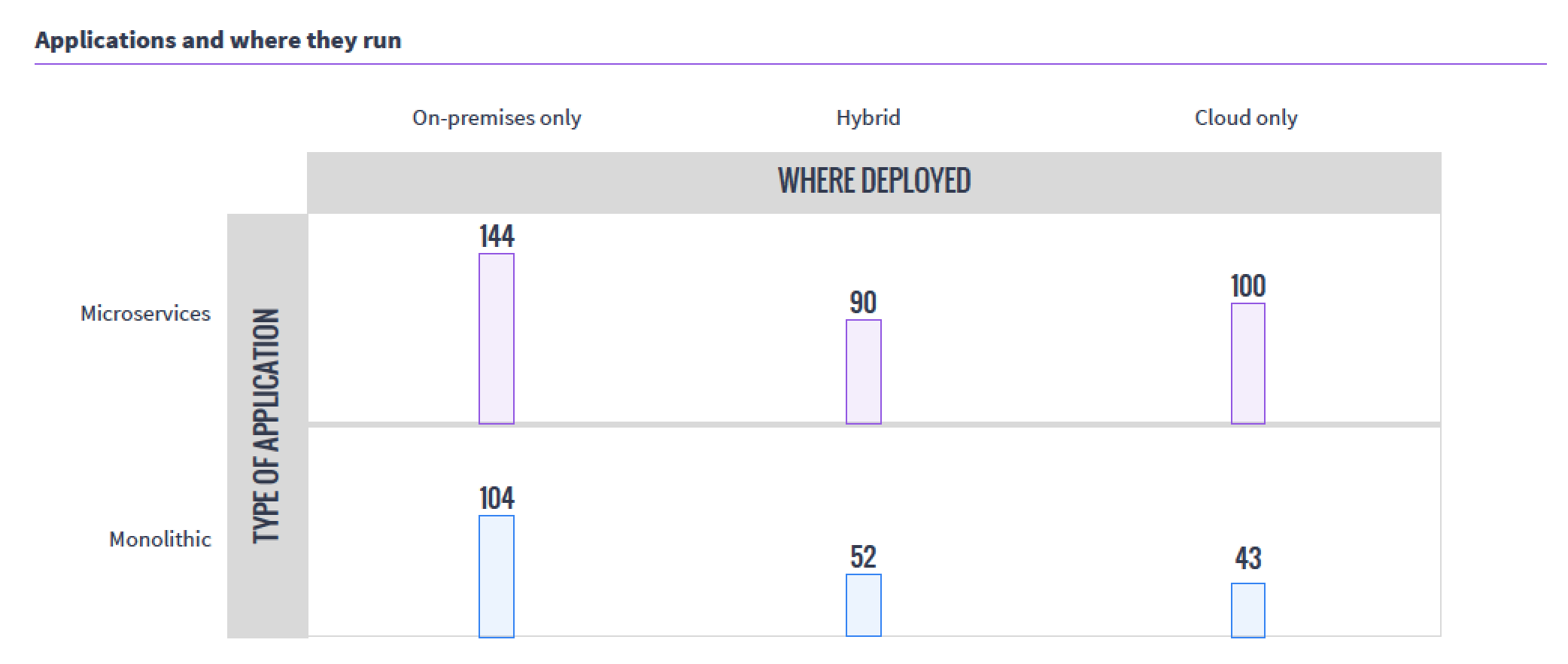
    The next interesting takeaway from the survey was the usage patterns. While internal/external/hybrid cloud is not a surprising distribution, the fact that so many organizations have moved monolithic workloads to Mesos was a bit of a surprise. The sample size of the survey was relatively small, but still, that’s a lot of “We have Mesos, let’s start running it there” going on.

    mesoswhereappsrun

    I think I’ll work with Mesosphere to talk to one of the organizations running monolithic apps on Mesos and see if we can’t get an interesting interview.

    For the health of open-source projects, I like to see what is happening with those involved—is the audience growing? Are the number of developers growing? Supplemental survey data says yes.

    mesoscontributors

    I double-checked this information, since it should be available publicly, and although the move from GitHub to Apache Git made it more difficult to track down, this Apache post from July does verify the graph above, and offers even more interesting data.

    The thing that still intrigues me about Mesos is that instead of allowing users to pool servers to create virtuals, it pools servers to make a massive parallel system. But running containers on it (as this data indicates most are for resource isolation) carves it up into virtuals, of sorts. Very esoteric.

    I won’t bore you by going over what I think of each and every question. Follow the survey link at the top of the article and you can get the survey response summaries to support your work.

    — Don Macvittie

  • Why DevOps Needs Cloudified NPM

    Why DevOps Needs Cloudified NPM

    One of the three “ways”—or principles that DevOps guru Gene Kim articulates as defining DevOps—is amplifying feedback loops. One of the key ways that Ops contributes to this amplification is by implementing rich monitoring instrumentation of operational conditions. The move toward more automated configuration management and the rise of cloud-friendly application performance management suites have gone a long way to providing strong feedback loops. However, network performance monitoring (NPM) is sorely in need of cloudification to become relevant to DevOps.

    In one of my previous articles on devopsy.kinsta.cloud, I wrote about the impact of DevOps on IT operations management, and noted that infrastructure management tools have largely lagged behind APM in terms of becoming cloudified and API-friendly. NPM is a case in point. Just to be clear on terms, by network performance monitoring, I’m talking about monitoring that collects metrics such as latency, TCP retransmits and out-of-order and fragmented packets. These four metrics can tell a network engineer a lot about whether the network is the root cause or a major contributing cause to application performance issues. Other metrics and data points that are highly relevant to NPM are interface utilization percentage, traffic flow statistics and, for any apps or services that rely on internet communications, BGP paths. These latter metrics and data sets help engineers locate underlying causes in the network, such as congestion on an interface, large spikes in flows, internet path changes or correlation of performance issues with traffic traversing a particular ISP’s network. Sounds great, right?

    The problem is, the way these metrics have been collected is all wrong for DevOps practice. For the last two decades, NPM tools have fallen into two main buckets: free, manual tools such as TCPDUMP, MRTG and WireShark; and monolithic, siloed commercial tools. Nobody will ever dispute the value of free tools, but at a certain point, chasing problems around with manual tools just doesn’t scale, so sooner or later most NetOps organizations have to invest in commercial tools.

    Commercial NPM tools were primarily architected in a pre-cloud, pre-DevOps era, when data centers all were inside the WAN, applications were centralized and monolithic and all users were somewhere else on the WAN in a campus or branch office.  Metrics collection was performed by appliances via connecting to the span interfaces of major routers and switches at choke points—the junctures of LAN and WAN connectivity.

    That era is disappearing rapidly. Most new applications are being built on a distributed basis, leveraging hybrid cloud. With distributed application components, there is a much more complex mesh of communications at play, much of which will cross networks and the internet. Further, in most cloud environments, you simply can’t deploy an appliance—not even a virtual one, since in many cases there simply are no span ports.

    The problem with traditional NPM goes beyond a lack of fit with modern application architectures. NPM appliances are designed as vertically integrated systems with a GUI as the only real way to get data out of them. As a result, their APIs are usually at best second-class citizens. This is problematic for DevOps because amplifying the feedback loop means being able to serve meaningful real-world data up across different teams.

    The cloud and DevOps gap in NPM is pronounced enough that major analyst firms have taken notice. In May of this year, Gartner analyst Sanjit Ganguli published a research note titled, “Network Performance Monitoring Tools Leave Gaps in Cloud Monitoring.” It’s a fairly biting critique of the NPM space that says, essentially, that the vast majority of current NPM approaches were largely built for a pre-cloud era, and are unable to because the new complexities brought by decentralization and full-stack virtualization. As a result, network managers are left in the lurch when trying to adapt to the realities of digital operations.

    What is needed to cloudify NPM and make it DevOps-friendly?  First of all, with distributed, hybrid cloud applications, there need to be options to embed NPM metric collection agents in cloud server deployments, either directly on app servers or load balancers such as NGINX or HAProxy. With container management and configuration automation tools, deploying lightweight NPM agents to more distributed points is very doable. By collecting NPM metrics on or very close to application servers, you get the most accurate read on “is it the network?” when app performance issues arise.

    Another key aspect of cloudifying NPM is where the analytics happens. Appliances have severe compute and storage constraints. In the era of big data and cloud-scale compute economics, relying on appliances for NPM analytics is beyond outmoded. There are a plethora of open-source big data platforms as well as a growing number of  emerging commercial SaaS options for NPM analytics. Today, big data network analytics platforms allow engineers to perform deep ad-hoc analyses on billion-row datasets and get answers in seconds.

    DevOps’ mandate for amplifying the feedback loop plus the availability of copious cloud compute capacity means that there is no excuse to not aggressively measure everything, including network performance. Networking teams can and must go beyond config automation to change the way and the scale they gather and share metrics to server and app dev teams. Cloud-friendly NPM is a needed step to bring about Net DevOps as a lived reality in IT.

    About the Author / Alex Henthorn-Iwane

    AlexAlex Henthorn-Iwane is the vice president of Marketing at Kentik. He has more than 20 years of experience bringing new technologies in networking, security and software to global markets. Henthorn-Iwane leads the global marketing strategy for Kentik and helps the company bring its story and solutions to network-dependent organizations around the world. Connect with him on LinkedIn, Twitter or SlideShare.

     

  • Moving to the Cloud? Consider These Questions

    Moving to the Cloud? Consider These Questions

    The cloud is going mainstream. That’s the word from a recent Cisco Systems-sponsored study, which found that more than two-thirds of organizations are using the cloud to “help drive business outcomes”—a whopping 61 percent increase from the previous year’s study. But almost the same number aren’t maximizing the true value of cloud computing.

    What does this mean for your business? It means that while the cloud is quickly becoming a necessity rather than “nice to have,” it’s worth asking some hard questions before you make the move. You can get the most from your deployment after determining the answers to these five questions, and even more from the accompanying infographic.

    What’s the Line-of-Business Benefit?

    You’re not just moving to the cloud because everyone else is doing it; you’re looking for benefits that boost your bottom line. The notion such benefits exist is not just hype: Many companies report lower IT spending and increased agility in the cloud. Before you make the move, however, it’s worth asking about the specific line-of-business (LOB) benefits you hope to achieve. Otherwise, you’re putting the cart before the horse, hoping a cloud deployment will inspire some kind of revolutionary use. One firm directly tapped the benefit of agile cloud computing by writing a script that closed down sandbox testing environments at night and spun them back up again in the morning, saving tens of thousands per year. This exemplifies the true value of using cloud resources—but it doesn’t just happen. Find your need, and then tap the cloud.

    Are You Ready for Change?

    Is your company ready for IT transformation? Ultimately, that’s the role of the cloud—70 percent of businesses say the cloud has enabled them to re-engineer one or more business processes. Consider analytics. Running data analytics is the fastest-growing activity in the cloud, since companies now can “flip a switch” and start mining critical data sources.

    Having the data on hand isn’t enough, however. Your company must be ready to run with this information and move forward with real change if you want to get the most from your cloud deployment. Put simply, the cloud is disruptive—embracing change is a requirement for increased ROI.

    How Much Can You See?

    Cloud providers promise on-demand, anytime, anywhere access. While it is a good thing for remote workers and satellite offices in different time zones, it also can lead to a problem: visibility. Do you know who’s spinning up new services, when and for how long? Do you have a way to track and monitor cloud uptime and performance to ensure your provider is living up to its service-level agreement (SLA)? Expert advice says it’s essential that you have a way to independently verify your company usage once services are hosted in the cloud. This could take the form of local monitor tools, third-party services or even a secondary cloud solution tasked exclusively with providing visibility. Bottom line? What you can’t see, you can’t measure—in turn potentially limiting your total cloud benefit.

    Where Does Compliance Live?

    You have compliance obligations. Maybe those obligations are related to consumer credit data, health information or legal documentation you’re required to protect. Whatever the case, if your cloud provider doesn’t comply with local or federal laws, you could face a hefty fine or other penalty. As a result, it’s worth tracking down a cloud provider that not only knows your industry standards inside and out, but also clearly describes in the SLA how these standards will be met. Here’s the takeaway: Always ask your cloud provider about compliance, and never settle for vague answers or promises that aren’t in writing.

    Is Data Done Right?

    How much data do you plan to store in the cloud? Almost 50 percent of companies now store more than half of their data in the cloud. Expect this number to rapidly increase as the cost of storage comes down year over year. Beyond balancing the need for local and cloud-based storage, however, it’s worth asking tougher questions about portability, backup and security. If you change providers, is your data ready to make the switch immediately? Is your cloud provider charging extra for data backup? If so, what does the service entail? Last but never least: What steps are being taken by your provider to safeguard data—both stored and in transit? Never underestimate the value of doing data right; better to pay more for great service than save a few bucks on cheaper, less robust alternatives.

    The cloud has arrived. Before making your move, however, consider the LOB benefit, your readiness for change and ability to monitor services—along with your provider’s compliance and data-handling aptitude. To better understand the potential benefits of using the cloud, check out the accompanying infographic and determine the answers to a few more questions about how your company and cloud capabilities will fit together.

    About the Author / Adam Cady

    adam-cadyAdam Cady is director of third-party managed Sservices at SingleHop. Cady is responsible for developing cutting-edge managed services solutions and software management tools for hyperscale cloud platforms. Connect with him on LinkedIn and Twitter.