Category: DevOps in the Cloud

  • 4 Ways to Give DevOps Teams the Support They Need

    4 Ways to Give DevOps Teams the Support They Need

    If it weren’t hard enough for IT infrastructure teams to innovate and keep the lights on, a host of technologies designed to drive efficiencies are introducing new levels of complexity across the data center. Virtualization, cloud computing, software-defined storage and digital are making it much more difficult for the infrastructure team to control, manage and administer an organization’s IT.

    Just when IT professionals think they’ve figured out the support model, DevOps steps in. As the number of apps continues to explode, more organizations are adopting a DevOps model to accelerate development efforts.  A recent Coleman Parkes Research survey of 1,770 senior business and IT executives revealed 87 percent have adopted DevOps.

    Unsurprisingly, the growing emphasis on DevOps is placing an added burden on infrastructure teams already struggling to cope with the digital transformation of their organizations. Traditional storage systems are often unable to match DevOps’ requirements for an enterprise infrastructure that is simple, flexible and automated. Some DevOps teams also work in silos, which produces an additional level of complexity and opportunities for failure.

    Also, occasional tensions between development and IT operations can flare up over different approaches to infrastructure and competition for resources.

    IT operations teams with traditional storage hardware backgrounds are normally focused on accelerated release cycles, availability, reliability and streamlined data management. Developers, on the other hand, spend little time thinking about what technology they need versus keeping test data up to date with production and having easy access to capacity when needed.

    A Support Structure That Works

    Set against this backdrop, choosing the right platform to underpin these growing changes within the enterprise cloud can play a big part in ensuring a DevOps model that works and makes life easier for the IT infrastructure team. Here are four ways to help make the enterprise cloud infrastructure fit a DevOps model:

    Copy Data Management

    Copy data management provides up-to-date, “virtual” copies of production data to the DevOps team, eliminating the need for physical data duplication. Copy data management helps remove the load on production storage and protects the performance of applications. With snapshots, cloning and replication, modern enterprise cloud systems can enable data copies. The same technologies make it possible to protect and manage the development side of the environment in case of failure or data corruption.

    QoS and Performance Guarantees

    Quality of service (QoS) and guaranteed performance is a significant concern when adopting DevOps. QoS enables IT to allocate different storage workloads to control performance. QoS can set levels of maximum and minimum input/output operations per second (IOPS) or bandwidth. IT can also configure QoS at the virtual machine (VM) or virtual disk (vDisk) level. With the power of all-flash, DevOps can be consolidated on the same platform as production. This makes it easier to access production data sets and reduce the storage footprint.

    Monitoring and Troubleshooting

    The ability to monitor the infrastructure and correct problems and misconfigurations rapidly is valuable when moving to a DevOps environment with continuous integration and continuous deployment. Ideally, the foundations of an enterprise cloud platform should provide basic and advanced monitoring capabilities, predictive analytics, integration with other monitoring tools and VM-level monitoring.

    Automation

    From an infrastructure point of view, it is also critical to provide the capability to provision and manage IT infrastructure programmatically. Automation enables organizations to create and break down environments as needed, incorporate advanced features such as snapshots and cloning as daily workflows, and eliminate the potential for error from manual or interactive configuration.

    As organizations move relentlessly to a mixture of virtual and physical, on-premises and cloud-based IT, infrastructure teams have to manage, control and administer all those resources while matching them to a diverse range of business, development and user requirements. By implementing an enterprise cloud platform that can work across physical and virtual environments, infrastructure teams can help DevOps teams achieve their goals without constraints around performance, scalability, manageability, resilience or flexibility.

    IT organizations are achieving this level of support by replicating the agility of public cloud within the data center to make it easier to manage enterprise and cloud-native applications. This approach can help support the DevOps model and ensure it is implemented with as little friction and disruption to the infrastructure as possible.

    About the Author / Chuck Dubuque

    Chuck Dubuque is the VP, Product Marketing at Tintri. Prior to Tintri, he was at Red Hat where, as director of product marketing for the virtualization business unit, he was responsible for Red Hat Enterprise Virtualization (RHEV) and Red Hat Enterprise Linux OpenStack Platform (RHEL-OSP) market strategy. Before Red Hat, Chuck worked at a value-added reseller for VMware, NetApp and Cisco and also spent several years in biotechnology in marketing and business development. Follow him on Twitter.


  • Pivotal Enlists Rackspace to Advance DevOps in Cloud Foundry Environments

    Pivotal Enlists Rackspace to Advance DevOps in Cloud Foundry Environments

    In a sign of the level of complexity now associated with managing DevOps, Pivotal has partnered with Rackspace to create a managed services practice for its distribution of the Cloud Foundry platform-as-a-service (PaaS) environment.

    Ian Andrews, vice president of product for Pivotal, says that at least half of the company’s customers have a least one instance of Pivotal Cloud Foundry (CF) that they would like to have managed by a third party. The reason for that is two-fold. For one, the Cloud Foundry PaaS can be complex for many IT organizations to deploy and manage on their own; Andrews notes that Pivotal releases updates to its distribution of the Cloud Foundry PaaS every 90 days. That’s a cadence the average internal IT organization is not prepared to keep pace with without help from an external services provider, he says.

    Also, increased usage of microservices based on containers running on Cloud Foundry is driving organizations to shift allocation of their own internal resources away from managing underlying infrastructure. By relying on managed services providers such as Rackspace to manage both the PaaS and the underlying infrastructure, Andrews says more resources can be focused on managing the DevOps pipeline.

    Pivotal opted to partner with Rackspace because Rackspace is capable to supporting instances of Cloud Foundry running on a public cloud, in a hosting center or on-premises, he says, adding that 60 percent of the Pivotal instances run on VMware vSphere platform, while the rest are distributed across multiple clouds and other on-premises environments. Pivotal is a sister company of VMware, operating under the umbrella of Dell Technologies.

    Brannon Lacey, vice president and general manager for applications and platforms at Rackspace, says his company is embracing Pivotal as part of a larger push to deliver managed services above the infrastructure level. Previously, Lacey says, Rackspace managed e-commerce and content management applications, then acquired TriCore to add a portfolio of managed ERP application services. However, the company doesn’t have any plans to add more PaaS environments to its portfolio beyond the Cloud Foundry PaaS curated by Pivotal.

    Historically, managed services have accounted for about a quarter of all IT spending. But as the number of deployment options available to IT organizations continue to expand, Lacey says Rackspace is expecting the number of companies that look beyond their internal IT organizations to manage that complexity will only increase.

    As more managed services providers become part of the DevOps pipeline, it’s clear that many companies will soon need to consider how to create processes that extend well beyond their own organizations. That may prove to be a significant challenge because of the cadence of the update process is dictated by the external entities. Of course, IT organizations can dictate the pace of the upgrades. But the further an IT organization falls behind in terms of upgrades, the more expensive the managed service tends to become. In short, there’s no such thing as a proverbial DevOps easy button.

    — Mike Vizard

  • Microsoft Woos Development Partners

    Microsoft Woos Development Partners

    If Microsoft has its way, many more DevOps processes will revolve around the cadence at which the company upgrades its applications. At its Inspire 2017 conference, the tech behemoth announced an ISV Cloud Embed initiative designed to entice more developers to add value by extending application functionality it has already developed and deployed in the cloud.

    Rather than reinvent the same functionality over again, Microsoft will provide developers with access to its application at price points that are as much as 50 percent less than what an end user might pay, notes Alysa Taylor, general manager for Microsoft Business Applications and Industry. In addition, the company is promising to help software developer partners reach 100 million commercial active users of Office 365 and Dynamic 365 customers through the Microsoft AppSource online store.

    The specific software modules the company is providing developers access to under this program include:

    • Dynamics 365 Embedded: a suite of business applications the company is hoping third-party developers will customize and extend across a variety of vertical industries.
    • Microsoft Flow Embedded: Makes it possible to customize workflows to automate business processes within their application.
    • PowerApps Embedded: Provides access to extensions that make it easier to deliver an application via a browser or as a mobile application.
    • Power BI Embedded: Allows users to easily embed fully interactive reports and dashboards.

    This latest initiative is a logical extension of the work the company has been doing to entice developers to employ Microsoft Office as the front end for accessing a wide variety of back-end services.

    The challenge IT organizations that go down this path will face is aligning the pace of DevOps with the rate at which the company is updating its applications.

    Microsoft is not the only IT vendor that presents this DevOps challenge. The more a software developer invokes APIs, the more complicated managing the DevOps process can become. The whole concept of continuous integration/continuous deployment (CI/CD) can get sorely tested when control over when the back-end services being invoked via an API are updated.

    In effect, software developers are being asked to make a buy-versus-build decision. To entice developers to make a buy, the company not only provides a common API framework, but also developers will be able to take advantage of any investments it makes in artificial intelligence across the entire Microsoft application portfolio.

    Taylor says Microsoft is committed to working with partners to eliminate any competitive friction. The company is in the process of implementing a massive reorganization under which the company’s core technology groups are being aligned around four technology groups: Modern Workplace, Business Applications, Applications and Infrastructure, and Data and AI. The rest of the company is then being organized around a go-to-market strategy that is focused on education, financial services, government, healthcare, manufacturing and retail industry segments. Microsoft is looking for partners that can apply their own intellectual property to extend its core applications into each of those segments, says Taylor.

    It remains to be seen just how well partnering with Microsoft can work on a practical DevOps level. But the one thing that is clear is that there will be no shortage of software developers who are about to find out.

    — Mike Vizard

  • Data Science Industry Perspectives in the Cloud

    Data Science Industry Perspectives in the Cloud

    In principle, the cloud is becoming a commodity. Google, Amazon and other companies are trying to commoditize almost everything, including the instruments for data gathering, data storage and data transformation. In the near term, we should expect that platform engineering, which today is overly complex, will become simpler.

    With data engineering, however, the prospects of such simplification in the near future is not that clear. Currently there is no single simple solution even for ETL (extract transform load), such as the Amazon Data Pipelines or Amazon Glue (which hasn’t been fully released). They represent some very humble beginnings of what people are building up right now brick by brick. Data engineers and architects and other professionals are building these to solve real-life cases.

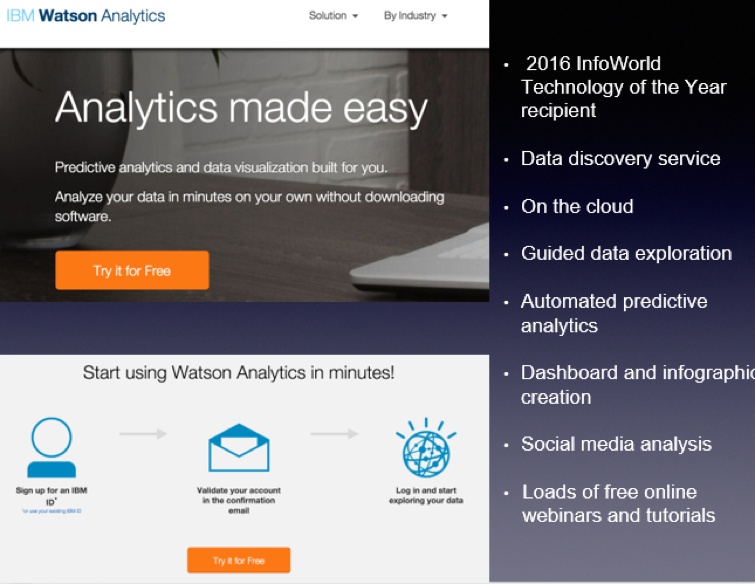
    From the data science point of view, new machine learning-as-a-service solutions are popping up like mushrooms after a spring rain. There are a multitude of them on the market: Big ML, Data Robot, Azure ML, Amazon ML, IBM Watson, Google Prediction and so on. But what is machine learning as a service (MLaaS)?

    Let’s look at IBM Watson Analytics as an example:

    MLaaS is a set of preset wizards to create machine learning models and use these models through API. For example, we need to recognize text and separate some facts and data out of it. To do that, we initiate the service in a couple of clicks, insert the original text and get back a marked out and analyzed copy. In this instance, the service is commoditizing NLP (natural language processing). The same goes for VTT (voice-to-text): We insert an audio file and get the text version of the talk back.
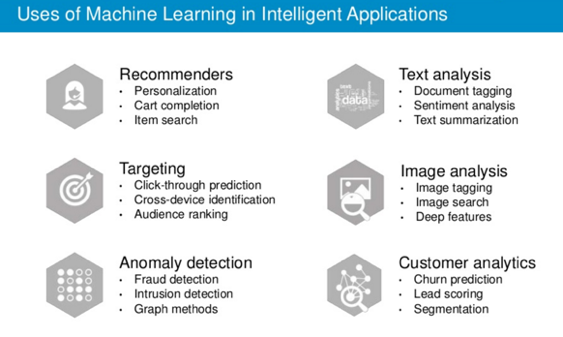
    There are other uses of machine learning technology:

    Machine learning closely works with data. But it is one thing to have data, and another to have actionable data with which you can help users. As seen from the chart, above one of the key trends is the commoditization of data services.
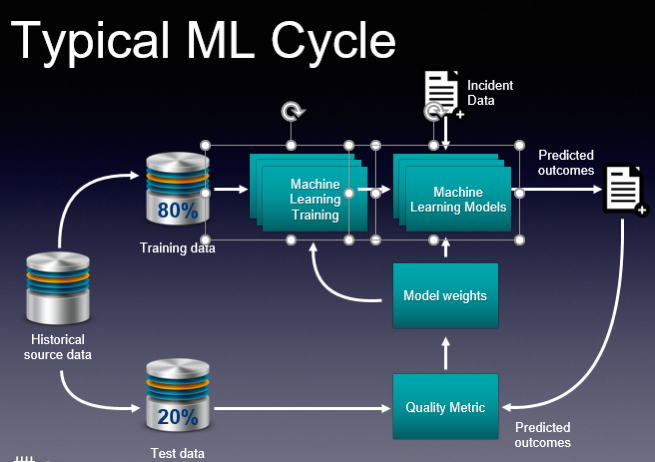
    These basic services do what they are supposed to, and this is great. And you don’t need to employ a data scientist to do some of these tasks. But if you are a company like Grammarly, whose know-how is in actual text recognition, provision of recommendations and text analytics, then ready-made services are insufficient. Grammarly, and companies like it, have to take a hands-on approach that will be very expensive. This is their core business and using third-party services is not viable.

    So how would you go about using ML cloud services?

    Even taking into account a large number of “as a service” solutions, the main challenge is in navigating and understanding “what is better” and “what is best,” and “how it all works.” The issue is that such services are constantly changing. The best choice for you may be to employ tools-consulting services. It’s imperative to understand what is available now and what tools would best suit your business. This is the most basic but essential help you may need.
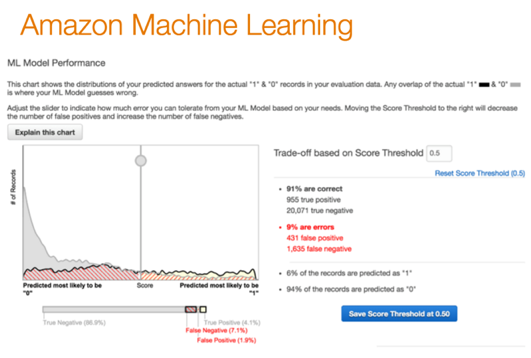
    Secondly, integrating your operations with these services requires particular engineering efforts. Indeed, most of the data science tasks right now are solved through these cloud “as a service” solutions. But having a proper consulting company with a strong engineering background can help you better utilize such ready-to-use solutions. They offer value to the business at a faster pace. There is no need to invent the wheel, especially when your consultant knows what and where to use.

    If you decide to go to a data science firm where the majority of employees are data scientists, they will create for you some unique genius custom solutions, do great research and so on and so forth. This is what they are good at. This is their bread and butter.

    An end-to-end consulting company may be a better choice for your company, as its goal is to bring value to your business. Consultants will tell you if MLaaS solutions are appropriate for your machine learning needs, and will have a deep understanding of how these services work. A consultancy company also should create and build proper architecture, and provide custom development work that is unique to your services for your business to scale.

    Finally, evolution is key if you plan to grow your business. Start with the ready-made solutions, then in time switch to in-house solutions that can be done with the help of a group of data scientists.

    About the Author / Stanislav Ivashchenko

    Stanislav Ivashchenko is the Senior DevOps Сonsultant at SQUADEX. A certified AWS solutions architect, he is experienced in building, delivering, supporting and optimizing a broad range of software applications. From bare metal to the cloud, from monolith architecture to microservices, he helps improve software delivery processes in startups, mid-sized companies and large enterprises. He has solid skills in orchestrating various DevOps and infrastructure related tools, services and management practices. Connect with him on LinkedIn.

     

  • Tips to Optimize the Cloud for Scaling

    Tips to Optimize the Cloud for Scaling

    When I first started migrating companies to the cloud (about seven years ago), companies would ask me, “How come the app isn’t scaling? How come users are still complaining about the slowness?” I would explain that the cloud enables auto-scaling, but you still have to make sure your app can scale in the cloud. In people’s minds, auto-scaling and the cloud was synonyms.

    I don’t get asked that question anymore (maybe people realized the cloud is not as magical as it seems). But now, people think the cloud is synonymous with speed, agility and cost-effectiveness. Sure, cloud enables all that. But you still need to make sure you optimize the cloud to facilitate that. I see many companies in the opposite situation: their accounts full of resources with names such as test1, test2 and finaltest2, or they put together a SWAT team to reduce an AWS bill, or security is an afterthought. So many engineers are making changes, it’s hard to know who is doing what.

    Before you run into this situation (maybe you’re already there), you have to create tools and processes to optimize your cloud for scale.

    Establish Strong Policies

    The magnitude of changes in cloud infrastructure is high. Unless you establish strong policies, managing all the resources across multiple cloud accounts get out of control pretty quickly. The most effective way we have seen is using tags for resources. For example, use tags that identify whether the resource is from a certain department are added to each resource. Typically, it works very well when the tagging process is embedded into the automation. If there are new resources that don’t comply, automation should terminate these resources. You should enforce policies like these sooner than later.

    And just because these resources were provisioned with proper tagging, it doesn’t mean they are provisioned for its full capacity. You should build automation to find underutilized instances and establish a process for downsizing. To ensure everyone complies with these policies, you should also establish change management process.

    Change Management and CMDB

    The objective of the change management process is to ensure all the infrastructure changes cause minimum disruption and meet internal guidelines. Many say that ITIL change management process is not compatible for fast environments such as cloud. I agree that the traditional way of doing change management by tracking changes manually just doesn’t work, due to the magnitude of changes. But in the cloud, you can leverage automation to streamline the change management process; for example, you can use automation to filter normal changes versus manual changes. Once all the AWS changes are reviewed and approved, in addition to bringing visibility to all the changes for security and reliability change management can simultaneously help reduce waste.

    Most companies heavily leverage auto-scaling, where new resources can be launched based on specified metrics. However, this behavior makes approving changes difficult. If new resources are appearing and disappearing, how do we track what truly changed in the infrastructure? To gain a true picture, you need an infrastructure delta, which shows resource updates for the still-running resources for a given time period. You can also use automation to build a dynamic change management database, and use auto-discovery to keep CMDB in sync.

    Shared Responsibility

    DevOps calls for breaking down the walls between operation and development team to deliver code faster. If you release software fast, you can rapidly add value to your customer. The cloud enables this culture because developers no longer have to wait for IT to provision resources. What doesn’t work well, though, is when no one takes responsibility for optimizing cost and maintaining security. If engineers can launch resources, they are also responsible for cost and security—it’s a shared responsibility. You should provide visibility to the cost for each department, based on tagging we talked about earlier, so they know the cloud is not free 🙂 Anyone can launch resources as long as they understand the security best practices for each service they are using.

    Conclusion

    Lean thinking calls for reducing waste. What’s waste? Anything that doesn’t add value to the customer. You should work fearlessly to reduce waste. You move to the cloud because you can innovate fast and it’s cost-effective, so you can quickly add value to your customer. You should continue to optimize your cloud infrastructure to ensure it’s meeting its original intent.

    About the Author / JT Giri

    JT is the creator of nOps – AWS cloud security tool. He spent last 10 years helping companies migrate to cloud and build automated infrastructures. nOps is a next generation security and collaboration solution for the cloud. nOps applies change management practices to deliver integrated security and reduce cloud waste.

  • Salesforce Moves Compliance to the DevOps Left

    Salesforce Moves Compliance to the DevOps Left

    Compliance is one of those tasks that trips up developers multiple times over. More times than anyone cares to admit developers finish an application only to discover there are any number of compliance controls that were overlooked. Sometimes, bringing that application into compliance is trivial. Other times, it can delay the rollout of the application by months.

    To help mitigate this issue, Salesforce this week added a Heroku Shield module to Heroku Enterprise, its container-based platform-as-a-service (PaaS) environment available to IT organizations needing access to a dedicated platform running on Amazon Web Services (AWS). Dylan Steele, vice president of marketing for the Salesforce platform, says Heroku Shield enables developers to comply with a broad range of mandates ranging from payment card standards to any number of healthcare regulations. The goal is to automate meeting regulation compliance by making it possible for developers to automatically add the appropriate controls to their applications.

    Heroku Shield requires mandatory encryption for data at rest in addition enforcing a stricter level of TLS encryption for applications deployed in a Shield Private Space. It also enforces trusted IP ranges and manages application-level authentication tokens.

    The move is part of the effort to shift left more of the responsibility for IT security, by making it easier for developers to address security and compliance issues early in the application development process. That’s when the cost of fixing those issues is substantially less than when that application is deployed in a production environment.

    In general, there’s not a lot of love lost between developers and auditors. Developers often feel that the controls needed to achieve compliance are not all that clear. Auditors feel that many developers are simply too lazy to implement the appropriate controls in the first place. In truth, however, there’s a lot of commonality between the control required to meet various compliance requirements. That creates a lot of opportunity for PaaS environments that abstract the underlying infrastructure away from developers to automate implementing a broad range of compliance and security controls. The biggest issue now may be simply making developers aware that’s possible.

    In the meantime, DevOps teams that regularly struggle with compliance issues at the back end of an application release cycle might want to reconsider their approach. Whether it involves a PaaS environment or not, there’s a strong case to be made for moving testing of compliance controls as far left as possible in the application development process. Not only does that approach minimize the number of compliance issues that may arise before and after an application is deployed, but the documentation generated during the development process should substantially reduce the amount of time auditors spend crawling over and around an IT environment. That’s critical, since most auditors charge by the hour, and every minute they spend on an audit also increases the probability of finding something else that needs to be fixed.

    — Mike Vizard

  • DevOps Needs a New Cloud Solution for Best Practices

    DevOps Needs a New Cloud Solution for Best Practices

    Imagine this scenario: You are a company building modern software which is a key driver of your business. To support this, you have grown your infrastructure organically over time by adding servers, storage, networks, security, virtualization software, monitoring, alerting and analytics tools. You have also added a plethora of other middleware, databases, messaging and operating systems that your developers need to build, test and deliver their applications.

    Because of this unplanned organic growth, there is no consistency in the environment. You manage, maintain and operate much of this environment manually. Your various specialist teams (storage, networking, security) begin to form fiefdoms around their respective functional areas. Change becomes extremely difficult and automating across silos turns into a maintenance nightmare. You over-purchase to meet the demand and risk under-utilizing resources. Your costs spiral out of control. You are now finding it a hopeless challenge to meet the needs of your developers—which was the primary purpose of doing all of this in the first place.

    Moving to a Modern Platform

    A modern DevOps platform should address the requirements of both your development and IT/operations teams. It should give software development teams an easy way to consume on-demand compute, storage and networking as well as provide easy access to continuous integration and continuous deployment (CI/CD) tooling and software services that help increase their development throughput and shorten product delivery. In addition, the platform should also empower operation teams to manage, maintain and operate the entire infrastructure environment with very few people using smart software that drives automation and intelligence into the entire stack.

    In short, it should have the ability to break the silos within your IT environment and between development, QA and operations teams. By doing this, you can increase the velocity of software development, improve infrastructure utilization, increase overall operational efficiency and reduce costs.

    Requirements for a Cloud Infrastructure That Streamlines DevOps

    There are several requirements for a modern, cloud-based DevOps platform. Let’s look at the key essentials of such a solution.

    Self-service API-driven infrastructure is a fundamental requirement to enable infrastructure as code, a key attribute to enable DevOps best practice. It allows developers to write code (which can be done using their favorite programming language) and make RESTful API calls to the underlying programmable infrastructure to manage initial deployments and configurations. It also enables them to manage ongoing automated dynamic provisioning of infrastructure, auto-scaling, monitoring and alerting.

    All this automation removes the confusion and error-prone manual steps for the entire application delivery process, including development, testing, staging and production deployments. This, in turn, accelerates software delivery and increases quality.

    However, building such a self-service API-driven infrastructure by yourself is not easy. The key component that drives up the cost is the operational complexity and the cost of experts needed to build and operate it.

    Smart software that drives intelligence into the stack. Very few solutions in the market automatically handle the full life cycle (deployment, upgrades, monitoring, alerting and ongoing resource management) of infrastructure and also allow seamless migration of workloads between private environments and public clouds. Additionally, if self-service is available as a SaaS-based delivery model, it is easy to add more features and workflows very quickly without having IT perform a major upgrade. If your solution comes with an on-premises install, ask how much work IT has to do to maintain this environment and how often new features will get added.

    Hyper-converged Infrastructure (HCI): Eliminating silos in the infrastructure. As mentioned earlier, silos impede velocity because they lead to complexity of operations, lack of consistency in the environment and lack of automation. A hyper-converged cloud design with a software-centric architecture tightly integrates compute, storage, networking and virtualization resources and other technologies from scratch in a commodity hardware box supported by a single vendor. This approach eliminates silos and lowers costs and complexity. It also makes it easy to start small and grow on demand while staying tightly right-sized on capacity and cost.

    A built-in browse-able categorized application store. DevOps engineers need readily accessible CI/CD tools such as Jenkins, Git, Maven or JUnit to automate the development and test pipelines. Additionally, tools such as Ansible, Puppet and Chef help with automated configuration and lifecycle management of workloads. Application developers need to quickly integrate and deploy middleware services such as RabbitMQ, Redis or storage back-ends including MySQL, Postgres, Cassandra or MongoDB. Single-click deployment of such services and other complex multitier network tools and applications greatly automates, accelerates and simplifies the development process.

    Seamless migration between private and public clouds. Developers and testers often need much greater capacity than is available on-premises for scale testing, and they should be able to move their application to a public cloud for such purposes. Alternatively, they may already have some applications running on a public cloud and they may want to bring them back to their private cloud for cost savings or better performance. For these use cases, a private cloud solution should offer seamless bi-directional migration between the public cloud and the private cloud.

    Dashboards and visibility for troubleshooting. One of the key advantages for a private cloud is that you can get complete visibility across the infrastructure and applications. In a public cloud, you can only get VM-level stats but have no control or visibility below that. Make sure that your private cloud solution can provide visibility to developers directly. Many vendors only provide access to IT, thereby controlling what developers can do and making IT a bottleneck in the application development and deployment process.

    Better insights to improve efficiency and capacity management. A cloud requires capacity planning, utilization monitoring, right-sizing of workloads and detecting zombie VMs and unused resources. Look for a solution that comes with built-in analytics, management tools and insights. An even better approach would be having a solution where you don’t have to install the management tool on-premises so that it can deliver its value as a service.

    To meet the needs of application developers and development frameworks and to create an efficient DevOps platform, companies should look at consistent converged architectures managed via smart software. This empowers application developers and operations teams to leverage a consumption model they want, while providing control to IT and making them relevant to your business success.

    Integrated intelligence and insights delivered as a service ensure that you never have to use spreadsheets to decide what to purchase and when. Cloud solutions with smart software ensure that you never have to make a Level 1 support call again; your management software can do that for you.

    About the Author / Kamesh Pemmaraju

    Kamesh Pemmaraju leads product management, product marketing, and technology partnerships at ZeroStack. Kamesh is a seasoned product management/marketing leader with a strong engineering and consulting background. In his most recent product roles at Mirantis and Dell, he focused on delivering private and hybrid cloud solutions to enterprises. He holds a Master of Science in Computer Science from Indian Institute of Science. Connect with him on LinkedIn and Twitter.


  • Database Bottlenecks: The Hidden Cause of App Slow Downs?

    Database Bottlenecks: The Hidden Cause of App Slow Downs?

    Performance problems can cripple mission-critical business apps. If you are lucky enough, your solution could be as easy as adding more WAN bandwidth, a few extra servers or a content delivery network, but the real problem arises when your database becomes your biggest bottleneck. When performance issues adversely impact the applications that keep your business operations running and revenue pumping in, the challenge is more difficult to overcome.

    It can be painstaking, tedious work to examine the architecture for flaws, dive into code for clues on sluggish performance and scour log files looking for correlation events. Among all the areas to examine, the following three problem spots should be high on the list of troubleshooting priorities to remove performance issues:

    1. Connection Pooling Problems
    2. Below Par Query Performance
    3. Insufficient Concurrent Capacity for Handling Heavy Traffic

    When database administrators (DBAs) fail to find and fix bottlenecks in time, businesses lose eyeballs and revenue—sometimes losing customers for life. Every transactional app accesses a relational database, and their biggest problem is the challenge of scaling horizontally. While modern databases support horizontal scale-out, today’s apps aren’t written to leverage this additional capacity.

    An intermediate software layer, database load balancing software, solves this challenge; it makes the apps able to use additional servers without any code changes. It often includes caching as well, which can substantially increase performance—again, with no code changes. Database load balancing not only makes it easy to scale horizontally but also helps you identify other bottlenecks and mitigate them in a matter of minutes.

    Database Load Balancing: The Silver Bullet?

    Database load balancing software comes with analytics tools that precisely pinpoint database issues in real time. It monitors everything from every read and write query to connections, server performance and overall database load. Detailed analytics offer insights into what you need to fix and where to focus your attention to ensure better performance. A load balancer has all the necessary tools needed to resolve performance problems in a timely manner. It efficiently addresses the three major performance problems previously mentioned and significantly improves app performance and availability through:

    1. Connection Pooling and Multiplexing: Database load balancing software can drastically decrease the number of connections to your servers by applying connection pooling and multiplexing. Unlike client-based connection pooling, this approach ensures greater operational efficiency and facilitates easy handling of additional connection spikes.
    1. In-Memory Query Response Caching: The analytics of the software identifies potential queries to cache and lets you cache them with no application changes. For example, you can cache an article in a content management system (CMS) for a day, having the comments section pull from the database to stay fresh. You can cache a zip code table for months. Look for the ability to set time-to-live expiration or automatic cache invalidation so you can ensure atomicity, consistency, isolation, durability (ACID) compliance and transaction safety.
    1. Dynamic Load Balancing: Database load balancing software routes queries from the app to multiple servers in a safe and consistent manner. Its automated read/write split ensures high performance by diverting all the read queries to available read replicas and writes to the master server. This load distribution increases capacity and facilitates an instant scale-out. A load balancer acts like a single point of control that offers deep visibility into performance needs. With real-time insights into the root cause of problems, the entire find and fix process becomes fast, efficient and effective.

    Saddled with the most difficult task of identifying database bottlenecks, DBAs can make their life easy and work efficient by leveraging a feature-rich database load balancer that automates the diagnosis of bottlenecks and gets the data flowing seamlessly.

    About the Author / Tony Branson

    Tony Branson is Database Load Balancing Senior Analyst at ScaleArc. Tony has a passion for dissecting tech topics such as transparent failover, centralized control, ACID compliance, database scalability and downtime effects. On his days off, he can be found watching sci-fi movies, rock climbing or volunteering. Follow him on Twitter.

  • How Are You Getting Your Cloud On?

    How Are You Getting Your Cloud On?

    With 71 percent of CIOs report having a cloud-first strategy, it’s clear enterprises are doing something. But it’s also clear that no two organizations are in the same place. While some organizations have gone “all in” by moving their production workloads to the cloud, most organizations are adopting a hybrid approach in which they are:

    • Building net-new next-generation applications that are built on cloud-native, non-relational database platforms, and
    • Selectively moving application workloads to one or multiple clouds and back to their on-premises data center.

    We at Datos IO thought we would share some of the ways in which we’ve seen organizations embrace a multicloud infrastructure strategy.

    Disaster Recovery

    One of the easiest ways to test the cloud and its promise of flexibility and agility is to set up your disaster recovery (DR) environment to act as a fail-safe mirror for the data in your on-premises environment. Cloud allows you to be more flexible in technology choices and offers elastic expansion of capacity. A cloud-based DR environment can be a conservative strategy to test the waters and prepare your organization. For more adventurous folks, you can think about building your DR strategy to focus on multiclouds.

    Test/Dev Environments

    In their journey to the cloud, many customers are trying to minimize their risk by moving test and development environments first. One way to do this is to move test/dev instant workloads for your batch analytical, integration and processing workloads. Some organizations have moved their production workloads off-premises, and could repurpose their on-premises infrastructure for test and development environments.

    Cloud Bursting

    As enterprises transition to the cloud, they are leveraging on-demand capabilities to transition analytical processing for peak processing hours, such as quarter-end financial reporting. In such cases, companies want to stand up an environment to offload processing and probably merge changes back to on-premises when operations are completed.

    Here are a few examples of how organizations are deploying new applications in the cloud.

    Data Lakes

    Some organizations use the cloud as a data lake, where data of all varieties—from different databases to different applications—go to a single environment. Big data file system technologies such as Hadoop are custom-built for data lake environments and offer a cost-effective way to store and process all the data. These new applications reside in the cloud and must be protected.

     Next-Generation Mobile and Web Applications

    Companies such as Netflix frequently use non-relational databases such as Cassandra and MongoDB to build new web 2.0 applications. A lot of new websites use MongoDB because of its support for objects, which works well in building a web catalog. Similarly, Cassandra is popular for applications such as web user profiles because of its ability to support distributed replication and fast write throughput.

    If one wishes to build a new application for the cloud, using a non-relational database is highly recommended.

    — Michael Colby

  • New Relic Extends Monitoring Reach

    New Relic Extends Monitoring Reach

    New Relic this week at its Future Stack 2017 conference extended the reach of its monitoring services via the release of a software development kit (SDK) that makes it possible for IT teams to monitor custom applications.

    In addition, New Relic unveiled Health Map, which makes it much easier for IT administrators to correlate data collected from New Relic application and infrastructure monitoring services. Todd Etchieson, vice president of product management for New Relic, says developing Health Map was a natural next step after the expansion of its services into the realm of infrastructure monitoring. That capability should significantly reduce the finger-pointing that often occurs between developers and IT operations teams anytime there’s an application performance issue, says Etchieson.

    New Relic is also adding billing and cost management features that enable customers to monitor costs in real time as well as plan for future Amazon Web Services (AWS) resource requirements. Rather than having to invoke a separate tool, users can leverage New Relic’s extensive history of relying on AWS to host its tools.

    Application performance management (APM) tools from New Relic first gained prominence among developers who preferred to monitor their applications using a service. Because New Relic is deployed on AWS it’s especially well-suited to monitoring applications deployed on AWS. The company this week also announced that its monitoring tools now come with 20 pre-built integrations to AWS services including Amazon Kinesis Firehose, Amazon Elasticsearch Service, Amazon Route 53, Amazon EC2 Container Service and Amazon EC2 Container Registry.

    Now Etchieson says New Relic is expanding its reach in the enterprise as organizations embrace a more integrated approach to DevOps. In fact, he notes half of its customers are already consuming multiple services. Driving that adoption is a need to roll out more applications, many of which are based on microservices enabled by containers. This fact is forcing organizations to confront their DevOps issues because of the dynamic and ephemeral nature of containers. New Relic added support for container monitoring back in 2015.

    Etchieson says New Relic doesn’t necessarily care where IT organizations choose to deploy their applications. Because New Relic made its APM software available as a service, use of APM expanded considerably. The company currently has 1,700 enterprise customers, he says.

    Not all those customers are very far down the DevOps path, but more than a few organizations have begun their DevOps starting with an APM tool. In fact, in many organizations DevOps is a bottom-up transformation that begins with developers seeking more information about how their applications are performing.

    As DevOps continues to evolve, the divide between application and infrastructure performance monitoring tools will continue to narrow. There may be different roles inside an IT organization that require different views to address specific issues. But at its core DevOps is all about providing cross-functional IT organizations with the context needed to resolve issues faster. In almost every case, that will require correlating data across both the application and infrastructure stack.

    — Mike Vizard