Category: DevOps in the Cloud

  • Top 6 Challenges of API Testing

    Top 6 Challenges of API Testing

    Testing teams face several unique challenges when testing application programming interface (API) implementations. API testing is part of the integration testing process and concerns the communication between two systems—one of which your staff likely has no control over.

    Below you’ll find the following six common challenges when testing APIs and our recommended solutions.

    Initial Setup of API Testing

    Manual testing helps confirm whether something works. Automated testing is necessary with APIs to gauge how well they perform under pressure. Getting the testing infrastructure up and running is often one of the most challenging parts of the process, not because it is particularly difficult, but because it can be a substantial motivation-killer. Once you manage to motivate your team to get through the process, however, it pays off over the long-term.

    Solution: API testing should start in the design phase—how is the API going to be tested? Ensure interval checking of your APIs for 100 percent uptime.

    Updating the Schema of API Testing

    The schema—in other words, the data formatting that handles requests and responses for the API—needs to be maintained throughout the testing process. Any updates to the program that create additional parameters for the API calls need to be reflected in the schema configuration.

    Solution: In today’s API economy, having an ever-changing API helps facilitate the demand. However, there can be downtime caused by those changes. One way to avoid that is to thoroughly test the API in beta and alpha environments. The chances of issues decrease to 90 percent when testing in these environments.

    Testing Parameter Combinations

    APIs handle communication between systems by assigning data values to parameters and passing those parameters through data requests. It’s necessary to test all possible parameter request combinations in the API to test for problems pertaining to specific configurations. A larger project could end up assigning two different values to the same parameter, or create instances where numerical values appear when text values should be. Adding an additional parameter exponentially increases the number of possible combinations.

    Solution: We’ve learned from our customers that having release candidates are important. For example, picking one or two applications to utilize the API on and release it to just those applications. Pick applications that aren’t critical to daily operations. This way you’re able to see how the API is being utilized and if there are any configurational changes that need to be made to have a general availability (GA) release.

    Sequencing the API Calls

    In many cases, API calls need to appear in a specific order to work correctly. This creates a sequencing challenge for the testing team. For example, if a call to return a user’s profile information goes through before the profile is created, the request will return an error. Alternatively, a call to create a map needs to run prior to placing location pins on the map to work correctly. This process can get increasingly difficult when working with multiple-threaded applications.

    Solution: This relates to the point above of having a release candidate to help in managing and seeing what the sequencing of the API calls are. We recommend making a flowchart to visualize the API calls. This will help developers build API calls and integrate them faster without causing issues.

    Validating Parameters

    Testing teams may find validating the parameters sent through API requests challenging as well. The sheer number of parameters and use cases for those parameters can make it a daunting task. The team needs to make sure all parameter data uses the correct string or numerical data type, fits within length restrictions, fits within a designated value range and passes other validation criteria. For example, U.S. phone numbers should appear in a 10-digit format, and returning a 5-digit zip code should trigger an invalidation error.

    Solution: This can be avoided by having continuous synthetic API monitoring to catch the problem early on. Moreover, it should be combined with an APM solution to get an overall 360-degree view. Validating parameters is one of the most important things. It should show you how fast you’re serving those parameters. If making those calls has significant impacts on your system, implementing synthetic and APM solutions will ensure you catch the problem early on.

    Tracking System Integration

    The final challenge is making sure the API testing system is working correctly with the data tracking system. This is necessary to bring back correct responses on whether a call is working correctly. It’s also used to passively monitor API performance. Since this step can come late in the process, the team may be too fatigued to give it the attention it needs.

    Solution: Think about your application in the design phase and how it will integrate with other systems. Different applications have different requirements that need to be met. Make sure you aren’t causing applications to fail by testing in parallel with critical integration systems. This can be accomplished by implementing and including load testing in your continuous delivery.

    API testing is an essential part of application development in the modern business environment.

    About the Author / Sven Hammar

    Sven Hammar is co-founder and Chief Strategy Officer of Apica, a provider of technology for testing, monitoring, and optimizing the performance of cloud and mobile applications. Mr. Hammar has more than a decade of experience and expertise in web performance and web optimization, e-commerce, cloud services, IT entrepreneurship and the Internet. He is also a serial entrepreneur who has founded several successful IT companies over the years. Connect with him on LinkedIn.

  • Understanding the App Development Life Cycle

    Understanding the App Development Life Cycle

    More and more businesses nowadays are shifting to mobile. And that’s absolutely reasonable choice:

    • More than 50 percent of digital media consumption accounts for mobile apps;
    • Ninety percent of the time smartphone users spend on their mobiles goes to mobile apps;
    • A typical user has about 30 apps installed on his mobile and spends more than 35 hours a month using them;
    • Forty-two percent of the mobile purchases were completed from mobile apps;
    • Eighty-five percent of consumers prefer native mobile apps over a mobile website.

    When deciding on developing a mobile app, it’s important to picture the entire range of stages and procedures to go through.

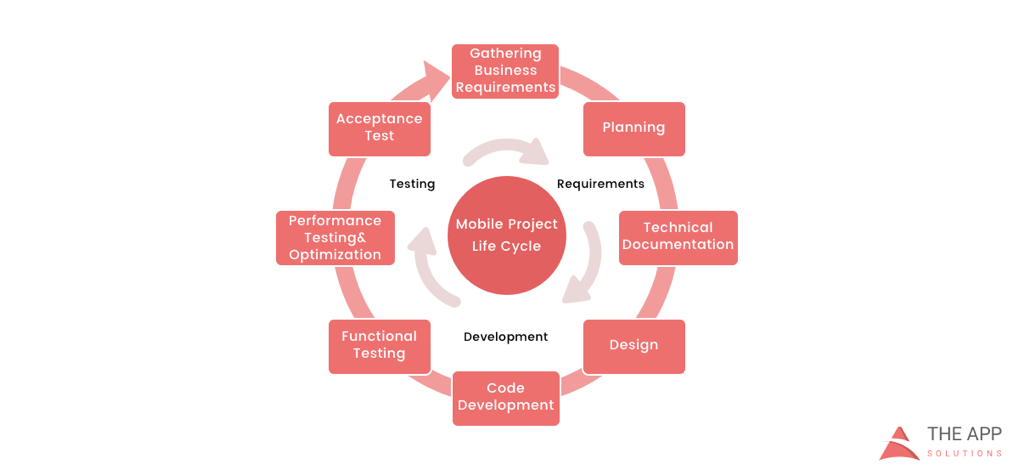
    According to the mobile app projects approach by The App Solutions, here is the life cycle of a typical development project, no matter the complexity:

    1. Planning stage (project manager, marketer, and business analyst are involved) – carrying out the business analysis and crafting mobile strategy.
    2. Technical documentation (covered by the technical writer) – describing all tech requirements and details.
    3. Prototyping (usually made by a UX/UI designer) – creating the sketch, wireframes, prototype and final app skins upon approval.
    4. Development (performed by the developers) – front-end and back-end segments of coding.
    5. Quality Assurance (usually performed continuously after each agile sprint is completed; followed by bug fixing) – testing tech requirements, device compatibility, interface, security aspects, etc.
    6. Publishing & Maintenance (covered by DevOps) – publishing to the app store, updates releases, infrastructure, and entire app maintenance.

    Planning stage

    When creating a mobile app, it is crucial to take time to go through the necessary research and planning steps.

    Business analysis:

    • Idea evaluation – a preliminary stage, when experts investigate the idea, correct it, give their advice and create a rough logics for it.
    • Competition analysis – study of activities of other players in the market.
    • SWOT-analysis – evaluation of strengths and weaknesses of the product, insights into opportunities and other aspects.
    • ROI calculation – assessment of the future app market performance help realize the real value and adjust budget accordingly.
    • Requirements scope – summing up requirements for the future product at all levels.

    Mobile strategy:

    • Market research – this study shows the overall situation on the market to help adjust the concept of the product to current demand.
    • Defining user personas – understanding who is your target audience is crucial in crafting advertising approach.
    • Technologies & tools assessment – study of specific tools required for the industry and select a set of technologies to meet the objectives of the project.
    • Complex promotion strategy – a step-by-step action plan for acquisition and retaining users.

    Technical documentation:

    Also known as a technical specification or a software documentation, this paper is a complex manual of your product, outlining requirements, business logic and leading your specialists through all stages of the project:

    • Makes your software universally understandable.
    • Provides flexibility for future changes.
    • Adds value to your app by providing a clear manual.
    • Helps to keep control of your own product.
    • Allows reusing existing parts of the developed application.

    Prototyping:

    Prototyping is a process of defining a concept in visual terms and evaluating how the app might develop to correct a misconception.

    • Creating a sketch – the draft version of your app on paper that sets up the main logic, number of screens and the way they interact with each other.
    • Creating wireframes – provides the visualization of the draft structure.
    • Creating a clickable prototype – helps to find out and analyze all possible use cases, discover logical breaks and technical inconsistencies in the original idea.
    • Designing app skins – collecting all wireframes and put them together to get the final design.

    Code Development:

    This segment usually consists of two main parts:

    • Front-end development – client-side development, creating a presentation layer of the software for a direct user interaction with it.
    • Back-end development – a server/database part of development, connecting a front-end part of the mobile app with the data access layer.

    Quality Assurance:

    In the agile development, it’s usually a continuous process following every sprint of development:

    • Compatibility testing – running the app on different devices and screen sizes.
    • Interface testing – checking the navigation, menu and buttons performance.
    • Device compatibility testing – checking how the app looks and performs on various screen sizes.
    • Low-level resources testing – examination of the app in conditions of low battery, slow internet connection, etc.
    • Security testing – provides quality assurance of users data safety.
    • Beta testing – giving users access to the app to get feedback.

    Publishing & Maintenance:

    • Publishing of the app and following updated versions to a chosen app store.
    • Infrastructure support – either you have admin panel to post on or cloud service attached, you’ll need to make sure it functions fully.
    • App store optimization – helping your app move onto the tops of search lists and this way gain more users.

    Making the Most of Your App Development Project

    Here are a few tips for getting the most out of your own app development project:

    • Mind what’s trendy + study the market and your target audience. It is a crucial preliminary stage that will impact literally every side of the project and every decision to make.
    • Specify as particularly as possible the product you expect to see at the end of the project. Defining the smallest features and functions of the software at the planning and prototyping points of the project will help find areas to save money on the actual development.
    • Negotiate your idea with various development teams (study the profile of the app development company and find evidence for their credibility, debate the best price). Make sure they hear you and understand what you mean—simply put, that you’re on the same page.

    About the Author / Charlie Shabe

    Charlie Shabe is a professional Digital Marketing Strategist. He has over 20 years Digital Marketing experience in helping global organizations use the Internet to drive their online visibility and generate leads. In addition to his PR and online marketing experience, Charlie is an expert in writing. Connect with him on Facebook and Twitter.

  • The Challenges of Digital Experience Monitoring

    The Challenges of Digital Experience Monitoring

    One of the great ironies of DevOps is that the better you are, the less likely it becomes that anyone will ever see your best work. If the code is supremely elegant, the app runs flawlessly, the servers do not lag and users and managers rarely say anything because that is exactly the experience they expect.

    People become aware of you only when something goes wrong—and at that point, they are rarely full of compliments. The experience means everything to them.

    Digital experience is the foundation of how online companies compete in the contemporary global market. That is why digital experience monitoring (DEM) has been recognized by Gartner as the most significant foundational process within application performance monitoring (APM). DEM is designed to improve not only your app but the entire experience that the user has in interacting with your brand online.

    If you’re unfamiliar with the DEM category, check out my primer here.

    DEM is the technological response to one of the oldest problems in business: not being able to be everywhere at once. On the digital side, the challenges of delivering the best possible performance across the widest scope fall into three spheres:

    • The problem of divergent user tech
    • The problem of network propagation
    • The problem of splintered responsibilities

    Let’s take a closer look at how DEM engages with each problem on its own turf.

    Divergent User Tech

    The mobile OS wars have settled on two champions for the time being: iOS and Android. As of February, those two account for 99.6 percent of mobile sales. Of course, from a DevOps perspective, nothing is that easy.

    Within iOS, around 79 percent of devices are on iOS 10, and another 16 percent are on iOS 9. The other 5 percent are scattered across various earlier versions. On the Android side, version 6 Marshmallow has the largest share at 31.3 percent of the market, and there are a plethora of other versions out there. Then you have to worry about the mind-boggling variety of hardware.

    For every combination of device and OS running your app, there are also users going to your mobile website on a handful of browsers. The numbers for February 2017 show 55.2 percent of the market is on Chrome, and 29.84 percent are looking at you through Safari. That leaves 14.96 percent of the market to be divided up among the default Android browser, Opera Mini, IE (at 1.02 percent, as hard as that is to believe) and many other contenders. It is significant to note here that the market leader did not even exist five years ago, so any apps you build now must be designed to work on browsers that haven’t been invented yet.

    The second subset of problems within the user tech consideration is geographic variation. How your app runs on 4G LTE in the city will be very different from 3G in rural areas. While Atlanta was judged to be the fastest city in the nation with downloads averaging 16.9 Mbps, users in the capital of Washington, D.C., can only work at 9.2 Mbps.

    The final subset covers issues related to the connection medium: Wi-Fi, cellular data, NFC, Bluetooth, ZigBee, WiMAX, HSPA, EV-DO, etc. It should be clear that there may be wide variations in digital experience based on the connectivity medium of various features within your app.

    Network Propagation

    It is not always the user’s fault. Old-school IT support tends to start with that assumption, but there are times when the problem originates within your own network or results from network latency generated by external errors.

    Everything that is happening on your servers, from DDoS attacks to viral videos to presentations in the conference room, could impact the performance of your app. As microservices becomes the dominant design model, it has become more common to see distributed applications get hung up in communications across the network. How will you track down which team is at fault or even assign fault when communications between microservices break down? The bigger question is, how will you correlate what happened on the front end with what happened on the back end?

    Splintered Responsibilities

    The second set of problems implies the third, which has to do with establishing a more unified view of your digital experience beyond just the IT world or whichever departments are involved. If your app involves contractors or third parties, the bigger view is larger than your company itself.

    It takes a paradigm shift to see your app as a unified tool. You have to assign a central command that takes a unified approach to keeping internal and external teams in agreement. This is the level where a team will determine the proper processes to launch at a moment’s notice and mitigate the damage from issues in real time.

    A central command outpost running DEM is needed to ensure a swift diagnosis of the performance anomalies. Then the DevOps team can resolve the issues and deploy fixes with minimal disruption to whatever the end user wants to do. Ideally, you want to do it with zero downtime or at least an SLA of nine 9’s (0.0864 milliseconds of downtime per day).

    About the Author / Kevin Goldberg

    Kevin Goldberg works in marketing at SolarWinds working on the Monitoring Cloud team. Prior to SolarWinds, he worked at AppDynamics and WalkMe. Follow his ramblings on Twitter at @Kevin_Goldberg.


  • The Top 10 Reasons to Use Cassandra

    The Top 10 Reasons to Use Cassandra

    The Apache Cassandra database is the right choice of database if you are looking for scalability and high availability without compromising performance for your mission-critical applications. Additionally, Cassandra’s support for replicating across multiple data centers is best-in-class, providing lower latency for users and the peace of mind of knowing that you can survive regional outages. To that end, we’ve compiled a list of the Top 10 reasons why enterprises onboarding and deploying mission-critical applications should use Cassandra (Apache Cassandra, DataStax Enterprise).

    1) Requirement for fast writes: Easily deals with data velocity, data variety and data complexity issues

    Many of the challenges associated with next-generation cloud applications center around data volume and data velocity. Is Cassandra able to handle the speed of data coming into the system? The answer is “yes” based on the amount of data and cluster size. Not only does Cassandra come with this ability out of the box, but there are systems of data pipeline architectures being built around ingestion speed. And to top it off, it scales linearly, making it easy to determine the right amount of capacity based on data flow.

    But, there are also two often overlooked components it provides: 1) data variety and 2) data complexity. Data variety is an alternate way of saying that data coming into one database can come in different forms. An example of this would be sensor input from a heart monitor and sensor input from an IV both for the same patient. The second component, data complexity, extends the previous example. The heart monitor might report 100 metrics twice per second under normal operating circumstances and up to 125 metrics once per second while the wearer is sleeping. This means the write patterns, locations, and frequencies can vary. Cassandra handles these situations gracefully.

    2) Can handle massive data sets

    If there were any questions about whether Cassandra is capable of handling large data sets, there is no need to look any further than the companies using it. They operate at massive scale—Netflix, Hulu, Instagram, eBay, Apple, and Spotify all have Cassandra working in interesting ways as part of their offerings.

    The other way you know Cassandra is up to the challenge is in use case examples. Many organizations use it for applications where data grows in an unbounded way very quickly. These include Twitter clones, a web log analytics data warehouse and telemetry or sensor data.

    3) Homogeneous environment

    Unlike some of the legacy distributed systems, Cassandra does not require outside support for synchronization. All of the required components for basic operation are built in. Since Cassandra also operates in a peer-to-peer fashion, this means that there is no master-slave or sharding setup and that all nodes in the ring are equal. Additionally, there is only one machine type that an administrator needs to worry about.

    4) Highly fault-tolerant

    Cassandra employs many mechanisms for fault tolerance. Since it is masterless, there is no single point of failure. There is also the potential for zero downtime rolling upgrades. This is because Cassandra can support the temporary loss of multiple nodes (depending on cluster size) with negligible impact to the overall performance of the cluster.

    The safety net Cassandra offers extends outside of your data center as well. Cassandra allows you to replicate your data to other data centers and keep multiple copies in multiple locations. This helps satisfy many regulatory requirements in addition to being a part of an strong disaster recovery and business continuity plan.

    5) Proven success across enterprise applications and in many use cases already

    There are already many examples where Cassandra is being used effectively. Banks and other financial institutions are storing large quantities of financial data in Cassandra. Analytics companies are using Cassandra to store web analytics data. Medical companies are using Cassandra to store sensor data and other time series inputs. There are also many companies making use of Cassandra for storing internet of things (IoT) data.

    6) Ease of administration

    Cassandra is a straightforward system to administer. With Cassandra being a masterless system, all nodes in the ring are the same—a homogenous system. It’s fault-tolerant and can support the temporary loss of nodes with minimal impact to production performance. This means that nodes are easy to replace and the requirement to replace downed nodes immediately isn’t as strict.

    7) Custom tuning

    There are a lot of knobs and levers that can be turned to get Cassandra to perform optimally for your workload and environment. You can set it up to operate in a way that is consistent with your workload. For example, if you write lots of log data and read infrequently, then there are configuration tweaks to be made for write-heavy systems. If you write heavily to one data center and then do all your reading from another data center, then you can adjust the settings on a data center-by-data center basis.  This idea of tuning isn’t just available at the application level; you can also tune the JVM and Java settings, including GC and logging levels. Changes can even be made by the drivers at connection time to aid in the performance of your system.

    8) Easy to integrate core applications

    A lot of work has been done on data manipulation and parsing systems to integrate with Cassandra. For instance, the full text search engine Apache Solr has been packaged to work with Cassandra to provide full featured search capabilities to an existing Cassandra database. Apache Spark, a big data analytics engine, also has been plugged in to work on an existing database. There are entire suites of tools that can be integrated or bolted on to increase its capabilities. These include Apache Mahout, Kafka and Zipkin, to name a few. This is important because the more tools you have available to you, the more powerful your data becomes. You also have the ability to gain more insight about your data without having to build and maintain the application systems that were previously required.

    9) Excellent Monitoring Options

    Included in the system of tools referenced in No. 8 are monitoring packages. If you are a user of automated monitoring platforms such as Datadog or Netuitive, you’ll find examples of prepackaged agents to monitor the important parts of Cassandra. You can then tack on your own additions of other metrics that are important to you. This is made possible by Cassandra taking advantage of Java MBeans and exposing them to the client. You can use these to get at much of the internal information Cassandra uses to make its own decisions and decide on its own health. Datastax also offers its own monitoring and control application called Opscenter.

    10) Amazing community

    One of the best things about any piece of software is having a great community of developers and experts available to you for help or guidance. There is a huge yearly database summit put on by Datastax, the primary backer and largest contributor of code to Cassandra. It also sponsors community events all over the world so you can meet and interact with other developers around you.

    For open-source software to be successful, there needs to be an ecosystem that develops around it. In the case of Cassandra, there are consultancies, monitoring and troubleshooting systems, plugins, instrumentation systems and backup systems. That is all a set a competencies that your organization no longer needs to own and can use what the greater community has already created. There are even PaaS companies that will completely take over the management for you, leaving you just the development of your application to focus on.

    Given the sizable number of organizations and people that are a part of the ecosystem and the Cassandra community as a whole, there is no shortage of articles, documentation and people willing to help. A welcoming and helpful community isn’t always a given, but in the case of Cassandra, it’s alive and thriving. This is important because software is always about people.  The more of them that you can interact with that have shared your experiences, the better. It also will be easier to find solutions to your problems having a network of people who might have faced them before.

    There are many reasons why Cassandra could be the right tool for your application. Knowing your systems requirements, workloads and future will help you make the right choice. As you can see, if you do choose Cassandra, you are bound to be in good company.

    — Michael Colby

  • When Bad Things Happen to Good Clouds: Why You Need a Recovery Plan

    When Bad Things Happen to Good Clouds: Why You Need a Recovery Plan

    Amazon S3 storage service recently experienced a widespread five-hour outage in its East Coast availability zone. Many next-generation consumer and business applications rely on a cloud storage, so the S3 outage quickly cascaded and temporarily crippled organizations from Netflix to Slack.

    Cloud outages like this are normal, and notable because they affect so many businesses. The last significant AWS outage was in August 2016. While Amazon S3 is architected for data durability, that doesn’t equal fast recoverability during an outage. As good as cloud platforms are, they still leave a few gaps:

    • Availability zones don’t equal recoverability. S3 is designed to withstand a site outage within a zone, but as the most recent outage shows, networking issues can lead to a widespread outage across an entire region.
    • Data still needs to be backed up. As we noted in a previous blog post, even Amazon recommends backing up data.
    • Recovery can be slow and tedious. It’s one thing to back up data. It’s another thing entirely to recover it. It can take hours or days to recover data after a failure—especially for hyperscale applications and databases.
    • Data is often in one “basket.” If backup data is stored in the same cloud service as the primary data, in the same availability zone, there’s no way to recover data during a widespread outage.
    • Data can get compromised or enter an inconsistent state. The cloud itself doesn’t protect data from application- or database-level corruption, or human error.

    A data backup, recovery and continuity strategy needs to be designed with the cloud in mind. To make sure you can recover quickly, even from a cloud outage:

    • Keep backup data in another service or region. Failures like this one often affect an entire region. A backup and recovery strategy needs to include the ability to recover in another region, cloud service or even a private cloud.
    • Have a fast recovery process. Traditional backup solutions and scripting-based approaches can’t recover data quickly, particularly if the application needs to be recovered to a different topology.
    • Have point-in-time recovery. Since data can get compromised at the early stages of an outage, being able to restore applications quickly to a point in time is important as well.

    The cloud as-a-service architecture is more resilient than traditional infrastructure, and gives you agility. But when failures do happen, they are also entirely out of your control. Don’t ignore recoverability and resiliency of the data because it’s in the cloud, and don’t expect the same recovery processes and tools to work on next-generation, hyperscale applications.

    — Shalabh Goyal

  • Backup: Not So Easy in Certain Environments

    Backup: Not So Easy in Certain Environments

    We discussed how backup needs to be reinvented for a new era cloud-native applications, and what you should look for in a modern database backup and recovery solution. But even if you scrap the traditional approach to back up and write scripts to handle the task, backup and recovery of next-generation applications and databases (Apache Cassandra, MongoDB, Amazon DynamoDB, Microsoft DocumentDB, Apache HBase, et al) can be frustratingly difficult. But why is that?

    The short version is this: In an eventually consistent write-anywhere non-relational database architecture, it is almost impossible to capture a consistent state backup. Successful data recovery is even less likely!

    There isn’t just one reason why this is the case. It comes down to the basic nature of a distributed architecture that’s designed to both scale and withstand node failures without downtime. As we’ve highlighted below, there are several challenges from the start that make backing up a distributed architecture difficult:

    • Data is written to an available node. The first landing point for data is not predictable, so there’s no way to catch data as it lands on the node.
    • Then data is replicated to at least one other node before verification. That ensures a valid write, but also immediately creates a copy of the data.
    • … then replicated to one or two more nodes for availability. This happens afterwards, and the same data can get updated in quick succession.
    • … meaning there are three or four copies of data at any time.
    • … and nodes are never immediately consistent.
    • … and backups are hugely inefficient since every replica is copied.
    • And when a node fails, the topology changes mid-flight.

    Theoretically, a good DevOps team might be able to write scripts that will back up the database successfully 80 percent to 90 percent of the time (cases such as multi-node failures, changing topologies, compaction of databases and many more are complex to model, so scripts are difficult to get right).

    Unfortunately, backup is the “easy” part of the equation. Restoring a backup is where it really gets challenging. A successful restore is far more complicated than most people assume. It involves the following steps:

    • Rebuilding the correct topology. Because each node was backed up individually, the database has to be restored to the same topology (six nodes to six nodes, 12 nodes to 12 nodes), etc. This relates to enabling recovery across clouds, test/dev and CI/CD use cases.
    • Waiting for the database to repair and restore itself. The non-relational database architecture can withstand node failures and keep running, but a full restore with data reconciliation will bring back memories of the worst RAID rebuilds on slow drives.
    • Deduplicating multiple inconsistent copies. The backup copy has three or more copies of all data that may be in an inconsistent state. It needs to be deduplicated or reconciled first.
    • But data history isn’t always available. In most distributed architectures, the oplog is a circular buffer that essentially eats itself as it goes! It may not be possible to even recover the necessary log data to reconcile the database.
    • And there’s no reliable way to go back to a point-in-time. Even with the oplog data, it would be very difficult to reconstruct point-in-time data. At best, you’d get a recent, mostly accurate copy of the database.

    In the real world, restores can take days or weeks—if the data can be recovered at all.  But as the recent Gitlab outage shows, it is difficult for even technically savvy organizations to get it right. Human error can be as fatal to a database as a natural disaster if there isn’t a reliable backup and recovery process in place.

    — Shalabh Goyal

  • Why Reinvent Deduplication? Isn’t Cloud Storage Cheap?

    Why Reinvent Deduplication? Isn’t Cloud Storage Cheap?

    Most people assume cloud storage is cheaper than on-premises storage. After all, why wouldn’t they? You can rent object storage for $276 per terabyte per year or less, depending on your performance and access requirements. Enterprise storage costs between $2,500 to $4,000 per terabyte per year, according to analysts at Gartner and ESG.

    This comparison makes sense for primary data, but what happens when you make backups or copies of data for other reasons in the cloud? Imagine that an enterprise needs to retain three years of monthly backups of a 100TB data set. In the cloud, this can be easily equate to 3.6PB of raw backup data, or a monthly bill of more than $83,000. That’s about $1 million a year, even before factoring in and data access or retrieval charges.

    That is precisely why efficient deduplication is hugely important for both on-premise and cloud storage, especially when enterprises want to retain their secondary data (backup, archival, long-term retention) for weeks, months and years. Cloud storage costs can add up quickly, surprising even astute IT professionals, especially as data sizes get bigger with web-scale architectures—data gets replicated and they discover it can’t be deduplicated in the cloud.

    The Promise of Cloud Storage: Cheap, Scalable, Forever Available

    Cloud storage is viewed as cheap, reliable and infinitely scalable—which is generally true. Object storage such as AWS S3 is available at just $23/TB per month for the standard tier, or $12.50/TB for the Infrequent Access tier. Many modern applications can take advantage of object storage. Cloud providers offer their own file or block options, such as AWS EBS (Elastic Block Storage) that starts at $100/TB per month, prorated hourly. Third-party solutions also exist that connect traditional file or block storage to object storage as a back end.

    Even AWS EBS, at $1,200/TB per year, compares favorably to on-premises solutions that cost 2 to 3 times as much and require high upfront capital expenditures. To recap, enterprises are gravitating to the cloud because the OPEX costs are significantly lower, there’s minimal upfront cost and you pay as you go (vs. traditional storage, which you have to buy far ahead of actual need).

    Copies, Copies Everywhere: How Cloud Storage Costs Skyrocket

    The direct cost comparison between cloud storage and traditional on-premises storage can distract from managing storage costs in the cloud, particularly as more and more data and applications move there. There are three components to cloud storage costs to consider:

    • Cost for storing the primary data, either on object or block storage
    • Cost for any copies, snapshots, backups or archive copies of data
    • Transfer charges for data.

    We’ve covered the first one. Let’s look at the other two.

    Copies of data. It’s not how much data you put into the cloud; uploading data is free, and storing a single copy is cheap. It’s when you start making multiple copies of data—for backups, archives or any other reason—that costs spiral if you’re not careful. Even if you don’t make actual copies of the data, applications or databases often have built-in data redundancy and replicate data (or, in database parlance, a Replication Factor).

    In the cloud, each copy you make of an object incurs the same cost as the original. Cloud providers may do some deduplication or compression behind the scenes, but this isn’t generally credited back to the customer. For example, in a consumer cloud storage service such as DropBox, if you make one copy or 10 copies of a file, each copy counts against your storage quota.

    For enterprises, this means data snapshots, backups and archived data all incur additional costs. As an example, AWS EBS charges $0.05/GB per month for storing snapshots. While the snapshots are compressed and only store incremental data, they’re not deduplicated. Storing a snapshot of that 100TB dataset could cost $60,000 per year, and that’s assuming it doesn’t grow at all.

    Data access. Public cloud providers generally charge for data transfer either between cloud regions or out of the cloud. For example, moving or copying a TB of AWS S3 data between Amazon regions costs $20, and transferring a TB of data out to the internet costs $90. Combined with GET, PUT, POST, LIST and DELETE request charges, data access costs can really add up.

    Why Deduplication in the Cloud Matters

    Cloud applications are distributed by design and are deployed on non-relational massively scalable databases as a standard. In non-relational databases, most data is redundant before you even make a copy. There are common blocks, objects and databases such as MongoDB or Cassandra that have replication factor (RF) of 3 to ensure data integrity in a distributed cluster, so you start out with three copies.

    Backups or secondary copies are usually created and maintained via snapshots (for example, using EBS snapshots as noted earlier). The database architecture means that when you take a snapshot, you’re really making three copies of the data. Without any deduplication, this gets really expensive. And existing solutions, designed for on-premises legacy storage, can’t help.

    Not Just Deduplication — Semantic Deduplication

    Most deduplication technology works at the storage layer, deduplicating blocks of data. This is highly efficient on centralized SAN or NAS storage, but breaks down if the data layer is abstracted from the storage—as it is in a distributed database such as MongoDB. Deduplication in this world needs to address two fundamental issues:

    • It has to work at the data layer, not the storage layer. To deduplicate data from a distributed cluster, the software has to understand and interpret the underlying data structure.
    • It has to eliminate redundant data before it gets written to the database. Once data is written, it gets replicated within the cluster, so it needs to be deduplicated in-flight.

    The good news is there is semantic deduplication technology that works efficiently with distributed cloud applications that can help cut storage costs by up to 80 percent for databases such as MongoDB and Cassandra.

    — Shalabh Goyal

  • Is Cloud Adoption on Your Company’s Horizon?

    Is Cloud Adoption on Your Company’s Horizon?

    Under pressure to increase the speed of innovation in the digital space and outpace competitors, companies large and small are turning to the cloud. Moving to the cloud provides flexibility of infrastructure, transparency of infrastructure costs and many other benefits.

    However, making the transition to the cloud is far more intricate for regulated industries—especially large financial organizations—where security and compliance concerns often trump innovation efforts. According to Cloud Security Alliance, the financial industry is still in the early stages of cloud adoption. In fact, 61 percent of financial leaders say their cloud strategy is in the formative stages. Those financial companies that can shift to the cloud properly will see long-term gains, from both a performance and economic standpoint.

    In 2015, while working at a large international bank, I assisted on a project to help transform how the bank approached digital for retail banking and wealth management. The bank was still approaching most projects as large, monolithic endeavors, where six-month delivery cycles were standard. Infrastructure was owned by IT Operations, and provisioning lacked automation. As such, almost every project began with designing environmental needs from scratch—adding time to both creation and delivery. It was quickly evident that cloud was the bank’s best option, allowing for increased transparency, greater scalability, infrastructure on demand and improved organizational efficiency.

    Shifting to the Cloud

    After working on this project, I learned that to effectively move to the cloud, organizations must understand how to maximize benefits and minimize risks. Here’s how:

    Apply a two-pronged approach

    We realized right away that we needed a system where we could meet our project objectives, while simultaneously exploring the cloud options. To avoid jumping in too quickly and running into non-technical challenges, we adopted a two-pronged approach: we’d build the platform internally using Cloud Foundry PaaS, while exploring the use of external cloud in parallel—without impacting the delivery of the internal platform. To avoid re-architecture and rebuild later on, we had a guiding principle: Whatever is built internally has to be available in the external cloud as well.

    Navigate legal and compliance hurdles

    Regulators are still on the fence when it comes to certain industries adopting the cloud, with regulations still lacking specific policies. For example, in the financial space, lack of close regulation leaves many institutions on their own to sort out contracts with cloud providers based on their individual risk appetite. When regulations are published, they are very high-level and generally state that managing the risk and responsibility for integrity of data is with banks, not with cloud providers. Instead of creating an equal playing field, this tilts the scale toward smaller fintech partners with larger risk appetite±and who more regularly fly under the regulator’s radar.

    Expect roadblocks

    In so many organizations, IT operates in silos. For example, all infrastructure is owned and operated by the IT Operations group, which then recharges that infrastructure back to the businesses based on complex metrics. For cloud to succeed, we need to answer the question of ownership. But that’s not all: Many folks may not believe that organizational issues are a serious problem, and thus, will lack a commitment to be involved. To ease this problem, strong sponsorship from senior leadership is essential.

    Prepare for technical issues

    When implementing a technology solution, things don’t always go smoothly from the start. For example, there might be approved ways to connect with third-party providers that were created before cloud providers came into play. While this kind of issue is easy to solve, it requires a change in internal procedures that must be accounted for.

    Focus on development and testing first, then on production

    While working toward final approval and negotiating the agreement, which can take significant amount of time, conducting a trial run is an effective way to work out any potential problems before full implementation. Signing an agreement to use cloud for development and testing only is less of a hurdle, as no customer data will be transmitted or stored. It’s also important to train anyone who might be involved throughout the process—no matter how big or small their role.

    Conduct a formal project launch and set clear goals

    To drive continuous improvements, it’s essential to establish clear objectives and goals. This provides metrics for benchmarking success and ROI, and encourages the brainstorming of new ideas on a case-by-case basis. Prior to the formal launch, don’t forget to identify key stakeholders and advocates—they will stand behind the project and provide valuable insight into the potential outcomes of decisions.

    Create a transparent culture

    Full transparency is key, even if it means dealing with resistance. Resistance, especially early on, often is unavoidable. However, it is better to deal with resistance, gain support and handle any issues early in the project. Being transparent gains you more support. Or, if the opposition is insurmountable, you can stop the project before wasting too much time or effort. Most important, you want to avoid criticism suggesting that the project is putting the company at risk. By looping in the right people from the start, you’ll have advocates in your corner who will raise red flags and anticipate problems on the horizon.

    Remember that people will want to be involved

    While cloud may still be an unfamiliar concept for many, almost always someone will come out and say, “Actually, I have experience, and already thought about how to do this. How can I get involved?” Bring those people on board, leverage additional insights and increase commitment to the project. This is an exciting change—people want to be on the team that introduces it!

    Large, regulated companies historically have been slow to implement the cloud, due largely to perceived compliance concerns and security risks. However, in an environment marked with rapid innovation, companies are quickly realizing that to stay ahead, adopting a cloud-first business model is a must.

    About the Author / Alexander Kalinovsky

    Alexander Kalinovsky is Director of Engineering at Wipro Digital. He is a senior IT leader with extensive experience managing successful application development and operational teams, along with establishing global development practices and partnering with global organizations. Alex has spent over 10 years working in Financial Services in development and infrastructure, specializing in payment systems and FX solutions. Alex brings his strong FS background and enthusiasm for Agile development to his role at Wipro Digital, driving the digital transformation agenda for many of the world’s leading brands.

  • Protecting Data in Public Cloud and Hybrid Cloud

    Protecting Data in Public Cloud and Hybrid Cloud

    Backup, business continuity (BC) and disaster recovery (DR) have all been a critical part of IT for over 30 years—ever since we began relying on technology to run our businesses. Traditional solutions were designed for the world of on-premises infrastructure and structured applications and relational databases. But the world is changing. In the last blog, I talked about the era of digital transformation and the impetus it has on rethinking and reinventing the fundamental backup and recovery architecture for workloads moving to the cloud and applications being born in the cloud.

    What Changed? Reinventing Backup and Recovery

    Application and data platforms are undergoing the biggest transformation since the dawn of computing. There are several forces at work:

    • New applications. The third-generation applications are geo-distributed, scale across multiple systems, always on and typically are deployed in a cloud-first model.
    • Existing applications are moving to the cloud. They aren’t going away, but companies are moving some or all of them to the cloud. They still need backup and recovery.
    • RPO and RTO windows are shrinking: Enterprises want “always-on” and gone are the days when you could do nightly backups.
    • Smaller companies will go all-in on public cloud. SMBs don’t want to be in the business of IT. They’ve been driving the rapid growth of cloud applications and platforms.
    • Enterprises will build hybrid clouds. Enterprises will deploy applications and data across on-premises and public cloud environments. Scale, compliance and other factors mean they’ll need to keep some systems on-premises.
    • Everyone will use multiple clouds. No one will bet their business on one cloud or one provider. Even now, enterprises are splitting workloads across clouds or cloud and on-premises. Development and test may use one cloud, while the same application might be deployed in a private cloud or a different public cloud.

    Cloud’s Impact on Backup, Recovery and Continuity

    Cloud gives organizations much more agility, operational savings, and a pay-as-you go model. Public cloud providers can also build much more resilient infrastructure. Amazon guarantees 99.95 percent availability for EC2 and 99.99 percent for S3; S3 is designed for 11 nines of data durability, with multiple availability zones. Because the cloud is so reliable—and cheap—it’s quickly becoming a backup target for on-premises data. But that shouldn’t trick us into believing backup and recovery are “built-in” when we run applications in the cloud. Even Amazon itself recommends backup services for all AWS-native applications and cloud databases.

    While service availability and data resiliency addresses infrastructure business continuity and disaster recovery, it doesn’t provide point-in-time recovery or application level intelligence for backup and recovery. As good as the cloud platforms are, they don’t protect against logical errors. And research shows 8 out of 10 errors are logical errors—data corruption, user errors.

    Existing Backup Products and the Cloud

    As we noted above, traditional backup and recovery products don’t meet the needs of cloud applications—even for existing applications that have moved to the cloud, and not just because they were built in a different era. Cloud and distributed architectures present several other challenges:

    • Cloud breaks the media server based architecture of traditional solutions. Cloud applications and data don’t reside on a specific array or disk, so you can’t easily back up what you can’t see. Backups also don’t capture configuration data in the cloud, such as AWS Cloud Formation templates.
    • Cloud doesn’t speak the same language. Legacy solutions talk to tape, disk or virtual disks. Backup and recovery in the cloud means integrating with the right protocols, such as the S3 API or Google Cloud Storage.
    • Backup appliances can’t be moved to the cloud. Existing backup appliances such as EMC Data Domain or NetBackup that work extremely well on-premises can’t be picked up and moved to the cloud.
    • Traditional backup agents won’t scale. If you could get a backup agent running in the cloud, it wouldn’t scale well across dozens or possibly hundreds of nodes.
    • VM is not the right layer of abstraction: This is precisely why the core principle of the Datos IO CODR architecture is a scalable application-centric view of data management and data protection that distinguishes it from conventional approaches. This is the exact reason why the CODR architecture introspects application data and uses global semantic de-duplication to achieve storage efficiencies, instead of relying on traditional de-duplication techniques which treat data as an opaque object (such as a VM or a LUN). The benefit of this approach is fine-grained and highly space-efficient data protection that can span clouds over network links.
    • Cloud Gateway or Migration Services: Unidirectional only.

    Data Protection Must Be Reinvented

    The problem of backup and recovery of cloud applications is novel as there are three critical things a cloud backup and recovery architecture should have:

    • Elastic compute only. The architecture should scale efficiently on elastic compute instances. There shouldn’t be any CapEx costs for servers or appliances.
    • No media servers. Backing up large, scale-out databases requires direct a parallel streaming architecture for data movement between the database and secondary storage. Legacy backup architectures rely on media servers that quickly would become choke points. Direct parallel streaming also allows the data to remain available in native formats.
    • Semantic deduplication. Scale-out application databases typically have a 3x replication factor. If you back up individual nodes or even manage to snapshot the whole database, two-thirds of the backup data is redundant. Over time, backups will be 75 percent to 80 percent inefficient without semantic deduplication that works across a distributed architecture.

    — Shalabh Goyal

  • 3 Approaches to End-User Experience Monitoring

    3 Approaches to End-User Experience Monitoring

    The volume of transactions running through websites and mobile apps make customer-facing applications crucial to online businesses. If these applications perform well for their users, they generate revenue for the business. If they don’t, they affect the credibility of the business, which in turn affects the overall revenue. It is therefore imperative that businesses using monitoring to understand how well their revenue-critical applications are behaving for their end users.

    From an IT team’s point of view, understanding the user experience of their applications is becoming more challenging as technology evolves. Newer and more complex applications are being written using an assortment of languages. These applications are being deployed on a wide variety of infrastructure components. To add to that, today’s users access these modern applications on a variety of devices such as the web, smartphones, tablets and smart watches.

    Fortunately, there are a few means available through which businesses can determine the user experience of their web applications. Let’s take a look at three common approaches below.

    Real User Monitoring (RUM)

    Real user monitoring is a passive monitoring approach that involves collecting metrics at the browser level to accurately determine the application performance as perceived by the end users. Monitoring at the browser level is achieved by injecting JavaScript snippets into the header and footer of the HTML code of the web application. This code will ascertain the full page-load experience—including downloading the assets from the content delivery network (CDN), rendering the page and executing the JavaScript from the browser’s perspective. Additional instrumentation can be used to collect more metrics by injecting additional JavaScript code.

    The data gathered through RUM provides answers to questions about user experience such as:

    • How long did it take to load the full page?
    • What is the response time from a network perspective (redirection time, DNS resolution time, connection time)?
    • What is the time interval between sending the request and receiving the first byte of response?
    • What is the time taken by the browser to receive the response and render the page?
    • Are there any problems on the page? If yes, what caused the problem?
    • How is the performance when the application is accessed from different countries?
    • What is the response time across different browsers? Do new application updates affect the performance in a specific version of the browser?
    • How does the application perform on different platforms such as desktop, web and mobile?

    The biggest advantage of monitoring real user data is that it relies on actual traffic to take measurements. There is no need to script the important use cases, which can save a lot of time and resources.

    Real user monitoring captures everything as a user goes through the application, so performance data will be available irrespective of what pages the user sees. This is particularly useful for complex apps in which the functionality or content is dynamic.

    Server-Side Monitoring

    Although user experience is best tracked at the browser level, application performance monitoring at the server side also provides insight into end-user performance. Server-side monitoring is mostly used in conjunction with real user monitoring. This is because problems originating on the server side can only be efficiently detected using server-side monitoring.

    Monitoring performance on the server side involves agent-based instrumentation technology for acquiring and transmitting data. This monitoring approach is used to watch user transactions in real time and troubleshoot issues such as slowness or application bugs.

    Developers have to install agents on the application server to help capture and visualize transactions end to end, with performance statistics across all components, from the URL down to the SQL level. This visual breakdown reveals the flow of all the user transactions being executed in each layer of the application infrastructure.

    Server-side monitoring helps track response time and throughput taken by each application component, with the option to trace transactions end to end via code analysis. This helps the IT operations/DevOps teams identify slow web transactions and then isolate performance issues down to the level of the specific application code that caused them. The underlying database is also monitored most of the time to determine slow database calls, database usage and overall database performance. With server-side monitoring, users will be able to identify the SQL queries executed during a transaction and thus identify the worst-performing queries.

    Synthetic Transaction Monitoring

    Synthetic transaction monitoring is an active monitoring technique based on the concept of simulating the actions of an end user on a web application. This method involves the use of external agents executing prerecorded scripts that mimic end-user behavior at regular time intervals. The monitoring agents are usually very light and do not create any additional load on network traffic.

    Most application performance monitoring solutions provide recorder tools to capture the actions or paths a typical end user might take in an application, such as log in, view product, search and check out. These recordings are saved as scripts, which are then executed by the agents from different geographical locations.

    Technically, there are two different approaches to generating requests. Some solutions replay recorded HTTP traffic patterns, while others drive real browser instances. The second approach is more useful for modern applications that make a lot of JavaScript, CSS and Ajax calls.

    Since synthetic transaction monitoring involves sending requests across the network, it can measure the response time of application servers and network infrastructure. This type of monitoring does not require actual web traffic, so you can use this approach to test your web applications prior to launch—or anytime you like. Many companies use synthetic monitoring before entering production in the form of automated integration tests with Selenium.

    Synthetic monitoring does have its limitations, though. Since it is based on predefined transactions, it does not monitor the perception of real end users. Transactions have to be “read-only” because they would otherwise set off real purchase processes. This limits the usage to a certain subset of your business-critical transactions.

    The best approach is to use synthetic transaction monitoring as a reference measurement that will help identify performance degradation, detect network problems and notify in case of errors.

    Every business is different and has its own requirements that can help to choose which type of monitoring to implement. An ideal strategy would be to use active and passive monitoring techniques side by side so that no stone is left unturned in the pursuit to monitor end-user experience.

    About the Author / Sridhar Iyengar

    Sridhar Iyengar is vice president, product management, at ManageEngine, a division of Zoho Corp. For more information on ManageEngine, the real-time IT management company, please visit www.manageengine.com; follow the company blog at http://blogs.manageengine.com, on Facebook at http://www.facebook.com/ManageEngine and on Twitter @ManageEngine. Follow Sridhar on Twitter @iSridhar.