Category: DevOps in the Cloud

  • DevOps Chat: Panzura’s Cloud-Based File System Gives DevOps Big Savings

    DevOps Chat: Panzura’s Cloud-Based File System Gives DevOps Big Savings

    Have you heard of Panzura? If not, you are probably not alone. The company is relatively new to the DevOps market. But it’s not some new startup that grabbed some VC money by using DevOps as a buzzword: Panzura has been around for years, perfecting its cloud-based file system that can deliver eye-popping results in terms of speeding file requests, as well as the volume of data that you have to transport. For DevOps, this kind of speed savings is just too good to pass up.

    I had a chance to sit down with Rich Weber and Barry Phillips of Panzura and discuss why DevOps teams are finding Panzura’s offering so enticing. Barry is the VP of Marketing at Panzura, but don’t let that title fool you—Barry is highly technical. Rich is chief product officer at Panzura and is also really knowledgeable. Together, we had a great conversation about this interesting offering and why the DevOps market actually came to Panzura rather than Panzura coming to it.

    As usual, the streaming media player is below, followed by the written transcript of our conversation. Have a listen or a read, or both. Enjoy!

    Alan Shimel: Hi. Alan Shimel, Editor-in-Chief, devopsy.kinsta.cloud here for another DevOps Chat and I’m happy to be bringing—I, well, I think introducing to our audience a new company or a new company to the DevOps face perhaps that we haven’t had a chance to speak to before and that company is Panzura, and I’m happy to be joined on this episode by Rich Weber, Chief Product Officer at Panzura, and Barry Phillips, Chief Marketing Officer at Panzura. Gentlemen, welcome.

    Weber: Nice to be here. Thank you, Alan.

    Phillips: Yeah. Thanks, Alan, great to be here.

    Shimel: Okay and just for our audience, though, Rich, that was you first and, Barry, that was you second. So guys, I’m gonna guess right now that our audience may not be familiar with Panzura, can one of you give me the elevator pitch or a quick background on Panzura and we’ll go from there?

    Phillips: Yeah, it’s Barry. I’ll do that. So yeah, so Panzura and it’s interesting as I start this off, most people may go I’m not really sure why you’re in this DevOps space, so what we do is have a hybrid-cloud storage solution and really what that means is we put all of our customer’s unstructured data in the cloud and we happen to cache the data that they’re using on physical or virtual appliances that’s set in the offices. And that happens to work really, really well for some specific use cases because of some unique technology that we have inside of our software so you know one of those is for manufacturing and it really makes CAD applications work really, really well across sites, architectural apps, engineering apps and just like those use cases we’ve have customers actually bring us into the use case into the DevOps use case and really specifically being able to globally distribute software builds and artifacts quite quickly. And so that’s really the part of DevOps that we play and it really kinda plays into the continuous development, continuous delivery, continuous integration space and essentially what happens is in the case of electronic arts you know we dramatically taking the time it takes to distribute globally you know 50GB build files from 10 hours to essentially minutes and we’ve got many different examples of customers like that, so it’s always great to be brought into a specific space by a customer need that’s taken a platform that you have and really using it for a specific use case.

    Shimel: Absolutely. And, Barry, of course when we’re talking about a time difference of 10 hours to a few minutes, I mean that’s the kind of eye-popping differentials that we like to tell in the best of cases in DevOps, right, where we’re putting those kinds of savings, those kinds of numbers in front of people. So thanks for that background. Rich, if I can ask you so you know obviously there’s use cases here for the DevOps audience, for the DevOps market and DevOps use patterns, as we say. As chief product officer, Rich, what kind of—you know, how did you steer feature set? How do you plan your road map to kinda further help the DevOps community with this product/service?

    Weber: Well, I mean typically it’s based on feedback from real customers that we have doing workflows and things that run through there and like so that eye-popping one that you were talking about is how do we reduce that time by so much? You know a lot of that came from working with software developers and one in particular is in the gaming industry where imagine their builds are very large, right? They’re building into like Blu-ray ISO images and things and enabled low-cost QA centers to test that. Now you can have anywhere from 20GB to 50GB resulting builds and transferring those takes a long time, right? Suddenly, you come to the point of, ‘Hey, I could probably get that data across the globe faster on FedEx than I can digitally over the line.’ Our product really helps do that by providing a global file system that’s available in each site and by virtue of talking to the Panzura device it’s automatically in the cloud. It’s automatically duplicated, compressed and transported and available in their real time. Especially if I’m doing many hundreds of builds very quickly, the deltas between those builds are very short so effectively I can make those available for tests, production and immediate use through my build process.

    Shimel: Excellent. And, Barry, you and I spoke a little bit offline and you know I think I had asked you about so is this a product or service that is really only for big companies or for unicorns you know of the world? I mean who’s a good candidate, especially from a DevOps point of view, for Panzura?

    Phillips: Yeah and I would even extend it, I would say, beyond DevOps, right? So if you think of any company that does any sort of global testing and development whether that’s pure DevOps, whether that’s somebody who is in the process of putting DevOps in place or even somebody who’s basically not even there yet that when you think of just the ability to move these builds and artifacts quickly that really increases the number of test cycles you can do on the software itself. Of course, that’s better quality software you know typically gets market—it gets software to market faster. It’s all those typical things. But I think it really encompasses anybody who is actually has dev and test teams essentially around the world.

    Shimel: Yep. And another kind of phenomenon that we’re—that I’ve observed, Barry, in talking to a lot of people, obviously, is this idea of a multi-cloud. So let me back up. When we first saw the whole sort of cloud revolution, if you will, I think the—everyone agreed that hybrid cloud was the way to go. No one was moving a hundred percent of their infrastructure to a AWS or Azure, a public cloud platform, but there was a hybrid where some of it might be public. Some of it might be in a private cloud in a data center. Some of it may be on-prem, right, but it was that hybrid situation. Now we’re seeing multi-cloud, right? And I think it’s a different animal. Barry, Rich, what do you think?

    Weber: I think multi-cloud is good and particularly for DR purposes but going to that hybrid concept that you were speaking of before and how do companies really bridge the, hey I’m working inside of my four walls or inside of my data center and how I take advantage of that cloud space that’s where Panzura really helps companies bridge that gap. So in particular, if I am working within my own data centers and my own sites and I’ve got multiple sites, that example that I gave you before not only was the time reduced from many hours of days down to minutes but in terms of that footprint that went down to one—from 1.5PB to 45TB by utilizing the cloud because I had one central location of the data and I didn’t have to store and move and transfer many replicas. So that cloud gives you the ability to aggregate and make that data available quicker. Multi-cloud I think gives you an opportunity to then further do a disaster recovery even redundant across clouds not only from sites but from cloud to cloud, right? That first step is really getting that data and aggregating it in the cloud itself and Panzura really gives companies the advantage on how to move there and take advantage of that and even burst inside of computing, not—and beyond data, as well.

    Shimel: Absolutely. I mean and that’s exactly where I see with multi-cloud. Once I’ve been able to move that data to the cloud whether I have some of my infrastructure on Windows, let’s say in Azure and some other stuff on NOS and AWS and maybe something on OpenStack at Rackspace or somewhere doesn’t make a difference ‘cause my data is rather—you know my data is multihomed anyway or not multihome. That’s not the word I’m looking for. Panzura takes care of the data. I don’t have to worry about that. Is that—is that the gist of it?

    Weber: Yeah, I mean, in fact, we’ve got customers who I would say maybe you didn’t start out as being cloud-forward customers or cloud-savvy but Panzura makes that simple, right? If all they have to do is make a mount, my workflow stays exactly the same as it is today and you don’t have to worry about where that replication it goes, what data center is getting used. Panzura makes that part simple. All you got to do is mount it regardless of where I’m at. It’s the beauty of having a global main space in a global file system.

    Phillips: And maybe to further add on top of that, Alan, is you know Rich mentioned workflow and as you think of you know companies who essentially go from you know waterfall to Agile and then get into you know really this DevOps model. You know we can sit underneath there and it stays the same for them ‘cause we are just we look like a regular storage mount for them, so everything will remain the same as they move down this process into DevOps.

    Shimel: Great. So let me get a little geeky on us. Rich, can you kinda describe what the Panzura stack, if you will, looks like? I know you referenced a Panzura device earlier. What exactly—give us a little—our audience a little bit more detail on that.

    Weber: Yeah, so I’ll try and keep it simple but on the front end it looks just like a file server you know whether that be like a net app or even a Windows file server on the front end, so it integrates with AD or other authentication methods and you just mount it, right? So, on the front end you’ve got either an SMB/CIFS front end or an NFS front end. You mount that drive and you store your data there. As data comes to us, it runs through our stack and our stack begins with de-duplicating and that de-duplication what you need to know about Panzura is it’s not just for the data at that place. It’s for the entire footprint for all data written everywhere because that de-duplication information is part of the metadata that’s shared globally. Then it gets—after it gets de-duplicated it gets compressed, then it gets encrypted and none of the customer keys or security access stuff exist in the cloud, so none of our customers actually even have to trust the cloud provider themselves because no data sits in there in clear text. Then it all gets compressed, packaged up and put in the cloud and that’s done at the block level from a de-duplication standpoint. So as it run through our stack we integrate WAN optimization, as well, so moving that data becomes very fast and simple and on the other end everything works in reverse and the customer doesn’t have to manage all that; all that happens automatically. Again, all they see is a drive mount and access the data in exactly the same way they would from their filer today.

    Shimel: Has anyone ever used the term data storage as a service or data storage and access as a service?

    Weber: Yeah, absolutely –

    Shimel: Would that be fair?

    Weber: Yeah, I think you especially as you move into that cloud paradigm, right? You’ve got platform as a service, storage as a service, software as a service and this is where, like I said, Panzura makes the adaptability of that service very simple, right? That’s storage and object storage in the cloud without you having to write specific apps to do that. Panzura allows you to adapt those type of either storage as a service or platform as a service integrated into your existing data center or workflow.

    Shimel: Okay and guys, if I can ask ya, can you give our audience a sense of how this is priced or sold or offered or however you want to call it?

    Phillips: Yeah. We essentially sell controllers and those controllers are what sits in somebody’s office and that can be either a virtual machine or it can be a physical controller and the more capacity those controllers have on them the more expensive they are. The other thing we do is we do have controllers that run inside the cloud and so and they would run inside Amazon right now and we do have just a preview that’s running inside Azure and the whole idea there is now not only does every single office see the same file system across every office but also that cloud does. So if you happen to have some sort of application or service running in the cloud, let’s say it’s platform as a service and you’re looking to be able to access file data that may be on premise, you know right now what we provide there is the same exact cloud data everywhere. So in all those cases somebody would purchase a controller from Panzura and that would be either a physical controller on site, a virtual machine that they would put on top of their own hardware, or it would be a Panzura controller running inside the cloud itself.

    Weber: Yeah, I mean it depends on what your needs are. I mean in our hardware system think of this as a lightning-fast flash filer that sits inside of here, where our algorithms concentrate on the cache or very fast local performance usage. But software-only deliverable inside of a VM for flexibility of the customers or, like Barry said, an in-cloud solution if I want to burst into the compute and have my data there, Panzura controller in there, we’ll help ‘em do that. And again, global file system and mail work in concert together.

    Shimel: Got it. Guys, I’m curious. As part of maybe your market research customer feedback, what have you, what has the feedback been from people from DevOps teams, let’s say? I don’t want to use the term DevOps engineers. It gets people up in arms but you know from teams that are using DevOps within some of your customers have you gotten any feedback from them on this and is it different than your customers at large?

    Weber: I think the interesting feedback that comes through is probably twofold, right? There’s two things that you hear. Most of the concentration really comes in productivity, right? It’s about that speed. How do I make things faster? How do I get bills done quicker and get product to market faster? And we give some examples of that and I’m not kidding. I’ve been into customers before and they say, you know, “Hey, can you beat FedEx bandwidth?” and it just blows me away. You’d think it was the nineties or something again. So when you’re dealing with big files that helps and it’s not only about delivery of the final executable but also about doing builds in remote locations. If I’ve got remote mounts on those build artifacts or dependencies, people hit builds for private builds and remote site and wait ‘til the next day. With us they hit a build and they enjoy the same performance that they do at the headquarters or where the files reside. The second portion is, of course, the economic side, right? How do I save money? And I think that most of the feedback comes in as they pick us up or productivity gain, get products back to market faster and then they found out without having to do replicas and manage multiple file loads of data they end up saving a ton of money and it’s another example I gave you, right? 1.5PB of replicas down to 45TB—that’s a huge storage savings.

    Shimel: Yep.

    Phillips: Yeah and bear in mind I’m the marketing guy here, I mean the things that I’ve heard is when you think of these distributed teams who are working in a DevOps environment it really makes them seem like they’re really in one office, right, because it makes that speed seem just as fast over a wide area network across the world as essentially on a local area network in one office.

    Shimel: Sure. And, Barry, you’re being facetious when you say you’re just the marketing guy. I happen to know you have two degrees in computer science so let’s not hide behind the marketing title too much. Anyway, gentlemen, we’re—actually, we’re past our time already. We always go past our time and I apologize, but I need to ask one last question which is the question we usually end our DevOps chats with. Though there’s two of ya, I’m gonna ask you just to recommend one book to our audience that they really should read as soon as they can or at least put it on their list and get to it when they can. What book would that be?

    Phillips: Yeah, it’s Barry. I really enjoyed reading, “The Big Switch,” from Nicholas Carr and it really was—it was interesting ‘cause it—and I think it applies to DevOps and especially with DevOps in the cloud. I think someone wrote it’s kind of the whole chocolate and peanut butter you know together as a chocolate peanut butter cup and just really gave examples of what happened when power used to be generated from waterwheels and how that moved to the grid and really making that comparison of how things are moving to the internet. So I thought it was a great book and I recommend it for anybody.

    Shimel: Great. Rich, you second that one?

    Weber: Absolutely. [Laughs]

    Shimel: Great. Well Rich Weber, Barry Phillips, Panzura—of Panzura, thank you for joining us on this episode of DevOps Chat. We welcome you to the devopsy.kinsta.cloud community and we hope to see and hear more from you in the near future. Continued success and we’ll see you both soon.

    Weber: Thank you.

    Phillips: Thanks, Alan.

    Shimel: All right. This is Alan Shimel for devopsy.kinsta.cloud and DevOps Chats. Thank you and we’ll see you again at our next DevOps Chat.
    — Alan Shimel

  • How to Avoid Trouble when Deploying Apps to Multiple Clouds

    How to Avoid Trouble when Deploying Apps to Multiple Clouds

    Deployment is where Dev meets Ops. The glue that binds the two is orchestration, which places operations guidelines in the application itself. Here’s how to avoid trouble when deploying your apps to multiple clouds.

    Things move faster when your infrastructure is the cloud. Applications go from concept to production in hours rather than weeks or months. Everything happens at the same time: development, testing, deployment, updates. Your tools have to be as quick and nimble as your virtual environments.On the open-source side of orchestration, two scripting tools dominate–Chef and Puppet. As Tom Nolle explained in a July 2016 article on TechTarget, Chef is considered the more “programmer-friendly” of two, while Puppet traces its roots back to the operations side. In practice, however, the imperative or prescriptive Chef model and the declarative Puppet model are “growing closer together,” according to Nolle.

    Chef and Puppet: Two Paths to the Same Destination

    With Chef, you create “recipes” and “cookbooks” in a programmatic manner; each deployment step is described separately, and the independent recipes are combined into a repeatable app deployment process. By contrast, Puppet has you build a model that describes, or “declares,” what the end state will look like. Puppet models are intended to simplify these deployment descriptions. The Puppet approach is a natural complement to application lifecycle management (ALM) because it accommodates a complete ALM function.Other orchestration tools that take a purely declarative approach are CFEngine and Juju, while Ansible and SaltStack support both declarative and imperative models. The Organization for the Advancement of Structured Information Standards has released the Topology and Orchestration Specification for Cloud Applications (TOSCA), a declarative-based model intended to support both the definition of end-state application deployment and specific modeling of virtual resources and pools.

    DevOps as an ‘Easy Button’ for Cloud App Deployment

    Today, the components of any application may reside in-house, in a public cloud or anywhere in between. Microservices, virtualization and similar innovations have turned the concept of “infrastructure” on its head. Now the infrastructure adapts to the needs of the applications and services running on it rather than the software adapting to the hardware it runs on. DZone’s Mark Jackson wrote in an Aug. 1 article that IT organizations are evolving from builders and managers of infrastructure to “security-driven cloud service brokers.”

    The ultimate goal is to adopt a new approach: a hybrid-cloud stack model based on a programmable, policy-driven infrastructure. In addition to the stack’s infrastructure, management layers are hybrid cloud orchestration and cloud-native stacks that combine to support nearly any type of data-driven app, whether mobile, IoT, hyperscale or vertical use cases.

    Chart - Deploying Apps to Multiple Clouds
    In a next-generation data center reference architecture, a hybrid-cloud stack accommodates deployment of apps whose components may exist in-house or in public clouds at any given time.

    Take the Sting out of Deploying to Multiple Clouds

    Organizations that rely on one single cloud service are the exception rather than the rule in today’s IT operations. Flexibility is the name of the game as companies deploy to public, private and hybrid clouds using a range of services: OpenStack, AWS, Google Cloud Platform, HPE and Microsoft Azure, among others. Cloud Technology Partners’ David Linthicum wrote in a March 28 article that deploying to multiple clouds presents three challenges:

    • Taking advantage of each service’s native capabilities using generic, relatively new DevOps tools and processes;

    • Ensuring your DevOps tools keep pace with the rapid changes being made to the platforms; and

    • Maintaining security and governance when each service’s rules for these vital operations are platform-specific.When deploying to multiple clouds, that same code set—usually teamed with data—has to be marked for the target platform at the point of staging. As the app runs through the platform-specific testing, it is checked by the tool or process to verify it will work with the platform’s native features. While this feature-checking can be automated to a degree, it often entails manual rechecks as potential problems are identified and corrected.

    Workflow - Deploying Apps to Multiple Clouds
    Deploying apps to multiple clouds requires platform-specific testing that may not be possible to automate completely.

    Once the platform-specific testing is completed, the actual deployment to production on each platform can be automated by placing it on a machine instance in a public or private cloud, and then spinning up the “continuous operations” process. The five components of the process are monitoring, management, resource governance, service governance/service catalog and security:

    • Monitoring the application during execution reports any stability or performance glitches when preset thresholds for various subsystems are exceeded.
    • Management acts in response to alerts of potential problems by interpreting the monitoring data, usually via a cloud management platform for resource management, as well as primary application and subsystem components.
    • Resource governance abstracts the performance data received from individual cloud services through a single console, or dashboard, linked to all the target platforms. User policies can be set once and applied to the various clouds. This is the approach taken by the Happy Apps performance and uptime monitoring service, which provides status and real-time visibility across all your apps and business services.
    • Service governance lets you create policies for the use of APIs and services that serve as common services for all the clouds you use, allowing apps to leverage the service on whichever cloud they’re deployed to. A service catalog is used to track infrastructure-level and application-level services in all your clouds as well as on premises.
    • Security attempts to minimize complexity in a multicloud model by reducing the number of security services involved, which usually include user authentication, access management and breach detection.

    The nature of individual cloud services ensures that deploying to multiple clouds will remain complicated into the future regardless of your preferred set of deployment tools. One way to minimize the complexity is to plan your DevOps strategy from the start with a multicloud environment in mind. There will be times when getting an application to pass data seamlessly across many distinct cloud platforms will require a good deal of manual coding.Adopting a service orientation can mitigate the costs associated with deploying to multiple clouds by sharing services among apps. This way, a single application could run hundreds of remote services from any number of clouds. The service and resource tracking may be daunting at first, but microservice apps prove their business value by making developers more productive and opening doors to new sources of revenue.

  • Cloud Computing in 2016 and Beyond

    Cloud Computing in 2016 and Beyond

    Few activities are more perilous than predicting the future of the tech industry. That goes double for cloud computing forecasts. Yet, with thoughtful deliberation and the appropriate amount of caution, you can get a fairly accurate read on what’s to come in the increasingly competitive cloud services market.

    Here’s a quick look at several trends evident among leading cloud vendors and technologies through the first half of 2016, along with a look ahead at what awaits us for the second half of the year, and on through the next decade.

    Google Makes a Major Cloud Play

    The company synonymous with search isn’t used to looking up at the leaders in its markets, yet according to figures compiled by Synergy Research Group, Google’s 4 percent share in the cloud services market in fourth quarter 2015 makes it an also-ran behind Amazon (31 percent), Microsoft (9 percent) and IBM (7 percent). Market Realist’s Puneet Sikka reports on the share numbers in a May 31 article.

    Google’s first-quarter 2016 earnings call highlighted three recent actions by the company that signal its intention to grow its cloud business:

    1. Google has gained experience through its internal cloud operations that it is now ready to share with its customers.
    2. The company is integrating its artificial intelligence (AI) and machine-learning expertise with its cloud services for enterprises.
    3. VMWare co-founder Diane Greene was appointed to lead Google’s cloud business in late 2015.

    AWS, Microsoft Azure Continue to Raise the Cloud Services Bar

    Even with its depth of technical expertise and seemingly endless resources, Google faces a formidable challenge in taking share away from Amazon and Microsoft in the skyrocketing cloud services market. Among the 722 new features added to AWS in 2015 was the Aurora relational database that Amazon claims is its fastest ever, according to Sikka. The Amazon QuickSight (AWS data analytics and visualization) tool has helped AWS sustain quarterly revenue growth near or above 50 percent for five consecutive periods.

    cloud report card
    Amazon Web Services racked up five straight quarters of revenue growth at or exceeding 50 percent through first-quarter 2016. Source: Market Realist

    Meanwhile, Microsoft’s 2015 revenue from Azure, Office 365 and Dynamics CRM increased a whopping 140 percent year over year. Microsoft’s continued ascendance, as well as that of other cloud service providers, is attributable in part to a trend highlighted in RightScale’s 2016 State of the Cloud Survey: Companies using the cloud run apps on an average of 1.5 public clouds and are experimenting with another 1.5 public clouds. They’re also using 1.7 private clouds on average, and they’re experimenting with 1.3 private clouds.

    Cloud Report Card 2
    Companies running apps in the cloud use an average of three different public and private services. Source: RightScale

    The RightScale survey notes that while AWS’s share of the public cloud market was flat at 57 percent in 2015, the number of workloads per customer increased, which helps account for the service’s 69 percent jump in revenue for the year over 2014’s figures. Venture Beat’s Jordan Novet digs into AWS’s 2015 financials in a Jan. 28 article.

    Vendors Called Out for ‘Cloudwashing’

    The rosy outlook for cloud services through this year and beyond is echoed in Gartner’s Cloud Computing Primer for 2016 (Gartner account required to access). Yet, cost and security continue to be two primary obstacles to cloud adoption. One other impediment to success identified by Gartner researchers is the tendency of cloud vendors to make unsubstantiated claims about their offerings. Gartner refers to this as “cloudwashing.”

    The industry has matured to a point where most obstacles to cloud adoption are non-technical, according to Gartner: adapting the organization’s culture, skills and management to a cloud framework; and winning the hearts and minds of end users, who often are hesitant to overcome their innate fear and mistrust of the cloud model. (Yes, your sensitive data is indeed safer on a cloud server than it is on your local hard drive.)

    Much of the confusion that Gartner lumps into the “cloudwashing” category relates to a lack of clear definitions of cloud terms such as “infrastructure as a service” and “platform as a service”—two categories whose distinctions will continue to blur.

    They’re All ‘Hybrid’ Clouds—or Soon Will Be

    Also becoming less discernable are differences between public and private clouds, both of which are morphing into versions of hybrid cloud, according to Gartner. In fact, it’s not unusual for enterprises to have multiple cloud strategies being implemented in parallel. An overarching aspect of this trend is that the fundamental role of IT is changing from a service provider to a service broker.

    The Gartner survey points out that IT pros now wear several hats and switch between roles in the course of a given day, from provider to broker to consumer. The hybrid model itself is evolving from “public/private” to “fast mode/safe mode,” according to Gartner. Confusion surrounding the term “hybrid” as it relates to cloud services is likely to continue with the rise of mobile devices, where “hybrid” refers to apps that are both web-based and native to the mobile platform.

    One way to ensure cloud customers and vendors are speaking the same language is to focus on cloud outcomes rather than the means of achieving those outcomes. Customers need to define what results they expect from their cloud efforts—financial effectiveness, tapping the expertise of cloud providers, delivering immediate results to business consumers and making overall IT operations more efficient, for example.

    What’s in Store for 2017 and Beyond?

    The popular buzzwords resurface when you scan the prognostications of the cloud experts: microservices, containers, open source. Yet customers—particularly those in enterprises—have the same concerns about cloud computing now that they had when the technology first emerged a decade ago: security, risk management, governance, compliance and disaster recovery. How much progress is being made on these fronts?

    Perhaps those areas will be addressed not by traditional IT providers but instead by web-centric services and other non-IT companies that develop and market cloud solutions for their vertical. You can’t blame non-cloud service providers from salivating at the prospect of grabbing a share of the booming cloud market. According to Forbes’ 2016 Roundup of Market Estimates, cloud forecasts are dominated by a single preposition: “Up.”

    2016 Cloud Report Card
    CLICK TO TWEET
    • Public cloud IaaS hardware and infrastructure software revenue up to $38 billion in 2016 from $25 billion in 2015 and jumping to $173 billion by 2026 (Statista)
    • Worldwide public cloud revenues up to $117 billion in 2017 from $80 billion in 2015 and $167 billion in 2020 (TBR)
    • Cloud’s share of annual IT budgets up from 29.8 percent as of January 2016 to 43 percent by January 2018 (IDC)

    No matter your organization’s current state of cloud adoption—whether dipping your toe, or in with both feet—you’ll future-proof your cloud investment by relying on vendor-agnostic application-management services. There’s no better way to take advantage of what the cloud has to offer now while ensuring you’re positioned to benefit from tomorrow’s cloud enhancements.

  • Cloud Security Tips: How to Prevent Hackers from Breaching Your Cloud

    Cloud Security Tips: How to Prevent Hackers from Breaching Your Cloud

    Recent data system breaches at Oracle and Sage reminds us all that the continuous threat of criminal hacking of cloud security systems is not abating. Rather, it’s becoming routine. Business managers, lawmakers and computing professionals must understand the motivation behind this activity if they want to protect business interests and thwart attacks effectively. Perhaps the biggest challenge is that the hacking community is a diverse and complex universe—a large variety of skilled players and several motivators. Only by understanding the motives of criminal security hackers is it possible to profile computer crimes. With solid profiles and some basic cloud security tips in hand, security professionals can better predict future activity and install the appropriate safeguards.

    Most security professionals are likely to spend much more time analyzing the technical and mechanical aspects of cybercrime than the social and psychological dimensions. Of course, it’s critically important to dissect malware, examine hacker tools and analyze their code. However, if we want to understand the nature of the cyberthreat, security professionals need to act more like criminal investigators. We no longer live in a world of mere glory-seekers and script kiddies. Some very serious thugs are now lurking in virtually every sector. So, it’s critically important to understand their motives and signatures, since these point to their targets and reveal their methods of operation.

    As you consider your business context, it’s important to frequently ask yourself this question: What exactly are the means, motives and opportunities for potential criminal hackers of my business computing systems? Getting a solid answer to this question is the key to identifying your most vulnerable assets and developing a security plan.

    The Sage Breach

    Earlier this month, Sage Inc. announced that hackers, using an internal login, had gained access to sensitive customer information including the names, addresses and bank account information of a few hundred U.K. customers. It’s undetermined at this point whether the hackers gained access to everything needed to cash in on their attack. But the Sage attack is just the latest in a wave of high-profile hackings in recent months, with victims ranging from enterprise IT vendor Oracle to cryptocurrency Bitcoin and even The College Board, creators of the ACT exam.

    According to many IT and computing system analysts, the top three hacker motives are financial, corporate espionage and political activism. In the remainder of this article, we look closely at the financial motive, and then we help you consider the best approaches to securing your cloud computing assets.

    Financial System Hackers

    You’re probably most familiar with this type of hacker, since they cause the most damage and are often featured in the news. The motive here is pretty obvious: make money the easy way, by stealing it. Financial system security hackers range in size from a few lone actors to large cybercrime organizations—often with the backing of conventional criminal organizations. Collectively, these thieves are responsible for extracting billions of dollars from consumers and businesses each year.

    These threats go well beyond the hobbyist community to a very high level of sophistication. All criminal attackers immerse themselves in a complex underground economy: a vast black market in which participants buy and sell toolkits, zero-day exploit code and malware botnet services. Vast quantities of private data and intellectual property are up for sale—highly valuable data that has been stolen from victims. A recent market trend is the sale of web exploit kits such as Blackhole, Nuclear Pack and Phoenix—which they use to automate drive-by download attacks.

    Some financial system hackers are opportunistic and focus on small businesses and consumers. Larger operations go to great lengths to analyze large enterprises and specialize in one or two industry verticals. In a recent attack on the banking and credit card industry, a very organized group was able to pull off a global heist of $45 million in total from an ATM—with an extreme degree of synchronization. These secondary attacks were feasible because of a previously undetected breach of some bank networks and a payment processor company.

    The Next Wake of Hackers

    Malicious hacker attacks are quite common nowadays, and often have tragic and highly disruptive outcomes. And these attacks are also inevitable, as more internet users utilize cloud computing and storage. This raises more concerns about combating the effects of hacking, and it will become increasingly critical in the future. There is ongoing debate as to whether basic cloud security tips are enough to prevent hacking threats. After years of extensive industry debate, it’s been found to be the same problem in a different location. So, if businesses can build reliable security and recovery methods, then cloud computing can be a serious consideration. Most importantly, the freedom, accessibility and collaboration that is available through cloud computing can far outweigh and mitigate the risks to your data security.

    Many cloud computing users assume their data is held safe by the security measures of their cloud vendor. But, hackers use code-cracking algorithms and brute force attacks to acquire passwords, and they can also access data transmissions that lack proper encryption.

    Ask yourself this question: Do you have solid infrastructure, processes and procedures to ensure reliable, high-security backups of your sensitive and business-critical data? If you can’t answer this question with confidence, then we invite you to read on a bit further as we consider various aspects of a top-tier cloud backup service.

    Your cloud backup service should process all data through encryption to ensure that it’s entirely unreadable by unauthorized users. It should only be possible to decrypt your data when you decide to retrieve it. Minimally, this means that data transmission should be done only through the SSL protocol and that strong passwords are necessary for information access and decoding.

    No system is hacker-proof, but the greatest benefit of cloud a backup service is the high-degree of readiness for recovery from a hacking event. Companies that specialize in cloud backup services reduce threats to your data by enabling full recovery of all business-critical data to its original state in just a matter of clicks. These backup companies replicate your cloud data and safeguard it in a separate cloud so that the likelihood of data loss from natural disasters and other threats remains infinitesimally small.

    Modern Cloud Security Tips

    Rock-solid facilities. Today, the best cloud application management solutions have standard built-in backups. Look for a provider that has robust, extreme-security data centers utilizing precise electronic surveillance and multifactor access control systems. The design of its environmental systems is important, also, to minimize the impact of any disruptions to operations. What’s more, multiple geographic locations and extensive redundancy add up to a high degree of resiliency against virtually all failure types, including natural disasters.

    Protection from the bad guys. The best providers not only provide super-strong physical protection for your backup data, but they also lock everything down with extensive network and security monitoring systems. Their systems include essential security measures such as distributed denial of service (DDoS) protection and password brute-force detection on all accounts. Additional security measures can include:

    • Secure access and data transfer – all data access and transfers go through secure HTTP access using SSL.
    • Unique users – identity and access management features to allow you to control the level of access.
    • Encrypted data storage – encrypt your backup data and objects using Advanced Encryption Standard (AES) 256.
    • Security logs – extensive, verbose logs of all activity for all users of an account.
    • Native Support – Native support for multiple platforms and systems including MongoDB, MySQL and Linux/Unix/Windows files.
  • The Cost of Rework when Developing for OpenStack Clouds

    The Cost of Rework when Developing for OpenStack Clouds

    According to the 2016 State of DevOps Report by Puppet and DORA, the mean time to recover when a service incident occurs ranges from less than one hour for high IT performers to less than one day for medium and low IT performers. Put that in a real-world scenario: your OpenStack application and the data associated with it that spans multiple virtual machines failed (for one reason or another). Now you need to rebuild something you’ve already spent time developing. Are you—and your boss—OK with that rework taking hours to days? Or do you think you’d be wishing you fell in the range of high IT performers, and you could quickly recreate what you lost in less than one hour?

    Now, take it a step further. What could you be doing with that time you now need to dedicate to rebuilding something? What will that rework take you away from? The next phase of your development? Lunch? Happy hour? Sleep? What price would you put on the personal cost to you?

    The 2016 State of DevOps Report authors wanted to calculate the cost of excess rework per year for organizations. They created a formula to calculate the number:

    Cost of excess rework = Technical staff size x average salary x benefits multiplier x percentage of technical staff time spent on excess rework

    Here’s what they found:

    • High performers have 11 percent excess rework
    • Medium performers have 22 percent excess rework
    • Low performers have 17 percent excess rework

    At first glance, those numbers seem odd. Why would the low performers have less excess rework than the medium performers? The report clarified that by explaining “low performers spend less time on rework … because they report spending a greater proportion of time on new work. We believe this greater amount of new work could be occurring at the expense of rework, thus racking up technical debt.”

    It’s clear all organizations have some amount of rework as a result of a failure of some kind. The question is, What is the cost of that rework? Let’s take a look at the results of the study.

    Cost of rework - 2016 State of DevOps Report by Puppet and DORA; OpenStack DevOps

    For the most part, the simple answer is that rework will likely cost your organization millions (unless it’s costing you billions). It’s just a matter of how many millions.

    We often get asked why it’s necessary for OpenStack environments to have a data protection strategy and a backup solution. The conventional (but wrong) thinking is that virtualization can take the place of data recovery. Frankly, the answer to why is contained within those numbers above. If you don’t have a backup and recovery solution for your OpenStack development efforts, are you willing to spend money and resources on reworking the lost data? And if you are, how many millions are you willing to spend on it? Let me remind you that you are trying to recover to a point in -time … persistent data included. If you say, “If you built your cloud appropriately, this shouldn’t be an issue ….” Madame or Sir, if your virtualized cloud has that kind of resiliency, then I would like to work for you.

  • Hybrid Cloud: How to Avoid Twice the Problems

    Hybrid Cloud: How to Avoid Twice the Problems

    Regardless of how enthusiastically you embrace the cloud, unless you’re a brand new business, you have already have an infrastructure running your applications. Odds are, you’re either renting space in one or more data centers. Or maybe long ago you reached the tipping point and built a data center or two of your own.

    Regardless, moving to the cloud is going to be a process. You’re going to be working on a scale of months, if not years. During that time, how do you manage and secure assets that are in more than one environment—especially when those environments are radically different?

    The Data Center

    Your data center environment is probably well-established. You’ve got a mature technology stack, a high level of rigor around manual processes and a traditional “castle walls” perimeter-based approach to security.

    Specialized teams are in place for the networking infrastructure, operating system management, security, data center logistics and other areas. Each team does a great job running the day-to-day of their areas and planning for the five-to-seven-year life cycle of their technologies.

    The challenge here is that this structure has lead to a slow, stable cadence around innovation and encourages each team to work in their own silo. Common ground and management is established through a formal change management process. This results in stability, but at a very high cost when it comes to rapidly iterating on ideas.

    The Cloud

    In stark contrast, the cloud is constantly changing. New technologies are deployed quickly, systems such as continuous integration/continuous deployment (CI/CD) enforce what used to be a manual process and capacity planning is basically a thing of the past.

    Just as the cloud is delivered in a different manner, teams working in the cloud also are delivering in a very different manner.

    When assets are available on demand and at a higher level of abstraction, a lot of the work associated with deploying a new application is handled by automation, allowing you to focus on solving problems for your customers.

    Reconciliation

    It’s clear that the data center and cloud are two very different environments. How do you reconcile having assets in each without simply duplicating all of your tooling and processes?

    Tools

    Start with the tools that your teams are using today. Odds are, the set of tools you’re leveraging in the cloud more closely aligns with what you want to achieve around application delivery.

    Cloud-first tools also are more likely to be able to handle the rapid pace of change and the large-scale environments normal to the cloud. These traits make it easier for cloud-first tools to adapt to the data center.

    Make sure you’re pushing your cloud-first tools in to the data center and not the other way around.

    Responsibilities

    Leveraging more cloud services from a variety of providers means that the day-to-day operational and security responsibilities are spread out among teams and organizations. This can pose some serious challenges if not addressed properly.

    You need to ensure responsibilities are defined clearly for all involved and there is a spirit of cooperation so that you can avoid finger-pointing when things hit the fan.

    Remember that service level agreements (SLAs) represent the worst-case scenario. Solutions and services always should beat the stated SLA. If a team or organization you’re working with is consistently blowing their SLA or barely meeting it, it’s time to re-evaluate their involvement.

    Process

    Your processes define how the responsible teams are going to use the tools you’ve deployed. Data center processes are the weak spot in joint hybrid environment processes.

    The traditional workflows typically are too slow and require too much manual work to support the style of work the cloud promotes. Take the processes you use in the cloud (think CI/CD), map out where you absolutely have to make exceptions for the data center, and use those as your baseline processes.

    The goal here it to double down on your DevOps culture shift and force it into the data center. You want to maximize your current data center investment while not slowing down the culture transformation you’ve started with DevOps.

    Security

    The last piece of the puzzle (at least a high level) is security. It’s crucial you view security as a unified layer across all of your environments.

    Security is challenging enough without creating additional work for your teams.

    Security controls need to integrate with your preferred cloud service providers and be applicable inside the data center. The traditional perimeter is gone, and tools that still try to defend your data under that principle are needlessly increasing your risk.

    Modern controls need to be applied as close to the workload and data as possible. They need to present a unified front across environments and still handle the speed and scale of the cloud.

    That may seem like a tall order, but there’s a lot of work being done in the vendor and open-source communities to modernize the approach to hybrid security rapidly.

    The Way Forward

    Even in a best-case scenario, you’re going to be dealing with hybrid environments for months–if not years–to come. Doubling your workload or ignoring the challenges will only make matters worse. It’s best to tackle the problem head on.

    Here are the three keys to remember:

    1. Aim for one set of processes,
    2. Push cloud tools into the data center, and
    3. View security as a unified layer.

    This is a difficult task. You are not going to get it right the first time. The key is to ensure your teams are working together, communicating regularly and iterating often.

    What are your experiences managing hybrid environments? Let me know on Twitter, where I’m @marknca, or leave a comment below.

    BTW, if you’re looking for a deeper dive on the topic of hybrid environments, watch my webinar hosted by devopsy.kinsta.cloud, “Handling The Realities of Hybrid Cloud.” Watch below or over on the Trend Micro site.

  • The Maturing OpenStack Cloud: Just Do it

    The Maturing OpenStack Cloud: Just Do it

    We’ve been thinking about the maturing cloud a lot lately. In fact, we’re participating in a panel discussion on the topic at the upcoming OpenStack East in August in New York. As we’ve spoken with OpenStack users and vendors throughout the world we’re hearing a common theme about the maturation of OpenStack clouds—the results seldom look like what was originally planned. Disruptive technologies, changes in personnel, the evolution of business strategies … these are all unplanned events that can change what the mature cloud eventually will look like. The challenge for today’s DevOps teams is to how to maximize the opportunities for success, despite the likelihood of unanticipated changes. After all, as many DevOps folks know, between the design of an application or system and the completion of that project, they often are faced with a change in the initial business requirements of the project.

    Lao Tzu famously said, “The journey of a thousand miles begins with one step.” While that is true, we’d add that the journey will be much smoother if that one beginning step relies on careful consideration of the best shoes for the journey: shoes that are comfortable, durable and multi-purpose. Shoes that see you through any type of weather. The right shoes won’t necessarily get you to the right destination, but they certainly will make your journey easier and better ensure you complete your journey—even if you end up somewhere other than where you thought you would.

    So what do shoes have to do with the OpenStack cloud? We liken choosing the right shoes to making the right architectural decisions at the beginning of your OpenStack journey. One of the most important architectural decisions DevOps can make early in the development of the OpenStack cloud is to include a comprehensive data protection strategy, accompanied by the appropriate tools to facilitate that. There are three primary reasons to include data protection from the start:

    • It’s a “given” for VMWare and other enterprise applications for a reason. One might argue there’s no need for data protection, since everything lives in the cloud. But we all know files, applications and systems can fail for no apparent reason. It’s much easier to recover from a failure if you have a data protection strategy in place, rather than having to suddenly (and often quickly) re-create the lost resources.
    • It will make it easier to manage OpenStack and cloud resources. As your OpenStack cloud grows, you may need to move workloads to different availability zones or data centers. While you may have a general idea of your resources needs at the beginning of the DevOps process, chances are things will change along the way.
    • It makes for a smoother upgrade process. Chances are that you are not rolling out your OpenStack cloud with the exact OpenStack version you started with. For example, one of our customers started on Kilo and now is migrating to Mitaka for its rollout. Their migration is much easier because the customer knows everything is backed up, available to use and restored in its new, upgraded environment.

    Sure, the OpenStack and the cloud paradigm is enabling DevOps and business users to upend many “traditional” approaches to IT. But that doesn’t mean you should toss out every strategy that’s considered “traditional.” After all, if you were buying your shoes for your thousand-mile journey, would you only buy one pair? Or make sure you have a spare just in case?

  • Reinventing Monitoring for Private, Hybrid Clouds

    Reinventing Monitoring for Private, Hybrid Clouds

    Monitoring of systems, networks and applications has been around since the inception of computing. However, in the last five years there have been dramatic changes and innovations in the computing, networking and applications development landscapes.

    For instance, infrastructure is shared and allocated dynamically—often by continuous automation. Server virtualization by VMware and dynamic resource scheduling (DRS) allowed virtual servers to move around automatically between hosts based upon CPU and memory constraints. Automation vendors including VMTurbo and Cirba have taken this one step further by incorporating constraints such as networking and storage congestion, as well as allowing for the prioritization of workloads.

    These days, virtualization extends to the network and storage. In some cases, virtual networks are established in software between every two things that have to talk to each other using products such as VMware NSX. Storage is being virtualized so that there is only a faint resemblance between the storage layer accessed by the operating system and the applications and the actual physical disks or flash arrays. With that said, there also are ever more layers of abstraction between the actual application and the physical hardware. These might include Docker, the Java virtual machine (JVM), a platform-as-a-service (PaaS) stack such as Cloud Foundry and the layers of virtualization listed above.

    Now, the application layer is characterized by both diversity and rapid change. It is not just a Java world anymore; other languages are just as popular and new ones arrive every day. The pressure on business to put more functionality into production more quickly has led to both agile development and DevOps—both of which result in the applications being modified in production more frequently.

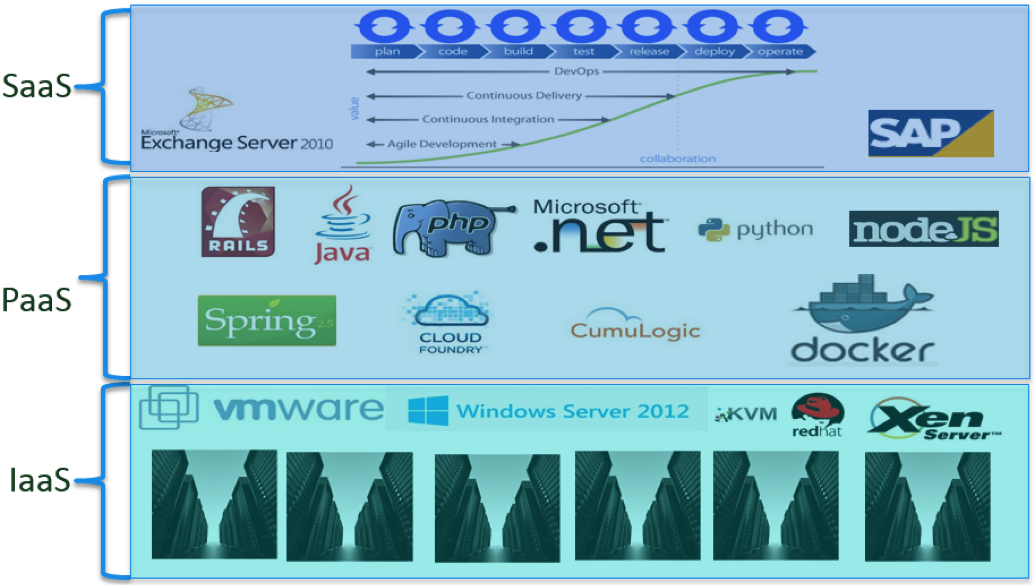
    Private and hybrid clouds lead to layers of infrastructure, layers of management and teams and layers of tools, creating the same problem that silos of management created in the past. Each of the infrastructure-as-a-service (IaaS), PaaS and software-as-a-service (SaaS) layers in the cloud architecture have their own teams to manage them and their own tools to manage that layer. The tools to monitor these layers are:

    1. For the IaaS layer – storage tools, storage area networking (SAN) tools, networking tools, server tools, virtualization (hypervisor tools) and tools to monitor the wide area network.
    2. For the PaaS layer – tools to monitor all of the software services that support the applications, which include database servers, web servers, Java application servers, PaaS frameworks and, of course, now Docker.
    3. For the SaaS layer – tools to monitor the applications themselves, which include application performance management products, as well as tools to monitor actual end user experience.

    The Layers of the Private or Hybrid Cloud

    layer

    The Problem: Monitoring

    There are several core problems with these layers of tools that must be addressed in order for private clouds to be successful:

    1. Lack of visibility – The data from each of these tools at each of these layers is not shared with the owners or operators of the other layers of the private cloud stack. A consolidated set of data or metrics is not available to business constituents or users of the private cloud, giving them no end-to-end visibility into the behavior of their applications and the workloads that support them.
    2. Communication issues – When there are performance problems (as there always are), the layering of the toolset and lack of collaboration across the teams that own the three layers make problem resolution a time-consuming and frustrating process.
    3. Improper data analysis – Despite the vast amount of monitoring being collected by all of these tools, in many cases the data necessary to ensure the private cloud is working correctly for its hosted applications and business constituents is not collected at all—or in the required manner.

    What’s Needed: New Types of Monitoring Data

    Highly dynamic and interactive systems have a new approach to collecting and processing monitoring data. The following concepts must be incorporated in a modern monitoring data pipeline to stay in the game:

    1. Streams of metrics – A modern online application system produces streams of metrics starting with the response time (user experience) data and including data about how all layers of the software and hardware that support that interaction are behaving.
    2. Streams of relationships – In a modern online application system, a transaction of interest is related to the JVM in which it runs, the operating system upon which the JVM runs, the virtualized hardware where the operating system runs and the entire virtualized and physical infrastructure (down to the spindle on the hard disk) that support that transaction.
    3. Streams of state – Most enterprises have configuration management databases (CMDBs). These are supposed to store the current state of the entire software and hardware environment of the enterprise. But now online systems change too rapidly for CMDBs to be kept up to date—relegating them to the junkyard of worse-than-useless legacy technologies. Private clouds and their modern applications are simply too dynamic for the CMDB and the CMDB must be replaced with something that is kept up to date automatically and continuously.

    The Crucial Metrics and Their Sources

    The single most broken thing about monitoring is the mistaken notion that monitoring for resource utilization across the set of devices and stack of software that comprises an application or a private cloud can ensure acceptable service quality.

    To fix this misconception, we have to redefine performance as not having available resources, but rather in terms of how long it is taking to get work done (response time and latency) and how much work is getting done per unit of time (throughput). Response time, throughput and, of course, errors need to become the crucial metrics by which service quality is judged and delivered.

    If we accept that response time, throughput and errors are the crucial categories of metrics, the next steps are to identify what these metrics are at each layer of the private cloud stack and then identify the sources of those metrics. The most important thing to realize is the standard interfaces that exist at each layer of the stack (SMIS, SNMP, Netflow, JMX, etc.) do not measure response time, throughput and errors, and we have to rely on vendors that have invested heavily in the custom instrumentation required to collect these metrics.

    We also have to recognize that the investment in collecting these metrics at a particular layer is significant, as is the level of technical expertise required to collect these metrics more than what can be assembled by a single vendor or tool.

    Finally, we have to recognize that the industry is changing too quickly for any single vendor to be able to cover the waterfront or the entire cloud stack. Network virtualization, storage virtualization and containers are just the most recent examples of innovations that require advances and innovations in instrumentation, and these advances are going to continue to occur at an accelerating pace.

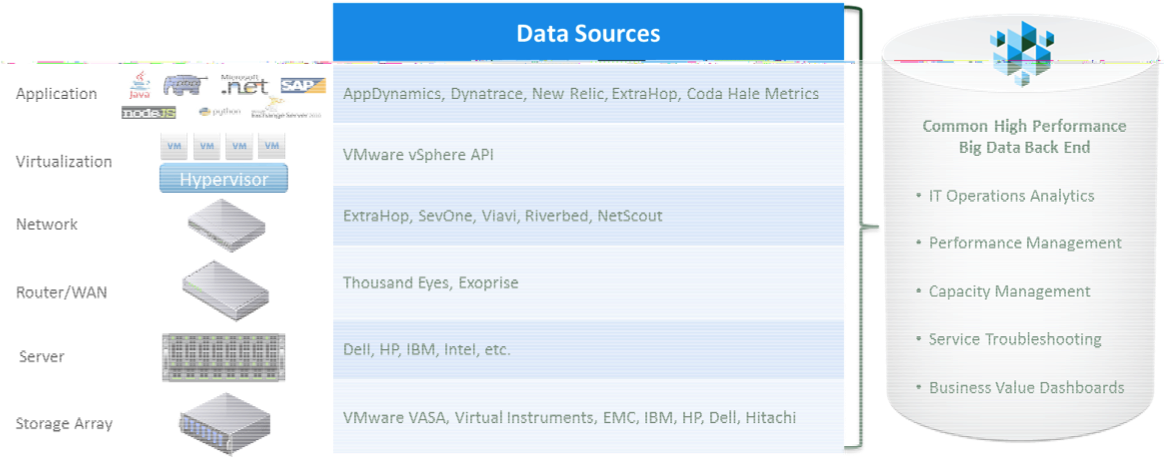
    For the reasons listed above, the only monitoring strategy that can work for the private and hybrid cloud is to focus on best-of-breed vendors that collect the required data at a layer in the cloud stack, then feed these metrics into a common big data back end for processing or analysis.

    A Monitoring Architecture for the Private, Hybrid Cloud

    monitoring


    Both private and hybrid clouds require a completely different approach to collecting data, processing data and making this data useful to users and analysts. Enterprise IT operations organizations must adopt these modern approaches to managing their private clouds or else those clouds will not be cost-competitive and functionally competitive with public cloud offerings, leading to ever more outsourcing of workloads to public cloud providers.

    About the Author/Bernd Harzog

    Bernd Harzog_Headshot_2016Bernd Harzog is the CEO and Founder of OpsDataStore, the real-time big data back end for all IT operations management data and vendors. OpsDataStore’s open big data back end consumes and relates data from multiple sources and immediately makes that data useful to decision-makers using market-leading BI and visualization tools. Learn more at www.opsdatastore.com, and by following OpsDataStore on Twitter, @OpsDataStore, and LinkedIn.


  • DevOps: The (Absolutely Critical) Cloud Enabler

    DevOps: The (Absolutely Critical) Cloud Enabler

    A couple weeks ago, I gave a talk titled, “DevOps: The Cloud Enabler” at a conference. As I was putting together some requisite materials previewing my session, I made a few mistakes. (Yes, I’ll readily admit it.) I used the words “should” and “can” and “consider.” Instead, the words “must” or “not optional” or “operationally imperative” make better sense.

    Companies are moving to the cloud (or at least endeavoring to); that’s a fact of IT life. If you’re not doing it, your competitors are lapping you. That may not be what you want to hear, but hey, reality bites. The cloud is simply the most scalable, flexible, efficient way to run a business these days. Cloud was just a buzzword for the longest time, but companies in all industries are actually putting it to work now. If your CIO isn’t at least in the midst of forming an application migration plan to the cloud, it might be time to light a fire under him or her; otherwise, start reading the writing on the wall and look for a new gig.

    Easier said than done, though, right? I’ve heard many a CIO say, “We’re going to have all our apps in the cloud by 2018!” No, you’re not. You don’t know how. You don’t have the tools and road map to get there. Let me enlighten you with some of those stronger, more urgent words I mentioned earlier. In your move to the cloud, DevOps MUST be the conduit. Period. Stop. End of argument. Game, set, match. Not optional; it’s imperative.

    Here’s why: One of the most fundamental problems that’s part and parcel of a move to reliance on the cloud is that IT orgs want every scrum team to have its own environment, complemented by an individual database instance. Eventually, that leads to creating a distinct database instance for every single developer. You probably can see where this is headed.

    I’ve used this comparison time and time again, but cloud and database instances become like the wire hangers in your closet you accumulate every time you pick up clothes from the dry cleaner. They multiply over time and, all of a sudden, you seemingly have a million on your hands, with no idea where they came from and no good way to get rid of them. To compound things, once the proliferation begins, it’s hard to stop. Shut down a database instance (as with an application instance), and you lose the underlying data. No can do.

    That reality spells disaster for the database administrators (DBAs) being flooded with thousands of development SQL scripts and database changes across multiple app release cycles across multiple environments. For DBAs to attempt to keep pace with this rise in change requests, organizations all but have to go through DevOps’ economies of scale. DBAs need reprieve, and DevOps can be just that. David Linthicum put the solution thusly: “Stop separating the development and operations skills; they are tightly coupled and need to be peers. You’ll find this is the hardest part of the process of moving to devops and the cloud.”

    Spot on. To be more prescriptive:

    • Developers need to understand what DBAs are dealing with as part of the cloud migration and know how their work rolls downhill.
    • Automation needs to reign supreme, removing manual work.
    • Developers need to have the ability to be involved directly in cloud ops and enact 95 percent of changes themselves.
    • DBAs need to be freed to oversee the 5 percent of changes that truly need their attention and management skills.
    • The flow from cloud application updates to cloud DB changes needs to be seamless.

    In bringing development and DBAs into sync, DevOps then becomes the vital remedy, the critical cloud enabler.

    TL;DR: If you have DevOps alignment, processes, responsibilities and tooling properly implemented in advance, then when you decide to move to the cloud, you can simply flip the switch from on-premise to the cloud. One click and you won’t miss a beat. Seriously, it’s that easy. Sound appealing? I know.

    If you truly want to get to the cloud, you must have a sound DevOps strategy that encompasses application development, web and the database. Without that in place, swim at your own risk. This is the year that we’ll see much more of the true impact of DevOps. And that’s coming just in the nick of time, because without DevOps, CIOs and their IT orgs would be in for some nasty surprises in their all-important moves to the cloud.

  • MongoDB Atlas: One Giant Leap, But More Steps Needed

    MongoDB Atlas: One Giant Leap, But More Steps Needed

    Atlas, holding up your databases in the cloud. I’m not sure if that’s what MongoDB was going for, but I personally like the analogy.

    At MongoDB World’16, MongoDB announced Atlas, a database-as-a-service offering (in the cloud) of the company’s popular open-source NoSQL database. Rather than dealing with the complexities of setting up, provisioning and configuring a MongoDB cluster yourself, Atlas allows companies to leave all those details for the masters of MongoDB to manage, freeing up application developers to focus on more important things (such as application development). Atlas currently is available on Amazon AWS, but there are plans to expand it to other public cloud platforms such as Microsoft Azure and Google Cloud Platform.

    Depending on the needs of your application, Atlas allows you to scale your cluster up or down, both vertically (with more powerful servers) and horizontally (with more shards in your cluster). You can also provision more disk space as your data grows. Simply tell Atlas and it will automatically update your cluster in the cloud to match your specifications. The documentation is unclear whether Atlas leverages AWS’ autoscaling features, but it appears that scaling must be done manually.

    Bringing Up a MongoDB Cluster

    When you first log in to Atlas, you’re met with a pretty simple user interface (UI). The very first thing you can do is to start up a new cluster in the cloud.

    2Before deploying a cluster, you need to know the AWS region to place the cluster, AWS instance size, amount of disk space needed, whether to use encrypted storage, whether to enable backups, the speed of the underlying storage (i.e. number of IOPS) and the number of shards and replica set members.

    You first specify the type of AWS instance you want to run your cluster on (ranging from M10 to M100) and how much disk space you want to provision, anywhere from 10GB to 16TB. All instances can be configured with encrypted storage with no additional cost. I first started by selecting the default settings from the M10 instance, which also happens to be the cheapest.

    3Instance sizes, specs, and configurable options. Details including cost are consolidated on the right.

    After specifying your instance, you can then configure the number of nodes in your cluster. For replica sets, you can have either three, five or seven members. Additionally, you can specify whether the cluster should be sharded and the number of shards in the cluster. Note that sharded clusters requires an AWS instance of M50 or higher, which is one of the more expensive instances, so the jump from a basic unsharded cluster to sharded cluster will be fairly expensive!

    4

    5The cheapest sharded cluster is 56 times more expensive than the cheapest unsharded cluster. You probably don’t want to be using Atlas for any sharded testing clusters if you can help it.

    After you’re satisfied with your cluster configuration, you can just click “Confirm & Deploy.” My cluster was spun up within a couple minutes, but your mileage may vary. After adding the IP addresses from which you’ll access the Atlas instances to a security whitelist, you can begin using your new mongo cluster. Something small that I really appreciated about Atlas is that it gives you the exact command and hostnames you should use to connect to your cluster (both through the mongo shell as well as through MongoDB’s many drivers). It makes connecting to your cluster incredibly simple. Just copy and paste.

    6Atlas gives you high-level stats of your cluster, including IOPS, read and write performance, disk usage, etc. You can also get more detailed metrics for each node.

    7Connecting to your cluster made easy! Just download an updated mongos binary and then copy and paste.

    After creating your cluster, it is fairly simple to scale your clusters horizontally by adding more shards. For me, the whole process of upgrading my 1×3 to a 2×3 cluster took around 10 minutes (again, your mileage may vary). Pretty slick! In this process, Atlas will automatically provision more servers and configure your cluster with new config servers, mongos and shards. Notably, once you decide to shard a cluster, you are unable to go back down to an unsharded instance, so make sure that you’re absolutely sure when you decide to scale up to a sharded cluster—you won’t be able to go back!

    Overall, outside of a few unsupported cases, the process of setting up a cluster and manually scaling it was quite smooth. While what has been achieved thus far in reducing cluster configuration to a few tunable options is definitely a step in the right direction in simplifying cluster setup for the user, Atlas can do much more. Compare with other existing cloud database services, such as Amazon’s DynamoDB or Microsoft’s DocumentDB, where all you need to specify is the IOPS requirement of your application (application IOPS, not storage IOPS as it is in Atlas). In these competing cloud databases, issues such as replication, number of shards, and high availability are hidden away from the user. Granted, DocumentDB has been out for a year already and DynamoDB many years before that, so it may just be a matter of time before Atlas catches up. Regardless, there is a lot more Atlas can do to be truly serverless and even simpler to use—a solid first step, but lot more needs to be developed to compete with cloud databases and to win enterprise customers.

    Under the Covers: Backup and Recovery

    Now since I work on something similar here at Datos IO, I was quite interested in Atlas’ backup and recovery options. At a first glance, it looks similar to the backup and recovery services provided by MongoDB’s earlier products such as CloudManager and OpsManager. After playing around with the feature, I’m more convinced that the backup technology Atlas uses is essentially the same as previous offerings, only that it’s applied to Atlas instances.

    Backups are free for the first 1GB and $2.50 per GB per month for every GB after that. Backups can be scheduled at set intervals but with a minimum interval of six hours. While I was initially put off by the minimum snapshot interval (after all, a LOT can happen in six hours!), after some investigation, Atlas also allows you to schedule “checkpoints” in between snapshots. Checkpoints can be used as restore points, but they take longer to restore because it requires applying all deltas since the last snapshot. It’s important to note that this feature is only available for sharded clusters. If you want to protect data on an unsharded cluster, you’ll be stuck with a minimum snapshot interval of six hours.

    Backup can be set when by toggling a flag during cluster initialization. During restore time, you can select a specific snapshot to restore. If you need a finer granularity of restore, Atlas also provides point-in-time recovery, which is pretty neat. You can specify a time between two snapshots to restore at a minute-level granularity. If you need an even finer granularity, you can specify the specific oplog timestamp and interval you want to restore.

    8Existing cluster snapshots and the types of restores you can do.

    As I performed a couple of backups and restores, I had a couple reservations about the feature. Most of my qualms arose from the fact that Atlas treats the entire cluster as its ‘unit’ of backup. What I mean by this is that backups created by Atlas are snapshots of the entire cluster. So there is no granularity at all, and this is problematic in a few ways.

    First, since Atlas takes snapshots of the entire cluster, you can’t control what data you want to back up. Say, for example, only a small portion of your database contains critical sensitive information that needs to be backed up. With Atlas, to back up your critical data, you’ll have to back up all your noncritical data as well! Considering that the cost of backup increases with the size of your data, you’ll end up unnecessarily paying a lot for backups of data you don’t really care about.

    Moreover, your options when recovering your backups becomes constrained by the fact that backups are at the cluster-level. By nature of being cluster-level snapshots, backups must restore back the entire cluster; you can’t restore back a specific database or collection. This can be problematic when, say, only one of your collections in your production cluster becomes corrupted. In that case, Atlas takes a very heavy-handed approach of bringing down the entire cluster and resetting every collection back to the point of the snapshot, as opposed to only restoring the problematic collection.

    Lastly, Atlas only allows you to restore snapshots to clusters with the same number of shards as the snapshot. For example, if you have a cluster with three shards, you can only restore to other clusters with three shards. One potential reason you may want to restore data to a cluster with a different topology is for testing purposes: Perhaps you want to measure application performance as you increase the number of shards in your cluster, or perhaps you just need a small, cheap cluster for basic tests. If you want to restore production data to a test cluster in Atlas, you’ll either have to spin up a cluster with the same topology as the production cluster (which is good for MongoDB, but sad for your wallet), or you’ll have to manually download from Atlas and then manually restore that data back to Atlas into a cluster of different topology. Both cases work, but are far from being ideal.

    Concluding Thoughts

    Atlas is a pretty good move by MongoDB to make it even easier to build up applications on top of its database by abstracting out a lot of the more mundane details of cluster configuration to the people who know MongoDB best. For me, Atlas was a simple and fast way to create and scale up MongoDB clusters. While a good step in the right direction, Atlas can do more to make it a truly serverless approach like other cloud databases in the market right now.