Category: DevOps in the Cloud

  • Financial Drivers for Cloud Migration in Enterprise

    Financial Drivers for Cloud Migration in Enterprise

    Clouds are a vast pool of usable and manageable virtualized means such as development platforms, hardware and services. These assets can be animatedly reconfigured to adjust to a flexible load, which helps in the optimal utilization of resources. Your enterprise breathes through IT—to keep your business moving forward, you must modernize and be more flexible to break the shackles of the orthodox technologies that are holding you back.

    The cloud’s pay-as-you-go business model enables enterprises to cut capital spending by leveraging the cloud service. It also offers several benefits required by the enterprise, including lower operating cost, no upfront investment, great scalability and much more.

    To gain the benefit of cloud computing and guard the current investment to the legacy system, companies are keen in migrating their legacy systems to the cloud. The cloud provides a cost-effective corridor to transforming legacy systems to more modern technologies. It offers modern efficient development structures, improved supervision of IT resource supply and demand and enhanced scalability, and it provides access to these assets from almost any part of the world. With this upgraded dexterity, you are able to respond more swiftly to the changes in the market, exploit newer business prospects, surge financial growth and drive innovation.

    However, to benefit from what the cloud could offer, you are required to spend money and time on launching your cloud and migrating data and applications to the newer environment.

    Migrating databases from on-premise machines to the cloud has a few crucial advantages: Cloud elasticity delivers instant flexibility in scaling up or down. And, the cloud model saves money by shifting companies from early heavy capital expenses (CapEx) of on-premise hardware to constant, known operational expenses (OpEx) on cloud facilities and more.

    Migration Ahoy

    But migrating live applications to the cloud is not an easy task. Listed below are few methods to migrate to the cloud.

    Rehost: This term refers to redistributing applications to a diverse hardware setting and changing the application’s structure configuration. Rehosting the application while making no changes to its construction can offer a faster migration to the cloud. The key benefit of infrastructure as a service (IaaS) is that the systems can be migrated by the teams quickly, with no modification to their architecture.

    Refactor: This term refers to applications run over the cloud provider’s infrastructure. The main benefit is combining innovation with awareness, as “backward-compatible” platform as a service (PaaS) means developers can reuse frameworks, languages and containers in which they have invested. Its biggest drawbacks include transitive risk, missing capabilities and lock-in framework.

    Revise: This method requires extending or modifying the present code base to assist the legacy transformation requirements, and then using the refactor or rehost options to position the cloud. This method enables enterprises to enhance the application to influence the cloud features of providers’ infrastructure. However, this method requires upfront development work, which needs upfront outlays to assemble a development team.

    Rebuild: This term refers to rebuilding the solution on PaaS, discarding code for the current application and restructuring the application. Though rebuilding involves dropping the familiarity of present code and frameworks, the benefit of rebuilding the application is admission to advanced and innovative features in the platform of the provider. They increase the productivity of the developer. Still, lock-in is a major drawback: Should the provider make a pricing or technical change, breaches the service level agreements or goes out of business, the customer is required to switch, possibly deserting some or almost all its application resources.

    Replace: This method requires discarding the present application and using the commercial software offered as a service. This method reduces or eliminates any investment in assembling a development team when there is a change in the business function. Issues may include issues in accessing the data, unpredictable data semantics and vendor lock-in.

    The Bottom Line

    Projects relating the migration be of any size entails careful planning. Evaluating its existing applications portfolio could help an organization understand the complexity, challenges and amount of effort required in migrating its databases to the cloud. Many tools assist application and database migrations, and each method differs in the amount of automation they provide and in the accurateness of the migrated system. Carrying out proofs of concept using these tools to understand their abilities will be constructive in the longer run for larger projects related to migration.

  • Building the Search Engine Users Expect

    Building the Search Engine Users Expect

    The search experience most of us are familiar with is Google’s. The company has raised the expectations of search, conditioning us to its level of user experience. However, most websites and mobile applications still don’t offer this kind of advanced search.

    Here are three things to consider to keep the search experience on your company website or mobile app competitive:

    Speed

    Amazon reports that every 100 millisecond in latency causes the company a 1 percent loss in sales. Google says that every 500 milliseconds in latency causes a 20 percent drop in traffic. In today’s “attention economy,” people won’t wait for a slow search when they can easily jump to a competitor’s site.

    How can you ensure optimal speed from your search engine?

    A robust infrastructure plays a key role in maximizing search speed. Search is quite resource-intensive, so start with solid hardware that maximizes performance when having big loads on CPU, solid state drive and memory. Beyond the hardware, the network also plays a huge role in search speed. Like a content delivery network, users need to be close to the search engine to have a truly interactive session; it is important to distribute the search in different regions if your users are distributed worldwide.

    User Experience

    Users also expect finding the content they need to be as intuitive as possible. Some search engines suggest queries to users based on their search input; however, this often falls short for several reasons:

    1. If you suggest queries, you have little to no control over the quality of the results compared to the original intention. It is very frustrating as a user to follow suggestions that lead to poor results.
    1. Suggesting queries, often accomplished by “did-you-mean” type proposals, introduces an unnecessary step in the user interaction, and we’ve already established that speed is an important factor in finding information. You should even consider allowing your search engine to handle typos on the fly without requesting further user validation.
    1. If a user searches for something very specific, the probability of your frequent queries including their exact answer is low. In this case, the user is getting to a search without any feedback, which makes it much more difficult to actually find the intended content.

    Many websites also encourage browsing activities based on an extensive site map. But expecting users to know and understand your site map to find the information or product they need is unrealistic.

    Instead, users most benefit from a search experience that displays requested information as they type, updating results in real time. For example, on an ecommerce website, you should display products, categories, brand or reviews instead of queries. You should also propose a rich display with a readable summary of information.

    Relevance

    Finally, relevance should be an important consideration in building a search engine, but relevance is a difficult topic to understand, let alone master. Many existing searches require extensive fine-tuning of their engine and may still not understand the impact each change has on the search results. It often happens when a marketing manager comes to see the tech team to ask for a fix on a specific query. The tech team tunes the search rankings to fix that specific query, unknowingly breaking dozens of other queries. This approach is an endless game that will never globally improve the engine.

    You should focus first on the different ways to enter a query (for example, “iphone,” “i-phone” and “i phone”), and be sure to retrieve the relevant information for all of them. You can then enrich results with business data such as the number of sales or number of times a product was put in a cart.

    About the Author/Julien Lemoine

    Julien Lemoine AlgoliaJulien is a search veteran who’s been working in the search landscape for over 10 years, with work experience in Thales and Exalead. He participated in the design of three different search engines prior to co-founding Algolia with Nicolas and is the author of the different algorithms responsible for Algolia’s super fast performance.

    Julien is also passionate about imparting knowledge and spent some time teaching at his Alma Mater, EPITA. He holds an engineering degree from the same institution.

  • Why a Dev/Test Cloud Is Not Optional

    Why a Dev/Test Cloud Is Not Optional

    How do you create a private Dev/Test cloud to standardize processes, tooling and environments across teams? Recently, I participated in an online panel on the subject of, “Creating an Internal Dev/Test Cloud,” as part of Continuous Discussions (#c9d9), a series of community panels about agile, continuous delivery and DevOps.

    Continuous Discussions is a community initiative by Electric Cloud, a provider of continuous delivery to businesses including SpaceX, Cisco Systems, GE and E*TRADE. I am not an employee or vendor of Electric Cloud.

    Below are a few insights from my contribution to the panel:

    What are your thoughts on Dev/Test cloud?

    It’s not a question of why—You don’t really have a choice. I don’t think that this is an optional thing. If you’re moving to this modern software delivery, you’re going to have to build this environment. If by chance you’re already doing some of the continuous integration continuous delivery (CICD) processes without it, it’s not going to last long. If I were to take a slightly different angle, I think the interesting question is where? So where is your Dev/Test cloud?

    I think of Dev/Test as a conceptual thing; it’s your factory. If we talk about it from a singleton point of view—as one environment, for example, or one integration environment that it is not going to support microservices and some of the future architectures—that’s when you might add multiple Dev/Test clouds. For example, if you think you’re going to have your browser grid on-prem or intermingling with your other integration environments, that’s a lot of work, and that’s a lot of maintenance. It’s just not a good idea. But at the same time, it’s actually amazing if you’re doing anything with artifact repos. Even though some of these artifacts are really small—and Docker images can be very small, if those repositories are not on the same network as the rest of your Dev/Test—it could be really slow pulling assets down. So that’s what can be brought on-prem. I think the bottom line is that you’re going to have to get there no matter what. It’s just going to happen. I think how you set it up is the interesting question, since there are a lot of options as far as how to do that.

    What are the challenges of creating a Dev/Test cloud?

    I think the first challenge is parity between your Dev/Test environment and your production environment. Replication would be insane because you’re talking about data centers, a lot of overhead, and it reduces flexibility. And everything we talked about before—the ability of developers to spin out Dev/Test environment and integration environment on a whim. However, there are things that you can absolutely consider, which is consistency between all your configurations, making sure that all your frameworks are consistent because chasing down bugs that cross applications throughout the system are very hard to deal with. But there is always the need to address that.

    And we’re even talking about agents sitting on your nodes. I mean, if you’re running some tooling on your servers, it’s good to know what the potential impact of having those, or not having those on your Dev/Test environment could actually be. I’d say that parity is probably one of the biggest challenges. And then the other challenge is just knowing who owns it, because I think that the best scenarios I’ve seen are when you have a steward of the Dev/Test environment. It could be DevOps, it could be somebody else who’s responsible for maintaining the strategy of what you do with those environments versus it being a wild west. So they don’t own it, but they facilitate making sure that parity exists, and facilitate making sure the automation and the provisioning and everything is as efficient as possible. Developers shouldn’t think about that. Dev/Test should be more of an offering. At the bigger organizations, that’s exactly what they do. They’ve created a shared services or cloud services division that is responsible for setting those up.

    What are the challenges you see people running into when they’re trying to create a Dev/Test cloud?

    It is a huge habit of developers to build locally, and I think that most developers I tell to stop doing that complain. It is a big problem, just from a pure pollution standpoint and the fact that you don’t really know the condition of each developer box, there is no consistency. Hopefully a Dev/Test Cloud is easy enough to utilize that they don’t see the need, and there is some training—I think it goes back to the idea that if you treat it as this singleton thing, you know that some Dev/Test environments live and die within an hour time period. They’re very short. That should be the idea, that you spin it up, put your code and test it quickly, get the IP address. You test it and kill it, and that’s it. You move on and continue coding, and as it moves downstream, you can have a more robust integration environment.

    I do think that there are best-of-breed Dev/Test clouds. I think you have the Dev/Test clouds that are great for the spinning up and down a pole instances. And then I think you have past types environments, and I think you have load testing clouds, and you have functional testing clouds. There may be a reason to break them out into different types. The most important thing is that everything is tightly integrated and that there is a strategy. It’s not just off the cuff, because that’s equivalent to shadow IT. Even if everybody knows it’s happening, it’s the same difference.

    What Are the Prerequisites for a Dev/Test Cloud?

    I think you have to have a steward, somebody who owns it, standardization. You need to have full master scripts, snapshots, images, that represent the de facto Dev/Test environment, and somebody needs to make sure that those are up to date and current so you have consistency across all the locations where these have been spun up. The contradiction is if you are using a performance testing cloud for load testing, a functional testing cloud, where you don’t have control over that infrastructure. In those scenarios, if you’re running Selenium scripts, you’re going outside in, so it doesn’t really matter as much.

    How to do it

    If you’re starting bottom up, you could think about it all the way through before you develop it. But most organizations aren’t in that position; they’re slip-streaming that into something else, and chances are you’ve already had this concept and you’re already using virtualization, so part of it you probably already have, but maybe not in the most efficient way. Many of the organizations I’ve seen start with something small. For example, they start with a robust integration environment. Druva is an example of a company that’s made this transition. But in all the scenarios I’ve seen, there’s been another catalyst, it’s never just been Dev/Test cloud. There’s always been something else. An architecture change to microservices, changing your product from an on-premises solution to a cloud-based solution, which was the scenario with Druva. There always seems to be something else. I don’t think it has to be that way, but it seems like there are other driving factors that necessitate change and the opportunity to change your pipeline, and they’re driven by the application. I don’t think there’s an easy answer. I think you have to rely on automation, you have to rely on tooling. You can’t be afraid of tooling. Don’t let the tool dictate what you do. You should be telling the tool what to do. If eventually you are a Chef shop and Jenkins, and it dictates what you’re doing, then that’s all you’re going to do. And you’ll never be able to adopt a future tool, so think about that. Inertia is a powerful force.

    I have very strong opinions about how Development environments should be set up. Stop building locally, and put it in the cloud.

  • The 3 Compliance Questions to Ask

    The 3 Compliance Questions to Ask

    As companies move to cloud, they require more certainty around export compliance.

    Of the many complexities associated with cloud computing, export compliance laws arguably are some of the thorniest. From a legal and technical perspective, the export compliance laws currently on the books—as they vary from country to country—can make even the savviest and most experienced attorneys’ and engineers’ heads spin.

    All enterprises must adhere to a variety of industry- and country-specific rules related to important security, data privacy, taxation and export controls. But these rules become especially murky around cloud services. For example, if a U.S.-based company provisions a virtual machine abroad, say in China, does it need to develop region-specific export controls?

    Export compliance rules raise other, broader questions. For example, how do you retain agility while complying with the necessary regulations? And how do those regulations and controls vary according to workload? Like tax regulations, rules for collecting and distributing user data vary depending on location.

    Not having the proper compliance protocols in place can have serious implications. Say your client is expanding into a foreign market and, at the last minute, they request a number of changes that have not been evaluated from a compliance perspective. Either the expansion is delayed, which could be damaging from a reputation and financial perspective, or the company runs the risk of being cited for compliance violations.

    So, as more and more companies expand globally, how can they prepare to meet the compliance challenges stemming from cloud computing?

    Three questions in particular are critical to answer when it comes to cloud export compliance.

    Is it possible for companies to be both agile and compliant?

    Increased business agility is perhaps the single greatest benefit cloud offers. Cloud computing facilitates rapid provisioning of resources, allowing companies to scale quickly and adapt to changing client and market needs. But what effect does export compliance have on cloud’s speed and flexibility? This type of unprecedented agility requires a re-think of how governance and policy enforcement is managed. Instead of manual checks, companies must transition to real-time policy enforcement and recording that matches the agility of cloud. This is a change to both culture and process—the rocky road where foundations can begin to crumble.

    How do compliance rules vary from country to country?

    Companies that operate internationally are subject to a number of rules related to citizens’ data protection, taxes, variations relating to workload, region-specific controls, paperwork and registration. When conducting cross-border provisioning, legal counsel is mandatory to establish best practices and to ensure compliance. Unfortunately, because the cloud is a relatively new phenomenon, legal expertise in this area is scant.

    Further, even when there is some legal expertise, when it comes to uncertainty, the default answer from legal counsel is often, “No, we can’t do that.” Indeed, when there is a certain amount of risk and haziness around the law, the easiest—and safest—thing for legal counsel to do is to say it can’t be done. But that’s not helpful to a business.

    What steps can companies take to prepare for these differing requirements?

    There are three essential measures that companies can follow to help ensure their cloud services are compliant with global export regulations.

    1. Identify: All software that could be subject to cross-border exports—either packaged software or homegrown code transferred between between countries—requires legal guidance and approval. So the first step is to determine the software being exported.
    1. Register: Once you have identified the appropriate software, you need to maintain a registry. Whether an image or an automation routine deploys the software, it’s important that you have a clear record verifying what must be registered.
    1. Record: Companies that employ cloud across borders may be required to keep a record of all export transactions. Many businesses make excuses why they don’t properly document these transactions—the virtual machines in question do not belong to them; their cloud software is publicly available; or recording export transactions is only mandatory when exporting to riskier markets such as China, Iran or North Korea. To protect companies from liability or legal action associated with cross-border data transfers, legal counsel often will suggest recording all cross-border software movement.

    These steps are critical to the export process, and partnering with a cloud provider that can help clear up export confusion can ease the pain. Some cloud brokers and providers offer applications that track cross-border exports, which can save a number of headaches. They have tagging and metadata reporting systems in place ahead of time. These are necessary for security and privacy compliance anyway, so it can be leveraged across domains.

    A good cloud platform provider anticipates a business’s needs and offers services that a company may have never even taken into consideration, such as tracking tools to keep tabs on software so that it can be easily reported. These companies have in-house counsel with expertise in cloud export and tactical, strategic plans (such as the metadata tracking) so you know what software is going where for how long and how often—data that can also help support audits.

    Information is power, and the more you have, the more prepared you are to deal with thorny issues such as export compliance. Having a partner to guide you through the process—an experienced cloud platform provider with sound advice—can help arm you with the information you need to get to cloud quickly, safely and securely.

    About the Author / Rodrigo Flores

    Rodrigo Flores_headshotRodrigo Flores is Managing Director of Product Innovation, Architecture and Management for Accenture Cloud Platform. The Accenture Cloud Platform is a multi-cloud management platform that procures, provisions, orchestrates, manages and governs enterprise cloud resources.

  • Why Legacy Backup Solutions Aren’t Ideal for OpenStack

    Why Legacy Backup Solutions Aren’t Ideal for OpenStack

    Our team has recently returned from the OpenStack Summit in Austin. While there were many hot topics, we discovered people fell within two camps when it comes to backup and recovery: those who understand why a native OpenStack solution is required, and those who question why legacy backup and recovery won’t fit the bill.

    I sat down with Trilio Data’s co-founder, Murali Balcha, to detail why legacy backup and recovery solutions are not suited to protect OpenStack applications without considerable retooling. Even then, these solutions do not naturally fit into OpenStack operating model and will increase your total cost of ownership (TCO) considerably.

    First, let’s look at the OpenStack operating model. It includes:

    Horizontal Scale

    OpenStack does not come with the maximum capacity that it can grow into. The architecture is inherently scalable without any theoretical boundaries; it can be deployed in a single box or it can scale to thousands of nodes.

    Contrast this with existing backup solutions that always have some predefined capacity, whether it is number of applications it can back up or the amount of backup storage capacity that it can manage. So essentially you have a forever scalable architecture, tied to a backup solution with a limit on capacity.

    Multi-Tenancy

    Multi-tenancy is an integral part of OpenStack cloud. The tenancy is different than supporting multiple active directory users in a backup application. Active directory users are typically OS users, whereas cloud tenancy usually represents individual organizational units with in a bigger organization. So there is a mismatch on how existing backup solutions are created versus how OpenStack multi-tenancy works.

    One way to make existing solutions work with OpenStack is to deploy a backup application for each tenant and make that tenant responsible for managing its own instance of the backup application. This means each tenant has to manage the application and any storage that is provisioned to save backup images.

    Self-Service Portal

    Some backup applications provide an aspect of a self-service portal for individual users to manage their own backup policies. Backup applications use host agents on either virtual machines, or on servers to back up files and provide a portal to restore a backup copy in place through its agent infrastructure. This kind of self-service portal is, again, in contrast to what an OpenStack self-service portal is—it provides the ability to provision virtual resources.

    File-Level Backups

    Existing backup solutions are only good at doing file-level backups. Yes, they have evolved to do virtual machine (VM) backups for VMware, but vCenter is not a cloud platform, and the mechanism to do a VM backup on VMware platforms is totally different from doing VM backups in OpenStack. Anyone trying to retrofit existing backup solutions for OpenStack will only have their file-level backup feature to rely on.

    File-level backups only back up bits and pieces of your application. File-level backups are the legacy of backing up scale-up systems, where huge databases are confined to a beefed-up single host. But cloud applications are lot more distributed. Instead of provisioning one beefed-up server to host a large database, cloud applications are deployed as multiple VMs, with each VM performing discrete functionality. The data in these applications are also are distributed to multiple VMs. File-level backups will not ensure consistent backups. They are notoriously insufficient to restore an entire application environment and may seriously affect your recovery time.

    Infrastructure-Aware Backup Solutions

    File-level backups are not well-suited to address cloud application needs. Instead, a backup application that is aware of cloud infrastructure provides a perfect solution for your cloud applications. Since cloud applications are distributed, your backup should include not only the data but also the application context to successfully recover the application.

    An application context includes the VMs, flavors of the VMs, network settings and all the volumes attached to those VMs. Let’s not forget that all of the aforementioned will be tweaked and will evolve over time to suit that moment in time. So only backup solutions that can provide a single snapshot that includes all the VMs, storage volumes mapped to each VM, network settings and the meta data associated with each VM and its resources at that point in time are suited for OpenStack backup needs. Since such backup solutions capture the entire application environment, recovery with this backup solution is very deterministic and reliable, irrespective of the size and complexity of application.

    Solutions that are aware of the infrastructure also can back up applications into one availability zone/region and restore into a different zone/region. Beyond speed of recovery, this now empowers data protection (or backup) with resource management capabilities.

    DevOps

    DevOps is an integral part of OpenStack cloud deployment and management. Your choice of backup solution should play with your cloud DevOps scripts. For example, if you standardize on Ansible playbooks to manage your cloud deployments, the backup application should play into your DevOps strategy so you can reduce the TCO of your backup application.

    Other Use Cases

    In traditional IT, the data management functions such as backup and recovery, disaster recovery and application migration require different applications. However, your backup solution for OpenStack should be more than just a backup and restore of the files. A backup solution that is well-designed for OpenStack is a re-orchestration from a point-in-time and should be able to provide additional uses cases such as:

    1. File(s) restore
    2. VM/volume restore
    3. Intra/inter-cloud application migration
    4. Disaster recovery
    5. Instant restore of point in time for application validity checks, network scanner and other forensics
    6. Archival
    7. Environmental restore during cloud upgrades

    OpenStack offers an operating model that warrants a completely new thinking around backup solutions. Retrofitting existing solutions not only is inadequate in protecting your applications, it also increases your TCO. So do yourself a favor and look for solutions that are purpose-built for OpenStack. That will provide the best data protection possible, decrease your TCO and simplify recovery.

  • Managing Application Performance in Hybrid Clouds

    Managing Application Performance in Hybrid Clouds

    Keeping pace with changes to your networks, systems and applications can feel like a full-time job. As applications support more data types in more distributed environments—often in real time—it becomes imperative to have a clear picture of your end-to-end computing environment.

    Just as important is making sure your apps take advantage of the adaptability and efficiency of microservices, document data models and other cloud-focused technologies.

    All those much-touted benefits of cloud computing—efficiency, agility, scalability—come to nothing if your applications don’t perform as expected. The growing prevalence of hybrid cloud infrastructures makes managing app performance trickier than ever. According to a recent survey conducted by Riverbed and reported in a Jan. 29 article in Data Center Journal by Riverbed Marketing Director Steve Brar, 89 percent of IT pros claim poor application performance hinders their operations, with 58 percent report application performance glitches each week and 36 percent experience application performance problems each day.

    Even worse, 71 percent of the IT managers surveyed are “in the dark” about why the apps are running so poorly, and 37 percent have turned to unsupported apps to fill the breach when such problems occur, which exacerbates the growing problem of shadow IT. On the plus side, the managers believe that making application performance more visible improves productivity (58 percent), customer service (54 percent), product quality (49 percent), employee engagement (46 percent) and revenue generation (43 percent).

    Brar identifies five requirements to ensure end-to-end application performance visibility:

    1. Network- and app-aware path selection directs traffic to one of three branches: one MPLS-based, one IPSec-protected Internet link and one that exits directly to the Internet.
    2. Dynamic tunneling via a central control plane allows backhauling of branch data to the data center over an IPSec link.
    3. Use secure web gateways in conjunction with advanced threat detection.
    4. Use a QoS function that manages traffic from the source (inbound) rather than from the destination (outbound) to avoid slowing business-critical inbound data flows unnecessarily.
    5. Implement a unified management plane that has an intuitive interface and is based on such high-level abstractions as applications, sites, uplinks or networks, depending on the unique characteristics of your IT infrastructure.

    Cloud Application Management: The IT Basics Still Apply

    It isn’t unusual for IT departments to feel they’re losing control of their network infrastructure when they migrate applications to the cloud. Cahit Akin writes in an April 22, 2015, article on Network Computing that capacity management, change control and other IT fundamentals are just as important for managing your cloud infrastructure—if not more so, considering the likely increase in network traffic that results.

    The key is to consider the cloud part of your internal network architecture. Three WAN-optimization techniques transfer easily to cloud infrastructure management:

    1. Caching images and other common elements on the local device helps ensure network bandwidth is reserved for the most important data.
    2. Deduplication minimizes your backups and other secondary network traffic by ensuring only changed data is updated.
    3. Compression removes unnecessary data from files to make them smaller and reduce overall bandwidth use.

    The same features of a typical WAN optimization tool apply to improving the performance of cloud-based applications, notes TechTarget.

    The challenge for IT is to keep pace with the tremendous changes in the nature of applications themselves. Data is collected, aggregated and analyzed from diverse sources, including IoT sensors, clickstreams, logs and social media data, as Ravi Dharnikota writes in a Feb. 5 article on DataInformed. Dharnikota states that IT has to support “anything, anytime, anywhere.”

    Rather than a point-to-point approach to integration, you have to rearchitect your systems based on microservices that communicate via lightweight REST APIs. This way you distribute execution of integrations, which lowers costs and increases efficiency. If you aren’t already, you need to break out of the row-and-column rut and adopt document data models that support semi-structured and unstructured data.

    Design Apps to Leverage Batch and Real-Time Processing

    The only way to deliver an infrastructure that meets the anytime, anywhere nature of modern apps is to be adaptable enough to support both batch processing and real-time processing. Along with this comes the ability to determine which apps require real-time attention, and which can be shifted into batch-processing mode. Dharnikota cites the Lambda architecture as an example of one that accommodates batch and real-time processing by balancing latency and throughput.

    However, the Lambda architecture’s shortcomings are explained by LinkedIn’s Jay Kreps in a July 2, 2014, article on O’Reilly Radar. Ultimately, you have to maintain code that produces the same result in two complex, distributed systems. According to Kreps, it’s much simpler and efficient to improve the stream processing system to support both batch and real-time modes. Doing so would entail increasing the system’s inherent parallelism by “replaying history very, very fast.”

    MorpheusData-Kreps-parallelism

    An alternative to the dual-processing-mode Lambda architecture enhances the stream processing of a single-mode system to reprocess the full data log to mimic both batch and real-time modes.

    In this model, reprocessing is required only when the code changes. Rather than two full duplicates of your code, you simply update the single set. The recomputation is done by a job that is merely an improved version of the same code: it runs on the same framework and takes the same input data, although the parallelism needs to be increased to ensure fast performance.

    To optimize performance further, you could combine two output tables. However, having two separate tables, at least for a brief period, lets you revert to the old logic in an instant via a button that redirects the application to the older output table. To prevent the new version of the code from degrading performance in comparison to the old version, add an automatic A/B test or bandit algorithm that lets you control the cutover.

  • Enterprise Cassandra Deployments

    Enterprise Cassandra Deployments

    Successful Cassandra deployment in the cloud takes a certain amount of skill and knowledge. In this blog I will share best practices for a successful Cassandra deployment in the cloud such as Amazon Web Services (AWS) and Google Cloud Platform (GCP). I will also discuss how you can protect and recover the data in your Cassandra cluster when deployed in the public cloud.

    Cassandra Deployments in the Public Cloud

    There are two main ways to have successful enterprise Cassandra deployments in AWS:

    • Use a ‘managed’ Cassandra deployment. This is a reasonable approach; the only downside is the inability to customize data placement beyond what is typically provided by the vendor.
    • Manage the cluster yourself, if you want to have full control over your Cassandra deployment and customize it to scale and perform according your business needs.

    Please refer documentation from Datastax or Apache Cassandra for detailed best practices for Cassandra deployments. The following best practices are reiterated here to simplify deployment of a scalable Cassandra cluster in AWS.

    Storage

    Both AWS and GCP offer two types of local storage options for their compute instances. For AWS, the options are Elastic Block Storage (EBS) and Ephemeral Storage. In GCP, the options are Persistent Disks and Local SSD. Both options have their own trade-offs. Pick the one that best suits your deployment.

    Persistent Storage

    EBS volumes have performance characteristics similar to network storage such as a NAS or SAN. Because storage from EBS volumes is multitenant in nature, it is not suitable for distributed, log structured databases such as Cassandra. If you want to ensure reliable performance through EBS volumes, use “EBS optimized instances” with “provisioned IOPS.” Since the IO traffic to EBS volumes goes over the instance network, EBS optimized will provide reliable performance, but does not guarantee any increased performance. To get the most performance out of EBS volumes, use instances with multiple disks and separate the volumes used for “Data” and “Commitlog.”

    If you have to use EBS Volumes, go with “EBS Optimized Instances,” with “Provisioned IOPS” and split data and Commit Log on different volumes.

    Ephemeral Storage

    Ephemeral storage is a great option to use for downstream Cassandra environments such as test/dev and staging. Since ephemeral volumes are typically SSDs, there is no need to separate the data and commitlog into separate drives. To optimize performance, choose EC2 instances with multiple ephemeral storage drives and stripe them together into one logical volume. Send data and commitlog to the logical volume. Remember that when you stop the EC2 instance, the data in Ephemeral storage will be deleted.

    Stripe all Ephemeral drives into a single volume to get maximum performance.

    Data Distribution

    Cassandra uses Snitch to determine the topology of the cluster. The Snitch is also used to determine the data center and rack for each node in the cluster. Replication strategy is used to determine the placement of data across the different nodes in the cluster.

    AWS

    1. EC2Snitch works well for single region deployments.
    1. Ec2MultiRegionSnitch works well for cluster distributed across multiple AWS regions. Please note, Multi-DC, Active-Active configuration makes your cluster resilient to region failures and for multi-dc cluster, use “local quorum” to improve performance.

    Google Cloud Platform (GCP)

    1. Use GoogleCloudSnitch for Cassandra deployments in GCP.
    1. GoogleCloudSnitch treats regions as Cassandra data centers and availability zones as racks.

    Other Features

    Both AWS and GCP offer a series of operational capabilities that seem to make it easier to maintain high uptime on Apache Cassandra cluster. These capabilities have to be chosen carefully depending your deployment needs.

    1. Load Balancing: Network-level load balancing service is offered by both AWS (Elastic Load Balancer) and GCP. It is not recommended to put a load balancer in front of Cassandra. It is better to use a client connector that can handle this, consider open source utilities such Presto and Astyanax
    1. Autoscaling: Both AWS and GCP offer Autoscaling facility for compute instances. However, although this functionality looks very enticing, putting all C* nodes in an autoscaling group will not produce the desired result. Instead, create a separate autoscaling group of ‘1 node’ for every node in your cluster. This will ensure that anytime a node goes down, it is automatically brought back up. This will ensure the cluster data placement is not disturbed when nodes go down and nodes coming up do not cause excessive data movement.

    Scalable Backups and Reliable Point-in-Time Recovery

    Backing up your data is a must-have for enterprise organizations. The impact of data loss is so high that no enterprise wants to risk relying alone on replication. Protecting data in a public cloud environment may seem daunting, but there are several options available that can make this easier compared to an on-premise deployment. A simple option may look like one of the native snapshots:

    Storage Snapshots

    I have seen few customers use snapshots of EBS volumes as a way to protect the data in their cluster against logical and/or operational errors. This solution will work but with some severe limitations. On top of the overhead of maintaining the scripts to take snapshots, there is a large overhead in storage costs. Taking a snapshot of volumes does not allow for incremental backups of your data. This causes an exponential bloat in the amount of data stored in snapshots, leading to high cost of the backup solution.

    Amazon S3 or Google Cloud Storage

    Using an S3 bucket as the secondary storage enables enterprises to use low-cost, highthroughput storage, while reducing overall operating costs for storing backup data. Here are a few recommendations when using S3:

    1. S3 Region: Amazon S3 buckets are region-specific. A bucket created in one region will provide better performance characteristics to other infrastructure in the same region. Subsequently, it is important to ensure the S3 bucket used as the secondary storage is in the same region as the production database being protected and the Datos IO cluster.
    1. Storage Class and Lifecycle Policy: Amazon S3 allows users to create lifecycle policies on buckets. These policies dictate the performance and response time characteristics of objects in the bucket. STANDARD_1A is more suitable for longer lived and less frequently access data, and is not suitable as secondary storage. Additionally, do not turn on any lifecycle policies on the buckets used for the secondary storage. All buckets should be in the standard storage class.

    Conclusion

    As enterprises leverage the agility provided by public cloud environments, it’s important to understand the various facets of Cassandra deployments to ensure the efficient use of your money and time.

  • Best Practices for Cloud Deployment

    Best Practices for Cloud Deployment

    When it comes to deploying apps in the cloud, the conventional wisdom is that DevOps is not required if you’re a small or midsized company. The cloud is designed to enable virtually anyone to set up the infrastructure they need, quickly and easily, without a lot of experience in the intricacies of managing data center operations or hardware. But then, by the time the company realizes it needs DevOps, it’s almost too late—the cloud infrastructure has become complex, costs have exceeded expectations and precious time is being wasted.

    To ensure you’re able to optimize cloud, or hybrid cloud, deployments—and avoid many of the problems that other companies have experienced—there are a number of best practices you must employ within your company.

    Best Practice No. 1: Realize You Need DevOps from the Start

    When you manage your own hardware, you know exactly what the deployment costs are and what resources are available, and have a clear understanding of how they are interrelated. The abstraction of the cloud makes the initial setup a snap. But typically there is no formal structure involved: Individual developers can initiate new instances whenever they need them, without considering the bigger picture of the resources already in use, how they’re used or what is being planned by the organization.

    Spinning up unnecessary cloud resources not only costs a company more in the long run, it also leads to a cloud sprawl that requires time-consuming, manual processes to maintain. Think about the challenges your company would face if it had thousands of machines created by different processes but you didn’t know who created them, what they were being used for or  even if they were still needed.

    By employing DevOps from the start, you will be able to balance the needs of developers with the availability of resources in the cloud to ensure expenses do not run out of control and you understand exactly how the cloud infrastructure is being used now and into the future.

    Best Practice No. 2: Have a Process and Purpose

    As you create your cloud infrastructure, you need to have a clearly defined purpose, as well as a process in place for deployment and ongoing management. You will need to keep track of what resources are being used and their designated purposes. Some cloud vendors, such as AWS, offer tagging capabilities that help you keep track of what services each machine was created for and whether they are being used for production, backup, load balancing or testing.

    Regardless of whether you use tagging capabilities or maintain a separate database of cloud resources, knowing what you have purchased and how it’s being used will provide needed visibility, ease of management and greater control of costs.

    Best Practice No. 3: Leverage Automation

    Automation is important—both in the cloud and on premises—to streamline routine practices, make sure they’re applied consistently and eliminate potential errors that are common with manual processes.

    When deploying on multiple clouds or in a hybrid environment, it is important to understand that tags used for one cloud provider won’t work on another. The process is typically broken into three steps: inventory creation, system preparation and automatic deployment. Many cloud systems allow you to create a dynamic inventory directly from the servers, eliminating the need to create or maintain it manually. However, deployment over multiple clouds require an abstraction of this inventory; it is common to create a static inventory in a unified format from the various dynamic inventories.

    Best Practice No. 4: Design the Network with Security in Mind

    Poorly designed networks are almost impossible to secure. Problems often arise when companies allow their networks to grow organically rather than being planned out in advance. A number of companies have employed the best practice of segregating the services network and the management network. The services network includes all the components required to provide services to your customers and users, while the management network is comprised of what you need internally to manage the network. Separating these networks provides greater assurance that unauthorized users cannot gain access to your systems via the Internet.

    Another part of security is key management. Depending on the cloud provider, keys can be widely available or have a root password that is open to the world. In fact, many hackers routinely scan Github for keys developers accidentally check in. With having to manage so many keys, you may struggle to ensure that they’re not exposed. DevOps plays an important role in keeping the keys locked away, then providing them to a select group of individuals who can use them only in production.

    Best Practice No. 5: Be Strategic About Monitoring

    When you’re deploying hardware on-premises, it’s a common practice to define in advance what to monitor. But monitoring in the cloud is quite different, with basic defaults that produce vast quantities of data—much of which may not be relevant to your organization.

    Taking a cue from how you handle monitoring on-prem, you’ll want to design cloud monitoring to fit your company’s unique needs and filter out the information that isn’t pertinent to your network or operations.

    Best Practices Go a Long Way

    Keeping in mind these best practices and employing a DevOps model from the start will enable your company to get the most benefits from its cloud deployment regardless of its size, and avoid the costly and time-consuming challenges that arise without proper advanced planning and a strong focus on network design and processes.

    About the Author/Roger Fulton

    roger-headshot

    Roger Fulton is Iron.io’s director of Infrastructure and Operations. His background includes broad experience in software architecture and operational planning. He manages international teams to deliver highly available products for end users and highly performing in-house infrastructure. Prior to joining Iron.io, Roger served as head of application and infrastructure engineering at Kaybus. He has also held technical leadership roles at JRV Consulting Group, Cybrata, Invisible IT and Clarus Systems. Roger holds a Masters from the Queens University of Belfast, having graduated with highest honors.


  • Why Your SaaS Ecosystem Isn’t Delivering

    Why Your SaaS Ecosystem Isn’t Delivering

    Cloud computing and -as-a-service deliverables such as SaaS have the potential to be transformational, but their value depends on whether you see them as tactical, single-purpose tools or as part of a larger and more strategically integrated ecosystem.

    The cloud today is embraced almost universally at some level and seen as an essential component of nearly any enterprise, making it easier to enter new markets, transcend physical barriers and gain access to vital services. The most common, basic approach to SaaS may best be described as a JBOS approach, or “Just a Bunch of SaaS.” In this model, SaaS is used throughout the enterprise, but only as single-purpose tools, deployed to meet the needs of a particular siloed requirement. SaaS in that respect is a quick fix, a Band-Aid, lipstick on a pig—and it has not reached its full potential.

    There is a point however, where SaaS and DevOps intersect—that point where an integration framework is superimposed over a SaaS catalog, and enterprise users now gain the advantage of each SaaS being part of a greater whole. At this point where SaaS apps and data become integrated strategically, we begin to see collaboration between IT professionals, developers and line-of-business managers; we see a higher level of automation; a more agile solution that takes full advantage of the cloud model; and finally, an overall cultural shift—all components of the DevOps movement.

    SaaS’ Potential

    The potential of SaaS is well-known and includes lower costs, agile sourcing and deployment, lower CapEx and more functionality to a wider group of users. But, the greater potential has been lost on many corporate users. IT is moving to the cloud, but is it doing so for the right reasons? By focusing on the “quick fix” aspect of SaaS, companies are missing out on the bigger picture. A more successful SaaS strategy defines the future of the business, using SaaS to stay agile and to align with business needs not just the individual SaaS instances but the entire SaaS ecosystem.

    The greater potential of SaaS is achieved when it is deployed strategically, with an integration framework—and then the benefits go far beyond lower costs and CapEx. At that point, SaaS becomes transformational.

    Unexpected Results

    With all the potential, the rapid uptake of SaaS throughout the enterprise has had a few unexpected results. In addition to a marked increase in siloed information and isolated functionality that results from a lack of integration, the “dark data” phenomenon looms on the horizon, especially as the Internet of Things creates millions of new data points that never before existed. IBM Research’s John Kelly, known as the “Father of Watson,” noted recently at the San Francisco Cognitive Colloquium that 80 percent of data remains dark, and by 2020, the number will reach 93 percent.

    With the vast majority of this unused data being generated from SaaS apps and IoT deployments, the unexpected result is an enormously untapped potential. Regardless of what the app’s intended purpose may be, who it was meant to benefit and which department deployed it, useful data is being orphaned at the source. In many cases, that data may have practical uses beyond the original intent, but those uses are never seen because it never escapes its own little corner of the enterprise.

    In addition, incumbent integration platforms do not lend themselves to the cloud and lack the SaaS adapters necessary for ad hoc integration and line-of-business usage, and the solutions that do exist still lack tools for governance, API management and IoT integration support.

    The Role of IT is Shifting

    The IT department’s role is shifting dramatically. The need for agility and flexibility, along with a growing dependence on the cloud and as-a-service software, means IT no can longer continue its centralized role, lest the benefits of the cloud be thwarted. In a recent survey conducted by NetEnrich, respondents’ greatest concerns included IT is losing its relevance (18 percent) and  business applications are crashing more because IT is not involved (22 percent).

    While businesses recognize the shift, still, 39 percent are facing difficulty integrating traditional IT, cloud and DevOps, and there is no DevOps team in more than half of the IT departments surveyed.

    The Solution

    With more than half of companies lacking a DevOps team to accommodate the integration of traditional IT and the cloud, the most pressing need is to continue re-evaluating IT’s role from one of build-and-deliver to one of facilitator. Use of an as-a-service integration framework that can be guided by and facilitated by IT but used by ad hoc integrators or developers—whose specialization is not integration but have a need to connect applications and systems quickly from time to time—is the obvious next step to resolving the issues of a SaaS ecosystem that isn’t living up to its potential.

    Such a framework can be deployed effectively using a bimodal, do-it-yourself integration approach. Those integration platforms that have begun to emerge may still be inadequate to accommodate the pervasive requirements of this major shift, since they still require IT specialists to manage the integration. The use of integration platform as a service (iPaaS) overcomes this limitation by providing a framework that empowers non-specialist IT users. Specifically, IT’s role as facilitator of this self-service platform comes into play by creating and maintaining the integration platform and a library of connectors, which then can be used not only by the integration specialists, but also by ad hoc integrators and “citizen integrators” or power users within the lines of business. As a result, the inefficient priesthood of IT is then replaced with a new balance of power between IT specialists, IT non-specialists and line-of-business users, encouraging more flexibility of integration in response to different priorities.

    The iPaaS approach brings a new level of efficiency to the many new projects that are generating storms of data, such as IoT, and it supports a move away from the older IT approach that lacks the speed and agility required in today’s environment. To make the best use of SaaS, it’s time to rethink our approach and, through universal integration platforms, bring it out into the open.

    About the Author/Renat Zubairov

    Renat photoRenat Zubairov is CEO and co-founder of elastic.io, a leading innovator in as-a-service integration.

  • Should Your Apps be Cloud-Native?

    Should Your Apps be Cloud-Native?

    There’s plenty of life left in a great number of the applications companies have been relying on and profiting from for years. The future may belong to cloud-native apps that deliver the performance and efficiency benefits of microservices and containers, but in the here and now, organizations are looking for ways to combine the best of the old with the promise of the new.

    With continuous development, you could argue that the software industry has eliminated the concept of product life cycle altogether. Yet, IT managers know that some of the applications currently used by their organization likely will be running long after they have hung up their compilers.

    These legacy applications have proven their worth many times over. Some are one-offs that easily accommodate and are accommodated by new systems as they are implemented. Some are so good at what they do they epitomize, “If it ain’t broke, don’t fix it.” In the mass migration of apps and data to the cloud, it’s natural that such grand old apps would come under scrutiny as candidates for replacement by their cloud-native counterparts.

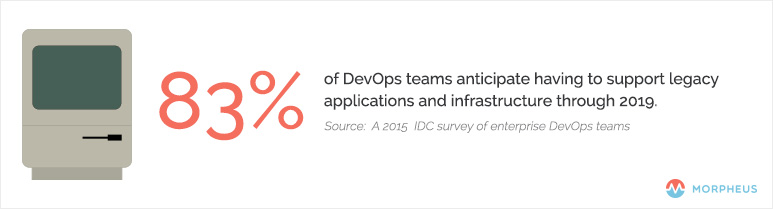
    In a Dec. 8, 2015, article on The Stack, Red Hat’s Gordon Haff examined the results of a recent IDC survey of enterprise DevOps teams, which found that 83 percent anticipate having to support legacy applications and infrastructure through 2019.

    DevOps_Cloud_Native

    It may seem counterintuitive, but the organizations that have gone furthest in adopting distributed, scale-out, microservices-based applications are twice as likely to delay converting existing apps to cloud architectures, he noted.


    What Characteristics Make an Application Cloud-Native?

    The simplest definition of a cloud-native application is one that is “decoupled from the physical infrastructure,” as TechTarget’s Sean M. Kerner wrote in a December 2015 article. In addition to being designed from the ground up to run in the cloud—whether private or public—the app also must scale on demand, both up and down, and across nodes.

    Cloud-native apps are fault-tolerant, built to scale and designed to process requests asynchronously, using queues to decouple functionality, according to Munish Kumar Gupta via Slideshare.

    Another feature that quickly is becoming standard on cloud-native apps is the use of Docker containers, which facilitates deployment on public Amazon Web Services (AWS) clouds and private OpenStack clouds, among other options. A more formal definition of “cloud native” likely will arrive soon from the Cloud Native Computing Foundation (CNCF), an effort sponsored by the Linux Foundation and others.

    Containers are a key component of the CNCF’s proposed standard for applications and services that run natively on public and private clouds, and that move seamlessly between the two environments. Rather than writing specs on paper first and then implementing the code based on the specs, CNCF will create the code for its reference implementations. Google, a CNCF member, has donated its Kubernetes container-orchestration system and stands to benefit via the foundation’s support for private and hybrid clouds, a technology the company currently lacks.

    The Continuing Evolution of Cloud-Native

    It’s tempting to limit the definition of a cloud-native app to those two primary characteristics: decoupled from the infrastructure and scalable up, down and across nodes. If this approach strikes you as too simplistic, you’re not alone. InformationWeek’s Charles Babcock explained in a July 30, 2015, article that the key to cloud-native is microservices—which he referred to as “discrete application services”—running in their own containers and connected via a network to create custom applications. The result is an environment for “user-driven systems” comprised of standardized parts and governed by “standardized deployment and operational procedures.”

    The combination of microservices and containers pushes down the app stack and simplifies deployment in computing environments of all types, according to Richard Harvey of Ngineered via SlideShare.

    The payoff for companies is still far off, according to Babcock, but ultimately cloud-native apps will keep firms focused on their customers as the software landscape shifts around them. This translates into a competitive advantage via continuous deployment and delivery of “fresh” software.