Continuous testing is the process of executing automated tests as part of the software delivery pipeline to obtain immediate feedback on the business risks associated with a software release candidate.
Incident response tools offer the ability for organizations to not only implement continuous testing but to also shorten the feedback loop from continuous testing back into planning and development
At this point, you should be able to say the word “continuous” to any technical team, drop the mic and leave. Yes, the idea that we want to do more delivery, more testing and more interactions isn’t always novel. The reason we use phrases such as continuous testing and continuous improvement is to have the conversation about the unique set of tools and practices required to run these processes in production, and not just as part of continuous integration (CI). Part of supporting continuous testing is having a highly effective incident response process—arguably, it’s required.
Functional testing is the process of running automated tests of the application as if the test were a user, from the outside in. Performance testing is the process of putting artificial loads on the application to simulate high transaction volume to see how the application responds. Vulnerability scanning is the process of scanning application code to make sure components don’t have known vulnerabilities.
All of these application quality processes are generally run in continuous integration (CI) environments and pre-production. If an organization were to move them to production, they get several benefits:
Full parity with production infrastructure. When you run these tests in CI, the environment it’s run on isn’t a one-for-one comparison with the infrastructure used for production. By running tests in production, you get a true picture of what is going to happen.
Better relation to production data. By running these tests in production you are running aside real user activity, which gives a more accurate picture from the outcome of the tests.
Reduced reliance on CI. Continuous testing allows you to streamline and even reduce pre-release processes, allowing more code to get to production faster. It also reduces the reliance on synthetics, mocks and service virtualization.
Specifically for vulnerability scanning, the ability to build DevSecOps workflows into production for vulnerabilities that show up at a later date.
The mechanisms for running the tests in production are the same as CI, just with a different target environment. The problem is, when something breaks in production, it’s much more serious. So, to support continuous testing, you need to know what to do if there’s a test case failure or a failure in the application as a result of running the test.
This is where incident response comes in. Today, most incident response tools and processes are used by SREs and developers to be alerted when something breaks. But, the same tools and approaches can be used for running tests as well. The only difference is, not only will the application be a data source of an alert, but so are the testing tools. This way, quality engineering and DevSecOps teams can confidently run their test suites and get alerted if something goes wrong.
In particular for vulnerability scanning, continuous testing allows SecOps folks to get alerted when a new vulnerability is detected, which can result in patching holes long before the application is exploited.
If an organization embraces continuous testing, they need to know:
If a test fails. The effort to run tests, both in terms of human and compute time can be high. To wait for a result can also impact downstream processes. Therefore, it’s important for application quality and security to know that the tests themselves are running successfully. And, if they break, the QE team or SecOps team needs to be alerted so they can re-run the tests.
If the tests break something in production. Not only do the teams who own the testing process and tools need to be alerted but if you’re on-call, you need to know as part of the context of an alert, that the incident was directly or indirectly impacted by tests being run. This can save a lot of time by killing tests versus chasing down issues with the application that may not be there.
Incident response tools offer the ability for organizations to not only implement continuous testing but to also shorten the feedback loop from continuous testing back into planning and development. This can be done simply by reducing the amount of time it takes to get details from an incident back to the appropriate teams, but also for non-critical incidents that indicate potential issues in the application. Issues can be made more visible to everyone and communicated to product owners faster and more effectively. This is the other continuous, continuous improvement.
Digital transformation brought about by quality software applications and robust hardware platforms helps to create a competitive advantage for enterprises across verticals and geographies. Now it is no longer about choosing between speed or quality of software but to incorporate both when delivering to customers. With Agile and DevOps being embraced by enterprises to stay up to speed on the competitive curve, continuous integration (CI), continuous delivery (CD) and continuous testing (CT) have become the catalysts driving quality digital transformation.
It goes without saying that continuous testing has become critical and is challenging. CI and CD are primarily tools and team-driven activities, while CT is comprehensive in its scope, including teams, tools, testers and services. The importance of driving and integrating code changes cannot be ignored in the software delivery life cycle. At the same time, unless the automated delivery system can figure out the impact of such code changes on customer experience, CI and CD could become meaningless.
Rising competition and changing market dynamics have put pressure on enterprises to innovate and change. Agile and DevOps in consonance with continuous testing offer the framework to address the requirement. At the heart of digital transformation lies the need to deliver software quickly, safely and reliably, which can be achieved through continuous testing in DevOps.
Why Continuous Testing?
Customers today use software applications across a plethora of devices, operating platforms, browsers and networks. They want the applications to be high-performing, navigable, scalable, secure, intuitive and fast-loading. These attributes can only be fostered if the software development process supports a robust QA mechanism in the Agile or DevOps mold. Unlike in the traditional or manual way of testing, where QA comes after development as a separate discipline, the Agile and DevOps models have QA as part of an integrated team with development.
In Agile testing, the software is tested for performance, security, usability, scalability and more throughout the various stages of development. Thus, glitches are identified and fixed early in the SDLC, leading to the delivery of quality software. A continuous testing strategy enables enterprises to put in place the processes, systems and automation to accelerate the time to market, install improved feedback loops and deliver desirable business outcomes including high-quality products and services, operational efficiency, responsiveness, competitive differentiation and enhanced customer experience.
Continuous testing services create a quick and risk-free feedback loop for the QA specialists in the Agile testing pipeline to understand (and act upon) the issues faced by the end customers. These services help to manage business risks borne out of the complexity and pace of application delivery.
Why Agile and DevOps?
To thrive in a competitive business environment, enterprises must address issues such as time constraints and resource mobilization to build-test-deliver applications that are higher quality, secure and stable. This engenders a renewed focus on continuous test automation and collaboration.
The DevOps approach is ideal for enterprises that struggle to manage demand and implement rapid changes in the SDLC.
DevOps allows enterprises to address their acceleration and integration needs by establishing a toolchain that cuts across the realms of development, QA, integration, management and delivery.
The silo-driven development and operations teams should be integrated to drive better collaboration. Further, the pipeline should have a built-in mechanism to receive continuous feedback and to generate better quality features and functionalities.
DevOps: The Extension of Agile
In the Agile model of software development, developers create user stories comprising smaller chunks of the build to generate feedback loops and to align the product to the market need. It started with small teams comprising developers and QA testers working collaboratively and efficiently. Thereafter came the notion of scale, wherein the software code was developed in short iterations. However, down the pipeline, when it came to deployment and receiving feedback, the silo-driven processes stifled what was expected of Agile.
Consequently, the process was further refined by automating and streamlining the SDLC and incorporating continuous integration. In CI, code is tested repeatedly and integrated to create a stream of small but frequent releases. However, these challenged the Ops team, which found it difficult to keep pace with development. So, while Agile addressed the issues developers faced with glitches being passed on to the next phase, the DevOps approach turned out to be more effective, as it treated the entire SDLC as a monolith of collaborative processes that generate better outcomes.
Continuous Delivery and Testing
To support the strategic business needs, many enterprises have graduated from performing CI to implementing CD. In doing so, they have fine-tuned both processes and technical frameworks. From creating CI builds and executing testing to achieving deployment, the continuous delivery and continuous testing methodologies have covered all dimensions of the organization’s operations. These ensure the quick and frequent deployment of quality software applications to end users. The questions to be asked while implementing a continuous testing framework are:
Is the software application deployable during its life cycle?
Can the software application be deployed while the team is working on its new features?
Can the process receive quick and automated feedback each time a change is implemented?
Can a push-button deployment be performed for a software version in any environment?
How Agile, DevOps and Continuous Testing Benefit Enterprises
These interconnected methodologies help enterprises in several ways:
Accelerated time to market.
Better productivity and efficiency.
Frequent releases of reliable and stable builds.
Capability to build products aligned to the market.
Better feedback mechanism.
Superior customer experiences.
Conclusion
The need for enterprises to be the disrupter in the market by producing or delivering top-quality software products or services has put focus on methodologies such as Agile, DevOps and continuous testing. The complementary relationship among the three methodologies has led to the overhauling of processes and working culture in favor of a new paradigm in which quality deployment is a continuous process.
The practice of crowdtesting has taken on greater importance during the COVID-19 pandemic, for good reason
Entering 2020, digital transformation projects and initiatives dominated tech spending for most companies. But, between a global pandemic and fiscal uncertainty around the world, spending must be shrinking, right?
Think again.
If anything, the pandemic has created a sense of urgency for many companies, accelerating digital transformation in organizations. According to June data from TEKsystems, 56% of digital experience leaders—companies with mature digital transformation strategies—have increased spending on digital transformation. Remarkably, more than one-third of digital experience laggards—those that have historically had limited digital transformation initiatives in place—also increased spending on digital transformation projects.
The rush can be attributed to COVID-19. For businesses, it has changed the future of work. Distributed workforces are nothing new, but very few companies were prepared to deal with a fully distributed model in which all employees are working remotely. The pandemic has changed buyer behaviors, too. In lieu of malls and brick-and-mortar stores, people have turned to e-commerce sites for the bulk of their shopping. Legacy companies, such as Pepsi, for example, are building direct-to-consumer e-commerce sites in response to the evolving market dynamics.
Digital is now the primary means of communication for businesses. Digital quality is no longer a niche issue for the application and DevOps teams; it is a strategic business imperative in the C-Suite.
Apps Everywhere, At All Times
Apps need to be tested by real users, on every device, network and operating system, across the globe and at all times. The typical workday used to be 9 to 5, but that’s no longer the case. With most workforces now remote, the days are longer and the diversions greater (yes, I’m looking at you, juggling Zoom calls and your daughter’s remote learning plan at school). Customers, too, have higher demands for the technology they use. There can be no downtime; downtime means customers will look for alternatives, becoming ex-customers and resulting in lost revenues.
In today’s extremely fragmented device landscape, QA teams face increasing difficulties in keeping up with the myriad device/OS combinations they need to test on. For obvious reasons, purchasing and maintaining a nearly endless pool of devices is not an option—not only is it too expensive but it’s also time-consuming and harms the team’s productivity.
Beyond logistics, QA teams must collect data from real-world testing to make informed decisions. No matter how many test cycles are run, QA teams can’t uncover all unexpected bugs and edge cases unless they include in-the-wild testing in their strategy.
To test anything related to hardware in an efficient manner, leveraging a community of remote testers is the best way to obtain reliable results without burdening internal QA resources, generating disproportionate costs or missing out on important use cases.
Crowdtesting Replaces Offshoring as the De Facto Way to Test Software
With a market greater than $50 billion in India alone, there is no denying the offshoring model worked. But, the pandemic exposed pre-existing cracks in the model, causing many businesses and entire industries to regroup, re-evaluate and find new ways to accomplish tasks that just a few months prior would have been routine.
When the pandemic hit, the supply chain broke. Testing and product development facilities built on product teams working collaboratively in close proximity struggled to keep up with the most basic needs of their customers. Outsourcing companies and their employees lacked the infrastructure to work remotely, negatively impacting the business continuity of their clients.
This new reality leaves companies that are used to the offshoring model for testing and QA with one big question: what is the best way to test software and digital experiences in a post-COVID-19 world?
While crowdtesting has been a factor in application and digital testing for more than a decade, it has taken on increased importance as internal QA teams can no longer maintain business continuity while working remotely and the offshoring model has faltered amid the pandemic.
The reason the crowdtesting model remains a reliable answer even during COVID-19 is that it is always done remotely, via a community of vetted testers who already work in remote environments. This setup allows testing teams to maintain business continuity, while often improving test coverage across devices, operating systems, geographies, demographics and more.
As an example, let’s look at how the Israeli government used crowdtesting to bring its tracing app to the country. The Israeli Ministry of Health developed the app using cellular GPS data to provide alerts on areas with high concentrations of COVID-19 infections. The app is designed to prevent COVID-19 spread by notifying people who were in the vicinity of verified coronavirus carriers. Similarly, healthcare provider K Health has used crowdtesting to help it launch a new COVID-19 diagnostic feature. K Health was already using crowdtesting services prior to the onset of the pandemic to ensure its mobile app functioned properly across all relevant device/OS combinations and timezones but found the scalability and reliability of the model meshed perfectly with the demands on healthcare providers in the new normal. When K Health offered free services to all Louisiana residents, crowdtesters were there to scale testing at a moment’s notice and provide 24/7 test coverage for the K Health app.
It was urgent to get the app out quickly, but it also needed to work properly. Did push notifications go through promptly and to everyone? Would the app work across devices, and in different configurations? Since launching the app in March, the Ministry of Health has been able to leverage continuous crowdtesting to identify dozens of bugs that could have prevented Israelis from using the app or trusting its results.
For example, the testers discovered that the app crashed when it was used in dark mode, and certain situations led to the app showing that it detected data even when data and location services were off. Since this second error was directly related to the main functionality of the app, it represented a very critical bug for the Ministry of Health to fix.
Crowdtesting uses real devices and real people in their daily environments, which accounts for all these variables that are not seen in traditional labs and offshoring facilities. That makes crowdtesting a valuable testing approach even after the COVID-19 pandemic and resulting lockdown ends.
Eggplant this week announced it has extended the capabilities of its application testing platform infused with machine and deep learning algorithms to now include recommendations to help improve tests.
In addition, the latest update to the Digital Automation Intelligence (DAI) Platform makes it easier to onboard new members to an application testing team.
Finally, Eggplant is making it easier to capture snapshots of the testing environment to more easily identify areas that require additional test development.
Eggplant COO Antony Edwards said the goal is to extend a low-code platform that employs modeling tools to make testing more accessible to both developers and end users. There is simply not enough testing expertise available to keep pace with the rate at which applications are now being developed thanks mainly to the rise of DevOps, he noted.
By employing a testing platform based on a low-code platform that enables tests to be created using modeling tools, it becomes feasible to include more end users in the testing process, he said. Generally, end users have the best understanding of how an application should function, so including them in the testing process also yields higher quality applications that will be accepted sooner, Edwards added.
Eggplant, which was just acquired by Keysight Technologies, has been making a case for applying artificial intelligence (AI) to application testing to increase the overall capacity of testing teams. Using AI makes it possible to conduct more than 100 tests in parallel because most of the mundane tasks associated with building and updating tests have been automated, said Edwards.
There will always be a need to include humans in the testing process, but Edwards noted AI can augment the capabilities of testing teams in a way that not only allows more tests to be conducted faster but also ensures more resources are allocated to writing code, versus continually debugging applications.
Many IT organizations are now caught up in a vicious DevOps cycle. They can develop more applications faster, but the more applications they develop the more time they need to spend debugging them. Ultimately, organizations find themselves spending more time debugging existing applications than developing new ones. AI-infused testing tools break that cycle by identifying issues before applications are deployed, which is when they are easiest and least costly to fix.
Breaking that cycle has become more of an imperative because in the age of microservices, the overall application environment is becoming more complex, Edwards said. Most testing teams are not going to be able to create the tests needed to assure the quality of those applications unless it becomes possible to generate more sophisticated tests using modeling tools that automate much of the process.
Naturally, it may take some organizations time to trust the tests and recommendations generated by an AI platform. However, in the wake of the economic downturn brought on by the COVID-19 pandemic, it’s apparent DevOps processes need to be streamlined. Arguably, one of the best places to begin that process is by automating as much of the application testing process as possible.
Here are ways organizations can reduce their test run times to improve speed and efficiency
Consult any recent DevOps survey and the same theme emerges: Testing remains one of the biggest roadblocks impeding organizations’ collective efforts to deliver better software, faster. Unlike days past, however, when agile development was still in its relative infancy and investments in testing lagged other areas of the delivery pipeline, organizations today are increasingly aware of the critical role continuous testing plays in delivering quality software at speed, and are aggressively investing in the requisite testing tools and technologies.
No, the problem today is not lack of awareness or tooling. The problem, quite simply, is that testing is difficult, and only gets more difficult as organizations look to drive automation at scale. Nowhere is this challenge more evident than in organizations’ ongoing struggles with test quality. A recent study showed only 24.37% of organizations pass at least 90% of their desktop tests and only 25.45% pass at least 90% of their mobile tests. Remember, the purpose of agile development is to accelerate application delivery and shorten the release cycle. Organizations can do neither if they constantly have to manually follow-up to determine the source of repeated test failures.
Doing It Right
Organizations must find ways to improve test quality and speed. A major reason so many tests fail is they take far too long to run. The longer it takes to run, the more likely it is to end with a failure. According to the aforementioned study, those that complete in two minutes or less are twice as likely to pass as those lasting longer than two minutes.
With that in mind, let’s take a look at four key steps testers and developers can implement to reduce test run times.
Script Atomic Tests
There’s no more important best practice to create a better and faster automation experience than to run atomic tests. These focus on just one piece of application functionality and are much faster and easier to execute than longer tests assessing multiple pieces of functionality.
Let’s examine what this looks like in practice. Suppose an online retailer needs to validate that users can log in, view their gift card balance, add items to their cart, proceed to checkout and successfully process a transaction. Even an experienced tester will often make the mistake of scripting a single test to validate those five functions. The far better approach, especially if the aim is to reduce run time and improve test quality, is to write five separate tests, each specifically focused on one piece of functionality. Running individually but in parallel, these five “atomic” tests will execute in far less time than one longer test.
Run Tests in Parallel
Of course, if those five atomic tests are executed sequentially—that is, one at a time, one after the other—they’ll take even longer to complete than the one screen flow test, negating any potential runtime benefit. That’s why running tests in parallel is an equally critical component of any strategy to reduce test run times. Consider the hypothetical example of a test suite with 100 atomic tests, each of which takes two minutes to execute. Run those 100 tests sequentially and they’ll take more than three hours to complete. Run them in parallel, and all 100 will complete in just two minutes.
Remember, too, not to get thrown by the volume of tests in a given suite. It’s tempting to think that a suite with 10 long tests that each take 5 minutes to complete will execute faster than one with 100 atomic tests that each take 1 minute to execute. But even if executed in parallel, the suite with the 10 long tests will still take 5 minutes to run—five times longer than the suite with 100 atomic tests.
Reduce the Number of Selenium Commands
Having too many Selenium commands in your test script flies in the face of atomic testing and is one of the most common underlying causes of long and unstable tests. Every single command takes time to execute and represents a new opportunity for something to go wrong. Minimize the number of commands required to execute a test case and run time will shrink accordingly.
Use Explicit Waits
Another effective way to reduce test run time is to use explicit waits rather than implicit waits. Implicit waits set a default wait time between each step or command across a test script, such that the subsequent step only executes after the pre-defined amount of time has elapsed. Explicit waits, on the other hand, enable the next step in a script to execute as soon as the preceding step is complete. Though more complicated to implement, using only explicit waits can have a significant positive impact on test run time.
Putting it Together
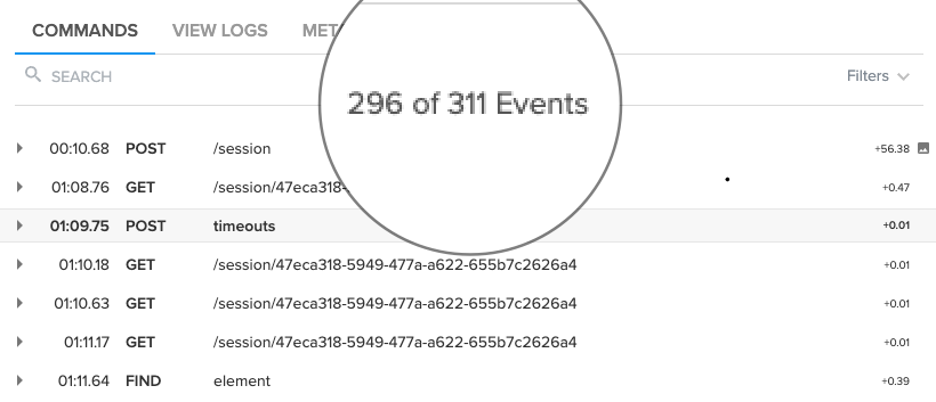
The example below shows an unoptimized test suite with 311 commands run against a mobile device. This example took 1,265 seconds (or more than 21 minutes) to execute. If delivering better software faster is the aim, that’s not going to work.
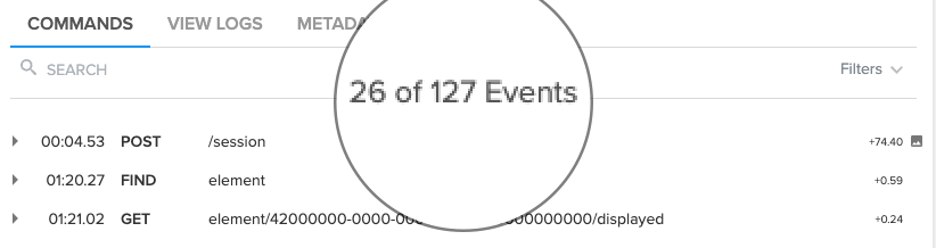
Applying the aforementioned tactics to the same test suite executed against the same device, however, drove the total number of commands down to just 127 and enabled the suite to execute in just 430 seconds (or just over 7 minutes), a 66% improvement in test run time.
Though the prospect of reducing test run time may be daunting, by focusing on a limited set of key tactics and best practices, the end goal of shorter, more stable tests is indeed attainable.
For those unfamiliar with the term, a GameDay is a dedicated day for running chaos engineering experiments on our systems with our team. The goal is cooperative, proactive testing of our system to enhance reliability. By getting the team together and thinking through your system architecture, you can test hypotheses and evaluate if your systems are resilient to various kinds of failures (and if they are not resilient, fix them before those weaknesses impact customers).
But how can we have productive GameDays in a distributed, remote context? This article highlights the differences that exist between running a GameDay with everyone in the same room at the office or data center versus running a GameDay with everyone working remotely. This post is meant to be a resource now that we’re all working from home as a result of COVID-19. First I outline the differences, then I talk about how to be successful despite these differences, and in some cases enhance your potential for success because of them.
What Makes a Remote GameDay Different?
Because all of the participants are spread out, communication will be a challenge at first, especially for teams that have little to no experience with it. Learning how to hold standup meetings, communicate about system changes and updates and coordinate work such as deployments will be a challenge.
Distractions can also be a big deal. When everyone is locked in a conference room it’s easy to run a distraction-free GameDay. It’s more difficult when we are remote and have kids and pets running around, FedEx deliveries and random family noises. Have a plan to mitigate the best you can. Some find headphones helpful, while others move into the basement or a bedroom and lock the door. Find something that works for you.
You also need to think about the risk of someone’s internet connection going down or their PC/laptop crashing. Create alternate ways to dial in to conference calls. Make sure every team member has a backup team member standing by ready to take over that person’s role if needed. When a required role is being performed by someone remotely, there is always a chance their internet connection could go down. There needs to be a contingency plan for someone to take over their role if that happens. This can be a team member who already has a role and is capable of taking on another concurrently or someone who was only participating as an observer.
For teams that are remote-first and have been working this way for a long time, much of what we outline here may be old hat. But it can be easy to fall into bad habits for anyone, so if your team was used to running GameDays weekly in the office, it’s important to keep that muscle memory even in the new paradigm.
How to Prepare for a Remote GameDay
Here are the ways you must prepare.
Define
Define the GameDay. Specify the exact chaos experiments that the team will run, and exactly which systems the team will target. Define the goal. Is it to:
Replay/reproduce circumstances that lead to a past outage?
Retest something that caused a problem in a previous test that you believe you have fixed and want to confirm?
Ensure that a new system has the proper monitoring set up and working with alerts and metrics?
Something else?
Time
Set the date with a beginning and end time. This will likely require coordination with people. Be sure to account for time zones if your team is spread out nation- or worldwide. Set a clear agenda for the GameDay that includes:
Assigning which tasks will be done by which team member and the timing involved. This orchestration is especially useful with team members working from a distance because it frees up communication channels for use in dealing with problems or for the leader to give direction without interruption.
Whiteboarding of the current system architecture to paint a clear picture of what you are going to attack and what you expect might be impacted. Doing this remotely requires the use of some imagination and forethought. One option is to use a diagramming app while sharing your screen over a video conference.
A short team debate on assumptions to get everyone on the same page.
Clearly defined chaos experiment test cases and scoping to limit test magnitude, length of time and blast radius. To prevent problems, make sure you have a halt or abort plan and can stop the experiment easily if unexpected problems arise.
The execution of the chaos experiment. Ask questions like, “What changes are observed in monitoring data?” and “Is this the behavior we expected?” Collect and document the information.
A recap at the end to discuss what worked, what didn’t and how to use what was learned.
People
Identify which team(s) will participate and make sure everyone on those teams is ready. Make sure all stakeholders are available and will be present in the appropriate communications venues.
Identify the incident manager on-call (IMOC).
Define the on-call rotation.
Notify everyone on the on-call team(s).
Comms
Set up dedicated, real-time communication venues for the duration of the event. This is where all activities will be coordinated and where all reports will be sent.
Create a dedicated instant messaging channel using Slack, Hangouts, Skype or whatever your company currently uses. Test and make sure all involved are invited and can access the channel.
Create a dedicated video conference using Zoom, BlueJeans, Webex or whatever your company currently uses. Test and make sure everyone involved can access it.
Final Steps
The agenda will be the same as in an onsite GameDay. Communicate it in advance. Include information about the schedule, the activities and the roles, specifying who is responsible for what. Typically two hours is more than enough time for a bit of an introduction, a discussion of assumptions and the day’s test design.
During the introduction, the designated test leader will make sure everyone understands what will be tested, the parameters for how the blast radius is set, the magnitude of the attack to be run and the expected outcome. Another team member is assigned to monitor the metrics. Others may be assigned to monitor other systems that may end up being involved.
Communication is key, especially because if the test causes unexpected problems. Everyone needs to know immediately so that the test can be stopped and any damage dealt with right away. It’s actually a good thing if you find unexpected issues because then you can fix them.
It’s also a good thing to take time to celebrate when an experiment yields an expected result. Rejoice together that your team’s implementation of self-healing or recovery mechanisms kicked in and worked as expected. Allow yourself to take the opportunity to call out the immediate wins and not just the issues you find.
Conclusion
Running your first GameDay can be intimidating, but with good preparation, any team can be successful. Doing the same thing with everyone working remote can be even more intimidating. It doesn’t have to be! Keep up good habits and set clear agendas, have concrete start and end times, go in with a plan and execute. Your customers will be happier if your team is figuring out problems before they ever had the chance to experience them.
Tricentis this week announced an alliance with SAP under which a continuous testing platform that employs machine learning algorithms is being incorporated into the SAP Application Lifecycle Management (ALM) portfolio.
Jonathan Boswell, director of strategic content for SAP and packaged applications for Tricentis, said via this initiative SAP customers will be able to take advantage of a testing platform infused with machine learning algorithms to accelerate the rate at which they upgrade to the latest editions of SAP applications.
Many of SAP’s customers still run older versions of its software, much of which has been customized. Those customizations make it difficult to migrate to the latest version of SAP applications because in many cases SAP has extended the range of functions provided with SAP applications, thereby eliminating the need for those customizations.
The Tricentis tools enables IT teams to map existing custom functions to the standard capabilities that SAP provides now under a so-called Model Company initiative. Tricentis identifies the aspects of an upgrade that are likely to have the most risk to the business and surfaces issues involving integrations between SAP and third-party applications. Tricentis automates 90% of tests to help ensure the entire chain is tested, in addition to employing load testing to optimize SAP application user experience, added Boswell.
While many organizations employ SAP applications extensively, many of them are struggling with upgrades. In an ideal world, more organizations would take advantage of the latest packaged SAP application features to drive digital business transformation initiatives. Right now, however, it can take organizations months to perform an impact analysis on the SAP upgrade process, he said.
Tricentis shortens that time by employing machine learning algorithms to discover the difference between two application environments versus relying on legacy approaches based on testing scripts, said Boswell.
Ultimately, he noted, the goal is to enable more organizations to focus more on business processes rather than application quality assurance.
It’s not clear to what degree IT organizations will continue to customize SAP applications. SAP now provides a separate cloud platform that it encourages organizations to employ to build custom applications that extend SAP applications without ever having to touch SAP application code. Getting SAP customers to make that transition has become much more of a journey for many customers than SAP originally anticipated. However, as best DevOps practices continue to be adopted by SAP, the rate at which custom functions are built should accelerate. The challenge is creating and deploying those customizations in a way that doesn’t impede a SAP packaged application update cycle that happens every quarter.
Regardless of the path forward, machine learning algorithms and other forms of AI are positioned to play a major role in application testing. They may never replace the need for human testers, but the days when business users needed to be recruited to help test every low-level function in an application may finally be coming to a merciful end.
The concept of shift-left has been a popular trend in continuous testing practices for a while. We are now beginning to see shift-right practices as an emergent trend in testing.
Shift-right entails doing more testing in the immediate pre-release and post-release phases (i.e. testing in production) of the application lifecycle. These include practices such as: release validation, destructive/chaos testing, A/B and canary testing, CX-based testing (e.g. correlating user behavior with test requirements), crowd testing, production monitoring, extraction of test insights from production data, etc.
Shift-right not only introduces such new testing techniques, but also requires testers to acquire new skills, make aggressive use of production data to drive testing strategies and collaborate with new stakeholders, such as site reliability engineers (SRE) and operations engineers.
In shift-right of testing, and in the increased collaboration with operations disciplines, we see the evolution of a new discipline in DevOps that we call TestOps.
In this blog, we will discuss the various shift-right testing trends and practices, what’s driving them, the new skills and collaboration required so that TestOps benefits can be realized.
Emerging Trends in Shift-Right Testing
In a recent survey of continuous testing conducted jointly by Capgemini and Broadcom, testing in production was ranked as the number one practice (with 45% respondents) either currently implemented or planned (see Figure 1). In addition, 39% of the respondents mentioned the use of analytics from operations to determine or optimize test coverage.
Figure 1.
When asked how customers measure the effectiveness of continuous testing processes, production data and user feedback and adoption of new functionality were ranked number one and number two respectively (see Figure 2).
Figure 2.
Finally, in response to how customers test their digital applications to ensure that they meet real world requirements, almost all of the responses were related to production data (see Figure 3). Use of production data for designing test strategy and chaos testing emerged as new methods compared to similar survey done a year ago.
Figure 3.
The survey data clearly indicates that customers are actively practicing (or considering adoption of) shift-right testing techniques. This report has a chapter (with my contributions) dedicated to shift-right that discusses the techniques and recommendations for its adoption, as well as relevant customer case studies.
What’s Driving Shift-Right Testing Trends?
The goal of shift-right testing is to ensure correct behavior, performance and availability over the production of an application.
There are several drivers for adoption of shift-right testing trends.
Customer Experience (CX) Is a Key Quality Metric for Digital Applications
Unlike classic testing, this takes into account real-world users and their experiences. An application with perfect traditional quality scores (such as FURPS) may still suffer from poor CX if it fails to delight the customer. CX is measured using various metrics such as Customer Effort Score (CES), Net Promoter Score (NPS), Customer Satisfaction Score (CSAT), etc. While it is possible to shift-left some of these measurements to some degree, most CX measurements are deduced from systems in production (or close to production). Examples of CX-based testing include the following:
Requirements validation based on real user journeys, behavior and feedback.
Deriving functional and performance test scenarios based on the above.
A/B testing and canary testing, to experiment how well customers like (or dislike) changes.
Crowd testing, to better understand real-world user experience.
In a World of Agile Delivery, It may Not Be Possible to Test Everything Before Release to Production
Time to market (or lead time for changes) is a top business imperative for digital applications, which is why QA/testing is considered a major bottleneck in continuous delivery. While it is possible to optimize testing effort and cycle time using shift-left practices (such as model-based testing, change-impact testing, test process and execution automation etc.), those approaches may still take too long (or too much effort) during the shrinking release cycle time. In some cases, the exact usage patterns may not even be fully understood before release. The idea is to learn usage patterns from production and use it for better testing strategy within shift-left.
Complex and increasingly distributed systems using microservices (using thousands of components) and cloud-native techniques that allow releases at a very granular level make it more and more difficult to test fully in pre-production environments. This is complemented by the fact that since such releases are so granular, they may be backed out easily (rollback) in case they cause problems.
Hence, enterprises test to assure “good enough” quality (to ensure timely release) and rely on fast remediation (or rollback) to address defects or problems that arise.
Also, CX measurements (as described above) often provide real-user feedback in shades of gray, unlike the black-n-white pass/fail measurement of classic testing. Which means it is not possible to perfect pre-production test suites to ensure thorough CX coverage.
A Hundred Percent Reliability (or Quality) Is Often an Unrealistic Goal
Related to the above, one of the key principles we learn from the DevOps discipline of SRE is that 100% reliability is not only unrealistic, but often too expensive to accomplish. SRE establishes the concept of service level objectives (SLOs) and error budgets to quantify acceptable risk tolerance in production systems. The same principle applies to testing and overall quality. See my related blog for more on this subject
Some Validations Are Difficult to Run in Test Environments
These include large-scale performance tests when the test environments are not appropriately sized (or configured) relative to production environments.
Another example is destructive or chaos testing. While it is possible to run isolated chaos testing in test environments by using techniques such as service virtualization (to simulate failure in dependent components), it is difficult to execute for large-scale destructive tests. For example, Netflix does a significant amount of their testing in production.
Similarly, enterprise monitoring to gather insight about real-world usage patterns and failures is only possible in production. Though we advocate turning on monitoring in test environments (as part of shift-left), such monitoring only helps to do localized monitoring (e.g. of the specific app or system being tested), and that too under test conditions. However, performance test scenarios that have been developed by testers can be re-used in production (shift-right) as synthetic monitors to measure application performance and regression.
Lastly, as an extension of monitoring, testing of some AI-based applications may be difficult without access to production data. Some machine learning algorithms, for example, need to be constantly refined based on real world data. While these algorithms are developed using a limited set of training and testing data, they need to be monitored and tuned, based on its performance in production.
Developers and Testers Need Easier Closed-Loop Feedback from Production
Easier closed-loop feedback from operations allows developers and testers to better understand the behavior of the app, predict the success/failure of releases and respond to production incidents (e.g. reduce MTTR).
Interpretation and use of voluminous production data is often difficult and tedious for development and test teams. Use of shift-right techniques allows developers and testers to access production data more easily in a form that is easily consumable and actionable–by leveraging the right insights from AIOps disciplines. This data collaboration is a key tenet of the DevOps paradigm. For example, synthetic monitors (which are typically created by developers and testers in the dev/test stages) provide means for developers to get monitoring feedback in a form that they are familiar with.
In addition, automated root-cause analysis of defects/incidents in production can provide developers and testers insight on failure patterns and trends, their sources (when production data is correlated with development data) and what’s causing them, and how they may be better prevented.
Similarly, data usage scenarios (e.g. from database logs and RR pairs from service transaction logs) can be used for generation of relevant test data.
In essence, shift-right testing practices are necessary to create a continuous feedback loop from real user experience with a production application back to the development and testing process.
The Evolution of TestOps Discipline
It is clear from the customer survey data and drivers discussed above that there is an evolution toward shift-right practices.
Just like we did with shift-left testing, in order to make these practices sustainable and to realize the benefits, we need to also evolve tester use cases, skills, tools and collaboration patterns with people and disciplines to the right of the application lifecycle, i.e. operations. In other words, a new discipline needs to be established—we call this new discipline TestOps—a sub-discipline within the broader DevOps context.
Though the term TestOps (like all the X-Ops sub-disciplines within DevOps) implies the collaboration between testing and operations, it isn’t simply about shift-right. Why? Because with DevOps, operational disciplines themselves have shifted left (such as shift-left of monitoring, configuration management, SRE, etc.). Hence TestOps—true to the principle of continuous testing—refers to better collaboration with operations disciplines across the DevOps lifecycle.
Let’s consider some of the key practices in TestOps shift-left (see Figure 4).
Figure 4.
Early reliability testing:this includes static scalability analysis of the system architecture, as well as performance and stress testing.
Configuration quality and testing: this includes testing of “as-code” (anything “as-code” can and should be tested as such, just like application code) environment and deployment configurations, as well as deployment testing (to test the correctness of deployments) and rollback testing (to ensure that rollbacks can be done quickly and successfully).
Early monitoring: includes monitoring of systems early in the lifecycle (e.g. in development and test environments) as well as development and testing of synthetic monitors before they are deployed to production.
Early AIOps insights: this includes early use of AIOps techniques (in the dev/test environments) to glean testing and quality insights, for example for defect and release risk prediction.
Below are some of the key TestOps shift-right practices (see Figure 5).
Chaos engineering: this includes testing the reliability of the system through the injection of controlled failure scenarios.
A/B testing: consists of a randomized experiment with two (or more) variants to study which are more effective with users.
Canary releases: consists of techniques used to reduce the risk of introducing a new software version in production by gradually rolling out the change to a small subgroup of users, before rolling it out to the entire platform/infrastructure and making it available to everybody.
Synthetic monitoring: includes monitoring techniques using an emulation or scripted recordings of transactions (that reflect typical user behavior).
CX testing and analytics: includes extracting of CX data to understand customer experience as well as to derive insights from it (such as customer problems, new feature requirements, etc.).
Other testing in production: includes performance tests and testing of AI-based applications.
Testing insights from AIOps data: as described above, a rich variety of testing insights can be gleaned from operations data.
Figure 5.
Key TestOps Skills and Tools
Let’s consider the new skills required for the key TestOps practices. This includes the following:
Data analytics skills: Since most of the production data is both voluminous, diverse and often temporal, testers must now pick up data analytics so that they quickly glean insight from such data, as well as perform correlations with other datasets to identify actions. Advanced analytics skills (such as predictive analytics or machine learning) are also necessary to predict events (e.g. release quality). While these analytics skills are well understood within the operations community (with the increasing adoption of AIOps), these are relatively new for developers and testers.
CX skills: As we discussed, CX is now considered a key metric for measuring quality in production. New types of CX testing include A/B and canary tests as well as crowd testing. Like other operational data, CX data is also typically voluminous and often unstructured. While CX teams specialize in such principles, testers need to acquire sufficient skills to glean insight from the CX process and data, and collaborate effectively with such teams.
Monitoring and operations skills: Understanding of monitoring principles (e.g. creation, testing and deployment of monitors and use of data from monitors) is a key skill required for TestOps. Similarly, testers must also understand operations principles (incidents, failures, alarms, MTBF, MMTR, configuration definitions, etc.) so that such information can be leveraged for testing purposes as well as for collaboration with ops teams.
Reliability skills: Reliability is also another key operational quality attribute that testers need to be familiar with. This includes chaos/resiliency testing, deployment and rollback testing, and configuration testing. The discipline of SRE has evolved within DevOps to address reliability, and many of its principles overlap with TestOps.
New tools skills: In addition to using traditional testing tools, TestOps also requires the use of additional tools such as monitoring, data analytics (for production and CX data), CX testing (such as A/B and canary testing) and reliability testing. Technology innovations that support testers with these new capabilities include RunScope (a lightweight API monitoring tool that can be used for monitoring both in test and production environments), Blazemeter (for performance testing for CX and reliability), Optimizely for A/B testing. For data analytics, technologies such as automation.ai simplify the work of data aggregation and modeling so that testers can more easily extract actionable insights from data collected across the lifecycle.
Key TestOps Collaborations
In addition to new skills, testers must now learn to collaborate better with additional stakeholders as alluded to above. These include:
Collaboration with data science and AI/ML engineers: This is necessary for testers to tweak or build out new algorithms and models required to perform the analytics needed for TestOps.
Collaboration with CX engineers and teams: This is necessary for testers to monitor the appropriate CX metrics and data, and to study the impact of their testing/QA activities on CX.
Collaboration with Operations engineers and teams: This is fundamental for TestOps to not only support all the shift-right testing activities, but also to gain access to production data that is required for TestOps analytics. This is analogous to how testers collaborate with developers as part of shift-left.
Collaboration with SREs: As mentioned, there is a fair degree of overlap between SRE and TestOps principles, and hence collaboration with SREs is key for testers. See my blog on how testers and SREs can work better together to improve reliability.
Conclusion
Hopefully, this article has provided readers with some insight into the emerging discipline of TestOps. As we build increasingly distributed microservices and cloud-native systems, and as the discipline of SRE matures, we expect to see more of shift-right testing practices that enrich TestOps.
In the wake of the recent Iowa caucus, vote-counting software has fallen under suspicion after a smartphone app built by Shadow, Inc., brought chaos and delays to the first 2020 Democratic caucuses. Stopgap measures, such as Nevada officials canceling the application’s use in its upcoming caucus, are not enough to ensure vote tallies the electorate can be comfortable with. What’s needed is to correctly identify and fix the underlying problem.
The flaw does not lie with a lack of end-user sophistication, dataset complexity or inappropriate app security. Remember, government officials around the world are transforming urban areas into connected, responsive smart cities. Students are live-streaming interstellar space flights to Mars and Saturn. Uber drivers navigate past traffic jams, while seniors use apps to make time-sensitive healthcare decisions and adjust their retirement portfolios. People of all ages and experience levels do this and more, on the fly, with handheld mobile devices.
The real problem lies in the way leadership teams drive software delivery. The Iowa app failed for a number of reasons: It was released with no product testing after a short, two-month development runway conducted under a cloud of secrecy. It was not built to scale. Worse, there was little to no input, transparency or communication among the application’s most important stakeholders—the Shadow management team, the software developers and the end-users, in this case, precinct captains running the Iowa caucuses and party.
The IT professionals in charge could have avoided these problems by following three simple principles of successful software development:
Collaborate With All Stakeholders: Applications are no longer stand-alone widgets. They are digital experiences. With even the most sophisticated design, experiences that don’t serve their target audience are failures. A development process that prioritizes collaboration with end users can prevent such failures. Feedback from those with a vested interest in the outcome would have quickly raised red flags for developers. In Iowa, collaborating with intended users would have highlighted a need for accessibility training and connectivity issues, since the app was deployed in buildings with high-speed internet along with remote, off-grid locations.
Build to Scale: Every developer knows to build for performance at an order of magnitude larger than you expect. This includes ensuring performance on the widest possible range of handheld devices and phones. From a developer’s perspective, the phone model will impact application performance due to different hardware specs. It’s imperative for designers to build apps that are native, so that all users, devices and performance profiles will function as intended. A useful software solution should reap success, not failure, when more people use an application than initially expected.
Be Transparent: Valid concerns over security risks and election integrity unfortunately led Shadow’s team to prioritize secrecy over transparency. That didn’t work. Problems are not detected and solved when siloed or when small groups of people work on a solution in secret. Proper vetting and testing falls by the wayside. The risk that the app will not be suitable for its intended users increases. The app may have additional, exploitable security vulnerabilities that can only be found when teams ensure proper openness and transparency during the development process. Proper governance and guardrails that protect core data mitigates the security risk for election-based applications (and software in general). There’s little to be gained and much to risk by closing off input and vetting at any point during the full application development cycle.
Developers Move From Stressed to Empowered
One simple, effective way to solve or avoid these issues is by adopting an enterprise-grade, low-code software development platform. The “low-code” label refers to visual, model-driven software development, which employs an unambiguous visual language throughout the application development lifecycle, enabling nontechnical stakeholders, end users and professional developers to work together.
Such a collaborative platform can surface issues with senior leadership before it’s too late. Feedback from citizen developers—that is, not citizens in the voting sense, but rather, non-traditional developers—can capture leadership’s careful attention, precisely because the feedback is from nontechnical users. The right low-code platform would have enabled the Iowa caucus volunteers and stakeholders to collaborate on every step of the process without slowing it down.
Another benefit of a robust low-code platform is having more people on deck to meet product goals with tight deadlines. Insights from citizen developers with unique backgrounds can also help when testing applications. With suitable governance controls, low-code functionality speeds up a developer’s ability to deliver software without taking away their ability to dive deeply and extend functionality with coding when needed.
Market analysts have evaluated the strengths and merits of different low-code platforms. In multi-experience use cases—such as Iowa’s, particularly because the eyes of the world are watching—it’s important to use a low-code platform that enables applications that are truly device native. This allows the software to take advantage of core device capabilities, typically delivering better performance and supporting the interactivity users are familiar with. Additionally, continuity online and offline would address connectivity issues in areas where signals are weak or nonexistent; the data can be properly synced when a signal is available. Lastly, a robust low-code platform provides tools to enable apps to scale automatically, avoiding the coding work required to allow an app originally built for 1,000 people to service 100,000 or a million.
An Urgent Role for Software Developers
When roughly half of all eligible voters sit out general elections, talented developers should not lose sight of the many ways technology can aid and expand civic participation. Eventually, we may live in a world where election-based apps for registered voters are accessible and secure, regardless of the user’s device, age, location, physical ability or educational background. Building in redundant systems of paper-based vote confirmation and other offline systems will add integrity, inspire greater confidence and drive adoption of these innovations.
What happened in Iowa is, unfortunately, not an isolated case. These complications are endemic to how most leadership teams drive software delivery. Development teams of all types will continue to run into similar issues until their leadership makes transparency, accessibility and scalability a priority by investing in the appropriate resources. Organizations can leverage the strength and impact of fully robust low-code software development platform to that end.
Since the introduction of low-code in 2004, platform capabilities have matured at an accelerated rate, moving to widespread adoption for enterprise use. During the same period, elections have increasingly relied on software-driven electronics, leading to consistent issues. Citizens casting ballots is one of the most sacred mechanisms of our republic. Any software used to tally votes must be bulletproof. Truly open and holistic low-code software development platforms can make this happen by proactively bringing people together to make sure software works for those who need it most.
It looks like the drive to shift testing left toward developers to accelerate the development and deployment of applications has stalled. A survey of 102 IT professionals involved in application testing published by Perforce, a provider of testing tools, finds only 18% of organizations test applications solely within their development feature teams. The rest continue to rely on a separate team in one form or another.
More troubling still, the survey conducted by Gateway Research finds more than half the respondents (56%) are automating less than a quarter of their test cases.
Eran Kinsbruner, chief evangelist for Perfecto by Perforce, a set of testing tools, said the survey results make it clear that when it comes to automating testing within a DevOps environment there is still a lot of reliance on manual testing. In fact, the survey finds the rate of test automation is less than 50% on average. Almost 40% of teams are automating fewer than a quarter of their test cases, while only 9% automate three-fourths of their test cases, the survey finds.
On average, only 14% of respondents said they are releasing code daily. Another 39% said they release code weekly, while 46% release code monthly.
Kinsbruner said it’s clear most organizations are still engaging in a “Big Bang” approach to testing that results in most testing being conducted after large amounts of code has been merged versus being conducted by developers concurrently as code is developed. A total of 66% said they test code after a development project is ready, while 54% said they test when each build is ready. That compares to 43% who test upon each code change and 41% that test at the start of a software sprint.
A major reason many organizations are not releasing code faster is clearly manual testing. The survey identifies manual testing as the most time-consuming element of the testing process (72%), followed by test environment setup (28%), script creation/maintenance (27%) and test cycle analysis (19%). In terms of biggest challenges organization face, achieving complete test automation (47%) tops the list, followed by test instability/false negatives (44%) and lack of scripting/coding skills (41%).
In terms of overall priorities, survey respondents placed reducing regression testing time (46%), reducing the number of escaped defects (43%) and automated testing (43%) at the top of the list.
It may not be possible to automate every part of the testing process, but Kinsbruner said it is clear many more organizations could be automating lower-level testing processes to accelerate application development and deployment. In fact, the survey notes 46% of respondents are looking to invest in test automation in 2020. Among organizations that are using testing tools, two-thirds are using open source software (68%), while 66% are using some type of automation framework.
Regardless of the approach to testing, Kinsbruner said it’s clear testing teams need more visibility into the DevOps pipeline. Organizations are clearly underestimating how long it takes to thoroughly test an application, so the sooner those teams can see what is being developed the faster they can develop test suites, he said.
Of course, there are still plenty of development teams that are giving short shrift to testing in the name of achieving delivery deadlines. The trouble with that approach, however, is the end customer all too often winds up being dissatisfied to the point where the application winds up being reject altogether. After the end of the day, nobody really wants more bad code faster.