Category: Continuous Testing

Continuous testing is the process of executing automated tests as part of the software delivery pipeline to obtain immediate feedback on the business risks associated with a software release candidate.

  • Orchestration Emerges as Crucial DevSecOps Enabler in 2021

    Orchestration Emerges as Crucial DevSecOps Enabler in 2021

    As DevSecOps best practices continue to evolve and mature in 2021, security orchestration is emerging as a cornerstone of a solid defense-in-depth approach to application security.

    DevSecOps assumes organizations will shift responsibility for application security further left toward developers. If this assumption is correct, then developers clearly need access to a range of code analysis tools to achieve that goal. The challenge they face is incorporating tools from multiple vendors within a DevSecOps workflow. At different points in the development process, it may make sense to employ a static application security tool (SAST) versus a dynamic application security tool (DAST) that stress-tests the application just before it is deployed.

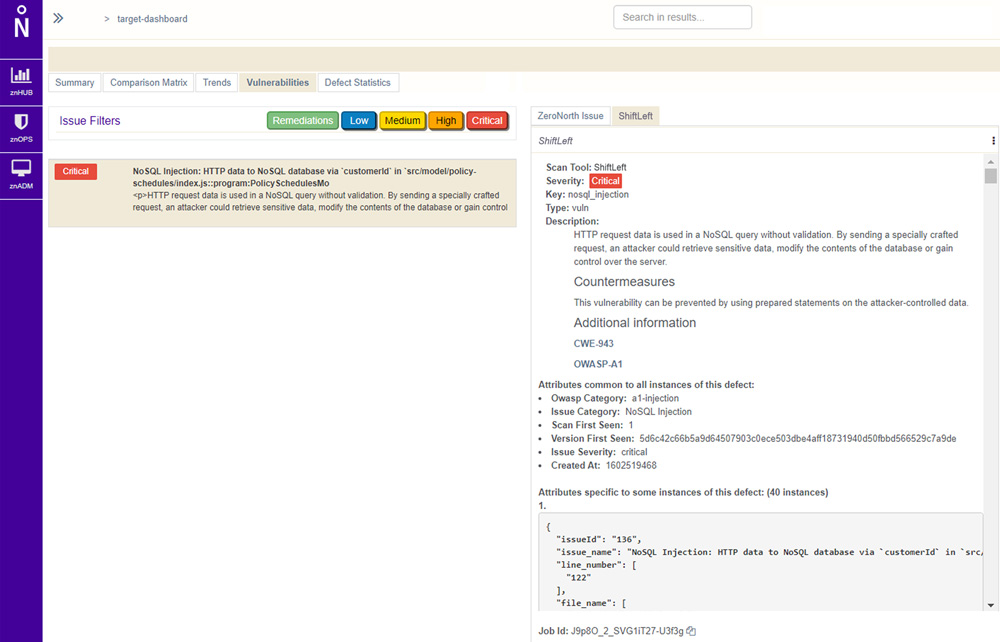
    Not surprisingly, providers of these tools are starting to align with security orchestration engine providers. ZeroNorth, for example, recently added ShiftLeft, a provider of a SAST tool, to the list of security tools that can be orchestrated via its software-as-a-service (SaaS) platform.

    Joanne Godfrey, director of product marketing for ZeroNorth, said organizations that have embraced DevSecOps are standardizing on two to three security tools. This mitigates the risk of becoming overly dependent on a single tool to discover vulnerabilities, Godfrey said. No single security tool can uncover every possible vulnerability in a timely manner, so DevOps teams must work to integrate multiple security tools into their workflows.

    Developers need tools capable of identifying vulnerabilities as they write code. They should also construct tests to proactively flag vulnerabilities before those are incorporated into a larger build. New vulnerabilities, however, are discovered all the time and it’s not uncommon for a container build deemed safe yesterday to suddenly need an update as quickly as possible. DevOps teams also need to secure the runtimes and hosts on which application builds are deployed, which typically requires more collaboration with the security teams usually responsible for managing platform security and DevSecOps.

    Despite this need to collaborate closely, the cultural divide between DevOps and cybersecurity teams is often wide. While there’s a lot of interest in DevSecOps best practices, developers don’t always prioritize application security when there are delivery deadlines to be met. This often results in security issues being addressed late in the application development process or, worse, addressed after the fact as part of an update delivered after an application has been deployed in a production environment.

    As application development accelerates, it’s imperative that the current divide between DevOps and security teams is bridged. Short-handed cybersecurity teams simply can’t keep pace with the rate at which applications are being built, deployed and updated. The need to shift more application security responsibility left toward developers increases daily.

    The challenge now is, rather than simply delivering an empty DevSecOps sermon, IT leaders need to practice what they preach and provide developers with the tools and processes required to secure their applications.

  • Every Millisecond Counts When Code-Testing Mobile Apps

    Every Millisecond Counts When Code-Testing Mobile Apps

    Whether a company is creating mobile applications for e-commerce, customer service or internally to boost employee productivity, the rapid development and effective deployment of mobile apps has become a business imperative.

    The global mobile application market was estimated at $106 billion in 2018 and is expected to hit $407 billion by 2026; an annual growth rate of 18.4%, according to Valuates Reports. Growth is being driven primarily by e-commerce, gaming and IoT, according to the report. “The advantage of having a mobile application, even for a small business, is that it improves brand recognition and offers a whole new level of e-commerce user experience, helps create customer loyalty, gathers feedback and helps [the business] stand out from the crowd,” the report says.

    Mobile App Developers Face UI Pressure

    Unfortunately, mobile application users are a tough crowd with zero tolerance for bugs or user interface (UI) issues. In fact, one-fourth of end users abandon mobile apps after their initial experience, according to the report. In this highly competitive environment, the ability to effectively test mobile apps prior to launch is critical, but many organizations face challenges when it comes to creating a suitable test environment.

    “Test environments and test data are the most cited challenges for core enterprise applications, as well as more fluid applications developed in short cycles, often deployed on smartphones, tablets or a web browser,” according to a recent Capgemini World Quality Report.

    The percentage of organizations struggling to keep pace with mobile app testing requirements is increasing, according to the report. Respondents cited a slew of issues, including not having the right processes, methods or tools to test mobile applications; not having in-house mobile testing experts; not having an in-house testing environment and/or not having enough physical devices on which to test.

    These challenges are pushing many organizations to cloud-based application testing platforms, which offer a way for developers to avoid common testing bottlenecks that slow mobile app deployment. The COVID-19 pandemic created another driver for adoption of cloud-based testing platforms, since mobile application testers lacked access to physical testing spaces where they could access and share an inventory of mobile devices.

    Accelerating Demand for Mobile Apps

    The shift to agile software development and continuous deployment methodologies is another factor ratcheting up pressure on developers to create new apps in weeks, or even days, without sacrificing quality.

    Unlike traditional apps, mobile applications need to be tested on dozens, sometimes hundreds of devices to ensure they run anywhere. The proliferation and ubiquity of mobile devices means developers need to test on more than 350 devices just to cover 90% of the mobile device market. In a present-day enterprise BYOD scenario, for example, each employee might use three to five different devices – a number that’s only expected to increase as wearables and IoT gain mainstream adoption. Development teams must prove the app is hardware agnostic and functions as expected; otherwise, imagine the fallout if the company launched a BYOD app that didn’t run properly on the CEO’s smartphone, for instance.

    This is where the value of cloud-based application testing platforms becomes clear. Cloud-based app testing platforms enable developers to manually test applications on an unlimited number of mobile devices, and to perform crucial measurements and tests of functionality like screen rendering. Mobile applications must seamlessly render in the tester’s browser without lag or latency to avoid poor user experience.

    Beyond that, there are time considerations to think about. A large enterprise organization could have hundreds of testers working around the clock to validate an application, and a slowdown of even a few milliseconds per screen rendering could cost  thousands of dollars a day in lost productivity. That’s why every millisecond matters.

    Selecting a Mobile App Testing Vendor

    Selecting a vendor that can deliver a cloud-based testing platform without lag or delay is critical, but there are other factors to consider, as well.

    Some solutions use emulators or simulators to test application performance, but nothing can replace the real thing. Look for a vendor with the ability to perform tests on real, physical devices. Since most organizations operate in a hybrid world, look for a vendor that gives customers the flexibility to combine both cloud-based and on-premises testing.

    Automation is also a major factor to consider in vendor selection. According to one survey of more than 350 mobile developers and software testers, 55% said automation would improve software quality, but the majority of respondents, 76%, are automating fewer than half of all software tests.

    Look for a vendor with the capability to take an initial manual test and automatically create scripts for all of the devices under test, without requiring developers to write new code. Test automation scripts can be created and executed exponentially faster than manual efforts, which enables businesses to get to market faster with better quality mobile apps.

  • The Weakest Link in DevOps for Financial Services

    The Weakest Link in DevOps for Financial Services

    Many companies in the financial services sector are making huge investments in IT transformation these days. They are embracing DevOps and agile best practices, modernizing legacy applications and moving their infrastructure to the cloud.

    In many instances, though, this significant investment of time and resources simply isn’t producing measurable outcomes that matter to the broader financial services organization. Developers may be coding faster and new operating efficiencies may be realized, but little else has changed. Teams are simply unable to move the needle in support of core business strategies that determine success or failure in the marketplace.

    Why the disconnect? Often those assigned to IT transformation projects work in isolation. They have no way of knowing whether they are delivering what customers need, when and how they need it. What’s more, they are unable to deliver the metrics and feedback needed by product development and strategy teams to guide continuous improvement and innovation.

    Is it any surprise that during tough times, transformation teams are often among the first on the chopping block in the financial services space? They have simply been unable to demonstrate that the significant investments made in their work are worth it.

    A 2-Step Solution

    If your DevOps team is committed to modernization, consider this two-step approach to resolving the disconnect between the work you do and the core business you serve.

    First, don’t work with blinders on. Broaden your mindset and involve all critical stakeholders, from business strategists and developers to operations specialists and customer-facing support teams. Engaging this broader group of constituents can help you gather multiple perspectives on what success looks like and where you need to focus your time and attention. You can determine what outcomes truly matter to your organization and what criteria you need to monitor to demonstrate the value you produce.

    Second, it’s time to rethink testing and the role it plays in your organization. Adopt an automated, technology-agnostic platform that can provide continuous feedback to everyone on your expanded team, not just developers writing code.

    The experiences of a global 500 banking and finance company show why a broadened approach to testing matters. The company was treating testing as an event, part of a linear application development process. Projects were prioritized, code was written and testing was conducted to determine whether the work was bug-free.

    Test creation and maintenance relied on manual effort, making it impossible to keep up with the continuous code development of agile teams. In addition, proprietary testing tools were difficult to use. It was impossible to shift left for continuous integration of fully tested code early in development. And it was impossible to shift right to monitor and learn from application performance and customer experiences.

    As a result, the company lacked a continuous loop of predictive insights and feedback that could be accessed and used by stakeholders across multiple geographic locations to advance the priorities of the business.

    The bank rethought its approach and adopted a new artificial intelligence-powered platform based on open source standards. Now all stakeholders can run tests and monitor services from anywhere, with tools that are easy for anyone to use. And they can do so without sensitive data ever leaving their network. They have the insights they need to create focus and deliver results that matter.

    Making a Smart Investment

    If you’re ready to broaden your DevOps mindset and make the move to continuous testing, keep the following tips in mind. Look for an open source, enterprise-ready test automation environment that is easy to use and integrates seamlessly with your existing testing tools. In addition, insist on the following features that will help you broaden the strategic impact of your testing and monitoring program:

    • Single-pane business insights: Select a solution that helps you keep everyone on the same page, enabling a continuous flow of predictive insights and feedback that is easily accessed and understood. Make certain you can track trends from multiple builds and can share interactive test results and graphs with all your teammates and stakeholders.
    • On–demand scalability: Many legacy tools have limited load-generation capacity. Look for a solution that can help you overcome that hurdle. You should be able to upload tests and emulate network conditions on demand across multiple geographies, while simulating millions of virtual users.
    • Decentralization: Your new test environment should let you broaden your testing program by shifting both left and right as you orchestrate new releases. Make certain you can easily broker new automated tools for continuous monitoring and empower all stakeholders to use them. This democratic approach will help you overcome manual testing bottlenecks and promote faster intervention when issues arise.
    • Self-service test creation: Make certain the user interface for your new platform is “load and go,” with no proprietary languages or special skills required. Anyone should be able to create small-scale, self-service tests from a local machine, then seamlessly reuse the same tests at scale via the cloud to accelerate test automation as part of your continuous delivery pipeline.

    The Payoff for Financial Services Firms

    It’s time to make certain your transformation efforts are headed in the right direction and that your team isn’t working in isolation from the broader business. Expand your mindset and your toolset to encompass key stakeholders and to align with your organization’s business strategy.

    Embed test automation into every activity across your software delivery life cycle and create a continuous feedback loop that informs planning, development and operations. When you do, you can turbocharge velocity, improve quality, boost efficiency and keep pace with customer expectations, all while supporting what matters most to the success of your enterprise.

  • Early vs. Late-Stage DevOps Testing: The Benefits of Both

    Early vs. Late-Stage DevOps Testing: The Benefits of Both

    Companies that are working toward optimizing DevOps processes have over the past few years adopted a practice of testing throughout the software application design, development and production phases—a practice of continuous testing throughout the product life cycle. This includes shifting testing operations “left,” i.e. beginning testing earlier in the life cycle, to catch any software malfunctions or errors as early in development as possible.

    While shifting testing left is critical when it comes to reducing the cost of late-stage software corrections, DevOps teams must also remember that software malfunctions may arise at any stage in the development process, as well as post-production.

    The Early Bird Gets the (Software) Bug

    Continuously testing software throughout the product life cycle is a strategy used to optimize DevOps processes. Continuously testing software from design to production throughout its life cycle provides DevOps teams with an uninterrupted flow of software testing data. DevOps teams can use this data to inform software design and development based on the performance successes and failures of previous and existing products.

    Shifting testing left—earlier in the software development cycle—enables companies to catch as many software errors as early as possible to avoid potentially costly redesigns in later-stage development. Shifting left was a crucial area of focus for many of the companies featured in the recent “Forrester Wave for Continuous Functional Test Automation” (CFTA).

    Shifting testing left significantly not only reduces the overall cost of software development but also hastens time to market. DevOps teams can avoid a back-and-forth pattern, or context switching, which involves switching between developing various features of the software as they are tested and verified. Context switching to test various software functions also risks fatiguing and frustrating software developers, as they may be forced to repeatedly revisit and redesign certain software features when they could be focusing on more critical aspects of the product. When DevOps teams are burdened with tight deadlines, they may end up cutting corners, creating more risk for errors that may present themselves to the product’s end user.

    Late-Stage Testing: Removing the Rest of the Bugs

    However, just because a software application works in its current testing environment doesn’t mean it is unbreakable. How many times have you seen a product such as a dishwasher or a fridge operate perfectly in the store during a demonstration, only to get it home and discover it doesn’t fit or the power cable doesn’t reach the same power outlet as the old machine? How many times have you ordered a product, even one that you’ve used countless times before, and opened the packaging to discover it was broken or had some kind of defect? In the same vein, how many times have you ordered an electronic device that required a charger or electronic port type that you or your computer did not possess? It’s not exactly the great end user experience product design teams had in mind when they were designing the product. For DevOps teams that neglect shift-right testing, that’s exactly the negative end user experience they are risking with their software products.

    Shifting DevOps testing right, also referred to as “testing in-production,” is the opposite of shifting left. Shifting right involves testing software later in the product life cycle in late-stage development and even as far as production. This strategy enables DevOps teams to identify and fix bugs that may only arise after shift-left corrections have been made. In other words, if a DevOps team uses shift-left testing to catch bugs earlier, they will then go in and correct those errors. But how do they know that more bugs won’t arise in the production environment? That’s where shifting right comes in. In this respect, shifting left and shifting right are critical aspects of a continuous testing strategy that should be used together to perfect software validation processes.

    Shift-right testing also helps to enable a seamless end user experience. A company’s test environment and end user environment may not be exactly the same. When applications are deployed to different cloud or on-premises environments than those in which they were tested, it’s nearly impossible to predict how those varying environments will affect the performance of the product.

    Even if the end user environment and testing environments are the same, it’s an unfortunate but inevitable fact of life that things break. Unless software companies are truly continuously testing their products, which includes production phases, they will fail to identify and fix any bugs before their customers can point them out. While customers appreciate rapid fixes when they point out an issue, it’s a poor substitute for a product that customers never have any problems with. Companies and DevOps teams that hope to perfect software development processes are embracing a continuous testing strategy, also known as DevTestOps, and they should be careful not to turn a blind eye to the post release part of the software development life cycle by ignoring the importance of shifting testing right. While shifting left and shifting right are separate  strategies, they should not be viewed as mutually exclusive and DevOps and testing teams must work together to develop the best products possible while simultaneously eliminating the need for back-and-forth development and testing patterns.

    If companies truly hope to fully optimize DevOps processes, they must embrace a practice of truly continuous testing that spans the entirety of the product life cycle from design through production. Ultimately, this not only enables developers to close the loop on their development cycle to develop more robust, effective applications, but it also provides the competitive advantage of a faster-time-to-market.

  • 7 Important Truths About Chaos Engineering

    7 Important Truths About Chaos Engineering

    As a relatively new practice, chaos engineering has plenty of myths surrounding it, from randomly shutting down production systems to requiring huge investments of time and money. There’s a lot of confusion over the purpose, the value and the practice of chaos engineering. This presents a problem for DevOps teams, especially since more than half of the teams surveyed in the 2019 Gartner DevOps Survey listed improving system reliability and release quality as one of their top five DevOps objectives.

    In this article, we’ll clear up some of this confusion by presenting seven important truths to help you make an informed decision about chaos engineering and how it can help your engineering organization.

    Truth 1: Chaos Engineering is not Chaotic

    What comes to mind when you think of chaos engineering as a practice? If the answer is causing random production outages, you’re not alone. Tools such as Chaos Monkey popularized this idea, but for most teams practicing chaos engineering, it is a well-planned, controlled process that aims to mitigate chaos rather than cause it.

    The goal of chaos engineering isn’t to add chaos, but to mitigate chaos.

    It’s true that it involves creating potentially harmful conditions on otherwise healthy systems. For example, we might test our application’s ability to handle load by increasing CPU usage on our servers. With enterprise solutions we have full control over which systems are affected by this test (known as the blast radius), how much CPU we consume (known as the magnitude) and how long it runs for. We can also immediately stop the test and roll back its impact in case of unexpected consequences.

    We also know exactly what conditions we’re introducing into our systems and can revert the changes at any time. Yes, we’re still causing harm, but we’re doing so in a way that helps us learn about our systems and reduces the risk of failures, both real-world and induced.

     Truth 2: Developers Care About Reliability

    Developers aren’t only interested in building new features. While development teams often prioritize feature development, this is likely due to business-driven initiatives resulting in rapid release schedules. Developers—especially those who have responded to incidents or worked through bug reports—understand the value of resilient software. They just don’t have time to build it.

    The problem is that this creates a reliability gap in our applications. Rapidly building features without adequately testing their resilience creates failure modes, leading to problems that developers need to go back and fix at the expense of new projects. The longer we go before finding these failure modes, the more likely we are to experience unexpected behaviors and outages in our applications, and the more expensive a solution will be.

    Increasing development velocity without testing for reliability increases the likelihood of failures, causing our expected availability to drop.

    To prevent this gap from forming, we need to prioritize and provide the appropriate tooling so developers can test their code and improve the resilience of our applications. This leads to our next truth.

    Truth 3: You Have Enough Time for Chaos Engineering

    Chaos engineering saves you the time you would spend responding to, troubleshooting and fixing production incidents. As you build resilience through chaos engineering, you’ll reduce the engineering time, effort and costs spent on incidents and can focus more on your core competencies.

    That said, adopting chaos engineering does require some time investment. Engineers will need to learn the principles and practices, adopt new tools, run experiments and implement fixes. However, this is relatively minor compared to the cost of production outages. Without chaos engineering, your engineers will need to pause their regular work and rush to restore service. This is time they could be spending on feature development and other value-creating tasks.

    A few minutes of proactive testing can uncover defects that would’ve taken hours to fix in production.

    Truth 4: Your Systems Support Chaos Engineering

    You don’t need to use specific hardware, software, or cloud platforms to benefit from chaos engineering. While some tools have specific requirements, most only require access to the host operating system. Some can even target specific resources, such as containers.

    Truth 5: You Don’t Need Comprehensive Observability (But It Helps)

    You don’t need a comprehensive monitoring or observability practice in place to benefit from chaos engineering. Basic metrics provided for free by your cloud provider can still provide important insights into how your systems are responding to experiments, and some chaos engineering tools provide basic monitoring for you.

    That said, chaos engineering provides significantly more value when used with monitoring and observability. We want to know how our systems are responding to our experiments, and the way we do that is by collecting metrics and traces. Even if you’re currently implementing a monitoring solution, chaos engineering can help streamline this process by helping you determine which metrics to track, fine-tune your alerts and avoid alarm fatigue.

    Truth 6: Chaos Engineering Pays for Itself

    Like any new tool or practice, chaos engineering requires an upfront investment of time and money. Solutions need to be evaluated and purchased, and engineers need time to warm up to the practice. However, the value it provides far exceeds these costs. Using chaos engineering can help you:

    • Avoid losses in revenue and productivity due to incidents and engineering time spent resolving incidents.
    • Improve your ability to generate sales by helping you build reliable systems and prepare for periods of increased demand.
    • Save costs by helping you optimize resource allocation and test for non-essential infrastructure.

    Truth 7: You Can Get Started Today

    Getting started with chaos engineering can be as easy as deploying an agent to your systems and choosing a resource to target for experimentation. You don’t need to have a stable, mature SRE practice or enterprise-grade infrastructure. In fact, you can use chaos engineering to help establish your SRE practice or accelerate migration to a new platform.

    The most important truth is that no system is perfect, and there are failure modes hidden all throughout our applications and infrastructure. Chaos engineering lets us uncover these failure modes and transform reliability from myth to reality.

  • The State of Commercial and Retail App Testing 2020

    The State of Commercial and Retail App Testing 2020

    When the folks at Testlio approached me to review their “State of App Testing 2020″ report, I had some mixed feelings. These reports can sometimes be too broad; they can say what is not, but not help a team decide where to go. Still, it would only cost me five minutes of my time to see if it was worth writing about, and it came highly recommended, so I took a look. I am glad I did. Today, I’ll analyze the report itself, hit some of the highlights from the survey results and provide some analysis to help you decide if the information is relevant for you—and what you should do about it.

    First of all, the report is short. This is a feature. You won’t have to dig through 68 pages of information—six pages just doesn’t provide an opportunity to provide “fluff.” There are no long opening editorials by someone with an impressive title and list of hypothetical things that survey respondents pick between that will “become important” next year. Instead, Testlio simply anonymized its client information and re-used it to determine averages. This replaces the multiple-choice survey (which was likely filled out by someone abstracted from the work) with the actual data of the work. Testlio knows how often its customers’ applications go to production; it knows the scores of those applications in the Google and Apple stores. From that, the company can draw inferences in the relationship of shipping speed and quality. Finally, the report is grounded in a specific domain—that is, retail and business applications. The distinction between the domains is clear enough that readers won’t walk away trying something that won’t apply to their industry.

    Let’s talk about what the report says.

    In addition to Testlio’s data, the report borrows from other sources to draw a picture. One of the most important observations they made was a connection between quality, speed and customer adoption.

    Quality Matters

    I was amazed to read that 50% of users will not download an application with a 3-star rating, and 85% won’t download one with two stars. That isn’t a huge surprise, as I was recently brought into a project rescue for an application with 2.2 stars (and yes, thousands of ratings) in the Apple store. Trusting that data, that meant the application had less than half the potential users it could have—and the core reason for the app was not to sell a product but instead to promote brand loyalty.

    That data creates a strong argument for an investment in quality in mobile software. Yet, it is also a lagging indicator of quality, the result of poor quality. Put differently, app store reviews are sort of an “aww, shoot” metric. We put the software into the wild and hope it scores well. If the score is good, we have a party. If it is bad, we say “aww, shoot.” Instead of lagging metrics, the result, my interest is in leading metrics, the cause. What actions can we take to improve the scores?

    That’s when things get really interesting.

    Release Speed Matters

    The folks at Testlio grouped mobile applications into two categories: one group that released three times per month and another that released less often. (The average for the study was 2.4 releases per month.) I recently worked with a team that used something like the Scaled Agile Framework (SAFe) to manage deploys about once a quarter, with perhaps a patch in the middle.

    As it turns out, the more frequently released software had higher review scores, about 7% on average. That’s a counterintuitive result worth examining. I am not suggesting you ship twice as often. However, it does make sense that teams that ship more frequently have a small amount of change between releases. That change is likely to be more localized. A large program with teams of teams that tries to integration-test at the end—say the last sprint out of six—is likely to have a lot of uncertainty. The developer who fixes a bug is unlikely to be the one that created it; the “fix” may have unintended consequences that are difficult to test out. At the very least, be very careful about slowing down release schedules in the name of quality, as the results may be lose-lose.

    Let’s move on to device coverage.

    Device Coverage Matters

    Although they have an identical rating system, Testlio found Android OS applications across the board ranked slightly lower than their Apple iOS cousins. That is, the average score for the top 30 commercial and retail apps on iOS is 4.6 and 4.3 on Android. Personally, I think it is fantastic to have these hard numbers at the top of the field rather than opinions from a small group who responded to a survey. The challenge with this data, like the release cadences, is that you have to infer a reason. Testlio proposed three: that acceptance to the Apple Store itself is more difficult (Apple has internal tests); that as a premier brand, Apple has a “halo” effect; and that Android devices are simply too fragmented. With 24,000 different Android devices as of 2015 and too many to count now, it is likely that some older devices have some problems that could not be tested for; thus, a few bad reviews from rare models pulls down the scores.

    One thing Testlio didn’t see shrinking was the size of the test group. The top 30 clients averaged 18 testers per week, and over the time of the survey had at least eight and as many as 38 testers. These would be the people who work on all the different devices checking for compatibility, in addition to doing the human testing that is not, or should not be, automated. What is changing is how those testers are deployed, for more visual inspection, flexing with project needs, instead of a defined group that will be a bottleneck some of the time and over-capacity at others. Personally, I’m a fan of the Agile, whole-team approach, but they make a case for test augmentation with flexibility in the mobile application space, which reminds me of Jon Bach’s chapter in the book, “How To Reduce The Cost of Software Testing.” As an editor on that book, I’ll be the first to admit we picked a terrible title. At the time, we were working through the ideas that would eventually come to be known as Lean Software Testing, which seems to be what Testlio is suggesting.

    App Testing Conclusions

    There’s a fair bit more to the survey, including the amount of device testing occurring, locations for test sourcing worldwide and how distributed testing is working, especially as remote work has become the norm.

    As I said, I was pleased to see some hard data for once, and the challenge will be figuring out what we as an industry can make of it.

    What do you think? Share your thoughts below.

  • Testing in Production 101

    Testing in Production 101

    A top priority for developers is knowing that their new feature code will work in production before their user base has access to it. That’s why testing in production has been gaining popularity in the software development industry.

    Developers need to know that they can safely deploy their code to production and have the power to specifically target internal teammates, test the functionality and validate the design and performance of the feature. They also need the flexibility to fix any bugs or defects that emerge. After all of these boxes have been checked, it’s time to turn on the feature flag and give your user base access to the new feature—already knowing that it works in production.

    Testing in production provides the fast results that developers expect, but how do you get started? This step-by-step guide provides best practices and order of operations for what to implement to successfully test in production.

    Benefits of Testing in Production

    You wouldn’t let your users log into your staging environment and use your software that way, so why would you use dummy environments to test features before they’re released? Answer: That’s just the way it’s always been done. For years, the process has been to deploy code to staging, have the QA team test in staging and then deploy to production after testing. But when your staging test results don’t match your production results, what do you do? How do you tell the QA engineer who tested the feature in staging that it broke in production? More importantly, what’s the point of all the effort that was put into testing in staging if it doesn’t give you the same test results as production?

    Feature flags let you avoid those issues by testing in production and confirming the feature will successfully function in the environment that it will ultimately live in.

    The bottom line is that customers don’t care how a feature performs in a staging environment. They care that it works when they need to use it, and the only way to guarantee it will work in production is to test it in production.

    Implementation Plan

    Still not sure where to get started? The following plan lays out step-by-step instructions for the first 30, 60, and 90 days of your implementation.

    First 30 Days

    During the first 30 days, the focus should be on project alignment and familiarizing and educating yourself on the feature flag management tool you decided to use. This time should be spent hammering out the details to ensure testing in production will work for your team, and one vital part of that is revisiting the team’s automation framework to make sure it is easy to use and implement. The automation framework needs to be able to write end-to-end tests and have adequate reporting so the team is updated on details when a test fails. By skipping this step, your automation framework will become an obstacle that hinders your future testing in production and becomes more of an annoyance than a benefit. Do not skip this step!

    For those onboarding a new tool to manage your feature flagging and experimentation, the next step is to configure the tool to your needs. This can include setting up SSO, permissions, user creation and user maintenance. When these are complete, it’s time to implement the appropriate SDK.

    These first 30 days are also a good time to set baseline metrics for benchmarking. These metrics can include things such as time to release, page load time, percentage of bugs in production versus staging, percentage of bugs found before release versus after release, etc. With these baseline metrics, you have a standard to which you can compare any changes, and once a feature has been released, you can quickly measure its performance and make any necessary process improvements.

    Days 30 to 60

    During the next 30 days, prioritize setting up your feature flag management tool to mirror your current environment setup. For example, if you currently have Dev, Test, QA, UAT and Prod in your software development life cycle (SDLC), you should have those accurately reflected in your tool. Eventually, you will narrow this down to only production and dev here to mirror a true testing in production setup, but for now, these environments should mirror your current environment setup in your application.

    With your environment set up, you can grant segments of teams access to each environment in the ‘Allowlist’ section of your feature flag configuration. For example, if your product team currently validates features after releasing to production, you can add a segment for the product team and allow them to have access to the feature in production. This ensures the team will still have access to the feature even when the feature flag is off.

    The next step is to differentiate between test data and real data from production. This can be done by setting up a boolean for test entities in production such as “is_test_user = true” for the test users and “is_test_user = false” set automatically for real production users. For business intelligence (BI) tools used with products such as Datadog and Looker, create a separate database for all of the test users’ activity. This gives you the ability to make business decisions based on real user data rather than data from automated tests in production.

    For this phase of the process, it’s also crucial that your team is abiding by the same definition of done. Your team must agree that a feature cannot be labeled “done” until the tests are running in production and the flag has been turned on for 100% of your users.

    Days 60 to 90

    You’ve reached the home stretch, and now the fun begins: your first real test in production. To start, deploy your first feature to production with the default rule off for safety. This ensures that only the targeted users will have access to the feature. Next, run your automation scripts in production with targeted test users, as well as the regression suite to guarantee previously released features are not affected by your changes. With the feature flag off and only your targeted team members having access to the feature, you will officially be testing in production. This is the time to resolve any bugs and validate all proper functionality. It’s important to remember that because end users do not yet have access to your feature, they will not be impacted if anything does go wrong.

    After you’ve resolved the issues that appeared in your first test and you’re confident the feature will work properly, it’s time to use a canary release to open up the feature to 1% of your user base. The next days will be spent monitoring error logs and growing your confidence in the feature until you feel it’s appropriate to increase the percentage of users that can access your feature. Once you reach 100% of users and you know without a doubt that the feature works, it’s time to turn on the default rule for the feature.

    By the time you reach the 90-day mark, you should have a regular test cadence and the next step is to work with your product team to determine which tests will run at which cadence. For example, you could schedule your lower priority test suite to run nightly, while your high-priority test suite runs hourly. Be sure to set up alerts to be automatically notified when a test fails so that you can immediately analyze the failure.

    With 90 days of testing under your belt, circle back with your team to reflect on what was successful during the process and where the team can make improvements. By aligning your team this way and tweaking the process to make it work best, you’re setting up your team to achieve optimal performance.

    Let Your Fear Go

    When testing in production, one of the biggest obstacles to overcome is fear. Teams are scared of negatively impacting their user base, negatively impacting data and generally creating a mess in production. While these fears are valid, they can all be avoided with feature flags. When feature flags are implemented correctly, they open up a world of possibilities for testing. So put your fears aside and trust in the abilities of feature flags!

  • Applitools Integrates Testing Platform With GitHub

    Applitools Integrates Testing Platform With GitHub

    Applitools announced today that its test automation tools have been integrated with GitHub and GitHub Actions in addition to being available on the Microsoft Visual Studio App Center.

    Company COO Moshe Milman said these integrations make it possible to add testing tools that incorporate machine learning algorithms, dubbed Visual AI, to a DevOps workflow using the Applitools Eyes testing platform. Those tests are run on a cloud platform dubbed Ultrafast Grid.

    The goal is to make it possible to easily correlate code changes across different versions of updates to web and mobile applications using any testing framework and programming language, said Milman. Visual AI can now be applied to every build and pull request, he noted.

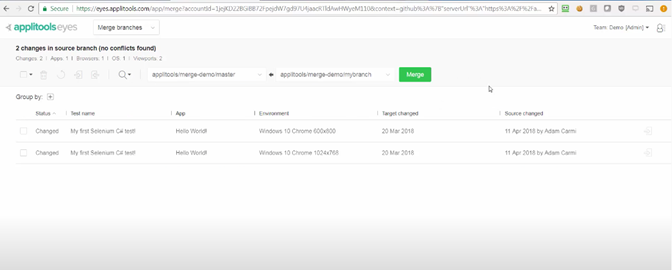
    When feature branches are created, Applitools instantly mirrors those feature branches to create a new set of baseline images. That approach simplifies the automated testing of all feature branches without impacting the trunk and its tests, he said, noting as pull requests are merged back in, the integration automatically updates the target branch with the source branch’s baseline images in a way that ensures no conflicts exist between branches.

    The Applitools approach to AI testing also provides developers with more control based on the application use cases, he added. For example, different settings can be applied to test a medical application that requires perfect alignment of pixels versus an e-commerce application that may not require as much fidelity. Developers can then resolve regression issues by employing root cause analytics.

    In general, Milman said the number of organizations that are applying DevOps processes now to the development of both web and mobile applications is increasing. Mobile applications are core to digital business transformation initiatives that have accelerated in the wake of the COVID-19 pandemic. Many of those applications are being built using components that typically are shared through repositories such as GitHub, which Milman noted creates the imperative to integrate testing tools with code repositories and other DevOps platforms.

    It’s still early days as far as applying AI to application testing is concerned. However, it’s now more a matter of when versus if organizations will be relying more on AI to test applications. As the number of testing platforms that include AI capabilities expands, each IT team will need to evaluate which approaches provide the most accurate testing.

    Nor is it clear to what degree AI might reduce the need for dedicated application testing teams. More responsibility for testing applications has been shifting left toward developers for several years now. Nevertheless, an independent test review of an application before it is deployed is always a good idea. AI capabilities in testing tools should reduce the most common mistakes the developers seem to make regularly.

    As part of an effort to make it tools more widely accessible, Applitools also makes Applitools Eyes along with its GitHub integrations available for free for open source projects hosted on GitHub that sign up to be part of Applitools’ open source plan.

    Regardless of how DevOps teams gain access to those tools, the future of application testing promises to be a lot let less monotonous.

  • Tricentis Applies Visual AI to Improve Application Testing

    Tricentis Applies Visual AI to Improve Application Testing

    Tricentis this week announced it has added visual test design and automation technology based on artificial intelligence (AI) to its Tosca platform.

    Dave Colwell, vice president of AI and machine learning at Tricentis, said Tosca 14 automatically recognizes and identifies visual user interface elements and controls across any form factor to identify the most appropriate tests to run as an application is being developed. That approach enables testing to be shifted further left during the application development process as successive iterations of an application are developed, he said.

    While AI has been incorporated into other AI tools, Colwell said Tricentis is applying the same types of machine learning algorithms that are employed to enable self-driving cars to detect objects to the testing of controls included on an application screen.

    Colwell said it’s now only a matter of time before most developers routinely expect testing capabilities based on visual AI technologies to be included in testing tools. Rather than having to continually encounter the same design issues, visual AI will enable developers to craft applications that end users will employ much faster.

    Given the large numbers of applications that many end users haven’t embraced because of user experience issues, there’s clearly a base of developers who could use some advice from AI tools that have been trained to identify common problems that have affected previous generations of applications. Tricentis is now not only committing to providing testing tools but also curating the content required to train AI models.

    It may take a while for developers to fully trust those recommendations, but the number of potential issues that could be averted earlier in the application development life cycle has significant implications for the productivity of DevOps teams. In theory, at least, the number of applications successfully moving through the build process should increase. The amount of testing required after an application is created should also decline as well.

    Less clear is to what degree the shifting of testing of visual elements of an application might have on dedicated application testing teams. Arguably, IT organizations should be able to devote more resources to building versus testing applications.

    Whatever the outcome, AI is not going away. Providers of testing platforms are now effectively engaged in an algorithms arms race. In fact, it’s becoming increasingly apparent AI will be applied with greater frequency across the entire application development and deployment life cycle. It may take a while for IT organizations to adjust to that new reality, but the fact remains that organizations that don’t incorporate AI into their DevOps processes will be at a distinct disadvantage compared to those that do. Members of DevOps teams would be well-advised to start assessing what manual processes today are most likely to be automated by algorithms tomorrow.

    In the meantime, the overall quality of the user experience should also soon improve—assuming, of course, the AI models being created to test applications are indeed being trained properly.

  • Shift Left … With In-Sprint UI Test Automation (?!?)

    Shift Left … With In-Sprint UI Test Automation (?!?)

    UI testing is really the most intuitive testing approach imaginable: Just find someone who can represent the target user and let them poke around in the interface they use for their daily work—the UI. It’s natural. It’s intuitive. And it’s still the predominant method used for testing most software releases today.

    This human-driven testing can never stop. Having smart testers creatively explore the UI using their creative, analytical minds to uncover issues that disrupt the user experience is absolutely essential. But it’s also essential to perform a level of regimented, routine checking with each change to ensure the modifications don’t introduce strange side effects. Performing such tedious checking at the required frequency and speed would be torture for human testers. Hence, the push toward test automation.

    You would think, then, that the natural place to start with test automation would be to automate the most natural of all testing: humans interacting with the UI. Not so: UI test automation is actually one of the most dreadfully difficult test automation approaches.

    Tests automated at the UI level historically have a fair share of issues. They’re slow to run. They’re fast to break. They’re somewhat technical and tedious to create even for common modern technologies such as web and mobile. They’re much more difficult to create when you have to deal with custom desktop applications, packaged applications, extremely old technologies, extremely new technologies or Citrix/remote applications. And creating automated UI tests typically requires a fully implemented—and stable—UI.

    If you’re aiming for in-sprint test automation, this means that tests need to be implemented in that tiny sliver of time between when developers complete the final UI code (with a successful build) and when the sprint is supposed to be completed. Guess what? That rarely happens. Within the sprint, teams can certainly tackle human UI testing (a.k.a. exploratory testing). But automated UI testing? That’s often delayed until a later sprint … and/or scrapped altogether.

    Clearly, there are a lot of issues with UI test automation. But if you really think about these issues, it all boils down to one thing: The test automation doesn’t think like a human:

    • A human can interact with an application’s UI quite rapidly (the human eye can process 24 images per second).
    • A human is not derailed by interface changes. Something such as a reimplemented drop-down menu or a new way to display results won’t phase a human tester at all.
    • A human brain can interact with extremely old technologies (such as mainframes and COBOL-based apps) along with whatever new technology happens to be released tomorrow. And if your application is migrated from a monolith to a microservices architecture, the same tester’s brain can still test its UI in exactly the same manner.
    • A human tester might not recognize whether the application is installed on their machine or is accessed via desktop-virtualization. They can test its UI just the same.
    • A human doesn’t really need to wait for a fully implemented (and stable) UI implementation. They can start working on their tests the moment a rough prototype is available. And they can start performing tests as soon as the UI is at least kinda—If the underlying technical implementation is still shifting a bit, it’s not necessarily a showstopper.

    So, if the key problems with UI test automation stem from the fact that human intelligence is greater than test automation, why not try to address those problems with the next best thing: artificial intelligence. By tapping the power of AI, we can achieve UI test automation that’s as smart and resilient as a human, but as efficient and scalable as a machine.

    For this to work, the technology must learn how to understand user interfaces in the same way that a human can. For example, it needs to know that a drop-down is a drop-down just by “looking” at it. With that accomplished, you—well, any human, really—can define test automation by simply providing a natural language explanation of what business process should be tested (e.g., “Enter 10,000 in the list price input, click the confirm button, then … “).  AI-driven test automation can take it from there. There’s no need to deal with shadow DOMs, web assemblies and the like. Emulated tables on SAP can be automated without any special customization. It’s not going to fail the next time there’s a minor UI tweak, and you won’t have to rebuild your tests if the application is reimplemented in a new technology.

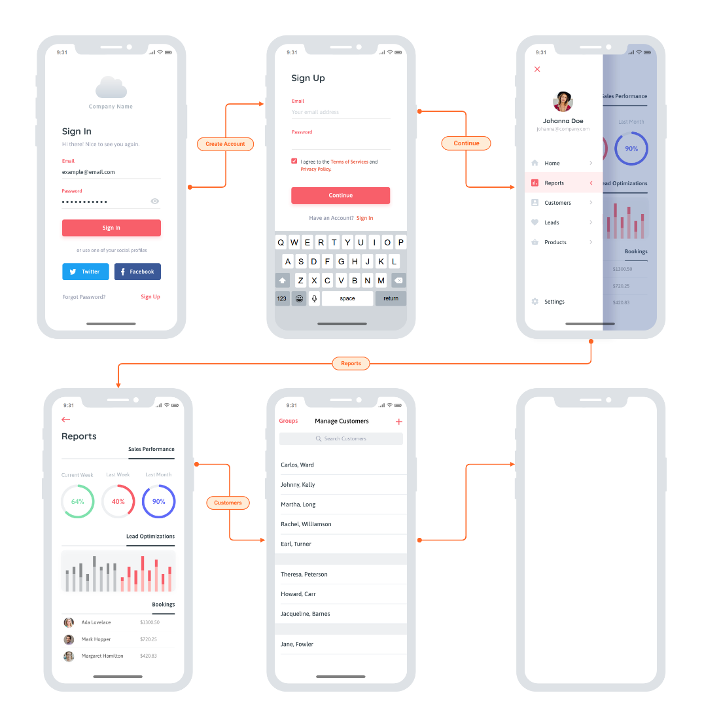
    In terms of shift left, you can start implementing your UI tests as soon as the team sketches out a rough prototype or mockup. Advanced UX designs like this are a great starting point:

    You really could start anywhere though. Even more rudimentary whiteboard sketches would enable you to start on UI test automation without waiting on the actual implementation. This means less crunch time each release and ultimately eliminates the ripple effect of testing delays, unfinished stories and “hardening sprints.” And it enables an interesting flavor of TDD: Start running these automated UI tests before implementation begins, then have developers write code that makes them pass.

    The catch? It’s not so easy to make UI test automation so easy. Two things to watch out for: accuracy and speed. For this to work, the technology must be able to accurately recognize and interact with UI controls that it’s never seen before. This requires visual object detection as well as optical character recognition (OCR). And that’s the easy part; the difficult part is doing this at speed. For a while now, AI-driven automation solutions have been struggling to come close to the speed of human processing. On average, you’re looking at tools processing 1.8 images per second, while humans can handle 25. You don’t need automation that mimics human speed, though—you need to beat it. If you want this UI testing to run as part of your continuous testing as a core part of your CI/CD process it needs to vastly surpass the speed of the human eye and the human brain.

    Once you overcome that little challenge, AI-driven UI testing will remove a lot of not-so-artificial conflict on Agile dev teams:

    • Testers waiting on developers to finish the UI so they can start implementing tests—and avoid the dreaded crunch time at the end of sprints.
    • Developers waiting on testers to finish tests so that the user story is deemed “done done” within the current sprint.
    • All the retro finger-pointing you get when delayed or unfinished testing results in unfinished user stories.

    I admit: when you first tell the team that UI test automation will help you complete testing sooner, it could be a hard sell. But after a few rounds of having UI test automation ready before developers write a line of code, I’m confident that you’ll find some real support for this artificial intelligence-driven testing approach.