Category: Continuous Testing

Continuous testing is the process of executing automated tests as part of the software delivery pipeline to obtain immediate feedback on the business risks associated with a software release candidate.

  • SRE’s Guide to Pragmatic Incident Response

    SRE’s Guide to Pragmatic Incident Response

    In my past experience as an SRE, I learned some valuable lessons about how to respond to and learn from incidents. If you want the TL;DR, I’ll summarize them here:

    • Declare and run retros for the small incidents. It’s less stressful, and action items become much more actionable.
    • Decrease the time it takes to analyze an incident. You’ll remember more, and will learn more from the incident.
    • Alert on pain felt by people – not machines. The only reason we declare incidents at all is because of the people on the other side of those machines.

    Now, let’s dive into each of these lessons a little deeper, and explore how they can help you build a better system for pragmatic incident response.

    1. Focus on the Small Incidents First

    The bad habit of ignoring small issues often leads to bigger issues. You should run retrospectives for small incidents (slowdowns, minor bugs, etc.) because these often have the most actionable takeaways—instead of shooting the moon and creating “rearchitect async pipeline” as a Jira ticket that never happens. Focusing on low-stakes incidents and retrospectives are a great introduction to behavior change across your organization.

    Let’s look at an obvious example of how a focus on small incidents can have an outsized impact. Case in point—my apartment. I live in an old candy factory retrofitted into apartment units. We have an elevator (thank God), but some of the buttons don’t light up when you press them. The LED display doesn’t match up with the numbers on the floor buttons. Yes, the elevator goes up and down, but overall, you can tell that things are wrong with it.

    One day, I came home and noticed an “Out of Order” notice on the elevator door. Was I surprised? Not at all. Of course an elevator with mislabeled buttons and broken LEDs would stop working!

    This isn’t dissimilar from an important software lesson—ignoring small issues often leads to much bigger issues. What starts as an inconvenience can lead to a complete breakdown. This is why you should focus on the small incidents first. I hear a lot of companies say, “We need to fix incident response! Every time we have an incident, it’s just chaos!”

    They are talking about unexpected downtime during a high severity level incident and they want to improve it.

    I say that’s the wrong type of incident to use to fix your incident response system and process. Focus on the small incidents first. Running retros for small incidents can help you build strong incident response models, because they have the most actionable takeaways and they are the best way to change behavior through repetition and practice.

    If you have a high-stakes, 12-hour incident and you run a one-hour retrospective you’re not going to get the results you want. You need to start small. Run retros for bugs that were introduced; maybe a bad data migration that didn’t really impact anything but took up a couple of hours of your day.

    Heidi Waterhouse captured this idea really well in this piece on reliability. Every airplane you’ve ever flown on has many tiny problems, Waterhouse said, “… like a sticky luggage latch or a broken seat or a frayed seatbelt. None of these problems alone are cause to ground the plane. However, if enough small problems compound, the plane may no longer meet the requirements for passenger airworthiness and the airline will ground it. A plane with many malfunctioning call buttons may also be poorly maintained in other ways, like faulty checking for turbine blade microfractures or landing gear behavior.”

    I couldn’t agree more. Extrapolating to software: The small things are typically indicators of bigger issues and could cause catastrophes down the road.

    2. Track Mean Time to Retro (MTTR)

    It’s important to think about what you measure in your organization. You should be measuring how you’re improving, and the most important metric here is mean time to retro (MTTR). Everyone should be tracking MTTR. It’s a great statistic to improve incident response in your team because it helps you understand the delay between incidents and retrospectives.

    The easiest way to have a bad incident retro is to wait two weeks. It’s better to get into a room quickly and hash out what happened than wait a long time until you’ve got everything perfectly prepared.

    Tracking MTTR can help you hold prompt and consistent retrospectives after incidents. Set a timer and make an SLO or SLA for yourself that says, “This is how long we take for retros.”

    Retro time will vary depending on the severity of the incident itself. If it’s a SEV1, clear everyone’s schedules, because you need to have retro within 24 hours of the incident. For SEV3 incidents, you have much more leniency.

    I also like tracking the ratio of retros to declared incidents. This is a metric that should go up; you should see your ratio of retrospectives to incidents increasing. You can break down that number by severity, as well. If you have a low retro ratio for a SEV1 versus a SEV3 incident, that might be okay at first (remember, start small) but you want those metrics to eventually become equal.

    3. Alert on Degraded Experience with the Service, and Not Much Else

    The severity of incidents is directly linked to customer pain. We would not declare SEV1s if there weren’t a lot of people feeling a lot of pain.

    Alerting on computer vitals is an easy way to create alert fatigue and burnout. As your company starts to scale, you are going to use more CPU; you’re going to use more memory. Tying alerts to computer vitals is not a good sign.

    If I run, my heart will beat faster—it’s just doing its job. Paging people at 2:00 a.m. because disc capacity is at 80% even though you won’t run out of space until next month is a good way to lose great teammates. I have worked with people who left their previous companies strictly because they got paged too many times for stuff that didn’t matter.

    This is why you need to alert on a degraded experience with the service and not much else. A CPU burning hot at 90% is not necessarily a bad thing, but you need context to decide. Create SLOs that are tied to customer experience and alert on those. People experiencing problems with the service is the only thing you should alert on—for the most part.

    One of the best ways I’ve seen to think about this came from Soundcloud developers, who explained that you should alert on symptoms, not causes. My fast heartbeat is not necessarily a problem. But if my elevated heart rate leads to lightheadedness and I fall—that’s a problem. So, I need to be able to alert on something like that. Paging people at 2:00 a.m. because disc capacity is at 80% and you won’t run out until next month is not good. But paging people because you know that disc capacity problems cascade into other, systemic problems is. You can apply the same thought to other potential causes of an outage. Paging alerts that wake you up in the night should only be based on symptoms.

  • The Key Benefits of Observability for SREs

    The Key Benefits of Observability for SREs

    In today’s technology landscape, organizations strive to champion innovative ideas, techniques and technologies to achieve success and outshine their competitors. For this reason, site reliability engineering (SRE) has become one of the fastest-growing enterprise roles and a set of organizational practices for fast and reliable software delivery. 

    SREs use various tools and practices at their disposal to manage services at scale, such as observability. Observability is the ability to infer a system’s internal state(s). It provides actionable insights into when errors occur within a system and, more importantly, why they occur. For SREs, this actionable data can be important to providing secure and reliable applications. 

    To gain more insights into the benefits of observability for SREs, I asked SKILup Day participants and DevOps Institute Ambassadors to weigh in. Here’s what they shared: 

    Sponsor, Priya Satheesh, CEO, Instana 

    “As their name implies, site reliability engineers are tasked with keeping the applications, architectures and websites up and available. Observability solutions put alerts in front of them at the first indications of trouble, with proper context and information so they can take action before issues become incidents and start affecting their customers. In addition, AIOps and machine learning help them to predict events and standardize responses for common occurrences to reduce response and repair times.”

    Helen Beal, chief ambassador, DevOps Institute 

    “Embracing observability supports SREs’ goals by:

    • Reducing the toil associated with incident management—particularly around cause analysis—improving uptime and MTTR.
    • Providing a platform for inspecting and adapting according to SLOs and ultimately improving teams’ ability to meet them.
    • Offering a potential solution to improve when SLOs are not met and error budgets are overspent.
    • Relieving team cognitive load when dealing with vast amounts of data–reducing burnout.
    • Releasing humans and teams from toil while improving productivity, innovation and the flow and delivery of value.
    • Supporting multifunctional, autonomous teams and the ‘We build it, we own it,’ DevOps mantra.
    • Completing the value stream cycle by providing insights around value outcomes that can be fed back into the innovation phase.”

    Mark Peters, technical lead, Novetta

    “True system observability means any process or event within any operational or development phase can be monitored by SREs. Systems with built-in observability provide SREs, as subject matter experts, the opportunity to examine events from different perspectives. The more observable the system, the more different places can be examined to help improve the overall flow. SREs can then create the feedback and design experiments to observe from different perspectives. If the event is showing functional difficulties and the only monitoring point is the input/output of the function and there is no process observability, SREs have to go back to the beginning to find events. If they can observe the entire process chain from commit to deployment, one can find the different areas. Think about the A/B cycle: Limited deployments are planned, and the load shifted gradually to ensure the new system can handle the increased functions. If the SRE cannot observe the function, then they cannot help improve reliability.”

    Ryan Sheldrake, field CTO, Lacework 

    “If you can ‘see’ or observe the complex and ever-changing environments that SREs are tasked with managing, creating and perhaps destroying, you can manage the associated risk posture associated with those environments and corresponding workload.“

    Vishnu Vasudevan, head of product engineering and development, Opsera

    “The top benefit for site reliability engineering (SRE) teams is the opportunity to work collaboratively with the business stakeholders and technology stakeholders to set goals and continuously improve. Based on these goals, SRE’s can create an approval process, which will help them understand where they are with respect to their own planning, security policies, quality metrics and operations practices. The ability to measure every release and verify the project helps improve speed to market and other factors once a robust observability practice is achieved. With DevOps orchestration across all the DevOps tools, applications being released and the different teams involved, SRE teams can then turn observability practices into a competitive advantage.”

    Sushant Mehta, senior manager, application development, Diyar United Company

    “Using observability, SREs can achieve a number of objectives in their day-to-day work, like identifying the root cause of production issues, faster resolution of issues and striving for self-healing infrastructure setup with no-code.”

    Tiffany Jachja, engineering manager, Vox Media

    “Every team that delivers software should be taking responsibility for their contributions to a software service. For SREs, having observability into an application means having the systems in place to help developers gain insights into how software applications function. Ultimately, it’s about building better software.”

    Parveen Arora, co-founder and director, VVnT SeQuor

    “SREs teams can leverage observability to get the following benefits:

    • To keep SLOs intact by detecting customer-affecting issues faster and rolling back before an issue affects the SLOs.
    • To have real-time health updates and transparency of information with regard to a service’s status. 
    • To create better workflows for debugging, optimizing workflows and resolving issues rapidly.
    • To simplify root cause analysis and investigation of hypotheses.”

    Jose Adan Ortiz, solutions engineer, Akamai Technologies

    “SREs are mainly concerned with the reliability of systems and usually monitor practices of toil, SLO, error, budget and stability to maintain systems working as expected.

    You could ask, ‘How can an SRE achieve such an integrated view of all systems components?’ The answer is observability. Without observability tools, it was impossible for an SRE to provide an effective response, fast RCA and analysis of data to improve SLOs.”

    Supratip Banerjee, solutions architect, Principal Global Services

    “It can provide several advantages, including:

    • Detecting customer-impacting errors faster and reverting before SLOs are broken.
    • Fostering transparency and delivering real-time updates on the status of a service. This allows SREs to be more productive and saves a lot of time.
    • Developing better methods for debugging, optimizing and quickly addressing issues.
    • Allows for feedback loops, which are crucial in the SRE role.
    • To avoid downtime, the relevance of observability rises in real-world production systems. There should be proper notification processes in place.”

    Maciek Jarosz, DevOps and process expert

    “The benefits are quite great, I’d say. Unless one is living under a rock with one local system, then it’s rather inevitable that there will be dependencies here and there. And if you’re an SRE, then I’d say that you’d rather know a bit more about dependencies from other branches of your system—or other systems altogether—than less.

    Learn more about observability and similar topics by registering for an upcoming SKILup Day. 

  • CircleCI Bets on Webhooks to Streamline DevOps Integrations

    CircleCI Bets on Webhooks to Streamline DevOps Integrations

    CircleCI today announced CircleCI webhooks, a feature that enables software engineering teams to build integrations that react to CircleCI job and workflow status notifications in near-real-time.

    Tom Trahan, vice president of business development at CircleCI, said this latest iteration of the company’s implementation of webhooks, which send messages any time an event occurs, will become the foundation upon which CircleCI will expand the ecosystem surrounding its continuous integration/continuous delivery (CI/CD) platform.

    For example, the CircleCI platform can now employ webhooks to integrate with a CI visibility tool from Datadog that can now be used to surface CicleCI metrics. Sumo Logic is similarly employing webhooks to enable its Continuous Intelligence observability platform to track events on the CircleCI platform. Those capabilities are now available via the software-as-a-service (SaaS) edition of the CircleCI platform.

    Trahan said the primary goal is to reduce the amount of friction within DevOps workflows that span multiple platforms by increasing the level of orchestration DevOps teams can take advantage of without having to create and maintain integrations using low-level application programming interfaces (APIs).

    Webhooks make it possible to streamline developer workflows while also increasing overall engineering velocity, he added. In addition, it should also become simpler for DevOps teams to triangulate events in a way that results in incidents being resolved faster, noted Trahan.

    CircleCI is relying on webhooks to strengthen its case for a best-of-breed approach to DevOps that enables organizations to mix and match tools as they best see fit rather than getting locked into a single integrated DevOps platform. The best-of-breed approach often makes it simpler to take advantage of new tools as they become available. The downside is the level of integration that DevOps teams need to maintain after they integrate all the tools that make up a DevOps workflow.

    It’s not clear what impact relying on webhooks to share messages in real-time about events as they occur across multiple platforms will have on integrations. However, any effort to streamline DevOps environments without requiring DevOps teams to abandon one tool for another is likely to be well-received. After all, every minute spent managing a DevOps platform means much less time that can be applied to building and deploying applications.

    It will be up to each DevOps team to decide to what degree a best-of-breed approach to DevOps suits their organization. As more organizations realize how dependent they have become on software to, for example, drive digital business transformation initiatives, many IT leaders are making a case to standardize DevOps platforms across their organization. Achieving that goal, however, may be difficult given all the various departments within an enterprise that have already adopted a wide range of tools and platforms.

    In the meantime, the focus on developer and engineering productivity will only increase as organizations look for ways to further accelerate application development and deployment at a time when software updates can now have a profound impact on profits and revenue. In fact, a delay to one software project can have a cascading impact on a wide range of initiatives that can’t go forward because of their dependency on a delayed project. Given the impact all those delays might have on revenue, the tolerance organizations have for delays to software development projects is understandably lessening by the day.

  • How DevOps Can Address CX Challenges

    How DevOps Can Address CX Challenges

    Delivering a seamless customer experience (CX) has become a top priority for companies undergoing digital transformation initiatives, as 85% of buyers are willing to pay more for a great customer experience. However, customers aren’t only willing to pay more for a positive experience–they’ll go elsewhere if their experience isn’t positive. In fact, 33% of customers will leave a brand they previously loved after just one bad experience, and 92% of customers will completely abandon a company after just two or three negative experiences. So, delivering a positive CX has become a major priority for companies that want to retain their current customers while winning over new prospects from competitors.

    To assure CX quality for customer-serving technology products and services, established DevOps processes and strategies should be applied to the unique aspects of customer experience software. DevOps for CX enables the delivery of software where the customer’s experience is paramount and quality is imperative. However, there are six major pitfalls in deploying DevOps for CX that customer-serving organizations must overcome.

    What is DevOps for CX?

    To understand the challenges, we must first understand the purpose of DevOps for CX.

    DevOps for CX refocuses the DevOps software methodology on the unique aspects of CX software to enable greater efficiency and quality. The constant delivery of expanded CX capabilities through new software developments and features has become a priority in organizations undergoing digital transformation. But when it comes to software products for CX and customer services, quality cannot be sacrificed for speedy development. At the same time, companies must still meet the demand for rapid innovations and tight deadlines on software delivery.

    Customers have higher expectations than ever before. These days, there aren’t any second chances when it comes to a customer’s experience. Social media has empowered customers to broadcast CX failures for the whole world to see. Due to the visibility of CX mishaps and negative customer interactions, a brand’s CX reputation depends on flawless execution from the customer’s first impression.

    The customer is always right; so, the customer’s perspective must be the primary consideration in software development and testing. This puts significant demand on the DevOps solutions and processes specific to user experience (UX) design, as well as CX testing and monitoring. Software must be designed, developed and continuously tested and monitored in real-time. Companies need to know all the different ways a customer might use the software to accomplish their goals and quickly identify and fix any potential issues before the customer experiences them.

    6 Potential Pitfalls of DevOps for CX

    Underinvestment in Executive Sponsorship and Cultural Evolution

    For CX transformation initiatives to succeed, they must be empowered by an executive leader who can champion the need to drive cultural change and strategic investments. An executive leader is necessary because CX initiatives typically span multiple departments: Operations, development, marketing, sales and services, for example.

    Whether the leader taking on this responsibility is an existing executive or a brand new position will depend on the company’s organizational structure. Some companies assign this duty to the COO, CIO or CMO, while others create an entirely new chief CX officer role so that the leader can give their full attention to the CX transformation initiatives at hand. Regardless of the DevOps for CX champion’s title, they must have a broad authority over budget, people and processes to make their role effective.

    Competing and Misaligned Incentives

    DevOps is a multi-team effort. Ensuring that the teams’ objectives and incentives are aligned is key to ensuring that DevOps for CX projects are executed harmoniously. Each team should have objectives that fit their team function but do not oppose other teams’ objectives, such as speed or a low defect rate on the development side and high reliability for the operations side. These functional team objectives should be centered around respective business objectives for customer satisfaction.

    Unclear Key Performance Indicators (KPIs)

    Adopting DevOps forces organizations to take on a more collaborative mindset. Due to the multi-team, collaborative nature of DevOps for CX initiatives, it’s critical that KPIs are clearly communicated, widely understood, and monitored across teams. KPIs should also be widely distributed so CX can be viewed at an operational level.

    Lack of DevSecOps Prioritization

    Many organizations fail to recognize the importance of DevSecOps from different aspects of DevOps. Not only must customer data be protected, but larger organizations that operate globally must also ensure they are complying with regional data privacy regulations. Organizations that don’t comply with regulatory requirements risk fines and other punitive setbacks.

    You must be able to test security features in production to protect both customers and your organization itself. Unfortunately, security is too often one of the last DevOps aspects to be discussed.

    Different Configurations Across CX Delivery Environments

    Shifting between development, quality assurance, staging and production is a major source of frustration for DevOps teams, as the environments are often configured differently. As code moves through the software life cycle and different environments, having a consistent approach to the solutions and environments via deployment automation will prevent wasted time fixing bugs that suddenly pop up when the code is moved.

    Errors Introduced by Manual or Outdated Processes

    Manual processes introduce opportunities for human error, causing delays and defects that result in unplanned work. Performing software testing manually is a sluggish process that not only causes quality issues and delivery delays but also reduces the amount of time developers have to execute any unplanned work or rework that must be done post-testing. Automating the CX systems’ testing results in higher quality and reliability at faster speeds, providing more time post-testing for developers to ensure the product meets quality requirements.

    DevOps for CX enables companies to innovate CX rapidly by delivering high-quality software and maintaining exceptional customer interactions. As CX leaders innovate new products and services through software, DevOps for CX practices will continue to be honed over the coming years. In the meantime, following the best practices outlined here to avoid the six major pitfalls of DevOps for CX will ensure customer experiences are maintained at an elevated level.

  • The Pace of Change Requires Better Testing

    The Pace of Change Requires Better Testing

    The COVID-19 pandemic in 2020 created a pressing need to give people additional ways to do their jobs and handle the tasks of day-to-day life via mobile devices and forced the growth of app innovation at a never-before-seen rate. Thanks to new application development technologies and agile processes along with open source and embedded libraries, organizations are delivering greater functionality, faster, and for multiple devices (think web, mobile, tablet, etc.). And while a never-ending stream of new apps and updates has been great for consumers, it’s proven to be a pain point for many enterprises whose testing processes aren’t up to speed, literally and figuratively.

    While test automation is an essential component of agile development, it’s not addressed in published agile methodologies such as Scrum and Kanban. Of course, testing tools and methodologies have changed along with modern development practices, but they haven’t always kept up with today’s rapid-fire pace of AppDev, and the past 18 months have only served to elevate the need for improved testing. For companies to keep up with and move beyond their competition, testing must be conducted in parallel with development.

    Automated and Continuous Testing: Analogous, not Synonymous

    There are many ways to test software, including manual, user interface (UI), automated and continuous testing (CT), but most enterprises today employ some form of automated testing and, increasingly, continuous testing. All too often, people throw the terms automated and continuous around as if they are synonymous, but they aren’t. So, before we delve into the merits of one over the other, it’s important to have a clear understanding of what each of the terms means.

    Automated testing refers to conducting software tests programmatically with little to no human interaction. It measures actual outcomes in relation to predicted outcomes, and, as it’s less time-consuming to execute than manual testing, has become the norm for modern enterprises. Continuous testing, meanwhile, uses automated tests to provide uninterrupted feedback at every stage of the software development life cycle and, therefore, plays a key role in DevOps.

    Automated and continuous testing work hand-in-hand to ensure software quality, cost-savings and speed time to market and should be conducted in lockstep with development. Whereas it’s possible to have one without the other, it’s far from advisable, however.

    The Upside of Continuous Testing

    Continuous testing takes automation to the next level and, as such, holds several advantages over automated testing alone.

    • Early and actionable feedback at each development stage means issues can be addressed sooner—before they evolve into larger, more complex issues.
    • Agile teams’ velocity is measured by how much they can complete in a sprint. Because of this, a team’s testing focus is narrowed to the sprint they are immersed in, meaning that problems affecting functionality previously deployed often aren’t discovered until later in the development life cycle, or they are discovered by users after deployment.
    • An automated and continuous approach means more problems are identified and fixed before deployment.
    • Release cycles are accelerated as organizations can respond to market changes faster and in real-time.
    • Correcting problems early reduces rework, which translates into cost and time savings.
    • Continuous integration requires continuous testing.
    • CT tests not only the parts of the application that have changed but also how those updates work within the app’s entire functionality.
    • Unlike automated testing, CT requires no human intervention.

    What’s the Holdup?

    Despite numerous benefits, CT isn’t as widespread as one would hope. One of the reasons for the disconnect comes down to investment, whether it’s hiring the right people, training or tools.

    Perhaps the greatest stumbling block comes at the hiring stage. CT requires a specific set of technical skills coupled with a natural aptitude for test development and a mindset focused on resiliency. Beyond investing in staff, there are upfront (and ongoing) automation costs to consider. Unfortunately, it’s not as if you can implement CT and never touch it again—CT becomes its own software delivery pipeline that must be developed, maintained and enhanced to ensure it doesn’t become obsolete.

    Continuous Testing: What Could go Wrong?

    As the pace of AppDev quickens, so does the imperative to integrate it into DevOps. Failure to do so has serious implications, the most obvious of which is that without CT, companies fail to test as much and as frequently as they should. Regression tests aren’t done as deeply, for instance, so when a new app or update is released, it’s more likely that something will break. Further, without the right skill sets, teams have a tendency to examine whatever is new and fail to see how it fits into the whole. Moreover, without proper testing, you may inadvertently introduce bugs or discover too late that functionality doesn’t work as planned. Relying on manual and slow, fragile UI testing will only hinder progress in organizations that don’t adapt.

    Negative consequences go beyond the confines of an agile team or enterprise as poor software design and implementation feed into the all-important issue of customer (dis)satisfaction. As everyone knows, unhappy customers aren’t loyal customers, and that translates to a lower bottom line. Another equally serious (perhaps more serious, depending on your perspective) ramification is the potential impact on data security, exposing organizations to a very different but significant risk posture.

    Thanks to DevOps, ideas are moving from deployment to business value at lightning speed. It stands to reason, then, that testing also must be faster than ever.

    When you consider that what you see today is the least amount of change you’re going to experience and that tomorrow is guaranteed to bring more, it should be abundantly clear why continuous testing is so important: The less testing you do, the more problems will occur downstream.

    Businesses develop software for a reason—to get business value. If your app isn’t working, you aren’t reaping its full value. So, instead of asking yourself if you should implement continuous testing, you need to be asking yourself why you haven’t done it already. By failing to invest in CT now, you will undoubtedly pay for it later.

  • Micronaut Taps Moderne to Automate Java Framework Updates

    Micronaut Taps Moderne to Automate Java Framework Updates

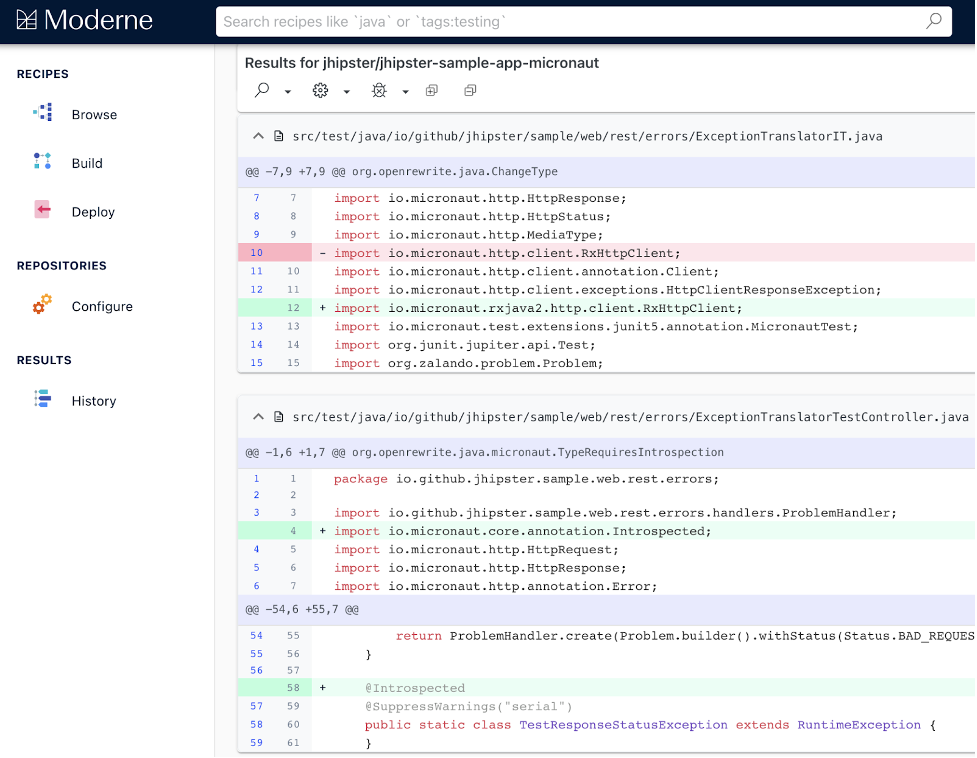
    Micronaut, a provider of a framework for building applications based on microservices and serverless computing platforms, today revealed it is allying with Moderne, a provider of a tool for refactoring code, to create a “recipe” that will automatically update the Micronaut framework.

    Moderne CEO Jonathan Schneider said the open source OpenRewrite refactoring tool for code, originally developed at Netflix, makes it possible to automate updates to codebases, remediate vulnerabilities and provide a foundation for high-level building blocks that will make authoring custom transformations simpler. That approach will eventually be embraced by other providers of application development frameworks.

    Fresh from raising $4.7 million in initial funding, Moderne makes OpenRewrite available via a software-as-a-service (SaaS) platform to enable IT teams to search and transform millions of lines of code in minutes. OpenRewrite currently supports Java, but the company is working toward adding support for additional languages, including infrastructure-as-code (IaC) tools such as Kubernetes, YAML and XML.

    Moderne has also developed “recipes” for common search and refactoring operations that can be assembled into more complex recipes for framework migrations involving, for example, an upgrade from Java 8 to Java 11. Micronaut is the first provider of a development framework to create a recipe for its own framework using OpenRewrite.

    At a time when applications are more distributed than ever, updating codebases is a major challenge. In fact, the manual effort involved in making those migrations is one of the primary reasons many organizations continue to employ older versions of frameworks such as Java 8. OpenRewrite is designed to automate that process at scale in a way that leaves it up to the individual developer to determine how involved they want or be or if they simply prefer to have a DevOps team manage the upgrade process on their behalf, said Schneider.

    In the longer term, Schneider said he expects recipes will be created to address everything from mass migrations to remediating specific types of vulnerabilities across an entire codebase.

    Too much reliance on legacy development frameworks generally stymies innovation. The latest versions of Java, for example, are designed to make it simpler for developers to build microservices-based applications.

    It remains to be seen to what degree DevOps teams will embrace automation to upgrade code. Many developers are hesitant to rely on automated tools of any kind. However, given the need for most developers to spend more time writing new code, it’s only a matter of time before most of them come to terms with automated approaches to updating existing code.

    In the meantime, the cost of supporting legacy frameworks should decline as organizations begin to migrate their codebases faster. One of the reasons there is so much technical debt in the enterprise is because different development teams tend to adopt different framework versions at different times. DevOps teams can find themselves being asked to simultaneously support multiple versions of the same framework. There may always be multiple versions of those frameworks, but, over time, DevOps teams should eventually see the bulk of deployed applications all using the same framework as the upgrade cycle becomes more automated.

  • 5 Ways to Embed Accessibility in Your SDLC

    5 Ways to Embed Accessibility in Your SDLC

    Developing an accessible software development life cycle (SDLC) requires a commitment to inclusion from everyone at the beginning of every project. By committing to developing accessible products, you will avoid costly and timely remediation prior to deployment at the end of your product roadmap.

    Creating An Accessible Software Development Life Cycle (SDLC)

    An accessible SDLC is one in which accessibility is integrated into every stage from planning through maintenance. This includes accessibility policy, automated testing against that policy, incorporation into your QA processes as well as verifying and documenting conformance requirements such as voluntary product accessibility template (VPAT) creation.

    Integrating accessibility isn’t really all that different from testing for any other quality standard, like cross-browser compatibility or other bugs. Here are the five key elements required to support your efforts:

    Policy – Start by establishing your accessibility goals, then prioritize based on importance (which is helpful for future sprint planning). Define these goals and priorities in your policies so that you can use them to measure your successes and understand where you need improvements.

    Automated and Manual Testing – Automated testing works by using software to scan your digital assets—whether in production, dev or staging—with an accessibility rules engine to check for errors. It can quickly and efficiently catch machine-detectable web content accessibility guidelines (WCAG) failures—the accessibility standard—that engineers can fix during the development process. Automated testing can be performed in many ways; however, the approach that will work best for you will depend on the level of integration that your DevOps team can facilitate. Manual assessments are far more comprehensive than automated scans. They also take essential user experiences into consideration, and they can catch errors far beyond what is machine-detectable today.

    Integrated User Story Development or Continuous Integration/ Continuous Deployment (CI/CD) – Once you’ve found the failures, what do you do with them? They should be treated like any other bug or glitch that prevents customers from accessing or using your website or application. You’ll want to capture this information in your ticket tracking system. Many organizations use agile sprints and project management software to create tickets, which are then fed into the development pipeline and prioritized, assigned and completed. Finding a solution that will let you easily convert WCAG failures into user stories (either manually or, better yet, through automation) is key for feeding a prioritized pipeline of work to be done.

    Knowledge and Resources – There are specific development techniques used to solve accessibility failures. Without access to a comprehensive library of accessible code techniques, developers will spend a lot of time scouring the web for solutions. Yes, you can find good solutions if you look long enough, but even so, how do you know whether that solution is legitimate or optimal for your case? Having the relevant solutions for an issue at your fingertips (negating the need to do a ton of online research) lets your DevOps team work more smoothly with fewer disruptions.

    Accountability – Accessibility analytics establish accountability. How effective are your DevOps teams at reducing WCAG failures? Tracking failures across your digital properties on a defined cadence lets you see and document trends over time. You can also track activities like the volume of tickets that are tagged as accessibility remediation or bugs, or new features or capabilities to represent active efforts.

    Whether you’re on a small or large development team at any size organization, adopting an accessible SDLC by implementing continuous accessibility checks at each phase of your development cycle is the most efficient and effective strategy to ensure that your website or applications are WCAG and ADA conformant.

  • Measuring Value Streams by Analyzing Flow Metrics

    Measuring Value Streams by Analyzing Flow Metrics

    There is increasing pressure and demand for IT administrators to bring software to market quickly and cost-effectively. To achieve that goal, IT departments frequently compile various metrics that measure specific development processes.

    Data and metrics are important tools, but administrators sometimes don’t think to look at projects through a wider lens—by measuring total production workflows. This can curb production and adversely affect business outcomes as inefficiencies go undetected across the value stream.

    In other words, total visibility across the entire value chain is needed to accomplish lean project management and optimize DevOps workflows.

    Let’s talk about the different kinds of flow metrics, why they matter and how to begin measuring them.

    Flow Metrics: What do They Mean?

    Flow metrics indicate the rate of value delivery with regard to desired business outcomes. This allows organizations visibility into production at a macro level so that they can make more effective decisions. Flow metrics can also produce an analysis of historical performance over time, which can be valuable for businesses that focus on continued growth.

    IT leaders now widely use flow metric analysis to bridge the gap between business teams and technology, because it can uncover a variety of problems that affect critical objectives. For instance, teams can identify prioritization challenges, why projects take longer than expected, pinpoint technical debt and more.

    When evaluating flow metrics, IT departments measure individual work units—also known as flow items—that clients or product teams hand over to their colleagues. This may be a request for a new software feature, a security flaw or something that needs a fix.

    What Are the Different Kinds of Flow Metrics?

    With a better understanding of flow metrics, we can now delve deeper into the five flow metrics that organizations should assess throughout the development process.

    1. Throughput

    Throughput measures the rate at which total number of flow items are completed. By measuring this, throughput can determine the total amount of value attained and distributed during a specific project.

    Throughput is generally measured week-over-week. Measuring and evaluating throughput on a historical basis also helps work out how clashes in priorities affect value overall.

    Optimizing throughput results in greater end user experiences and customer satisfaction, which naturally drives revenue and growth.

    2. Cycle Time

    Cycle time is the speed at which an IT team can deliver value. This means timing how long it takes for flow items to progress from work start to work complete, taking into account active and wait times.

    Cycle time is just as important as throughput when it comes to driving revenue and growth. Measuring cycle time can streamline the process of determining project estimates and allocating resources, resulting in stronger workflows and enhanced efficiency.

    3. Flow Efficiency

    Flow efficiency is the proportion of active time to wait time. Measuring flow efficiency uncovers where roadblocks are happening and whether process waste is rising or falling. The desired flow efficiency rate should be higher than 15%.

    Most flow time comes from waiting, resulting in roadblocks and increased production costs. Measuring flow efficiency can enable teams to pinpoint when workflows are taking too much time, and they can then take active measures to accelerate individual processes.

    4. Work in Progress

    Work in progress involves measuring demand. Teams achieve this by measuring the amount of flow items either pending or in active development within a value stream. Measuring work in progress generally enables IT leaders to identify whether value streams are overused or underused.

    Nobody’s perfect. That’s why leaders have to be conscious of how each employee’s time is being used. By doing so, they can systematically assign workloads and enhance quality where required. This, in turn, lowers burnout and turnover while also cutting down on mistakes that need to be reworked.

    5. Work Profile

    Measuring work profile is important when determining priority alignment. It’s analyzed as a ratio of the four other flow items completed in a specific time period.

    Assessing work profile allows for optimal quality and productivity. This raises customer experience (CX), which results in better retention and reviews.

    Why Should I Track Flow Metrics?

    In the past, DevOps professionals largely went without the necessary tools for tracking and enhancing flow metrics, but recent improvements in tracking these metrics have made the process much more efficient and easy.

    There are three key reasons for flow tracking:

    1. Boost Communication

    A lack of communication can be a common issue between business and software teams. Flow tracking enables IT administrators to delve into flow metrics and gain insight into the value stream. This helps teams provide accurate project estimates along with real-time updates, which makes communication with stakeholders much easier.

    2. Determine Desired Business Outcomes

    Having total visibility across a value stream helps IT and business leaders cooperate on identifying and prioritizing key projects and establishing goals.

    Improving software quality could be a goal, for example. Teams can examine various flow metrics to determine what is causing issues in software quality, how to fix those issues and how prioritizing adjustments to software quality could affect other workflows.

    3. Act on Intelligence

    Software organizations spend a lot of time and money attempting to expedite software development. They hold meeting after meeting, hire consultants or even bring on new team members, but the solutions they need to streamline workflows can be simple. They just need to be discovered.

    Organizations can gain total and real-time visibility into the value stream with flow tracking. This makes it quick and simple to act on intelligence and enhance development, leading to accurate, data-driven decisions that don’t require guessing.

    Elevate Your Value Stream With Flow Metrics

    Achieving optimal efficiency in workflows requires end-to-end visibility, which is made easy by analyzing flow metrics.

    Using flow metrics to maximize the value stream improves visibility, accelerates development and cuts software production costs.

  • How Third-Party Security Assurance Enhances DevSecOps

    How Third-Party Security Assurance Enhances DevSecOps

    Enterprises are constantly trying to do more with less today, and do it faster to gain competitive advantages and grow revenue. Nowhere is this more prevalent than in their internal software development processes. The movement to third-party or external sources of code is a natural reaction to “faster” release cycles. However, this need for speed can have unintended downstream security consequences for application development teams.

    As cybercrime has grown parallel to the explosion of digital processes in many enterprises, “security by design” needs to go from a nice-to-have concept to a hard reality. This is the reason DevSecOps has gone from buzzword to practice for many development teams. Implementing a software security assurance program, which embeds security as part of the coding and assembly process rather than a separate, after-the-fact quality testing function performed by security staff, is vital to limiting the cost of fixing vulnerabilities and preventing data breaches.

    Software Attacks are a Growing Problem

    One of the recent and most high-profile cybercrime incidents involved hackers using the SolarWinds software platform as a launching pad to breach companies. With threats specifically targeting software on a growth curve, organizations need to secure both the software they develop and that which they acquire from suppliers. This often includes a lot of reused code picked up from vendors and open source libraries that offer the building blocks for software and applications to help developers work faster and cheaper—but with a potential security cost.

    Maintaining software security has become more complicated as enterprises rely more on third parties for the components to develop software faster and cheaper and keep up with digital disruption. The share of code developed in-house for enterprise software has dropped from 43% to 38% in the last five years, while the use of commercial and open source software has grown in its place. Rather than rely on custom code, many developers are leveraging open source components or API libraries to build applications. Some software vendors provide application libraries that can have third-party components purchased by that vendor for their customers.

    Leaning on third-party code can leave software open to abuse, as developers have less visibility into the content of the components they use as the building blocks of their programming. Some vendor libraries get reused by the vendor for different applications, and some use open source components in their code; a developer may be using third- and fourth-party code from who-knows-what source. Vulnerabilities can be hiding many layers deep in the code, and unless developers know the source, they are difficult to detect.

    This is where a well-established software security assurance program can reduce the risk of cybersecurity incidents and the impact of security weaknesses. It protects users and the enterprise by establishing cybersecurity practices, fulfills the organization’s risk management and compliance requirements and offers the C-suite visibility into the process.

    A Checklist for Software Security Assurance

    A well-organized security assurance program ensures that security requirements have been established for the software and the software development process and that any software deployed is free from vulnerabilities. If any are found, it also establishes remediation steps to handle them.

    Some important practices:

    ● Trust but verify: Ensure that a security evaluation has been performed for the software throughout the software development life cycle (SDLC). Proactively validate the security and integrity of software code and provide results identifying any vulnerabilities found and assign remediation steps to correct them before release into production.
    ● Know what’s in the software: Since many developers and software vendors rely on open source and third-party code more frequently, it’s more important than ever to know what those components are and where they come from. Software security
    assurance should include the software bill of materials (SBOM) for any open source code and third-party components.
    ● Put it in writing: Produce documented proof, such as the SBOM mentioned above, and generate a vulnerability report proving the integrity of the software. If vulnerabilities are found, determine the cybersecurity risk and the potential impact based on the Common Vulnerability Scoring System (CVSS) score, an industry standard, to guide remediation.

    A good software security assurance program makes sure that each software review or audit includes an evaluation of the security requirements for the enterprise. These can vary by industry—and even within the organization—based on which function the software is running. A program running mailing lists for a power generation company is not as mission-critical as the software running the power grid.

    With all industries in the crosshairs of cyberattackers, an effective and diligent software security assurance program will make it harder for them to find a back door and can help keep your organization safe.

  • Real-Life BDD: Getting the Best Out of Dev Teams

    Real-Life BDD: Getting the Best Out of Dev Teams

    If we want our software to have value, we need to improve it every day, rather than wait three months for the next release. If someone finds a bug and we know how to fix it, we want to deliver the fix that day. The challenge is deploying to production many times a day.

    If the developer is coding right now, we want to see their work in production today. However, when you increase the speed of delivery, you need to be sure that the code you deploy works. To increase speed and quality at the same time, you need a safety net and a lot of automation.

    Sometimes we need to change the mindset of developers. This affects interactions between the developers and product management. It also changes the way developers code and how they approach their work.

    Break It Down

    Behavior-driven development (BDD) helps all of my teams. My mature teams use the three stages of BDD: discovery, formulation and automation. To increase speed and quality in a team that isn’t as mature (not much test automation, a lot of manual testing), one of our challenges is to develop small pieces of code they can deliver.

    When we groom an item in the backlog, the product owner (PO) explains what’s needed, but sometimes when the developers start working, they find other stories that may take two weeks each. With BDD discovery, the PO and developers can reach a shared understanding of what’s needed before coding starts. If the story is too large, example mapping helps them split it. They need to obtain stories that will take less than three days.

    More Ideas, More Examples, More Agile

    To simplify collaboration between the engineering and business units, the product team needs to understand the size of the ask for the developer. You can improve communication by showing all the different cases that exist for this feature and by using example mapping.

    Here’s an example of how this works in practice: the product team asks for a feature and explains it in about 10 minutes. The developers say this will take two to three weeks. However, after the developers completed user story mapping and example mapping and began to split the big features into smaller stories with examples, they realized it would take much longer. There were simply too many things the product team hadn’t known about.

    The product team had lots of ideas, but ideas take time to implement. Now that they had more examples, they could make better decisions about what was mandatory and what would be great but was not essential. Working in this way allows us to be more agile.

    The particular aspect of BDD that helps here is discovery with example mapping. I like to use user story mapping to see different versions of the same feature to understand the value brought by the feature’s different potential iterations.

    Whenever Possible, Push Live Code

    I’ve transformed the way my team works to help them to release more often. The key is to add a continuous integration server with the first automated test and a staging environment where the code is deployed many times per day. This allows us to automate the process from the code, so when a developer pushes the code, we have the beginning of a safety net. When the safety net says everything is okay, deployment is triggered to a staging production environment. The production can be a staging production, but it’s better when it’s live. When it’s not possible to deploy directly in production, then you should at least deploy in a staging environment.

    From the developer’s point of view, when they push the code, there’s an impact on production, even if it’s just within a staging production environment. For the next step, they need to create the first unit test each time they have to add code. In other words, every time you write code, you need to have an automated test at the same time. These tests should be run by the continuous integration server.

    Once you have that, the next question is about the size of the code you push. If you wait a few days to push or use another branch, you won’t have the value to see the increment of the code you’ll push.

    Developers Should Own Quality

    Quality has traditionally been the responsibility of the QA team, but it should be owned by the developers. As a developer, you can’t wait for someone else to read your code and tell you it’s okay and then talk to the QA team to make sure you didn’t introduce a bug. If more unit tests are needed, you should write them and you should be using test-driven development (TDD) and BDD. You also need a lot of feedback. You need to be the owner of quality, and help your team achieve it.

    To summarize, here are my top three tips:

    • Automate the process of deployment with continuous integration/continuous delivery
    • Create examples with all the stakeholders of the project together—product, development and testers
    • Create small stories that you can deliver in less than three days