Category: Continuous Testing

Continuous testing is the process of executing automated tests as part of the software delivery pipeline to obtain immediate feedback on the business risks associated with a software release candidate.

  • Choosing the Right Software Testing Metrics

    Choosing the Right Software Testing Metrics

    A software testing metric is a criterion to track the effectiveness of quality assurance efforts. First, you establish success indicators throughout the planning stage. Then, compare them with the received metric after the completion of the process.

    However, many software QA and test experts tend to focus on how the tests will be executed rather than on the actual information produced by the tests. By this I mean testers often focus on the mere satisfaction of completing all the tests. But is this always a good thing? You can have a 100% pass rate with all green indicators on your dashboard and it is still possible that your tests aren’t strong enough.

    This article will discuss five software testing metrics that might assist QA professionals in evaluating their success.

    Characteristics of a “Good” Testing Metric

    Let’s talk about the features a metric should ideally have.

    Relevant to Business Goals

    Critical KPIs should reflect the primary mission and purpose of a business; for example, monthly revenue growth or the number of new users. Each company chooses its metrics based on what they intend to achieve with their product. While it may seem attractive to succeed in all tests, focusing on the wrong goals can be deceiving. This may impact the app’s work and the entire complex system, such as headless commerce architecture.

    Allows for Growth

    Every metric should allow for improvement. What if you’ve achieved a 100% success rate? The goal may be to keep the metric at this level or to improve it further.

    Encourages Development of a Strategy

    When a metric gives a team a goal, it also motivates them to ask questions to develop a plan. Suppose you need to increase revenue. Consider whether the product requires new features to encourage more purchases. Is it necessary to create a new acquisition channel? Has the competitor launched any new products or features that are attracting new buyers?

    Trackable and Comprehensible

    Good metrics are simple to comprehend and follow. Otherwise, how will the people gathering them make informed decisions? Employees must understand what they can do to improve the outcome.

    Three Tips for Choosing and Measuring Software Testing Metrics

    1. Start by Asking Questions

    Your questions should cover three topics:
    1. What you’re measuring
    2. Strategies and tools to measure it
    3. Reasons to track it

    To avoid analyzing useless metrics, pay attention to the metrics definition process. Sometimes, a small number of backlog bugs means your QA team is doing its job. However, when you break down these bugs into high/medium/low priority issues, you’ll be able to better see the overall program quality and make the needed adjustments.

    2. Don’t Neglect Automation When Calculating QA Metrics

    Automation saves you time on manual data collection and helps ensure your metrics will always be relevant. Let’s assume you use Jira. Set up a Jira Query Language (JQL) request on your Confluence page if you need data on critical bugs every sprint. It will be updated frequently. Or you can employ other tools based on your preferred test management/task tracking system.

    3. Collect Comments and Gradually Improve Metrics

    Once you’ve set up and gathered all the metrics, the feedback and improvement processes start. Pay attention to feedback to improve the efficiency and clarity of your metrics and reports.

    Five Software Testing Metrics to Track

    Now let’s look at some specific examples. Note that different quality aspects matter to varying degrees depending on circumstances.

    1. User Satisfaction

    Here, you’ll want to see the client’s reaction to the product. You use user satisfaction surveys and support tickets that reveal bugs. If you track these quality metrics and work to improve them, the business will grow as you’ll see more satisfied and returning customers. If something’s wrong, you’ll have to do a causal problem analysis and remove the roadblocks.

    2. Process Metrics

    These are internal measurements that have a significant impact on your product quality. For example, you can track lead time and the time it takes between setting the task and code deployment and production.

    One more metric you could use is cycle time. It means time to build a feature after being given the approval to begin working on it. Finally, you can track the time it takes to solve difficulties. This could refer to the speed of resolving tickets or bugs once they’ve been reported.

    As these metrics can be hard to measure, another method to improve process efficiency is to detect where unfinished work starts to pile up in the queue. It can highlight a bottleneck that, if removed, could help your teams become more productive.

    3. Coverage Metrics

    Another indicator of test quality is test coverage. It informs us of the amount of tested code. It’s a method of ensuring that your tests check the code and how much they operate. In this case, it’s better to use a top-down strategy. The first step is analyzing module coverage. Then you consider functionality and, finally, data coverage in each functionality. It means how many different combinations of the potential data inputs you’re covering with tests.

    This group includes such metrics as:
    ● Requirements coverage percentage
    ● Unit test coverage
    ● Manual or exploratory test coverage
    ● Test cases by requirement category
    ● UI test coverage
    ● Integration and API test coverage

    4. Code Quality Metrics

    Evaluating code quality means categorizing the value of code into two categories: Good and bad. There is no single notion of quality because practically every developer defines for themselves what constitutes good code. How can you assess code quality? Tools like SonarQube let you reveal how much technical debt is in a system. You’ll need to classify issues and vulnerabilities, organize them by priority and select what you’re going to focus on.

    5. Bug or Incident Metrics

    Each issue differs in severity, so don’t give all issues equal weight. Some problems are simply suggestions for improvement. Determine which components of quality are more important than others for your company. That said, go beyond just the amount of defects when analyzing the metrics you’ll use.

    What can you extract from incident reports? These results can include:

    ● Total number of bugs
    ● Open defects
    ● Closed defects
    ● The time to close each incident report
    ● Changes since the last release

    Rules for Measuring Software Testing Metrics

    Evaluating metrics in software testing and estimating their success can be frustrating and vague. Here are some tips and suggestions you can use:

    1. Correlate your metrics with project, process and product goals. Keep in mind that a single indicator is not enough for a complete view of your software quality.
    2. Track the progress (or regress) throughout time. Streamline the data collection process through automation, store data in a collaborative resource like a Wiki/Confluence and review outcomes regularly.
    3. Report the statistics to the customer and the team to show your progress. Reports should be easy to understand, so make them helpful and user-friendly.
    4. Check to make sure if the metrics are valid. Keeping track of irrelevant metrics and displaying inaccurate data is out of the question.

    Measurement is an important activity in software testing, such as determining the number of successful tests against how many have failed. All the information you get comes to stakeholders. As a result, they can make informed decisions such as when to release an app.

    How can you monitor your test activities? You need to determine relevant software testing metrics. Choosing the correct testing metrics can be difficult. Frequently, teams opt for metrics that are out of sync with the overall business.

    What can the lack of adequate benchmarks cause? Stakeholders fail to measure progress, identify possibilities for development or control which testing tactics have the most positive impact. All things considered, QA teams need to track individual progress, skill level, and success, as well as code quality, bugs, and coverage.

  • Securing Your Software Development Pipelines

    Securing Your Software Development Pipelines

    Earlier this year, it was announced that the attack on IT management software provider SolarWinds had been used to compromise other organizations, including parts of the United States government. There were several reasons for alarm because of this news, but one of the biggest was the revelation that attackers breached SolarWinds’ software development process and pipeline. The level of concern was such that it led to a first-of-its-kind executive order on cybersecurity.

    The security of the software development process has been a concern for development teams for decades, beginning with Ken Thompson’s thought experiment around hacking compilers to inject vulnerable code (PDF). As the software development process becomes increasingly automated, this means there is more to secure. Indeed, the biggest difference between Thompson’s “Reflections on Trusting Trust” and today is that much of our concern stems from just how much we, as development teams, must trust code that was not written by us.

    The issue of code ‘not written here’ is bigger than just open source libraries – though those are a big part of the issue since a typical Java application is 97% third-party code by weight, according to the Veracode State of Software Security, 2020. Moreover, modern cloud-native applications are also comprised of additional types of code written by others, including container images, serverless code and other cloud-native artifacts.

    As a result, an attacker could compromise a development pipeline by one of a variety of means:

    • Poisoning an upstream open source repository by taking over an open source project, or by typosquatting
    • Compromising a container image repository
    • Gaining access to the continuous integration server and making changes in the pipeline to incorporate malicious code
    • Gaining access to the source repository, identifying an existing vulnerability (zero-day) in an application, and exploiting it in production

    So, what must be done to mitigate these threats? A lot of the answer comes down to testing, managing the chain of custody and monitoring access to internal resources.

    • Managing access—Systems that touch your software development process provide a door that, if not properly secured, may allow an attacker to walk in and compromise the software you ship to your customers. Things to be aware of here include the source control system, the continuous integration server and other tools (including quality and security tools) that have access to the source repository. Similarly, any activity that touches the source code, especially commits to the source code repository, must be properly authenticated with a developer GPG key. This prevents spoofing a user’s identity by setting git configuration parameters (this blog post from Alessandro Segala describes the problem nicely) or by stealing credentials.
    • Manage the chain of custody for software dependencies—Most modern software dependency managers allow connections to multiple software registries, including public registries that can be easily attacked or compromised. Configuring dependency managers to only allow connections to an authorized list of registries can help keep compromised packages from entering the build pipeline. This can also help to ensure that only dependencies that are free of critical and high vulnerabilities can be used in the application. This topic also relates to the next one on testing for vulnerabilities. Part of managing code coming from other parts of the software supply chain is looking for security vulnerabilities in the code. Consider a security scanning tool that can look for vulnerable open source libraries or container images with vulnerabilities and security misconfigurations.
    • Testing for vulnerabilities —Code introduced by an attacker may introduce new vulnerabilities. Using static application security testing (SAST) can help to identify serious security issues, including poor cryptographic practices, hard-coded credentials, and injection vulnerabilities. Performing SAST in the pipeline allows for the identification of critical and high severity defects early, enabling you to fail a pipeline upon their discovery and preventing insecure code from being deployed into production. Likewise, as noted above, testing for vulnerable containers and open source libraries can prevent vulnerabilities from being introduced via the software supply chain. Finally, using dynamic application security testing (DAST) to perform an end-to-end runtime test for a web application in a pre-production environment can help identify other exploitable issues in the end-to-end application. It can also find problems with application configuration that are only observable in the deployed environment. Both SAST and SCA might identify weaknesses in software that, while indicative of poor coding processes, may not be vulnerabilities. So, selecting tools that allow you to set a baseline of acceptable findings can help to ensure this control is adopted successfully.

    Solving all these problems requires thinking about different parts of the application development process as a complete system. To that end, Veracode collaborated with Venafi, Sophos and CloudBees earlier this year to put together a proposed blueprint for secure software development pipelines. The proposal is maintained on GitHub and is available for users to raise issues or propose pull requests on the blueprint—all input is welcome.

    The importance of getting this right cannot be underestimated. Hacks and breaches continue to hit the headlines, and putting in place the right tools, technologies and processes to minimize security risk in the software development pipeline is more critical than ever. 

  • Observability Vs. Monitoring: What’s the Difference?

    Observability Vs. Monitoring: What’s the Difference?

    As more and more IT organizations pivot from strategies rooted in monitoring to ones that aim to achieve observability, one of the first questions that teams need to answer is, “What is the difference between the two?”

    That’s a somewhat loaded question because there are some differences of opinion out there regarding what, exactly, distinguishes monitoring from observability. But in general, the differences can be distilled into two main points, as we will explain.

    What is Observability and What is Monitoring?

    The first step in understanding the difference is to understand what each term means on its own.

    The classic definition of observability is that it is the use of external data outputs to understand the internal state of a system. In the IT industry specifically, observability could be defined as the use of logs, metrics and distributed traces to understand the state of a complex software system.

    Meanwhile, monitoring is the process by which data is collected from a system. In IT, monitoring is how teams collect logs, metrics and traces and move them to a place where they can be analyzed.

    Similarities

    There are some obvious similarities between the two. Both involve (at least in part) the collection of diverse sets of data. Both also serve the goal of helping teams identify problems within their software stacks and deliver a high-quality user experience.

    Two Key Differences

    But the similarities end there. Ultimately, monitoring and observability are distinct concepts and processes, with two main differences that distinguish them from each other.

    Monitoring collects data. Observability interprets it.

    The first is that observability focuses on interpreting and understanding data, whereas monitoring is merely the collection of data.

    In this sense, you can think of monitoring as one of the processes that makes observability possible. But observability requires more than monitoring. In addition to collecting data, observability also involves the correlation of data from multiple sources and the identification of relevant patterns or anomalies within that data.

    Monitoring Tells you What is Wrong. Observability Tells you Why it’s Wrong

    The second main difference is that monitoring simply alerts you when something goes wrong. Observability goes further by helping you understand why it’s wrong and how to fix it.

    For example, a monitoring tool might tell you that your application’s response rate is no longer adequate. But you need observability to figure out which specific microservices within the application are causing the problem. Using that information, you can plan and execute an effective response to reliability issues using an incident management platform.

    With monitoring alone, you only know that something is broken, not how to fix it.

    Observability and Monitoring: Better Together

    Although it’s common to speak in terms of “observability versus monitoring,” the reality is that you can’t have observability without monitoring. (You could monitor without observing, but doing so would significantly reduce your ability to understand and resolve problems quickly.)

    So, don’t think of it as an either/or proposition. Think of them as concepts and practices that go hand-in-hand, even if they perform different functions.

  • CircleCI Adds Test Insights Module to CI/CD Platform

    CircleCI Adds Test Insights Module to CI/CD Platform

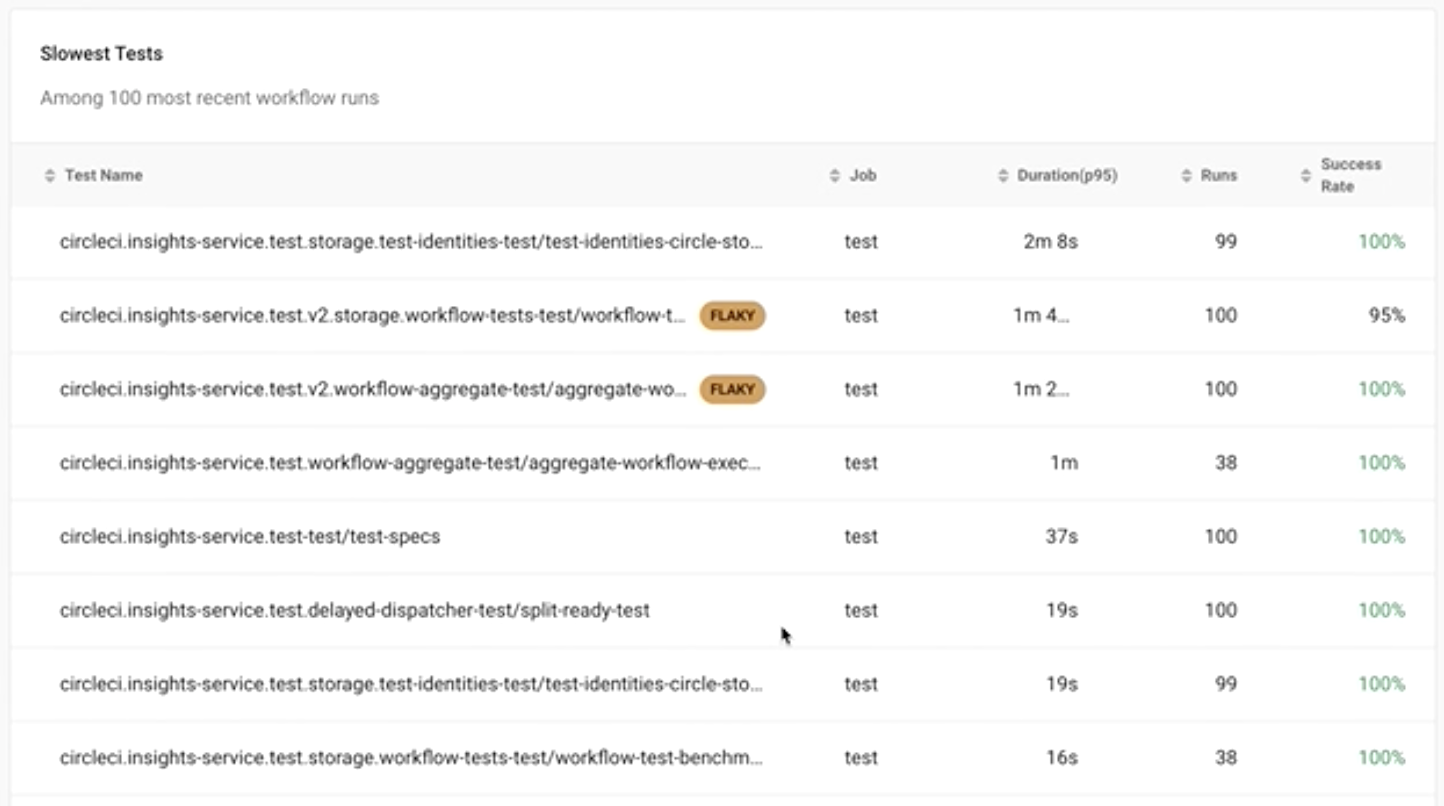
    CircleCI today announced it has added a Test Insights capability to its continuous integration/continuous delivery (CI/CD) platform to make it easier to identify tests that are either taking too long to run or simply exhibiting some form of anomalous behavior.

    Dawit Gebregziabher, product manager for data insights at CircleCI, said Test Insights is designed to make it simpler for IT organizations to shift more responsibility for testing further left toward DevOps teams that identify issues as applications are being built on the CircleCI platform.

    Each organization will still need to determine what tools to employ to create a test, but once it starts running, the Test Insights module will be able to surface the tests that, for one reason or another, are problematic to execute, he added.

    Test Insights, for example, will flag flaky tests and identify the longest-running and most failed tests. It will also enable DevOps teams to identify performance changes over time to pinpoint changes in application behavior.

    Finally, DevOps teams can track benchmarks at the organization, workflow and job level, as well as metrics for mean-time-to-recovery, throughput and durations for 24-hour, 7-day and 30-day windows of time.

    The challenge DevOps teams often encounter is a test may be run even when it’s apparent the application will fail. Test Insights makes it feasible for DevOps teams to manage the testing process much more efficiently, said Gebregziabher.

    It’s not quite clear how far testing is shifting left. There’s no doubt more developers are testing their code before it is loaded into a production environment to hopefully avoid issues that will only become more expensive to fix later. Other organizations have dedicated software engineers to create testing processes that are tightly integrated with CI/CD pipelines, noted Gebregziabher.

    However, many large enterprise organizations continue to also hire and retain dedicated application testing teams that are trained to identify issues that might either adversely affect the end-user experience or run afoul of compliance requirements.

    Regardless of who does what kind of testing, however, it’s clear there’s a lot more focus on addressing issues earlier when they are much less expensive to fix. The goal should be to make it easier to optimize when tests should run based on probabilities that ultimately reduce the time wasted running tests that either will fail or are, for one reason or another, flawed.

    Developers, of course, are all equally committed to running tests, so organizations will need to determine for themselves how far to shift that process left. However, at the very least, DevOps teams should be able to identify patterns that might indicate there is a need for additional developer training. After all, it’s unlikely a developer is going to understand there’s an issue until some meaningful metrics are shared.

    In the meantime, the more testing that occurs at a faster rate the more likely it becomes that an organization can provide a superior application experience the first time—and every time—an application is built and deployed.

  • Defining Availability, Maintainability and Reliability in SRE

    Defining Availability, Maintainability and Reliability in SRE

    In the world of reliability engineering, you’ll frequently encounter the three “-ability” words: Availability, maintainability and reliability. They sound similar and have similar meanings. In fact, these words may seem so similar that it can be tempting to use them interchangeably.

    That would be a mistake. Availability, maintainability and reliability all have distinct—if related—meanings, and they each play different roles in reliability operations.

    Definitions of Availability, Maintainability and Reliability

    Let’s start by succinctly defining each of the terms.

    Availability, Defined

    Availability is the extent to which an IT resource is ready to perform a task when requested.

    Thus, an application or server that is responding to requests is available (even if it takes longer to respond than desired or otherwise operates suboptimally, in which case it may have a reliability issue but not an availability issue).

    Availability is usually measured as a percentage. A resource that has 99% availability, for example, is one that is up and responding 99% of the time.

    Maintainability, Defined

    Maintainability is a measure of how quickly and easily a resource can be fixed when something goes wrong.

    If a buggy application release can be quickly fixed by rolling back to a stable version, the application would have a high degree of maintainability. On the other hand, if you have a server that needs to be rebuilt manually after it fails, it’s not very maintainable.

    Reliability, Defined

    Reliability is the extent to which a resource functions as required upon request (as opposed to simply being available).

    For example, if your users require an application to process each transaction within one second, and it does this 99%of the time while also maintaining a 99% availability level, that would be a relatively reliable application. In contrast, an application that responds to almost all requests but that suffers from high latency or error rates would not be very reliable, although it might be highly available.

    Differences Between Availability, Maintainability and Reliability

    The simplest way to spell out the differences between availability, maintainability and reliability is to highlight what’s unique about each concept.

    Availability

    Unlike maintainability and reliability, availability is an essentially binary metric, in the sense that a system is either available or it’s not. Although availability status can change over time, there is no such thing as varying degrees of availability.

    Availability also stands out because it is often the most important metric in defining SLAs and SLOs. Contracts typically specify that resources will achieve a certain level of availability, defined in percentage terms. They may sometimes also specify metrics like response times, which are a reflection of reliability, but availability is more likely to be the most important metric within service agreements.

    Maintainability

    Maintainability is unique in that it’s a pretty subjective concept. A system that one SRE considers easy to maintain could seem difficult to maintain to another SRE. The methodologies that engineers leverage to optimize maintainability could vary, too; for instance, someone from a DevOps background may be more likely to focus on optimizing maintainability within the software delivery chain than someone trained in classic site reliability engineering, which focuses on automating IT operations through code more than on the software delivery process.

    That said, automation tools help virtually every team maximize maintainability, no matter their preferences or background.

    Reliability

    Reliability stands out because it reflects how well a system performs. Here again, this is a somewhat subjective metric, because performance requirements may vary from one user to another. Nonetheless, reliability is the most effective means of measuring whether a system meets the performance levels it needs to, even if those requirements change over time.

    Why do availability, maintainability and reliability matter?

    Because availability, maintainability and reliability each measure different aspects of a system’s status, putting them together is a useful means of gaining insight into the overall reliability of a system.

    In order to be reliable, a system requires both availability and maintainability. A system can’t be reliable if it’s not available. It’s also unlikely to be highly reliable if it takes a long time to fix issues due to low maintainability.

    At the same time, by focusing on availability, maintainability and reliability individually, you can drill down into specific issues within the IT resources you manage. For instance, you might have systems that are high-performing when they’re available, but that have low reliability rates because of availability issues. In that case, you’ll know that an investment in increased availability is likely to yield the greatest reward for increasing overall reliability.

    The Bottom Line

    The bottom line: While availability, maintainability and reliability are all reflections of the quality of an IT resource, they measure quality in different ways. Tracking each category separately is important for ensuring that you know where your weakest links exist within overall system performance and health.

    At the same time, however, it’s important to compare and correlate availability, maintainability and reliability data so that you can achieve continuous insight into a resource’s status. When you can track each item separately but also combine them together to gain a complete picture of your system, you are in the best position to optimize reliability operations.

  • Welcome to the New Field of Software Supply Chain Management

    Welcome to the New Field of Software Supply Chain Management

    Supply chain management is the newest ‘shiny object’ in both the DevOps and DevSecOps communities. But what does it mean in relation to software development?

    Historically, supply chain management is a commerce term that refers to tracking the logistics of goods and services moving between producer and consumer. This would include the storage and flow of raw materials with a focus on the channels that support the process.

    When we look at this concept from the perspective of software development, we will soon see that it is a new form of software configuration management. Yes, the new SCM is … SCM. The core of supply chain management is the process of controlling changes in software. The new SCM expands those old practices to include all ‘raw materials’ which we manage as part of our software build and package steps. For instance, when companies purchase and download open source libraries used in their in-house software. Supply chain management includes the interrogation of these ‘raw materials’ as well as all of the internal code and libraries. We will soon be hearing more about software bill of materials (SBOM) reports and difference reports, as they are critical for understanding the objects that flow through the software we create.

    The software supply chain or software configuration management practice hasn’t been talked about much until recently. This area of expertise has never been ‘sexy.’ That is, until the SolarWinds supply chain hack. The SolarWinds hack was a hard lesson to learn, but it taught us to take a closer look at how we consume our raw materials and to be more serious about how we build and package our software.

    According to FireEye, the firm that discovered the backdoor supply chain hack:

    “SolarWinds.Orion.Core.BusinessLayer.dll is a SolarWinds digitally-signed component of the Orion software framework that contains a backdoor that communicates via HTTP to third-party servers. We are tracking the Trojanized version of this SolarWinds Orion plug-in as SUNBURST.”

    It was obvious, something went very wrong with the creation of that .dll. I don’t pretend to fully understand how this breach occurred. But I do understand the build process and have been talking about the potential for these types of breaches for over 25 years.

    There have always been big security gaps and vulnerabilities in our most basic software development practice—the compile/link process. Most build processes are imperatively defined using an Ant, Make or Maven script. Each time the build runs, it rebuilds all the binaries, even if the corresponding source code has not changed.

    This is a problem. Instead, we need a build that is incremental. Incremental builds are difficult to script because they need more advanced logic. Most developers are not given adequate time to create a better build process, one that only rebuilds the changes. This means it is next to impossible to audit why a binary was recompiled because they are always recompiled. If we only recompiled the binaries that had corresponding code updates, we could more carefully audit the code and make sure that only approved coding updates were included.

    This may not have caused the SolarWinds attack, but it could have. Once hackers have gotten past the firewall they can find the build directory, read through the build scripts and identify the perfect piece of code to update with their bad function. The next time the build runs, a ‘clean all’ recompiles everything and, like dark magic, a SUNBURST is created.

    In our not-too-distant past, the developer community had tools that controlled software builds beyond what an imperative script could do. OpenMake Software, for example, provided a build automation solution called Meister that ensured that incremental builds were easy. As part of the build, it generated SBOM reports and differences reports allowing teams to easily audit and compare the actual source changes to confirm that only approved code updates were included. Another example was Rational Software’s ClearCase which used a program called ClearMake. ClearMake used a process called ‘winkin’ to reuse ‘derived’ objects that had not changed. This process created an incremental build that could be easily audited.

    I realize that I am simplifying the overall problem, but it is a good example of the basic supply chain best practices and how potentially vulnerable our processes are.

    The time to carefully think about how we manage our raw materials and overall supply chain is now. I’m guessing that most monolithic practices will not change much; it is too costly and impactful to rewrite hundreds of CI pipelines. But that does not mean we can’t solve the supply chain puzzle as we shift into cloud-native development in a microservice architecture.

    In a microservices architecture, we need to begin thinking about what the supply chain looks like. How do we track raw materials that are in the form of hundreds of small ‘bounded context’ functions? The good news is there is an emerging microservice catalog market that can become part of the supply chain solution. A microservices catalog can track versions of services to versions of their consuming applications. Your new SBOM report will have two levels: First, an SBOM for the microservice. Second, aggregated data at an application level. Remember, in this new architecture a full build is not done.

    It’s important to understand that microservices are naturally incremental and are independently built, packaged and deployed. Managing these small services opens the door to more closely auditing their source code before they are released.

    As we shift from monolithic development to microservices, we have an opportunity to incorporate supply chain and configuration management best practices. This includes being able to carefully audit the code before a release is done. And remember, we must do this as fast as possible. It sounds like a big task, but it’s well worth the effort. Collectively, we will find the answers as we explore new ways to manage our DevOps pipeline and incorporate configuration management and DevSecOps principles.

  • 5 Steps to Succeed With Blue-Green Deployment

    5 Steps to Succeed With Blue-Green Deployment

    By allowing teams to maintain two production-ready environments at the same time, the blue-green deployment technique can significantly boost reliability. But blue-green deployment can also be difficult to execute and manage. Let’s unpack how blue-green deployment works, why it’s important and which best practices to follow for blue-green deployment success.

    Blue-Green Deployment, Defined

    Blue-green deployment is a software deployment technique in which teams maintain two identical but distinct environments that are capable of hosting a production application. One environment is “live” and actively serving users, while the other is kept in reserve.

    When it comes time to deploy a new version of your application, you deploy it to the reserve environment. You then test and validate it to make sure it meets performance and reliability requirements.

    If it does, you reconfigure your DNS or load balancers so that user traffic is directed to this environment, which becomes the new production environment. Meanwhile, the previous production environment is placed in reserve.

    Benefits of Blue-Green Deployment

    The blue-green deployment technique can boost reliability in several ways:

    • Environment parity: Because the reserve environment in which you test your application becomes the live production environment, blue-green deployment ensures parity between testing and production. In turn, it reduces the risk that configuration differences could cause unforeseen problems in production.
    • Failed deployments: If a deployment fails, it doesn’t impact your users because you deploy into the reserve environment. You can fix the issue while a stable user-facing version of your app continues to run in the other environment. 
    • Redundant environments: Although blue-green deployment is not a data protection or disaster recovery technique, having two production-ready environments available is useful in the event that one of your environments is wiped out by an event like a data center failure. In that case, you can restore operations quickly by using the other environment (provided it’s hosted in a separate data center, of course).

    How to Use Blue-Green Deployment: Steps and Best Practices

    While blue-green deployment is a great way to increase reliability, it does present some challenges. The following best practices can help you to handle them.

    Use Scalable Infrastructure

    One obvious potential downside of blue-green deployment is that it can essentially double the amount of resources you need to host your application since you have to maintain two identical environments. That can double your hosting bill.

    One way to reduce the cost impact of blue-green deployment is to create environments that can scale rapidly without changing their core configuration. You could do this using cloud-based virtual machines (VMs) and autoscaling or via containers and an orchestration engine (like Kubernetes) that can scale them.

    Using this approach, you can set up two environments that are effectively identical except that the production environment includes more VM or container instances than the reserve. Although you could argue that this is not quite a blue-green deployment because the environments are not perfectly identical, that semantic downside is outweighed by the benefit of not wasting a bunch of money on infrastructure you don’t need.

    Chaos Engineering

    Typically, chaos engineering entails experimenting with a production system to test its reliability. Chaos engineering offers many benefits, but it presents the obvious risk of creating a problem in production that impacts your end users.

    Blue-green deployment allows you to work around this risk by practicing chaos engineering in the reserve environment. Of course, because you won’t have real users, performing chaos engineering under these settings may not allow you to test every aspect of your production application. But you can still test many of the configuration variables by issuing requests yourself within the reserve environment—all without worrying about breaking things for actual users.

    Managing Database State

    Keeping databases in sync when you switch between environments is one of the biggest challenges of blue-green deployment. Even small discrepancies in database state could cause big reliability issues.

    The simplest way to address this issue is to turn off the database before switching and perform tests to ensure that databases in both environments are identical before they are reenabled. Of course, this approach may impact application functionality, because the app may not work properly if the database is turned off.

    Another solution is to sync databases between your two environments. This should ensure that database state remains identical even as you switch from one production environment to the other. But it also means that problems with the database will affect both environments.

    The bottom line: There is no simple way of managing database state in blue-green deployment. You should evaluate the different options available and consider which one best meets your needs. If you can tolerate a little downtime, stop the database and restart it during the switch. If you need total continuity, use syncing, but be sure to manage the associated risks.

    Change Load Balancers, not DNS

    There are two main ways to manage where traffic is directed, and hence which is the production environment: You can change your DNS configuration when you want to switch. That’s easy to do—you would simply change the mapping for yourapp.com from one IP address to another, depending on which environment is the live one.

    You can also use load balancers to manage traffic. Load balancer configuration is more complex than simply changing DNS entries, but it also enables more sophisticated and granular control.

    In general, it’s a best practice to manage blue-green deployment switches via load balancers, due to the extra control they provide.

    Prepare for the Unexpected

    While blue-green deployment can reduce the risk of user-impacting disruptions, it’s no silver bullet. You must also be sure that you have the reliability management tools you’ll need to detect and remediate issues within both of your environments.

    Blue-green deployment is a powerful reliability engineering technique. But to get the most out of it, you must optimize the way you handle requirements like infrastructure management, traffic routing and database state. 

  • Does Shift Left Matter to SREs?

    Does Shift Left Matter to SREs?

    If you’re a software engineer, you’ve likely heard all about shift left, a practice that can streamline certain aspects of software development.

    But shift left isn’t just for developers. It can be equally valuable for site reliability engineers (SREs). Although the main mission of SREs is ensuring the reliability of software after it has been deployed rather than actually developing software, encouraging shift left practices as part of a software development strategy can nonetheless make it easier to optimize reliability.

    To prove the point, here’s an overview of what shift left means and why it matters for SREs.

    What Does Shift Left Mean?

    Shift left is the detection of application problems early in the software development process. The core idea behind shift left is that instead of waiting until just before deployment to test software for bugs, security issues or other problems, teams should begin the testing process as early as possible. In other words, they should shift some testing to the “left” of the software development life cycle instead of testing only in the middle—hence the term “shift left.”

    In so doing, they can detect problems early in the development process, at which point they are typically easier to resolve. If you don’t catch a performance, reliability or security bug until just before you plan to push your application release into production, you may have to overhaul a large part of your codebase to fix the issue. In many cases, you’ll have to change not just the specific code that triggered the bug, but also other code that depends on or integrates with the buggy code. But by finding buggy code early, developers can often fix the problem with minimal adjustments to the application as a whole.

    Shift left is a high-level concept, and it can be implemented in multiple ways. In some cases, developers may start running performance tests on new code right after they write it, even if it has not yet been integrated into the main codebase. In other cases, shift left testing could mean compiling some parts of the codebase in order to run tests against it before the application as a whole is built and tested in a dev/testing environment. Either way, the result is a testing process that begins earlier than it would under a conventional approach.

    Importantly, shift left doesn’t mean that teams skip the tests that they would normally perform just prior to deployment. Those tests, which are important for catching bugs that materialize only when testing the application as a whole rather than individual parts of it, typically still happen as part of a shift left strategy. Thus, shift left means that testing begins earlier and coincides with a broader portion of the overall development pipeline, not that testing is simply shifted to the beginning of the pipeline at the expense of mid-pipeline tests.

    Shift Left and SREs

    Again, the main job of SREs is to manage the reliability of systems. They may spend part of their days working alongside software engineers to help devise architectures and coding strategies that maximize the resiliency of applications against reliability and performance issues. But SREs also devote much of their time to managing what happens post-deployment. They use monitoring and observability tools to detect problems that arise in production environments. They then take the lead in responding to them.

    In that sense, SREs may not seem to have much to gain from shift left. Shift left is a strategy that aligns with software development first and foremost, and software development is not the core focus of SREs.

    Nonetheless, a shift-left strategy can help SREs do their jobs better, for several reasons:

    • Fewer problems in production: Most obviously, shift left reduces the rate at which reliability issues reach production environments. In turn, it minimizes the number of incidents SREs need to respond to.
    • Optimizing software pre-deployment: By exposing reliability issues early in the development process, shift left is one way for SREs to acquire the insights they need to collaborate with developers on building reliability into applications. Shift left could highlight buggy dependencies or suboptimal architectural patterns, for example, which SREs can encourage developers to address.
    • Granular reliability insights: Because shift left is a great way to trace software problems to the specific code that triggers them, it provides highly granular visibility into reliability. It can help SREs find the weakest links within an application’s codebase or architecture. These weak spots can be harder to detect when monitoring or observing an application as a whole.

    How SREs can Follow the Shift Left Methodology

    Because the implementation of shift left practices is a task that ultimately falls to developers, SREs need to work closely with development teams (and DevOps engineers, if they exist in the organization) to make shift left happen.

    The first step in that process is to get buy-in for shift left among developers. SREs can do this by highlighting the ways in which shift left can streamline the work of developers and reduce the complexity of fixing bugs. That’s important to communicate because it ensures that developers understand that shift left benefits everyone, not just SREs.

    SREs should also work with developers to identify the best approaches and practices to implementing shift left. A key factor to consider here is where reliability problems most often arise, and how shift left can help to detect them earlier. If most performance problems stem from code written by individual developers, for instance, testing code as soon as it is generated may be the best way to detect problems early on. In contrast, in situations where performance issues are triggered most often by environment configurations, the ability to test applications early under different environment variables could be the best way to surface issues early in the development process.

    Finally, SREs should partner with developers to respond to the issues that shift left reveals. After all, while developers typically don’t pay close attention to what happens post-deployment, SREs have a special ability to understand how problems in development translate to problems in production. SREs may therefore be able to help developers identify the most effective way to fix bugs based on production environment requirements, even if it’s not the quickest or simplest way.

    Why SREs Need to Shift Left, Too

    Although the shift left methodology has not traditionally been closely associated with SRE, shift left is a crucial tool in the SRE toolbox. By helping teams to detect reliability issues when they are easier to resolve, shift left puts SREs in a stronger position to maximize the overall reliability of applications. At the same time, it reduces the number of production environment issues that SREs have to manage.

  • Snyk Extends Tools Portfolio to Drive DevSecOps Adoption

    Snyk Extends Tools Portfolio to Drive DevSecOps Adoption

    During its online SnykCon 2021 conference this week, Snyk extended Snyk Code, a static application security testing (SAST) tool that already supports the Java, JavaScript and Python programming languages to include support for C#, Ruby, PHP and Go.

    At the same time, Snyk Open Source, a platform for remediating open source vulnerabilities, has been extended to provide native integration with Atlassian BitBucket and AWS CodePipeline platforms for driving DevOps workflows. Snyk has also tightened integrations with platforms from DigitalOcean and HashiCorp.

    Snyk also added support for the Elixir programming language and package managers Yarn 2 and Poetry alongside integration with a C++ scanning tool from FossilID, a provider of a software composition analysis (SCA) tool for open source code that Snyk acquired earlier this year.

    The Snyk Container platform is now integrated with the open source Trivy container scanning tools and with Snyk’s vulnerability database in addition to adding support for container registries such as Quay, GitHub Container Registry, GitLab, Google Artifact Registry and Harbor.

    The Snyk infrastructure-as-code platform now also makes it possible to detect configuration issues in Kubernetes manifests in Terraform code in a way that is compatible with cloud platforms from Amazon Web Services (AWS), Microsoft Azure and Google Cloud Platform (GCP).

    Snyk also is adding support for version 3 of OpenAPI, which the company reports is three times faster than the previous version. That API is also the foundation for Snyk Apps that the company will continue to roll out.

    Finally, Snyk launched both a new free developer security education program, dubbed Snyk Learn, through which developers can attain and measure their level of DevSecOps expertise and Snyk Impact, an effort to foster collaboration among developers involving a wide range of socio-economic issues.

    Company president Guy Podjamy said as DevsecOps continues to evolve, the primary focus remains on developers and DevOps teams. However, as an issue, DevSecOps is also becoming more important at both the C-level within organizations as well as individual security operations teams. As such, and in the wake of recent high-profile security breaches, the sense of urgency surrounding DevSecOps is now a lot higher. The fundamental challenge organizations are trying to address is finding a way to improve overall application security without slowing down the pace at which applications are built, noted Podjamy.

    Snyk itself revealed it has secured an additional $530 million round of funding to address those issues. The company has now raised a total of $775 million to date with a valuation of $8.5 billion. Snyk also revealed it has increased annual recurring revenue (ARR) by 154% year-over-year from a customer base that now spans more than 1,200 organizations, including Asurion, Google, Intuit, MongoDB, New Relic, Revolut and Salesforce. Snyk customers and users collectively have run more than 300 million tests in the last 12 months to fix more than 30 million vulnerabilities in a 90-day period of time, the company claims.

    It may be a while before most organizations have embedded security tools within every DevOps workflow. However, given the resources being poured into DevSecOps, it may be more a question when DevSecOps will be finally achieved rather than if.

  • BMC Acquires StreamWeaver to Advance AIOps Strategy

    BMC Acquires StreamWeaver to Advance AIOps Strategy

    BMC has acquired StreamWeaver, a provider of a platform that makes it simpler to capture streaming data in real-time, as part of an effort to extend the BMC Helix IT operations platform infused with artificial intelligence (AIOps). Financial terms of the transaction were not disclosed.

    Margaret Lee, general manager and senior vice president for digital service and operations management for BMC, said StreamWeaver brings with it a wide range of integrations with multiple data sources that BMC will use to both train AI models and improve overall observability. While connecting to data sources is relatively straightforward, the challenge now is collecting that data in real-time in a way that is easily repeatable for IT operations teams, noted Lee.

    In general, AIOps continues to gain traction as IT environments become increasingly complex. Most IT operations teams are not going to be able to manage highly distributed computing environments without augmenting their IT staff with some AI, said Lee.

    Naturally, many rote tasks that were once performed manually by IT operations professionals will become increasingly automated. However, there will always be a need for IT personnel, noted Lee.

    Arguably, there may come a day when IT professionals will not want to work for organizations that don’t have an AIOps platform in place simply because the tasks assigned to them would otherwise be considered archaic, especially if they involve a series of tedious tasks that not many IT professionals really want to perform.

    At the same time, AIOps should reduce overall risk by making it easier for IT operations teams to proactively identify issues before they disrupt an application service. That’s especially critical as IT environments—increasingly with microservices-based applications constructed using containers—and serverless computing frameworks are being deployed with greater frequency alongside legacy monolithic applications.

    BMC has been making a case for AIOps as far back as 2017. However, since then, a wave of startups and IT operations incumbents have either built an AIOps platform from the ground up or updated an existing platform with AI capabilities. It’s difficult to assess which vendors are now ahead in terms of the AIOps race, but one thing that is certain is that IT organizations now have plenty of options.

    From a cultural perspective, however, not every organization is entirely comfortable with AIOps. While some IT professionals remain skeptical, others view AI as an existential threat to their existence. Most IT teams are also concerned about the potential impact any flawed AI model might have on IT operations—it’s one thing for a human to make a mistake, but an AI model making a mistake at scale could be catastrophic.

    There are few IT organizations that are embracing AIOps across the board, but most do recognize that AIOps platforms, in one form or another, are inevitably here to stay. After all, machine learning algorithms never forget anything they learn. Nor do they ever take a day off or decide to leave when offered higher pay. The challenge is figuring out exactly where the interface between IT staff and algorithms is going to be—not just today, but also in the near future.