Category: Continuous Delivery

Continuous delivery is a software engineering discipline that allows organizations to consistently develop and release quality software at a rapid pace. It is achieved by automating the software development lifecycle, enabling tasks such as development, testing and release to occur concurrently and continuously.

  • Do’s and Don’ts of Phased Rollouts Software Delivery

    Do’s and Don’ts of Phased Rollouts Software Delivery

    When it comes to app stability and user experience, the “move fast and break things” approach is a recipe for disaster. To protect brand reputation and to stay ahead of evolving needs and customer expectations, leading Silicon Valley companies’ software engineering teams have adopted phased rollouts, a software development method that involves the gradual implementation of a new feature to a smaller cohort of users at one time rather than all users at once.

    Phased rollouts help companies maintain the highest-quality customer experience (CX) for their users while making changes and software updates. When significant features and updates aren’t rolled out to production all at once, the organization’s software engineering team doesn’t have to deal with all the potential implementation issues at once. With phased rollouts, engineering teams catch issues early in the process so they can quickly fix them and resume the rollout of the experiment, which prevents issues from impacting millions of users down the road.

    While companies everywhere try to emulate the app development techniques of these Silicon Valley tech leaders, many are unable to achieve successful phased rollouts at scale. What they often don’t realize is that before even implementing a phased rollout approach—whether it be to 5%, 10% or 15% of their user base—there are a few steps that must be taken to ensure success. Below, I’ll walk you through the do’s and don’ts of a successful phased rollout plan.

    Do: Release Stability Management

    Companies must drive consistently stable app and web experiences in order to succeed in the market today. Therefore, it’s critical to continually monitor the stability of releases throughout development and testing to catch problems early and decide when to roll features out to users. By measuring and monitoring app stability in real-time, release managers inject accountability, predictability and complete peace of mind into the organization. Taking control of release stability management helps engineers deliver stable applications to drive world-class digital experiences.

    On top of that, software development teams must constantly improve mobile and web apps with new features and capabilities that better enable users to accomplish what they want to do. These kinds of improvements give companies the competitive edge they need to survive in today’s competitive business environment. In addition, monitoring release stability provides engineering teams with real-time visibility into every issue impacting application stability and CX. This level of visibility is critical for quickly diagnosing and understanding the root cause of errors so that engineers can roll out fixes before users are negatively impacted.

    Do: Testing and Early Access

    For a phased rollout, engineering teams must run A/B tests and quality assurance (QA) testing. A/B testing (also referred to as split testing or bucket testing) is a method of comparing two versions of a web page or app against each other to determine which one performs better. This includes trying out features like different screenshots, videos and even different app icons to measure which format users like the most.

    QA testing ensures that the organization delivers the best products or services possible by detecting usability issues that might not be technical. It tests for any problems that impact the end-user experience, from poor navigation to slow load times or unclear web copy.

    With phased rollouts, you must also provide early access to new features for select users to collect feedback and stamp out critical issues before launch. Many software products collect user feedback by including a small checkbox somewhere asking users to help make the software better by sending insights into how they use the application. In addition, social media has become an undeniable avenue for collecting candid user feedback. We’ve all seen it—when a platform changes its interface for certain users before others, users will post on social media sites about whether they are pleased with the new update or not. Historically, there has been backlash when significant changes are made and the company then has to decide whether to keep, change or cancel the new changes to the platform.

    As mentioned above, with an app stability monitoring tool, you can see if new features or experiments are introducing new stability issues and make decisions about pulling back or rolling out to a larger subset of users. By conducting testing and allowing early access to only a specific cohort of users, software engineering teams can balance release speed with application stability to create the best experience possible.

    Do: Allow for A Staging Period Before Going into Production

    As you launch new features, you’ll want to test them in a production-like environment after they go through QA testing. This is called staging, and it has become a popular concept with Silicon Valley companies. Staging is a near-exact replica of a production environment for software testing. Staging is meant to test code, builds and updates to ensure quality under a production-like environment before application deployment.

    A production-like environment is similar to when the app is released into production for users, but it’s not public yet. It provides an accurate view of how the update or new feature will operate and look in a production environment to avoid glitches that are only noticeable in production. Staging can include manual tests or, in some cases, engineering teams use automated software testing, which is more costly to implement and may only be attainable for larger enterprises.

    In this phase, software engineers should conduct additional tests and experiment with the new features to ensure that these capabilities—when released to production or to the larger user base—will not compromise the app’s stability. The last thing you want is for a new feature to break the user experience.

    Don’t: Try to Fix Every Bug or Error as it Occurs

    Since engineering teams often don’t have the bandwidth to fix every coding error that should arise, they need to prioritize and fix the errors that impact customers directly in order to protect revenue. Although organizations should have visibility into every error or bug, not all of them are worth fixing. This causes the signal-to-noise ratio that plagues developer efficiency.

    This is where app stability management plays an essential role. However, many of the app stability monitoring solutions on the market today can help with identifying errors, but leave it up to development teams to figure out which ones need to be prioritized. Engineering teams have to quickly determine which errors are the most urgent to fix, so they need to have reliable tools such as an app stability and error monitoring platform to provide them with visibility to make these important decisions in real-time.

    Phased Rollouts for Progressive Delivery

    Phased rollouts allow software engineers to continuously optimize the digital experience, without impacting the whole user base and negatively affecting the brand. Once mastered, phased rollouts can be used as part of a cutting-edge progressive delivery approach to software engineering and development.

    A progressive delivery approach includes shipping code (sometimes unfinished code) to a production environment multiple times a day, exceeding many companies’ risk tolerance. In order to do this successfully, engineers must have control over who can ship releases and when, and which users can access certain features and updates at what time. Phased rollouts provide a way to shield the majority of customers from the failures that occur at those rapid release speeds. To ship new software releases faster, engineers have to spend less time on QA and testing, but that doesn’t mean they should be overlooked completely. Then, by delivering the new release to a small subset of users first, you can manage risks more effectively and iterate accordingly.

    It’s important to call out that if the engineering team is making minute changes that no users will see or care about, you don’t need to use a phased rollout approach. That said, if it’s a significant cosmetic or operational change, such as updates to the UI, then phased rollouts are crucial. A phased rollout strategy is key for making software or app updates at scale that are necessary for a successful launch in today’s highly competitive market.

  • Driving E-Commerce Transformation with Microservices

    Driving E-Commerce Transformation with Microservices

    It’s no surprise that COVID-19 has accelerated digital transformation, but just how fast these changes have occurred is incredible. According to recent research, companies have accelerated their share of digital or digitally enabled products by up to seven years.

    These changes are impacting every sector in every region around the world, but they are being felt acutely by companies that sell their solutions online—which I imagine includes your company. To thrive in the new normal of digital commerce, businesses need to be supported by a fast, flexible technology architecture that can adapt to new products and go-to-market strategies and can be spun up on the fly. The best—and really, the only—way to do that is with a microservices architecture.

    Why Monolithic Architectures are Uniquely Bad for Commerce

    While monolithic architectures can be simple to develop, test, and deploy, their limitations, especially in the age of digital, quickly become apparent. Software becomes too large and complex to make changes quickly, or correctly. Bugs can be a disaster, and monolithic architectures are often a barrier to adopting new technologies since any change requires significant time and monetary investment to update the entire application.

    These limitations are even more glaring in the age of subscriptions. In today’s market, if you are selling products or services online, you are likely offering subscriptions. In fact, 95% of companies offer at least one subscription-based product. For subscription commerce businesses, the need for microservices architecture is even more critical. A recurring revenue strategy requires frequent adjustments and easy integration with other systems, requirements that a monolithic architecture often can’t accommodate.

    Scale Is the Critical Factor

    One of the greatest benefits of a microservices architecture is the ability to scale quickly. Monolithic architectures are much more rigid because everything has to be scaled at the same time. In contrast, a microservices architecture allows organizations to scale individual components of an application to meet niche use cases. Moreover, because microservices give you the freedom to update individual components, organizations can make changes without any interruption to broader systems. In other words, with a microservices architecture, developers are able to upgrade the airplane while it’s in flight.

    There’s internal scale, but external scale through ecosystems is also an important consideration. Recent research found that 56% of executives believe engaging in ecosystems is the most effective way to access new markets, while 55% believe that the new capabilities gained from partnering are essential to building new capabilities. Ecosystem participation—whether as an operator or a participant—requires timely integration and development, a reality that monolithic architectures just cannot support.

    Microservices as a Recruitment Tool

    Innovation and digital transformation aren’t just business needs. They can also be one of the most powerful recruiting tools available to draw in the best talent. The job market is rife with opportunity for prospective employees—especially now, during the Great Resignation, where a significant number of employees are looking to change jobs—and businesses need to embrace every advantage they can to attract top talent.

    Legacy technology can have its place, but it can also be a red flag for job candidates. Most developers want to join an organization that values innovation and gives them the freedom to build unique products and solve meaningful business problems, which microservices development offers. A microservices architecture can also make onboarding new talent easier, since developers aren’t obligated to learn every facet of the architecture. It’s a win for new employees and existing organizations alike.

    Driving Transformation Through Microservices

    The needs of any given business are always changing, but digital and subscription commerce businesses have proven to be extraordinarily dynamic. Monolithic architectures of the past simply aren’t equipped to power digital transformation or support commerce businesses when they emerge on the other side. Microservices may come in a smaller “package,” but they will deliver much bigger benefits to your business in the long run.

  • SRE’s Guide to Pragmatic Incident Response

    SRE’s Guide to Pragmatic Incident Response

    In my past experience as an SRE, I learned some valuable lessons about how to respond to and learn from incidents. If you want the TL;DR, I’ll summarize them here:

    • Declare and run retros for the small incidents. It’s less stressful, and action items become much more actionable.
    • Decrease the time it takes to analyze an incident. You’ll remember more, and will learn more from the incident.
    • Alert on pain felt by people – not machines. The only reason we declare incidents at all is because of the people on the other side of those machines.

    Now, let’s dive into each of these lessons a little deeper, and explore how they can help you build a better system for pragmatic incident response.

    1. Focus on the Small Incidents First

    The bad habit of ignoring small issues often leads to bigger issues. You should run retrospectives for small incidents (slowdowns, minor bugs, etc.) because these often have the most actionable takeaways—instead of shooting the moon and creating “rearchitect async pipeline” as a Jira ticket that never happens. Focusing on low-stakes incidents and retrospectives are a great introduction to behavior change across your organization.

    Let’s look at an obvious example of how a focus on small incidents can have an outsized impact. Case in point—my apartment. I live in an old candy factory retrofitted into apartment units. We have an elevator (thank God), but some of the buttons don’t light up when you press them. The LED display doesn’t match up with the numbers on the floor buttons. Yes, the elevator goes up and down, but overall, you can tell that things are wrong with it.

    One day, I came home and noticed an “Out of Order” notice on the elevator door. Was I surprised? Not at all. Of course an elevator with mislabeled buttons and broken LEDs would stop working!

    This isn’t dissimilar from an important software lesson—ignoring small issues often leads to much bigger issues. What starts as an inconvenience can lead to a complete breakdown. This is why you should focus on the small incidents first. I hear a lot of companies say, “We need to fix incident response! Every time we have an incident, it’s just chaos!”

    They are talking about unexpected downtime during a high severity level incident and they want to improve it.

    I say that’s the wrong type of incident to use to fix your incident response system and process. Focus on the small incidents first. Running retros for small incidents can help you build strong incident response models, because they have the most actionable takeaways and they are the best way to change behavior through repetition and practice.

    If you have a high-stakes, 12-hour incident and you run a one-hour retrospective you’re not going to get the results you want. You need to start small. Run retros for bugs that were introduced; maybe a bad data migration that didn’t really impact anything but took up a couple of hours of your day.

    Heidi Waterhouse captured this idea really well in this piece on reliability. Every airplane you’ve ever flown on has many tiny problems, Waterhouse said, “… like a sticky luggage latch or a broken seat or a frayed seatbelt. None of these problems alone are cause to ground the plane. However, if enough small problems compound, the plane may no longer meet the requirements for passenger airworthiness and the airline will ground it. A plane with many malfunctioning call buttons may also be poorly maintained in other ways, like faulty checking for turbine blade microfractures or landing gear behavior.”

    I couldn’t agree more. Extrapolating to software: The small things are typically indicators of bigger issues and could cause catastrophes down the road.

    2. Track Mean Time to Retro (MTTR)

    It’s important to think about what you measure in your organization. You should be measuring how you’re improving, and the most important metric here is mean time to retro (MTTR). Everyone should be tracking MTTR. It’s a great statistic to improve incident response in your team because it helps you understand the delay between incidents and retrospectives.

    The easiest way to have a bad incident retro is to wait two weeks. It’s better to get into a room quickly and hash out what happened than wait a long time until you’ve got everything perfectly prepared.

    Tracking MTTR can help you hold prompt and consistent retrospectives after incidents. Set a timer and make an SLO or SLA for yourself that says, “This is how long we take for retros.”

    Retro time will vary depending on the severity of the incident itself. If it’s a SEV1, clear everyone’s schedules, because you need to have retro within 24 hours of the incident. For SEV3 incidents, you have much more leniency.

    I also like tracking the ratio of retros to declared incidents. This is a metric that should go up; you should see your ratio of retrospectives to incidents increasing. You can break down that number by severity, as well. If you have a low retro ratio for a SEV1 versus a SEV3 incident, that might be okay at first (remember, start small) but you want those metrics to eventually become equal.

    3. Alert on Degraded Experience with the Service, and Not Much Else

    The severity of incidents is directly linked to customer pain. We would not declare SEV1s if there weren’t a lot of people feeling a lot of pain.

    Alerting on computer vitals is an easy way to create alert fatigue and burnout. As your company starts to scale, you are going to use more CPU; you’re going to use more memory. Tying alerts to computer vitals is not a good sign.

    If I run, my heart will beat faster—it’s just doing its job. Paging people at 2:00 a.m. because disc capacity is at 80% even though you won’t run out of space until next month is a good way to lose great teammates. I have worked with people who left their previous companies strictly because they got paged too many times for stuff that didn’t matter.

    This is why you need to alert on a degraded experience with the service and not much else. A CPU burning hot at 90% is not necessarily a bad thing, but you need context to decide. Create SLOs that are tied to customer experience and alert on those. People experiencing problems with the service is the only thing you should alert on—for the most part.

    One of the best ways I’ve seen to think about this came from Soundcloud developers, who explained that you should alert on symptoms, not causes. My fast heartbeat is not necessarily a problem. But if my elevated heart rate leads to lightheadedness and I fall—that’s a problem. So, I need to be able to alert on something like that. Paging people at 2:00 a.m. because disc capacity is at 80% and you won’t run out until next month is not good. But paging people because you know that disc capacity problems cascade into other, systemic problems is. You can apply the same thought to other potential causes of an outage. Paging alerts that wake you up in the night should only be based on symptoms.

  • The Key Benefits of Observability for SREs

    The Key Benefits of Observability for SREs

    In today’s technology landscape, organizations strive to champion innovative ideas, techniques and technologies to achieve success and outshine their competitors. For this reason, site reliability engineering (SRE) has become one of the fastest-growing enterprise roles and a set of organizational practices for fast and reliable software delivery. 

    SREs use various tools and practices at their disposal to manage services at scale, such as observability. Observability is the ability to infer a system’s internal state(s). It provides actionable insights into when errors occur within a system and, more importantly, why they occur. For SREs, this actionable data can be important to providing secure and reliable applications. 

    To gain more insights into the benefits of observability for SREs, I asked SKILup Day participants and DevOps Institute Ambassadors to weigh in. Here’s what they shared: 

    Sponsor, Priya Satheesh, CEO, Instana 

    “As their name implies, site reliability engineers are tasked with keeping the applications, architectures and websites up and available. Observability solutions put alerts in front of them at the first indications of trouble, with proper context and information so they can take action before issues become incidents and start affecting their customers. In addition, AIOps and machine learning help them to predict events and standardize responses for common occurrences to reduce response and repair times.”

    Helen Beal, chief ambassador, DevOps Institute 

    “Embracing observability supports SREs’ goals by:

    • Reducing the toil associated with incident management—particularly around cause analysis—improving uptime and MTTR.
    • Providing a platform for inspecting and adapting according to SLOs and ultimately improving teams’ ability to meet them.
    • Offering a potential solution to improve when SLOs are not met and error budgets are overspent.
    • Relieving team cognitive load when dealing with vast amounts of data–reducing burnout.
    • Releasing humans and teams from toil while improving productivity, innovation and the flow and delivery of value.
    • Supporting multifunctional, autonomous teams and the ‘We build it, we own it,’ DevOps mantra.
    • Completing the value stream cycle by providing insights around value outcomes that can be fed back into the innovation phase.”

    Mark Peters, technical lead, Novetta

    “True system observability means any process or event within any operational or development phase can be monitored by SREs. Systems with built-in observability provide SREs, as subject matter experts, the opportunity to examine events from different perspectives. The more observable the system, the more different places can be examined to help improve the overall flow. SREs can then create the feedback and design experiments to observe from different perspectives. If the event is showing functional difficulties and the only monitoring point is the input/output of the function and there is no process observability, SREs have to go back to the beginning to find events. If they can observe the entire process chain from commit to deployment, one can find the different areas. Think about the A/B cycle: Limited deployments are planned, and the load shifted gradually to ensure the new system can handle the increased functions. If the SRE cannot observe the function, then they cannot help improve reliability.”

    Ryan Sheldrake, field CTO, Lacework 

    “If you can ‘see’ or observe the complex and ever-changing environments that SREs are tasked with managing, creating and perhaps destroying, you can manage the associated risk posture associated with those environments and corresponding workload.“

    Vishnu Vasudevan, head of product engineering and development, Opsera

    “The top benefit for site reliability engineering (SRE) teams is the opportunity to work collaboratively with the business stakeholders and technology stakeholders to set goals and continuously improve. Based on these goals, SRE’s can create an approval process, which will help them understand where they are with respect to their own planning, security policies, quality metrics and operations practices. The ability to measure every release and verify the project helps improve speed to market and other factors once a robust observability practice is achieved. With DevOps orchestration across all the DevOps tools, applications being released and the different teams involved, SRE teams can then turn observability practices into a competitive advantage.”

    Sushant Mehta, senior manager, application development, Diyar United Company

    “Using observability, SREs can achieve a number of objectives in their day-to-day work, like identifying the root cause of production issues, faster resolution of issues and striving for self-healing infrastructure setup with no-code.”

    Tiffany Jachja, engineering manager, Vox Media

    “Every team that delivers software should be taking responsibility for their contributions to a software service. For SREs, having observability into an application means having the systems in place to help developers gain insights into how software applications function. Ultimately, it’s about building better software.”

    Parveen Arora, co-founder and director, VVnT SeQuor

    “SREs teams can leverage observability to get the following benefits:

    • To keep SLOs intact by detecting customer-affecting issues faster and rolling back before an issue affects the SLOs.
    • To have real-time health updates and transparency of information with regard to a service’s status. 
    • To create better workflows for debugging, optimizing workflows and resolving issues rapidly.
    • To simplify root cause analysis and investigation of hypotheses.”

    Jose Adan Ortiz, solutions engineer, Akamai Technologies

    “SREs are mainly concerned with the reliability of systems and usually monitor practices of toil, SLO, error, budget and stability to maintain systems working as expected.

    You could ask, ‘How can an SRE achieve such an integrated view of all systems components?’ The answer is observability. Without observability tools, it was impossible for an SRE to provide an effective response, fast RCA and analysis of data to improve SLOs.”

    Supratip Banerjee, solutions architect, Principal Global Services

    “It can provide several advantages, including:

    • Detecting customer-impacting errors faster and reverting before SLOs are broken.
    • Fostering transparency and delivering real-time updates on the status of a service. This allows SREs to be more productive and saves a lot of time.
    • Developing better methods for debugging, optimizing and quickly addressing issues.
    • Allows for feedback loops, which are crucial in the SRE role.
    • To avoid downtime, the relevance of observability rises in real-world production systems. There should be proper notification processes in place.”

    Maciek Jarosz, DevOps and process expert

    “The benefits are quite great, I’d say. Unless one is living under a rock with one local system, then it’s rather inevitable that there will be dependencies here and there. And if you’re an SRE, then I’d say that you’d rather know a bit more about dependencies from other branches of your system—or other systems altogether—than less.

    Learn more about observability and similar topics by registering for an upcoming SKILup Day. 

  • CircleCI Bets on Webhooks to Streamline DevOps Integrations

    CircleCI Bets on Webhooks to Streamline DevOps Integrations

    CircleCI today announced CircleCI webhooks, a feature that enables software engineering teams to build integrations that react to CircleCI job and workflow status notifications in near-real-time.

    Tom Trahan, vice president of business development at CircleCI, said this latest iteration of the company’s implementation of webhooks, which send messages any time an event occurs, will become the foundation upon which CircleCI will expand the ecosystem surrounding its continuous integration/continuous delivery (CI/CD) platform.

    For example, the CircleCI platform can now employ webhooks to integrate with a CI visibility tool from Datadog that can now be used to surface CicleCI metrics. Sumo Logic is similarly employing webhooks to enable its Continuous Intelligence observability platform to track events on the CircleCI platform. Those capabilities are now available via the software-as-a-service (SaaS) edition of the CircleCI platform.

    Trahan said the primary goal is to reduce the amount of friction within DevOps workflows that span multiple platforms by increasing the level of orchestration DevOps teams can take advantage of without having to create and maintain integrations using low-level application programming interfaces (APIs).

    Webhooks make it possible to streamline developer workflows while also increasing overall engineering velocity, he added. In addition, it should also become simpler for DevOps teams to triangulate events in a way that results in incidents being resolved faster, noted Trahan.

    CircleCI is relying on webhooks to strengthen its case for a best-of-breed approach to DevOps that enables organizations to mix and match tools as they best see fit rather than getting locked into a single integrated DevOps platform. The best-of-breed approach often makes it simpler to take advantage of new tools as they become available. The downside is the level of integration that DevOps teams need to maintain after they integrate all the tools that make up a DevOps workflow.

    It’s not clear what impact relying on webhooks to share messages in real-time about events as they occur across multiple platforms will have on integrations. However, any effort to streamline DevOps environments without requiring DevOps teams to abandon one tool for another is likely to be well-received. After all, every minute spent managing a DevOps platform means much less time that can be applied to building and deploying applications.

    It will be up to each DevOps team to decide to what degree a best-of-breed approach to DevOps suits their organization. As more organizations realize how dependent they have become on software to, for example, drive digital business transformation initiatives, many IT leaders are making a case to standardize DevOps platforms across their organization. Achieving that goal, however, may be difficult given all the various departments within an enterprise that have already adopted a wide range of tools and platforms.

    In the meantime, the focus on developer and engineering productivity will only increase as organizations look for ways to further accelerate application development and deployment at a time when software updates can now have a profound impact on profits and revenue. In fact, a delay to one software project can have a cascading impact on a wide range of initiatives that can’t go forward because of their dependency on a delayed project. Given the impact all those delays might have on revenue, the tolerance organizations have for delays to software development projects is understandably lessening by the day.

  • CNCF Advances OpenTelemetry Initiative

    CNCF Advances OpenTelemetry Initiative

    The Technical Oversight Committee (TOC) of the Cloud Native Computing Foundation (CNCF) has voted to accept OpenTelemetry as an incubating project as part of an ongoing effort to simplify instrumentation of software using open source agent software.

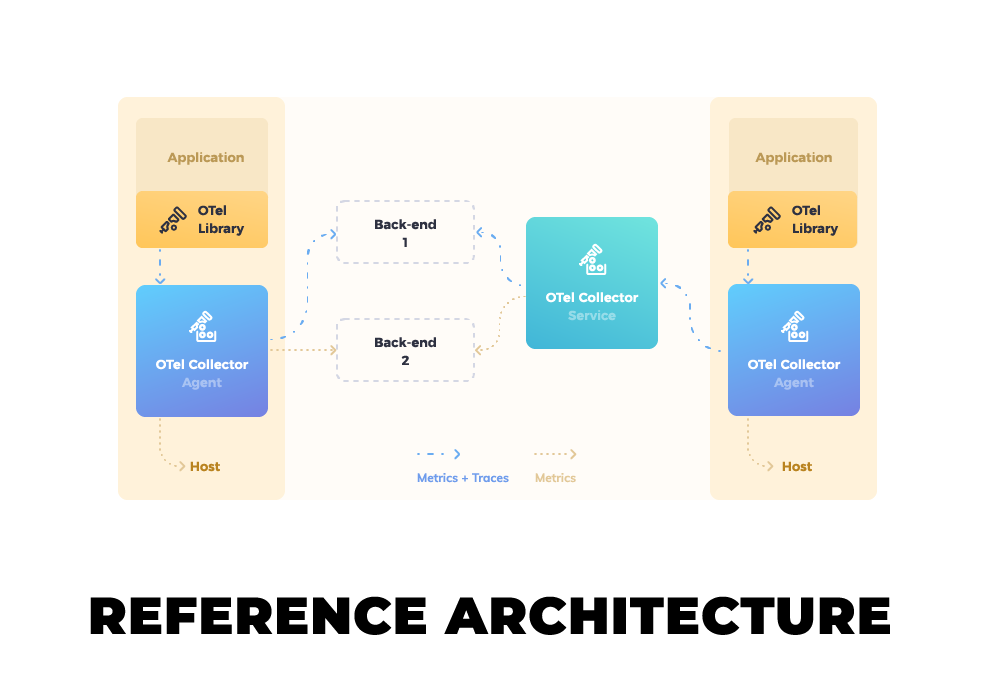
    OpenTelemetry is a collection of tools, application programming interfaces (APIs) and software development kits (SDKs) that can be employed to collect metrics, logs and traces that make it simpler to determine the root cause of an application issue.

    At its core, OpenTelemetry is based on an OpenTelemetry Protocol (OTLP) specification that describes the encoding, transport and delivery mechanism of telemetry data gathered from sources, intermediate nodes and backend platforms. An OpenTelemetry Collector provides a vendor-agnostic implementation for receiving, processing and exporting telemetry data. APIs and SDKs that make it possible to instrument applications are available for 11 different programming languages.

    Previously a sandbox-level project within the CNCF, the next step would be for OpenTelemetry to become a graduated level project alongside other open source offerings such as Kubernetes and Prometheus, a platform used to monitor IT environments.

    The OpenTelemetry project was created via the merger of the OpenCensus and OpenTracing projects in May 2019. Since then more than 500 developers from 220 companies, including Amazon, Dynatrace, Google, Honeycomb, Lightstep, Microsoft, Splunk and Uber have contributed to the project.

    Most providers of observability platforms have at least signaled their intent to support OpenTelemetry as an alternative to proprietary agent software they had previously created to collect metrics, logs and traces.

    Ben Sigelman, one of the co-creators of both OpenTracing and OpenTelemetry and CEO of Lightstep, said different elements of the OpenTelemetry project are at varying stages of maturity. As such, support for the elements of the project are being added to platforms depending on the degree to which a vendor has confidence in, for example, the ability of OpenTelemetry agent software to collect logs.

    Liz Fong-Jones, principal developer advocate for Honeycomb.io, a provider of an observability platform, said that, in time, most observability platforms will support all the elements of the OpenTelemetry initiative to reduce their own engineering and support costs. In time, those savings will be passed on to organizations that will be able to instrument applications more affordably, she noted.

    It may take a while longer for OpenTelemetry to be widely employed, but the faster organizations transition to microservices-based applications the more pressing the need for open source telemetry software becomes. The dependencies that exist between all the microservices that make up multiple applications will be unmanageable without some form of telemetry. The challenge organizations face is finding an affordable way to instrument all those microservices.

    Of course, organizations have been instrumenting applications for decades. However, the time, effort and cost associated with instrumentation have tended to limit its use to only an organization’s most mission-critical applications. The issue now is that not only do microservices-based applications require instrumentation to manage them but in the age of digital transformation the percentage of applications deemed mission-critical is also steadily rising.

  • Building DevSecOps With Value Stream Management

    Building DevSecOps With Value Stream Management

    As teams develop software, testing for potential security risks and flaws is mission-critical, just as it has always been. Yet, cyberattackers continue to exploit code vulnerabilities as open source code remains the foundation for the majority of commercial applications across all industries. Security firms are churning out solutions at an aggressive rate, and both project managers and their teams hope they can purchase some bolt-on tool or license a service to take care of security, painlessly. In the end, vulnerabilities still occur.

    The most effective pathway to secure software code has always been to eliminate vulnerabilities. The question today is, “What is the best way to achieve that goal given such an accelerated, threat-laden landscape?” Before we dig into that answer, let’s take a closer look at the problem.

    Software Security Is Everyone’s Issue

    Even the largest organizations, from Adobe to Microsoft, have been humbled by the number and scope of code vulnerabilities that have been overlooked—and therefore escaped into public release—due to the frenzied pace of software updates. Here’s just one example:

    On May 11, 2021, Adobe issued a security update for Adobe InDesign that addressed multiple critical vulnerabilities. “Successful exploitation could lead to arbitrary code execution in the context of the current user,” the security bulletin read. “Arbitrary code execution in the context of the current user” is cybersecurity speak for “an attacker can execute arbitrary commands or code on a target machine or process.” Arbitrary code execution vulnerabilities are known to be one of the top attack vectors that lead to system penetration resulting in data breaches.

    Given the enormous effort companies and their software teams are exerting today, and the importance of avoiding software flaws in the current threat landscape, how is this happening? It doesn’t help to have publicly available lists of software vulnerabilities posted on the dark web and CVE (ironically, a database of vulnerabilities launched to help companies improve their cybersecurity). Hackers — from solopreneurs to nation-state teams — are having a field day with this information.

    Rearranging the Puzzle Pieces Doesn’t Guarantee Security

    In an attempt to resolve this challenge, industry professionals are coining new terms and calling for new approaches. One I have seen promoted recently is “SecDevOps” rather than “DevSecOps.” With SecDevOps, they assert, security is first—conducted at the start of the project and maintained all the way through.

    This approach isn’t new—it’s essentially a variant of shifting left, which for more than a decade has been an established mechanism in software testing for finding flaws and “failing faster.” In my experience, while failing earlier and faster with any software endeavor has considerable value, it is not automatically going to highlight all security challenges and enable their resolution.

    It is just as important for DevSecOps teams to collaborate and work together, not only to support development and operations, but also to ensure security, compliance and governance are built into every piece of code.

    Insight Is Preferable to Blind Interpretation

    Unfortunately, achieving that collaboration productively comes with challenges. DevSecOps teams need rich, real-time visibility into code vulnerabilities, early, so they can act on that information and update code as it moves through the pipeline. To do that, they need actionable insight—not a motley assortment of data that’s open to interpretation.

    In value stream management, we have seen firsthand while working with our clients that several techniques can be applied to eliminate vulnerabilities more quickly and effectively. All of these approaches hold value, whether a firm is seeking to deliver a new product to market or secure its current software pipeline.

    • Amplify feedback loops. Continuous feedback loops—from DevSecOps tools, for example—give developers more detailed insight into their code’s vulnerability.
    • Run security scans. Give testers the ability to run security scans on their code even before it is committed to identify security vulnerabilities as early as possible.
    • Leverage reporting and analytics. Gaining early access to as much insight as possible makes teams and management more confident regarding swift action to resolve code deficiencies.

    These approaches also support governance and compliance initiatives. As a bonus, they boost software quality, as well.

    The Business Case for Built-In Security, Governance and Compliance

    As mentioned earlier, these activities are integrally connected with the effort to eliminate code vulnerabilities. In case you are thinking, “This is obvious,” take a moment to reflect on this statistic: 60% of data breaches involved vulnerabilities for which a patch was available but not applied.

    The sheer scope of the problem also underscores the lack of attention to security and governance—and any compliance requirements that accompany it.

    Half of websites in production have high-risk vulnerabilities, and 82% of these are located in application code.

    The high percentage of errors in source code suggests it was not checked for vulnerabilities during development, signaling that developers focused on app functionality and gave short thrift to security. This often means they don’t have a program for governance and compliance, either.

    In my experience, a primary reason for these failures is that teams don’t have actionable information from the activities mentioned above, such as real-time feedback from DevSecOps tools. Developers need this insight when they are resolving sprint backlogs. Information relating to high-level security issues must be available so it can be addressed, with issues prioritized and resolved, and not left sitting in siloed DevSecOps tools.

    In many ways, DevSecOps is in the same stage of transformation as DevOps was a decade ago. Teams are frustrated by needs they do not know how to meet, and they hope for fast resolution in the form of tools and solutions. As with virtually every other software challenge over time, there is no replacement for getting in the trenches and fixing the problem rather than placing strategic band-aids.

    If you are not subject to compliance mandates and therefore dismiss the value of software governance, consider this: If your team misses a software vulnerability that results in a major data breach because you didn’t have the insight to identify it—or the governance to ensure it was addressed—your firm may not recover. The imperative for software security—and the governance that helps ensure it stays that way—should be sufficient for organizations to take vulnerabilities seriously.

    Effectively applying the insight gleaned from software code reporting and analytics is the surest way to eliminate vulnerabilities. As an added benefit, the reporting and analytics that informs the software effort can also make the case to upper management for the value of launching future improvement initiatives.

  • How DevOps Can Address CX Challenges

    How DevOps Can Address CX Challenges

    Delivering a seamless customer experience (CX) has become a top priority for companies undergoing digital transformation initiatives, as 85% of buyers are willing to pay more for a great customer experience. However, customers aren’t only willing to pay more for a positive experience–they’ll go elsewhere if their experience isn’t positive. In fact, 33% of customers will leave a brand they previously loved after just one bad experience, and 92% of customers will completely abandon a company after just two or three negative experiences. So, delivering a positive CX has become a major priority for companies that want to retain their current customers while winning over new prospects from competitors.

    To assure CX quality for customer-serving technology products and services, established DevOps processes and strategies should be applied to the unique aspects of customer experience software. DevOps for CX enables the delivery of software where the customer’s experience is paramount and quality is imperative. However, there are six major pitfalls in deploying DevOps for CX that customer-serving organizations must overcome.

    What is DevOps for CX?

    To understand the challenges, we must first understand the purpose of DevOps for CX.

    DevOps for CX refocuses the DevOps software methodology on the unique aspects of CX software to enable greater efficiency and quality. The constant delivery of expanded CX capabilities through new software developments and features has become a priority in organizations undergoing digital transformation. But when it comes to software products for CX and customer services, quality cannot be sacrificed for speedy development. At the same time, companies must still meet the demand for rapid innovations and tight deadlines on software delivery.

    Customers have higher expectations than ever before. These days, there aren’t any second chances when it comes to a customer’s experience. Social media has empowered customers to broadcast CX failures for the whole world to see. Due to the visibility of CX mishaps and negative customer interactions, a brand’s CX reputation depends on flawless execution from the customer’s first impression.

    The customer is always right; so, the customer’s perspective must be the primary consideration in software development and testing. This puts significant demand on the DevOps solutions and processes specific to user experience (UX) design, as well as CX testing and monitoring. Software must be designed, developed and continuously tested and monitored in real-time. Companies need to know all the different ways a customer might use the software to accomplish their goals and quickly identify and fix any potential issues before the customer experiences them.

    6 Potential Pitfalls of DevOps for CX

    Underinvestment in Executive Sponsorship and Cultural Evolution

    For CX transformation initiatives to succeed, they must be empowered by an executive leader who can champion the need to drive cultural change and strategic investments. An executive leader is necessary because CX initiatives typically span multiple departments: Operations, development, marketing, sales and services, for example.

    Whether the leader taking on this responsibility is an existing executive or a brand new position will depend on the company’s organizational structure. Some companies assign this duty to the COO, CIO or CMO, while others create an entirely new chief CX officer role so that the leader can give their full attention to the CX transformation initiatives at hand. Regardless of the DevOps for CX champion’s title, they must have a broad authority over budget, people and processes to make their role effective.

    Competing and Misaligned Incentives

    DevOps is a multi-team effort. Ensuring that the teams’ objectives and incentives are aligned is key to ensuring that DevOps for CX projects are executed harmoniously. Each team should have objectives that fit their team function but do not oppose other teams’ objectives, such as speed or a low defect rate on the development side and high reliability for the operations side. These functional team objectives should be centered around respective business objectives for customer satisfaction.

    Unclear Key Performance Indicators (KPIs)

    Adopting DevOps forces organizations to take on a more collaborative mindset. Due to the multi-team, collaborative nature of DevOps for CX initiatives, it’s critical that KPIs are clearly communicated, widely understood, and monitored across teams. KPIs should also be widely distributed so CX can be viewed at an operational level.

    Lack of DevSecOps Prioritization

    Many organizations fail to recognize the importance of DevSecOps from different aspects of DevOps. Not only must customer data be protected, but larger organizations that operate globally must also ensure they are complying with regional data privacy regulations. Organizations that don’t comply with regulatory requirements risk fines and other punitive setbacks.

    You must be able to test security features in production to protect both customers and your organization itself. Unfortunately, security is too often one of the last DevOps aspects to be discussed.

    Different Configurations Across CX Delivery Environments

    Shifting between development, quality assurance, staging and production is a major source of frustration for DevOps teams, as the environments are often configured differently. As code moves through the software life cycle and different environments, having a consistent approach to the solutions and environments via deployment automation will prevent wasted time fixing bugs that suddenly pop up when the code is moved.

    Errors Introduced by Manual or Outdated Processes

    Manual processes introduce opportunities for human error, causing delays and defects that result in unplanned work. Performing software testing manually is a sluggish process that not only causes quality issues and delivery delays but also reduces the amount of time developers have to execute any unplanned work or rework that must be done post-testing. Automating the CX systems’ testing results in higher quality and reliability at faster speeds, providing more time post-testing for developers to ensure the product meets quality requirements.

    DevOps for CX enables companies to innovate CX rapidly by delivering high-quality software and maintaining exceptional customer interactions. As CX leaders innovate new products and services through software, DevOps for CX practices will continue to be honed over the coming years. In the meantime, following the best practices outlined here to avoid the six major pitfalls of DevOps for CX will ensure customer experiences are maintained at an elevated level.

  • CloudBolt Survey Shows DevOps Frustration in the Enterprise

    CloudBolt Survey Shows DevOps Frustration in the Enterprise

    A survey of more than 200 senior IT leaders at organizations with more than 1,000 employees published today finds only 4% consider their organizations to be experts when it comes to continuous integration/continuous delivery (CI/CD).

    Conducted by CloudBolt Software, a provider of a platform for many IT environments, the survey also found only 11% consider their CI/CD infrastructure to be reliable. Another 69% said their CI/CD infrastructure was somewhat reliable, while 21% said their platforms were somewhat unreliable or not reliable at all. A full 85% also report they regularly test the infrastructure they rely on to drive DevOps processes.

    Overall, the CloudBolt survey finds only 5% of respondents report their organization is deploying code multiple times a day. Most respondents (85%) said their organization only deploys code on a weekly or monthly basis.

    A full 70% said that, on average, it also takes multiple days or even weeks to set up a pipeline. Nearly two-thirds (63%) said there are too many manual processes involved when setting up pipeline infrastructure. More than half (56%) also noted they have no automated processes for post-deployment tasks.

    More than half (53%) said it is also challenging to proactively detect infrastructure issues, while 55% said it is difficult to create a consistent CI/CD pipeline environment across multiple development teams. Improving those pipeline environments requires speeding up the process of provisioning infrastructure through automated processes (70%); continuously detecting infrastructure issues to reduce testing challenges and failures (62%) and simplifying remediation of infrastructure issues proactively (56%), according to survey respondents.

    The CloudBolt Software survey specifically identifies issues organizations encounter when employing Terraform to manage infrastructure-as-code (IaC). Only 5% of respondents said they were “very satisfied” with using Terraform and another 75% reported they are somewhat satisfied. Top challenges include difficulty using it in on-premises infrastructure deployments (62%), lack of Day 2 management for deployed resources (53%) and governance (42%). Only 2% of respondents said they were employing Terraform to deploy 75% or more of their infrastructure. A full 90% noted that Terraform requires more custom-coded integrations with other critical tools and systems to work properly.

    Finally, 29% said their organization lacks specific Terraform expertise. The most sought-after Terraform capabilities are enabling non-Terraform experts to easily deploy infrastructure using Terraform; ensuring that only Terraform plans with IT “guardrails” are executed and the ability to visualize and cost-optimize infrastructure deployed by Terraform. More than a third (35%) want to simplify deployment of on-premises infrastructure when using Terraform.

    Jeff Kulkowski, CloudBolt CEO, said the survey makes it clear there simply isn’t enough expertise available to implement DevOps  best practices at scale without enabling IT administrators—that often lack programming expertise—to manage infrastructure and DevOps platforms. That requirement creates the need for an IT management platform based on a set of visual tools that enables DevOps professionals and traditional IT managers to work more collaboratively, he added. DevOps teams can manage IaC whenever they desire, but it’s also crucial to enable IT operations staff to manage IT infrastructure alongside those teams.

    Obviously, DevOps as an IT discipline still has a long way to go before it is pervasively adopted across enterprise IT organizations. The challenge now is to remove many of the low-level barriers that conspire to block IT modernization initiatives.

  • Cosmonic Contributes WebAssembly Runtime to CNCF

    Cosmonic Contributes WebAssembly Runtime to CNCF

    Cosmonic today revealed it has donated its universal application runtime for building cloud-native applications using the WebAssembly (Wasm) development framework to the Cloud Native Computing Foundation (CNCF).

    The Cosmonic wasmCloud runtime makes it possible to run applications built using WebAssembly on any platform. In comparison, applications built using containers are not as portable because IT teams can’t take a container application developed for Linux and run it on Windows. The container technologies for each operating system are implemented differently.

    The CNCF will make wasmCloud available as a sandbox project and will invite other organizations to start making contributions as part of an effort to eventually put wasmCloud on par with other projects such as Kubernetes. There are already nearly 80 contributors to a wasmCloud runtime that was launched last November.

    Cosmonic

    The CNCF is trying to advance other WebAssembly technologies including Krustlet, a tool for Kubernetes environments that listens for event streams from new pods so that the scheduler can then assign workloads.

    However, the CNCF is now not the only organization looking to promote adoption of WebAssembly technologies. The Bytecode Alliance has launched WebAssembly (Wasm) and WebAssembly System Interface (WASI) initiatives as part of an effort to promote standards that would make it easier to run Wasm applications anywhere. Originally founded by Fastly, Intel, Mozilla and Microsoft, the Bytecode Alliance now also includes Arm, DFINITY Foundation, Embark Studios, Google, Shopify and University of California at San Diego.

    At its core, Wasm is a portable binary instruction format for building software that describes a memory-safe, sandboxed execution environment. That approach might one day replace the current predominant method for building software that relies on the aggregation of software components that tend to lack distinct security boundaries between them. As a result, it becomes relatively simple for malware to infect all the components of an application.

    Liam Randall, CEO of Cosmonic, said even though Wasm, in effect, provides another type of virtualization for applications, IT teams should not view it as a set of technologies that will one day obviate the need for containers. Applications developed using Wasm will be layered on top of various container platforms, he said.

    There is, for example, already a Wasm project that creates a server-side Wasm runtime that enables applications to be deployed on a secure container architecture that is more efficient than Docker containers.

    The World Wide Web Consortium (W3C) drove the development of Wasm as part of an effort to create a common format for browsers executing JavaScript code. Wasm is now being extended beyond browsers and JavaScript to enable developers to ultimately create a set of universal binaries that could work on any platform without modification.

    It may be a while before the fruits of those labors are realized. However, it’s apparent the walls that have separated one IT platform from another are starting to crumble. Once applications become much more portable, the reasons why one organization may choose one platform over another will have a lot less to do with what developers prefer.